Skip to content
  • Home
  • Aktuell
  • Tags
  • 0 Ungelesen 0
  • Kategorien
  • Unreplied
  • Beliebt
  • GitHub
  • Docu
  • Hilfe
Skins
  • Light
  • Brite
  • Cerulean
  • Cosmo
  • Flatly
  • Journal
  • Litera
  • Lumen
  • Lux
  • Materia
  • Minty
  • Morph
  • Pulse
  • Sandstone
  • Simplex
  • Sketchy
  • Spacelab
  • United
  • Yeti
  • Zephyr
  • Dark
  • Cyborg
  • Darkly
  • Quartz
  • Slate
  • Solar
  • Superhero
  • Vapor

  • Standard: (Kein Skin)
  • Kein Skin
Einklappen
ioBroker Logo

Community Forum

donate donate
  1. ioBroker Community Home
  2. Deutsch
  3. ioBroker Allgemein
  4. [gelöst] Jeelink funktioniert nach Update nicht mehr

NEWS

  • Jahresrückblick 2025 – unser neuer Blogbeitrag ist online! ✨
    BluefoxB
    Bluefox
    14
    1
    187

  • Neuer Blogbeitrag: Monatsrückblick - Dezember 2025 🎄
    BluefoxB
    Bluefox
    12
    1
    572

  • Weihnachtsangebot 2025! 🎄
    BluefoxB
    Bluefox
    24
    1
    1.8k

[gelöst] Jeelink funktioniert nach Update nicht mehr

Geplant Angeheftet Gesperrt Verschoben ioBroker Allgemein
jeelink-adapterupdates
78 Beiträge 3 Kommentatoren 6.7k Aufrufe 3 Watching
  • Älteste zuerst
  • Neuste zuerst
  • Meiste Stimmen
Antworten
  • In einem neuen Thema antworten
Anmelden zum Antworten
Dieses Thema wurde gelöscht. Nur Nutzer mit entsprechenden Rechten können es sehen.
  • GlasfaserG Glasfaser

    @gregors sagte in Jeelink funktioniert nach Update nicht mehr:

    Node.js. Trying to rebuild it... 3 attempt

    Hat 3 x versucht , dann aufgegeben .

    Da war mal was ...

    GlasfaserG Online
    GlasfaserG Online
    Glasfaser
    schrieb am zuletzt editiert von
    #22

    @GregorS

    https://forum.iobroker.net/topic/26403/nach-node-update-serialport-adapter-hinüber/2

    Synology 918+ 16GB - ioBroker in Docker v9 , VISO auf Trekstor Primebook C13 13,3" , Hikvision Domkameras mit Surveillance Station .. CCU RaspberryMatic in Synology VM .. Zigbee CC2538+CC2592 .. Sonoff .. KNX .. Modbus ..

    GregorSG 1 Antwort Letzte Antwort
    0
    • GlasfaserG Glasfaser

      @GregorS

      https://forum.iobroker.net/topic/26403/nach-node-update-serialport-adapter-hinüber/2

      GregorSG Offline
      GregorSG Offline
      GregorS
      schrieb am zuletzt editiert von
      #23

      @glasfaser
      Hat leider nichts gebracht.
      Jeelink bleibt rot mit den gleichen Fehlern

      INTEL NUC i7, Sonoff, hmIP, AVM, Jeelink, T-Link, Alexa, Saia-Burgess, uvm.

      GlasfaserG 1 Antwort Letzte Antwort
      0
      • GregorSG GregorS

        @glasfaser
        Hat leider nichts gebracht.
        Jeelink bleibt rot mit den gleichen Fehlern

        GlasfaserG Online
        GlasfaserG Online
        Glasfaser
        schrieb am zuletzt editiert von
        #24

        @gregors sagte in Jeelink funktioniert nach Update nicht mehr:

        Hat leider nichts gebracht.

        Auch nicht ...was im Link ist !?

        Synology 918+ 16GB - ioBroker in Docker v9 , VISO auf Trekstor Primebook C13 13,3" , Hikvision Domkameras mit Surveillance Station .. CCU RaspberryMatic in Synology VM .. Zigbee CC2538+CC2592 .. Sonoff .. KNX .. Modbus ..

        1 Antwort Letzte Antwort
        0
        • GregorSG GregorS

          @glasfaser

          ost.TinkerboardS
          	2022-08-15 19:01:30.470	info	Rebuild for adapter system.adapter.jeelink.0 not successful in 3 tries. Adapter will not be restarted again. Please execute "npm install --production" in adapter directory manually.
          host.TinkerboardS
          	2022-08-15 19:01:30.470	error	instance system.adapter.jeelink.0 terminated with code 1 (JS_CONTROLLER_STOPPED)
          host.TinkerboardS
          	2022-08-15 19:01:30.469	error	Caught by controller[0]: }
          host.TinkerboardS
          	2022-08-15 19:01:30.469	error	Caught by controller[0]: ]
          host.TinkerboardS
          	2022-08-15 19:01:30.469	error	Caught by controller[0]: '/opt/iobroker/node_modules/iobroker.jeelink/jeelink.js'
          host.TinkerboardS
          	2022-08-15 19:01:30.469	error	Caught by controller[0]: '/opt/iobroker/node_modules/iobroker.jeelink/node_modules/serialport/lib/index.js',
          host.TinkerboardS
          	2022-08-15 19:01:30.469	error	Caught by controller[0]: requireStack: [
          host.TinkerboardS
          	2022-08-15 19:01:30.469	error	Caught by controller[0]: code: 'MODULE_NOT_FOUND',
          host.TinkerboardS
          	2022-08-15 19:01:30.468	error	Caught by controller[0]: at Module.require (node:internal/modules/cjs/loader:1005:19) {
          host.TinkerboardS
          	2022-08-15 19:01:30.468	error	Caught by controller[0]: at Function.Module._load (node:internal/modules/cjs/loader:822:12)
          host.TinkerboardS
          	2022-08-15 19:01:30.468	error	Caught by controller[0]: at Module.load (node:internal/modules/cjs/loader:981:32)
          host.TinkerboardS
          	2022-08-15 19:01:30.468	error	Caught by controller[0]: at Object.Module._extensions..js (node:internal/modules/cjs/loader:1159:10)
          host.TinkerboardS
          	2022-08-15 19:01:30.468	error	Caught by controller[0]: at Module._compile (node:internal/modules/cjs/loader:1105:14)
          host.TinkerboardS
          	2022-08-15 19:01:30.468	error	Caught by controller[0]: at Object.<anonymous> (/opt/iobroker/node_modules/iobroker.jeelink/node_modules/serialport/lib/index.js:2:17)
          host.TinkerboardS
          	2022-08-15 19:01:30.467	error	Caught by controller[0]: at require (node:internal/modules/cjs/helpers:102:18)
          host.TinkerboardS
          	2022-08-15 19:01:30.467	error	Caught by controller[0]: at Module.require (node:internal/modules/cjs/loader:1005:19)
          host.TinkerboardS
          	2022-08-15 19:01:30.467	error	Caught by controller[0]: at Function.Module._load (node:internal/modules/cjs/loader:778:27)
          host.TinkerboardS
          	2022-08-15 19:01:30.467	error	Caught by controller[0]: at Function.Module._resolveFilename (node:internal/modules/cjs/loader:933:15)
          host.TinkerboardS
          	2022-08-15 19:01:30.467	error	Caught by controller[0]: - /opt/iobroker/node_modules/iobroker.jeelink/jeelink.js
          host.TinkerboardS
          	2022-08-15 19:01:30.467	error	Caught by controller[0]: - /opt/iobroker/node_modules/iobroker.jeelink/node_modules/serialport/lib/index.js
          host.TinkerboardS
          	2022-08-15 19:01:30.466	error	Caught by controller[0]: Require stack:
          host.TinkerboardS
          	2022-08-15 19:01:30.466	error	Caught by controller[0]: Error: Cannot find module '@serialport/bindings'
          host.TinkerboardS
          	2022-08-15 19:01:30.466	error	Caught by controller[0]: ^
          host.TinkerboardS
          	2022-08-15 19:01:30.466	error	Caught by controller[0]: throw err;
          host.TinkerboardS
          	2022-08-15 19:01:30.465	error	Caught by controller[0]: node:internal/modules/cjs/loader:936
          host.TinkerboardS
          	2022-08-15 19:01:29.921	info	instance system.adapter.jeelink.0 started with pid 26824
          host.TinkerboardS
          	2022-08-15 19:01:29.856	info	iobroker npm-rebuild: exit 1
          host.TinkerboardS
          	2022-08-15 19:01:28.839	error	iobroker npm-rebuild: Rebuilding native modules failed
          host.TinkerboardS
          	2022-08-15 19:01:16.318	info	iobroker npm-rebuild: Rebuilding native modules ...
          host.TinkerboardS
          	2022-08-15 19:01:14.757	info	iobroker rebuild
          host.TinkerboardS
          	2022-08-15 19:01:14.756	warn	adapter "jeelink" seems to be installed for a different version of Node.js. Trying to rebuild it... 3 attempt
          
          GlasfaserG Online
          GlasfaserG Online
          Glasfaser
          schrieb am zuletzt editiert von
          #25

          @gregors sagte in Jeelink funktioniert nach Update nicht mehr:

          Please execute "npm install --production" in adapter directory manually.

          Und was ist hier mit , was in deinem Log steht !?

          Synology 918+ 16GB - ioBroker in Docker v9 , VISO auf Trekstor Primebook C13 13,3" , Hikvision Domkameras mit Surveillance Station .. CCU RaspberryMatic in Synology VM .. Zigbee CC2538+CC2592 .. Sonoff .. KNX .. Modbus ..

          1 Antwort Letzte Antwort
          0
          • GregorSG Offline
            GregorSG Offline
            GregorS
            schrieb am zuletzt editiert von
            #26

            @glasfaser
            was bedeutet das?

            INTEL NUC i7, Sonoff, hmIP, AVM, Jeelink, T-Link, Alexa, Saia-Burgess, uvm.

            GlasfaserG 1 Antwort Letzte Antwort
            0
            • GregorSG GregorS

              @glasfaser
              was bedeutet das?

              GlasfaserG Online
              GlasfaserG Online
              Glasfaser
              schrieb am zuletzt editiert von Glasfaser
              #27

              @gregors

              Du sollst ins Verzeichniss jeelink ...
              mußt du nachschauen ob es so richtig geschrieben wird ...

              cd /opt/iobroker/iobroker-data/files/jeelink
              

              dann darin

              npm install --production
              

              EDIT :

              oder im

              cd /opt/iobroker/node_modules/iobroker.jeelink
              

              dann darin

              npm install --production
              

              Synology 918+ 16GB - ioBroker in Docker v9 , VISO auf Trekstor Primebook C13 13,3" , Hikvision Domkameras mit Surveillance Station .. CCU RaspberryMatic in Synology VM .. Zigbee CC2538+CC2592 .. Sonoff .. KNX .. Modbus ..

              GregorSG 1 Antwort Letzte Antwort
              0
              • GlasfaserG Glasfaser

                @gregors

                Du sollst ins Verzeichniss jeelink ...
                mußt du nachschauen ob es so richtig geschrieben wird ...

                cd /opt/iobroker/iobroker-data/files/jeelink
                

                dann darin

                npm install --production
                

                EDIT :

                oder im

                cd /opt/iobroker/node_modules/iobroker.jeelink
                

                dann darin

                npm install --production
                
                GregorSG Offline
                GregorSG Offline
                GregorS
                schrieb am zuletzt editiert von
                #28

                @glasfaser

                Habe ich gemacht, aber jetztr soll ich eine Verzeichnis umbenennen, dass ich nicht finde.

                npm WARN config production Use `--omit=dev` instead.
                npm ERR! code ENOTEMPTY
                npm ERR! syscall rename
                npm ERR! path /opt/iobroker/node_modules/abab
                npm ERR! dest /opt/iobroker/node_modules/.abab-bvmibCm3
                npm ERR! errno -39
                npm ERR! ENOTEMPTY: directory not empty, rename '/opt/iobroker/node_modules/abab' -> '/opt/iobroker/node_modules/.abab-bvmibCm3'
                
                npm ERR! A complete log of this run can be found in:
                npm ERR!     /home/iobroker/.npm/_logs/2022-08-15T17_43_56_474Z-debug-0.log


                Es gibt bereits ein Verzeichnis .abab-bvmibCm3

                INTEL NUC i7, Sonoff, hmIP, AVM, Jeelink, T-Link, Alexa, Saia-Burgess, uvm.

                GlasfaserG 1 Antwort Letzte Antwort
                0
                • GregorSG GregorS

                  @glasfaser

                  Habe ich gemacht, aber jetztr soll ich eine Verzeichnis umbenennen, dass ich nicht finde.

                  npm WARN config production Use `--omit=dev` instead.
                  npm ERR! code ENOTEMPTY
                  npm ERR! syscall rename
                  npm ERR! path /opt/iobroker/node_modules/abab
                  npm ERR! dest /opt/iobroker/node_modules/.abab-bvmibCm3
                  npm ERR! errno -39
                  npm ERR! ENOTEMPTY: directory not empty, rename '/opt/iobroker/node_modules/abab' -> '/opt/iobroker/node_modules/.abab-bvmibCm3'
                  
                  npm ERR! A complete log of this run can be found in:
                  npm ERR!     /home/iobroker/.npm/_logs/2022-08-15T17_43_56_474Z-debug-0.log


                  Es gibt bereits ein Verzeichnis .abab-bvmibCm3

                  GlasfaserG Online
                  GlasfaserG Online
                  Glasfaser
                  schrieb am zuletzt editiert von
                  #29

                  @gregors sagte in Jeelink funktioniert nach Update nicht mehr:

                  rm -r /opt/iobroker/node_modules/.abab-bvmibCm3
                  

                  Synology 918+ 16GB - ioBroker in Docker v9 , VISO auf Trekstor Primebook C13 13,3" , Hikvision Domkameras mit Surveillance Station .. CCU RaspberryMatic in Synology VM .. Zigbee CC2538+CC2592 .. Sonoff .. KNX .. Modbus ..

                  GregorSG 1 Antwort Letzte Antwort
                  0
                  • GlasfaserG Glasfaser

                    @gregors sagte in Jeelink funktioniert nach Update nicht mehr:

                    rm -r /opt/iobroker/node_modules/.abab-bvmibCm3
                    
                    GregorSG Offline
                    GregorSG Offline
                    GregorS
                    schrieb am zuletzt editiert von GregorS
                    #30

                    @glasfaser

                    
                    pi@TinkerboardS:/opt/iobroker/iobroker-data/files/jeelink$ npm install --production
                    npm WARN config production Use `--omit=dev` instead.
                    npm ERR! code ENOTEMPTY
                    npm ERR! syscall rename
                    npm ERR! path /opt/iobroker/node_modules/abort-controller
                    npm ERR! dest /opt/iobroker/node_modules/.abort-controller-x3pdLVqa
                    npm ERR! errno -39
                    npm ERR! ENOTEMPTY: directory not empty, rename '/opt/iobroker/node_modules/abort-controller' -> '/opt/iobroker/node_modules/.abort-controller-x3pdLVqa'
                    
                    npm ERR! A complete log of this run can be found in:
                    npm ERR!     /home/iobroker/.npm/_logs/2022-08-15T18_46_11_223Z-debug-0.log
                    pi@TinkerboardS:/opt/iobroker/iobroker-data/files/jeelink$ .abort-controller-x3pdLVqa


                    Das Verzeichnis ist bereits richtig umbenannt

                    jeelnink_3.JPG

                    INTEL NUC i7, Sonoff, hmIP, AVM, Jeelink, T-Link, Alexa, Saia-Burgess, uvm.

                    GlasfaserG 1 Antwort Letzte Antwort
                    0
                    • GlasfaserG Online
                      GlasfaserG Online
                      Glasfaser
                      schrieb am zuletzt editiert von Glasfaser
                      #31

                      @gregors sagte in Jeelink funktioniert nach Update nicht mehr:

                      Das Verzeichnis ist bereits richtig umbenannt

                      nicht umbenennen !

                      npm ERR! ENOTEMPTY: directory not empty, rename '/opt/iobroker/node_modules/abort-controller' -> '/opt/iobroker/node_modules/.abort-controller-x3pdLVqa'

                      Nächste löschen

                      rm -r  /opt/iobroker/node_modules/.abort-controller-x3pdLVqa
                      

                      Synology 918+ 16GB - ioBroker in Docker v9 , VISO auf Trekstor Primebook C13 13,3" , Hikvision Domkameras mit Surveillance Station .. CCU RaspberryMatic in Synology VM .. Zigbee CC2538+CC2592 .. Sonoff .. KNX .. Modbus ..

                      GregorSG 1 Antwort Letzte Antwort
                      0
                      • GlasfaserG Glasfaser

                        @gregors sagte in Jeelink funktioniert nach Update nicht mehr:

                        Das Verzeichnis ist bereits richtig umbenannt

                        nicht umbenennen !

                        npm ERR! ENOTEMPTY: directory not empty, rename '/opt/iobroker/node_modules/abort-controller' -> '/opt/iobroker/node_modules/.abort-controller-x3pdLVqa'

                        Nächste löschen

                        rm -r  /opt/iobroker/node_modules/.abort-controller-x3pdLVqa
                        
                        GregorSG Offline
                        GregorSG Offline
                        GregorS
                        schrieb am zuletzt editiert von
                        #32

                        @glasfaser
                        War der Meinung rename ...

                        pi@TinkerboardS:~$ rm -r  /opt/iobroker/node_modules/.abort-controller-x3pdLVqa
                        rm: das Entfernen von '/opt/iobroker/node_modules/.abort-controller-x3pdLVqa' ist nicht möglich: Datei oder Verzeichnis nicht gefunden


                        INTEL NUC i7, Sonoff, hmIP, AVM, Jeelink, T-Link, Alexa, Saia-Burgess, uvm.

                        1 Antwort Letzte Antwort
                        0
                        • GregorSG GregorS

                          @glasfaser

                          
                          pi@TinkerboardS:/opt/iobroker/iobroker-data/files/jeelink$ npm install --production
                          npm WARN config production Use `--omit=dev` instead.
                          npm ERR! code ENOTEMPTY
                          npm ERR! syscall rename
                          npm ERR! path /opt/iobroker/node_modules/abort-controller
                          npm ERR! dest /opt/iobroker/node_modules/.abort-controller-x3pdLVqa
                          npm ERR! errno -39
                          npm ERR! ENOTEMPTY: directory not empty, rename '/opt/iobroker/node_modules/abort-controller' -> '/opt/iobroker/node_modules/.abort-controller-x3pdLVqa'
                          
                          npm ERR! A complete log of this run can be found in:
                          npm ERR!     /home/iobroker/.npm/_logs/2022-08-15T18_46_11_223Z-debug-0.log
                          pi@TinkerboardS:/opt/iobroker/iobroker-data/files/jeelink$ .abort-controller-x3pdLVqa


                          Das Verzeichnis ist bereits richtig umbenannt
                          jeelnink_3.JPG

                          GlasfaserG Online
                          GlasfaserG Online
                          Glasfaser
                          schrieb am zuletzt editiert von
                          #33

                          @gregors sagte in Jeelink funktioniert nach Update nicht mehr:

                          /opt/iobroker/node_modules/

                          sind dort viele mit einem Punkt vorraus !?

                          Synology 918+ 16GB - ioBroker in Docker v9 , VISO auf Trekstor Primebook C13 13,3" , Hikvision Domkameras mit Surveillance Station .. CCU RaspberryMatic in Synology VM .. Zigbee CC2538+CC2592 .. Sonoff .. KNX .. Modbus ..

                          1 Antwort Letzte Antwort
                          0
                          • GregorSG Offline
                            GregorSG Offline
                            GregorS
                            schrieb am zuletzt editiert von
                            #34

                            @glasfaser

                            Ja, 747 Verzeichnisse

                            INTEL NUC i7, Sonoff, hmIP, AVM, Jeelink, T-Link, Alexa, Saia-Burgess, uvm.

                            GlasfaserG 1 Antwort Letzte Antwort
                            0
                            • GregorSG GregorS

                              @glasfaser

                              Ja, 747 Verzeichnisse

                              GlasfaserG Online
                              GlasfaserG Online
                              Glasfaser
                              schrieb am zuletzt editiert von
                              #35

                              @gregors

                              Dann :

                              cd /opt/iobroker/node_modules
                              
                              for i in $(ls -d .[^.]*-*/); do rm -rf ${i%%/}; done
                              

                              Zitat von Thomas
                              (Bitte Befehl KOPIEREN, nicht eintippen, ein Vertipper kann und wird da 'tödlich' sein).

                              Synology 918+ 16GB - ioBroker in Docker v9 , VISO auf Trekstor Primebook C13 13,3" , Hikvision Domkameras mit Surveillance Station .. CCU RaspberryMatic in Synology VM .. Zigbee CC2538+CC2592 .. Sonoff .. KNX .. Modbus ..

                              GregorSG 1 Antwort Letzte Antwort
                              1
                              • GlasfaserG Glasfaser

                                @gregors

                                Dann :

                                cd /opt/iobroker/node_modules
                                
                                for i in $(ls -d .[^.]*-*/); do rm -rf ${i%%/}; done
                                

                                Zitat von Thomas
                                (Bitte Befehl KOPIEREN, nicht eintippen, ein Vertipper kann und wird da 'tödlich' sein).

                                GregorSG Offline
                                GregorSG Offline
                                GregorS
                                schrieb am zuletzt editiert von
                                #36

                                @glasfaser
                                jetzt gibt es nur noch .bin

                                INTEL NUC i7, Sonoff, hmIP, AVM, Jeelink, T-Link, Alexa, Saia-Burgess, uvm.

                                GlasfaserG 1 Antwort Letzte Antwort
                                0
                                • GregorSG GregorS

                                  @glasfaser
                                  jetzt gibt es nur noch .bin

                                  GlasfaserG Online
                                  GlasfaserG Online
                                  Glasfaser
                                  schrieb am zuletzt editiert von
                                  #37

                                  @gregors

                                  Ja ... den lassen !!!!!!

                                  Synology 918+ 16GB - ioBroker in Docker v9 , VISO auf Trekstor Primebook C13 13,3" , Hikvision Domkameras mit Surveillance Station .. CCU RaspberryMatic in Synology VM .. Zigbee CC2538+CC2592 .. Sonoff .. KNX .. Modbus ..

                                  GregorSG 1 Antwort Letzte Antwort
                                  0
                                  • GlasfaserG Glasfaser

                                    @gregors

                                    Ja ... den lassen !!!!!!

                                    GregorSG Offline
                                    GregorSG Offline
                                    GregorS
                                    schrieb am zuletzt editiert von
                                    #38

                                    @glasfaser
                                    Jetzt nochmal:
                                    Du sollst ins Verzeichniss jeelink ...
                                    mußt du nachschauen ob es so richtig geschrieben wird ...

                                    cd /opt/iobroker/iobroker-data/files/jeelink

                                    dann darin

                                    npm install --production

                                    EDIT :

                                    oder im

                                    cd /opt/iobroker/node_modules/iobroker.jeelink

                                    dann darin

                                    npm install --production

                                    INTEL NUC i7, Sonoff, hmIP, AVM, Jeelink, T-Link, Alexa, Saia-Burgess, uvm.

                                    GlasfaserG Thomas BraunT 2 Antworten Letzte Antwort
                                    0
                                    • GregorSG GregorS

                                      @glasfaser
                                      Jetzt nochmal:
                                      Du sollst ins Verzeichniss jeelink ...
                                      mußt du nachschauen ob es so richtig geschrieben wird ...

                                      cd /opt/iobroker/iobroker-data/files/jeelink

                                      dann darin

                                      npm install --production

                                      EDIT :

                                      oder im

                                      cd /opt/iobroker/node_modules/iobroker.jeelink

                                      dann darin

                                      npm install --production

                                      GlasfaserG Online
                                      GlasfaserG Online
                                      Glasfaser
                                      schrieb am zuletzt editiert von
                                      #39

                                      @gregors

                                      Nimm erstmal den im EDIT

                                      Synology 918+ 16GB - ioBroker in Docker v9 , VISO auf Trekstor Primebook C13 13,3" , Hikvision Domkameras mit Surveillance Station .. CCU RaspberryMatic in Synology VM .. Zigbee CC2538+CC2592 .. Sonoff .. KNX .. Modbus ..

                                      1 Antwort Letzte Antwort
                                      1
                                      • GregorSG GregorS

                                        @glasfaser
                                        Jetzt nochmal:
                                        Du sollst ins Verzeichniss jeelink ...
                                        mußt du nachschauen ob es so richtig geschrieben wird ...

                                        cd /opt/iobroker/iobroker-data/files/jeelink

                                        dann darin

                                        npm install --production

                                        EDIT :

                                        oder im

                                        cd /opt/iobroker/node_modules/iobroker.jeelink

                                        dann darin

                                        npm install --production

                                        Thomas BraunT Online
                                        Thomas BraunT Online
                                        Thomas Braun
                                        Most Active
                                        schrieb am zuletzt editiert von
                                        #40

                                        @gregors sagte in Jeelink funktioniert nach Update nicht mehr:

                                        npm install --production

                                        Die neue Syntax seit npm8 ist übrigens

                                        npm install --omit=dev
                                        

                                        Linux-Werkzeugkasten:
                                        https://forum.iobroker.net/topic/42952/der-kleine-iobroker-linux-werkzeugkasten
                                        NodeJS Fixer Skript:
                                        https://forum.iobroker.net/topic/68035/iob-node-fix-skript
                                        iob_diag: curl -sLf -o diag.sh https://iobroker.net/diag.sh && bash diag.sh

                                        GregorSG 1 Antwort Letzte Antwort
                                        1
                                        • Thomas BraunT Thomas Braun

                                          @gregors sagte in Jeelink funktioniert nach Update nicht mehr:

                                          npm install --production

                                          Die neue Syntax seit npm8 ist übrigens

                                          npm install --omit=dev
                                          
                                          GregorSG Offline
                                          GregorSG Offline
                                          GregorS
                                          schrieb am zuletzt editiert von
                                          #41

                                          @thomas-braun
                                          @Glasfaser

                                          DANKE !!!
                                          Das war´s.

                                          pi@TinkerboardS:~$ cd /opt/iobroker/node_modules/iobroker.jeelink
                                          pi@TinkerboardS:/opt/iobroker/node_modules/iobroker.jeelink$ npm install --omit=dev
                                          [sudo] Passwort für pi:
                                          
                                          added 46 packages, and audited 61 packages in 34s
                                          
                                          20 packages are looking for funding
                                            run `npm fund` for details
                                          
                                          found 0 vulnerabilities
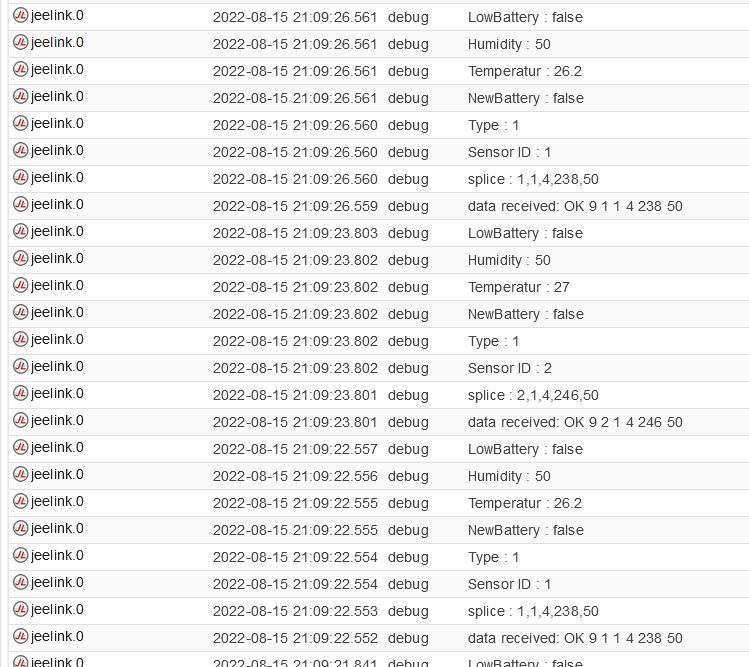


                                          Jeelink_4.JPG

                                          INTEL NUC i7, Sonoff, hmIP, AVM, Jeelink, T-Link, Alexa, Saia-Burgess, uvm.

                                          GlasfaserG 1 Antwort Letzte Antwort
                                          1
                                          Antworten
                                          • In einem neuen Thema antworten
                                          Anmelden zum Antworten
                                          • Älteste zuerst
                                          • Neuste zuerst
                                          • Meiste Stimmen


                                          Support us

                                          ioBroker
                                          Community Adapters
                                          Donate
                                          FAQ Cloud / IOT
                                          HowTo: Node.js-Update
                                          HowTo: Backup/Restore
                                          Downloads
                                          BLOG

                                          933

                                          Online

                                          32.5k

                                          Benutzer

                                          81.8k

                                          Themen

                                          1.3m

                                          Beiträge
                                          Community
                                          Impressum | Datenschutz-Bestimmungen | Nutzungsbedingungen | Einwilligungseinstellungen
                                          ioBroker Community 2014-2025
                                          logo
                                          • Anmelden

                                          • Du hast noch kein Konto? Registrieren

                                          • Anmelden oder registrieren, um zu suchen
                                          • Erster Beitrag
                                            Letzter Beitrag
                                          0
                                          • Home
                                          • Aktuell
                                          • Tags
                                          • Ungelesen 0
                                          • Kategorien
                                          • Unreplied
                                          • Beliebt
                                          • GitHub
                                          • Docu
                                          • Hilfe