



Weiter zum Inhalt
  • Home
  • Aktuell
  • Tags
  • 0 Ungelesen 0
  • Kategorien
  • Unreplied
  • Beliebt
  • GitHub
  • Docu
  • Hilfe
Skins
  • Hell
  • Brite
  • Cerulean
  • Cosmo
  • Flatly
  • Journal
  • Litera
  • Lumen
  • Lux
  • Materia
  • Minty
  • Morph
  • Pulse
  • Sandstone
  • Simplex
  • Sketchy
  • Spacelab
  • United
  • Yeti
  • Zephyr
  • Dunkel
  • Cyborg
  • Darkly
  • Quartz
  • Slate
  • Solar
  • Superhero
  • Vapor

  • Standard: (Kein Skin)
  • Kein Skin
Einklappen
ioBroker Logo

Community Forum

donate donate
  1. ioBroker Community Home
  2. Deutsch
  3. Tester
  4. Test Adapter ioBroker.backitup v3.1.x

NEWS

  • Monatsrückblick Januar/Februar 2026 ist online!
    BluefoxB
    Bluefox
    18
    1
    795

  • Jahresrückblick 2025 – unser neuer Blogbeitrag ist online! ✨
    BluefoxB
    Bluefox
    18
    1
    6.2k

  • Neuer Blogbeitrag: Monatsrückblick - Dezember 2025 🎄
    BluefoxB
    Bluefox
    13
    1
    1.6k

Test Adapter ioBroker.backitup v3.1.x

Geplant Angeheftet Gesperrt Verschoben Tester
backitupbackitup backupccuhistorymysqlredisrestorerestore backup
2.8k Beiträge 170 Kommentatoren 2.4m Aufrufe 113 Beobachtet
  • Älteste zuerst
  • Neuste zuerst
  • Meiste Stimmen
Antworten
  • In einem neuen Thema antworten
Anmelden zum Antworten
Dieses Thema wurde gelöscht. Nur Nutzer mit entsprechenden Rechten können es sehen.
  • M MCU

    @thomas-braun Da fehlt mir das Wissen. Wie gehe ich über den Paketmanager?

    Thomas BraunT Online
    Thomas BraunT Online
    Thomas Braun
    Most Active
    schrieb am zuletzt editiert von
    #2043

    @mcu

    Repo anlegen:

    wget -q https://repos.influxdata.com/influxdb.key
    echo '23a1c8836f0afc5ed24e0486339d7cc8f6790b83886c4c96995b88a061c5bb5d influxdb.key' | sha256sum -c && cat influxdb.key | gpg --dearmor | sudo tee /etc/apt/trusted.gpg.d/influxdb.gpg > /dev/null
    echo 'deb [signed-by=/etc/apt/trusted.gpg.d/influxdb.gpg] https://repos.influxdata.com/debian stable main' | sudo tee /etc/apt/sources.list.d/influxdata.list
    

    Dann das übliche Installations-Prozedere:

    sudo apt update
    sudo apt install PAKETNAME
    

    Linux-Werkzeugkasten:
    https://forum.iobroker.net/topic/42952/der-kleine-iobroker-linux-werkzeugkasten
    NodeJS Fixer Skript:
    https://forum.iobroker.net/topic/68035/iob-node-fix-skript
    iob_diag: curl -sLf -o diag.sh https://iobroker.net/diag.sh && bash diag.sh

    M 1 Antwort Letzte Antwort
    0
    • Thomas BraunT Thomas Braun

      @mcu

      Repo anlegen:

      wget -q https://repos.influxdata.com/influxdb.key
      echo '23a1c8836f0afc5ed24e0486339d7cc8f6790b83886c4c96995b88a061c5bb5d influxdb.key' | sha256sum -c && cat influxdb.key | gpg --dearmor | sudo tee /etc/apt/trusted.gpg.d/influxdb.gpg > /dev/null
      echo 'deb [signed-by=/etc/apt/trusted.gpg.d/influxdb.gpg] https://repos.influxdata.com/debian stable main' | sudo tee /etc/apt/sources.list.d/influxdata.list
      

      Dann das übliche Installations-Prozedere:

      sudo apt update
      sudo apt install PAKETNAME
      
      M Offline
      M Offline
      MCU
      schrieb am zuletzt editiert von
      #2044

      @thomas-braun Das habe ich doch bei der Installation von influxdb2 schon so gemacht?

      apt install sudo curl gpg gnupg2 wget -y
      
      wget -q https://repos.influxdata.com/influxdb.key
      echo '23a1c8836f0afc5ed24e0486339d7cc8f6790b83886c4c96995b88a061c5bb5d influxdb.key' | sha256sum -c && cat influxdb.key | gpg --dearmor | sudo tee /etc/apt/trusted.gpg.d/influxdb.gpg > /dev/null
      echo 'deb [signed-by=/etc/apt/trusted.gpg.d/influxdb.gpg] https://repos.influxdata.com/debian stable main' | sudo tee /etc/apt/sources.list.d/influxdata.list
      
      sudo apt-get update && sudo apt-get install influxdb2
      

      NUC i7 64GB mit Proxmox ---- Jarvis Infos Aktualisierungen der Doku auf Instagram verfolgen -> mcuiobroker Instagram
      Wenn Euch mein Vorschlag geholfen hat, bitte rechts "^" klicken.

      Thomas BraunT 1 Antwort Letzte Antwort
      0
      • M MCU

        @thomas-braun Das habe ich doch bei der Installation von influxdb2 schon so gemacht?

        apt install sudo curl gpg gnupg2 wget -y
        
        wget -q https://repos.influxdata.com/influxdb.key
        echo '23a1c8836f0afc5ed24e0486339d7cc8f6790b83886c4c96995b88a061c5bb5d influxdb.key' | sha256sum -c && cat influxdb.key | gpg --dearmor | sudo tee /etc/apt/trusted.gpg.d/influxdb.gpg > /dev/null
        echo 'deb [signed-by=/etc/apt/trusted.gpg.d/influxdb.gpg] https://repos.influxdata.com/debian stable main' | sudo tee /etc/apt/sources.list.d/influxdata.list
        
        sudo apt-get update && sudo apt-get install influxdb2
        
        Thomas BraunT Online
        Thomas BraunT Online
        Thomas Braun
        Most Active
        schrieb am zuletzt editiert von Thomas Braun
        #2045

        @mcu

        Und warum installierst du dann den client nicht auch daraus?
        Stattdessen verhunzt du dir die dpkg-Datenbank.

        apt policy influxdb2-cli
        

        bringt?

        Linux-Werkzeugkasten:
        https://forum.iobroker.net/topic/42952/der-kleine-iobroker-linux-werkzeugkasten
        NodeJS Fixer Skript:
        https://forum.iobroker.net/topic/68035/iob-node-fix-skript
        iob_diag: curl -sLf -o diag.sh https://iobroker.net/diag.sh && bash diag.sh
        M 1 Antwort Letzte Antwort
        0
        • Thomas BraunT Thomas Braun

          @mcu

          Und warum installierst du dann den client nicht auch daraus?
          Stattdessen verhunzt du dir die dpkg-Datenbank.

          apt policy influxdb2-cli
          

          bringt?

          M Offline
          M Offline
          MCU
          schrieb am zuletzt editiert von MCU
          #2046

          @thomas-braun So?

          sudo apt update && sudo apt install influxdb2-cli                                                                                                
          Get:1 http://security.debian.org bullseye-security InRelease [44.1 kB]
          Get:2 http://ftp.debian.org/debian bullseye InRelease [116 kB]                                                                        
          Get:3 https://repos.influxdata.com/debian stable InRelease [4645 B]                                                                             
          Get:4 http://ftp.debian.org/debian bullseye-updates InRelease [39.4 kB]                                       
          Get:5 http://security.debian.org bullseye-security/main amd64 Packages [164 kB]
          Get:6 https://repos.influxdata.com/debian stable/main amd64 Packages [1263 B]
          Get:7 http://security.debian.org bullseye-security/main Translation-en [103 kB]
          Get:8 http://ftp.debian.org/debian bullseye/main amd64 Packages [8182 kB]
          Get:9 http://ftp.debian.org/debian bullseye/main Translation-en [6243 kB]
          Get:10 http://ftp.debian.org/debian bullseye/contrib amd64 Packages [50.6 kB]
          Get:11 http://ftp.debian.org/debian bullseye/contrib Translation-en [46.9 kB]
          Fetched 15.0 MB in 2s (7736 kB/s)                            
          Reading package lists... Done
          Building dependency tree... Done
          Reading state information... Done
          12 packages can be upgraded. Run 'apt list --upgradable' to see them.
          N: Repository 'http://ftp.debian.org/debian bullseye InRelease' changed its 'Version' value from '11.3' to '11.4'
          Reading package lists... Done
          Building dependency tree... Done
          Reading state information... Done
          influxdb2-cli is already the newest version (2.3.0).
          0 upgraded, 0 newly installed, 0 to remove and 12 not upgraded.
          

          apt policy influxdb2-cli

          apt policy influxdb2-cli
          influxdb2-cli:
            Installed: 2.3.0
            Candidate: 2.3.0
            Version table:
           *** 2.3.0 500
                  500 https://repos.influxdata.com/debian stable/main amd64 Packages
                  100 /var/lib/dpkg/status
          

          NUC i7 64GB mit Proxmox ---- Jarvis Infos Aktualisierungen der Doku auf Instagram verfolgen -> mcuiobroker Instagram
          Wenn Euch mein Vorschlag geholfen hat, bitte rechts "^" klicken.

          Thomas BraunT 1 Antwort Letzte Antwort
          0
          • M MCU

            @thomas-braun So?

            sudo apt update && sudo apt install influxdb2-cli                                                                                                
            Get:1 http://security.debian.org bullseye-security InRelease [44.1 kB]
            Get:2 http://ftp.debian.org/debian bullseye InRelease [116 kB]                                                                        
            Get:3 https://repos.influxdata.com/debian stable InRelease [4645 B]                                                                             
            Get:4 http://ftp.debian.org/debian bullseye-updates InRelease [39.4 kB]                                       
            Get:5 http://security.debian.org bullseye-security/main amd64 Packages [164 kB]
            Get:6 https://repos.influxdata.com/debian stable/main amd64 Packages [1263 B]
            Get:7 http://security.debian.org bullseye-security/main Translation-en [103 kB]
            Get:8 http://ftp.debian.org/debian bullseye/main amd64 Packages [8182 kB]
            Get:9 http://ftp.debian.org/debian bullseye/main Translation-en [6243 kB]
            Get:10 http://ftp.debian.org/debian bullseye/contrib amd64 Packages [50.6 kB]
            Get:11 http://ftp.debian.org/debian bullseye/contrib Translation-en [46.9 kB]
            Fetched 15.0 MB in 2s (7736 kB/s)                            
            Reading package lists... Done
            Building dependency tree... Done
            Reading state information... Done
            12 packages can be upgraded. Run 'apt list --upgradable' to see them.
            N: Repository 'http://ftp.debian.org/debian bullseye InRelease' changed its 'Version' value from '11.3' to '11.4'
            Reading package lists... Done
            Building dependency tree... Done
            Reading state information... Done
            influxdb2-cli is already the newest version (2.3.0).
            0 upgraded, 0 newly installed, 0 to remove and 12 not upgraded.
            

            apt policy influxdb2-cli

            apt policy influxdb2-cli
            influxdb2-cli:
              Installed: 2.3.0
              Candidate: 2.3.0
              Version table:
             *** 2.3.0 500
                    500 https://repos.influxdata.com/debian stable/main amd64 Packages
                    100 /var/lib/dpkg/status
            
            Thomas BraunT Online
            Thomas BraunT Online
            Thomas Braun
            Most Active
            schrieb am zuletzt editiert von Thomas Braun
            #2047

            @mcu sagte in Test Adapter ioBroker.backitup v2.4.x:

            influxdb2-cli is already the newest version (2.3.0).

            ist also bereits installiert.

            which influx
            

            liefert?

            Hau die 12 Updates rein...

            Linux-Werkzeugkasten:
            https://forum.iobroker.net/topic/42952/der-kleine-iobroker-linux-werkzeugkasten
            NodeJS Fixer Skript:
            https://forum.iobroker.net/topic/68035/iob-node-fix-skript
            iob_diag: curl -sLf -o diag.sh https://iobroker.net/diag.sh && bash diag.sh

            M 1 Antwort Letzte Antwort
            0
            • Thomas BraunT Thomas Braun

              @mcu sagte in Test Adapter ioBroker.backitup v2.4.x:

              influxdb2-cli is already the newest version (2.3.0).

              ist also bereits installiert.

              which influx
              

              liefert?

              Hau die 12 Updates rein...

              M Offline
              M Offline
              MCU
              schrieb am zuletzt editiert von MCU
              #2048

              @thomas-braun

              sudo apt update                       
              [sudo] password for prox: 
              Hit:1 http://ftp.debian.org/debian bullseye InRelease
              Hit:2 http://security.debian.org bullseye-security InRelease        
              Hit:3 http://ftp.debian.org/debian bullseye-updates InRelease       
              Hit:4 https://repos.influxdata.com/debian stable InRelease
              Reading package lists... Done
              Building dependency tree... Done
              Reading state information... Done
              All packages are up to date.
              
              which influx
              /usr/local/bin/influx
              

              NUC i7 64GB mit Proxmox ---- Jarvis Infos Aktualisierungen der Doku auf Instagram verfolgen -> mcuiobroker Instagram
              Wenn Euch mein Vorschlag geholfen hat, bitte rechts "^" klicken.

              Thomas BraunT 1 Antwort Letzte Antwort
              0
              • M MCU

                @thomas-braun

                sudo apt update                       
                [sudo] password for prox: 
                Hit:1 http://ftp.debian.org/debian bullseye InRelease
                Hit:2 http://security.debian.org bullseye-security InRelease        
                Hit:3 http://ftp.debian.org/debian bullseye-updates InRelease       
                Hit:4 https://repos.influxdata.com/debian stable InRelease
                Reading package lists... Done
                Building dependency tree... Done
                Reading state information... Done
                All packages are up to date.
                
                which influx
                /usr/local/bin/influx
                
                Thomas BraunT Online
                Thomas BraunT Online
                Thomas Braun
                Most Active
                schrieb am zuletzt editiert von Thomas Braun
                #2049

                @mcu sagte in Test Adapter ioBroker.backitup v2.4.x:

                /usr/local/bin/influx

                sudo rm /usr/local/bin/influx
                exit
                

                Wieder einloggen und dann nochmal

                which influx
                

                Und warum hast du nodejs nicht als Repo? Das ist wichtig! (Ah, das ist nicht die Dose mit dem ioBroker...)

                Linux-Werkzeugkasten:
                https://forum.iobroker.net/topic/42952/der-kleine-iobroker-linux-werkzeugkasten
                NodeJS Fixer Skript:
                https://forum.iobroker.net/topic/68035/iob-node-fix-skript
                iob_diag: curl -sLf -o diag.sh https://iobroker.net/diag.sh && bash diag.sh
                M 1 Antwort Letzte Antwort
                0
                • M MCU

                  @simatec So?
                  9092a109-cb4a-4535-9ff2-32b97a2e3d67-image.png

                  simatecS Offline
                  simatecS Offline
                  simatec
                  Developer Most Active
                  schrieb am zuletzt editiert von
                  #2050

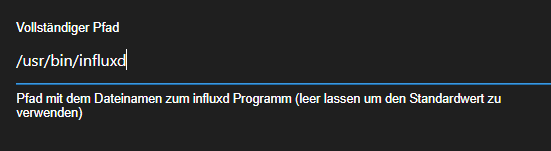
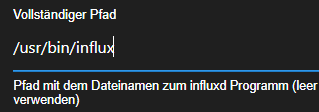
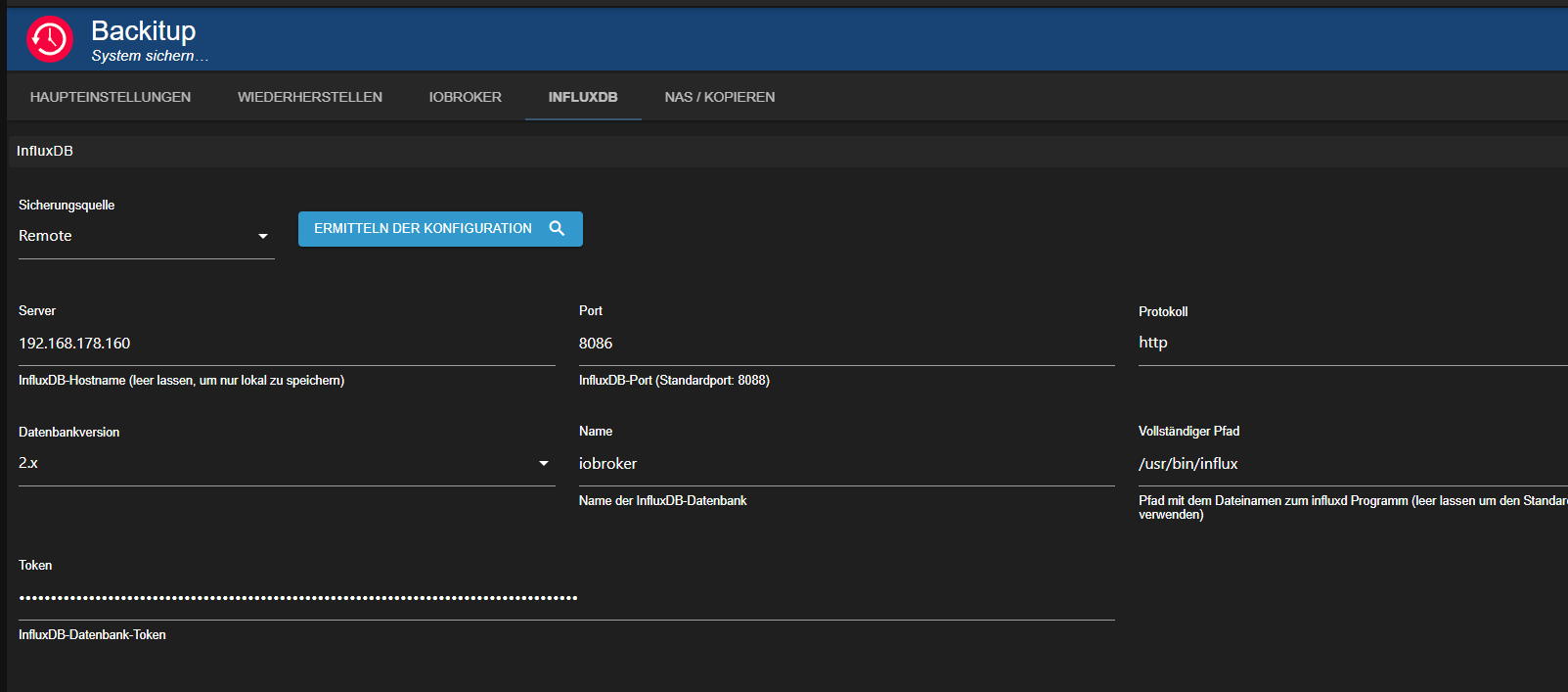
                  @mcu nich influxd … nur influx

                  • Besuche meine Github Seite
                  • Beitrag hat geholfen oder willst du mich unterstützen
                  • HowTo Restore ioBroker
                  M 1 Antwort Letzte Antwort
                  0
                  • Thomas BraunT Thomas Braun

                    @mcu sagte in Test Adapter ioBroker.backitup v2.4.x:

                    /usr/local/bin/influx

                    sudo rm /usr/local/bin/influx
                    exit
                    

                    Wieder einloggen und dann nochmal

                    which influx
                    

                    Und warum hast du nodejs nicht als Repo? Das ist wichtig! (Ah, das ist nicht die Dose mit dem ioBroker...)

                    M Offline
                    M Offline
                    MCU
                    schrieb am zuletzt editiert von
                    #2051

                    @thomas-braun

                    which influx
                    /usr/bin/influx
                    

                    NUC i7 64GB mit Proxmox ---- Jarvis Infos Aktualisierungen der Doku auf Instagram verfolgen -> mcuiobroker Instagram
                    Wenn Euch mein Vorschlag geholfen hat, bitte rechts "^" klicken.

                    1 Antwort Letzte Antwort
                    0
                    • simatecS simatec

                      @mcu nich influxd … nur influx

                      M Offline
                      M Offline
                      MCU
                      schrieb am zuletzt editiert von MCU
                      #2052

                      @simatec
                      3e10cb7f-7876-4483-989f-101caf9c425a-image.png
                      32b6c16b-1aa2-418b-b273-e605cd3764c2-image.png
                      9d7e265b-d19b-4e8a-b48e-7f252c51fe33-image.png

                      NUC i7 64GB mit Proxmox ---- Jarvis Infos Aktualisierungen der Doku auf Instagram verfolgen -> mcuiobroker Instagram
                      Wenn Euch mein Vorschlag geholfen hat, bitte rechts "^" klicken.

                      Thomas BraunT 1 Antwort Letzte Antwort
                      0
                      • M MCU

                        @simatec
                        3e10cb7f-7876-4483-989f-101caf9c425a-image.png
                        32b6c16b-1aa2-418b-b273-e605cd3764c2-image.png
                        9d7e265b-d19b-4e8a-b48e-7f252c51fe33-image.png

                        Thomas BraunT Online
                        Thomas BraunT Online
                        Thomas Braun
                        Most Active
                        schrieb am zuletzt editiert von
                        #2053

                        @mcu

                        rm influxdb2*
                        apt policy influxdb*
                        

                        Linux-Werkzeugkasten:
                        https://forum.iobroker.net/topic/42952/der-kleine-iobroker-linux-werkzeugkasten
                        NodeJS Fixer Skript:
                        https://forum.iobroker.net/topic/68035/iob-node-fix-skript
                        iob_diag: curl -sLf -o diag.sh https://iobroker.net/diag.sh && bash diag.sh

                        M 1 Antwort Letzte Antwort
                        0
                        • Thomas BraunT Thomas Braun

                          @mcu

                          rm influxdb2*
                          apt policy influxdb*
                          
                          M Offline
                          M Offline
                          MCU
                          schrieb am zuletzt editiert von MCU
                          #2054

                          @thomas-braun sagte in Test Adapter ioBroker.backitup v2.4.x:

                          rm influxdb2*

                          rm influxdb2*
                          rm: cannot remove 'influxdb2-client-2.3.0-linux-amd64': Is a directory
                          

                          mit sudo?

                          apt policy influxdb*
                          N: Unable to locate package influxdb.key
                          N: Couldn't find any package by glob 'influxdb.key'
                          N: Unable to locate package influxdb2-client-2.3.0-linux-amd64
                          N: Couldn't find any package by glob 'influxdb2-client-2.3.0-linux-amd64'
                          

                          NUC i7 64GB mit Proxmox ---- Jarvis Infos Aktualisierungen der Doku auf Instagram verfolgen -> mcuiobroker Instagram
                          Wenn Euch mein Vorschlag geholfen hat, bitte rechts "^" klicken.

                          Thomas BraunT 1 Antwort Letzte Antwort
                          0
                          • M MCU

                            @thomas-braun sagte in Test Adapter ioBroker.backitup v2.4.x:

                            rm influxdb2*

                            rm influxdb2*
                            rm: cannot remove 'influxdb2-client-2.3.0-linux-amd64': Is a directory
                            

                            mit sudo?

                            apt policy influxdb*
                            N: Unable to locate package influxdb.key
                            N: Couldn't find any package by glob 'influxdb.key'
                            N: Unable to locate package influxdb2-client-2.3.0-linux-amd64
                            N: Couldn't find any package by glob 'influxdb2-client-2.3.0-linux-amd64'
                            
                            Thomas BraunT Online
                            Thomas BraunT Online
                            Thomas Braun
                            Most Active
                            schrieb am zuletzt editiert von
                            #2055

                            @mcu

                            ls -la
                            

                            Und bitte vollständige Ein- wie Ausgabezeilen inkl. LogIn-Prompt, damit ich sehe wo du da im Tree stehst.

                            Linux-Werkzeugkasten:
                            https://forum.iobroker.net/topic/42952/der-kleine-iobroker-linux-werkzeugkasten
                            NodeJS Fixer Skript:
                            https://forum.iobroker.net/topic/68035/iob-node-fix-skript
                            iob_diag: curl -sLf -o diag.sh https://iobroker.net/diag.sh && bash diag.sh
                            M 1 Antwort Letzte Antwort
                            0
                            • Thomas BraunT Thomas Braun

                              @mcu

                              ls -la
                              

                              Und bitte vollständige Ein- wie Ausgabezeilen inkl. LogIn-Prompt, damit ich sehe wo du da im Tree stehst.

                              M Offline
                              M Offline
                              MCU
                              schrieb am zuletzt editiert von
                              #2056

                              @thomas-braun sagte in Test Adapter ioBroker.backitup v2.4.x:

                              ls -la

                              prox@influxdb:~$ ls -la
                              total 32
                              drwxr-xr-x 3 prox prox 4096 Jul 10 20:41 .
                              drwxr-xr-x 3 root root 4096 Jun 26 07:23 ..
                              -rw------- 1 prox prox 1297 Jul 10 20:37 .bash_history
                              -rw-r--r-- 1 prox prox  220 Jun 26 07:23 .bash_logout
                              -rw-r--r-- 1 prox prox 3526 Jun 26 07:23 .bashrc
                              -rw-r--r-- 1 prox prox  807 Jun 26 07:23 .profile
                              -rw-r--r-- 1 prox prox 3108 May  4  2021 influxdb.key
                              drwxr-xr-x 2 prox prox 4096 Jul 10 19:42 influxdb2-client-2.3.0-linux-amd64
                              prox@influxdb:~$ 
                              

                              NUC i7 64GB mit Proxmox ---- Jarvis Infos Aktualisierungen der Doku auf Instagram verfolgen -> mcuiobroker Instagram
                              Wenn Euch mein Vorschlag geholfen hat, bitte rechts "^" klicken.

                              Thomas BraunT 1 Antwort Letzte Antwort
                              0
                              • M MCU

                                @thomas-braun sagte in Test Adapter ioBroker.backitup v2.4.x:

                                ls -la

                                prox@influxdb:~$ ls -la
                                total 32
                                drwxr-xr-x 3 prox prox 4096 Jul 10 20:41 .
                                drwxr-xr-x 3 root root 4096 Jun 26 07:23 ..
                                -rw------- 1 prox prox 1297 Jul 10 20:37 .bash_history
                                -rw-r--r-- 1 prox prox  220 Jun 26 07:23 .bash_logout
                                -rw-r--r-- 1 prox prox 3526 Jun 26 07:23 .bashrc
                                -rw-r--r-- 1 prox prox  807 Jun 26 07:23 .profile
                                -rw-r--r-- 1 prox prox 3108 May  4  2021 influxdb.key
                                drwxr-xr-x 2 prox prox 4096 Jul 10 19:42 influxdb2-client-2.3.0-linux-amd64
                                prox@influxdb:~$ 
                                
                                Thomas BraunT Online
                                Thomas BraunT Online
                                Thomas Braun
                                Most Active
                                schrieb am zuletzt editiert von Thomas Braun
                                #2057

                                @mcu

                                rm -rf influx*

                                Linux-Werkzeugkasten:
                                https://forum.iobroker.net/topic/42952/der-kleine-iobroker-linux-werkzeugkasten
                                NodeJS Fixer Skript:
                                https://forum.iobroker.net/topic/68035/iob-node-fix-skript
                                iob_diag: curl -sLf -o diag.sh https://iobroker.net/diag.sh && bash diag.sh

                                M 1 Antwort Letzte Antwort
                                0
                                • Thomas BraunT Thomas Braun

                                  @mcu

                                  rm -rf influx*

                                  M Offline
                                  M Offline
                                  MCU
                                  schrieb am zuletzt editiert von MCU
                                  #2058

                                  @thomas-braun Geht nur mit sudo rm influx*. OK?
                                  Oder so:

                                  ls -la
                                  total 24
                                  drwxr-xr-x 2 prox prox 4096 Jul 10 20:47 .
                                  drwxr-xr-x 3 root root 4096 Jun 26 07:23 ..
                                  -rw------- 1 prox prox 1297 Jul 10 20:37 .bash_history
                                  -rw-r--r-- 1 prox prox  220 Jun 26 07:23 .bash_logout
                                  -rw-r--r-- 1 prox prox 3526 Jun 26 07:23 .bashrc
                                  -rw-r--r-- 1 prox prox  807 Jun 26 07:23 .profile
                                  

                                  NUC i7 64GB mit Proxmox ---- Jarvis Infos Aktualisierungen der Doku auf Instagram verfolgen -> mcuiobroker Instagram
                                  Wenn Euch mein Vorschlag geholfen hat, bitte rechts "^" klicken.

                                  Thomas BraunT 2 Antworten Letzte Antwort
                                  0
                                  • M MCU

                                    @thomas-braun Geht nur mit sudo rm influx*. OK?
                                    Oder so:

                                    ls -la
                                    total 24
                                    drwxr-xr-x 2 prox prox 4096 Jul 10 20:47 .
                                    drwxr-xr-x 3 root root 4096 Jun 26 07:23 ..
                                    -rw------- 1 prox prox 1297 Jul 10 20:37 .bash_history
                                    -rw-r--r-- 1 prox prox  220 Jun 26 07:23 .bash_logout
                                    -rw-r--r-- 1 prox prox 3526 Jun 26 07:23 .bashrc
                                    -rw-r--r-- 1 prox prox  807 Jun 26 07:23 .profile
                                    
                                    Thomas BraunT Online
                                    Thomas BraunT Online
                                    Thomas Braun
                                    Most Active
                                    schrieb am zuletzt editiert von
                                    #2059

                                    @mcu

                                    Nein, das muss auch mit dem user prox funktionieren, dem gehört der Sums ja.

                                    rm -rf influx*
                                    

                                    Linux-Werkzeugkasten:
                                    https://forum.iobroker.net/topic/42952/der-kleine-iobroker-linux-werkzeugkasten
                                    NodeJS Fixer Skript:
                                    https://forum.iobroker.net/topic/68035/iob-node-fix-skript
                                    iob_diag: curl -sLf -o diag.sh https://iobroker.net/diag.sh && bash diag.sh

                                    M 1 Antwort Letzte Antwort
                                    1
                                    • Thomas BraunT Thomas Braun

                                      @mcu

                                      Nein, das muss auch mit dem user prox funktionieren, dem gehört der Sums ja.

                                      rm -rf influx*
                                      
                                      M Offline
                                      M Offline
                                      MCU
                                      schrieb am zuletzt editiert von
                                      #2060

                                      @thomas-braun

                                      apt policy influxdb*
                                      influxdb2-cli:
                                        Installed: 2.3.0
                                        Candidate: 2.3.0
                                        Version table:
                                       *** 2.3.0 500
                                              500 https://repos.influxdata.com/debian stable/main amd64 Packages
                                              100 /var/lib/dpkg/status
                                      influxdb-client:
                                        Installed: (none)
                                        Candidate: 1.6.7~rc0-1+b5
                                        Version table:
                                           1.6.7~rc0-1+b5 500
                                              500 http://ftp.debian.org/debian bullseye/main amd64 Packages
                                      influxdb-dev:
                                        Installed: (none)
                                        Candidate: (none)
                                        Version table:
                                      influxdb:
                                        Installed: (none)
                                        Candidate: 1.8.10-1
                                        Version table:
                                           1.8.10-1 500
                                              500 https://repos.influxdata.com/debian stable/main amd64 Packages
                                           1.6.7~rc0-1+b5 500
                                              500 http://ftp.debian.org/debian bullseye/main amd64 Packages
                                      influxdb2:
                                        Installed: 2.3.0-1
                                        Candidate: 2.3.0-1
                                        Version table:
                                       *** 2.3.0-1 500
                                              500 https://repos.influxdata.com/debian stable/main amd64 Packages
                                              100 /var/lib/dpkg/status
                                      

                                      NUC i7 64GB mit Proxmox ---- Jarvis Infos Aktualisierungen der Doku auf Instagram verfolgen -> mcuiobroker Instagram
                                      Wenn Euch mein Vorschlag geholfen hat, bitte rechts "^" klicken.

                                      Thomas BraunT 1 Antwort Letzte Antwort
                                      0
                                      • M MCU

                                        @thomas-braun Geht nur mit sudo rm influx*. OK?
                                        Oder so:

                                        ls -la
                                        total 24
                                        drwxr-xr-x 2 prox prox 4096 Jul 10 20:47 .
                                        drwxr-xr-x 3 root root 4096 Jun 26 07:23 ..
                                        -rw------- 1 prox prox 1297 Jul 10 20:37 .bash_history
                                        -rw-r--r-- 1 prox prox  220 Jun 26 07:23 .bash_logout
                                        -rw-r--r-- 1 prox prox 3526 Jun 26 07:23 .bashrc
                                        -rw-r--r-- 1 prox prox  807 Jun 26 07:23 .profile
                                        
                                        Thomas BraunT Online
                                        Thomas BraunT Online
                                        Thomas Braun
                                        Most Active
                                        schrieb am zuletzt editiert von
                                        #2061

                                        @mcu

                                        apt policy influxdb*
                                        

                                        bringt nun?

                                        Linux-Werkzeugkasten:
                                        https://forum.iobroker.net/topic/42952/der-kleine-iobroker-linux-werkzeugkasten
                                        NodeJS Fixer Skript:
                                        https://forum.iobroker.net/topic/68035/iob-node-fix-skript
                                        iob_diag: curl -sLf -o diag.sh https://iobroker.net/diag.sh && bash diag.sh

                                        1 Antwort Letzte Antwort
                                        0
                                        • M MCU

                                          @thomas-braun

                                          apt policy influxdb*
                                          influxdb2-cli:
                                            Installed: 2.3.0
                                            Candidate: 2.3.0
                                            Version table:
                                           *** 2.3.0 500
                                                  500 https://repos.influxdata.com/debian stable/main amd64 Packages
                                                  100 /var/lib/dpkg/status
                                          influxdb-client:
                                            Installed: (none)
                                            Candidate: 1.6.7~rc0-1+b5
                                            Version table:
                                               1.6.7~rc0-1+b5 500
                                                  500 http://ftp.debian.org/debian bullseye/main amd64 Packages
                                          influxdb-dev:
                                            Installed: (none)
                                            Candidate: (none)
                                            Version table:
                                          influxdb:
                                            Installed: (none)
                                            Candidate: 1.8.10-1
                                            Version table:
                                               1.8.10-1 500
                                                  500 https://repos.influxdata.com/debian stable/main amd64 Packages
                                               1.6.7~rc0-1+b5 500
                                                  500 http://ftp.debian.org/debian bullseye/main amd64 Packages
                                          influxdb2:
                                            Installed: 2.3.0-1
                                            Candidate: 2.3.0-1
                                            Version table:
                                           *** 2.3.0-1 500
                                                  500 https://repos.influxdata.com/debian stable/main amd64 Packages
                                                  100 /var/lib/dpkg/status
                                          
                                          Thomas BraunT Online
                                          Thomas BraunT Online
                                          Thomas Braun
                                          Most Active
                                          schrieb am zuletzt editiert von
                                          #2062

                                          @mcu @simatec
                                          Muss der client auf dem System mit dem ioBroker installiert sein?
                                          Mir war so.

                                          Linux-Werkzeugkasten:
                                          https://forum.iobroker.net/topic/42952/der-kleine-iobroker-linux-werkzeugkasten
                                          NodeJS Fixer Skript:
                                          https://forum.iobroker.net/topic/68035/iob-node-fix-skript
                                          iob_diag: curl -sLf -o diag.sh https://iobroker.net/diag.sh && bash diag.sh

                                          M simatecS 2 Antworten Letzte Antwort
                                          0

                                          Hey! Du scheinst an dieser Unterhaltung interessiert zu sein, hast aber noch kein Konto.

                                          Hast du es satt, bei jedem Besuch durch die gleichen Beiträge zu scrollen? Wenn du dich für ein Konto anmeldest, kommst du immer genau dorthin zurück, wo du zuvor warst, und kannst dich über neue Antworten benachrichtigen lassen (entweder per E-Mail oder Push-Benachrichtigung). Du kannst auch Lesezeichen speichern und Beiträge positiv bewerten, um anderen Community-Mitgliedern deine Wertschätzung zu zeigen.

                                          Mit deinem Input könnte dieser Beitrag noch besser werden 💗

                                          Registrieren Anmelden
                                          Antworten
                                          • In einem neuen Thema antworten
                                          Anmelden zum Antworten
                                          • Älteste zuerst
                                          • Neuste zuerst
                                          • Meiste Stimmen


                                          Support us

                                          ioBroker
                                          Community Adapters
                                          Donate

                                          487

                                          Online

                                          32.8k

                                          Benutzer

                                          82.7k

                                          Themen

                                          1.3m

                                          Beiträge
                                          Community
                                          Impressum | Datenschutz-Bestimmungen | Nutzungsbedingungen | Einwilligungseinstellungen
                                          ioBroker Community 2014-2025
                                          logo
                                          • Anmelden

                                          • Du hast noch kein Konto? Registrieren

                                          • Anmelden oder registrieren, um zu suchen
                                          • Erster Beitrag
                                            Letzter Beitrag
                                          0
                                          • Home
                                          • Aktuell
                                          • Tags
                                          • Ungelesen 0
                                          • Kategorien
                                          • Unreplied
                                          • Beliebt
                                          • GitHub
                                          • Docu
                                          • Hilfe