Skip to content
  • Home
  • Aktuell
  • Tags
  • 0 Ungelesen 0
  • Kategorien
  • Unreplied
  • Beliebt
  • GitHub
  • Docu
  • Hilfe
Skins
  • Light
  • Brite
  • Cerulean
  • Cosmo
  • Flatly
  • Journal
  • Litera
  • Lumen
  • Lux
  • Materia
  • Minty
  • Morph
  • Pulse
  • Sandstone
  • Simplex
  • Sketchy
  • Spacelab
  • United
  • Yeti
  • Zephyr
  • Dark
  • Cyborg
  • Darkly
  • Quartz
  • Slate
  • Solar
  • Superhero
  • Vapor

  • Standard: (Kein Skin)
  • Kein Skin
Einklappen
ioBroker Logo

Community Forum

donate donate
  1. ioBroker Community Home
  2. Deutsch
  3. Tester
  4. Test Adapter ioBroker.backitup v3.1.x

NEWS

  • UPDATE 31.10.: Amazon Alexa - ioBroker Skill läuft aus ?
    apollon77A
    apollon77
    48
    3
    8.7k

  • Monatsrückblick – September 2025
    BluefoxB
    Bluefox
    13
    1
    2.2k

  • Neues Video "KI im Smart Home" - ioBroker plus n8n
    BluefoxB
    Bluefox
    16
    1
    3.1k

Test Adapter ioBroker.backitup v3.1.x

Geplant Angeheftet Gesperrt Verschoben Tester
backitupbackitup backupccuhistorymysqlredisrestorerestore backup
2.8k Beiträge 170 Kommentatoren 2.4m Aufrufe 113 Watching
  • Älteste zuerst
  • Neuste zuerst
  • Meiste Stimmen
Antworten
  • In einem neuen Thema antworten
Anmelden zum Antworten
Dieses Thema wurde gelöscht. Nur Nutzer mit entsprechenden Rechten können es sehen.
  • Thomas BraunT Thomas Braun

    @mcu

    Hast du denn auch influxdb2?

    apt policy influxdb*
    

    zeigt mehr.

    M Online
    M Online
    MCU
    schrieb am zuletzt editiert von
    #2027

    @thomas-braun sagte in Test Adapter ioBroker.backitup v2.4.x:

    apt policy influxdb*

    apt policy influxdb*
    N: Unable to locate package influxdb2-client-2.3.0-linux-amd64
    N: Couldn't find any package by glob 'influxdb2-client-2.3.0-linux-amd64'
    N: Unable to locate package influxdb2-client-2.3.0-linux-amd64.tar.gz
    N: Couldn't find any package by glob 'influxdb2-client-2.3.0-linux-amd64.tar.gz'
    

    NUC i7 64GB mit Proxmox ---- Jarvis Infos Aktualisierungen der Doku auf Instagram verfolgen -> mcuiobroker Instagram
    Wenn Euch mein Vorschlag geholfen hat, bitte rechts "^" klicken.

    Thomas BraunT 1 Antwort Letzte Antwort
    0
    • M MCU

      @thomas-braun sagte in Test Adapter ioBroker.backitup v2.4.x:

      apt policy influxdb*

      apt policy influxdb*
      N: Unable to locate package influxdb2-client-2.3.0-linux-amd64
      N: Couldn't find any package by glob 'influxdb2-client-2.3.0-linux-amd64'
      N: Unable to locate package influxdb2-client-2.3.0-linux-amd64.tar.gz
      N: Couldn't find any package by glob 'influxdb2-client-2.3.0-linux-amd64.tar.gz'
      
      Thomas BraunT Online
      Thomas BraunT Online
      Thomas Braun
      Most Active
      schrieb am zuletzt editiert von Thomas Braun
      #2028

      @mcu

      Dann hast du dir irgendwas irgendwie am Paketmanager vorbei ins System geprügelt.

      Sauber sähe das so aus:

      echad@chet:/opt/iobroker $ apt policy influxdb*
      influxdb2-cli:
        Installed: (none)
        Candidate: 2.3.0
        Version table:
           2.3.0 500
              500 https://repos.influxdata.com/debian bullseye/stable arm64 Packages
      influxdb-client:
        Installed: (none)
        Candidate: 1.6.7~rc0-1+b5
        Version table:
           1.6.7~rc0-1+b5 500
              500 http://deb.debian.org/debian bullseye/main arm64 Packages
      influxdb-dev:
        Installed: (none)
        Candidate: (none)
        Version table:
      influxdb:
        Installed: (none)
        Candidate: 1.8.10-1
        Version table:
           1.8.10-1 500
              500 https://repos.influxdata.com/debian bullseye/stable arm64 Packages
           1.6.7~rc0-1+b5 500
              500 http://deb.debian.org/debian bullseye/main arm64 Packages
      influxdb2:
        Installed: (none)
        Candidate: 2.3.0-1
        Version table:
           2.3.0-1 500
              500 https://repos.influxdata.com/debian bullseye/stable arm64 Packages
      

      Linux-Werkzeugkasten:
      https://forum.iobroker.net/topic/42952/der-kleine-iobroker-linux-werkzeugkasten
      NodeJS Fixer Skript:
      https://forum.iobroker.net/topic/68035/iob-node-fix-skript
      iob_diag: curl -sLf -o diag.sh https://iobroker.net/diag.sh && bash diag.sh

      M 1 Antwort Letzte Antwort
      0
      • Thomas BraunT Thomas Braun

        @mcu

        Dann hast du dir irgendwas irgendwie am Paketmanager vorbei ins System geprügelt.

        Sauber sähe das so aus:

        echad@chet:/opt/iobroker $ apt policy influxdb*
        influxdb2-cli:
          Installed: (none)
          Candidate: 2.3.0
          Version table:
             2.3.0 500
                500 https://repos.influxdata.com/debian bullseye/stable arm64 Packages
        influxdb-client:
          Installed: (none)
          Candidate: 1.6.7~rc0-1+b5
          Version table:
             1.6.7~rc0-1+b5 500
                500 http://deb.debian.org/debian bullseye/main arm64 Packages
        influxdb-dev:
          Installed: (none)
          Candidate: (none)
          Version table:
        influxdb:
          Installed: (none)
          Candidate: 1.8.10-1
          Version table:
             1.8.10-1 500
                500 https://repos.influxdata.com/debian bullseye/stable arm64 Packages
             1.6.7~rc0-1+b5 500
                500 http://deb.debian.org/debian bullseye/main arm64 Packages
        influxdb2:
          Installed: (none)
          Candidate: 2.3.0-1
          Version table:
             2.3.0-1 500
                500 https://repos.influxdata.com/debian bullseye/stable arm64 Packages
        
        M Online
        M Online
        MCU
        schrieb am zuletzt editiert von
        #2029

        @thomas-braun

        wget https://dl.influxdata.com/influxdb/releases/influxdb2-client-2.3.0-linux-amd64.tar.gz
        --2022-07-10 19:41:36--  https://dl.influxdata.com/influxdb/releases/influxdb2-client-2.3.0-linux-amd64.tar.gz
        Resolving dl.influxdata.com (dl.influxdata.com)... 54.230.206.23, 54.230.206.30, 54.230.206.53, ...
        Connecting to dl.influxdata.com (dl.influxdata.com)|54.230.206.23|:443... connected.
        HTTP request sent, awaiting response... 200 OK
        Length: 5350662 (5.1M) [application/x-gzip]
        Saving to: 'influxdb2-client-2.3.0-linux-amd64.tar.gz'
        
        influxdb2-client-2.3.0-linux-amd64.tar.gz  100%[=======================================================================================>]   5.10M  --.-KB/s    in 0.1s    
        
        2022-07-10 19:41:36 (34.4 MB/s) - 'influxdb2-client-2.3.0-linux-amd64.tar.gz' saved [5350662/5350662]
        
        prox@influxdb:~$ tar xvzf ./influxdb2-client-2.3.0-linux-amd64.tar.gz
        influxdb2-client-2.3.0-linux-amd64/LICENSE
        influxdb2-client-2.3.0-linux-amd64/README.md
        influxdb2-client-2.3.0-linux-amd64/influx
        prox@influxdb:~$ sudo cp influxdb2-client-2.3.0-linux-amd64/influx /usr/local/bin/
        
        We trust you have received the usual lecture from the local System
        Administrator. It usually boils down to these three things:
        
            #1) Respect the privacy of others.
            #2) Think before you type.
            #3) With great power comes great responsibility.
        
        [sudo] password for prox: 
        prox@influxdb:~$ 
        

        NUC i7 64GB mit Proxmox ---- Jarvis Infos Aktualisierungen der Doku auf Instagram verfolgen -> mcuiobroker Instagram
        Wenn Euch mein Vorschlag geholfen hat, bitte rechts "^" klicken.

        Thomas BraunT simatecS 2 Antworten Letzte Antwort
        0
        • M MCU

          @thomas-braun

          wget https://dl.influxdata.com/influxdb/releases/influxdb2-client-2.3.0-linux-amd64.tar.gz
          --2022-07-10 19:41:36--  https://dl.influxdata.com/influxdb/releases/influxdb2-client-2.3.0-linux-amd64.tar.gz
          Resolving dl.influxdata.com (dl.influxdata.com)... 54.230.206.23, 54.230.206.30, 54.230.206.53, ...
          Connecting to dl.influxdata.com (dl.influxdata.com)|54.230.206.23|:443... connected.
          HTTP request sent, awaiting response... 200 OK
          Length: 5350662 (5.1M) [application/x-gzip]
          Saving to: 'influxdb2-client-2.3.0-linux-amd64.tar.gz'
          
          influxdb2-client-2.3.0-linux-amd64.tar.gz  100%[=======================================================================================>]   5.10M  --.-KB/s    in 0.1s    
          
          2022-07-10 19:41:36 (34.4 MB/s) - 'influxdb2-client-2.3.0-linux-amd64.tar.gz' saved [5350662/5350662]
          
          prox@influxdb:~$ tar xvzf ./influxdb2-client-2.3.0-linux-amd64.tar.gz
          influxdb2-client-2.3.0-linux-amd64/LICENSE
          influxdb2-client-2.3.0-linux-amd64/README.md
          influxdb2-client-2.3.0-linux-amd64/influx
          prox@influxdb:~$ sudo cp influxdb2-client-2.3.0-linux-amd64/influx /usr/local/bin/
          
          We trust you have received the usual lecture from the local System
          Administrator. It usually boils down to these three things:
          
              #1) Respect the privacy of others.
              #2) Think before you type.
              #3) With great power comes great responsibility.
          
          [sudo] password for prox: 
          prox@influxdb:~$ 
          
          Thomas BraunT Online
          Thomas BraunT Online
          Thomas Braun
          Most Active
          schrieb am zuletzt editiert von
          #2030

          @mcu

          Macht man ja auch nicht so.

          Linux-Werkzeugkasten:
          https://forum.iobroker.net/topic/42952/der-kleine-iobroker-linux-werkzeugkasten
          NodeJS Fixer Skript:
          https://forum.iobroker.net/topic/68035/iob-node-fix-skript
          iob_diag: curl -sLf -o diag.sh https://iobroker.net/diag.sh && bash diag.sh

          M 1 Antwort Letzte Antwort
          0
          • Thomas BraunT Thomas Braun

            @mcu

            Macht man ja auch nicht so.

            M Online
            M Online
            MCU
            schrieb am zuletzt editiert von MCU
            #2031

            @thomas-braun Steht aber so dort:
            https://docs.influxdata.com/influxdb/v2.3/tools/influx-cli/?t=Linux
            Wie sonst?

            NUC i7 64GB mit Proxmox ---- Jarvis Infos Aktualisierungen der Doku auf Instagram verfolgen -> mcuiobroker Instagram
            Wenn Euch mein Vorschlag geholfen hat, bitte rechts "^" klicken.

            Thomas BraunT simatecS 2 Antworten Letzte Antwort
            0
            • M MCU

              @thomas-braun Steht aber so dort:
              https://docs.influxdata.com/influxdb/v2.3/tools/influx-cli/?t=Linux
              Wie sonst?

              Thomas BraunT Online
              Thomas BraunT Online
              Thomas Braun
              Most Active
              schrieb am zuletzt editiert von
              #2032

              @mcu

              Da steht aber auch, wie man sich deren Repo anlacht.
              Software unter Debian wird (zu 99,9%) IMMER über den Paketmanager installiert. Auch influx.

              Linux-Werkzeugkasten:
              https://forum.iobroker.net/topic/42952/der-kleine-iobroker-linux-werkzeugkasten
              NodeJS Fixer Skript:
              https://forum.iobroker.net/topic/68035/iob-node-fix-skript
              iob_diag: curl -sLf -o diag.sh https://iobroker.net/diag.sh && bash diag.sh

              simatecS 1 Antwort Letzte Antwort
              0
              • M MCU

                @thomas-braun

                wget https://dl.influxdata.com/influxdb/releases/influxdb2-client-2.3.0-linux-amd64.tar.gz
                --2022-07-10 19:41:36--  https://dl.influxdata.com/influxdb/releases/influxdb2-client-2.3.0-linux-amd64.tar.gz
                Resolving dl.influxdata.com (dl.influxdata.com)... 54.230.206.23, 54.230.206.30, 54.230.206.53, ...
                Connecting to dl.influxdata.com (dl.influxdata.com)|54.230.206.23|:443... connected.
                HTTP request sent, awaiting response... 200 OK
                Length: 5350662 (5.1M) [application/x-gzip]
                Saving to: 'influxdb2-client-2.3.0-linux-amd64.tar.gz'
                
                influxdb2-client-2.3.0-linux-amd64.tar.gz  100%[=======================================================================================>]   5.10M  --.-KB/s    in 0.1s    
                
                2022-07-10 19:41:36 (34.4 MB/s) - 'influxdb2-client-2.3.0-linux-amd64.tar.gz' saved [5350662/5350662]
                
                prox@influxdb:~$ tar xvzf ./influxdb2-client-2.3.0-linux-amd64.tar.gz
                influxdb2-client-2.3.0-linux-amd64/LICENSE
                influxdb2-client-2.3.0-linux-amd64/README.md
                influxdb2-client-2.3.0-linux-amd64/influx
                prox@influxdb:~$ sudo cp influxdb2-client-2.3.0-linux-amd64/influx /usr/local/bin/
                
                We trust you have received the usual lecture from the local System
                Administrator. It usually boils down to these three things:
                
                    #1) Respect the privacy of others.
                    #2) Think before you type.
                    #3) With great power comes great responsibility.
                
                [sudo] password for prox: 
                prox@influxdb:~$ 
                
                simatecS Online
                simatecS Online
                simatec
                Developer Most Active
                schrieb am zuletzt editiert von
                #2033

                @mcu leg die mal in /usr/bin
                Bei einigen Systemen wird usr/local/bin nicht richtig erkannt

                • Besuche meine Github Seite
                • Beitrag hat geholfen oder willst du mich unterstützen
                • HowTo Restore ioBroker
                M 1 Antwort Letzte Antwort
                0
                • simatecS simatec

                  @mcu leg die mal in /usr/bin
                  Bei einigen Systemen wird usr/local/bin nicht richtig erkannt

                  M Online
                  M Online
                  MCU
                  schrieb am zuletzt editiert von
                  #2034

                  @simatec Bringt keinen Unterschied.

                  NUC i7 64GB mit Proxmox ---- Jarvis Infos Aktualisierungen der Doku auf Instagram verfolgen -> mcuiobroker Instagram
                  Wenn Euch mein Vorschlag geholfen hat, bitte rechts "^" klicken.

                  Thomas BraunT 1 Antwort Letzte Antwort
                  0
                  • Thomas BraunT Thomas Braun

                    @mcu

                    Da steht aber auch, wie man sich deren Repo anlacht.
                    Software unter Debian wird (zu 99,9%) IMMER über den Paketmanager installiert. Auch influx.

                    simatecS Online
                    simatecS Online
                    simatec
                    Developer Most Active
                    schrieb am zuletzt editiert von
                    #2035

                    @thomas-braun Kannst du mal bitte in Backitup ein Issue anlegen, wie man über Paketmanager die influx-cli installiert
                    Also speziell für influxdb2.

                    Dann passe ich die Doku an.
                    Damals gab es noch kein offizielles Paket

                    • Besuche meine Github Seite
                    • Beitrag hat geholfen oder willst du mich unterstützen
                    • HowTo Restore ioBroker
                    1 Antwort Letzte Antwort
                    1
                    • M MCU

                      @simatec Bringt keinen Unterschied.

                      Thomas BraunT Online
                      Thomas BraunT Online
                      Thomas Braun
                      Most Active
                      schrieb am zuletzt editiert von Thomas Braun
                      #2036

                      @mcu

                      https://docs.influxdata.com/influxdb/v1.8/introduction/install/

                      Leg dir das Repo an, da ist auch influxdb2 drin. Und dann installierst du das sauber.

                      Und kratz das wieder aus /usr/local/bin raus.

                      Linux-Werkzeugkasten:
                      https://forum.iobroker.net/topic/42952/der-kleine-iobroker-linux-werkzeugkasten
                      NodeJS Fixer Skript:
                      https://forum.iobroker.net/topic/68035/iob-node-fix-skript
                      iob_diag: curl -sLf -o diag.sh https://iobroker.net/diag.sh && bash diag.sh

                      1 Antwort Letzte Antwort
                      0
                      • M MCU

                        @thomas-braun Steht aber so dort:
                        https://docs.influxdata.com/influxdb/v2.3/tools/influx-cli/?t=Linux
                        Wie sonst?

                        simatecS Online
                        simatecS Online
                        simatec
                        Developer Most Active
                        schrieb am zuletzt editiert von
                        #2037

                        @mcu
                        Was kommt denn, wenn du influx in der Konsole aufrufst?

                        • Besuche meine Github Seite
                        • Beitrag hat geholfen oder willst du mich unterstützen
                        • HowTo Restore ioBroker
                        M 1 Antwort Letzte Antwort
                        0
                        • simatecS simatec

                          @mcu
                          Was kommt denn, wenn du influx in der Konsole aufrufst?

                          M Online
                          M Online
                          MCU
                          schrieb am zuletzt editiert von
                          #2038

                          @simatec

                          influx
                          NAME:
                             influx - Influx Client
                          
                          USAGE:
                             influx [command]
                          
                          COMMANDS:
                             version              Print the influx CLI version
                             write                Write points to InfluxDB
                             bucket               Bucket management commands
                             completion           Generates completion scripts
                             query                Execute a Flux query
                             config               Config management commands
                             org, organization    Organization management commands
                             delete               Delete points from InfluxDB
                             user                 User management commands
                             task                 Task management commands
                             telegrafs            List Telegraf configuration(s). Subcommands manage Telegraf configurations.
                             dashboards           List Dashboard(s).
                             export               Export existing resources as a template
                             secret               Secret management commands
                             v1                   InfluxDB v1 management commands
                             auth, authorization  Authorization management commands
                             apply                Apply a template to manage resources
                             stacks               List stack(s) and associated templates. Subcommands manage stacks.
                             template             Summarize the provided template
                             bucket-schema        Bucket schema management commands
                             ping                 Check the InfluxDB /health endpoint
                             setup                Setup instance with initial user, org, bucket
                             backup               Backup database
                             restore              Restores a backup directory to InfluxDB
                             remote               Remote connection management commands
                             replication          Replication stream management commands
                             server-config        Display server config
                             help, h              Shows a list of commands or help for one command
                          
                          GLOBAL OPTIONS:
                             --help, -h  show help
                          

                          NUC i7 64GB mit Proxmox ---- Jarvis Infos Aktualisierungen der Doku auf Instagram verfolgen -> mcuiobroker Instagram
                          Wenn Euch mein Vorschlag geholfen hat, bitte rechts "^" klicken.

                          simatecS 1 Antwort Letzte Antwort
                          0
                          • M MCU

                            @simatec

                            influx
                            NAME:
                               influx - Influx Client
                            
                            USAGE:
                               influx [command]
                            
                            COMMANDS:
                               version              Print the influx CLI version
                               write                Write points to InfluxDB
                               bucket               Bucket management commands
                               completion           Generates completion scripts
                               query                Execute a Flux query
                               config               Config management commands
                               org, organization    Organization management commands
                               delete               Delete points from InfluxDB
                               user                 User management commands
                               task                 Task management commands
                               telegrafs            List Telegraf configuration(s). Subcommands manage Telegraf configurations.
                               dashboards           List Dashboard(s).
                               export               Export existing resources as a template
                               secret               Secret management commands
                               v1                   InfluxDB v1 management commands
                               auth, authorization  Authorization management commands
                               apply                Apply a template to manage resources
                               stacks               List stack(s) and associated templates. Subcommands manage stacks.
                               template             Summarize the provided template
                               bucket-schema        Bucket schema management commands
                               ping                 Check the InfluxDB /health endpoint
                               setup                Setup instance with initial user, org, bucket
                               backup               Backup database
                               restore              Restores a backup directory to InfluxDB
                               remote               Remote connection management commands
                               replication          Replication stream management commands
                               server-config        Display server config
                               help, h              Shows a list of commands or help for one command
                            
                            GLOBAL OPTIONS:
                               --help, -h  show help
                            
                            simatecS Online
                            simatecS Online
                            simatec
                            Developer Most Active
                            schrieb am zuletzt editiert von
                            #2039

                            @mcu na geht doch.
                            Dan sollte es auch in Backitup gehen.
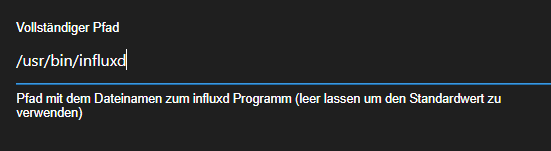
                            Falls die influx aus irgend einem Grund von Backitup nicht gefunden wird, trage den kompletten Pfad in der Config ein

                            • Besuche meine Github Seite
                            • Beitrag hat geholfen oder willst du mich unterstützen
                            • HowTo Restore ioBroker
                            M 1 Antwort Letzte Antwort
                            0
                            • simatecS simatec

                              @mcu na geht doch.
                              Dan sollte es auch in Backitup gehen.
                              Falls die influx aus irgend einem Grund von Backitup nicht gefunden wird, trage den kompletten Pfad in der Config ein

                              M Online
                              M Online
                              MCU
                              schrieb am zuletzt editiert von
                              #2040

                              @simatec So?
                              9092a109-cb4a-4535-9ff2-32b97a2e3d67-image.png

                              NUC i7 64GB mit Proxmox ---- Jarvis Infos Aktualisierungen der Doku auf Instagram verfolgen -> mcuiobroker Instagram
                              Wenn Euch mein Vorschlag geholfen hat, bitte rechts "^" klicken.

                              Thomas BraunT simatecS 2 Antworten Letzte Antwort
                              0
                              • M MCU

                                @simatec So?
                                9092a109-cb4a-4535-9ff2-32b97a2e3d67-image.png

                                Thomas BraunT Online
                                Thomas BraunT Online
                                Thomas Braun
                                Most Active
                                schrieb am zuletzt editiert von
                                #2041

                                @mcu

                                Ich würde es über den Paketmanager machen. Das fällt dir früher oder später sonst wieder auf die Füße.

                                Linux-Werkzeugkasten:
                                https://forum.iobroker.net/topic/42952/der-kleine-iobroker-linux-werkzeugkasten
                                NodeJS Fixer Skript:
                                https://forum.iobroker.net/topic/68035/iob-node-fix-skript
                                iob_diag: curl -sLf -o diag.sh https://iobroker.net/diag.sh && bash diag.sh

                                M 1 Antwort Letzte Antwort
                                0
                                • Thomas BraunT Thomas Braun

                                  @mcu

                                  Ich würde es über den Paketmanager machen. Das fällt dir früher oder später sonst wieder auf die Füße.

                                  M Online
                                  M Online
                                  MCU
                                  schrieb am zuletzt editiert von
                                  #2042

                                  @thomas-braun Da fehlt mir das Wissen. Wie gehe ich über den Paketmanager?

                                  NUC i7 64GB mit Proxmox ---- Jarvis Infos Aktualisierungen der Doku auf Instagram verfolgen -> mcuiobroker Instagram
                                  Wenn Euch mein Vorschlag geholfen hat, bitte rechts "^" klicken.

                                  Thomas BraunT 1 Antwort Letzte Antwort
                                  0
                                  • M MCU

                                    @thomas-braun Da fehlt mir das Wissen. Wie gehe ich über den Paketmanager?

                                    Thomas BraunT Online
                                    Thomas BraunT Online
                                    Thomas Braun
                                    Most Active
                                    schrieb am zuletzt editiert von
                                    #2043

                                    @mcu

                                    Repo anlegen:

                                    wget -q https://repos.influxdata.com/influxdb.key
                                    echo '23a1c8836f0afc5ed24e0486339d7cc8f6790b83886c4c96995b88a061c5bb5d influxdb.key' | sha256sum -c && cat influxdb.key | gpg --dearmor | sudo tee /etc/apt/trusted.gpg.d/influxdb.gpg > /dev/null
                                    echo 'deb [signed-by=/etc/apt/trusted.gpg.d/influxdb.gpg] https://repos.influxdata.com/debian stable main' | sudo tee /etc/apt/sources.list.d/influxdata.list
                                    

                                    Dann das übliche Installations-Prozedere:

                                    sudo apt update
                                    sudo apt install PAKETNAME
                                    

                                    Linux-Werkzeugkasten:
                                    https://forum.iobroker.net/topic/42952/der-kleine-iobroker-linux-werkzeugkasten
                                    NodeJS Fixer Skript:
                                    https://forum.iobroker.net/topic/68035/iob-node-fix-skript
                                    iob_diag: curl -sLf -o diag.sh https://iobroker.net/diag.sh && bash diag.sh

                                    M 1 Antwort Letzte Antwort
                                    0
                                    • Thomas BraunT Thomas Braun

                                      @mcu

                                      Repo anlegen:

                                      wget -q https://repos.influxdata.com/influxdb.key
                                      echo '23a1c8836f0afc5ed24e0486339d7cc8f6790b83886c4c96995b88a061c5bb5d influxdb.key' | sha256sum -c && cat influxdb.key | gpg --dearmor | sudo tee /etc/apt/trusted.gpg.d/influxdb.gpg > /dev/null
                                      echo 'deb [signed-by=/etc/apt/trusted.gpg.d/influxdb.gpg] https://repos.influxdata.com/debian stable main' | sudo tee /etc/apt/sources.list.d/influxdata.list
                                      

                                      Dann das übliche Installations-Prozedere:

                                      sudo apt update
                                      sudo apt install PAKETNAME
                                      
                                      M Online
                                      M Online
                                      MCU
                                      schrieb am zuletzt editiert von
                                      #2044

                                      @thomas-braun Das habe ich doch bei der Installation von influxdb2 schon so gemacht?

                                      apt install sudo curl gpg gnupg2 wget -y
                                      
                                      wget -q https://repos.influxdata.com/influxdb.key
                                      echo '23a1c8836f0afc5ed24e0486339d7cc8f6790b83886c4c96995b88a061c5bb5d influxdb.key' | sha256sum -c && cat influxdb.key | gpg --dearmor | sudo tee /etc/apt/trusted.gpg.d/influxdb.gpg > /dev/null
                                      echo 'deb [signed-by=/etc/apt/trusted.gpg.d/influxdb.gpg] https://repos.influxdata.com/debian stable main' | sudo tee /etc/apt/sources.list.d/influxdata.list
                                      
                                      sudo apt-get update && sudo apt-get install influxdb2
                                      

                                      NUC i7 64GB mit Proxmox ---- Jarvis Infos Aktualisierungen der Doku auf Instagram verfolgen -> mcuiobroker Instagram
                                      Wenn Euch mein Vorschlag geholfen hat, bitte rechts "^" klicken.

                                      Thomas BraunT 1 Antwort Letzte Antwort
                                      0
                                      • M MCU

                                        @thomas-braun Das habe ich doch bei der Installation von influxdb2 schon so gemacht?

                                        apt install sudo curl gpg gnupg2 wget -y
                                        
                                        wget -q https://repos.influxdata.com/influxdb.key
                                        echo '23a1c8836f0afc5ed24e0486339d7cc8f6790b83886c4c96995b88a061c5bb5d influxdb.key' | sha256sum -c && cat influxdb.key | gpg --dearmor | sudo tee /etc/apt/trusted.gpg.d/influxdb.gpg > /dev/null
                                        echo 'deb [signed-by=/etc/apt/trusted.gpg.d/influxdb.gpg] https://repos.influxdata.com/debian stable main' | sudo tee /etc/apt/sources.list.d/influxdata.list
                                        
                                        sudo apt-get update && sudo apt-get install influxdb2
                                        
                                        Thomas BraunT Online
                                        Thomas BraunT Online
                                        Thomas Braun
                                        Most Active
                                        schrieb am zuletzt editiert von Thomas Braun
                                        #2045

                                        @mcu

                                        Und warum installierst du dann den client nicht auch daraus?
                                        Stattdessen verhunzt du dir die dpkg-Datenbank.

                                        apt policy influxdb2-cli
                                        

                                        bringt?

                                        Linux-Werkzeugkasten:
                                        https://forum.iobroker.net/topic/42952/der-kleine-iobroker-linux-werkzeugkasten
                                        NodeJS Fixer Skript:
                                        https://forum.iobroker.net/topic/68035/iob-node-fix-skript
                                        iob_diag: curl -sLf -o diag.sh https://iobroker.net/diag.sh && bash diag.sh

                                        M 1 Antwort Letzte Antwort
                                        0
                                        • Thomas BraunT Thomas Braun

                                          @mcu

                                          Und warum installierst du dann den client nicht auch daraus?
                                          Stattdessen verhunzt du dir die dpkg-Datenbank.

                                          apt policy influxdb2-cli
                                          

                                          bringt?

                                          M Online
                                          M Online
                                          MCU
                                          schrieb am zuletzt editiert von MCU
                                          #2046

                                          @thomas-braun So?

                                          sudo apt update && sudo apt install influxdb2-cli                                                                                                
                                          Get:1 http://security.debian.org bullseye-security InRelease [44.1 kB]
                                          Get:2 http://ftp.debian.org/debian bullseye InRelease [116 kB]                                                                        
                                          Get:3 https://repos.influxdata.com/debian stable InRelease [4645 B]                                                                             
                                          Get:4 http://ftp.debian.org/debian bullseye-updates InRelease [39.4 kB]                                       
                                          Get:5 http://security.debian.org bullseye-security/main amd64 Packages [164 kB]
                                          Get:6 https://repos.influxdata.com/debian stable/main amd64 Packages [1263 B]
                                          Get:7 http://security.debian.org bullseye-security/main Translation-en [103 kB]
                                          Get:8 http://ftp.debian.org/debian bullseye/main amd64 Packages [8182 kB]
                                          Get:9 http://ftp.debian.org/debian bullseye/main Translation-en [6243 kB]
                                          Get:10 http://ftp.debian.org/debian bullseye/contrib amd64 Packages [50.6 kB]
                                          Get:11 http://ftp.debian.org/debian bullseye/contrib Translation-en [46.9 kB]
                                          Fetched 15.0 MB in 2s (7736 kB/s)                            
                                          Reading package lists... Done
                                          Building dependency tree... Done
                                          Reading state information... Done
                                          12 packages can be upgraded. Run 'apt list --upgradable' to see them.
                                          N: Repository 'http://ftp.debian.org/debian bullseye InRelease' changed its 'Version' value from '11.3' to '11.4'
                                          Reading package lists... Done
                                          Building dependency tree... Done
                                          Reading state information... Done
                                          influxdb2-cli is already the newest version (2.3.0).
                                          0 upgraded, 0 newly installed, 0 to remove and 12 not upgraded.
                                          

                                          apt policy influxdb2-cli

                                          apt policy influxdb2-cli
                                          influxdb2-cli:
                                            Installed: 2.3.0
                                            Candidate: 2.3.0
                                            Version table:
                                           *** 2.3.0 500
                                                  500 https://repos.influxdata.com/debian stable/main amd64 Packages
                                                  100 /var/lib/dpkg/status
                                          

                                          NUC i7 64GB mit Proxmox ---- Jarvis Infos Aktualisierungen der Doku auf Instagram verfolgen -> mcuiobroker Instagram
                                          Wenn Euch mein Vorschlag geholfen hat, bitte rechts "^" klicken.

                                          Thomas BraunT 1 Antwort Letzte Antwort
                                          0
                                          Antworten
                                          • In einem neuen Thema antworten
                                          Anmelden zum Antworten
                                          • Älteste zuerst
                                          • Neuste zuerst
                                          • Meiste Stimmen


                                          Support us

                                          ioBroker
                                          Community Adapters
                                          Donate

                                          503

                                          Online

                                          32.4k

                                          Benutzer

                                          81.5k

                                          Themen

                                          1.3m

                                          Beiträge
                                          Community
                                          Impressum | Datenschutz-Bestimmungen | Nutzungsbedingungen | Einwilligungseinstellungen
                                          ioBroker Community 2014-2025
                                          logo
                                          • Anmelden

                                          • Du hast noch kein Konto? Registrieren

                                          • Anmelden oder registrieren, um zu suchen
                                          • Erster Beitrag
                                            Letzter Beitrag
                                          0
                                          • Home
                                          • Aktuell
                                          • Tags
                                          • Ungelesen 0
                                          • Kategorien
                                          • Unreplied
                                          • Beliebt
                                          • GitHub
                                          • Docu
                                          • Hilfe