




Adapter Paketverfolgung DHL, Briefe, Amazon, DPD,GLS,UPS,17T
-
@tombox
Moin, mir ist gerade aufgefallen das es bei DPD eine weiteren Eintrag in der all provider JSON gibt{"id":"1","name":"A","status":"Zustellung erfolgreich","source":"DHL","delivery_status":1,"direction":"ANKOMMEND"}, {"id":"2","name":"B","status":"Auftragsdaten übermittelt ","statusId":"1","source":"DPD","delivery_status":20}, {"id":"3","name":"C","status":"Paket zugestellt - 01.04.2022","statusId":"6","source":"DPD","delivery_status":1}, {"id":"4","name":"D","status":"Die Sendung wurde zugestellt. ","source":"Hermes","delivery_status":1},Die Einträge von anderen Anbietern haben kein "statusId" dadurch wird in der JSON alles um eins verschoben
-
Hi ich kann den Adapter nicht nutzen. Er startet erst gar nicht und bleibt rot.
In den Logs steht folgendes:ost.SmartHomePi 2022-04-05 10:03:47.561 error instance system.adapter.parcel.0 terminated with code 1 (JS_CONTROLLER_STOPPED) host.SmartHomePi 2022-04-05 10:03:47.561 error Caught by controller[0]: } host.SmartHomePi 2022-04-05 10:03:47.560 error Caught by controller[0]: code: 'ERR_DLOPEN_FAILED' host.SmartHomePi 2022-04-05 10:03:47.560 error Caught by controller[0]: at Function.Module._load (internal/modules/cjs/loader.js:790:12) { host.SmartHomePi 2022-04-05 10:03:47.560 error Caught by controller[0]: at Module.load (internal/modules/cjs/loader.js:950:32) host.SmartHomePi 2022-04-05 10:03:47.560 error Caught by controller[0]: at Object.Module._extensions..js (internal/modules/cjs/loader.js:1114:10) host.SmartHomePi 2022-04-05 10:03:47.559 error Caught by controller[0]: at Module._compile (internal/modules/cjs/loader.js:1085:14) host.SmartHomePi 2022-04-05 10:03:47.559 error Caught by controller[0]: at Object.<anonymous> (/opt/iobroker/node_modules/canvas/lib/bindings.js:3:18) host.SmartHomePi 2022-04-05 10:03:47.559 error Caught by controller[0]: at require (internal/modules/cjs/helpers.js:101:18) host.SmartHomePi 2022-04-05 10:03:47.559 error Caught by controller[0]: at Module.require (internal/modules/cjs/loader.js:974:19) host.SmartHomePi 2022-04-05 10:03:47.559 error Caught by controller[0]: at Function.Module._load (internal/modules/cjs/loader.js:790:12) host.SmartHomePi 2022-04-05 10:03:47.558 error Caught by controller[0]: at Module.load (internal/modules/cjs/loader.js:950:32) host.SmartHomePi 2022-04-05 10:03:47.558 error Caught by controller[0]: at Object.Module._extensions..node (internal/modules/cjs/loader.js:1144:18) host.SmartHomePi 2022-04-05 10:03:47.558 error Caught by controller[0]: the module (for instance, using `npm rebuild` or `npm install`). host.SmartHomePi 2022-04-05 10:03:47.558 error Caught by controller[0]: NODE_MODULE_VERSION 83. Please try re-compiling or re-installing host.SmartHomePi 2022-04-05 10:03:47.557 error Caught by controller[0]: NODE_MODULE_VERSION 72. This version of Node.js requires host.SmartHomePi 2022-04-05 10:03:47.557 error Caught by controller[0]: was compiled against a different Node.js version using host.SmartHomePi 2022-04-05 10:03:47.557 error Caught by controller[0]: Error: The module '/opt/iobroker/node_modules/canvas/build/Release/canvas.node' host.SmartHomePi 2022-04-05 10:03:47.556 error Caught by controller[0]: ^ host.SmartHomePi 2022-04-05 10:03:47.556 error Caught by controller[0]: return process.dlopen(module, path.toNamespacedPath(filename)); host.SmartHomePi 2022-04-05 10:03:47.555 error Caught by controller[0]: internal/modules/cjs/loader.js:1144Neuinstallation, iOBroker Neustart hat nichts gebracht.
-
Hi ich kann den Adapter nicht nutzen. Er startet erst gar nicht und bleibt rot.
In den Logs steht folgendes:ost.SmartHomePi 2022-04-05 10:03:47.561 error instance system.adapter.parcel.0 terminated with code 1 (JS_CONTROLLER_STOPPED) host.SmartHomePi 2022-04-05 10:03:47.561 error Caught by controller[0]: } host.SmartHomePi 2022-04-05 10:03:47.560 error Caught by controller[0]: code: 'ERR_DLOPEN_FAILED' host.SmartHomePi 2022-04-05 10:03:47.560 error Caught by controller[0]: at Function.Module._load (internal/modules/cjs/loader.js:790:12) { host.SmartHomePi 2022-04-05 10:03:47.560 error Caught by controller[0]: at Module.load (internal/modules/cjs/loader.js:950:32) host.SmartHomePi 2022-04-05 10:03:47.560 error Caught by controller[0]: at Object.Module._extensions..js (internal/modules/cjs/loader.js:1114:10) host.SmartHomePi 2022-04-05 10:03:47.559 error Caught by controller[0]: at Module._compile (internal/modules/cjs/loader.js:1085:14) host.SmartHomePi 2022-04-05 10:03:47.559 error Caught by controller[0]: at Object.<anonymous> (/opt/iobroker/node_modules/canvas/lib/bindings.js:3:18) host.SmartHomePi 2022-04-05 10:03:47.559 error Caught by controller[0]: at require (internal/modules/cjs/helpers.js:101:18) host.SmartHomePi 2022-04-05 10:03:47.559 error Caught by controller[0]: at Module.require (internal/modules/cjs/loader.js:974:19) host.SmartHomePi 2022-04-05 10:03:47.559 error Caught by controller[0]: at Function.Module._load (internal/modules/cjs/loader.js:790:12) host.SmartHomePi 2022-04-05 10:03:47.558 error Caught by controller[0]: at Module.load (internal/modules/cjs/loader.js:950:32) host.SmartHomePi 2022-04-05 10:03:47.558 error Caught by controller[0]: at Object.Module._extensions..node (internal/modules/cjs/loader.js:1144:18) host.SmartHomePi 2022-04-05 10:03:47.558 error Caught by controller[0]: the module (for instance, using `npm rebuild` or `npm install`). host.SmartHomePi 2022-04-05 10:03:47.558 error Caught by controller[0]: NODE_MODULE_VERSION 83. Please try re-compiling or re-installing host.SmartHomePi 2022-04-05 10:03:47.557 error Caught by controller[0]: NODE_MODULE_VERSION 72. This version of Node.js requires host.SmartHomePi 2022-04-05 10:03:47.557 error Caught by controller[0]: was compiled against a different Node.js version using host.SmartHomePi 2022-04-05 10:03:47.557 error Caught by controller[0]: Error: The module '/opt/iobroker/node_modules/canvas/build/Release/canvas.node' host.SmartHomePi 2022-04-05 10:03:47.556 error Caught by controller[0]: ^ host.SmartHomePi 2022-04-05 10:03:47.556 error Caught by controller[0]: return process.dlopen(module, path.toNamespacedPath(filename)); host.SmartHomePi 2022-04-05 10:03:47.555 error Caught by controller[0]: internal/modules/cjs/loader.js:1144Neuinstallation, iOBroker Neustart hat nichts gebracht.
Aktuelle nodeJS-Version? nodeJS@14 ist empfohlen.
Dann muss der Adapter neugebaut werden. -
Aktuelle nodeJS-Version? nodeJS@14 ist empfohlen.
Dann muss der Adapter neugebaut werden. -
Hi ich kann den Adapter nicht nutzen. Er startet erst gar nicht und bleibt rot.
In den Logs steht folgendes:ost.SmartHomePi 2022-04-05 10:03:47.561 error instance system.adapter.parcel.0 terminated with code 1 (JS_CONTROLLER_STOPPED) host.SmartHomePi 2022-04-05 10:03:47.561 error Caught by controller[0]: } host.SmartHomePi 2022-04-05 10:03:47.560 error Caught by controller[0]: code: 'ERR_DLOPEN_FAILED' host.SmartHomePi 2022-04-05 10:03:47.560 error Caught by controller[0]: at Function.Module._load (internal/modules/cjs/loader.js:790:12) { host.SmartHomePi 2022-04-05 10:03:47.560 error Caught by controller[0]: at Module.load (internal/modules/cjs/loader.js:950:32) host.SmartHomePi 2022-04-05 10:03:47.560 error Caught by controller[0]: at Object.Module._extensions..js (internal/modules/cjs/loader.js:1114:10) host.SmartHomePi 2022-04-05 10:03:47.559 error Caught by controller[0]: at Module._compile (internal/modules/cjs/loader.js:1085:14) host.SmartHomePi 2022-04-05 10:03:47.559 error Caught by controller[0]: at Object.<anonymous> (/opt/iobroker/node_modules/canvas/lib/bindings.js:3:18) host.SmartHomePi 2022-04-05 10:03:47.559 error Caught by controller[0]: at require (internal/modules/cjs/helpers.js:101:18) host.SmartHomePi 2022-04-05 10:03:47.559 error Caught by controller[0]: at Module.require (internal/modules/cjs/loader.js:974:19) host.SmartHomePi 2022-04-05 10:03:47.559 error Caught by controller[0]: at Function.Module._load (internal/modules/cjs/loader.js:790:12) host.SmartHomePi 2022-04-05 10:03:47.558 error Caught by controller[0]: at Module.load (internal/modules/cjs/loader.js:950:32) host.SmartHomePi 2022-04-05 10:03:47.558 error Caught by controller[0]: at Object.Module._extensions..node (internal/modules/cjs/loader.js:1144:18) host.SmartHomePi 2022-04-05 10:03:47.558 error Caught by controller[0]: the module (for instance, using `npm rebuild` or `npm install`). host.SmartHomePi 2022-04-05 10:03:47.558 error Caught by controller[0]: NODE_MODULE_VERSION 83. Please try re-compiling or re-installing host.SmartHomePi 2022-04-05 10:03:47.557 error Caught by controller[0]: NODE_MODULE_VERSION 72. This version of Node.js requires host.SmartHomePi 2022-04-05 10:03:47.557 error Caught by controller[0]: was compiled against a different Node.js version using host.SmartHomePi 2022-04-05 10:03:47.557 error Caught by controller[0]: Error: The module '/opt/iobroker/node_modules/canvas/build/Release/canvas.node' host.SmartHomePi 2022-04-05 10:03:47.556 error Caught by controller[0]: ^ host.SmartHomePi 2022-04-05 10:03:47.556 error Caught by controller[0]: return process.dlopen(module, path.toNamespacedPath(filename)); host.SmartHomePi 2022-04-05 10:03:47.555 error Caught by controller[0]: internal/modules/cjs/loader.js:1144Neuinstallation, iOBroker Neustart hat nichts gebracht.
-
@draexler sagte in Adapter Paketverfolgung DHL, Briefe, Amazon, DPD,GLS,UPS,17T:
Die installierte Version ist die "v14.19.1"
Also kann es ja daran nicht liegen?Kann auch 'schief' installiert sein. Die Versionsnummer alleine sagt nichts aus.
-
Hi ich habe ein neuen Adapter für Paketverfolgung geschrieben
Anbieter:
DHL Paket und Briefe
DPD
GLS
UPS
Hermes
Amazon
17Track**Steuerung über ***
parcel.0.refresh Daten manuell updaten
parcel.0.17tuser.register Paket id unter 17TUser registrierenZum Installieren:
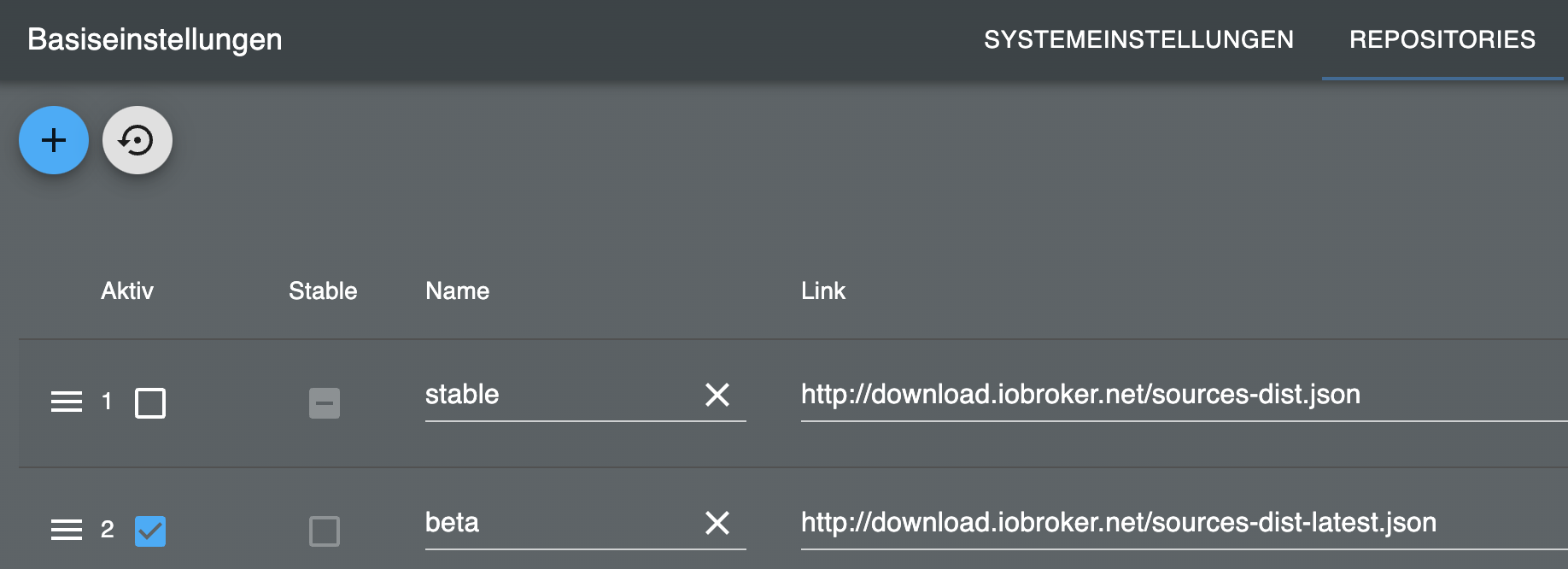
https://github.com/TA2k/ioBroker.parcelFür die aktuelle Version
 bitte das latest Repo auswählen:
Loginablauf
DHL:
- DHL App Login eingeben
- SMS/EMail Code erhalten
- In die Instanzeinstellungen eingeben und speichern
Amazon:
- Login eingeben
- Wenn nötig vorab ein OTP token aus der 2FA App eingeben.
DPD, GLS, UPS, Hermes, 17Track User:
Login und Passwort eingeben17Track User maximal 40 Pakete gleichzeitig:
https://buyer.17track.net/en/myshipment?ob=117Track Api developer maximal 100 Anfragen dann muss bezahlt werden
Hier ein Security Key beantragen und in die Einstellungen eingeben geht nur wenn man kein 17Track User ist
https://user.17track.net/de/register?gb=%23maybe%3D16
https://api.17track.net/en/admin/settingsTelegram Benachrichtigung für Sendungen und Briefe
In den Instanz Einstellung telegram.0 eingebenVis
delivery_status = {
ERROR: -1,
UNKNOWN: 5,
REGISTERED: 10,
IN_PREPARATION: 20,
IN_TRANSIT: 30,
OUT_FOR_DELIVERY: 40,
DELIVERED: 1,
};Sendungen als Vis Table darstellen
Datenpunkte alle Sendungen:
parcel.0.allProviderJsonDatenpunkte in Zustellung:
parcel.0.inDeliveryWidget: json Table
Anleitung:
https://www.smarthome-tricks.de/software-iobroker/iobroker-vis-json-table-widget-teil-1-basics/DHL Briefverfolgung in Vis anzeigen.
Den Datenpunkt image ein String img src element zuordnen

Den Datenpunkt image als HTML element in die vis einfügen mit folgendem Inhalt<img src="{parcel.0.dhl.briefe.oldAdvices01.advices01.image}" width="500px" />
Diskussion Widget
https://forum.iobroker.net/topic/53045/test-widget-vis-owl-v0-2-x-github
ich kann leider nicht genau sagen seit wann aber seit einiger Zeit erhalte ich keine Meldungen über PushOver.
pushover.3 2022-04-08 10:58:38.042 error Error from Pushover: message cannot be blank pushover.3 2022-04-08 10:58:37.882 info Send pushover notification: {"user":"","text":"📦 Amazon EU SARL\nZustellung erfolgreich","title":"Parcel","priority":0,"message":""}:Nachtrag v0.0.13
-
ich kann leider nicht genau sagen seit wann aber seit einiger Zeit erhalte ich keine Meldungen über PushOver.
pushover.3 2022-04-08 10:58:38.042 error Error from Pushover: message cannot be blank pushover.3 2022-04-08 10:58:37.882 info Send pushover notification: {"user":"","text":"📦 Amazon EU SARL\nZustellung erfolgreich","title":"Parcel","priority":0,"message":""}:Nachtrag v0.0.13
@senior1418 ist gefixt
-
Hi ich habe ein neuen Adapter für Paketverfolgung geschrieben
Anbieter:
DHL Paket und Briefe
DPD
GLS
UPS
Hermes
Amazon
17Track**Steuerung über ***
parcel.0.refresh Daten manuell updaten
parcel.0.17tuser.register Paket id unter 17TUser registrierenZum Installieren:
https://github.com/TA2k/ioBroker.parcelFür die aktuelle Version
bitte das latest Repo auswählen:
Loginablauf
DHL:
- DHL App Login eingeben
- SMS/EMail Code erhalten
- In die Instanzeinstellungen eingeben und speichern
Amazon:
- Login eingeben
- Wenn nötig vorab ein OTP token aus der 2FA App eingeben.
DPD, GLS, UPS, Hermes, 17Track User:
Login und Passwort eingeben17Track User maximal 40 Pakete gleichzeitig:
https://buyer.17track.net/en/myshipment?ob=117Track Api developer maximal 100 Anfragen dann muss bezahlt werden
Hier ein Security Key beantragen und in die Einstellungen eingeben geht nur wenn man kein 17Track User ist
https://user.17track.net/de/register?gb=%23maybe%3D16
https://api.17track.net/en/admin/settingsTelegram Benachrichtigung für Sendungen und Briefe
In den Instanz Einstellung telegram.0 eingebenVis
delivery_status = {
ERROR: -1,
UNKNOWN: 5,
REGISTERED: 10,
IN_PREPARATION: 20,
IN_TRANSIT: 30,
OUT_FOR_DELIVERY: 40,
DELIVERED: 1,
};Sendungen als Vis Table darstellen
Datenpunkte alle Sendungen:
parcel.0.allProviderJsonDatenpunkte in Zustellung:
parcel.0.inDeliveryWidget: json Table
Anleitung:
https://www.smarthome-tricks.de/software-iobroker/iobroker-vis-json-table-widget-teil-1-basics/DHL Briefverfolgung in Vis anzeigen.
Den Datenpunkt image ein String img src element zuordnen
Den Datenpunkt image als HTML element in die vis einfügen mit folgendem Inhalt<img src="{parcel.0.dhl.briefe.oldAdvices01.advices01.image}" width="500px" />Diskussion Widget
https://forum.iobroker.net/topic/53045/test-widget-vis-owl-v0-2-x-github
@tombox habe den adapter Installier und er bleibt rot
host.raspberrypi 2022-04-08 12:14:32.446 info Rebuild for adapter system.adapter.parcel.0 not successful in 3 tries. Adapter will not be restarted again. Please execute "npm install --production" in adapter directory manually. host.raspberrypi 2022-04-08 12:14:32.445 error instance system.adapter.parcel.0 terminated with code 1 (JS_CONTROLLER_STOPPED) host.raspberrypi 2022-04-08 12:14:32.444 error Caught by controller[0]: } host.raspberrypi 2022-04-08 12:14:32.443 error Caught by controller[0]: code: 'ERR_DLOPEN_FAILED' host.raspberrypi 2022-04-08 12:14:32.443 error Caught by controller[0]: at Function.Module._load (internal/modules/cjs/loader.js:790:12) { host.raspberrypi 2022-04-08 12:14:32.442 error Caught by controller[0]: at Module.load (internal/modules/cjs/loader.js:950:32) host.raspberrypi 2022-04-08 12:14:32.442 error Caught by controller[0]: at Object.Module._extensions..js (internal/modules/cjs/loader.js:1114:10) host.raspberrypi 2022-04-08 12:14:32.441 error Caught by controller[0]: at Module._compile (internal/modules/cjs/loader.js:1085:14) host.raspberrypi 2022-04-08 12:14:32.441 error Caught by controller[0]: at Object.<anonymous> (/opt/iobroker/node_modules/canvas/lib/bindings.js:3:18) host.raspberrypi 2022-04-08 12:14:32.440 error Caught by controller[0]: at require (internal/modules/cjs/helpers.js:93:18) host.raspberrypi 2022-04-08 12:14:32.440 error Caught by controller[0]: at Module.require (internal/modules/cjs/loader.js:974:19) host.raspberrypi 2022-04-08 12:14:32.439 error Caught by controller[0]: at Function.Module._load (internal/modules/cjs/loader.js:790:12) host.raspberrypi 2022-04-08 12:14:32.439 error Caught by controller[0]: at Module.load (internal/modules/cjs/loader.js:950:32) host.raspberrypi 2022-04-08 12:14:32.438 error Caught by controller[0]: at Object.Module._extensions..node (internal/modules/cjs/loader.js:1144:18) host.raspberrypi 2022-04-08 12:14:32.438 error Caught by controller[0]: the module (for instance, using `npm rebuild` or `npm install`). host.raspberrypi 2022-04-08 12:14:32.437 error Caught by controller[0]: NODE_MODULE_VERSION 83. Please try re-compiling or re-installing host.raspberrypi 2022-04-08 12:14:32.437 error Caught by controller[0]: NODE_MODULE_VERSION 72. This version of Node.js requires host.raspberrypi 2022-04-08 12:14:32.436 error Caught by controller[0]: was compiled against a different Node.js version using host.raspberrypi 2022-04-08 12:14:32.435 error Caught by controller[0]: Error: The module '/opt/iobroker/node_modules/canvas/build/Release/canvas.node' host.raspberrypi 2022-04-08 12:14:32.435 error Caught by controller[0]: ^ host.raspberrypi 2022-04-08 12:14:32.434 error Caught by controller[0]: return process.dlopen(module, path.toNamespacedPath(filename)); host.raspberrypi 2022-04-08 12:14:32.433 error Caught by controller[0]: internal/modules/cjs/loader.js:1144 host.raspberrypi 2022-04-08 12:14:28.563 info instance system.adapter.parcel.0 started with pid 2182 host.raspberrypi 2022-04-08 12:14:27.736 info "system.adapter.parcel.0" enabledioBroker auf Proxmox (Debian) auf LENOVO PC Thinkcentre als Produktivsystem
-
@tombox habe den adapter Installier und er bleibt rot
host.raspberrypi 2022-04-08 12:14:32.446 info Rebuild for adapter system.adapter.parcel.0 not successful in 3 tries. Adapter will not be restarted again. Please execute "npm install --production" in adapter directory manually. host.raspberrypi 2022-04-08 12:14:32.445 error instance system.adapter.parcel.0 terminated with code 1 (JS_CONTROLLER_STOPPED) host.raspberrypi 2022-04-08 12:14:32.444 error Caught by controller[0]: } host.raspberrypi 2022-04-08 12:14:32.443 error Caught by controller[0]: code: 'ERR_DLOPEN_FAILED' host.raspberrypi 2022-04-08 12:14:32.443 error Caught by controller[0]: at Function.Module._load (internal/modules/cjs/loader.js:790:12) { host.raspberrypi 2022-04-08 12:14:32.442 error Caught by controller[0]: at Module.load (internal/modules/cjs/loader.js:950:32) host.raspberrypi 2022-04-08 12:14:32.442 error Caught by controller[0]: at Object.Module._extensions..js (internal/modules/cjs/loader.js:1114:10) host.raspberrypi 2022-04-08 12:14:32.441 error Caught by controller[0]: at Module._compile (internal/modules/cjs/loader.js:1085:14) host.raspberrypi 2022-04-08 12:14:32.441 error Caught by controller[0]: at Object.<anonymous> (/opt/iobroker/node_modules/canvas/lib/bindings.js:3:18) host.raspberrypi 2022-04-08 12:14:32.440 error Caught by controller[0]: at require (internal/modules/cjs/helpers.js:93:18) host.raspberrypi 2022-04-08 12:14:32.440 error Caught by controller[0]: at Module.require (internal/modules/cjs/loader.js:974:19) host.raspberrypi 2022-04-08 12:14:32.439 error Caught by controller[0]: at Function.Module._load (internal/modules/cjs/loader.js:790:12) host.raspberrypi 2022-04-08 12:14:32.439 error Caught by controller[0]: at Module.load (internal/modules/cjs/loader.js:950:32) host.raspberrypi 2022-04-08 12:14:32.438 error Caught by controller[0]: at Object.Module._extensions..node (internal/modules/cjs/loader.js:1144:18) host.raspberrypi 2022-04-08 12:14:32.438 error Caught by controller[0]: the module (for instance, using `npm rebuild` or `npm install`). host.raspberrypi 2022-04-08 12:14:32.437 error Caught by controller[0]: NODE_MODULE_VERSION 83. Please try re-compiling or re-installing host.raspberrypi 2022-04-08 12:14:32.437 error Caught by controller[0]: NODE_MODULE_VERSION 72. This version of Node.js requires host.raspberrypi 2022-04-08 12:14:32.436 error Caught by controller[0]: was compiled against a different Node.js version using host.raspberrypi 2022-04-08 12:14:32.435 error Caught by controller[0]: Error: The module '/opt/iobroker/node_modules/canvas/build/Release/canvas.node' host.raspberrypi 2022-04-08 12:14:32.435 error Caught by controller[0]: ^ host.raspberrypi 2022-04-08 12:14:32.434 error Caught by controller[0]: return process.dlopen(module, path.toNamespacedPath(filename)); host.raspberrypi 2022-04-08 12:14:32.433 error Caught by controller[0]: internal/modules/cjs/loader.js:1144 host.raspberrypi 2022-04-08 12:14:28.563 info instance system.adapter.parcel.0 started with pid 2182 host.raspberrypi 2022-04-08 12:14:27.736 info "system.adapter.parcel.0" enabled -
@tombox sagte in Adapter Paketverfolgung DHL, Briefe, Amazon, DPD,GLS,UPS,17T:
cd /opt/iobroker/
npm install canvas
ich arbeite daran das es gefixt wird
pi@raspberrypi:/opt/iobroker $ iobroker stop pi@raspberrypi:/opt/iobroker $ cd /opt/iobroker/ pi@raspberrypi:/opt/iobroker $ sudo npm install canvas > canvas@2.9.1 install /opt/iobroker/node_modules/canvas > node-pre-gyp install --fallback-to-build node-pre-gyp WARN Pre-built binaries not installable for canvas@2.9.1 and node@14.18.1 (node-v83 ABI, glibc) (falling back to source compile with node-gyp) node-pre-gyp WARN Hit error EACCES: permission denied, mkdir '/opt/iobroker/node_modules/canvas/build' gyp WARN EACCES current user ("pi") does not have permission to access the dev dir "/root/.cache/node-gyp/14.18.1" gyp WARN EACCES attempting to reinstall using temporary dev dir "/tmp/.node-gyp" gyp ERR! configure error gyp ERR! stack Error: EACCES: permission denied, mkdir '/opt/iobroker/node_modules/canvas/build' gyp ERR! System Linux 5.10.17-v7l+ gyp ERR! command "/usr/bin/node" "/usr/lib/node_modules/npm/node_modules/node-gyp/bin/node-gyp.js" "configure" "--fallback-to-build" "--module=/opt/iobroker/node_modules/canvas/build/Release/canvas.node" "--module_name=canvas" "--module_path=/opt/iobroker/node_modules/canvas/build/Release" "--napi_version=8" "--node_abi_napi=napi" "--napi_build_version=0" "--node_napi_label=node-v83" gyp ERR! cwd /opt/iobroker/node_modules/canvas gyp ERR! node -v v14.18.1 gyp ERR! node-gyp -v v5.1.0 gyp ERR! not ok node-pre-gyp ERR! build error node-pre-gyp ERR! stack Error: Failed to execute '/usr/bin/node /usr/lib/node_modules/npm/node_modules/node-gyp/bin/node-gyp.js configure --fallback-to-build --module=/opt/iobroker/node_modules/canvas/build/Release/canvas.node --module_name=canvas --module_path=/opt/iobroker/node_modules/canvas/build/Release --napi_version=8 --node_abi_napi=napi --napi_build_version=0 --node_napi_label=node-v83' (1) node-pre-gyp ERR! stack at ChildProcess.<anonymous> (/opt/iobroker/node_modules/@mapbox/node-pre-gyp/lib/util/compile.js:89:23) node-pre-gyp ERR! stack at ChildProcess.emit (events.js:400:28) node-pre-gyp ERR! stack at maybeClose (internal/child_process.js:1058:16) node-pre-gyp ERR! stack at Process.ChildProcess._handle.onexit (internal/child_process.js:293:5) node-pre-gyp ERR! System Linux 5.10.17-v7l+ node-pre-gyp ERR! command "/usr/bin/node" "/opt/iobroker/node_modules/.bin/node-pre-gyp" "install" "--fallback-to-build" node-pre-gyp ERR! cwd /opt/iobroker/node_modules/canvas node-pre-gyp ERR! node -v v14.18.1 node-pre-gyp ERR! node-pre-gyp -v v1.0.6 node-pre-gyp ERR! not ok Failed to execute '/usr/bin/node /usr/lib/node_modules/npm/node_modules/node-gyp/bin/node-gyp.js configure --fallback-to-build --module=/opt/iobroker/node_modules/canvas/build/Release/canvas.node --module_name=canvas --module_path=/opt/iobroker/node_modules/canvas/build/Release --napi_version=8 --node_abi_napi=napi --napi_build_version=0 --node_napi_label=node-v83' (1) npm WARN @rollup/plugin-inject@4.0.4 requires a peer of rollup@^1.20.0 || ^2.0.0 but none is installed. You must install peer dependencies yourself. npm WARN @rollup/pluginutils@3.1.0 requires a peer of rollup@^1.20.0||^2.0.0 but none is installed. You must install peer dependencies yourself. npm WARN http-cookie-agent@1.0.5 requires a peer of tough-cookie@^4.0.0 but none is installed. You must install peer dependencies yourself. npm WARN rollup-plugin-polyfill-node@0.8.0 requires a peer of rollup@^1.20.0 || ^2.0.0 but none is installed. You must install peer dependencies yourself. npm ERR! code ELIFECYCLE npm ERR! errno 1 npm ERR! canvas@2.9.1 install: `node-pre-gyp install --fallback-to-build` npm ERR! Exit status 1 npm ERR! npm ERR! Failed at the canvas@2.9.1 install script. npm ERR! This is probably not a problem with npm. There is likely additional logging output above. npm ERR! A complete log of this run can be found in: npm ERR! /root/.npm/_logs/2022-04-08T14_22_43_117Z-debug.log pi@raspberrypi:/opt/iobroker $ioBroker auf Proxmox (Debian) auf LENOVO PC Thinkcentre als Produktivsystem
-
@tombox sagte in Adapter Paketverfolgung DHL, Briefe, Amazon, DPD,GLS,UPS,17T:
cd /opt/iobroker/
npm install canvas
ich arbeite daran das es gefixt wird
pi@raspberrypi:/opt/iobroker $ iobroker stop pi@raspberrypi:/opt/iobroker $ cd /opt/iobroker/ pi@raspberrypi:/opt/iobroker $ sudo npm install canvas > canvas@2.9.1 install /opt/iobroker/node_modules/canvas > node-pre-gyp install --fallback-to-build node-pre-gyp WARN Pre-built binaries not installable for canvas@2.9.1 and node@14.18.1 (node-v83 ABI, glibc) (falling back to source compile with node-gyp) node-pre-gyp WARN Hit error EACCES: permission denied, mkdir '/opt/iobroker/node_modules/canvas/build' gyp WARN EACCES current user ("pi") does not have permission to access the dev dir "/root/.cache/node-gyp/14.18.1" gyp WARN EACCES attempting to reinstall using temporary dev dir "/tmp/.node-gyp" gyp ERR! configure error gyp ERR! stack Error: EACCES: permission denied, mkdir '/opt/iobroker/node_modules/canvas/build' gyp ERR! System Linux 5.10.17-v7l+ gyp ERR! command "/usr/bin/node" "/usr/lib/node_modules/npm/node_modules/node-gyp/bin/node-gyp.js" "configure" "--fallback-to-build" "--module=/opt/iobroker/node_modules/canvas/build/Release/canvas.node" "--module_name=canvas" "--module_path=/opt/iobroker/node_modules/canvas/build/Release" "--napi_version=8" "--node_abi_napi=napi" "--napi_build_version=0" "--node_napi_label=node-v83" gyp ERR! cwd /opt/iobroker/node_modules/canvas gyp ERR! node -v v14.18.1 gyp ERR! node-gyp -v v5.1.0 gyp ERR! not ok node-pre-gyp ERR! build error node-pre-gyp ERR! stack Error: Failed to execute '/usr/bin/node /usr/lib/node_modules/npm/node_modules/node-gyp/bin/node-gyp.js configure --fallback-to-build --module=/opt/iobroker/node_modules/canvas/build/Release/canvas.node --module_name=canvas --module_path=/opt/iobroker/node_modules/canvas/build/Release --napi_version=8 --node_abi_napi=napi --napi_build_version=0 --node_napi_label=node-v83' (1) node-pre-gyp ERR! stack at ChildProcess.<anonymous> (/opt/iobroker/node_modules/@mapbox/node-pre-gyp/lib/util/compile.js:89:23) node-pre-gyp ERR! stack at ChildProcess.emit (events.js:400:28) node-pre-gyp ERR! stack at maybeClose (internal/child_process.js:1058:16) node-pre-gyp ERR! stack at Process.ChildProcess._handle.onexit (internal/child_process.js:293:5) node-pre-gyp ERR! System Linux 5.10.17-v7l+ node-pre-gyp ERR! command "/usr/bin/node" "/opt/iobroker/node_modules/.bin/node-pre-gyp" "install" "--fallback-to-build" node-pre-gyp ERR! cwd /opt/iobroker/node_modules/canvas node-pre-gyp ERR! node -v v14.18.1 node-pre-gyp ERR! node-pre-gyp -v v1.0.6 node-pre-gyp ERR! not ok Failed to execute '/usr/bin/node /usr/lib/node_modules/npm/node_modules/node-gyp/bin/node-gyp.js configure --fallback-to-build --module=/opt/iobroker/node_modules/canvas/build/Release/canvas.node --module_name=canvas --module_path=/opt/iobroker/node_modules/canvas/build/Release --napi_version=8 --node_abi_napi=napi --napi_build_version=0 --node_napi_label=node-v83' (1) npm WARN @rollup/plugin-inject@4.0.4 requires a peer of rollup@^1.20.0 || ^2.0.0 but none is installed. You must install peer dependencies yourself. npm WARN @rollup/pluginutils@3.1.0 requires a peer of rollup@^1.20.0||^2.0.0 but none is installed. You must install peer dependencies yourself. npm WARN http-cookie-agent@1.0.5 requires a peer of tough-cookie@^4.0.0 but none is installed. You must install peer dependencies yourself. npm WARN rollup-plugin-polyfill-node@0.8.0 requires a peer of rollup@^1.20.0 || ^2.0.0 but none is installed. You must install peer dependencies yourself. npm ERR! code ELIFECYCLE npm ERR! errno 1 npm ERR! canvas@2.9.1 install: `node-pre-gyp install --fallback-to-build` npm ERR! Exit status 1 npm ERR! npm ERR! Failed at the canvas@2.9.1 install script. npm ERR! This is probably not a problem with npm. There is likely additional logging output above. npm ERR! A complete log of this run can be found in: npm ERR! /root/.npm/_logs/2022-04-08T14_22_43_117Z-debug.log pi@raspberrypi:/opt/iobroker $@horst-böttcher sagte in Adapter Paketverfolgung DHL, Briefe, Amazon, DPD,GLS,UPS,17T:
sudo npm install canvas
NICHT mit sudo hantieren an der Stelle.
Stand aber auch offenbar so nicht in der Anleitung. Warum macht man das also dann doch?System auf Stand halten.
sudo apt update
sudo apt full-upgrade
sudo reboot
Danach als user:
cd /opt/iobroker npm install canvas -
@horst-böttcher sagte in Adapter Paketverfolgung DHL, Briefe, Amazon, DPD,GLS,UPS,17T:
sudo npm install canvas
NICHT mit sudo hantieren an der Stelle.
Stand aber auch offenbar so nicht in der Anleitung. Warum macht man das also dann doch?System auf Stand halten.
sudo apt update
sudo apt full-upgrade
sudo reboot
Danach als user:
cd /opt/iobroker npm install canvasich hatte es vorher ohne sudo gemacht
ioBroker auf Proxmox (Debian) auf LENOVO PC Thinkcentre als Produktivsystem
-
ich hatte es vorher ohne sudo gemacht
Hast du jetzt die Hausaufgaben erledigt? System auf Stand?
cd /opt/iobroker
npm ls canvas
liefert?
-
@senior1418 ist gefixt
@tombox sagte in Adapter Paketverfolgung DHL, Briefe, Amazon, DPD,GLS,UPS,17T:
ist gefixt
herzlichen Dank ! Es funktioniert wieder .
-
@basty2 bräuchte die genaue objekte wo die information drin sind.
Bei dpd muss erst auf die sendung geklickt werden damit man diese information sieht?@tombox Ich wollte nach dem aktuellen Stand nachfragen. Bei mir funktioniert die Darstellung der voraussichtlichen Lieferung und der Anzahl der Stopps nur bei Amazon. Die Infos gibt es bspw. teilweise auch bei der DHL. Ich fände es klasse, wenn diese Infos auch bei den anderen Unternehmen im JSON landen würden.
-
@tombox Ich wollte nach dem aktuellen Stand nachfragen. Bei mir funktioniert die Darstellung der voraussichtlichen Lieferung und der Anzahl der Stopps nur bei Amazon. Die Infos gibt es bspw. teilweise auch bei der DHL. Ich fände es klasse, wenn diese Infos auch bei den anderen Unternehmen im JSON landen würden.
-
@basty2 Also wenn sie nicht im rohen JSON sind wird es schwer darauf zuzugreifen. Ich habe bisher keine DHL mit Stop gehabt
@tombox
Ich hatte schon einige Lieferungen von DHL welche im Livetracking auch die Stopps angezeigt haben - allerdings nur in der Ordnerstruktur. Ich habe aber davon abgesehen dies zu visualisieren oder anders zu verarbeiten da sich die Anzahl der Stopps und eigentlich alle Daten im Livetracking ja auch nur ändern wenn sich die Instanz die Daten holt. In meinem Fall alle 15 Minuten und zwischen den Intervallen sind deutliche Abweichungen im Vergleich zur APP von DHL zu erkennen.
Habe im Moment leider keine Lieferung von DHL um auch mal zu sehen ob da was in der rohen JSON eingetragen wird.




Hey! Du scheinst an dieser Unterhaltung interessiert zu sein, hast aber noch kein Konto.
Hast du es satt, bei jedem Besuch durch die gleichen Beiträge zu scrollen? Wenn du dich für ein Konto anmeldest, kommst du immer genau dorthin zurück, wo du zuvor warst, und kannst dich über neue Antworten benachrichtigen lassen (entweder per E-Mail oder Push-Benachrichtigung). Du kannst auch Lesezeichen speichern und Beiträge positiv bewerten, um anderen Community-Mitgliedern deine Wertschätzung zu zeigen.
Mit deinem Input könnte dieser Beitrag noch besser werden 💗
Registrieren AnmeldenSupport us
343
Online33.0k
Benutzer83.6k
Themen1.3m
Beiträge