
NEWS




Test Adapter ioBroker.backitup v3.1.x
-
@simatec Leider genau das gleiche.
Started restore ...
[DEBUG] [influxDB] - Created tmp directory
[DEBUG] [influxDB] - Start infuxDB Restore ...
[ERROR] [influxDB] - 2021/12/02 13:28:53 error updating meta: DB metadata not changed. database may already exist
restore: DB metadata not changed. database may already exist

[DEBUG] [influxDB] - Try deleting the InfluxDB tmp directory
[DEBUG] [influxDB] - InfluxDB tmp directory was successfully deleted
[DEBUG] [influxDB] - infuxDB Restore completed successfully
[EXIT] influxDB restore done
Ein show database zeigt keine DB an und wenn ich den Adapter starte dann wird wieder die DB angelegt.
Wurde jetzt was zurückgespielt oder hat der Adapter einfach ne leere DB angelegt?EDIT: Ist ne leere DB /var/lib/influxdb/data/ sind 88KB und auf dem alten System sind es 75MB.
Mod-Edit: Code in </> Code-Tag gepackt!
-
@simatec Leider genau das gleiche.
Started restore ...
[DEBUG] [influxDB] - Created tmp directory
[DEBUG] [influxDB] - Start infuxDB Restore ...
[ERROR] [influxDB] - 2021/12/02 13:28:53 error updating meta: DB metadata not changed. database may already exist
restore: DB metadata not changed. database may already exist

[DEBUG] [influxDB] - Try deleting the InfluxDB tmp directory
[DEBUG] [influxDB] - InfluxDB tmp directory was successfully deleted
[DEBUG] [influxDB] - infuxDB Restore completed successfully
[EXIT] influxDB restore done
Ein show database zeigt keine DB an und wenn ich den Adapter starte dann wird wieder die DB angelegt.
Wurde jetzt was zurückgespielt oder hat der Adapter einfach ne leere DB angelegt?EDIT: Ist ne leere DB /var/lib/influxdb/data/ sind 88KB und auf dem alten System sind es 75MB.
Mod-Edit: Code in </> Code-Tag gepackt!
@firebowl Zeige doch mal bitte die Einstellungen in Backitup
-
Nachdem ich nun die fast 1500 Beiträge gelesen/überflogen habe, muss ich um eure Unterstützung bitten.
Als ich den Adapter eingerichtet habe und einmalig manuell das Backup erstellt wurde, sah alles super aus! Freude war groß...3 Tage mit viel probieren sind vorbei, die automatischen Backups liefern nur Datein mit einer Größe von 0kB ???
So schaut der Vorgang aus:Started iobroker ... [DEBUG] [mount] - noserverino option: false [DEBUG] [mount] - cifs-mount command: "sudo mount -t cifs -o username=Uwe,password=****,rw,file_mode=0777,dir_mode=0777,vers=3.1.1 //192.168.178.20/300_SMARTHOME/310_BACKUP/IOB_1 /opt/iobroker/backups" [DEBUG] [mount] - mount successfully completed [DEBUG] [mount] - done [DEBUG] [iobroker] - host.raspberrypi 15813 states saved [DEBUG] [iobroker] - host.raspberrypi 18592 objects saved [DEBUG] [iobroker] - Backup created: /opt/iobroker/backups/iobroker_2021_12_14-16_59_04_backupiobroker.tar.gz [DEBUG] [iobroker] - done [DEBUG] [influxDB] - InfluxDB-Backup started ... [DEBUG] [influxDB] - Start InfluxDB Backup ... [DEBUG] [influxDB] - InfluxDB Backup tmp directory created [DEBUG] [influxDB] - Backup created: /opt/iobroker/backups/influxDB_2021_12_14-16_59_23_backupiobroker.tar.gz [DEBUG] [influxDB] - Try deleting the InfluxDB tmp directory [DEBUG] [influxDB] - InfluxDB tmp directory was successfully deleted [DEBUG] [influxDB] - InfluxDB-Backup for is finish [DEBUG] [influxDB] - done [DEBUG] [mysql] - MySql-Backup started ... [ERROR] [mysql] - [IGNORED] Error: Command failed: mysqldump -u ioBroker -p**** iobroker -h 192.168.178.20 -P 3307 > /opt/iobroker/backups/mysql_2021_12_14-16_59_27_backupiobroker.sql /bin/sh: 1: mysqldump: not found [DEBUG] [historyDB] - compress from historyDB started ... [ERROR] [historyDB] - [IGNORED] Backitup cannot found source "undefined" for compress! [DEBUG] [grafana] - Start Grafana Backup ... [DEBUG] [grafana] - Created grafana_tmp directory: "/opt/iobroker/backups/grafana_tmp" [DEBUG] [grafana] - Created dashboard directory [DEBUG] [grafana] - Created dashboards_manually_restore directory [DEBUG] [grafana] - Created datasource directory [DEBUG] [grafana] - start Grafana request ... [DEBUG] [grafana] - Grafana is available ... Status: 200 [DEBUG] [grafana] - Error on Grafana Dashoard Request: Error: Request failed with status code 401 [DEBUG] [grafana] - start Grafana backup compress ... [DEBUG] [grafana] - Try deleting the Grafana tmp directory: "/opt/iobroker/backups/grafana_tmp" [DEBUG] [grafana] - Grafana tmp directory "/opt/iobroker/backups/grafana_tmp" successfully deleted [DEBUG] [grafana] - cannot found Grafana Backup files [DEBUG] [grafana] - done [DEBUG] [ftp] - FTP connected. [DEBUG] [ftp] - Send iobroker_2021_12_14-16_59_04_backupiobroker.tar.gz [DEBUG] [ftp] - Send influxDB_2021_12_14-16_59_23_backupiobroker.tar.gz [DEBUG] [ftp] - Send mysql_2021_12_14-16_59_27_backupiobroker.tar.gz [ERROR] [ftp] - File "/opt/iobroker/backups/mysql_2021_12_14-16_59_27_backupiobroker.tar.gz" not found [DEBUG] [ftp] - Send historyDB_2021_12_14-16_59_27_backupiobroker.tar.gz [ERROR] [ftp] - File "/opt/iobroker/backups/historyDB_2021_12_14-16_59_27_backupiobroker.tar.gz" not found [DEBUG] [ftp] - done [DEBUG] [cifs] - done [DEBUG] [googledrive] - Google Drive: Copy iobroker_2021_12_14-16_59_04_backupiobroker.tar.gz... [DEBUG] [googledrive] - Google Drive: Copy influxDB_2021_12_14-16_59_23_backupiobroker.tar.gz... [ERROR] [googledrive] - Google Drive: File "/opt/iobroker/backups/mysql_2021_12_14-16_59_27_backupiobroker.tar.gz" not found [ERROR] [googledrive] - Google Drive: File "/opt/iobroker/backups/historyDB_2021_12_14-16_59_27_backupiobroker.tar.gz" not found [DEBUG] [googledrive] - done [ERROR] [clean] - Backup files not deleted from /opt/iobroker/backups because some errors. [DEBUG] [clean] - done [DEBUG] [email] - done [DEBUG] [historyHTML] - new history html values created [DEBUG] [historyHTML] - done [DEBUG] [historyJSON] - new history json values created [DEBUG] [historyJSON] - done [DEBUG] [umount] - mount activ, umount is started ... [DEBUG] [umount] - umount successfully completed [DEBUG] [umount] - done [EXIT] 0Bei allen Sicherungsquellen wird das Backup mit 0kB abgelegt.
Hier sieht man, am 10.12. lief alles super, konnte auch einwandfrei rückspielen. An den anderen Tagen nur 0kB Datein.
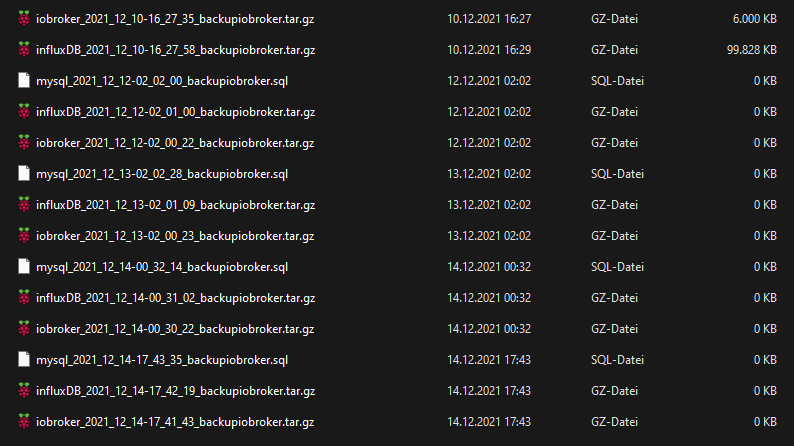
Mir ist bewußt, dass einige ERROR's stehen, aber leider für mich nicht verständlich, daher meine Bitte nach Hilfe!
Danke schon mal vorab. -
Nachdem ich nun die fast 1500 Beiträge gelesen/überflogen habe, muss ich um eure Unterstützung bitten.
Als ich den Adapter eingerichtet habe und einmalig manuell das Backup erstellt wurde, sah alles super aus! Freude war groß...3 Tage mit viel probieren sind vorbei, die automatischen Backups liefern nur Datein mit einer Größe von 0kB ???
So schaut der Vorgang aus:Started iobroker ... [DEBUG] [mount] - noserverino option: false [DEBUG] [mount] - cifs-mount command: "sudo mount -t cifs -o username=Uwe,password=****,rw,file_mode=0777,dir_mode=0777,vers=3.1.1 //192.168.178.20/300_SMARTHOME/310_BACKUP/IOB_1 /opt/iobroker/backups" [DEBUG] [mount] - mount successfully completed [DEBUG] [mount] - done [DEBUG] [iobroker] - host.raspberrypi 15813 states saved [DEBUG] [iobroker] - host.raspberrypi 18592 objects saved [DEBUG] [iobroker] - Backup created: /opt/iobroker/backups/iobroker_2021_12_14-16_59_04_backupiobroker.tar.gz [DEBUG] [iobroker] - done [DEBUG] [influxDB] - InfluxDB-Backup started ... [DEBUG] [influxDB] - Start InfluxDB Backup ... [DEBUG] [influxDB] - InfluxDB Backup tmp directory created [DEBUG] [influxDB] - Backup created: /opt/iobroker/backups/influxDB_2021_12_14-16_59_23_backupiobroker.tar.gz [DEBUG] [influxDB] - Try deleting the InfluxDB tmp directory [DEBUG] [influxDB] - InfluxDB tmp directory was successfully deleted [DEBUG] [influxDB] - InfluxDB-Backup for is finish [DEBUG] [influxDB] - done [DEBUG] [mysql] - MySql-Backup started ... [ERROR] [mysql] - [IGNORED] Error: Command failed: mysqldump -u ioBroker -p**** iobroker -h 192.168.178.20 -P 3307 > /opt/iobroker/backups/mysql_2021_12_14-16_59_27_backupiobroker.sql /bin/sh: 1: mysqldump: not found [DEBUG] [historyDB] - compress from historyDB started ... [ERROR] [historyDB] - [IGNORED] Backitup cannot found source "undefined" for compress! [DEBUG] [grafana] - Start Grafana Backup ... [DEBUG] [grafana] - Created grafana_tmp directory: "/opt/iobroker/backups/grafana_tmp" [DEBUG] [grafana] - Created dashboard directory [DEBUG] [grafana] - Created dashboards_manually_restore directory [DEBUG] [grafana] - Created datasource directory [DEBUG] [grafana] - start Grafana request ... [DEBUG] [grafana] - Grafana is available ... Status: 200 [DEBUG] [grafana] - Error on Grafana Dashoard Request: Error: Request failed with status code 401 [DEBUG] [grafana] - start Grafana backup compress ... [DEBUG] [grafana] - Try deleting the Grafana tmp directory: "/opt/iobroker/backups/grafana_tmp" [DEBUG] [grafana] - Grafana tmp directory "/opt/iobroker/backups/grafana_tmp" successfully deleted [DEBUG] [grafana] - cannot found Grafana Backup files [DEBUG] [grafana] - done [DEBUG] [ftp] - FTP connected. [DEBUG] [ftp] - Send iobroker_2021_12_14-16_59_04_backupiobroker.tar.gz [DEBUG] [ftp] - Send influxDB_2021_12_14-16_59_23_backupiobroker.tar.gz [DEBUG] [ftp] - Send mysql_2021_12_14-16_59_27_backupiobroker.tar.gz [ERROR] [ftp] - File "/opt/iobroker/backups/mysql_2021_12_14-16_59_27_backupiobroker.tar.gz" not found [DEBUG] [ftp] - Send historyDB_2021_12_14-16_59_27_backupiobroker.tar.gz [ERROR] [ftp] - File "/opt/iobroker/backups/historyDB_2021_12_14-16_59_27_backupiobroker.tar.gz" not found [DEBUG] [ftp] - done [DEBUG] [cifs] - done [DEBUG] [googledrive] - Google Drive: Copy iobroker_2021_12_14-16_59_04_backupiobroker.tar.gz... [DEBUG] [googledrive] - Google Drive: Copy influxDB_2021_12_14-16_59_23_backupiobroker.tar.gz... [ERROR] [googledrive] - Google Drive: File "/opt/iobroker/backups/mysql_2021_12_14-16_59_27_backupiobroker.tar.gz" not found [ERROR] [googledrive] - Google Drive: File "/opt/iobroker/backups/historyDB_2021_12_14-16_59_27_backupiobroker.tar.gz" not found [DEBUG] [googledrive] - done [ERROR] [clean] - Backup files not deleted from /opt/iobroker/backups because some errors. [DEBUG] [clean] - done [DEBUG] [email] - done [DEBUG] [historyHTML] - new history html values created [DEBUG] [historyHTML] - done [DEBUG] [historyJSON] - new history json values created [DEBUG] [historyJSON] - done [DEBUG] [umount] - mount activ, umount is started ... [DEBUG] [umount] - umount successfully completed [DEBUG] [umount] - done [EXIT] 0Bei allen Sicherungsquellen wird das Backup mit 0kB abgelegt.
Hier sieht man, am 10.12. lief alles super, konnte auch einwandfrei rückspielen. An den anderen Tagen nur 0kB Datein.
Mir ist bewußt, dass einige ERROR's stehen, aber leider für mich nicht verständlich, daher meine Bitte nach Hilfe!
Danke schon mal vorab.@ub-privat sagte in Test Adapter Backitup v2.2.x:
mysqldump not foundDa fehlt wohl was. Welche Datenbank? mariadb? mariadb-client dann installiert?
Dann würde ich auch nicht per ftp agieren sondern mit smb/cifs oder nfs.
Linux-Werkzeugkasten:
https://forum.iobroker.net/topic/42952/der-kleine-iobroker-linux-werkzeugkasten
NodeJS Fixer Skript:
https://forum.iobroker.net/topic/68035/iob-node-fix-skript
iob_diag: curl -sLf -o diag.sh https://iobroker.net/diag.sh && bash diag.sh -
@ub-privat sagte in Test Adapter Backitup v2.2.x:
mysqldump not foundDa fehlt wohl was. Welche Datenbank? mariadb? mariadb-client dann installiert?
Dann würde ich auch nicht per ftp agieren sondern mit smb/cifs oder nfs.
Danke für die schnelle Antwort.
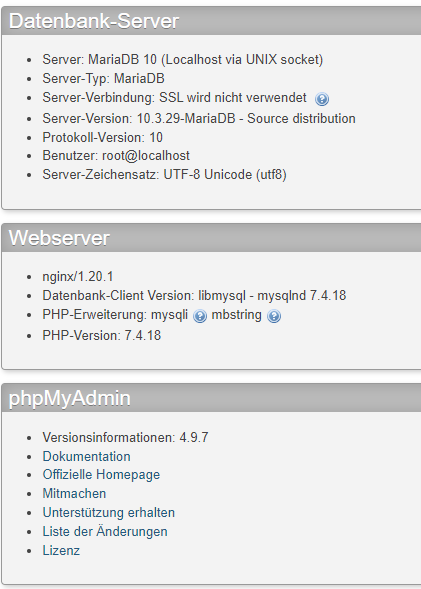
Ja eine MariaDB ist auf der Syno DS216P installiert. Diese wird auch aktiv angesprochen.
Einen Client habe ich auf dem Raspi definitiv nicht installiert (weiß leider nicht wie!).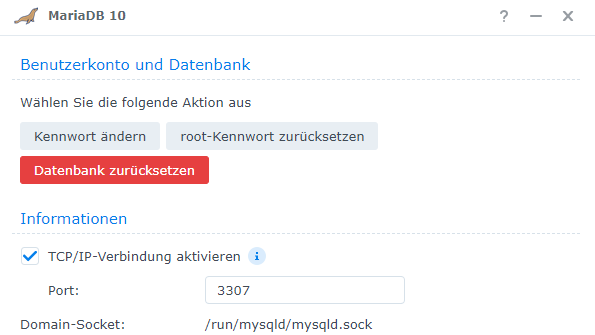
FTP habe ich nur als alternitves Sicherungsziel verwendet, kann also kurzfrisitg weg.
-
Danke für die schnelle Antwort.
Ja eine MariaDB ist auf der Syno DS216P installiert. Diese wird auch aktiv angesprochen.
Einen Client habe ich auf dem Raspi definitiv nicht installiert (weiß leider nicht wie!).FTP habe ich nur als alternitves Sicherungsziel verwendet, kann also kurzfrisitg weg.
@ub-privat
Auf dem Raspi muss ein Paket wie
mariadb-client-XXX
installiert sein. Wobei XXX für die Version steht.
Persudo apt update apt policy mariadb-client<TAB-Taste><TAB-Taste>kannst du schauen was da verfügbar ist.
Linux-Werkzeugkasten:
https://forum.iobroker.net/topic/42952/der-kleine-iobroker-linux-werkzeugkasten
NodeJS Fixer Skript:
https://forum.iobroker.net/topic/68035/iob-node-fix-skript
iob_diag: curl -sLf -o diag.sh https://iobroker.net/diag.sh && bash diag.sh -
@ub-privat
Auf dem Raspi muss ein Paket wie
mariadb-client-XXX
installiert sein. Wobei XXX für die Version steht.
Persudo apt update apt policy mariadb-client<TAB-Taste><TAB-Taste>kannst du schauen was da verfügbar ist.
-
mariadb-client-10.0 mariadb-client-10.3 mariadb-client-core-10.0 mariadb-client-core-10.3
@ub-privat
Und auf der anderen Kiste läuft welche Version? Ich würde da möglichst nah herangehen mit der Nummer.Linux-Werkzeugkasten:
https://forum.iobroker.net/topic/42952/der-kleine-iobroker-linux-werkzeugkasten
NodeJS Fixer Skript:
https://forum.iobroker.net/topic/68035/iob-node-fix-skript
iob_diag: curl -sLf -o diag.sh https://iobroker.net/diag.sh && bash diag.sh -
@ub-privat
Und auf der anderen Kiste läuft welche Version? Ich würde da möglichst nah herangehen mit der Nummer. -
@ub-privat
sudo apt install mariadb-client-10.3Linux-Werkzeugkasten:
https://forum.iobroker.net/topic/42952/der-kleine-iobroker-linux-werkzeugkasten
NodeJS Fixer Skript:
https://forum.iobroker.net/topic/68035/iob-node-fix-skript
iob_diag: curl -sLf -o diag.sh https://iobroker.net/diag.sh && bash diag.sh -
@ub-privat
sudo apt install mariadb-client-10.3das System noch einmal neu gebootet. Nun nochmals manuell das Backup anstoßen?
-
@ub-privat
sudo apt install mariadb-client-10.3Schaut schon ein wenig "besser" aus:
Started iobroker ...
[DEBUG] [mount] - noserverino option: false
[DEBUG] [mount] - cifs-mount command: "sudo mount -t cifs -o username=Uwe,password=****,rw,file_mode=0777,dir_mode=0777,vers=3.1.1 //192.168.178.20/300_SMARTHOME/310_BACKUP/IOB_1 /opt/iobroker/backups"
[DEBUG] [mount] - mount successfully completed
[DEBUG] [mount] - done
[DEBUG] [iobroker] - host.raspberrypi 15818 states saved

[DEBUG] [iobroker] - host.raspberrypi 18629 objects saved

[DEBUG] [iobroker] - Backup created: /opt/iobroker/backups/iobroker_2021_12_14-18_36_25_backupiobroker.tar.gz

[DEBUG] [iobroker] - done
[DEBUG] [influxDB] - InfluxDB-Backup started ...
[DEBUG] [influxDB] - Start InfluxDB Backup ...
[DEBUG] [influxDB] - InfluxDB Backup tmp directory created
[DEBUG] [influxDB] - Backup created: /opt/iobroker/backups/influxDB_2021_12_14-18_36_53_backupiobroker.tar.gz
[DEBUG] [influxDB] - Try deleting the InfluxDB tmp directory
[DEBUG] [influxDB] - InfluxDB tmp directory was successfully deleted
[DEBUG] [influxDB] - InfluxDB-Backup for is finish
[DEBUG] [influxDB] - done
[DEBUG] [mysql] - MySql-Backup started ...
[ERROR] [mysql] - [IGNORED] Error: Command failed: mysqldump  -u ioBroker -p**** iobroker -h 192.168.178.20 -P 3307 > /opt/iobroker/backups/mysql_2021_12_14-18_36_55_backupiobroker.sql
mysqldump: Got error: 1045: "Access denied for user 'ioBroker'@'raspberrypi-3.fritz.box' (using password: YES)" when trying to connect

[DEBUG] [historyDB] - compress from historyDB started ...
[ERROR] [historyDB] - [IGNORED] Backitup cannot found source "undefined" for compress!
[DEBUG] [grafana] - Start Grafana Backup ...
[DEBUG] [grafana] - Created grafana_tmp directory: "/opt/iobroker/backups/grafana_tmp"
[DEBUG] [grafana] - Created dashboard directory
[DEBUG] [grafana] - Created dashboards_manually_restore directory
[DEBUG] [grafana] - Created datasource directory
[DEBUG] [grafana] - start Grafana request ...
[DEBUG] [grafana] - Grafana is available ... Status: 200
[DEBUG] [grafana] - Error on Grafana Dashoard Request: Error: Request failed with status code 401
[DEBUG] [grafana] - start Grafana backup compress ...
[DEBUG] [grafana] - Try deleting the Grafana tmp directory: "/opt/iobroker/backups/grafana_tmp"
[DEBUG] [grafana] - Grafana tmp directory "/opt/iobroker/backups/grafana_tmp" successfully deleted
[DEBUG] [grafana] - cannot found Grafana Backup files
[DEBUG] [grafana] - done
[DEBUG] [cifs] - done
[DEBUG] [googledrive] - Google Drive: Copy iobroker_2021_12_14-18_36_25_backupiobroker.tar.gz...
[DEBUG] [googledrive] - Google Drive: Copy influxDB_2021_12_14-18_36_53_backupiobroker.tar.gz...
[ERROR] [googledrive] - Google Drive: File "/opt/iobroker/backups/mysql_2021_12_14-18_36_55_backupiobroker.tar.gz" not found
[ERROR] [googledrive] - Google Drive: File "/opt/iobroker/backups/historyDB_2021_12_14-18_36_58_backupiobroker.tar.gz" not found
[DEBUG] [googledrive] - done
[ERROR] [clean] - Backup files not deleted from /opt/iobroker/backups because some errors.
[DEBUG] [clean] - done
[DEBUG] [email] - done
[DEBUG] [historyHTML] - new history html values created
[DEBUG] [historyHTML] - done
[DEBUG] [historyJSON] - new history json values created
[DEBUG] [historyJSON] - done
[DEBUG] [umount] - mount activ, umount is started ...
[DEBUG] [umount] - umount successfully completed
[DEBUG] [umount] - done
[EXIT] 0
Nun kommt diese Fehlermeldung:
Got error: 1045: "Access denied for user 'ioBroker'@'raspberrypi-3.fritz.box' (using password: YES)" when trying to connect
InFlux DB und ioBroker - Backup wurden geschrieben! Freu...
Jetzt nich die mySQL hinbekommen!Ich verstehe aber nicht, warum jetzt die GZ-Datei geschrieben wird!?
-
Schaut schon ein wenig "besser" aus:
Started iobroker ...
[DEBUG] [mount] - noserverino option: false
[DEBUG] [mount] - cifs-mount command: "sudo mount -t cifs -o username=Uwe,password=****,rw,file_mode=0777,dir_mode=0777,vers=3.1.1 //192.168.178.20/300_SMARTHOME/310_BACKUP/IOB_1 /opt/iobroker/backups"
[DEBUG] [mount] - mount successfully completed
[DEBUG] [mount] - done
[DEBUG] [iobroker] - host.raspberrypi 15818 states saved

[DEBUG] [iobroker] - host.raspberrypi 18629 objects saved

[DEBUG] [iobroker] - Backup created: /opt/iobroker/backups/iobroker_2021_12_14-18_36_25_backupiobroker.tar.gz

[DEBUG] [iobroker] - done
[DEBUG] [influxDB] - InfluxDB-Backup started ...
[DEBUG] [influxDB] - Start InfluxDB Backup ...
[DEBUG] [influxDB] - InfluxDB Backup tmp directory created
[DEBUG] [influxDB] - Backup created: /opt/iobroker/backups/influxDB_2021_12_14-18_36_53_backupiobroker.tar.gz
[DEBUG] [influxDB] - Try deleting the InfluxDB tmp directory
[DEBUG] [influxDB] - InfluxDB tmp directory was successfully deleted
[DEBUG] [influxDB] - InfluxDB-Backup for is finish
[DEBUG] [influxDB] - done
[DEBUG] [mysql] - MySql-Backup started ...
[ERROR] [mysql] - [IGNORED] Error: Command failed: mysqldump  -u ioBroker -p**** iobroker -h 192.168.178.20 -P 3307 > /opt/iobroker/backups/mysql_2021_12_14-18_36_55_backupiobroker.sql
mysqldump: Got error: 1045: "Access denied for user 'ioBroker'@'raspberrypi-3.fritz.box' (using password: YES)" when trying to connect

[DEBUG] [historyDB] - compress from historyDB started ...
[ERROR] [historyDB] - [IGNORED] Backitup cannot found source "undefined" for compress!
[DEBUG] [grafana] - Start Grafana Backup ...
[DEBUG] [grafana] - Created grafana_tmp directory: "/opt/iobroker/backups/grafana_tmp"
[DEBUG] [grafana] - Created dashboard directory
[DEBUG] [grafana] - Created dashboards_manually_restore directory
[DEBUG] [grafana] - Created datasource directory
[DEBUG] [grafana] - start Grafana request ...
[DEBUG] [grafana] - Grafana is available ... Status: 200
[DEBUG] [grafana] - Error on Grafana Dashoard Request: Error: Request failed with status code 401
[DEBUG] [grafana] - start Grafana backup compress ...
[DEBUG] [grafana] - Try deleting the Grafana tmp directory: "/opt/iobroker/backups/grafana_tmp"
[DEBUG] [grafana] - Grafana tmp directory "/opt/iobroker/backups/grafana_tmp" successfully deleted
[DEBUG] [grafana] - cannot found Grafana Backup files
[DEBUG] [grafana] - done
[DEBUG] [cifs] - done
[DEBUG] [googledrive] - Google Drive: Copy iobroker_2021_12_14-18_36_25_backupiobroker.tar.gz...
[DEBUG] [googledrive] - Google Drive: Copy influxDB_2021_12_14-18_36_53_backupiobroker.tar.gz...
[ERROR] [googledrive] - Google Drive: File "/opt/iobroker/backups/mysql_2021_12_14-18_36_55_backupiobroker.tar.gz" not found
[ERROR] [googledrive] - Google Drive: File "/opt/iobroker/backups/historyDB_2021_12_14-18_36_58_backupiobroker.tar.gz" not found
[DEBUG] [googledrive] - done
[ERROR] [clean] - Backup files not deleted from /opt/iobroker/backups because some errors.
[DEBUG] [clean] - done
[DEBUG] [email] - done
[DEBUG] [historyHTML] - new history html values created
[DEBUG] [historyHTML] - done
[DEBUG] [historyJSON] - new history json values created
[DEBUG] [historyJSON] - done
[DEBUG] [umount] - mount activ, umount is started ...
[DEBUG] [umount] - umount successfully completed
[DEBUG] [umount] - done
[EXIT] 0
Nun kommt diese Fehlermeldung:
Got error: 1045: "Access denied for user 'ioBroker'@'raspberrypi-3.fritz.box' (using password: YES)" when trying to connect
InFlux DB und ioBroker - Backup wurden geschrieben! Freu...
Jetzt nich die mySQL hinbekommen!Ich verstehe aber nicht, warum jetzt die GZ-Datei geschrieben wird!?
@ub-privat
Der User muss dann auf dem Server auch angelegt sein. Sonst darf der natürlich auch keinen mysqldump ausführen.Linux-Werkzeugkasten:
https://forum.iobroker.net/topic/42952/der-kleine-iobroker-linux-werkzeugkasten
NodeJS Fixer Skript:
https://forum.iobroker.net/topic/68035/iob-node-fix-skript
iob_diag: curl -sLf -o diag.sh https://iobroker.net/diag.sh && bash diag.sh -
@ub-privat
Der User muss dann auf dem Server auch angelegt sein. Sonst darf der natürlich auch keinen mysqldump ausführen.ich muss nun in der MariaDB den Fritzbox-User mit dem entsprechenden Passwort anlegen/einrichten?
Puuh, da muss ich mal schauen, wie ich das hinbekomme...wäre dies die korrekte Vorgehensweise?
https://forum.iobroker.net/topic/3327/mariadb-auf-diskstation-als-datenbank-für-flot -
ich muss nun in der MariaDB den Fritzbox-User mit dem entsprechenden Passwort anlegen/einrichten?
Puuh, da muss ich mal schauen, wie ich das hinbekomme...wäre dies die korrekte Vorgehensweise?
https://forum.iobroker.net/topic/3327/mariadb-auf-diskstation-als-datenbank-für-flot@ub-privat
Keine Ahnung von mariadb.Linux-Werkzeugkasten:
https://forum.iobroker.net/topic/42952/der-kleine-iobroker-linux-werkzeugkasten
NodeJS Fixer Skript:
https://forum.iobroker.net/topic/68035/iob-node-fix-skript
iob_diag: curl -sLf -o diag.sh https://iobroker.net/diag.sh && bash diag.sh -
@ub-privat
Keine Ahnung von mariadb.OK, Schade.
Aktuell sind diese User eingerichtet:
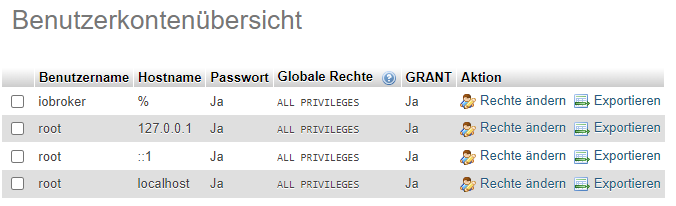
aber ist denn 'ioBroker'@'raspberrypi-3.fritz.box' nicht gleich der Benutzer "iobroker"?
Wie gesagt, alles "learning by doing" und die grenzenlose Forumshilfe!
-
@ub-privat
Keine Ahnung von mariadb.dann werede ich erst einmal die iobroker- und influx-Backups beobachten!
Vielen Dank für deine Hilfe! DANKE.
-
OK, Schade.
Aktuell sind diese User eingerichtet:
aber ist denn 'ioBroker'@'raspberrypi-3.fritz.box' nicht gleich der Benutzer "iobroker"?
Wie gesagt, alles "learning by doing" und die grenzenlose Forumshilfe!
gelöscht
Jeder Flow bzw. jedes Script, das ich hier poste implementiert jeder auf eigene Gefahr. Flows und Scripts können Fehler aufweisen und weder der Seitenbetreiber noch ich persönlich können hierfür haftbar gemacht werden. Das gleiche gilt für Empfehlungen aller Art.




Hey! Du scheinst an dieser Unterhaltung interessiert zu sein, hast aber noch kein Konto.
Hast du es satt, bei jedem Besuch durch die gleichen Beiträge zu scrollen? Wenn du dich für ein Konto anmeldest, kommst du immer genau dorthin zurück, wo du zuvor warst, und kannst dich über neue Antworten benachrichtigen lassen (entweder per E-Mail oder Push-Benachrichtigung). Du kannst auch Lesezeichen speichern und Beiträge positiv bewerten, um anderen Community-Mitgliedern deine Wertschätzung zu zeigen.
Mit deinem Input könnte dieser Beitrag noch besser werden 💗
Registrieren AnmeldenSupport us
451
Online33.1k
Benutzende83.7k
Themen1.3m
Beiträge