




Test Adapter Linux Control v1.x.x

-
@liv-in-sky Danke.
Ich habe jetzt die Abfrage mit acpitool gemacht.
Daten stehen jetzt im Datenpunkt. Jetzt nur noch versuchen zu parsen damit aus der einen Zeile etwas für mich brauchbares wird.
Das Ergebnis sieht aktuell nämlich noch so aus:
Battery #1 : Unknown, 100.0% AC adapter : online Thermal info : <not available>Und Ziel ist es ja die Akku Ladung in % zu nutzen um Laden ein/aus zu schalten.
@wendy2702 teste mal:
dein befehl | grep "Battery" | awk ' {print $5}' | sed 's/%//g'nach einem gelösten Thread wäre es sinnvoll dies in der Überschrift des ersten Posts einzutragen [gelöst]-... Bitte benutzt das Voting rechts unten im Beitrag wenn er euch geholfen hat. Forum-Tools: PicPick https://picpick.app/en/download/ und ScreenToGif https://www.screentogif.com/downloads.html
-
@wendy2702 teste mal:
dein befehl | grep "Battery" | awk ' {print $5}' | sed 's/%//g'@liv-in-sky sagte in Test Adapter Linux Control v1.x.x:
| grep "Battery" | awk ' {print $5}' | sed 's/%//g'
Auch das funktioniert natürlich.
Ich sehe denn Wald vor lauter Bäumen nicht und komme erst darauf das es Linux filtern ist und ich garnicht Parsen muss :-(
Vielen Dank!!!
-
@scrounger
würde gerne mein IoBroker Slave der auf einem Pi2 läuft mit deinem Adapter verwenden.
Es funktioniert soweit auch alles bis auf den dienst von iobroker!
Das ist kein Service..pi@raspberrypi:~ $ service iobroker iobroker: unrecognized service pi@raspberrypi:~ $mache ich aber
pi@raspberrypi:~ $ iobroker status
iobroker is running on this host.

At least one iobroker host is running.

Objects type: file
States  type: file
pi@raspberrypi:~ $
kann ich das als service machen oder wäre es möglich diese option in der services mit aufzunehmen.
-
@scrounger
würde gerne mein IoBroker Slave der auf einem Pi2 läuft mit deinem Adapter verwenden.
Es funktioniert soweit auch alles bis auf den dienst von iobroker!
Das ist kein Service..pi@raspberrypi:~ $ service iobroker iobroker: unrecognized service pi@raspberrypi:~ $mache ich aber
pi@raspberrypi:~ $ iobroker status
iobroker is running on this host.

At least one iobroker host is running.

Objects type: file
States  type: file
pi@raspberrypi:~ $
kann ich das als service machen oder wäre es möglich diese option in der services mit aufzunehmen.
@bishop sagte in Test Adapter Linux Control v1.x.x:
Es funktioniert soweit auch alles bis auf den dienst von iobroker!
Das ist kein Service..Iob ist ein service, zumindest mit Ubuntu & Debian Distributionen.

Was liefert denn der folgende Befehl bei dir?
systemctl status iobroker.servicekann ich das als service machen oder wäre es möglich diese option in der services mit aufzunehmen.
Du kannst das über den Reiter meine Befehle realisieren. Mit in Services werde ich es nicht einbauen, da es bei Ubuntu & Debian funktioniert.
-
@bishop Wie alt ist die Installation?
Kannst mal den Fixer laufen lassen. Danach sollte es ein Service sein wenn er durchläuft.
curl -sL https://iobroker.net/fix.sh | bash -danke hat funktioniert.
Ist etwas Offtopic aber ich wollte jetzt ein Js Controller update machen auf dem Raspberry pi2 und bekomme nun:
pi@raspberrypi:~ $ iobroker upgrade self
Update js-controller from @3.1.6 to @3.2.16
NPM version: 6.14.11
npm install iobroker.js-controller@3.2.16 --loglevel error --unsafe-perm --prefix "/opt/iobroker" (System call)
/opt/iobroker/node_modules/at-least-node/index.js:5
    location?: LocationCode;
             ^

SyntaxError: Unexpected token :
    at Module._compile (internal/modules/cjs/loader.js:723:23)
    at Object.Module._extensions..js (internal/modules/cjs/loader.js:789:10)
    at Module.load (internal/modules/cjs/loader.js:653:32)
    at tryModuleLoad (internal/modules/cjs/loader.js:593:12)
    at Function.Module._load (internal/modules/cjs/loader.js:585:3)
    at Module.require (internal/modules/cjs/loader.js:692:17)
    at require (internal/modules/cjs/helpers.js:25:18)
    at Object.<anonymous> (/opt/iobroker/node_modules/iobroker.js-controller/node_modules/fs-extra/lib/mkdirs/make-dir.js:9:21)
    at Module._compile (internal/modules/cjs/loader.js:778:30)
    at Object.Module._extensions..js (internal/modules/cjs/loader.js:789:10)
npm ERR! code ELIFECYCLE
npm ERR! errno 1
npm ERR! iobroker.js-controller@3.2.16 install: `node iobroker.js setup first`
npm ERR! Exit status 1
npm ERR!
npm ERR! Failed at the iobroker.js-controller@3.2.16 install script.
npm ERR! This is probably not a problem with npm. There is likely additional logging output above.

npm ERR! A complete log of this run can be found in:
npm ERR!     /home/iobroker/.npm/_logs/2021-03-05T06_55_14_822Z-debug.log
host.raspberrypi Cannot install iobroker.js-controller@3.2.16: 1
pi@raspberrypi:~ $ npm -v
6.14.11
vorher habe ich eine apt-get update und upgrade gemacht.
-
danke hat funktioniert.
Ist etwas Offtopic aber ich wollte jetzt ein Js Controller update machen auf dem Raspberry pi2 und bekomme nun:
pi@raspberrypi:~ $ iobroker upgrade self
Update js-controller from @3.1.6 to @3.2.16
NPM version: 6.14.11
npm install iobroker.js-controller@3.2.16 --loglevel error --unsafe-perm --prefix "/opt/iobroker" (System call)
/opt/iobroker/node_modules/at-least-node/index.js:5
    location?: LocationCode;
             ^

SyntaxError: Unexpected token :
    at Module._compile (internal/modules/cjs/loader.js:723:23)
    at Object.Module._extensions..js (internal/modules/cjs/loader.js:789:10)
    at Module.load (internal/modules/cjs/loader.js:653:32)
    at tryModuleLoad (internal/modules/cjs/loader.js:593:12)
    at Function.Module._load (internal/modules/cjs/loader.js:585:3)
    at Module.require (internal/modules/cjs/loader.js:692:17)
    at require (internal/modules/cjs/helpers.js:25:18)
    at Object.<anonymous> (/opt/iobroker/node_modules/iobroker.js-controller/node_modules/fs-extra/lib/mkdirs/make-dir.js:9:21)
    at Module._compile (internal/modules/cjs/loader.js:778:30)
    at Object.Module._extensions..js (internal/modules/cjs/loader.js:789:10)
npm ERR! code ELIFECYCLE
npm ERR! errno 1
npm ERR! iobroker.js-controller@3.2.16 install: `node iobroker.js setup first`
npm ERR! Exit status 1
npm ERR!
npm ERR! Failed at the iobroker.js-controller@3.2.16 install script.
npm ERR! This is probably not a problem with npm. There is likely additional logging output above.

npm ERR! A complete log of this run can be found in:
npm ERR!     /home/iobroker/.npm/_logs/2021-03-05T06_55_14_822Z-debug.log
host.raspberrypi Cannot install iobroker.js-controller@3.2.16: 1
pi@raspberrypi:~ $ npm -v
6.14.11
vorher habe ich eine apt-get update und upgrade gemacht.
iobroker stop iobroker update iobroker upgrade self iobroker start -
danke hat funktioniert.
Ist etwas Offtopic aber ich wollte jetzt ein Js Controller update machen auf dem Raspberry pi2 und bekomme nun:
pi@raspberrypi:~ $ iobroker upgrade self
Update js-controller from @3.1.6 to @3.2.16
NPM version: 6.14.11
npm install iobroker.js-controller@3.2.16 --loglevel error --unsafe-perm --prefix "/opt/iobroker" (System call)
/opt/iobroker/node_modules/at-least-node/index.js:5
    location?: LocationCode;
             ^

SyntaxError: Unexpected token :
    at Module._compile (internal/modules/cjs/loader.js:723:23)
    at Object.Module._extensions..js (internal/modules/cjs/loader.js:789:10)
    at Module.load (internal/modules/cjs/loader.js:653:32)
    at tryModuleLoad (internal/modules/cjs/loader.js:593:12)
    at Function.Module._load (internal/modules/cjs/loader.js:585:3)
    at Module.require (internal/modules/cjs/loader.js:692:17)
    at require (internal/modules/cjs/helpers.js:25:18)
    at Object.<anonymous> (/opt/iobroker/node_modules/iobroker.js-controller/node_modules/fs-extra/lib/mkdirs/make-dir.js:9:21)
    at Module._compile (internal/modules/cjs/loader.js:778:30)
    at Object.Module._extensions..js (internal/modules/cjs/loader.js:789:10)
npm ERR! code ELIFECYCLE
npm ERR! errno 1
npm ERR! iobroker.js-controller@3.2.16 install: `node iobroker.js setup first`
npm ERR! Exit status 1
npm ERR!
npm ERR! Failed at the iobroker.js-controller@3.2.16 install script.
npm ERR! This is probably not a problem with npm. There is likely additional logging output above.

npm ERR! A complete log of this run can be found in:
npm ERR!     /home/iobroker/.npm/_logs/2021-03-05T06_55_14_822Z-debug.log
host.raspberrypi Cannot install iobroker.js-controller@3.2.16: 1
pi@raspberrypi:~ $ npm -v
6.14.11
vorher habe ich eine apt-get update und upgrade gemacht.
which nodejs && nodejs -v && which node && node -v && which npm && npm -v && apt policy nodejs -
@fredf sagte in Test Adapter Linux Control v1.x.x:
iobroker stop iobroker update iobroker upgrade self iobroker startDas habe ich getan!
@thomas-braun sagte in Test Adapter Linux Control v1.x.x:
which nodejs && nodejs -v && which node && node -v && which npm && npm -v && apt policy nodejspi@raspberrypi:~ $ which nodejs && nodejs -v && which node && node -v && which npm && npm -v && apt policy nodejs /usr/bin/nodejs v10.24.0 /usr/bin/node v10.24.0 /usr/bin/npm 6.14.11 nodejs: Installed: 10.24.0-1nodesource1 Candidate: 10.24.0-1nodesource1 Version table: *** 10.24.0-1nodesource1 500 500 https://deb.nodesource.com/node_10.x buster/main armhf Packages 100 /var/lib/dpkg/status 10.24.0~dfsg-1~deb10u1 500 500 http://raspbian.raspberrypi.org/raspbian buster/main armhf Packages pi@raspberrypi:~ $ -
@fredf sagte in Test Adapter Linux Control v1.x.x:
iobroker stop
iobroker update
iobroker upgrade self
iobroker start
Das habe ich getan!
@thomas-braun sagte in Test Adapter Linux Control v1.x.x:
which nodejs && nodejs -v && which node && node -v && which npm && npm -v && apt policy nodejspi@raspberrypi:~ $ which nodejs && nodejs -v && which node && node -v && which npm && npm -v && apt policy nodejs /usr/bin/nodejs v10.24.0 /usr/bin/node v10.24.0 /usr/bin/npm 6.14.11 nodejs: Installed: 10.24.0-1nodesource1 Candidate: 10.24.0-1nodesource1 Version table: *** 10.24.0-1nodesource1 500 500 https://deb.nodesource.com/node_10.x buster/main armhf Packages 100 /var/lib/dpkg/status 10.24.0~dfsg-1~deb10u1 500 500 http://raspbian.raspberrypi.org/raspbian buster/main armhf Packages pi@raspberrypi:~ $sudo apt update sudo apt dist-upgrade sudo reboot -
sudo apt update sudo apt dist-upgrade sudo reboot@thomas-braun sagte in Test Adapter Linux Control v1.x.x:
sudo apt update sudo apt dist-upgrade sudo rebootpi@raspberrypi:~ $ sudo apt update Hit:1 http://raspbian.raspberrypi.org/raspbian buster InRelease Hit:2 http://archive.raspberrypi.org/debian buster InRelease Hit:3 http://packages.microsoft.com/repos/code stable InRelease Hit:4 https://www.pivccu.de/piVCCU stable InRelease Hit:5 https://deb.nodesource.com/node_10.x buster InRelease Reading package lists... Done Building dependency tree Reading state information... Done All packages are up to date. pi@raspberrypi:~ $ sudo apt dist-upgrade Reading package lists... Done Building dependency tree Reading state information... Done Calculating upgrade... Done 0 upgraded, 0 newly installed, 0 to remove and 0 not upgraded. pi@raspberrypi:~ $ -
@thomas-braun sagte in Test Adapter Linux Control v1.x.x:
sudo apt update
sudo apt dist-upgrade
sudo reboot
pi@raspberrypi:~ $ sudo apt update Hit:1 http://raspbian.raspberrypi.org/raspbian buster InRelease Hit:2 http://archive.raspberrypi.org/debian buster InRelease Hit:3 http://packages.microsoft.com/repos/code stable InRelease Hit:4 https://www.pivccu.de/piVCCU stable InRelease Hit:5 https://deb.nodesource.com/node_10.x buster InRelease Reading package lists... Done Building dependency tree Reading state information... Done All packages are up to date. pi@raspberrypi:~ $ sudo apt dist-upgrade Reading package lists... Done Building dependency tree Reading state information... Done Calculating upgrade... Done 0 upgraded, 0 newly installed, 0 to remove and 0 not upgraded. pi@raspberrypi:~ $ist es möglich auch die synology nas zu integrieren?
Habe sie mal mit im Adapter konfiguriert aber leider bleibt nur ein INFO Datenpunkt mit der Ip und das sie Offline ist, ist aber natürlich online SSH ist dort auch konfiguriert ich bekomme eine Verbindung mit Putty hin.
Kann das sein weil es keine richtige Distribution ist?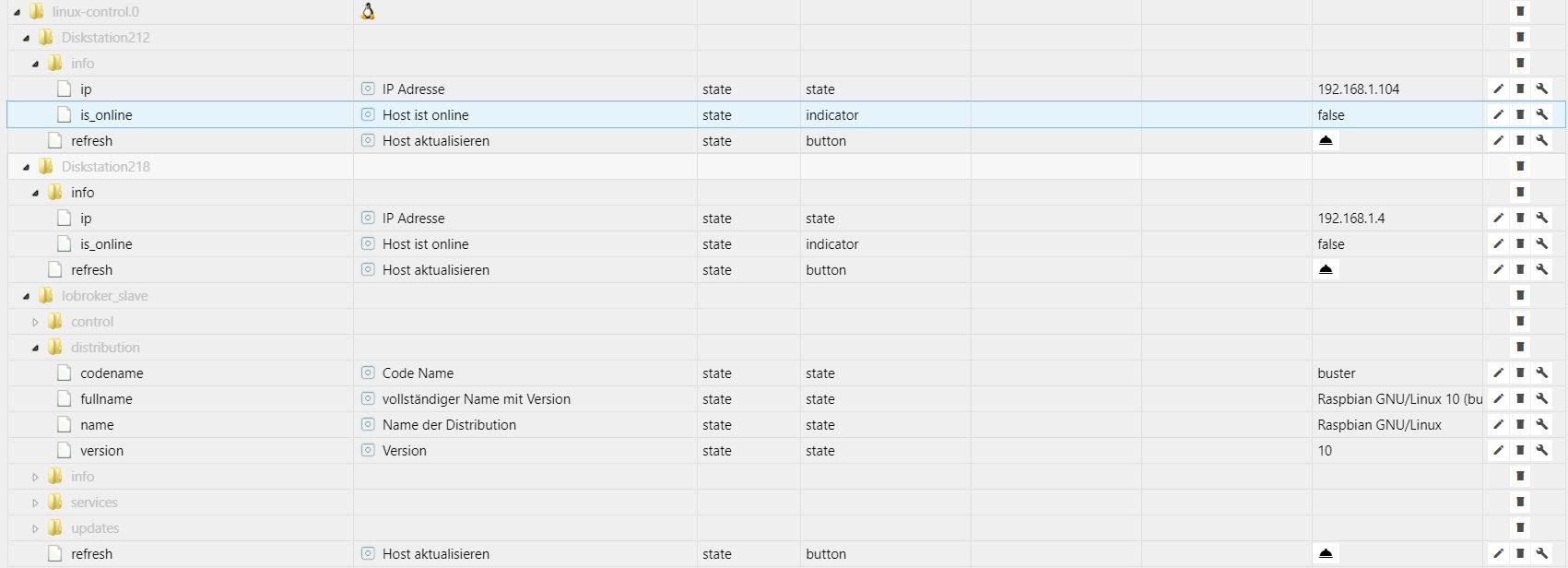
linux-control.0 2021-03-13 21:27:33.633 error at processTimers (internal/timers.js:497:7) linux-control.0 2021-03-13 21:27:33.633 error at listOnTimeout (internal/timers.js:554:17) linux-control.0 2021-03-13 21:27:33.633 error at Timeout._onTimeout (/opt/iobroker/node_modules/ssh2/lib/client.js:695:19) linux-control.0 2021-03-13 21:27:33.633 error (26597) [getConnection] error: Timed out while waiting for handshake, stack: Error: Timed out while waiting for handshake linux-control.0 2021-03-13 21:27:33.631 error (26597) [getConnection] Could not establish a connection to 'Diskstation218' (192.168.1.4:22)! linux-control.0 2021-03-13 21:27:28.341 error at processTimers (internal/timers.js:497:7) linux-control.0 2021-03-13 21:27:28.341 error at listOnTimeout (internal/timers.js:554:17) linux-control.0 2021-03-13 21:27:28.341 error at Timeout._onTimeout (/opt/iobroker/node_modules/ssh2/lib/client.js:695:19) linux-control.0 2021-03-13 21:27:28.341 error (26597) [getConnection] error: Timed out while waiting for handshake, stack: Error: Timed out while waiting for handshake linux-control.0 2021-03-13 21:27:28.275 error (26597) [getConnection] Could not establish a connection to 'Diskstation212' (192.168.1.104:22)! -
@bishop hmm, hab gerade meine 2 DS reingehängt, da kommt wirklich nicht viel rum. ausser bei der grossen mehr...
wenn du mehr infos brauchst, dann nimm den synology adapter... -
@da_woody
ja das habe ich auch schon probiert, wollte das ohne synology adapter versuchen :)werde das ganze mit nem rsa schlüssel versuchen vielleicht geht es damit besser!
-
@bishop tjo, schuss in den ofen... :) komisch ja auch, daß bei der 218+ nichtmal control kommt...
-
ist es möglich auch die synology nas zu integrieren?
Habe sie mal mit im Adapter konfiguriert aber leider bleibt nur ein INFO Datenpunkt mit der Ip und das sie Offline ist, ist aber natürlich online SSH ist dort auch konfiguriert ich bekomme eine Verbindung mit Putty hin.
Kann das sein weil es keine richtige Distribution ist?linux-control.0 2021-03-13 21:27:33.633 error at processTimers (internal/timers.js:497:7) linux-control.0 2021-03-13 21:27:33.633 error at listOnTimeout (internal/timers.js:554:17) linux-control.0 2021-03-13 21:27:33.633 error at Timeout._onTimeout (/opt/iobroker/node_modules/ssh2/lib/client.js:695:19) linux-control.0 2021-03-13 21:27:33.633 error (26597) [getConnection] error: Timed out while waiting for handshake, stack: Error: Timed out while waiting for handshake linux-control.0 2021-03-13 21:27:33.631 error (26597) [getConnection] Could not establish a connection to 'Diskstation218' (192.168.1.4:22)! linux-control.0 2021-03-13 21:27:28.341 error at processTimers (internal/timers.js:497:7) linux-control.0 2021-03-13 21:27:28.341 error at listOnTimeout (internal/timers.js:554:17) linux-control.0 2021-03-13 21:27:28.341 error at Timeout._onTimeout (/opt/iobroker/node_modules/ssh2/lib/client.js:695:19) linux-control.0 2021-03-13 21:27:28.341 error (26597) [getConnection] error: Timed out while waiting for handshake, stack: Error: Timed out while waiting for handshake linux-control.0 2021-03-13 21:27:28.275 error (26597) [getConnection] Could not establish a connection to 'Diskstation212' (192.168.1.104:22)!@bishop sagte in Test Adapter Linux Control v1.x.x:
linux-control.0	2021-03-13 21:27:28.341	error	(26597) [getConnection] error: Timed out while waiting for handshake, stack: Error: Timed out while waiting for handshake
linux-control.0	2021-03-13 21:27:28.275	error	(26597) [getConnection] Could not establish a connection to 'Diskstation212' (192.168.1.104:22)!
Hast du den timeout mal erhöht?
-
@bishop sagte in Test Adapter Linux Control v1.x.x:
linux-control.0	2021-03-13 21:27:28.341	error	(26597) [getConnection] error: Timed out while waiting for handshake, stack: Error: Timed out while waiting for handshake
linux-control.0	2021-03-13 21:27:28.275	error	(26597) [getConnection] Could not establish a connection to 'Diskstation212' (192.168.1.104:22)!
Hast du den timeout mal erhöht?
ja habe ich
linux-control.0	2021-03-14 13:25:03.940	error	at LinuxControl.onReady (/opt/iobroker/node_modules/iobroker.linux-control/main.js:54:5)
linux-control.0	2021-03-14 13:25:03.940	error	at LinuxControl.refreshHost (/opt/iobroker/node_modules/iobroker.linux-control/main.js:82:5)
linux-control.0	2021-03-14 13:25:03.940	error	at LinuxControl.servicesInfo (/opt/iobroker/node_modules/iobroker.linux-control/main.js:485:21)
linux-control.0	2021-03-14 13:25:03.940	error	at processTicksAndRejections (internal/process/task_queues.js:97:5)
linux-control.0	2021-03-14 13:25:03.940	error	at runMicrotasks (<anonymous>)
linux-control.0	2021-03-14 13:25:03.940	error	at LinuxControl.sendCommand (/opt/iobroker/node_modules/iobroker.linux-control/main.js:874:26)
linux-control.0	2021-03-14 13:25:03.940	error	(23028) [servicesInfo] Diskstation218 (192.168.1.4:22): response error: sh: systemctl: command not found, stack: ResponseError: [servicesInfo] Diskstation218 (192.168.1.4:22): sh: systemctl: command
linux-control.0	2021-03-14 13:25:03.551	error	at LinuxControl.onReady (/opt/iobroker/node_modules/iobroker.linux-control/main.js:54:5)
linux-control.0	2021-03-14 13:25:03.551	error	at LinuxControl.refreshHost (/opt/iobroker/node_modules/iobroker.linux-control/main.js:81:5)
linux-control.0	2021-03-14 13:25:03.551	error	at LinuxControl.updateInfos (/opt/iobroker/node_modules/iobroker.linux-control/main.js:609:5)
linux-control.0	2021-03-14 13:25:03.551	error	at LinuxControl.cmdAptUpdate (/opt/iobroker/node_modules/iobroker.linux-control/main.js:706:21)
linux-control.0	2021-03-14 13:25:03.551	error	at processTicksAndRejections (internal/process/task_queues.js:97:5)
linux-control.0	2021-03-14 13:25:03.551	error	at runMicrotasks (<anonymous>)
linux-control.0	2021-03-14 13:25:03.551	error	at LinuxControl.sendCommand (/opt/iobroker/node_modules/iobroker.linux-control/main.js:874:26)
linux-control.0	2021-03-14 13:25:03.551	error	(23028) [cmdAptUpdate] Diskstation218 (192.168.1.4:22): response error: sh: apt-get: command not found, stack: ResponseError: [cmdAptUpdate] Diskstation218 (192.168.1.4:22): sh: apt-get: command not
linux-control.0	2021-03-14 13:25:03.533	error	at LinuxControl.onReady (/opt/iobroker/node_modules/iobroker.linux-control/main.js:54:5)
linux-control.0	2021-03-14 13:25:03.533	error	at LinuxControl.refreshHost (/opt/iobroker/node_modules/iobroker.linux-control/main.js:80:5)
linux-control.0	2021-03-14 13:25:03.533	error	at LinuxControl.distributionInfo (/opt/iobroker/node_modules/iobroker.linux-control/main.js:553:21)
linux-control.0	2021-03-14 13:25:03.533	error	at processTicksAndRejections (internal/process/task_queues.js:97:5)
linux-control.0	2021-03-14 13:25:03.533	error	at runMicrotasks (<anonymous>)
linux-control.0	2021-03-14 13:25:03.533	error	at LinuxControl.sendCommand (/opt/iobroker/node_modules/iobroker.linux-control/main.js:874:26)
linux-control.0	2021-03-14 13:25:03.533	error	(23028) [distributionInfo] Diskstation218 (192.168.1.4:22): response error: cat: /etc/os-release: No such file or directory, stack: ResponseError: [distributionInfo] Diskstation218 (192.168.1.4:22):
host.iobroker	2021-03-14 13:24:27.723	info	instance system.adapter.linux-control.0 started with pid 23028
Der Synology Adapter ist im Prinzip möglich nur der stresst meine Nas ziemlich, wenn der Adapter läuft habe ich mindestens 30% mehr CPU auslastung!
-
ja habe ich
linux-control.0	2021-03-14 13:25:03.940	error	at LinuxControl.onReady (/opt/iobroker/node_modules/iobroker.linux-control/main.js:54:5)
linux-control.0	2021-03-14 13:25:03.940	error	at LinuxControl.refreshHost (/opt/iobroker/node_modules/iobroker.linux-control/main.js:82:5)
linux-control.0	2021-03-14 13:25:03.940	error	at LinuxControl.servicesInfo (/opt/iobroker/node_modules/iobroker.linux-control/main.js:485:21)
linux-control.0	2021-03-14 13:25:03.940	error	at processTicksAndRejections (internal/process/task_queues.js:97:5)
linux-control.0	2021-03-14 13:25:03.940	error	at runMicrotasks (<anonymous>)
linux-control.0	2021-03-14 13:25:03.940	error	at LinuxControl.sendCommand (/opt/iobroker/node_modules/iobroker.linux-control/main.js:874:26)
linux-control.0	2021-03-14 13:25:03.940	error	(23028) [servicesInfo] Diskstation218 (192.168.1.4:22): response error: sh: systemctl: command not found, stack: ResponseError: [servicesInfo] Diskstation218 (192.168.1.4:22): sh: systemctl: command
linux-control.0	2021-03-14 13:25:03.551	error	at LinuxControl.onReady (/opt/iobroker/node_modules/iobroker.linux-control/main.js:54:5)
linux-control.0	2021-03-14 13:25:03.551	error	at LinuxControl.refreshHost (/opt/iobroker/node_modules/iobroker.linux-control/main.js:81:5)
linux-control.0	2021-03-14 13:25:03.551	error	at LinuxControl.updateInfos (/opt/iobroker/node_modules/iobroker.linux-control/main.js:609:5)
linux-control.0	2021-03-14 13:25:03.551	error	at LinuxControl.cmdAptUpdate (/opt/iobroker/node_modules/iobroker.linux-control/main.js:706:21)
linux-control.0	2021-03-14 13:25:03.551	error	at processTicksAndRejections (internal/process/task_queues.js:97:5)
linux-control.0	2021-03-14 13:25:03.551	error	at runMicrotasks (<anonymous>)
linux-control.0	2021-03-14 13:25:03.551	error	at LinuxControl.sendCommand (/opt/iobroker/node_modules/iobroker.linux-control/main.js:874:26)
linux-control.0	2021-03-14 13:25:03.551	error	(23028) [cmdAptUpdate] Diskstation218 (192.168.1.4:22): response error: sh: apt-get: command not found, stack: ResponseError: [cmdAptUpdate] Diskstation218 (192.168.1.4:22): sh: apt-get: command not
linux-control.0	2021-03-14 13:25:03.533	error	at LinuxControl.onReady (/opt/iobroker/node_modules/iobroker.linux-control/main.js:54:5)
linux-control.0	2021-03-14 13:25:03.533	error	at LinuxControl.refreshHost (/opt/iobroker/node_modules/iobroker.linux-control/main.js:80:5)
linux-control.0	2021-03-14 13:25:03.533	error	at LinuxControl.distributionInfo (/opt/iobroker/node_modules/iobroker.linux-control/main.js:553:21)
linux-control.0	2021-03-14 13:25:03.533	error	at processTicksAndRejections (internal/process/task_queues.js:97:5)
linux-control.0	2021-03-14 13:25:03.533	error	at runMicrotasks (<anonymous>)
linux-control.0	2021-03-14 13:25:03.533	error	at LinuxControl.sendCommand (/opt/iobroker/node_modules/iobroker.linux-control/main.js:874:26)
linux-control.0	2021-03-14 13:25:03.533	error	(23028) [distributionInfo] Diskstation218 (192.168.1.4:22): response error: cat: /etc/os-release: No such file or directory, stack: ResponseError: [distributionInfo] Diskstation218 (192.168.1.4:22):
host.iobroker	2021-03-14 13:24:27.723	info	instance system.adapter.linux-control.0 started with pid 23028
Der Synology Adapter ist im Prinzip möglich nur der stresst meine Nas ziemlich, wenn der Adapter läuft habe ich mindestens 30% mehr CPU auslastung!
@bishop dann stimmt was nicht mit der config oder system, der Synology Adapter braucht nicht viel Ressourcen.
Welche Version hast du denn installiert? -
ja habe ich
linux-control.0	2021-03-14 13:25:03.940	error	at LinuxControl.onReady (/opt/iobroker/node_modules/iobroker.linux-control/main.js:54:5)
linux-control.0	2021-03-14 13:25:03.940	error	at LinuxControl.refreshHost (/opt/iobroker/node_modules/iobroker.linux-control/main.js:82:5)
linux-control.0	2021-03-14 13:25:03.940	error	at LinuxControl.servicesInfo (/opt/iobroker/node_modules/iobroker.linux-control/main.js:485:21)
linux-control.0	2021-03-14 13:25:03.940	error	at processTicksAndRejections (internal/process/task_queues.js:97:5)
linux-control.0	2021-03-14 13:25:03.940	error	at runMicrotasks (<anonymous>)
linux-control.0	2021-03-14 13:25:03.940	error	at LinuxControl.sendCommand (/opt/iobroker/node_modules/iobroker.linux-control/main.js:874:26)
linux-control.0	2021-03-14 13:25:03.940	error	(23028) [servicesInfo] Diskstation218 (192.168.1.4:22): response error: sh: systemctl: command not found, stack: ResponseError: [servicesInfo] Diskstation218 (192.168.1.4:22): sh: systemctl: command
linux-control.0	2021-03-14 13:25:03.551	error	at LinuxControl.onReady (/opt/iobroker/node_modules/iobroker.linux-control/main.js:54:5)
linux-control.0	2021-03-14 13:25:03.551	error	at LinuxControl.refreshHost (/opt/iobroker/node_modules/iobroker.linux-control/main.js:81:5)
linux-control.0	2021-03-14 13:25:03.551	error	at LinuxControl.updateInfos (/opt/iobroker/node_modules/iobroker.linux-control/main.js:609:5)
linux-control.0	2021-03-14 13:25:03.551	error	at LinuxControl.cmdAptUpdate (/opt/iobroker/node_modules/iobroker.linux-control/main.js:706:21)
linux-control.0	2021-03-14 13:25:03.551	error	at processTicksAndRejections (internal/process/task_queues.js:97:5)
linux-control.0	2021-03-14 13:25:03.551	error	at runMicrotasks (<anonymous>)
linux-control.0	2021-03-14 13:25:03.551	error	at LinuxControl.sendCommand (/opt/iobroker/node_modules/iobroker.linux-control/main.js:874:26)
linux-control.0	2021-03-14 13:25:03.551	error	(23028) [cmdAptUpdate] Diskstation218 (192.168.1.4:22): response error: sh: apt-get: command not found, stack: ResponseError: [cmdAptUpdate] Diskstation218 (192.168.1.4:22): sh: apt-get: command not
linux-control.0	2021-03-14 13:25:03.533	error	at LinuxControl.onReady (/opt/iobroker/node_modules/iobroker.linux-control/main.js:54:5)
linux-control.0	2021-03-14 13:25:03.533	error	at LinuxControl.refreshHost (/opt/iobroker/node_modules/iobroker.linux-control/main.js:80:5)
linux-control.0	2021-03-14 13:25:03.533	error	at LinuxControl.distributionInfo (/opt/iobroker/node_modules/iobroker.linux-control/main.js:553:21)
linux-control.0	2021-03-14 13:25:03.533	error	at processTicksAndRejections (internal/process/task_queues.js:97:5)
linux-control.0	2021-03-14 13:25:03.533	error	at runMicrotasks (<anonymous>)
linux-control.0	2021-03-14 13:25:03.533	error	at LinuxControl.sendCommand (/opt/iobroker/node_modules/iobroker.linux-control/main.js:874:26)
linux-control.0	2021-03-14 13:25:03.533	error	(23028) [distributionInfo] Diskstation218 (192.168.1.4:22): response error: cat: /etc/os-release: No such file or directory, stack: ResponseError: [distributionInfo] Diskstation218 (192.168.1.4:22):
host.iobroker	2021-03-14 13:24:27.723	info	instance system.adapter.linux-control.0 started with pid 23028
Der Synology Adapter ist im Prinzip möglich nur der stresst meine Nas ziemlich, wenn der Adapter läuft habe ich mindestens 30% mehr CPU auslastung!






Hey! Du scheinst an dieser Unterhaltung interessiert zu sein, hast aber noch kein Konto.
Hast du es satt, bei jedem Besuch durch die gleichen Beiträge zu scrollen? Wenn du dich für ein Konto anmeldest, kommst du immer genau dorthin zurück, wo du zuvor warst, und kannst dich über neue Antworten benachrichtigen lassen (entweder per E-Mail oder Push-Benachrichtigung). Du kannst auch Lesezeichen speichern und Beiträge positiv bewerten, um anderen Community-Mitgliedern deine Wertschätzung zu zeigen.
Mit deinem Input könnte dieser Beitrag noch besser werden 💗
Registrieren AnmeldenSupport us
437
Online33.1k
Benutzende83.7k
Themen1.3m
Beiträge