Skip to content
  • Home
  • Aktuell
  • Tags
  • 0 Ungelesen 0
  • Kategorien
  • Unreplied
  • Beliebt
  • GitHub
  • Docu
  • Hilfe
Skins
  • Light
  • Brite
  • Cerulean
  • Cosmo
  • Flatly
  • Journal
  • Litera
  • Lumen
  • Lux
  • Materia
  • Minty
  • Morph
  • Pulse
  • Sandstone
  • Simplex
  • Sketchy
  • Spacelab
  • United
  • Yeti
  • Zephyr
  • Dark
  • Cyborg
  • Darkly
  • Quartz
  • Slate
  • Solar
  • Superhero
  • Vapor

  • Standard: (Kein Skin)
  • Kein Skin
Einklappen
ioBroker Logo

Community Forum

donate donate
  1. ioBroker Community Home
  2. Deutsch
  3. Error/Bug
  4. (Alexa Adapter) Cannot find module 'https-proxy-agent'

NEWS

  • Weihnachtsangebot 2025! 🎄
    BluefoxB
    Bluefox
    22
    1
    1.2k

  • UPDATE 31.10.: Amazon Alexa - ioBroker Skill läuft aus ?
    apollon77A
    apollon77
    48
    3
    9.2k

  • Monatsrückblick – September 2025
    BluefoxB
    Bluefox
    14
    1
    2.5k

(Alexa Adapter) Cannot find module 'https-proxy-agent'

Geplant Angeheftet Gesperrt Verschoben Ungelöst Error/Bug
alexahttps-proxy-agenterror
31 Beiträge 7 Kommentatoren 3.7k Aufrufe 7 Watching
  • Älteste zuerst
  • Neuste zuerst
  • Meiste Stimmen
Antworten
  • In einem neuen Thema antworten
Anmelden zum Antworten
Dieses Thema wurde gelöscht. Nur Nutzer mit entsprechenden Rechten können es sehen.
  • M mrzee

    Bei mir ist es das gleiche.
    System ist jedoch Ubuntu - nach dem letzten Update bekomme ich die gleichen Fehlermeldungen und stelle fest, dass der Pfad, auf den das Log verweist, gar nicht existiert.
    Gleichmaßen kann ich den http-proxy-agent aber auch nicht neuinstallieren.

    Thomas BraunT Online
    Thomas BraunT Online
    Thomas Braun
    Most Active
    schrieb am zuletzt editiert von
    #12

    @mrzee Für Ubuntu gelten die gleichen Anmerkungen zu nodejs wie zu Debian.

    Linux-Werkzeugkasten:
    https://forum.iobroker.net/topic/42952/der-kleine-iobroker-linux-werkzeugkasten
    NodeJS Fixer Skript:
    https://forum.iobroker.net/topic/68035/iob-node-fix-skript
    iob_diag: curl -sLf -o diag.sh https://iobroker.net/diag.sh && bash diag.sh

    M 1 Antwort Letzte Antwort
    0
    • Thomas BraunT Thomas Braun

      @mrzee Für Ubuntu gelten die gleichen Anmerkungen zu nodejs wie zu Debian.

      M Offline
      M Offline
      mrzee
      schrieb am zuletzt editiert von mrzee
      #13

      @Thomas-Braun

      Danke - ich komme mit den ganzen Distris immer durcheinander. Ich habe das Problem aber gefunden:
      Scheinbar wurde bei einem Update, entweder Adapter oder OS, das Verzeichnis /opt/iobroker/node_modules/https-proxy-agent wie auch immer beschädigt. Eine manuelle Neuinstallation via NPM hat funktioniert und der Adapter läuft wieder.

      1 Antwort Letzte Antwort
      0
      • B Offline
        B Offline
        Bibo*13
        schrieb am zuletzt editiert von
        #14

        Hi wunderbar das das Problem gefunden wurde.
        Leider bin ich etwas unbedart und weiß nicht wie ich den fehlenden http-proxy-agent fixen soll.
        Kann mir bitte jemand da auf die Sprünge helfen.

        1 Antwort Letzte Antwort
        0
        • C Offline
          C Offline
          Chrischo
          schrieb am zuletzt editiert von
          #15

          Würde mich auch interessieren. Habe den fixer laufen lassen - hat aber nicht geholfen. Habe die Instanz und den kompletten Adapter deinstalliert und anschließend neu installiert - leider auch keine Besserung. Das ist aber wirklich sehr ärgerlich.

          1 Antwort Letzte Antwort
          0
          • C Offline
            C Offline
            Chrischo
            schrieb am zuletzt editiert von
            #16

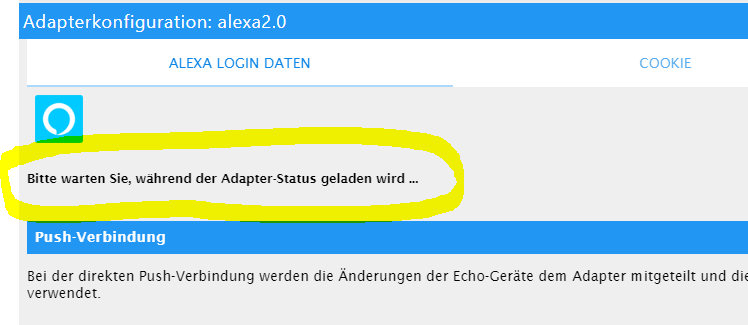
            alexa.PNG

            Dabei bleibt´s dann stehen und der Adapter startet nicht.

            Thomas BraunT 1 Antwort Letzte Antwort
            0
            • C Chrischo

              alexa.PNG

              Dabei bleibt´s dann stehen und der Adapter startet nicht.

              Thomas BraunT Online
              Thomas BraunT Online
              Thomas Braun
              Most Active
              schrieb am zuletzt editiert von
              #17

              @Chrischo Und was sagt das Log? Und ist nodejs sauber?

              Linux-Werkzeugkasten:
              https://forum.iobroker.net/topic/42952/der-kleine-iobroker-linux-werkzeugkasten
              NodeJS Fixer Skript:
              https://forum.iobroker.net/topic/68035/iob-node-fix-skript
              iob_diag: curl -sLf -o diag.sh https://iobroker.net/diag.sh && bash diag.sh

              C 1 Antwort Letzte Antwort
              0
              • Thomas BraunT Thomas Braun

                @Chrischo Und was sagt das Log? Und ist nodejs sauber?

                C Offline
                C Offline
                Chrischo
                schrieb am zuletzt editiert von
                #18

                @Thomas-Braun
                nicht viel Neues :-(

                host.raspberrypi	2020-07-19 14:20:20.839	error	instance system.adapter.alexa2.0 terminated with code 1 (JS_CONTROLLER_STOPPED)
                host.raspberrypi	2020-07-19 14:20:20.839	error	Caught by controller[0]: }
                host.raspberrypi	2020-07-19 14:20:20.838	error	Caught by controller[0]: ]
                host.raspberrypi	2020-07-19 14:20:20.838	error	Caught by controller[0]: '/opt/iobroker/node_modules/iobroker.alexa2/main.js'
                host.raspberrypi	2020-07-19 14:20:20.838	error	Caught by controller[0]: '/opt/iobroker/node_modules/virtual-device-sdk/lib/src/Index.js',
                host.raspberrypi	2020-07-19 14:20:20.838	error	Caught by controller[0]: '/opt/iobroker/node_modules/virtual-device-sdk/lib/src/VirtualDevice.js',
                host.raspberrypi	2020-07-19 14:20:20.838	error	Caught by controller[0]: requireStack: [
                host.raspberrypi	2020-07-19 14:20:20.838	error	Caught by controller[0]: code: 'MODULE_NOT_FOUND',
                host.raspberrypi	2020-07-19 14:20:20.837	error	Caught by controller[0]: at Module.require (internal/modules/cjs/loader.js:1026:19) {
                host.raspberrypi	2020-07-19 14:20:20.837	error	Caught by controller[0]: at Function.Module._load (internal/modules/cjs/loader.js:879:14)
                host.raspberrypi	2020-07-19 14:20:20.837	error	Caught by controller[0]: at Module.load (internal/modules/cjs/loader.js:986:32)
                host.raspberrypi	2020-07-19 14:20:20.837	error	Caught by controller[0]: at Object.Module._extensions..js (internal/modules/cjs/loader.js:1158:10)
                host.raspberrypi	2020-07-19 14:20:20.837	error	Caught by controller[0]: at Module._compile (internal/modules/cjs/loader.js:1138:30)
                host.raspberrypi	2020-07-19 14:20:20.836	error	Caught by controller[0]: at Object.<anonymous> (/opt/iobroker/node_modules/virtual-device-sdk/lib/src/VirtualDevice.js:41:23)
                host.raspberrypi	2020-07-19 14:20:20.836	error	Caught by controller[0]: at require (internal/modules/cjs/helpers.js:72:18)
                host.raspberrypi	2020-07-19 14:20:20.836	error	Caught by controller[0]: at Module.require (internal/modules/cjs/loader.js:1026:19)
                host.raspberrypi	2020-07-19 14:20:20.836	error	Caught by controller[0]: at Function.Module._load (internal/modules/cjs/loader.js:842:27)
                host.raspberrypi	2020-07-19 14:20:20.836	error	Caught by controller[0]: at Function.Module._resolveFilename (internal/modules/cjs/loader.js:966:15)
                host.raspberrypi	2020-07-19 14:20:20.835	error	Caught by controller[0]: - /opt/iobroker/node_modules/iobroker.alexa2/main.js
                host.raspberrypi	2020-07-19 14:20:20.835	error	Caught by controller[0]: - /opt/iobroker/node_modules/virtual-device-sdk/lib/src/Index.js
                host.raspberrypi	2020-07-19 14:20:20.835	error	Caught by controller[0]: - /opt/iobroker/node_modules/virtual-device-sdk/lib/src/VirtualDevice.js
                host.raspberrypi	2020-07-19 14:20:20.835	error	Caught by controller[0]: Require stack:
                host.raspberrypi	2020-07-19 14:20:20.835	error	Caught by controller[0]: Error: Cannot find module 'https-proxy-agent'
                host.raspberrypi	2020-07-19 14:20:20.835	error	Caught by controller[0]: ^
                host.raspberrypi	2020-07-19 14:20:20.834	error	Caught by controller[0]: throw err;
                host.raspberrypi	2020-07-19 14:20:20.834	error	Caught by controller[0]: internal/modules/cjs/loader.js:969
                
                Thomas BraunT 1 Antwort Letzte Antwort
                0
                • C Chrischo

                  @Thomas-Braun
                  nicht viel Neues :-(

                  host.raspberrypi	2020-07-19 14:20:20.839	error	instance system.adapter.alexa2.0 terminated with code 1 (JS_CONTROLLER_STOPPED)
                  host.raspberrypi	2020-07-19 14:20:20.839	error	Caught by controller[0]: }
                  host.raspberrypi	2020-07-19 14:20:20.838	error	Caught by controller[0]: ]
                  host.raspberrypi	2020-07-19 14:20:20.838	error	Caught by controller[0]: '/opt/iobroker/node_modules/iobroker.alexa2/main.js'
                  host.raspberrypi	2020-07-19 14:20:20.838	error	Caught by controller[0]: '/opt/iobroker/node_modules/virtual-device-sdk/lib/src/Index.js',
                  host.raspberrypi	2020-07-19 14:20:20.838	error	Caught by controller[0]: '/opt/iobroker/node_modules/virtual-device-sdk/lib/src/VirtualDevice.js',
                  host.raspberrypi	2020-07-19 14:20:20.838	error	Caught by controller[0]: requireStack: [
                  host.raspberrypi	2020-07-19 14:20:20.838	error	Caught by controller[0]: code: 'MODULE_NOT_FOUND',
                  host.raspberrypi	2020-07-19 14:20:20.837	error	Caught by controller[0]: at Module.require (internal/modules/cjs/loader.js:1026:19) {
                  host.raspberrypi	2020-07-19 14:20:20.837	error	Caught by controller[0]: at Function.Module._load (internal/modules/cjs/loader.js:879:14)
                  host.raspberrypi	2020-07-19 14:20:20.837	error	Caught by controller[0]: at Module.load (internal/modules/cjs/loader.js:986:32)
                  host.raspberrypi	2020-07-19 14:20:20.837	error	Caught by controller[0]: at Object.Module._extensions..js (internal/modules/cjs/loader.js:1158:10)
                  host.raspberrypi	2020-07-19 14:20:20.837	error	Caught by controller[0]: at Module._compile (internal/modules/cjs/loader.js:1138:30)
                  host.raspberrypi	2020-07-19 14:20:20.836	error	Caught by controller[0]: at Object.<anonymous> (/opt/iobroker/node_modules/virtual-device-sdk/lib/src/VirtualDevice.js:41:23)
                  host.raspberrypi	2020-07-19 14:20:20.836	error	Caught by controller[0]: at require (internal/modules/cjs/helpers.js:72:18)
                  host.raspberrypi	2020-07-19 14:20:20.836	error	Caught by controller[0]: at Module.require (internal/modules/cjs/loader.js:1026:19)
                  host.raspberrypi	2020-07-19 14:20:20.836	error	Caught by controller[0]: at Function.Module._load (internal/modules/cjs/loader.js:842:27)
                  host.raspberrypi	2020-07-19 14:20:20.836	error	Caught by controller[0]: at Function.Module._resolveFilename (internal/modules/cjs/loader.js:966:15)
                  host.raspberrypi	2020-07-19 14:20:20.835	error	Caught by controller[0]: - /opt/iobroker/node_modules/iobroker.alexa2/main.js
                  host.raspberrypi	2020-07-19 14:20:20.835	error	Caught by controller[0]: - /opt/iobroker/node_modules/virtual-device-sdk/lib/src/Index.js
                  host.raspberrypi	2020-07-19 14:20:20.835	error	Caught by controller[0]: - /opt/iobroker/node_modules/virtual-device-sdk/lib/src/VirtualDevice.js
                  host.raspberrypi	2020-07-19 14:20:20.835	error	Caught by controller[0]: Require stack:
                  host.raspberrypi	2020-07-19 14:20:20.835	error	Caught by controller[0]: Error: Cannot find module 'https-proxy-agent'
                  host.raspberrypi	2020-07-19 14:20:20.835	error	Caught by controller[0]: ^
                  host.raspberrypi	2020-07-19 14:20:20.834	error	Caught by controller[0]: throw err;
                  host.raspberrypi	2020-07-19 14:20:20.834	error	Caught by controller[0]: internal/modules/cjs/loader.js:969
                  
                  Thomas BraunT Online
                  Thomas BraunT Online
                  Thomas Braun
                  Most Active
                  schrieb am zuletzt editiert von
                  #19

                  @Chrischo nodejs sauber?

                  Linux-Werkzeugkasten:
                  https://forum.iobroker.net/topic/42952/der-kleine-iobroker-linux-werkzeugkasten
                  NodeJS Fixer Skript:
                  https://forum.iobroker.net/topic/68035/iob-node-fix-skript
                  iob_diag: curl -sLf -o diag.sh https://iobroker.net/diag.sh && bash diag.sh

                  C 1 Antwort Letzte Antwort
                  0
                  • Thomas BraunT Thomas Braun

                    @Chrischo nodejs sauber?

                    C Offline
                    C Offline
                    Chrischo
                    schrieb am zuletzt editiert von
                    #20

                    @Thomas-Braun wie überprüfe ich die "Sauberkeit"?
                    Augenscheinlich macht es keine Probleme.

                    Thomas BraunT 1 Antwort Letzte Antwort
                    0
                    • C Chrischo

                      @Thomas-Braun wie überprüfe ich die "Sauberkeit"?
                      Augenscheinlich macht es keine Probleme.

                      Thomas BraunT Online
                      Thomas BraunT Online
                      Thomas Braun
                      Most Active
                      schrieb am zuletzt editiert von
                      #21

                      @Chrischo

                      which nodejs && nodejs -v && which node && node -v && which npm && npm -v && apt policy nodejs
                      

                      Linux-Werkzeugkasten:
                      https://forum.iobroker.net/topic/42952/der-kleine-iobroker-linux-werkzeugkasten
                      NodeJS Fixer Skript:
                      https://forum.iobroker.net/topic/68035/iob-node-fix-skript
                      iob_diag: curl -sLf -o diag.sh https://iobroker.net/diag.sh && bash diag.sh

                      C 1 Antwort Letzte Antwort
                      0
                      • Thomas BraunT Thomas Braun

                        @Chrischo

                        which nodejs && nodejs -v && which node && node -v && which npm && npm -v && apt policy nodejs
                        
                        C Offline
                        C Offline
                        Chrischo
                        schrieb am zuletzt editiert von
                        #22

                        @Thomas-Braun

                        
                        pi@raspberrypi:~ $ which nodejs && nodejs -v && which node && node -v && which npm && npm -v && apt policy nodejs
                        /usr/bin/nodejs
                        v12.18.2
                        /usr/bin/node
                        v12.18.2
                        /usr/bin/npm
                        6.14.5
                        nodejs:
                          Installed: 12.18.2-1nodesource1
                          Candidate: 12.18.2-1nodesource1
                          Version table:
                         *** 12.18.2-1nodesource1 500
                                500 https://deb.nodesource.com/node_12.x buster/main arm64 Packages
                                100 /var/lib/dpkg/status
                             10.21.0~dfsg-1~deb10u1 500
                                500 http://deb.debian.org/debian-security buster/updates/main arm64 Packages
                             10.19.0~dfsg1-1 500
                                500 http://deb.debian.org/debian buster/main arm64 Packages


                        Das hatte ich aber bereits weiter oben im Beitrag schon gepostet.

                        Thomas BraunT 1 Antwort Letzte Antwort
                        0
                        • C Chrischo

                          @Thomas-Braun

                          
                          pi@raspberrypi:~ $ which nodejs && nodejs -v && which node && node -v && which npm && npm -v && apt policy nodejs
                          /usr/bin/nodejs
                          v12.18.2
                          /usr/bin/node
                          v12.18.2
                          /usr/bin/npm
                          6.14.5
                          nodejs:
                            Installed: 12.18.2-1nodesource1
                            Candidate: 12.18.2-1nodesource1
                            Version table:
                           *** 12.18.2-1nodesource1 500
                                  500 https://deb.nodesource.com/node_12.x buster/main arm64 Packages
                                  100 /var/lib/dpkg/status
                               10.21.0~dfsg-1~deb10u1 500
                                  500 http://deb.debian.org/debian-security buster/updates/main arm64 Packages
                               10.19.0~dfsg1-1 500
                                  500 http://deb.debian.org/debian buster/main arm64 Packages


                          Das hatte ich aber bereits weiter oben im Beitrag schon gepostet.

                          Thomas BraunT Online
                          Thomas BraunT Online
                          Thomas Braun
                          Most Active
                          schrieb am zuletzt editiert von
                          #23

                          @Chrischo Passt. Dann installier den Adapter nochmals frisch neu

                          Linux-Werkzeugkasten:
                          https://forum.iobroker.net/topic/42952/der-kleine-iobroker-linux-werkzeugkasten
                          NodeJS Fixer Skript:
                          https://forum.iobroker.net/topic/68035/iob-node-fix-skript
                          iob_diag: curl -sLf -o diag.sh https://iobroker.net/diag.sh && bash diag.sh

                          C 1 Antwort Letzte Antwort
                          0
                          • Thomas BraunT Thomas Braun

                            @Chrischo Passt. Dann installier den Adapter nochmals frisch neu

                            C Offline
                            C Offline
                            Chrischo
                            schrieb am zuletzt editiert von
                            #24

                            @Thomas-Braun alles schon gemacht, selbst ein Downgrade auf eine ältere Adapter-Version funktioniert nicht mehr. Die 3.2.8 muss irgendwas im System zerschossen haben :face_with_rolling_eyes: .

                            1 Antwort Letzte Antwort
                            0
                            • C Offline
                              C Offline
                              Chrischo
                              schrieb am zuletzt editiert von
                              #25

                              LÖSUNG:

                              So hat´s nun bei mir funktioniert, danke an Apollon77.

                              • ListenpunktInstanz & Adapter komplett deinstalliert

                              • Login per SSH in das Verzeichnis /opt/iobroker/

                              • folgenden Befehl ausgeführt: npm install iobroker.alexa2@3.2.8 --production

                              • Alexa/Amazon Anmeldedaten neu eingegeben - dann lief der Adapter wieder :+1:

                              Thomas BraunT 1 Antwort Letzte Antwort
                              0
                              • C Chrischo

                                LÖSUNG:

                                So hat´s nun bei mir funktioniert, danke an Apollon77.

                                • ListenpunktInstanz & Adapter komplett deinstalliert

                                • Login per SSH in das Verzeichnis /opt/iobroker/

                                • folgenden Befehl ausgeführt: npm install iobroker.alexa2@3.2.8 --production

                                • Alexa/Amazon Anmeldedaten neu eingegeben - dann lief der Adapter wieder :+1:

                                Thomas BraunT Online
                                Thomas BraunT Online
                                Thomas Braun
                                Most Active
                                schrieb am zuletzt editiert von
                                #26

                                @Chrischo Sagte ich doch auch schon. Frische Neuinstallation.

                                Linux-Werkzeugkasten:
                                https://forum.iobroker.net/topic/42952/der-kleine-iobroker-linux-werkzeugkasten
                                NodeJS Fixer Skript:
                                https://forum.iobroker.net/topic/68035/iob-node-fix-skript
                                iob_diag: curl -sLf -o diag.sh https://iobroker.net/diag.sh && bash diag.sh

                                C 1 Antwort Letzte Antwort
                                0
                                • Thomas BraunT Thomas Braun

                                  @Chrischo Sagte ich doch auch schon. Frische Neuinstallation.

                                  C Offline
                                  C Offline
                                  Chrischo
                                  schrieb am zuletzt editiert von
                                  #27

                                  @Thomas-Braun ja, funktioniert aber nur "manuell" per SSH-Zugriff - nicht über das GUI.

                                  1 Antwort Letzte Antwort
                                  0
                                  • A Offline
                                    A Offline
                                    Adnim
                                    schrieb am zuletzt editiert von
                                    #28

                                    Hi!
                                    habe auch das gleiche Modul Problem, bekomme aber Alexa Adapter nicht gelöscht. Via Gui oder CLI kommt immer der gleiche Fehler, hat mir wer einen Tipp?

                                    $ ./iobroker del alexa2
                                    Delete adapter "alexa2"
                                    npm uninstall iobroker.alexa2 --error --prefix "/opt/iobroker" (System call)
                                    npm
                                     ERR! code ELOOPnpm ERR! syscall opennpm ERR! path /opt/iobroker/node_modules/iobroker.objects-redis/package.jsonnpm ERR! errno -40
                                    npm 
                                    ERR! ELOOP: too many symbolic links encountered, open '/opt/iobroker/node_modules/iobroker.objects-redis/package.json'
                                    
                                    npm ERR! A complete log of this run can be found in:npm ERR!     /home/iobroker/.npm/_logs/2020-07-25T07_50_39_421Z-debug.log
                                    ERROR: Error deleting adapter alexa2 from disk: Error: host.iobroker1: Cannot uninstall iobroker.alexa2: 216You might have to delete it yourself!
                                    process exited with code 0
                                    
                                    which nodejs && nodejs -v && which node && node -v && which npm && npm -v && apt policy nodejs
                                    

                                    Ist ein Proxmox Container:

                                    root@iobroker1:/opt/iobroker# which nodejs && nodejs -v && which node && node -v && which npm && npm -v && apt policy nodejs
                                    /usr/bin/nodejs
                                    v12.18.3
                                    /usr/bin/node
                                    v12.18.3
                                    /usr/bin/npm
                                    6.14.6
                                    nodejs:
                                      Installed: 12.18.3-1nodesource1
                                      Candidate: 12.18.3-1nodesource1
                                      Version table:
                                     *** 12.18.3-1nodesource1 500
                                            500 https://deb.nodesource.com/node_12.x stretch/main amd64 Packages
                                            100 /var/lib/dpkg/status
                                         4.8.2~dfsg-1 500
                                            500 http://ftp.debian.org/debian stretch/main amd64 Packages
                                    
                                    
                                    npm list http-proxy-agent
                                    
                                    root@iobroker1:/opt/iobroker# npm list http-proxy-agent
                                    iobroker.inst@1.1.2 /opt/iobroker
                                    +-- iobroker.alexa2@3.3.1
                                    | `-- virtual-device-sdk@1.7.3
                                    |   `-- http-proxy-agent@4.0.1 
                                    +-- iobroker.unifi@0.5.5
                                    | `-- node-unifi@1.3.3
                                    |   `-- snyk@1.339.2
                                    |     `-- proxy-agent@3.1.1
                                    |       +-- http-proxy-agent@2.1.0 
                                    |       `-- pac-proxy-agent@3.0.1
                                    |         `-- http-proxy-agent@2.1.0 
                                    `-- iobroker.vis-weather@2.5.2
                                      `-- npm@6.14.4
                                        `-- npm-registry-fetch@4.0.3
                                          `-- make-fetch-happen@5.0.2
                                            `-- http-proxy-agent@2.1.0 
                                    

                                    Vg

                                    Thomas BraunT 1 Antwort Letzte Antwort
                                    0
                                    • A Adnim

                                      Hi!
                                      habe auch das gleiche Modul Problem, bekomme aber Alexa Adapter nicht gelöscht. Via Gui oder CLI kommt immer der gleiche Fehler, hat mir wer einen Tipp?

                                      $ ./iobroker del alexa2
                                      Delete adapter "alexa2"
                                      npm uninstall iobroker.alexa2 --error --prefix "/opt/iobroker" (System call)
                                      npm
                                       ERR! code ELOOPnpm ERR! syscall opennpm ERR! path /opt/iobroker/node_modules/iobroker.objects-redis/package.jsonnpm ERR! errno -40
                                      npm 
                                      ERR! ELOOP: too many symbolic links encountered, open '/opt/iobroker/node_modules/iobroker.objects-redis/package.json'
                                      
                                      npm ERR! A complete log of this run can be found in:npm ERR!     /home/iobroker/.npm/_logs/2020-07-25T07_50_39_421Z-debug.log
                                      ERROR: Error deleting adapter alexa2 from disk: Error: host.iobroker1: Cannot uninstall iobroker.alexa2: 216You might have to delete it yourself!
                                      process exited with code 0
                                      
                                      which nodejs && nodejs -v && which node && node -v && which npm && npm -v && apt policy nodejs
                                      

                                      Ist ein Proxmox Container:

                                      root@iobroker1:/opt/iobroker# which nodejs && nodejs -v && which node && node -v && which npm && npm -v && apt policy nodejs
                                      /usr/bin/nodejs
                                      v12.18.3
                                      /usr/bin/node
                                      v12.18.3
                                      /usr/bin/npm
                                      6.14.6
                                      nodejs:
                                        Installed: 12.18.3-1nodesource1
                                        Candidate: 12.18.3-1nodesource1
                                        Version table:
                                       *** 12.18.3-1nodesource1 500
                                              500 https://deb.nodesource.com/node_12.x stretch/main amd64 Packages
                                              100 /var/lib/dpkg/status
                                           4.8.2~dfsg-1 500
                                              500 http://ftp.debian.org/debian stretch/main amd64 Packages
                                      
                                      
                                      npm list http-proxy-agent
                                      
                                      root@iobroker1:/opt/iobroker# npm list http-proxy-agent
                                      iobroker.inst@1.1.2 /opt/iobroker
                                      +-- iobroker.alexa2@3.3.1
                                      | `-- virtual-device-sdk@1.7.3
                                      |   `-- http-proxy-agent@4.0.1 
                                      +-- iobroker.unifi@0.5.5
                                      | `-- node-unifi@1.3.3
                                      |   `-- snyk@1.339.2
                                      |     `-- proxy-agent@3.1.1
                                      |       +-- http-proxy-agent@2.1.0 
                                      |       `-- pac-proxy-agent@3.0.1
                                      |         `-- http-proxy-agent@2.1.0 
                                      `-- iobroker.vis-weather@2.5.2
                                        `-- npm@6.14.4
                                          `-- npm-registry-fetch@4.0.3
                                            `-- make-fetch-happen@5.0.2
                                              `-- http-proxy-agent@2.1.0 
                                      

                                      Vg

                                      Thomas BraunT Online
                                      Thomas BraunT Online
                                      Thomas Braun
                                      Most Active
                                      schrieb am zuletzt editiert von
                                      #29

                                      @Adnim

                                      hat mir wer einen Tipp?

                                      Ja. Nicht als root anmelden.

                                      Linux-Werkzeugkasten:
                                      https://forum.iobroker.net/topic/42952/der-kleine-iobroker-linux-werkzeugkasten
                                      NodeJS Fixer Skript:
                                      https://forum.iobroker.net/topic/68035/iob-node-fix-skript
                                      iob_diag: curl -sLf -o diag.sh https://iobroker.net/diag.sh && bash diag.sh

                                      1 Antwort Letzte Antwort
                                      0
                                      • moelskiM Offline
                                        moelskiM Offline
                                        moelski
                                        schrieb am zuletzt editiert von
                                        #30

                                        Moin !

                                        Bei mir klappt das leider nicht. Ich habe den Adapter gelöscht:
                                        ./iobroker del alexa2
                                        habe dann den Adapter neu installiert:
                                        npm install iobroker.alexa2@3.3.0 --production

                                        Und danach in der Admin Seite eine neue Instanz angelegt.

                                        Vermutlich irgendwas noch nicht richtig gemacht.

                                        Könnte mal jemand kurz niederschreiben welche Kommandos ich in der Konsole alle in welche Reihenfolge absetzen muss?

                                        Grüße Dominik

                                        Grüße Dominik

                                        Thomas BraunT 1 Antwort Letzte Antwort
                                        0
                                        • moelskiM moelski

                                          Moin !

                                          Bei mir klappt das leider nicht. Ich habe den Adapter gelöscht:
                                          ./iobroker del alexa2
                                          habe dann den Adapter neu installiert:
                                          npm install iobroker.alexa2@3.3.0 --production

                                          Und danach in der Admin Seite eine neue Instanz angelegt.

                                          Vermutlich irgendwas noch nicht richtig gemacht.

                                          Könnte mal jemand kurz niederschreiben welche Kommandos ich in der Konsole alle in welche Reihenfolge absetzen muss?

                                          Grüße Dominik

                                          Thomas BraunT Online
                                          Thomas BraunT Online
                                          Thomas Braun
                                          Most Active
                                          schrieb am zuletzt editiert von
                                          #31

                                          @moelski
                                          Als USER, nicht als root:

                                          cd /opt/iobroker
                                          iobroker del alexa2
                                          iobroker add alexa2
                                          

                                          Linux-Werkzeugkasten:
                                          https://forum.iobroker.net/topic/42952/der-kleine-iobroker-linux-werkzeugkasten
                                          NodeJS Fixer Skript:
                                          https://forum.iobroker.net/topic/68035/iob-node-fix-skript
                                          iob_diag: curl -sLf -o diag.sh https://iobroker.net/diag.sh && bash diag.sh

                                          1 Antwort Letzte Antwort
                                          0
                                          Antworten
                                          • In einem neuen Thema antworten
                                          Anmelden zum Antworten
                                          • Älteste zuerst
                                          • Neuste zuerst
                                          • Meiste Stimmen


                                          Support us

                                          ioBroker
                                          Community Adapters
                                          Donate

                                          607

                                          Online

                                          32.5k

                                          Benutzer

                                          81.7k

                                          Themen

                                          1.3m

                                          Beiträge
                                          Community
                                          Impressum | Datenschutz-Bestimmungen | Nutzungsbedingungen | Einwilligungseinstellungen
                                          ioBroker Community 2014-2025
                                          logo
                                          • Anmelden

                                          • Du hast noch kein Konto? Registrieren

                                          • Anmelden oder registrieren, um zu suchen
                                          • Erster Beitrag
                                            Letzter Beitrag
                                          0
                                          • Home
                                          • Aktuell
                                          • Tags
                                          • Ungelesen 0
                                          • Kategorien
                                          • Unreplied
                                          • Beliebt
                                          • GitHub
                                          • Docu
                                          • Hilfe