




(Alexa Adapter) Cannot find module 'https-proxy-agent'
-
Systemdata Bitte Ausfüllen Hardwaresystem: Virtuelle Maschine Arbeitsspeicher: 2GB Festplattenart: HDD Betriebssystem: Debian Linux Node-Version: v10.20.1 Nodejs-Version: v10.20.1 NPM-Version: 6.14.4 Installationsart: Skript Moin !
Nach dem Update auf Version 3.2.8 meldet mein Alexa Adapter diesen Fehler:
host.SHome-IoBroker	2020-07-17 09:58:16.965	error	instance system.adapter.alexa2.0 terminated with code 1 (JS_CONTROLLER_STOPPED)
host.SHome-IoBroker	2020-07-17 09:58:16.965	error	Caught by controller[0]: at Function.Module._load (internal/modules/cjs/loader.js:585:3)
host.SHome-IoBroker	2020-07-17 09:58:16.965	error	Caught by controller[0]: at tryModuleLoad (internal/modules/cjs/loader.js:593:12)
host.SHome-IoBroker	2020-07-17 09:58:16.964	error	Caught by controller[0]: at Module.load (internal/modules/cjs/loader.js:653:32)
host.SHome-IoBroker	2020-07-17 09:58:16.964	error	Caught by controller[0]: at Object.Module._extensions..js (internal/modules/cjs/loader.js:789:10)
host.SHome-IoBroker	2020-07-17 09:58:16.964	error	Caught by controller[0]: at Module._compile (internal/modules/cjs/loader.js:778:30)
host.SHome-IoBroker	2020-07-17 09:58:16.964	error	Caught by controller[0]: at Object.<anonymous> (/opt/iobroker/node_modules/virtual-device-sdk/lib/src/VirtualDevice.js:41:23)
host.SHome-IoBroker	2020-07-17 09:58:16.963	error	Caught by controller[0]: at require (internal/modules/cjs/helpers.js:25:18)
host.SHome-IoBroker	2020-07-17 09:58:16.963	error	Caught by controller[0]: at Module.require (internal/modules/cjs/loader.js:692:17)
host.SHome-IoBroker	2020-07-17 09:58:16.963	error	Caught by controller[0]: at Function.Module._load (internal/modules/cjs/loader.js:562:25)
host.SHome-IoBroker	2020-07-17 09:58:16.962	error	Caught by controller[0]: at Function.Module._resolveFilename (internal/modules/cjs/loader.js:636:15)
host.SHome-IoBroker	2020-07-17 09:58:16.962	error	Caught by controller[0]: Error: Cannot find module 'https-proxy-agent'
host.SHome-IoBroker	2020-07-17 09:58:16.962	error	Caught by controller[0]: ^
host.SHome-IoBroker	2020-07-17 09:58:16.962	error	Caught by controller[0]: throw err;
host.SHome-IoBroker	2020-07-17 09:58:16.961	error	Caught by controller[0]: internal/modules/cjs/loader.js:638
Kann ich das Modul irgendwie nachinstallieren?
Grüße Dominik
@moelski
Bist du sicher, dass nodejs sauber installiert ist?Ansonsten würde ich den Adapter mal deinstallieren und frisch neuinstallieren. Meldungen im Log beobachten!
-
@moelski
Das es bislang lief heißt ja nix.
Bei mir schaut das so aus:pi@raspberrypi:~$ cd /opt/iobroker/ pi@raspberrypi:/opt/iobroker$ npm list http-proxy-agent iobroker.inst@2.0.3 /opt/iobroker ├─┬ iobroker.alexa2@3.2.8 │ └─┬ virtual-device-sdk@1.7.3 │ └── http-proxy-agent@4.0.1 └─┬ iobroker.nuki-extended@2.2.6 └─┬ npm@6.14.6 └─┬ npm-registry-fetch@4.0.5 └─┬ make-fetch-happen@5.0.2 └── http-proxy-agent@2.1.0Was liefert denn
which nodejs && nodejs -v && which node && node -v && which npm && npm -v && apt policy nodejsUnabhängig vom Ergebnis würde ich auf node12 updaten.
-
Hallo,
bei mir erscheinen die gleichen Fehlermeldungen seit dem Update auf 3.2.8.host.raspberrypi 2020-07-17 13:46:15.780 error instance system.adapter.alexa2.0 terminated with code 1 (JS_CONTROLLER_STOPPED) host.raspberrypi 2020-07-17 13:46:15.779 error Caught by controller[0]: } host.raspberrypi 2020-07-17 13:46:15.779 error Caught by controller[0]: ] host.raspberrypi 2020-07-17 13:46:15.779 error Caught by controller[0]: '/opt/iobroker/node_modules/iobroker.alexa2/main.js' host.raspberrypi 2020-07-17 13:46:15.778 error Caught by controller[0]: '/opt/iobroker/node_modules/virtual-device-sdk/lib/src/Index.js', host.raspberrypi 2020-07-17 13:46:15.778 error Caught by controller[0]: '/opt/iobroker/node_modules/virtual-device-sdk/lib/src/VirtualDevice.js', host.raspberrypi 2020-07-17 13:46:15.778 error Caught by controller[0]: requireStack: [ host.raspberrypi 2020-07-17 13:46:15.778 error Caught by controller[0]: code: 'MODULE_NOT_FOUND', host.raspberrypi 2020-07-17 13:46:15.778 error Caught by controller[0]: at Module.require (internal/modules/cjs/loader.js:1026:19) { host.raspberrypi 2020-07-17 13:46:15.777 error Caught by controller[0]: at Function.Module._load (internal/modules/cjs/loader.js:879:14) host.raspberrypi 2020-07-17 13:46:15.777 error Caught by controller[0]: at Module.load (internal/modules/cjs/loader.js:986:32) host.raspberrypi 2020-07-17 13:46:15.777 error Caught by controller[0]: at Object.Module._extensions..js (internal/modules/cjs/loader.js:1158:10) host.raspberrypi 2020-07-17 13:46:15.777 error Caught by controller[0]: at Module._compile (internal/modules/cjs/loader.js:1138:30) host.raspberrypi 2020-07-17 13:46:15.776 error Caught by controller[0]: at Object.<anonymous> (/opt/iobroker/node_modules/virtual-device-sdk/lib/src/VirtualDevice.js:41:23) host.raspberrypi 2020-07-17 13:46:15.776 error Caught by controller[0]: at require (internal/modules/cjs/helpers.js:72:18) host.raspberrypi 2020-07-17 13:46:15.776 error Caught by controller[0]: at Module.require (internal/modules/cjs/loader.js:1026:19) host.raspberrypi 2020-07-17 13:46:15.776 error Caught by controller[0]: at Function.Module._load (internal/modules/cjs/loader.js:842:27) host.raspberrypi 2020-07-17 13:46:15.775 error Caught by controller[0]: at Function.Module._resolveFilename (internal/modules/cjs/loader.js:966:15) host.raspberrypi 2020-07-17 13:46:15.775 error Caught by controller[0]: - /opt/iobroker/node_modules/iobroker.alexa2/main.js host.raspberrypi 2020-07-17 13:46:15.775 error Caught by controller[0]: - /opt/iobroker/node_modules/virtual-device-sdk/lib/src/Index.js host.raspberrypi 2020-07-17 13:46:15.775 error Caught by controller[0]: - /opt/iobroker/node_modules/virtual-device-sdk/lib/src/VirtualDevice.js host.raspberrypi 2020-07-17 13:46:15.774 error Caught by controller[0]: Require stack: host.raspberrypi 2020-07-17 13:46:15.774 error Caught by controller[0]: Error: Cannot find module 'https-proxy-agent' host.raspberrypi 2020-07-17 13:46:15.774 error Caught by controller[0]: ^ host.raspberrypi 2020-07-17 13:46:15.773 error Caught by controller[0]: throw err; host.raspberrypi 2020-07-17 13:46:15.773 error Caught by controller[0]: internal/modules/cjs/loader.js:969pi@raspberrypi:~ $ cd /opt/iobroker/ pi@raspberrypi:/opt/iobroker $ npm list http-proxy-agent iobroker.inst@2.0.3 /opt/iobroker ├─┬ iobroker.alexa2@3.2.8 │ └─┬ virtual-device-sdk@1.7.3 │ └── http-proxy-agent@4.0.1 ├─┬ iobroker.unifi@0.5.5 │ └─┬ node-unifi@1.3.3 │ └─┬ snyk@1.346.0 │ └─┬ proxy-agent@3.1.1 │ ├── http-proxy-agent@2.1.0 │ └─┬ pac-proxy-agent@3.0.1 │ └── http-proxy-agent@2.1.0 └─┬ iobroker.vis-weather@2.5.2 └─┬ npm@6.14.5 └─┬ npm-registry-fetch@4.0.4 └─┬ make-fetch-happen@5.0.2 └── http-proxy-agent@2.1.0/usr/bin/nodejs v12.18.2 /usr/bin/node v12.18.2 /usr/bin/npm 6.14.5 nodejs: Installed: 12.18.2-1nodesource1 Candidate: 12.18.2-1nodesource1 Version table: *** 12.18.2-1nodesource1 500 500 https://deb.nodesource.com/node_12.x buster/main arm64 Packages 100 /var/lib/dpkg/status 10.21.0~dfsg-1~deb10u1 500 500 http://deb.debian.org/debian-security buster/updates/main arm64 Packages 10.19.0~dfsg1-1 500 500 http://deb.debian.org/debian buster/main arm64 PackagesDer Alexa Adapter lässt sich auch nicht mehr starten.
Selbst bei einem Downgrade auf die ältere und zuvor funktionierende Version funktioniert nicht mehr und es kommen die gleichen Fehlermeldungen.Interessanter Weise hat das Update auf einem zweiten Raspi mit nahezu den gleichen Adaptern problemlos funktioniert. Beide Raspis sind aktuell.
Vielleicht kann jemand helfen?
Vielen Dank -
bei mir läuft es ohne Probleme, aber meine Ausgabe zu dem angemeckerten Modul sieht so aus:
jan@Beelink:/opt/iobroker$ npm list http-proxy-agent
iobroker.inst@2.0.3 /opt/iobroker
└── (empty)
Das ist bei mir gar nicht vorhanden, wobei ich es manuell finden kann:
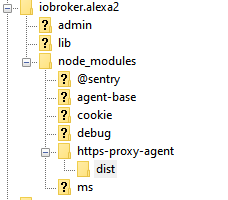
-
Ok hier die Ausgaben von ...
which nodejs && nodejs -v && which node && node -v && which npm && npm -v && apt policy nodejs/usr/bin/nodejs v10.20.1 /usr/bin/node v10.20.1 /usr/bin/npm 6.14.4 nodejs: Installed: 10.20.1-1nodesource1 Candidate: 10.20.1-1nodesource1 Version table: *** 10.20.1-1nodesource1 500 500 https://deb.nodesource.com/node_10.x stretch/main amd64 Packages 100 /var/lib/dpkg/status 4.8.2~dfsg-1 500 500 http://ftp.de.debian.org/debian stretch/main amd64 PackagesUnd hier noch die Ausgabe von dem npm Aufruf:
dominik@SHome-IoBroker:~$ cd /opt/iobroker/
dominik@SHome-IoBroker:/opt/iobroker$ npm list http-proxy-agent
[sudo] password for dominik:
iobroker.inst@2.0.3 /opt/iobroker
└─┬ iobroker.alexa2@3.2.8
  └─┬ virtual-device-sdk@1.7.3
    └── http-proxy-agent@4.0.1
Grüße Dominik
Grüße Dominik
-
Ok hier die Ausgaben von ...
which nodejs && nodejs -v && which node && node -v && which npm && npm -v && apt policy nodejs/usr/bin/nodejs v10.20.1 /usr/bin/node v10.20.1 /usr/bin/npm 6.14.4 nodejs: Installed: 10.20.1-1nodesource1 Candidate: 10.20.1-1nodesource1 Version table: *** 10.20.1-1nodesource1 500 500 https://deb.nodesource.com/node_10.x stretch/main amd64 Packages 100 /var/lib/dpkg/status 4.8.2~dfsg-1 500 500 http://ftp.de.debian.org/debian stretch/main amd64 PackagesUnd hier noch die Ausgabe von dem npm Aufruf:
dominik@SHome-IoBroker:~$ cd /opt/iobroker/
dominik@SHome-IoBroker:/opt/iobroker$ npm list http-proxy-agent
[sudo] password for dominik:
iobroker.inst@2.0.3 /opt/iobroker
└─┬ iobroker.alexa2@3.2.8
  └─┬ virtual-device-sdk@1.7.3
    └── http-proxy-agent@4.0.1
Grüße Dominik
@moelski
Wenn beim Aufruf von npm im Verzeichnis /opt/iobroker nach dem sudo Passwort gefragt wird dürfte da irgendwas mit den Rechten für die User nicht stimmen.
Jag mal deniobroker fixdurch.
Und ich würde an deiner Stelle den Absprung von Stretch planen. Je länger du das rauszögerst, umso komplizierter kann das werden. -
Moin !
fix durchgeführt:
==========================================================================
    Checking ioBroker user and directory permissions (2/3)
==========================================================================

Created /etc/sudoers.d/iobroker
Fixing directory permissions...

==========================================================================
    Checking autostart (3/3)
==========================================================================

Enabling autostart...
Autostart enabled!

==========================================================================

    Your installation was fixed successfully
    Run iobroker start to start ioBroker again!

==========================================================================

dominik@SHome-IoBroker:/opt/iobroker$ iobroker start
dominik@SHome-IoBroker:/opt/iobroker$ iobroker fix^C
dominik@SHome-IoBroker:/opt/iobroker$ npm list http-proxy-agent
iobroker.inst@2.0.3 /opt/iobroker
└─┬ iobroker.alexa2@3.2.8
  └─┬ virtual-device-sdk@1.7.3
    └── http-proxy-agent@4.0.1
Aber der Fehler mit dem Alexa bleibt leider immer noch.
Stretch Update ... Hmm, ok da müsste ich dann wohl demnächst mal ran ...
Grüße
-
Bei mir ist es das gleiche.
System ist jedoch Ubuntu - nach dem letzten Update bekomme ich die gleichen Fehlermeldungen und stelle fest, dass der Pfad, auf den das Log verweist, gar nicht existiert.
Gleichmaßen kann ich den http-proxy-agent aber auch nicht neuinstallieren. -
Bei mir ist es das gleiche.
System ist jedoch Ubuntu - nach dem letzten Update bekomme ich die gleichen Fehlermeldungen und stelle fest, dass der Pfad, auf den das Log verweist, gar nicht existiert.
Gleichmaßen kann ich den http-proxy-agent aber auch nicht neuinstallieren.@mrzee Für Ubuntu gelten die gleichen Anmerkungen zu nodejs wie zu Debian.
-
@mrzee Für Ubuntu gelten die gleichen Anmerkungen zu nodejs wie zu Debian.
Danke - ich komme mit den ganzen Distris immer durcheinander. Ich habe das Problem aber gefunden:
Scheinbar wurde bei einem Update, entweder Adapter oder OS, das Verzeichnis /opt/iobroker/node_modules/https-proxy-agent wie auch immer beschädigt. Eine manuelle Neuinstallation via NPM hat funktioniert und der Adapter läuft wieder. -
@Chrischo Und was sagt das Log? Und ist nodejs sauber?
-
@Chrischo Und was sagt das Log? Und ist nodejs sauber?
@Thomas-Braun
nicht viel Neues :-(host.raspberrypi 2020-07-19 14:20:20.839 error instance system.adapter.alexa2.0 terminated with code 1 (JS_CONTROLLER_STOPPED) host.raspberrypi 2020-07-19 14:20:20.839 error Caught by controller[0]: } host.raspberrypi 2020-07-19 14:20:20.838 error Caught by controller[0]: ] host.raspberrypi 2020-07-19 14:20:20.838 error Caught by controller[0]: '/opt/iobroker/node_modules/iobroker.alexa2/main.js' host.raspberrypi 2020-07-19 14:20:20.838 error Caught by controller[0]: '/opt/iobroker/node_modules/virtual-device-sdk/lib/src/Index.js', host.raspberrypi 2020-07-19 14:20:20.838 error Caught by controller[0]: '/opt/iobroker/node_modules/virtual-device-sdk/lib/src/VirtualDevice.js', host.raspberrypi 2020-07-19 14:20:20.838 error Caught by controller[0]: requireStack: [ host.raspberrypi 2020-07-19 14:20:20.838 error Caught by controller[0]: code: 'MODULE_NOT_FOUND', host.raspberrypi 2020-07-19 14:20:20.837 error Caught by controller[0]: at Module.require (internal/modules/cjs/loader.js:1026:19) { host.raspberrypi 2020-07-19 14:20:20.837 error Caught by controller[0]: at Function.Module._load (internal/modules/cjs/loader.js:879:14) host.raspberrypi 2020-07-19 14:20:20.837 error Caught by controller[0]: at Module.load (internal/modules/cjs/loader.js:986:32) host.raspberrypi 2020-07-19 14:20:20.837 error Caught by controller[0]: at Object.Module._extensions..js (internal/modules/cjs/loader.js:1158:10) host.raspberrypi 2020-07-19 14:20:20.837 error Caught by controller[0]: at Module._compile (internal/modules/cjs/loader.js:1138:30) host.raspberrypi 2020-07-19 14:20:20.836 error Caught by controller[0]: at Object.<anonymous> (/opt/iobroker/node_modules/virtual-device-sdk/lib/src/VirtualDevice.js:41:23) host.raspberrypi 2020-07-19 14:20:20.836 error Caught by controller[0]: at require (internal/modules/cjs/helpers.js:72:18) host.raspberrypi 2020-07-19 14:20:20.836 error Caught by controller[0]: at Module.require (internal/modules/cjs/loader.js:1026:19) host.raspberrypi 2020-07-19 14:20:20.836 error Caught by controller[0]: at Function.Module._load (internal/modules/cjs/loader.js:842:27) host.raspberrypi 2020-07-19 14:20:20.836 error Caught by controller[0]: at Function.Module._resolveFilename (internal/modules/cjs/loader.js:966:15) host.raspberrypi 2020-07-19 14:20:20.835 error Caught by controller[0]: - /opt/iobroker/node_modules/iobroker.alexa2/main.js host.raspberrypi 2020-07-19 14:20:20.835 error Caught by controller[0]: - /opt/iobroker/node_modules/virtual-device-sdk/lib/src/Index.js host.raspberrypi 2020-07-19 14:20:20.835 error Caught by controller[0]: - /opt/iobroker/node_modules/virtual-device-sdk/lib/src/VirtualDevice.js host.raspberrypi 2020-07-19 14:20:20.835 error Caught by controller[0]: Require stack: host.raspberrypi 2020-07-19 14:20:20.835 error Caught by controller[0]: Error: Cannot find module 'https-proxy-agent' host.raspberrypi 2020-07-19 14:20:20.835 error Caught by controller[0]: ^ host.raspberrypi 2020-07-19 14:20:20.834 error Caught by controller[0]: throw err; host.raspberrypi 2020-07-19 14:20:20.834 error Caught by controller[0]: internal/modules/cjs/loader.js:969 -
@Thomas-Braun
nicht viel Neues :-(host.raspberrypi 2020-07-19 14:20:20.839 error instance system.adapter.alexa2.0 terminated with code 1 (JS_CONTROLLER_STOPPED) host.raspberrypi 2020-07-19 14:20:20.839 error Caught by controller[0]: } host.raspberrypi 2020-07-19 14:20:20.838 error Caught by controller[0]: ] host.raspberrypi 2020-07-19 14:20:20.838 error Caught by controller[0]: '/opt/iobroker/node_modules/iobroker.alexa2/main.js' host.raspberrypi 2020-07-19 14:20:20.838 error Caught by controller[0]: '/opt/iobroker/node_modules/virtual-device-sdk/lib/src/Index.js', host.raspberrypi 2020-07-19 14:20:20.838 error Caught by controller[0]: '/opt/iobroker/node_modules/virtual-device-sdk/lib/src/VirtualDevice.js', host.raspberrypi 2020-07-19 14:20:20.838 error Caught by controller[0]: requireStack: [ host.raspberrypi 2020-07-19 14:20:20.838 error Caught by controller[0]: code: 'MODULE_NOT_FOUND', host.raspberrypi 2020-07-19 14:20:20.837 error Caught by controller[0]: at Module.require (internal/modules/cjs/loader.js:1026:19) { host.raspberrypi 2020-07-19 14:20:20.837 error Caught by controller[0]: at Function.Module._load (internal/modules/cjs/loader.js:879:14) host.raspberrypi 2020-07-19 14:20:20.837 error Caught by controller[0]: at Module.load (internal/modules/cjs/loader.js:986:32) host.raspberrypi 2020-07-19 14:20:20.837 error Caught by controller[0]: at Object.Module._extensions..js (internal/modules/cjs/loader.js:1158:10) host.raspberrypi 2020-07-19 14:20:20.837 error Caught by controller[0]: at Module._compile (internal/modules/cjs/loader.js:1138:30) host.raspberrypi 2020-07-19 14:20:20.836 error Caught by controller[0]: at Object.<anonymous> (/opt/iobroker/node_modules/virtual-device-sdk/lib/src/VirtualDevice.js:41:23) host.raspberrypi 2020-07-19 14:20:20.836 error Caught by controller[0]: at require (internal/modules/cjs/helpers.js:72:18) host.raspberrypi 2020-07-19 14:20:20.836 error Caught by controller[0]: at Module.require (internal/modules/cjs/loader.js:1026:19) host.raspberrypi 2020-07-19 14:20:20.836 error Caught by controller[0]: at Function.Module._load (internal/modules/cjs/loader.js:842:27) host.raspberrypi 2020-07-19 14:20:20.836 error Caught by controller[0]: at Function.Module._resolveFilename (internal/modules/cjs/loader.js:966:15) host.raspberrypi 2020-07-19 14:20:20.835 error Caught by controller[0]: - /opt/iobroker/node_modules/iobroker.alexa2/main.js host.raspberrypi 2020-07-19 14:20:20.835 error Caught by controller[0]: - /opt/iobroker/node_modules/virtual-device-sdk/lib/src/Index.js host.raspberrypi 2020-07-19 14:20:20.835 error Caught by controller[0]: - /opt/iobroker/node_modules/virtual-device-sdk/lib/src/VirtualDevice.js host.raspberrypi 2020-07-19 14:20:20.835 error Caught by controller[0]: Require stack: host.raspberrypi 2020-07-19 14:20:20.835 error Caught by controller[0]: Error: Cannot find module 'https-proxy-agent' host.raspberrypi 2020-07-19 14:20:20.835 error Caught by controller[0]: ^ host.raspberrypi 2020-07-19 14:20:20.834 error Caught by controller[0]: throw err; host.raspberrypi 2020-07-19 14:20:20.834 error Caught by controller[0]: internal/modules/cjs/loader.js:969@Chrischo nodejs sauber?
-
@Chrischo nodejs sauber?
-
@Thomas-Braun wie überprüfe ich die "Sauberkeit"?
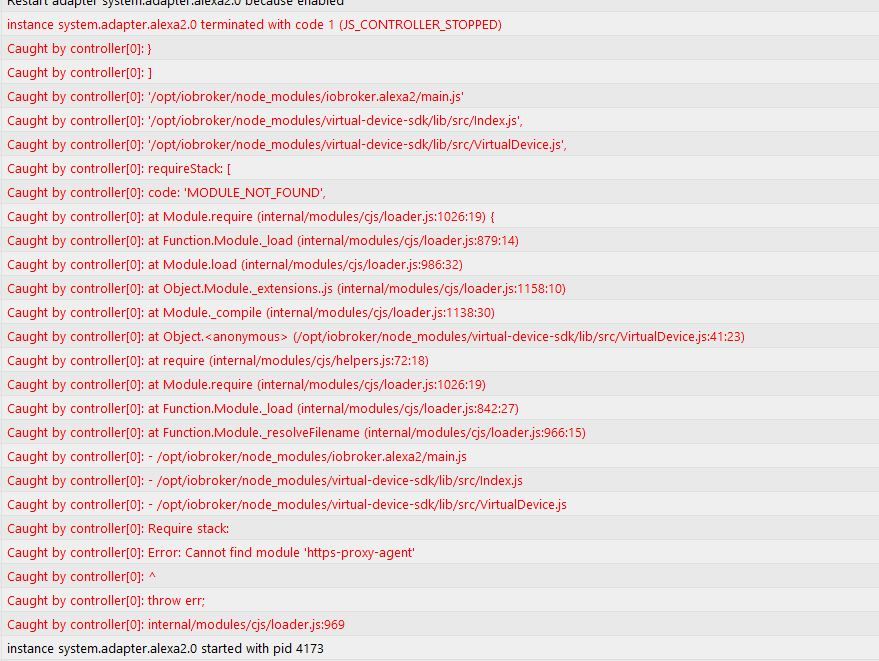
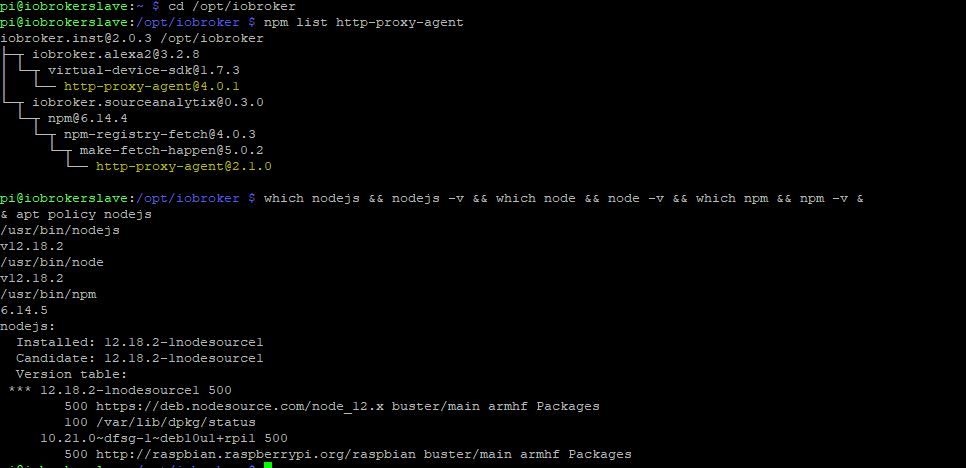
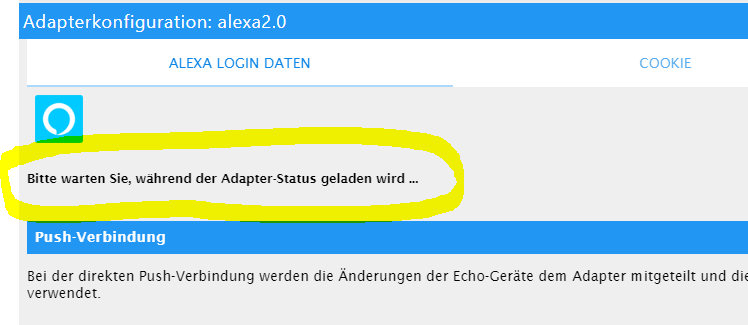
Augenscheinlich macht es keine Probleme.which nodejs && nodejs -v && which node && node -v && which npm && npm -v && apt policy nodejs


Hey! Du scheinst an dieser Unterhaltung interessiert zu sein, hast aber noch kein Konto.
Hast du es satt, bei jedem Besuch durch die gleichen Beiträge zu scrollen? Wenn du dich für ein Konto anmeldest, kommst du immer genau dorthin zurück, wo du zuvor warst, und kannst dich über neue Antworten benachrichtigen lassen (entweder per E-Mail oder Push-Benachrichtigung). Du kannst auch Lesezeichen speichern und Beiträge positiv bewerten, um anderen Community-Mitgliedern deine Wertschätzung zu zeigen.
Mit deinem Input könnte dieser Beitrag noch besser werden 💗
Registrieren AnmeldenSupport us
407
Online33.1k
Benutzende83.9k
Themen1.4m
Beiträge