




ioBroker in Proxmox VM startet nicht
-
Gut dann haben wir jetzt schon mal die Grundlagen geklärt.
Dann warte ich noch auf das logHP traue ich immer zu inkompatibel zu sein
-
@Homoran
Aber proxmox läuft doch und iobroker läuft dich da drauf🙄@moppel2810
Da ist allerdings was dran.Dann kann ich (zumindest auf die Schnalle) erst mal nicht weiterhelfen.
Sorry
kein Support per PN! - Fragen im Forum stellen - Benutzt das Voting rechts unten im Beitrag wenn er euch geholfen hat.
Das Forum freut sich über eine Spende. Benutzt dazu den Spendenbutton oben rechts. Danke!
der Installationsfixer: curl -fsL https://iobroker.net/fix.sh | bash - -
@moppel2810
Da ist allerdings was dran.Dann kann ich (zumindest auf die Schnalle) erst mal nicht weiterhelfen.
Sorry
@Homoran
Wie komm ich an die Log Datei ran? -
@moppel2810
Da ist allerdings was dran.Dann kann ich (zumindest auf die Schnalle) erst mal nicht weiterhelfen.
Sorry
0 info it worked if it ends with ok
1 verbose cli [ '/usr/bin/node',
1 verbose cli   '/usr/bin/npm',
1 verbose cli   'i',
1 verbose cli   'iobroker',
1 verbose cli   '--loglevel',
1 verbose cli   'error' ]
2 info using npm@6.11.3
3 info using node@v10.17.0
4 verbose npm-session a5e0904b88ae8b94
5 silly install loadCurrentTree
6 silly install readLocalPackageData
7 silly fetchPackageMetaData error for iobroker@latest The value "4294967295" is invalid for option "family"
8 timing stage:rollbackFailedOptional Completed in 13ms
9 timing stage:runTopLevelLifecycles Completed in 1373ms
10 verbose stack TypeError [ERR_INVALID_OPT_VALUE]: The value "4294967295" is invalid for option "family"
10 verbose stack     at lookup (dns.js:112:11)
10 verbose stack     at net.js:1004:5
10 verbose stack     at defaultTriggerAsyncIdScope (internal/async_hooks.js:294:19)
10 verbose stack     at lookupAndConnect (net.js:1003:3)
10 verbose stack     at TLSSocket.Socket.connect (net.js:938:5)
10 verbose stack     at Object.connect (_tls_wrap.js:1165:13)
10 verbose stack     at HttpsAgent.createConnection (https.js:120:22)
10 verbose stack     at HttpsAgent.createSocket (/usr/lib/node_modules/npm/node_modules/agentkeepalive/lib/_http_agent.js:265:26)
10 verbose stack     at HttpsAgent.createSocket (/usr/lib/node_modules/npm/node_modules/agentkeepalive/lib/agent.js:77:11)
10 verbose stack     at HttpsAgent.addRequest (/usr/lib/node_modules/npm/node_modules/agentkeepalive/lib/_http_agent.js:239:10)
10 verbose stack     at new ClientRequest (_http_client.js:249:16)
10 verbose stack     at request (https.js:289:10)
10 verbose stack     at fetch.Promise (/usr/lib/node_modules/npm/node_modules/node-fetch-npm/src/index.js:54:17)
10 verbose stack     at new Promise (<anonymous>)
10 verbose stack     at fetch (/usr/lib/node_modules/npm/node_modules/node-fetch-npm/src/index.js:41:10)
10 verbose stack     at retry (/usr/lib/node_modules/npm/node_modules/make-fetch-happen/index.js:332:14)
11 verbose cwd /opt/iobroker
12 verbose Linux 4.19.0-6-amd64
13 verbose argv "/usr/bin/node" "/usr/bin/npm" "i" "iobroker" "--loglevel" "error"
14 verbose node v10.17.0
15 verbose npm  v6.11.3
16 error code ERR_INVALID_OPT_VALUE
17 error The value "4294967295" is invalid for option "family"
18 verbose exit [ 1, true ]
das wäre jetzt der loginhalt
-
0 info it worked if it ends with ok
1 verbose cli [ '/usr/bin/node',
1 verbose cli   '/usr/bin/npm',
1 verbose cli   'i',
1 verbose cli   'iobroker',
1 verbose cli   '--loglevel',
1 verbose cli   'error' ]
2 info using npm@6.11.3
3 info using node@v10.17.0
4 verbose npm-session a5e0904b88ae8b94
5 silly install loadCurrentTree
6 silly install readLocalPackageData
7 silly fetchPackageMetaData error for iobroker@latest The value "4294967295" is invalid for option "family"
8 timing stage:rollbackFailedOptional Completed in 13ms
9 timing stage:runTopLevelLifecycles Completed in 1373ms
10 verbose stack TypeError [ERR_INVALID_OPT_VALUE]: The value "4294967295" is invalid for option "family"
10 verbose stack     at lookup (dns.js:112:11)
10 verbose stack     at net.js:1004:5
10 verbose stack     at defaultTriggerAsyncIdScope (internal/async_hooks.js:294:19)
10 verbose stack     at lookupAndConnect (net.js:1003:3)
10 verbose stack     at TLSSocket.Socket.connect (net.js:938:5)
10 verbose stack     at Object.connect (_tls_wrap.js:1165:13)
10 verbose stack     at HttpsAgent.createConnection (https.js:120:22)
10 verbose stack     at HttpsAgent.createSocket (/usr/lib/node_modules/npm/node_modules/agentkeepalive/lib/_http_agent.js:265:26)
10 verbose stack     at HttpsAgent.createSocket (/usr/lib/node_modules/npm/node_modules/agentkeepalive/lib/agent.js:77:11)
10 verbose stack     at HttpsAgent.addRequest (/usr/lib/node_modules/npm/node_modules/agentkeepalive/lib/_http_agent.js:239:10)
10 verbose stack     at new ClientRequest (_http_client.js:249:16)
10 verbose stack     at request (https.js:289:10)
10 verbose stack     at fetch.Promise (/usr/lib/node_modules/npm/node_modules/node-fetch-npm/src/index.js:54:17)
10 verbose stack     at new Promise (<anonymous>)
10 verbose stack     at fetch (/usr/lib/node_modules/npm/node_modules/node-fetch-npm/src/index.js:41:10)
10 verbose stack     at retry (/usr/lib/node_modules/npm/node_modules/make-fetch-happen/index.js:332:14)
11 verbose cwd /opt/iobroker
12 verbose Linux 4.19.0-6-amd64
13 verbose argv "/usr/bin/node" "/usr/bin/npm" "i" "iobroker" "--loglevel" "error"
14 verbose node v10.17.0
15 verbose npm  v6.11.3
16 error code ERR_INVALID_OPT_VALUE
17 error The value "4294967295" is invalid for option "family"
18 verbose exit [ 1, true ]
das wäre jetzt der loginhalt
@moppel2810
Gut - da haben wir die ganzen Infos auf einen Schlag ;-)@moppel2810 sagte in ioBroker in Proxmox VM startet nicht:
12 verbose Linux 4.19.0-6-amd64 13 verbose argv "/usr/bin/node" "/usr/bin/npm" "i" "iobroker" "--loglevel" "error" 14 verbose node v10.17.0 15 verbose npm v6.11.3
Der Fehler ist der selbe - keine weiteren Informationen :-(
@moppel2810 sagte in ioBroker in Proxmox VM startet nicht:
error The value "4294967295" is invalid for option "family"
Die Suche danach
4294967295" is invalid for option "family"ergibt einen Treffer - https://forum.iobroker.net/topic/12605/nodejs-und-npm-update/109
Sieh mal ob du da etwas für dich ableiten kannst
kein Support per PN! - Fragen im Forum stellen - Benutzt das Voting rechts unten im Beitrag wenn er euch geholfen hat.
Das Forum freut sich über eine Spende. Benutzt dazu den Spendenbutton oben rechts. Danke!
der Installationsfixer: curl -fsL https://iobroker.net/fix.sh | bash - -
@moppel2810
Gut - da haben wir die ganzen Infos auf einen Schlag ;-)@moppel2810 sagte in ioBroker in Proxmox VM startet nicht:
12 verbose Linux 4.19.0-6-amd64 13 verbose argv "/usr/bin/node" "/usr/bin/npm" "i" "iobroker" "--loglevel" "error" 14 verbose node v10.17.0 15 verbose npm v6.11.3
Der Fehler ist der selbe - keine weiteren Informationen :-(
@moppel2810 sagte in ioBroker in Proxmox VM startet nicht:
error The value "4294967295" is invalid for option "family"
Die Suche danach
4294967295" is invalid for option "family"ergibt einen Treffer - https://forum.iobroker.net/topic/12605/nodejs-und-npm-update/109
Sieh mal ob du da etwas für dich ableiten kannst
ich glaube mittlerweile das es doch am proxmox liegt. Ich hab jetzt alles probiert...
Ich installiere die vm mit Debian und muss aber beim erstellen siehe Bild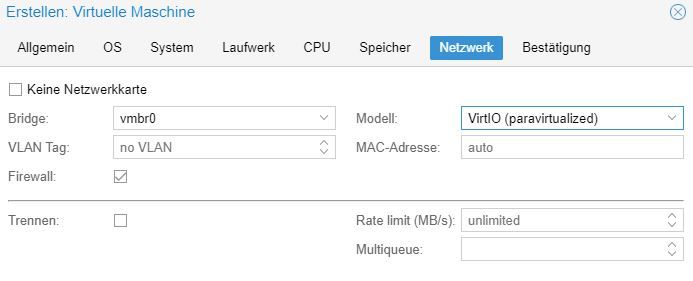 diese Einstellung wählen das ich iobroker installieren kann hab ich irgendwo gelesen aber damit schlägt die automatische Netzwerkkonfig fehl und ich bekomm auch nichts manuell hin. Wenn ich aber diese
 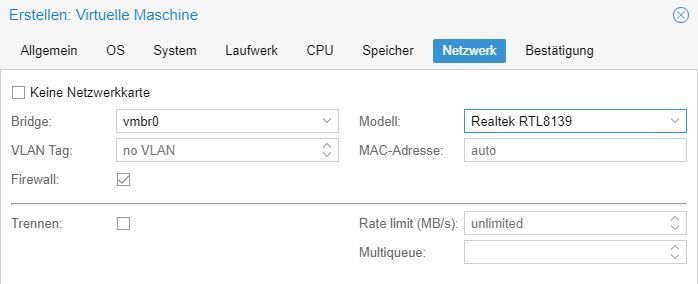 Einstellung wähle läuft das Netzwerk aber da funktioniert eben die Installation vom iobroker nicht.
Ich bin hier nach über einer Woche echt am ENDE

-
ich glaube mittlerweile das es doch am proxmox liegt. Ich hab jetzt alles probiert...
Ich installiere die vm mit Debian und muss aber beim erstellen siehe Bild diese Einstellung wählen das ich iobroker installieren kann hab ich irgendwo gelesen aber damit schlägt die automatische Netzwerkkonfig fehl und ich bekomm auch nichts manuell hin. Wenn ich aber diese Einstellung wähle läuft das Netzwerk aber da funktioniert eben die Installation vom iobroker nicht.Ich bin hier nach über einer Woche echt am ENDE
@moppel2810 Seltsam ich habe die Intel E1000 als Netzwerkkarte
-
ich glaube mittlerweile das es doch am proxmox liegt. Ich hab jetzt alles probiert...
Ich installiere die vm mit Debian und muss aber beim erstellen siehe Bild diese Einstellung wählen das ich iobroker installieren kann hab ich irgendwo gelesen aber damit schlägt die automatische Netzwerkkonfig fehl und ich bekomm auch nichts manuell hin. Wenn ich aber diese Einstellung wähle läuft das Netzwerk aber da funktioniert eben die Installation vom iobroker nicht.Ich bin hier nach über einer Woche echt am ENDE
@moppel2810 das Problem hatte ich auch mit meinem alten HP Thin610. Komm nur grad nicht drauf, was ich da damals eingestellt hatte. Ist schon ne weile her.
Wenn mich nicht alles täuscht, hat @ostseereiter nen Hp mit Proxmox laufen, vllt weiss er wasumgestiegen von Proxmox auf Unraid
-
@moppel2810 das Problem hatte ich auch mit meinem alten HP Thin610. Komm nur grad nicht drauf, was ich da damals eingestellt hatte. Ist schon ne weile her.
Wenn mich nicht alles täuscht, hat @ostseereiter nen Hp mit Proxmox laufen, vllt weiss er was -
@crunchip das wäre super! ich bin echt am verzweifeln
@moppel2810 Ich habe zwar einen HP aber der läuft autark kein Proxmox drauf nur der Iobroker.
Gruß OSR
Plattform
Linux x64 CPUs2 AMD G-T56N Processor 1646 MHz 8GB RAM -
ich glaube mittlerweile das es doch am proxmox liegt. Ich hab jetzt alles probiert...
Ich installiere die vm mit Debian und muss aber beim erstellen siehe Bild diese Einstellung wählen das ich iobroker installieren kann hab ich irgendwo gelesen aber damit schlägt die automatische Netzwerkkonfig fehl und ich bekomm auch nichts manuell hin. Wenn ich aber diese Einstellung wähle läuft das Netzwerk aber da funktioniert eben die Installation vom iobroker nicht.Ich bin hier nach über einer Woche echt am ENDE
@moppel2810 also, wie Homoran schon schrieb, mit der Intel E1000 sollte es eigentlich funktionieren, siehe
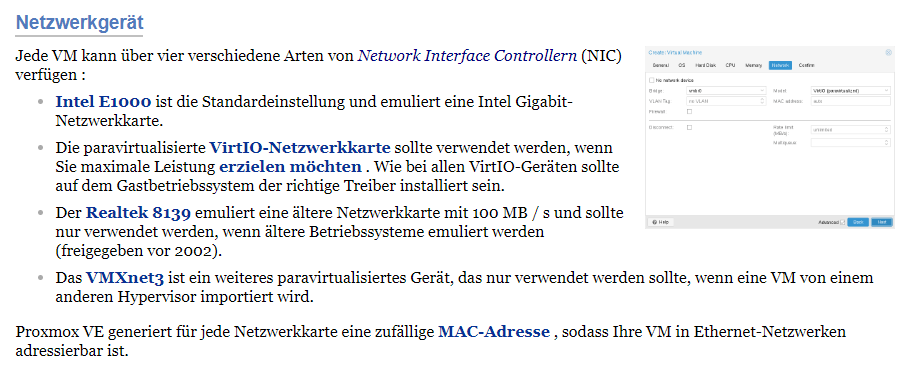
Vllt fehlt auch irgendein Treiber, bei der Buster Installation, gab es da Hinweise beim Installieren?
du könntest auch mal Debian 9 probieren.
Alternativ wäre die Option, statt einer VM, einen LXC zu erstellen, der müsste dann definitiv laufen. Ist aber wiederum eine Entscheidung, zwecks Bluetooth/ Usb Stick/Zigbee, da das einbinden, etwas umfangreicher ist.umgestiegen von Proxmox auf Unraid
-
@moppel2810 Ich habe zwar einen HP aber der läuft autark kein Proxmox drauf nur der Iobroker.
@ostseereiter hast du da debian als System drauf? Ich überlege auch ob ich proxmox weg lasse da ich das System eh nur als iobroker nutzen möchte. Hast du conbee stick oder ähnliches auch eingebunden? Wie läuft das?
-
@moppel2810 also, wie Homoran schon schrieb, mit der Intel E1000 sollte es eigentlich funktionieren, siehe
Vllt fehlt auch irgendein Treiber, bei der Buster Installation, gab es da Hinweise beim Installieren?
du könntest auch mal Debian 9 probieren.
Alternativ wäre die Option, statt einer VM, einen LXC zu erstellen, der müsste dann definitiv laufen. Ist aber wiederum eine Entscheidung, zwecks Bluetooth/ Usb Stick/Zigbee, da das einbinden, etwas umfangreicher ist.@crunchip debian 9 könnte ich mal probieren. Fehlermeldungen kamen keine bei der debian Installation.
-
Hallo,
hat zwar mit dem Ursprungspost nichts zu tun, aber ich habe das gleiche Problem wie @moppel2810. Gibt es hier schon eine Lösung?
Proxmox 5.4-13 auf einem alten Laptop,
ioBroker läuft schon länger im Container. Wegen eines BT-Sticks wollte ich mit ioBroker jetzt aber auf eine VM umziehen - klappt nicht.Habe es mit Debian 10.3 und 9.12, der Anleitung und in sämtlichen Kombinationen mit node 8, 10 und 12 versucht.
Bei Debian 10.13 und node 10 scheint alles erstmal okay bis zur Installation von iobroker:
io@iobroker:~$ node -v
v10.19.0
io@iobroker:~$ nodejs -v
v10.19.0
io@iobroker:~$ npm -v
6.13.4
io@iobroker:~$ curl -sL https://iobroker.net/install.sh | bash -
library: loaded
Library version=2020-01-30

==========================================================================

    Welcome to the ioBroker installer!
    Installer version: 2020-01-25

    You might need to enter your password a couple of times.

==========================================================================


==========================================================================
    Installing prerequisites (1/4)
==========================================================================

[sudo] Passwort für io:
Ign:1 http://ftp.de.debian.org/debian stretch InRelease
Holen:2 http://security.debian.org/debian-security stretch/updates InRelease [94,3 kB]
OK:3 http://ftp.de.debian.org/debian stretch-updates InRelease
OK:4 http://ftp.de.debian.org/debian stretch Release
OK:5 https://deb.nodesource.com/node_10.x stretch InRelease
Es wurden 94,3 kB in 16 s geholt (5.854 B/s).
Paketlisten werden gelesen... Fertig
Changing npm registry to https://registry.npmjs.org
Installed acl
Installed libcap2-bin
Installed gcc-c++
Installed libavahi-compat-libdnssd-dev
Installed libudev-dev
Installed libpam0g-dev
Installed git
Installed unzip
Installed python-dev

==========================================================================
    Creating ioBroker user and directory (2/4)
==========================================================================

User iobroker created
Created /etc/sudoers.d/iobroker
Directory /opt/iobroker created

==========================================================================
    Installing ioBroker (3/4)
==========================================================================

npm ERR! code ERR_INVALID_OPT_VALUE
npm ERR! The value "4294967295" is invalid for option "family"

npm ERR! A complete log of this run can be found in:
npm ERR!     /home/io/.npm/_logs/2020-02-20T15_32_13_579Z-debug.log

==========================================================================
    Finalizing installation (4/4)
==========================================================================

Enabling autostart...
Created symlink /etc/systemd/system/multi-user.target.wants/iobroker.service → /lib/systemd/system/iobroker.service.
Autostart enabled!
Fixing directory permissions...

==========================================================================

    ioBroker was installed successfully
    Open http://192.168.178.239:8081 in a browser and start configuring!

==========================================================================


You need to re-login before doing anything else on the console!
Log /home/io/.npm/_logs/2020-02-20T15_32_13_579Z-debug.log
0 info it worked if it ends with ok
1 verbose cli [ '/usr/bin/node',
1 verbose cli   '/usr/bin/npm',
1 verbose cli   'i',
1 verbose cli   'iobroker',
1 verbose cli   '--loglevel',
1 verbose cli   'error' ]
2 info using npm@6.13.4
3 info using node@v10.19.0
4 verbose npm-session 0b4dc7a080c86c84
5 silly install loadCurrentTree
6 silly install readLocalPackageData
7 silly fetchPackageMetaData error for iobroker@latest The value "4294967295" is invalid for option "family"
8 timing stage:rollbackFailedOptional Completed in 38ms
9 timing stage:runTopLevelLifecycles Completed in 2119ms
10 verbose stack TypeError [ERR_INVALID_OPT_VALUE]: The value "4294967295" is invalid for option "family"
10 verbose stack     at lookup (dns.js:112:11)
10 verbose stack     at net.js:1004:5
10 verbose stack     at defaultTriggerAsyncIdScope (internal/async_hooks.js:294:19)
10 verbose stack     at lookupAndConnect (net.js:1003:3)
10 verbose stack     at TLSSocket.Socket.connect (net.js:938:5)
10 verbose stack     at Object.connect (_tls_wrap.js:1165:13)
10 verbose stack     at HttpsAgent.createConnection (https.js:120:22)
10 verbose stack     at HttpsAgent.createSocket (/usr/lib/node_modules/npm/node_modules/agentkeepalive/lib/_http_agent.js:265:26)
10 verbose stack     at HttpsAgent.createSocket (/usr/lib/node_modules/npm/node_modules/agentkeepalive/lib/agent.js:77:11)
10 verbose stack     at HttpsAgent.addRequest (/usr/lib/node_modules/npm/node_modules/agentkeepalive/lib/_http_agent.js:239:10)
10 verbose stack     at new ClientRequest (_http_client.js:258:16)
10 verbose stack     at request (https.js:289:10)
10 verbose stack     at fetch.Promise (/usr/lib/node_modules/npm/node_modules/node-fetch-npm/src/index.js:54:17)
10 verbose stack     at new Promise (<anonymous>)
10 verbose stack     at fetch (/usr/lib/node_modules/npm/node_modules/node-fetch-npm/src/index.js:41:10)
10 verbose stack     at retry (/usr/lib/node_modules/npm/node_modules/make-fetch-happen/index.js:332:14)
11 verbose cwd /opt/iobroker
12 verbose Linux 4.9.0-12-amd64
13 verbose argv "/usr/bin/node" "/usr/bin/npm" "i" "iobroker" "--loglevel" "error"
14 verbose node v10.19.0
15 verbose npm  v6.13.4
16 error code ERR_INVALID_OPT_VALUE
17 error The value "4294967295" is invalid for option "family"
18 verbose exit [ 1, true ]
Bei Debian 9 mit node 10 gibt's den gleichen Fehler wie oben, bei Debian 9 mit node 8:
io@iobroker:~$ node -v
v8.17.0
io@iobroker:~$ nodejs -v
v8.17.0
io@iobroker:~$ npm -v
6.13.4
io@iobroker:~$ curl -sL https://iobroker.net/install.sh | bash -
library: loaded
Library version=2020-01-30

==========================================================================

    Welcome to the ioBroker installer!
    Installer version: 2020-01-25

    You might need to enter your password a couple of times.

==========================================================================


==========================================================================
    Installing prerequisites (1/4)
==========================================================================

[sudo] Passwort für io:
OK:1 http://security.debian.org/debian-security stretch/updates InRelease
Ign:2 http://ftp.de.debian.org/debian stretch InRelease
OK:3 http://ftp.de.debian.org/debian stretch-updates InRelease
OK:4 http://ftp.de.debian.org/debian stretch Release
OK:5 https://deb.nodesource.com/node_8.x stretch InRelease
Paketlisten werden gelesen... Fertig
Changing npm registry to https://registry.npmjs.org
Installed acl
Installed libcap2-bin
Installed gcc-c++
Installed libavahi-compat-libdnssd-dev
Installed libudev-dev
Installed libpam0g-dev
Installed git
Installed unzip
Installed python-dev

==========================================================================
    Creating ioBroker user and directory (2/4)
==========================================================================

User iobroker created
Created /etc/sudoers.d/iobroker
Directory /opt/iobroker created

==========================================================================
    Installing ioBroker (3/4)
==========================================================================

npm ERR! Invalid argument: family must be 4 or 6

npm ERR! A complete log of this run can be found in:
npm ERR!     /home/io/.npm/_logs/2020-02-20T16_54_53_481Z-debug.log

==========================================================================
    Finalizing installation (4/4)
==========================================================================

Enabling autostart...
Created symlink /etc/systemd/system/multi-user.target.wants/iobroker.service → /lib/systemd/system/iobroker.service.
Autostart enabled!
Fixing directory permissions...

==========================================================================

    ioBroker was installed successfully
    Open http://192.168.178.240:8081 in a browser and start configuring!

==========================================================================


You need to re-login before doing anything else on the console!
Log /home/io/.npm/_logs/2020-02-20T16_54_53_481Z-debug.log
0 info it worked if it ends with ok 1 verbose cli [ '/usr/bin/node', 1 verbose cli '/usr/bin/npm', 1 verbose cli 'i', 1 verbose cli 'iobroker', 1 verbose cli '--loglevel', 1 verbose cli 'error' ] 2 info using npm@6.13.4 3 info using node@v8.17.0 4 verbose npm-session 4e4798bb54b8d9d9 5 silly install loadCurrentTree 6 silly install readLocalPackageData 7 silly fetchPackageMetaData error for iobroker@latest Invalid argument: family must be 4 or 6 8 timing stage:rollbackFailedOptional Completed in 21ms 9 timing stage:runTopLevelLifecycles Completed in 2044ms 10 verbose stack TypeError: Invalid argument: family must be 4 or 6 10 verbose stack at lookup (dns.js:129:11) 10 verbose stack at net.js:1091:5 10 verbose stack at defaultTriggerAsyncIdScope (internal/async_hooks.js:281:19) 10 verbose stack at lookupAndConnect (net.js:1090:3) 10 verbose stack at TLSSocket.Socket.connect (net.js:1025:5) 10 verbose stack at Object.exports.connect (_tls_wrap.js:1088:12) 10 verbose stack at HttpsAgent.createConnection (https.js:117:22) 10 verbose stack at HttpsAgent.createSocket (/usr/lib/node_modules/npm/node_modules/agentkeepalive/lib/_http_agent.js:265:26) 10 verbose stack at HttpsAgent.createSocket (/usr/lib/node_modules/npm/node_modules/agentkeepalive/lib/agent.js:77:11) 10 verbose stack at HttpsAgent.addRequest (/usr/lib/node_modules/npm/node_modules/agentkeepalive/lib/_http_agent.js:239:10) 10 verbose stack at new ClientRequest (_http_client.js:268:16) 10 verbose stack at Object.request (http.js:39:10) 10 verbose stack at request (https.js:245:15) 10 verbose stack at fetch.Promise (/usr/lib/node_modules/npm/node_modules/node-fetch-npm/src/index.js:54:17) 10 verbose stack at new Promise (<anonymous>) 10 verbose stack at fetch (/usr/lib/node_modules/npm/node_modules/node-fetch-npm/src/index.js:41:10) 11 verbose cwd /opt/iobroker 12 verbose Linux 4.9.0-12-amd64 13 verbose argv "/usr/bin/node" "/usr/bin/npm" "i" "iobroker" "--loglevel" "error" 14 verbose node v8.17.0 15 verbose npm v6.13.4 16 error Invalid argument: family must be 4 or 6 17 verbose exit [ 1, true ] -
Hallo,
hat zwar mit dem Ursprungspost nichts zu tun, aber ich habe das gleiche Problem wie @moppel2810. Gibt es hier schon eine Lösung?
Proxmox 5.4-13 auf einem alten Laptop,
ioBroker läuft schon länger im Container. Wegen eines BT-Sticks wollte ich mit ioBroker jetzt aber auf eine VM umziehen - klappt nicht.Habe es mit Debian 10.3 und 9.12, der Anleitung und in sämtlichen Kombinationen mit node 8, 10 und 12 versucht.
Bei Debian 10.13 und node 10 scheint alles erstmal okay bis zur Installation von iobroker:
io@iobroker:~$ node -v
v10.19.0
io@iobroker:~$ nodejs -v
v10.19.0
io@iobroker:~$ npm -v
6.13.4
io@iobroker:~$ curl -sL https://iobroker.net/install.sh | bash -
library: loaded
Library version=2020-01-30

==========================================================================

    Welcome to the ioBroker installer!
    Installer version: 2020-01-25

    You might need to enter your password a couple of times.

==========================================================================


==========================================================================
    Installing prerequisites (1/4)
==========================================================================

[sudo] Passwort für io:
Ign:1 http://ftp.de.debian.org/debian stretch InRelease
Holen:2 http://security.debian.org/debian-security stretch/updates InRelease [94,3 kB]
OK:3 http://ftp.de.debian.org/debian stretch-updates InRelease
OK:4 http://ftp.de.debian.org/debian stretch Release
OK:5 https://deb.nodesource.com/node_10.x stretch InRelease
Es wurden 94,3 kB in 16 s geholt (5.854 B/s).
Paketlisten werden gelesen... Fertig
Changing npm registry to https://registry.npmjs.org
Installed acl
Installed libcap2-bin
Installed gcc-c++
Installed libavahi-compat-libdnssd-dev
Installed libudev-dev
Installed libpam0g-dev
Installed git
Installed unzip
Installed python-dev

==========================================================================
    Creating ioBroker user and directory (2/4)
==========================================================================

User iobroker created
Created /etc/sudoers.d/iobroker
Directory /opt/iobroker created

==========================================================================
    Installing ioBroker (3/4)
==========================================================================

npm ERR! code ERR_INVALID_OPT_VALUE
npm ERR! The value "4294967295" is invalid for option "family"

npm ERR! A complete log of this run can be found in:
npm ERR!     /home/io/.npm/_logs/2020-02-20T15_32_13_579Z-debug.log

==========================================================================
    Finalizing installation (4/4)
==========================================================================

Enabling autostart...
Created symlink /etc/systemd/system/multi-user.target.wants/iobroker.service → /lib/systemd/system/iobroker.service.
Autostart enabled!
Fixing directory permissions...

==========================================================================

    ioBroker was installed successfully
    Open http://192.168.178.239:8081 in a browser and start configuring!

==========================================================================


You need to re-login before doing anything else on the console!
Log /home/io/.npm/_logs/2020-02-20T15_32_13_579Z-debug.log
0 info it worked if it ends with ok
1 verbose cli [ '/usr/bin/node',
1 verbose cli   '/usr/bin/npm',
1 verbose cli   'i',
1 verbose cli   'iobroker',
1 verbose cli   '--loglevel',
1 verbose cli   'error' ]
2 info using npm@6.13.4
3 info using node@v10.19.0
4 verbose npm-session 0b4dc7a080c86c84
5 silly install loadCurrentTree
6 silly install readLocalPackageData
7 silly fetchPackageMetaData error for iobroker@latest The value "4294967295" is invalid for option "family"
8 timing stage:rollbackFailedOptional Completed in 38ms
9 timing stage:runTopLevelLifecycles Completed in 2119ms
10 verbose stack TypeError [ERR_INVALID_OPT_VALUE]: The value "4294967295" is invalid for option "family"
10 verbose stack     at lookup (dns.js:112:11)
10 verbose stack     at net.js:1004:5
10 verbose stack     at defaultTriggerAsyncIdScope (internal/async_hooks.js:294:19)
10 verbose stack     at lookupAndConnect (net.js:1003:3)
10 verbose stack     at TLSSocket.Socket.connect (net.js:938:5)
10 verbose stack     at Object.connect (_tls_wrap.js:1165:13)
10 verbose stack     at HttpsAgent.createConnection (https.js:120:22)
10 verbose stack     at HttpsAgent.createSocket (/usr/lib/node_modules/npm/node_modules/agentkeepalive/lib/_http_agent.js:265:26)
10 verbose stack     at HttpsAgent.createSocket (/usr/lib/node_modules/npm/node_modules/agentkeepalive/lib/agent.js:77:11)
10 verbose stack     at HttpsAgent.addRequest (/usr/lib/node_modules/npm/node_modules/agentkeepalive/lib/_http_agent.js:239:10)
10 verbose stack     at new ClientRequest (_http_client.js:258:16)
10 verbose stack     at request (https.js:289:10)
10 verbose stack     at fetch.Promise (/usr/lib/node_modules/npm/node_modules/node-fetch-npm/src/index.js:54:17)
10 verbose stack     at new Promise (<anonymous>)
10 verbose stack     at fetch (/usr/lib/node_modules/npm/node_modules/node-fetch-npm/src/index.js:41:10)
10 verbose stack     at retry (/usr/lib/node_modules/npm/node_modules/make-fetch-happen/index.js:332:14)
11 verbose cwd /opt/iobroker
12 verbose Linux 4.9.0-12-amd64
13 verbose argv "/usr/bin/node" "/usr/bin/npm" "i" "iobroker" "--loglevel" "error"
14 verbose node v10.19.0
15 verbose npm  v6.13.4
16 error code ERR_INVALID_OPT_VALUE
17 error The value "4294967295" is invalid for option "family"
18 verbose exit [ 1, true ]
Bei Debian 9 mit node 10 gibt's den gleichen Fehler wie oben, bei Debian 9 mit node 8:
io@iobroker:~$ node -v
v8.17.0
io@iobroker:~$ nodejs -v
v8.17.0
io@iobroker:~$ npm -v
6.13.4
io@iobroker:~$ curl -sL https://iobroker.net/install.sh | bash -
library: loaded
Library version=2020-01-30

==========================================================================

    Welcome to the ioBroker installer!
    Installer version: 2020-01-25

    You might need to enter your password a couple of times.

==========================================================================


==========================================================================
    Installing prerequisites (1/4)
==========================================================================

[sudo] Passwort für io:
OK:1 http://security.debian.org/debian-security stretch/updates InRelease
Ign:2 http://ftp.de.debian.org/debian stretch InRelease
OK:3 http://ftp.de.debian.org/debian stretch-updates InRelease
OK:4 http://ftp.de.debian.org/debian stretch Release
OK:5 https://deb.nodesource.com/node_8.x stretch InRelease
Paketlisten werden gelesen... Fertig
Changing npm registry to https://registry.npmjs.org
Installed acl
Installed libcap2-bin
Installed gcc-c++
Installed libavahi-compat-libdnssd-dev
Installed libudev-dev
Installed libpam0g-dev
Installed git
Installed unzip
Installed python-dev

==========================================================================
    Creating ioBroker user and directory (2/4)
==========================================================================

User iobroker created
Created /etc/sudoers.d/iobroker
Directory /opt/iobroker created

==========================================================================
    Installing ioBroker (3/4)
==========================================================================

npm ERR! Invalid argument: family must be 4 or 6

npm ERR! A complete log of this run can be found in:
npm ERR!     /home/io/.npm/_logs/2020-02-20T16_54_53_481Z-debug.log

==========================================================================
    Finalizing installation (4/4)
==========================================================================

Enabling autostart...
Created symlink /etc/systemd/system/multi-user.target.wants/iobroker.service → /lib/systemd/system/iobroker.service.
Autostart enabled!
Fixing directory permissions...

==========================================================================

    ioBroker was installed successfully
    Open http://192.168.178.240:8081 in a browser and start configuring!

==========================================================================


You need to re-login before doing anything else on the console!
Log /home/io/.npm/_logs/2020-02-20T16_54_53_481Z-debug.log
0 info it worked if it ends with ok 1 verbose cli [ '/usr/bin/node', 1 verbose cli '/usr/bin/npm', 1 verbose cli 'i', 1 verbose cli 'iobroker', 1 verbose cli '--loglevel', 1 verbose cli 'error' ] 2 info using npm@6.13.4 3 info using node@v8.17.0 4 verbose npm-session 4e4798bb54b8d9d9 5 silly install loadCurrentTree 6 silly install readLocalPackageData 7 silly fetchPackageMetaData error for iobroker@latest Invalid argument: family must be 4 or 6 8 timing stage:rollbackFailedOptional Completed in 21ms 9 timing stage:runTopLevelLifecycles Completed in 2044ms 10 verbose stack TypeError: Invalid argument: family must be 4 or 6 10 verbose stack at lookup (dns.js:129:11) 10 verbose stack at net.js:1091:5 10 verbose stack at defaultTriggerAsyncIdScope (internal/async_hooks.js:281:19) 10 verbose stack at lookupAndConnect (net.js:1090:3) 10 verbose stack at TLSSocket.Socket.connect (net.js:1025:5) 10 verbose stack at Object.exports.connect (_tls_wrap.js:1088:12) 10 verbose stack at HttpsAgent.createConnection (https.js:117:22) 10 verbose stack at HttpsAgent.createSocket (/usr/lib/node_modules/npm/node_modules/agentkeepalive/lib/_http_agent.js:265:26) 10 verbose stack at HttpsAgent.createSocket (/usr/lib/node_modules/npm/node_modules/agentkeepalive/lib/agent.js:77:11) 10 verbose stack at HttpsAgent.addRequest (/usr/lib/node_modules/npm/node_modules/agentkeepalive/lib/_http_agent.js:239:10) 10 verbose stack at new ClientRequest (_http_client.js:268:16) 10 verbose stack at Object.request (http.js:39:10) 10 verbose stack at request (https.js:245:15) 10 verbose stack at fetch.Promise (/usr/lib/node_modules/npm/node_modules/node-fetch-npm/src/index.js:54:17) 10 verbose stack at new Promise (<anonymous>) 10 verbose stack at fetch (/usr/lib/node_modules/npm/node_modules/node-fetch-npm/src/index.js:41:10) 11 verbose cwd /opt/iobroker 12 verbose Linux 4.9.0-12-amd64 13 verbose argv "/usr/bin/node" "/usr/bin/npm" "i" "iobroker" "--loglevel" "error" 14 verbose node v8.17.0 15 verbose npm v6.13.4 16 error Invalid argument: family must be 4 or 6 17 verbose exit [ 1, true ]@anna sagte in ioBroker in Proxmox VM startet nicht:
einem alten Laptop
welche iso hast du genommen?
@anna sagte in ioBroker in Proxmox VM startet nicht:
Kombinationen mit node 8, 10 und 12
Debian Buster erfordert node.js v10.x!!
v12 ist noch nicht "ausgereift" und sollte nicht unbedingt verwendet werden -
@anna sagte in ioBroker in Proxmox VM startet nicht:
einem alten Laptop
welche iso hast du genommen?
@anna sagte in ioBroker in Proxmox VM startet nicht:
Kombinationen mit node 8, 10 und 12
Debian Buster erfordert node.js v10.x!!
v12 ist noch nicht "ausgereift" und sollte nicht unbedingt verwendet werden@crunchip said in ioBroker in Proxmox VM startet nicht:
@anna sagte in ioBroker in Proxmox VM startet nicht:
einem alten Laptop
welche iso hast du genommen?
Für die VM? debian-10.3.0-amd64-netinst.iso von debian.org und debian-9.12.0-amd64-netinst.iso
@crunchip said in ioBroker in Proxmox VM startet nicht:
@anna sagte in ioBroker in Proxmox VM startet nicht:
Kombinationen mit node 8, 10 und 12
Debian Buster erfordert node.js v10.x!!
v12 ist noch nicht "ausgereift" und sollte nicht unbedingt verwendet werdenHab ich da auch bemerkt
 Bei Debian 10 wird die Debian-Version von node 10 und nodejs ohne npm installiert, wenn man node 8 versucht zu installieren. Aber mit Debian 9 läuft node 8 ja noch. Fehlermeldung gab's bei der Iobroker-Installation ja dann trotzdem.
Im Container läuft node v8.16.0 / nodejs 8.16.0 / npm 6.4.1, deshalb der Versuch mit Debian 9 & node 8.
Eigentlich habe ich sämtliche Lösungsansätze ausprobiert, die Google so ausgespuckt hat. Ich glaube, es liegt am alten Laptop und probiere es einfach irgendwann nochmal, wenn mein System umgezogen ist...
-
@crunchip said in ioBroker in Proxmox VM startet nicht:
@anna sagte in ioBroker in Proxmox VM startet nicht:
einem alten Laptop
welche iso hast du genommen?
Für die VM? debian-10.3.0-amd64-netinst.iso von debian.org und debian-9.12.0-amd64-netinst.iso
@crunchip said in ioBroker in Proxmox VM startet nicht:
@anna sagte in ioBroker in Proxmox VM startet nicht:
Kombinationen mit node 8, 10 und 12
Debian Buster erfordert node.js v10.x!!
v12 ist noch nicht "ausgereift" und sollte nicht unbedingt verwendet werdenHab ich da auch bemerkt
Bei Debian 10 wird die Debian-Version von node 10 und nodejs ohne npm installiert, wenn man node 8 versucht zu installieren. Aber mit Debian 9 läuft node 8 ja noch. Fehlermeldung gab's bei der Iobroker-Installation ja dann trotzdem.
Im Container läuft node v8.16.0 / nodejs 8.16.0 / npm 6.4.1, deshalb der Versuch mit Debian 9 & node 8.
Eigentlich habe ich sämtliche Lösungsansätze ausprobiert, die Google so ausgespuckt hat. Ich glaube, es liegt am alten Laptop und probiere es einfach irgendwann nochmal, wenn mein System umgezogen ist...@anna die Frage war eher wegen dem alten Laptop ob amd64 überhaupt geeignet ist.



Hey! Du scheinst an dieser Unterhaltung interessiert zu sein, hast aber noch kein Konto.
Hast du es satt, bei jedem Besuch durch die gleichen Beiträge zu scrollen? Wenn du dich für ein Konto anmeldest, kommst du immer genau dorthin zurück, wo du zuvor warst, und kannst dich über neue Antworten benachrichtigen lassen (entweder per E-Mail oder Push-Benachrichtigung). Du kannst auch Lesezeichen speichern und Beiträge positiv bewerten, um anderen Community-Mitgliedern deine Wertschätzung zu zeigen.
Mit deinem Input könnte dieser Beitrag noch besser werden 💗
Registrieren Anmelden172
Online33.0k
Benutzende83.7k
Themen1.3m
Beiträge