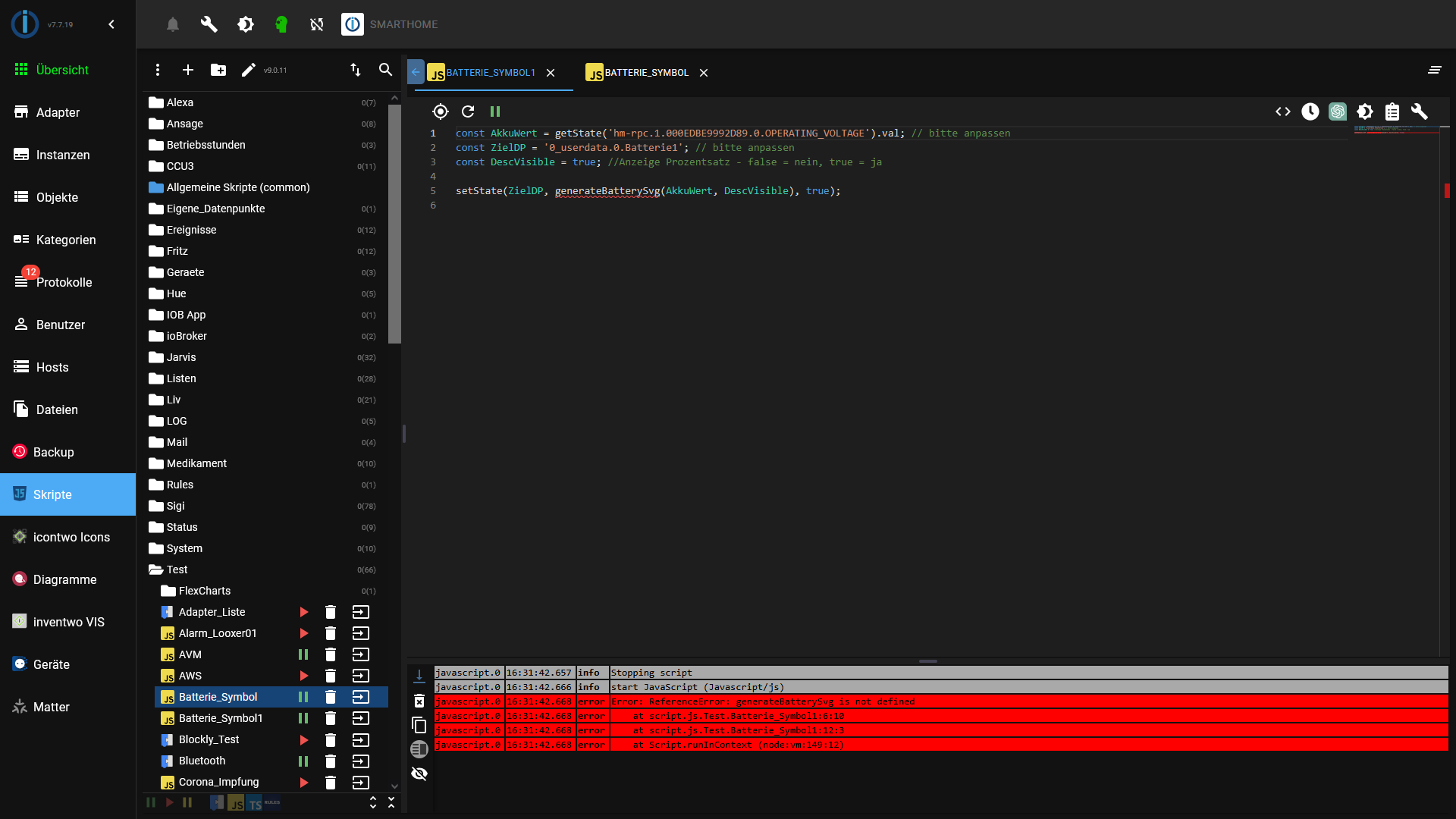
Hallo. Hier ein neues Skript von mir. Ich verwende in meiner Visualisierung (VIS 1) an diversen Stellen den (Lade)zustand von Batterie/Akku. Bisher habe ich das mit Grafiken (png, svg) realisiert.
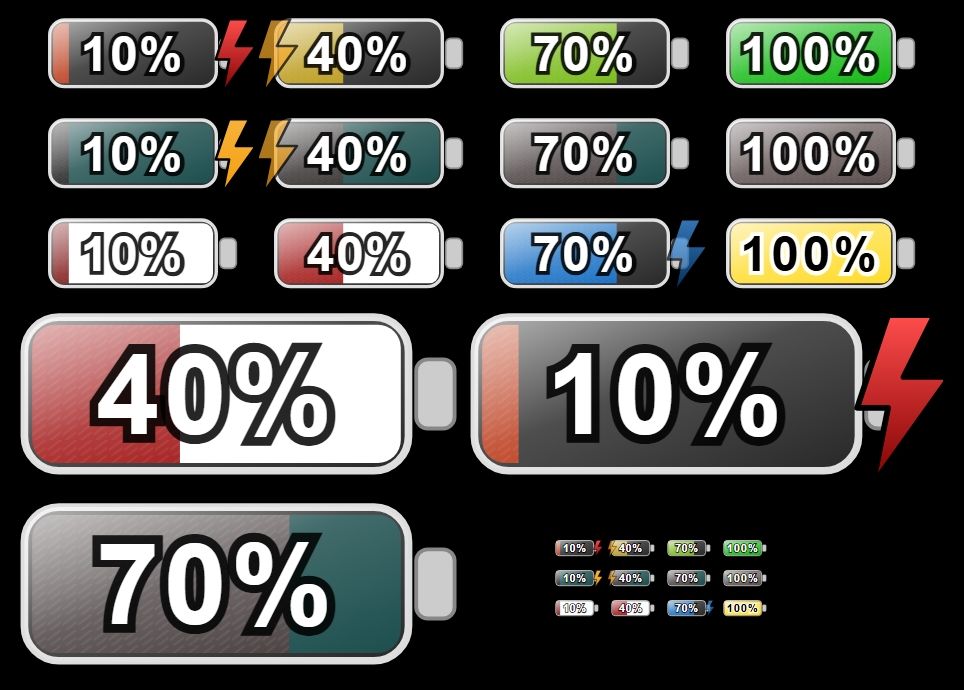
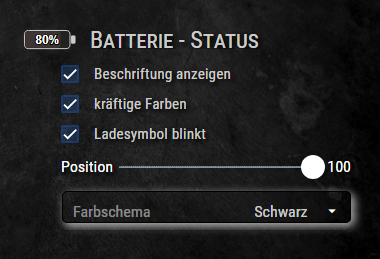
Dieses Skript erzeugt dynamisch ein farbliches Symbol im SVG Format. Diese reicht von rot bis grün. Der Prozentsatz ist zentriert enthalten. Weiterhin können auch kräftiger Farben oder ein Ladesymbol (frei positionierbar) aktiviert werden. Statt % kann auch jede andere Bezeichnung für den Wert, oder ein komplett anderer Text genutzt werden.
Funktioniert mit VIS 1, VIS 2. Sollte aber auch anderen Modulen laufen.
Mit ein wenig Spielerei und Experimentierfreudigkeit kann man da auch andere Farben verwenden.
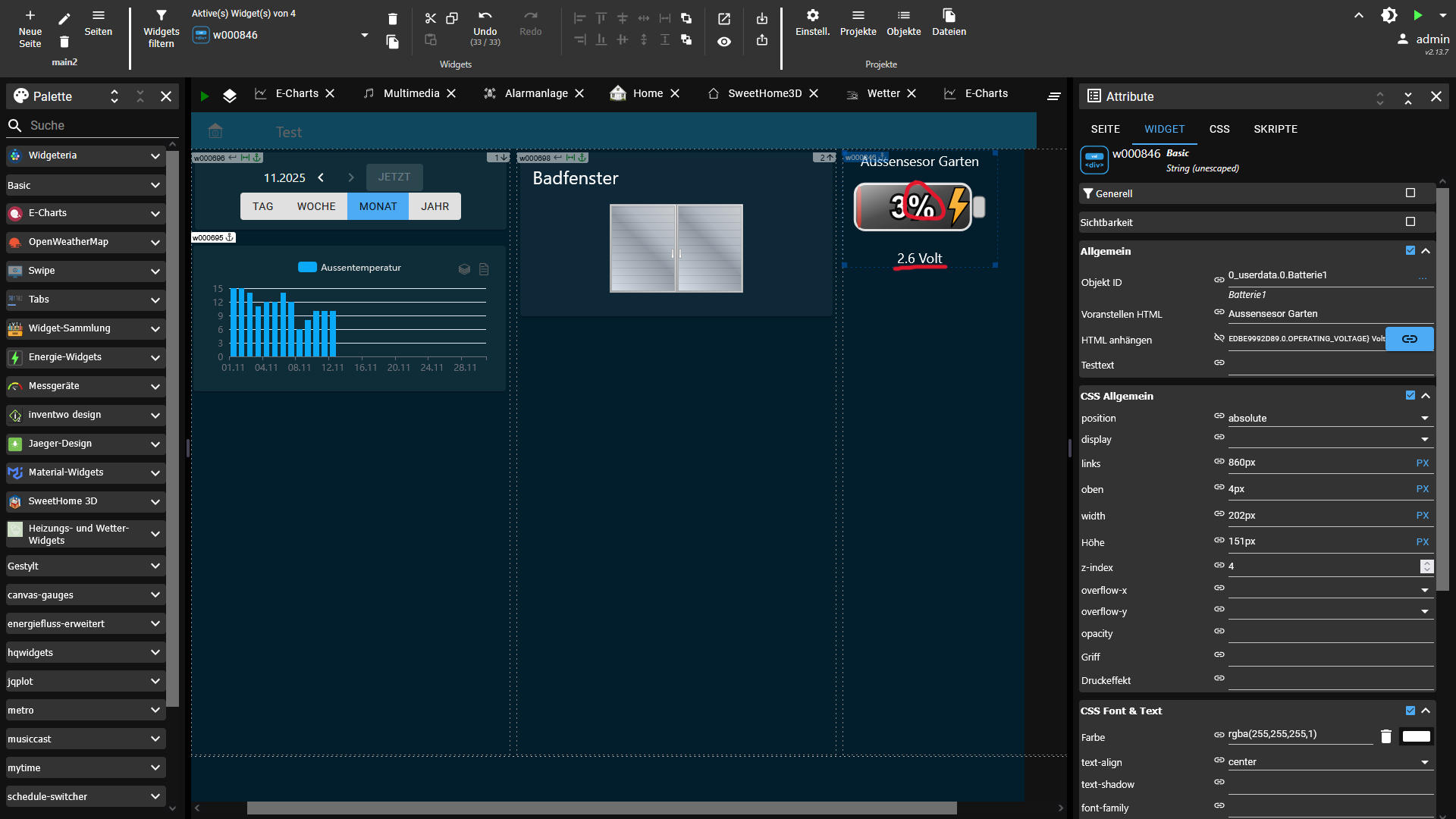
Der Code generiert einen SVG Code der in einem Datenpunkt (Zeichen ) gespeichert wird. Zur Darstellung wird in VIS 1 das String (unescaped) verwendet, das mit dem entsprechenden Datenpunkt verbunden ist.
Der Code:
//Ersteller: Ro75
//Datum: 22.11.2025
//Version: 1.0.19
//Javascript: 8.9.2
//NodeJS: 20.x / 22.x

// clamp: sorgt dafür, dass ein Wert nie kleiner als Minimum oder größer als Maximum wird. Nützlich für Prozentwerte.
function clamp(v, a, b) {
  return Math.max(a, Math.min(b, v));
}

// uid: erzeugt eine eindeutige ID, damit mehrere SVGs auf derselben Seite ohne Konflikte funktionieren.
function uid(prefix = 'id') {
  return `${prefix}-${Math.random().toString(36).slice(2, 9)}`;
}

// hslToRgb: wandelt HSL-Farben in RGB um, damit kann später die Helligkeit berechnent werden.
function hslToRgb(h, s, l) {
  s /= 100;
  l /= 100;
  const k = n => (n + h / 30) % 12;
  const a = s * Math.min(l, 1 - l);
  const f = n => l - a * Math.max(-1,
    Math.min(k(n) - 3, Math.min(9 - k(n), 1))
  );
  return [Math.round(255 * f(0)), Math.round(255 * f(8)), Math.round(255 * f(4))];
}

// luminance: berechnet die wahrgenommene Helligkeit einer Farbe. Wichtig für gut lesbaren Text.
function luminance(r, g, b) {
  const srgb = [r, g, b].map(c => {
    c /= 255;
    return (c <= 0.04045) ? c / 12.92
      : Math.pow((c + 0.055) / 1.055, 2.4);
  });
  return 0.2126 * srgb[0] + 0.7152 * srgb[1] + 0.0722 * srgb[2];
}

// SAMPLE_POINTS: Tabelle für die Breite des Füllbalkens bei verschiedenen Prozentwerten für harmonische Übergänge.
const SAMPLE_POINTS = [
  { p: 0, w: 2 }, { p: 5, w: 10 }, { p: 10, w: 19 }, { p: 15, w: 29 },
  { p: 20, w: 38 }, { p: 25, w: 48 }, { p: 30, w: 58 }, { p: 35, w: 67 },
  { p: 40, w: 77 }, { p: 45, w: 86 }, { p: 50, w: 96 }, { p: 55, w: 106 },
  { p: 60, w: 115 }, { p: 65, w: 125 }, { p: 70, w: 134 }, { p: 75, w: 144 },
  { p: 80, w: 154 }, { p: 85, w: 163 }, { p: 90, w: 173 }, { p: 95, w: 182 },
  { p: 100, w: 192 }
];

// interpolatedWidth: berechnet die Breite des Füllbalkens aus SAMPLE_POINTS, auch Zwischenwerte.
function interpolatedWidth(percent) {
  const p = clamp(percent, 0, 100);

  for (const s of SAMPLE_POINTS) if (s.p === p) return s.w;

  let lower = SAMPLE_POINTS[0], upper = SAMPLE_POINTS[SAMPLE_POINTS.length - 1];

  for (let i = 0; i < SAMPLE_POINTS.length - 1; i++) {
    const a = SAMPLE_POINTS[i], b = SAMPLE_POINTS[i + 1];
    if (p > a.p && p < b.p) { lower = a; upper = b; break; }
    if (p === b.p) return b.w;
  }

  const t = (p - lower.p) / (upper.p - lower.p);
  return Math.round(lower.w + t * (upper.w - lower.w));
}

// getDynamicLetterSpacing: fügt bei runden Ziffern etwas mehr Abstand ein, damit der Text optisch sauber wirkt.
function getDynamicLetterSpacing(text) {
  const belly = ['0', '3', '6', '8', '9'];
  const t = String(text ?? "");
  const count = [...t].filter(c => belly.includes(c)).length;
  const spacing = count * 0.04;
  return spacing === 0 ? null : `${spacing}em`;
}

// getFillColor: berechnet die Füllfarbe je nach Farbschema und Ladestand.
function getFillColor(p, strongColors, colorScheme) {

  const raw = colorScheme ?? "default";
  const scheme = raw.toLowerCase();

  // Prüfe auf benutzerdefinierte Farben
  const isHex  = /^#([0-9a-f]{3}|[0-9a-f]{6})$/i.test(raw);
  const isRgb  = /^rgb\(\s*(\d+)\s*,\s*(\d+)\s*,\s*(\d+)\s*\)$/i.test(raw);
  const isRgba = /^rgba\(\s*(\d+)\s*,\s*(\d+)\s*,\s*(\d+)\s*,\s*((0?\.?\d+)|1|0)\s*\)$/i.test(raw);

  // -----------------------------------------------------
  // BENUTZERDEFINIERTE FARBEN → RGB → HSL → dynamischer Verlauf
  // -----------------------------------------------------
  if (isHex || isRgb || isRgba) {

    let r, g, b;

    if (isHex) {
      let hex = raw.slice(1);
      if (hex.length === 3)
        hex = hex.split("").map(x => x + x).join("");
      r = parseInt(hex.slice(0, 2), 16);
      g = parseInt(hex.slice(2, 4), 16);
      b = parseInt(hex.slice(4, 6), 16);
    }
    else {
      // rgb(...) oder rgba(...)
      const nums = raw.match(/\d+\.?\d*/g).map(Number);
      [r, g, b] = nums;
    }

    // RGB → HSL
    const rf = r / 255, gf = g / 255, bf = b / 255;
    const max = Math.max(rf, gf, bf), min = Math.min(rf, gf, bf);
    const delta = max - min;

    let h = 0;

    if (delta !== 0) {
      if (max === rf)       h = 60 * (((gf - bf) / delta) % 6);
      else if (max === gf)  h = 60 * ((bf - rf) / delta + 2);
      else                  h = 60 * ((rf - gf) / delta + 4);
    }
    if (h < 0) h += 360;

    const l = (max + min) / 2;
    const s = delta === 0 ? 0 : delta / (1 - Math.abs(2 * l - 1));

    const hue = Math.round(h);
    const saturation = Math.round(s * 100);
    const lightness = strongColors ? (20 + p * 0.25) : (35 + p * 0.3);

    return `hsl(${hue},${saturation}%,${lightness}%)`;
  }

  // -----------------------------------------------------
  // STANDARD-SCHEMEN
  // -----------------------------------------------------
  let hue, saturation, lightness;

  switch (scheme) {
    case 'green':  hue = 120; saturation = strongColors ? 100 : 80; lightness = strongColors ? 25 + p/4 : 35 + p*0.3; break;
    case 'yellow': hue =  50; saturation = strongColors ? 100 : 85; lightness = strongColors ? 25 + p*0.3 : 35 + p*0.3; break;
    case 'blue':   hue = 210; saturation = strongColors ? 100 : 75; lightness = strongColors ? 20 + p*0.25 : 35 + p*0.3; break;
    case 'red':    hue =   0; saturation = strongColors ? 100 : 75; lightness = strongColors ? 20 + p*0.25 : 35 + p*0.3; break;
    case 'orange': hue =  30; saturation = strongColors ? 100 : 80; lightness = strongColors ? 20 + p*0.25 : 35 + p*0.3; break;
    case 'brown':  hue =  25; saturation = strongColors ? 85 : 65; lightness = strongColors ? 20 + p*0.2 : 25 + p*0.25; break;
    case 'grey':   hue =   0; saturation = strongColors ? 15 :  0; lightness = strongColors ? 20 + p*0.4 : 25 + p*0.4; break;
    case 'purple': hue = 275; saturation = strongColors ? 95 : 75; lightness = strongColors ? 25 + p*0.25 : 35 + p*0.3; break;
    case 'black':  hue =   0; saturation = strongColors ? 10 :  0; lightness = strongColors ?  1 + p*0.27 :  3 + p*0.2; break;

    default:
      hue = Math.round(p * 1.2);
      saturation = strongColors ? 100 : 90;
      lightness = strongColors ? 35 : 50;
      break;
  }

  return `hsl(${hue},${saturation}%,${lightness}%)`;
}

// getBoltGradientFromScheme: bestimmt den Farbverlauf des Blitzsymbols je nach Schema.
function getBoltGradientFromScheme(strongColors, boltColorScheme) {
  const scheme = (
    boltColorScheme === 'default' ? 'default' : (boltColorScheme ?? 'default')
  ).toLowerCase();

  if (scheme === 'default') return ['#f7b23b', '#f59e0b'];

  let hue, saturation;
  switch (scheme) {
    case 'green': hue = 120; saturation = strongColors ? 100 : 80; break;
    case 'yellow': hue = 50; saturation = strongColors ? 100 : 85; break;
    case 'blue': hue = 210; saturation = strongColors ? 100 : 75; break;
    case 'red': hue = 0; saturation = strongColors ? 100 : 75; break;
    case 'orange': hue = 30; saturation = strongColors ? 100 : 80; break;
    case 'brown': hue = 25; saturation = strongColors ? 85 : 65; break;
    case 'grey': hue = 0; saturation = strongColors ? 15 : 0; break;
    case 'purple': hue = 275; saturation = strongColors ? 95 : 75; break;
    case 'black': hue = 0; saturation = strongColors ? 10 : 0; break;
    default: hue = 45; saturation = 100; break;
  }

  const lightLow = strongColors ? 25 : 40;
  const lightHigh = strongColors ? 65 : 70;

  return [`hsl(${hue},${saturation}%,${lightHigh}%)`, `hsl(${hue},${saturation}%,${lightLow}%)`];
}

// parseRightBackground: prüft, ob ein rechter Hintergrund gesetzt ist oder 'default' (dann keiner).
function parseRightBackground(value) {
  if (!value || value === "default") return null;
  return value;
}

// generateBatterySvg: Hauptfunktion, erzeugt das komplette Batterie-SVG inklusive Form, Text, Farben, Blitz und Effekten.
function generateBatterySvg(
  percent,
  decimalPlaces = 0,
  labelSuffix = '%',
  customLabel = null,
  showPercent = true,
  strongColors = false,
  colorScheme = 'default',
  showBolt = false,
  boltPos = 100,
  blinkBolt = false,
  boltColorScheme = 'default',
  rightBackground = 'default'
) {
  const raw = Number(percent);
  const p = clamp(Number.isFinite(raw) ? raw : 0, 0, 100);

  const viewBoxW = 264, viewBoxH = 129;
  const outer = { x: 20, y: 24, w: 200, h: 80, rx: 18 };
  const inner = { x: 24, y: 28, h: 72, rx: 12 };
  const maxInnerWidth = 192;

  const fillW = interpolatedWidth(p);
  const fillColor = getFillColor(p, strongColors, colorScheme);

  const rightCustom = parseRightBackground(rightBackground);
  const rightStartX = inner.x + fillW;
  const rightWidth = maxInnerWidth - fillW;

  const nums = (fillColor.match(/-?\d+(\.\d+)?/g) || []).map(Number);
  const [hVal = 0, sVal = 0, lVal = 50] = nums;
  const [r, g, b] = hslToRgb(hVal, sVal, lVal);
  const lum = luminance(r, g, b);
  const textFill = lum > 0.55 ? '#000' : '#fff';
  const outlineColor = (textFill === '#fff') ? 'rgba(0,0,0,0.85)' : 'rgba(255,255,255,0.95)';

  const formattedValue = Number(p).toFixed(decimalPlaces);
  const formattedTrimmed = decimalPlaces === 0
    ? String(Math.round(Number(formattedValue)))
    : formattedValue;

  const displayText = customLabel ?? `${formattedTrimmed}${labelSuffix}`;

  const fontSize = Math.max(12, Math.round(inner.h * 0.33 * 2.25 * 1.10));
  const textCenterX = inner.x + maxInnerWidth / 2;
  const textCenterY = inner.y + inner.h / 2;
  const TEXT_DY_EM = 0.35;

  const contact = { x: 224, y: 46, w: 20, h: 36 };
  const contactCenterY = contact.y + contact.h / 2;

  const boltViewBox = { w: 102.7, h: 186.8 };
  const boltTargetH = outer.h * 1.7;
  const boltScale = boltTargetH / boltViewBox.h;
  const boltOffsetY = contactCenterY + 26;

  const clampedBoltPos = clamp(boltPos, 0, 100);

  const boltMinX = -37.0;
  const boltMaxX = 185.0;

  const boltX = boltMinX + (boltMaxX - boltMinX) * (clampedBoltPos / 100);

  const boltTransform = `
    translate(${boltX}, ${boltOffsetY})
    scale(${boltScale})
    translate(${-boltViewBox.w / 2}, ${-boltViewBox.h / 2})
  `.trim();

  const id = uid('b');

  const boltAnimation = blinkBolt ? `
    <style>
      @keyframes blinkBolt-${id} {
        0%, 100% { opacity: 1; }
        50% { opacity: 0.6; }
      }
      .blinking-bolt-${id} {
        animation: blinkBolt-${id} 1.8s ease-in-out infinite;
      }
    </style>` : '';

  const boltClass = blinkBolt ? `blinking-bolt-${id}` : '';

  const [boltColorLight, boltColorDark] = getBoltGradientFromScheme(strongColors, boltColorScheme);

  const dynamicLetterSpacing = getDynamicLetterSpacing(displayText);
  const letterSpacingAttr = dynamicLetterSpacing ? `letter-spacing="${dynamicLetterSpacing}"` : '';

  return `
    <svg xmlns="http://www.w3.org/2000/svg"
         viewBox="0 0 ${viewBoxW} ${viewBoxH}"
         width="100%" height="100%"
         preserveAspectRatio="xMidYMid meet">

      ${boltAnimation}

      <defs>
        <linearGradient id="glass-${id}" x1="0" y1="0" x2="0" y2="1">
          <stop offset="0%" stop-color="#ffffff" stop-opacity="0.80"/>
          <stop offset="100%" stop-color="#ffffff" stop-opacity="0.10"/>
        </linearGradient>

        <linearGradient id="diagGlass-${id}" x1="0" y1="0" x2="1" y2="1">
          <stop offset="0%" stop-color="#ffffff" stop-opacity="0.75"/>
          <stop offset="45%" stop-color="#ffffff" stop-opacity="0.22"/>
          <stop offset="100%" stop-color="#ffffff" stop-opacity="0.03"/>
        </linearGradient>

        <pattern id="stripes-${id}" width="8" height="8" patternUnits="userSpaceOnUse">
          <rect width="8" height="8" fill="transparent"/>
          <path d="M-1,6 l8,-6 M-1,10 l8,-6"
                stroke="#fff" stroke-opacity="0.08" stroke-width="1"/>
        </pattern>

        <clipPath id="clip-fill-${id}">
          <rect x="${inner.x}" y="${inner.y}" width="${maxInnerWidth}"
                height="${inner.h}" rx="${inner.rx}" ry="${inner.rx}" />
        </clipPath>

        <linearGradient id="boltGradient-${id}" x1="0" y1="0" x2="0" y2="1">
          <stop offset="0%" stop-color="${boltColorLight}"/>
          <stop offset="100%" stop-color="${boltColorDark}"/>
        </linearGradient>

        <symbol id="boltSymbol-${id}" viewBox="0 0 102.7 186.8">
          <path fill="url(#boltGradient-${id})" stroke="#000" stroke-width="6" stroke-linejoin="round"
                d="m34.8 2-32 96h32l-16 80 80-112h-48l32-64h-48z"/>
        </symbol>
      </defs>

      <!-- ÄUSSERER RAHMEN -->
      <rect x="${outer.x}" y="${outer.y}" width="${outer.w}" height="${outer.h}"
            rx="${outer.rx}" fill="#222" stroke="#ddd" stroke-width="4"/>

      <!-- FÜLLBEREICH LINKS (universeller Fix) -->
      ${
        fillW >= maxInnerWidth
          ? `<rect x="${inner.x}" y="${inner.y}" width="${maxInnerWidth}" height="${inner.h}"
                   rx="${inner.rx}" ry="${inner.rx}" fill="${fillColor}"/>`
          : (
              fillW > 0
                ? `<path d="
                     M ${inner.x + inner.rx} ${inner.y}
                     L ${inner.x + fillW} ${inner.y}
                     L ${inner.x + fillW} ${inner.y + inner.h}
                     L ${inner.x + inner.rx} ${inner.y + inner.h}
                     A ${inner.rx} ${inner.rx} 0 0 1 ${inner.x} ${inner.y + inner.h - inner.rx}
                     L ${inner.x} ${inner.y + inner.rx}
                     A ${inner.rx} ${inner.rx} 0 0 1 ${inner.x + inner.rx} ${inner.y}
                     Z"
                   fill="${fillColor}"/>`
                : ""
            )
      }

      <!-- RECHTE HINTERGRUNDHÄLFTE -->
      ${
        rightBackground === "default" || fillW >= maxInnerWidth
          ? ""
          : (rightWidth > 0
              ? `<path d="M ${rightStartX} ${inner.y}
                         L ${rightStartX + rightWidth - inner.rx} ${inner.y}
                         A ${inner.rx} ${inner.rx} 0 0 1 ${rightStartX + rightWidth} ${inner.y + inner.rx}
                         L ${rightStartX + rightWidth} ${inner.y + inner.h - inner.rx}
                         A ${inner.rx} ${inner.rx} 0 0 1 ${rightStartX + rightWidth - inner.rx} ${inner.y + inner.h}
                         L ${rightStartX} ${inner.y + inner.h}
                         Z"
                     fill="${rightCustom}"/>`
              : "")
      }

      <!-- GLAS UND TEXTURIERUNG -->
      <g clip-path="url(#clip-fill-${id})">
        <rect x="${inner.x}" y="${inner.y}" width="${fillW}" height="${inner.h}"
              fill="url(#stripes-${id})" opacity="0.95"/>
        <rect x="${inner.x}" y="${inner.y}" width="${fillW}" height="${inner.h}"
              fill="url(#glass-${id})" opacity="0.25"/>
      </g>

      <!-- DIAGONALER GLASEFFEKT -->
      <rect x="${outer.x}" y="${outer.y}" width="${outer.w}" height="${outer.h}"
            rx="${outer.rx}" fill="url(#diagGlass-${id})" opacity="0.9"/>

      <!-- KONTAKT -->
      <rect x="224" y="46" width="20" height="36" rx="6" fill="#ccc" stroke="#888" stroke-width="2"/>

      <!-- BLITZ -->
      ${showBolt ? `<use href="#boltSymbol-${id}" class="${boltClass}" transform="${boltTransform}"/>` : ""}

      <!-- TEXT -->
      ${
        showPercent
          ? `<g transform="translate(${textCenterX}, ${textCenterY})">
              <text text-anchor="middle"
                    font-family="Arial, Helvetica, sans-serif"
                    font-size="${fontSize}"
                    font-weight="700"
                    fill="${textFill}"
                    stroke="${outlineColor}"
                    stroke-width="${Math.max(2, Math.round(fontSize * 0.15))}"
                    paint-order="stroke"
                    dy="${TEXT_DY_EM}em"
                    ${letterSpacingAttr}>
                ${displayText}
              </text>
            </g>`
          : ""
      }

    </svg>
  `.trim();
}
DOKUMENTATION: Prarameterübersicht
Parameter
Typ
Standardwert
Beschreibung
percent numbererforderlich Ladezustand der Batterie (0–100). Werte außerhalb werden automatisch begrenzt.
decimalPlaces number0Anzahl der Nachkommastellen für die Wertanzeige.
labelSuffix string'%'Text, der hinter dem Prozentwert angezeigt wird (%, V, mAh, …).
customLabel string \| nullnullÜberschreibt die Textanzeige vollständig (z. B. "FULL"). Ignoriert decimalPlaces und labelSuffix.
showPercent booleantrueSteuert, ob Text in der Batterie angezeigt wird.
strongColors booleanfalseAktiviert kräftigere Farben und stärkere Kontraste (für Füllfarbe und Blitz).
colorScheme string'default'Farbschema für den gefüllten linken Bereich . Unterstützte Werte siehe unten.
showBolt booleanfalseZeigt ein ⚡-Blitzsymbol an.
boltPos number100Horizontale Position des Blitzes (0 = links, 100 = rechts).
blinkBolt booleanfalseAktiviert einen regelmäßigen „Atmen“-Blinkeffekt des Blitzsymbols.
boltColorScheme string'default'Farbschema des Blitz-Symbols (siehe Liste unten).
rightBackground string'default'Hintergrund des rechten, leeren Bereichs . Unterstützt: 'default', HEX, RGB, RGBA.
DOKUMENTATION: Unterstützte Farbschemata (colorScheme)
Name
Beschreibung
Verlauf / Charakteristik
'default'Standardverlauf: grün → gelb → rot
Dynamisch abhängig vom Prozentwert
'green'Grüntöne
Dunkelgrün → Hellgrün
'yellow'Gelbtöne
Ocker → Hellgelb
'blue'Blautöne
Marineblau → Hellblau
'red'Rottöne
Dunkelrot → Hellrot
'orange'Orangetöne
Dunkelorange → Hellorange
'brown'Brauntöne
Dunkelbraun → Mittelbraun
'grey'Grautöne
Mittelgrau → Hellgrau
'purple'Violett / Purpur
Dunkles Lila → helleres Violett
'black'Schwarzschema
Tiefschwarz → Dunkelgrau
HEX z. B. #00ff88
Wird automatisch in dynamischen HSL-Verlauf umgerechnet
RGB z. B. rgb(0,128,128)
ebenfalls → dynamischer HSL-Verlauf
RGBA z. B. rgba(0,128,128,0.5)
ebenfalls → dynamischer HSL-Verlauf
Dynamik bei Custom-Farben
HEX/RGB/RGBA werden intern in HSL umgerechnet und dann mit einem Verlauf versehen (abhängig vom Ladezustand und strongColors).
DOKUMENTATION: Unterstützte Farbschemata (boltColorScheme)
Name
Beschreibung / Verlauf
'default'Orange → Gelb
'green'Dunkelgrün → Hellgrün
'yellow'Ocker → Hellgelb
'blue'Marineblau → Hellblau
'red'Dunkelrot → Hellrot
'orange'Dunkelorange → Hellorange
'brown'Dunkelbraun → Mittelbraun
'grey'Mittelgrau → Hellgrau
'purple'Dunkles Lila → helleres Violett
'black'Tiefschwarz → Dunkelgrau
DOKUMENTATION: Unterstützte Werte für den rechten Hintergrund (rightBackground)
Wert
Beispiel
Beschreibung
'default'–
Spezieller Glasschimmer-Effekt
HEX #ffffffFester Farbwert
RGB rgb(0,128,128)Fester Farbwert
RGBA rgba(0,128,128,0.4)Transparente Farben möglich
Hinweise zur Farbdarstellung
stärkere Sättigung
dunklerer Startpunkt
mehr Kontrast
grellerer Blitzverlauf
Bei strongColors = false:
weicherer, neutraler Verlauf
dezenter Blitz
DOKUMENTATION: Blitzsymbol (showBolt, boltPos, blinkBolt)
Option
Wirkung
showBolt: trueZeigt das ⚡-Symbol.
boltPosPosition des Blitzsymbols auf der horizontalen Achse der Batterie (0–100).
blinkBolt: trueAktiviert weiches Pulsieren (Opacity 1 → 0.6 → 1).
BEISPIEL mit Speicherung des SVG Code in einen Datenpunkt
const ZielDP = '0_userdata.0.Batterie1'; // bitte anpassen

const dValue = getState('fritzdect.0.DECT_099950330172.battery').val; // bitte anpassen
const decimalPlaces = 0; // bitte anpassen
const labelSuffix = '%'; // bitte anpassen
const customLabel = null; // bitte anpassen
const showPercent = true; // bitte anpassen, z.B. Datenpunkt für zentrale Festlegung
const strongColors = true; // bitte anpassen, z.B. Datenpunkt für zentrale Festlegung
const colorScheme = 'default'; // bitte anpassen, z.B. Datenpunkt für zentrale Festlegung
const showBolt = false; // bitte anpassen, z.B. Datenpunkt für zentrale Festlegung
const boltPos = 100; // bitte anpassen, z.B. Datenpunkt für zentrale Festlegung
const blinkBolt = false; // bitte anpassen
const boltColorScheme = 'default'; // bitte anpassen, z.B. Datenpunkt für zentrale Festlegung
const rightBackground = 'default'; // bitte anpassen, z.B. Datenpunkt für zentrale Festlegung

//Funktionsaufruf mit Speicherung der SVG in einen Datenpunkt
setState(ZielDP, generateBatterySvg(dValue, decimalPlaces, labelSuffix, customLabel, showPercent, strongColors, colorScheme, showBolt, boltPos, blinkBolt, boltColorScheme, rightBackground), true);
Viel Spaß beim testen und benutzen.
Ro75.
1.0.1: KorrekturenrightBackground . Damit kann das gesamte SVG frei definiert werden.colorScheme akzeptiert jetzt nicht nur 'default' und ein Farbschema aus der Liste. Jetzt kann jeder beliebige HEX, RGB oder RGBA Wert Verwendung finden.
Archiv - Version 1.0.8
//Ersteller: Ro75
//Datum: 13.11.2025
//Version: 1.0.8
//Javascript: 8.9.2
//NodeJS: 20.x / 22.x

// dynamische Betterie-Icon Generierung

// -------------------------------------------------------
// Hilfsfunktionen
// -------------------------------------------------------
function clamp(v, a, b) { return Math.max(a, Math.min(b, v)); }
function uid(prefix = 'id') { return `${prefix}-${Math.random().toString(36).slice(2,9)}`; }

function hslToRgb(h, s, l) {
 s /= 100; l /= 100;
 const k = n => (n + h / 30) % 12;
 const a = s * Math.min(l, 1 - l);
 const f = n => l - a * Math.max(-1, Math.min(k(n) - 3, Math.min(9 - k(n), 1)));
 return [Math.round(255 * f(0)), Math.round(255 * f(8)), Math.round(255 * f(4))];
}

function luminance(r, g, b) {
 const srgb = [r, g, b].map(c => {
   c /= 255;
   return (c <= 0.04045) ? c / 12.92 : Math.pow((c + 0.055) / 1.055, 2.4);
 });
 return 0.2126 * srgb[0] + 0.7152 * srgb[1] + 0.0722 * srgb[2];
}

const SAMPLE_POINTS = [
 { p: 0, w: 2 }, { p: 5, w: 10 }, { p: 10, w: 19 }, { p: 15, w: 29 }, { p: 20, w: 38 },
 { p: 25, w: 48 }, { p: 30, w: 58 }, { p: 35, w: 67 }, { p: 40, w: 77 }, { p: 45, w: 86 },
 { p: 50, w: 96 }, { p: 55, w: 106 }, { p: 60, w: 115 }, { p: 65, w: 125 }, { p: 70, w: 134 },
 { p: 75, w: 144 }, { p: 80, w: 154 }, { p: 85, w: 163 }, { p: 90, w: 173 }, { p: 95, w: 182 },
 { p: 100, w: 192 }
];

function interpolatedWidth(percent) {
 const p = clamp(percent, 0, 100);
 for (const s of SAMPLE_POINTS) if (s.p === p) return s.w;
 let lower = SAMPLE_POINTS[0], upper = SAMPLE_POINTS[SAMPLE_POINTS.length - 1];
 for (let i = 0; i < SAMPLE_POINTS.length - 1; i++) {
   const a = SAMPLE_POINTS[i], b = SAMPLE_POINTS[i + 1];
   if (p > a.p && p < b.p) { lower = a; upper = b; break; }
   if (p === b.p) return b.w;
 }
 const t = (p - lower.p) / (upper.p - lower.p);
 return Math.round(lower.w + t * (upper.w - lower.w));
}

// -------------------------------------------------------
// Farb-Schemata mit strongColors-Effekt
// -------------------------------------------------------
function getFillColor(p, strongColors, colorScheme) {
 let hue;
 let saturation;
 let lightness;

 switch ((colorScheme || 'default').toLowerCase()) {
   case 'green':
     hue = 120;
     saturation = strongColors ? 100 : 80;
     lightness = strongColors ? 25 + (p / 100) * 25 : 35 + (p / 100) * 30;
     break;
   case 'yellow':
     hue = 50;
     saturation = strongColors ? 100 : 85;
     lightness = strongColors ? 25 + (p / 100) * 30 : 35 + (p / 100) * 30;
     break;
   case 'blue':
     hue = 210;
     saturation = strongColors ? 100 : 75;
     lightness = strongColors ? 20 + (p / 100) * 25 : 35 + (p / 100) * 30;
     break;
   case 'red':
     hue = 0;
     saturation = strongColors ? 100 : 75;
     lightness = strongColors ? 20 + (p / 100) * 25 : 35 + (p / 100) * 30;
     break;
   case 'orange':
     hue = 30;
     saturation = strongColors ? 100 : 80;
     lightness = strongColors ? 20 + (p / 100) * 25 : 35 + (p / 100) * 30;
     break;
   case 'brown':
     hue = 25;
     saturation = strongColors ? 85 : 65;
     lightness = strongColors ? 20 + (p / 100) * 20 : 25 + (p / 100) * 25;
     break;
   case 'grey':
     hue = 0;
     saturation = strongColors ? 15 : 0;
     lightness = strongColors ? 20 + (p / 100) * 40 : 25 + (p / 100) * 40;
     break;
   case 'purple':
     hue = 275;
     saturation = strongColors ? 95 : 75;
     lightness = strongColors ? 25 + (p / 100) * 25 : 35 + (p / 100) * 30;
     break;
   case 'black':
     hue = 0;
     saturation = strongColors ? 10 : 0;
     lightness = strongColors ? 1 + (p / 100) * 27 : 3 + (p / 100) * 20;
     break;
   default: // Standard: grün → rot Verlauf
     hue = Math.round((p / 100) * 120);
     saturation = strongColors ? 100 : 90;
     lightness = strongColors ? 35 : 50;
     break;
 }

 return `hsl(${hue},${saturation}%,${lightness}%)`;
}

// -------------------------------------------------------
// Blitz-Farbverlauf passend zum Farbschema
// -------------------------------------------------------
function getBoltGradientFromScheme(strongColors, boltColorScheme) {
 const scheme = (boltColorScheme || 'default').toLowerCase();

 if (scheme === 'default') {
   return ['#f7b23b', '#f59e0b'];
 }

 let hue, saturation;
 switch (scheme) {
   case 'green': hue = 120; saturation = strongColors ? 100 : 80; break;
   case 'yellow': hue = 50; saturation = strongColors ? 100 : 85; break;
   case 'blue': hue = 210; saturation = strongColors ? 100 : 75; break;
   case 'red': hue = 0; saturation = strongColors ? 100 : 75; break;
   case 'orange': hue = 30; saturation = strongColors ? 100 : 80; break;
   case 'brown': hue = 25; saturation = strongColors ? 85 : 65; break;
   case 'grey': hue = 0; saturation = strongColors ? 15 : 0; break;
   case 'purple': hue = 275; saturation = strongColors ? 95 : 75; break;
   case 'black': hue = 0; saturation = strongColors ? 10 : 0; break;
   default: hue = 45; saturation = 100; break;
 }

 const lightLow = strongColors ? 25 : 40;
 const lightHigh = strongColors ? 65 : 70;

 return [
   `hsl(${hue},${saturation}%,${lightLow}%)`,
   `hsl(${hue},${saturation}%,${lightHigh}%)`
 ];
}

// -------------------------------------------------------
// Hauptfunktion
// -------------------------------------------------------
function generateBatterySvg(percent, decimalPlaces = 0, labelSuffix = '%', customLabel = null, showPercent = true, strongColors = false, colorScheme = 'default', showBolt = false, boltPos = 100, blinkBolt = false, boltColorScheme = 'default')
{
 const raw = Number(percent);
 const p = clamp(Number.isFinite(raw) ? raw : 0, 0, 100);

 const viewBoxW = 264, viewBoxH = 129;
 const outer = { x: 20, y: 24, w: 200, h: 80, rx: 18 };
 const inner = { x: 24, y: 28, h: 72, rx: 12 };
 const maxInnerWidth = 192;

 const fillW = interpolatedWidth(p);
 const fillColor = getFillColor(p, strongColors, colorScheme);

 const nums = (fillColor.match(/-?\d+(\.\d+)?/g) || []).map(Number);
 const [hVal = 0, sVal = 0, lVal = 50] = nums;
 const [r, g, b] = hslToRgb(hVal, sVal, lVal);
 const lum = luminance(r, g, b);
 const textFill = lum > 0.55 ? '#000' : '#fff';
 const outlineColor = (textFill === '#fff') ? 'rgba(0,0,0,0.85)' : 'rgba(255,255,255,0.95)';

 const formattedValue = Number(p).toFixed(decimalPlaces);
 const formattedTrimmed = (decimalPlaces === 0) ? String(Math.round(Number(formattedValue))) : formattedValue;
 const displayText = customLabel ?? `${formattedTrimmed}${labelSuffix}`;

 const fontSize = Math.max(12, Math.round(inner.h * 0.33 * 2.25));
 const textCenterX = inner.x + maxInnerWidth / 2;
 const textCenterY = inner.y + inner.h / 2;
 const TEXT_DY_EM = 0.35;

 const contact = { x: 224, y: 46, w: 20, h: 36 };
 const contactCenterX = contact.x + contact.w / 2;
 const contactCenterY = contact.y + contact.h / 2;

 const boltViewBox = { w: 102.7, h: 186.8 };
 const boltTargetH = outer.h * 1.7;
 const boltScale = boltTargetH / boltViewBox.h;
 const boltOffsetY = contactCenterY + 26;

 const clampedBoltPos = clamp(boltPos, 0, 100);
 const leftEdge = 0;
 const rightEdge = contactCenterX - 50;
 const baseX = leftEdge + ((rightEdge - leftEdge) * (clampedBoltPos / 100));
 let extraOffset = -30;
 if (clampedBoltPos === 0) extraOffset = -15;
 else if (clampedBoltPos === 100) extraOffset = 0;
 const boltX = baseX + extraOffset;

 const boltTransform = `
   translate(${boltX}, ${boltOffsetY})
   scale(${boltScale})
   translate(${-boltViewBox.w / 2}, ${-boltViewBox.h / 2})
 `.trim();

 const id = uid('b');
 const boltAnimation = blinkBolt ? `
   <style>
     @keyframes blinkBolt-${id} {
       0%, 100% { opacity: 1; }
       50% { opacity: 0.6; }
     }
     .blinking-bolt-${id} {
       animation: blinkBolt-${id} 1.8s ease-in-out infinite;
     }
   </style>` : '';
 const boltClass = blinkBolt ? `blinking-bolt-${id}` : '';

 const [boltColorDark, boltColorLight] = getBoltGradientFromScheme(strongColors, boltColorScheme || colorScheme);

 return `
   <svg xmlns="http://www.w3.org/2000/svg"
        xmlns:xlink="http://www.w3.org/1999/xlink"
        viewBox="0 0 ${viewBoxW} ${viewBoxH}"
        width="100%" height="100%"
        preserveAspectRatio="xMidYMid meet">
     ${boltAnimation}
     <defs>
       <linearGradient id="glass-${id}" x1="0" y1="0" x2="0" y2="1">
         <stop offset="0%" stop-color="#ffffff" stop-opacity="0.80"/>
         <stop offset="100%" stop-color="#ffffff" stop-opacity="0.10"/>
       </linearGradient>
       <linearGradient id="diagGlass-${id}" x1="0" y1="0" x2="1" y2="1">
         <stop offset="0%" stop-color="#ffffff" stop-opacity="0.75"/>
         <stop offset="45%" stop-color="#ffffff" stop-opacity="0.22"/>
         <stop offset="100%" stop-color="#ffffff" stop-opacity="0.03"/>
       </linearGradient>
       <pattern id="stripes-${id}" width="8" height="8" patternUnits="userSpaceOnUse">
         <rect width="8" height="8" fill="transparent"/>
         <path d="M-1,6 l8,-6 M-1,10 l8,-6" stroke="#fff" stroke-opacity="0.08" stroke-width="1"/>
       </pattern>
       <clipPath id="clip-fill-${id}">
         <rect x="${inner.x}" y="${inner.y}" width="${fillW}" height="${inner.h}" rx="${inner.rx}" ry="${inner.rx}"/>
       </clipPath>
       <linearGradient id="boltGradient-${id}" x1="8.7" x2="80.9" y1="17.1" y2="142.1" gradientUnits="userSpaceOnUse">
         <stop offset="0" stop-color="${boltColorLight}"/>
         <stop offset="1" stop-color="${boltColorDark}"/>
       </linearGradient>
       <symbol id="boltSymbol-${id}" viewBox="0 0 102.7 186.8">
         <path fill="url(#boltGradient-${id})" stroke="#000" stroke-width="6" stroke-linejoin="round"
               d="m34.8 2-32 96h32l-16 80 80-112h-48l32-64h-48z"/>
       </symbol>
     </defs>
     <rect x="${outer.x}" y="${outer.y}" width="${outer.w}" height="${outer.h}" rx="${outer.rx}"
           fill="#222" stroke="#ddd" stroke-width="4"/>
     <rect x="${inner.x}" y="${inner.y}" width="${fillW}" height="${inner.h}"
           rx="${inner.rx}" ry="${inner.rx}" fill="${fillColor}"/>
     <g clip-path="url(#clip-fill-${id})">
       <rect x="${inner.x}" y="${inner.y}" width="${fillW}" height="${inner.h}"
             rx="${inner.rx}" fill="url(#stripes-${id})" opacity="0.95"/>
       <rect x="${inner.x}" y="${inner.y}" width="${fillW}" height="${inner.h}"
             rx="${inner.rx}" fill="url(#glass-${id})" opacity="0.25"/>
     </g>
     <rect x="${outer.x}" y="${outer.y}" width="${outer.w}" height="${outer.h}"
           rx="${outer.rx}" fill="url(#diagGlass-${id})" opacity="0.9"/>
     <rect x="224" y="46" width="20" height="36" rx="6" fill="#ccc" stroke="#888" stroke-width="2"/>
     ${showBolt ? `<use href="#boltSymbol-${id}" class="${boltClass}" transform="${boltTransform}"/>` : ''}
     ${showPercent ? `
       <g transform="translate(${textCenterX}, ${textCenterY})">
         <text text-anchor="middle"
               font-family="Arial, Helvetica, sans-serif"
               font-size="${fontSize}" font-weight="700"
               fill="${textFill}" stroke="${outlineColor}"
               stroke-width="${Math.max(2, Math.round(fontSize * 0.15))}"
               paint-order="stroke" dy="${TEXT_DY_EM}em">${displayText}</text>
       </g>` : ''}
   </svg>`.trim();
}
Archiv - Version 1.0.17
//Ersteller: Ro75
//Datum: 21.11.2025
//Version: 1.0.17
//Javascript: 8.9.2
//NodeJS: 20.x / 22.x

// Version 1.0.17
// Dynamische Batterie-Icon Generierung
// ------------------------------------------------------

// clamp: sorgt dafür, dass ein Wert nie kleiner als Minimum oder größer als Maximum wird. Nützlich für Prozentwerte.
function clamp(v, a, b) {
 return Math.max(a, Math.min(b, v));
}

// uid: erzeugt eine eindeutige ID, damit mehrere SVGs auf derselben Seite ohne Konflikte funktionieren.
function uid(prefix = 'id') {
 return `${prefix}-${Math.random().toString(36).slice(2, 9)}`;
}

// hslToRgb: wandelt HSL-Farben in RGB um, damit kann später die Helligkeit berechnent werden.
function hslToRgb(h, s, l) {
 s /= 100;
 l /= 100;
 const k = n => (n + h / 30) % 12;
 const a = s * Math.min(l, 1 - l);
 const f = n => l - a * Math.max(-1,
   Math.min(k(n) - 3, Math.min(9 - k(n), 1))
 );
 return [Math.round(255 * f(0)), Math.round(255 * f(8)), Math.round(255 * f(4))];
}

// luminance: berechnet die wahrgenommene Helligkeit einer Farbe. Wichtig für gut lesbaren Text.
function luminance(r, g, b) {
 const srgb = [r, g, b].map(c => {
   c /= 255;
   return (c <= 0.04045) ? c / 12.92
     : Math.pow((c + 0.055) / 1.055, 2.4);
 });
 return 0.2126 * srgb[0] + 0.7152 * srgb[1] + 0.0722 * srgb[2];
}

// SAMPLE_POINTS: Tabelle für die Breite des Füllbalkens bei verschiedenen Prozentwerten für harmonische Übergänge.
const SAMPLE_POINTS = [
 { p: 0, w: 2 }, { p: 5, w: 10 }, { p: 10, w: 19 }, { p: 15, w: 29 },
 { p: 20, w: 38 }, { p: 25, w: 48 }, { p: 30, w: 58 }, { p: 35, w: 67 },
 { p: 40, w: 77 }, { p: 45, w: 86 }, { p: 50, w: 96 }, { p: 55, w: 106 },
 { p: 60, w: 115 }, { p: 65, w: 125 }, { p: 70, w: 134 }, { p: 75, w: 144 },
 { p: 80, w: 154 }, { p: 85, w: 163 }, { p: 90, w: 173 }, { p: 95, w: 182 },
 { p: 100, w: 192 }
];

// interpolatedWidth: berechnet die Breite des Füllbalkens aus SAMPLE_POINTS, auch Zwischenwerte.
function interpolatedWidth(percent) {
 const p = clamp(percent, 0, 100);

 for (const s of SAMPLE_POINTS) if (s.p === p) return s.w;

 let lower = SAMPLE_POINTS[0], upper = SAMPLE_POINTS[SAMPLE_POINTS.length - 1];

 for (let i = 0; i < SAMPLE_POINTS.length - 1; i++) {
   const a = SAMPLE_POINTS[i], b = SAMPLE_POINTS[i + 1];
   if (p > a.p && p < b.p) { lower = a; upper = b; break; }
   if (p === b.p) return b.w;
 }

 const t = (p - lower.p) / (upper.p - lower.p);
 return Math.round(lower.w + t * (upper.w - lower.w));
}

// getDynamicLetterSpacing: fügt bei runden Ziffern etwas mehr Abstand ein, damit der Text optisch sauber wirkt.
function getDynamicLetterSpacing(text) {
 const belly = ['0', '3', '6', '8', '9'];
 const t = String(text ?? "");
 const count = [...t].filter(c => belly.includes(c)).length;
 const spacing = count * 0.04;
 return spacing === 0 ? null : `${spacing}em`;
}

// getFillColor: berechnet die Füllfarbe je nach Farbschema und Ladestand.
function getFillColor(p, strongColors, colorScheme) {
 let hue, saturation, lightness;
 const scheme = (
   colorScheme === 'default' ? 'default' : (colorScheme ?? 'default')
 ).toLowerCase();

 switch (scheme) {
   case 'green': hue = 120; saturation = strongColors ? 100 : 80; lightness = strongColors ? 25 + p/4 : 35 + p*0.3; break;
   case 'yellow': hue = 50; saturation = strongColors ? 100 : 85; lightness = strongColors ? 25 + p*0.3 : 35 + p*0.3; break;
   case 'blue': hue = 210; saturation = strongColors ? 100 : 75; lightness = strongColors ? 20 + p*0.25 : 35 + p*0.3; break;
   case 'red': hue = 0; saturation = strongColors ? 100 : 75; lightness = strongColors ? 20 + p*0.25 : 35 + p*0.3; break;
   case 'orange': hue = 30; saturation = strongColors ? 100 : 80; lightness = strongColors ? 20 + p*0.25 : 35 + p*0.3; break;
   case 'brown': hue = 25; saturation = strongColors ? 85 : 65; lightness = strongColors ? 20 + p*0.2 : 25 + p*0.25; break;
   case 'grey': hue = 0; saturation = strongColors ? 15 : 0; lightness = strongColors ? 20 + p*0.4 : 25 + p*0.4; break;
   case 'purple': hue = 275; saturation = strongColors ? 95 : 75; lightness = strongColors ? 25 + p*0.25 : 35 + p*0.3; break;
   case 'black': hue = 0; saturation = strongColors ? 10 : 0; lightness = strongColors ? 1 + p*0.27 : 3 + p*0.2; break;
   default:
     hue = Math.round(p * 1.2);
     saturation = strongColors ? 100 : 90;
     lightness = strongColors ? 35 : 50;
     break;
 }

 return `hsl(${hue},${saturation}%,${lightness}%)`;
}

// getBoltGradientFromScheme: bestimmt den Farbverlauf des Blitzsymbols je nach Schema.
function getBoltGradientFromScheme(strongColors, boltColorScheme) {
 const scheme = (
   boltColorScheme === 'default' ? 'default' : (boltColorScheme ?? 'default')
 ).toLowerCase();

 if (scheme === 'default') return ['#f7b23b', '#f59e0b'];

 let hue, saturation;
 switch (scheme) {
   case 'green': hue = 120; saturation = strongColors ? 100 : 80; break;
   case 'yellow': hue = 50; saturation = strongColors ? 100 : 85; break;
   case 'blue': hue = 210; saturation = strongColors ? 100 : 75; break;
   case 'red': hue = 0; saturation = strongColors ? 100 : 75; break;
   case 'orange': hue = 30; saturation = strongColors ? 100 : 80; break;
   case 'brown': hue = 25; saturation = strongColors ? 85 : 65; break;
   case 'grey': hue = 0; saturation = strongColors ? 15 : 0; break;
   case 'purple': hue = 275; saturation = strongColors ? 95 : 75; break;
   case 'black': hue = 0; saturation = strongColors ? 10 : 0; break;
   default: hue = 45; saturation = 100; break;
 }

 const lightLow = strongColors ? 25 : 40;
 const lightHigh = strongColors ? 65 : 70;

 return [`hsl(${hue},${saturation}%,${lightHigh}%)`, `hsl(${hue},${saturation}%,${lightLow}%)`];
}

// parseRightBackground: prüft, ob ein rechter Hintergrund gesetzt ist oder 'default' (dann keiner).
function parseRightBackground(value) {
 if (!value || value === "default") return null;
 return value;
}

// generateBatterySvg: Hauptfunktion, erzeugt das komplette Batterie-SVG inklusive Form, Text, Farben, Blitz und Effekten.
function generateBatterySvg(
 percent,
 decimalPlaces = 0,
 labelSuffix = '%',
 customLabel = null,
 showPercent = true,
 strongColors = false,
 colorScheme = 'default',
 showBolt = false,
 boltPos = 100,
 blinkBolt = false,
 boltColorScheme = 'default',
 rightBackground = 'default'
) {
 const raw = Number(percent);
 const p = clamp(Number.isFinite(raw) ? raw : 0, 0, 100);

 const viewBoxW = 264, viewBoxH = 129;
 const outer = { x: 20, y: 24, w: 200, h: 80, rx: 18 };
 const inner = { x: 24, y: 28, h: 72, rx: 12 };
 const maxInnerWidth = 192;

 const fillW = interpolatedWidth(p);
 const fillColor = getFillColor(p, strongColors, colorScheme);

 const rightCustom = parseRightBackground(rightBackground);
 const rightStartX = inner.x + fillW;
 const rightWidth = maxInnerWidth - fillW;

 const nums = (fillColor.match(/-?\d+(\.\d+)?/g) || []).map(Number);
 const [hVal = 0, sVal = 0, lVal = 50] = nums;
 const [r, g, b] = hslToRgb(hVal, sVal, lVal);
 const lum = luminance(r, g, b);
 const textFill = lum > 0.55 ? '#000' : '#fff';
 const outlineColor = (textFill === '#fff') ? 'rgba(0,0,0,0.85)' : 'rgba(255,255,255,0.95)';

 const formattedValue = Number(p).toFixed(decimalPlaces);
 const formattedTrimmed = decimalPlaces === 0
   ? String(Math.round(Number(formattedValue)))
   : formattedValue;

 const displayText = customLabel ?? `${formattedTrimmed}${labelSuffix}`;

 const fontSize = Math.max(12, Math.round(inner.h * 0.33 * 2.25 * 1.10));
 const textCenterX = inner.x + maxInnerWidth / 2;
 const textCenterY = inner.y + inner.h / 2;
 const TEXT_DY_EM = 0.35;

 const contact = { x: 224, y: 46, w: 20, h: 36 };
 const contactCenterY = contact.y + contact.h / 2;

 const boltViewBox = { w: 102.7, h: 186.8 };
 const boltTargetH = outer.h * 1.7;
 const boltScale = boltTargetH / boltViewBox.h;
 const boltOffsetY = contactCenterY + 26;

 const clampedBoltPos = clamp(boltPos, 0, 100);

 const boltMinX = -37.0;
 const boltMaxX = 185.0;

 const boltX = boltMinX + (boltMaxX - boltMinX) * (clampedBoltPos / 100);

 const boltTransform = `
   translate(${boltX}, ${boltOffsetY})
   scale(${boltScale})
   translate(${-boltViewBox.w / 2}, ${-boltViewBox.h / 2})
 `.trim();

 const id = uid('b');

 const boltAnimation = blinkBolt ? `
   <style>
     @keyframes blinkBolt-${id} {
       0%, 100% { opacity: 1; }
       50% { opacity: 0.6; }
     }
     .blinking-bolt-${id} {
       animation: blinkBolt-${id} 1.8s ease-in-out infinite;
     }
   </style>` : '';

 const boltClass = blinkBolt ? `blinking-bolt-${id}` : '';

 const [boltColorLight, boltColorDark] = getBoltGradientFromScheme(strongColors, boltColorScheme);

 const dynamicLetterSpacing = getDynamicLetterSpacing(displayText);
 const letterSpacingAttr = dynamicLetterSpacing ? `letter-spacing="${dynamicLetterSpacing}"` : '';

 return `
   <svg xmlns="http://www.w3.org/2000/svg"
        viewBox="0 0 ${viewBoxW} ${viewBoxH}"
        width="100%" height="100%"
        preserveAspectRatio="xMidYMid meet">

     ${boltAnimation}

     <defs>
       <linearGradient id="glass-${id}" x1="0" y1="0" x2="0" y2="1">
         <stop offset="0%" stop-color="#ffffff" stop-opacity="0.80"/>
         <stop offset="100%" stop-color="#ffffff" stop-opacity="0.10"/>
       </linearGradient>

       <linearGradient id="diagGlass-${id}" x1="0" y1="0" x2="1" y2="1">
         <stop offset="0%" stop-color="#ffffff" stop-opacity="0.75"/>
         <stop offset="45%" stop-color="#ffffff" stop-opacity="0.22"/>
         <stop offset="100%" stop-color="#ffffff" stop-opacity="0.03"/>
       </linearGradient>

       <pattern id="stripes-${id}" width="8" height="8" patternUnits="userSpaceOnUse">
         <rect width="8" height="8" fill="transparent"/>
         <path d="M-1,6 l8,-6 M-1,10 l8,-6"
               stroke="#fff" stroke-opacity="0.08" stroke-width="1"/>
       </pattern>

       <clipPath id="clip-fill-${id}">
         <rect x="${inner.x}" y="${inner.y}" width="${maxInnerWidth}"
               height="${inner.h}" rx="${inner.rx}" ry="${inner.rx}" />
       </clipPath>

       <linearGradient id="boltGradient-${id}" x1="0" y1="0" x2="0" y2="1">
         <stop offset="0%" stop-color="${boltColorLight}"/>
         <stop offset="100%" stop-color="${boltColorDark}"/>
       </linearGradient>

       <symbol id="boltSymbol-${id}" viewBox="0 0 102.7 186.8">
         <path fill="url(#boltGradient-${id})" stroke="#000" stroke-width="6" stroke-linejoin="round"
               d="m34.8 2-32 96h32l-16 80 80-112h-48l32-64h-48z"/>
       </symbol>
     </defs>

     <!-- ÄUSSERER RAHMEN -->
     <rect x="${outer.x}" y="${outer.y}" width="${outer.w}" height="${outer.h}"
           rx="${outer.rx}" fill="#222" stroke="#ddd" stroke-width="4"/>

     <!-- FÜLLBEREICH LINKS (universeller Fix) -->
     ${
       fillW >= maxInnerWidth
         ? `<rect x="${inner.x}" y="${inner.y}" width="${maxInnerWidth}" height="${inner.h}"
                  rx="${inner.rx}" ry="${inner.rx}" fill="${fillColor}"/>`
         : (
             fillW > 0
               ? `<path d="
                    M ${inner.x + inner.rx} ${inner.y}
                    L ${inner.x + fillW} ${inner.y}
                    L ${inner.x + fillW} ${inner.y + inner.h}
                    L ${inner.x + inner.rx} ${inner.y + inner.h}
                    A ${inner.rx} ${inner.rx} 0 0 1 ${inner.x} ${inner.y + inner.h - inner.rx}
                    L ${inner.x} ${inner.y + inner.rx}
                    A ${inner.rx} ${inner.rx} 0 0 1 ${inner.x + inner.rx} ${inner.y}
                    Z"
                  fill="${fillColor}"/>`
               : ""
           )
     }

     <!-- RECHTE HINTERGRUNDHÄLFTE -->
     ${
       rightBackground === "default" || fillW >= maxInnerWidth
         ? ""
         : (rightWidth > 0
             ? `<path d="M ${rightStartX} ${inner.y}
                        L ${rightStartX + rightWidth - inner.rx} ${inner.y}
                        A ${inner.rx} ${inner.rx} 0 0 1 ${rightStartX + rightWidth} ${inner.y + inner.rx}
                        L ${rightStartX + rightWidth} ${inner.y + inner.h - inner.rx}
                        A ${inner.rx} ${inner.rx} 0 0 1 ${rightStartX + rightWidth - inner.rx} ${inner.y + inner.h}
                        L ${rightStartX} ${inner.y + inner.h}
                        Z"
                    fill="${rightCustom}"/>`
             : "")
     }

     <!-- GLAS UND TEXTURIERUNG -->
     <g clip-path="url(#clip-fill-${id})">
       <rect x="${inner.x}" y="${inner.y}" width="${fillW}" height="${inner.h}"
             fill="url(#stripes-${id})" opacity="0.95"/>
       <rect x="${inner.x}" y="${inner.y}" width="${fillW}" height="${inner.h}"
             fill="url(#glass-${id})" opacity="0.25"/>
     </g>

     <!-- DIAGONALER GLASEFFEKT -->
     <rect x="${outer.x}" y="${outer.y}" width="${outer.w}" height="${outer.h}"
           rx="${outer.rx}" fill="url(#diagGlass-${id})" opacity="0.9"/>

     <!-- KONTAKT -->
     <rect x="224" y="46" width="20" height="36" rx="6" fill="#ccc" stroke="#888" stroke-width="2"/>

     <!-- BLITZ -->
     ${showBolt ? `<use href="#boltSymbol-${id}" class="${boltClass}" transform="${boltTransform}"/>` : ""}

     <!-- TEXT -->
     ${
       showPercent
         ? `<g transform="translate(${textCenterX}, ${textCenterY})">
             <text text-anchor="middle"
                   font-family="Arial, Helvetica, sans-serif"
                   font-size="${fontSize}"
                   font-weight="700"
                   fill="${textFill}"
                   stroke="${outlineColor}"
                   stroke-width="${Math.max(2, Math.round(fontSize * 0.15))}"
                   paint-order="stroke"
                   dy="${TEXT_DY_EM}em"
                   ${letterSpacingAttr}>
               ${displayText}
             </text>
           </g>`
         : ""
     }

   </svg>
 `.trim();
}
Beispielcode aus meiner Umgebung
const Battery_Basis = '0_userdata.0.Battery.';

// Batterie-Datenpunkte mit Lade-Datenpunkt
const batteryDevices = {
   Netatmo: {
       id: 'netatmo.0.63ac6778fe0c0b93e3004238.70-ee-50-90-e4-10.02-00-00-90-60-64.BatteryStatus',
       loading_id: null
   },
   HeizungWZ: {
       id: 'fritzdect.0.DECT_139790949411.battery',
       loading_id: null
   },
   HeizungKZ: {
       id: 'fritzdect.0.DECT_099950330172.battery',
       loading_id: null
   },
   Roborock: {
       id: 'roborock.0.Devices.6oZ4aK34EEIzJLLLLLLzbX.deviceStatus.battery',
       loading_id: 'alias.0.Charging.Roborock'
   },
   HueWZ: {
       id: 'hue.0.WZ_Deckenlampe.battery',
       loading_id: null
   },
   HueWZSB: {
       id: 'hue.0.WZ_Sitzbereich.battery',
       loading_id: null
   },
   HueKueche: {
       id: 'hue.0.Küche_Deckenlampe.battery',
       loading_id: null
   },
   HueKZ: {
       id: 'hue.0.Yasu.battery',
       loading_id: null
   },
   OwnYXXX: {
       id: 'owntracks.0.users.yh.battery',
       loading_id: 'alias.0.Charging.YXXX_Handy'
   },
   OwnLoXXX: {
       id: 'owntracks.0.users.lh.battery',
       loading_id: 'alias.0.Charging.LoXXX_Handy'
   },
   OwnRoXXX: {
       id: 'owntracks.0.users.rh.battery',
       loading_id: 'alias.0.Charging.RoXXX_Handy'
   }
};

// Version 1.0.17
// Dynamische Batterie-Icon Generierung
// ------------------------------------------------------

// clamp: sorgt dafür, dass ein Wert nie kleiner als Minimum oder größer als Maximum wird. Nützlich für Prozentwerte.
function clamp(v, a, b) {
 return Math.max(a, Math.min(b, v));
}

// uid: erzeugt eine eindeutige ID, damit mehrere SVGs auf derselben Seite ohne Konflikte funktionieren.
function uid(prefix = 'id') {
 return `${prefix}-${Math.random().toString(36).slice(2, 9)}`;
}

// hslToRgb: wandelt HSL-Farben in RGB um, damit kann später die Helligkeit berechnent werden.
function hslToRgb(h, s, l) {
 s /= 100;
 l /= 100;
 const k = n => (n + h / 30) % 12;
 const a = s * Math.min(l, 1 - l);
 const f = n => l - a * Math.max(-1,
   Math.min(k(n) - 3, Math.min(9 - k(n), 1))
 );
 return [Math.round(255 * f(0)), Math.round(255 * f(8)), Math.round(255 * f(4))];
}

// luminance: berechnet die wahrgenommene Helligkeit einer Farbe. Wichtig für gut lesbaren Text.
function luminance(r, g, b) {
 const srgb = [r, g, b].map(c => {
   c /= 255;
   return (c <= 0.04045) ? c / 12.92
     : Math.pow((c + 0.055) / 1.055, 2.4);
 });
 return 0.2126 * srgb[0] + 0.7152 * srgb[1] + 0.0722 * srgb[2];
}

// SAMPLE_POINTS: Tabelle für die Breite des Füllbalkens bei verschiedenen Prozentwerten für harmonische Übergänge.
const SAMPLE_POINTS = [
 { p: 0, w: 2 }, { p: 5, w: 10 }, { p: 10, w: 19 }, { p: 15, w: 29 },
 { p: 20, w: 38 }, { p: 25, w: 48 }, { p: 30, w: 58 }, { p: 35, w: 67 },
 { p: 40, w: 77 }, { p: 45, w: 86 }, { p: 50, w: 96 }, { p: 55, w: 106 },
 { p: 60, w: 115 }, { p: 65, w: 125 }, { p: 70, w: 134 }, { p: 75, w: 144 },
 { p: 80, w: 154 }, { p: 85, w: 163 }, { p: 90, w: 173 }, { p: 95, w: 182 },
 { p: 100, w: 192 }
];

// interpolatedWidth: berechnet die Breite des Füllbalkens aus SAMPLE_POINTS, auch Zwischenwerte.
function interpolatedWidth(percent) {
 const p = clamp(percent, 0, 100);

 for (const s of SAMPLE_POINTS) if (s.p === p) return s.w;

 let lower = SAMPLE_POINTS[0], upper = SAMPLE_POINTS[SAMPLE_POINTS.length - 1];

 for (let i = 0; i < SAMPLE_POINTS.length - 1; i++) {
   const a = SAMPLE_POINTS[i], b = SAMPLE_POINTS[i + 1];
   if (p > a.p && p < b.p) { lower = a; upper = b; break; }
   if (p === b.p) return b.w;
 }

 const t = (p - lower.p) / (upper.p - lower.p);
 return Math.round(lower.w + t * (upper.w - lower.w));
}

// getDynamicLetterSpacing: fügt bei runden Ziffern etwas mehr Abstand ein, damit der Text optisch sauber wirkt.
function getDynamicLetterSpacing(text) {
 const belly = ['0', '3', '6', '8', '9'];
 const t = String(text ?? "");
 const count = [...t].filter(c => belly.includes(c)).length;
 const spacing = count * 0.04;
 return spacing === 0 ? null : `${spacing}em`;
}

// getFillColor: berechnet die Füllfarbe je nach Farbschema und Ladestand.
function getFillColor(p, strongColors, colorScheme) {
 let hue, saturation, lightness;
 const scheme = (
   colorScheme === 'default' ? 'default' : (colorScheme ?? 'default')
 ).toLowerCase();

 switch (scheme) {
   case 'green': hue = 120; saturation = strongColors ? 100 : 80; lightness = strongColors ? 25 + p/4 : 35 + p*0.3; break;
   case 'yellow': hue = 50; saturation = strongColors ? 100 : 85; lightness = strongColors ? 25 + p*0.3 : 35 + p*0.3; break;
   case 'blue': hue = 210; saturation = strongColors ? 100 : 75; lightness = strongColors ? 20 + p*0.25 : 35 + p*0.3; break;
   case 'red': hue = 0; saturation = strongColors ? 100 : 75; lightness = strongColors ? 20 + p*0.25 : 35 + p*0.3; break;
   case 'orange': hue = 30; saturation = strongColors ? 100 : 80; lightness = strongColors ? 20 + p*0.25 : 35 + p*0.3; break;
   case 'brown': hue = 25; saturation = strongColors ? 85 : 65; lightness = strongColors ? 20 + p*0.2 : 25 + p*0.25; break;
   case 'grey': hue = 0; saturation = strongColors ? 15 : 0; lightness = strongColors ? 20 + p*0.4 : 25 + p*0.4; break;
   case 'purple': hue = 275; saturation = strongColors ? 95 : 75; lightness = strongColors ? 25 + p*0.25 : 35 + p*0.3; break;
   case 'black': hue = 0; saturation = strongColors ? 10 : 0; lightness = strongColors ? 1 + p*0.27 : 3 + p*0.2; break;
   default:
     hue = Math.round(p * 1.2);
     saturation = strongColors ? 100 : 90;
     lightness = strongColors ? 35 : 50;
     break;
 }

 return `hsl(${hue},${saturation}%,${lightness}%)`;
}

// getBoltGradientFromScheme: bestimmt den Farbverlauf des Blitzsymbols je nach Schema.
function getBoltGradientFromScheme(strongColors, boltColorScheme) {
 const scheme = (
   boltColorScheme === 'default' ? 'default' : (boltColorScheme ?? 'default')
 ).toLowerCase();

 if (scheme === 'default') return ['#f7b23b', '#f59e0b'];

 let hue, saturation;
 switch (scheme) {
   case 'green': hue = 120; saturation = strongColors ? 100 : 80; break;
   case 'yellow': hue = 50; saturation = strongColors ? 100 : 85; break;
   case 'blue': hue = 210; saturation = strongColors ? 100 : 75; break;
   case 'red': hue = 0; saturation = strongColors ? 100 : 75; break;
   case 'orange': hue = 30; saturation = strongColors ? 100 : 80; break;
   case 'brown': hue = 25; saturation = strongColors ? 85 : 65; break;
   case 'grey': hue = 0; saturation = strongColors ? 15 : 0; break;
   case 'purple': hue = 275; saturation = strongColors ? 95 : 75; break;
   case 'black': hue = 0; saturation = strongColors ? 10 : 0; break;
   default: hue = 45; saturation = 100; break;
 }

 const lightLow = strongColors ? 25 : 40;
 const lightHigh = strongColors ? 65 : 70;

 return [`hsl(${hue},${saturation}%,${lightHigh}%)`, `hsl(${hue},${saturation}%,${lightLow}%)`];
}

// parseRightBackground: prüft, ob ein rechter Hintergrund gesetzt ist oder 'default' (dann keiner).
function parseRightBackground(value) {
 if (!value || value === "default") return null;
 return value;
}

// generateBatterySvg: Hauptfunktion, erzeugt das komplette Batterie-SVG inklusive Form, Text, Farben, Blitz und Effekten.
function generateBatterySvg(
 percent,
 decimalPlaces = 0,
 labelSuffix = '%',
 customLabel = null,
 showPercent = true,
 strongColors = false,
 colorScheme = 'default',
 showBolt = false,
 boltPos = 100,
 blinkBolt = false,
 boltColorScheme = 'default',
 rightBackground = 'default'
) {
 const raw = Number(percent);
 const p = clamp(Number.isFinite(raw) ? raw : 0, 0, 100);

 const viewBoxW = 264, viewBoxH = 129;
 const outer = { x: 20, y: 24, w: 200, h: 80, rx: 18 };
 const inner = { x: 24, y: 28, h: 72, rx: 12 };
 const maxInnerWidth = 192;

 const fillW = interpolatedWidth(p);
 const fillColor = getFillColor(p, strongColors, colorScheme);

 const rightCustom = parseRightBackground(rightBackground);
 const rightStartX = inner.x + fillW;
 const rightWidth = maxInnerWidth - fillW;

 const nums = (fillColor.match(/-?\d+(\.\d+)?/g) || []).map(Number);
 const [hVal = 0, sVal = 0, lVal = 50] = nums;
 const [r, g, b] = hslToRgb(hVal, sVal, lVal);
 const lum = luminance(r, g, b);
 const textFill = lum > 0.55 ? '#000' : '#fff';
 const outlineColor = (textFill === '#fff') ? 'rgba(0,0,0,0.85)' : 'rgba(255,255,255,0.95)';

 const formattedValue = Number(p).toFixed(decimalPlaces);
 const formattedTrimmed = decimalPlaces === 0
   ? String(Math.round(Number(formattedValue)))
   : formattedValue;

 const displayText = customLabel ?? `${formattedTrimmed}${labelSuffix}`;

 const fontSize = Math.max(12, Math.round(inner.h * 0.33 * 2.25 * 1.10));
 const textCenterX = inner.x + maxInnerWidth / 2;
 const textCenterY = inner.y + inner.h / 2;
 const TEXT_DY_EM = 0.35;

 const contact = { x: 224, y: 46, w: 20, h: 36 };
 const contactCenterY = contact.y + contact.h / 2;

 const boltViewBox = { w: 102.7, h: 186.8 };
 const boltTargetH = outer.h * 1.7;
 const boltScale = boltTargetH / boltViewBox.h;
 const boltOffsetY = contactCenterY + 26;

 const clampedBoltPos = clamp(boltPos, 0, 100);

 const boltMinX = -37.0;
 const boltMaxX = 185.0;

 const boltX = boltMinX + (boltMaxX - boltMinX) * (clampedBoltPos / 100);

 const boltTransform = `
   translate(${boltX}, ${boltOffsetY})
   scale(${boltScale})
   translate(${-boltViewBox.w / 2}, ${-boltViewBox.h / 2})
 `.trim();

 const id = uid('b');

 const boltAnimation = blinkBolt ? `
   <style>
     @keyframes blinkBolt-${id} {
       0%, 100% { opacity: 1; }
       50% { opacity: 0.6; }
     }
     .blinking-bolt-${id} {
       animation: blinkBolt-${id} 1.8s ease-in-out infinite;
     }
   </style>` : '';

 const boltClass = blinkBolt ? `blinking-bolt-${id}` : '';

 const [boltColorLight, boltColorDark] = getBoltGradientFromScheme(strongColors, boltColorScheme);

 const dynamicLetterSpacing = getDynamicLetterSpacing(displayText);
 const letterSpacingAttr = dynamicLetterSpacing ? `letter-spacing="${dynamicLetterSpacing}"` : '';

 return `
   <svg xmlns="http://www.w3.org/2000/svg"
        viewBox="0 0 ${viewBoxW} ${viewBoxH}"
        width="100%" height="100%"
        preserveAspectRatio="xMidYMid meet">

     ${boltAnimation}

     <defs>
       <linearGradient id="glass-${id}" x1="0" y1="0" x2="0" y2="1">
         <stop offset="0%" stop-color="#ffffff" stop-opacity="0.80"/>
         <stop offset="100%" stop-color="#ffffff" stop-opacity="0.10"/>
       </linearGradient>

       <linearGradient id="diagGlass-${id}" x1="0" y1="0" x2="1" y2="1">
         <stop offset="0%" stop-color="#ffffff" stop-opacity="0.75"/>
         <stop offset="45%" stop-color="#ffffff" stop-opacity="0.22"/>
         <stop offset="100%" stop-color="#ffffff" stop-opacity="0.03"/>
       </linearGradient>

       <pattern id="stripes-${id}" width="8" height="8" patternUnits="userSpaceOnUse">
         <rect width="8" height="8" fill="transparent"/>
         <path d="M-1,6 l8,-6 M-1,10 l8,-6"
               stroke="#fff" stroke-opacity="0.08" stroke-width="1"/>
       </pattern>

       <clipPath id="clip-fill-${id}">
         <rect x="${inner.x}" y="${inner.y}" width="${maxInnerWidth}"
               height="${inner.h}" rx="${inner.rx}" ry="${inner.rx}" />
       </clipPath>

       <linearGradient id="boltGradient-${id}" x1="0" y1="0" x2="0" y2="1">
         <stop offset="0%" stop-color="${boltColorLight}"/>
         <stop offset="100%" stop-color="${boltColorDark}"/>
       </linearGradient>

       <symbol id="boltSymbol-${id}" viewBox="0 0 102.7 186.8">
         <path fill="url(#boltGradient-${id})" stroke="#000" stroke-width="6" stroke-linejoin="round"
               d="m34.8 2-32 96h32l-16 80 80-112h-48l32-64h-48z"/>
       </symbol>
     </defs>

     <!-- ÄUSSERER RAHMEN -->
     <rect x="${outer.x}" y="${outer.y}" width="${outer.w}" height="${outer.h}"
           rx="${outer.rx}" fill="#222" stroke="#ddd" stroke-width="4"/>

     <!-- FÜLLBEREICH LINKS (universeller Fix) -->
     ${
       fillW >= maxInnerWidth
         ? `<rect x="${inner.x}" y="${inner.y}" width="${maxInnerWidth}" height="${inner.h}"
                  rx="${inner.rx}" ry="${inner.rx}" fill="${fillColor}"/>`
         : (
             fillW > 0
               ? `<path d="
                    M ${inner.x + inner.rx} ${inner.y}
                    L ${inner.x + fillW} ${inner.y}
                    L ${inner.x + fillW} ${inner.y + inner.h}
                    L ${inner.x + inner.rx} ${inner.y + inner.h}
                    A ${inner.rx} ${inner.rx} 0 0 1 ${inner.x} ${inner.y + inner.h - inner.rx}
                    L ${inner.x} ${inner.y + inner.rx}
                    A ${inner.rx} ${inner.rx} 0 0 1 ${inner.x + inner.rx} ${inner.y}
                    Z"
                  fill="${fillColor}"/>`
               : ""
           )
     }

     <!-- RECHTE HINTERGRUNDHÄLFTE -->
     ${
       rightBackground === "default" || fillW >= maxInnerWidth
         ? ""
         : (rightWidth > 0
             ? `<path d="M ${rightStartX} ${inner.y}
                        L ${rightStartX + rightWidth - inner.rx} ${inner.y}
                        A ${inner.rx} ${inner.rx} 0 0 1 ${rightStartX + rightWidth} ${inner.y + inner.rx}
                        L ${rightStartX + rightWidth} ${inner.y + inner.h - inner.rx}
                        A ${inner.rx} ${inner.rx} 0 0 1 ${rightStartX + rightWidth - inner.rx} ${inner.y + inner.h}
                        L ${rightStartX} ${inner.y + inner.h}
                        Z"
                    fill="${rightCustom}"/>`
             : "")
     }

     <!-- GLAS UND TEXTURIERUNG -->
     <g clip-path="url(#clip-fill-${id})">
       <rect x="${inner.x}" y="${inner.y}" width="${fillW}" height="${inner.h}"
             fill="url(#stripes-${id})" opacity="0.95"/>
       <rect x="${inner.x}" y="${inner.y}" width="${fillW}" height="${inner.h}"
             fill="url(#glass-${id})" opacity="0.25"/>
     </g>

     <!-- DIAGONALER GLASEFFEKT -->
     <rect x="${outer.x}" y="${outer.y}" width="${outer.w}" height="${outer.h}"
           rx="${outer.rx}" fill="url(#diagGlass-${id})" opacity="0.9"/>

     <!-- KONTAKT -->
     <rect x="224" y="46" width="20" height="36" rx="6" fill="#ccc" stroke="#888" stroke-width="2"/>

     <!-- BLITZ -->
     ${showBolt ? `<use href="#boltSymbol-${id}" class="${boltClass}" transform="${boltTransform}"/>` : ""}

     <!-- TEXT -->
     ${
       showPercent
         ? `<g transform="translate(${textCenterX}, ${textCenterY})">
             <text text-anchor="middle"
                   font-family="Arial, Helvetica, sans-serif"
                   font-size="${fontSize}"
                   font-weight="700"
                   fill="${textFill}"
                   stroke="${outlineColor}"
                   stroke-width="${Math.max(2, Math.round(fontSize * 0.15))}"
                   paint-order="stroke"
                   dy="${TEXT_DY_EM}em"
                   ${letterSpacingAttr}>
               ${displayText}
             </text>
           </g>`
         : ""
     }

   </svg>
 `.trim();
}


// beliebige DP-Werte zu echtem Boolean normalisieren
function toBool(val) {
   if (val === true) return true;
   if (val === 1) return true;
   if (typeof val === 'string') {
       const s = val.trim().toLowerCase();
       return s === 'true' || s === 'on' || s === 'charging' || s === 'laden' || s === '1';
   }
   return false;
}

// States erstellen & Listener setzen
Object.entries(batteryDevices).forEach(([name, dev]) => {
   if (!dev || typeof dev.id !== 'string' || dev.id.length === 0) return;

   const id = dev.id;
   const loading_id = dev.loading_id; // false oder String
   const DescVisible = (getState('0_userdata.0.Battery.LabelVisible') || { val: true }).val;
   const StrongColor = (getState('0_userdata.0.Battery.StrongColor') || { val: false }).val;
   const colorScheme = (getState('0_userdata.0.Battery.ColorSchema') || { val: 'default' }).val;
   const boltblink = (getState('0_userdata.0.Battery.BlinkBolt') || { val: false }).val;
   const boltpos = (getState('0_userdata.0.Battery.PosBolt') || { val: 100 }).val;
   const boltcolorScheme = (getState('0_userdata.0.Battery.ColorSchemaBolt') || { val: 'default' }).val;
   const stateId = Battery_Basis + name;

   if (!existsState(stateId)) {
       createState(stateId, '', { type: 'string', read: true, write: true });
   }

   const getShowBolt = () => {
       if (typeof loading_id === 'string' && loading_id.length > 0) {
           const s = getState(loading_id);
           return s ? toBool(s.val) : false;
       }
       return false;
   };

   on({ id, change: 'ne' }, dp => {
       const batteryVal = dp && dp.state ? dp.state.val : (getState(id) || { val: null }).val;
       const ShowBolt = getShowBolt();
       setState(stateId, generateBatterySvg(batteryVal, 0, '%', null, DescVisible, StrongColor, colorScheme, ShowBolt, boltpos, boltblink, boltcolorScheme, 'rgba(0,128,128,0.3'), true);
   });

   const initBattery = (getState(id) || { val: null }).val;
   const ShowBolt = getShowBolt();
   setState(stateId, generateBatterySvg(initBattery, 0, '%', null, DescVisible, StrongColor, colorScheme, ShowBolt, boltpos, boltblink, boltcolorScheme, 'rgba(0,128,128,0.3'), true);

   if (typeof loading_id === 'string' && loading_id.length > 0) {
       const loadingStateId = Battery_Basis + name + '.loading';
       if (!existsState(loadingStateId)) {
           createState(loadingStateId, false, { type: 'boolean', read: true, write: true });
       }
       setState(loadingStateId, ShowBolt, true);

       on({ id: loading_id, change: 'ne' }, dp => {
           const ShowBolt = dp && dp.state ? toBool(dp.state.val) : getShowBolt();
           setState(loadingStateId, ShowBolt, true);

           const curBattery = (getState(id) || { val: null }).val;
           setState(stateId, generateBatterySvg(curBattery, 0, '%', null, DescVisible, StrongColor, colorScheme, ShowBolt, boltpos, boltblink, boltcolorScheme, 'rgba(0,128,128,0.3'), true);
       });
   }
});

on(['0_userdata.0.Battery.LabelVisible','0_userdata.0.Battery.StrongColor','0_userdata.0.Battery.ColorSchema','0_userdata.0.Battery.BlinkBolt','0_userdata.0.Battery.PosBolt','0_userdata.0.Battery.ColorSchemaBolt'], function(dp) {
   Object.entries(batteryDevices).forEach(([name, { id, loading_id }]) => {
       const DescVisible = (getState('0_userdata.0.Battery.LabelVisible') || { val: true }).val;
       const StrongColor = (getState('0_userdata.0.Battery.StrongColor') || { val: false }).val;
       const colorScheme = (getState('0_userdata.0.Battery.ColorSchema') || { val: 'default' }).val;
       const boltblink = (getState('0_userdata.0.Battery.BlinkBolt') || { val: false }).val;
       const boltpos = (getState('0_userdata.0.Battery.PosBolt') || { val: 100 }).val;
       const boltcolorScheme = (getState('0_userdata.0.Battery.ColorSchemaBolt') || { val: 'default' }).val;

       const stateId = Battery_Basis + name;

       const val = (getState(id) || { val: null }).val;

       let ShowBolt = false;
       if (typeof loading_id === 'string' && loading_id.length > 0) {
           const state = getState(loading_id);
           ShowBolt = state ? toBool(state.val) : false;
       }

       setState(stateId, generateBatterySvg(val, 0, '%', null, DescVisible, StrongColor, colorScheme, ShowBolt, boltpos, boltblink, boltcolorScheme, 'rgba(0,128,128,0.3'), true);
   });
});