




System mit Master/Slave neu aufsetzen
-
@lollo_c sagte in System mit Master/Slave neu aufsetzen:
tcp 0 0 0.0.0.0:6379 0.0.0.0:* LISTEN 106 13311 699/redis-server *:Das sieht jetzt eigentlich gut aus. Habe erstmal keine Idee, was da noch schief sein könnte. Die IP auf dem Slave passt ganz sicher?
@marc-berg
Am Slave habe ich ja nichts geändert. Ich kann mit Putty auf ihn zugreifen. Die iob diag vom Slave sieht wie folgt aus:Skript v.2023-10-10 *** BASE SYSTEM *** Static hostname: RasPi3 Icon name: computer Operating System: Raspbian GNU/Linux 10 (buster) Kernel: Linux 5.10.103-v7+ Architecture: arm Model : Raspberry Pi 3 Model B Plus Rev 1.3 Docker : false Virtualization : none Kernel : armv7l Userland : armhf Systemuptime and Load: 11:22:26 up 16:07, 1 user, load average: 0.32, 0.25, 0.21 CPU threads: 4 *** RASPBERRY THROTTLING *** Current issues: No throttling issues detected. Previously detected issues: ~ Under-voltage has occurred *** Time and Time Zones *** Local time: Sat 2024-03-02 11:22:26 CET Universal time: Sat 2024-03-02 10:22:26 UTC RTC time: n/a Time zone: Europe/Berlin (CET, +0100) System clock synchronized: yes NTP service: active RTC in local TZ: no *** User and Groups *** pi /home/pi pi adm dialout cdrom sudo audio video plugdev games users input netdev gpio i2c spi iobroker *** X-Server-Setup *** X-Server: false Desktop: Terminal: tty Boot Target: graphical.target *** MEMORY *** total used free shared buff/cache available Mem: 923M 211M 262M 15M 449M 733M Swap: 99M 3.0M 96M Total: 1.0G 214M 359M 923 M total memory 211 M used memory 283 M active memory 312 M inactive memory 262 M free memory 79 M buffer memory 369 M swap cache 99 M total swap 3 M used swap 96 M free swap Raspberry only: oom events: 0 lifetime oom required: 0 Mbytes total time in oom handler: 0 ms max time spent in oom handler: 0 ms *** FAILED SERVICES *** 0 loaded units listed. Pass --all to see loaded but inactive units, too. To show all installed unit files use 'systemctl list-unit-files'. *** FILESYSTEM *** Filesystem Type Size Used Avail Use% Mounted on /dev/root ext4 15G 5.5G 8.2G 40% / devtmpfs devtmpfs 430M 0 430M 0% /dev tmpfs tmpfs 462M 0 462M 0% /dev/shm tmpfs tmpfs 462M 18M 444M 4% /run tmpfs tmpfs 5.0M 4.0K 5.0M 1% /run/lock tmpfs tmpfs 462M 0 462M 0% /sys/fs/cgroup /dev/mmcblk0p1 vfat 253M 49M 204M 20% /boot tmpfs tmpfs 93M 0 93M 0% /run/user/1000 Messages concerning ext4 filesystem in dmesg: [Fri Mar 1 19:15:07 2024] Kernel command line: coherent_pool=1M 8250.nr_uarts=1 snd_bcm2835.enable_compat_alsa=0 snd_bcm2835.enable_hdmi=1 bcm2708_fb.fbwidth=656 bcm2708_fb.fbheight=416 bcm2708_fb.fbswap=1 vc_mem.mem_base=0x3ec00000 vc_mem.mem_size=0x40000000 console=tty1 root=PARTUUID=6c586e13-02 rootfstype=ext4 elevator=deadline fsck.repair=yes rootwait [Fri Mar 1 19:15:10 2024] EXT4-fs (mmcblk0p2): mounted filesystem with ordered data mode. Opts: (null) [Fri Mar 1 19:15:10 2024] VFS: Mounted root (ext4 filesystem) readonly on device 179:2. [Fri Mar 1 19:15:13 2024] EXT4-fs (mmcblk0p2): re-mounted. Opts: (null) Show mounted filesystems \(real ones only\): TARGET SOURCE FSTYPE OPTIONS / /dev/mmcblk0p2 ext4 rw,noatime |-/sys/fs/bpf none bpf rw,nosuid,nodev,noexec,relatime,mode=700 |-/run/owfs OWFS fuse.OWFS rw,nosuid,nodev,relatime,user_id=0,group_id=0,allow_other `-/boot /dev/mmcblk0p1 vfat rw,relatime,fmask=0022,dmask=0022,codepage=437,iocharset=ascii,shortname=mixed,errors=remount-ro Files in neuralgic directories: /var: 2.6G /var/ 2.3G /var/cache/apt/archives 2.3G /var/cache/apt 2.3G /var/cache 147M /var/lib Archived and active journals take up 17.3M in the file system. /opt/iobroker/backups: 169M /opt/iobroker/backups/ /opt/iobroker/iobroker-data: 42M /opt/iobroker/iobroker-data/ 22M /opt/iobroker/iobroker-data/files 15M /opt/iobroker/iobroker-data/backup-objects 8.0M /opt/iobroker/iobroker-data/files/vis 7.9M /opt/iobroker/iobroker-data/files/web The five largest files in iobroker-data are: 2.0M /opt/iobroker/iobroker-data/objects.json.migrated 2.0M /opt/iobroker/iobroker-data/objects.json.bak.migrated 636K /opt/iobroker/iobroker-data/backup-objects/2020-11-18_19-20_objects.json.gz 632K /opt/iobroker/iobroker-data/backup-objects/2020-11-18_19-28_objects.json.gz 632K /opt/iobroker/iobroker-data/backup-objects/2020-11-18_19-25_objects.json.gz USB-Devices by-id: USB-Sticks - Avoid direct links to /dev/* in your adapter setups, please always prefer the links 'by-id': /dev/serial/by-id/usb-FTDI_FT230X_Basic_UART_DK0EJEOL-if00-port0 *** NodeJS-Installation *** /usr/bin/nodejs v18.19.1 /usr/bin/node v18.19.1 /usr/bin/npm 10.2.4 /usr/bin/npx 10.2.4 /usr/bin/corepack 0.22.0 nodejs: Installed: 18.19.1-1nodesource1 Candidate: 18.19.1-1nodesource1 Version table: *** 18.19.1-1nodesource1 600 500 https://deb.nodesource.com/node_18.x nodistro/main armhf Packages 100 /var/lib/dpkg/status 18.19.0-1nodesource1 600 500 https://deb.nodesource.com/node_18.x nodistro/main armhf Packages 18.18.2-1nodesource1 600 500 https://deb.nodesource.com/node_18.x nodistro/main armhf Packages 18.18.1-1nodesource1 600 500 https://deb.nodesource.com/node_18.x nodistro/main armhf Packages 18.18.0-1nodesource1 600 500 https://deb.nodesource.com/node_18.x nodistro/main armhf Packages 18.17.1-1nodesource1 600 500 https://deb.nodesource.com/node_18.x nodistro/main armhf Packages 18.17.0-1nodesource1 600 500 https://deb.nodesource.com/node_18.x nodistro/main armhf Packages 18.16.1-1nodesource1 600 500 https://deb.nodesource.com/node_18.x nodistro/main armhf Packages 18.16.0-1nodesource1 600 500 https://deb.nodesource.com/node_18.x nodistro/main armhf Packages 18.15.0-1nodesource1 600 500 https://deb.nodesource.com/node_18.x nodistro/main armhf Packages 18.14.2-1nodesource1 600 500 https://deb.nodesource.com/node_18.x nodistro/main armhf Packages 18.14.1-1nodesource1 600 500 https://deb.nodesource.com/node_18.x nodistro/main armhf Packages 18.14.0-1nodesource1 600 500 https://deb.nodesource.com/node_18.x nodistro/main armhf Packages 18.13.0-1nodesource1 600 500 https://deb.nodesource.com/node_18.x nodistro/main armhf Packages 18.12.0-1nodesource1 600 500 https://deb.nodesource.com/node_18.x nodistro/main armhf Packages 18.11.0-1nodesource1 600 500 https://deb.nodesource.com/node_18.x nodistro/main armhf Packages 18.10.0-1nodesource1 600 500 https://deb.nodesource.com/node_18.x nodistro/main armhf Packages 18.9.1-1nodesource1 600 500 https://deb.nodesource.com/node_18.x nodistro/main armhf Packages 18.9.0-1nodesource1 600 500 https://deb.nodesource.com/node_18.x nodistro/main armhf Packages 18.8.0-1nodesource1 600 500 https://deb.nodesource.com/node_18.x nodistro/main armhf Packages 18.7.0-1nodesource1 600 500 https://deb.nodesource.com/node_18.x nodistro/main armhf Packages 18.6.0-1nodesource1 600 500 https://deb.nodesource.com/node_18.x nodistro/main armhf Packages 18.5.0-1nodesource1 600 500 https://deb.nodesource.com/node_18.x nodistro/main armhf Packages 18.4.0-1nodesource1 600 500 https://deb.nodesource.com/node_18.x nodistro/main armhf Packages 18.3.0-1nodesource1 600 500 https://deb.nodesource.com/node_18.x nodistro/main armhf Packages 18.2.0-1nodesource1 600 500 https://deb.nodesource.com/node_18.x nodistro/main armhf Packages 18.1.0-1nodesource1 600 500 https://deb.nodesource.com/node_18.x nodistro/main armhf Packages 18.0.0-1nodesource1 600 500 https://deb.nodesource.com/node_18.x nodistro/main armhf Packages 10.24.0~dfsg-1~deb10u3 500 500 http://raspbian.raspberrypi.org/raspbian buster/main armhf Packages Temp directories causing npm8 problem: 0 No problems detected Errors in npm tree: *** ioBroker-Installation *** ioBroker Status No connection to states 192.168.2.210:6379[redis] Core adapters versions js-controller: 5.0.19 admin: 6.3.5 javascript: "javascript" not found Adapters from github: 0 Adapter State No connection to states 192.168.2.210:6379[redis] Enabled adapters with bindings ioBroker-Repositories No connection to states 192.168.2.210:6379[redis] Installed ioBroker-Instances No connection to states 192.168.2.210:6379[redis] Objects and States Please stand by - This may take a while Objects: 1 States: 1 *** OS-Repositories and Updates *** W: An error occurred during the signature verification. The repository is not updated and the previous index files will be used. GPG error: https://repos.influxdata.com/debian buster InRelease: The following signatures couldn't be verified because the public key is not available: NO_PUBKEY D8FF8E1F7DF8B07E W: Failed to fetch https://repos.influxdata.com/debian/dists/buster/InRelease The following signatures couldn't be verified because the public key is not available: NO_PUBKEY D8FF8E1F7DF8B07E W: Some index files failed to download. They have been ignored, or old ones used instead. Hit:1 http://archive.raspberrypi.org/debian buster InRelease Hit:2 http://raspbian.raspberrypi.org/raspbian buster InRelease Hit:3 http://phoscon.de/apt/deconz buster InRelease Get:4 https://repos.influxdata.com/debian buster InRelease [7047 B] Hit:5 https://deb.nodesource.com/node_18.x nodistro InRelease Err:4 https://repos.influxdata.com/debian buster InRelease The following signatures couldn't be verified because the public key is not available: NO_PUBKEY D8FF8E1F7DF8B07E Fetched 7047 B in 2s (4327 B/s) Reading package lists... W: An error occurred during the signature verification. The repository is not updated and the previous index files will be used. GPG error: https://repos.influxdata.com/debian buster InRelease: The following signatures couldn't be verified because the public key is not available: NO_PUBKEY D8FF8E1F7DF8B07E W: Failed to fetch https://repos.influxdata.com/debian/dists/buster/InRelease The following signatures couldn't be verified because the public key is not available: NO_PUBKEY D8FF8E1F7DF8B07E W: Some index files failed to download. They have been ignored, or old ones used instead. Pending Updates: 2 *** Listening Ports *** Active Internet connections (only servers) Proto Recv-Q Send-Q Local Address Foreign Address State User Inode PID/Program name tcp 0 0 0.0.0.0:2120 0.0.0.0:* LISTEN 109 15414 327/owftpd tcp 0 0 0.0.0.0:2121 0.0.0.0:* LISTEN 109 16506 456/owhttpd tcp 0 0 0.0.0.0:5005 0.0.0.0:* LISTEN 0 15896 637/node tcp 0 0 0.0.0.0:22 0.0.0.0:* LISTEN 0 15836 642/sshd tcp 0 0 127.0.0.1:8088 0.0.0.0:* LISTEN 999 16526 409/influxd tcp6 0 0 :::3500 :::* LISTEN 0 15898 637/node tcp6 0 0 :::4304 :::* LISTEN 0 13594 1/init tcp6 0 0 :::8086 :::* LISTEN 999 16006 409/influxd tcp6 0 0 :::22 :::* LISTEN 0 15846 642/sshd udp 0 0 0.0.0.0:68 0.0.0.0:* 0 14849 635/dhcpcd udp 0 0 0.0.0.0:5353 0.0.0.0:* 108 14734 346/avahi-daemon: r udp 0 0 0.0.0.0:42936 0.0.0.0:* 108 14736 346/avahi-daemon: r udp6 0 0 :::45220 :::* 108 14737 346/avahi-daemon: r udp6 0 0 :::5353 :::* 108 14735 346/avahi-daemon: r udp6 0 0 :::546 :::* 0 14993 635/dhcpcd *** Log File - Last 25 Lines *** 2024-03-02 11:22:20.955 - info: host.RasPi3 iobroker _restart 2024-03-02 11:22:29.592 - info: host.RasPi3 iobroker.js-controller version 5.0.19 js-controller starting 2024-03-02 11:22:29.605 - info: host.RasPi3 Copyright (c) 2014-2023 bluefox, 2014 hobbyquaker 2024-03-02 11:22:29.607 - info: host.RasPi3 hostname: RasPi3, node: v18.19.1 2024-03-02 11:22:29.609 - info: host.RasPi3 ip addresses: 192.168.2.30 2003:e0:9712:9a00:bee:e5c2:b6b8:6aad fe80::df32:ad2b:5f7d:3ca 2024-03-02 11:22:59.685 - error: host.RasPi3 No connection to databases possible, restart 2024-03-02 11:22:59.699 - info: host.RasPi3 iobroker _restart 2024-03-02 11:23:07.999 - info: host.RasPi3 iobroker.js-controller version 5.0.19 js-controller starting 2024-03-02 11:23:08.011 - info: host.RasPi3 Copyright (c) 2014-2023 bluefox, 2014 hobbyquaker 2024-03-02 11:23:08.013 - info: host.RasPi3 hostname: RasPi3, node: v18.19.1 2024-03-02 11:23:08.016 - info: host.RasPi3 ip addresses: 192.168.2.30 2003:e0:9712:9a00:bee:e5c2:b6b8:6aad fe80::df32:ad2b:5f7d:3ca 2024-03-02 11:23:38.096 - error: host.RasPi3 No connection to databases possible, restart 2024-03-02 11:23:38.123 - info: host.RasPi3 iobroker _restart 2024-03-02 11:23:46.193 - info: host.RasPi3 iobroker.js-controller version 5.0.19 js-controller starting 2024-03-02 11:23:46.207 - info: host.RasPi3 Copyright (c) 2014-2023 bluefox, 2014 hobbyquaker 2024-03-02 11:23:46.210 - info: host.RasPi3 hostname: RasPi3, node: v18.19.1 2024-03-02 11:23:46.212 - info: host.RasPi3 ip addresses: 192.168.2.30 2003:e0:9712:9a00:bee:e5c2:b6b8:6aad fe80::df32:ad2b:5f7d:3ca 2024-03-02 11:24:16.265 - error: host.RasPi3 No connection to databases possible, restart 2024-03-02 11:24:16.280 - info: host.RasPi3 iobroker _restart 2024-03-02 11:24:24.292 - info: host.RasPi3 iobroker.js-controller version 5.0.19 js-controller starting 2024-03-02 11:24:24.302 - info: host.RasPi3 Copyright (c) 2014-2023 bluefox, 2014 hobbyquaker 2024-03-02 11:24:24.304 - info: host.RasPi3 hostname: RasPi3, node: v18.19.1 2024-03-02 11:24:24.305 - info: host.RasPi3 ip addresses: 192.168.2.30 2003:e0:9712:9a00:bee:e5c2:b6b8:6aad fe80::df32:ad2b:5f7d:3ca 2024-03-02 11:24:54.355 - error: host.RasPi3 No connection to databases possible, restart 2024-03-02 11:24:54.369 - info: host.RasPi3 iobroker _restartMit freundlichen Grüßen und Glückauf
Wilfried -
@marc-berg
Am Slave habe ich ja nichts geändert. Ich kann mit Putty auf ihn zugreifen. Die iob diag vom Slave sieht wie folgt aus:Skript v.2023-10-10 *** BASE SYSTEM *** Static hostname: RasPi3 Icon name: computer Operating System: Raspbian GNU/Linux 10 (buster) Kernel: Linux 5.10.103-v7+ Architecture: arm Model : Raspberry Pi 3 Model B Plus Rev 1.3 Docker : false Virtualization : none Kernel : armv7l Userland : armhf Systemuptime and Load: 11:22:26 up 16:07, 1 user, load average: 0.32, 0.25, 0.21 CPU threads: 4 *** RASPBERRY THROTTLING *** Current issues: No throttling issues detected. Previously detected issues: ~ Under-voltage has occurred *** Time and Time Zones *** Local time: Sat 2024-03-02 11:22:26 CET Universal time: Sat 2024-03-02 10:22:26 UTC RTC time: n/a Time zone: Europe/Berlin (CET, +0100) System clock synchronized: yes NTP service: active RTC in local TZ: no *** User and Groups *** pi /home/pi pi adm dialout cdrom sudo audio video plugdev games users input netdev gpio i2c spi iobroker *** X-Server-Setup *** X-Server: false Desktop: Terminal: tty Boot Target: graphical.target *** MEMORY *** total used free shared buff/cache available Mem: 923M 211M 262M 15M 449M 733M Swap: 99M 3.0M 96M Total: 1.0G 214M 359M 923 M total memory 211 M used memory 283 M active memory 312 M inactive memory 262 M free memory 79 M buffer memory 369 M swap cache 99 M total swap 3 M used swap 96 M free swap Raspberry only: oom events: 0 lifetime oom required: 0 Mbytes total time in oom handler: 0 ms max time spent in oom handler: 0 ms *** FAILED SERVICES *** 0 loaded units listed. Pass --all to see loaded but inactive units, too. To show all installed unit files use 'systemctl list-unit-files'. *** FILESYSTEM *** Filesystem Type Size Used Avail Use% Mounted on /dev/root ext4 15G 5.5G 8.2G 40% / devtmpfs devtmpfs 430M 0 430M 0% /dev tmpfs tmpfs 462M 0 462M 0% /dev/shm tmpfs tmpfs 462M 18M 444M 4% /run tmpfs tmpfs 5.0M 4.0K 5.0M 1% /run/lock tmpfs tmpfs 462M 0 462M 0% /sys/fs/cgroup /dev/mmcblk0p1 vfat 253M 49M 204M 20% /boot tmpfs tmpfs 93M 0 93M 0% /run/user/1000 Messages concerning ext4 filesystem in dmesg: [Fri Mar 1 19:15:07 2024] Kernel command line: coherent_pool=1M 8250.nr_uarts=1 snd_bcm2835.enable_compat_alsa=0 snd_bcm2835.enable_hdmi=1 bcm2708_fb.fbwidth=656 bcm2708_fb.fbheight=416 bcm2708_fb.fbswap=1 vc_mem.mem_base=0x3ec00000 vc_mem.mem_size=0x40000000 console=tty1 root=PARTUUID=6c586e13-02 rootfstype=ext4 elevator=deadline fsck.repair=yes rootwait [Fri Mar 1 19:15:10 2024] EXT4-fs (mmcblk0p2): mounted filesystem with ordered data mode. Opts: (null) [Fri Mar 1 19:15:10 2024] VFS: Mounted root (ext4 filesystem) readonly on device 179:2. [Fri Mar 1 19:15:13 2024] EXT4-fs (mmcblk0p2): re-mounted. Opts: (null) Show mounted filesystems \(real ones only\): TARGET SOURCE FSTYPE OPTIONS / /dev/mmcblk0p2 ext4 rw,noatime |-/sys/fs/bpf none bpf rw,nosuid,nodev,noexec,relatime,mode=700 |-/run/owfs OWFS fuse.OWFS rw,nosuid,nodev,relatime,user_id=0,group_id=0,allow_other `-/boot /dev/mmcblk0p1 vfat rw,relatime,fmask=0022,dmask=0022,codepage=437,iocharset=ascii,shortname=mixed,errors=remount-ro Files in neuralgic directories: /var: 2.6G /var/ 2.3G /var/cache/apt/archives 2.3G /var/cache/apt 2.3G /var/cache 147M /var/lib Archived and active journals take up 17.3M in the file system. /opt/iobroker/backups: 169M /opt/iobroker/backups/ /opt/iobroker/iobroker-data: 42M /opt/iobroker/iobroker-data/ 22M /opt/iobroker/iobroker-data/files 15M /opt/iobroker/iobroker-data/backup-objects 8.0M /opt/iobroker/iobroker-data/files/vis 7.9M /opt/iobroker/iobroker-data/files/web The five largest files in iobroker-data are: 2.0M /opt/iobroker/iobroker-data/objects.json.migrated 2.0M /opt/iobroker/iobroker-data/objects.json.bak.migrated 636K /opt/iobroker/iobroker-data/backup-objects/2020-11-18_19-20_objects.json.gz 632K /opt/iobroker/iobroker-data/backup-objects/2020-11-18_19-28_objects.json.gz 632K /opt/iobroker/iobroker-data/backup-objects/2020-11-18_19-25_objects.json.gz USB-Devices by-id: USB-Sticks - Avoid direct links to /dev/* in your adapter setups, please always prefer the links 'by-id': /dev/serial/by-id/usb-FTDI_FT230X_Basic_UART_DK0EJEOL-if00-port0 *** NodeJS-Installation *** /usr/bin/nodejs v18.19.1 /usr/bin/node v18.19.1 /usr/bin/npm 10.2.4 /usr/bin/npx 10.2.4 /usr/bin/corepack 0.22.0 nodejs: Installed: 18.19.1-1nodesource1 Candidate: 18.19.1-1nodesource1 Version table: *** 18.19.1-1nodesource1 600 500 https://deb.nodesource.com/node_18.x nodistro/main armhf Packages 100 /var/lib/dpkg/status 18.19.0-1nodesource1 600 500 https://deb.nodesource.com/node_18.x nodistro/main armhf Packages 18.18.2-1nodesource1 600 500 https://deb.nodesource.com/node_18.x nodistro/main armhf Packages 18.18.1-1nodesource1 600 500 https://deb.nodesource.com/node_18.x nodistro/main armhf Packages 18.18.0-1nodesource1 600 500 https://deb.nodesource.com/node_18.x nodistro/main armhf Packages 18.17.1-1nodesource1 600 500 https://deb.nodesource.com/node_18.x nodistro/main armhf Packages 18.17.0-1nodesource1 600 500 https://deb.nodesource.com/node_18.x nodistro/main armhf Packages 18.16.1-1nodesource1 600 500 https://deb.nodesource.com/node_18.x nodistro/main armhf Packages 18.16.0-1nodesource1 600 500 https://deb.nodesource.com/node_18.x nodistro/main armhf Packages 18.15.0-1nodesource1 600 500 https://deb.nodesource.com/node_18.x nodistro/main armhf Packages 18.14.2-1nodesource1 600 500 https://deb.nodesource.com/node_18.x nodistro/main armhf Packages 18.14.1-1nodesource1 600 500 https://deb.nodesource.com/node_18.x nodistro/main armhf Packages 18.14.0-1nodesource1 600 500 https://deb.nodesource.com/node_18.x nodistro/main armhf Packages 18.13.0-1nodesource1 600 500 https://deb.nodesource.com/node_18.x nodistro/main armhf Packages 18.12.0-1nodesource1 600 500 https://deb.nodesource.com/node_18.x nodistro/main armhf Packages 18.11.0-1nodesource1 600 500 https://deb.nodesource.com/node_18.x nodistro/main armhf Packages 18.10.0-1nodesource1 600 500 https://deb.nodesource.com/node_18.x nodistro/main armhf Packages 18.9.1-1nodesource1 600 500 https://deb.nodesource.com/node_18.x nodistro/main armhf Packages 18.9.0-1nodesource1 600 500 https://deb.nodesource.com/node_18.x nodistro/main armhf Packages 18.8.0-1nodesource1 600 500 https://deb.nodesource.com/node_18.x nodistro/main armhf Packages 18.7.0-1nodesource1 600 500 https://deb.nodesource.com/node_18.x nodistro/main armhf Packages 18.6.0-1nodesource1 600 500 https://deb.nodesource.com/node_18.x nodistro/main armhf Packages 18.5.0-1nodesource1 600 500 https://deb.nodesource.com/node_18.x nodistro/main armhf Packages 18.4.0-1nodesource1 600 500 https://deb.nodesource.com/node_18.x nodistro/main armhf Packages 18.3.0-1nodesource1 600 500 https://deb.nodesource.com/node_18.x nodistro/main armhf Packages 18.2.0-1nodesource1 600 500 https://deb.nodesource.com/node_18.x nodistro/main armhf Packages 18.1.0-1nodesource1 600 500 https://deb.nodesource.com/node_18.x nodistro/main armhf Packages 18.0.0-1nodesource1 600 500 https://deb.nodesource.com/node_18.x nodistro/main armhf Packages 10.24.0~dfsg-1~deb10u3 500 500 http://raspbian.raspberrypi.org/raspbian buster/main armhf Packages Temp directories causing npm8 problem: 0 No problems detected Errors in npm tree: *** ioBroker-Installation *** ioBroker Status No connection to states 192.168.2.210:6379[redis] Core adapters versions js-controller: 5.0.19 admin: 6.3.5 javascript: "javascript" not found Adapters from github: 0 Adapter State No connection to states 192.168.2.210:6379[redis] Enabled adapters with bindings ioBroker-Repositories No connection to states 192.168.2.210:6379[redis] Installed ioBroker-Instances No connection to states 192.168.2.210:6379[redis] Objects and States Please stand by - This may take a while Objects: 1 States: 1 *** OS-Repositories and Updates *** W: An error occurred during the signature verification. The repository is not updated and the previous index files will be used. GPG error: https://repos.influxdata.com/debian buster InRelease: The following signatures couldn't be verified because the public key is not available: NO_PUBKEY D8FF8E1F7DF8B07E W: Failed to fetch https://repos.influxdata.com/debian/dists/buster/InRelease The following signatures couldn't be verified because the public key is not available: NO_PUBKEY D8FF8E1F7DF8B07E W: Some index files failed to download. They have been ignored, or old ones used instead. Hit:1 http://archive.raspberrypi.org/debian buster InRelease Hit:2 http://raspbian.raspberrypi.org/raspbian buster InRelease Hit:3 http://phoscon.de/apt/deconz buster InRelease Get:4 https://repos.influxdata.com/debian buster InRelease [7047 B] Hit:5 https://deb.nodesource.com/node_18.x nodistro InRelease Err:4 https://repos.influxdata.com/debian buster InRelease The following signatures couldn't be verified because the public key is not available: NO_PUBKEY D8FF8E1F7DF8B07E Fetched 7047 B in 2s (4327 B/s) Reading package lists... W: An error occurred during the signature verification. The repository is not updated and the previous index files will be used. GPG error: https://repos.influxdata.com/debian buster InRelease: The following signatures couldn't be verified because the public key is not available: NO_PUBKEY D8FF8E1F7DF8B07E W: Failed to fetch https://repos.influxdata.com/debian/dists/buster/InRelease The following signatures couldn't be verified because the public key is not available: NO_PUBKEY D8FF8E1F7DF8B07E W: Some index files failed to download. They have been ignored, or old ones used instead. Pending Updates: 2 *** Listening Ports *** Active Internet connections (only servers) Proto Recv-Q Send-Q Local Address Foreign Address State User Inode PID/Program name tcp 0 0 0.0.0.0:2120 0.0.0.0:* LISTEN 109 15414 327/owftpd tcp 0 0 0.0.0.0:2121 0.0.0.0:* LISTEN 109 16506 456/owhttpd tcp 0 0 0.0.0.0:5005 0.0.0.0:* LISTEN 0 15896 637/node tcp 0 0 0.0.0.0:22 0.0.0.0:* LISTEN 0 15836 642/sshd tcp 0 0 127.0.0.1:8088 0.0.0.0:* LISTEN 999 16526 409/influxd tcp6 0 0 :::3500 :::* LISTEN 0 15898 637/node tcp6 0 0 :::4304 :::* LISTEN 0 13594 1/init tcp6 0 0 :::8086 :::* LISTEN 999 16006 409/influxd tcp6 0 0 :::22 :::* LISTEN 0 15846 642/sshd udp 0 0 0.0.0.0:68 0.0.0.0:* 0 14849 635/dhcpcd udp 0 0 0.0.0.0:5353 0.0.0.0:* 108 14734 346/avahi-daemon: r udp 0 0 0.0.0.0:42936 0.0.0.0:* 108 14736 346/avahi-daemon: r udp6 0 0 :::45220 :::* 108 14737 346/avahi-daemon: r udp6 0 0 :::5353 :::* 108 14735 346/avahi-daemon: r udp6 0 0 :::546 :::* 0 14993 635/dhcpcd *** Log File - Last 25 Lines *** 2024-03-02 11:22:20.955 - info: host.RasPi3 iobroker _restart 2024-03-02 11:22:29.592 - info: host.RasPi3 iobroker.js-controller version 5.0.19 js-controller starting 2024-03-02 11:22:29.605 - info: host.RasPi3 Copyright (c) 2014-2023 bluefox, 2014 hobbyquaker 2024-03-02 11:22:29.607 - info: host.RasPi3 hostname: RasPi3, node: v18.19.1 2024-03-02 11:22:29.609 - info: host.RasPi3 ip addresses: 192.168.2.30 2003:e0:9712:9a00:bee:e5c2:b6b8:6aad fe80::df32:ad2b:5f7d:3ca 2024-03-02 11:22:59.685 - error: host.RasPi3 No connection to databases possible, restart 2024-03-02 11:22:59.699 - info: host.RasPi3 iobroker _restart 2024-03-02 11:23:07.999 - info: host.RasPi3 iobroker.js-controller version 5.0.19 js-controller starting 2024-03-02 11:23:08.011 - info: host.RasPi3 Copyright (c) 2014-2023 bluefox, 2014 hobbyquaker 2024-03-02 11:23:08.013 - info: host.RasPi3 hostname: RasPi3, node: v18.19.1 2024-03-02 11:23:08.016 - info: host.RasPi3 ip addresses: 192.168.2.30 2003:e0:9712:9a00:bee:e5c2:b6b8:6aad fe80::df32:ad2b:5f7d:3ca 2024-03-02 11:23:38.096 - error: host.RasPi3 No connection to databases possible, restart 2024-03-02 11:23:38.123 - info: host.RasPi3 iobroker _restart 2024-03-02 11:23:46.193 - info: host.RasPi3 iobroker.js-controller version 5.0.19 js-controller starting 2024-03-02 11:23:46.207 - info: host.RasPi3 Copyright (c) 2014-2023 bluefox, 2014 hobbyquaker 2024-03-02 11:23:46.210 - info: host.RasPi3 hostname: RasPi3, node: v18.19.1 2024-03-02 11:23:46.212 - info: host.RasPi3 ip addresses: 192.168.2.30 2003:e0:9712:9a00:bee:e5c2:b6b8:6aad fe80::df32:ad2b:5f7d:3ca 2024-03-02 11:24:16.265 - error: host.RasPi3 No connection to databases possible, restart 2024-03-02 11:24:16.280 - info: host.RasPi3 iobroker _restart 2024-03-02 11:24:24.292 - info: host.RasPi3 iobroker.js-controller version 5.0.19 js-controller starting 2024-03-02 11:24:24.302 - info: host.RasPi3 Copyright (c) 2014-2023 bluefox, 2014 hobbyquaker 2024-03-02 11:24:24.304 - info: host.RasPi3 hostname: RasPi3, node: v18.19.1 2024-03-02 11:24:24.305 - info: host.RasPi3 ip addresses: 192.168.2.30 2003:e0:9712:9a00:bee:e5c2:b6b8:6aad fe80::df32:ad2b:5f7d:3ca 2024-03-02 11:24:54.355 - error: host.RasPi3 No connection to databases possible, restart 2024-03-02 11:24:54.369 - info: host.RasPi3 iobroker _restart@lollo_c sagte in System mit Master/Slave neu aufsetzen:
Am Slave habe ich ja nichts geändert.
mach da mal
iob setup customund prüfe/korrigiere die Parameterlaut Konfiguration im ersten Post hast du jsonl eingestellt
EDIT
SORRY, war Blödsinn -
@lollo_c sagte in System mit Master/Slave neu aufsetzen:
Am Slave habe ich ja nichts geändert.
mach da mal
iob setup customund prüfe/korrigiere die Parameterlaut Konfiguration im ersten Post hast du jsonl eingestellt
EDIT
SORRY, war Blödsinn@homoran
Bevor ich das mache: wären das die richtigen Parameter, oder muss ich bei Host auf states die des Master angeben?Type of objects DB [file, couch, redis], default [jsonl]: ENTER Host of objects DB(file), default[127.0.0.1]: <0.0.0.0> Port of objects DB(file), default[9001]: ENTER Type of states DB [file, redis], default [redis]: ENTER Host of states DB (file), default[0.0.0.0]: ENTER Port of states DB (file), default[6379]: ENTER Host name of this machine [RasPi3]: ENTERMit freundlichen Grüßen und Glückauf
Wilfried -
@homoran
Bevor ich das mache: wären das die richtigen Parameter, oder muss ich bei Host auf states die des Master angeben?Type of objects DB [file, couch, redis], default [jsonl]: ENTER Host of objects DB(file), default[127.0.0.1]: <0.0.0.0> Port of objects DB(file), default[9001]: ENTER Type of states DB [file, redis], default [redis]: ENTER Host of states DB (file), default[0.0.0.0]: ENTER Port of states DB (file), default[6379]: ENTER Host name of this machine [RasPi3]: ENTER@lollo_c Dein slave soll doch auf die Redis des Masters zugreifen
(wieso überhaupt redis?)dann muss hier (beim Slave) auch die IP des Masters rein.
bei den objects mit JSONL bin ich mir da nicht sicher
-
@lollo_c Dein slave soll doch auf die Redis des Masters zugreifen
(wieso überhaupt redis?)dann muss hier (beim Slave) auch die IP des Masters rein.
bei den objects mit JSONL bin ich mir da nicht sicher
@homoran
Warum redis: weil irgendwann mal gesagt wurde, dann läuft der iobroker schneller. (Sorry, aber ich habe mein Wissen meist von YT). Egal: ich habe beim Slave kontrolliert:Current configuration: - Objects database: - Type: jsonl - Host/Unix Socket: 192.168.2.210 - Port: 9001 - States database: - Type: redis - Host/Unix Socket: 192.168.2.210 - Port: 6379 - Data Directory: ../../iobroker-data/ Type of objects DB [(j)sonl, (f)ile, (r)edis, ...], default [jsonl]: Host / Unix Socket of objects DB(jsonl), default[192.168.2.210]: Port of objects DB(jsonl), default[9001]: Type of states DB [(j)sonl, (f)file, (r)edis, ...], default [jsonl]: r Host / Unix Socket of states DB (redis), default[192.168.2.210]: Port of states DB (redis), default[6379]: Host name of this machine [RasPi3]: updating conf/iobroker.jsonSieht für mich erst einmal i.O. aus, oder?
Mit freundlichen Grüßen und Glückauf
Wilfried -
@homoran
Warum redis: weil irgendwann mal gesagt wurde, dann läuft der iobroker schneller. (Sorry, aber ich habe mein Wissen meist von YT). Egal: ich habe beim Slave kontrolliert:Current configuration: - Objects database: - Type: jsonl - Host/Unix Socket: 192.168.2.210 - Port: 9001 - States database: - Type: redis - Host/Unix Socket: 192.168.2.210 - Port: 6379 - Data Directory: ../../iobroker-data/ Type of objects DB [(j)sonl, (f)ile, (r)edis, ...], default [jsonl]: Host / Unix Socket of objects DB(jsonl), default[192.168.2.210]: Port of objects DB(jsonl), default[9001]: Type of states DB [(j)sonl, (f)file, (r)edis, ...], default [jsonl]: r Host / Unix Socket of states DB (redis), default[192.168.2.210]: Port of states DB (redis), default[6379]: Host name of this machine [RasPi3]: updating conf/iobroker.jsonSieht für mich erst einmal i.O. aus, oder?
@lollo_c sagte in System mit Master/Slave neu aufsetzen:
weil irgendwann mal gesagt wurde,
ja, bei Raspberry v1/2 und ähnlichen.
und läuft's jetzt?
-
@lollo_c sagte in System mit Master/Slave neu aufsetzen:
weil irgendwann mal gesagt wurde,
ja, bei Raspberry v1/2 und ähnlichen.
und läuft's jetzt?
-
@lollo_c sagte in System mit Master/Slave neu aufsetzen:
@homoran sagte in System mit Master/Slave neu aufsetzen:
und läuft's jetzt?
nein, leider nicht.
dann bitte nochmal auf dem Master in der redis.conf explizit die 0.0.0.0 freigeben (über bind)
wenn das auch nicht hilft, Master und slave neu starten (ggf. 2x im Wechsel) -
@lollo_c sagte in System mit Master/Slave neu aufsetzen:
@homoran sagte in System mit Master/Slave neu aufsetzen:
und läuft's jetzt?
nein, leider nicht.
dann bitte nochmal auf dem Master in der redis.conf explizit die 0.0.0.0 freigeben (über bind)
wenn das auch nicht hilft, Master und slave neu starten (ggf. 2x im Wechsel)@homoran
Ich glaube, jetzt habe ich was falsch eingegeben. In der redis.config:bind 127.0.0.1 0.0.0.0Beim "sudo service redis-server restart" kommt Fehlermeldung
Job for redis-server.service failed because the control process exited with error code.
See "systemctl status redis-server.service" and "journalctl -xeu redis-server.service" for details.
Mit freundlichen Grüßen und Glückauf
Wilfried -
@homoran
Ich glaube, jetzt habe ich was falsch eingegeben. In der redis.config:bind 127.0.0.1 0.0.0.0Beim "sudo service redis-server restart" kommt Fehlermeldung
Job for redis-server.service failed because the control process exited with error code. See "systemctl status redis-server.service" and "journalctl -xeu redis-server.service" for details.@lollo_c sagte in System mit Master/Slave neu aufsetzen:
bind 127.0.0.1 0.0.0.0
Das geht so nicht. Wenn, dann musst du
bind 0.0.0.0eingeben. Aber wie oben bereits erwähnt, ist es das gleiche, als wenn du gar nichts konfigurierst. Und man hat ja schon gesehen, dass es funktionierte:
tcp 0 0 0.0.0.0:6379 0.0.0.0:* LISTEN 106 13311 699/redis-server *: -
Hast du
protected-mode noin der redis.conf eingestellt?
NUC10I3+Ubuntu+Docker+ioBroker+influxDB2+Node Red+EMQX+Grafana
Pi-hole, Traefik, Checkmk, Conbee II+Zigbee2MQTT, ESPSomfy-RTS, LoRaWAN
Benutzt das Voting im Beitrag, wenn er euch geholfen hat.
-
@marc-berg sagte in System mit Master/Slave neu aufsetzen:
Hast du
protected-mode noin der redis.conf eingestellt?
Nein, steht auf YES
-
@marc-berg sagte in System mit Master/Slave neu aufsetzen:
Hast du
protected-mode noin der redis.conf eingestellt?
DAS WAR ES! Vielen Dank, jetzt ist der Slave da.
-
@marc-berg sagte in System mit Master/Slave neu aufsetzen:
Hast du
protected-mode noin der redis.conf eingestellt?
DAS WAR ES! Vielen Dank, jetzt ist der Slave da.
@lollo_c
Ich benötige doch noch einmal Hilfe. Master und Slave laufen nun. Im #tab-instances sind alle (bis auf die ws.0) Instanzen grün. Es werden auch Daten in die Objekte geschrieben. Wenn ich die Einstellungen der Instanzen auf dem Slave öffnen möchte, dann bleibt die Seite weiß und es erscheint eine Meldung[JsonConfig] Cannot read file: Not existsBei den Protokollen werden jede Menge Warnungen zu Instanzen vom Slave angezeigt.
-
@marc-berg sagte in System mit Master/Slave neu aufsetzen:
Hast du
protected-mode noin der redis.conf eingestellt?
ist das neu(er)?
und deswegen jetzt 0.0.0.0 als default?kein Support per PN! - Fragen im Forum stellen - Benutzt das Voting rechts unten im Beitrag wenn er euch geholfen hat.
Das Forum freut sich über eine Spende. Benutzt dazu den Spendenbutton oben rechts. Danke!
der Installationsfixer: curl -fsL https://iobroker.net/fix.sh | bash - -
@marc-berg
Ich hatte die redis.config gerade durchgeschaut und nur die o.g. Zeile gefunden. -
@marc-berg sagte in System mit Master/Slave neu aufsetzen:
Hast du
protected-mode noin der redis.conf eingestellt?
ist das neu(er)?
und deswegen jetzt 0.0.0.0 als default?@homoran sagte in System mit Master/Slave neu aufsetzen:
ist das neu(er)?
und deswegen jetzt 0.0.0.0 als default?Ob das neu ist, kann ich nicht sagen, ich kenne es nicht anders. Und es steht auch in der Dokumentation, wobei es in der Multihost Doku vielleicht nachgezogen werden sollte.
https://www.iobroker.net/#en/documentation/config/redis.md
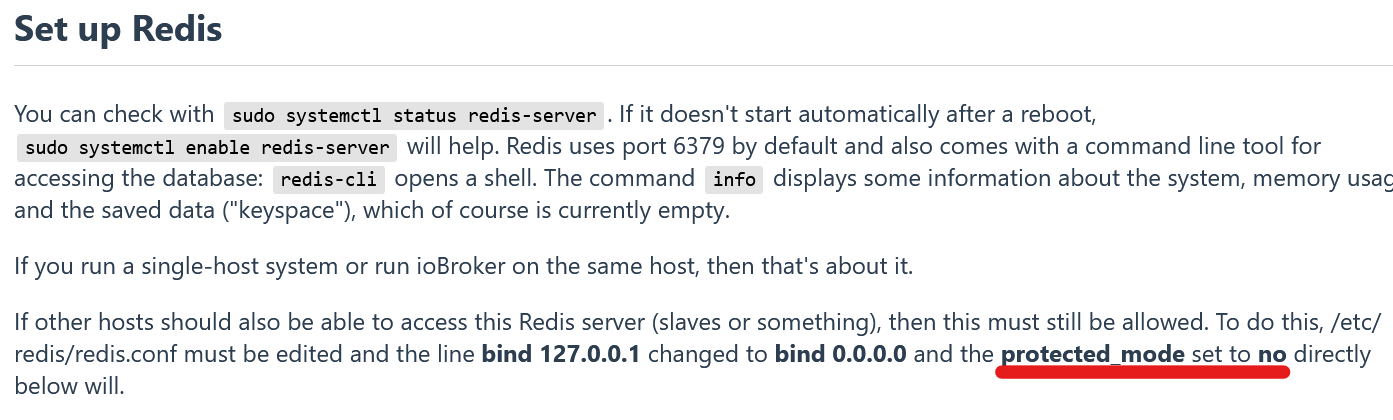
NUC10I3+Ubuntu+Docker+ioBroker+influxDB2+Node Red+EMQX+Grafana
Pi-hole, Traefik, Checkmk, Conbee II+Zigbee2MQTT, ESPSomfy-RTS, LoRaWAN
Benutzt das Voting im Beitrag, wenn er euch geholfen hat.
-
@homoran sagte in System mit Master/Slave neu aufsetzen:
ist das neu(er)?
und deswegen jetzt 0.0.0.0 als default?Ob das neu ist, kann ich nicht sagen, ich kenne es nicht anders. Und es steht auch in der Dokumentation, wobei es in der Multihost Doku vielleicht nachgezogen werden sollte.
https://www.iobroker.net/#en/documentation/config/redis.md
@marc-berg sagte in System mit Master/Slave neu aufsetzen:
Und es steht auch in der Dokumentation,
aber da steht doch, dass du bind 0.0.0.0 eintragen musst. (must be changed to 0.0.0.0)
Wenn es grundsätzlich freigeschaltet wäre, wäre das nicht nötig.
So kenne ich das auch.Deswegen habe ich es auch genau so in 2014 in die Doku übernommen.
https://www.iobroker.net/#de/documentation/config/multihost.md?multihostmitredisDamals gab es meines Wissens die Option protected mode nicht.
kein Support per PN! - Fragen im Forum stellen - Benutzt das Voting rechts unten im Beitrag wenn er euch geholfen hat.
Das Forum freut sich über eine Spende. Benutzt dazu den Spendenbutton oben rechts. Danke!
der Installationsfixer: curl -fsL https://iobroker.net/fix.sh | bash - -
@marc-berg sagte in System mit Master/Slave neu aufsetzen:
Und es steht auch in der Dokumentation,
aber da steht doch, dass du bind 0.0.0.0 eintragen musst. (must be changed to 0.0.0.0)
Wenn es grundsätzlich freigeschaltet wäre, wäre das nicht nötig.
So kenne ich das auch.Deswegen habe ich es auch genau so in 2014 in die Doku übernommen.
https://www.iobroker.net/#de/documentation/config/multihost.md?multihostmitredisDamals gab es meines Wissens die Option protected mode nicht.
@homoran sagte in System mit Master/Slave neu aufsetzen:
Wenn es grundsätzlich freigeschaltet wäre, wäre das nicht nötig.
So kenne ich das auch.Es ist nicht grundsätzlich freigeschaltet, da standardmäßig
bind 127.0.0.1in der config steht. Jetzt kann man das auf "0.0.0.0" ändern, oder die Zeile löschen. Es kommt auf das selbe raus.

Hey! Du scheinst an dieser Unterhaltung interessiert zu sein, hast aber noch kein Konto.
Hast du es satt, bei jedem Besuch durch die gleichen Beiträge zu scrollen? Wenn du dich für ein Konto anmeldest, kommst du immer genau dorthin zurück, wo du zuvor warst, und kannst dich über neue Antworten benachrichtigen lassen (entweder per E-Mail oder Push-Benachrichtigung). Du kannst auch Lesezeichen speichern und Beiträge positiv bewerten, um anderen Community-Mitgliedern deine Wertschätzung zu zeigen.
Mit deinem Input könnte dieser Beitrag noch besser werden 💗
Registrieren Anmelden342
Online33.0k
Benutzer83.6k
Themen1.3m
Beiträge