Skip to content
  • Home
  • Aktuell
  • Tags
  • 0 Ungelesen 0
  • Kategorien
  • Unreplied
  • Beliebt
  • GitHub
  • Docu
  • Hilfe
Skins
  • Light
  • Brite
  • Cerulean
  • Cosmo
  • Flatly
  • Journal
  • Litera
  • Lumen
  • Lux
  • Materia
  • Minty
  • Morph
  • Pulse
  • Sandstone
  • Simplex
  • Sketchy
  • Spacelab
  • United
  • Yeti
  • Zephyr
  • Dark
  • Cyborg
  • Darkly
  • Quartz
  • Slate
  • Solar
  • Superhero
  • Vapor

  • Standard: (Kein Skin)
  • Kein Skin
Einklappen
ioBroker Logo

Community Forum

donate donate
  1. ioBroker Community Home
  2. Deutsch
  3. ioBroker Allgemein
  4. QNAP NAS Container ioBroker js-controller und node update
NEWS

  • UPDATE 31.10.: Amazon Alexa - ioBroker Skill läuft aus ?
    apollon77A
    apollon77
    48
    3
    8.9k

  • Monatsrückblick – September 2025
    BluefoxB
    Bluefox
    13
    1
    2.3k

  • Neues Video "KI im Smart Home" - ioBroker plus n8n
    BluefoxB
    Bluefox
    16
    1
    3.4k

QNAP NAS Container ioBroker js-controller und node update

Geplant Angeheftet Gesperrt Verschoben ioBroker Allgemein
68 Beiträge 7 Kommentatoren 6.6k Aufrufe 4 Watching
  • Älteste zuerst
  • Neuste zuerst
  • Meiste Stimmen
Antworten
  • In einem neuen Thema antworten
Anmelden zum Antworten
Dieses Thema wurde gelöscht. Nur Nutzer mit entsprechenden Rechten können es sehen.
  • GlasfaserG Glasfaser

    @holgercw

    Dann ziehen wir langsam hoch ...

    Erstmal

    pkill -u iobroker
    sudo -H -u iobroker npm install iobroker.js-controller@4.0.24
    

    Container danach neu starten .

    Bei

    nodejs: v10.18.1

    @Thomas-Braun kannst du nacher helfen... um erstmal nur auf 16 zu kommen für den alten Container !

    EDIT :

    Mähhh .. ab 4.0.24

    Nur die Node.js Version muss weiterhin mindestens 12.x sein, wie oben bereits ausgeführt.

    also erst Node-js

    Thomas BraunT Online
    Thomas BraunT Online
    Thomas Braun
    Most Active
    schrieb am zuletzt editiert von
    #31

    @glasfaser sagte in QNAP NAS Container ioBroker js-controller und node update:

    kannst du nacher helfen... um erstmal nur auf 16 zu kommen für den alten Container !

    Keine Ahnung. Ich kann nur apt... Geht das im Container?

    Linux-Werkzeugkasten:
    https://forum.iobroker.net/topic/42952/der-kleine-iobroker-linux-werkzeugkasten
    NodeJS Fixer Skript:
    https://forum.iobroker.net/topic/68035/iob-node-fix-skript
    iob_diag: curl -sLf -o diag.sh https://iobroker.net/diag.sh && bash diag.sh

    GlasfaserG 1 Antwort Letzte Antwort
    0
    • Thomas BraunT Thomas Braun

      @glasfaser sagte in QNAP NAS Container ioBroker js-controller und node update:

      kannst du nacher helfen... um erstmal nur auf 16 zu kommen für den alten Container !

      Keine Ahnung. Ich kann nur apt... Geht das im Container?

      GlasfaserG Offline
      GlasfaserG Offline
      Glasfaser
      schrieb am zuletzt editiert von
      #32

      @thomas-braun

      Ja , geht !

      Synology 918+ 16GB - ioBroker in Docker v9 , VISO auf Trekstor Primebook C13 13,3" , Hikvision Domkameras mit Surveillance Station .. CCU RaspberryMatic in Synology VM .. Zigbee CC2538+CC2592 .. Sonoff .. KNX .. Modbus ..

      1 Antwort Letzte Antwort
      0
      • H HolgerCW

        @glasfaser Ich konnte ja auch jetzt nicht in der Console iobroker update machen

        Thomas BraunT Online
        Thomas BraunT Online
        Thomas Braun
        Most Active
        schrieb am zuletzt editiert von
        #33

        @holgercw

        apt update 
        apt policy nodejs
        

        sagt?

        Linux-Werkzeugkasten:
        https://forum.iobroker.net/topic/42952/der-kleine-iobroker-linux-werkzeugkasten
        NodeJS Fixer Skript:
        https://forum.iobroker.net/topic/68035/iob-node-fix-skript
        iob_diag: curl -sLf -o diag.sh https://iobroker.net/diag.sh && bash diag.sh

        H 2 Antworten Letzte Antwort
        0
        • GlasfaserG Glasfaser

          @holgercw

          Dann ziehen wir langsam hoch ...

          Erstmal

          pkill -u iobroker
          sudo -H -u iobroker npm install iobroker.js-controller@4.0.24
          

          Container danach neu starten .

          Bei

          nodejs: v10.18.1

          @Thomas-Braun kannst du nacher helfen... um erstmal nur auf 16 zu kommen für den alten Container !

          EDIT :

          Mähhh .. ab 4.0.24

          Nur die Node.js Version muss weiterhin mindestens 12.x sein, wie oben bereits ausgeführt.

          also erst Node-js

          H Offline
          H Offline
          HolgerCW
          schrieb am zuletzt editiert von
          #34

          @glasfaser ```
          root@ioBroker:/opt/iobroker# pkill -u iobroker
          root@ioBroker:/opt/iobroker# sudo -H -u iobroker npm install iobroker.js-controller@4.0.24
          npm ERR! code ENOTSUP
          npm ERR! notsup Unsupported engine for iobroker.js-controller@4.0.24: wanted: {"node":">=12.0.0"} (current: {"node":"10.18.1","npm":"6.13.4"})
          npm ERR! notsup Not compatible with your version of node/npm: iobroker.js-controller@4.0.24
          npm ERR! notsup Not compatible with your version of node/npm: iobroker.js-controller@4.0.24
          npm ERR! notsup Required: {"node":">=12.0.0"}
          npm ERR! notsup Actual: {"npm":"6.13.4","node":"10.18.1"}

          npm ERR! A complete log of this run can be found in:
          npm ERR! /opt/iobroker/.npm/_logs/2024-01-14T13_59_52_793Z-debug.log
          root@ioBroker:/opt/iobroker#

          GlasfaserG 1 Antwort Letzte Antwort
          0
          • Thomas BraunT Thomas Braun

            @holgercw

            apt update 
            apt policy nodejs
            

            sagt?

            H Offline
            H Offline
            HolgerCW
            schrieb am zuletzt editiert von
            #35

            @thomas-braun sagte in QNAP NAS Container ioBroker js-controller und node update:

            apt policy nodejs

            root@ioBroker:/opt/iobroker# apt update
            Ign:1 http://security.debian.org/debian-security stretch/updates InRelease
            Fehl:2 http://security.debian.org/debian-security stretch/updates Release
              404  Not Found
            Ign:3 http://deb.debian.org/debian stretch InRelease
            Ign:4 http://deb.debian.org/debian stretch-updates InRelease
            Fehl:5 http://deb.debian.org/debian stretch Release
              404  Not Found
            Fehl:6 http://deb.debian.org/debian stretch-updates Release
              404  Not Found
            Holen:7 https://deb.nodesource.com/node_10.x stretch InRelease [4.585 B]
            Holen:8 https://deb.nodesource.com/node_10.x stretch/main amd64 Packages [767 B]
            Paketlisten werden gelesen... Fertig
            E: The repository 'http://security.debian.org/debian-security stretch/updates Release' does not have a Release file.
            N: Updating from such a repository can't be done securely, and is therefore disabled by default.
            N: See apt-secure(8) manpage for repository creation and user configuration details.
            E: The repository 'http://deb.debian.org/debian stretch Release' does not have a Release file.
            N: Updating from such a repository can't be done securely, and is therefore disabled by default.
            N: See apt-secure(8) manpage for repository creation and user configuration details.
            E: The repository 'http://deb.debian.org/debian stretch-updates Release' does not have a Release file.
            N: Updating from such a repository can't be done securely, and is therefore disabled by default.
            N: See apt-secure(8) manpage for repository creation and user configuration details.
            root@ioBroker:/opt/iobroker# apt policy nodejs
            nodejs:
              Installiert:           10.18.1-1nodesource1
              Installationskandidat: 10.24.1-1nodesource1
              Versionstabelle:
                 10.24.1-1nodesource1 500
                    500 https://deb.nodesource.com/node_10.x stretch/main amd64 Packages
             *** 10.18.1-1nodesource1 100
                    100 /var/lib/dpkg/status
            root@ioBroker:/opt/iobroker# 
            
            1 Antwort Letzte Antwort
            0
            • Thomas BraunT Thomas Braun

              @holgercw

              apt update 
              apt policy nodejs
              

              sagt?

              H Offline
              H Offline
              HolgerCW
              schrieb am zuletzt editiert von
              #36

              Habe beides durchgeführt. Siehe was die Console ausgespuckt hat in den letzten beiden Posts. Sorry, gestern konnte ich leider nicht mehr antworten.

              Gruss

              Holger

              1 Antwort Letzte Antwort
              0
              • H HolgerCW

                @glasfaser ```
                root@ioBroker:/opt/iobroker# pkill -u iobroker
                root@ioBroker:/opt/iobroker# sudo -H -u iobroker npm install iobroker.js-controller@4.0.24
                npm ERR! code ENOTSUP
                npm ERR! notsup Unsupported engine for iobroker.js-controller@4.0.24: wanted: {"node":">=12.0.0"} (current: {"node":"10.18.1","npm":"6.13.4"})
                npm ERR! notsup Not compatible with your version of node/npm: iobroker.js-controller@4.0.24
                npm ERR! notsup Not compatible with your version of node/npm: iobroker.js-controller@4.0.24
                npm ERR! notsup Required: {"node":">=12.0.0"}
                npm ERR! notsup Actual: {"npm":"6.13.4","node":"10.18.1"}

                npm ERR! A complete log of this run can be found in:
                npm ERR! /opt/iobroker/.npm/_logs/2024-01-14T13_59_52_793Z-debug.log
                root@ioBroker:/opt/iobroker#

                GlasfaserG Offline
                GlasfaserG Offline
                Glasfaser
                schrieb am zuletzt editiert von Glasfaser
                #37

                @holgercw sagte in QNAP NAS Container ioBroker js-controller und node update:

                Unsupported engine for iobroker.js-controller

                deshalb mein Edit dazu im oberen Beitrag , das erst Nodejs hochgezogen werden muß !!

                Synology 918+ 16GB - ioBroker in Docker v9 , VISO auf Trekstor Primebook C13 13,3" , Hikvision Domkameras mit Surveillance Station .. CCU RaspberryMatic in Synology VM .. Zigbee CC2538+CC2592 .. Sonoff .. KNX .. Modbus ..

                H 1 Antwort Letzte Antwort
                0
                • GlasfaserG Glasfaser

                  @holgercw sagte in QNAP NAS Container ioBroker js-controller und node update:

                  Unsupported engine for iobroker.js-controller

                  deshalb mein Edit dazu im oberen Beitrag , das erst Nodejs hochgezogen werden muß !!

                  H Offline
                  H Offline
                  HolgerCW
                  schrieb am zuletzt editiert von HolgerCW
                  #38

                  @glasfaser OK, da übersehe ich dann hier ständig was. Wie ziehe ich das hoch ? Kannst mir den Code dazu posten ?

                  GlasfaserG 1 Antwort Letzte Antwort
                  0
                  • H HolgerCW

                    @glasfaser OK, da übersehe ich dann hier ständig was. Wie ziehe ich das hoch ? Kannst mir den Code dazu posten ?

                    GlasfaserG Offline
                    GlasfaserG Offline
                    Glasfaser
                    schrieb am zuletzt editiert von
                    #39

                    @holgercw sagte in QNAP NAS Container ioBroker js-controller und node update:

                    @glasfaser OK, da übersehe ich dann hier ständig was.

                    Ja , das sehe ich ..

                    Wie ziehe ich das hoch ?

                    lese doch bitte die Kommentare langsam durch , ich habe @Thomas-Braun um Hilfe gebeten !

                    Synology 918+ 16GB - ioBroker in Docker v9 , VISO auf Trekstor Primebook C13 13,3" , Hikvision Domkameras mit Surveillance Station .. CCU RaspberryMatic in Synology VM .. Zigbee CC2538+CC2592 .. Sonoff .. KNX .. Modbus ..

                    H 2 Antworten Letzte Antwort
                    0
                    • GlasfaserG Glasfaser

                      @holgercw sagte in QNAP NAS Container ioBroker js-controller und node update:

                      @glasfaser OK, da übersehe ich dann hier ständig was.

                      Ja , das sehe ich ..

                      Wie ziehe ich das hoch ?

                      lese doch bitte die Kommentare langsam durch , ich habe @Thomas-Braun um Hilfe gebeten !

                      H Offline
                      H Offline
                      HolgerCW
                      schrieb am zuletzt editiert von Homoran
                      #40

                      @glasfaser Habe jetzt apt update gemacht und dann kommt das:

                      root@ioBroker:/opt/iobroker# apt update
                      Ign:1 http://security.debian.org/debian-security stretch/updates InRelease
                      Fehl:2 http://security.debian.org/debian-security stretch/updates Release
                        404  Not Found
                      Ign:3 http://deb.debian.org/debian stretch InRelease         
                      Ign:4 http://deb.debian.org/debian stretch-updates InRelease
                      Fehl:5 http://deb.debian.org/debian stretch Release
                        404  Not Found
                      Fehl:6 http://deb.debian.org/debian stretch-updates Release
                        404  Not Found
                      Holen:7 https://deb.nodesource.com/node_10.x stretch InRelease [4.585 B]
                      Holen:8 https://deb.nodesource.com/node_10.x stretch/main amd64 Packages [767 B]                                                                                                                                                                                               
                      Paketlisten werden gelesen... Fertig                                                                                                                                                                                                                                           
                      E: The repository 'http://security.debian.org/debian-security stretch/updates Release' does not have a Release file.
                      N: Updating from such a repository can't be done securely, and is therefore disabled by default.
                      N: See apt-secure(8) manpage for repository creation and user configuration details.
                      E: The repository 'http://deb.debian.org/debian stretch Release' does not have a Release file.
                      N: Updating from such a repository can't be done securely, and is therefore disabled by default.
                      N: See apt-secure(8) manpage for repository creation and user configuration details.
                      E: The repository 'http://deb.debian.org/debian stretch-updates Release' does not have a Release file.
                      N: Updating from such a repository can't be done securely, and is therefore disabled by default.
                      N: See apt-secure(8) manpage for repository creation and user configuration details.
                      root@ioBroker:/opt/iobroker# apt policy nodejs
                      nodejs:
                        Installiert:           10.18.1-1nodesource1
                        Installationskandidat: 10.24.1-1nodesource1
                        Versionstabelle:
                           10.24.1-1nodesource1 500
                              500 https://deb.nodesource.com/node_10.x stretch/main amd64 Packages
                       *** 10.18.1-1nodesource1 100
                              100 /var/lib/dpkg/status
                      root@ioBroker:/opt/iobroker#
                      
                      GlasfaserG 1 Antwort Letzte Antwort
                      0
                      • H HolgerCW

                        @glasfaser Habe jetzt apt update gemacht und dann kommt das:

                        root@ioBroker:/opt/iobroker# apt update
                        Ign:1 http://security.debian.org/debian-security stretch/updates InRelease
                        Fehl:2 http://security.debian.org/debian-security stretch/updates Release
                          404  Not Found
                        Ign:3 http://deb.debian.org/debian stretch InRelease         
                        Ign:4 http://deb.debian.org/debian stretch-updates InRelease
                        Fehl:5 http://deb.debian.org/debian stretch Release
                          404  Not Found
                        Fehl:6 http://deb.debian.org/debian stretch-updates Release
                          404  Not Found
                        Holen:7 https://deb.nodesource.com/node_10.x stretch InRelease [4.585 B]
                        Holen:8 https://deb.nodesource.com/node_10.x stretch/main amd64 Packages [767 B]                                                                                                                                                                                               
                        Paketlisten werden gelesen... Fertig                                                                                                                                                                                                                                           
                        E: The repository 'http://security.debian.org/debian-security stretch/updates Release' does not have a Release file.
                        N: Updating from such a repository can't be done securely, and is therefore disabled by default.
                        N: See apt-secure(8) manpage for repository creation and user configuration details.
                        E: The repository 'http://deb.debian.org/debian stretch Release' does not have a Release file.
                        N: Updating from such a repository can't be done securely, and is therefore disabled by default.
                        N: See apt-secure(8) manpage for repository creation and user configuration details.
                        E: The repository 'http://deb.debian.org/debian stretch-updates Release' does not have a Release file.
                        N: Updating from such a repository can't be done securely, and is therefore disabled by default.
                        N: See apt-secure(8) manpage for repository creation and user configuration details.
                        root@ioBroker:/opt/iobroker# apt policy nodejs
                        nodejs:
                          Installiert:           10.18.1-1nodesource1
                          Installationskandidat: 10.24.1-1nodesource1
                          Versionstabelle:
                             10.24.1-1nodesource1 500
                                500 https://deb.nodesource.com/node_10.x stretch/main amd64 Packages
                         *** 10.18.1-1nodesource1 100
                                100 /var/lib/dpkg/status
                        root@ioBroker:/opt/iobroker#
                        
                        GlasfaserG Offline
                        GlasfaserG Offline
                        Glasfaser
                        schrieb am zuletzt editiert von
                        #41

                        @holgercw sagte in QNAP NAS Container ioBroker js-controller und node update:

                        @glasfaser Habe jetzt apt update gemacht

                        Bitte kein Doppelpost ... eine Ausgabe reicht oben !

                        Und Wichtig bitte keine Befehl quer ausführen ... !

                        Also warten !

                        Synology 918+ 16GB - ioBroker in Docker v9 , VISO auf Trekstor Primebook C13 13,3" , Hikvision Domkameras mit Surveillance Station .. CCU RaspberryMatic in Synology VM .. Zigbee CC2538+CC2592 .. Sonoff .. KNX .. Modbus ..

                        1 Antwort Letzte Antwort
                        0
                        • GlasfaserG Glasfaser

                          @holgercw sagte in QNAP NAS Container ioBroker js-controller und node update:

                          @glasfaser OK, da übersehe ich dann hier ständig was.

                          Ja , das sehe ich ..

                          Wie ziehe ich das hoch ?

                          lese doch bitte die Kommentare langsam durch , ich habe @Thomas-Braun um Hilfe gebeten !

                          H Offline
                          H Offline
                          HolgerCW
                          schrieb am zuletzt editiert von Homoran
                          #42

                          @glasfaser UNd auch das mit iob nodejs-update. Dann kommt das:

                          root@ioBroker:/opt/iobroker# iob stop
                          iobroker controller daemon is not running
                          root@ioBroker:/opt/iobroker# iob fix
                          root@ioBroker:/opt/iobroker# iob nodejs-update
                          iobroker [command]
                          
                          Commands:
                            iobroker setup                                               Setup ioBroker
                            iobroker start                                               Starts the js-controller
                            iobroker stop                                                stops the js-controller
                            iobroker restart                                             Restarts js-controller
                            iobroker debug <adapter>[.<instance>]                        Starts a Node.js debugging session for the adapter instance
                            iobroker info                                                Shows the host info
                            iobroker logs [<adapter>]                                    Monitor log
                            iobroker add <adapter> [desiredNumber]                       Add instance of adapter
                            iobroker install <adapter>                                   Installs a specified adapter
                            iobroker rebuild <adapter>|self                              Rebuilds a specified adapter
                            iobroker url <url> [<name>]                                  Install adapter from specified url, e.g. GitHub
                            iobroker del <adapter>                                       Remove adapter from system
                            iobroker del <adapter>.<instance>                            Remove adapter instance
                            iobroker update [<repositoryUrl>]                            Update repository and list adapters
                            iobroker upgrade                                             Upgrade management
                            iobroker upload                                              Upload management
                            iobroker object                                              Object management
                            iobroker state                                               State management
                            iobroker message <adapter>[.instance] <command> [<message>]  Send message to adapter instance/s
                            iobroker list <type> [<filter>]                              List all entries, like objects
                            iobroker chmod <mode> <file>                                 Change file rights
                            iobroker chown <user> <group> <file>                         Change file ownership
                            iobroker touch <file>                                        Touch file
                            iobroker rm <file>                                           Remove file
                            iobroker file                                                File management
                            iobroker user                                                User commands
                            iobroker group                                               group management
                            iobroker host <hostname>                                     Set host to given hostname
                            iobroker set <adapter>.<instance>                            Change settings of adapter config
                            iobroker license <license.file or license.text>              Update license by given file
                            iobroker cert                                                Certificate management
                            iobroker clean <yes>                                         Clears all objects and states
                            iobroker backup                                              Create backup
                            iobroker restore <backup name or path>                       Restore a specified backup
                            iobroker validate <backup name or path>                      Validate a specified backup
                            iobroker status [all|<adapter>.<instance>]                   Status of ioBroker or adapter instance
                            iobroker repo [<name>]                                       Show repo information
                            iobroker uuid                                                Show uuid of the installation
                            iobroker unsetup                                             Reset license, installation secret and language
                            iobroker fix                                                 Execute the installation fixer script, this updates your ioBroker installation
                            iobroker multihost                                           Multihost management
                            iobroker compact                                             compact group management
                            iobroker plugin                                              Plugin management
                            iobroker version [<adapter>]                                 Show version of js-controller or specified adapter
                          
                          Options:
                                --help     Show help  [boolean]
                            -v, --version  Show version  [boolean]
                          
                          GlasfaserG 1 Antwort Letzte Antwort
                          0
                          • H HolgerCW

                            @glasfaser UNd auch das mit iob nodejs-update. Dann kommt das:

                            root@ioBroker:/opt/iobroker# iob stop
                            iobroker controller daemon is not running
                            root@ioBroker:/opt/iobroker# iob fix
                            root@ioBroker:/opt/iobroker# iob nodejs-update
                            iobroker [command]
                            
                            Commands:
                              iobroker setup                                               Setup ioBroker
                              iobroker start                                               Starts the js-controller
                              iobroker stop                                                stops the js-controller
                              iobroker restart                                             Restarts js-controller
                              iobroker debug <adapter>[.<instance>]                        Starts a Node.js debugging session for the adapter instance
                              iobroker info                                                Shows the host info
                              iobroker logs [<adapter>]                                    Monitor log
                              iobroker add <adapter> [desiredNumber]                       Add instance of adapter
                              iobroker install <adapter>                                   Installs a specified adapter
                              iobroker rebuild <adapter>|self                              Rebuilds a specified adapter
                              iobroker url <url> [<name>]                                  Install adapter from specified url, e.g. GitHub
                              iobroker del <adapter>                                       Remove adapter from system
                              iobroker del <adapter>.<instance>                            Remove adapter instance
                              iobroker update [<repositoryUrl>]                            Update repository and list adapters
                              iobroker upgrade                                             Upgrade management
                              iobroker upload                                              Upload management
                              iobroker object                                              Object management
                              iobroker state                                               State management
                              iobroker message <adapter>[.instance] <command> [<message>]  Send message to adapter instance/s
                              iobroker list <type> [<filter>]                              List all entries, like objects
                              iobroker chmod <mode> <file>                                 Change file rights
                              iobroker chown <user> <group> <file>                         Change file ownership
                              iobroker touch <file>                                        Touch file
                              iobroker rm <file>                                           Remove file
                              iobroker file                                                File management
                              iobroker user                                                User commands
                              iobroker group                                               group management
                              iobroker host <hostname>                                     Set host to given hostname
                              iobroker set <adapter>.<instance>                            Change settings of adapter config
                              iobroker license <license.file or license.text>              Update license by given file
                              iobroker cert                                                Certificate management
                              iobroker clean <yes>                                         Clears all objects and states
                              iobroker backup                                              Create backup
                              iobroker restore <backup name or path>                       Restore a specified backup
                              iobroker validate <backup name or path>                      Validate a specified backup
                              iobroker status [all|<adapter>.<instance>]                   Status of ioBroker or adapter instance
                              iobroker repo [<name>]                                       Show repo information
                              iobroker uuid                                                Show uuid of the installation
                              iobroker unsetup                                             Reset license, installation secret and language
                              iobroker fix                                                 Execute the installation fixer script, this updates your ioBroker installation
                              iobroker multihost                                           Multihost management
                              iobroker compact                                             compact group management
                              iobroker plugin                                              Plugin management
                              iobroker version [<adapter>]                                 Show version of js-controller or specified adapter
                            
                            Options:
                                  --help     Show help  [boolean]
                              -v, --version  Show version  [boolean]
                            
                            GlasfaserG Offline
                            GlasfaserG Offline
                            Glasfaser
                            schrieb am zuletzt editiert von
                            #43

                            @holgercw sagte in QNAP NAS Container ioBroker js-controller und node update:

                            @glasfaser UNd auch das mit iob nodejs-update.

                            Nochmal bitte Warten !

                            der Befehl funktioniert nicht in Docker !

                            Synology 918+ 16GB - ioBroker in Docker v9 , VISO auf Trekstor Primebook C13 13,3" , Hikvision Domkameras mit Surveillance Station .. CCU RaspberryMatic in Synology VM .. Zigbee CC2538+CC2592 .. Sonoff .. KNX .. Modbus ..

                            H 1 Antwort Letzte Antwort
                            0
                            • GlasfaserG Glasfaser

                              @holgercw sagte in QNAP NAS Container ioBroker js-controller und node update:

                              @glasfaser UNd auch das mit iob nodejs-update.

                              Nochmal bitte Warten !

                              der Befehl funktioniert nicht in Docker !

                              H Offline
                              H Offline
                              HolgerCW
                              schrieb am zuletzt editiert von
                              #44

                              @glasfaser Achso. Ich soll hier auf eine Antwort warten ? Ich danchte ich hätte was übersehen. Dann bin ich gespannt auf die Antwort.

                              GlasfaserG 1 Antwort Letzte Antwort
                              0
                              • H HolgerCW

                                @glasfaser Achso. Ich soll hier auf eine Antwort warten ? Ich danchte ich hätte was übersehen. Dann bin ich gespannt auf die Antwort.

                                GlasfaserG Offline
                                GlasfaserG Offline
                                Glasfaser
                                schrieb am zuletzt editiert von
                                #45

                                @holgercw sagte in QNAP NAS Container ioBroker js-controller und node update:

                                @glasfaser Achso. Ich soll hier auf eine Antwort warten ?

                                richtig ...er braucht diese zwei Ausgaben , dann gehts es weiter ... ( oder auch nicht ) !

                                Das Problem ist , das du auf Nodejs 10 bist !

                                Synology 918+ 16GB - ioBroker in Docker v9 , VISO auf Trekstor Primebook C13 13,3" , Hikvision Domkameras mit Surveillance Station .. CCU RaspberryMatic in Synology VM .. Zigbee CC2538+CC2592 .. Sonoff .. KNX .. Modbus ..

                                H 1 Antwort Letzte Antwort
                                0
                                • GlasfaserG Glasfaser

                                  @holgercw sagte in QNAP NAS Container ioBroker js-controller und node update:

                                  @glasfaser Achso. Ich soll hier auf eine Antwort warten ?

                                  richtig ...er braucht diese zwei Ausgaben , dann gehts es weiter ... ( oder auch nicht ) !

                                  Das Problem ist , das du auf Nodejs 10 bist !

                                  H Offline
                                  H Offline
                                  HolgerCW
                                  schrieb am zuletzt editiert von
                                  #46

                                  @glasfaser Ok, die Ausgabe habe ich ja geliefert, richtig ? Dann warten wir mal ab.

                                  Thomas BraunT 1 Antwort Letzte Antwort
                                  0
                                  • H HolgerCW

                                    @glasfaser Ok, die Ausgabe habe ich ja geliefert, richtig ? Dann warten wir mal ab.

                                    Thomas BraunT Online
                                    Thomas BraunT Online
                                    Thomas Braun
                                    Most Active
                                    schrieb am zuletzt editiert von Thomas Braun
                                    #47

                                    @holgercw

                                    Alles steinalt und die Repos sind natürlich auch abgeräumt worden...

                                    Versuch mal in der Datei
                                    /etc/apt/sources.list.d/nodesource.list
                                    die 10 durch 16 zu ersetzen. Vielleicht lebt wenigstens das noch.

                                    Der ganze Mist kommt von dem tollen 'never tatsch a running süstem'. Der Schwachsinn funktioniert nicht.

                                    Linux-Werkzeugkasten:
                                    https://forum.iobroker.net/topic/42952/der-kleine-iobroker-linux-werkzeugkasten
                                    NodeJS Fixer Skript:
                                    https://forum.iobroker.net/topic/68035/iob-node-fix-skript
                                    iob_diag: curl -sLf -o diag.sh https://iobroker.net/diag.sh && bash diag.sh

                                    H malorossM 2 Antworten Letzte Antwort
                                    0
                                    • Thomas BraunT Thomas Braun

                                      @holgercw

                                      Alles steinalt und die Repos sind natürlich auch abgeräumt worden...

                                      Versuch mal in der Datei
                                      /etc/apt/sources.list.d/nodesource.list
                                      die 10 durch 16 zu ersetzen. Vielleicht lebt wenigstens das noch.

                                      Der ganze Mist kommt von dem tollen 'never tatsch a running süstem'. Der Schwachsinn funktioniert nicht.

                                      H Offline
                                      H Offline
                                      HolgerCW
                                      schrieb am zuletzt editiert von
                                      #48

                                      @thomas-braun sagte in QNAP NAS Container ioBroker js-controller und node update:

                                      /etc/apt/sources.list.d/nodesource.list

                                      Kannst Du mir sage, wo ich den PFad finde:
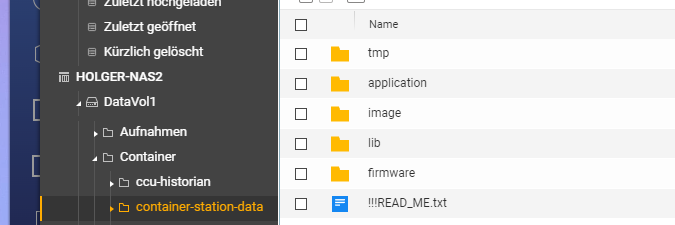
                                      07aabbae-40ef-4df8-8947-93f6dbb94ad4-image.png

                                      Thomas BraunT 1 Antwort Letzte Antwort
                                      0
                                      • H HolgerCW

                                        @thomas-braun sagte in QNAP NAS Container ioBroker js-controller und node update:

                                        /etc/apt/sources.list.d/nodesource.list

                                        Kannst Du mir sage, wo ich den PFad finde:

                                        07aabbae-40ef-4df8-8947-93f6dbb94ad4-image.png

                                        Thomas BraunT Online
                                        Thomas BraunT Online
                                        Thomas Braun
                                        Most Active
                                        schrieb am zuletzt editiert von
                                        #49

                                        @holgercw

                                        Nein, kann ich nicht. Von Docker lass ich nämlich die Finger.

                                        Linux-Werkzeugkasten:
                                        https://forum.iobroker.net/topic/42952/der-kleine-iobroker-linux-werkzeugkasten
                                        NodeJS Fixer Skript:
                                        https://forum.iobroker.net/topic/68035/iob-node-fix-skript
                                        iob_diag: curl -sLf -o diag.sh https://iobroker.net/diag.sh && bash diag.sh

                                        H 1 Antwort Letzte Antwort
                                        0
                                        • Thomas BraunT Thomas Braun

                                          @holgercw

                                          Alles steinalt und die Repos sind natürlich auch abgeräumt worden...

                                          Versuch mal in der Datei
                                          /etc/apt/sources.list.d/nodesource.list
                                          die 10 durch 16 zu ersetzen. Vielleicht lebt wenigstens das noch.

                                          Der ganze Mist kommt von dem tollen 'never tatsch a running süstem'. Der Schwachsinn funktioniert nicht.

                                          malorossM Offline
                                          malorossM Offline
                                          maloross
                                          schrieb am zuletzt editiert von
                                          #50

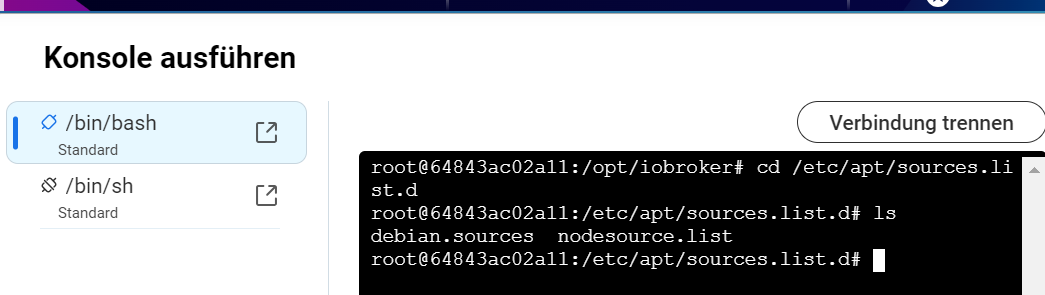
                                          @thomas-braun sagte in QNAP NAS Container ioBroker js-controller und node update:

                                          Versuch mal in der Datei
                                          /etc/apt/sources.list.d/nodesource.list
                                          die 10 durch 16 zu ersetzen.

                                          Das sollte über die Befehlskonsole funktionieren (Ansicht aus CS 3)
                                          164c8f06-710d-4ed0-8948-80c13d069811-image.png

                                          Auch Frauen können sich für Technik begeistern! ;)

                                          Equipment:
                                          diverse HM-, HMIP-, Aeotec- Tradfri- Sonos- und Fibaro-Geräte, Master-/Slavesystem auf 2 Raspi4, NAS

                                          H 1 Antwort Letzte Antwort
                                          0
                                          Antworten
                                          • In einem neuen Thema antworten
                                          Anmelden zum Antworten
                                          • Älteste zuerst
                                          • Neuste zuerst
                                          • Meiste Stimmen


                                          Support us

                                          ioBroker
                                          Community Adapters
                                          Donate
                                          FAQ Cloud / IOT
                                          HowTo: Node.js-Update
                                          HowTo: Backup/Restore
                                          Downloads
                                          BLOG

                                          802

                                          Online

                                          32.4k

                                          Benutzer

                                          81.6k

                                          Themen

                                          1.3m

                                          Beiträge
                                          Community
                                          Impressum | Datenschutz-Bestimmungen | Nutzungsbedingungen | Einwilligungseinstellungen
                                          ioBroker Community 2014-2025
                                          logo
                                          • Anmelden

                                          • Du hast noch kein Konto? Registrieren

                                          • Anmelden oder registrieren, um zu suchen
                                          • Erster Beitrag
                                            Letzter Beitrag
                                          0
                                          • Home
                                          • Aktuell
                                          • Tags
                                          • Ungelesen 0
                                          • Kategorien
                                          • Unreplied
                                          • Beliebt
                                          • GitHub
                                          • Docu
                                          • Hilfe