



Skip to content
  • Home
  • Aktuell
  • Tags
  • 0 Ungelesen 0
  • Kategorien
  • Unreplied
  • Beliebt
  • GitHub
  • Docu
  • Hilfe
Skins
  • Light
  • Brite
  • Cerulean
  • Cosmo
  • Flatly
  • Journal
  • Litera
  • Lumen
  • Lux
  • Materia
  • Minty
  • Morph
  • Pulse
  • Sandstone
  • Simplex
  • Sketchy
  • Spacelab
  • United
  • Yeti
  • Zephyr
  • Dark
  • Cyborg
  • Darkly
  • Quartz
  • Slate
  • Solar
  • Superhero
  • Vapor

  • Standard: (Kein Skin)
  • Kein Skin
Einklappen
ioBroker Logo

Community Forum

donate donate
  1. ioBroker Community Home
  2. Deutsch
  3. Off Topic
  4. Ertrag (Tag, Monat, Jahr) berechnen und in Datei speichern

NEWS

  • Weihnachtsangebot 2025! 🎄
    BluefoxB
    Bluefox
    18
    1
    600

  • UPDATE 31.10.: Amazon Alexa - ioBroker Skill läuft aus ?
    apollon77A
    apollon77
    48
    3
    9.0k

  • Monatsrückblick – September 2025
    BluefoxB
    Bluefox
    13
    1
    2.3k

Ertrag (Tag, Monat, Jahr) berechnen und in Datei speichern

Geplant Angeheftet Gesperrt Verschoben Off Topic
190 Beiträge 5 Kommentatoren 23.1k Aufrufe 4 Watching
  • Älteste zuerst
  • Neuste zuerst
  • Meiste Stimmen
Antworten
  • In einem neuen Thema antworten
Anmelden zum Antworten
Dieses Thema wurde gelöscht. Nur Nutzer mit entsprechenden Rechten können es sehen.
  • B bitwicht

    @Thomas-Braun

    ok ich warte mal ab bis Marc online ist und hoffe das er es fixen kann.
    Habe etwas Panik das meine Daten weg sind

    Marc BergM Offline
    Marc BergM Offline
    Marc Berg
    Most Active
    schrieb am zuletzt editiert von
    #99

    @bitwicht sagte in Ertrag (Tag, Monat, Jahr) berechnen und in Datei speichern:

    Habe etwas Panik das meine Daten weg sind

    Panik müsstest du nur haben, wenn du kein Backup hast, oder?

    Zeig mal das Ergebnis von

    sudo find / \( -path /proc -o -path /dev -o -path /sys -o -path /lost+found -o -path /mnt \) -prune -false -o -name *.bolt
    

    NUC10I3+Ubuntu+Docker+ioBroker+influxDB2+Node Red+RabbitMQ+Grafana

    Pi-hole, Traefik, Checkmk, Conbee II+Zigbee2MQTT, ESPSomfy-RTS, LoRaWAN, Arduino, KiCad

    Benutzt das Voting im Beitrag, wenn er euch geholfen hat.

    1 Antwort Letzte Antwort
    0
    • B Offline
      B Offline
      bitwicht
      schrieb am zuletzt editiert von bitwicht
      #100

      @Marc-Berg

      ich bin mir auch nicht sicher ob ich eins habe. ich habe den backitup aktiviert, aber was der macht oder auch nicht habe ich noch nicht geprüft.

      hier:

      pi@raspberrypi:~ $ sudo find / \( -path /proc -o -path /dev -o -path /sys -o -path /lost+found -o -path /mnt \) -prune -false -o -name *.bolt
      /var/lib/influxdb/influxd.bolt
      /var/lib/influxdb/.influxdbv2/influxd.bolt
      pi@raspberrypi:~ $
      

      Es kommt das initale Setup.
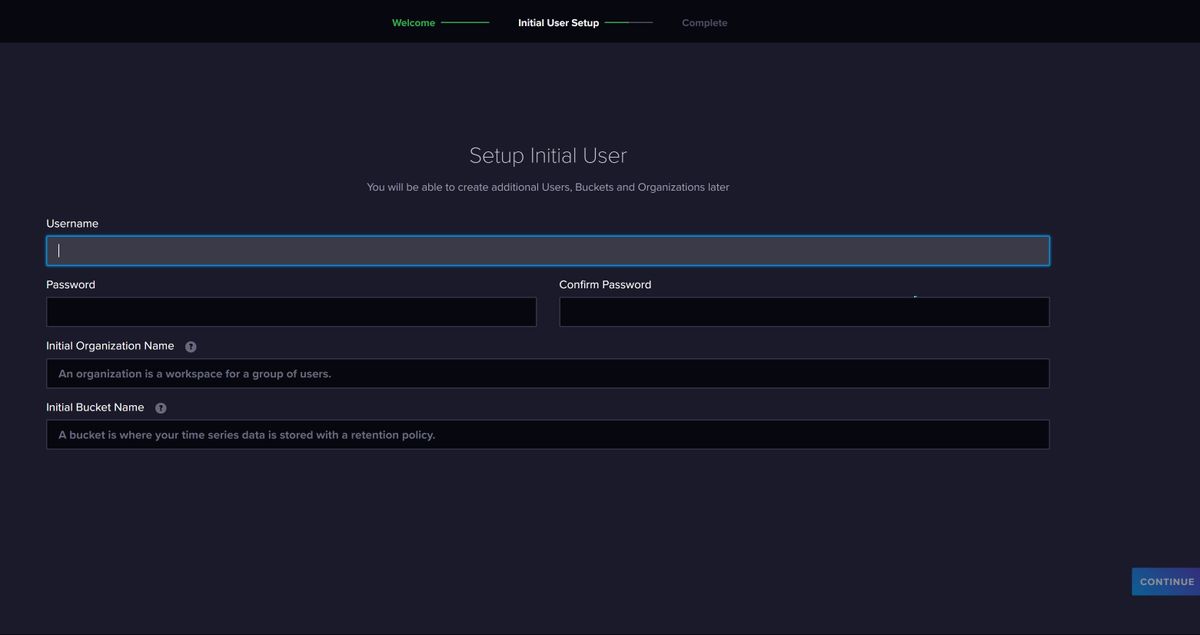
      IO-B20.JPG

      Marc BergM 1 Antwort Letzte Antwort
      0
      • B bitwicht

        @Marc-Berg

        ich bin mir auch nicht sicher ob ich eins habe. ich habe den backitup aktiviert, aber was der macht oder auch nicht habe ich noch nicht geprüft.

        hier:

        pi@raspberrypi:~ $ sudo find / \( -path /proc -o -path /dev -o -path /sys -o -path /lost+found -o -path /mnt \) -prune -false -o -name *.bolt
        /var/lib/influxdb/influxd.bolt
        /var/lib/influxdb/.influxdbv2/influxd.bolt
        pi@raspberrypi:~ $
        

        Es kommt das initale Setup.
        IO-B20.JPG

        Marc BergM Offline
        Marc BergM Offline
        Marc Berg
        Most Active
        schrieb am zuletzt editiert von
        #101

        @bitwicht sagte in Ertrag (Tag, Monat, Jahr) berechnen und in Datei speichern:

        /var/lib/influxdb/influxd.bolt

        ls -lah /var/lib/influxdb
        ls -lah /var/lib/influxdb/.influxdbv2
        ls -la /opt/iobroker/backups/influx*
        

        NUC10I3+Ubuntu+Docker+ioBroker+influxDB2+Node Red+RabbitMQ+Grafana

        Pi-hole, Traefik, Checkmk, Conbee II+Zigbee2MQTT, ESPSomfy-RTS, LoRaWAN, Arduino, KiCad

        Benutzt das Voting im Beitrag, wenn er euch geholfen hat.

        1 Antwort Letzte Antwort
        0
        • B Offline
          B Offline
          bitwicht
          schrieb am zuletzt editiert von
          #102

          @Marc-Berg

          pi@raspberrypi:~ $ ls -lah /var/lib/influxdb
          ls: cannot open directory '/var/lib/influxdb': Permission denied
          

          muss ich die influx erst stoppen oder per sudo ?

          Marc BergM 1 Antwort Letzte Antwort
          0
          • B bitwicht

            @Marc-Berg

            pi@raspberrypi:~ $ ls -lah /var/lib/influxdb
            ls: cannot open directory '/var/lib/influxdb': Permission denied
            

            muss ich die influx erst stoppen oder per sudo ?

            Marc BergM Offline
            Marc BergM Offline
            Marc Berg
            Most Active
            schrieb am zuletzt editiert von
            #103

            @bitwicht sagte in Ertrag (Tag, Monat, Jahr) berechnen und in Datei speichern:

            er per sudo ?

            sorry, sudo vergessen

            NUC10I3+Ubuntu+Docker+ioBroker+influxDB2+Node Red+RabbitMQ+Grafana

            Pi-hole, Traefik, Checkmk, Conbee II+Zigbee2MQTT, ESPSomfy-RTS, LoRaWAN, Arduino, KiCad

            Benutzt das Voting im Beitrag, wenn er euch geholfen hat.

            1 Antwort Letzte Antwort
            0
            • B Offline
              B Offline
              bitwicht
              schrieb am zuletzt editiert von bitwicht
              #104

              @Marc-Berg

              pi@raspberrypi:~ $ sudo ls -lah /var/lib/influxdb
              total 200K
              drwxr-x---  8 influxdb influxdb 4.0K Jan  8 17:47 .
              drwxr-xr-x 31 root     root     4.0K Jan  6 07:46 ..
              drwxr-xr-x  3 influxdb influxdb 4.0K Nov 14  2022 .cache
              drwxr-xr-x  3 influxdb influxdb 4.0K Nov 14  2022 data
              drwxr-x---  4 influxdb influxdb 4.0K Jan  8 17:47 engine
              -rw-------  1 influxdb influxdb  64K Jan  8 17:47 influxd.bolt
              drwx------  3 influxdb influxdb 4.0K Nov 14  2022 .influxdbv2
              -rw-r-----  1 influxdb influxdb    4 Jan  8 17:47 influxd.pid
              -rw-r-----  1 influxdb influxdb 120K Jan  8 17:47 influxd.sqlite
              drwxr-xr-x  2 influxdb influxdb 4.0K Nov 14  2022 meta
              drwx------  3 influxdb influxdb 4.0K Nov 14  2022 wal
              pi@raspberrypi:~ $ sudo ls -lah /var/lib/influxdb/.influxdbv2
              total 220K
              drwx------ 3 influxdb influxdb 4.0K Nov 14  2022 .
              drwxr-x--- 8 influxdb influxdb 4.0K Jan  8 17:47 ..
              drwxr-xr-x 5 influxdb influxdb 4.0K Nov 14  2022 engine
              -rw------- 1 influxdb influxdb 128K Jan  8 17:44 influxd.bolt
              -rw-r--r-- 1 influxdb influxdb 108K Nov 14  2022 influxd.sqlite
              pi@raspberrypi:~ $ sudo ls -la /opt/iobroker/backups/influx*
              ls: cannot access '/opt/iobroker/backups/influx*': No such file or directory
              pi@raspberrypi:~ $


              cannot access '/opt/iobroker/backups/influx*': No such file or directory

              Marc BergM 1 Antwort Letzte Antwort
              0
              • B bitwicht

                @Marc-Berg

                pi@raspberrypi:~ $ sudo ls -lah /var/lib/influxdb
                total 200K
                drwxr-x---  8 influxdb influxdb 4.0K Jan  8 17:47 .
                drwxr-xr-x 31 root     root     4.0K Jan  6 07:46 ..
                drwxr-xr-x  3 influxdb influxdb 4.0K Nov 14  2022 .cache
                drwxr-xr-x  3 influxdb influxdb 4.0K Nov 14  2022 data
                drwxr-x---  4 influxdb influxdb 4.0K Jan  8 17:47 engine
                -rw-------  1 influxdb influxdb  64K Jan  8 17:47 influxd.bolt
                drwx------  3 influxdb influxdb 4.0K Nov 14  2022 .influxdbv2
                -rw-r-----  1 influxdb influxdb    4 Jan  8 17:47 influxd.pid
                -rw-r-----  1 influxdb influxdb 120K Jan  8 17:47 influxd.sqlite
                drwxr-xr-x  2 influxdb influxdb 4.0K Nov 14  2022 meta
                drwx------  3 influxdb influxdb 4.0K Nov 14  2022 wal
                pi@raspberrypi:~ $ sudo ls -lah /var/lib/influxdb/.influxdbv2
                total 220K
                drwx------ 3 influxdb influxdb 4.0K Nov 14  2022 .
                drwxr-x--- 8 influxdb influxdb 4.0K Jan  8 17:47 ..
                drwxr-xr-x 5 influxdb influxdb 4.0K Nov 14  2022 engine
                -rw------- 1 influxdb influxdb 128K Jan  8 17:44 influxd.bolt
                -rw-r--r-- 1 influxdb influxdb 108K Nov 14  2022 influxd.sqlite
                pi@raspberrypi:~ $ sudo ls -la /opt/iobroker/backups/influx*
                ls: cannot access '/opt/iobroker/backups/influx*': No such file or directory
                pi@raspberrypi:~ $


                cannot access '/opt/iobroker/backups/influx*': No such file or directory

                Marc BergM Offline
                Marc BergM Offline
                Marc Berg
                Most Active
                schrieb am zuletzt editiert von
                #105

                @bitwicht

                sudo service influxdb status
                

                NUC10I3+Ubuntu+Docker+ioBroker+influxDB2+Node Red+RabbitMQ+Grafana

                Pi-hole, Traefik, Checkmk, Conbee II+Zigbee2MQTT, ESPSomfy-RTS, LoRaWAN, Arduino, KiCad

                Benutzt das Voting im Beitrag, wenn er euch geholfen hat.

                1 Antwort Letzte Antwort
                0
                • B Offline
                  B Offline
                  bitwicht
                  schrieb am zuletzt editiert von
                  #106

                  @marc-berg said in Ertrag (Tag, Monat, Jahr) berechnen und in Datei speichern:

                  sudo service influxdb status

                  pi@raspberrypi:~ $ sudo service influxdb status
                  ● influxdb.service - InfluxDB is an open-source, distributed, time series database
                       Loaded: loaded (/lib/systemd/system/influxdb.service; enabled; vendor preset: enabled)
                       Active: active (running) since Mon 2024-01-08 17:47:10 CET; 3h 5min ago
                         Docs: https://docs.influxdata.com/influxdb/
                     Main PID: 768 (influxd)
                        Tasks: 10 (limit: 8754)
                          CPU: 12.489s
                       CGroup: /system.slice/influxdb.service
                               └─768 /usr/bin/influxd
                  
                  Jan 08 20:06:54 raspberrypi influxd-systemd-start.sh[768]: ts=2024-01-08T19:06:54.556226Z lvl=info msg=Unauthorized log_id=0mbVNo2G000 error="authorization not found"
                  Jan 08 20:07:04 raspberrypi influxd-systemd-start.sh[768]: ts=2024-01-08T19:07:04.565325Z lvl=info msg=Unauthorized log_id=0mbVNo2G000 error="authorization not found"
                  Jan 08 20:07:14 raspberrypi influxd-systemd-start.sh[768]: ts=2024-01-08T19:07:14.572711Z lvl=info msg=Unauthorized log_id=0mbVNo2G000 error="authorization not found"
                  Jan 08 20:07:24 raspberrypi influxd-systemd-start.sh[768]: ts=2024-01-08T19:07:24.584166Z lvl=info msg=Unauthorized log_id=0mbVNo2G000 error="authorization not found"
                  Jan 08 20:07:34 raspberrypi influxd-systemd-start.sh[768]: ts=2024-01-08T19:07:34.593064Z lvl=info msg=Unauthorized log_id=0mbVNo2G000 error="authorization not found"
                  Jan 08 20:07:44 raspberrypi influxd-systemd-start.sh[768]: ts=2024-01-08T19:07:44.600902Z lvl=info msg=Unauthorized log_id=0mbVNo2G000 error="authorization not found"
                  Jan 08 20:17:23 raspberrypi influxd-systemd-start.sh[768]: ts=2024-01-08T19:17:23.618886Z lvl=info msg="Retention policy deletion check (start)" log_id=0mbVNo2G000 service=retention op_name=retention_delete_check op_event=start
                  Jan 08 20:17:23 raspberrypi influxd-systemd-start.sh[768]: ts=2024-01-08T19:17:23.618960Z lvl=info msg="Retention policy deletion check (end)" log_id=0mbVNo2G000 service=retention op_name=retention_delete_check op_event=end op_elapsed=0>
                  Jan 08 20:47:23 raspberrypi influxd-systemd-start.sh[768]: ts=2024-01-08T19:47:23.618284Z lvl=info msg="Retention policy deletion check (start)" log_id=0mbVNo2G000 service=retention op_name=retention_delete_check op_event=start
                  Jan 08 20:47:23 raspberrypi influxd-systemd-start.sh[768]: ts=2024-01-08T19:47:23.618352Z lvl=info msg="Retention policy deletion check (end)" log_id=0mbVNo2G000 service=retention op_name=retention_delete_check op_event=end op_elapsed=0>
                  lines 1-20/20 (END)
                  
                  
                  Marc BergM 1 Antwort Letzte Antwort
                  0
                  • B bitwicht

                    @marc-berg said in Ertrag (Tag, Monat, Jahr) berechnen und in Datei speichern:

                    sudo service influxdb status

                    pi@raspberrypi:~ $ sudo service influxdb status
                    ● influxdb.service - InfluxDB is an open-source, distributed, time series database
                         Loaded: loaded (/lib/systemd/system/influxdb.service; enabled; vendor preset: enabled)
                         Active: active (running) since Mon 2024-01-08 17:47:10 CET; 3h 5min ago
                           Docs: https://docs.influxdata.com/influxdb/
                       Main PID: 768 (influxd)
                          Tasks: 10 (limit: 8754)
                            CPU: 12.489s
                         CGroup: /system.slice/influxdb.service
                                 └─768 /usr/bin/influxd
                    
                    Jan 08 20:06:54 raspberrypi influxd-systemd-start.sh[768]: ts=2024-01-08T19:06:54.556226Z lvl=info msg=Unauthorized log_id=0mbVNo2G000 error="authorization not found"
                    Jan 08 20:07:04 raspberrypi influxd-systemd-start.sh[768]: ts=2024-01-08T19:07:04.565325Z lvl=info msg=Unauthorized log_id=0mbVNo2G000 error="authorization not found"
                    Jan 08 20:07:14 raspberrypi influxd-systemd-start.sh[768]: ts=2024-01-08T19:07:14.572711Z lvl=info msg=Unauthorized log_id=0mbVNo2G000 error="authorization not found"
                    Jan 08 20:07:24 raspberrypi influxd-systemd-start.sh[768]: ts=2024-01-08T19:07:24.584166Z lvl=info msg=Unauthorized log_id=0mbVNo2G000 error="authorization not found"
                    Jan 08 20:07:34 raspberrypi influxd-systemd-start.sh[768]: ts=2024-01-08T19:07:34.593064Z lvl=info msg=Unauthorized log_id=0mbVNo2G000 error="authorization not found"
                    Jan 08 20:07:44 raspberrypi influxd-systemd-start.sh[768]: ts=2024-01-08T19:07:44.600902Z lvl=info msg=Unauthorized log_id=0mbVNo2G000 error="authorization not found"
                    Jan 08 20:17:23 raspberrypi influxd-systemd-start.sh[768]: ts=2024-01-08T19:17:23.618886Z lvl=info msg="Retention policy deletion check (start)" log_id=0mbVNo2G000 service=retention op_name=retention_delete_check op_event=start
                    Jan 08 20:17:23 raspberrypi influxd-systemd-start.sh[768]: ts=2024-01-08T19:17:23.618960Z lvl=info msg="Retention policy deletion check (end)" log_id=0mbVNo2G000 service=retention op_name=retention_delete_check op_event=end op_elapsed=0>
                    Jan 08 20:47:23 raspberrypi influxd-systemd-start.sh[768]: ts=2024-01-08T19:47:23.618284Z lvl=info msg="Retention policy deletion check (start)" log_id=0mbVNo2G000 service=retention op_name=retention_delete_check op_event=start
                    Jan 08 20:47:23 raspberrypi influxd-systemd-start.sh[768]: ts=2024-01-08T19:47:23.618352Z lvl=info msg="Retention policy deletion check (end)" log_id=0mbVNo2G000 service=retention op_name=retention_delete_check op_event=end op_elapsed=0>
                    lines 1-20/20 (END)
                    
                    
                    Marc BergM Offline
                    Marc BergM Offline
                    Marc Berg
                    Most Active
                    schrieb am zuletzt editiert von
                    #107

                    @bitwicht
                    Okay.

                    Schlecht: kein Backup vorhanden
                    Wahrscheinlich gut: die alten Daten wurden nicht gelöscht.

                    Habe erstmal familäre Pflichten zu erfüllen, bin gleich wieder da.

                    NUC10I3+Ubuntu+Docker+ioBroker+influxDB2+Node Red+RabbitMQ+Grafana

                    Pi-hole, Traefik, Checkmk, Conbee II+Zigbee2MQTT, ESPSomfy-RTS, LoRaWAN, Arduino, KiCad

                    Benutzt das Voting im Beitrag, wenn er euch geholfen hat.

                    1 Antwort Letzte Antwort
                    0
                    • B Offline
                      B Offline
                      bitwicht
                      schrieb am zuletzt editiert von bitwicht
                      #108

                      @Marc-Berg

                      OK. Was mir eingefallen ist. Der Backitup schreibt das Backup auf ein NAS.
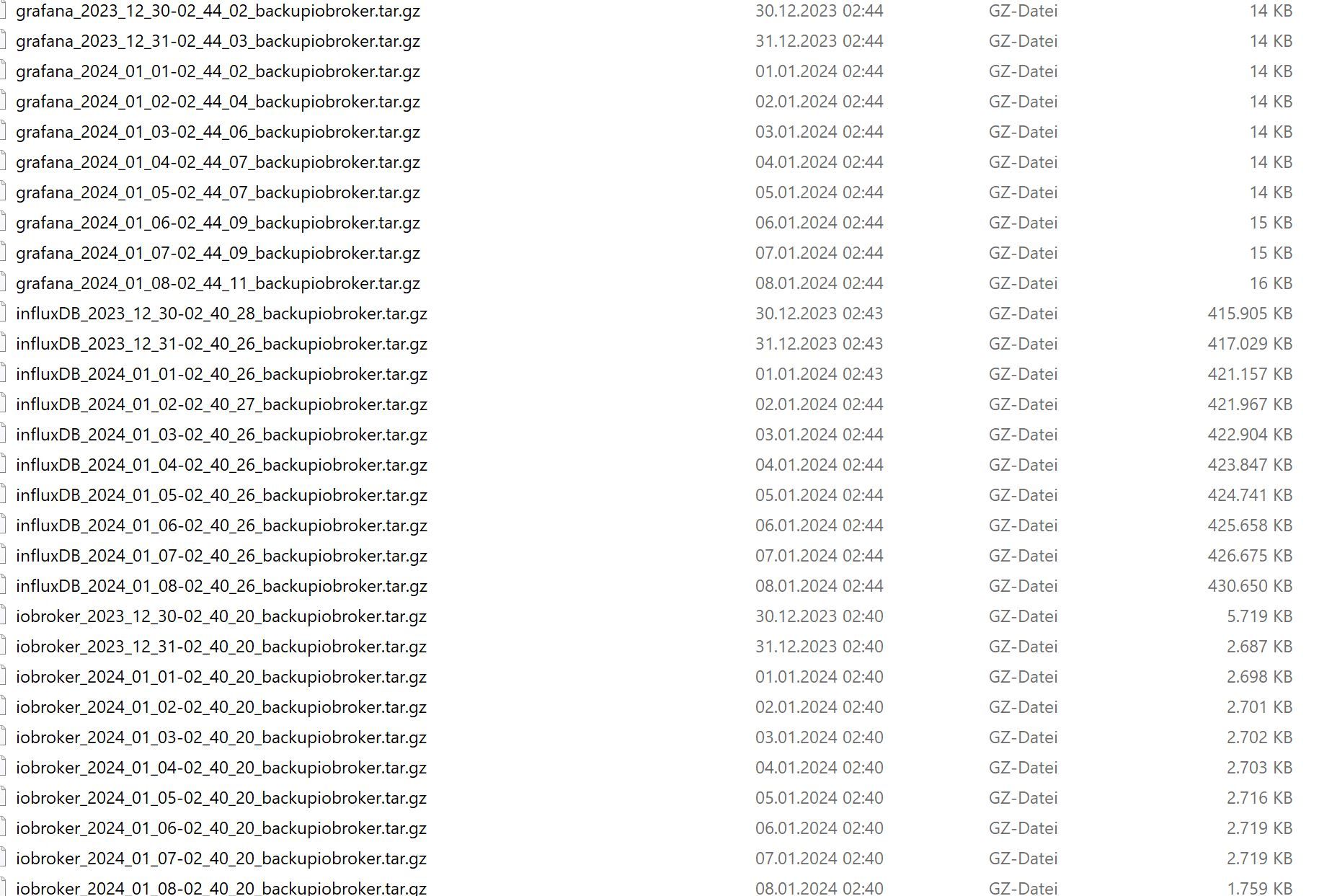
                      IO-B21.JPG

                      Das Backup wäre aber von heute Nacht. Vielleicht findest du die Dateien noch auf dem PI, falls sie nicht überschrieben wurden

                      Marc BergM 1 Antwort Letzte Antwort
                      0
                      • B bitwicht

                        @Marc-Berg

                        OK. Was mir eingefallen ist. Der Backitup schreibt das Backup auf ein NAS.

                        IO-B21.JPG

                        Das Backup wäre aber von heute Nacht. Vielleicht findest du die Dateien noch auf dem PI, falls sie nicht überschrieben wurden

                        Marc BergM Offline
                        Marc BergM Offline
                        Marc Berg
                        Most Active
                        schrieb am zuletzt editiert von
                        #109

                        @bitwicht sagte in Ertrag (Tag, Monat, Jahr) berechnen und in Datei speichern:

                        Das Backup wäre aber von heute Nacht. Vielleicht findest du die Dateien noch auf dem PI, falls sie nicht überschrieben wurden

                        Okay, dann haben wir eine Rückfalloption, falls das hier schief geht:

                        sudo service influxdb stop
                        sudo cp -pR /var/lib/influxdb/.influxdbv2/ /tmp
                        sudo cp -pR /tmp/.influxdbv2/* /var/lib/influxdb/
                        sudo service influxdb start
                        

                        NUC10I3+Ubuntu+Docker+ioBroker+influxDB2+Node Red+RabbitMQ+Grafana

                        Pi-hole, Traefik, Checkmk, Conbee II+Zigbee2MQTT, ESPSomfy-RTS, LoRaWAN, Arduino, KiCad

                        Benutzt das Voting im Beitrag, wenn er euch geholfen hat.

                        1 Antwort Letzte Antwort
                        0
                        • B Offline
                          B Offline
                          bitwicht
                          schrieb am zuletzt editiert von bitwicht
                          #110

                          @Marc-Berg

                          pi@raspberrypi:~ $ sudo service influxdb stop
                          pi@raspberrypi:~ $ sudo cp -pR /var/lib/influxdb/.influxdbv2/ /tmp
                          pi@raspberrypi:~ $ sudo cp -pR /tmp/.influxdbv2/* /var/lib/influxdb/
                          sudo service influxdb start
                          {1}
                          cp: cannot stat '/tmp/.influxdbv2/*': No such file or directory
                          -bash: {1}: command not found
                          pi@raspberrypi:~ $


                          oder sind das 2 Befhle:

                          • sudo cp -pR /tmp/.influxdbv2/* /var/lib/influxdb/
                          • sudo service influxdb start
                          Marc BergM 1 Antwort Letzte Antwort
                          0
                          • B bitwicht

                            @Marc-Berg

                            pi@raspberrypi:~ $ sudo service influxdb stop
                            pi@raspberrypi:~ $ sudo cp -pR /var/lib/influxdb/.influxdbv2/ /tmp
                            pi@raspberrypi:~ $ sudo cp -pR /tmp/.influxdbv2/* /var/lib/influxdb/
                            sudo service influxdb start
                            {1}
                            cp: cannot stat '/tmp/.influxdbv2/*': No such file or directory
                            -bash: {1}: command not found
                            pi@raspberrypi:~ $


                            oder sind das 2 Befhle:

                            • sudo cp -pR /tmp/.influxdbv2/* /var/lib/influxdb/
                            • sudo service influxdb start
                            Marc BergM Offline
                            Marc BergM Offline
                            Marc Berg
                            Most Active
                            schrieb am zuletzt editiert von
                            #111

                            @bitwicht sagte in Ertrag (Tag, Monat, Jahr) berechnen und in Datei speichern:

                            oder sind das 2 Befhle:

                            sudo cp -pR /tmp/.influxdbv2/* /var/lib/influxdb/
                            sudo service influxdb start

                            ja, genau

                            NUC10I3+Ubuntu+Docker+ioBroker+influxDB2+Node Red+RabbitMQ+Grafana

                            Pi-hole, Traefik, Checkmk, Conbee II+Zigbee2MQTT, ESPSomfy-RTS, LoRaWAN, Arduino, KiCad

                            Benutzt das Voting im Beitrag, wenn er euch geholfen hat.

                            1 Antwort Letzte Antwort
                            0
                            • B Offline
                              B Offline
                              bitwicht
                              schrieb am zuletzt editiert von
                              #112

                              @marc-berg

                              pi@raspberrypi:~ $ sudo cp -pR /var/lib/influxdb/.influxdbv2/ /tmp
                              pi@raspberrypi:~ $ sudo cp -pR /tmp/.influxdbv2/* /var/lib/influxdb/
                              cp: cannot stat '/tmp/.influxdbv2/*': No such file or directory
                              pi@raspberrypi:~ $
                              
                              
                              Marc BergM 1 Antwort Letzte Antwort
                              0
                              • B bitwicht

                                @marc-berg

                                pi@raspberrypi:~ $ sudo cp -pR /var/lib/influxdb/.influxdbv2/ /tmp
                                pi@raspberrypi:~ $ sudo cp -pR /tmp/.influxdbv2/* /var/lib/influxdb/
                                cp: cannot stat '/tmp/.influxdbv2/*': No such file or directory
                                pi@raspberrypi:~ $
                                
                                
                                Marc BergM Offline
                                Marc BergM Offline
                                Marc Berg
                                Most Active
                                schrieb am zuletzt editiert von
                                #113

                                @bitwicht sagte in Ertrag (Tag, Monat, Jahr) berechnen und in Datei speichern:

                                /tmp/.influxdbv2

                                sudo ls -lah /tmp/.influxdbv2
                                

                                NUC10I3+Ubuntu+Docker+ioBroker+influxDB2+Node Red+RabbitMQ+Grafana

                                Pi-hole, Traefik, Checkmk, Conbee II+Zigbee2MQTT, ESPSomfy-RTS, LoRaWAN, Arduino, KiCad

                                Benutzt das Voting im Beitrag, wenn er euch geholfen hat.

                                1 Antwort Letzte Antwort
                                0
                                • B Offline
                                  B Offline
                                  bitwicht
                                  schrieb am zuletzt editiert von
                                  #114

                                  @marc-berg

                                  pi@raspberrypi:~ $ sudo ls -lah /tmp/.influxdbv2
                                  total 220K
                                  drwx------  3 influxdb influxdb 4.0K Nov 14  2022 .
                                  drwxrwxrwt 13 root     root     4.0K Jan  8 22:11 ..
                                  drwxr-xr-x  5 influxdb influxdb 4.0K Nov 14  2022 engine
                                  -rw-------  1 influxdb influxdb 128K Jan  8 17:44 influxd.bolt
                                  -rw-r--r--  1 influxdb influxdb 108K Nov 14  2022 influxd.sqlite
                                  pi@raspberrypi:~ $
                                  
                                  
                                  Marc BergM 1 Antwort Letzte Antwort
                                  0
                                  • B bitwicht

                                    @marc-berg

                                    pi@raspberrypi:~ $ sudo ls -lah /tmp/.influxdbv2
                                    total 220K
                                    drwx------  3 influxdb influxdb 4.0K Nov 14  2022 .
                                    drwxrwxrwt 13 root     root     4.0K Jan  8 22:11 ..
                                    drwxr-xr-x  5 influxdb influxdb 4.0K Nov 14  2022 engine
                                    -rw-------  1 influxdb influxdb 128K Jan  8 17:44 influxd.bolt
                                    -rw-r--r--  1 influxdb influxdb 108K Nov 14  2022 influxd.sqlite
                                    pi@raspberrypi:~ $
                                    
                                    
                                    Marc BergM Offline
                                    Marc BergM Offline
                                    Marc Berg
                                    Most Active
                                    schrieb am zuletzt editiert von Marc Berg
                                    #115

                                    @bitwicht

                                    sudo mv /tmp/.influxdbv2/ /tmp/influxdbv2
                                    sudo cp -pR /tmp/influxdbv2/* /var/lib/influxdb/
                                    

                                    NUC10I3+Ubuntu+Docker+ioBroker+influxDB2+Node Red+RabbitMQ+Grafana

                                    Pi-hole, Traefik, Checkmk, Conbee II+Zigbee2MQTT, ESPSomfy-RTS, LoRaWAN, Arduino, KiCad

                                    Benutzt das Voting im Beitrag, wenn er euch geholfen hat.

                                    1 Antwort Letzte Antwort
                                    0
                                    • B Offline
                                      B Offline
                                      bitwicht
                                      schrieb am zuletzt editiert von bitwicht
                                      #116

                                      @Marc-Berg

                                      pi@raspberrypi:/ $ sudo mv /tmp/.influxdbv2/ /tmp/influxdbv2
                                      pi@raspberrypi:/ $ sudo cp -pR /tmp/influxdbv2/* /var/lib/influxdb/
                                      cp: cannot stat '/tmp/influxdbv2/*': No such file or directory
                                      pi@raspberrypi:/ $


                                      das geht auch nicht

                                      pi@raspberrypi:~ $ sudo cp -pR /var/lib/influxdb/.influxdbv2/ /tmp
                                      pi@raspberrypi:~ $ sudo mv /tmp/.influxdbv2/ /tmp/influxdbv2
                                      pi@raspberrypi:~ $ sudo cp -pR /tmp/influxdbv2/* /var/lib/influxdb/
                                      cp: cannot stat '/tmp/influxdbv2/*': No such file or directory
                                      pi@raspberrypi:~ $

                                      
                                      
                                      Marc BergM 1 Antwort Letzte Antwort
                                      0
                                      • B bitwicht

                                        @Marc-Berg

                                        pi@raspberrypi:/ $ sudo mv /tmp/.influxdbv2/ /tmp/influxdbv2
                                        pi@raspberrypi:/ $ sudo cp -pR /tmp/influxdbv2/* /var/lib/influxdb/
                                        cp: cannot stat '/tmp/influxdbv2/*': No such file or directory
                                        pi@raspberrypi:/ $


                                        das geht auch nicht

                                        pi@raspberrypi:~ $ sudo cp -pR /var/lib/influxdb/.influxdbv2/ /tmp
                                        pi@raspberrypi:~ $ sudo mv /tmp/.influxdbv2/ /tmp/influxdbv2
                                        pi@raspberrypi:~ $ sudo cp -pR /tmp/influxdbv2/* /var/lib/influxdb/
                                        cp: cannot stat '/tmp/influxdbv2/*': No such file or directory
                                        pi@raspberrypi:~ $
                                        
                                        
                                        Marc BergM Offline
                                        Marc BergM Offline
                                        Marc Berg
                                        Most Active
                                        schrieb am zuletzt editiert von
                                        #117

                                        @bitwicht

                                        sudo systemctl stop influxdb
                                        sudo mv /tmp/influxdb2 /tmp/influxdb
                                        sudo cp -pR /tmp/influxdb/ /var/lib
                                        sudo systemctl start influxdb
                                        

                                        NUC10I3+Ubuntu+Docker+ioBroker+influxDB2+Node Red+RabbitMQ+Grafana

                                        Pi-hole, Traefik, Checkmk, Conbee II+Zigbee2MQTT, ESPSomfy-RTS, LoRaWAN, Arduino, KiCad

                                        Benutzt das Voting im Beitrag, wenn er euch geholfen hat.

                                        1 Antwort Letzte Antwort
                                        0
                                        • B Offline
                                          B Offline
                                          bitwicht
                                          schrieb am zuletzt editiert von
                                          #118

                                          @marc-berg

                                          pi@raspberrypi:~ $ sudo systemctl stop influxdb
                                          pi@raspberrypi:~ $ sudo mv /tmp/influxdb2 /tmp/influxdb
                                          mv: cannot stat '/tmp/influxdb2': No such file or directory
                                          pi@raspberrypi:~ $
                                          
                                          
                                          Marc BergM 1 Antwort Letzte Antwort
                                          0
                                          Antworten
                                          • In einem neuen Thema antworten
                                          Anmelden zum Antworten
                                          • Älteste zuerst
                                          • Neuste zuerst
                                          • Meiste Stimmen


                                          Support us

                                          ioBroker
                                          Community Adapters
                                          Donate

                                          894

                                          Online

                                          32.5k

                                          Benutzer

                                          81.6k

                                          Themen

                                          1.3m

                                          Beiträge
                                          Community
                                          Impressum | Datenschutz-Bestimmungen | Nutzungsbedingungen | Einwilligungseinstellungen
                                          ioBroker Community 2014-2025
                                          logo
                                          • Anmelden

                                          • Du hast noch kein Konto? Registrieren

                                          • Anmelden oder registrieren, um zu suchen
                                          • Erster Beitrag
                                            Letzter Beitrag
                                          0
                                          • Home
                                          • Aktuell
                                          • Tags
                                          • Ungelesen 0
                                          • Kategorien
                                          • Unreplied
                                          • Beliebt
                                          • GitHub
                                          • Docu
                                          • Hilfe