




raspi nicht erreichbar und iobroker führt keine skripte aus
-
Hallo in die Runde,
ich bin wieder auf eure Hilfe angewiesen!
In unregelmäßigen Abständen ist mein raspi über SSH nicht mehr erreichbar und der iobroker führt die skripte nicht mehr aus. Es hilft nur Stromkabel zu ziehen und den raspi neu hochfahren zu lassen. Erst dann ist raspi wieder erreichbar bis er irgendwann dann wieder nicht erreichbar ist.Nachdem ich hier im Forum gelesen habe, dass oft Stromkabel oder SD-Karte schuld daran sein könnten, habe ich die Dinge neu gekauft - Stromkabel original. Deshalb dachte ich, es liegt an der raspi - also neuen Raspi gekauft. Das Problem tritt aber weiterhin auf.
Habt ihr eine Idee, was ich machen kann?
Noch ein paar Infos zu den Rahmenbedingungen:
- Mein Raspi ist direkt per LAN am Router verbunden
- am Raspi ist noch ein conbee über USB angesteckt -> Problem tritt aber auch ohne USB auf
iob diag======== Start marking the full check here =========
Skript v.2023-10-10

*** BASE SYSTEM ***
   Static hostname: raspberrypi
         Icon name: computer
  Operating System: Debian GNU/Linux 11 (bullseye)
            Kernel: Linux 6.1.21-v8+
      Architecture: arm64

Model           : Raspberry Pi 3 Model B Rev 1.2
Docker          : false
Virtualization  : none
Kernel          : aarch64
Userland        : arm64

Systemuptime and Load:
 22:52:32 up 7 min,  1 user,  load average: 0.33, 0.56, 0.38
CPU threads: 4


*** RASPBERRY THROTTLING ***
Current issues:
No throttling issues detected.

Previously detected issues:
No throttling issues detected.

*** Time and Time Zones ***
               Local time: Thu 2023-11-23 22:52:33 CET
           Universal time: Thu 2023-11-23 21:52:33 UTC
                 RTC time: n/a
                Time zone: Europe/Berlin (CET, +0100)
System clock synchronized: yes
              NTP service: active
          RTC in local TZ: no

*** User and Groups ***
pi
/home/pi
pi adm dialout cdrom sudo audio video plugdev games users input render netdev gpio i2c spi iobroker

*** X-Server-Setup ***
X-Server:       false
Desktop:
Terminal:       tty
Boot Target:    multi-user.target

*** MEMORY ***
               total        used        free      shared  buff/cache   available
Mem:            909M        604M        126M        0.0K        178M        243M
Swap:            99M        2.0M         97M
Total:          1.0G        606M        224M

          909 M total memory
          604 M used memory
          383 M active memory
          302 M inactive memory
          126 M free memory
            6 M buffer memory
          171 M swap cache
           99 M total swap
            2 M used swap
           97 M free swap

Raspberry only:
oom events: 0
lifetime oom required: 0 Mbytes
total time in oom handler: 0 ms
max time spent in oom handler: 0 ms

*** FAILED SERVICES ***

  UNIT LOAD ACTIVE SUB DESCRIPTION
0 loaded units listed.

*** FILESYSTEM ***
Filesystem     Type      Size  Used Avail Use% Mounted on
/dev/root      ext4       29G  3.5G   25G  13% /
devtmpfs       devtmpfs  325M     0  325M   0% /dev
tmpfs          tmpfs     455M     0  455M   0% /dev/shm
tmpfs          tmpfs     182M  1.0M  181M   1% /run
tmpfs          tmpfs     5.0M  4.0K  5.0M   1% /run/lock
/dev/mmcblk0p1 vfat      255M   31M  225M  13% /boot
tmpfs          tmpfs      91M     0   91M   0% /run/user/1000

Messages concerning ext4 filesystem in dmesg:
[Thu Nov 23 22:44:41 2023] Kernel command line: coherent_pool=1M 8250.nr_uarts=0 snd_bcm2835.enable_headphones=0 snd_bcm2835.enable_headphones=1 snd_bcm2835.enable_hdmi=1 snd_bcm2835.enable_hdmi=0 video=Composite-1:720x480@60i vc_mem.mem_base=0x3ec00000 vc_mem.mem_size=0x40000000  console=ttyS0,115200 console=tty1 root=PARTUUID=39428d7f-02 rootfstype=ext4 fsck.repair=yes rootwait
[Thu Nov 23 22:44:44 2023] EXT4-fs (mmcblk0p2): INFO: recovery required on readonly filesystem
[Thu Nov 23 22:44:44 2023] EXT4-fs (mmcblk0p2): write access will be enabled during recovery
[Thu Nov 23 22:44:44 2023] EXT4-fs (mmcblk0p2): orphan cleanup on readonly fs
[Thu Nov 23 22:44:44 2023] EXT4-fs (mmcblk0p2): 2 orphan inodes deleted
[Thu Nov 23 22:44:44 2023] EXT4-fs (mmcblk0p2): recovery complete
[Thu Nov 23 22:44:44 2023] EXT4-fs (mmcblk0p2): mounted filesystem with ordered data mode. Quota mode: none.
[Thu Nov 23 22:44:44 2023] VFS: Mounted root (ext4 filesystem) readonly on device 179:2.
[Thu Nov 23 22:44:47 2023] EXT4-fs (mmcblk0p2): re-mounted. Quota mode: none.

Show mounted filesystems \(real ones only\):
TARGET  SOURCE         FSTYPE OPTIONS
/       /dev/mmcblk0p2 ext4   rw,noatime,commit=600
`-/boot /dev/mmcblk0p1 vfat   rw,relatime,fmask=0022,dmask=0022,codepage=437,iocharset=ascii,shortname=mixed,errors=remount-ro

Files in neuralgic directories:

/var:
711M    /var/
268M    /var/log
265M    /var/log/journal/a8000a2f81ec4db5be5216f2b4d2ff86
265M    /var/log/journal
181M    /var/cache

Archived and active journals take up 264.0M in the file system.

/opt/iobroker/backups:
36M     /opt/iobroker/backups/

/opt/iobroker/iobroker-data:
165M    /opt/iobroker/iobroker-data/
120M    /opt/iobroker/iobroker-data/files
52M     /opt/iobroker/iobroker-data/files/javascript.admin
35M     /opt/iobroker/iobroker-data/backup-objects
34M     /opt/iobroker/iobroker-data/files/javascript.admin/static

The five largest files in iobroker-data are:
21M     /opt/iobroker/iobroker-data/files/web.admin/static/js/main.aaea95f8.js.map
9.9M    /opt/iobroker/iobroker-data/objects.jsonl
8.5M    /opt/iobroker/iobroker-data/files/iot.admin/static/js/main.1797d034.js
8.3M    /opt/iobroker/iobroker-data/files/web.admin/static/js/main.aaea95f8.js
7.1M    /opt/iobroker/iobroker-data/files/javascript.admin/static/js/610.f22de4ab.chunk.js.map

USB-Devices by-id:
USB-Sticks -  Avoid direct links to /dev/* in your adapter setups, please always prefer the links 'by-id':

/dev/serial/by-id/usb-dresden_elektronik_ingenieurtechnik_GmbH_ConBee_II_DE2214620-if00

*** NodeJS-Installation ***

/usr/bin/nodejs         v18.18.2
/usr/bin/node           v18.18.2
/usr/bin/npm            9.8.1
/usr/bin/npx            9.8.1
/usr/bin/corepack       0.19.0


nodejs:
  Installed: 18.18.2-1nodesource1
  Candidate: 18.18.2-1nodesource1
  Version table:
 *** 18.18.2-1nodesource1 500
        500 https://deb.nodesource.com/node_18.x nodistro/main arm64 Packages
        100 /var/lib/dpkg/status
     18.18.1-1nodesource1 500
        500 https://deb.nodesource.com/node_18.x nodistro/main arm64 Packages
     18.18.0-1nodesource1 500
        500 https://deb.nodesource.com/node_18.x nodistro/main arm64 Packages
     18.17.1-1nodesource1 500
        500 https://deb.nodesource.com/node_18.x nodistro/main arm64 Packages
     18.17.0-1nodesource1 500
        500 https://deb.nodesource.com/node_18.x nodistro/main arm64 Packages
     18.16.1-1nodesource1 500
        500 https://deb.nodesource.com/node_18.x nodistro/main arm64 Packages
     18.16.0-1nodesource1 500
        500 https://deb.nodesource.com/node_18.x nodistro/main arm64 Packages
     18.15.0-1nodesource1 500
        500 https://deb.nodesource.com/node_18.x nodistro/main arm64 Packages
     18.14.2-1nodesource1 500
        500 https://deb.nodesource.com/node_18.x nodistro/main arm64 Packages
     18.14.1-1nodesource1 500
        500 https://deb.nodesource.com/node_18.x nodistro/main arm64 Packages
     18.14.0-1nodesource1 500
        500 https://deb.nodesource.com/node_18.x nodistro/main arm64 Packages
     18.13.0-1nodesource1 500
        500 https://deb.nodesource.com/node_18.x nodistro/main arm64 Packages
     18.12.0-1nodesource1 500
        500 https://deb.nodesource.com/node_18.x nodistro/main arm64 Packages
     18.11.0-1nodesource1 500
        500 https://deb.nodesource.com/node_18.x nodistro/main arm64 Packages
     18.10.0-1nodesource1 500
        500 https://deb.nodesource.com/node_18.x nodistro/main arm64 Packages
     18.9.1-1nodesource1 500
        500 https://deb.nodesource.com/node_18.x nodistro/main arm64 Packages
     18.9.0-1nodesource1 500
        500 https://deb.nodesource.com/node_18.x nodistro/main arm64 Packages
     18.8.0-1nodesource1 500
        500 https://deb.nodesource.com/node_18.x nodistro/main arm64 Packages
     18.7.0-1nodesource1 500
        500 https://deb.nodesource.com/node_18.x nodistro/main arm64 Packages
     18.6.0-1nodesource1 500
        500 https://deb.nodesource.com/node_18.x nodistro/main arm64 Packages
     18.5.0-1nodesource1 500
        500 https://deb.nodesource.com/node_18.x nodistro/main arm64 Packages
     18.4.0-1nodesource1 500
        500 https://deb.nodesource.com/node_18.x nodistro/main arm64 Packages
     18.3.0-1nodesource1 500
        500 https://deb.nodesource.com/node_18.x nodistro/main arm64 Packages
     18.2.0-1nodesource1 500
        500 https://deb.nodesource.com/node_18.x nodistro/main arm64 Packages
     18.1.0-1nodesource1 500
        500 https://deb.nodesource.com/node_18.x nodistro/main arm64 Packages
     18.0.0-1nodesource1 500
        500 https://deb.nodesource.com/node_18.x nodistro/main arm64 Packages
     12.22.12~dfsg-1~deb11u4 500
        500 http://deb.debian.org/debian bullseye/main arm64 Packages
        500 http://security.debian.org/debian-security bullseye-security/main arm64 Packages

Temp directories causing npm8 problem: 0
No problems detected

Errors in npm tree:

*** ioBroker-Installation ***

ioBroker Status
iobroker is running on this host.


Objects type: jsonl
States  type: jsonl

Core adapters versions
js-controller:  5.0.16
admin:          6.12.0
javascript:     7.1.4

Adapters from github:   0

Adapter State
+ system.adapter.admin.0                  : admin                 : raspberrypi                              -  enabled, port: 8081, bind: 0.0.0.0, run as: admin
+ system.adapter.backitup.0               : backitup              : raspberrypi                              -  enabled
+ system.adapter.deconz.0                 : deconz                : raspberrypi                              -  enabled
+ system.adapter.discovery.0              : discovery             : raspberrypi                              -  enabled
+ system.adapter.iot.0                    : iot                   : raspberrypi                              -  enabled
+ system.adapter.javascript.0             : javascript            : raspberrypi                              -  enabled
+ system.adapter.shelly.0                 : shelly                : raspberrypi                              -  enabled, port: 1882, bind: 0.0.0.0
  system.adapter.vis.0                    : vis                   : raspberrypi                              -  enabled
+ system.adapter.web.0                    : web                   : raspberrypi                              -  enabled, port: 8082, bind: 0.0.0.0, run as: admin

+ instance is alive

Enabled adapters with bindings
+ system.adapter.admin.0                  : admin                 : raspberrypi                              -  enabled, port: 8081, bind: 0.0.0.0, run as: admin
+ system.adapter.shelly.0                 : shelly                : raspberrypi                              -  enabled, port: 1882, bind: 0.0.0.0
+ system.adapter.web.0                    : web                   : raspberrypi                              -  enabled, port: 8082, bind: 0.0.0.0, run as: admin

ioBroker-Repositories
stable        : http://download.iobroker.net/sources-dist.json
beta          : http://download.iobroker.net/sources-dist-latest.json

Active repo(s): stable

Installed ioBroker-Instances
Used repository: stable
Adapter    "admin"        : 6.12.0   , installed 6.12.0
Adapter    "backitup"     : 2.8.7    , installed 2.8.7
Adapter    "cloud"        : 4.4.1    , installed 4.4.1
Adapter    "deconz"       : 1.3.23   , installed 1.3.23
Adapter    "discovery"    : 4.2.0    , installed 4.2.0
Adapter    "iot"          : 2.0.11   , installed 2.0.11
Adapter    "javascript"   : 7.1.4    , installed 7.1.4
Controller "js-controller": 5.0.16   , installed 5.0.16
Adapter    "nuki"         : 1.6.0    , installed 1.6.0
Adapter    "nuki-extended": 2.6.5    , installed 2.6.5
Adapter    "shelly"       : 6.6.1    , installed 6.6.1
Adapter    "simple-api"   : 2.7.2    , installed 2.7.2
Adapter    "socketio"     : 6.5.5    , installed 6.6.0
Adapter    "vis"          : 1.4.16   , installed 1.4.16
Adapter    "web"          : 6.1.10   , installed 6.1.10
Adapter    "ws"           : 2.5.8    , installed 2.5.8

Objects and States
Please stand by - This may take a while
Objects:        1610
States:         1202

*** OS-Repositories and Updates ***
Hit:1 http://deb.debian.org/debian bullseye InRelease
Hit:2 http://deb.debian.org/debian bullseye-updates InRelease
Hit:3 http://security.debian.org/debian-security bullseye-security InRelease
Hit:4 http://phoscon.de/apt/deconz bullseye InRelease
Hit:5 http://archive.raspberrypi.org/debian bullseye InRelease
Hit:6 https://deb.nodesource.com/node_18.x nodistro InRelease
Reading package lists...
Pending Updates: 6

*** Listening Ports ***
Active Internet connections (only servers)
Proto Recv-Q Send-Q Local Address           Foreign Address         State       User       Inode      PID/Program name
tcp        0      0 0.0.0.0:80              0.0.0.0:*               LISTEN      1000       1830       385/deCONZ
tcp        0      0 0.0.0.0:22              0.0.0.0:*               LISTEN      0          12032      558/sshd: /usr/sbin
tcp        0      0 127.0.0.1:9001          0.0.0.0:*               LISTEN      1001       14179      547/iobroker.js-con
tcp        0      0 127.0.0.1:9000          0.0.0.0:*               LISTEN      1001       14974      547/iobroker.js-con
tcp        0      0 0.0.0.0:443             0.0.0.0:*               LISTEN      1000       12184      385/deCONZ
tcp6       0      0 :::22                   :::*                    LISTEN      0          14825      558/sshd: /usr/sbin
tcp6       0      0 :::8081                 :::*                    LISTEN      1001       16604      1271/io.admin.0
tcp6       0      0 :::8082                 :::*                    LISTEN      1001       16695      1417/io.web.0
udp        0      0 0.0.0.0:5683            0.0.0.0:*                           1001       15633      1325/io.shelly.0
udp        0      0 0.0.0.0:68              0.0.0.0:*                           0          14811      776/dhcpcd
udp        0      0 0.0.0.0:5353            0.0.0.0:*                           108        14735      380/avahi-daemon: r
udp        0      0 0.0.0.0:46322           0.0.0.0:*                           108        14737      380/avahi-daemon: r
udp        0      0 0.0.0.0:1900            0.0.0.0:*                           1001       16767      1502/io.deconz.0
udp        0      0 0.0.0.0:1900            0.0.0.0:*                           1001       16764      1502/io.deconz.0
udp        0      0 0.0.0.0:1900            0.0.0.0:*                           1000       1946       385/deCONZ
udp6       0      0 :::546                  :::*                                0          14838      776/dhcpcd
udp6       0      0 :::5353                 :::*                                108        14736      380/avahi-daemon: r
udp6       0      0 :::42332                :::*                                108        14738      380/avahi-daemon: r
udp6       0      0 :::1900                 :::*                                1001       16769      1502/io.deconz.0
udp6       0      0 :::1900                 :::*                                1001       16768      1502/io.deconz.0
udp6       0      0 :::1900                 :::*                                1001       16766      1502/io.deconz.0
udp6       0      0 :::1900                 :::*                                1001       16765      1502/io.deconz.0

*** Log File - Last 25 Lines ***

2023-11-23 22:46:16.160  - info: backitup.0 (1416) [iobroker] backup will be activated at 02:40 every 1 day(s)
2023-11-23 22:46:16.307  - info: shelly.0 (1325) [CoAP] Device 192.168.2.123 (shellyswitch25 / shellyswitch25-40F5201799B7 / SHSW-25#40F5201799B7#1) connected! Polltime set to 15 sec.
2023-11-23 22:46:16.979  - info: host.raspberrypi instance system.adapter.deconz.0 started with pid 1502
2023-11-23 22:46:17.207  - info: web.0 (1417) socket.io server listening on port 8082
2023-11-23 22:46:17.226  - info: web.0 (1417) http server listening on port 8082
2023-11-23 22:46:18.284  - info: shelly.0 (1325) [CoAP] Device 192.168.2.114 (shellyswitch25 / shellyswitch25-40F5200082A5 / SHSW-25#40F5200082A5#1) connected! Polltime set to 15 sec.
2023-11-23 22:46:20.123  - info: shelly.0 (1325) [CoAP] Device 192.168.2.124 (shellyswitch25 / shellyswitch25-40F52000C34D / SHSW-25#40F52000C34D#1) connected! Polltime set to 15 sec.
2023-11-23 22:46:20.336  - info: iot.0 (1467) starting. Version 2.0.11 in /opt/iobroker/node_modules/iobroker.iot, node: v18.18.2, js-controller: 5.0.16
2023-11-23 22:46:20.381  - info: shelly.0 (1325) [CoAP] Device 192.168.2.121 (shellyswitch25 / shellyswitch25-40F52026B19B / SHSW-25#40F52026B19B#1) connected! Polltime set to 15 sec.
2023-11-23 22:46:20.827  - info: iot.0 (1467) Connecting with a18wym7vjdl22g.iot.eu-west-1.amazonaws.com
2023-11-23 22:46:21.699  - info: shelly.0 (1325) [CoAP] Device 192.168.2.122 (shellyswitch25 / shellyswitch25-40F52026608D / SHSW-25#40F52026608D#1) connected! Polltime set to 15 sec.
2023-11-23 22:46:21.749  - info: shelly.0 (1325) [CoAP] Device 192.168.2.147 (shellydimmer2 / shellydimmer2-84CCA8ADCCDF / SHDM-2#84CCA8ADCCDF#1) connected! Polltime set to 15 sec.
2023-11-23 22:46:21.837  - info: shelly.0 (1325) [CoAP] Device 192.168.2.125 (shelly1 / shelly1-E8DB84A27C17 / SHSW-1#E8DB84A27C17#1) connected! Polltime set to 15 sec.
2023-11-23 22:46:22.137  - info: shelly.0 (1325) [CoAP] Device 192.168.2.168 (shelly1 / shelly1-E8DB84A24DEE / SHSW-1#E8DB84A24DEE#1) connected! Polltime set to 15 sec.
2023-11-23 22:46:22.958  - info: shelly.0 (1325) [CoAP] Device 192.168.2.126 (shelly1 / shelly1-E8DB84A20BA9 / SHSW-1#E8DB84A20BA9#1) connected! Polltime set to 15 sec.
2023-11-23 22:46:23.146  - info: shelly.0 (1325) [CoAP] Device 192.168.2.142 (shelly1 / shelly1-E8DB84A9357B / SHSW-1#E8DB84A9357B#1) connected! Polltime set to 15 sec.
2023-11-23 22:46:23.725  - error: iot.0 (1467) Cannot fetch connection certificates because of invalid user or password
2023-11-23 22:46:23.730  - error: iot.0 (1467) Cannot read connection certificates
2023-11-23 22:46:25.007  - info: shelly.0 (1325) [CoAP] Device 192.168.2.169 (shelly1 / shelly1-E8DB848036F9 / SHSW-1#E8DB848036F9#1) connected! Polltime set to 15 sec.
2023-11-23 22:46:25.022  - info: shelly.0 (1325) [CoAP] Device 192.168.2.116 (shellyswitch25 / shellyswitch25-40F5202742AC / SHSW-25#40F5202742AC#1) connected! Polltime set to 15 sec.
2023-11-23 22:46:25.681  - info: deconz.0 (1502) starting. Version 1.3.23 in /opt/iobroker/node_modules/iobroker.deconz, node: v18.18.2, js-controller: 5.0.16
2023-11-23 22:46:26.501  - info: shelly.0 (1325) [CoAP] Device 192.168.2.146 (shellydimmer2 / shellydimmer2-F4CFA2ECD17C / SHDM-2#F4CFA2ECD17C#1) connected! Polltime set to 15 sec.
2023-11-23 22:46:26.576  - info: shelly.0 (1325) [CoAP] Device 192.168.2.120 (shellyswitch25 / shellyswitch25-40F52026F422 / SHSW-25#40F52026F422#1) connected! Polltime set to 15 sec.
2023-11-23 22:46:26.717  - info: shelly.0 (1325) [CoAP] Device 192.168.2.130 (shelly1 / shelly1-E8DB84D261E5 / SHSW-1#E8DB84D261E5#1) connected! Polltime set to 15 sec.
2023-11-23 22:46:27.522  - info: shelly.0 (1325) [CoAP] Device 192.168.2.179 (shelly1 / shelly1-E8DB84A1E540 / SHSW-1#E8DB84A1E540#1) connected! Polltime set to 15 sec.
============ Mark until here for C&P =============
-
Hallo in die Runde,
ich bin wieder auf eure Hilfe angewiesen!
In unregelmäßigen Abständen ist mein raspi über SSH nicht mehr erreichbar und der iobroker führt die skripte nicht mehr aus. Es hilft nur Stromkabel zu ziehen und den raspi neu hochfahren zu lassen. Erst dann ist raspi wieder erreichbar bis er irgendwann dann wieder nicht erreichbar ist.Nachdem ich hier im Forum gelesen habe, dass oft Stromkabel oder SD-Karte schuld daran sein könnten, habe ich die Dinge neu gekauft - Stromkabel original. Deshalb dachte ich, es liegt an der raspi - also neuen Raspi gekauft. Das Problem tritt aber weiterhin auf.
Habt ihr eine Idee, was ich machen kann?
Noch ein paar Infos zu den Rahmenbedingungen:
- Mein Raspi ist direkt per LAN am Router verbunden
- am Raspi ist noch ein conbee über USB angesteckt -> Problem tritt aber auch ohne USB auf
iob diag======== Start marking the full check here =========
Skript v.2023-10-10

*** BASE SYSTEM ***
   Static hostname: raspberrypi
         Icon name: computer
  Operating System: Debian GNU/Linux 11 (bullseye)
            Kernel: Linux 6.1.21-v8+
      Architecture: arm64

Model           : Raspberry Pi 3 Model B Rev 1.2
Docker          : false
Virtualization  : none
Kernel          : aarch64
Userland        : arm64

Systemuptime and Load:
 22:52:32 up 7 min,  1 user,  load average: 0.33, 0.56, 0.38
CPU threads: 4


*** RASPBERRY THROTTLING ***
Current issues:
No throttling issues detected.

Previously detected issues:
No throttling issues detected.

*** Time and Time Zones ***
               Local time: Thu 2023-11-23 22:52:33 CET
           Universal time: Thu 2023-11-23 21:52:33 UTC
                 RTC time: n/a
                Time zone: Europe/Berlin (CET, +0100)
System clock synchronized: yes
              NTP service: active
          RTC in local TZ: no

*** User and Groups ***
pi
/home/pi
pi adm dialout cdrom sudo audio video plugdev games users input render netdev gpio i2c spi iobroker

*** X-Server-Setup ***
X-Server:       false
Desktop:
Terminal:       tty
Boot Target:    multi-user.target

*** MEMORY ***
               total        used        free      shared  buff/cache   available
Mem:            909M        604M        126M        0.0K        178M        243M
Swap:            99M        2.0M         97M
Total:          1.0G        606M        224M

          909 M total memory
          604 M used memory
          383 M active memory
          302 M inactive memory
          126 M free memory
            6 M buffer memory
          171 M swap cache
           99 M total swap
            2 M used swap
           97 M free swap

Raspberry only:
oom events: 0
lifetime oom required: 0 Mbytes
total time in oom handler: 0 ms
max time spent in oom handler: 0 ms

*** FAILED SERVICES ***

  UNIT LOAD ACTIVE SUB DESCRIPTION
0 loaded units listed.

*** FILESYSTEM ***
Filesystem     Type      Size  Used Avail Use% Mounted on
/dev/root      ext4       29G  3.5G   25G  13% /
devtmpfs       devtmpfs  325M     0  325M   0% /dev
tmpfs          tmpfs     455M     0  455M   0% /dev/shm
tmpfs          tmpfs     182M  1.0M  181M   1% /run
tmpfs          tmpfs     5.0M  4.0K  5.0M   1% /run/lock
/dev/mmcblk0p1 vfat      255M   31M  225M  13% /boot
tmpfs          tmpfs      91M     0   91M   0% /run/user/1000

Messages concerning ext4 filesystem in dmesg:
[Thu Nov 23 22:44:41 2023] Kernel command line: coherent_pool=1M 8250.nr_uarts=0 snd_bcm2835.enable_headphones=0 snd_bcm2835.enable_headphones=1 snd_bcm2835.enable_hdmi=1 snd_bcm2835.enable_hdmi=0 video=Composite-1:720x480@60i vc_mem.mem_base=0x3ec00000 vc_mem.mem_size=0x40000000  console=ttyS0,115200 console=tty1 root=PARTUUID=39428d7f-02 rootfstype=ext4 fsck.repair=yes rootwait
[Thu Nov 23 22:44:44 2023] EXT4-fs (mmcblk0p2): INFO: recovery required on readonly filesystem
[Thu Nov 23 22:44:44 2023] EXT4-fs (mmcblk0p2): write access will be enabled during recovery
[Thu Nov 23 22:44:44 2023] EXT4-fs (mmcblk0p2): orphan cleanup on readonly fs
[Thu Nov 23 22:44:44 2023] EXT4-fs (mmcblk0p2): 2 orphan inodes deleted
[Thu Nov 23 22:44:44 2023] EXT4-fs (mmcblk0p2): recovery complete
[Thu Nov 23 22:44:44 2023] EXT4-fs (mmcblk0p2): mounted filesystem with ordered data mode. Quota mode: none.
[Thu Nov 23 22:44:44 2023] VFS: Mounted root (ext4 filesystem) readonly on device 179:2.
[Thu Nov 23 22:44:47 2023] EXT4-fs (mmcblk0p2): re-mounted. Quota mode: none.

Show mounted filesystems \(real ones only\):
TARGET  SOURCE         FSTYPE OPTIONS
/       /dev/mmcblk0p2 ext4   rw,noatime,commit=600
`-/boot /dev/mmcblk0p1 vfat   rw,relatime,fmask=0022,dmask=0022,codepage=437,iocharset=ascii,shortname=mixed,errors=remount-ro

Files in neuralgic directories:

/var:
711M    /var/
268M    /var/log
265M    /var/log/journal/a8000a2f81ec4db5be5216f2b4d2ff86
265M    /var/log/journal
181M    /var/cache

Archived and active journals take up 264.0M in the file system.

/opt/iobroker/backups:
36M     /opt/iobroker/backups/

/opt/iobroker/iobroker-data:
165M    /opt/iobroker/iobroker-data/
120M    /opt/iobroker/iobroker-data/files
52M     /opt/iobroker/iobroker-data/files/javascript.admin
35M     /opt/iobroker/iobroker-data/backup-objects
34M     /opt/iobroker/iobroker-data/files/javascript.admin/static

The five largest files in iobroker-data are:
21M     /opt/iobroker/iobroker-data/files/web.admin/static/js/main.aaea95f8.js.map
9.9M    /opt/iobroker/iobroker-data/objects.jsonl
8.5M    /opt/iobroker/iobroker-data/files/iot.admin/static/js/main.1797d034.js
8.3M    /opt/iobroker/iobroker-data/files/web.admin/static/js/main.aaea95f8.js
7.1M    /opt/iobroker/iobroker-data/files/javascript.admin/static/js/610.f22de4ab.chunk.js.map

USB-Devices by-id:
USB-Sticks -  Avoid direct links to /dev/* in your adapter setups, please always prefer the links 'by-id':

/dev/serial/by-id/usb-dresden_elektronik_ingenieurtechnik_GmbH_ConBee_II_DE2214620-if00

*** NodeJS-Installation ***

/usr/bin/nodejs         v18.18.2
/usr/bin/node           v18.18.2
/usr/bin/npm            9.8.1
/usr/bin/npx            9.8.1
/usr/bin/corepack       0.19.0


nodejs:
  Installed: 18.18.2-1nodesource1
  Candidate: 18.18.2-1nodesource1
  Version table:
 *** 18.18.2-1nodesource1 500
        500 https://deb.nodesource.com/node_18.x nodistro/main arm64 Packages
        100 /var/lib/dpkg/status
     18.18.1-1nodesource1 500
        500 https://deb.nodesource.com/node_18.x nodistro/main arm64 Packages
     18.18.0-1nodesource1 500
        500 https://deb.nodesource.com/node_18.x nodistro/main arm64 Packages
     18.17.1-1nodesource1 500
        500 https://deb.nodesource.com/node_18.x nodistro/main arm64 Packages
     18.17.0-1nodesource1 500
        500 https://deb.nodesource.com/node_18.x nodistro/main arm64 Packages
     18.16.1-1nodesource1 500
        500 https://deb.nodesource.com/node_18.x nodistro/main arm64 Packages
     18.16.0-1nodesource1 500
        500 https://deb.nodesource.com/node_18.x nodistro/main arm64 Packages
     18.15.0-1nodesource1 500
        500 https://deb.nodesource.com/node_18.x nodistro/main arm64 Packages
     18.14.2-1nodesource1 500
        500 https://deb.nodesource.com/node_18.x nodistro/main arm64 Packages
     18.14.1-1nodesource1 500
        500 https://deb.nodesource.com/node_18.x nodistro/main arm64 Packages
     18.14.0-1nodesource1 500
        500 https://deb.nodesource.com/node_18.x nodistro/main arm64 Packages
     18.13.0-1nodesource1 500
        500 https://deb.nodesource.com/node_18.x nodistro/main arm64 Packages
     18.12.0-1nodesource1 500
        500 https://deb.nodesource.com/node_18.x nodistro/main arm64 Packages
     18.11.0-1nodesource1 500
        500 https://deb.nodesource.com/node_18.x nodistro/main arm64 Packages
     18.10.0-1nodesource1 500
        500 https://deb.nodesource.com/node_18.x nodistro/main arm64 Packages
     18.9.1-1nodesource1 500
        500 https://deb.nodesource.com/node_18.x nodistro/main arm64 Packages
     18.9.0-1nodesource1 500
        500 https://deb.nodesource.com/node_18.x nodistro/main arm64 Packages
     18.8.0-1nodesource1 500
        500 https://deb.nodesource.com/node_18.x nodistro/main arm64 Packages
     18.7.0-1nodesource1 500
        500 https://deb.nodesource.com/node_18.x nodistro/main arm64 Packages
     18.6.0-1nodesource1 500
        500 https://deb.nodesource.com/node_18.x nodistro/main arm64 Packages
     18.5.0-1nodesource1 500
        500 https://deb.nodesource.com/node_18.x nodistro/main arm64 Packages
     18.4.0-1nodesource1 500
        500 https://deb.nodesource.com/node_18.x nodistro/main arm64 Packages
     18.3.0-1nodesource1 500
        500 https://deb.nodesource.com/node_18.x nodistro/main arm64 Packages
     18.2.0-1nodesource1 500
        500 https://deb.nodesource.com/node_18.x nodistro/main arm64 Packages
     18.1.0-1nodesource1 500
        500 https://deb.nodesource.com/node_18.x nodistro/main arm64 Packages
     18.0.0-1nodesource1 500
        500 https://deb.nodesource.com/node_18.x nodistro/main arm64 Packages
     12.22.12~dfsg-1~deb11u4 500
        500 http://deb.debian.org/debian bullseye/main arm64 Packages
        500 http://security.debian.org/debian-security bullseye-security/main arm64 Packages

Temp directories causing npm8 problem: 0
No problems detected

Errors in npm tree:

*** ioBroker-Installation ***

ioBroker Status
iobroker is running on this host.


Objects type: jsonl
States  type: jsonl

Core adapters versions
js-controller:  5.0.16
admin:          6.12.0
javascript:     7.1.4

Adapters from github:   0

Adapter State
+ system.adapter.admin.0                  : admin                 : raspberrypi                              -  enabled, port: 8081, bind: 0.0.0.0, run as: admin
+ system.adapter.backitup.0               : backitup              : raspberrypi                              -  enabled
+ system.adapter.deconz.0                 : deconz                : raspberrypi                              -  enabled
+ system.adapter.discovery.0              : discovery             : raspberrypi                              -  enabled
+ system.adapter.iot.0                    : iot                   : raspberrypi                              -  enabled
+ system.adapter.javascript.0             : javascript            : raspberrypi                              -  enabled
+ system.adapter.shelly.0                 : shelly                : raspberrypi                              -  enabled, port: 1882, bind: 0.0.0.0
  system.adapter.vis.0                    : vis                   : raspberrypi                              -  enabled
+ system.adapter.web.0                    : web                   : raspberrypi                              -  enabled, port: 8082, bind: 0.0.0.0, run as: admin

+ instance is alive

Enabled adapters with bindings
+ system.adapter.admin.0                  : admin                 : raspberrypi                              -  enabled, port: 8081, bind: 0.0.0.0, run as: admin
+ system.adapter.shelly.0                 : shelly                : raspberrypi                              -  enabled, port: 1882, bind: 0.0.0.0
+ system.adapter.web.0                    : web                   : raspberrypi                              -  enabled, port: 8082, bind: 0.0.0.0, run as: admin

ioBroker-Repositories
stable        : http://download.iobroker.net/sources-dist.json
beta          : http://download.iobroker.net/sources-dist-latest.json

Active repo(s): stable

Installed ioBroker-Instances
Used repository: stable
Adapter    "admin"        : 6.12.0   , installed 6.12.0
Adapter    "backitup"     : 2.8.7    , installed 2.8.7
Adapter    "cloud"        : 4.4.1    , installed 4.4.1
Adapter    "deconz"       : 1.3.23   , installed 1.3.23
Adapter    "discovery"    : 4.2.0    , installed 4.2.0
Adapter    "iot"          : 2.0.11   , installed 2.0.11
Adapter    "javascript"   : 7.1.4    , installed 7.1.4
Controller "js-controller": 5.0.16   , installed 5.0.16
Adapter    "nuki"         : 1.6.0    , installed 1.6.0
Adapter    "nuki-extended": 2.6.5    , installed 2.6.5
Adapter    "shelly"       : 6.6.1    , installed 6.6.1
Adapter    "simple-api"   : 2.7.2    , installed 2.7.2
Adapter    "socketio"     : 6.5.5    , installed 6.6.0
Adapter    "vis"          : 1.4.16   , installed 1.4.16
Adapter    "web"          : 6.1.10   , installed 6.1.10
Adapter    "ws"           : 2.5.8    , installed 2.5.8

Objects and States
Please stand by - This may take a while
Objects:        1610
States:         1202

*** OS-Repositories and Updates ***
Hit:1 http://deb.debian.org/debian bullseye InRelease
Hit:2 http://deb.debian.org/debian bullseye-updates InRelease
Hit:3 http://security.debian.org/debian-security bullseye-security InRelease
Hit:4 http://phoscon.de/apt/deconz bullseye InRelease
Hit:5 http://archive.raspberrypi.org/debian bullseye InRelease
Hit:6 https://deb.nodesource.com/node_18.x nodistro InRelease
Reading package lists...
Pending Updates: 6

*** Listening Ports ***
Active Internet connections (only servers)
Proto Recv-Q Send-Q Local Address           Foreign Address         State       User       Inode      PID/Program name
tcp        0      0 0.0.0.0:80              0.0.0.0:*               LISTEN      1000       1830       385/deCONZ
tcp        0      0 0.0.0.0:22              0.0.0.0:*               LISTEN      0          12032      558/sshd: /usr/sbin
tcp        0      0 127.0.0.1:9001          0.0.0.0:*               LISTEN      1001       14179      547/iobroker.js-con
tcp        0      0 127.0.0.1:9000          0.0.0.0:*               LISTEN      1001       14974      547/iobroker.js-con
tcp        0      0 0.0.0.0:443             0.0.0.0:*               LISTEN      1000       12184      385/deCONZ
tcp6       0      0 :::22                   :::*                    LISTEN      0          14825      558/sshd: /usr/sbin
tcp6       0      0 :::8081                 :::*                    LISTEN      1001       16604      1271/io.admin.0
tcp6       0      0 :::8082                 :::*                    LISTEN      1001       16695      1417/io.web.0
udp        0      0 0.0.0.0:5683            0.0.0.0:*                           1001       15633      1325/io.shelly.0
udp        0      0 0.0.0.0:68              0.0.0.0:*                           0          14811      776/dhcpcd
udp        0      0 0.0.0.0:5353            0.0.0.0:*                           108        14735      380/avahi-daemon: r
udp        0      0 0.0.0.0:46322           0.0.0.0:*                           108        14737      380/avahi-daemon: r
udp        0      0 0.0.0.0:1900            0.0.0.0:*                           1001       16767      1502/io.deconz.0
udp        0      0 0.0.0.0:1900            0.0.0.0:*                           1001       16764      1502/io.deconz.0
udp        0      0 0.0.0.0:1900            0.0.0.0:*                           1000       1946       385/deCONZ
udp6       0      0 :::546                  :::*                                0          14838      776/dhcpcd
udp6       0      0 :::5353                 :::*                                108        14736      380/avahi-daemon: r
udp6       0      0 :::42332                :::*                                108        14738      380/avahi-daemon: r
udp6       0      0 :::1900                 :::*                                1001       16769      1502/io.deconz.0
udp6       0      0 :::1900                 :::*                                1001       16768      1502/io.deconz.0
udp6       0      0 :::1900                 :::*                                1001       16766      1502/io.deconz.0
udp6       0      0 :::1900                 :::*                                1001       16765      1502/io.deconz.0

*** Log File - Last 25 Lines ***

2023-11-23 22:46:16.160  - info: backitup.0 (1416) [iobroker] backup will be activated at 02:40 every 1 day(s)
2023-11-23 22:46:16.307  - info: shelly.0 (1325) [CoAP] Device 192.168.2.123 (shellyswitch25 / shellyswitch25-40F5201799B7 / SHSW-25#40F5201799B7#1) connected! Polltime set to 15 sec.
2023-11-23 22:46:16.979  - info: host.raspberrypi instance system.adapter.deconz.0 started with pid 1502
2023-11-23 22:46:17.207  - info: web.0 (1417) socket.io server listening on port 8082
2023-11-23 22:46:17.226  - info: web.0 (1417) http server listening on port 8082
2023-11-23 22:46:18.284  - info: shelly.0 (1325) [CoAP] Device 192.168.2.114 (shellyswitch25 / shellyswitch25-40F5200082A5 / SHSW-25#40F5200082A5#1) connected! Polltime set to 15 sec.
2023-11-23 22:46:20.123  - info: shelly.0 (1325) [CoAP] Device 192.168.2.124 (shellyswitch25 / shellyswitch25-40F52000C34D / SHSW-25#40F52000C34D#1) connected! Polltime set to 15 sec.
2023-11-23 22:46:20.336  - info: iot.0 (1467) starting. Version 2.0.11 in /opt/iobroker/node_modules/iobroker.iot, node: v18.18.2, js-controller: 5.0.16
2023-11-23 22:46:20.381  - info: shelly.0 (1325) [CoAP] Device 192.168.2.121 (shellyswitch25 / shellyswitch25-40F52026B19B / SHSW-25#40F52026B19B#1) connected! Polltime set to 15 sec.
2023-11-23 22:46:20.827  - info: iot.0 (1467) Connecting with a18wym7vjdl22g.iot.eu-west-1.amazonaws.com
2023-11-23 22:46:21.699  - info: shelly.0 (1325) [CoAP] Device 192.168.2.122 (shellyswitch25 / shellyswitch25-40F52026608D / SHSW-25#40F52026608D#1) connected! Polltime set to 15 sec.
2023-11-23 22:46:21.749  - info: shelly.0 (1325) [CoAP] Device 192.168.2.147 (shellydimmer2 / shellydimmer2-84CCA8ADCCDF / SHDM-2#84CCA8ADCCDF#1) connected! Polltime set to 15 sec.
2023-11-23 22:46:21.837  - info: shelly.0 (1325) [CoAP] Device 192.168.2.125 (shelly1 / shelly1-E8DB84A27C17 / SHSW-1#E8DB84A27C17#1) connected! Polltime set to 15 sec.
2023-11-23 22:46:22.137  - info: shelly.0 (1325) [CoAP] Device 192.168.2.168 (shelly1 / shelly1-E8DB84A24DEE / SHSW-1#E8DB84A24DEE#1) connected! Polltime set to 15 sec.
2023-11-23 22:46:22.958  - info: shelly.0 (1325) [CoAP] Device 192.168.2.126 (shelly1 / shelly1-E8DB84A20BA9 / SHSW-1#E8DB84A20BA9#1) connected! Polltime set to 15 sec.
2023-11-23 22:46:23.146  - info: shelly.0 (1325) [CoAP] Device 192.168.2.142 (shelly1 / shelly1-E8DB84A9357B / SHSW-1#E8DB84A9357B#1) connected! Polltime set to 15 sec.
2023-11-23 22:46:23.725  - error: iot.0 (1467) Cannot fetch connection certificates because of invalid user or password
2023-11-23 22:46:23.730  - error: iot.0 (1467) Cannot read connection certificates
2023-11-23 22:46:25.007  - info: shelly.0 (1325) [CoAP] Device 192.168.2.169 (shelly1 / shelly1-E8DB848036F9 / SHSW-1#E8DB848036F9#1) connected! Polltime set to 15 sec.
2023-11-23 22:46:25.022  - info: shelly.0 (1325) [CoAP] Device 192.168.2.116 (shellyswitch25 / shellyswitch25-40F5202742AC / SHSW-25#40F5202742AC#1) connected! Polltime set to 15 sec.
2023-11-23 22:46:25.681  - info: deconz.0 (1502) starting. Version 1.3.23 in /opt/iobroker/node_modules/iobroker.deconz, node: v18.18.2, js-controller: 5.0.16
2023-11-23 22:46:26.501  - info: shelly.0 (1325) [CoAP] Device 192.168.2.146 (shellydimmer2 / shellydimmer2-F4CFA2ECD17C / SHDM-2#F4CFA2ECD17C#1) connected! Polltime set to 15 sec.
2023-11-23 22:46:26.576  - info: shelly.0 (1325) [CoAP] Device 192.168.2.120 (shellyswitch25 / shellyswitch25-40F52026F422 / SHSW-25#40F52026F422#1) connected! Polltime set to 15 sec.
2023-11-23 22:46:26.717  - info: shelly.0 (1325) [CoAP] Device 192.168.2.130 (shelly1 / shelly1-E8DB84D261E5 / SHSW-1#E8DB84D261E5#1) connected! Polltime set to 15 sec.
2023-11-23 22:46:27.522  - info: shelly.0 (1325) [CoAP] Device 192.168.2.179 (shelly1 / shelly1-E8DB84A1E540 / SHSW-1#E8DB84A1E540#1) connected! Polltime set to 15 sec.
============ Mark until here for C&P =============
@zelly sagte in raspi nicht erreichbar und iobroker führt keine skripte aus:
Habt ihr eine Idee, was ich machen kann
otal used free shared buff/cache available
Mem: 909M 604M 126M 0.0K 178M 243M
Swap: 99M 2.0M 97M
Total: 1.0G 606M 224M
sehr Mager, da geht dir wohl jedes mal der Ram aus
umgestiegen von Proxmox auf Unraid
-
@zelly sagte in raspi nicht erreichbar und iobroker führt keine skripte aus:
Habt ihr eine Idee, was ich machen kann
otal used free shared buff/cache available
Mem: 909M 604M 126M 0.0K 178M 243M
Swap: 99M 2.0M 97M
Total: 1.0G 606M 224M
sehr Mager, da geht dir wohl jedes mal der Ram aus
-
@crunchip sagte in raspi nicht erreichbar und iobroker führt keine skripte aus:
sehr Mager, da geht dir wohl jedes mal der Ram aus
Also wäre die Lösung deiner Meinung nach ein Raspi mit größerem RAM?
@zelly Ein ähnliches verhalten hatte ich mal beim test mit einem Raspi 3 und das war echt nicht schön der lief ab und an mal ne zeitlang und blieb dann auch einfach hängen. das haben wir 2-3 tage durchgetestet und dann hat sich mein neffe den raspi 4 mit 4Gb geholt seiddem keinerlei Probleme damit gehabt. Wieso kauft man überhaupt noch einen Raspi 3 der Raspi 4 mit 4gb kostet keine 60 Euro mehr. Die Software egal ob jetzt das Betriebsystem oder der Iobroker oder ähnliche sind mittlerweile auch gewachsen und damit sollte natürlich auch die hardware angepasst werden.
Ob das allerdings letztendlich die Lösung für dich ist kann man von außen sicherlich nicht abschließend beurteilen wäre aber in meinen Augen durchaus sinnvoll -
@zelly Ein ähnliches verhalten hatte ich mal beim test mit einem Raspi 3 und das war echt nicht schön der lief ab und an mal ne zeitlang und blieb dann auch einfach hängen. das haben wir 2-3 tage durchgetestet und dann hat sich mein neffe den raspi 4 mit 4Gb geholt seiddem keinerlei Probleme damit gehabt. Wieso kauft man überhaupt noch einen Raspi 3 der Raspi 4 mit 4gb kostet keine 60 Euro mehr. Die Software egal ob jetzt das Betriebsystem oder der Iobroker oder ähnliche sind mittlerweile auch gewachsen und damit sollte natürlich auch die hardware angepasst werden.
Ob das allerdings letztendlich die Lösung für dich ist kann man von außen sicherlich nicht abschließend beurteilen wäre aber in meinen Augen durchaus sinnvoll@teletapi sagte in raspi nicht erreichbar und iobroker führt keine skripte aus:
@zelly Ein ähnliches verhalten hatte ich mal beim test mit einem Raspi 3 und das war echt nicht schön der lief ab und an mal ne zeitlang und blieb dann auch einfach hängen. das haben wir 2-3 tage durchgetestet und dann hat sich mein neffe den raspi 4 mit 4Gb geholt seiddem keinerlei Probleme damit gehabt.
Danke für´s Teilen deiner Erfahrungen. Ich werde dann mal die 4er bestellen. Die Aussage von crunchip geht ja in die gleiche Richtung... Die 3er kann ich gut auch anderweitig verwenden. Das ist kein Problem.
Wieso kauft man überhaupt noch einen Raspi 3 der Raspi 4 mit 4gb kostet keine 60 Euro mehr. Die Software egal ob jetzt das Betriebsystem oder der Iobroker oder ähnliche sind mittlerweile auch gewachsen und damit sollte natürlich auch die hardware angepasst werden.
Ich hatte bis dato keine schlechten Erfahrungen gemacht. Außerdem hatte ich noch das Gehäuse für die 3er. Deswegen habe ich keinen Grund gesehen, mir die 4er zu kaufen.
Ob das allerdings letztendlich die Lösung für dich ist kann man von außen sicherlich nicht abschließend beurteilen wäre aber in meinen Augen durchaus sinnvoll
Warten wir´s mal ab...
-
@zelly ja
und wenn du schon des öffteren einfach den Stecker gezogen hast, wäre auch eine neue Sd-Karte anzuraten
-
Kurze Info:
seit über einer Woche hängt nun der Raspi 4 dran... und es läuft!
Hat also tatsächlich am RAM gelegen.Vielen Dank!
@zelly naja, RAM Problem ist ja nichts neues.
Gehäuse auch mit SSD ist mit 3d Druck auch nix tragisches..
In Zeiten wie diesen ist ein raspi nicht mehr zeitgemäß.gruß vom Woody
HAPPINESS is not a DESTINATION, it's a WAY of LIFE! -
@zelly naja, RAM Problem ist ja nichts neues.
Gehäuse auch mit SSD ist mit 3d Druck auch nix tragisches..
In Zeiten wie diesen ist ein raspi nicht mehr zeitgemäß.@da_woody sagte in raspi nicht erreichbar und iobroker führt keine skripte aus:
In Zeiten wie diesen ist ein raspi nicht mehr zeitgemäß.
Das kannst du so allgemein nicht sagen. Für meinen Anwendungsfall ist ein Raspberry (hier Rpi4 / 8GB) z.B. ideal und wird mir auch noch einige Zeit dicke ausreichen.
Linux-Werkzeugkasten:
https://forum.iobroker.net/topic/42952/der-kleine-iobroker-linux-werkzeugkasten
NodeJS Fixer Skript:
https://forum.iobroker.net/topic/68035/iob-node-fix-skript
iob_diag: curl -sLf -o diag.sh https://iobroker.net/diag.sh && bash diag.sh -
@da_woody sagte in raspi nicht erreichbar und iobroker führt keine skripte aus:
In Zeiten wie diesen ist ein raspi nicht mehr zeitgemäß.
Das kannst du so allgemein nicht sagen. Für meinen Anwendungsfall ist ein Raspberry (hier Rpi4 / 8GB) z.B. ideal und wird mir auch noch einige Zeit dicke ausreichen.
@thomas-braun ok, rein für ioB ist deiner sicher ausreichend.
aber wenn ich da lese, proxmox und einige VMs/LXCs auf nem raspi... ;) -
@zelly naja, RAM Problem ist ja nichts neues.
Gehäuse auch mit SSD ist mit 3d Druck auch nix tragisches..
In Zeiten wie diesen ist ein raspi nicht mehr zeitgemäß. -
@da_woody Okay, darüber hab ich mir noch nie Gedanken gemacht.
Was wäre denn dein Vorschlag als zeitgemäße Alternative?
@zelly
Viele nutzen einen NUC mit ProxmoxIch selbst hab nen Beelink Mini S12 Pro.
https://forum.iobroker.net/topic/69226/umzug-von-raspi-auf-proxmox
EDIT: Erst jetzt gesehen das du deinen raspi mit proxmox quälst :)
-
@zelly
Viele nutzen einen NUC mit ProxmoxIch selbst hab nen Beelink Mini S12 Pro.
https://forum.iobroker.net/topic/69226/umzug-von-raspi-auf-proxmox
EDIT: Erst jetzt gesehen das du deinen raspi mit proxmox quälst :)
@ticaki helfe mir bitte auf die Sprünge... Ich weiß nicht was "proxmox" genau ist

Ich wollte einen kostengünstigen Mini-PC mit dem ich über ioBroker ein paar Geräte verknüpfen und intelligenter machen kann. Dafür schien mir der raspi eigentlich super geeignet. Anscheinend wohl eher nicht...
-
@ticaki helfe mir bitte auf die Sprünge... Ich weiß nicht was "proxmox" genau ist
Ich wollte einen kostengünstigen Mini-PC mit dem ich über ioBroker ein paar Geräte verknüpfen und intelligenter machen kann. Dafür schien mir der raspi eigentlich super geeignet. Anscheinend wohl eher nicht...
@zelly Dafür und noch vieles mehr ist der raspi gedacht und auch super ausreichend. Und wenn ich meine ersten versuche mit dem raspi 5 sehe das Teil ist echt schnell und ganz sicher noch für etliche jahre genug. genauso wie auch der Raspi 4
Große mengen an rechenarbeit und ähnliches, da sollte man evtl. auf bessere systeme ausweichen aber gerade für Experimentieren und Aufgaben wie Smarthome ist der raspi dicke genug -
@zelly Dafür und noch vieles mehr ist der raspi gedacht und auch super ausreichend. Und wenn ich meine ersten versuche mit dem raspi 5 sehe das Teil ist echt schnell und ganz sicher noch für etliche jahre genug. genauso wie auch der Raspi 4
Große mengen an rechenarbeit und ähnliches, da sollte man evtl. auf bessere systeme ausweichen aber gerade für Experimentieren und Aufgaben wie Smarthome ist der raspi dicke genug@teletapi ich kann das nur voll und ganz bestätigen. Der 5er ist ein tolles Teil. Auch dass der Preis für das Modell mit 8gb wieder zweistellig geworden ist, finde ich sehr lobenswert. Würde mich auch nicht wundern, wenn der 5er irgendwann ein Update auf die Taktfrequenz bekommen würde, wie es auch beim 4er war. Im Netz sind Berichte, von auf 3ghz hochgetakteten Modellen, die das scheinbar problemlos schaffen. Für iobroker braucht es das sicherlich nicht, aber interessant finde ich das schon.
-
@ticaki helfe mir bitte auf die Sprünge... Ich weiß nicht was "proxmox" genau ist
Ich wollte einen kostengünstigen Mini-PC mit dem ich über ioBroker ein paar Geräte verknüpfen und intelligenter machen kann. Dafür schien mir der raspi eigentlich super geeignet. Anscheinend wohl eher nicht...
@zelly proxmox ist dafür, daß du mehrere "rechner" am laufen haben kannst.
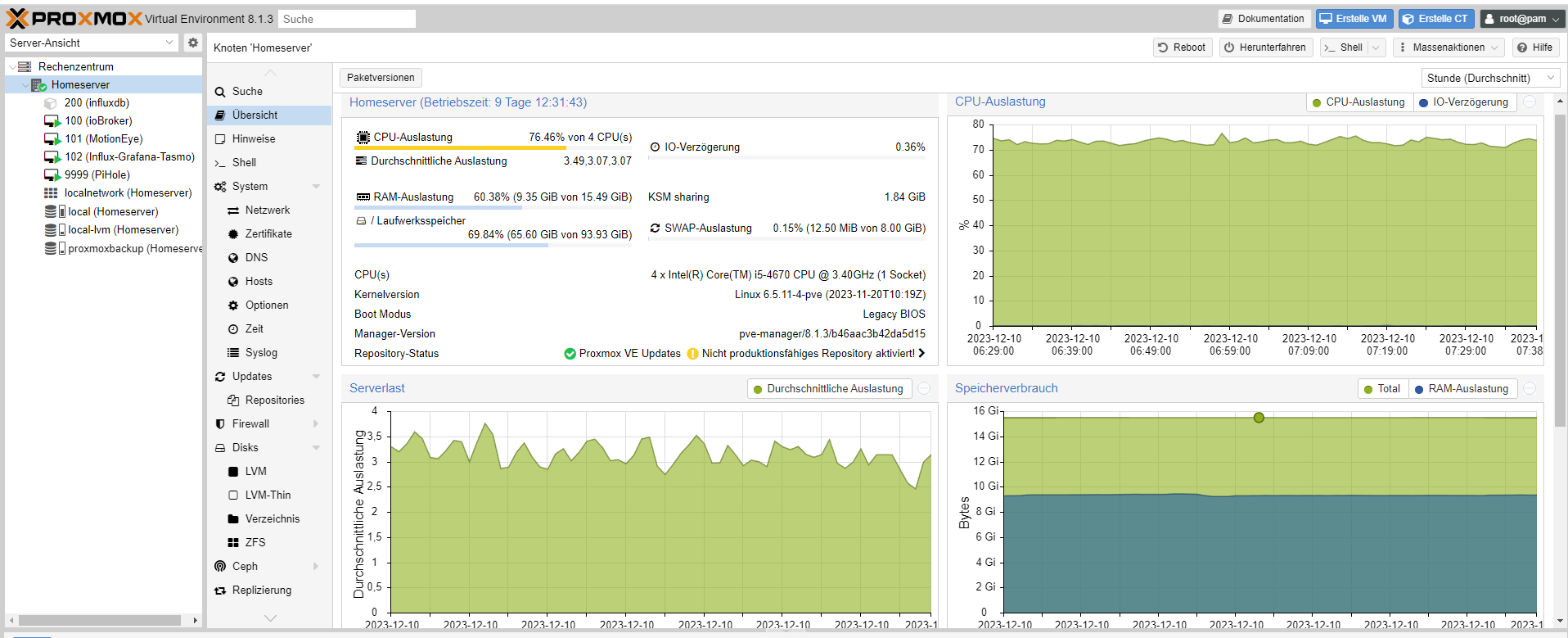
die meisten verwenden sicher NUCs, bei mir steht ein mini-pc den ich über ebay für knapp 100€ bekommen habe. i5 mit 16gig ram. gfx-karte raus, fertig. -
@ticaki helfe mir bitte auf die Sprünge... Ich weiß nicht was "proxmox" genau ist
Ich wollte einen kostengünstigen Mini-PC mit dem ich über ioBroker ein paar Geräte verknüpfen und intelligenter machen kann. Dafür schien mir der raspi eigentlich super geeignet. Anscheinend wohl eher nicht...
@zelly sagte in raspi nicht erreichbar und iobroker führt keine skripte aus:
Ich gehe das mal umgedreht an
Ich wollte einen kostengünstigen Mini-PC mit dem ich über ioBroker ein paar Geräte verknüpfen und intelligenter machen kann. Dafür schien mir der raspi eigentlich super geeignet. Anscheinend wohl eher nicht...
Wenn du nur den iobroker nutzen möchtest ist der Rapsi wirklich gut geeignet. Kenne den 5er auch nicht. Hab nochmal bei Amazon auf die raspi Preise geschaut... man noch immer so teuer. nicht weit von 200€ da kann man auch einen Nuc kaufen. (Raspi 8gb + Gedöns + ssd)
@ticaki helfe mir bitte auf die Sprünge... Ich weiß nicht was "proxmox" genau ist
Was es ist hat oben schon jemand geschrieben. Die Vorteile sind für mich sind:
- Automatische Backups wie ich es will
- Restore vom z.B. iobroker dauert ca. 40 Sekunden
- Hab um die 15 Dienste am laufen, influx, plex, iobroker, scrypted usw.
- Wenn einer der Dienste spinnt läuft der rest sauber weiter
- Wartungsaufwand und Gefahr was kaputt zu machen deutlich gesunken.
Nachteil:
- Ersteinrichtung und Einarbeitung in Proxmox.
Ich hatte vorher 2 * raspi 4 und die sind teils gut aufgelastet gewesen. Wobei da plex nicht installiert war.
-
Keine Frage, für die Preise die derzeit bei Amazon aufgerufen werden würde ich auch keinen Raspberry kaufen. Das ist einfach unverschämt. Ich habe für meinen 5er mit 8gb 98,45€ bei reichelt bezahlt. Allerdings sind die im Moment schon wieder ausverkauft. Quellen wo man sich für eine Benachrichtigung bei Verfügbarkeit registrieren lassen kann, wären z.B. berrybase, raspishop und reichelt. Alle unter 100€, wenn wieder verfügbar. Man braucht ein bisschen Geduld, aber es lohnt sich.






Hey! Du scheinst an dieser Unterhaltung interessiert zu sein, hast aber noch kein Konto.
Hast du es satt, bei jedem Besuch durch die gleichen Beiträge zu scrollen? Wenn du dich für ein Konto anmeldest, kommst du immer genau dorthin zurück, wo du zuvor warst, und kannst dich über neue Antworten benachrichtigen lassen (entweder per E-Mail oder Push-Benachrichtigung). Du kannst auch Lesezeichen speichern und Beiträge positiv bewerten, um anderen Community-Mitgliedern deine Wertschätzung zu zeigen.
Mit deinem Input könnte dieser Beitrag noch besser werden 💗
Registrieren Anmelden283
Online33.0k
Benutzende83.7k
Themen1.3m
Beiträge