



Skip to content
  • Home
  • Aktuell
  • Tags
  • 0 Ungelesen 0
  • Kategorien
  • Unreplied
  • Beliebt
  • GitHub
  • Docu
  • Hilfe
Skins
  • Light
  • Brite
  • Cerulean
  • Cosmo
  • Flatly
  • Journal
  • Litera
  • Lumen
  • Lux
  • Materia
  • Minty
  • Morph
  • Pulse
  • Sandstone
  • Simplex
  • Sketchy
  • Spacelab
  • United
  • Yeti
  • Zephyr
  • Dark
  • Cyborg
  • Darkly
  • Quartz
  • Slate
  • Solar
  • Superhero
  • Vapor

  • Standard: (Kein Skin)
  • Kein Skin
Einklappen
ioBroker Logo

Community Forum

donate donate
  1. ioBroker Community Home
  2. Deutsch
  3. Einsteigerfragen
  4. ioBroker auf neuer Maschine aufgesetzt und Adapter Probleme

NEWS

  • Jahresrückblick 2025 – unser neuer Blogbeitrag ist online! ✨
    BluefoxB
    Bluefox
    15
    1
    620

  • Neuer Blogbeitrag: Monatsrückblick - Dezember 2025 🎄
    BluefoxB
    Bluefox
    13
    1
    627

  • Weihnachtsangebot 2025! 🎄
    BluefoxB
    Bluefox
    25
    1
    1.9k

ioBroker auf neuer Maschine aufgesetzt und Adapter Probleme

Geplant Angeheftet Gesperrt Verschoben Einsteigerfragen
267 Beiträge 8 Kommentatoren 40.1k Aufrufe 8 Watching
  • Älteste zuerst
  • Neuste zuerst
  • Meiste Stimmen
Antworten
  • In einem neuen Thema antworten
Anmelden zum Antworten
Dieses Thema wurde gelöscht. Nur Nutzer mit entsprechenden Rechten können es sehen.
  • Thomas BraunT Thomas Braun

    @gismoh

    Dann schau da mal nach dem Eintrag, den crunchip oben genannt hat.

    Ich vermute aber, der ist da so gar nicht mehr drin.

    In meiner Version steht da nämlich:

        if os.path.exists(build_file_path):
            build_file_contents = open(build_file_path, encoding='utf-8').read()
        else:
            raise GypError(f"{build_file_path} not found (cwd: {os.getcwd()})")
    
        build_file_data = None
    
    crunchipC Abwesend
    crunchipC Abwesend
    crunchip
    Forum Testing Most Active
    schrieb am zuletzt editiert von
    #104

    @thomas-braun sagte in ioBroker auf neuer Maschine aufgesetzt und Adapter Probleme:

    In meiner Version steht da nämlich:

    in der einen ja, ich hab da beide
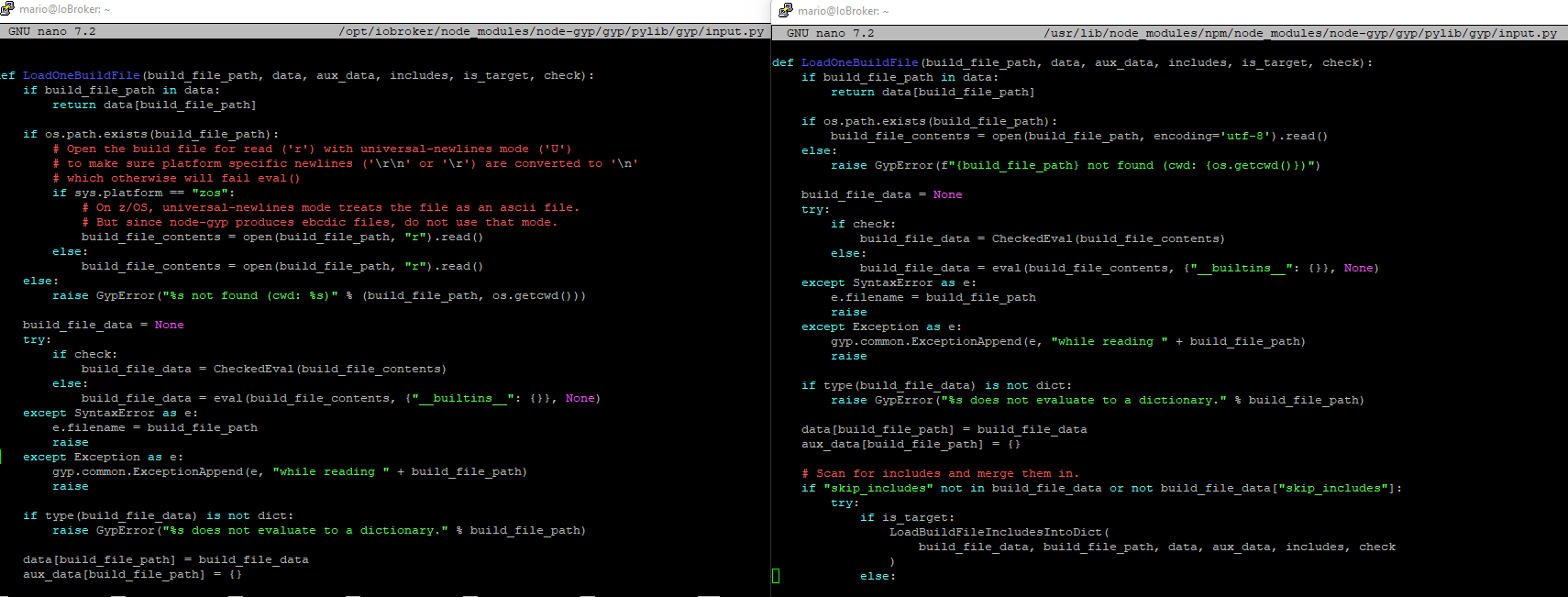
    7cebbb7b-504a-469c-873a-c9e26d7638b4-image.png

    und die Fehlermeldung spuckt ja auch aus

    npm ERR!   File "/opt/iobroker/node_modules/node-gyp/gyp/pylib/gyp/input.py", line 239, in LoadOneBuildFile
    npm ERR!     build_file_contents = open(build_file_path, "rU").read()
    npm ERR!                           ^^^^^^^^^^^^^^^^^^^^^^^^^^^
    npm ERR! ValueError: invalid mode: 'rU' while trying to load binding.gyp
    

    umgestiegen von Proxmox auf Unraid

    1 Antwort Letzte Antwort
    1
    • Thomas BraunT Thomas Braun

      @gismoh

      iob stop
      iob fix
      cd /home/iobroker
      sudo -u iobroker npm cache clear --force
      cd
      iobroker upgrade ble@0.13.4
      
      G Offline
      G Offline
      Gismoh
      schrieb am zuletzt editiert von
      #105

      @thomas-braun

      idash@ioBrokerVM:/home/iobroker$ sudo -u iobroker npm cache clear --force
      npm WARN using --force Recommended protections disabled.
      npm ERR! code ENOTEMPTY
      npm ERR! syscall rmdir
      npm ERR! path /home/iobroker/.npm/_cacache
      npm ERR! errno -39
      npm ERR! ENOTEMPTY: directory not empty, rmdir '/home/iobroker/.npm/_cacache'
      
      npm ERR! A complete log of this run can be found in: /home/iobroker/.npm/_logs/2023-11-08T22_45_40_333Z-debug-0.log
      

      denke, es sollte anders aussehen?

      ioBroker auf: Lenovo ThinkCentre M910Q Tiny i5-7500T 16 GB mit proxmox in VM (Bookworm)

      Thomas BraunT 1 Antwort Letzte Antwort
      0
      • G Gismoh

        @thomas-braun

        idash@ioBrokerVM:/home/iobroker$ sudo -u iobroker npm cache clear --force
        npm WARN using --force Recommended protections disabled.
        npm ERR! code ENOTEMPTY
        npm ERR! syscall rmdir
        npm ERR! path /home/iobroker/.npm/_cacache
        npm ERR! errno -39
        npm ERR! ENOTEMPTY: directory not empty, rmdir '/home/iobroker/.npm/_cacache'
        
        npm ERR! A complete log of this run can be found in: /home/iobroker/.npm/_logs/2023-11-08T22_45_40_333Z-debug-0.log
        

        denke, es sollte anders aussehen?

        Thomas BraunT Online
        Thomas BraunT Online
        Thomas Braun
        Most Active
        schrieb am zuletzt editiert von
        #106

        @gismoh

        Ja, das sollte so aussehen:

        echad@chet:/home/iobroker $ sudo -u iobroker npm cache clear --force
        npm WARN using --force Recommended protections disabled.
        echad@chet:/home/iobroker $
        
        ls -lah /home/iobroker/.npm/_cacache
        

        sagt?

        Linux-Werkzeugkasten:
        https://forum.iobroker.net/topic/42952/der-kleine-iobroker-linux-werkzeugkasten
        NodeJS Fixer Skript:
        https://forum.iobroker.net/topic/68035/iob-node-fix-skript
        iob_diag: curl -sLf -o diag.sh https://iobroker.net/diag.sh && bash diag.sh

        G 1 Antwort Letzte Antwort
        0
        • Thomas BraunT Thomas Braun

          @gismoh

          Ja, das sollte so aussehen:

          echad@chet:/home/iobroker $ sudo -u iobroker npm cache clear --force
          npm WARN using --force Recommended protections disabled.
          echad@chet:/home/iobroker $
          
          ls -lah /home/iobroker/.npm/_cacache
          

          sagt?

          G Offline
          G Offline
          Gismoh
          schrieb am zuletzt editiert von
          #107

          @thomas-braun

          idash@ioBrokerVM:/home/iobroker$ ls -lah /home/iobroker/.npm/_cacache
          insgesamt 12K
          drwxr-xr-x 3 iobroker iobroker 4,0K  8. Nov 23:45 .
          drwxr-xr-x 7 iobroker iobroker 4,0K  8. Nov 22:10 ..
          drwxr-xr-x 2 iobroker iobroker 4,0K  8. Nov 23:45 tmp
          

          ioBroker auf: Lenovo ThinkCentre M910Q Tiny i5-7500T 16 GB mit proxmox in VM (Bookworm)

          Thomas BraunT 1 Antwort Letzte Antwort
          0
          • G Gismoh

            @thomas-braun

            idash@ioBrokerVM:/home/iobroker$ ls -lah /home/iobroker/.npm/_cacache
            insgesamt 12K
            drwxr-xr-x 3 iobroker iobroker 4,0K  8. Nov 23:45 .
            drwxr-xr-x 7 iobroker iobroker 4,0K  8. Nov 22:10 ..
            drwxr-xr-x 2 iobroker iobroker 4,0K  8. Nov 23:45 tmp
            
            Thomas BraunT Online
            Thomas BraunT Online
            Thomas Braun
            Most Active
            schrieb am zuletzt editiert von
            #108

            @gismoh sagte in ioBroker auf neuer Maschine aufgesetzt und Adapter Probleme:

            rm -rf /home/iobroker/.npm/_cacache/tmp
            

            Linux-Werkzeugkasten:
            https://forum.iobroker.net/topic/42952/der-kleine-iobroker-linux-werkzeugkasten
            NodeJS Fixer Skript:
            https://forum.iobroker.net/topic/68035/iob-node-fix-skript
            iob_diag: curl -sLf -o diag.sh https://iobroker.net/diag.sh && bash diag.sh

            G 1 Antwort Letzte Antwort
            0
            • Thomas BraunT Thomas Braun

              @gismoh sagte in ioBroker auf neuer Maschine aufgesetzt und Adapter Probleme:

              rm -rf /home/iobroker/.npm/_cacache/tmp
              
              G Offline
              G Offline
              Gismoh
              schrieb am zuletzt editiert von
              #109

              @thomas-braun

              rm: das Entfernen von '/home/iobroker/.npm/_cacache/tmp/d411385f' ist nicht möglich: Keine Berechtigung
              

              ioBroker auf: Lenovo ThinkCentre M910Q Tiny i5-7500T 16 GB mit proxmox in VM (Bookworm)

              Thomas BraunT 1 Antwort Letzte Antwort
              0
              • G Gismoh

                @thomas-braun

                rm: das Entfernen von '/home/iobroker/.npm/_cacache/tmp/d411385f' ist nicht möglich: Keine Berechtigung
                
                Thomas BraunT Online
                Thomas BraunT Online
                Thomas Braun
                Most Active
                schrieb am zuletzt editiert von
                #110

                @gismoh

                sudo -u iobroker rm -rf /home/iobroker/.npm/_cacache/tmp
                

                Linux-Werkzeugkasten:
                https://forum.iobroker.net/topic/42952/der-kleine-iobroker-linux-werkzeugkasten
                NodeJS Fixer Skript:
                https://forum.iobroker.net/topic/68035/iob-node-fix-skript
                iob_diag: curl -sLf -o diag.sh https://iobroker.net/diag.sh && bash diag.sh

                G 1 Antwort Letzte Antwort
                0
                • Thomas BraunT Thomas Braun

                  @gismoh

                  sudo -u iobroker rm -rf /home/iobroker/.npm/_cacache/tmp
                  
                  G Offline
                  G Offline
                  Gismoh
                  schrieb am zuletzt editiert von
                  #111

                  @thomas-braun

                  idash@ioBrokerVM:/home/iobroker$ sudo -u iobroker npm cache clear --force
                  npm WARN using --force Recommended protections disabled.
                  idash@ioBrokerVM:/home/iobroker$ cd
                  idash@ioBrokerVM:~$ iobroker upgrade ble@0.13.4
                  Adapter "ble"            is not installed.
                  

                  ioBroker auf: Lenovo ThinkCentre M910Q Tiny i5-7500T 16 GB mit proxmox in VM (Bookworm)

                  Thomas BraunT 1 Antwort Letzte Antwort
                  0
                  • G Gismoh

                    @thomas-braun

                    idash@ioBrokerVM:/home/iobroker$ sudo -u iobroker npm cache clear --force
                    npm WARN using --force Recommended protections disabled.
                    idash@ioBrokerVM:/home/iobroker$ cd
                    idash@ioBrokerVM:~$ iobroker upgrade ble@0.13.4
                    Adapter "ble"            is not installed.
                    
                    Thomas BraunT Online
                    Thomas BraunT Online
                    Thomas Braun
                    Most Active
                    schrieb am zuletzt editiert von
                    #112

                    @gismoh sagte in ioBroker auf neuer Maschine aufgesetzt und Adapter Probleme:

                    iobroker add ble@0.13.4 --debug
                    

                    Linux-Werkzeugkasten:
                    https://forum.iobroker.net/topic/42952/der-kleine-iobroker-linux-werkzeugkasten
                    NodeJS Fixer Skript:
                    https://forum.iobroker.net/topic/68035/iob-node-fix-skript
                    iob_diag: curl -sLf -o diag.sh https://iobroker.net/diag.sh && bash diag.sh

                    G 1 Antwort Letzte Antwort
                    0
                    • Thomas BraunT Thomas Braun

                      @gismoh sagte in ioBroker auf neuer Maschine aufgesetzt und Adapter Probleme:

                      iobroker add ble@0.13.4 --debug
                      
                      G Offline
                      G Offline
                      Gismoh
                      schrieb am zuletzt editiert von
                      #113

                      @thomas-braun

                      idash@ioBrokerVM:~$ iobroker add ble@0.13.4 --debug
                      NPM version: 9.8.1
                      Installing iobroker.ble@0.13.4... (System call)
                      npm ERR! code 1
                      npm ERR! path /opt/iobroker/node_modules/iobroker.ble/node_modules/@abandonware/noble
                      npm ERR! command failed
                      npm ERR! command sh -c node-gyp-build
                      npm ERR! gyp info it worked if it ends with ok
                      npm ERR! gyp info using node-gyp@7.1.2
                      npm ERR! gyp info using node@18.18.2 | linux | x64
                      npm ERR! gyp info find Python using Python version 3.11.2 found at "/usr/bin/python3"
                      npm ERR! (node:6399) [DEP0150] DeprecationWarning: Setting process.config is deprecated. In the future the property will be read-only.
                      npm ERR! (Use `node --trace-deprecation ...` to show where the warning was created)
                      npm ERR! gyp info spawn /usr/bin/python3
                      npm ERR! gyp info spawn args [
                      npm ERR! gyp info spawn args   '/opt/iobroker/node_modules/node-gyp/gyp/gyp_main.py',
                      npm ERR! gyp info spawn args   'binding.gyp',
                      npm ERR! gyp info spawn args   '-f',
                      npm ERR! gyp info spawn args   'make',
                      npm ERR! gyp info spawn args   '-I',
                      npm ERR! gyp info spawn args   '/opt/iobroker/node_modules/iobroker.ble/node_modules/@abandonware/noble/build/config.gypi',
                      npm ERR! gyp info spawn args   '-I',
                      npm ERR! gyp info spawn args   '/opt/iobroker/node_modules/node-gyp/addon.gypi',
                      npm ERR! gyp info spawn args   '-I',
                      npm ERR! gyp info spawn args   '/home/iobroker/.cache/node-gyp/18.18.2/include/node/common.gypi',
                      npm ERR! gyp info spawn args   '-Dlibrary=shared_library',
                      npm ERR! gyp info spawn args   '-Dvisibility=default',
                      npm ERR! gyp info spawn args   '-Dnode_root_dir=/home/iobroker/.cache/node-gyp/18.18.2',
                      npm ERR! gyp info spawn args   '-Dnode_gyp_dir=/opt/iobroker/node_modules/node-gyp',
                      npm ERR! gyp info spawn args   '-Dnode_lib_file=/home/iobroker/.cache/node-gyp/18.18.2/<(target_arch)/node.lib',
                      npm ERR! gyp info spawn args   '-Dmodule_root_dir=/opt/iobroker/node_modules/iobroker.ble/node_modules/@abandonware/noble',
                      npm ERR! gyp info spawn args   '-Dnode_engine=v8',
                      npm ERR! gyp info spawn args   '--depth=.',
                      npm ERR! gyp info spawn args   '--no-parallel',
                      npm ERR! gyp info spawn args   '--generator-output',
                      npm ERR! gyp info spawn args   'build',
                      npm ERR! gyp info spawn args   '-Goutput_dir=.'
                      npm ERR! gyp info spawn args ]
                      npm ERR! Traceback (most recent call last):
                      npm ERR!   File "/opt/iobroker/node_modules/node-gyp/gyp/gyp_main.py", line 51, in <module>
                      npm ERR!     sys.exit(gyp.script_main())
                      npm ERR!              ^^^^^^^^^^^^^^^^^
                      npm ERR!   File "/opt/iobroker/node_modules/node-gyp/gyp/pylib/gyp/__init__.py", line 670, in script_main
                      npm ERR!     return main(sys.argv[1:])
                      npm ERR!            ^^^^^^^^^^^^^^^^^^
                      npm ERR!   File "/opt/iobroker/node_modules/node-gyp/gyp/pylib/gyp/__init__.py", line 662, in main
                      npm ERR!     return gyp_main(args)
                      npm ERR!            ^^^^^^^^^^^^^^
                      npm ERR!   File "/opt/iobroker/node_modules/node-gyp/gyp/pylib/gyp/__init__.py", line 629, in gyp_main
                      npm ERR!     [generator, flat_list, targets, data] = Load(
                      npm ERR!                                             ^^^^^
                      npm ERR!   File "/opt/iobroker/node_modules/node-gyp/gyp/pylib/gyp/__init__.py", line 150, in Load
                      npm ERR!     result = gyp.input.Load(
                      npm ERR!              ^^^^^^^^^^^^^^^
                      npm ERR!   File "/opt/iobroker/node_modules/node-gyp/gyp/pylib/gyp/input.py", line 3021, in Load
                      npm ERR!     LoadTargetBuildFile(
                      npm ERR!   File "/opt/iobroker/node_modules/node-gyp/gyp/pylib/gyp/input.py", line 411, in LoadTargetBuildFile
                      npm ERR!     build_file_data = LoadOneBuildFile(
                      npm ERR!                       ^^^^^^^^^^^^^^^^^
                      npm ERR!   File "/opt/iobroker/node_modules/node-gyp/gyp/pylib/gyp/input.py", line 239, in LoadOneBuildFile
                      npm ERR!     build_file_contents = open(build_file_path, "rU").read()
                      npm ERR!                           ^^^^^^^^^^^^^^^^^^^^^^^^^^^
                      npm ERR! ValueError: invalid mode: 'rU' while trying to load binding.gyp
                      npm ERR! gyp ERR! configure error 
                      npm ERR! gyp ERR! stack Error: `gyp` failed with exit code: 1
                      npm ERR! gyp ERR! stack     at ChildProcess.onCpExit (/opt/iobroker/node_modules/node-gyp/lib/configure.js:351:16)
                      npm ERR! gyp ERR! stack     at ChildProcess.emit (node:events:517:28)
                      npm ERR! gyp ERR! stack     at ChildProcess._handle.onexit (node:internal/child_process:292:12)
                      npm ERR! gyp ERR! System Linux 6.1.0-13-amd64
                      npm ERR! gyp ERR! command "/usr/bin/node" "/opt/iobroker/node_modules/node-gyp/bin/node-gyp.js" "rebuild"
                      npm ERR! gyp ERR! cwd /opt/iobroker/node_modules/iobroker.ble/node_modules/@abandonware/noble
                      npm ERR! gyp ERR! node -v v18.18.2
                      npm ERR! gyp ERR! node-gyp -v v7.1.2
                      npm ERR! gyp ERR! not ok
                      
                      npm ERR! A complete log of this run can be found in: /home/iobroker/.npm/_logs/2023-11-08T22_56_29_824Z-debug-0.log
                      npm ERR! code 1
                      npm ERR! path /opt/iobroker/node_modules/iobroker.ble/node_modules/@abandonware/noble
                      npm ERR! command failed
                      npm ERR! command sh -c node-gyp-build
                      npm ERR! gyp info it worked if it ends with ok
                      npm ERR! gyp info using node-gyp@7.1.2
                      npm ERR! gyp info using node@18.18.2 | linux | x64
                      npm ERR! gyp info find Python using Python version 3.11.2 found at "/usr/bin/python3"
                      npm ERR! (node:6399) [DEP0150] DeprecationWarning: Setting process.config is deprecated. In the future the property will be read-only.
                      npm ERR! (Use `node --trace-deprecation ...` to show where the warning was created)
                      npm ERR! gyp info spawn /usr/bin/python3
                      npm ERR! gyp info spawn args [
                      npm ERR! gyp info spawn args   '/opt/iobroker/node_modules/node-gyp/gyp/gyp_main.py',
                      npm ERR! gyp info spawn args   'binding.gyp',
                      npm ERR! gyp info spawn args   '-f',
                      npm ERR! gyp info spawn args   'make',
                      npm ERR! gyp info spawn args   '-I',
                      npm ERR! gyp info spawn args   '/opt/iobroker/node_modules/iobroker.ble/node_modules/@abandonware/noble/build/config.gypi',
                      npm ERR! gyp info spawn args   '-I',
                      npm ERR! gyp info spawn args   '/opt/iobroker/node_modules/node-gyp/addon.gypi',
                      npm ERR! gyp info spawn args   '-I',
                      npm ERR! gyp info spawn args   '/home/iobroker/.cache/node-gyp/18.18.2/include/node/common.gypi',
                      npm ERR! gyp info spawn args   '-Dlibrary=shared_library',
                      npm ERR! gyp info spawn args   '-Dvisibility=default',
                      npm ERR! gyp info spawn args   '-Dnode_root_dir=/home/iobroker/.cache/node-gyp/18.18.2',
                      npm ERR! gyp info spawn args   '-Dnode_gyp_dir=/opt/iobroker/node_modules/node-gyp',
                      npm ERR! gyp info spawn args   '-Dnode_lib_file=/home/iobroker/.cache/node-gyp/18.18.2/<(target_arch)/node.lib',
                      npm ERR! gyp info spawn args   '-Dmodule_root_dir=/opt/iobroker/node_modules/iobroker.ble/node_modules/@abandonware/noble',
                      npm ERR! gyp info spawn args   '-Dnode_engine=v8',
                      npm ERR! gyp info spawn args   '--depth=.',
                      npm ERR! gyp info spawn args   '--no-parallel',
                      npm ERR! gyp info spawn args   '--generator-output',
                      npm ERR! gyp info spawn args   'build',
                      npm ERR! gyp info spawn args   '-Goutput_dir=.'
                      npm ERR! gyp info spawn args ]
                      npm ERR! Traceback (most recent call last):
                      npm ERR!   File "/opt/iobroker/node_modules/node-gyp/gyp/gyp_main.py", line 51, in <module>
                      npm ERR!     sys.exit(gyp.script_main())
                      npm ERR!              ^^^^^^^^^^^^^^^^^
                      npm ERR!   File "/opt/iobroker/node_modules/node-gyp/gyp/pylib/gyp/__init__.py", line 670, in script_main
                      npm ERR!     return main(sys.argv[1:])
                      npm ERR!            ^^^^^^^^^^^^^^^^^^
                      npm ERR!   File "/opt/iobroker/node_modules/node-gyp/gyp/pylib/gyp/__init__.py", line 662, in main
                      npm ERR!     return gyp_main(args)
                      npm ERR!            ^^^^^^^^^^^^^^
                      npm ERR!   File "/opt/iobroker/node_modules/node-gyp/gyp/pylib/gyp/__init__.py", line 629, in gyp_main
                      npm ERR!     [generator, flat_list, targets, data] = Load(
                      npm ERR!                                             ^^^^^
                      npm ERR!   File "/opt/iobroker/node_modules/node-gyp/gyp/pylib/gyp/__init__.py", line 150, in Load
                      npm ERR!     result = gyp.input.Load(
                      npm ERR!              ^^^^^^^^^^^^^^^
                      npm ERR!   File "/opt/iobroker/node_modules/node-gyp/gyp/pylib/gyp/input.py", line 3021, in Load
                      npm ERR!     LoadTargetBuildFile(
                      npm ERR!   File "/opt/iobroker/node_modules/node-gyp/gyp/pylib/gyp/input.py", line 411, in LoadTargetBuildFile
                      npm ERR!     build_file_data = LoadOneBuildFile(
                      npm ERR!                       ^^^^^^^^^^^^^^^^^
                      npm ERR!   File "/opt/iobroker/node_modules/node-gyp/gyp/pylib/gyp/input.py", line 239, in LoadOneBuildFile
                      npm ERR!     build_file_contents = open(build_file_path, "rU").read()
                      npm ERR!                           ^^^^^^^^^^^^^^^^^^^^^^^^^^^
                      npm ERR! ValueError: invalid mode: 'rU' while trying to load binding.gyp
                      npm ERR! gyp ERR! configure error 
                      npm ERR! gyp ERR! stack Error: `gyp` failed with exit code: 1
                      npm ERR! gyp ERR! stack     at ChildProcess.onCpExit (/opt/iobroker/node_modules/node-gyp/lib/configure.js:351:16)
                      npm ERR! gyp ERR! stack     at ChildProcess.emit (node:events:517:28)
                      npm ERR! gyp ERR! stack     at ChildProcess._handle.onexit (node:internal/child_process:292:12)
                      npm ERR! gyp ERR! System Linux 6.1.0-13-amd64
                      npm ERR! gyp ERR! command "/usr/bin/node" "/opt/iobroker/node_modules/node-gyp/bin/node-gyp.js" "rebuild"
                      npm ERR! gyp ERR! cwd /opt/iobroker/node_modules/iobroker.ble/node_modules/@abandonware/noble
                      npm ERR! gyp ERR! node -v v18.18.2
                      npm ERR! gyp ERR! node-gyp -v v7.1.2
                      npm ERR! gyp ERR! not ok
                      
                      npm ERR! A complete log of this run can be found in: /home/iobroker/.npm/_logs/2023-11-08T22_56_29_824Z-debug-0.log
                      host.ioBrokerVM Cannot install iobroker.ble@0.13.4: 1
                      

                      ioBroker auf: Lenovo ThinkCentre M910Q Tiny i5-7500T 16 GB mit proxmox in VM (Bookworm)

                      Thomas BraunT 1 Antwort Letzte Antwort
                      0
                      • G Gismoh

                        @thomas-braun

                        idash@ioBrokerVM:~$ iobroker add ble@0.13.4 --debug
                        NPM version: 9.8.1
                        Installing iobroker.ble@0.13.4... (System call)
                        npm ERR! code 1
                        npm ERR! path /opt/iobroker/node_modules/iobroker.ble/node_modules/@abandonware/noble
                        npm ERR! command failed
                        npm ERR! command sh -c node-gyp-build
                        npm ERR! gyp info it worked if it ends with ok
                        npm ERR! gyp info using node-gyp@7.1.2
                        npm ERR! gyp info using node@18.18.2 | linux | x64
                        npm ERR! gyp info find Python using Python version 3.11.2 found at "/usr/bin/python3"
                        npm ERR! (node:6399) [DEP0150] DeprecationWarning: Setting process.config is deprecated. In the future the property will be read-only.
                        npm ERR! (Use `node --trace-deprecation ...` to show where the warning was created)
                        npm ERR! gyp info spawn /usr/bin/python3
                        npm ERR! gyp info spawn args [
                        npm ERR! gyp info spawn args   '/opt/iobroker/node_modules/node-gyp/gyp/gyp_main.py',
                        npm ERR! gyp info spawn args   'binding.gyp',
                        npm ERR! gyp info spawn args   '-f',
                        npm ERR! gyp info spawn args   'make',
                        npm ERR! gyp info spawn args   '-I',
                        npm ERR! gyp info spawn args   '/opt/iobroker/node_modules/iobroker.ble/node_modules/@abandonware/noble/build/config.gypi',
                        npm ERR! gyp info spawn args   '-I',
                        npm ERR! gyp info spawn args   '/opt/iobroker/node_modules/node-gyp/addon.gypi',
                        npm ERR! gyp info spawn args   '-I',
                        npm ERR! gyp info spawn args   '/home/iobroker/.cache/node-gyp/18.18.2/include/node/common.gypi',
                        npm ERR! gyp info spawn args   '-Dlibrary=shared_library',
                        npm ERR! gyp info spawn args   '-Dvisibility=default',
                        npm ERR! gyp info spawn args   '-Dnode_root_dir=/home/iobroker/.cache/node-gyp/18.18.2',
                        npm ERR! gyp info spawn args   '-Dnode_gyp_dir=/opt/iobroker/node_modules/node-gyp',
                        npm ERR! gyp info spawn args   '-Dnode_lib_file=/home/iobroker/.cache/node-gyp/18.18.2/<(target_arch)/node.lib',
                        npm ERR! gyp info spawn args   '-Dmodule_root_dir=/opt/iobroker/node_modules/iobroker.ble/node_modules/@abandonware/noble',
                        npm ERR! gyp info spawn args   '-Dnode_engine=v8',
                        npm ERR! gyp info spawn args   '--depth=.',
                        npm ERR! gyp info spawn args   '--no-parallel',
                        npm ERR! gyp info spawn args   '--generator-output',
                        npm ERR! gyp info spawn args   'build',
                        npm ERR! gyp info spawn args   '-Goutput_dir=.'
                        npm ERR! gyp info spawn args ]
                        npm ERR! Traceback (most recent call last):
                        npm ERR!   File "/opt/iobroker/node_modules/node-gyp/gyp/gyp_main.py", line 51, in <module>
                        npm ERR!     sys.exit(gyp.script_main())
                        npm ERR!              ^^^^^^^^^^^^^^^^^
                        npm ERR!   File "/opt/iobroker/node_modules/node-gyp/gyp/pylib/gyp/__init__.py", line 670, in script_main
                        npm ERR!     return main(sys.argv[1:])
                        npm ERR!            ^^^^^^^^^^^^^^^^^^
                        npm ERR!   File "/opt/iobroker/node_modules/node-gyp/gyp/pylib/gyp/__init__.py", line 662, in main
                        npm ERR!     return gyp_main(args)
                        npm ERR!            ^^^^^^^^^^^^^^
                        npm ERR!   File "/opt/iobroker/node_modules/node-gyp/gyp/pylib/gyp/__init__.py", line 629, in gyp_main
                        npm ERR!     [generator, flat_list, targets, data] = Load(
                        npm ERR!                                             ^^^^^
                        npm ERR!   File "/opt/iobroker/node_modules/node-gyp/gyp/pylib/gyp/__init__.py", line 150, in Load
                        npm ERR!     result = gyp.input.Load(
                        npm ERR!              ^^^^^^^^^^^^^^^
                        npm ERR!   File "/opt/iobroker/node_modules/node-gyp/gyp/pylib/gyp/input.py", line 3021, in Load
                        npm ERR!     LoadTargetBuildFile(
                        npm ERR!   File "/opt/iobroker/node_modules/node-gyp/gyp/pylib/gyp/input.py", line 411, in LoadTargetBuildFile
                        npm ERR!     build_file_data = LoadOneBuildFile(
                        npm ERR!                       ^^^^^^^^^^^^^^^^^
                        npm ERR!   File "/opt/iobroker/node_modules/node-gyp/gyp/pylib/gyp/input.py", line 239, in LoadOneBuildFile
                        npm ERR!     build_file_contents = open(build_file_path, "rU").read()
                        npm ERR!                           ^^^^^^^^^^^^^^^^^^^^^^^^^^^
                        npm ERR! ValueError: invalid mode: 'rU' while trying to load binding.gyp
                        npm ERR! gyp ERR! configure error 
                        npm ERR! gyp ERR! stack Error: `gyp` failed with exit code: 1
                        npm ERR! gyp ERR! stack     at ChildProcess.onCpExit (/opt/iobroker/node_modules/node-gyp/lib/configure.js:351:16)
                        npm ERR! gyp ERR! stack     at ChildProcess.emit (node:events:517:28)
                        npm ERR! gyp ERR! stack     at ChildProcess._handle.onexit (node:internal/child_process:292:12)
                        npm ERR! gyp ERR! System Linux 6.1.0-13-amd64
                        npm ERR! gyp ERR! command "/usr/bin/node" "/opt/iobroker/node_modules/node-gyp/bin/node-gyp.js" "rebuild"
                        npm ERR! gyp ERR! cwd /opt/iobroker/node_modules/iobroker.ble/node_modules/@abandonware/noble
                        npm ERR! gyp ERR! node -v v18.18.2
                        npm ERR! gyp ERR! node-gyp -v v7.1.2
                        npm ERR! gyp ERR! not ok
                        
                        npm ERR! A complete log of this run can be found in: /home/iobroker/.npm/_logs/2023-11-08T22_56_29_824Z-debug-0.log
                        npm ERR! code 1
                        npm ERR! path /opt/iobroker/node_modules/iobroker.ble/node_modules/@abandonware/noble
                        npm ERR! command failed
                        npm ERR! command sh -c node-gyp-build
                        npm ERR! gyp info it worked if it ends with ok
                        npm ERR! gyp info using node-gyp@7.1.2
                        npm ERR! gyp info using node@18.18.2 | linux | x64
                        npm ERR! gyp info find Python using Python version 3.11.2 found at "/usr/bin/python3"
                        npm ERR! (node:6399) [DEP0150] DeprecationWarning: Setting process.config is deprecated. In the future the property will be read-only.
                        npm ERR! (Use `node --trace-deprecation ...` to show where the warning was created)
                        npm ERR! gyp info spawn /usr/bin/python3
                        npm ERR! gyp info spawn args [
                        npm ERR! gyp info spawn args   '/opt/iobroker/node_modules/node-gyp/gyp/gyp_main.py',
                        npm ERR! gyp info spawn args   'binding.gyp',
                        npm ERR! gyp info spawn args   '-f',
                        npm ERR! gyp info spawn args   'make',
                        npm ERR! gyp info spawn args   '-I',
                        npm ERR! gyp info spawn args   '/opt/iobroker/node_modules/iobroker.ble/node_modules/@abandonware/noble/build/config.gypi',
                        npm ERR! gyp info spawn args   '-I',
                        npm ERR! gyp info spawn args   '/opt/iobroker/node_modules/node-gyp/addon.gypi',
                        npm ERR! gyp info spawn args   '-I',
                        npm ERR! gyp info spawn args   '/home/iobroker/.cache/node-gyp/18.18.2/include/node/common.gypi',
                        npm ERR! gyp info spawn args   '-Dlibrary=shared_library',
                        npm ERR! gyp info spawn args   '-Dvisibility=default',
                        npm ERR! gyp info spawn args   '-Dnode_root_dir=/home/iobroker/.cache/node-gyp/18.18.2',
                        npm ERR! gyp info spawn args   '-Dnode_gyp_dir=/opt/iobroker/node_modules/node-gyp',
                        npm ERR! gyp info spawn args   '-Dnode_lib_file=/home/iobroker/.cache/node-gyp/18.18.2/<(target_arch)/node.lib',
                        npm ERR! gyp info spawn args   '-Dmodule_root_dir=/opt/iobroker/node_modules/iobroker.ble/node_modules/@abandonware/noble',
                        npm ERR! gyp info spawn args   '-Dnode_engine=v8',
                        npm ERR! gyp info spawn args   '--depth=.',
                        npm ERR! gyp info spawn args   '--no-parallel',
                        npm ERR! gyp info spawn args   '--generator-output',
                        npm ERR! gyp info spawn args   'build',
                        npm ERR! gyp info spawn args   '-Goutput_dir=.'
                        npm ERR! gyp info spawn args ]
                        npm ERR! Traceback (most recent call last):
                        npm ERR!   File "/opt/iobroker/node_modules/node-gyp/gyp/gyp_main.py", line 51, in <module>
                        npm ERR!     sys.exit(gyp.script_main())
                        npm ERR!              ^^^^^^^^^^^^^^^^^
                        npm ERR!   File "/opt/iobroker/node_modules/node-gyp/gyp/pylib/gyp/__init__.py", line 670, in script_main
                        npm ERR!     return main(sys.argv[1:])
                        npm ERR!            ^^^^^^^^^^^^^^^^^^
                        npm ERR!   File "/opt/iobroker/node_modules/node-gyp/gyp/pylib/gyp/__init__.py", line 662, in main
                        npm ERR!     return gyp_main(args)
                        npm ERR!            ^^^^^^^^^^^^^^
                        npm ERR!   File "/opt/iobroker/node_modules/node-gyp/gyp/pylib/gyp/__init__.py", line 629, in gyp_main
                        npm ERR!     [generator, flat_list, targets, data] = Load(
                        npm ERR!                                             ^^^^^
                        npm ERR!   File "/opt/iobroker/node_modules/node-gyp/gyp/pylib/gyp/__init__.py", line 150, in Load
                        npm ERR!     result = gyp.input.Load(
                        npm ERR!              ^^^^^^^^^^^^^^^
                        npm ERR!   File "/opt/iobroker/node_modules/node-gyp/gyp/pylib/gyp/input.py", line 3021, in Load
                        npm ERR!     LoadTargetBuildFile(
                        npm ERR!   File "/opt/iobroker/node_modules/node-gyp/gyp/pylib/gyp/input.py", line 411, in LoadTargetBuildFile
                        npm ERR!     build_file_data = LoadOneBuildFile(
                        npm ERR!                       ^^^^^^^^^^^^^^^^^
                        npm ERR!   File "/opt/iobroker/node_modules/node-gyp/gyp/pylib/gyp/input.py", line 239, in LoadOneBuildFile
                        npm ERR!     build_file_contents = open(build_file_path, "rU").read()
                        npm ERR!                           ^^^^^^^^^^^^^^^^^^^^^^^^^^^
                        npm ERR! ValueError: invalid mode: 'rU' while trying to load binding.gyp
                        npm ERR! gyp ERR! configure error 
                        npm ERR! gyp ERR! stack Error: `gyp` failed with exit code: 1
                        npm ERR! gyp ERR! stack     at ChildProcess.onCpExit (/opt/iobroker/node_modules/node-gyp/lib/configure.js:351:16)
                        npm ERR! gyp ERR! stack     at ChildProcess.emit (node:events:517:28)
                        npm ERR! gyp ERR! stack     at ChildProcess._handle.onexit (node:internal/child_process:292:12)
                        npm ERR! gyp ERR! System Linux 6.1.0-13-amd64
                        npm ERR! gyp ERR! command "/usr/bin/node" "/opt/iobroker/node_modules/node-gyp/bin/node-gyp.js" "rebuild"
                        npm ERR! gyp ERR! cwd /opt/iobroker/node_modules/iobroker.ble/node_modules/@abandonware/noble
                        npm ERR! gyp ERR! node -v v18.18.2
                        npm ERR! gyp ERR! node-gyp -v v7.1.2
                        npm ERR! gyp ERR! not ok
                        
                        npm ERR! A complete log of this run can be found in: /home/iobroker/.npm/_logs/2023-11-08T22_56_29_824Z-debug-0.log
                        host.ioBrokerVM Cannot install iobroker.ble@0.13.4: 1
                        
                        Thomas BraunT Online
                        Thomas BraunT Online
                        Thomas Braun
                        Most Active
                        schrieb am zuletzt editiert von
                        #114

                        @gismoh

                        sudo apt update
                        apt policy node-gyp
                        

                        Linux-Werkzeugkasten:
                        https://forum.iobroker.net/topic/42952/der-kleine-iobroker-linux-werkzeugkasten
                        NodeJS Fixer Skript:
                        https://forum.iobroker.net/topic/68035/iob-node-fix-skript
                        iob_diag: curl -sLf -o diag.sh https://iobroker.net/diag.sh && bash diag.sh

                        G 2 Antworten Letzte Antwort
                        1
                        • Thomas BraunT Thomas Braun

                          @gismoh

                          sudo apt update
                          apt policy node-gyp
                          
                          G Offline
                          G Offline
                          Gismoh
                          schrieb am zuletzt editiert von
                          #115

                          @thomas-braun

                          idash@ioBrokerVM:~$ sudo apt update
                          OK:1 http://deb.debian.org/debian bookworm InRelease
                          OK:2 http://security.debian.org/debian-security bookworm-security InRelease    
                          OK:3 http://deb.debian.org/debian bookworm-updates InRelease                   
                          OK:4 https://repos.influxdata.com/debian stable InRelease                      
                          OK:5 https://deb.nodesource.com/node_18.x nodistro InRelease                   
                          Paketlisten werden gelesen… Fertig
                          Abhängigkeitsbaum wird aufgebaut… Fertig
                          Statusinformationen werden eingelesen… Fertig
                          Alle Pakete sind aktuell.
                          idash@ioBrokerVM:~$ apt policy node-gyp
                          node-gyp:
                            Installiert:           (keine)
                            Installationskandidat: 9.3.0-2
                            Versionstabelle:
                               9.3.0-2 500
                                  500 http://deb.debian.org/debian bookworm/main amd64 Packages
                          

                          ioBroker auf: Lenovo ThinkCentre M910Q Tiny i5-7500T 16 GB mit proxmox in VM (Bookworm)

                          1 Antwort Letzte Antwort
                          0
                          • Thomas BraunT Thomas Braun

                            @gismoh

                            sudo apt update
                            apt policy node-gyp
                            
                            G Offline
                            G Offline
                            Gismoh
                            schrieb am zuletzt editiert von
                            #116

                            @thomas-braun
                            soll ich?:

                            sudo npm install -g node-gyp
                            

                            ioBroker auf: Lenovo ThinkCentre M910Q Tiny i5-7500T 16 GB mit proxmox in VM (Bookworm)

                            Thomas BraunT 1 Antwort Letzte Antwort
                            0
                            • G Gismoh

                              @thomas-braun
                              soll ich?:

                              sudo npm install -g node-gyp
                              
                              Thomas BraunT Online
                              Thomas BraunT Online
                              Thomas Braun
                              Most Active
                              schrieb am zuletzt editiert von Thomas Braun
                              #117

                              @gismoh sagte in ioBroker auf neuer Maschine aufgesetzt und Adapter Probleme:

                              sudo npm install -g node-gyp

                              NEIN!
                              Hast du das in der Vergangenheit schon mal gemacht?
                              Oder mit 'npm' schon mal gemacht?

                              Linux-Werkzeugkasten:
                              https://forum.iobroker.net/topic/42952/der-kleine-iobroker-linux-werkzeugkasten
                              NodeJS Fixer Skript:
                              https://forum.iobroker.net/topic/68035/iob-node-fix-skript
                              iob_diag: curl -sLf -o diag.sh https://iobroker.net/diag.sh && bash diag.sh

                              G 1 Antwort Letzte Antwort
                              0
                              • Thomas BraunT Thomas Braun

                                @gismoh sagte in ioBroker auf neuer Maschine aufgesetzt und Adapter Probleme:

                                sudo npm install -g node-gyp

                                NEIN!
                                Hast du das in der Vergangenheit schon mal gemacht?
                                Oder mit 'npm' schon mal gemacht?

                                G Offline
                                G Offline
                                Gismoh
                                schrieb am zuletzt editiert von Gismoh
                                #118

                                @thomas-braun
                                nein, hatte erst gerade eben danach gesucht
                                npm vermutlich auch nicht, es sei denn es ist mir weiter oben (HEUTE) so angeraten wurden - meine aber nicht. Habe dieses Backup (der VM) erst heute eingespielt und dann das Backup (iobroker) aufgespielt.

                                ioBroker auf: Lenovo ThinkCentre M910Q Tiny i5-7500T 16 GB mit proxmox in VM (Bookworm)

                                Thomas BraunT 1 Antwort Letzte Antwort
                                0
                                • G Gismoh

                                  @thomas-braun
                                  nein, hatte erst gerade eben danach gesucht
                                  npm vermutlich auch nicht, es sei denn es ist mir weiter oben (HEUTE) so angeraten wurden - meine aber nicht. Habe dieses Backup (der VM) erst heute eingespielt und dann das Backup (iobroker) aufgespielt.

                                  Thomas BraunT Online
                                  Thomas BraunT Online
                                  Thomas Braun
                                  Most Active
                                  schrieb am zuletzt editiert von
                                  #119

                                  @gismoh
                                  Vergiss irgendwelche npm-Befehle, die ein -g beinhalten.
                                  Irgendwo zieht die Kiste ein altes node-gyp her.

                                  type -p node-gyp
                                  

                                  Linux-Werkzeugkasten:
                                  https://forum.iobroker.net/topic/42952/der-kleine-iobroker-linux-werkzeugkasten
                                  NodeJS Fixer Skript:
                                  https://forum.iobroker.net/topic/68035/iob-node-fix-skript
                                  iob_diag: curl -sLf -o diag.sh https://iobroker.net/diag.sh && bash diag.sh

                                  G 1 Antwort Letzte Antwort
                                  0
                                  • Thomas BraunT Thomas Braun

                                    @gismoh
                                    Vergiss irgendwelche npm-Befehle, die ein -g beinhalten.
                                    Irgendwo zieht die Kiste ein altes node-gyp her.

                                    type -p node-gyp
                                    
                                    G Offline
                                    G Offline
                                    Gismoh
                                    schrieb am zuletzt editiert von Gismoh
                                    #120

                                    @thomas-braun
                                    kam keine Ausgabe:

                                    idash@ioBrokerVM:~$ type -p node-gyp
                                    idash@ioBrokerVM:~$ 
                                    

                                    Was macht das backitup nur, das es mir den ble zerschießt?
                                    Davor hat es ja funktioniert.

                                    ioBroker auf: Lenovo ThinkCentre M910Q Tiny i5-7500T 16 GB mit proxmox in VM (Bookworm)

                                    Thomas BraunT 1 Antwort Letzte Antwort
                                    0
                                    • G Gismoh

                                      @thomas-braun
                                      kam keine Ausgabe:

                                      idash@ioBrokerVM:~$ type -p node-gyp
                                      idash@ioBrokerVM:~$ 
                                      

                                      Was macht das backitup nur, das es mir den ble zerschießt?
                                      Davor hat es ja funktioniert.

                                      Thomas BraunT Online
                                      Thomas BraunT Online
                                      Thomas Braun
                                      Most Active
                                      schrieb am zuletzt editiert von
                                      #121

                                      @gismoh sagte in ioBroker auf neuer Maschine aufgesetzt und Adapter Probleme:

                                      Was macht das backitup nur, das es mir den ble zerschießt?

                                      Nichts.

                                      iobroker rebuild iobroker.ble
                                      

                                      Linux-Werkzeugkasten:
                                      https://forum.iobroker.net/topic/42952/der-kleine-iobroker-linux-werkzeugkasten
                                      NodeJS Fixer Skript:
                                      https://forum.iobroker.net/topic/68035/iob-node-fix-skript
                                      iob_diag: curl -sLf -o diag.sh https://iobroker.net/diag.sh && bash diag.sh

                                      G 1 Antwort Letzte Antwort
                                      0
                                      • Thomas BraunT Thomas Braun

                                        @gismoh sagte in ioBroker auf neuer Maschine aufgesetzt und Adapter Probleme:

                                        Was macht das backitup nur, das es mir den ble zerschießt?

                                        Nichts.

                                        iobroker rebuild iobroker.ble
                                        
                                        G Offline
                                        G Offline
                                        Gismoh
                                        schrieb am zuletzt editiert von Gismoh
                                        #122

                                        @thomas-braun

                                        idash@ioBrokerVM:~$ iobroker rebuild iobroker.ble
                                        Rebuilding native module "iobroker.ble" ...
                                        rebuilt dependencies successfully
                                        
                                        Rebuilding native modules done
                                        

                                        ioBroker auf: Lenovo ThinkCentre M910Q Tiny i5-7500T 16 GB mit proxmox in VM (Bookworm)

                                        Thomas BraunT 1 Antwort Letzte Antwort
                                        0
                                        • G Gismoh

                                          @thomas-braun

                                          idash@ioBrokerVM:~$ iobroker rebuild iobroker.ble
                                          Rebuilding native module "iobroker.ble" ...
                                          rebuilt dependencies successfully
                                          
                                          Rebuilding native modules done
                                          
                                          Thomas BraunT Online
                                          Thomas BraunT Online
                                          Thomas Braun
                                          Most Active
                                          schrieb am zuletzt editiert von
                                          #123

                                          @gismoh

                                          iob list adapters
                                          

                                          Linux-Werkzeugkasten:
                                          https://forum.iobroker.net/topic/42952/der-kleine-iobroker-linux-werkzeugkasten
                                          NodeJS Fixer Skript:
                                          https://forum.iobroker.net/topic/68035/iob-node-fix-skript
                                          iob_diag: curl -sLf -o diag.sh https://iobroker.net/diag.sh && bash diag.sh

                                          G 1 Antwort Letzte Antwort
                                          1
                                          Antworten
                                          • In einem neuen Thema antworten
                                          Anmelden zum Antworten
                                          • Älteste zuerst
                                          • Neuste zuerst
                                          • Meiste Stimmen


                                          Support us

                                          ioBroker
                                          Community Adapters
                                          Donate

                                          765

                                          Online

                                          32.6k

                                          Benutzer

                                          81.9k

                                          Themen

                                          1.3m

                                          Beiträge
                                          Community
                                          Impressum | Datenschutz-Bestimmungen | Nutzungsbedingungen | Einwilligungseinstellungen
                                          ioBroker Community 2014-2025
                                          logo
                                          • Anmelden

                                          • Du hast noch kein Konto? Registrieren

                                          • Anmelden oder registrieren, um zu suchen
                                          • Erster Beitrag
                                            Letzter Beitrag
                                          0
                                          • Home
                                          • Aktuell
                                          • Tags
                                          • Ungelesen 0
                                          • Kategorien
                                          • Unreplied
                                          • Beliebt
                                          • GitHub
                                          • Docu
                                          • Hilfe
