



Skip to content
  • Home
  • Aktuell
  • Tags
  • 0 Ungelesen 0
  • Kategorien
  • Unreplied
  • Beliebt
  • GitHub
  • Docu
  • Hilfe
Skins
  • Light
  • Brite
  • Cerulean
  • Cosmo
  • Flatly
  • Journal
  • Litera
  • Lumen
  • Lux
  • Materia
  • Minty
  • Morph
  • Pulse
  • Sandstone
  • Simplex
  • Sketchy
  • Spacelab
  • United
  • Yeti
  • Zephyr
  • Dark
  • Cyborg
  • Darkly
  • Quartz
  • Slate
  • Solar
  • Superhero
  • Vapor

  • Standard: (Kein Skin)
  • Kein Skin
Einklappen
ioBroker Logo

Community Forum

donate donate
  1. ioBroker Community Home
  2. Deutsch
  3. Einsteigerfragen
  4. Installation
  5. [gelöst] Update von Debian 10 auf 11?

NEWS

  • Jahresrückblick 2025 – unser neuer Blogbeitrag ist online! ✨
    BluefoxB
    Bluefox
    10
    1
    64

  • Neuer Blogbeitrag: Monatsrückblick - Dezember 2025 🎄
    BluefoxB
    Bluefox
    11
    1
    554

  • Weihnachtsangebot 2025! 🎄
    BluefoxB
    Bluefox
    24
    1
    1.7k

[gelöst] Update von Debian 10 auf 11?

Geplant Angeheftet Gesperrt Verschoben Installation
90 Beiträge 4 Kommentatoren 4.9k Aufrufe 3 Watching
  • Älteste zuerst
  • Neuste zuerst
  • Meiste Stimmen
Antworten
  • In einem neuen Thema antworten
Anmelden zum Antworten
Dieses Thema wurde gelöscht. Nur Nutzer mit entsprechenden Rechten können es sehen.
  • A Alero

    @thomas-braun sagte in Update von Debian 10 auf 11?:

    iob diag

    ======== Start marking the full check here =========

    Skript v.2023-06-20
    
    *** BASE SYSTEM ***
     Static hostname: iobroker-prod-12
           Icon name: computer-container
             Chassis: container ☐
          Machine ID: 735eba02704e4761a53cb81764304e07
             Boot ID: 97cabc4ce7f248c09bea9ebb59e47718
      Virtualization: lxc
    Operating System: Debian GNU/Linux 12 (bookworm)
              Kernel: Linux 6.2.16-14-pve
        Architecture: x86-64
    
    model name      : Intel(R) Core(TM) i5-6500T CPU @ 2.50GHz
    Docker          : false
    Virtualization  : lxc
    Kernel          : x86_64
    Userland        : amd64
    
    Systemuptime and Load:
     13:36:26 up 8 min,  2 users,  load average: 0.20, 0.55, 1.20
    CPU threads: 2
    
    
    *** Time and Time Zones ***
                   Local time: Mon 2023-09-25 13:36:26 UTC
               Universal time: Mon 2023-09-25 13:36:26 UTC
                     RTC time: n/a
                    Time zone: Etc/UTC (UTC, +0000)
    System clock synchronized: yes
                  NTP service: inactive
              RTC in local TZ: no
    
    *** User and Groups ***
    root
    /root
    root
    
    *** X-Server-Setup ***
    X-Server:       false
    Desktop: 
    Terminal: 
    Boot Target:    graphical.target
    
    *** MEMORY ***
                   total        used        free      shared  buff/cache   available
    Mem:            6.4G        520M        5.5G        110K        374M        5.9G
    Swap:           536M          0B        536M
    Total:          7.0G        520M        6.1G
    
             6144 M total memory
              496 M used memory
               95 M active memory
              726 M inactive memory
             5290 M free memory
                0 M buffer memory
              357 M swap cache
              512 M total swap
                0 M used swap
              512 M free swap
    
    *** FILESYSTEM ***
    Filesystem                       Type      Size  Used Avail Use% Mounted on
    /dev/mapper/pve-vm--219--disk--0 ext4       30G  4.2G   24G  15% /
    none                             tmpfs     492K  4.0K  488K   1% /dev
    udev                             devtmpfs  7.8G     0  7.8G   0% /dev/tty
    tmpfs                            tmpfs     7.8G     0  7.8G   0% /dev/shm
    tmpfs                            tmpfs     3.2G  104K  3.2G   1% /run
    tmpfs                            tmpfs     5.0M     0  5.0M   0% /run/lock
    
    Messages concerning ext4 filesystem in dmesg:
    dmesg: read kernel buffer failed: Operation not permitted
    
    Show mounted filesystems (real ones only):
    TARGET SOURCE                           FSTYPE OPTIONS
    /      /dev/mapper/pve-vm--219--disk--0 ext4   rw,relatime,stripe=16
    
    Files in neuralgic directories:
    
    /var:
    433M    /var/
    248M    /var/cache
    244M    /var/cache/apt
    169M    /var/cache/apt/archives
    144M    /var/lib
    
    Archived and active journals take up 40.0M in the file system.
    
    /opt/iobroker/backups:
    29M     /opt/iobroker/backups/
    
    /opt/iobroker/iobroker-data:
    542M    /opt/iobroker/iobroker-data/
    509M    /opt/iobroker/iobroker-data/files
    88M     /opt/iobroker/iobroker-data/files/echarts.admin
    78M     /opt/iobroker/iobroker-data/files/icons-open-icon-library-png
    57M     /opt/iobroker/iobroker-data/files/echarts
    
    The five largest files in iobroker-data are:
    26M     /opt/iobroker/iobroker-data/objects.jsonl
    23M     /opt/iobroker/iobroker-data/files/echarts/static/js/main.eb0afecd.js.map
    23M     /opt/iobroker/iobroker-data/files/echarts.admin/static/js/main.7952f0f7.js.map
    23M     /opt/iobroker/iobroker-data/files/echarts.admin/chart/static/js/main.eb0afecd.js.map
    21M     /opt/iobroker/iobroker-data/files/web.admin/static/js/main.edf7552a.js.map
    
    *** NodeJS-Installation ***
    
    /usr/bin/nodejs         v18.18.0
    /usr/bin/node           v18.18.0
    /usr/bin/npm            9.8.1
    /usr/bin/npx            9.8.1
    
    
    nodejs:
      Installed: 18.18.0-1nodesource1
      Candidate: 18.18.0-1nodesource1
      Version table:
     *** 18.18.0-1nodesource1 500
            500 https://deb.nodesource.com/node_18.x nodistro/main amd64 Packages
            100 /var/lib/dpkg/status
         18.17.1-1nodesource1 500
            500 https://deb.nodesource.com/node_18.x nodistro/main amd64 Packages
         18.17.0-1nodesource1 500
            500 https://deb.nodesource.com/node_18.x nodistro/main amd64 Packages
         18.16.1-1nodesource1 500
            500 https://deb.nodesource.com/node_18.x nodistro/main amd64 Packages
         18.16.0-1nodesource1 500
            500 https://deb.nodesource.com/node_18.x nodistro/main amd64 Packages
         18.15.0-1nodesource1 500
            500 https://deb.nodesource.com/node_18.x nodistro/main amd64 Packages
         18.14.2-1nodesource1 500
            500 https://deb.nodesource.com/node_18.x nodistro/main amd64 Packages
         18.14.1-1nodesource1 500
            500 https://deb.nodesource.com/node_18.x nodistro/main amd64 Packages
         18.14.0-1nodesource1 500
            500 https://deb.nodesource.com/node_18.x nodistro/main amd64 Packages
         18.13.0+dfsg1-1 500
            500 http://deb.debian.org/debian bookworm/main amd64 Packages
         18.13.0-1nodesource1 500
            500 https://deb.nodesource.com/node_18.x nodistro/main amd64 Packages
         18.12.0-1nodesource1 500
            500 https://deb.nodesource.com/node_18.x nodistro/main amd64 Packages
         18.11.0-1nodesource1 500
            500 https://deb.nodesource.com/node_18.x nodistro/main amd64 Packages
         18.10.0-1nodesource1 500
            500 https://deb.nodesource.com/node_18.x nodistro/main amd64 Packages
         18.9.1-1nodesource1 500
            500 https://deb.nodesource.com/node_18.x nodistro/main amd64 Packages
         18.9.0-1nodesource1 500
            500 https://deb.nodesource.com/node_18.x nodistro/main amd64 Packages
         18.8.0-1nodesource1 500
            500 https://deb.nodesource.com/node_18.x nodistro/main amd64 Packages
         18.7.0-1nodesource1 500
            500 https://deb.nodesource.com/node_18.x nodistro/main amd64 Packages
         18.6.0-1nodesource1 500
            500 https://deb.nodesource.com/node_18.x nodistro/main amd64 Packages
         18.5.0-1nodesource1 500
            500 https://deb.nodesource.com/node_18.x nodistro/main amd64 Packages
         18.4.0-1nodesource1 500
            500 https://deb.nodesource.com/node_18.x nodistro/main amd64 Packages
         18.3.0-1nodesource1 500
            500 https://deb.nodesource.com/node_18.x nodistro/main amd64 Packages
         18.2.0-1nodesource1 500
            500 https://deb.nodesource.com/node_18.x nodistro/main amd64 Packages
         18.1.0-1nodesource1 500
            500 https://deb.nodesource.com/node_18.x nodistro/main amd64 Packages
         18.0.0-1nodesource1 500
            500 https://deb.nodesource.com/node_18.x nodistro/main amd64 Packages
    
    Temp directories causing npm8 problem: 0
    No problems detected
    
    Errors in npm tree: 0
    
    *** ioBroker-Installation ***
    
    ioBroker Status
    iobroker is running on this host.
    
    
    Objects type: jsonl
    States  type: jsonl
    
    No configuration change needed.
    
    
    Multihost discovery server: disabled
    Discovery authentication:   enabled
    Persistent activation:      disabled
    Objects:                    jsonl on 127.0.0.1
    States:                     jsonl on 127.0.0.1
    
    Core adapters versions
    js-controller:  5.0.12
    admin:          6.10.1
    javascript:     7.1.4
    
    Adapters from github:   3
    
    Adapter State
    + system.adapter.admin.1                  : admin                 : iobroker-prod-12                         -  enabled, port: 8081, bind: 192.168.42.15, run as: admin
    + system.adapter.backitup.0               : backitup              : iobroker-prod-12                         -  enabled
      system.adapter.birthdays.0              : birthdays             : iobroker-prod-12                         - disabled
      system.adapter.daswetter.0              : daswetter             : iobroker-prod-12                         - disabled
      system.adapter.device-reminder.0        : device-reminder       : iobroker-prod-12                         - disabled
      system.adapter.discovery.0              : discovery             : iobroker-prod-12                         - disabled
      system.adapter.dwd.0                    : dwd                   : iobroker-prod-12                         - disabled
      system.adapter.echarts.0                : echarts               : iobroker-prod-12                         - disabled
      system.adapter.email.0                  : email                 : iobroker-prod-12                         - disabled
      system.adapter.energiefluss.0           : energiefluss          : iobroker-prod-12                         - disabled
      system.adapter.fb-checkpresence.0       : fb-checkpresence      : iobroker-prod-12                         - disabled
      system.adapter.feiertage.0              : feiertage             : iobroker-prod-12                         - disabled
      system.adapter.flot.0                   : flot                  : iobroker-prod-12                         - disabled
      system.adapter.fritzbox.0               : fritzbox              : iobroker-prod-12                         - disabled
      system.adapter.fritzdect.0              : fritzdect             : iobroker-prod-12                         - disabled
      system.adapter.fullcalendar.0           : fullcalendar          : iobroker-prod-12                         - disabled
      system.adapter.history.0                : history               : iobroker-prod-12                         - disabled
      system.adapter.hm-rega.0                : hm-rega               : iobroker-prod-12                         - disabled
      system.adapter.hm-rpc.0                 : hm-rpc                : iobroker-prod-12                         - disabled, port: 0
      system.adapter.hm-rpc.1                 : hm-rpc                : iobroker-prod-12                         - disabled, port: 0
      system.adapter.hm-rpc.2                 : hm-rpc                : iobroker-prod-12                         - disabled, port: 0
      system.adapter.ical.0                   : ical                  : iobroker-prod-12                         - disabled
      system.adapter.ical.1                   : ical                  : iobroker-prod-12                         - disabled
      system.adapter.icons-fatcow-hosting.0   : icons-fatcow-hosting  : iobroker-prod-12                         - disabled
      system.adapter.icons-icons8.0           : icons-icons8          : iobroker-prod-12                         - disabled
      system.adapter.icons-material-png.0     : icons-material-png    : iobroker-prod-12                         - disabled
      system.adapter.icons-mfd-png.0          : icons-mfd-png         : iobroker-prod-12                         - disabled
      system.adapter.icons-mfd-svg.0          : icons-mfd-svg         : iobroker-prod-12                         - disabled
      system.adapter.icons-open-icon-library-png.0: icons-open-icon-library-png: iobroker-prod-12                         - disabled
      system.adapter.influxdb.0               : influxdb              : iobroker-prod-12                         - disabled, port: 8086
      system.adapter.info.0                   : info                  : iobroker-prod-12                         - disabled
      system.adapter.javascript.0             : javascript            : iobroker-prod-12                         - disabled
      system.adapter.melcloud.0               : melcloud              : iobroker-prod-12                         - disabled
      system.adapter.mercedesme.0             : mercedesme            : iobroker-prod-12                         - disabled
      system.adapter.mqtt.1                   : mqtt                  : iobroker-prod-12                         - disabled, port: 1884, bind: 192.168.42.15
      system.adapter.mqtt.2                   : mqtt                  : iobroker-prod-12                         - disabled, port: 1886, bind: 192.168.42.15
      system.adapter.mqtt.3                   : mqtt                  : iobroker-prod-12                         - disabled, port: 1883, bind: 192.168.42.15
      system.adapter.mqtt.4                   : mqtt                  : iobroker-prod-12                         - disabled, port: 1888, bind: 192.168.42.15
      system.adapter.node-red.0               : node-red              : iobroker-prod-12                         - disabled, port: 1880, bind: 192.168.42.15
      system.adapter.pvforecast.0             : pvforecast            : iobroker-prod-12                         - disabled
      system.adapter.radar2.0                 : radar2                : iobroker-prod-12                         - disabled
      system.adapter.rpi2.0                   : rpi2                  : iobroker-prod-12                         - disabled
      system.adapter.sayit.0                  : sayit                 : iobroker-prod-12                         - disabled, port: 0
      system.adapter.scenes.0                 : scenes                : iobroker-prod-12                         - disabled
      system.adapter.shelly.0                 : shelly                : iobroker-prod-12                         - disabled, port: 1881, bind: 192.168.42.15
      system.adapter.shuttercontrol.0         : shuttercontrol        : iobroker-prod-12                         - disabled
      system.adapter.simple-api.0             : simple-api            : iobroker-prod-12                         - disabled, port: 8087, bind: 192.168.42.15, run as: admin
      system.adapter.socketio.0               : socketio              : iobroker-prod-12                         - disabled, port: 8084, bind: 192.168.42.15, run as: admin
      system.adapter.sonoff.0                 : sonoff                : iobroker-prod-12                         - disabled, port: 1883, bind: 192.168.42.15
      system.adapter.sonoff.1                 : sonoff                : iobroker-prod-12                         - disabled, port: 1884, bind: 192.168.42.15
      system.adapter.sonoff.2                 : sonoff                : iobroker-prod-12                         - disabled, port: 1888, bind: 0.0.0.0
      system.adapter.sonos.0                  : sonos                 : iobroker-prod-12                         - disabled
      system.adapter.synology.0               : synology              : iobroker-prod-12                         - disabled, port: 5001
      system.adapter.tankerkoenig.0           : tankerkoenig          : iobroker-prod-12                         - disabled
      system.adapter.telegram.0               : telegram              : iobroker-prod-12                         - disabled, port: 8443, bind: 0.0.0.0
      system.adapter.telegram.1               : telegram              : iobroker-prod-12                         - disabled, port: 8443, bind: 0.0.0.0
      system.adapter.telegram.2               : telegram              : iobroker-prod-12                         - disabled, port: 8443, bind: 0.0.0.0
      system.adapter.text2command.0           : text2command          : iobroker-prod-12                         - disabled
      system.adapter.text2command.1           : text2command          : iobroker-prod-12                         - disabled
      system.adapter.tr-064.0                 : tr-064                : iobroker-prod-12                         - disabled
      system.adapter.tvspielfilm.0            : tvspielfilm           : iobroker-prod-12                         - disabled
      system.adapter.upnp.0                   : upnp                  : iobroker-prod-12                         - disabled
      system.adapter.vis-bars.0               : vis-bars              : iobroker-prod-12                         - disabled
      system.adapter.vis-canvas-gauges.0      : vis-canvas-gauges     : iobroker-prod-12                         - disabled
      system.adapter.vis-history.0            : vis-history           : iobroker-prod-12                         - disabled
      system.adapter.vis-hqwidgets.0          : vis-hqwidgets         : iobroker-prod-12                         - disabled
      system.adapter.vis-icontwo.0            : vis-icontwo           : iobroker-prod-12                         - disabled
      system.adapter.vis-inventwo.0           : vis-inventwo          : iobroker-prod-12                         - disabled
      system.adapter.vis-jqui-mfd.0           : vis-jqui-mfd          : iobroker-prod-12                         - disabled
      system.adapter.vis-material-advanced.0  : vis-material-advanced : iobroker-prod-12                         - disabled
      system.adapter.vis-material.0           : vis-material          : iobroker-prod-12                         - disabled
      system.adapter.vis-materialdesign.0     : vis-materialdesign    : iobroker-prod-12                         - disabled
      system.adapter.vis-metro.0              : vis-metro             : iobroker-prod-12                         - disabled
      system.adapter.vis-players.0            : vis-players           : iobroker-prod-12                         - disabled
      system.adapter.vis-timeandweather.0     : vis-timeandweather    : iobroker-prod-12                         - disabled
      system.adapter.vis-weather.0            : vis-weather           : iobroker-prod-12                         - disabled
      system.adapter.vis.0                    : vis                   : iobroker-prod-12                         - disabled
      system.adapter.web.0                    : web                   : iobroker-prod-12                         - disabled, port: 8082, bind: 0.0.0.0, run as: admin
    
    + instance is alive
    
    Enabled adapters with bindings
    + system.adapter.admin.1                  : admin                 : iobroker-prod-12                         -  enabled, port: 8081, bind: 192.168.42.15, run as: admin
    
    ioBroker-Repositories
    Stable (default): http://download.iobroker.net/sources-dist.json
    Beta (latest) : http://download.iobroker.net/sources-dist-latest.json
    
    Active repo(s): Stable (default)
    
    Installed ioBroker-Instances
    Used repository: Stable (default)
    Adapter    "admin"        : 6.10.1   , installed 6.10.1
    Adapter    "backitup"     : 2.8.1    , installed 2.8.1
    Adapter    "birthdays"    : 2.3.1    , installed 2.3.1
    Adapter    "daswetter"    : 3.1.10   , installed 3.1.10
    Adapter    "device-reminder": 1.2.9  , installed 1.2.9
    Adapter    "discovery"    : 3.1.0    , installed 3.1.0
    Adapter    "dwd"          : 2.8.5    , installed 2.8.5
    Adapter    "echarts"      : 1.5.1    , installed 1.5.1
    Adapter    "email"        : 1.2.0    , installed 1.2.0
    Adapter    "fb-checkpresence": 1.2.2 , installed 1.2.2
    Adapter    "feiertage"    : 1.1.4    , installed 1.1.4
    Adapter    "flot"         : 1.12.0   , installed 1.12.0
    Adapter    "fritzbox"     : 0.5.0    , installed 0.5.0
    Adapter    "fritzdect"    : 2.3.1    , installed 2.3.1
    Adapter    "fullcalendar" : 1.2.0    , installed 1.2.0
    Adapter    "history"      : 2.2.6    , installed 2.2.6
    Adapter    "hm-rega"      : 3.0.47   , installed 3.0.47
    Adapter    "hm-rpc"       : 1.15.19  , installed 1.15.19
    Adapter    "ical"         : 1.13.3   , installed 1.13.3
    Adapter    "icons-fatcow-hosting": 0.1.0, installed 0.1.0
    Adapter    "icons-icons8" : 0.0.1    , installed 0.0.1
    Adapter    "icons-material-png": 0.1.0, installed 0.1.0
    Adapter    "icons-mfd-png": 1.1.0    , installed 1.1.0
    Adapter    "icons-mfd-svg": 1.1.0    , installed 1.1.0
    Adapter    "icons-open-icon-library-png": 0.1.2, installed 0.1.2
    Adapter    "influxdb"     : 3.2.0    , installed 3.2.0
    Adapter    "info"         : 1.9.26   , installed 1.9.26
    Adapter    "javascript"   : 7.1.4    , installed 7.1.4
    Controller "js-controller": 5.0.12   , installed 5.0.12
    Adapter    "melcloud"     : 1.3.5    , installed 1.3.5
    Adapter    "mercedesme"   : 0.1.1    , installed 0.1.1
    Adapter    "mqtt"         : 4.1.1    , installed 4.1.1
    Adapter    "node-red"     : 4.0.3    , installed 4.0.3
    Adapter    "pvforecast"   : 2.7.1    , installed 2.7.1
    Adapter    "radar2"       : 2.0.7    , installed 2.0.7
    Adapter    "rpi2"         : 1.3.2    , installed 1.3.2
    Adapter    "sayit"        : 3.0.5    , installed 3.0.5
    Adapter    "scenes"       : 2.3.9    , installed 2.3.9
    Adapter    "shelly"       : 6.4.1    , installed 6.4.1
    Adapter    "shuttercontrol": 1.6.2   , installed 1.6.2
    Adapter    "simple-api"   : 2.7.2    , installed 2.7.2
    Adapter    "socketio"     : 6.5.5    , installed 6.5.5
    Adapter    "sonoff"       : 2.5.3    , installed 2.5.3
    Adapter    "sonos"        : 2.3.1    , installed 2.3.1
    Adapter    "synology"     : 3.0.0    , installed 3.0.0
    Adapter    "tankerkoenig" : 3.3.7    , installed 3.3.7
    Adapter    "telegram"     : 1.16.0   , installed 1.16.0
    Adapter    "text2command" : 3.0.2    , installed 3.0.2
    Adapter    "tr-064"       : 4.2.18   , installed 4.2.18
    Adapter    "tvspielfilm"  : 2.0.4    , installed 2.0.4
    Adapter    "upnp"         : 1.0.21   , installed 1.0.21
    Adapter    "vis"          : 1.4.16   , installed 1.4.16
    Adapter    "vis-bars"     : 0.1.4    , installed 0.1.4
    Adapter    "vis-canvas-gauges": 1.0.1, installed 1.0.1
    Adapter    "vis-history"  : 1.0.0    , installed 1.0.0
    Adapter    "vis-hqwidgets": 1.4.0    , installed 1.4.0
    Adapter    "vis-icontwo"  : 0.96.0   , installed 0.96.0
    Adapter    "vis-inventwo" : 3.3.3    , installed 3.3.3
    Adapter    "vis-jqui-mfd" : 1.0.12   , installed 1.0.12
    Adapter    "vis-material-advanced": 1.7.2, installed 1.7.2
    Adapter    "vis-metro"    : 1.2.0    , installed 1.2.0
    Adapter    "vis-players"  : 0.1.6    , installed 0.1.6
    Adapter    "vis-timeandweather": 1.2.2, installed 1.2.2
    Adapter    "vis-weather"  : 2.5.6    , installed 2.5.6
    Adapter    "web"          : 6.1.2    , installed 6.1.2
    Adapter    "ws"           : 2.5.5    , installed 2.5.5
    
    Objects and States
    Please stand by - This may take a while
    Objects:        24810
    States:         25055
    
    *** OS-Repositories and Updates ***
    Hit:1 http://deb.debian.org/debian bookworm InRelease
    Hit:2 http://security.debian.org bookworm-security InRelease
    Hit:3 http://deb.debian.org/debian bookworm-updates InRelease
    Hit:4 https://deb.nodesource.com/node_18.x nodistro InRelease
    Reading package lists...
    Pending Updates: 0
    
    *** Listening Ports ***
    Active Internet connections (only servers)
    Proto Recv-Q Send-Q Local Address           Foreign Address         State       User       Inode      PID/Program name    
    tcp        0      0 127.0.0.1:9001          0.0.0.0:*               LISTEN      1001       15968723   130/iobroker.js-con 
    tcp        0      0 127.0.0.1:9000          0.0.0.0:*               LISTEN      1001       15969455   130/iobroker.js-con 
    tcp        0      0 127.0.0.1:25            0.0.0.0:*               LISTEN      0          15968591   299/master          
    tcp        0      0 0.0.0.0:111             0.0.0.0:*               LISTEN      0          15964997   1/init              
    tcp6       0      0 :::111                  :::*                    LISTEN      0          15964999   1/init              
    tcp6       0      0 :::22                   :::*                    LISTEN      0          15965179   1/init              
    tcp6       0      0 ::1:25                  :::*                    LISTEN      0          15968592   299/master          
    udp        0      0 0.0.0.0:111             0.0.0.0:*                           0          15964998   1/init              
    udp6       0      0 :::111                  :::*                                0          15965000   1/init              
    
    *** Log File - Last 25 Lines ***
    
    2023-09-25 13:28:15.183  - debug: backitup.0 (367) States create System PubSub Client
    2023-09-25 13:28:15.183  - debug: backitup.0 (367) States create User PubSub Client
    2023-09-25 13:28:15.393  - error: host.iobroker-prod-12 iobroker npm-install: host.iobroker-prod-12 Unknown packetName vis-materialdesign. Please install packages from outside the repository using npm!
    2023-09-25 13:28:15.395  - debug: backitup.0 (367) States connected to redis: 127.0.0.1:9000
    2023-09-25 13:28:15.471  - info: host.iobroker-prod-12 Updating repository "Stable (default)" under "http://download.iobroker.net/sources-dist.json"
    2023-09-25 13:28:15.663  - debug: backitup.0 (367) Plugin sentry Initialize Plugin (enabled=true)
    2023-09-25 13:28:15.808  - info: backitup.0 (367) starting. Version 2.8.1 in /opt/iobroker/node_modules/iobroker.backitup, node: v18.18.0, js-controller: 5.0.12
    2023-09-25 13:28:15.842  - debug: backitup.0 (367) Backitup has recognized a linux system
    2023-09-25 13:28:15.850  - info: backitup.0 (367) [iobroker] backup will be activated at 03:00 every 1 day(s)
    2023-09-25 13:28:15.891  - debug: backitup.0 (367) [iobroker] 10 00 03 */1 * * 
    2023-09-25 13:28:15.891  - info: backitup.0 (367) [ccu] backup will be activated at 01:30 every 1 day(s)
    2023-09-25 13:28:15.895  - debug: backitup.0 (367) [ccu] 10 30 01 */1 * * 
    2023-09-25 13:28:15.899  - debug: backitup.0 (367) noserverino option: false
    2023-09-25 13:28:15.899  - debug: backitup.0 (367) cifs-mount command: "sudo mount -t cifs -o username=Backup,password=****,rw,uid=iobroker,gid=iobroker,file_mode=0777,dir_mode=0777,vers=3.0 //192.168.42.100backup/Iobroker/Standard /opt/iobroker/backups"
    2023-09-25 13:28:16.258  - debug: backitup.0 (367) first mount attempt with smb option failed. try next mount attempt without smb option ...
    2023-09-25 13:28:16.259  - debug: backitup.0 (367) cifs-mount command: "sudo mount -t cifs -o username=Backup,password=****,rw,uid=iobroker,gid=iobroker,file_mode=0777,dir_mode=0777 //192.168.42.100backup/Iobroker/Standard /opt/iobroker/backups"
    2023-09-25 13:28:16.337  - error: backitup.0 (367) Error: Command failed: sudo mount -t cifs -o username=Backup,password=****,rw,uid=iobroker,gid=iobroker,file_mode=0777,dir_mode=0777 //192.168.42.100/backup/Iobroker/Standard /opt/iobroker/backups
    mount error(1): Operation not permitted
    Refer to the mount.cifs(8) manual page (e.g. man mount.cifs) and kernel log messages (dmesg)
    
    2023-09-25 13:28:16.371  - info: admin.1 (320) Repository received successfully.
    2023-09-25 13:28:16.486  - info: host.iobroker-prod-12 iobroker npm-install: exit 12
    2023-09-25 13:28:18.339  - debug: backitup.0 (367) detect backup file 1 from NAS: iobroker_2023_09_25-03_00_20_backupiobroker.tar.gz
    2023-09-25 13:28:18.339  - debug: backitup.0 (367) detect backup file 2 from NAS: iobroker_2023_09_25-09_25_08_backupiobroker.tar.gz
    2023-09-25 13:28:18.339  - debug: backitup.0 (367) detect last backup file: iobroker_2023_09_25-09_25_08_backupiobroker.tar.gz


    ============ Mark until here for C&P =============

    crunchipC Abwesend
    crunchipC Abwesend
    crunchip
    Forum Testing Most Active
    schrieb am zuletzt editiert von
    #45

    @alero sagte in Update von Debian 10 auf 11?:

    • system.adapter.admin.1 : admin : iobroker-prod-12 - enabled, port: 8081, bind: 192.168.42.15, run as: admin

    woher kommt denn da der admin 1?
    und dieser ist an die IP gebunden

    umgestiegen von Proxmox auf Unraid

    HomoranH 1 Antwort Letzte Antwort
    0
    • crunchipC crunchip

      @alero sagte in Update von Debian 10 auf 11?:

      • system.adapter.admin.1 : admin : iobroker-prod-12 - enabled, port: 8081, bind: 192.168.42.15, run as: admin

      woher kommt denn da der admin 1?
      und dieser ist an die IP gebunden

      HomoranH Nicht stören
      HomoranH Nicht stören
      Homoran
      Global Moderator Administrators
      schrieb am zuletzt editiert von
      #46

      @crunchip sagte in Update von Debian 10 auf 11?:

      woher kommt denn da der admin 1?

      aus dem backup :grinning:

      kein Support per PN! - Fragen im Forum stellen - es gibt fast nichts, was nicht auch für andere interessant ist.

      Benutzt das Voting rechts unten im Beitrag wenn er euch geholfen hat.

      der Installationsfixer: curl -fsL https://iobroker.net/fix.sh | bash -

      crunchipC 1 Antwort Letzte Antwort
      0
      • HomoranH Homoran

        @alero sagte in Update von Debian 10 auf 11?:

        Time zone: Etc/UTC (UTC, +0000)

        falsch

        @alero sagte in Update von Debian 10 auf 11?:

        enabled, port: 8081, bind: 192.168.42.15, run as: admin

        Ebenfalls falsch, da muss 0.0.0.0 stehen

        A Offline
        A Offline
        Alero
        schrieb am zuletzt editiert von
        #47

        @homoran
        hi, wo kann ich es ändern?
        ist klar. das ist ein restore von der 192.168.42.15 ich lasse eine neue Maschine mit 192.168.42.16 laufen. wenn sie läuft wollte ich die ip ändern und den alten Server herunterfahren.

        HomoranH 1 Antwort Letzte Antwort
        0
        • A Alero

          @homoran
          hi, wo kann ich es ändern?
          ist klar. das ist ein restore von der 192.168.42.15 ich lasse eine neue Maschine mit 192.168.42.16 laufen. wenn sie läuft wollte ich die ip ändern und den alten Server herunterfahren.

          HomoranH Nicht stören
          HomoranH Nicht stören
          Homoran
          Global Moderator Administrators
          schrieb am zuletzt editiert von
          #48

          @alero sagte in Update von Debian 10 auf 11?:

          wollte ich die ip ändern

          da hat keine dedizierte IP zu stehen!
          da gehört 0.0.0.0 rein, damit es keine Probleme gibt

          kein Support per PN! - Fragen im Forum stellen - es gibt fast nichts, was nicht auch für andere interessant ist.

          Benutzt das Voting rechts unten im Beitrag wenn er euch geholfen hat.

          der Installationsfixer: curl -fsL https://iobroker.net/fix.sh | bash -

          A 1 Antwort Letzte Antwort
          0
          • HomoranH Homoran

            @alero sagte in Update von Debian 10 auf 11?:

            wollte ich die ip ändern

            da hat keine dedizierte IP zu stehen!
            da gehört 0.0.0.0 rein, damit es keine Probleme gibt

            A Offline
            A Offline
            Alero
            schrieb am zuletzt editiert von Alero
            #49

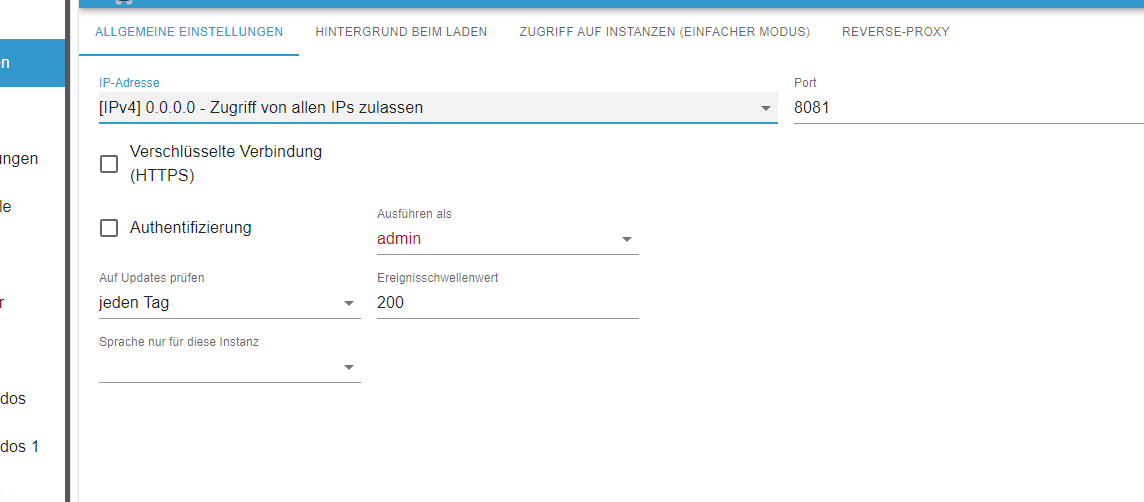
            @homoran
            hi, also so?


            b2916058-33cf-4013-a4ad-f03100364fba-image.png

            habs jetzt auf dem produktiven geändert.
            dann mache ich noch ein backup und spiele es noch mal ein.

            HomoranH 1 Antwort Letzte Antwort
            0
            • HomoranH Homoran

              @crunchip sagte in Update von Debian 10 auf 11?:

              woher kommt denn da der admin 1?

              aus dem backup :grinning:

              crunchipC Abwesend
              crunchipC Abwesend
              crunchip
              Forum Testing Most Active
              schrieb am zuletzt editiert von
              #50

              @homoran schon klar, hätte wohl direkter fragen sollen, warum ne instanz 1, bzw was da im Vorfeld "gefummelt" wurde

              außerdem immer noch

              @alero sagte in Update von Debian 10 auf 11?:

              root
              /root
              root

              @alero sagte in Update von Debian 10 auf 11?:

              habe ich noch einen user angelegt

              umgestiegen von Proxmox auf Unraid

              A 1 Antwort Letzte Antwort
              1
              • crunchipC crunchip

                @homoran schon klar, hätte wohl direkter fragen sollen, warum ne instanz 1, bzw was da im Vorfeld "gefummelt" wurde

                außerdem immer noch

                @alero sagte in Update von Debian 10 auf 11?:

                root
                /root
                root

                @alero sagte in Update von Debian 10 auf 11?:

                habe ich noch einen user angelegt

                A Offline
                A Offline
                Alero
                schrieb am zuletzt editiert von
                #51

                hi,ist das dann so richtig auf meinem prod system wenn ich dort 0.0.0.0. einstelle?

                crunchipC 1 Antwort Letzte Antwort
                0
                • A Alero

                  @homoran
                  hi, also so?


                  b2916058-33cf-4013-a4ad-f03100364fba-image.png

                  habs jetzt auf dem produktiven geändert.
                  dann mache ich noch ein backup und spiele es noch mal ein.

                  HomoranH Nicht stören
                  HomoranH Nicht stören
                  Homoran
                  Global Moderator Administrators
                  schrieb am zuletzt editiert von
                  #52

                  @alero sagte in Update von Debian 10 auf 11?:

                  mache ich noch ein backup und spiele es noch mal ein.

                  wofür?

                  kein Support per PN! - Fragen im Forum stellen - es gibt fast nichts, was nicht auch für andere interessant ist.

                  Benutzt das Voting rechts unten im Beitrag wenn er euch geholfen hat.

                  der Installationsfixer: curl -fsL https://iobroker.net/fix.sh | bash -

                  A 1 Antwort Letzte Antwort
                  0
                  • HomoranH Homoran

                    @alero sagte in Update von Debian 10 auf 11?:

                    mache ich noch ein backup und spiele es noch mal ein.

                    wofür?

                    A Offline
                    A Offline
                    Alero
                    schrieb am zuletzt editiert von
                    #53

                    @homoran
                    weil ich auf das neue system zur zeit nicht mehr zugreifen kann. Wahrscheinlich weill ich im BAckup beim admin.1 die alte ip 192.168.42.15 vorgegeben habe.Das neue system aber zur zeit die 192.168.42.16 hat.

                    1 Antwort Letzte Antwort
                    0
                    • A Alero

                      hi,ist das dann so richtig auf meinem prod system wenn ich dort 0.0.0.0. einstelle?

                      crunchipC Abwesend
                      crunchipC Abwesend
                      crunchip
                      Forum Testing Most Active
                      schrieb am zuletzt editiert von
                      #54

                      @alero sollte generell so eingestellt sein
                      du musst kein neues backup einspielen, kannst du auch per Konsole ändern

                      umgestiegen von Proxmox auf Unraid

                      A 1 Antwort Letzte Antwort
                      0
                      • crunchipC crunchip

                        @alero sollte generell so eingestellt sein
                        du musst kein neues backup einspielen, kannst du auch per Konsole ändern

                        A Offline
                        A Offline
                        Alero
                        schrieb am zuletzt editiert von
                        #55

                        @crunchip

                        wo und wie?

                        crunchipC Thomas BraunT 2 Antworten Letzte Antwort
                        0
                        • A Alero

                          @crunchip

                          wo und wie?

                          crunchipC Abwesend
                          crunchipC Abwesend
                          crunchip
                          Forum Testing Most Active
                          schrieb am zuletzt editiert von
                          #56

                          @alero

                          iob set admin.1 --bind 0.0.0.0
                          

                          umgestiegen von Proxmox auf Unraid

                          1 Antwort Letzte Antwort
                          0
                          • A Alero

                            @crunchip

                            wo und wie?

                            Thomas BraunT Online
                            Thomas BraunT Online
                            Thomas Braun
                            Most Active
                            schrieb am zuletzt editiert von
                            #57

                            @alero

                            Und als Grundlage für alles:

                            MELD DICH NIE ALS ROOT AN!!!1!!!!111!

                            Linux-Werkzeugkasten:
                            https://forum.iobroker.net/topic/42952/der-kleine-iobroker-linux-werkzeugkasten
                            NodeJS Fixer Skript:
                            https://forum.iobroker.net/topic/68035/iob-node-fix-skript
                            iob_diag: curl -sLf -o diag.sh https://iobroker.net/diag.sh && bash diag.sh

                            A 1 Antwort Letzte Antwort
                            0
                            • Thomas BraunT Thomas Braun

                              @alero

                              Und als Grundlage für alles:

                              MELD DICH NIE ALS ROOT AN!!!1!!!!111!

                              A Offline
                              A Offline
                              Alero
                              schrieb am zuletzt editiert von
                              #58

                              @thomas-braun
                              jo das war der Grund warum ich einen zusätzlichen user angelegt habe.
                              i.d.r. mache ich das auch

                              Thomas BraunT HomoranH 2 Antworten Letzte Antwort
                              0
                              • A Alero

                                @thomas-braun
                                jo das war der Grund warum ich einen zusätzlichen user angelegt habe.
                                i.d.r. mache ich das auch

                                Thomas BraunT Online
                                Thomas BraunT Online
                                Thomas Braun
                                Most Active
                                schrieb am zuletzt editiert von
                                #59

                                @alero sagte in Update von Debian 10 auf 11?:

                                i.d.r. mache ich das auch

                                Dann mach es nicht nur in der Regel sondern IMMER!

                                Linux-Werkzeugkasten:
                                https://forum.iobroker.net/topic/42952/der-kleine-iobroker-linux-werkzeugkasten
                                NodeJS Fixer Skript:
                                https://forum.iobroker.net/topic/68035/iob-node-fix-skript
                                iob_diag: curl -sLf -o diag.sh https://iobroker.net/diag.sh && bash diag.sh

                                1 Antwort Letzte Antwort
                                0
                                • A Alero

                                  @thomas-braun
                                  jo das war der Grund warum ich einen zusätzlichen user angelegt habe.
                                  i.d.r. mache ich das auch

                                  HomoranH Nicht stören
                                  HomoranH Nicht stören
                                  Homoran
                                  Global Moderator Administrators
                                  schrieb am zuletzt editiert von Homoran
                                  #60

                                  @alero sagte in Update von Debian 10 auf 11?:

                                  i.d.r. mache ich das auch

                                  dann mach das ab jetzt immer einself!

                                  fix das wieder

                                  als user:

                                  iob stop
                                  iob fix
                                  iob start
                                  

                                  kein Support per PN! - Fragen im Forum stellen - es gibt fast nichts, was nicht auch für andere interessant ist.

                                  Benutzt das Voting rechts unten im Beitrag wenn er euch geholfen hat.

                                  der Installationsfixer: curl -fsL https://iobroker.net/fix.sh | bash -

                                  A 1 Antwort Letzte Antwort
                                  0
                                  • A Offline
                                    A Offline
                                    Alero
                                    schrieb am zuletzt editiert von
                                    #61

                                    hi,
                                    der fehler mit dem nas besteht leider immer noch. habe mir dien Berechtigungen auch auf dem nas angeschaut. da sieht alles gut aus. es muss was im iobroker sein.

                                    HomoranH crunchipC 3 Antworten Letzte Antwort
                                    0
                                    • A Alero

                                      hi,
                                      der fehler mit dem nas besteht leider immer noch. habe mir dien Berechtigungen auch auf dem nas angeschaut. da sieht alles gut aus. es muss was im iobroker sein.

                                      HomoranH Nicht stören
                                      HomoranH Nicht stören
                                      Homoran
                                      Global Moderator Administrators
                                      schrieb am zuletzt editiert von
                                      #62

                                      @alero hast du gefixt?

                                      wenn dann immer noch Probleme sind, bitte backitup Instanz auf Logstufe debug stellen und nochmal versuchen.
                                      Dann das debug-log posten

                                      kein Support per PN! - Fragen im Forum stellen - es gibt fast nichts, was nicht auch für andere interessant ist.

                                      Benutzt das Voting rechts unten im Beitrag wenn er euch geholfen hat.

                                      der Installationsfixer: curl -fsL https://iobroker.net/fix.sh | bash -

                                      HomoranH 1 Antwort Letzte Antwort
                                      0
                                      • HomoranH Homoran

                                        @alero sagte in Update von Debian 10 auf 11?:

                                        i.d.r. mache ich das auch

                                        dann mach das ab jetzt immer einself!

                                        fix das wieder

                                        als user:

                                        iob stop
                                        iob fix
                                        iob start
                                        
                                        A Offline
                                        A Offline
                                        Alero
                                        schrieb am zuletzt editiert von
                                        #63

                                        @homoran sagte in Update von Debian 10 auf 11?:

                                        iob fix

                                        fm bei eingabe von iob fix:

                                        sorry, user juergen is not allowed to execute '/usr/bin/rm -f /etc/sudoers.d/iobroker' as root on iobroker-prod-12.fritz.box.
                                        
                                        HomoranH Thomas BraunT 2 Antworten Letzte Antwort
                                        0
                                        • A Alero

                                          @homoran sagte in Update von Debian 10 auf 11?:

                                          iob fix

                                          fm bei eingabe von iob fix:

                                          sorry, user juergen is not allowed to execute '/usr/bin/rm -f /etc/sudoers.d/iobroker' as root on iobroker-prod-12.fritz.box.
                                          
                                          HomoranH Nicht stören
                                          HomoranH Nicht stören
                                          Homoran
                                          Global Moderator Administrators
                                          schrieb am zuletzt editiert von
                                          #64

                                          @alero wie hast du den user angelegt?
                                          kein Support per PN! - Fragen im Forum stellen - es gibt fast nichts, was nicht auch für andere interessant ist.

                                          Benutzt das Voting rechts unten im Beitrag wenn er euch geholfen hat.

                                          der Installationsfixer: curl -fsL https://iobroker.net/fix.sh | bash -

                                          A 1 Antwort Letzte Antwort
                                          0
                                          Antworten
                                          • In einem neuen Thema antworten
                                          Anmelden zum Antworten
                                          • Älteste zuerst
                                          • Neuste zuerst
                                          • Meiste Stimmen


                                          Support us

                                          ioBroker
                                          Community Adapters
                                          Donate

                                          686

                                          Online

                                          32.5k

                                          Benutzer

                                          81.8k

                                          Themen

                                          1.3m

                                          Beiträge
                                          Community
                                          Impressum | Datenschutz-Bestimmungen | Nutzungsbedingungen | Einwilligungseinstellungen
                                          ioBroker Community 2014-2025
                                          logo
                                          • Anmelden

                                          • Du hast noch kein Konto? Registrieren

                                          • Anmelden oder registrieren, um zu suchen
                                          • Erster Beitrag
                                            Letzter Beitrag
                                          0
                                          • Home
                                          • Aktuell
                                          • Tags
                                          • Ungelesen 0
                                          • Kategorien
                                          • Unreplied
                                          • Beliebt
                                          • GitHub
                                          • Docu
                                          • Hilfe
