




BLE Adapter lässt sich nicht installieren. gelöst(Nodev18)
-
$ iobroker add ble --host iob-server

NPM version: 9.7.2

Installing iobroker.ble@0.13.4... (System call)

npm ERR! code 7npm ERR! path /opt/iobroker/node_modules/iobroker.ble/node_modules/@abandonware/noblenpm ERR! command failednpm ERR! command sh -c node-gyp-buildnpm ERR! gyp ERR! UNCAUGHT EXCEPTION npm ERR! gyp ERR! stack TypeError: Cannot assign to read only property 'cflags' of object '#<Object>'npm ERR! gyp ERR! stack at createConfigFile (/opt/iobroker/node_modules/node-gyp/lib/configure.js:117:21)npm ERR! gyp ERR! stack at /opt/iobroker/node_modules/node-gyp/lib/configure.js:84:9npm ERR! gyp ERR! stack at FSReqCallback.oncomplete (node:fs:189:23)npm ERR! gyp ERR! System Linux 5.15.0-76-genericnpm ERR! gyp ERR! command "/usr/bin/node" "/opt/iobroker/node_modules/.bin/node-gyp" "rebuild"npm ERR! gyp ERR! cwd /opt/iobroker/node_modules/iobroker.ble/node_modules/@abandonware/noblenpm ERR! gyp ERR! node -v v20.4.0npm ERR! gyp ERR! node-gyp -v v7.1.2npm ERR! gyp ERR! Node-gyp failed to build your package.npm ERR! gyp ERR! Try to update npm and/or node-gyp and if it does not help file an issue with the package author.npm ERR! A complete log of this run can be found in: /home/iobroker/.npm/_logs/2023-07-16T16_55_15_625Z-debug-0.log

host.iob-server Cannot install iobroker.ble@0.13.4: 7

ERROR: Process exited with code 25
MOD-EDIT: Code in code-tags gesetzt!
alle anderen adapter laufen und sind grün.
Mit nodejs@20 gibt es noch verschiedene Probleme.
Setz die empfohlene v18 ein. -
Mit nodejs@20 gibt es noch verschiedene Probleme.
Setz die empfohlene v18 ein.======== Start marking the full check here =========
Skript v.2023-04-16

*** BASE SYSTEM ***
Architecture    : x86_64
Docker          : false
Virtualization  : kvm
Distributor ID: Ubuntu
Description:    Ubuntu 22.04.2 LTS
Release:        22.04
Codename:       jammy

PRETTY_NAME="Ubuntu 22.04.2 LTS"
NAME="Ubuntu"
VERSION_ID="22.04"
VERSION="22.04.2 LTS (Jammy Jellyfish)"
VERSION_CODENAME=jammy
ID=ubuntu
ID_LIKE=debian
HOME_URL="https://www.ubuntu.com/"
SUPPORT_URL="https://help.ubuntu.com/"
BUG_REPORT_URL="https://bugs.launchpad.net/ubuntu/"
PRIVACY_POLICY_URL="https://www.ubuntu.com/legal/terms-and-policies/privacy-policy"
UBUNTU_CODENAME=jammy

Systemuptime and Load:
 19:06:54 up 14 min,  2 users,  load average: 0.89, 0.32, 0.19
CPU threads: 8


*** Time and Time Zones ***
               Local time: Sun 2023-07-16 19:06:54 CEST
           Universal time: Sun 2023-07-16 17:06:54 UTC
                 RTC time: Sun 2023-07-16 17:06:54
                Time zone: Europe/Berlin (CEST, +0200)
System clock synchronized: yes
              NTP service: active
          RTC in local TZ: no

*** User and Groups ***
root
/root
root

*** X-Server-Setup ***
X-Server:       false
Desktop:
Terminal:       tty
Boot Target:    graphical.target

*** MEMORY ***
               total        used        free      shared  buff/cache   available
Mem:            7.9G        217M        6.9G        1.0M        818M        7.5G
Swap:             0B          0B          0B
Total:          7.9G        217M        6.9G

         7937 M total memory
          217 M used memory
          380 M active memory
          426 M inactive memory
         6901 M free memory
           55 M buffer memory
          762 M swap cache
            0 M total swap
            0 M used swap
            0 M free swap

*** FILESYSTEM ***
Filesystem                        Type   Size  Used Avail Use% Mounted on
tmpfs                             tmpfs  794M  1.1M  793M   1% /run
/dev/mapper/ubuntu--vg-ubuntu--lv ext4   9.8G  7.5G  1.8G  81% /
tmpfs                             tmpfs  3.9G     0  3.9G   0% /dev/shm
tmpfs                             tmpfs  5.0M     0  5.0M   0% /run/lock
/dev/sda2                         ext4   1.7G  240M  1.4G  15% /boot
tmpfs                             tmpfs  794M  4.0K  794M   1% /run/user/0

Messages concerning ext4 filesystem in dmesg:
[Sun Jul 16 18:52:11 2023] EXT4-fs (dm-0): mounted filesystem with ordered data mode. Opts: (null). Quota mode: none.
[Sun Jul 16 18:52:12 2023] EXT4-fs (dm-0): re-mounted. Opts: (null). Quota mode: none.
[Sun Jul 16 18:52:12 2023] EXT4-fs (sda2): mounted filesystem with ordered data mode. Opts: (null). Quota mode: none.

Show mounted filesystems (real ones only):
TARGET              SOURCE                            FSTYPE   OPTIONS
/                   /dev/mapper/ubuntu--vg-ubuntu--lv ext4     rw,relatime
|-/snap/core20/1950 /dev/loop0                        squashfs ro,nodev,relatime,errors=continue
|-/snap/core20/1974 /dev/loop1                        squashfs ro,nodev,relatime,errors=continue
|-/snap/lxd/24061   /dev/loop2                        squashfs ro,nodev,relatime,errors=continue
|-/snap/snapd/19361 /dev/loop3                        squashfs ro,nodev,relatime,errors=continue
|-/snap/snapd/19457 /dev/loop4                        squashfs ro,nodev,relatime,errors=continue
`-/boot             /dev/sda2                         ext4     rw,relatime

Files in neuralgic directories:

/var:
2.1G    /var/
1.1G    /var/log
992M    /var/log/journal/8716649619c849e1a3f7aa18f9c78966
992M    /var/log/journal
651M    /var/lib

Archived and active journals take up 991.7M in the file system.

/opt/iobroker/backups:
4.0K    /opt/iobroker/backups/

/opt/iobroker/iobroker-data:
185M    /opt/iobroker/iobroker-data/
86M     /opt/iobroker/iobroker-data/files
65M     /opt/iobroker/iobroker-data/backup-objects
51M     /opt/iobroker/iobroker-data/files/javascript.admin
33M     /opt/iobroker/iobroker-data/files/javascript.admin/static

The five largest files in iobroker-data are:
14M     /opt/iobroker/iobroker-data/objects.jsonl
7.2M    /opt/iobroker/iobroker-data/files/ham.admin/static/js/main.8080bc0b.js.map
6.9M    /opt/iobroker/iobroker-data/files/javascript.admin/static/js/910.e1389bdb.chunk.js.map
6.3M    /opt/iobroker/iobroker-data/files/admin.admin/custom/static/js/vendors-node_modules_iobroker_adapter-react-v5_assets_devices_parseNames_js-node_modules_iobr-99c23e.847b8ad9.chunk.js.map
5.3M    /opt/iobroker/iobroker-data/files/javascript.admin/static/js/472.d73f9bde.chunk.js.map

*** NodeJS-Installation ***

/usr/bin/nodejs         v20.4.0
/usr/bin/node           v20.4.0
/usr/bin/npm            9.7.2
/usr/bin/npx            9.7.2


nodejs:
  Installed: 20.4.0-deb-1nodesource1
  Candidate: 20.4.0-deb-1nodesource1
  Version table:
 *** 20.4.0-deb-1nodesource1 500
        500 https://deb.nodesource.com/node_20.x jammy/main amd64 Packages
        100 /var/lib/dpkg/status
     12.22.9~dfsg-1ubuntu3 500
        500 http://de.archive.ubuntu.com/ubuntu jammy/universe amd64 Packages

Temp directories causing npm8 problem: 0
No problems detected

*** ioBroker-Installation ***

ioBroker Status
iobroker is not running on this host.


Objects type: jsonl
States  type: jsonl

MULTIHOSTSERVICE/enabled: false

Core adapters versions
js-controller:  5.0.8
admin:          6.6.0
javascript:     7.1.1

Adapters from github:   4

Adapter State
  system.adapter.accuweather.0            : accuweather           : iob-server                               -  enabled
  system.adapter.admin.0                  : admin                 : iob-server                               -  enabled, port: 8081, bind: 0.0.0.0, run as: admin
  system.adapter.alexa2.0                 : alexa2                : iob-server                               -  enabled
  system.adapter.backitup.0               : backitup              : iob-server                               -  enabled
  system.adapter.discovery.0              : discovery             : iob-server                               -  enabled
  system.adapter.ham.0                    : ham                   : iob-server                               -  enabled
  system.adapter.history.0                : history               : iob-server                               -  enabled
  system.adapter.hue-extended.0           : hue-extended          : iob-server                               -  enabled
  system.adapter.javascript.0             : javascript            : iob-server                               -  enabled
  system.adapter.mihome.0                 : mihome                : iob-server                               -  enabled, port: 9898, bind: 0.0.0.0
  system.adapter.nina.0                   : nina                  : iob-server                               -  enabled
  system.adapter.radar2.0                 : radar2                : iob-server                               -  enabled
  system.adapter.tapo.0                   : tapo                  : iob-server                               -  enabled
  system.adapter.tuya.0                   : tuya                  : iob-server                               -  enabled
  system.adapter.yeelight-2.0             : yeelight-2            : iob-server                               -  enabled
  system.adapter.zigbee.0                 : zigbee                : iob-server                               -  enabled, port: /dev/serial/by-id/usb-Silicon_Labs_Sonoff_Zigbee_3.0_USB_Dongle_Plus_0001-if00-port0

+ instance is alive

Enabled adapters with bindings
  system.adapter.admin.0                  : admin                 : iob-server                               -  enabled, port: 8081, bind: 0.0.0.0, run as: admin
  system.adapter.mihome.0                 : mihome                : iob-server                               -  enabled, port: 9898, bind: 0.0.0.0
  system.adapter.zigbee.0                 : zigbee                : iob-server                               -  enabled, port: /dev/serial/by-id/usb-Silicon_Labs_Sonoff_Zigbee_3.0_USB_Dongle_Plus_0001-if00-port0

ioBroker-Repositories
stable        : http://download.iobroker.net/sources-dist.json
beta          : http://download.iobroker.net/sources-dist-latest.json

Active repo(s): beta

Installed ioBroker-Instances
Used repository: beta
Adapter    "accuweather"  : 1.2.4    , installed 1.2.4
Adapter    "admin"        : 6.6.0    , installed 6.6.0
Adapter    "alexa2"       : 3.23.2   , installed 3.23.2
Adapter    "backitup"     : 2.6.23   , installed 2.6.23
Adapter    "discovery"    : 3.2.0    , installed 3.2.0
Adapter    "ham"          : 5.3.1    , installed 5.3.1
Adapter    "history"      : 2.2.4    , installed 2.2.4
Adapter    "hue-extended" : 2.0.0    , installed 2.0.1
Adapter    "javascript"   : 7.1.1    , installed 7.1.1
Controller "js-controller": 5.0.8    , installed 5.0.8
Adapter    "mihome"       : 1.4.0    , installed 1.4.0
Adapter    "nina"         : 0.0.25   , installed 0.0.25
Adapter    "radar2"       : 2.0.7    , installed 2.0.7
Adapter    "tapo"         : 0.0.8    , installed 0.0.8
Adapter    "tuya"         : 3.14.2   , installed 3.14.2
Adapter    "yeelight-2"   : 1.2.1    , installed 1.2.1
Adapter    "zigbee"       : 1.8.18   , installed 1.8.14 [Updatable]

Objects and States
Please stand by - This may take a while
Objects:        6156
States:         5431

*** OS-Repositories and Updates ***
Hit:1 http://de.archive.ubuntu.com/ubuntu jammy InRelease
Hit:2 https://deb.nodesource.com/node_20.x jammy InRelease
Hit:3 http://de.archive.ubuntu.com/ubuntu jammy-updates InRelease
Get:4 http://de.archive.ubuntu.com/ubuntu jammy-backports InRelease [108 kB]
Hit:5 http://de.archive.ubuntu.com/ubuntu jammy-security InRelease
Fetched 108 kB in 1s (193 kB/s)
Reading package lists...
Pending Updates: 0

*** Listening Ports ***
Active Internet connections (only servers)
Proto Recv-Q Send-Q Local Address           Foreign Address         State       User       Inode      PID/Program name
tcp        0      0 0.0.0.0:22              0.0.0.0:*               LISTEN      0          22849      748/sshd: /usr/sbin
tcp        0      0 0.0.0.0:111             0.0.0.0:*               LISTEN      0          20024      1/init
tcp        0      0 127.0.0.53:53           0.0.0.0:*               LISTEN      101        22689      677/systemd-resolve
tcp        0      0 127.0.0.1:631           0.0.0.0:*               LISTEN      0          21133      694/cupsd
tcp        0      0 0.0.0.0:47307           0.0.0.0:*               LISTEN      115        33007      3269/rpc.statd
tcp6       0      0 :::22                   :::*                    LISTEN      0          22861      748/sshd: /usr/sbin
tcp6       0      0 :::111                  :::*                    LISTEN      0          15771      1/init
tcp6       0      0 ::1:631                 :::*                    LISTEN      0          21132      694/cupsd
tcp6       0      0 :::52297                :::*                    LISTEN      115        33011      3269/rpc.statd
udp        0      0 127.0.0.53:53           0.0.0.0:*                           101        22688      677/systemd-resolve
udp        0      0 192.168.1.166:68        0.0.0.0:*                           100        16195      675/systemd-network
udp        0      0 0.0.0.0:111             0.0.0.0:*                           0          20025      1/init
udp        0      0 0.0.0.0:49712           0.0.0.0:*                           115        33005      3269/rpc.statd
udp        0      0 0.0.0.0:631             0.0.0.0:*                           0          23649      756/cups-browsed
udp        0      0 127.0.0.1:901           0.0.0.0:*                           0          33001      3269/rpc.statd
udp        0      0 0.0.0.0:5353            0.0.0.0:*                           116        22281      689/avahi-daemon: r
udp        0      0 0.0.0.0:51718           0.0.0.0:*                           116        22283      689/avahi-daemon: r
udp6       0      0 :::35688                :::*                                116        22284      689/avahi-daemon: r
udp6       0      0 :::44404                :::*                                115        33009      3269/rpc.statd
udp6       0      0 :::111                  :::*                                0          15772      1/init
udp6       0      0 fe80::4401:1ff:fe01:546 :::*                                100        22714      675/systemd-network
udp6       0      0 :::5353                 :::*                                116        22282      689/avahi-daemon: r

*** Log File - Last 25 Lines ***

2023-07-16 19:06:34.474  - info: accuweather.0 (3331) terminating
2023-07-16 19:06:34.478  - info: mihome.0 (3019) terminating
2023-07-16 19:06:34.479  - info: javascript.0 (3000) terminating
2023-07-16 19:06:34.478  - info: alexa2.0 (3078) terminating
2023-07-16 19:06:34.496  - info: tapo.0 (3380) terminating
2023-07-16 19:06:34.496  - info: backitup.0 (3232) terminating
2023-07-16 19:06:34.496  - info: admin.0 (2946) terminating
2023-07-16 19:06:34.676  - info: host.iob-server instance system.adapter.admin.0 terminated with code 0 (NO_ERROR)
2023-07-16 19:06:34.676  - info: host.iob-server instance system.adapter.yeelight-2.0 terminated with code 0 (NO_ERROR)
2023-07-16 19:06:34.770  - info: host.iob-server instance system.adapter.discovery.0 terminated with code 0 (NO_ERROR)
2023-07-16 19:06:34.770  - info: host.iob-server instance system.adapter.nina.0 terminated with code 0 (NO_ERROR)
2023-07-16 19:06:34.789  - info: host.iob-server instance system.adapter.accuweather.0 terminated with code 0 (NO_ERROR)
2023-07-16 19:06:34.809  - info: host.iob-server instance system.adapter.alexa2.0 terminated with code 0 (NO_ERROR)
2023-07-16 19:06:34.852  - info: host.iob-server instance system.adapter.mihome.0 terminated with code 0 (NO_ERROR)
2023-07-16 19:06:34.853  - info: host.iob-server instance system.adapter.backitup.0 terminated with code 0 (NO_ERROR)
2023-07-16 19:06:34.853  - info: host.iob-server instance system.adapter.hue-extended.0 terminated with code 0 (NO_ERROR)
2023-07-16 19:06:34.881  - info: host.iob-server instance system.adapter.radar2.0 terminated with code 0 (NO_ERROR)
2023-07-16 19:06:34.881  - info: host.iob-server instance system.adapter.tapo.0 terminated with code 0 (NO_ERROR)
2023-07-16 19:06:34.903  - info: host.iob-server instance system.adapter.history.0 terminated with code 0 (NO_ERROR)
2023-07-16 19:06:34.903  - info: host.iob-server instance system.adapter.javascript.0 terminated with code 0 (NO_ERROR)
2023-07-16 19:06:34.956  - info: host.iob-server instance system.adapter.ham.0 terminated with code 0 (NO_ERROR)
2023-07-16 19:06:35.041  - info: host.iob-server instance system.adapter.zigbee.0 terminated with code 0 (NO_ERROR)
2023-07-16 19:06:37.502  - info: host.iob-server instance system.adapter.tuya.0 terminated with code 0 (NO_ERROR)
2023-07-16 19:06:37.502  - info: host.iob-server All instances are stopped.
2023-07-16 19:06:37.657  - info: host.iob-server terminated
============ Mark until here for C&P =============
iob diag has finished.
-
======== Start marking the full check here =========
Skript v.2023-04-16

*** BASE SYSTEM ***
Architecture    : x86_64
Docker          : false
Virtualization  : kvm
Distributor ID: Ubuntu
Description:    Ubuntu 22.04.2 LTS
Release:        22.04
Codename:       jammy

PRETTY_NAME="Ubuntu 22.04.2 LTS"
NAME="Ubuntu"
VERSION_ID="22.04"
VERSION="22.04.2 LTS (Jammy Jellyfish)"
VERSION_CODENAME=jammy
ID=ubuntu
ID_LIKE=debian
HOME_URL="https://www.ubuntu.com/"
SUPPORT_URL="https://help.ubuntu.com/"
BUG_REPORT_URL="https://bugs.launchpad.net/ubuntu/"
PRIVACY_POLICY_URL="https://www.ubuntu.com/legal/terms-and-policies/privacy-policy"
UBUNTU_CODENAME=jammy

Systemuptime and Load:
 19:06:54 up 14 min,  2 users,  load average: 0.89, 0.32, 0.19
CPU threads: 8


*** Time and Time Zones ***
               Local time: Sun 2023-07-16 19:06:54 CEST
           Universal time: Sun 2023-07-16 17:06:54 UTC
                 RTC time: Sun 2023-07-16 17:06:54
                Time zone: Europe/Berlin (CEST, +0200)
System clock synchronized: yes
              NTP service: active
          RTC in local TZ: no

*** User and Groups ***
root
/root
root

*** X-Server-Setup ***
X-Server:       false
Desktop:
Terminal:       tty
Boot Target:    graphical.target

*** MEMORY ***
               total        used        free      shared  buff/cache   available
Mem:            7.9G        217M        6.9G        1.0M        818M        7.5G
Swap:             0B          0B          0B
Total:          7.9G        217M        6.9G

         7937 M total memory
          217 M used memory
          380 M active memory
          426 M inactive memory
         6901 M free memory
           55 M buffer memory
          762 M swap cache
            0 M total swap
            0 M used swap
            0 M free swap

*** FILESYSTEM ***
Filesystem                        Type   Size  Used Avail Use% Mounted on
tmpfs                             tmpfs  794M  1.1M  793M   1% /run
/dev/mapper/ubuntu--vg-ubuntu--lv ext4   9.8G  7.5G  1.8G  81% /
tmpfs                             tmpfs  3.9G     0  3.9G   0% /dev/shm
tmpfs                             tmpfs  5.0M     0  5.0M   0% /run/lock
/dev/sda2                         ext4   1.7G  240M  1.4G  15% /boot
tmpfs                             tmpfs  794M  4.0K  794M   1% /run/user/0

Messages concerning ext4 filesystem in dmesg:
[Sun Jul 16 18:52:11 2023] EXT4-fs (dm-0): mounted filesystem with ordered data mode. Opts: (null). Quota mode: none.
[Sun Jul 16 18:52:12 2023] EXT4-fs (dm-0): re-mounted. Opts: (null). Quota mode: none.
[Sun Jul 16 18:52:12 2023] EXT4-fs (sda2): mounted filesystem with ordered data mode. Opts: (null). Quota mode: none.

Show mounted filesystems (real ones only):
TARGET              SOURCE                            FSTYPE   OPTIONS
/                   /dev/mapper/ubuntu--vg-ubuntu--lv ext4     rw,relatime
|-/snap/core20/1950 /dev/loop0                        squashfs ro,nodev,relatime,errors=continue
|-/snap/core20/1974 /dev/loop1                        squashfs ro,nodev,relatime,errors=continue
|-/snap/lxd/24061   /dev/loop2                        squashfs ro,nodev,relatime,errors=continue
|-/snap/snapd/19361 /dev/loop3                        squashfs ro,nodev,relatime,errors=continue
|-/snap/snapd/19457 /dev/loop4                        squashfs ro,nodev,relatime,errors=continue
`-/boot             /dev/sda2                         ext4     rw,relatime

Files in neuralgic directories:

/var:
2.1G    /var/
1.1G    /var/log
992M    /var/log/journal/8716649619c849e1a3f7aa18f9c78966
992M    /var/log/journal
651M    /var/lib

Archived and active journals take up 991.7M in the file system.

/opt/iobroker/backups:
4.0K    /opt/iobroker/backups/

/opt/iobroker/iobroker-data:
185M    /opt/iobroker/iobroker-data/
86M     /opt/iobroker/iobroker-data/files
65M     /opt/iobroker/iobroker-data/backup-objects
51M     /opt/iobroker/iobroker-data/files/javascript.admin
33M     /opt/iobroker/iobroker-data/files/javascript.admin/static

The five largest files in iobroker-data are:
14M     /opt/iobroker/iobroker-data/objects.jsonl
7.2M    /opt/iobroker/iobroker-data/files/ham.admin/static/js/main.8080bc0b.js.map
6.9M    /opt/iobroker/iobroker-data/files/javascript.admin/static/js/910.e1389bdb.chunk.js.map
6.3M    /opt/iobroker/iobroker-data/files/admin.admin/custom/static/js/vendors-node_modules_iobroker_adapter-react-v5_assets_devices_parseNames_js-node_modules_iobr-99c23e.847b8ad9.chunk.js.map
5.3M    /opt/iobroker/iobroker-data/files/javascript.admin/static/js/472.d73f9bde.chunk.js.map

*** NodeJS-Installation ***

/usr/bin/nodejs         v20.4.0
/usr/bin/node           v20.4.0
/usr/bin/npm            9.7.2
/usr/bin/npx            9.7.2


nodejs:
  Installed: 20.4.0-deb-1nodesource1
  Candidate: 20.4.0-deb-1nodesource1
  Version table:
 *** 20.4.0-deb-1nodesource1 500
        500 https://deb.nodesource.com/node_20.x jammy/main amd64 Packages
        100 /var/lib/dpkg/status
     12.22.9~dfsg-1ubuntu3 500
        500 http://de.archive.ubuntu.com/ubuntu jammy/universe amd64 Packages

Temp directories causing npm8 problem: 0
No problems detected

*** ioBroker-Installation ***

ioBroker Status
iobroker is not running on this host.


Objects type: jsonl
States  type: jsonl

MULTIHOSTSERVICE/enabled: false

Core adapters versions
js-controller:  5.0.8
admin:          6.6.0
javascript:     7.1.1

Adapters from github:   4

Adapter State
  system.adapter.accuweather.0            : accuweather           : iob-server                               -  enabled
  system.adapter.admin.0                  : admin                 : iob-server                               -  enabled, port: 8081, bind: 0.0.0.0, run as: admin
  system.adapter.alexa2.0                 : alexa2                : iob-server                               -  enabled
  system.adapter.backitup.0               : backitup              : iob-server                               -  enabled
  system.adapter.discovery.0              : discovery             : iob-server                               -  enabled
  system.adapter.ham.0                    : ham                   : iob-server                               -  enabled
  system.adapter.history.0                : history               : iob-server                               -  enabled
  system.adapter.hue-extended.0           : hue-extended          : iob-server                               -  enabled
  system.adapter.javascript.0             : javascript            : iob-server                               -  enabled
  system.adapter.mihome.0                 : mihome                : iob-server                               -  enabled, port: 9898, bind: 0.0.0.0
  system.adapter.nina.0                   : nina                  : iob-server                               -  enabled
  system.adapter.radar2.0                 : radar2                : iob-server                               -  enabled
  system.adapter.tapo.0                   : tapo                  : iob-server                               -  enabled
  system.adapter.tuya.0                   : tuya                  : iob-server                               -  enabled
  system.adapter.yeelight-2.0             : yeelight-2            : iob-server                               -  enabled
  system.adapter.zigbee.0                 : zigbee                : iob-server                               -  enabled, port: /dev/serial/by-id/usb-Silicon_Labs_Sonoff_Zigbee_3.0_USB_Dongle_Plus_0001-if00-port0

+ instance is alive

Enabled adapters with bindings
  system.adapter.admin.0                  : admin                 : iob-server                               -  enabled, port: 8081, bind: 0.0.0.0, run as: admin
  system.adapter.mihome.0                 : mihome                : iob-server                               -  enabled, port: 9898, bind: 0.0.0.0
  system.adapter.zigbee.0                 : zigbee                : iob-server                               -  enabled, port: /dev/serial/by-id/usb-Silicon_Labs_Sonoff_Zigbee_3.0_USB_Dongle_Plus_0001-if00-port0

ioBroker-Repositories
stable        : http://download.iobroker.net/sources-dist.json
beta          : http://download.iobroker.net/sources-dist-latest.json

Active repo(s): beta

Installed ioBroker-Instances
Used repository: beta
Adapter    "accuweather"  : 1.2.4    , installed 1.2.4
Adapter    "admin"        : 6.6.0    , installed 6.6.0
Adapter    "alexa2"       : 3.23.2   , installed 3.23.2
Adapter    "backitup"     : 2.6.23   , installed 2.6.23
Adapter    "discovery"    : 3.2.0    , installed 3.2.0
Adapter    "ham"          : 5.3.1    , installed 5.3.1
Adapter    "history"      : 2.2.4    , installed 2.2.4
Adapter    "hue-extended" : 2.0.0    , installed 2.0.1
Adapter    "javascript"   : 7.1.1    , installed 7.1.1
Controller "js-controller": 5.0.8    , installed 5.0.8
Adapter    "mihome"       : 1.4.0    , installed 1.4.0
Adapter    "nina"         : 0.0.25   , installed 0.0.25
Adapter    "radar2"       : 2.0.7    , installed 2.0.7
Adapter    "tapo"         : 0.0.8    , installed 0.0.8
Adapter    "tuya"         : 3.14.2   , installed 3.14.2
Adapter    "yeelight-2"   : 1.2.1    , installed 1.2.1
Adapter    "zigbee"       : 1.8.18   , installed 1.8.14 [Updatable]

Objects and States
Please stand by - This may take a while
Objects:        6156
States:         5431

*** OS-Repositories and Updates ***
Hit:1 http://de.archive.ubuntu.com/ubuntu jammy InRelease
Hit:2 https://deb.nodesource.com/node_20.x jammy InRelease
Hit:3 http://de.archive.ubuntu.com/ubuntu jammy-updates InRelease
Get:4 http://de.archive.ubuntu.com/ubuntu jammy-backports InRelease [108 kB]
Hit:5 http://de.archive.ubuntu.com/ubuntu jammy-security InRelease
Fetched 108 kB in 1s (193 kB/s)
Reading package lists...
Pending Updates: 0

*** Listening Ports ***
Active Internet connections (only servers)
Proto Recv-Q Send-Q Local Address           Foreign Address         State       User       Inode      PID/Program name
tcp        0      0 0.0.0.0:22              0.0.0.0:*               LISTEN      0          22849      748/sshd: /usr/sbin
tcp        0      0 0.0.0.0:111             0.0.0.0:*               LISTEN      0          20024      1/init
tcp        0      0 127.0.0.53:53           0.0.0.0:*               LISTEN      101        22689      677/systemd-resolve
tcp        0      0 127.0.0.1:631           0.0.0.0:*               LISTEN      0          21133      694/cupsd
tcp        0      0 0.0.0.0:47307           0.0.0.0:*               LISTEN      115        33007      3269/rpc.statd
tcp6       0      0 :::22                   :::*                    LISTEN      0          22861      748/sshd: /usr/sbin
tcp6       0      0 :::111                  :::*                    LISTEN      0          15771      1/init
tcp6       0      0 ::1:631                 :::*                    LISTEN      0          21132      694/cupsd
tcp6       0      0 :::52297                :::*                    LISTEN      115        33011      3269/rpc.statd
udp        0      0 127.0.0.53:53           0.0.0.0:*                           101        22688      677/systemd-resolve
udp        0      0 192.168.1.166:68        0.0.0.0:*                           100        16195      675/systemd-network
udp        0      0 0.0.0.0:111             0.0.0.0:*                           0          20025      1/init
udp        0      0 0.0.0.0:49712           0.0.0.0:*                           115        33005      3269/rpc.statd
udp        0      0 0.0.0.0:631             0.0.0.0:*                           0          23649      756/cups-browsed
udp        0      0 127.0.0.1:901           0.0.0.0:*                           0          33001      3269/rpc.statd
udp        0      0 0.0.0.0:5353            0.0.0.0:*                           116        22281      689/avahi-daemon: r
udp        0      0 0.0.0.0:51718           0.0.0.0:*                           116        22283      689/avahi-daemon: r
udp6       0      0 :::35688                :::*                                116        22284      689/avahi-daemon: r
udp6       0      0 :::44404                :::*                                115        33009      3269/rpc.statd
udp6       0      0 :::111                  :::*                                0          15772      1/init
udp6       0      0 fe80::4401:1ff:fe01:546 :::*                                100        22714      675/systemd-network
udp6       0      0 :::5353                 :::*                                116        22282      689/avahi-daemon: r

*** Log File - Last 25 Lines ***

2023-07-16 19:06:34.474  - info: accuweather.0 (3331) terminating
2023-07-16 19:06:34.478  - info: mihome.0 (3019) terminating
2023-07-16 19:06:34.479  - info: javascript.0 (3000) terminating
2023-07-16 19:06:34.478  - info: alexa2.0 (3078) terminating
2023-07-16 19:06:34.496  - info: tapo.0 (3380) terminating
2023-07-16 19:06:34.496  - info: backitup.0 (3232) terminating
2023-07-16 19:06:34.496  - info: admin.0 (2946) terminating
2023-07-16 19:06:34.676  - info: host.iob-server instance system.adapter.admin.0 terminated with code 0 (NO_ERROR)
2023-07-16 19:06:34.676  - info: host.iob-server instance system.adapter.yeelight-2.0 terminated with code 0 (NO_ERROR)
2023-07-16 19:06:34.770  - info: host.iob-server instance system.adapter.discovery.0 terminated with code 0 (NO_ERROR)
2023-07-16 19:06:34.770  - info: host.iob-server instance system.adapter.nina.0 terminated with code 0 (NO_ERROR)
2023-07-16 19:06:34.789  - info: host.iob-server instance system.adapter.accuweather.0 terminated with code 0 (NO_ERROR)
2023-07-16 19:06:34.809  - info: host.iob-server instance system.adapter.alexa2.0 terminated with code 0 (NO_ERROR)
2023-07-16 19:06:34.852  - info: host.iob-server instance system.adapter.mihome.0 terminated with code 0 (NO_ERROR)
2023-07-16 19:06:34.853  - info: host.iob-server instance system.adapter.backitup.0 terminated with code 0 (NO_ERROR)
2023-07-16 19:06:34.853  - info: host.iob-server instance system.adapter.hue-extended.0 terminated with code 0 (NO_ERROR)
2023-07-16 19:06:34.881  - info: host.iob-server instance system.adapter.radar2.0 terminated with code 0 (NO_ERROR)
2023-07-16 19:06:34.881  - info: host.iob-server instance system.adapter.tapo.0 terminated with code 0 (NO_ERROR)
2023-07-16 19:06:34.903  - info: host.iob-server instance system.adapter.history.0 terminated with code 0 (NO_ERROR)
2023-07-16 19:06:34.903  - info: host.iob-server instance system.adapter.javascript.0 terminated with code 0 (NO_ERROR)
2023-07-16 19:06:34.956  - info: host.iob-server instance system.adapter.ham.0 terminated with code 0 (NO_ERROR)
2023-07-16 19:06:35.041  - info: host.iob-server instance system.adapter.zigbee.0 terminated with code 0 (NO_ERROR)
2023-07-16 19:06:37.502  - info: host.iob-server instance system.adapter.tuya.0 terminated with code 0 (NO_ERROR)
2023-07-16 19:06:37.502  - info: host.iob-server All instances are stopped.
2023-07-16 19:06:37.657  - info: host.iob-server terminated
============ Mark until here for C&P =============
iob diag has finished.
Nicht als root herumhampeln, SWAP aktivieren, nodejs@18 verwenden.
/dev/mapper/ubuntu--vg-ubuntu--lv ext4 9.8G 7.5G 1.8G 81% /Dein / ist so gut wie voll, das fällt dir als nächstes auf die Füße.
-
Nicht als root herumhampeln, SWAP aktivieren, nodejs@18 verwenden.
/dev/mapper/ubuntu--vg-ubuntu--lv ext4 9.8G 7.5G 1.8G 81% /Dein / ist so gut wie voll, das fällt dir als nächstes auf die Füße.
Hallo in die Runde, vielleicht kann mir jemand helfen.
Habe auf dem Raspi 4 erfolgreich Bluetooth aktiviert und im iobroker ebenfalls den BLE-Adapter erfolgreich zum Laufen gebracht. Leider wird mein XIAOMI Helligkeitssensor nicht vom Adapter erkannt.
Habe im Adapter das xiaomi - Plugin aktiviert.
Beim Starten des Adapter erscheint folgendes im Log:
ble.0
2023-08-09 07:32:40.655	info	starting scan for services ["fe95"]

ble.0
2023-08-09 07:32:40.083	info	starting scanner process...

ble.0
2023-08-09 07:32:40.053	info	monitored services: fe95

ble.0
2023-08-09 07:32:40.052	info	enabled plugins: Xiaomi, _default

ble.0
2023-08-09 07:32:40.050	info	loaded plugins: Xiaomi, mi-flora, ruuvi-tag, _default

ble.0
2023-08-09 07:32:39.979	info	starting. Version 0.13.4 in /opt/iobroker/node_modules/iobroker.ble, node: v18.16.1, js-controller: 4.0.24
host.Raspberry-PI4
2023-08-09 07:32:37.294	info	instance system.adapter.ble.0 started with pid 3879
Hier noch die Daten im Objektknoten des BLE-Adapters:

Habe auch schon das Objekt: allowNewDevices auf true gesetzt und dann den Pairing-Modus auf dem Helligkeitssensor aktiviert. Hat bisher leider alles nichts gebracht.
Ich gehen davon aus, dass ich für die Anbindung des Sensors an IOBroker keinen Zigbee-Hub benötige.
Gruss Stefan
-
Hallo in die Runde, vielleicht kann mir jemand helfen.
Habe auf dem Raspi 4 erfolgreich Bluetooth aktiviert und im iobroker ebenfalls den BLE-Adapter erfolgreich zum Laufen gebracht. Leider wird mein XIAOMI Helligkeitssensor nicht vom Adapter erkannt.
Habe im Adapter das xiaomi - Plugin aktiviert.
Beim Starten des Adapter erscheint folgendes im Log:
ble.0
2023-08-09 07:32:40.655	info	starting scan for services ["fe95"]

ble.0
2023-08-09 07:32:40.083	info	starting scanner process...

ble.0
2023-08-09 07:32:40.053	info	monitored services: fe95

ble.0
2023-08-09 07:32:40.052	info	enabled plugins: Xiaomi, _default

ble.0
2023-08-09 07:32:40.050	info	loaded plugins: Xiaomi, mi-flora, ruuvi-tag, _default

ble.0
2023-08-09 07:32:39.979	info	starting. Version 0.13.4 in /opt/iobroker/node_modules/iobroker.ble, node: v18.16.1, js-controller: 4.0.24
host.Raspberry-PI4
2023-08-09 07:32:37.294	info	instance system.adapter.ble.0 started with pid 3879
Hier noch die Daten im Objektknoten des BLE-Adapters:
Habe auch schon das Objekt: allowNewDevices auf true gesetzt und dann den Pairing-Modus auf dem Helligkeitssensor aktiviert. Hat bisher leider alles nichts gebracht.
Ich gehen davon aus, dass ich für die Anbindung des Sensors an IOBroker keinen Zigbee-Hub benötige.
Gruss Stefan
@stefanh-0
bin jetzt etwas weiter gekommen.
Nachdem ich den Haken mal bei:

gesetzt habe, hat er schon mal Devices gefunden, das ist sehr schön und sagt mir, dass mein Bluetooth auf dem Rasp und der BLE-Adapter in IOBroker funktionieren.Es können jedoch von den Devices keine Daten ausgelesen werden.
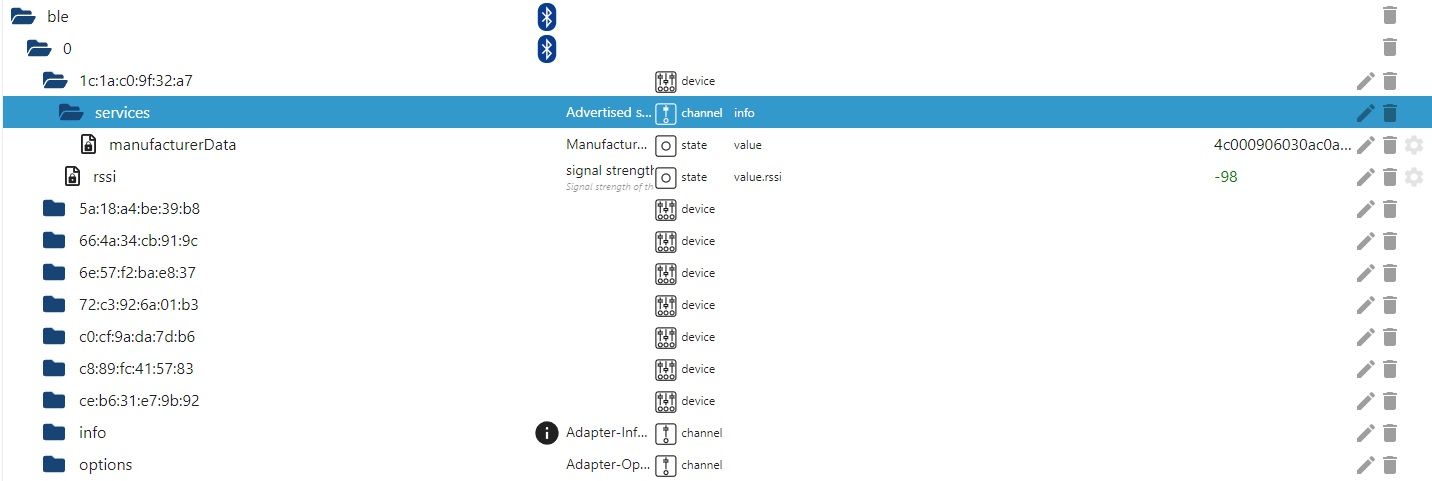
Das kann aber normal sein, da der XIAOMI Lichtsensor möglicher vom Plugin noch garnicht unterstützt wird und die restlichen gefundenen Bluetooth-Devices ohne geeignete Plugins sowieso nicht ausgelesen werden können.
-
@stefanh-0
bin jetzt etwas weiter gekommen.
Nachdem ich den Haken mal bei:
gesetzt habe, hat er schon mal Devices gefunden, das ist sehr schön und sagt mir, dass mein Bluetooth auf dem Rasp und der BLE-Adapter in IOBroker funktionieren.Es können jedoch von den Devices keine Daten ausgelesen werden.
Das kann aber normal sein, da der XIAOMI Lichtsensor möglicher vom Plugin noch garnicht unterstützt wird und die restlichen gefundenen Bluetooth-Devices ohne geeignete Plugins sowieso nicht ausgelesen werden können.
@stefanh-0 sagte in BLE Adapter lässt sich nicht installieren. gelöst(Nodev18):
XIAOMI Lichtsensor
bluetooth? wohl eher zigbee
-
@stefanh-0 sagte in BLE Adapter lässt sich nicht installieren. gelöst(Nodev18):
XIAOMI Lichtsensor
bluetooth? wohl eher zigbee
-
@crunchip
Ist mir schon klar dass zigbee als Protokoll verwendet wird, aber das sollten die Plugins ja hoffentlich können.@stefanh-0 scheinbar ist dir nicht ganz klar was der ble Adapter macht, das hat nichts mit zigbee zu tun, nur weil xiaomi als plugin drin steht.
es gibt Geräte von xiaomi die mit bluetooth funken, wie z.b der Xiaomi Temperature and humidity sensor
-
@stefanh-0 scheinbar ist dir nicht ganz klar was der ble Adapter macht, das hat nichts mit zigbee zu tun, nur weil xiaomi als plugin drin steht.
es gibt Geräte von xiaomi die mit bluetooth funken, wie z.b der Xiaomi Temperature and humidity sensor
-
@crunchip
Ok , danke für die Info und Klarstellung. Dachte bisher, dass zigbee auf Bluetooth aufsetzt. War mir nicht klar, dass zigbee ein eigenständiger Funkstandard ist. -
@stefanh-0 auf die schnelle https://www.libe.net/smart-home-funk
Hänge mich hier noch mal an.
Ich kann BLE _0.13.4 nicht Instalieren.Plattform: linux
Betriebssystem: linux
Architektur: x64
Geschwindigkeit: 1496 MHz
Modell: Intel(R) Celeron(R) CPU 1007U @ 1.50GHz
RAM: 7.5 GB
Node.js: v18.19.0
NPM: 10.2.3
Freier Festplattenspeicher: 453.0 GBERROR: Process exited with code 25 $ iobroker add ble --host Mini-pc-Master Installing iobroker.ble@0.13.4... (System call) npm ERR! code 1npm ERR! path /opt/iobroker/node_modules/@abandonware/noblenpm ERR! command failednpm ERR! command sh -c node-gyp-buildnpm ERR! (node:17520) [DEP0150] DeprecationWarning: Setting process.config is deprecated. In the future the property will be read-only.npm ERR! (Use `node --trace-deprecation ...` to show where the warning was created)npm ERR! Traceback (most recent call last):npm ERR! File "/opt/iobroker/node_modules/node-gyp/gyp/gyp_main.py", line 51, in <module>npm ERR! sys.exit(gyp.script_main())npm ERR! ^^^^^^^^^^^^^^^^^npm ERR! File "/opt/iobroker/node_modules/node-gyp/gyp/pylib/gyp/__init__.py", line 670, in script_mainnpm ERR! return main(sys.argv[1:])npm ERR! ^^^^^^^^^^^^^^^^^^npm ERR! File "/opt/iobroker/node_modules/node-gyp/gyp/pylib/gyp/__init__.py", line 662, in mainnpm ERR! return gyp_main(args)npm ERR! ^^^^^^^^^^^^^^npm ERR! File "/opt/iobroker/node_modules/node-gyp/gyp/pylib/gyp/__init__.py", line 629, in gyp_mainnpm ERR! [generator, flat_list, targets, data] = Load(npm ERR! ^^^^^npm ERR! File "/opt/iobroker/node_modules/node-gyp/gyp/pylib/gyp/__init__.py", line 150, in Loadnpm ERR! result = gyp.input.Load(npm ERR! ^^^^^^^^^^^^^^^npm ERR! File "/opt/iobroker/node_modules/node-gyp/gyp/pylib/gyp/input.py", line 3021, in Loadnpm ERR! LoadTargetBuildFile(npm ERR! File "/opt/iobroker/node_modules/node-gyp/gyp/pylib/gyp/input.py", line 411, in LoadTargetBuildFilenpm ERR! build_file_data = LoadOneBuildFile(npm ERR! ^^^^^^^^^^^^^^^^^npm ERR! File "/opt/iobroker/node_modules/node-gyp/gyp/pylib/gyp/input.py", line 239, in LoadOneBuildFilenpm ERR! build_file_contents = open(build_file_path, "rU").read()npm ERR! ^^^^^^^^^^^^^^^^^^^^^^^^^^^npm ERR! ValueError: invalid mode: 'rU' while trying to load binding.gypnpm ERR! gyp ERR! configure error npm ERR! gyp ERR! stack Error: `gyp` failed with exit code: 1npm ERR! gyp ERR! stack at ChildProcess.onCpExit (/opt/iobroker/node_modules/node-gyp/lib/configure.js:351:16)npm ERR! gyp ERR! stack at ChildProcess.emit (node:events:517:28)npm ERR! gyp ERR! stack at ChildProcess._handle.onexit (node:internal/child_process:292:12)npm ERR! gyp ERR! System Linux 6.1.0-17-amd64npm ERR! gyp ERR! command "/usr/bin/node" "/opt/iobroker/node_modules/node-gyp/bin/node-gyp.js" "rebuild"npm ERR! gyp ERR! cwd /opt/iobroker/node_modules/@abandonware/noblenpm ERR! gyp ERR! node -v v18.19.0npm ERR! gyp ERR! node-gyp -v v7.1.2npm ERR! gyp ERR! not oknpm ERR! A complete log of this run can be found in: /home/iobroker/.npm/_logs/2024-01-23T18_42_08_732Z-debug-0.loghost.Mini-pc-Master Cannot install iobroker.ble@0.13.4: 1 ERROR: Process exited with code 25Kann jemand weiterhelfen?
-
Hänge mich hier noch mal an.
Ich kann BLE _0.13.4 nicht Instalieren.Plattform: linux
Betriebssystem: linux
Architektur: x64
Geschwindigkeit: 1496 MHz
Modell: Intel(R) Celeron(R) CPU 1007U @ 1.50GHz
RAM: 7.5 GB
Node.js: v18.19.0
NPM: 10.2.3
Freier Festplattenspeicher: 453.0 GBERROR: Process exited with code 25 $ iobroker add ble --host Mini-pc-Master Installing iobroker.ble@0.13.4... (System call) npm ERR! code 1npm ERR! path /opt/iobroker/node_modules/@abandonware/noblenpm ERR! command failednpm ERR! command sh -c node-gyp-buildnpm ERR! (node:17520) [DEP0150] DeprecationWarning: Setting process.config is deprecated. In the future the property will be read-only.npm ERR! (Use `node --trace-deprecation ...` to show where the warning was created)npm ERR! Traceback (most recent call last):npm ERR! File "/opt/iobroker/node_modules/node-gyp/gyp/gyp_main.py", line 51, in <module>npm ERR! sys.exit(gyp.script_main())npm ERR! ^^^^^^^^^^^^^^^^^npm ERR! File "/opt/iobroker/node_modules/node-gyp/gyp/pylib/gyp/__init__.py", line 670, in script_mainnpm ERR! return main(sys.argv[1:])npm ERR! ^^^^^^^^^^^^^^^^^^npm ERR! File "/opt/iobroker/node_modules/node-gyp/gyp/pylib/gyp/__init__.py", line 662, in mainnpm ERR! return gyp_main(args)npm ERR! ^^^^^^^^^^^^^^npm ERR! File "/opt/iobroker/node_modules/node-gyp/gyp/pylib/gyp/__init__.py", line 629, in gyp_mainnpm ERR! [generator, flat_list, targets, data] = Load(npm ERR! ^^^^^npm ERR! File "/opt/iobroker/node_modules/node-gyp/gyp/pylib/gyp/__init__.py", line 150, in Loadnpm ERR! result = gyp.input.Load(npm ERR! ^^^^^^^^^^^^^^^npm ERR! File "/opt/iobroker/node_modules/node-gyp/gyp/pylib/gyp/input.py", line 3021, in Loadnpm ERR! LoadTargetBuildFile(npm ERR! File "/opt/iobroker/node_modules/node-gyp/gyp/pylib/gyp/input.py", line 411, in LoadTargetBuildFilenpm ERR! build_file_data = LoadOneBuildFile(npm ERR! ^^^^^^^^^^^^^^^^^npm ERR! File "/opt/iobroker/node_modules/node-gyp/gyp/pylib/gyp/input.py", line 239, in LoadOneBuildFilenpm ERR! build_file_contents = open(build_file_path, "rU").read()npm ERR! ^^^^^^^^^^^^^^^^^^^^^^^^^^^npm ERR! ValueError: invalid mode: 'rU' while trying to load binding.gypnpm ERR! gyp ERR! configure error npm ERR! gyp ERR! stack Error: `gyp` failed with exit code: 1npm ERR! gyp ERR! stack at ChildProcess.onCpExit (/opt/iobroker/node_modules/node-gyp/lib/configure.js:351:16)npm ERR! gyp ERR! stack at ChildProcess.emit (node:events:517:28)npm ERR! gyp ERR! stack at ChildProcess._handle.onexit (node:internal/child_process:292:12)npm ERR! gyp ERR! System Linux 6.1.0-17-amd64npm ERR! gyp ERR! command "/usr/bin/node" "/opt/iobroker/node_modules/node-gyp/bin/node-gyp.js" "rebuild"npm ERR! gyp ERR! cwd /opt/iobroker/node_modules/@abandonware/noblenpm ERR! gyp ERR! node -v v18.19.0npm ERR! gyp ERR! node-gyp -v v7.1.2npm ERR! gyp ERR! not oknpm ERR! A complete log of this run can be found in: /home/iobroker/.npm/_logs/2024-01-23T18_42_08_732Z-debug-0.loghost.Mini-pc-Master Cannot install iobroker.ble@0.13.4: 1 ERROR: Process exited with code 25Kann jemand weiterhelfen?
@walter-o sagte in BLE Adapter lässt sich nicht installieren. gelöst(Nodev18):
Kann jemand weiterhelfen?
Wie bist du da ansonsten so unterwegs?
iob diaganschauen.
Linux-Werkzeugkasten:
https://forum.iobroker.net/topic/42952/der-kleine-iobroker-linux-werkzeugkasten
NodeJS Fixer Skript:
https://forum.iobroker.net/topic/68035/iob-node-fix-skript
iob_diag: curl -sLf -o diag.sh https://iobroker.net/diag.sh && bash diag.sh -
Hänge mich hier noch mal an.
Ich kann BLE _0.13.4 nicht Instalieren.Plattform: linux
Betriebssystem: linux
Architektur: x64
Geschwindigkeit: 1496 MHz
Modell: Intel(R) Celeron(R) CPU 1007U @ 1.50GHz
RAM: 7.5 GB
Node.js: v18.19.0
NPM: 10.2.3
Freier Festplattenspeicher: 453.0 GBERROR: Process exited with code 25 $ iobroker add ble --host Mini-pc-Master Installing iobroker.ble@0.13.4... (System call) npm ERR! code 1npm ERR! path /opt/iobroker/node_modules/@abandonware/noblenpm ERR! command failednpm ERR! command sh -c node-gyp-buildnpm ERR! (node:17520) [DEP0150] DeprecationWarning: Setting process.config is deprecated. In the future the property will be read-only.npm ERR! (Use `node --trace-deprecation ...` to show where the warning was created)npm ERR! Traceback (most recent call last):npm ERR! File "/opt/iobroker/node_modules/node-gyp/gyp/gyp_main.py", line 51, in <module>npm ERR! sys.exit(gyp.script_main())npm ERR! ^^^^^^^^^^^^^^^^^npm ERR! File "/opt/iobroker/node_modules/node-gyp/gyp/pylib/gyp/__init__.py", line 670, in script_mainnpm ERR! return main(sys.argv[1:])npm ERR! ^^^^^^^^^^^^^^^^^^npm ERR! File "/opt/iobroker/node_modules/node-gyp/gyp/pylib/gyp/__init__.py", line 662, in mainnpm ERR! return gyp_main(args)npm ERR! ^^^^^^^^^^^^^^npm ERR! File "/opt/iobroker/node_modules/node-gyp/gyp/pylib/gyp/__init__.py", line 629, in gyp_mainnpm ERR! [generator, flat_list, targets, data] = Load(npm ERR! ^^^^^npm ERR! File "/opt/iobroker/node_modules/node-gyp/gyp/pylib/gyp/__init__.py", line 150, in Loadnpm ERR! result = gyp.input.Load(npm ERR! ^^^^^^^^^^^^^^^npm ERR! File "/opt/iobroker/node_modules/node-gyp/gyp/pylib/gyp/input.py", line 3021, in Loadnpm ERR! LoadTargetBuildFile(npm ERR! File "/opt/iobroker/node_modules/node-gyp/gyp/pylib/gyp/input.py", line 411, in LoadTargetBuildFilenpm ERR! build_file_data = LoadOneBuildFile(npm ERR! ^^^^^^^^^^^^^^^^^npm ERR! File "/opt/iobroker/node_modules/node-gyp/gyp/pylib/gyp/input.py", line 239, in LoadOneBuildFilenpm ERR! build_file_contents = open(build_file_path, "rU").read()npm ERR! ^^^^^^^^^^^^^^^^^^^^^^^^^^^npm ERR! ValueError: invalid mode: 'rU' while trying to load binding.gypnpm ERR! gyp ERR! configure error npm ERR! gyp ERR! stack Error: `gyp` failed with exit code: 1npm ERR! gyp ERR! stack at ChildProcess.onCpExit (/opt/iobroker/node_modules/node-gyp/lib/configure.js:351:16)npm ERR! gyp ERR! stack at ChildProcess.emit (node:events:517:28)npm ERR! gyp ERR! stack at ChildProcess._handle.onexit (node:internal/child_process:292:12)npm ERR! gyp ERR! System Linux 6.1.0-17-amd64npm ERR! gyp ERR! command "/usr/bin/node" "/opt/iobroker/node_modules/node-gyp/bin/node-gyp.js" "rebuild"npm ERR! gyp ERR! cwd /opt/iobroker/node_modules/@abandonware/noblenpm ERR! gyp ERR! node -v v18.19.0npm ERR! gyp ERR! node-gyp -v v7.1.2npm ERR! gyp ERR! not oknpm ERR! A complete log of this run can be found in: /home/iobroker/.npm/_logs/2024-01-23T18_42_08_732Z-debug-0.loghost.Mini-pc-Master Cannot install iobroker.ble@0.13.4: 1 ERROR: Process exited with code 25Kann jemand weiterhelfen?
@walter-o sagte in BLE Adapter lässt sich nicht installieren. gelöst(Nodev18):
Kann jemand weiterhelfen?
hast du die notwendigen Zusatzpakete installiert?
kein Support per PN! - Fragen im Forum stellen - Benutzt das Voting rechts unten im Beitrag wenn er euch geholfen hat.
Das Forum freut sich über eine Spende. Benutzt dazu den Spendenbutton oben rechts. Danke!
der Installationsfixer: curl -fsL https://iobroker.net/fix.sh | bash - -
@walter-o sagte in BLE Adapter lässt sich nicht installieren. gelöst(Nodev18):
Kann jemand weiterhelfen?
Wie bist du da ansonsten so unterwegs?
iob diaganschauen.
@thomas-braun sagte in BLE Adapter lässt sich nicht installieren. gelöst(Nodev18):
iob diag
Wie kann ich das denn alles kopieren?
Bekomme nicht mal die hälfte kopiert... -
@walter-o sagte in BLE Adapter lässt sich nicht installieren. gelöst(Nodev18):
Kann jemand weiterhelfen?
hast du die notwendigen Zusatzpakete installiert?
-
@thomas-braun sagte in BLE Adapter lässt sich nicht installieren. gelöst(Nodev18):
iob diag
Wie kann ich das denn alles kopieren?
Bekomme nicht mal die hälfte kopiert...@walter-o sagte in BLE Adapter lässt sich nicht installieren. gelöst(Nodev18):
Wie kann ich das denn alles kopieren?
Markieren, kopieren, hier rein hauen.
Linux-Werkzeugkasten:
https://forum.iobroker.net/topic/42952/der-kleine-iobroker-linux-werkzeugkasten
NodeJS Fixer Skript:
https://forum.iobroker.net/topic/68035/iob-node-fix-skript
iob_diag: curl -sLf -o diag.sh https://iobroker.net/diag.sh && bash diag.sh -
@walter-o sagte in BLE Adapter lässt sich nicht installieren. gelöst(Nodev18):
@homoran welche währen das?
steht in der Adapterbeschreibung, hab ich nicht im Kopf
kein Support per PN! - Fragen im Forum stellen - Benutzt das Voting rechts unten im Beitrag wenn er euch geholfen hat.
Das Forum freut sich über eine Spende. Benutzt dazu den Spendenbutton oben rechts. Danke!
der Installationsfixer: curl -fsL https://iobroker.net/fix.sh | bash - -
@walter-o sagte in BLE Adapter lässt sich nicht installieren. gelöst(Nodev18):
Wie kann ich das denn alles kopieren?
Markieren, kopieren, hier rein hauen.
@thomas-braun ```
Copy text starting here:======================= SUMMARY ======================= v.2023-10-10 Static hostname: Mini-PC Icon name: computer-laptop Chassis: laptop 💻 Operating System: Debian GNU/Linux 12 (bookworm) Kernel: Linux 6.1.0-17-amd64 Architecture: x86-64 Hardware Vendor: Wortmann_AG Hardware Model: TERRA_PC Firmware Version: 1.02 Installation: native Kernel: x86_64 Userland: amd64 Timezone: Europe/Berlin (CET, +0100) User-ID: 1000 X-Server: false Boot Target: graphical.target Pending OS-Updates: 0 Pending iob updates: 0 Nodejs-Installation: /usr/bin/nodejs v18.19.0 /usr/bin/node v18.19.0 /usr/bin/npm 10.2.3 /usr/bin/npx 10.2.3 /usr/bin/corepack 0.22.0 Recommended versions are nodejs and npm Your nodejs installation is correct MEMORY: total used free shared buff/cache available Mem: 8.1G 3.8G 3.6G 831K 1.0G 4.3G Swap: 1.0G 0B 1.0G Total: 9.2G 3.8G 4.6G Active iob-Instances: 38 Active repo(s): stable ioBroker Core: js-controller 5.0.17 admin 6.12.0 ioBroker Status: iobroker is running on this host. Objects type: jsonl States type: jsonl Status admin and web instance: + system.adapter.admin.0 : admin : Mini-pc-Master - enabled, port: 8081, bind: 0.0.0.0, run as: admin + system.adapter.web.0 : web : Mini-pc-Master - enabled, port: 8082, bind: 0.0.0.0, run as: admin Objects: 26578 States: 24887 Size of iob-Database: 30M /opt/iobroker/iobroker-data/objects.jsonl 68M /opt/iobroker/iobroker-data/states.jsonl =================== END OF SUMMARY ======================= Mark text until here for copying ===
-
@walter-o sagte in BLE Adapter lässt sich nicht installieren. gelöst(Nodev18):
@homoran welche währen das?
steht in der Adapterbeschreibung, hab ich nicht im Kopf
-
@thomas-braun ```
Copy text starting here:======================= SUMMARY ======================= v.2023-10-10 Static hostname: Mini-PC Icon name: computer-laptop Chassis: laptop 💻 Operating System: Debian GNU/Linux 12 (bookworm) Kernel: Linux 6.1.0-17-amd64 Architecture: x86-64 Hardware Vendor: Wortmann_AG Hardware Model: TERRA_PC Firmware Version: 1.02 Installation: native Kernel: x86_64 Userland: amd64 Timezone: Europe/Berlin (CET, +0100) User-ID: 1000 X-Server: false Boot Target: graphical.target Pending OS-Updates: 0 Pending iob updates: 0 Nodejs-Installation: /usr/bin/nodejs v18.19.0 /usr/bin/node v18.19.0 /usr/bin/npm 10.2.3 /usr/bin/npx 10.2.3 /usr/bin/corepack 0.22.0 Recommended versions are nodejs and npm Your nodejs installation is correct MEMORY: total used free shared buff/cache available Mem: 8.1G 3.8G 3.6G 831K 1.0G 4.3G Swap: 1.0G 0B 1.0G Total: 9.2G 3.8G 4.6G Active iob-Instances: 38 Active repo(s): stable ioBroker Core: js-controller 5.0.17 admin 6.12.0 ioBroker Status: iobroker is running on this host. Objects type: jsonl States type: jsonl Status admin and web instance: + system.adapter.admin.0 : admin : Mini-pc-Master - enabled, port: 8081, bind: 0.0.0.0, run as: admin + system.adapter.web.0 : web : Mini-pc-Master - enabled, port: 8082, bind: 0.0.0.0, run as: admin Objects: 26578 States: 24887 Size of iob-Database: 30M /opt/iobroker/iobroker-data/objects.jsonl 68M /opt/iobroker/iobroker-data/states.jsonl =================== END OF SUMMARY ======================= Mark text until here for copying ===
@walter-o
Die Langfassung wäre besser. Soweit sieht das aber gut aus.
python --version && python --versionsagt?
Linux-Werkzeugkasten:
https://forum.iobroker.net/topic/42952/der-kleine-iobroker-linux-werkzeugkasten
NodeJS Fixer Skript:
https://forum.iobroker.net/topic/68035/iob-node-fix-skript
iob_diag: curl -sLf -o diag.sh https://iobroker.net/diag.sh && bash diag.sh



Hey! Du scheinst an dieser Unterhaltung interessiert zu sein, hast aber noch kein Konto.
Hast du es satt, bei jedem Besuch durch die gleichen Beiträge zu scrollen? Wenn du dich für ein Konto anmeldest, kommst du immer genau dorthin zurück, wo du zuvor warst, und kannst dich über neue Antworten benachrichtigen lassen (entweder per E-Mail oder Push-Benachrichtigung). Du kannst auch Lesezeichen speichern und Beiträge positiv bewerten, um anderen Community-Mitgliedern deine Wertschätzung zu zeigen.
Mit deinem Input könnte dieser Beitrag noch besser werden 💗
Registrieren Anmelden432
Online33.0k
Benutzende83.7k
Themen1.3m
Beiträge