




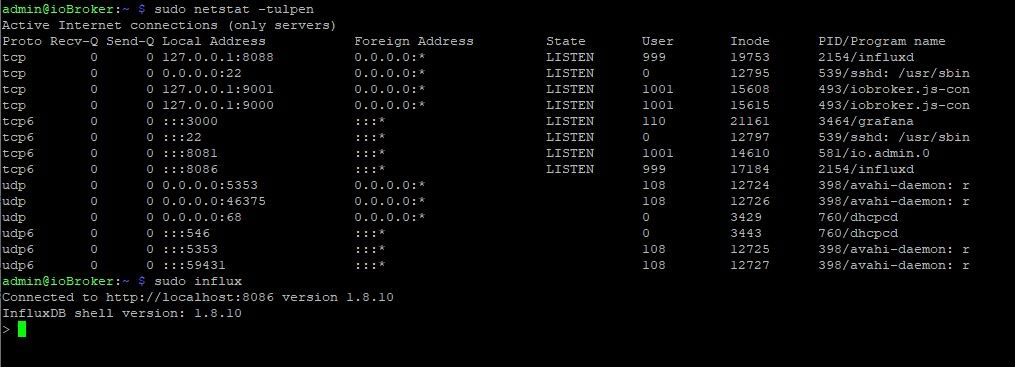
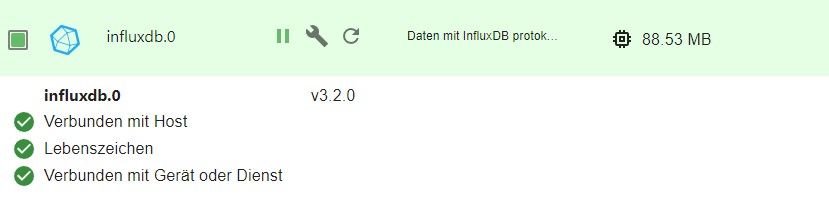
InfluxDB auf Raspberry PI4 meldet: 404 page not found

-
Ja, aber nur für ein reines 64bit-System.
sudo apt update
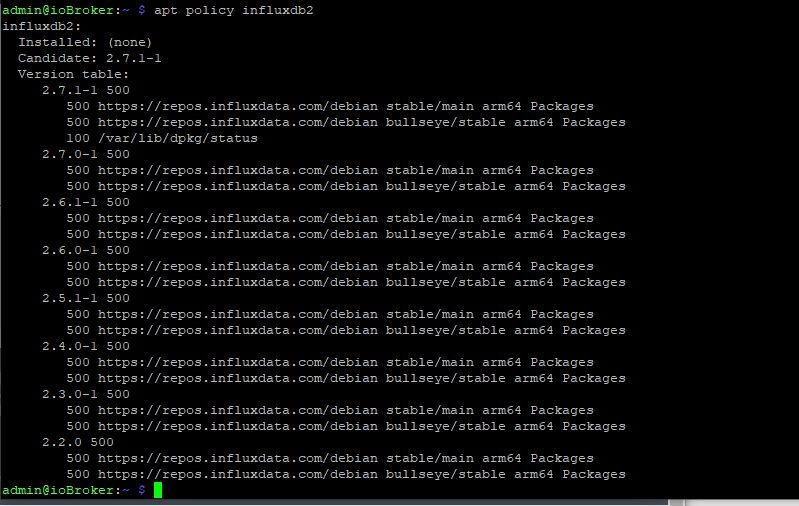
apt policy influxdb2
verrät dir, ob es verfügbar ist.
@thomas-braun
sieht gut aus, wie kann ich das jetzt starten? Sorry bin neu in Linux und kenne mich noch nicht so gut aus
-
@thomas-braun
sieht gut aus, wie kann ich das jetzt starten? Sorry bin neu in Linux und kenne mich noch nicht so gut aus
Bitte Output des Terminals immer in Textform (in CodeTags eingebettet) posten.
Mit Bildern von Text kann keiner was anfangen.https://forum.iobroker.net/topic/51555/hinweise-für-gute-forenbeiträge
-
Bitte Output des Terminals immer in Textform (in CodeTags eingebettet) posten.
Mit Bildern von Text kann keiner was anfangen.https://forum.iobroker.net/topic/51555/hinweise-für-gute-forenbeiträge
@thomas-braun
ok :-)influxdb2: Installed: (none) Candidate: 2.7.1-1 Version table: 2.7.1-1 500 500 https://repos.influxdata.com/debian stable/main arm64 Packages 500 https://repos.influxdata.com/debian bullseye/stable arm64 Packages 100 /var/lib/dpkg/status 2.7.0-1 500 500 https://repos.influxdata.com/debian stable/main arm64 Packages 500 https://repos.influxdata.com/debian bullseye/stable arm64 Packages 2.6.1-1 500 500 https://repos.influxdata.com/debian stable/main arm64 Packages 500 https://repos.influxdata.com/debian bullseye/stable arm64 Packages 2.6.0-1 500 500 https://repos.influxdata.com/debian stable/main arm64 Packages 500 https://repos.influxdata.com/debian bullseye/stable arm64 Packages 2.5.1-1 500 500 https://repos.influxdata.com/debian stable/main arm64 Packages 500 https://repos.influxdata.com/debian bullseye/stable arm64 Packages 2.4.0-1 500 500 https://repos.influxdata.com/debian stable/main arm64 Packages 500 https://repos.influxdata.com/debian bullseye/stable arm64 Packages 2.3.0-1 500 500 https://repos.influxdata.com/debian stable/main arm64 Packages 500 https://repos.influxdata.com/debian bullseye/stable arm64 Packages 2.2.0 500 500 https://repos.influxdata.com/debian stable/main arm64 Packages 500 https://repos.influxdata.com/debian bullseye/stable arm64 Packages -
@thomas-braun
sieht gut aus, wie kann ich das jetzt starten? Sorry bin neu in Linux und kenne mich noch nicht so gut aus
@alexander-apel dann musst du wohl erst mal die influxdb wieder deinstallieren und anschließend influxdb2 installieren
umgestiegen von Proxmox auf Unraid
-
@alexander-apel dann musst du wohl erst mal die influxdb wieder deinstallieren und anschließend influxdb2 installieren
@crunchip sagte in InfluxDB auf Raspberry PI4 meldet: 404 page not found:
@alexander-apel dann musst du wohl erst mal die influxdb wieder deinstallieren und anschließend influxdb2 installieren
WENN @Alexander-Apel denn ein 64bittiges OS drauf hat
kein Support per PN! - Fragen im Forum stellen - Benutzt das Voting rechts unten im Beitrag wenn er euch geholfen hat.
Das Forum freut sich über eine Spende. Benutzt dazu den Spendenbutton oben rechts. Danke!
der Installationsfixer: curl -fsL https://iobroker.net/fix.sh | bash - -
@crunchip sagte in InfluxDB auf Raspberry PI4 meldet: 404 page not found:
@alexander-apel dann musst du wohl erst mal die influxdb wieder deinstallieren und anschließend influxdb2 installieren
WENN @Alexander-Apel denn ein 64bittiges OS drauf hat
@homoran
ja habe ich"aarch64"
-
@alexander-apel dann musst du wohl erst mal die influxdb wieder deinstallieren und anschließend influxdb2 installieren
@crunchip
na super, muss ich dabei was beachten? Wahrscheinlich ja dann im iobroker die Version in der Instanz umstellen auf 2.x, sonst noch was?
Oder hast du evtl. einen Link zu einer Anleitung, wie oben schon gesagt - ich bin neu in der Materie und kenne mich nicht so gut aus. -
@crunchip sagte in InfluxDB auf Raspberry PI4 meldet: 404 page not found:
@alexander-apel dann musst du wohl erst mal die influxdb wieder deinstallieren und anschließend influxdb2 installieren
WENN @Alexander-Apel denn ein 64bittiges OS drauf hat
@homoran siehe
Candidate: 2.7.1-1
Version table:@alexander-apel sagte in InfluxDB auf Raspberry PI4 meldet: 404 page not found:
muss ich dabei was beachten? Wahrscheinlich ja dann im iobroker die Version in der Instanz umstellen auf 2.x, sonst noch was
stopp die Instanz erstmal im iobroker, die richtest du dann im Anschluß ein
influxdb deinstallieren
sudo apt-get autoremove --purge influxdbinstallieren der influxdb2
https://docs.influxdata.com/influxdb/v2.2/install/?t=Linuxumgestiegen von Proxmox auf Unraid
-
@thomas-braun
ok :-)influxdb2: Installed: (none) Candidate: 2.7.1-1 Version table: 2.7.1-1 500 500 https://repos.influxdata.com/debian stable/main arm64 Packages 500 https://repos.influxdata.com/debian bullseye/stable arm64 Packages 100 /var/lib/dpkg/status 2.7.0-1 500 500 https://repos.influxdata.com/debian stable/main arm64 Packages 500 https://repos.influxdata.com/debian bullseye/stable arm64 Packages 2.6.1-1 500 500 https://repos.influxdata.com/debian stable/main arm64 Packages 500 https://repos.influxdata.com/debian bullseye/stable arm64 Packages 2.6.0-1 500 500 https://repos.influxdata.com/debian stable/main arm64 Packages 500 https://repos.influxdata.com/debian bullseye/stable arm64 Packages 2.5.1-1 500 500 https://repos.influxdata.com/debian stable/main arm64 Packages 500 https://repos.influxdata.com/debian bullseye/stable arm64 Packages 2.4.0-1 500 500 https://repos.influxdata.com/debian stable/main arm64 Packages 500 https://repos.influxdata.com/debian bullseye/stable arm64 Packages 2.3.0-1 500 500 https://repos.influxdata.com/debian stable/main arm64 Packages 500 https://repos.influxdata.com/debian bullseye/stable arm64 Packages 2.2.0 500 500 https://repos.influxdata.com/debian stable/main arm64 Packages 500 https://repos.influxdata.com/debian bullseye/stable arm64 PackagesDu hast eine Doublette in deinen .list-Dateien.
grep -rn '/etc/apt/' -e 'influx'zeigt dir wo.
Lösch die Zeile mit demstable/maindrin. Die mitbullseye/stablebleibt.Installieren:
sudo apt install influxdb2 -
@homoran siehe
Candidate: 2.7.1-1
Version table:@alexander-apel sagte in InfluxDB auf Raspberry PI4 meldet: 404 page not found:
muss ich dabei was beachten? Wahrscheinlich ja dann im iobroker die Version in der Instanz umstellen auf 2.x, sonst noch was
stopp die Instanz erstmal im iobroker, die richtest du dann im Anschluß ein
influxdb deinstallieren
sudo apt-get autoremove --purge influxdbinstallieren der influxdb2
https://docs.influxdata.com/influxdb/v2.2/install/?t=Linux@crunchip sagte in InfluxDB auf Raspberry PI4 meldet: 404 page not found:
@homoran siehe
Candidate: 2.7.1-1
Version table:zeigt die Table nicht alles an was (von der Hardware) möglich wäre ohne das verwendete OS zu prüfen?
-
@crunchip sagte in InfluxDB auf Raspberry PI4 meldet: 404 page not found:
@alexander-apel dann musst du wohl erst mal die influxdb wieder deinstallieren und anschließend influxdb2 installieren
WENN @Alexander-Apel denn ein 64bittiges OS drauf hat
@homoran sagte in InfluxDB auf Raspberry PI4 meldet: 404 page not found:
WENN @Alexander-Apel denn ein 64bittiges OS drauf hat
Hat er, denn influxdb2 würde sonst nicht angezeigt.
Denn
zeigt die Table nicht alles an was möglich wäre ohne das verwendete OS zu prüfen?
apt ist schlau und zeigt nur zur Architektur passende Versionen an.
-
@homoran sagte in InfluxDB auf Raspberry PI4 meldet: 404 page not found:
WENN @Alexander-Apel denn ein 64bittiges OS drauf hat
Hat er, denn influxdb2 würde sonst nicht angezeigt.
Denn
zeigt die Table nicht alles an was möglich wäre ohne das verwendete OS zu prüfen?
apt ist schlau und zeigt nur zur Architektur passende Versionen an.
@thomas-braun Danke!
kein Support per PN! - Fragen im Forum stellen - Benutzt das Voting rechts unten im Beitrag wenn er euch geholfen hat.
Das Forum freut sich über eine Spende. Benutzt dazu den Spendenbutton oben rechts. Danke!
der Installationsfixer: curl -fsL https://iobroker.net/fix.sh | bash - -
@thomas-braun Danke!
Wobei du bzgl. des OS / Releases Recht hast. apt würde auch Versionen für 'stretch' anzeigen, wenn man denn ein solches Repo aktiv hätte.
-
Du hast eine Doublette in deinen .list-Dateien.
grep -rn '/etc/apt/' -e 'influx'zeigt dir wo.
Lösch die Zeile mit demstable/maindrin. Die mitbullseye/stablebleibt.Installieren:
sudo apt install influxdb2@thomas-braun
so, den "falschen" Eintrag habe ich entfernt und auch influxdb2 installiertinfluxdb2: Installed: 2.7.1-1 Candidate: 2.7.1-1 Version table: *** 2.7.1-1 500 500 https://repos.influxdata.com/debian bullseye/stable arm64 Packages 100 /var/lib/dpkg/status 2.7.0-1 500 500 https://repos.influxdata.com/debian bullseye/stable arm64 Packages 2.6.1-1 500 500 https://repos.influxdata.com/debian bullseye/stable arm64 Packages 2.6.0-1 500 500 https://repos.influxdata.com/debian bullseye/stable arm64 Packages 2.5.1-1 500 500 https://repos.influxdata.com/debian bullseye/stable arm64 Packages 2.4.0-1 500 500 https://repos.influxdata.com/debian bullseye/stable arm64 Packages 2.3.0-1 500 500 https://repos.influxdata.com/debian bullseye/stable arm64 Packages 2.2.0 500 500 https://repos.influxdata.com/debian bullseye/stable arm64 PackagesLaut dem Link (https://docs.influxdata.com/influxdb/v2.2/install/?t=CLI+Setup) soll ich jetzt influx setup ausführen aber das geht nicht. Was muss ich jetzt tun?
sudo influx setup Error: failed to check if already set up: 404 Not Found -
@thomas-braun
so, den "falschen" Eintrag habe ich entfernt und auch influxdb2 installiertinfluxdb2: Installed: 2.7.1-1 Candidate: 2.7.1-1 Version table: *** 2.7.1-1 500 500 https://repos.influxdata.com/debian bullseye/stable arm64 Packages 100 /var/lib/dpkg/status 2.7.0-1 500 500 https://repos.influxdata.com/debian bullseye/stable arm64 Packages 2.6.1-1 500 500 https://repos.influxdata.com/debian bullseye/stable arm64 Packages 2.6.0-1 500 500 https://repos.influxdata.com/debian bullseye/stable arm64 Packages 2.5.1-1 500 500 https://repos.influxdata.com/debian bullseye/stable arm64 Packages 2.4.0-1 500 500 https://repos.influxdata.com/debian bullseye/stable arm64 Packages 2.3.0-1 500 500 https://repos.influxdata.com/debian bullseye/stable arm64 Packages 2.2.0 500 500 https://repos.influxdata.com/debian bullseye/stable arm64 PackagesLaut dem Link (https://docs.influxdata.com/influxdb/v2.2/install/?t=CLI+Setup) soll ich jetzt influx setup ausführen aber das geht nicht. Was muss ich jetzt tun?
sudo influx setup Error: failed to check if already set up: 404 Not Found@alexander-apel
NICHT mit sudo.
sudo wird nur an hohen Feiertagen verwendet.Ansonsten kann ich dir da nicht weiterhelfen, hab influxdb2 nicht im Einsatz.
-
@alexander-apel
NICHT mit sudo.
sudo wird nur an hohen Feiertagen verwendet.Ansonsten kann ich dir da nicht weiterhelfen, hab influxdb2 nicht im Einsatz.
@thomas-braun
ohne sudo kommt die gleiche Meldunginflux setup Error: failed to check if already set up: 404 Not FoundJemand anders eine idee, weil jetzt geht garnichts mehr

-
@thomas-braun
ohne sudo kommt die gleiche Meldunginflux setup Error: failed to check if already set up: 404 Not FoundJemand anders eine idee, weil jetzt geht garnichts mehr
@alexander-apel dazu muss doch noch die influx CLI installiert werden
umgestiegen von Proxmox auf Unraid
-
@alexander-apel dazu muss doch noch die influx CLI installiert werden
@crunchip das habe ich bereits
Installiert nach https://docs.influxdata.com/influxdb/v2.2/tools/influx-cli/?t=Linux
und eine Config habe ich auch bereits angelegtadmin@ioBroker:~ $ influx config Active Name URL Org localconfig http://localhost:8086 iobroker admin@ioBroker:~ $ influx setup Error: failed to check if already set up: 404 Not Foundaber dennoch kommt immer 404 wenn ich das Setup starten will, egal ob über das Terminal oder über die WebUI
-
@crunchip das habe ich bereits
Installiert nach https://docs.influxdata.com/influxdb/v2.2/tools/influx-cli/?t=Linux
und eine Config habe ich auch bereits angelegtadmin@ioBroker:~ $ influx config Active Name URL Org localconfig http://localhost:8086 iobroker admin@ioBroker:~ $ influx setup Error: failed to check if already set up: 404 Not Foundaber dennoch kommt immer 404 wenn ich das Setup starten will, egal ob über das Terminal oder über die WebUI
-
@thomas-braun
nichts guten :-(admin@ioBroker:~ $ apt policy influx* N: Unable to locate package influxdata-archive_compat.key N: Unable to locate package influxdb2-client-2.2.1-linux-arm64 N: Couldn't find any package by glob 'influxdb2-client-2.2.1-linux-arm64' N: Unable to locate package influxdb2-client-2.2.1-linux-arm64.tar.gz N: Couldn't find any package by glob 'influxdb2-client-2.2.1-linux-arm64.tar.gz' N: Unable to locate package influxdb.key N: Couldn't find any package by glob 'influxdb.key' N: Unable to locate package influxdb.key.1 N: Couldn't find any package by glob 'influxdb.key.1'



Hey! Du scheinst an dieser Unterhaltung interessiert zu sein, hast aber noch kein Konto.
Hast du es satt, bei jedem Besuch durch die gleichen Beiträge zu scrollen? Wenn du dich für ein Konto anmeldest, kommst du immer genau dorthin zurück, wo du zuvor warst, und kannst dich über neue Antworten benachrichtigen lassen (entweder per E-Mail oder Push-Benachrichtigung). Du kannst auch Lesezeichen speichern und Beiträge positiv bewerten, um anderen Community-Mitgliedern deine Wertschätzung zu zeigen.
Mit deinem Input könnte dieser Beitrag noch besser werden 💗
Registrieren AnmeldenSupport us
313
Online33.0k
Benutzer83.6k
Themen1.3m
Beiträge