
NEWS




BackItUp - InfluxDB2 - Grafana
-
@thomas-braun
also mit diesenLinks funktioniert auch nicht alles:wget -q -O /usr/share/keyrings/grafana.key https://apt.grafana.com/gpg.key /usr/share/keyrings/grafana.key: Keine Berechtigungdann bei Influxdb2 werden ja nur die links zu den Repositories hinzugefügt.
Wie gehts dann weiter mit der Install??@friedhofsblond sagte in BackItUp - InfluxDB2 - Grafana:
@thomas-braun
also mit diesenLinks funktioniert auch nicht alles:wget -q -O /usr/share/keyrings/grafana.key https://apt.grafana.com/gpg.key /usr/share/keyrings/grafana.key: Keine Berechtigungdann bei Influxdb2 werden ja nur die links zu den Repositories hinzugefügt.
Wie gehts dann weiter mit der Install??Moin,
Da ist etwas beim Kopieren/einfügen kaputt gegangen
1) sudo apt-get install -y apt-transport-https
2) sudo apt-get install -y software-properties-common wget
3) wget -q -O /usr/share/keyrings/grafana.key https://apt.grafana.com/gpg.key
4) echo "deb [signed-by=/usr/share/keyrings/grafana.key] https://apt.grafana.com stable main" | sudo tee /etc/apt/sources.list.d/grafana.list
Das sind jeweils einzelne Kommandos, also erst 1, dann 2 usw.
VG
Bernd -
@thomas-braun
also mit diesenLinks funktioniert auch nicht alles:wget -q -O /usr/share/keyrings/grafana.key https://apt.grafana.com/gpg.key /usr/share/keyrings/grafana.key: Keine Berechtigungdann bei Influxdb2 werden ja nur die links zu den Repositories hinzugefügt.
Wie gehts dann weiter mit der Install??@friedhofsblond sagte in BackItUp - InfluxDB2 - Grafana:
Wie gehts dann weiter mit der Install??
Dann wie üblich bei deinem Betriebssystem.
sudo apt update
sudo apt install GEWÜNSCHTES_PAKET
Vermutlich also
influxdb2influxdb2-clientundgrafana -
@friedhofsblond sagte in BackItUp - InfluxDB2 - Grafana:
@thomas-braun
also mit diesenLinks funktioniert auch nicht alles:wget -q -O /usr/share/keyrings/grafana.key https://apt.grafana.com/gpg.key /usr/share/keyrings/grafana.key: Keine Berechtigungdann bei Influxdb2 werden ja nur die links zu den Repositories hinzugefügt.
Wie gehts dann weiter mit der Install??Moin,
Da ist etwas beim Kopieren/einfügen kaputt gegangen
1) sudo apt-get install -y apt-transport-https
2) sudo apt-get install -y software-properties-common wget
3) wget -q -O /usr/share/keyrings/grafana.key https://apt.grafana.com/gpg.key
4) echo "deb [signed-by=/usr/share/keyrings/grafana.key] https://apt.grafana.com stable main" | sudo tee /etc/apt/sources.list.d/grafana.list
Das sind jeweils einzelne Kommandos, also erst 1, dann 2 usw.
VG
Bernd@dp20eic
Ich hab gerade gesehen, da fehlt ein sudo in Zeile 3.
Muss alsosudo wget -q -O /usr/share/keyrings/grafana.key https://apt.grafana.com/gpg.keylauten.
-
hier ist es via apt beschrieben
https://docs.influxdata.com/influxdb/v2.2/install/?t=Linux -
hier ist es via apt beschrieben
https://docs.influxdata.com/influxdb/v2.2/install/?t=Linux@crunchip sagte in BackItUp - InfluxDB2 - Grafana:
hier ist es via apt beschrieben
https://docs.influxdata.com/influxdb/v2.2/install/?t=LinuxMoin,
ah, genau das war der Link, den ich oben eigentlich meinte, also V2.2 nicht 2.0 :)
VG
Bernd -
@crunchip sagte in BackItUp - InfluxDB2 - Grafana:
hier ist es via apt beschrieben
https://docs.influxdata.com/influxdb/v2.2/install/?t=LinuxMoin,
ah, genau das war der Link, den ich oben eigentlich meinte, also V2.2 nicht 2.0 :)
VG
Bernd@dp20eic
Jo, so langsam wirds - werde dann wohl morgen die nächsten blöden Fragen stellen.
Danke für die Geduld -
-
@friedhofsblond
moin, so nach der Install des IOB habe ich erstmal ein image gezogen und Influxdb2 und Grafana installiert.
Ohne erstmal daten in die DB laufen zu lassen und an Grafana was zu basteln, will ich erstmal ein Backup anlegen können. Dann habe ich eine saubere Basis und kann weiter machen.Influxdb2-CLI ist wohl jetzt im Influxdb2 paket enthalten und muß/kann nicht mehr zusätzlich installiert werden, so wie ich das deute:

superuser@debian:~$ sudo apt install influxdb2-client
Paketlisten werden gelesen… Fertig
Abhängigkeitsbaum wird aufgebaut… Fertig
Statusinformationen werden eingelesen… Fertig
Die folgenden NEUEN Pakete werden installiert:
  influxdb2-client
0 aktualisiert, 1 neu installiert, 0 zu entfernen und 0 nicht aktualisiert.
Es müssen noch 0 B von 11,3 MB an Archiven heruntergeladen werden.
Nach dieser Operation werden 25,0 MB Plattenplatz zusätzlich benutzt.
(Lese Datenbank ... 51827 Dateien und Verzeichnisse sind derzeit installiert.)
Vorbereitung zum Entpacken von .../influxdb2-client_2.7.1-1_amd64.deb ...
Entpacken von influxdb2-client (2.7.1-1) ...
dpkg: Fehler beim Bearbeiten des Archivs /var/cache/apt/archives/influxdb2-client_2.7.1-1_amd64.deb (--unpack):
 Versuch, »/usr/bin/influx« zu überschreiben, welches auch in Paket influxdb2-cli 2.7.3-1 ist
dpkg-deb: Fehler: »einfügen«-Unterprozess wurde durch Signal (Datenübergabe unterbrochen (broken pipe)) getötet
Fehler traten auf beim Bearbeiten von:
 /var/cache/apt/archives/influxdb2-client_2.7.1-1_amd64.deb
E: Sub-process /usr/bin/dpkg returned an error code (1)
Beide Installationen laufen nach Systemstart und sind über die Web-Gui erreichbar.
Eh ich bei Erstellung User/Datenbank/Visu fehler mache.
Das mit "CREATE USER "admin" WITH PASSWORD 'iobroker' WITH ALL PRIVILEGES" usw.
Muß ich ja bei V2 nicht mehr machen. (oder?)So Erstanmeldung bei Influx (was schreibe ich bei Bucket rein - das wird der Name der Datenbank - oder ?

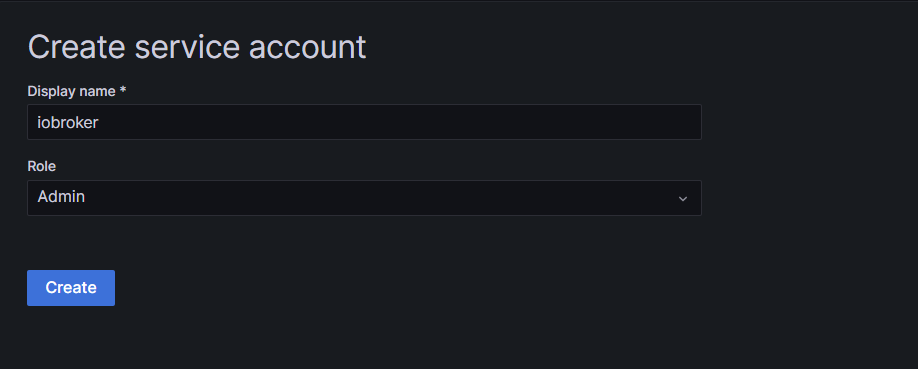
Bei Grafana - einen sa anlegen (mit welchen privilegien)
Grüße
-
@friedhofsblond
moin, so nach der Install des IOB habe ich erstmal ein image gezogen und Influxdb2 und Grafana installiert.
Ohne erstmal daten in die DB laufen zu lassen und an Grafana was zu basteln, will ich erstmal ein Backup anlegen können. Dann habe ich eine saubere Basis und kann weiter machen.Influxdb2-CLI ist wohl jetzt im Influxdb2 paket enthalten und muß/kann nicht mehr zusätzlich installiert werden, so wie ich das deute:
superuser@debian:~$ sudo apt install influxdb2-client
Paketlisten werden gelesen… Fertig
Abhängigkeitsbaum wird aufgebaut… Fertig
Statusinformationen werden eingelesen… Fertig
Die folgenden NEUEN Pakete werden installiert:
  influxdb2-client
0 aktualisiert, 1 neu installiert, 0 zu entfernen und 0 nicht aktualisiert.
Es müssen noch 0 B von 11,3 MB an Archiven heruntergeladen werden.
Nach dieser Operation werden 25,0 MB Plattenplatz zusätzlich benutzt.
(Lese Datenbank ... 51827 Dateien und Verzeichnisse sind derzeit installiert.)
Vorbereitung zum Entpacken von .../influxdb2-client_2.7.1-1_amd64.deb ...
Entpacken von influxdb2-client (2.7.1-1) ...
dpkg: Fehler beim Bearbeiten des Archivs /var/cache/apt/archives/influxdb2-client_2.7.1-1_amd64.deb (--unpack):
 Versuch, »/usr/bin/influx« zu überschreiben, welches auch in Paket influxdb2-cli 2.7.3-1 ist
dpkg-deb: Fehler: »einfügen«-Unterprozess wurde durch Signal (Datenübergabe unterbrochen (broken pipe)) getötet
Fehler traten auf beim Bearbeiten von:
 /var/cache/apt/archives/influxdb2-client_2.7.1-1_amd64.deb
E: Sub-process /usr/bin/dpkg returned an error code (1)
Beide Installationen laufen nach Systemstart und sind über die Web-Gui erreichbar.
Eh ich bei Erstellung User/Datenbank/Visu fehler mache.
Das mit "CREATE USER "admin" WITH PASSWORD 'iobroker' WITH ALL PRIVILEGES" usw.
Muß ich ja bei V2 nicht mehr machen. (oder?)So Erstanmeldung bei Influx (was schreibe ich bei Bucket rein - das wird der Name der Datenbank - oder ?
Bei Grafana - einen sa anlegen (mit welchen privilegien)
Grüße
@friedhofsblond sagte in BackItUp - InfluxDB2 - Grafana:
Influxdb2-CLI ist wohl jetzt im Influxdb2 paket enthalten und muß/kann nicht mehr zusätzlich installiert werden, so wie ich das deute:
Fast.
influxdb2-clientundinfluxdb2-clibeißen sich da. Ich hab aber noch nicht herausgefunden, wozu die beiden Versionen dienen. Vermutlich istinfluxdb2-clidas Paket, in dem die Entwicklung stattfindet undinfluxdb2-clientist die Version die zum Hauptrelease voninfluxdb2gehört. Würde ich jedenfalls so aus den Versionsnummern interpretieren.Linux-Werkzeugkasten:
https://forum.iobroker.net/topic/42952/der-kleine-iobroker-linux-werkzeugkasten
NodeJS Fixer Skript:
https://forum.iobroker.net/topic/68035/iob-node-fix-skript
iob_diag: curl -sLf -o diag.sh https://iobroker.net/diag.sh && bash diag.sh -
@friedhofsblond sagte in BackItUp - InfluxDB2 - Grafana:
Influxdb2-CLI ist wohl jetzt im Influxdb2 paket enthalten und muß/kann nicht mehr zusätzlich installiert werden, so wie ich das deute:
Fast.
influxdb2-clientundinfluxdb2-clibeißen sich da. Ich hab aber noch nicht herausgefunden, wozu die beiden Versionen dienen. Vermutlich istinfluxdb2-clidas Paket, in dem die Entwicklung stattfindet undinfluxdb2-clientist die Version die zum Hauptrelease voninfluxdb2gehört. Würde ich jedenfalls so aus den Versionsnummern interpretieren.@thomas-braun
also den cli installieren ? -
@thomas-braun
also den cli installieren ?@friedhofsblond sagte in BackItUp - InfluxDB2 - Grafana:
also den cli installieren ?
Den hast du schon installiert.
Ich würde den influxdb2-client stattdessen nehmen.sudo apt update sudo apt remove influxdb2-cli sudo apt install influxdb2-client apt policy influxdb2*Linux-Werkzeugkasten:
https://forum.iobroker.net/topic/42952/der-kleine-iobroker-linux-werkzeugkasten
NodeJS Fixer Skript:
https://forum.iobroker.net/topic/68035/iob-node-fix-skript
iob_diag: curl -sLf -o diag.sh https://iobroker.net/diag.sh && bash diag.sh -
@friedhofsblond sagte in BackItUp - InfluxDB2 - Grafana:
also den cli installieren ?
Den hast du schon installiert.
Ich würde den influxdb2-client stattdessen nehmen.sudo apt update sudo apt remove influxdb2-cli sudo apt install influxdb2-client apt policy influxdb2*superuser@debian:~$ sudo apt update [sudo] Passwort für superuser: OK:1 http://deb.debian.org/debian bullseye InRelease Holen:2 http://deb.debian.org/debian bullseye-updates InRelease [44,1 kB] OK:3 http://security.debian.org/debian-security bullseye-security InRelease OK:4 https://repos.influxdata.com/debian stable InRelease OK:5 https://deb.nodesource.com/node_18.x bullseye InRelease OK:6 https://apt.grafana.com stable InRelease Es wurden 44,1 kB in 1 s geholt (54,0 kB/s). Paketlisten werden gelesen… Fertig Abhängigkeitsbaum wird aufgebaut… Fertig Statusinformationen werden eingelesen… Fertig Alle Pakete sind aktuell. superuser@debian:~$ sudo apt remove influxdb2-cli Paketlisten werden gelesen… Fertig Abhängigkeitsbaum wird aufgebaut… Fertig Statusinformationen werden eingelesen… Fertig Die folgenden Pakete werden ENTFERNT: influxdb2-cli 0 aktualisiert, 0 neu installiert, 1 zu entfernen und 0 nicht aktualisiert. Nach dieser Operation werden 25,2 MB Plattenplatz freigegeben. Möchten Sie fortfahren? [J/n] j (Lese Datenbank ... 60118 Dateien und Verzeichnisse sind derzeit installiert.) Entfernen von influxdb2-cli (2.7.3-1) ... superuser@debian:~$ sudo apt install influxdb2-client Paketlisten werden gelesen… Fertig Abhängigkeitsbaum wird aufgebaut… Fertig Statusinformationen werden eingelesen… Fertig Die folgenden NEUEN Pakete werden installiert: influxdb2-client 0 aktualisiert, 1 neu installiert, 0 zu entfernen und 0 nicht aktualisiert. Es müssen noch 0 B von 11,3 MB an Archiven heruntergeladen werden. Nach dieser Operation werden 25,0 MB Plattenplatz zusätzlich benutzt. (Lese Datenbank ... 60115 Dateien und Verzeichnisse sind derzeit installiert.) Vorbereitung zum Entpacken von .../influxdb2-client_2.7.1-1_amd64.deb ... Entpacken von influxdb2-client (2.7.1-1) ... influxdb2-client (2.7.1-1) wird eingerichtet ... superuser@debian:~$ apt policy influxdb2* influxdb2-cli: Installiert: (keine) Installationskandidat: 2.7.3-1 Versionstabelle: 2.7.3-1 500 500 https://repos.influxdata.com/debian stable/main amd64 Packages 2.7.1-2 500 500 https://repos.influxdata.com/debian stable/main amd64 Packages 2.6.1 500 500 https://repos.influxdata.com/debian stable/main amd64 Packages 2.6.0 500 500 https://repos.influxdata.com/debian stable/main amd64 Packages 2.5.0 500 500 https://repos.influxdata.com/debian stable/main amd64 Packages 2.4.0 500 500 https://repos.influxdata.com/debian stable/main amd64 Packages 2.3.0 500 500 https://repos.influxdata.com/debian stable/main amd64 Packages influxdb2-client: Installiert: 2.7.1-1 Installationskandidat: 2.7.1-1 Versionstabelle: *** 2.7.1-1 500 500 https://repos.influxdata.com/debian stable/main amd64 Packages 100 /var/lib/dpkg/status influxdb2: Installiert: 2.7.1-1 Installationskandidat: 2.7.1-1 Versionstabelle: *** 2.7.1-1 500 500 https://repos.influxdata.com/debian stable/main amd64 Packages 100 /var/lib/dpkg/status 2.7.0-1 500 500 https://repos.influxdata.com/debian stable/main amd64 Packages 2.6.1-1 500 500 https://repos.influxdata.com/debian stable/main amd64 Packages 2.6.0-1 500 500 https://repos.influxdata.com/debian stable/main amd64 Packages 2.5.1-1 500 500 https://repos.influxdata.com/debian stable/main amd64 Packages 2.4.0-1 500 500 https://repos.influxdata.com/debian stable/main amd64 Packages 2.3.0-1 500 500 https://repos.influxdata.com/debian stable/main amd64 Packages 2.2.0 500 500 https://repos.influxdata.com/debian stable/main amd64 Packages superuser@debian:~$OK hat geklappt
Obwohl es manchmal von cli und manchmal von client die Rede ist.
Hier geht es um cli:
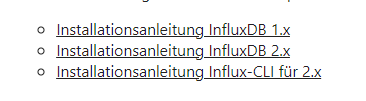
und der Link geht auf CLIIch denke fast der Client muß raus der CLI rein ?
-
superuser@debian:~$ sudo apt update
[sudo] Passwort für superuser:
OK:1 http://deb.debian.org/debian bullseye InRelease
Holen:2 http://deb.debian.org/debian bullseye-updates InRelease [44,1 kB]
OK:3 http://security.debian.org/debian-security bullseye-security InRelease
OK:4 https://repos.influxdata.com/debian stable InRelease
OK:5 https://deb.nodesource.com/node_18.x bullseye InRelease
OK:6 https://apt.grafana.com stable InRelease
Es wurden 44,1 kB in 1 s geholt (54,0 kB/s).
Paketlisten werden gelesen… Fertig
Abhängigkeitsbaum wird aufgebaut… Fertig
Statusinformationen werden eingelesen… Fertig
Alle Pakete sind aktuell.
superuser@debian:~$ sudo apt remove influxdb2-cli
Paketlisten werden gelesen… Fertig
Abhängigkeitsbaum wird aufgebaut… Fertig
Statusinformationen werden eingelesen… Fertig
Die folgenden Pakete werden ENTFERNT:
  influxdb2-cli
0 aktualisiert, 0 neu installiert, 1 zu entfernen und 0 nicht aktualisiert.
Nach dieser Operation werden 25,2 MB Plattenplatz freigegeben.
Möchten Sie fortfahren? [J/n] j
(Lese Datenbank ... 60118 Dateien und Verzeichnisse sind derzeit installiert.)
Entfernen von influxdb2-cli (2.7.3-1) ...
superuser@debian:~$ sudo apt install influxdb2-client
Paketlisten werden gelesen… Fertig
Abhängigkeitsbaum wird aufgebaut… Fertig
Statusinformationen werden eingelesen… Fertig
Die folgenden NEUEN Pakete werden installiert:
  influxdb2-client
0 aktualisiert, 1 neu installiert, 0 zu entfernen und 0 nicht aktualisiert.
Es müssen noch 0 B von 11,3 MB an Archiven heruntergeladen werden.
Nach dieser Operation werden 25,0 MB Plattenplatz zusätzlich benutzt.
(Lese Datenbank ... 60115 Dateien und Verzeichnisse sind derzeit installiert.)
Vorbereitung zum Entpacken von .../influxdb2-client_2.7.1-1_amd64.deb ...
Entpacken von influxdb2-client (2.7.1-1) ...
influxdb2-client (2.7.1-1) wird eingerichtet ...
superuser@debian:~$ apt policy influxdb2*
influxdb2-cli:
  Installiert:           (keine)
  Installationskandidat: 2.7.3-1
  Versionstabelle:
     2.7.3-1 500
        500 https://repos.influxdata.com/debian stable/main amd64 Packages
     2.7.1-2 500
        500 https://repos.influxdata.com/debian stable/main amd64 Packages
     2.6.1 500
        500 https://repos.influxdata.com/debian stable/main amd64 Packages
     2.6.0 500
        500 https://repos.influxdata.com/debian stable/main amd64 Packages
     2.5.0 500
        500 https://repos.influxdata.com/debian stable/main amd64 Packages
     2.4.0 500
        500 https://repos.influxdata.com/debian stable/main amd64 Packages
     2.3.0 500
        500 https://repos.influxdata.com/debian stable/main amd64 Packages
influxdb2-client:
  Installiert:           2.7.1-1
  Installationskandidat: 2.7.1-1
  Versionstabelle:
 *** 2.7.1-1 500
        500 https://repos.influxdata.com/debian stable/main amd64 Packages
        100 /var/lib/dpkg/status
influxdb2:
  Installiert:           2.7.1-1
  Installationskandidat: 2.7.1-1
  Versionstabelle:
 *** 2.7.1-1 500
        500 https://repos.influxdata.com/debian stable/main amd64 Packages
        100 /var/lib/dpkg/status
     2.7.0-1 500
        500 https://repos.influxdata.com/debian stable/main amd64 Packages
     2.6.1-1 500
        500 https://repos.influxdata.com/debian stable/main amd64 Packages
     2.6.0-1 500
        500 https://repos.influxdata.com/debian stable/main amd64 Packages
     2.5.1-1 500
        500 https://repos.influxdata.com/debian stable/main amd64 Packages
     2.4.0-1 500
        500 https://repos.influxdata.com/debian stable/main amd64 Packages
     2.3.0-1 500
        500 https://repos.influxdata.com/debian stable/main amd64 Packages
     2.2.0 500
        500 https://repos.influxdata.com/debian stable/main amd64 Packages
superuser@debian:~$
OK hat geklappt
Obwohl es manchmal von cli und manchmal von client die Rede ist.
Hier geht es um cli:
und der Link geht auf CLIIch denke fast der Client muß raus der CLI rein ?
@friedhofsblond sagte in BackItUp - InfluxDB2 - Grafana:
Ich denke fast der Client muß raus der CLI rein ?
Nein, beide Pakete stellen die benötigten Programme bereit. Das Paket
influxdb2-clientgibt es glaube ich auch noch nicht so lange.Von den Versionsnummern her bilden aber influxdb2 und influxdb2-client das bessere Pärchen, würde ich mal behaupten.
Linux-Werkzeugkasten:
https://forum.iobroker.net/topic/42952/der-kleine-iobroker-linux-werkzeugkasten
NodeJS Fixer Skript:
https://forum.iobroker.net/topic/68035/iob-node-fix-skript
iob_diag: curl -sLf -o diag.sh https://iobroker.net/diag.sh && bash diag.sh -
@friedhofsblond sagte in BackItUp - InfluxDB2 - Grafana:
Ich denke fast der Client muß raus der CLI rein ?
Nein, beide Pakete stellen die benötigten Programme bereit. Das Paket
influxdb2-clientgibt es glaube ich auch noch nicht so lange.Von den Versionsnummern her bilden aber influxdb2 und influxdb2-client das bessere Pärchen, würde ich mal behaupten.
@thomas-braun
OK sieht erstmal gut aus. Adapter influx und backup für influx - läuft.
Nach dem Mittag grafana.Started iobroker ... [DEBUG] [iobroker] - host.debian 2119 states saved [DEBUG] [iobroker] - host.debian 2900 objects saved [DEBUG] [iobroker] - Backup created: /opt/iobroker/backups/iobroker_2023_06_07-11_49_07_backupiobroker.tar.gz [DEBUG] [iobroker] - done [DEBUG] [influxDB] - InfluxDB-Backup started ... [DEBUG] [influxDB] - Start InfluxDB Backup ... [DEBUG] [influxDB] - InfluxDB Backup tmp directory created [DEBUG] [influxDB] - Backup created: /opt/iobroker/backups/influxDB_2023_06_07-11_49_10_backupiobroker.tar.gz [DEBUG] [influxDB] - Try deleting the InfluxDB tmp directory: "/opt/iobroker/backups/influxDB_2023_06_07-11_49_10_backupiobroker" [DEBUG] [influxDB] - InfluxDB tmp directory "/opt/iobroker/backups/influxDB_2023_06_07-11_49_10_backupiobroker" successfully deleted [DEBUG] [influxDB] - InfluxDB-Backup for is finish [DEBUG] [influxDB] - done [DEBUG] [clean] - No older backup files are deleted, because this backup was started manually [DEBUG] [clean] - done [DEBUG] [historyHTML] - new history html values created [DEBUG] [historyHTML] - done [DEBUG] [historyJSON] - new history json values created [DEBUG] [historyJSON] - done [EXIT] 0
-
@thomas-braun
OK sieht erstmal gut aus. Adapter influx und backup für influx - läuft.
Nach dem Mittag grafana.Started iobroker ... [DEBUG] [iobroker] - host.debian 2119 states saved [DEBUG] [iobroker] - host.debian 2900 objects saved [DEBUG] [iobroker] - Backup created: /opt/iobroker/backups/iobroker_2023_06_07-11_49_07_backupiobroker.tar.gz [DEBUG] [iobroker] - done [DEBUG] [influxDB] - InfluxDB-Backup started ... [DEBUG] [influxDB] - Start InfluxDB Backup ... [DEBUG] [influxDB] - InfluxDB Backup tmp directory created [DEBUG] [influxDB] - Backup created: /opt/iobroker/backups/influxDB_2023_06_07-11_49_10_backupiobroker.tar.gz [DEBUG] [influxDB] - Try deleting the InfluxDB tmp directory: "/opt/iobroker/backups/influxDB_2023_06_07-11_49_10_backupiobroker" [DEBUG] [influxDB] - InfluxDB tmp directory "/opt/iobroker/backups/influxDB_2023_06_07-11_49_10_backupiobroker" successfully deleted [DEBUG] [influxDB] - InfluxDB-Backup for is finish [DEBUG] [influxDB] - done [DEBUG] [clean] - No older backup files are deleted, because this backup was started manually [DEBUG] [clean] - done [DEBUG] [historyHTML] - new history html values created [DEBUG] [historyHTML] - done [DEBUG] [historyJSON] - new history json values created [DEBUG] [historyJSON] - done [EXIT] 0@friedhofsblond
So moin,
bin noch nicht viel weiter
Die Daten landen in der DB und werden auch gesichert:
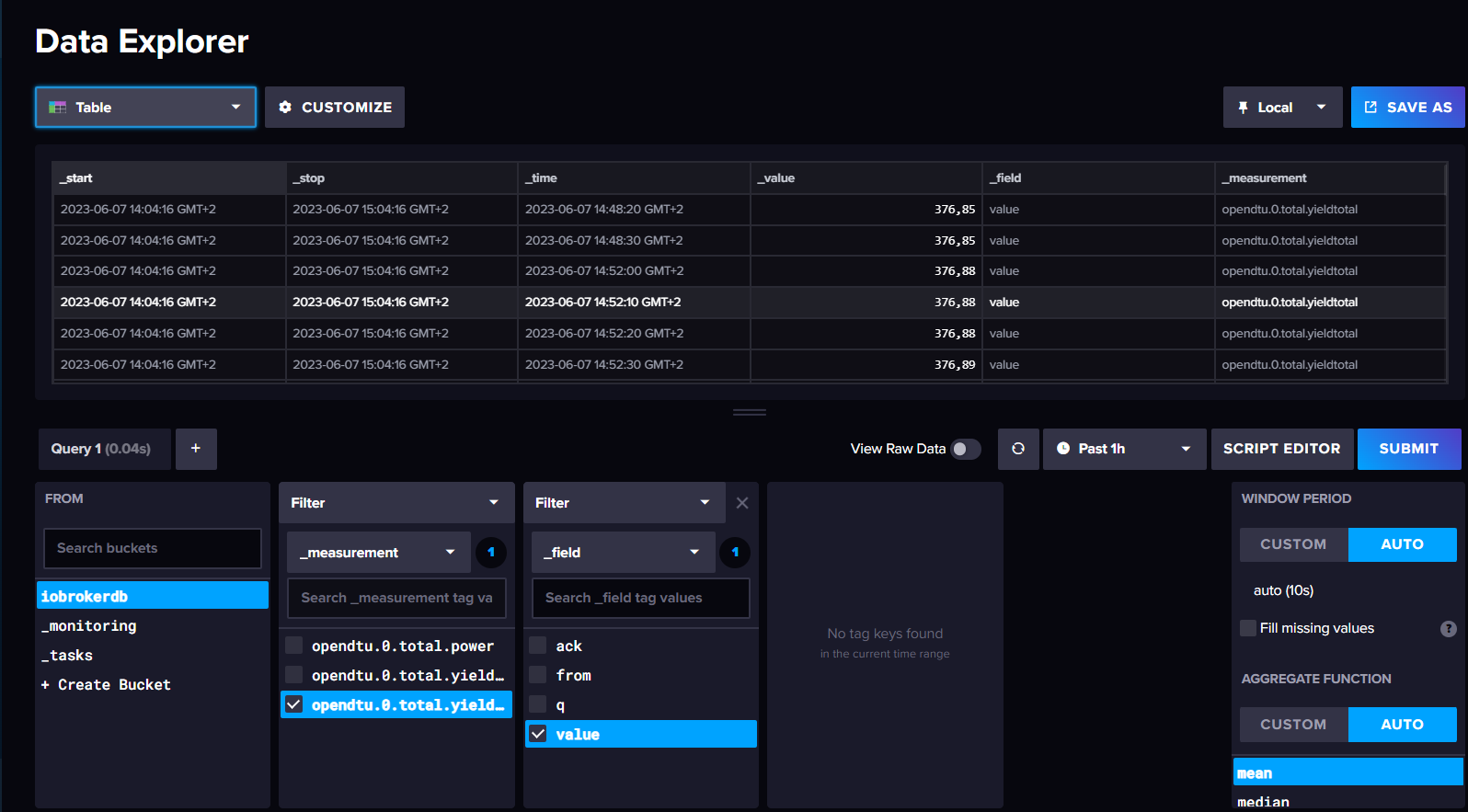
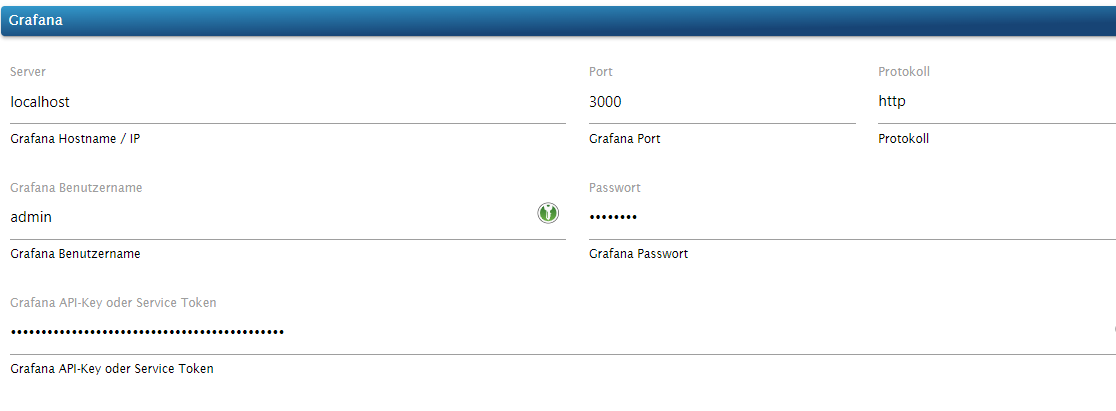
Habe zwei Probleme ich kann wohl kein Backup von Grafana machen, weil die Verbindung von Influxdb zu Grafana nicht klappt ... denke ich:
-
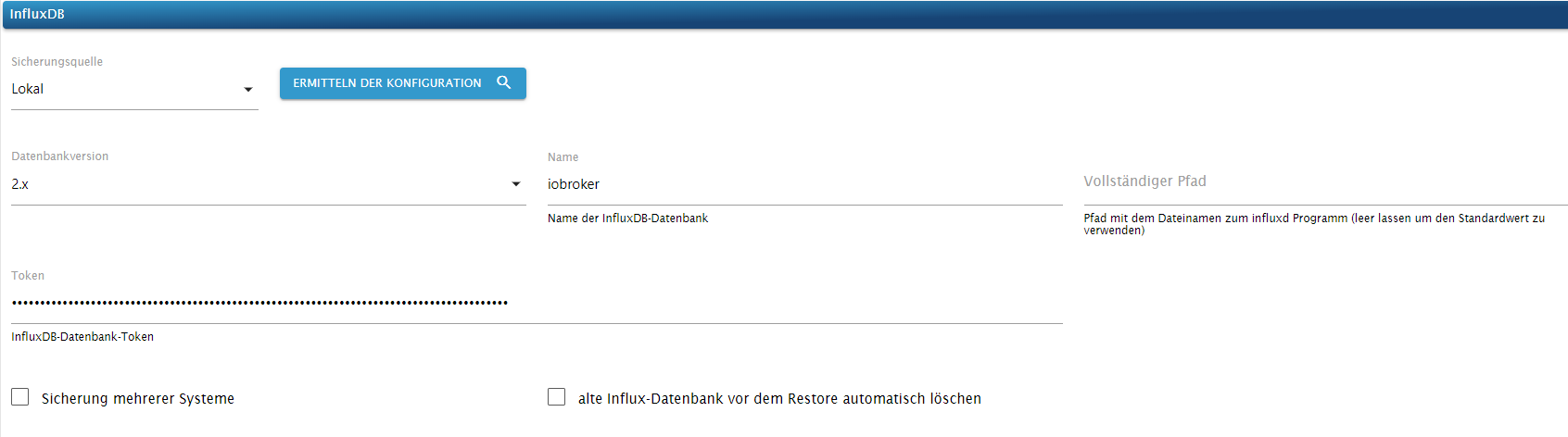
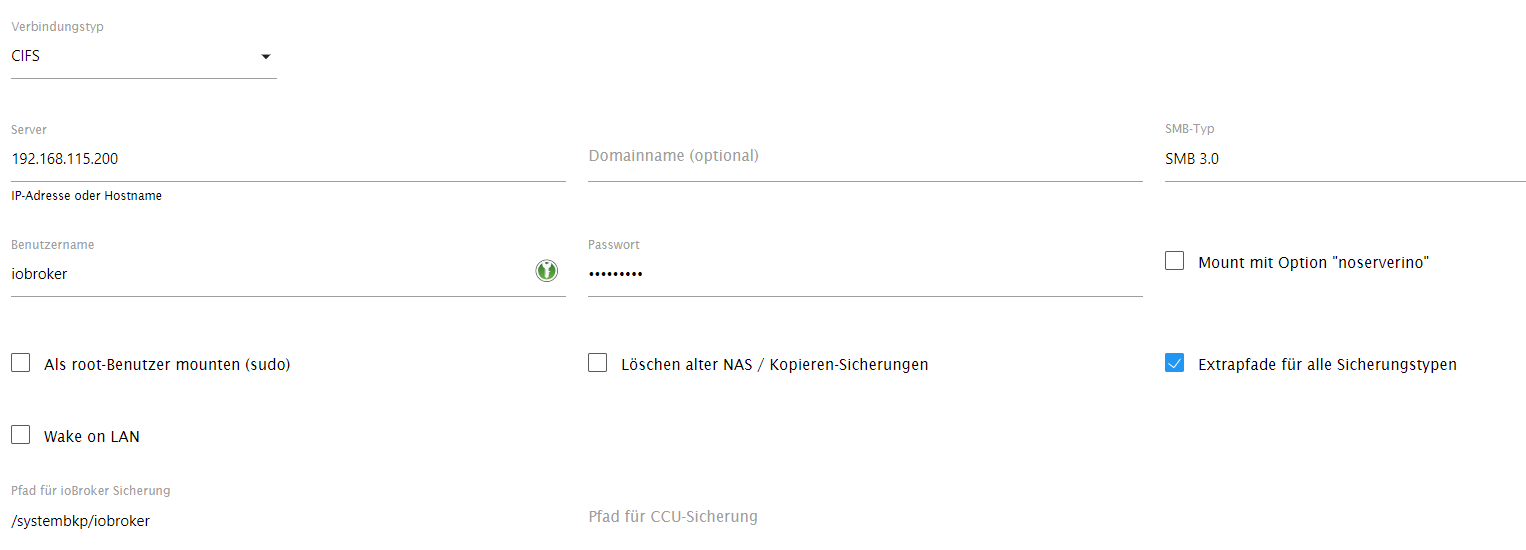
Was soll ich hier einstellen?:
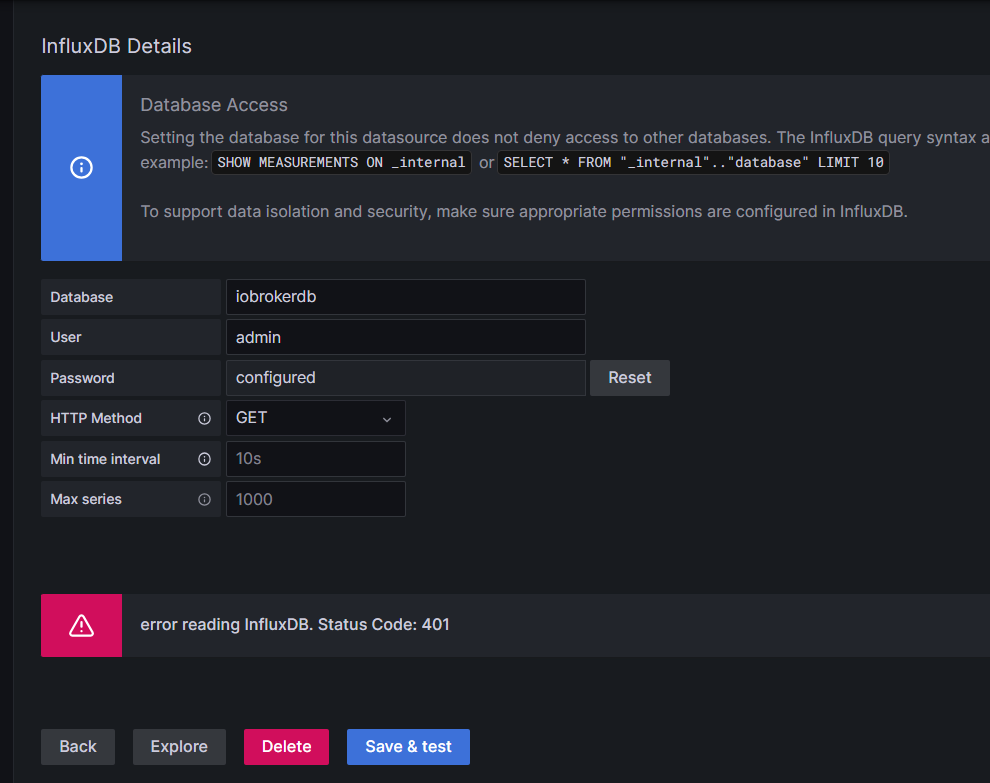
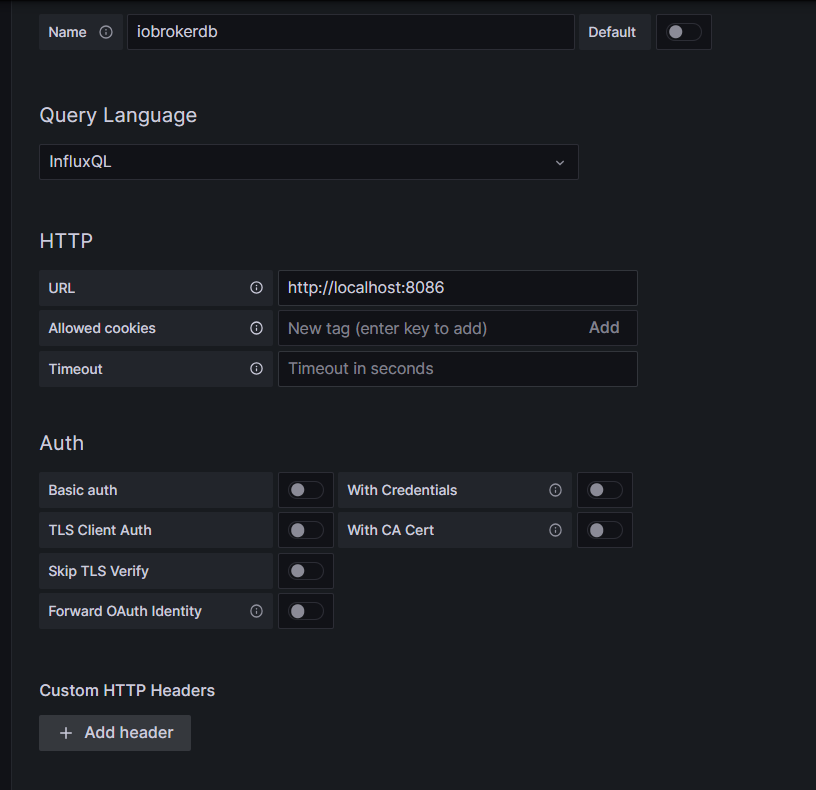
Ich habe alles mögliche versucht mit Passwort Token usw ... -
Und hier die Daten für das Backup?.
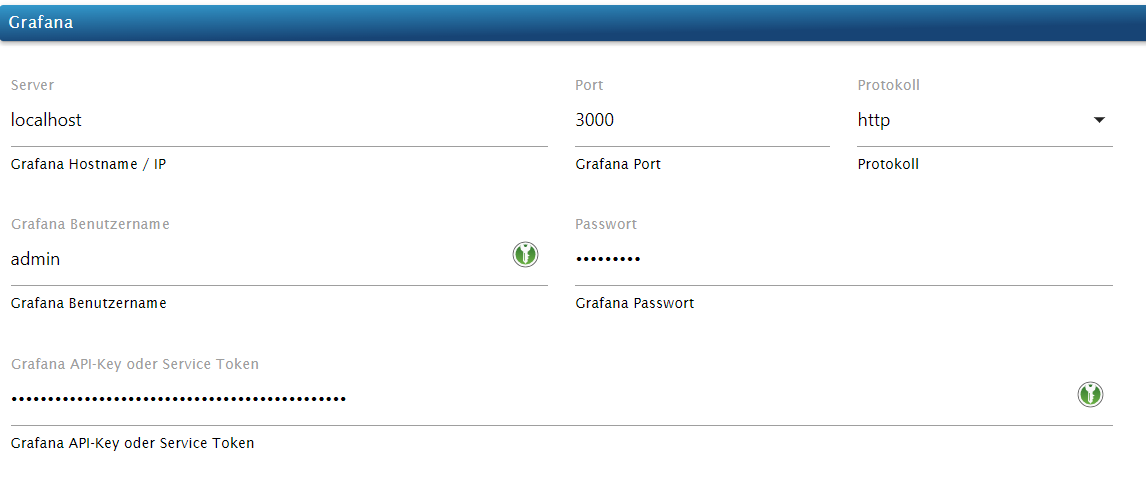
Die Datenbank für iobroker heißt iobrokerdb
-
-
@friedhofsblond
So moin,
bin noch nicht viel weiter
Die Daten landen in der DB und werden auch gesichert:
Habe zwei Probleme ich kann wohl kein Backup von Grafana machen, weil die Verbindung von Influxdb zu Grafana nicht klappt ... denke ich:
-
Was soll ich hier einstellen?:
Ich habe alles mögliche versucht mit Passwort Token usw ... -
Und hier die Daten für das Backup?.
Die Datenbank für iobroker heißt iobrokerdb
-
-
@friedhofsblond geb mal die IP Adresse anstatt localhost ein
@crunchip
kommt das und wird keine backupdatei angelegtStarted iobroker ... [DEBUG] [iobroker] - host.debian 2212 states saved [DEBUG] [iobroker] - host.debian 3010 objects saved [DEBUG] [iobroker] - Backup created: /opt/iobroker/backups/iobroker_2023_06_07-15_35_01_backupiobroker.tar.gz [DEBUG] [iobroker] - done [DEBUG] [grafana] - Start Grafana Backup ... [DEBUG] [grafana] - Created grafana_tmp directory: "/opt/iobroker/backups/grafana_tmp" [DEBUG] [grafana] - Created dashboard directory [DEBUG] [grafana] - Created dashboards_manually_restore directory [DEBUG] [grafana] - Created datasource directory [DEBUG] [grafana] - start Grafana request ... [DEBUG] [grafana] - Grafana is available ... Status: 200 [DEBUG] [grafana] - start Grafana backup compress ... [DEBUG] [grafana] - Try deleting the Grafana tmp directory: "/opt/iobroker/backups/grafana_tmp" [DEBUG] [grafana] - Grafana tmp directory "/opt/iobroker/backups/grafana_tmp" successfully deleted [ERROR] [grafana] - cannot found Grafana Backup files [DEBUG] [grafana] - done [DEBUG] [clean] - No older backup files are deleted, because this backup was started manually [DEBUG] [clean] - done [DEBUG] [historyHTML] - new history html values created [DEBUG] [historyHTML] - done [DEBUG] [historyJSON] - new history json values created [DEBUG] [historyJSON] - done [EXIT] 0 -
@crunchip
kommt das und wird keine backupdatei angelegtStarted iobroker ... [DEBUG] [iobroker] - host.debian 2212 states saved [DEBUG] [iobroker] - host.debian 3010 objects saved [DEBUG] [iobroker] - Backup created: /opt/iobroker/backups/iobroker_2023_06_07-15_35_01_backupiobroker.tar.gz [DEBUG] [iobroker] - done [DEBUG] [grafana] - Start Grafana Backup ... [DEBUG] [grafana] - Created grafana_tmp directory: "/opt/iobroker/backups/grafana_tmp" [DEBUG] [grafana] - Created dashboard directory [DEBUG] [grafana] - Created dashboards_manually_restore directory [DEBUG] [grafana] - Created datasource directory [DEBUG] [grafana] - start Grafana request ... [DEBUG] [grafana] - Grafana is available ... Status: 200 [DEBUG] [grafana] - start Grafana backup compress ... [DEBUG] [grafana] - Try deleting the Grafana tmp directory: "/opt/iobroker/backups/grafana_tmp" [DEBUG] [grafana] - Grafana tmp directory "/opt/iobroker/backups/grafana_tmp" successfully deleted [ERROR] [grafana] - cannot found Grafana Backup files [DEBUG] [grafana] - done [DEBUG] [clean] - No older backup files are deleted, because this backup was started manually [DEBUG] [clean] - done [DEBUG] [historyHTML] - new history html values created [DEBUG] [historyHTML] - done [DEBUG] [historyJSON] - new history json values created [DEBUG] [historyJSON] - done [EXIT] 0@friedhofsblond sagte in BackItUp - InfluxDB2 - Grafana:
kommt das
wo?
keine Timestamps bei den Meldungen?kein Support per PN! - Fragen im Forum stellen - Benutzt das Voting rechts unten im Beitrag wenn er euch geholfen hat.
Das Forum freut sich über eine Spende. Benutzt dazu den Spendenbutton oben rechts. Danke!
der Installationsfixer: curl -fsL https://iobroker.net/fix.sh | bash - -
@friedhofsblond sagte in BackItUp - InfluxDB2 - Grafana:
kommt das
wo?
keine Timestamps bei den Meldungen?2023-06-07 15:34:40.514 - info: host.debian stopInstance system.adapter.backitup.0 (force=false, process=true) 2023-06-07 15:34:40.521 - info: backitup.0 (2022) Got terminate signal TERMINATE_YOURSELF 2023-06-07 15:34:40.523 - info: backitup.0 (2022) cleaned everything up... 2023-06-07 15:34:40.525 - info: backitup.0 (2022) terminating 2023-06-07 15:34:40.526 - info: backitup.0 (2022) Terminated (ADAPTER_REQUESTED_TERMINATION): Without reason 2023-06-07 15:34:40.560 - info: host.debian stopInstance system.adapter.backitup.0 send kill signal 2023-06-07 15:34:41.081 - info: host.debian instance system.adapter.backitup.0 terminated with code 11 (ADAPTER_REQUESTED_TERMINATION) 2023-06-07 15:34:43.613 - info: host.debian instance system.adapter.backitup.0 started with pid 2044 2023-06-07 15:34:44.591 - info: backitup.0 (2044) starting. Version 2.6.19 in /opt/iobroker/node_modules/iobroker.backitup, node: v18.16.0, js-controller: 4.0.24 2023-06-07 15:34:44.650 - info: backitup.0 (2044) [iobroker] backup will be activated at 02:40 every 1 day(s) 2023-06-07 15:34:53.221 - info: host.debian stopInstance system.adapter.backitup.0 (force=false, process=true) 2023-06-07 15:34:53.227 - info: backitup.0 (2044) Got terminate signal TERMINATE_YOURSELF 2023-06-07 15:34:53.230 - info: backitup.0 (2044) cleaned everything up... 2023-06-07 15:34:53.231 - info: backitup.0 (2044) terminating 2023-06-07 15:34:53.233 - info: backitup.0 (2044) Terminated (ADAPTER_REQUESTED_TERMINATION): Without reason 2023-06-07 15:34:53.268 - info: host.debian stopInstance system.adapter.backitup.0 send kill signal 2023-06-07 15:34:53.800 - info: host.debian instance system.adapter.backitup.0 terminated with code 11 (ADAPTER_REQUESTED_TERMINATION) 2023-06-07 15:34:56.348 - info: host.debian instance system.adapter.backitup.0 started with pid 2059 2023-06-07 15:34:57.335 - info: backitup.0 (2059) starting. Version 2.6.19 in /opt/iobroker/node_modules/iobroker.backitup, node: v18.16.0, js-controller: 4.0.24 2023-06-07 15:34:57.395 - info: backitup.0 (2059) [iobroker] backup will be activated at 02:40 every 1 day(s) 2023-06-07 15:35:06.438 - error: backitup.0 (2059) [iobroker/grafana] cannot found Grafana Backup files 2023-06-07 15:37:19.757 - info: admin.0 (1247) <== Disconnect system.user.admin from ::ffff:192.168.115.175 2023-06-07 15:37:32.542 - info: admin.0 (1247) ==> Connected system.user.admin from ::ffff:192.168.115.175 2023-06-07 15:37:39.757 - info: host.debian stopInstance system.adapter.backitup.0 (force=false, process=true) 2023-06-07 15:37:39.767 - info: backitup.0 (2059) Got terminate signal TERMINATE_YOURSELF 2023-06-07 15:37:39.770 - info: backitup.0 (2059) cleaned everything up... 2023-06-07 15:37:39.771 - info: backitup.0 (2059) terminating 2023-06-07 15:37:39.772 - info: backitup.0 (2059) Terminated (ADAPTER_REQUESTED_TERMINATION): Without reason 2023-06-07 15:37:39.808 - info: host.debian stopInstance system.adapter.backitup.0 send kill signal 2023-06-07 15:37:39.903 - info: admin.0 (1247) <== Disconnect system.user.admin from ::ffff:192.168.115.175 2023-06-07 15:37:40.321 - info: host.debian instance system.adapter.backitup.0 terminated with code 11 (ADAPTER_REQUESTED_TERMINATION) 2023-06-07 15:37:42.860 - info: host.debian instance system.adapter.backitup.0 started with pid 2086 2023-06-07 15:37:43.825 - info: backitup.0 (2086) starting. Version 2.6.19 in /opt/iobroker/node_modules/iobroker.backitup, node: v18.16.0, js-controller: 4.0.24 2023-06-07 15:37:43.883 - info: backitup.0 (2086) [iobroker] backup will be activated at 02:40 every 1 day(s) 2023-06-07 15:37:45.746 - info: admin.0 (1247) ==> Connected system.user.admin from ::ffff:192.168.115.175 2023-06-07 15:37:56.744 - error: backitup.0 (2086) [iobroker/grafana] cannot found Grafana Backup files 2023-06-07 15:38:41.031 - info: admin.0 (1247) <== Disconnect system.user.admin from ::ffff:192.168.115.175locale speicherung:

-
@friedhofsblond danke!
wenn du jetzt noch die Instanz auf Logstufe debug schaltest, kann man noch mehr sehenkein Support per PN! - Fragen im Forum stellen - Benutzt das Voting rechts unten im Beitrag wenn er euch geholfen hat.
Das Forum freut sich über eine Spende. Benutzt dazu den Spendenbutton oben rechts. Danke!
der Installationsfixer: curl -fsL https://iobroker.net/fix.sh | bash - -
@friedhofsblond danke!
wenn du jetzt noch die Instanz auf Logstufe debug schaltest, kann man noch mehr sehen@homoran
das ist doch so viel ... :Started iobroker ... [DEBUG] [iobroker] start with {"type":"creator","workDir":"/opt/iobroker/node_modules/iobroker.js-controller/iobroker.js","time":"02:40","debugging":true,"slaveBackup":"Single","everyXDays":"1","deleteBackupAfter":0,"ignoreErrors":false,"dir":"/opt/iobroker","grafana":{"enabled":true,"type":"creator","ftp":{"enabled":false,"type":"storage","source":"local","host":"","debugging":true,"deleteOldBackup":false,"ownDir":false,"dir":"/backupDir","dirMinimal":"/backupDir/iobroker","user":"","pass":"****","port":"21","secure":false,"ignoreErrors":false},"cifs":{"enabled":false,"mountType":"NFS","type":"storage","source":"local","mount":"","debugging":true,"fileDir":"/opt/iobroker/iobroker-data/backitup","wakeOnLAN":false,"macAd":"20:DE:20:DE:20:DE","wolTime":"25","smb":"vers=3.1.1","sudo":true,"cifsDomain":"","clientInodes":false,"deleteOldBackup":false,"ownDir":false,"dir":"sharename/backupDir","dirMinimal":"sharename/backupDir","user":"","pass":"****","ignoreErrors":false},"dropbox":{"enabled":false,"type":"storage","source":"local","debugging":true,"deleteOldBackup":false,"accessToken":"****","dropboxAccessJson":"","dropboxTokenType":"custom","ownDir":false,"dir":"/backupDir","dirMinimal":"/backupDir/iobroker","ignoreErrors":false},"onedrive":{"enabled":false,"type":"storage","source":"local","debugging":true,"deleteOldBackup":false,"onedriveAccessJson":"****","ownDir":false,"dir":"backupDir","dirMinimal":"backupDir/iobroker","ignoreErrors":false},"webdav":{"enabled":false,"type":"storage","source":"local","debugging":true,"deleteOldBackup":false,"username":"username","pass":"****","url":"https://example.com/remote.php/dav/files/username/","ownDir":false,"dir":"/backupDir","dirMinimal":"/backupDir/iobroker","signedCertificates":true,"ignoreErrors":false},"googledrive":{"enabled":false,"type":"storage","source":"local","debugging":true,"deleteOldBackup":false,"newToken":false,"ownDir":false,"dir":"/backupDir","dirMinimal":"/backupDir/iobroker","ignoreErrors":false,"accessJson":"****"},"host":"192.168.115.30","port":"3000","protocol":"http","username":"admin","pass":"****","apiKey":"****","nameSuffix":"","slaveSuffix":"","hostType":"Single","ignoreErrors":false,"signedCertificates":true},"historyHTML":{"enabled":true,"type":"message","entriesNumber":"25","ignoreErrors":false,"systemLang":"de"},"historyJSON":{"enabled":true,"type":"message","entriesNumber":"25","ignoreErrors":false,"systemLang":"de"},"signal":{"enabled":false,"notificationsType":"Telegram","type":"message","instance":"","NoticeType":"longSignalNotice","onlyError":false,"signalWaiting":0,"hostName":"","ignoreErrors":false,"systemLang":"de"},"matrix":{"enabled":false,"notificationsType":"Telegram","type":"message","instance":"","NoticeType":"longMatrixNotice","onlyError":false,"matrixWaiting":0,"hostName":"","ignoreErrors":false,"systemLang":"de"},"backupDir":"/opt/iobroker/backups"} [DEBUG] [iobroker] - host.debian 2212 states saved [DEBUG] [iobroker] - host.debian 3010 objects saved [DEBUG] [iobroker] - Backup created: /opt/iobroker/backups/iobroker_2023_06_07-15_48_05_backupiobroker.tar.gz [DEBUG] [iobroker] - done [DEBUG] [grafana] - Start Grafana Backup ... [DEBUG] [grafana] - Created grafana_tmp directory: "/opt/iobroker/backups/grafana_tmp" [DEBUG] [grafana] - Created dashboard directory [DEBUG] [grafana] - Created dashboards_manually_restore directory [DEBUG] [grafana] - Created datasource directory [DEBUG] [grafana] - start Grafana request ... [DEBUG] [grafana] - Grafana is available ... Status: 200 [DEBUG] [grafana] - start Grafana backup compress ... [DEBUG] [grafana] - Try deleting the Grafana tmp directory: "/opt/iobroker/backups/grafana_tmp" [DEBUG] [grafana] - Grafana tmp directory "/opt/iobroker/backups/grafana_tmp" successfully deleted [ERROR] [grafana] - cannot found Grafana Backup files [DEBUG] [grafana] - done [DEBUG] [clean] - No older backup files are deleted, because this backup was started manually [DEBUG] [clean] - done [DEBUG] [historyHTML] - new history html values created [DEBUG] [historyHTML] - done [DEBUG] [historyHTML] start with {"type":"creator","workDir":"/opt/iobroker/node_modules/iobroker.js-controller/iobroker.js","time":"02:40","debugging":true,"slaveBackup":"Single","everyXDays":"1","deleteBackupAfter":0,"ignoreErrors":false,"dir":"/opt/iobroker","grafana":{"enabled":true,"type":"creator","ftp":{"enabled":false,"type":"storage","source":"local","host":"","debugging":true,"deleteOldBackup":false,"ownDir":false,"dir":"/backupDir","dirMinimal":"/backupDir/iobroker","user":"","pass":"****","port":"21","secure":false,"ignoreErrors":false},"cifs":{"enabled":false,"mountType":"NFS","type":"storage","source":"local","mount":"","debugging":true,"fileDir":"/opt/iobroker/iobroker-data/backitup","wakeOnLAN":false,"macAd":"20:DE:20:DE:20:DE","wolTime":"25","smb":"vers=3.1.1","sudo":true,"cifsDomain":"","clientInodes":false,"deleteOldBackup":false,"ownDir":false,"dir":"sharename/backupDir","dirMinimal":"sharename/backupDir","user":"","pass":"****","ignoreErrors":false},"dropbox":{"enabled":false,"type":"storage","source":"local","debugging":true,"deleteOldBackup":false,"accessToken":"****","dropboxAccessJson":"","dropboxTokenType":"custom","ownDir":false,"dir":"/backupDir","dirMinimal":"/backupDir/iobroker","ignoreErrors":false},"onedrive":{"enabled":false,"type":"storage","source":"local","debugging":true,"deleteOldBackup":false,"onedriveAccessJson":"****","ownDir":false,"dir":"backupDir","dirMinimal":"backupDir/iobroker","ignoreErrors":false},"webdav":{"enabled":false,"type":"storage","source":"local","debugging":true,"deleteOldBackup":false,"username":"username","pass":"****","url":"https://example.com/remote.php/dav/files/username/","ownDir":false,"dir":"/backupDir","dirMinimal":"/backupDir/iobroker","signedCertificates":true,"ignoreErrors":false},"googledrive":{"enabled":false,"type":"storage","source":"local","debugging":true,"deleteOldBackup":false,"newToken":false,"ownDir":false,"dir":"/backupDir","dirMinimal":"/backupDir/iobroker","ignoreErrors":false,"accessJson":"****"},"host":"192.168.115.30","port":"3000","protocol":"http","username":"admin","pass":"****","apiKey":"****","nameSuffix":"","slaveSuffix":"","hostType":"Single","ignoreErrors":false,"signedCertificates":true},"historyHTML":{"enabled":true,"type":"message","entriesNumber":"25","ignoreErrors":false,"systemLang":"de","time":"07. Juni 2023 um 15:48 Uhr"},"historyJSON":{"enabled":true,"type":"message","entriesNumber":"25","ignoreErrors":false,"systemLang":"de"},"signal":{"enabled":false,"notificationsType":"Telegram","type":"message","instance":"","NoticeType":"longSignalNotice","onlyError":false,"signalWaiting":0,"hostName":"","ignoreErrors":false,"systemLang":"de"},"matrix":{"enabled":false,"notificationsType":"Telegram","type":"message","instance":"","NoticeType":"longMatrixNotice","onlyError":false,"matrixWaiting":0,"hostName":"","ignoreErrors":false,"systemLang":"de"},"backupDir":"/opt/iobroker/backups","influxDBEvents":[],"mySqlEvents":[],"pgSqlEvents":[]} [DEBUG] [historyJSON] - new history json values created [DEBUG] [historyJSON] - done [DEBUG] [historyJSON] start with {"type":"creator","workDir":"/opt/iobroker/node_modules/iobroker.js-controller/iobroker.js","time":"02:40","debugging":true,"slaveBackup":"Single","everyXDays":"1","deleteBackupAfter":0,"ignoreErrors":false,"dir":"/opt/iobroker","grafana":{"enabled":true,"type":"creator","ftp":{"enabled":false,"type":"storage","source":"local","host":"","debugging":true,"deleteOldBackup":false,"ownDir":false,"dir":"/backupDir","dirMinimal":"/backupDir/iobroker","user":"","pass":"****","port":"21","secure":false,"ignoreErrors":false},"cifs":{"enabled":false,"mountType":"NFS","type":"storage","source":"local","mount":"","debugging":true,"fileDir":"/opt/iobroker/iobroker-data/backitup","wakeOnLAN":false,"macAd":"20:DE:20:DE:20:DE","wolTime":"25","smb":"vers=3.1.1","sudo":true,"cifsDomain":"","clientInodes":false,"deleteOldBackup":false,"ownDir":false,"dir":"sharename/backupDir","dirMinimal":"sharename/backupDir","user":"","pass":"****","ignoreErrors":false},"dropbox":{"enabled":false,"type":"storage","source":"local","debugging":true,"deleteOldBackup":false,"accessToken":"****","dropboxAccessJson":"","dropboxTokenType":"custom","ownDir":false,"dir":"/backupDir","dirMinimal":"/backupDir/iobroker","ignoreErrors":false},"onedrive":{"enabled":false,"type":"storage","source":"local","debugging":true,"deleteOldBackup":false,"onedriveAccessJson":"****","ownDir":false,"dir":"backupDir","dirMinimal":"backupDir/iobroker","ignoreErrors":false},"webdav":{"enabled":false,"type":"storage","source":"local","debugging":true,"deleteOldBackup":false,"username":"username","pass":"****","url":"https://example.com/remote.php/dav/files/username/","ownDir":false,"dir":"/backupDir","dirMinimal":"/backupDir/iobroker","signedCertificates":true,"ignoreErrors":false},"googledrive":{"enabled":false,"type":"storage","source":"local","debugging":true,"deleteOldBackup":false,"newToken":false,"ownDir":false,"dir":"/backupDir","dirMinimal":"/backupDir/iobroker","ignoreErrors":false,"accessJson":"****"},"host":"192.168.115.30","port":"3000","protocol":"http","username":"admin","pass":"****","apiKey":"****","nameSuffix":"","slaveSuffix":"","hostType":"Single","ignoreErrors":false,"signedCertificates":true},"historyHTML":{"enabled":true,"type":"message","entriesNumber":"25","ignoreErrors":false,"systemLang":"de"},"historyJSON":{"enabled":true,"type":"message","entriesNumber":"25","ignoreErrors":false,"systemLang":"de","time":"07. Juni 2023 um 15:48 Uhr"},"signal":{"enabled":false,"notificationsType":"Telegram","type":"message","instance":"","NoticeType":"longSignalNotice","onlyError":false,"signalWaiting":0,"hostName":"","ignoreErrors":false,"systemLang":"de"},"matrix":{"enabled":false,"notificationsType":"Telegram","type":"message","instance":"","NoticeType":"longMatrixNotice","onlyError":false,"matrixWaiting":0,"hostName":"","ignoreErrors":false,"systemLang":"de"},"backupDir":"/opt/iobroker/backups","influxDBEvents":[],"mySqlEvents":[],"pgSqlEvents":[]} [EXIT] 02023-06-07 15:47:57.507 - debug: backitup.0 (2124) Redis Objects: Use Redis connection: 127.0.0.1:9001 2023-06-07 15:47:57.528 - debug: backitup.0 (2124) Objects client ready ... initialize now 2023-06-07 15:47:57.529 - debug: backitup.0 (2124) Objects create System PubSub Client 2023-06-07 15:47:57.530 - debug: backitup.0 (2124) Objects create User PubSub Client 2023-06-07 15:47:57.547 - debug: backitup.0 (2124) Objects client initialize lua scripts 2023-06-07 15:47:57.551 - debug: backitup.0 (2124) Objects connected to redis: 127.0.0.1:9001 2023-06-07 15:47:57.566 - debug: backitup.0 (2124) Redis States: Use Redis connection: 127.0.0.1:9000 2023-06-07 15:47:57.572 - debug: backitup.0 (2124) States create System PubSub Client 2023-06-07 15:47:57.572 - debug: backitup.0 (2124) States create User PubSub Client 2023-06-07 15:47:57.624 - debug: backitup.0 (2124) States connected to redis: 127.0.0.1:9000 2023-06-07 15:47:57.712 - debug: backitup.0 (2124) Plugin sentry Do not initialize Plugin (enabled=false) 2023-06-07 15:47:57.716 - debug: backitup.0 (2124) Plugin sentry destroyed because not initialized correctly 2023-06-07 15:47:57.796 - info: backitup.0 (2124) starting. Version 2.6.19 in /opt/iobroker/node_modules/iobroker.backitup, node: v18.16.0, js-controller: 4.0.24 2023-06-07 15:47:57.825 - debug: backitup.0 (2124) Backitup has recognized a linux system 2023-06-07 15:47:57.856 - info: backitup.0 (2124) [iobroker] backup will be activated at 02:40 every 1 day(s) 2023-06-07 15:47:57.899 - debug: backitup.0 (2124) [iobroker] 10 40 02 */1 * * 2023-06-07 15:47:57.902 - debug: backitup.0 (2124) No backup file was found 2023-06-07 15:47:59.802 - info: admin.0 (1247) ==> Connected system.user.admin from ::ffff:192.168.115.175 2023-06-07 15:48:00.015 - debug: backitup.0 (2124) The local storage check was completed successfully. On the host "debian" are currently 219563 MB free space available! 2023-06-07 15:48:04.494 - debug: backitup.0 (2124) The local storage check was completed successfully. On the host "debian" are currently 219563 MB free space available! 2023-06-07 15:48:04.925 - debug: backitup.0 (2124) Backup has started ... 2023-06-07 15:48:06.374 - debug: backitup.0 (2124) [iobroker/iobroker] host.debian 2212 states saved 2023-06-07 15:48:06.411 - debug: backitup.0 (2124) [iobroker/iobroker] host.debian 3010 objects saved 2023-06-07 15:48:07.377 - debug: backitup.0 (2124) [iobroker/iobroker] Backup created: /opt/iobroker/backups/iobroker_2023_06_07-15_48_05_backupiobroker.tar.gz 2023-06-07 15:48:08.408 - debug: backitup.0 (2124) [iobroker/iobroker] done 2023-06-07 15:48:09.768 - debug: backitup.0 (2124) [iobroker/grafana] Start Grafana Backup ... 2023-06-07 15:48:09.773 - debug: backitup.0 (2124) [iobroker/grafana] Created grafana_tmp directory: "/opt/iobroker/backups/grafana_tmp" 2023-06-07 15:48:09.775 - debug: backitup.0 (2124) [iobroker/grafana] Created dashboard directory 2023-06-07 15:48:09.779 - debug: backitup.0 (2124) [iobroker/grafana] Created dashboards_manually_restore directory 2023-06-07 15:48:09.782 - debug: backitup.0 (2124) [iobroker/grafana] Created datasource directory 2023-06-07 15:48:09.783 - debug: backitup.0 (2124) [iobroker/grafana] start Grafana request ... 2023-06-07 15:48:09.862 - debug: backitup.0 (2124) [iobroker/grafana] Grafana is available ... Status: 200 2023-06-07 15:48:09.971 - debug: backitup.0 (2124) [iobroker/grafana] start Grafana backup compress ... 2023-06-07 15:48:09.974 - debug: backitup.0 (2124) [iobroker/grafana] Try deleting the Grafana tmp directory: "/opt/iobroker/backups/grafana_tmp" 2023-06-07 15:48:09.981 - debug: backitup.0 (2124) [iobroker/grafana] Grafana tmp directory "/opt/iobroker/backups/grafana_tmp" successfully deleted 2023-06-07 15:48:09.981 - error: backitup.0 (2124) [iobroker/grafana] cannot found Grafana Backup files 2023-06-07 15:48:09.982 - debug: backitup.0 (2124) [iobroker/grafana] done 2023-06-07 15:48:11.791 - debug: backitup.0 (2124) [iobroker/clean] No older backup files are deleted, because this backup was started manually 2023-06-07 15:48:11.793 - debug: backitup.0 (2124) [iobroker/clean] done 2023-06-07 15:48:12.932 - debug: backitup.0 (2124) [iobroker/historyHTML] new history html values created 2023-06-07 15:48:12.988 - debug: backitup.0 (2124) [iobroker/historyHTML] done 2023-06-07 15:48:13.157 - debug: backitup.0 (2124) [iobroker/historyJSON] new history json values created 2023-06-07 15:48:13.158 - debug: backitup.0 (2124) [iobroker/historyJSON] done 2023-06-07 15:48:13.461 - debug: backitup.0 (2124) [iobroker] exec: done 2023-06-07 15:48:52.361 - info: admin.0 (1247) <== Disconnect system.user.admin from ::ffff:192.168.115.175



Hey! Du scheinst an dieser Unterhaltung interessiert zu sein, hast aber noch kein Konto.
Hast du es satt, bei jedem Besuch durch die gleichen Beiträge zu scrollen? Wenn du dich für ein Konto anmeldest, kommst du immer genau dorthin zurück, wo du zuvor warst, und kannst dich über neue Antworten benachrichtigen lassen (entweder per E-Mail oder Push-Benachrichtigung). Du kannst auch Lesezeichen speichern und Beiträge positiv bewerten, um anderen Community-Mitgliedern deine Wertschätzung zu zeigen.
Mit deinem Input könnte dieser Beitrag noch besser werden 💗
Registrieren Anmelden396
Online33.1k
Benutzende83.7k
Themen1.3m
Beiträge