Skip to content
  • Home
  • Recent
  • Tags
  • 0 Unread 0
  • Categories
  • Unreplied
  • Popular
  • GitHub
  • Docu
  • Hilfe
Skins
  • Light
  • Brite
  • Cerulean
  • Cosmo
  • Flatly
  • Journal
  • Litera
  • Lumen
  • Lux
  • Materia
  • Minty
  • Morph
  • Pulse
  • Sandstone
  • Simplex
  • Sketchy
  • Spacelab
  • United
  • Yeti
  • Zephyr
  • Dark
  • Cyborg
  • Darkly
  • Quartz
  • Slate
  • Solar
  • Superhero
  • Vapor

  • Default (No Skin)
  • No Skin
Collapse
ioBroker Logo

Community Forum

donate donate
  1. ioBroker Community Home
  2. Deutsch
  3. Skripten / Logik
  4. Blockly
  5. [Frage BLOCKLY ] Klingel Bild per Telegram versenden / Snapshot von Cam per Telegram versenden

NEWS

  • Monatsrückblick Januar/Februar 2026 ist online!
    BluefoxB
    Bluefox
    18
    1
    770

  • Jahresrückblick 2025 – unser neuer Blogbeitrag ist online! ✨
    BluefoxB
    Bluefox
    18
    1
    6.2k

  • Neuer Blogbeitrag: Monatsrückblick - Dezember 2025 🎄
    BluefoxB
    Bluefox
    13
    1
    1.5k

[Frage BLOCKLY ] Klingel Bild per Telegram versenden / Snapshot von Cam per Telegram versenden

Scheduled Pinned Locked Moved Blockly
157 Posts 36 Posters 49.9k Views 31 Watching
  • Oldest to Newest
  • Newest to Oldest
  • Most Votes
Reply
  • Reply as topic
Log in to reply
This topic has been deleted. Only users with topic management privileges can see it.
  • UHU01U UHU01

    @glasfaser

    Nein. Ist eine Wansview W5. Hab bisher nichts in Richtung Snapshot dafür gefunden.

    crunchipC Away
    crunchipC Away
    crunchip
    Forum Testing Most Active Developer
    wrote on last edited by
    #129

    @uhu01 sagte in [Frage BLOCKLY ] Klingel Bild per Telegram versenden / Snapshot von Cam per Telegram versenden:

    Hab bisher nichts in Richtung Snapshot dafür gefunden

    https://www.maffert.net/wansview-befehle-commands-und-technische-infos/

    umgestiegen von Proxmox auf Unraid

    UHU01U 1 Reply Last reply
    1
    • UHU01U UHU01

      @glasfaser

      Nein. Ist eine Wansview W5. Hab bisher nichts in Richtung Snapshot dafür gefunden.

      GlasfaserG Online
      GlasfaserG Online
      Glasfaser
      wrote on last edited by Glasfaser
      #130

      @uhu01 sagte in [Frage BLOCKLY ] Klingel Bild per Telegram versenden / Snapshot von Cam per Telegram versenden:

      Wansview W5

      ist eine W6 ... siehe hier , vielleicht geht es damit :

      https://forum.iobroker.net/post/586617

      Synology 918+ 16GB - ioBroker in Docker v9 , VISO auf Trekstor Primebook C13 13,3" , Hikvision Domkameras mit Surveillance Station .. CCU RaspberryMatic in Synology VM .. Zigbee CC2538+CC2592 .. Sonoff .. KNX .. Modbus ..

      UHU01U 1 Reply Last reply
      0
      • GlasfaserG Glasfaser

        @uhu01 sagte in [Frage BLOCKLY ] Klingel Bild per Telegram versenden / Snapshot von Cam per Telegram versenden:

        Wansview W5

        ist eine W6 ... siehe hier , vielleicht geht es damit :

        https://forum.iobroker.net/post/586617

        UHU01U Offline
        UHU01U Offline
        UHU01
        wrote on last edited by
        #131

        @glasfaser lDas scheint der Sache schon näher zu kommen.

        ffmpeg -loglevel fatal -i rtsp:// FxSdL:cVK3mCsK @192.168.178.166:554/live/ch0 -vframes 1 -y -r 1 /opt/iobroker/iobroker-data/files/vis.0/main/icons/Hof3.jpg
        

        bringt zumindest keinen Fehler mehr. Abgelegt wird aber auch nichts. Kann das mit den Berechtigungen zu tun haben? Wo und wie stelle ich die denn ein wenn es so ist?

        GlasfaserG 1 Reply Last reply
        0
        • crunchipC crunchip

          @uhu01 sagte in [Frage BLOCKLY ] Klingel Bild per Telegram versenden / Snapshot von Cam per Telegram versenden:

          Hab bisher nichts in Richtung Snapshot dafür gefunden

          https://www.maffert.net/wansview-befehle-commands-und-technische-infos/

          UHU01U Offline
          UHU01U Offline
          UHU01
          wrote on last edited by
          #132

          @crunchip Leider nicht für diese Kamera.

          1 Reply Last reply
          0
          • UHU01U UHU01

            @glasfaser lDas scheint der Sache schon näher zu kommen.

            ffmpeg -loglevel fatal -i rtsp:// FxSdL:cVK3mCsK @192.168.178.166:554/live/ch0 -vframes 1 -y -r 1 /opt/iobroker/iobroker-data/files/vis.0/main/icons/Hof3.jpg
            

            bringt zumindest keinen Fehler mehr. Abgelegt wird aber auch nichts. Kann das mit den Berechtigungen zu tun haben? Wo und wie stelle ich die denn ein wenn es so ist?

            GlasfaserG Online
            GlasfaserG Online
            Glasfaser
            wrote on last edited by
            #133

            @uhu01 sagte in [Frage BLOCKLY ] Klingel Bild per Telegram versenden / Snapshot von Cam per Telegram versenden:

            /opt/iobroker/iobroker-data/files/vis.0/main/icons/Hof3.jpg

            nimm den tmp Ordner

            Synology 918+ 16GB - ioBroker in Docker v9 , VISO auf Trekstor Primebook C13 13,3" , Hikvision Domkameras mit Surveillance Station .. CCU RaspberryMatic in Synology VM .. Zigbee CC2538+CC2592 .. Sonoff .. KNX .. Modbus ..

            UHU01U 1 Reply Last reply
            0
            • GlasfaserG Glasfaser

              @uhu01 sagte in [Frage BLOCKLY ] Klingel Bild per Telegram versenden / Snapshot von Cam per Telegram versenden:

              /opt/iobroker/iobroker-data/files/vis.0/main/icons/Hof3.jpg

              nimm den tmp Ordner

              UHU01U Offline
              UHU01U Offline
              UHU01
              wrote on last edited by UHU01
              #134

              @glasfaser

              Funktioniert leider auch nich:

              pi@raspberrypi:/tmp $ ffmpeg -loglevel fatal -i rtsp:// FxS:cVK3m9rV @192.168.178.166:554/live/ch0 -vframes 1 -y -r 1 /tmp/Hof3.jpg
              pi@raspberrypi:/tmp $ ls -la
              insgesamt 44
              drwxrwxrwt 11 root     root     4096 27. Jan 18:53 .
              drwxr-xr-x 22 root     root     4096 27. Jan 17:26 ..
              drwxrwxrwt  2 root     root     4096 21. Jan 22:53 .font-unix
              drwxr-xr-x  2 iobroker iobroker 4096 27. Jan 10:55 hsperfdata_iobroker
              drwxrwxrwt  2 root     root     4096 21. Jan 22:53 .ICE-unix
              drwx------  2 pi       pi       4096 21. Jan 22:53 runtime-pi
              drwx------  3 root     root     4096 21. Jan 22:53 systemd-private-f9e07d227dfe4ba6848daeff263d15ab-colord.service-ak1Huf
              drwx------  3 root     root     4096 21. Jan 22:53 systemd-private-f9e07d227dfe4ba6848daeff263d15ab-systemd-logind.service-xk2P1h
              drwxrwxrwt  2 root     root     4096 21. Jan 22:53 .Test-unix
              drwxrwxrwt  2 root     root     4096 21. Jan 22:53 .X11-unix
              drwxrwxrwt  2 root     root     4096 21. Jan 22:53 .XIM-unix
              pi@raspberrypi:/tmp $
              
              GlasfaserG 1 Reply Last reply
              0
              • UHU01U UHU01

                @glasfaser

                Funktioniert leider auch nich:

                pi@raspberrypi:/tmp $ ffmpeg -loglevel fatal -i rtsp:// FxS:cVK3m9rV @192.168.178.166:554/live/ch0 -vframes 1 -y -r 1 /tmp/Hof3.jpg
                pi@raspberrypi:/tmp $ ls -la
                insgesamt 44
                drwxrwxrwt 11 root     root     4096 27. Jan 18:53 .
                drwxr-xr-x 22 root     root     4096 27. Jan 17:26 ..
                drwxrwxrwt  2 root     root     4096 21. Jan 22:53 .font-unix
                drwxr-xr-x  2 iobroker iobroker 4096 27. Jan 10:55 hsperfdata_iobroker
                drwxrwxrwt  2 root     root     4096 21. Jan 22:53 .ICE-unix
                drwx------  2 pi       pi       4096 21. Jan 22:53 runtime-pi
                drwx------  3 root     root     4096 21. Jan 22:53 systemd-private-f9e07d227dfe4ba6848daeff263d15ab-colord.service-ak1Huf
                drwx------  3 root     root     4096 21. Jan 22:53 systemd-private-f9e07d227dfe4ba6848daeff263d15ab-systemd-logind.service-xk2P1h
                drwxrwxrwt  2 root     root     4096 21. Jan 22:53 .Test-unix
                drwxrwxrwt  2 root     root     4096 21. Jan 22:53 .X11-unix
                drwxrwxrwt  2 root     root     4096 21. Jan 22:53 .XIM-unix
                pi@raspberrypi:/tmp $
                
                GlasfaserG Online
                GlasfaserG Online
                Glasfaser
                wrote on last edited by Glasfaser
                #135

                @uhu01

                stimmt den der Link , es kann auch sein das es ein anderer Kanal ist
                als im Thread mit der W6

                rtsp://user:pwd@192.168.178.xxx:554/live/ch0
                

                Teste den Link im VLC , bzw. im Browser

                Synology 918+ 16GB - ioBroker in Docker v9 , VISO auf Trekstor Primebook C13 13,3" , Hikvision Domkameras mit Surveillance Station .. CCU RaspberryMatic in Synology VM .. Zigbee CC2538+CC2592 .. Sonoff .. KNX .. Modbus ..

                UHU01U 1 Reply Last reply
                0
                • GlasfaserG Glasfaser

                  @uhu01

                  stimmt den der Link , es kann auch sein das es ein anderer Kanal ist
                  als im Thread mit der W6

                  rtsp://user:pwd@192.168.178.xxx:554/live/ch0
                  

                  Teste den Link im VLC , bzw. im Browser

                  UHU01U Offline
                  UHU01U Offline
                  UHU01
                  wrote on last edited by UHU01
                  #136

                  @glasfaser
                  Ja, der link funktioniert (mit vlc getestet) :

                  rtsp://xxx:xxx@192.168.178.166:554/live/ch0
                  
                  GlasfaserG 1 Reply Last reply
                  0
                  • UHU01U UHU01

                    @glasfaser
                    Ja, der link funktioniert (mit vlc getestet) :

                    rtsp://xxx:xxx@192.168.178.166:554/live/ch0
                    
                    GlasfaserG Online
                    GlasfaserG Online
                    Glasfaser
                    wrote on last edited by Glasfaser
                    #137

                    @uhu01

                    teste mal damit :

                    ffmpeg -loglevel fatal -rtsp_transport tcp -i 'rtsp://user:pwd@192.168.178.xxx:554/live/ch0' -f image2 -vframes 1 -pix_fmt yuvj420p /home/bild.jpeg
                    

                    Synology 918+ 16GB - ioBroker in Docker v9 , VISO auf Trekstor Primebook C13 13,3" , Hikvision Domkameras mit Surveillance Station .. CCU RaspberryMatic in Synology VM .. Zigbee CC2538+CC2592 .. Sonoff .. KNX .. Modbus ..

                    UHU01U 1 Reply Last reply
                    0
                    • GlasfaserG Glasfaser

                      @uhu01

                      teste mal damit :

                      ffmpeg -loglevel fatal -rtsp_transport tcp -i 'rtsp://user:pwd@192.168.178.xxx:554/live/ch0' -f image2 -vframes 1 -pix_fmt yuvj420p /home/bild.jpeg
                      
                      UHU01U Offline
                      UHU01U Offline
                      UHU01
                      wrote on last edited by
                      #138

                      @glasfaser
                      Es dauert zwar eine Weile, bis die Eingabe ausgeführt ist, aber es kommt wieder nichts an:

                      i@raspberrypi:/ $ ffmpeg -loglevel fatal -rtsp_transport tcp -i 'rtsp://FxSdL8f6:m9rKEcC@192.168.178.166:554/live/ch0' -f image2 -vframes 1 -pix_fmt yuvj420p /home/bild.jpeg
                      pi@raspberrypi:/ $ cd home
                      pi@raspberrypi:/home $ ls
                      iobroker  pi
                      pi@raspberrypi:/home $
                      
                      GlasfaserG 1 Reply Last reply
                      0
                      • UHU01U UHU01

                        @glasfaser
                        Es dauert zwar eine Weile, bis die Eingabe ausgeführt ist, aber es kommt wieder nichts an:

                        i@raspberrypi:/ $ ffmpeg -loglevel fatal -rtsp_transport tcp -i 'rtsp://FxSdL8f6:m9rKEcC@192.168.178.166:554/live/ch0' -f image2 -vframes 1 -pix_fmt yuvj420p /home/bild.jpeg
                        pi@raspberrypi:/ $ cd home
                        pi@raspberrypi:/home $ ls
                        iobroker  pi
                        pi@raspberrypi:/home $
                        
                        GlasfaserG Online
                        GlasfaserG Online
                        Glasfaser
                        wrote on last edited by
                        #139

                        @uhu01

                        schreibe mal ein

                        sudo
                        

                        davor

                        sudo ffmpeg -loglevel fatal -rtsp_transport tcp -i 'rtsp://FxSdL8f6:m9rKEcC@192.168.178.166:554/live/ch0' -f image2 -vframes 1 -pix_fmt yuvj420p /home/bild.jpeg
                        

                        Synology 918+ 16GB - ioBroker in Docker v9 , VISO auf Trekstor Primebook C13 13,3" , Hikvision Domkameras mit Surveillance Station .. CCU RaspberryMatic in Synology VM .. Zigbee CC2538+CC2592 .. Sonoff .. KNX .. Modbus ..

                        UHU01U 1 Reply Last reply
                        0
                        • GlasfaserG Glasfaser

                          @uhu01

                          schreibe mal ein

                          sudo
                          

                          davor

                          sudo ffmpeg -loglevel fatal -rtsp_transport tcp -i 'rtsp://FxSdL8f6:m9rKEcC@192.168.178.166:554/live/ch0' -f image2 -vframes 1 -pix_fmt yuvj420p /home/bild.jpeg
                          
                          UHU01U Offline
                          UHU01U Offline
                          UHU01
                          wrote on last edited by UHU01
                          #140

                          @Glasfaser
                          Heureka. Das war's. Danke dir vielmals!
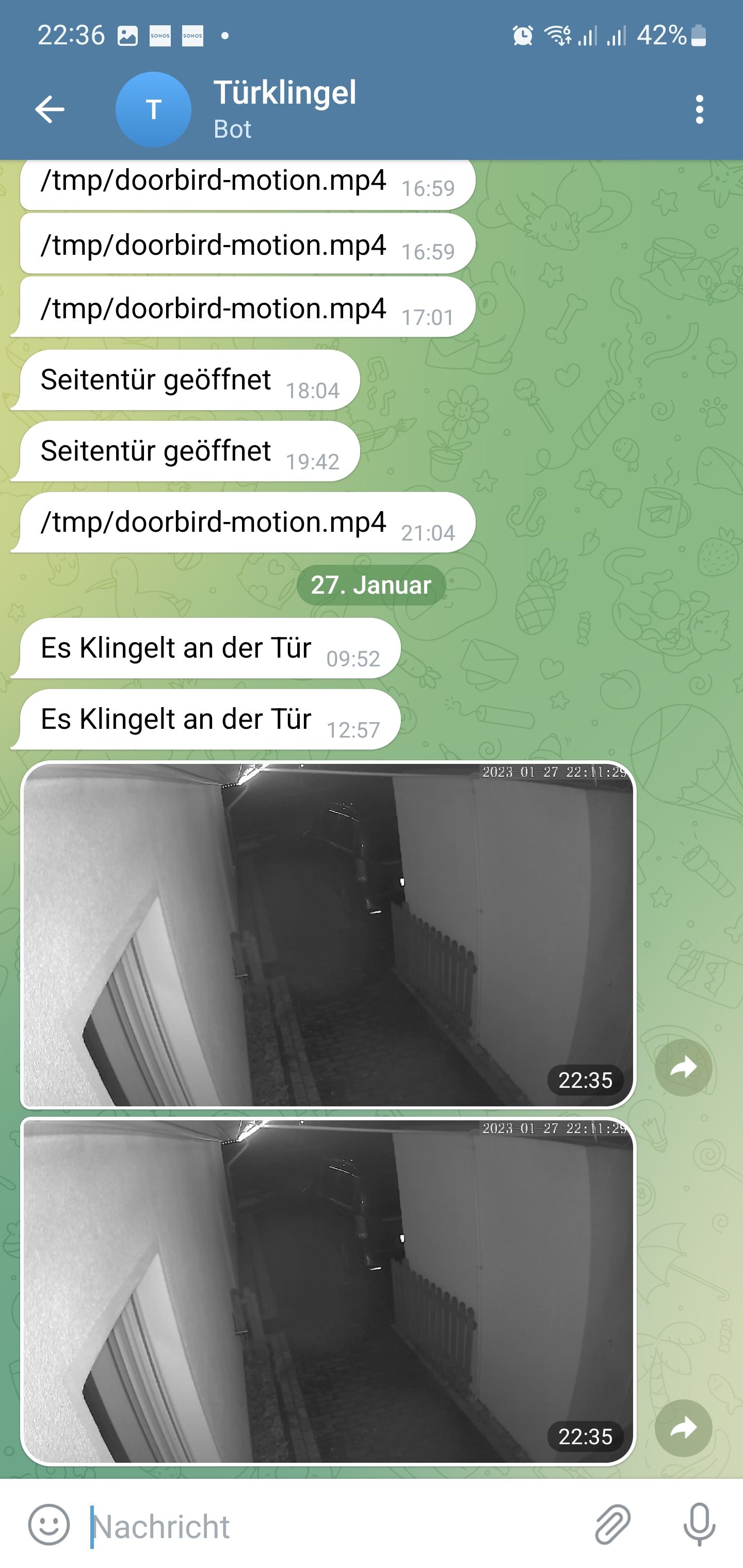
                          Screenshot_20230127-223640_Telegram.jpg

                          GlasfaserG 1 Reply Last reply
                          1
                          • UHU01U UHU01

                            @Glasfaser
                            Heureka. Das war's. Danke dir vielmals!

                            Screenshot_20230127-223640_Telegram.jpg

                            GlasfaserG Online
                            GlasfaserG Online
                            Glasfaser
                            wrote on last edited by
                            #141

                            @uhu01 sagte in [Frage BLOCKLY ] Klingel Bild per Telegram versenden / Snapshot von Cam per Telegram versenden:

                            Heureka. Das war's. Danke dir vielmals!

                            Kein Thema .. :)

                            Synology 918+ 16GB - ioBroker in Docker v9 , VISO auf Trekstor Primebook C13 13,3" , Hikvision Domkameras mit Surveillance Station .. CCU RaspberryMatic in Synology VM .. Zigbee CC2538+CC2592 .. Sonoff .. KNX .. Modbus ..

                            UHU01U 1 Reply Last reply
                            0
                            • GlasfaserG Glasfaser

                              @uhu01 sagte in [Frage BLOCKLY ] Klingel Bild per Telegram versenden / Snapshot von Cam per Telegram versenden:

                              Heureka. Das war's. Danke dir vielmals!

                              Kein Thema .. :)

                              UHU01U Offline
                              UHU01U Offline
                              UHU01
                              wrote on last edited by
                              #142

                              @glasfaser
                              Läuft doch noch nicht ganz. Das Foto wird zwar zuverlässig gesendet, aber immer das gleiche (von gestern). Es wird anscheinend kein neues abgelegt.

                              GlasfaserG 1 Reply Last reply
                              0
                              • UHU01U UHU01

                                @glasfaser
                                Läuft doch noch nicht ganz. Das Foto wird zwar zuverlässig gesendet, aber immer das gleiche (von gestern). Es wird anscheinend kein neues abgelegt.

                                GlasfaserG Online
                                GlasfaserG Online
                                Glasfaser
                                wrote on last edited by Glasfaser
                                #143

                                @uhu01 sagte in [Frage BLOCKLY ] Klingel Bild per Telegram versenden / Snapshot von Cam per Telegram versenden:

                                Es wird anscheinend kein neues abgelegt.

                                lösche es mit

                                rm  /home/bild.jpeg
                                

                                wird dann ein neues Bild erstellt

                                EDIT :

                                bzw.

                                sudo rm  /home/bild.jpeg
                                

                                Synology 918+ 16GB - ioBroker in Docker v9 , VISO auf Trekstor Primebook C13 13,3" , Hikvision Domkameras mit Surveillance Station .. CCU RaspberryMatic in Synology VM .. Zigbee CC2538+CC2592 .. Sonoff .. KNX .. Modbus ..

                                UHU01U 1 Reply Last reply
                                0
                                • GlasfaserG Glasfaser

                                  @uhu01 sagte in [Frage BLOCKLY ] Klingel Bild per Telegram versenden / Snapshot von Cam per Telegram versenden:

                                  Es wird anscheinend kein neues abgelegt.

                                  lösche es mit

                                  rm  /home/bild.jpeg
                                  

                                  wird dann ein neues Bild erstellt

                                  EDIT :

                                  bzw.

                                  sudo rm  /home/bild.jpeg
                                  
                                  UHU01U Offline
                                  UHU01U Offline
                                  UHU01
                                  wrote on last edited by UHU01
                                  #144

                                  @glasfaser

                                  Jetzt muss ich weiter ausholen...

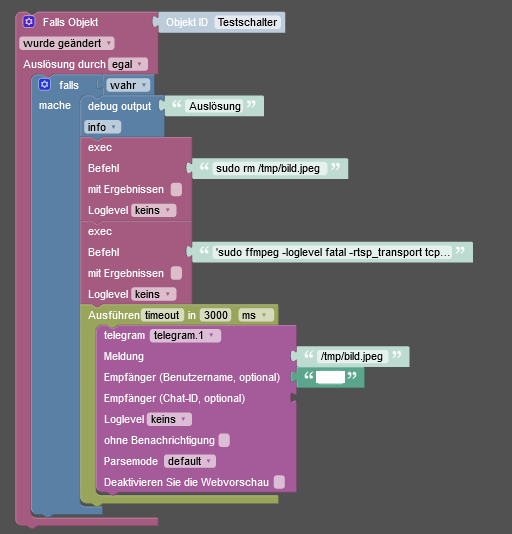
                                  Das Blockly, in dem ich den Befehl zur Fotoablage verwendet habe löscht weder, noch hat es jemals ein Bild abgelegt. Es sendet nur das Foto, dass ich vorher über den Putty Befehl abgelegt hatte.

                                  Bei der JS Variante bekomme ich einen Kompilierungsfehler in Zeile 15. Ich vermute wegen der Hochkommas in der Mitte.
                                  c48fcb9b-6257-465a-93b8-3f71093feabe-grafik.png

                                  var timeout;
                                  7
                                  
                                  //Installation  apt-get update dann apt-get install ffmpeg
                                   
                                  
                                  on({id: '0_userdata.0.Testschalter', val: true}, async function (obj) {
                                  
                                    var value = obj.state.val;
                                  
                                    var oldValue = obj.oldState.val;
                                  
                                   // exec('sudo ffmpeg -y -i rtsp://user:pass@192.168.178.166:554/live/ch0/ -t 8 -f mp4 -vcodec libx264 -pix_fmt yuv420p -an -vf scale=w=1280:h=738:force_original_aspect_ratio=decrease -r 10 /tmp/bild.mp4');
                                  
                                    exec('sudo ffmpeg -loglevel fatal -rtsp_transport tcp -ii 'rtsp://user:pass@192.168.178.166:554/live/ch0' -f image2 -vframes 1 -pix_fmt yuvj420p /tmp/bild.jpeg');
                                  
                                  
                                    timeout = setTimeout(async function () {
                                  
                                      sendTo("telegram.1", "send", {
                                  
                                          text: '/tmp/bild.jpeg',
                                  
                                          disable_notification: true
                                  
                                      });
                                  
                                    }, 15000);
                                  
                                  });
                                  
                                  1 Reply Last reply
                                  0
                                  • GlasfaserG Online
                                    GlasfaserG Online
                                    Glasfaser
                                    wrote on last edited by Glasfaser
                                    #145

                                    @uhu01

                                    in Zeile 15. Ich vermute wegen der Hochkommas in der Mitte.

                                    im Blockly , ändere auf , ohne '

                                    sudo ffmpeg -loglevel fatal -rtsp_transport tcp -i rtsp://FxSdL8f6:m9rKEcC@192.168.178.166:554/live/ch0 -f image2 -vframes 1 -pix_fmt yuvj420p /home/bild.jpeg
                                    

                                    Synology 918+ 16GB - ioBroker in Docker v9 , VISO auf Trekstor Primebook C13 13,3" , Hikvision Domkameras mit Surveillance Station .. CCU RaspberryMatic in Synology VM .. Zigbee CC2538+CC2592 .. Sonoff .. KNX .. Modbus ..


                                    UHU01U 1 Reply Last reply
                                    0
                                    • GlasfaserG Glasfaser

                                      @uhu01

                                      in Zeile 15. Ich vermute wegen der Hochkommas in der Mitte.

                                      im Blockly , ändere auf , ohne '

                                      sudo ffmpeg -loglevel fatal -rtsp_transport tcp -i rtsp://FxSdL8f6:m9rKEcC@192.168.178.166:554/live/ch0 -f image2 -vframes 1 -pix_fmt yuvj420p /home/bild.jpeg
                                      
                                      UHU01U Offline
                                      UHU01U Offline
                                      UHU01
                                      wrote on last edited by
                                      #146

                                      @glasfaser
                                      Nichts zu machen. Beide Befehle funktionieren über Putty. Aus dem Blockly heraus passiert aber nichts (außer der Telegram Versand).

                                      <xml xmlns="https://developers.google.com/blockly/xml">
                                        <variables>
                                          <variable type="timeout" id="timeout">timeout</variable>
                                        </variables>
                                        <block type="on_ext" id="1GbHG!B#J@}|7P.az3EG" x="5" y="-1324">
                                          <mutation xmlns="http://www.w3.org/1999/xhtml" items="1"></mutation>
                                          <field name="CONDITION">ne</field>
                                          <field name="ACK_CONDITION"></field>
                                          <value name="OID0">
                                            <shadow type="field_oid" id="iTK;8eqeV2xQkN+QJ9TF">
                                              <field name="oid">0_userdata.0.Testschalter</field>
                                            </shadow>
                                          </value>
                                          <statement name="STATEMENT">
                                            <block type="controls_if" id=",E+)WRA_=k%0lckb]:h[">
                                              <value name="IF0">
                                                <block type="logic_boolean" id=":W8j?iohfcdV4;W)j-:+">
                                                  <field name="BOOL">TRUE</field>
                                                </block>
                                              </value>
                                              <statement name="DO0">
                                                <block type="debug" id="}8RCQT8,f)4Z_@C)y|jz">
                                                  <field name="Severity">log</field>
                                                  <value name="TEXT">
                                                    <shadow type="text" id="-rVRQ4^8Kdn,N2(0%6`;">
                                                      <field name="TEXT">Auslösung</field>
                                                    </shadow>
                                                  </value>
                                                </block>
                                              </statement>
                                              <next>
                                                <block type="exec" id="fm/.+zLn;3lyLZC=l=DZ">
                                                  <mutation xmlns="http://www.w3.org/1999/xhtml" with_statement="false"></mutation>
                                                  <field name="WITH_STATEMENT">FALSE</field>
                                                  <field name="LOG">debug</field>
                                                  <value name="COMMAND">
                                                    <shadow type="text" id="6XpaZ{GR9!n:*-ue?ELc">
                                                      <field name="TEXT">sudo rm  /tmp/bild.jpeg</field>
                                                    </shadow>
                                                  </value>
                                                  <next>
                                                    <block type="exec" id="0?HLe|@]G@3[q4L[tx|t">
                                                      <mutation xmlns="http://www.w3.org/1999/xhtml" with_statement="false"></mutation>
                                                      <field name="WITH_STATEMENT">FALSE</field>
                                                      <field name="LOG">debug</field>
                                                      <value name="COMMAND">
                                                        <shadow type="text" id=".#9er8iN6K=urJvj_Uo|">
                                                          <field name="TEXT">sudo ffmpeg -loglevel fatal -rtsp_transport tcp -i rtsp://user:pass@192.168.178.166:554/live/ch0 -f image2 -vframes 1 -pix_fmt yuvj420p /tmp/bild.jpeg</field>
                                                        </shadow>
                                                      </value>
                                                      <next>
                                                        <block type="timeouts_settimeout" id="9J*b:4r8O.XG.h{=|~/*">
                                                          <field name="NAME">timeout</field>
                                                          <field name="DELAY">3000</field>
                                                          <field name="UNIT">ms</field>
                                                          <statement name="STATEMENT">
                                                            <block type="telegram" id="RWDx)$R22ue?FT{1ER4x">
                                                              <field name="INSTANCE">.1</field>
                                                              <field name="LOG"></field>
                                                              <field name="SILENT">FALSE</field>
                                                              <field name="PARSEMODE">default</field>
                                                              <field name="DISABLE_WEB_PAGE_PREVIEW">FALSE</field>
                                                              <value name="MESSAGE">
                                                                <shadow type="text" id="+!xJbKp]),=E8{`2)2xz">
                                                                  <field name="TEXT">/tmp/bild.jpeg</field>
                                                                </shadow>
                                                              </value>
                                                              <value name="USERNAME">
                                                                <block type="text" id="MSphw!NZ_?j1UA-~h4x9">
                                                                  <field name="TEXT">xxxx</field>
                                                                </block>
                                                              </value>
                                                            </block>
                                                          </statement>
                                                        </block>
                                                      </next>
                                                    </block>
                                                  </next>
                                                </block>
                                              </next>
                                            </block>
                                          </statement>
                                        </block>
                                      </xml>
                                      

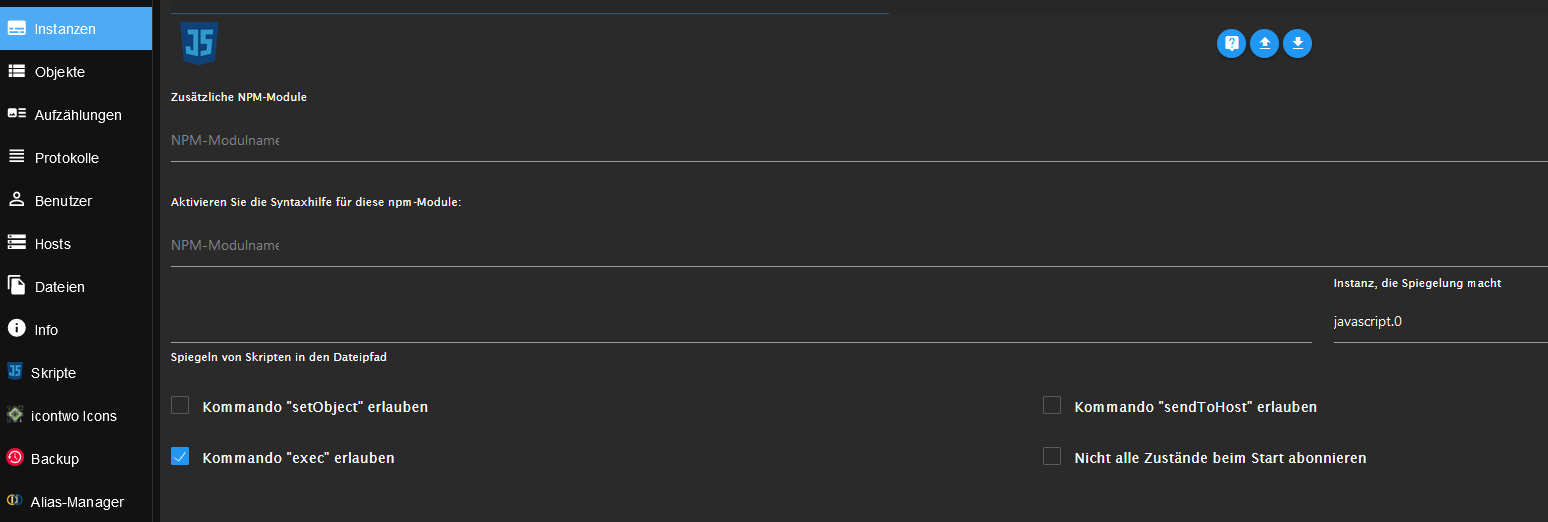
                                      exec ist in der Instanz zugelassen:

                                      91d7de0e-e45e-4535-8e35-698928521056-grafik.png

                                      GlasfaserG 2 Replies Last reply
                                      0
                                      • UHU01U UHU01

                                        @glasfaser
                                        Nichts zu machen. Beide Befehle funktionieren über Putty. Aus dem Blockly heraus passiert aber nichts (außer der Telegram Versand).

                                        <xml xmlns="https://developers.google.com/blockly/xml">
                                          <variables>
                                            <variable type="timeout" id="timeout">timeout</variable>
                                          </variables>
                                          <block type="on_ext" id="1GbHG!B#J@}|7P.az3EG" x="5" y="-1324">
                                            <mutation xmlns="http://www.w3.org/1999/xhtml" items="1"></mutation>
                                            <field name="CONDITION">ne</field>
                                            <field name="ACK_CONDITION"></field>
                                            <value name="OID0">
                                              <shadow type="field_oid" id="iTK;8eqeV2xQkN+QJ9TF">
                                                <field name="oid">0_userdata.0.Testschalter</field>
                                              </shadow>
                                            </value>
                                            <statement name="STATEMENT">
                                              <block type="controls_if" id=",E+)WRA_=k%0lckb]:h[">
                                                <value name="IF0">
                                                  <block type="logic_boolean" id=":W8j?iohfcdV4;W)j-:+">
                                                    <field name="BOOL">TRUE</field>
                                                  </block>
                                                </value>
                                                <statement name="DO0">
                                                  <block type="debug" id="}8RCQT8,f)4Z_@C)y|jz">
                                                    <field name="Severity">log</field>
                                                    <value name="TEXT">
                                                      <shadow type="text" id="-rVRQ4^8Kdn,N2(0%6`;">
                                                        <field name="TEXT">Auslösung</field>
                                                      </shadow>
                                                    </value>
                                                  </block>
                                                </statement>
                                                <next>
                                                  <block type="exec" id="fm/.+zLn;3lyLZC=l=DZ">
                                                    <mutation xmlns="http://www.w3.org/1999/xhtml" with_statement="false"></mutation>
                                                    <field name="WITH_STATEMENT">FALSE</field>
                                                    <field name="LOG">debug</field>
                                                    <value name="COMMAND">
                                                      <shadow type="text" id="6XpaZ{GR9!n:*-ue?ELc">
                                                        <field name="TEXT">sudo rm  /tmp/bild.jpeg</field>
                                                      </shadow>
                                                    </value>
                                                    <next>
                                                      <block type="exec" id="0?HLe|@]G@3[q4L[tx|t">
                                                        <mutation xmlns="http://www.w3.org/1999/xhtml" with_statement="false"></mutation>
                                                        <field name="WITH_STATEMENT">FALSE</field>
                                                        <field name="LOG">debug</field>
                                                        <value name="COMMAND">
                                                          <shadow type="text" id=".#9er8iN6K=urJvj_Uo|">
                                                            <field name="TEXT">sudo ffmpeg -loglevel fatal -rtsp_transport tcp -i rtsp://user:pass@192.168.178.166:554/live/ch0 -f image2 -vframes 1 -pix_fmt yuvj420p /tmp/bild.jpeg</field>
                                                          </shadow>
                                                        </value>
                                                        <next>
                                                          <block type="timeouts_settimeout" id="9J*b:4r8O.XG.h{=|~/*">
                                                            <field name="NAME">timeout</field>
                                                            <field name="DELAY">3000</field>
                                                            <field name="UNIT">ms</field>
                                                            <statement name="STATEMENT">
                                                              <block type="telegram" id="RWDx)$R22ue?FT{1ER4x">
                                                                <field name="INSTANCE">.1</field>
                                                                <field name="LOG"></field>
                                                                <field name="SILENT">FALSE</field>
                                                                <field name="PARSEMODE">default</field>
                                                                <field name="DISABLE_WEB_PAGE_PREVIEW">FALSE</field>
                                                                <value name="MESSAGE">
                                                                  <shadow type="text" id="+!xJbKp]),=E8{`2)2xz">
                                                                    <field name="TEXT">/tmp/bild.jpeg</field>
                                                                  </shadow>
                                                                </value>
                                                                <value name="USERNAME">
                                                                  <block type="text" id="MSphw!NZ_?j1UA-~h4x9">
                                                                    <field name="TEXT">xxxx</field>
                                                                  </block>
                                                                </value>
                                                              </block>
                                                            </statement>
                                                          </block>
                                                        </next>
                                                      </block>
                                                    </next>
                                                  </block>
                                                </next>
                                              </block>
                                            </statement>
                                          </block>
                                        </xml>
                                        

                                        exec ist in der Instanz zugelassen:

                                        91d7de0e-e45e-4535-8e35-698928521056-grafik.png

                                        GlasfaserG Online
                                        GlasfaserG Online
                                        Glasfaser
                                        wrote on last edited by
                                        #147

                                        @uhu01 sagte in [Frage BLOCKLY ] Klingel Bild per Telegram versenden / Snapshot von Cam per Telegram versenden:

                                        ffmpeg

                                        nach welcher Anleitung hast du das installiert .

                                        teste mal damit

                                        sudo -H -u iobroker ffmpeg -loglevel fatal -rtsp_transport tcp -i rtsp://user:pass@192.168.178.166:554/live/ch0 -f image2 -vframes 1 -pix_fmt yuvj420p /tmp/bild.jpeg
                                        

                                        Synology 918+ 16GB - ioBroker in Docker v9 , VISO auf Trekstor Primebook C13 13,3" , Hikvision Domkameras mit Surveillance Station .. CCU RaspberryMatic in Synology VM .. Zigbee CC2538+CC2592 .. Sonoff .. KNX .. Modbus ..

                                        1 Reply Last reply
                                        0
                                        • UHU01U UHU01

                                          @glasfaser
                                          Nichts zu machen. Beide Befehle funktionieren über Putty. Aus dem Blockly heraus passiert aber nichts (außer der Telegram Versand).

                                          <xml xmlns="https://developers.google.com/blockly/xml">
                                            <variables>
                                              <variable type="timeout" id="timeout">timeout</variable>
                                            </variables>
                                            <block type="on_ext" id="1GbHG!B#J@}|7P.az3EG" x="5" y="-1324">
                                              <mutation xmlns="http://www.w3.org/1999/xhtml" items="1"></mutation>
                                              <field name="CONDITION">ne</field>
                                              <field name="ACK_CONDITION"></field>
                                              <value name="OID0">
                                                <shadow type="field_oid" id="iTK;8eqeV2xQkN+QJ9TF">
                                                  <field name="oid">0_userdata.0.Testschalter</field>
                                                </shadow>
                                              </value>
                                              <statement name="STATEMENT">
                                                <block type="controls_if" id=",E+)WRA_=k%0lckb]:h[">
                                                  <value name="IF0">
                                                    <block type="logic_boolean" id=":W8j?iohfcdV4;W)j-:+">
                                                      <field name="BOOL">TRUE</field>
                                                    </block>
                                                  </value>
                                                  <statement name="DO0">
                                                    <block type="debug" id="}8RCQT8,f)4Z_@C)y|jz">
                                                      <field name="Severity">log</field>
                                                      <value name="TEXT">
                                                        <shadow type="text" id="-rVRQ4^8Kdn,N2(0%6`;">
                                                          <field name="TEXT">Auslösung</field>
                                                        </shadow>
                                                      </value>
                                                    </block>
                                                  </statement>
                                                  <next>
                                                    <block type="exec" id="fm/.+zLn;3lyLZC=l=DZ">
                                                      <mutation xmlns="http://www.w3.org/1999/xhtml" with_statement="false"></mutation>
                                                      <field name="WITH_STATEMENT">FALSE</field>
                                                      <field name="LOG">debug</field>
                                                      <value name="COMMAND">
                                                        <shadow type="text" id="6XpaZ{GR9!n:*-ue?ELc">
                                                          <field name="TEXT">sudo rm  /tmp/bild.jpeg</field>
                                                        </shadow>
                                                      </value>
                                                      <next>
                                                        <block type="exec" id="0?HLe|@]G@3[q4L[tx|t">
                                                          <mutation xmlns="http://www.w3.org/1999/xhtml" with_statement="false"></mutation>
                                                          <field name="WITH_STATEMENT">FALSE</field>
                                                          <field name="LOG">debug</field>
                                                          <value name="COMMAND">
                                                            <shadow type="text" id=".#9er8iN6K=urJvj_Uo|">
                                                              <field name="TEXT">sudo ffmpeg -loglevel fatal -rtsp_transport tcp -i rtsp://user:pass@192.168.178.166:554/live/ch0 -f image2 -vframes 1 -pix_fmt yuvj420p /tmp/bild.jpeg</field>
                                                            </shadow>
                                                          </value>
                                                          <next>
                                                            <block type="timeouts_settimeout" id="9J*b:4r8O.XG.h{=|~/*">
                                                              <field name="NAME">timeout</field>
                                                              <field name="DELAY">3000</field>
                                                              <field name="UNIT">ms</field>
                                                              <statement name="STATEMENT">
                                                                <block type="telegram" id="RWDx)$R22ue?FT{1ER4x">
                                                                  <field name="INSTANCE">.1</field>
                                                                  <field name="LOG"></field>
                                                                  <field name="SILENT">FALSE</field>
                                                                  <field name="PARSEMODE">default</field>
                                                                  <field name="DISABLE_WEB_PAGE_PREVIEW">FALSE</field>
                                                                  <value name="MESSAGE">
                                                                    <shadow type="text" id="+!xJbKp]),=E8{`2)2xz">
                                                                      <field name="TEXT">/tmp/bild.jpeg</field>
                                                                    </shadow>
                                                                  </value>
                                                                  <value name="USERNAME">
                                                                    <block type="text" id="MSphw!NZ_?j1UA-~h4x9">
                                                                      <field name="TEXT">xxxx</field>
                                                                    </block>
                                                                  </value>
                                                                </block>
                                                              </statement>
                                                            </block>
                                                          </next>
                                                        </block>
                                                      </next>
                                                    </block>
                                                  </next>
                                                </block>
                                              </statement>
                                            </block>
                                          </xml>
                                          

                                          exec ist in der Instanz zugelassen:

                                          91d7de0e-e45e-4535-8e35-698928521056-grafik.png

                                          GlasfaserG Online
                                          GlasfaserG Online
                                          Glasfaser
                                          wrote on last edited by
                                          #148

                                          @uhu01 sagte in [Frage BLOCKLY ] Klingel Bild per Telegram versenden / Snapshot von Cam per Telegram versenden:

                                          Beide Befehle funktionieren über Putty

                                          Ahh .... Denkfehler ..

                                          Der Benutzer Pi löst den Befehl aus

                                          im Blockly ist es ioBroker und der hat kein Recht in /tmp zu schreiben !

                                          Nimm ein Verzeichniss von ioBroker

                                          /opt/iobroker/

                                          Synology 918+ 16GB - ioBroker in Docker v9 , VISO auf Trekstor Primebook C13 13,3" , Hikvision Domkameras mit Surveillance Station .. CCU RaspberryMatic in Synology VM .. Zigbee CC2538+CC2592 .. Sonoff .. KNX .. Modbus ..

                                          UHU01U 1 Reply Last reply
                                          0

                                          Hello! It looks like you're interested in this conversation, but you don't have an account yet.

                                          Getting fed up of having to scroll through the same posts each visit? When you register for an account, you'll always come back to exactly where you were before, and choose to be notified of new replies (either via email, or push notification). You'll also be able to save bookmarks and upvote posts to show your appreciation to other community members.

                                          With your input, this post could be even better 💗

                                          Register Login
                                          Reply
                                          • Reply as topic
                                          Log in to reply
                                          • Oldest to Newest
                                          • Newest to Oldest
                                          • Most Votes


                                          Support us

                                          ioBroker
                                          Community Adapters
                                          Donate

                                          293

                                          Online

                                          32.8k

                                          Users

                                          82.7k

                                          Topics

                                          1.3m

                                          Posts
                                          Community
                                          Impressum | Datenschutz-Bestimmungen | Nutzungsbedingungen | Einwilligungseinstellungen
                                          ioBroker Community 2014-2025
                                          logo
                                          • Login

                                          • Don't have an account? Register

                                          • Login or register to search.
                                          • First post
                                            Last post
                                          0
                                          • Home
                                          • Recent
                                          • Tags
                                          • Unread 0
                                          • Categories
                                          • Unreplied
                                          • Popular
                                          • GitHub
                                          • Docu
                                          • Hilfe