Skip to content
  • Home
  • Aktuell
  • Tags
  • 0 Ungelesen 0
  • Kategorien
  • Unreplied
  • Beliebt
  • GitHub
  • Docu
  • Hilfe
Skins
  • Light
  • Brite
  • Cerulean
  • Cosmo
  • Flatly
  • Journal
  • Litera
  • Lumen
  • Lux
  • Materia
  • Minty
  • Morph
  • Pulse
  • Sandstone
  • Simplex
  • Sketchy
  • Spacelab
  • United
  • Yeti
  • Zephyr
  • Dark
  • Cyborg
  • Darkly
  • Quartz
  • Slate
  • Solar
  • Superhero
  • Vapor

  • Standard: (Kein Skin)
  • Kein Skin
Einklappen
ioBroker Logo

Community Forum

donate donate
  1. ioBroker Community Home
  2. Deutsch
  3. Einsteigerfragen
  4. NSPanel/Lovelace und Sonoff TRV

NEWS

  • UPDATE 31.10.: Amazon Alexa - ioBroker Skill läuft aus ?
    apollon77A
    apollon77
    48
    3
    8.8k

  • Monatsrückblick – September 2025
    BluefoxB
    Bluefox
    13
    1
    2.2k

  • Neues Video "KI im Smart Home" - ioBroker plus n8n
    BluefoxB
    Bluefox
    16
    1
    3.3k

NSPanel/Lovelace und Sonoff TRV

Geplant Angeheftet Gesperrt Verschoben Einsteigerfragen
34 Beiträge 3 Kommentatoren 2.8k Aufrufe 3 Watching
  • Älteste zuerst
  • Neuste zuerst
  • Meiste Stimmen
Antworten
  • In einem neuen Thema antworten
Anmelden zum Antworten
Dieses Thema wurde gelöscht. Nur Nutzer mit entsprechenden Rechten können es sehen.
  • T TT-Tom

    @darksoul
    Ja stimmt der Wert muss negiert werden. Du kannst im alias in der read Konvertierung !val eintragen. Dann wird aus true false

    D Offline
    D Offline
    DarkSoul
    schrieb am zuletzt editiert von
    #22

    @tt-tom Ähm, jaaa, nur kann ich den Alias dann nicht Speichern. Das Feld ist ausgegraut. Es geht nur Abbrechen und damit wird die Änderung dann nicht übernommen ???

    T 1 Antwort Letzte Antwort
    0
    • D DarkSoul

      @tt-tom Ähm, jaaa, nur kann ich den Alias dann nicht Speichern. Das Feld ist ausgegraut. Es geht nur Abbrechen und damit wird die Änderung dann nicht übernommen ???

      T Offline
      T Offline
      TT-Tom
      schrieb am zuletzt editiert von
      #23

      @darksoul zeige mal ein Screenshot

      Gruß Tom
      https://github.com/tt-tom17
      Wenn meine Hilfe erfolgreich war, benutze bitte das Voting unten rechts im Beitrag

      NSPanel Script Wiki
      https://github.com/joBr99/nspanel-lovelace-ui/wiki

      NSPanel Adapter Wiki
      https://github.com/ticaki/ioBroker.nspanel-lovelace-ui/wiki

      D 1 Antwort Letzte Antwort
      0
      • T TT-Tom

        @darksoul zeige mal ein Screenshot

        D Offline
        D Offline
        DarkSoul
        schrieb am zuletzt editiert von DarkSoul
        #24

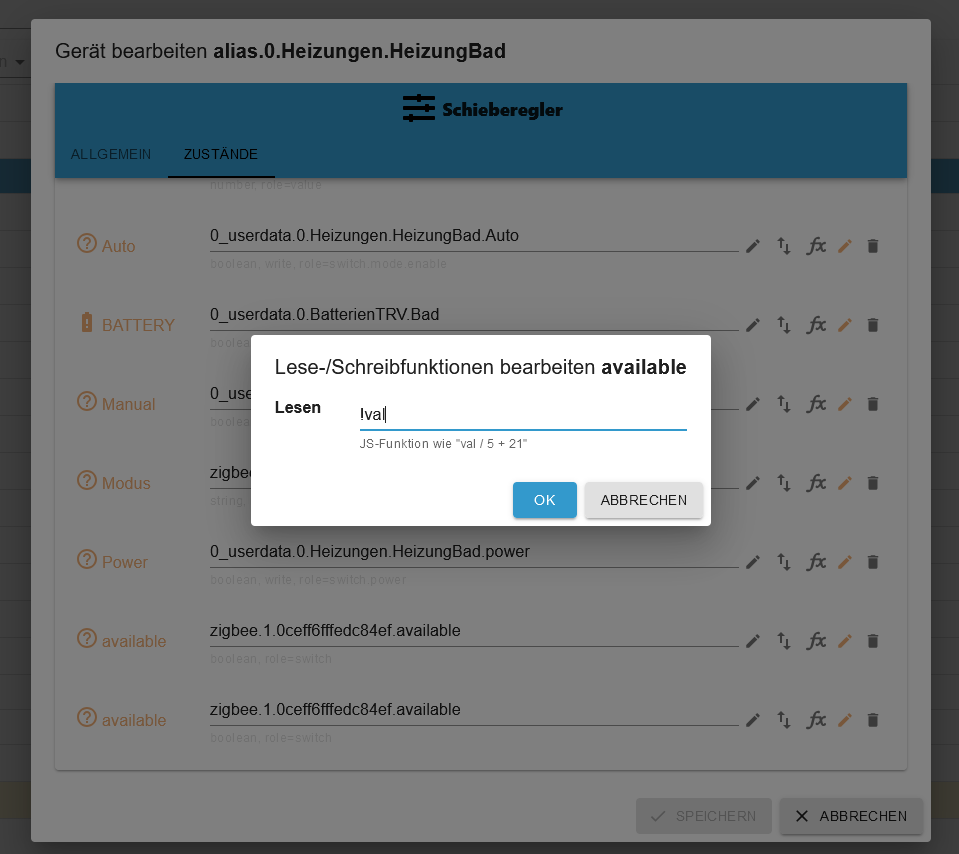
        @tt-tom
        Mit !val im fx
        Nummer1.png
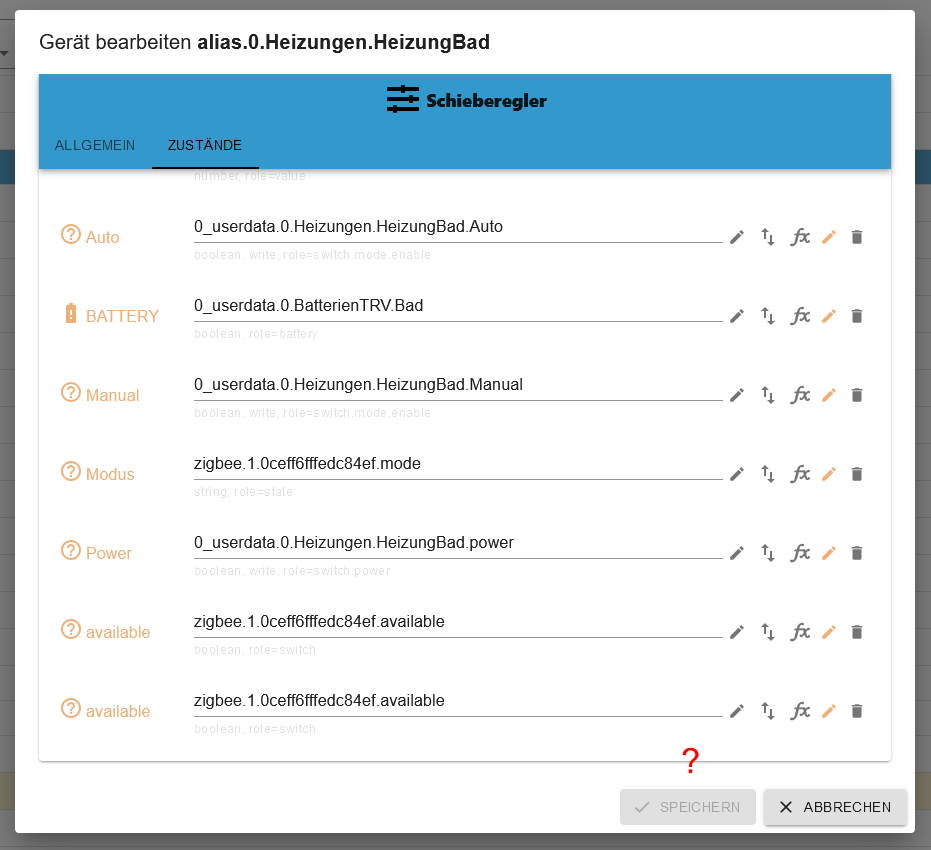
        Nach dem "OK"
        Nummer2.png
        Kein Speichern verfügbar ...

        Ich habe gerade gesehen, das der Punkt avaible zeimal drin ist, aber selbst wenn ich einen raus lösche geht es nicht.

        T ArmilarA 2 Antworten Letzte Antwort
        0
        • D DarkSoul

          @tt-tom
          Mit !val im fx
          Nummer1.png
          Nach dem "OK"
          Nummer2.png
          Kein Speichern verfügbar ...

          Ich habe gerade gesehen, das der Punkt avaible zeimal drin ist, aber selbst wenn ich einen raus lösche geht es nicht.

          T Offline
          T Offline
          TT-Tom
          schrieb am zuletzt editiert von
          #25

          @darksoul

          Ich bin persönlich nicht so begeistert von diesem Adapter. Du kannst es im Alias direkt ändern bzw. poste mal deine aktuelle Version vom Script. Dann passe ich es dort an, dann wird der Alias richtig gesetzt.

          Gruß Tom
          https://github.com/tt-tom17
          Wenn meine Hilfe erfolgreich war, benutze bitte das Voting unten rechts im Beitrag

          NSPanel Script Wiki
          https://github.com/joBr99/nspanel-lovelace-ui/wiki

          NSPanel Adapter Wiki
          https://github.com/ticaki/ioBroker.nspanel-lovelace-ui/wiki

          1 Antwort Letzte Antwort
          0
          • D DarkSoul

            @tt-tom
            Mit !val im fx
            Nummer1.png
            Nach dem "OK"
            Nummer2.png
            Kein Speichern verfügbar ...

            Ich habe gerade gesehen, das der Punkt avaible zeimal drin ist, aber selbst wenn ich einen raus lösche geht es nicht.

            ArmilarA Offline
            ArmilarA Offline
            Armilar
            Most Active Forum Testing
            schrieb am zuletzt editiert von
            #26

            @darksoul

            Ich bin ehrlich gesagt etwas verwirrt...

            Das Skript von @TT-Tom erzeugt andere Alias-States:

            2af4683a-bb73-4b4d-ba98-717884ba4c49-image.png

            Die sind auch korrekt im Case-Sensitiv (Alle Buchstaben groß) erzeugt worden.

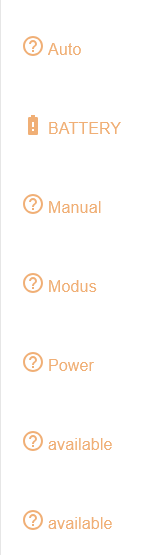
            In deinem Bild sehe ich lauter abweichende Bezeichner:

            3c06dc7e-362b-49a9-8daa-95d9ba9d4b8e-image.png

            und statt eines erwarteten Thermostaten sehe ich:

            e83e6210-9e8d-41ac-b4ea-adfd3d3fdd6f-image.png

            Installationsanleitung, Tipps, Alias-Definitionen, FAQ für das Sonoff NSPanel mit lovelace UI unter ioBroker
            https://github.com/joBr99/nspanel-lovelace-ui/wiki

            Benutzt das Voting rechts unten im Beitrag wenn er euch geholfen hat.

            T 1 Antwort Letzte Antwort
            0
            • ArmilarA Armilar

              @darksoul

              Ich bin ehrlich gesagt etwas verwirrt...

              Das Skript von @TT-Tom erzeugt andere Alias-States:

              2af4683a-bb73-4b4d-ba98-717884ba4c49-image.png

              Die sind auch korrekt im Case-Sensitiv (Alle Buchstaben groß) erzeugt worden.

              In deinem Bild sehe ich lauter abweichende Bezeichner:

              3c06dc7e-362b-49a9-8daa-95d9ba9d4b8e-image.png

              und statt eines erwarteten Thermostaten sehe ich:

              e83e6210-9e8d-41ac-b4ea-adfd3d3fdd6f-image.png

              T Offline
              T Offline
              TT-Tom
              schrieb am zuletzt editiert von
              #27

              @armilar oh ja, so genau habe ich da nicht hingeschaut. Da läuft anscheinend noch mehr schief.

              Gruß Tom
              https://github.com/tt-tom17
              Wenn meine Hilfe erfolgreich war, benutze bitte das Voting unten rechts im Beitrag

              NSPanel Script Wiki
              https://github.com/joBr99/nspanel-lovelace-ui/wiki

              NSPanel Adapter Wiki
              https://github.com/ticaki/ioBroker.nspanel-lovelace-ui/wiki

              ArmilarA 1 Antwort Letzte Antwort
              0
              • T TT-Tom

                @armilar oh ja, so genau habe ich da nicht hingeschaut. Da läuft anscheinend noch mehr schief.

                ArmilarA Offline
                ArmilarA Offline
                Armilar
                Most Active Forum Testing
                schrieb am zuletzt editiert von Armilar
                #28

                @tt-tom

                eben. Ich musste etwas schlucken, als ich selbstgebaute Typen wie available gesehen habe und weitere die hinten kleingeschrieben sind. Das NSPanelTs.ts kann nur handelsübliche Alias-States zum jeweiligen Alias-Channel auswerten (ist ja keine KI :blush:)

                Installationsanleitung, Tipps, Alias-Definitionen, FAQ für das Sonoff NSPanel mit lovelace UI unter ioBroker
                https://github.com/joBr99/nspanel-lovelace-ui/wiki

                Benutzt das Voting rechts unten im Beitrag wenn er euch geholfen hat.

                T 1 Antwort Letzte Antwort
                1
                • ArmilarA Armilar

                  @tt-tom

                  eben. Ich musste etwas schlucken, als ich selbstgebaute Typen wie available gesehen habe und weitere die hinten kleingeschrieben sind. Das NSPanelTs.ts kann nur handelsübliche Alias-States zum jeweiligen Alias-Channel auswerten (ist ja keine KI :blush:)

                  T Offline
                  T Offline
                  TT-Tom
                  schrieb am zuletzt editiert von
                  #29

                  @armilar hier sieht der Alias aber okay aus.

                  Gruß Tom
                  https://github.com/tt-tom17
                  Wenn meine Hilfe erfolgreich war, benutze bitte das Voting unten rechts im Beitrag

                  NSPanel Script Wiki
                  https://github.com/joBr99/nspanel-lovelace-ui/wiki

                  NSPanel Adapter Wiki
                  https://github.com/ticaki/ioBroker.nspanel-lovelace-ui/wiki

                  ArmilarA 1 Antwort Letzte Antwort
                  1
                  • T TT-Tom

                    @armilar hier sieht der Alias aber okay aus.

                    ArmilarA Offline
                    ArmilarA Offline
                    Armilar
                    Most Active Forum Testing
                    schrieb am zuletzt editiert von
                    #30

                    @tt-tom

                    @armilar hier sieht der Alias aber okay aus.

                    ja, da "war" es noch okay.

                    Installationsanleitung, Tipps, Alias-Definitionen, FAQ für das Sonoff NSPanel mit lovelace UI unter ioBroker
                    https://github.com/joBr99/nspanel-lovelace-ui/wiki

                    Benutzt das Voting rechts unten im Beitrag wenn er euch geholfen hat.

                    T 1 Antwort Letzte Antwort
                    0
                    • ArmilarA Armilar

                      @tt-tom

                      @armilar hier sieht der Alias aber okay aus.

                      ja, da "war" es noch okay.

                      T Offline
                      T Offline
                      TT-Tom
                      schrieb am zuletzt editiert von
                      #31

                      @armilar ich werde das Script mal anpassen, und dann schauen wir mal was kommt.

                      Gruß Tom
                      https://github.com/tt-tom17
                      Wenn meine Hilfe erfolgreich war, benutze bitte das Voting unten rechts im Beitrag

                      NSPanel Script Wiki
                      https://github.com/joBr99/nspanel-lovelace-ui/wiki

                      NSPanel Adapter Wiki
                      https://github.com/ticaki/ioBroker.nspanel-lovelace-ui/wiki

                      D 1 Antwort Letzte Antwort
                      0
                      • T TT-Tom

                        @armilar ich werde das Script mal anpassen, und dann schauen wir mal was kommt.

                        D Offline
                        D Offline
                        DarkSoul
                        schrieb am zuletzt editiert von DarkSoul
                        #32

                        @tt-tom Also mein aktuelles Skript sieht aus:

                        
                        const devicePath = 'zigbee.1.0ceff6fffedc84ef'; // Pfad zu den Thermostat Datenpunkten
                        const aliasPath = 'alias.0.Heizungen.HeizungBad'; // Pfad zu den Thermostat Alias
                        const userPath = '0_userdata.0.Heizungen.HeizungBad'; // Pfad für die Benutzerdatenpunkte
                         
                        async function createUserdata() {
                            extendObject(userPath, { type: 'folder', common: { name: 'Thermostat' }, native: {} });
                            await createStateAsync(userPath + '.lowbat', false, { type: 'boolean', write: true });
                            await createStateAsync(userPath + '.Auto', false, { type: 'boolean', write: true });
                            await createStateAsync(userPath + '.Manual', false, { type: 'boolean', write: true });
                            await createStateAsync(userPath + '.power', false, { type: 'boolean', write: true });
                        }
                        createUserdata();
                         
                        async function createAliasThermostat() {
                            extendObjectAsync(aliasPath, { type: 'channel', common: { name: 'Thermostat', role: 'thermostat' }, native: {} });
                            await createAliasAsync(aliasPath + '.UNREACH', devicePath + '.available', true, <iobJS.StateCommon>{ type: 'boolean', role: 'switch', name: 'available', write: false });
                            await createAliasAsync(aliasPath + '.LOWBAT', userPath + '.lowbat', true, <iobJS.StateCommon>{ type: 'boolean', role: 'indicator.maintenance', name: 'Battery', write: false });
                            /*await createAliasAsync(aliasPath + '.ACTUAL', devicePath + '.local_temperature', true, <iobJS.StateCommon>{ type: 'number', role: 'value.themperature', name: 'Temperature', write: false });*/
                            /*await createAliasAsync(aliasPath + '.SET', devicePath + '.occupied_heating_setpoint', true, <iobJS.StateCommon>{ type: 'number', role: 'level.themperature', name: 'Setpoint', write: true });*/
                            await createAliasAsync(aliasPath + '.AUTOMATIC', userPath + '.Auto', true, <iobJS.StateCommon>{ type: 'boolean', role: 'switch.mode.enable', name: 'Auto', write: true });
                            await createAliasAsync(aliasPath + '.MANUAL', userPath + '.Manual', true, <iobJS.StateCommon>{ type: 'boolean', role: 'switch.mode.enable', name: 'Manual', write: true });
                            await createAliasAsync(aliasPath + '.POWER', userPath + '.power', true, <iobJS.StateCommon>{ type: 'boolean', role: 'switch.power', name: 'Power', write: true });
                            await createAliasAsync(aliasPath + '.MODE', devicePath + '.mode', true, <iobJS.StateCommon>{ type: 'string', role: 'state', name: 'Modus' });
                        }
                         
                        createAliasThermostat();
                         
                        // überwacht Batterielevel
                        // kleiner als 25% wird angezeigt
                        on({ id: [devicePath + '.battery'], change: 'ne' }, function (obj) {
                            if (obj.state.val < 25) {
                                setStateAsync(userPath + '.lowbat', true);
                            } else {
                                setStateAsync(userPath + '.lowbat', false);
                            }
                        });
                         
                        // überwacht den Modus vom Thermostat
                        // setzt die Benutzerdatenpunkte entsprechend
                        on({ id: [devicePath + '.mode'], change: 'ne' }, function (obj) {
                            switch (obj.state.val) {
                                case 'auto':
                                    setStateAsync(userPath + '.Auto', true);
                                    setStateAsync(userPath + '.Manual', false);
                                    setStateAsync(userPath + '.power', true);
                                    break;
                         
                                case 'heat':
                                    setStateAsync(userPath + '.Auto', false);
                                    setStateAsync(userPath + '.Manual', true);
                                    setStateAsync(userPath + '.power', true);
                                    break;
                         
                                default:
                                    setStateAsync(userPath + '.Auto', false);
                                    setStateAsync(userPath + '.Manual', false);
                                    setStateAsync(userPath + '.power', false);
                                    break;
                            }
                        });
                         
                        // überwacht den Modus der Benutzerdatenpunkte
                        // setzt den Thermostat Modus entsprechend
                        on({ id: [userPath + '.Auto'], change: 'ne' }, function (obj) {
                            if (obj.state.val) {
                                setStateAsync(devicePath + '.mode', 'auto');
                            }
                        });
                         
                        on({ id: [userPath + '.Manual'], change: 'ne' }, function (obj) {
                            if (obj.state.val) {
                                setStateAsync(devicePath + '.mode', 'heat');
                            }
                        });
                         
                        on({ id: [userPath + '.power'], change: 'ne' }, function (obj) {
                            if (obj.state.val) {
                                setStateAsync(devicePath + '.mode', 'auto');
                            } else {
                                setStateAsync(devicePath + '.mode', 'off');
                            }
                        });


                        Die ersten drei Zeilen an die Gegebenheiten angepasst.
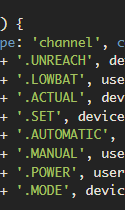
                        Und unter "async function" die beiden Zeilen abgeschaltet, da die in dem Alias nicht passten. Da habe ich die originalen DP aus dem ZigBee/Sonoff eingetragen.
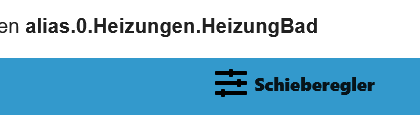
                        HeizungBad.png
                        Der Rest des Skript sieht aus wie in der Vorlage.
                        Und bis auf das Symbol für die Verbindung "unreach" läuft es auch bestens.
                        Warum der Geräte Adapter einen Schieberegler als Gerät anzeigt und nicht Thermostat weiß ich auch nicht.

                        T 1 Antwort Letzte Antwort
                        0
                        • D DarkSoul

                          @tt-tom Also mein aktuelles Skript sieht aus:

                          
                          const devicePath = 'zigbee.1.0ceff6fffedc84ef'; // Pfad zu den Thermostat Datenpunkten
                          const aliasPath = 'alias.0.Heizungen.HeizungBad'; // Pfad zu den Thermostat Alias
                          const userPath = '0_userdata.0.Heizungen.HeizungBad'; // Pfad für die Benutzerdatenpunkte
                           
                          async function createUserdata() {
                              extendObject(userPath, { type: 'folder', common: { name: 'Thermostat' }, native: {} });
                              await createStateAsync(userPath + '.lowbat', false, { type: 'boolean', write: true });
                              await createStateAsync(userPath + '.Auto', false, { type: 'boolean', write: true });
                              await createStateAsync(userPath + '.Manual', false, { type: 'boolean', write: true });
                              await createStateAsync(userPath + '.power', false, { type: 'boolean', write: true });
                          }
                          createUserdata();
                           
                          async function createAliasThermostat() {
                              extendObjectAsync(aliasPath, { type: 'channel', common: { name: 'Thermostat', role: 'thermostat' }, native: {} });
                              await createAliasAsync(aliasPath + '.UNREACH', devicePath + '.available', true, <iobJS.StateCommon>{ type: 'boolean', role: 'switch', name: 'available', write: false });
                              await createAliasAsync(aliasPath + '.LOWBAT', userPath + '.lowbat', true, <iobJS.StateCommon>{ type: 'boolean', role: 'indicator.maintenance', name: 'Battery', write: false });
                              /*await createAliasAsync(aliasPath + '.ACTUAL', devicePath + '.local_temperature', true, <iobJS.StateCommon>{ type: 'number', role: 'value.themperature', name: 'Temperature', write: false });*/
                              /*await createAliasAsync(aliasPath + '.SET', devicePath + '.occupied_heating_setpoint', true, <iobJS.StateCommon>{ type: 'number', role: 'level.themperature', name: 'Setpoint', write: true });*/
                              await createAliasAsync(aliasPath + '.AUTOMATIC', userPath + '.Auto', true, <iobJS.StateCommon>{ type: 'boolean', role: 'switch.mode.enable', name: 'Auto', write: true });
                              await createAliasAsync(aliasPath + '.MANUAL', userPath + '.Manual', true, <iobJS.StateCommon>{ type: 'boolean', role: 'switch.mode.enable', name: 'Manual', write: true });
                              await createAliasAsync(aliasPath + '.POWER', userPath + '.power', true, <iobJS.StateCommon>{ type: 'boolean', role: 'switch.power', name: 'Power', write: true });
                              await createAliasAsync(aliasPath + '.MODE', devicePath + '.mode', true, <iobJS.StateCommon>{ type: 'string', role: 'state', name: 'Modus' });
                          }
                           
                          createAliasThermostat();
                           
                          // überwacht Batterielevel
                          // kleiner als 25% wird angezeigt
                          on({ id: [devicePath + '.battery'], change: 'ne' }, function (obj) {
                              if (obj.state.val < 25) {
                                  setStateAsync(userPath + '.lowbat', true);
                              } else {
                                  setStateAsync(userPath + '.lowbat', false);
                              }
                          });
                           
                          // überwacht den Modus vom Thermostat
                          // setzt die Benutzerdatenpunkte entsprechend
                          on({ id: [devicePath + '.mode'], change: 'ne' }, function (obj) {
                              switch (obj.state.val) {
                                  case 'auto':
                                      setStateAsync(userPath + '.Auto', true);
                                      setStateAsync(userPath + '.Manual', false);
                                      setStateAsync(userPath + '.power', true);
                                      break;
                           
                                  case 'heat':
                                      setStateAsync(userPath + '.Auto', false);
                                      setStateAsync(userPath + '.Manual', true);
                                      setStateAsync(userPath + '.power', true);
                                      break;
                           
                                  default:
                                      setStateAsync(userPath + '.Auto', false);
                                      setStateAsync(userPath + '.Manual', false);
                                      setStateAsync(userPath + '.power', false);
                                      break;
                              }
                          });
                           
                          // überwacht den Modus der Benutzerdatenpunkte
                          // setzt den Thermostat Modus entsprechend
                          on({ id: [userPath + '.Auto'], change: 'ne' }, function (obj) {
                              if (obj.state.val) {
                                  setStateAsync(devicePath + '.mode', 'auto');
                              }
                          });
                           
                          on({ id: [userPath + '.Manual'], change: 'ne' }, function (obj) {
                              if (obj.state.val) {
                                  setStateAsync(devicePath + '.mode', 'heat');
                              }
                          });
                           
                          on({ id: [userPath + '.power'], change: 'ne' }, function (obj) {
                              if (obj.state.val) {
                                  setStateAsync(devicePath + '.mode', 'auto');
                              } else {
                                  setStateAsync(devicePath + '.mode', 'off');
                              }
                          });


                          Die ersten drei Zeilen an die Gegebenheiten angepasst.
                          Und unter "async function" die beiden Zeilen abgeschaltet, da die in dem Alias nicht passten. Da habe ich die originalen DP aus dem ZigBee/Sonoff eingetragen.
                          HeizungBad.png
                          Der Rest des Skript sieht aus wie in der Vorlage.
                          Und bis auf das Symbol für die Verbindung "unreach" läuft es auch bestens.
                          Warum der Geräte Adapter einen Schieberegler als Gerät anzeigt und nicht Thermostat weiß ich auch nicht.

                          T Offline
                          T Offline
                          TT-Tom
                          schrieb am zuletzt editiert von
                          #33

                          @darksoul

                          ersetze mal diese Funktion.

                          async function createAliasThermostat() {
                              extendObjectAsync(aliasPath, { type: 'channel', common: { name: 'Thermostat', role: 'thermostat' }, native: {} });
                              await createAliasAsync(aliasPath + '.UNREACH', devicePath + '.available', true, <iobJS.StateCommon>{
                                  type: 'boolean',
                                  role: 'switch',
                                  name: 'available',
                                  write: false,
                                  alias: { id: devicePath + '.available', read: '!val' },
                              });
                              await createAliasAsync(aliasPath + '.LOWBAT', userPath + '.lowbat', true, <iobJS.StateCommon>{ type: 'boolean', role: 'indicator.maintenance', name: 'Battery', write: false });
                              await createAliasAsync(aliasPath + '.ACTUAL', devicePath + '.local_temperature', true, <iobJS.StateCommon>{ type: 'number', role: 'value.themperature', name: 'Temperature', write: false });
                              await createAliasAsync(aliasPath + '.SET', devicePath + '.occupied_heating_setpoint', true, <iobJS.StateCommon>{ type: 'number', role: 'level.themperature', name: 'Setpoint', write: true });
                              await createAliasAsync(aliasPath + '.AUTOMATIC', userPath + '.Auto', true, <iobJS.StateCommon>{ type: 'boolean', role: 'switch.mode.enable', name: 'Auto', write: true });
                              await createAliasAsync(aliasPath + '.MANUAL', userPath + '.Manual', true, <iobJS.StateCommon>{ type: 'boolean', role: 'switch.mode.enable', name: 'Manual', write: true });
                              await createAliasAsync(aliasPath + '.POWER', userPath + '.power', true, <iobJS.StateCommon>{ type: 'boolean', role: 'switch.power', name: 'Power', write: true });
                              await createAliasAsync(aliasPath + '.MODE', devicePath + '.mode', true, <iobJS.StateCommon>{ type: 'string', role: 'state', name: 'Modus' });
                          }
                          

                          Gruß Tom
                          https://github.com/tt-tom17
                          Wenn meine Hilfe erfolgreich war, benutze bitte das Voting unten rechts im Beitrag

                          NSPanel Script Wiki
                          https://github.com/joBr99/nspanel-lovelace-ui/wiki

                          NSPanel Adapter Wiki
                          https://github.com/ticaki/ioBroker.nspanel-lovelace-ui/wiki

                          D 1 Antwort Letzte Antwort
                          0
                          • T TT-Tom

                            @darksoul

                            ersetze mal diese Funktion.

                            async function createAliasThermostat() {
                                extendObjectAsync(aliasPath, { type: 'channel', common: { name: 'Thermostat', role: 'thermostat' }, native: {} });
                                await createAliasAsync(aliasPath + '.UNREACH', devicePath + '.available', true, <iobJS.StateCommon>{
                                    type: 'boolean',
                                    role: 'switch',
                                    name: 'available',
                                    write: false,
                                    alias: { id: devicePath + '.available', read: '!val' },
                                });
                                await createAliasAsync(aliasPath + '.LOWBAT', userPath + '.lowbat', true, <iobJS.StateCommon>{ type: 'boolean', role: 'indicator.maintenance', name: 'Battery', write: false });
                                await createAliasAsync(aliasPath + '.ACTUAL', devicePath + '.local_temperature', true, <iobJS.StateCommon>{ type: 'number', role: 'value.themperature', name: 'Temperature', write: false });
                                await createAliasAsync(aliasPath + '.SET', devicePath + '.occupied_heating_setpoint', true, <iobJS.StateCommon>{ type: 'number', role: 'level.themperature', name: 'Setpoint', write: true });
                                await createAliasAsync(aliasPath + '.AUTOMATIC', userPath + '.Auto', true, <iobJS.StateCommon>{ type: 'boolean', role: 'switch.mode.enable', name: 'Auto', write: true });
                                await createAliasAsync(aliasPath + '.MANUAL', userPath + '.Manual', true, <iobJS.StateCommon>{ type: 'boolean', role: 'switch.mode.enable', name: 'Manual', write: true });
                                await createAliasAsync(aliasPath + '.POWER', userPath + '.power', true, <iobJS.StateCommon>{ type: 'boolean', role: 'switch.power', name: 'Power', write: true });
                                await createAliasAsync(aliasPath + '.MODE', devicePath + '.mode', true, <iobJS.StateCommon>{ type: 'string', role: 'state', name: 'Modus' });
                            }
                            
                            D Offline
                            D Offline
                            DarkSoul
                            schrieb am zuletzt editiert von
                            #34

                            @tt-tom 'nabend.
                            Scheint zu funktionieren.
                            Ich weiß nur nicht, ob der abgefragte DP auch das wiedergibt was er soll. Ich habe eine gute Stunde die Batterien aus dem Thermostat raus genommen und er hat seinen Status nicht geändert. Auch ein Mehrmaliges neustarten der Instance hat da nichts geändert. Aber das ist kein Problem des Scriptes. ZigBee halt, ist wohl ein wenig sehr träge.

                            Dank dir und schönen Abend noch

                            1 Antwort Letzte Antwort
                            1
                            Antworten
                            • In einem neuen Thema antworten
                            Anmelden zum Antworten
                            • Älteste zuerst
                            • Neuste zuerst
                            • Meiste Stimmen


                            Support us

                            ioBroker
                            Community Adapters
                            Donate

                            849

                            Online

                            32.4k

                            Benutzer

                            81.5k

                            Themen

                            1.3m

                            Beiträge
                            Community
                            Impressum | Datenschutz-Bestimmungen | Nutzungsbedingungen | Einwilligungseinstellungen
                            ioBroker Community 2014-2025
                            logo
                            • Anmelden

                            • Du hast noch kein Konto? Registrieren

                            • Anmelden oder registrieren, um zu suchen
                            • Erster Beitrag
                              Letzter Beitrag
                            0
                            • Home
                            • Aktuell
                            • Tags
                            • Ungelesen 0
                            • Kategorien
                            • Unreplied
                            • Beliebt
                            • GitHub
                            • Docu
                            • Hilfe