




NSPanel/Lovelace und Sonoff TRV
-
@tt-tom
Mit !val im fx
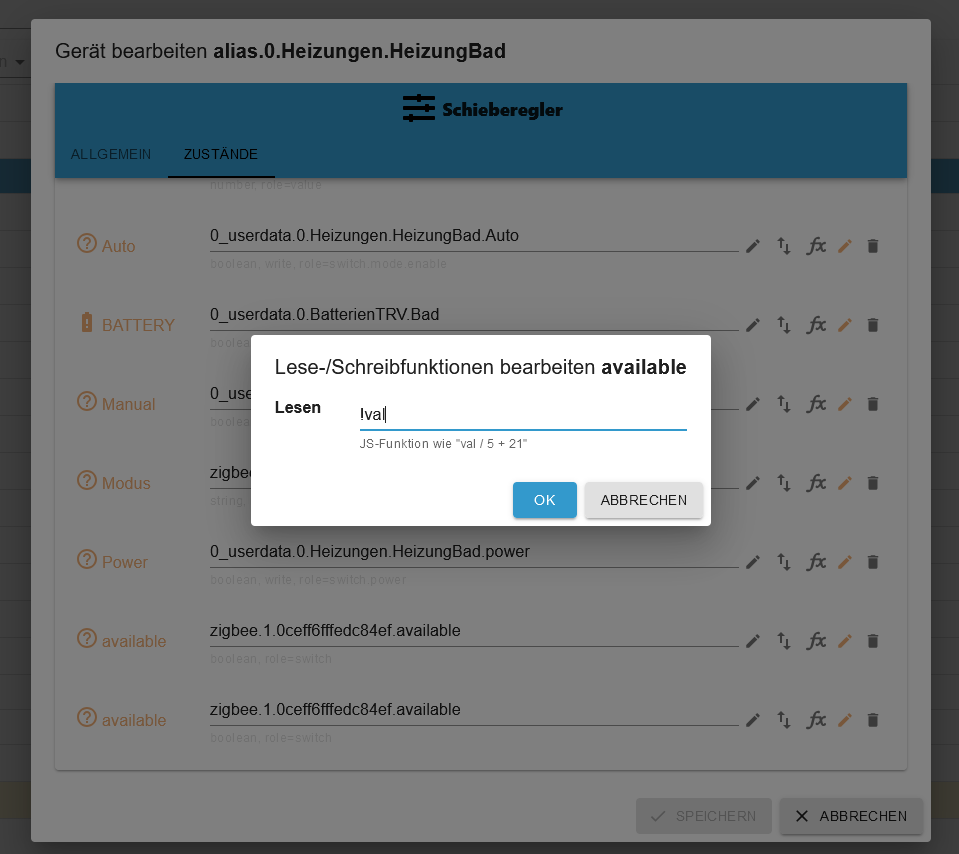
Nach dem "OK"
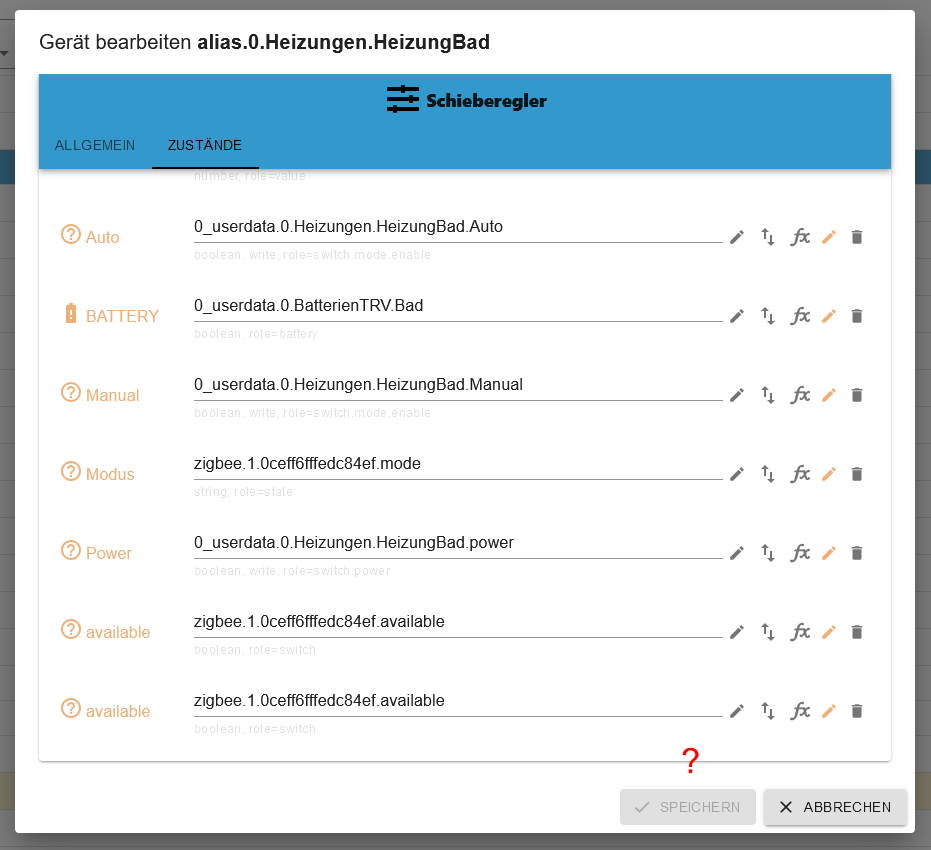
Kein Speichern verfügbar ...Ich habe gerade gesehen, das der Punkt avaible zeimal drin ist, aber selbst wenn ich einen raus lösche geht es nicht.
-
@tt-tom
Mit !val im fx
Nach dem "OK"
Kein Speichern verfügbar ...Ich habe gerade gesehen, das der Punkt avaible zeimal drin ist, aber selbst wenn ich einen raus lösche geht es nicht.
-
@armilar oh ja, so genau habe ich da nicht hingeschaut. Da läuft anscheinend noch mehr schief.
Gruß Tom
Wenn meine Hilfe erfolgreich war, benutze bitte das Voting unten rechts im Beitrag
Public Transport
https://github.com/tt-tom17/ioBroker.public-transport
https://github.com/tt-tom17/ioBroker.public-transport/wikiNSPanel Adapter Wiki
https://github.com/ticaki/ioBroker.nspanel-lovelace-ui/wiki -
@armilar oh ja, so genau habe ich da nicht hingeschaut. Da läuft anscheinend noch mehr schief.
eben. Ich musste etwas schlucken, als ich selbstgebaute Typen wie
availablegesehen habe und weitere die hinten kleingeschrieben sind. Das NSPanelTs.ts kann nur handelsübliche Alias-States zum jeweiligen Alias-Channel auswerten (ist ja keine KI )
) -
eben. Ich musste etwas schlucken, als ich selbstgebaute Typen wie
availablegesehen habe und weitere die hinten kleingeschrieben sind. Das NSPanelTs.ts kann nur handelsübliche Alias-States zum jeweiligen Alias-Channel auswerten (ist ja keine KI)Gruß Tom
Wenn meine Hilfe erfolgreich war, benutze bitte das Voting unten rechts im Beitrag
Public Transport
https://github.com/tt-tom17/ioBroker.public-transport
https://github.com/tt-tom17/ioBroker.public-transport/wikiNSPanel Adapter Wiki
https://github.com/ticaki/ioBroker.nspanel-lovelace-ui/wiki -
-
@tt-tom Also mein aktuelles Skript sieht aus:
const devicePath = 'zigbee.1.0ceff6fffedc84ef'; // Pfad zu den Thermostat Datenpunkten
const aliasPath = 'alias.0.Heizungen.HeizungBad'; // Pfad zu den Thermostat Alias
const userPath = '0_userdata.0.Heizungen.HeizungBad'; // Pfad für die Benutzerdatenpunkte

async function createUserdata() {
    extendObject(userPath, { type: 'folder', common: { name: 'Thermostat' }, native: {} });
    await createStateAsync(userPath + '.lowbat', false, { type: 'boolean', write: true });
    await createStateAsync(userPath + '.Auto', false, { type: 'boolean', write: true });
    await createStateAsync(userPath + '.Manual', false, { type: 'boolean', write: true });
    await createStateAsync(userPath + '.power', false, { type: 'boolean', write: true });
}
createUserdata();

async function createAliasThermostat() {
    extendObjectAsync(aliasPath, { type: 'channel', common: { name: 'Thermostat', role: 'thermostat' }, native: {} });
    await createAliasAsync(aliasPath + '.UNREACH', devicePath + '.available', true, <iobJS.StateCommon>{ type: 'boolean', role: 'switch', name: 'available', write: false });
    await createAliasAsync(aliasPath + '.LOWBAT', userPath + '.lowbat', true, <iobJS.StateCommon>{ type: 'boolean', role: 'indicator.maintenance', name: 'Battery', write: false });
    /*await createAliasAsync(aliasPath + '.ACTUAL', devicePath + '.local_temperature', true, <iobJS.StateCommon>{ type: 'number', role: 'value.themperature', name: 'Temperature', write: false });*/
    /*await createAliasAsync(aliasPath + '.SET', devicePath + '.occupied_heating_setpoint', true, <iobJS.StateCommon>{ type: 'number', role: 'level.themperature', name: 'Setpoint', write: true });*/
    await createAliasAsync(aliasPath + '.AUTOMATIC', userPath + '.Auto', true, <iobJS.StateCommon>{ type: 'boolean', role: 'switch.mode.enable', name: 'Auto', write: true });
    await createAliasAsync(aliasPath + '.MANUAL', userPath + '.Manual', true, <iobJS.StateCommon>{ type: 'boolean', role: 'switch.mode.enable', name: 'Manual', write: true });
    await createAliasAsync(aliasPath + '.POWER', userPath + '.power', true, <iobJS.StateCommon>{ type: 'boolean', role: 'switch.power', name: 'Power', write: true });
    await createAliasAsync(aliasPath + '.MODE', devicePath + '.mode', true, <iobJS.StateCommon>{ type: 'string', role: 'state', name: 'Modus' });
}

createAliasThermostat();

// überwacht Batterielevel
// kleiner als 25% wird angezeigt
on({ id: [devicePath + '.battery'], change: 'ne' }, function (obj) {
    if (obj.state.val < 25) {
        setStateAsync(userPath + '.lowbat', true);
    } else {
        setStateAsync(userPath + '.lowbat', false);
    }
});

// überwacht den Modus vom Thermostat
// setzt die Benutzerdatenpunkte entsprechend
on({ id: [devicePath + '.mode'], change: 'ne' }, function (obj) {
    switch (obj.state.val) {
        case 'auto':
            setStateAsync(userPath + '.Auto', true);
            setStateAsync(userPath + '.Manual', false);
            setStateAsync(userPath + '.power', true);
            break;

        case 'heat':
            setStateAsync(userPath + '.Auto', false);
            setStateAsync(userPath + '.Manual', true);
            setStateAsync(userPath + '.power', true);
            break;

        default:
            setStateAsync(userPath + '.Auto', false);
            setStateAsync(userPath + '.Manual', false);
            setStateAsync(userPath + '.power', false);
            break;
    }
});

// überwacht den Modus der Benutzerdatenpunkte
// setzt den Thermostat Modus entsprechend
on({ id: [userPath + '.Auto'], change: 'ne' }, function (obj) {
    if (obj.state.val) {
        setStateAsync(devicePath + '.mode', 'auto');
    }
});

on({ id: [userPath + '.Manual'], change: 'ne' }, function (obj) {
    if (obj.state.val) {
        setStateAsync(devicePath + '.mode', 'heat');
    }
});

on({ id: [userPath + '.power'], change: 'ne' }, function (obj) {
    if (obj.state.val) {
        setStateAsync(devicePath + '.mode', 'auto');
    } else {
        setStateAsync(devicePath + '.mode', 'off');
    }
});
Die ersten drei Zeilen an die Gegebenheiten angepasst.
Und unter "async function" die beiden Zeilen abgeschaltet, da die in dem Alias nicht passten. Da habe ich die originalen DP aus dem ZigBee/Sonoff eingetragen.

Der Rest des Skript sieht aus wie in der Vorlage.
Und bis auf das Symbol für die Verbindung "unreach" läuft es auch bestens.
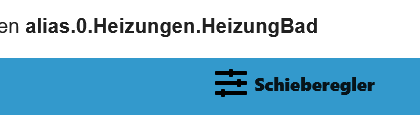
Warum der Geräte Adapter einen Schieberegler als Gerät anzeigt und nicht Thermostat weiß ich auch nicht. -
@tt-tom Also mein aktuelles Skript sieht aus:
const devicePath = 'zigbee.1.0ceff6fffedc84ef'; // Pfad zu den Thermostat Datenpunkten
const aliasPath = 'alias.0.Heizungen.HeizungBad'; // Pfad zu den Thermostat Alias
const userPath = '0_userdata.0.Heizungen.HeizungBad'; // Pfad für die Benutzerdatenpunkte

async function createUserdata() {
    extendObject(userPath, { type: 'folder', common: { name: 'Thermostat' }, native: {} });
    await createStateAsync(userPath + '.lowbat', false, { type: 'boolean', write: true });
    await createStateAsync(userPath + '.Auto', false, { type: 'boolean', write: true });
    await createStateAsync(userPath + '.Manual', false, { type: 'boolean', write: true });
    await createStateAsync(userPath + '.power', false, { type: 'boolean', write: true });
}
createUserdata();

async function createAliasThermostat() {
    extendObjectAsync(aliasPath, { type: 'channel', common: { name: 'Thermostat', role: 'thermostat' }, native: {} });
    await createAliasAsync(aliasPath + '.UNREACH', devicePath + '.available', true, <iobJS.StateCommon>{ type: 'boolean', role: 'switch', name: 'available', write: false });
    await createAliasAsync(aliasPath + '.LOWBAT', userPath + '.lowbat', true, <iobJS.StateCommon>{ type: 'boolean', role: 'indicator.maintenance', name: 'Battery', write: false });
    /*await createAliasAsync(aliasPath + '.ACTUAL', devicePath + '.local_temperature', true, <iobJS.StateCommon>{ type: 'number', role: 'value.themperature', name: 'Temperature', write: false });*/
    /*await createAliasAsync(aliasPath + '.SET', devicePath + '.occupied_heating_setpoint', true, <iobJS.StateCommon>{ type: 'number', role: 'level.themperature', name: 'Setpoint', write: true });*/
    await createAliasAsync(aliasPath + '.AUTOMATIC', userPath + '.Auto', true, <iobJS.StateCommon>{ type: 'boolean', role: 'switch.mode.enable', name: 'Auto', write: true });
    await createAliasAsync(aliasPath + '.MANUAL', userPath + '.Manual', true, <iobJS.StateCommon>{ type: 'boolean', role: 'switch.mode.enable', name: 'Manual', write: true });
    await createAliasAsync(aliasPath + '.POWER', userPath + '.power', true, <iobJS.StateCommon>{ type: 'boolean', role: 'switch.power', name: 'Power', write: true });
    await createAliasAsync(aliasPath + '.MODE', devicePath + '.mode', true, <iobJS.StateCommon>{ type: 'string', role: 'state', name: 'Modus' });
}

createAliasThermostat();

// überwacht Batterielevel
// kleiner als 25% wird angezeigt
on({ id: [devicePath + '.battery'], change: 'ne' }, function (obj) {
    if (obj.state.val < 25) {
        setStateAsync(userPath + '.lowbat', true);
    } else {
        setStateAsync(userPath + '.lowbat', false);
    }
});

// überwacht den Modus vom Thermostat
// setzt die Benutzerdatenpunkte entsprechend
on({ id: [devicePath + '.mode'], change: 'ne' }, function (obj) {
    switch (obj.state.val) {
        case 'auto':
            setStateAsync(userPath + '.Auto', true);
            setStateAsync(userPath + '.Manual', false);
            setStateAsync(userPath + '.power', true);
            break;

        case 'heat':
            setStateAsync(userPath + '.Auto', false);
            setStateAsync(userPath + '.Manual', true);
            setStateAsync(userPath + '.power', true);
            break;

        default:
            setStateAsync(userPath + '.Auto', false);
            setStateAsync(userPath + '.Manual', false);
            setStateAsync(userPath + '.power', false);
            break;
    }
});

// überwacht den Modus der Benutzerdatenpunkte
// setzt den Thermostat Modus entsprechend
on({ id: [userPath + '.Auto'], change: 'ne' }, function (obj) {
    if (obj.state.val) {
        setStateAsync(devicePath + '.mode', 'auto');
    }
});

on({ id: [userPath + '.Manual'], change: 'ne' }, function (obj) {
    if (obj.state.val) {
        setStateAsync(devicePath + '.mode', 'heat');
    }
});

on({ id: [userPath + '.power'], change: 'ne' }, function (obj) {
    if (obj.state.val) {
        setStateAsync(devicePath + '.mode', 'auto');
    } else {
        setStateAsync(devicePath + '.mode', 'off');
    }
});
Die ersten drei Zeilen an die Gegebenheiten angepasst.
Und unter "async function" die beiden Zeilen abgeschaltet, da die in dem Alias nicht passten. Da habe ich die originalen DP aus dem ZigBee/Sonoff eingetragen.
Der Rest des Skript sieht aus wie in der Vorlage.
Und bis auf das Symbol für die Verbindung "unreach" läuft es auch bestens.
Warum der Geräte Adapter einen Schieberegler als Gerät anzeigt und nicht Thermostat weiß ich auch nicht.ersetze mal diese Funktion.
async function createAliasThermostat() { extendObjectAsync(aliasPath, { type: 'channel', common: { name: 'Thermostat', role: 'thermostat' }, native: {} }); await createAliasAsync(aliasPath + '.UNREACH', devicePath + '.available', true, <iobJS.StateCommon>{ type: 'boolean', role: 'switch', name: 'available', write: false, alias: { id: devicePath + '.available', read: '!val' }, }); await createAliasAsync(aliasPath + '.LOWBAT', userPath + '.lowbat', true, <iobJS.StateCommon>{ type: 'boolean', role: 'indicator.maintenance', name: 'Battery', write: false }); await createAliasAsync(aliasPath + '.ACTUAL', devicePath + '.local_temperature', true, <iobJS.StateCommon>{ type: 'number', role: 'value.themperature', name: 'Temperature', write: false }); await createAliasAsync(aliasPath + '.SET', devicePath + '.occupied_heating_setpoint', true, <iobJS.StateCommon>{ type: 'number', role: 'level.themperature', name: 'Setpoint', write: true }); await createAliasAsync(aliasPath + '.AUTOMATIC', userPath + '.Auto', true, <iobJS.StateCommon>{ type: 'boolean', role: 'switch.mode.enable', name: 'Auto', write: true }); await createAliasAsync(aliasPath + '.MANUAL', userPath + '.Manual', true, <iobJS.StateCommon>{ type: 'boolean', role: 'switch.mode.enable', name: 'Manual', write: true }); await createAliasAsync(aliasPath + '.POWER', userPath + '.power', true, <iobJS.StateCommon>{ type: 'boolean', role: 'switch.power', name: 'Power', write: true }); await createAliasAsync(aliasPath + '.MODE', devicePath + '.mode', true, <iobJS.StateCommon>{ type: 'string', role: 'state', name: 'Modus' }); } -
ersetze mal diese Funktion.
async function createAliasThermostat() { extendObjectAsync(aliasPath, { type: 'channel', common: { name: 'Thermostat', role: 'thermostat' }, native: {} }); await createAliasAsync(aliasPath + '.UNREACH', devicePath + '.available', true, <iobJS.StateCommon>{ type: 'boolean', role: 'switch', name: 'available', write: false, alias: { id: devicePath + '.available', read: '!val' }, }); await createAliasAsync(aliasPath + '.LOWBAT', userPath + '.lowbat', true, <iobJS.StateCommon>{ type: 'boolean', role: 'indicator.maintenance', name: 'Battery', write: false }); await createAliasAsync(aliasPath + '.ACTUAL', devicePath + '.local_temperature', true, <iobJS.StateCommon>{ type: 'number', role: 'value.themperature', name: 'Temperature', write: false }); await createAliasAsync(aliasPath + '.SET', devicePath + '.occupied_heating_setpoint', true, <iobJS.StateCommon>{ type: 'number', role: 'level.themperature', name: 'Setpoint', write: true }); await createAliasAsync(aliasPath + '.AUTOMATIC', userPath + '.Auto', true, <iobJS.StateCommon>{ type: 'boolean', role: 'switch.mode.enable', name: 'Auto', write: true }); await createAliasAsync(aliasPath + '.MANUAL', userPath + '.Manual', true, <iobJS.StateCommon>{ type: 'boolean', role: 'switch.mode.enable', name: 'Manual', write: true }); await createAliasAsync(aliasPath + '.POWER', userPath + '.power', true, <iobJS.StateCommon>{ type: 'boolean', role: 'switch.power', name: 'Power', write: true }); await createAliasAsync(aliasPath + '.MODE', devicePath + '.mode', true, <iobJS.StateCommon>{ type: 'string', role: 'state', name: 'Modus' }); }@tt-tom 'nabend.
Scheint zu funktionieren.
Ich weiß nur nicht, ob der abgefragte DP auch das wiedergibt was er soll. Ich habe eine gute Stunde die Batterien aus dem Thermostat raus genommen und er hat seinen Status nicht geändert. Auch ein Mehrmaliges neustarten der Instance hat da nichts geändert. Aber das ist kein Problem des Scriptes. ZigBee halt, ist wohl ein wenig sehr träge.Dank dir und schönen Abend noch

Hey! Du scheinst an dieser Unterhaltung interessiert zu sein, hast aber noch kein Konto.
Hast du es satt, bei jedem Besuch durch die gleichen Beiträge zu scrollen? Wenn du dich für ein Konto anmeldest, kommst du immer genau dorthin zurück, wo du zuvor warst, und kannst dich über neue Antworten benachrichtigen lassen (entweder per E-Mail oder Push-Benachrichtigung). Du kannst auch Lesezeichen speichern und Beiträge positiv bewerten, um anderen Community-Mitgliedern deine Wertschätzung zu zeigen.
Mit deinem Input könnte dieser Beitrag noch besser werden 💗
Registrieren AnmeldenSupport us
363
Online33.0k
Benutzende83.7k
Themen1.3m
Beiträge