




(gelöst) linux-control lxc host klappt nicht
-
Auf meinem Proxmox System laufen diverse Linux Container. In einem LXC läuft der iobroker. Mit vis möchte ich gerne u.A. die Temperatur der Intel CPU darstellen. Das habe ich nach diesem Link versucht. Jedoch kommen keine Werte vom Proxmox Host (pve) .
Wenn ich von der LXC console des iobrokers mit SSH ( gleiche Anmeldedaten wie im linux-control Adapter ) auf den Host anmelde, kann ich die sensors Daten auslesen. Warum der Adapter
"linux-control.0 (85690) [getConnection] Host 'Proxmox' (192.168.178.44:22) seems not to be online"
ausgiebt, kann ich mir nicht erklären.Hier der log:
2024-03-24 17:57:38.521 - info: host.iobroker "system.adapter.linux-control.0" enabled
2024-03-24 17:57:38.755 - info: host.iobroker instance system.adapter.linux-control.0 started with pid 85690
2024-03-24 17:57:39.192 - debug: linux-control.0 (85690) Redis Objects: Use Redis connection: 127.0.0.1:9001
2024-03-24 17:57:39.217 - debug: linux-control.0 (85690) Objects client ready ... initialize now
2024-03-24 17:57:39.218 - debug: linux-control.0 (85690) Objects create System PubSub Client
2024-03-24 17:57:39.218 - debug: linux-control.0 (85690) Objects create User PubSub Client
2024-03-24 17:57:39.265 - debug: linux-control.0 (85690) Objects client initialize lua scripts
2024-03-24 17:57:39.283 - debug: linux-control.0 (85690) Objects connected to redis: 127.0.0.1:9001
2024-03-24 17:57:39.284 - silly: linux-control.0 (85690) redis psubscribe cfg.o.system.user.*
2024-03-24 17:57:39.310 - silly: linux-control.0 (85690) redis psubscribe cfg.o.enum.*
2024-03-24 17:57:39.310 - silly: linux-control.0 (85690) objectDB connected
2024-03-24 17:57:39.311 - debug: linux-control.0 (85690) Redis States: Use Redis connection: 127.0.0.1:9000
2024-03-24 17:57:39.366 - debug: linux-control.0 (85690) States create System PubSub Client
2024-03-24 17:57:39.367 - debug: linux-control.0 (85690) States create User PubSub Client
2024-03-24 17:57:39.435 - debug: linux-control.0 (85690) States connected to redis: 127.0.0.1:9000
2024-03-24 17:57:39.436 - silly: linux-control.0 (85690) statesDB connected
2024-03-24 17:57:39.460 - debug: linux-control.0 (85690) Plugin sentry Initialize Plugin (enabled=true)
2024-03-24 17:57:39.579 - warn: linux-control.0 (85690) Object linux-control.0.command.host is invalid: obj.common.states has an invalid type! Expected "object", received "string"
2024-03-24 17:57:39.579 - warn: linux-control.0 (85690) This object will not be created in future versions. Please report this to the developer.
2024-03-24 17:57:39.581 - warn: linux-control.0 (85690) Object linux-control.0.command.host is invalid: obj.common.states has an invalid type! Expected "object", received "string"
2024-03-24 17:57:39.581 - warn: linux-control.0 (85690) This object will not be created in future versions. Please report this to the developer.
2024-03-24 17:57:39.585 - info: linux-control.0 (85690) starting. Version 1.1.5 in /opt/iobroker/node_modules/iobroker.linux-control, node: v18.18.2, js-controller: 5.0.19
2024-03-24 17:57:39.609 - silly: linux-control.0 (85690) States system redis pmessage system.adapter.linux-control.0.logLevel/system.adapter.linux-control.0.logLevel:{"val":"silly","ack":true,"ts":1711299459605,"q":0,"from":"system.adapter.linux-control.0","lc":1711298298455}
2024-03-24 17:57:39.617 - warn: linux-control.0 (85690) Object linux-control.0.command.host is invalid: obj.common.states has an invalid type! Expected "object", received "string"
2024-03-24 17:57:39.617 - warn: linux-control.0 (85690) This object will not be created in future versions. Please report this to the developer.
2024-03-24 17:57:39.621 - info: linux-control.0 (85690) getting data from Proxmox (192.168.178.44:22, Adapter start)
2024-03-24 17:57:39.623 - debug: linux-control.0 (85690) [createObjectButton] creating datapoint 'Proxmox.refresh'
2024-03-24 17:57:39.635 - info: linux-control.0 (85690) [getConnection] Host 'Proxmox' (192.168.178.44:22) seems not to be online
2024-03-24 17:57:39.635 - debug: linux-control.0 (85690) [getConnection] Host 'Proxmox' (192.168.178.44:22) ping result: {"inputHost":"192.168.178.44","host":"socket:","alive":false,"output":"ping: socket: Operation not permitted\n","time":"unknown","times":[],"min":"unknown","max":"unknown","avg":"unknown","stddev":"unknown","packetLoss":"unknown","numeric_host":"peratio"}
2024-03-24 17:57:39.637 - debug: linux-control.0 (85690) [createObjectBoolean] creating datapoint 'Proxmox.info.is_online'
2024-03-24 17:57:39.736 - debug: linux-control.0 (85690) [createObjectString] creating datapoint 'Proxmox.info.ip'
2024-03-24 17:57:39.800 - debug: linux-control.0 (85690) [refreshHost] Proxmox (192.168.178.44:22): button 'linux-control.0.Proxmox.refresh' subscribed
2024-03-24 17:58:39.800 - info: linux-control.0 (85690) getting data from Proxmox (192.168.178.44:22)
2024-03-24 17:58:39.806 - info: linux-control.0 (85690) [getConnection] Host 'Proxmox' (192.168.178.44:22) seems not to be online
2024-03-24 17:58:39.806 - debug: linux-control.0 (85690) [getConnection] Host 'Proxmox' (192.168.178.44:22) ping result: {"inputHost":"192.168.178.44","host":"socket:","alive":false,"output":"ping: socket: Operation not permitted\n","time":"unknown","times":[],"min":"unknown","max":"unknown","avg":"unknown","stddev":"unknown","packetLoss":"unknown","numeric_host":"peratio"}
Alle Raspberry ( 5 ) gegen NUC (N100, 16GB Ram und 500GB M2 SSD, extern 2TB SSD ) mit Proxmox 8.3.3 gewechselt. Läuft absolut super !
(Iobroker, Grafana, Teslalogger, Nextcloud, go2rtc, PiHole, IOB-VIS2, Teslamate, homeassistant nur als test) -
Auf meinem Proxmox System laufen diverse Linux Container. In einem LXC läuft der iobroker. Mit vis möchte ich gerne u.A. die Temperatur der Intel CPU darstellen. Das habe ich nach diesem Link versucht. Jedoch kommen keine Werte vom Proxmox Host (pve) .
Wenn ich von der LXC console des iobrokers mit SSH ( gleiche Anmeldedaten wie im linux-control Adapter ) auf den Host anmelde, kann ich die sensors Daten auslesen. Warum der Adapter
"linux-control.0 (85690) [getConnection] Host 'Proxmox' (192.168.178.44:22) seems not to be online"
ausgiebt, kann ich mir nicht erklären.Hier der log:
2024-03-24 17:57:38.521 - info: host.iobroker "system.adapter.linux-control.0" enabled 2024-03-24 17:57:38.755 - info: host.iobroker instance system.adapter.linux-control.0 started with pid 85690 2024-03-24 17:57:39.192 - debug: linux-control.0 (85690) Redis Objects: Use Redis connection: 127.0.0.1:9001 2024-03-24 17:57:39.217 - debug: linux-control.0 (85690) Objects client ready ... initialize now 2024-03-24 17:57:39.218 - debug: linux-control.0 (85690) Objects create System PubSub Client 2024-03-24 17:57:39.218 - debug: linux-control.0 (85690) Objects create User PubSub Client 2024-03-24 17:57:39.265 - debug: linux-control.0 (85690) Objects client initialize lua scripts 2024-03-24 17:57:39.283 - debug: linux-control.0 (85690) Objects connected to redis: 127.0.0.1:9001 2024-03-24 17:57:39.284 - silly: linux-control.0 (85690) redis psubscribe cfg.o.system.user.* 2024-03-24 17:57:39.310 - silly: linux-control.0 (85690) redis psubscribe cfg.o.enum.* 2024-03-24 17:57:39.310 - silly: linux-control.0 (85690) objectDB connected 2024-03-24 17:57:39.311 - debug: linux-control.0 (85690) Redis States: Use Redis connection: 127.0.0.1:9000 2024-03-24 17:57:39.366 - debug: linux-control.0 (85690) States create System PubSub Client 2024-03-24 17:57:39.367 - debug: linux-control.0 (85690) States create User PubSub Client 2024-03-24 17:57:39.435 - debug: linux-control.0 (85690) States connected to redis: 127.0.0.1:9000 2024-03-24 17:57:39.436 - silly: linux-control.0 (85690) statesDB connected 2024-03-24 17:57:39.460 - debug: linux-control.0 (85690) Plugin sentry Initialize Plugin (enabled=true) 2024-03-24 17:57:39.579 - warn: linux-control.0 (85690) Object linux-control.0.command.host is invalid: obj.common.states has an invalid type! Expected "object", received "string" 2024-03-24 17:57:39.579 - warn: linux-control.0 (85690) This object will not be created in future versions. Please report this to the developer. 2024-03-24 17:57:39.581 - warn: linux-control.0 (85690) Object linux-control.0.command.host is invalid: obj.common.states has an invalid type! Expected "object", received "string" 2024-03-24 17:57:39.581 - warn: linux-control.0 (85690) This object will not be created in future versions. Please report this to the developer. 2024-03-24 17:57:39.585 - info: linux-control.0 (85690) starting. Version 1.1.5 in /opt/iobroker/node_modules/iobroker.linux-control, node: v18.18.2, js-controller: 5.0.19 2024-03-24 17:57:39.609 - silly: linux-control.0 (85690) States system redis pmessage system.adapter.linux-control.0.logLevel/system.adapter.linux-control.0.logLevel:{"val":"silly","ack":true,"ts":1711299459605,"q":0,"from":"system.adapter.linux-control.0","lc":1711298298455} 2024-03-24 17:57:39.617 - warn: linux-control.0 (85690) Object linux-control.0.command.host is invalid: obj.common.states has an invalid type! Expected "object", received "string" 2024-03-24 17:57:39.617 - warn: linux-control.0 (85690) This object will not be created in future versions. Please report this to the developer. 2024-03-24 17:57:39.621 - info: linux-control.0 (85690) getting data from Proxmox (192.168.178.44:22, Adapter start) 2024-03-24 17:57:39.623 - debug: linux-control.0 (85690) [createObjectButton] creating datapoint 'Proxmox.refresh' 2024-03-24 17:57:39.635 - info: linux-control.0 (85690) [getConnection] Host 'Proxmox' (192.168.178.44:22) seems not to be online 2024-03-24 17:57:39.635 - debug: linux-control.0 (85690) [getConnection] Host 'Proxmox' (192.168.178.44:22) ping result: {"inputHost":"192.168.178.44","host":"socket:","alive":false,"output":"ping: socket: Operation not permitted\n","time":"unknown","times":[],"min":"unknown","max":"unknown","avg":"unknown","stddev":"unknown","packetLoss":"unknown","numeric_host":"peratio"} 2024-03-24 17:57:39.637 - debug: linux-control.0 (85690) [createObjectBoolean] creating datapoint 'Proxmox.info.is_online' 2024-03-24 17:57:39.736 - debug: linux-control.0 (85690) [createObjectString] creating datapoint 'Proxmox.info.ip' 2024-03-24 17:57:39.800 - debug: linux-control.0 (85690) [refreshHost] Proxmox (192.168.178.44:22): button 'linux-control.0.Proxmox.refresh' subscribed 2024-03-24 17:58:39.800 - info: linux-control.0 (85690) getting data from Proxmox (192.168.178.44:22) 2024-03-24 17:58:39.806 - info: linux-control.0 (85690) [getConnection] Host 'Proxmox' (192.168.178.44:22) seems not to be online 2024-03-24 17:58:39.806 - debug: linux-control.0 (85690) [getConnection] Host 'Proxmox' (192.168.178.44:22) ping result: {"inputHost":"192.168.178.44","host":"socket:","alive":false,"output":"ping: socket: Operation not permitted\n","time":"unknown","times":[],"min":"unknown","max":"unknown","avg":"unknown","stddev":"unknown","packetLoss":"unknown","numeric_host":"peratio"}@hal sagte in linux-control lxc host klappt nicht:
Auf meinem Proxmox System laufen diverse Linux Container. In einem LXC läuft der iobroker. Mit vis möchte ich gerne u.A. die Temperatur der Intel CPU darstellen. Das habe ich nach diesem Link versucht. Jedoch kommen keine Werte vom Proxmox Host (pve) .
Wenn ich von der LXC console des iobrokers mit SSH ( gleiche Anmeldedaten wie im linux-control Adapter ) auf den Host anmelde, kann ich die sensors Daten auslesen. Warum der Adapter
"linux-control.0 (85690) [getConnection] Host 'Proxmox' (192.168.178.44:22) seems not to be online"
ausgiebt, kann ich mir nicht erklären.Hier der log:
2024-03-24 17:57:38.521 - info: host.iobroker "system.adapter.linux-control.0" enabled
2024-03-24 17:57:38.755 - info: host.iobroker instance system.adapter.linux-control.0 started with pid 85690
2024-03-24 17:57:39.192 - debug: linux-control.0 (85690) Redis Objects: Use Redis connection: 127.0.0.1:9001
2024-03-24 17:57:39.217 - debug: linux-control.0 (85690) Objects client ready ... initialize now
2024-03-24 17:57:39.218 - debug: linux-control.0 (85690) Objects create System PubSub Client
2024-03-24 17:57:39.218 - debug: linux-control.0 (85690) Objects create User PubSub Client
2024-03-24 17:57:39.265 - debug: linux-control.0 (85690) Objects client initialize lua scripts
2024-03-24 17:57:39.283 - debug: linux-control.0 (85690) Objects connected to redis: 127.0.0.1:9001
2024-03-24 17:57:39.284 - silly: linux-control.0 (85690) redis psubscribe cfg.o.system.user.*
2024-03-24 17:57:39.310 - silly: linux-control.0 (85690) redis psubscribe cfg.o.enum.*
2024-03-24 17:57:39.310 - silly: linux-control.0 (85690) objectDB connected
2024-03-24 17:57:39.311 - debug: linux-control.0 (85690) Redis States: Use Redis connection: 127.0.0.1:9000
2024-03-24 17:57:39.366 - debug: linux-control.0 (85690) States create System PubSub Client
2024-03-24 17:57:39.367 - debug: linux-control.0 (85690) States create User PubSub Client
2024-03-24 17:57:39.435 - debug: linux-control.0 (85690) States connected to redis: 127.0.0.1:9000
2024-03-24 17:57:39.436 - silly: linux-control.0 (85690) statesDB connected
2024-03-24 17:57:39.460 - debug: linux-control.0 (85690) Plugin sentry Initialize Plugin (enabled=true)
2024-03-24 17:57:39.579 - warn: linux-control.0 (85690) Object linux-control.0.command.host is invalid: obj.common.states has an invalid type! Expected "object", received "string"
2024-03-24 17:57:39.579 - warn: linux-control.0 (85690) This object will not be created in future versions. Please report this to the developer.
2024-03-24 17:57:39.581 - warn: linux-control.0 (85690) Object linux-control.0.command.host is invalid: obj.common.states has an invalid type! Expected "object", received "string"
2024-03-24 17:57:39.581 - warn: linux-control.0 (85690) This object will not be created in future versions. Please report this to the developer.
2024-03-24 17:57:39.585 - info: linux-control.0 (85690) starting. Version 1.1.5 in /opt/iobroker/node_modules/iobroker.linux-control, node: v18.18.2, js-controller: 5.0.19
2024-03-24 17:57:39.609 - silly: linux-control.0 (85690) States system redis pmessage system.adapter.linux-control.0.logLevel/system.adapter.linux-control.0.logLevel:{"val":"silly","ack":true,"ts":1711299459605,"q":0,"from":"system.adapter.linux-control.0","lc":1711298298455}
2024-03-24 17:57:39.617 - warn: linux-control.0 (85690) Object linux-control.0.command.host is invalid: obj.common.states has an invalid type! Expected "object", received "string"
2024-03-24 17:57:39.617 - warn: linux-control.0 (85690) This object will not be created in future versions. Please report this to the developer.
2024-03-24 17:57:39.621 - info: linux-control.0 (85690) getting data from Proxmox (192.168.178.44:22, Adapter start)
2024-03-24 17:57:39.623 - debug: linux-control.0 (85690) [createObjectButton] creating datapoint 'Proxmox.refresh'
2024-03-24 17:57:39.635 - info: linux-control.0 (85690) [getConnection] Host 'Proxmox' (192.168.178.44:22) seems not to be online
2024-03-24 17:57:39.635 - debug: linux-control.0 (85690) [getConnection] Host 'Proxmox' (192.168.178.44:22) ping result: {"inputHost":"192.168.178.44","host":"socket:","alive":false,"output":"ping: socket: Operation not permitted\n","time":"unknown","times":[],"min":"unknown","max":"unknown","avg":"unknown","stddev":"unknown","packetLoss":"unknown","numeric_host":"peratio"}
2024-03-24 17:57:39.637 - debug: linux-control.0 (85690) [createObjectBoolean] creating datapoint 'Proxmox.info.is_online'
2024-03-24 17:57:39.736 - debug: linux-control.0 (85690) [createObjectString] creating datapoint 'Proxmox.info.ip'
2024-03-24 17:57:39.800 - debug: linux-control.0 (85690) [refreshHost] Proxmox (192.168.178.44:22): button 'linux-control.0.Proxmox.refresh' subscribed
2024-03-24 17:58:39.800 - info: linux-control.0 (85690) getting data from Proxmox (192.168.178.44:22)
2024-03-24 17:58:39.806 - info: linux-control.0 (85690) [getConnection] Host 'Proxmox' (192.168.178.44:22) seems not to be online
2024-03-24 17:58:39.806 - debug: linux-control.0 (85690) [getConnection] Host 'Proxmox' (192.168.178.44:22) ping result: {"inputHost":"192.168.178.44","host":"socket:","alive":false,"output":"ping: socket: Operation not permitted\n","time":"unknown","times":[],"min":"unknown","max":"unknown","avg":"unknown","stddev":"unknown","packetLoss":"unknown","numeric_host":"peratio"}
Bei mir hat der linux-control neulich auch mal geflunkert. Ein Neustart des Adapters hat hier geholfen.
Proxmox und HA ...
Ich schreibe den Code nicht mehr selbst – ich schimpfe mit der KI, bis es funktioniert. -
@hal sagte in linux-control lxc host klappt nicht:
Auf meinem Proxmox System laufen diverse Linux Container. In einem LXC läuft der iobroker. Mit vis möchte ich gerne u.A. die Temperatur der Intel CPU darstellen. Das habe ich nach diesem Link versucht. Jedoch kommen keine Werte vom Proxmox Host (pve) .
Wenn ich von der LXC console des iobrokers mit SSH ( gleiche Anmeldedaten wie im linux-control Adapter ) auf den Host anmelde, kann ich die sensors Daten auslesen. Warum der Adapter
"linux-control.0 (85690) [getConnection] Host 'Proxmox' (192.168.178.44:22) seems not to be online"
ausgiebt, kann ich mir nicht erklären.Hier der log:
2024-03-24 17:57:38.521 - info: host.iobroker "system.adapter.linux-control.0" enabled
2024-03-24 17:57:38.755 - info: host.iobroker instance system.adapter.linux-control.0 started with pid 85690
2024-03-24 17:57:39.192 - debug: linux-control.0 (85690) Redis Objects: Use Redis connection: 127.0.0.1:9001
2024-03-24 17:57:39.217 - debug: linux-control.0 (85690) Objects client ready ... initialize now
2024-03-24 17:57:39.218 - debug: linux-control.0 (85690) Objects create System PubSub Client
2024-03-24 17:57:39.218 - debug: linux-control.0 (85690) Objects create User PubSub Client
2024-03-24 17:57:39.265 - debug: linux-control.0 (85690) Objects client initialize lua scripts
2024-03-24 17:57:39.283 - debug: linux-control.0 (85690) Objects connected to redis: 127.0.0.1:9001
2024-03-24 17:57:39.284 - silly: linux-control.0 (85690) redis psubscribe cfg.o.system.user.*
2024-03-24 17:57:39.310 - silly: linux-control.0 (85690) redis psubscribe cfg.o.enum.*
2024-03-24 17:57:39.310 - silly: linux-control.0 (85690) objectDB connected
2024-03-24 17:57:39.311 - debug: linux-control.0 (85690) Redis States: Use Redis connection: 127.0.0.1:9000
2024-03-24 17:57:39.366 - debug: linux-control.0 (85690) States create System PubSub Client
2024-03-24 17:57:39.367 - debug: linux-control.0 (85690) States create User PubSub Client
2024-03-24 17:57:39.435 - debug: linux-control.0 (85690) States connected to redis: 127.0.0.1:9000
2024-03-24 17:57:39.436 - silly: linux-control.0 (85690) statesDB connected
2024-03-24 17:57:39.460 - debug: linux-control.0 (85690) Plugin sentry Initialize Plugin (enabled=true)
2024-03-24 17:57:39.579 - warn: linux-control.0 (85690) Object linux-control.0.command.host is invalid: obj.common.states has an invalid type! Expected "object", received "string"
2024-03-24 17:57:39.579 - warn: linux-control.0 (85690) This object will not be created in future versions. Please report this to the developer.
2024-03-24 17:57:39.581 - warn: linux-control.0 (85690) Object linux-control.0.command.host is invalid: obj.common.states has an invalid type! Expected "object", received "string"
2024-03-24 17:57:39.581 - warn: linux-control.0 (85690) This object will not be created in future versions. Please report this to the developer.
2024-03-24 17:57:39.585 - info: linux-control.0 (85690) starting. Version 1.1.5 in /opt/iobroker/node_modules/iobroker.linux-control, node: v18.18.2, js-controller: 5.0.19
2024-03-24 17:57:39.609 - silly: linux-control.0 (85690) States system redis pmessage system.adapter.linux-control.0.logLevel/system.adapter.linux-control.0.logLevel:{"val":"silly","ack":true,"ts":1711299459605,"q":0,"from":"system.adapter.linux-control.0","lc":1711298298455}
2024-03-24 17:57:39.617 - warn: linux-control.0 (85690) Object linux-control.0.command.host is invalid: obj.common.states has an invalid type! Expected "object", received "string"
2024-03-24 17:57:39.617 - warn: linux-control.0 (85690) This object will not be created in future versions. Please report this to the developer.
2024-03-24 17:57:39.621 - info: linux-control.0 (85690) getting data from Proxmox (192.168.178.44:22, Adapter start)
2024-03-24 17:57:39.623 - debug: linux-control.0 (85690) [createObjectButton] creating datapoint 'Proxmox.refresh'
2024-03-24 17:57:39.635 - info: linux-control.0 (85690) [getConnection] Host 'Proxmox' (192.168.178.44:22) seems not to be online
2024-03-24 17:57:39.635 - debug: linux-control.0 (85690) [getConnection] Host 'Proxmox' (192.168.178.44:22) ping result: {"inputHost":"192.168.178.44","host":"socket:","alive":false,"output":"ping: socket: Operation not permitted\n","time":"unknown","times":[],"min":"unknown","max":"unknown","avg":"unknown","stddev":"unknown","packetLoss":"unknown","numeric_host":"peratio"}
2024-03-24 17:57:39.637 - debug: linux-control.0 (85690) [createObjectBoolean] creating datapoint 'Proxmox.info.is_online'
2024-03-24 17:57:39.736 - debug: linux-control.0 (85690) [createObjectString] creating datapoint 'Proxmox.info.ip'
2024-03-24 17:57:39.800 - debug: linux-control.0 (85690) [refreshHost] Proxmox (192.168.178.44:22): button 'linux-control.0.Proxmox.refresh' subscribed
2024-03-24 17:58:39.800 - info: linux-control.0 (85690) getting data from Proxmox (192.168.178.44:22)
2024-03-24 17:58:39.806 - info: linux-control.0 (85690) [getConnection] Host 'Proxmox' (192.168.178.44:22) seems not to be online
2024-03-24 17:58:39.806 - debug: linux-control.0 (85690) [getConnection] Host 'Proxmox' (192.168.178.44:22) ping result: {"inputHost":"192.168.178.44","host":"socket:","alive":false,"output":"ping: socket: Operation not permitted\n","time":"unknown","times":[],"min":"unknown","max":"unknown","avg":"unknown","stddev":"unknown","packetLoss":"unknown","numeric_host":"peratio"}
Bei mir hat der linux-control neulich auch mal geflunkert. Ein Neustart des Adapters hat hier geholfen.
@meister-mopper Den Adapter habe ich gefühlt schon 10 x neu gestartet und auch den kompletten iobroker .
-
@hal sagte in linux-control lxc host klappt nicht:
Auf meinem Proxmox System laufen diverse Linux Container. In einem LXC läuft der iobroker. Mit vis möchte ich gerne u.A. die Temperatur der Intel CPU darstellen. Das habe ich nach diesem Link versucht. Jedoch kommen keine Werte vom Proxmox Host (pve) .
Wenn ich von der LXC console des iobrokers mit SSH ( gleiche Anmeldedaten wie im linux-control Adapter ) auf den Host anmelde, kann ich die sensors Daten auslesen. Warum der Adapter
"linux-control.0 (85690) [getConnection] Host 'Proxmox' (192.168.178.44:22) seems not to be online"
ausgiebt, kann ich mir nicht erklären.Hier der log:
2024-03-24 17:57:38.521 - info: host.iobroker "system.adapter.linux-control.0" enabled
2024-03-24 17:57:38.755 - info: host.iobroker instance system.adapter.linux-control.0 started with pid 85690
2024-03-24 17:57:39.192 - debug: linux-control.0 (85690) Redis Objects: Use Redis connection: 127.0.0.1:9001
2024-03-24 17:57:39.217 - debug: linux-control.0 (85690) Objects client ready ... initialize now
2024-03-24 17:57:39.218 - debug: linux-control.0 (85690) Objects create System PubSub Client
2024-03-24 17:57:39.218 - debug: linux-control.0 (85690) Objects create User PubSub Client
2024-03-24 17:57:39.265 - debug: linux-control.0 (85690) Objects client initialize lua scripts
2024-03-24 17:57:39.283 - debug: linux-control.0 (85690) Objects connected to redis: 127.0.0.1:9001
2024-03-24 17:57:39.284 - silly: linux-control.0 (85690) redis psubscribe cfg.o.system.user.*
2024-03-24 17:57:39.310 - silly: linux-control.0 (85690) redis psubscribe cfg.o.enum.*
2024-03-24 17:57:39.310 - silly: linux-control.0 (85690) objectDB connected
2024-03-24 17:57:39.311 - debug: linux-control.0 (85690) Redis States: Use Redis connection: 127.0.0.1:9000
2024-03-24 17:57:39.366 - debug: linux-control.0 (85690) States create System PubSub Client
2024-03-24 17:57:39.367 - debug: linux-control.0 (85690) States create User PubSub Client
2024-03-24 17:57:39.435 - debug: linux-control.0 (85690) States connected to redis: 127.0.0.1:9000
2024-03-24 17:57:39.436 - silly: linux-control.0 (85690) statesDB connected
2024-03-24 17:57:39.460 - debug: linux-control.0 (85690) Plugin sentry Initialize Plugin (enabled=true)
2024-03-24 17:57:39.579 - warn: linux-control.0 (85690) Object linux-control.0.command.host is invalid: obj.common.states has an invalid type! Expected "object", received "string"
2024-03-24 17:57:39.579 - warn: linux-control.0 (85690) This object will not be created in future versions. Please report this to the developer.
2024-03-24 17:57:39.581 - warn: linux-control.0 (85690) Object linux-control.0.command.host is invalid: obj.common.states has an invalid type! Expected "object", received "string"
2024-03-24 17:57:39.581 - warn: linux-control.0 (85690) This object will not be created in future versions. Please report this to the developer.
2024-03-24 17:57:39.585 - info: linux-control.0 (85690) starting. Version 1.1.5 in /opt/iobroker/node_modules/iobroker.linux-control, node: v18.18.2, js-controller: 5.0.19
2024-03-24 17:57:39.609 - silly: linux-control.0 (85690) States system redis pmessage system.adapter.linux-control.0.logLevel/system.adapter.linux-control.0.logLevel:{"val":"silly","ack":true,"ts":1711299459605,"q":0,"from":"system.adapter.linux-control.0","lc":1711298298455}
2024-03-24 17:57:39.617 - warn: linux-control.0 (85690) Object linux-control.0.command.host is invalid: obj.common.states has an invalid type! Expected "object", received "string"
2024-03-24 17:57:39.617 - warn: linux-control.0 (85690) This object will not be created in future versions. Please report this to the developer.
2024-03-24 17:57:39.621 - info: linux-control.0 (85690) getting data from Proxmox (192.168.178.44:22, Adapter start)
2024-03-24 17:57:39.623 - debug: linux-control.0 (85690) [createObjectButton] creating datapoint 'Proxmox.refresh'
2024-03-24 17:57:39.635 - info: linux-control.0 (85690) [getConnection] Host 'Proxmox' (192.168.178.44:22) seems not to be online
2024-03-24 17:57:39.635 - debug: linux-control.0 (85690) [getConnection] Host 'Proxmox' (192.168.178.44:22) ping result: {"inputHost":"192.168.178.44","host":"socket:","alive":false,"output":"ping: socket: Operation not permitted\n","time":"unknown","times":[],"min":"unknown","max":"unknown","avg":"unknown","stddev":"unknown","packetLoss":"unknown","numeric_host":"peratio"}
2024-03-24 17:57:39.637 - debug: linux-control.0 (85690) [createObjectBoolean] creating datapoint 'Proxmox.info.is_online'
2024-03-24 17:57:39.736 - debug: linux-control.0 (85690) [createObjectString] creating datapoint 'Proxmox.info.ip'
2024-03-24 17:57:39.800 - debug: linux-control.0 (85690) [refreshHost] Proxmox (192.168.178.44:22): button 'linux-control.0.Proxmox.refresh' subscribed
2024-03-24 17:58:39.800 - info: linux-control.0 (85690) getting data from Proxmox (192.168.178.44:22)
2024-03-24 17:58:39.806 - info: linux-control.0 (85690) [getConnection] Host 'Proxmox' (192.168.178.44:22) seems not to be online
2024-03-24 17:58:39.806 - debug: linux-control.0 (85690) [getConnection] Host 'Proxmox' (192.168.178.44:22) ping result: {"inputHost":"192.168.178.44","host":"socket:","alive":false,"output":"ping: socket: Operation not permitted\n","time":"unknown","times":[],"min":"unknown","max":"unknown","avg":"unknown","stddev":"unknown","packetLoss":"unknown","numeric_host":"peratio"}
Bei mir hat der linux-control neulich auch mal geflunkert. Ein Neustart des Adapters hat hier geholfen.
@meister-mopper sagte in linux-control lxc host klappt nicht:
Operation not permitted
@HAL
MIT welchen zugangsdaten?umgestiegen von Proxmox auf Unraid
-
@meister-mopper sagte in linux-control lxc host klappt nicht:
Operation not permitted
@HAL
MIT welchen zugangsdaten?@crunchip sagte in linux-control lxc host klappt nicht:
zugangsdaten
Die Logindaten für die Host ( pve) console. Damit kann ich mich vom Linux Container ( LXC) in dem iobroker läuft am host über ssh anmelden. Der Befehl sensors bringt dann die gleiche Ausgabe wie bei direkter Ausführung auf dem Host.
Alle Raspberry ( 5 ) gegen NUC (N100, 16GB Ram und 500GB M2 SSD, extern 2TB SSD ) mit Proxmox 8.3.3 gewechselt. Läuft absolut super !
(Iobroker, Grafana, Teslalogger, Nextcloud, go2rtc, PiHole, IOB-VIS2, Teslamate, homeassistant nur als test) -
@crunchip sagte in linux-control lxc host klappt nicht:
zugangsdaten
Die Logindaten für die Host ( pve) console. Damit kann ich mich vom Linux Container ( LXC) in dem iobroker läuft am host über ssh anmelden. Der Befehl sensors bringt dann die gleiche Ausgabe wie bei direkter Ausführung auf dem Host.
@hal sagte in linux-control lxc host klappt nicht:
@crunchip sagte in linux-control lxc host klappt nicht:
zugangsdaten
Die Logindaten für die Host ( pve) console. Damit kann ich mich vom Linux Container ( LXC) in dem iobroker läuft am host über ssh anmelden. Der Befehl sensors bringt dann die gleiche Ausgabe wie bei direkter Ausführung auf dem Host.
Na dann zeig mal die Konfig vom linux-control, irgendwo muss es da doch Abweichungen zu funktionierenden Systemen geben.
Proxmox und HA ...
Ich schreibe den Code nicht mehr selbst – ich schimpfe mit der KI, bis es funktioniert. -
@hal sagte in linux-control lxc host klappt nicht:
@crunchip sagte in linux-control lxc host klappt nicht:
zugangsdaten
Die Logindaten für die Host ( pve) console. Damit kann ich mich vom Linux Container ( LXC) in dem iobroker läuft am host über ssh anmelden. Der Befehl sensors bringt dann die gleiche Ausgabe wie bei direkter Ausführung auf dem Host.
Na dann zeig mal die Konfig vom linux-control, irgendwo muss es da doch Abweichungen zu funktionierenden Systemen geben.
Alle Raspberry ( 5 ) gegen NUC (N100, 16GB Ram und 500GB M2 SSD, extern 2TB SSD ) mit Proxmox 8.3.3 gewechselt. Läuft absolut super !
(Iobroker, Grafana, Teslalogger, Nextcloud, go2rtc, PiHole, IOB-VIS2, Teslamate, homeassistant nur als test) -
@hal ,
mit root ist immer schlecht.
Leg dir ein Nutzer an und arbeite mit dem.Gruß
Walter -
@wal sagte in linux-control lxc host klappt nicht:
mit root ist immer schlecht
aber direkt auf dem Proxmox-Host ist root korrekt.
Lehrling seit 1975 !!!
Beitrag geholfen ? dann gerne ein upvote rechts unten im Beitrag klicken ;)
https://forum.iobroker.net/topic/51555/hinweise-für-gute-forenbeiträge -
@wal sagte in linux-control lxc host klappt nicht:
mit root ist immer schlecht
aber direkt auf dem Proxmox-Host ist root korrekt.
-
@wal sagte in linux-control lxc host klappt nicht:
mit root ist immer schlecht
aber direkt auf dem Proxmox-Host ist root korrekt.
-
Auf meinem Proxmox System laufen diverse Linux Container. In einem LXC läuft der iobroker. Mit vis möchte ich gerne u.A. die Temperatur der Intel CPU darstellen. Das habe ich nach diesem Link versucht. Jedoch kommen keine Werte vom Proxmox Host (pve) .
Wenn ich von der LXC console des iobrokers mit SSH ( gleiche Anmeldedaten wie im linux-control Adapter ) auf den Host anmelde, kann ich die sensors Daten auslesen. Warum der Adapter
"linux-control.0 (85690) [getConnection] Host 'Proxmox' (192.168.178.44:22) seems not to be online"
ausgiebt, kann ich mir nicht erklären.Hier der log:
2024-03-24 17:57:38.521 - info: host.iobroker "system.adapter.linux-control.0" enabled 2024-03-24 17:57:38.755 - info: host.iobroker instance system.adapter.linux-control.0 started with pid 85690 2024-03-24 17:57:39.192 - debug: linux-control.0 (85690) Redis Objects: Use Redis connection: 127.0.0.1:9001 2024-03-24 17:57:39.217 - debug: linux-control.0 (85690) Objects client ready ... initialize now 2024-03-24 17:57:39.218 - debug: linux-control.0 (85690) Objects create System PubSub Client 2024-03-24 17:57:39.218 - debug: linux-control.0 (85690) Objects create User PubSub Client 2024-03-24 17:57:39.265 - debug: linux-control.0 (85690) Objects client initialize lua scripts 2024-03-24 17:57:39.283 - debug: linux-control.0 (85690) Objects connected to redis: 127.0.0.1:9001 2024-03-24 17:57:39.284 - silly: linux-control.0 (85690) redis psubscribe cfg.o.system.user.* 2024-03-24 17:57:39.310 - silly: linux-control.0 (85690) redis psubscribe cfg.o.enum.* 2024-03-24 17:57:39.310 - silly: linux-control.0 (85690) objectDB connected 2024-03-24 17:57:39.311 - debug: linux-control.0 (85690) Redis States: Use Redis connection: 127.0.0.1:9000 2024-03-24 17:57:39.366 - debug: linux-control.0 (85690) States create System PubSub Client 2024-03-24 17:57:39.367 - debug: linux-control.0 (85690) States create User PubSub Client 2024-03-24 17:57:39.435 - debug: linux-control.0 (85690) States connected to redis: 127.0.0.1:9000 2024-03-24 17:57:39.436 - silly: linux-control.0 (85690) statesDB connected 2024-03-24 17:57:39.460 - debug: linux-control.0 (85690) Plugin sentry Initialize Plugin (enabled=true) 2024-03-24 17:57:39.579 - warn: linux-control.0 (85690) Object linux-control.0.command.host is invalid: obj.common.states has an invalid type! Expected "object", received "string" 2024-03-24 17:57:39.579 - warn: linux-control.0 (85690) This object will not be created in future versions. Please report this to the developer. 2024-03-24 17:57:39.581 - warn: linux-control.0 (85690) Object linux-control.0.command.host is invalid: obj.common.states has an invalid type! Expected "object", received "string" 2024-03-24 17:57:39.581 - warn: linux-control.0 (85690) This object will not be created in future versions. Please report this to the developer. 2024-03-24 17:57:39.585 - info: linux-control.0 (85690) starting. Version 1.1.5 in /opt/iobroker/node_modules/iobroker.linux-control, node: v18.18.2, js-controller: 5.0.19 2024-03-24 17:57:39.609 - silly: linux-control.0 (85690) States system redis pmessage system.adapter.linux-control.0.logLevel/system.adapter.linux-control.0.logLevel:{"val":"silly","ack":true,"ts":1711299459605,"q":0,"from":"system.adapter.linux-control.0","lc":1711298298455} 2024-03-24 17:57:39.617 - warn: linux-control.0 (85690) Object linux-control.0.command.host is invalid: obj.common.states has an invalid type! Expected "object", received "string" 2024-03-24 17:57:39.617 - warn: linux-control.0 (85690) This object will not be created in future versions. Please report this to the developer. 2024-03-24 17:57:39.621 - info: linux-control.0 (85690) getting data from Proxmox (192.168.178.44:22, Adapter start) 2024-03-24 17:57:39.623 - debug: linux-control.0 (85690) [createObjectButton] creating datapoint 'Proxmox.refresh' 2024-03-24 17:57:39.635 - info: linux-control.0 (85690) [getConnection] Host 'Proxmox' (192.168.178.44:22) seems not to be online 2024-03-24 17:57:39.635 - debug: linux-control.0 (85690) [getConnection] Host 'Proxmox' (192.168.178.44:22) ping result: {"inputHost":"192.168.178.44","host":"socket:","alive":false,"output":"ping: socket: Operation not permitted\n","time":"unknown","times":[],"min":"unknown","max":"unknown","avg":"unknown","stddev":"unknown","packetLoss":"unknown","numeric_host":"peratio"} 2024-03-24 17:57:39.637 - debug: linux-control.0 (85690) [createObjectBoolean] creating datapoint 'Proxmox.info.is_online' 2024-03-24 17:57:39.736 - debug: linux-control.0 (85690) [createObjectString] creating datapoint 'Proxmox.info.ip' 2024-03-24 17:57:39.800 - debug: linux-control.0 (85690) [refreshHost] Proxmox (192.168.178.44:22): button 'linux-control.0.Proxmox.refresh' subscribed 2024-03-24 17:58:39.800 - info: linux-control.0 (85690) getting data from Proxmox (192.168.178.44:22) 2024-03-24 17:58:39.806 - info: linux-control.0 (85690) [getConnection] Host 'Proxmox' (192.168.178.44:22) seems not to be online 2024-03-24 17:58:39.806 - debug: linux-control.0 (85690) [getConnection] Host 'Proxmox' (192.168.178.44:22) ping result: {"inputHost":"192.168.178.44","host":"socket:","alive":false,"output":"ping: socket: Operation not permitted\n","time":"unknown","times":[],"min":"unknown","max":"unknown","avg":"unknown","stddev":"unknown","packetLoss":"unknown","numeric_host":"peratio"}@hal sagte in linux-control lxc host klappt nicht:
Wenn ich von der LXC console des iobrokers mit SSH ( gleiche Anmeldedaten wie im linux-control Adapter ) auf den Host anmelde, kann ich die sensors Daten auslesen.
Den Satz verstehe ich nicht
Bei einem Lxc legt man sich einen User an, mit diesem hat man dann Zugriff per ssh.
Der root User hat keinen Zugriff per sshumgestiegen von Proxmox auf Unraid
-
@hal sagte in linux-control lxc host klappt nicht:
Wenn ich von der LXC console des iobrokers mit SSH ( gleiche Anmeldedaten wie im linux-control Adapter ) auf den Host anmelde, kann ich die sensors Daten auslesen.
Den Satz verstehe ich nicht
Bei einem Lxc legt man sich einen User an, mit diesem hat man dann Zugriff per ssh.
Der root User hat keinen Zugriff per ssh@crunchip sagte in linux-control lxc host klappt nicht:
Bei einem Lxc legt man sich einen User an, mit diesem hat man dann Zugriff per ssh.
und von dessen Konsole per SSH in die PVE
kein Support per PN! - Fragen im Forum stellen - Benutzt das Voting rechts unten im Beitrag wenn er euch geholfen hat.
Das Forum freut sich über eine Spende. Benutzt dazu den Spendenbutton oben rechts. Danke!
der Installationsfixer: curl -fsL https://iobroker.net/fix.sh | bash - -
@crunchip sagte in linux-control lxc host klappt nicht:
Bei einem Lxc legt man sich einen User an, mit diesem hat man dann Zugriff per ssh.
und von dessen Konsole per SSH in die PVE
@homoran vielleicht habe ich mich missverständlich ausgedrückt. Im iobroker Container melde ich mich von der Console mittel ssh am pve Host an ( root, werde ich aber noch auf user ändern). Bin dann ( immer noch im Container ) auf der Console des host (pve) und kann den command "sensors" bzw. den linux-control eigenen Befehl ausführen. Mit dem Adapter linux-control und den gleichen Eingaben klappt es nicht.
Alle Raspberry ( 5 ) gegen NUC (N100, 16GB Ram und 500GB M2 SSD, extern 2TB SSD ) mit Proxmox 8.3.3 gewechselt. Läuft absolut super !
(Iobroker, Grafana, Teslalogger, Nextcloud, go2rtc, PiHole, IOB-VIS2, Teslamate, homeassistant nur als test) -
@homoran vielleicht habe ich mich missverständlich ausgedrückt. Im iobroker Container melde ich mich von der Console mittel ssh am pve Host an ( root, werde ich aber noch auf user ändern). Bin dann ( immer noch im Container ) auf der Console des host (pve) und kann den command "sensors" bzw. den linux-control eigenen Befehl ausführen. Mit dem Adapter linux-control und den gleichen Eingaben klappt es nicht.
@hal sagte in linux-control lxc host klappt nicht:
Im iobroker Container melde ich mich von der Console mittel ssh am pve Host
welche Console? Standard hat man kein root Zugriff per ssh
oder redest du innerhalb von Proxmox auf der Gui?umgestiegen von Proxmox auf Unraid
-
@hal sagte in linux-control lxc host klappt nicht:
Im iobroker Container melde ich mich von der Console mittel ssh am pve Host
welche Console? Standard hat man kein root Zugriff per ssh
oder redest du innerhalb von Proxmox auf der Gui?@crunchip ich bin im iobroker Container (lxc) auf der shell (terminal) eingelogt. Starte ssh und melde mich mit dem root User auf der IP des Host ( pve ) an. Dann kann ich wie im Terminal im Host (pve) alle Befehle aufrufen. Wenn ich die gleichen Anmelde Daten ( ip, port, root,pw ) im Adapter linux-control eingeben, kommt u.A. im log:
"linux-control.0 (85690) [getConnection] Host 'pve' (192.168.178.44:22) seems not to be online"Vieleicht sollte ich einen anderen Weg probieren. :man-shrugging:
ps. Influxdb und grafana laufen in einem eigenen container. Auch hier kommt die gleiche Fehlermeldung im log
"linux-control.0 (85690) [getConnection] Host 'grafana' (192.168.178.55:22) seems not to be online"Das gleiche passiert auch, wenn ich versuche auf die ip des iobroker in dem der linux-control Adapter läuft, zuzugreifen. :man-facepalming:
Alle Raspberry ( 5 ) gegen NUC (N100, 16GB Ram und 500GB M2 SSD, extern 2TB SSD ) mit Proxmox 8.3.3 gewechselt. Läuft absolut super !
(Iobroker, Grafana, Teslalogger, Nextcloud, go2rtc, PiHole, IOB-VIS2, Teslamate, homeassistant nur als test) -
@crunchip ich bin im iobroker Container (lxc) auf der shell (terminal) eingelogt. Starte ssh und melde mich mit dem root User auf der IP des Host ( pve ) an. Dann kann ich wie im Terminal im Host (pve) alle Befehle aufrufen. Wenn ich die gleichen Anmelde Daten ( ip, port, root,pw ) im Adapter linux-control eingeben, kommt u.A. im log:
"linux-control.0 (85690) [getConnection] Host 'pve' (192.168.178.44:22) seems not to be online"Vieleicht sollte ich einen anderen Weg probieren. :man-shrugging:
ps. Influxdb und grafana laufen in einem eigenen container. Auch hier kommt die gleiche Fehlermeldung im log
"linux-control.0 (85690) [getConnection] Host 'grafana' (192.168.178.55:22) seems not to be online"Das gleiche passiert auch, wenn ich versuche auf die ip des iobroker in dem der linux-control Adapter läuft, zuzugreifen. :man-facepalming:
@hal sagte in linux-control lxc host klappt nicht:
ich bin im iobroker Container (lxc) auf der shell (terminal) eingelogt
Also auf deiner Proxmox Oberfläche und nicht extern über z. B Putty
@hal sagte in linux-control lxc host klappt nicht:
Vieleicht sollte ich einen anderen Weg probieren
Ja wie bereits vorgeschlagen, mit einem User, der auch die Berechtigung hat
-
@crunchip ich bin im iobroker Container (lxc) auf der shell (terminal) eingelogt. Starte ssh und melde mich mit dem root User auf der IP des Host ( pve ) an. Dann kann ich wie im Terminal im Host (pve) alle Befehle aufrufen. Wenn ich die gleichen Anmelde Daten ( ip, port, root,pw ) im Adapter linux-control eingeben, kommt u.A. im log:
"linux-control.0 (85690) [getConnection] Host 'pve' (192.168.178.44:22) seems not to be online"Vieleicht sollte ich einen anderen Weg probieren. :man-shrugging:
ps. Influxdb und grafana laufen in einem eigenen container. Auch hier kommt die gleiche Fehlermeldung im log
"linux-control.0 (85690) [getConnection] Host 'grafana' (192.168.178.55:22) seems not to be online"Das gleiche passiert auch, wenn ich versuche auf die ip des iobroker in dem der linux-control Adapter läuft, zuzugreifen. :man-facepalming:
@hal ,
installiere dir auch mal die Version 1.1.6 von Github, bei der 1.1.5 hatte ich unter Proxmox ab und zu auch Login Probleme.
Kann auch sein das die Probleme weg waren als ich in Proxmox auf feste IP umgestellt hatte, ich weis es nicht mehr.Gruß
Walter -
@hal ,
installiere dir auch mal die Version 1.1.6 von Github, bei der 1.1.5 hatte ich unter Proxmox ab und zu auch Login Probleme.
Kann auch sein das die Probleme weg waren als ich in Proxmox auf feste IP umgestellt hatte, ich weis es nicht mehr.@wal die 1.1.6 hatte ich schon
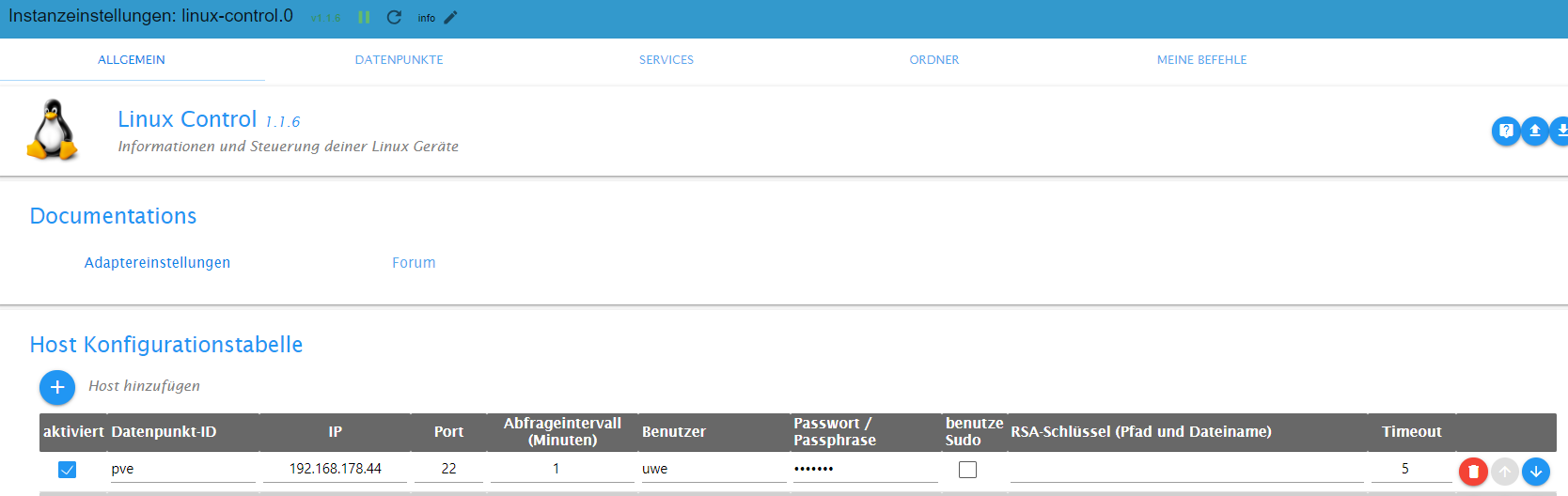
@crunchip auch mit einem user mit allen Berechtigungen, keine Veränderung. Der Adapter sagt immer die ip ist nicht zu erreichen...
Alle Raspberry ( 5 ) gegen NUC (N100, 16GB Ram und 500GB M2 SSD, extern 2TB SSD ) mit Proxmox 8.3.3 gewechselt. Läuft absolut super !
(Iobroker, Grafana, Teslalogger, Nextcloud, go2rtc, PiHole, IOB-VIS2, Teslamate, homeassistant nur als test) -
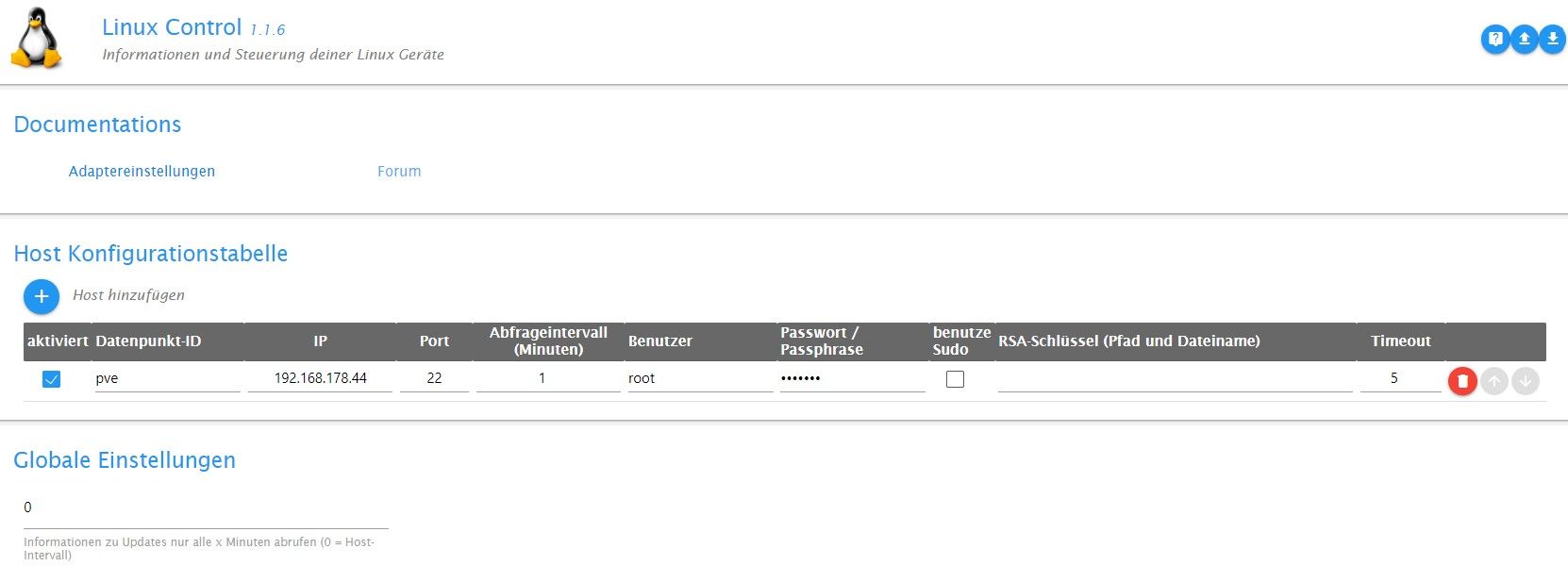
@hal da fehlt der Haken bei sudo
Edit
ich hatte auch paar Abfragen an Proxmox Konfiguriert und das ein oder andere wurde nicht mehr ausgeführt, daher ist das bei mir schon längere Zeit deaktiviert.
Ist mir gerade so eingefallen, müsst ich heut abend mal nachsehen ob die Verbindung noch klappt.umgestiegen von Proxmox auf Unraid








Hey! Du scheinst an dieser Unterhaltung interessiert zu sein, hast aber noch kein Konto.
Hast du es satt, bei jedem Besuch durch die gleichen Beiträge zu scrollen? Wenn du dich für ein Konto anmeldest, kommst du immer genau dorthin zurück, wo du zuvor warst, und kannst dich über neue Antworten benachrichtigen lassen (entweder per E-Mail oder Push-Benachrichtigung). Du kannst auch Lesezeichen speichern und Beiträge positiv bewerten, um anderen Community-Mitgliedern deine Wertschätzung zu zeigen.
Mit deinem Input könnte dieser Beitrag noch besser werden 💗
Registrieren Anmelden293
Online33.0k
Benutzende83.7k
Themen1.3m
Beiträge