Skip to content
  • Home
  • Aktuell
  • Tags
  • 0 Ungelesen 0
  • Kategorien
  • Unreplied
  • Beliebt
  • GitHub
  • Docu
  • Hilfe
Skins
  • Light
  • Brite
  • Cerulean
  • Cosmo
  • Flatly
  • Journal
  • Litera
  • Lumen
  • Lux
  • Materia
  • Minty
  • Morph
  • Pulse
  • Sandstone
  • Simplex
  • Sketchy
  • Spacelab
  • United
  • Yeti
  • Zephyr
  • Dark
  • Cyborg
  • Darkly
  • Quartz
  • Slate
  • Solar
  • Superhero
  • Vapor

  • Standard: (Kein Skin)
  • Kein Skin
Einklappen
ioBroker Logo

Community Forum

donate donate
  1. ioBroker Community Home
  2. Deutsch
  3. Skripten / Logik
  4. JavaScript
  5. [GELÖST] Skript gibt [objekt Objekt] aus

NEWS

  • UPDATE 31.10.: Amazon Alexa - ioBroker Skill läuft aus ?
    apollon77A
    apollon77
    48
    3
    8.8k

  • Monatsrückblick – September 2025
    BluefoxB
    Bluefox
    13
    1
    2.2k

  • Neues Video "KI im Smart Home" - ioBroker plus n8n
    BluefoxB
    Bluefox
    16
    1
    3.2k

[GELÖST] Skript gibt [objekt Objekt] aus

Geplant Angeheftet Gesperrt Verschoben JavaScript
javascript
51 Beiträge 6 Kommentatoren 4.5k Aufrufe 4 Watching
  • Älteste zuerst
  • Neuste zuerst
  • Meiste Stimmen
Antworten
  • In einem neuen Thema antworten
Anmelden zum Antworten
Dieses Thema wurde gelöscht. Nur Nutzer mit entsprechenden Rechten können es sehen.
  • fischi87F fischi87

    @paul53

    Sind denn da die Fehlermeldung bei .push und .sort auch behoben oder liegt die dann an einem anderen fehler?

    Danke dir erstmal.

    Ich glaube die Antwort auf die Frage nach dem „wie ist es richtig“ bzw „wie ist es am korrektesten“ wird man wohl nie beantworten können?

    haus-automatisierungH Offline
    haus-automatisierungH Offline
    haus-automatisierung
    Developer Most Active
    schrieb am zuletzt editiert von haus-automatisierung
    #33

    @fischi87 Habe mir jetzt das ganze Script nochmal angeschaut. Dein Problem ist .each und async. Das geht so nicht.

    const logging = true;
     
    const idbutton = 'shelly.0.info.update';
     
    const idAnzahlAn = 'javascript.0.Status.Shelly.UpdateFirmware.An';
    const idAnzahl = 'javascript.0.Status.Shelly.UpdateFirmware.Anzahl';
    const idText = 'javascript.0.Status.Shelly.UpdateFirmware.Text';
    const iddatenpunkt = 'javascript.0.Status.Shelly.UpdateFirmware.State';
     
    createState(idAnzahl, { // wenn benötigt: Anzahl der vorhandenen Lichter
        type: 'number',
        name: 'Anzahl aller Geräte',
        min: 0,
        def: 0,
        role: 'value'
    });
    createState(idAnzahlAn, { // Anzahl der Lichter, die auf sind als Variable unter Javascript.0 anlegen
        type: 'number',
        name: 'Anzahl Update',
        min: 0,
        def: 0,
        role: 'value'
    });
    createState(idText, { // Anzahl der brennenden Lichter und deren Namen als Variable unter Javascript.0 anlegen
        type: 'string',
        name: 'Eingeschaltete Update',
        desc: 'Namen der Update Geräte',
        def: ' ',
        role: 'value'
    });
    createState(iddatenpunkt, {
        type: 'boolean',
        name: 'State',
        role: '',
        read: true,
        write: false,
        def: false
    });
    
    const cacheSelectorState = $('shelly.0.*[state.id=*.firmware]');
    
    async function checkDevices() {
        let anzahlUpdateAn = 0;
        let anzahlUpdate = 0;
        const textUpdateAn = [];
     
        for (const id of cacheSelectorState) {
            const obj = await getObjectAsync(id);
            const oName = typeof obj.common.name === 'object' ? obj.common.name.de : obj.common.name;
            const state = await getStateAsync(id).val;
     
            if (state.val) { 
                anzahlUpdateAn++;
                textUpdateAn.push(oName); 
            }
            anzahlUpdate++;
     
            setState(iddatenpunkt, anzahlUpdateAn > 0, true);
        }
     
        textUpdateAn.sort();
     
        if (logging) log(`Text: ${JSON.stringify(textUpdateAn)}`);
        if (logging) log(`Anzahl Geräte: ${anzahlUpdate} # davon: ${anzahlUpdateAn} Updaten`);
    
        setState(idText, textUpdateAn.join(',<br>')); 
        setState(idAnzahlAn, textUpdateAn.length); 
        setState(idAnzahl, anzahlUpdate); 
     
        if (anzahlUpdateAn > 0 ) {
            sendTo('telegram.0', {
                text: `+++ Geräte Update +++\n\n + ${textUpdateAn.join(', ')}`,
                reply_markup: {
                    keyboard: [['System', 'Heizung'], ['Licht', 'Strom'], ['Multimedia', 'Szenen'], ['Home']],
                    resize_keyboard: true,
                    one_time_keyboard: true
                }
            });
        }
    }
    
    // Trigger
    cacheSelectorState.on(checkDevices);
    
    function main() {
        setTimeout(() => {
            if (logging) {
                log('Auslöser Skriptstart');
            }
    
            checkDevices();
        }, 2000);
    }
    
    function button() { 
        setTimeout(() => {
            setState(idbutton, false);
        }, 200);
    }
    
    on(idbutton, (dp) => {
        if (dp.state.val) {
            button();
        }
    });
    
    main(); // Skriptstart-Auslöser
    

    🧑‍🎓 Autor des beliebten ioBroker-Master-Kurses
    🎥 Tutorials rund um das Thema DIY-Smart-Home: https://haus-automatisierung.com/
    📚 Meine inoffizielle ioBroker Dokumentation

    paul53P fischi87F 4 Antworten Letzte Antwort
    0
    • haus-automatisierungH haus-automatisierung

      @fischi87 Habe mir jetzt das ganze Script nochmal angeschaut. Dein Problem ist .each und async. Das geht so nicht.

      const logging = true;
       
      const idbutton = 'shelly.0.info.update';
       
      const idAnzahlAn = 'javascript.0.Status.Shelly.UpdateFirmware.An';
      const idAnzahl = 'javascript.0.Status.Shelly.UpdateFirmware.Anzahl';
      const idText = 'javascript.0.Status.Shelly.UpdateFirmware.Text';
      const iddatenpunkt = 'javascript.0.Status.Shelly.UpdateFirmware.State';
       
      createState(idAnzahl, { // wenn benötigt: Anzahl der vorhandenen Lichter
          type: 'number',
          name: 'Anzahl aller Geräte',
          min: 0,
          def: 0,
          role: 'value'
      });
      createState(idAnzahlAn, { // Anzahl der Lichter, die auf sind als Variable unter Javascript.0 anlegen
          type: 'number',
          name: 'Anzahl Update',
          min: 0,
          def: 0,
          role: 'value'
      });
      createState(idText, { // Anzahl der brennenden Lichter und deren Namen als Variable unter Javascript.0 anlegen
          type: 'string',
          name: 'Eingeschaltete Update',
          desc: 'Namen der Update Geräte',
          def: ' ',
          role: 'value'
      });
      createState(iddatenpunkt, {
          type: 'boolean',
          name: 'State',
          role: '',
          read: true,
          write: false,
          def: false
      });
      
      const cacheSelectorState = $('shelly.0.*[state.id=*.firmware]');
      
      async function checkDevices() {
          let anzahlUpdateAn = 0;
          let anzahlUpdate = 0;
          const textUpdateAn = [];
       
          for (const id of cacheSelectorState) {
              const obj = await getObjectAsync(id);
              const oName = typeof obj.common.name === 'object' ? obj.common.name.de : obj.common.name;
              const state = await getStateAsync(id).val;
       
              if (state.val) { 
                  anzahlUpdateAn++;
                  textUpdateAn.push(oName); 
              }
              anzahlUpdate++;
       
              setState(iddatenpunkt, anzahlUpdateAn > 0, true);
          }
       
          textUpdateAn.sort();
       
          if (logging) log(`Text: ${JSON.stringify(textUpdateAn)}`);
          if (logging) log(`Anzahl Geräte: ${anzahlUpdate} # davon: ${anzahlUpdateAn} Updaten`);
      
          setState(idText, textUpdateAn.join(',<br>')); 
          setState(idAnzahlAn, textUpdateAn.length); 
          setState(idAnzahl, anzahlUpdate); 
       
          if (anzahlUpdateAn > 0 ) {
              sendTo('telegram.0', {
                  text: `+++ Geräte Update +++\n\n + ${textUpdateAn.join(', ')}`,
                  reply_markup: {
                      keyboard: [['System', 'Heizung'], ['Licht', 'Strom'], ['Multimedia', 'Szenen'], ['Home']],
                      resize_keyboard: true,
                      one_time_keyboard: true
                  }
              });
          }
      }
      
      // Trigger
      cacheSelectorState.on(checkDevices);
      
      function main() {
          setTimeout(() => {
              if (logging) {
                  log('Auslöser Skriptstart');
              }
      
              checkDevices();
          }, 2000);
      }
      
      function button() { 
          setTimeout(() => {
              setState(idbutton, false);
          }, 200);
      }
      
      on(idbutton, (dp) => {
          if (dp.state.val) {
              button();
          }
      });
      
      main(); // Skriptstart-Auslöser
      
      paul53P Offline
      paul53P Offline
      paul53
      schrieb am zuletzt editiert von
      #34

      @haus-automatisierung sagte: Problem ist .each und async.

      Ich kann im ersten Post kein async entdecken.

      Bitte verzichtet auf Chat-Nachrichten, denn die Handhabung ist grauenhaft !
      Produktiv: RPi 2 mit S.USV, HM-MOD-RPI und SLC-USB-Stick mit root fs

      1 Antwort Letzte Antwort
      0
      • haus-automatisierungH haus-automatisierung

        @fischi87 Habe mir jetzt das ganze Script nochmal angeschaut. Dein Problem ist .each und async. Das geht so nicht.

        const logging = true;
         
        const idbutton = 'shelly.0.info.update';
         
        const idAnzahlAn = 'javascript.0.Status.Shelly.UpdateFirmware.An';
        const idAnzahl = 'javascript.0.Status.Shelly.UpdateFirmware.Anzahl';
        const idText = 'javascript.0.Status.Shelly.UpdateFirmware.Text';
        const iddatenpunkt = 'javascript.0.Status.Shelly.UpdateFirmware.State';
         
        createState(idAnzahl, { // wenn benötigt: Anzahl der vorhandenen Lichter
            type: 'number',
            name: 'Anzahl aller Geräte',
            min: 0,
            def: 0,
            role: 'value'
        });
        createState(idAnzahlAn, { // Anzahl der Lichter, die auf sind als Variable unter Javascript.0 anlegen
            type: 'number',
            name: 'Anzahl Update',
            min: 0,
            def: 0,
            role: 'value'
        });
        createState(idText, { // Anzahl der brennenden Lichter und deren Namen als Variable unter Javascript.0 anlegen
            type: 'string',
            name: 'Eingeschaltete Update',
            desc: 'Namen der Update Geräte',
            def: ' ',
            role: 'value'
        });
        createState(iddatenpunkt, {
            type: 'boolean',
            name: 'State',
            role: '',
            read: true,
            write: false,
            def: false
        });
        
        const cacheSelectorState = $('shelly.0.*[state.id=*.firmware]');
        
        async function checkDevices() {
            let anzahlUpdateAn = 0;
            let anzahlUpdate = 0;
            const textUpdateAn = [];
         
            for (const id of cacheSelectorState) {
                const obj = await getObjectAsync(id);
                const oName = typeof obj.common.name === 'object' ? obj.common.name.de : obj.common.name;
                const state = await getStateAsync(id).val;
         
                if (state.val) { 
                    anzahlUpdateAn++;
                    textUpdateAn.push(oName); 
                }
                anzahlUpdate++;
         
                setState(iddatenpunkt, anzahlUpdateAn > 0, true);
            }
         
            textUpdateAn.sort();
         
            if (logging) log(`Text: ${JSON.stringify(textUpdateAn)}`);
            if (logging) log(`Anzahl Geräte: ${anzahlUpdate} # davon: ${anzahlUpdateAn} Updaten`);
        
            setState(idText, textUpdateAn.join(',<br>')); 
            setState(idAnzahlAn, textUpdateAn.length); 
            setState(idAnzahl, anzahlUpdate); 
         
            if (anzahlUpdateAn > 0 ) {
                sendTo('telegram.0', {
                    text: `+++ Geräte Update +++\n\n + ${textUpdateAn.join(', ')}`,
                    reply_markup: {
                        keyboard: [['System', 'Heizung'], ['Licht', 'Strom'], ['Multimedia', 'Szenen'], ['Home']],
                        resize_keyboard: true,
                        one_time_keyboard: true
                    }
                });
            }
        }
        
        // Trigger
        cacheSelectorState.on(checkDevices);
        
        function main() {
            setTimeout(() => {
                if (logging) {
                    log('Auslöser Skriptstart');
                }
        
                checkDevices();
            }, 2000);
        }
        
        function button() { 
            setTimeout(() => {
                setState(idbutton, false);
            }, 200);
        }
        
        on(idbutton, (dp) => {
            if (dp.state.val) {
                button();
            }
        });
        
        main(); // Skriptstart-Auslöser
        
        fischi87F Offline
        fischi87F Offline
        fischi87
        schrieb am zuletzt editiert von
        #35

        @haus-automatisierung

        Soviele Wege :-)

        Das ist echt viel Input. Hab noch paar solche Skripte die eigentlich laufen aber wenn ich das jetzt sehe mit 100% Wahrscheinlichkeit auch nicht richtig sind.

        Danke euch erstmal, werd heut Abend Erfolg oder Misserfolg vermelden!

        1 Antwort Letzte Antwort
        0
        • paul53P paul53

          @fischi87
          Zur Überschrift: Zeile 68

              if (logging) log("Text: " + textUpdateAn);
          

          zeigt "Text: [objekt Objekt]", da textUpdateAn ein Array enthält. Entweder

              if (logging) log("Text: " + JSON.stringify(textUpdateAn));
          

          oder

              if (logging) log(textUpdateAn);
          

          @fischi87 sagte in Skript gibt [objekt Objekt] aus:

          Sind denn da die Fehlermeldung bei .push und .sort auch behoben

          Ich sehe im ersten Post keinen Grund, weshalb es nicht funktionieren sollte.

          EDIT: Durch falsch gewählte Variablenbezeichner (textUpdateAn) kann man sich auch selbst verwirren.

          fischi87F Offline
          fischi87F Offline
          fischi87
          schrieb am zuletzt editiert von
          #36

          @paul53

          Was meinst du selber verwirren? Ich möchte die Geräte ausgeben die ein verfügbares Update haben. Wie meinst du das? Wie im Skript lass ich mir das auch als Telegram Nachricht senden, da bekomme ich auch nur [objekt Objekt] ausgegeben. Also nicht nur im log?!

          paul53P 1 Antwort Letzte Antwort
          0
          • haus-automatisierungH haus-automatisierung

            @fischi87 Habe mir jetzt das ganze Script nochmal angeschaut. Dein Problem ist .each und async. Das geht so nicht.

            const logging = true;
             
            const idbutton = 'shelly.0.info.update';
             
            const idAnzahlAn = 'javascript.0.Status.Shelly.UpdateFirmware.An';
            const idAnzahl = 'javascript.0.Status.Shelly.UpdateFirmware.Anzahl';
            const idText = 'javascript.0.Status.Shelly.UpdateFirmware.Text';
            const iddatenpunkt = 'javascript.0.Status.Shelly.UpdateFirmware.State';
             
            createState(idAnzahl, { // wenn benötigt: Anzahl der vorhandenen Lichter
                type: 'number',
                name: 'Anzahl aller Geräte',
                min: 0,
                def: 0,
                role: 'value'
            });
            createState(idAnzahlAn, { // Anzahl der Lichter, die auf sind als Variable unter Javascript.0 anlegen
                type: 'number',
                name: 'Anzahl Update',
                min: 0,
                def: 0,
                role: 'value'
            });
            createState(idText, { // Anzahl der brennenden Lichter und deren Namen als Variable unter Javascript.0 anlegen
                type: 'string',
                name: 'Eingeschaltete Update',
                desc: 'Namen der Update Geräte',
                def: ' ',
                role: 'value'
            });
            createState(iddatenpunkt, {
                type: 'boolean',
                name: 'State',
                role: '',
                read: true,
                write: false,
                def: false
            });
            
            const cacheSelectorState = $('shelly.0.*[state.id=*.firmware]');
            
            async function checkDevices() {
                let anzahlUpdateAn = 0;
                let anzahlUpdate = 0;
                const textUpdateAn = [];
             
                for (const id of cacheSelectorState) {
                    const obj = await getObjectAsync(id);
                    const oName = typeof obj.common.name === 'object' ? obj.common.name.de : obj.common.name;
                    const state = await getStateAsync(id).val;
             
                    if (state.val) { 
                        anzahlUpdateAn++;
                        textUpdateAn.push(oName); 
                    }
                    anzahlUpdate++;
             
                    setState(iddatenpunkt, anzahlUpdateAn > 0, true);
                }
             
                textUpdateAn.sort();
             
                if (logging) log(`Text: ${JSON.stringify(textUpdateAn)}`);
                if (logging) log(`Anzahl Geräte: ${anzahlUpdate} # davon: ${anzahlUpdateAn} Updaten`);
            
                setState(idText, textUpdateAn.join(',<br>')); 
                setState(idAnzahlAn, textUpdateAn.length); 
                setState(idAnzahl, anzahlUpdate); 
             
                if (anzahlUpdateAn > 0 ) {
                    sendTo('telegram.0', {
                        text: `+++ Geräte Update +++\n\n + ${textUpdateAn.join(', ')}`,
                        reply_markup: {
                            keyboard: [['System', 'Heizung'], ['Licht', 'Strom'], ['Multimedia', 'Szenen'], ['Home']],
                            resize_keyboard: true,
                            one_time_keyboard: true
                        }
                    });
                }
            }
            
            // Trigger
            cacheSelectorState.on(checkDevices);
            
            function main() {
                setTimeout(() => {
                    if (logging) {
                        log('Auslöser Skriptstart');
                    }
            
                    checkDevices();
                }, 2000);
            }
            
            function button() { 
                setTimeout(() => {
                    setState(idbutton, false);
                }, 200);
            }
            
            on(idbutton, (dp) => {
                if (dp.state.val) {
                    button();
                }
            });
            
            main(); // Skriptstart-Auslöser
            
            fischi87F Offline
            fischi87F Offline
            fischi87
            schrieb am zuletzt editiert von
            #37

            @haus-automatisierung

            Wofür ist dieses Zeichen? Bzw was besagt oder besser wo ist der Unterschied ohne?

            =>
            
            1 Antwort Letzte Antwort
            0
            • fischi87F fischi87

              @paul53

              Was meinst du selber verwirren? Ich möchte die Geräte ausgeben die ein verfügbares Update haben. Wie meinst du das? Wie im Skript lass ich mir das auch als Telegram Nachricht senden, da bekomme ich auch nur [objekt Objekt] ausgegeben. Also nicht nur im log?!

              paul53P Offline
              paul53P Offline
              paul53
              schrieb am zuletzt editiert von
              #38

              @fischi87 sagte: Telegram Nachricht senden, da bekomme ich auch nur [objekt Objekt]

              Ja, weil auch dort ein Array in textUpdateAn übergeben wird.

              @fischi87 sagte in Skript gibt [objekt Objekt] aus:

              Was meinst du selber verwirren?

              Wenn eine Variable textUpdateAn bezeichnet ist, erwartet man einen String und kein Array - wie die Verwendung für Telegram zeigt.

              Bitte verzichtet auf Chat-Nachrichten, denn die Handhabung ist grauenhaft !
              Produktiv: RPi 2 mit S.USV, HM-MOD-RPI und SLC-USB-Stick mit root fs

              fischi87F 1 Antwort Letzte Antwort
              0
              • paul53P paul53

                @fischi87 sagte: Telegram Nachricht senden, da bekomme ich auch nur [objekt Objekt]

                Ja, weil auch dort ein Array in textUpdateAn übergeben wird.

                @fischi87 sagte in Skript gibt [objekt Objekt] aus:

                Was meinst du selber verwirren?

                Wenn eine Variable textUpdateAn bezeichnet ist, erwartet man einen String und kein Array - wie die Verwendung für Telegram zeigt.

                fischi87F Offline
                fischi87F Offline
                fischi87
                schrieb am zuletzt editiert von
                #39

                @paul53

                Wie würdest du diese benennen damit man weiß es ist ein Array? Nur zum Verständnis

                paul53P 1 Antwort Letzte Antwort
                0
                • fischi87F fischi87

                  @paul53

                  Wie würdest du diese benennen damit man weiß es ist ein Array? Nur zum Verständnis

                  paul53P Offline
                  paul53P Offline
                  paul53
                  schrieb am zuletzt editiert von paul53
                  #40

                  @fischi87 sagte: Wie würdest du diese benennen damit man weiß es ist ein Array?

                  Siehe Funktion checkDevices(). Ersatz für Zeilen 42 bis 86 (erster Post):

                  const idsUpdate = $('shelly.0.*.firmware'); 
                  setState(idAnzahl, idsUpdate.length, true); 
                   
                  function checkDevices() {
                      const arrUpdate = [];
                      idsUpdate.each(function (id) { 
                          if(getState(id).val) { 
                              let name = getObject(id).common.name;
                              if(typeof name == 'object') name = name.de;
                              arrUpdate.push(name); 
                          }
                      });
                  
                      arrUpdate.sort();
                      const anzahlUpdateAn = arrUpdate.length;
                      setState(iddatenpunkt, anzahlUpdateAn > 0, true);
                      const textUpdateAn = arrUpdate.join(', ');
                   
                      if (logging) log("Text: " + textUpdateAn);
                      if (logging) log(`Anzahl Geräte: ${idsUpdate.length} # davon: ${anzahlUpdateAn} Updaten`);
                      setState(idText, arrUpdate.join(',<br>'), true); 
                      setState(idAnzahlAn, anzahlUpdateAn, true); 
                   
                      if (anzahlUpdateAn > 0 ) {
                          sendTo('telegram.0', {
                              text:   '+++ Geräte Update +++' +
                                  '\n' +
                                  '\n' + textUpdateAn,
                              reply_markup: {
                                  keyboard: [['System','Heizung'],['Licht','Strom'],['Multimedia','Szenen'],['Home']],
                                  resize_keyboard: true,
                                  one_time_keyboard: true
                              }
                          });
                      }
                  }
                  

                  In Zeile 17 wird das Array in einen Text gewandelt.

                  Bitte verzichtet auf Chat-Nachrichten, denn die Handhabung ist grauenhaft !
                  Produktiv: RPi 2 mit S.USV, HM-MOD-RPI und SLC-USB-Stick mit root fs

                  1 Antwort Letzte Antwort
                  0
                  • haus-automatisierungH haus-automatisierung

                    @fischi87 Habe mir jetzt das ganze Script nochmal angeschaut. Dein Problem ist .each und async. Das geht so nicht.

                    const logging = true;
                     
                    const idbutton = 'shelly.0.info.update';
                     
                    const idAnzahlAn = 'javascript.0.Status.Shelly.UpdateFirmware.An';
                    const idAnzahl = 'javascript.0.Status.Shelly.UpdateFirmware.Anzahl';
                    const idText = 'javascript.0.Status.Shelly.UpdateFirmware.Text';
                    const iddatenpunkt = 'javascript.0.Status.Shelly.UpdateFirmware.State';
                     
                    createState(idAnzahl, { // wenn benötigt: Anzahl der vorhandenen Lichter
                        type: 'number',
                        name: 'Anzahl aller Geräte',
                        min: 0,
                        def: 0,
                        role: 'value'
                    });
                    createState(idAnzahlAn, { // Anzahl der Lichter, die auf sind als Variable unter Javascript.0 anlegen
                        type: 'number',
                        name: 'Anzahl Update',
                        min: 0,
                        def: 0,
                        role: 'value'
                    });
                    createState(idText, { // Anzahl der brennenden Lichter und deren Namen als Variable unter Javascript.0 anlegen
                        type: 'string',
                        name: 'Eingeschaltete Update',
                        desc: 'Namen der Update Geräte',
                        def: ' ',
                        role: 'value'
                    });
                    createState(iddatenpunkt, {
                        type: 'boolean',
                        name: 'State',
                        role: '',
                        read: true,
                        write: false,
                        def: false
                    });
                    
                    const cacheSelectorState = $('shelly.0.*[state.id=*.firmware]');
                    
                    async function checkDevices() {
                        let anzahlUpdateAn = 0;
                        let anzahlUpdate = 0;
                        const textUpdateAn = [];
                     
                        for (const id of cacheSelectorState) {
                            const obj = await getObjectAsync(id);
                            const oName = typeof obj.common.name === 'object' ? obj.common.name.de : obj.common.name;
                            const state = await getStateAsync(id).val;
                     
                            if (state.val) { 
                                anzahlUpdateAn++;
                                textUpdateAn.push(oName); 
                            }
                            anzahlUpdate++;
                     
                            setState(iddatenpunkt, anzahlUpdateAn > 0, true);
                        }
                     
                        textUpdateAn.sort();
                     
                        if (logging) log(`Text: ${JSON.stringify(textUpdateAn)}`);
                        if (logging) log(`Anzahl Geräte: ${anzahlUpdate} # davon: ${anzahlUpdateAn} Updaten`);
                    
                        setState(idText, textUpdateAn.join(',<br>')); 
                        setState(idAnzahlAn, textUpdateAn.length); 
                        setState(idAnzahl, anzahlUpdate); 
                     
                        if (anzahlUpdateAn > 0 ) {
                            sendTo('telegram.0', {
                                text: `+++ Geräte Update +++\n\n + ${textUpdateAn.join(', ')}`,
                                reply_markup: {
                                    keyboard: [['System', 'Heizung'], ['Licht', 'Strom'], ['Multimedia', 'Szenen'], ['Home']],
                                    resize_keyboard: true,
                                    one_time_keyboard: true
                                }
                            });
                        }
                    }
                    
                    // Trigger
                    cacheSelectorState.on(checkDevices);
                    
                    function main() {
                        setTimeout(() => {
                            if (logging) {
                                log('Auslöser Skriptstart');
                            }
                    
                            checkDevices();
                        }, 2000);
                    }
                    
                    function button() { 
                        setTimeout(() => {
                            setState(idbutton, false);
                        }, 200);
                    }
                    
                    on(idbutton, (dp) => {
                        if (dp.state.val) {
                            button();
                        }
                    });
                    
                    main(); // Skriptstart-Auslöser
                    
                    fischi87F Offline
                    fischi87F Offline
                    fischi87
                    schrieb am zuletzt editiert von fischi87
                    #41

                    @haus-automatisierung sagte in Skript gibt [objekt Objekt] aus:

                    hab dein code mal eingefügt, bekomme sehr oft diesen Fehler angezeigt:

                    Property 'join' does not exist on type 'any[]'
                    

                    auch sowas hier:

                    Cannot redeclare block-scoped variable 'cacheSelectorState'.(2451)
                    index0.js(72, 5): 'cacheSelectorState' was also declared here.
                    
                    paul53P 2 Antworten Letzte Antwort
                    0
                    • fischi87F fischi87

                      @haus-automatisierung sagte in Skript gibt [objekt Objekt] aus:

                      hab dein code mal eingefügt, bekomme sehr oft diesen Fehler angezeigt:

                      Property 'join' does not exist on type 'any[]'
                      

                      auch sowas hier:

                      Cannot redeclare block-scoped variable 'cacheSelectorState'.(2451)
                      index0.js(72, 5): 'cacheSelectorState' was also declared here.
                      
                      paul53P Offline
                      paul53P Offline
                      paul53
                      schrieb am zuletzt editiert von paul53
                      #42

                      @fischi87 sagte: auch sowas hier:

                      Die Variable cacheSelectorState sollte nicht mehr existieren. Poste bitte das komplette Skript.

                      Bitte verzichtet auf Chat-Nachrichten, denn die Handhabung ist grauenhaft !
                      Produktiv: RPi 2 mit S.USV, HM-MOD-RPI und SLC-USB-Stick mit root fs

                      fischi87F 1 Antwort Letzte Antwort
                      0
                      • paul53P paul53

                        @fischi87 sagte: auch sowas hier:

                        Die Variable cacheSelectorState sollte nicht mehr existieren. Poste bitte das komplette Skript.

                        fischi87F Offline
                        fischi87F Offline
                        fischi87
                        schrieb am zuletzt editiert von fischi87
                        #43

                        @paul53

                         var logging = true;
                         
                        const idbutton = 'shelly.0.info.update'
                         
                        const idAnzahlAn = 'javascript.0.Status.Shelly.UpdateFirmware.An';
                        const idAnzahl = 'javascript.0.Status.Shelly.UpdateFirmware.Anzahl';
                        const idText = 'javascript.0.Status.Shelly.UpdateFirmware.Text'
                        const iddatenpunkt = 'javascript.0.Status.Shelly.UpdateFirmware.State';
                         
                        createState(idAnzahl, { // wenn benötigt: Anzahl der vorhandenen Lichter
                        type: 'number',
                        name: 'Anzahl aller Geräte',
                        min: 0,
                        def: 0,
                        role: 'value'
                        });
                        createState(idAnzahlAn, { // Anzahl der Lichter, die auf sind als Variable unter Javascript.0 anlegen
                        type: 'number',
                        name: 'Anzahl Update',
                        min: 0,
                        def: 0,
                        role: 'value'
                        });
                        createState(idText, { // Anzahl der brennenden Lichter und deren Namen als Variable unter Javascript.0 anlegen
                        type: 'string',
                        name: 'Eingeschaltete Update',
                        desc: 'Namen der Update Geräte',
                        def: ' ',
                        role: 'value'
                        });
                        createState(iddatenpunkt, {
                        name: "State",
                        role: "",
                        type: "boolean",
                        read: true,
                        write: true,
                        desc: "Manuell erzeugt",
                        def: false
                        });
                         
                         const idsUpdate = $('shelly.0.*.firmware'); 
                        setState(idAnzahl, idsUpdate.length, true); 
                         
                        function checkDevices() {
                            const arrUpdate = [];
                            idsUpdate.each(function (id) { 
                                if(getState(id).val) { 
                                    let name = getObject(id).common.name;
                                    if(typeof name == 'object') name = name.de;
                                    arrUpdate.push(name); 
                                }
                            });
                         
                            arrUpdate.sort();
                            const anzahlUpdateAn = arrUpdate.length;
                            setState(iddatenpunkt, anzahlUpdateAn > 0, true);
                            const textUpdateAn = arrUpdate.join(', ');
                         
                            if (logging) log("Text: " + textUpdateAn);
                            if (logging) log(`Anzahl Geräte: ${idsUpdate.length} # davon: ${anzahlUpdateAn} Updaten`);
                            setState(idText, arrUpdate.join(',<br>'), true); 
                            setState(idAnzahlAn, anzahlUpdateAn, true); 
                         
                            if (anzahlUpdateAn > 0 ) {
                                sendTo('telegram.0', {
                                    text:   '+++ Geräte Update +++' +
                                        '\n' +
                                        '\n' + textUpdateAn,
                                    reply_markup: {
                                        keyboard: [['System','Heizung'],['Licht','Strom'],['Multimedia','Szenen'],['Home']],
                                        resize_keyboard: true,
                                        one_time_keyboard: true
                                    }
                                });
                            }
                        }
                         
                         
                        // Trigger
                        cacheSelectorState.on(function(obj) { 
                            if (logging) log('Auslösendes Gerät: ' + obj.id + ': ' + obj.state.val); 
                            checkDevices();
                        });
                         
                        function main() {
                            setTimeout(function(){
                                if (logging) log('Auslöser Skriptstart');
                                checkDevices();
                            }, 2000);
                        };
                         
                        function button() { 
                            setTimeout(function(){
                                     setState(idbutton,false);
                                }, 200);
                        }
                         
                        on(idbutton, function(dp) {
                            if(dp.state.val) {
                                button();
                            }
                        });
                         
                        main(); // Skriptstart-Auslöser
                        

                        ist auch noch ein trigger mit cachesSelector in Zeile 80.?

                        1 Antwort Letzte Antwort
                        0
                        • fischi87F fischi87

                          @haus-automatisierung sagte in Skript gibt [objekt Objekt] aus:

                          hab dein code mal eingefügt, bekomme sehr oft diesen Fehler angezeigt:

                          Property 'join' does not exist on type 'any[]'
                          

                          auch sowas hier:

                          Cannot redeclare block-scoped variable 'cacheSelectorState'.(2451)
                          index0.js(72, 5): 'cacheSelectorState' was also declared here.
                          
                          paul53P Offline
                          paul53P Offline
                          paul53
                          schrieb am zuletzt editiert von
                          #44

                          @fischi87
                          Ändere Zeile 80 in

                          idsUpdate.on(function(obj) {
                          

                          Bitte verzichtet auf Chat-Nachrichten, denn die Handhabung ist grauenhaft !
                          Produktiv: RPi 2 mit S.USV, HM-MOD-RPI und SLC-USB-Stick mit root fs

                          fischi87F 1 Antwort Letzte Antwort
                          0
                          • paul53P paul53

                            @fischi87
                            Ändere Zeile 80 in

                            idsUpdate.on(function(obj) {
                            
                            fischi87F Offline
                            fischi87F Offline
                            fischi87
                            schrieb am zuletzt editiert von fischi87
                            #45

                            @paul53 sagte in Skript gibt [objekt Objekt] aus:

                            idsUpdate.on(function(obj) {

                            okay das funktioniert zumindest bekomme ich kein Objekt mehr aber dieses .push und .sort und .lengh ist immer noch rot?!

                            ausserdem bekomme ich nur "Neue Firmware verfügbar" angezeigt und nicht den Namen des Gerätes:
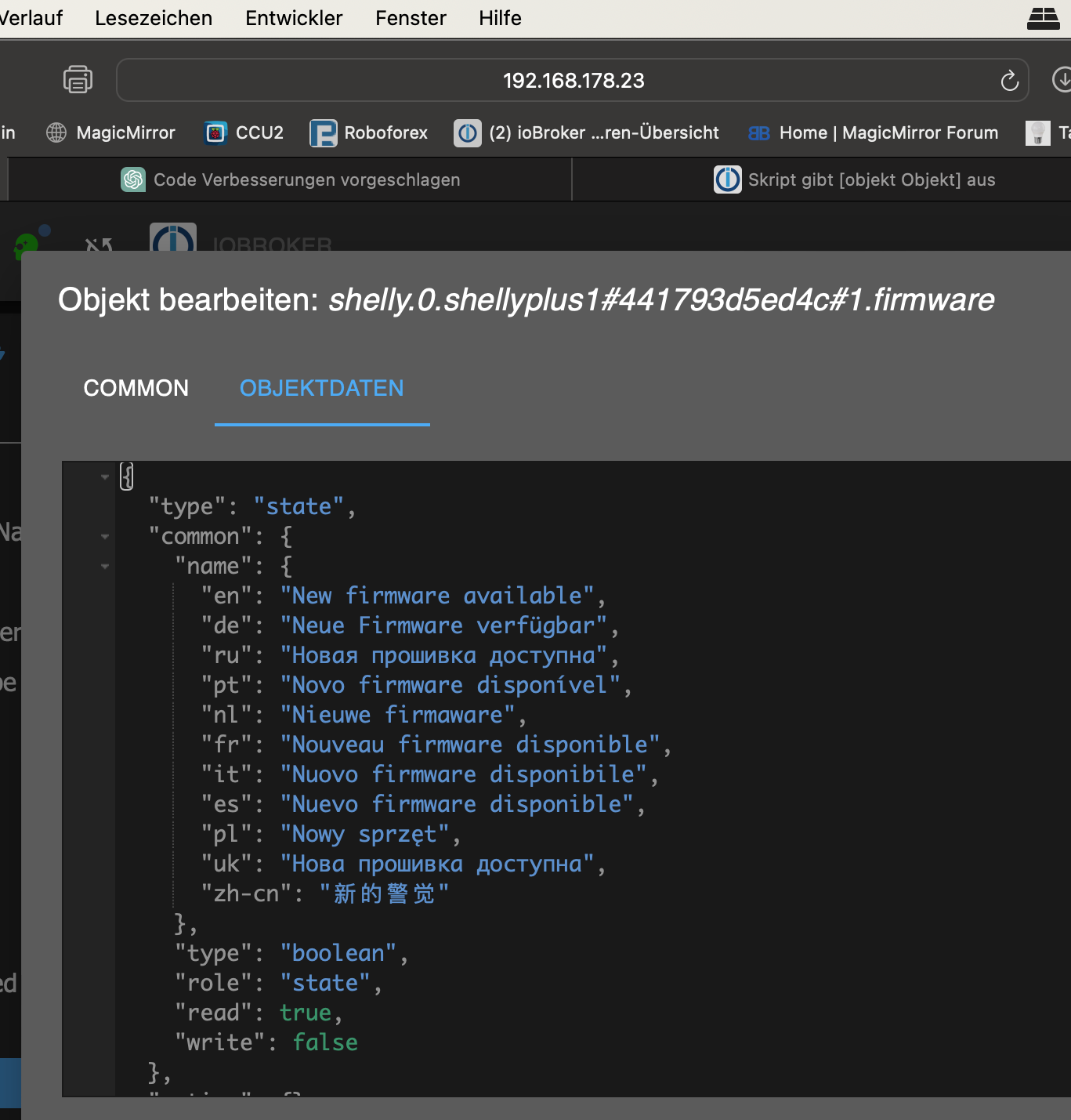
                            Bildschirmfoto 2024-02-26 um 21.35.14.png

                            paul53P 1 Antwort Letzte Antwort
                            0
                            • fischi87F fischi87

                              @paul53 sagte in Skript gibt [objekt Objekt] aus:

                              idsUpdate.on(function(obj) {

                              okay das funktioniert zumindest bekomme ich kein Objekt mehr aber dieses .push und .sort und .lengh ist immer noch rot?!

                              ausserdem bekomme ich nur "Neue Firmware verfügbar" angezeigt und nicht den Namen des Gerätes:

                              Bildschirmfoto 2024-02-26 um 21.35.14.png

                              paul53P Offline
                              paul53P Offline
                              paul53
                              schrieb am zuletzt editiert von paul53
                              #46

                              @fischi87 sagte: .push und .sort und .lengh ist immer noch rot?!

                              Im Editor? Das wundert mich, da in meinem Editor nicht. Das kann man oft ignorieren.

                              @fischi87 sagte in Skript gibt [objekt Objekt] aus:

                              ausserdem bekomme ich nur "Neue Firmware verfügbar" angezeigt und nicht den Namen des Gerätes:

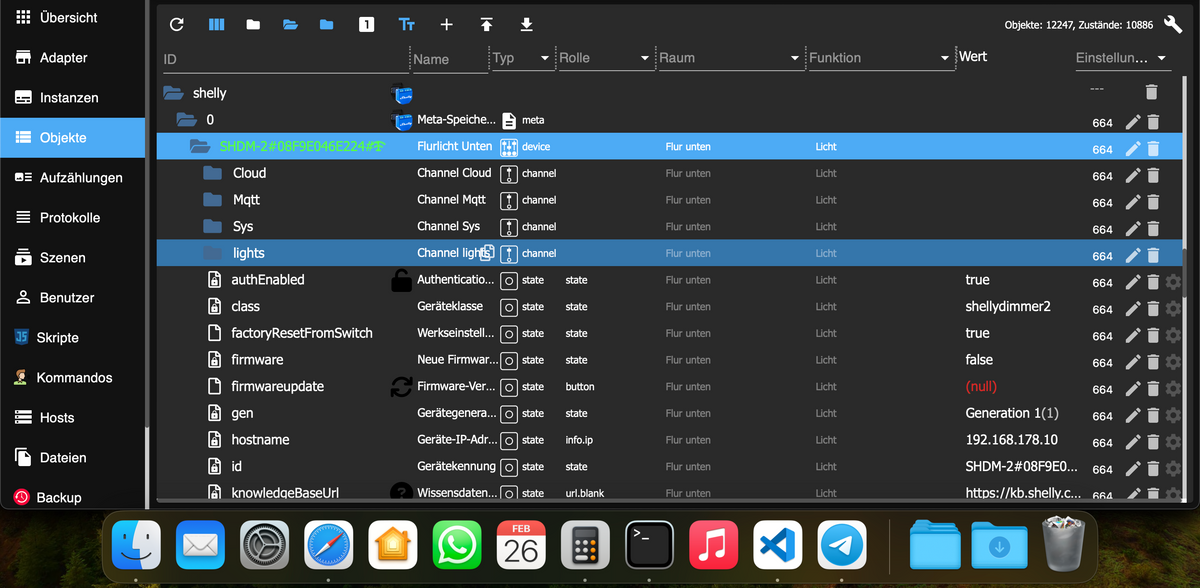
                              Wo findet man den Namen des Gerätes (ID-Struktur zeigen)?
                              Wenn es im übergeordneten Objekt ist, dann ergänze die Änderung der ID in parent-ID:

                                      if(getState(id).val) {
                                          id = id.substring(0, id.lastIndexOf('.')); // parent-ID
                                          let name = getObject(id).common.name;
                                          if(typeof name == 'object') name = name.de;
                                          arrUpdate.push(name); 
                                      }
                              

                              Bitte verzichtet auf Chat-Nachrichten, denn die Handhabung ist grauenhaft !
                              Produktiv: RPi 2 mit S.USV, HM-MOD-RPI und SLC-USB-Stick mit root fs

                              fischi87F 1 Antwort Letzte Antwort
                              0
                              • paul53P paul53

                                @fischi87 sagte: .push und .sort und .lengh ist immer noch rot?!

                                Im Editor? Das wundert mich, da in meinem Editor nicht. Das kann man oft ignorieren.

                                @fischi87 sagte in Skript gibt [objekt Objekt] aus:

                                ausserdem bekomme ich nur "Neue Firmware verfügbar" angezeigt und nicht den Namen des Gerätes:

                                Wo findet man den Namen des Gerätes (ID-Struktur zeigen)?
                                Wenn es im übergeordneten Objekt ist, dann ergänze die Änderung der ID in parent-ID:

                                        if(getState(id).val) {
                                            id = id.substring(0, id.lastIndexOf('.')); // parent-ID
                                            let name = getObject(id).common.name;
                                            if(typeof name == 'object') name = name.de;
                                            arrUpdate.push(name); 
                                        }
                                
                                fischi87F Offline
                                fischi87F Offline
                                fischi87
                                schrieb am zuletzt editiert von
                                #47

                                @paul53

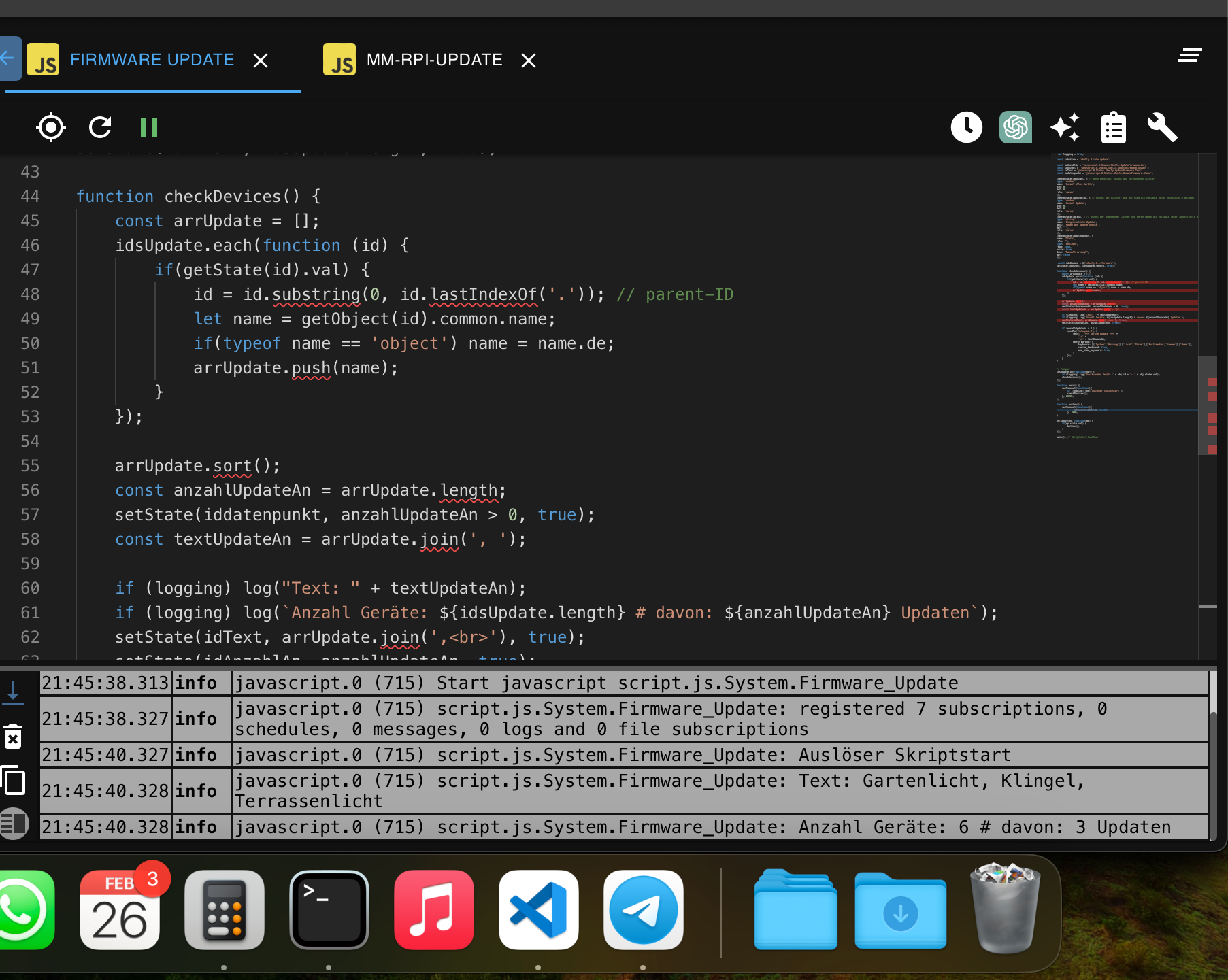
                                okay. das wundert mich jetzt aber auch da es verwundert aber okay danke

                                Bildschirmfoto 2024-02-26 um 21.41.02.png

                                paul53P 1 Antwort Letzte Antwort
                                0
                                • fischi87F fischi87

                                  @paul53

                                  okay. das wundert mich jetzt aber auch da es verwundert aber okay danke

                                  Bildschirmfoto 2024-02-26 um 21.41.02.png

                                  paul53P Offline
                                  paul53P Offline
                                  paul53
                                  schrieb am zuletzt editiert von
                                  #48

                                  @fischi87
                                  Ergänze um die Änderung der ID in parent-ID (2. Zeile einfügen):

                                          if(getState(id).val) {
                                              id = id.substring(0, id.lastIndexOf('.')); // parent-ID
                                              let name = getObject(id).common.name;
                                              if(typeof name == 'object') name = name.de;
                                              arrUpdate.push(name); 
                                          }
                                  

                                  Bitte verzichtet auf Chat-Nachrichten, denn die Handhabung ist grauenhaft !
                                  Produktiv: RPi 2 mit S.USV, HM-MOD-RPI und SLC-USB-Stick mit root fs

                                  fischi87F 1 Antwort Letzte Antwort
                                  0
                                  • paul53P paul53

                                    @fischi87
                                    Ergänze um die Änderung der ID in parent-ID (2. Zeile einfügen):

                                            if(getState(id).val) {
                                                id = id.substring(0, id.lastIndexOf('.')); // parent-ID
                                                let name = getObject(id).common.name;
                                                if(typeof name == 'object') name = name.de;
                                                arrUpdate.push(name); 
                                            }
                                    
                                    fischi87F Offline
                                    fischi87F Offline
                                    fischi87
                                    schrieb am zuletzt editiert von
                                    #49

                                    @paul53 sagte in Skript gibt [objekt Objekt] aus:

                                    id = id.substring(0, id.lastIndexOf('.')); // parent-ID

                                    weil du es halt kannst, super läuft jetzt bekomme zwar wieder rote Linien:

                                    Property 'lastIndexOf' does not exist on type 'string'
                                    

                                    aber funktioniert.

                                    vielen dank

                                    paul53P 1 Antwort Letzte Antwort
                                    0
                                    • fischi87F fischi87

                                      @paul53 sagte in Skript gibt [objekt Objekt] aus:

                                      id = id.substring(0, id.lastIndexOf('.')); // parent-ID

                                      weil du es halt kannst, super läuft jetzt bekomme zwar wieder rote Linien:

                                      Property 'lastIndexOf' does not exist on type 'string'
                                      

                                      aber funktioniert.

                                      vielen dank

                                      paul53P Offline
                                      paul53P Offline
                                      paul53
                                      schrieb am zuletzt editiert von paul53
                                      #50

                                      @fischi87 sagte: wieder rote Linien:

                                      Kann ich bei mir nicht nachvollziehen.
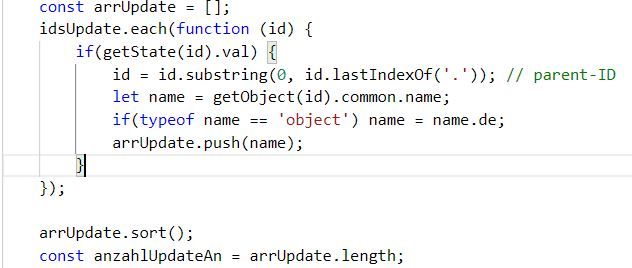
                                      Blockly_temp.JPG

                                      Keine roten Schlangenlinien.

                                      Bitte verzichtet auf Chat-Nachrichten, denn die Handhabung ist grauenhaft !
                                      Produktiv: RPi 2 mit S.USV, HM-MOD-RPI und SLC-USB-Stick mit root fs

                                      fischi87F 1 Antwort Letzte Antwort
                                      0
                                      • paul53P paul53

                                        @fischi87 sagte: wieder rote Linien:

                                        Kann ich bei mir nicht nachvollziehen.

                                        Blockly_temp.JPG

                                        Keine roten Schlangenlinien.

                                        fischi87F Offline
                                        fischi87F Offline
                                        fischi87
                                        schrieb am zuletzt editiert von
                                        #51

                                        @paul53

                                        Bildschirmfoto 2024-02-26 um 21.52.28.png

                                        1 Antwort Letzte Antwort
                                        0
                                        Antworten
                                        • In einem neuen Thema antworten
                                        Anmelden zum Antworten
                                        • Älteste zuerst
                                        • Neuste zuerst
                                        • Meiste Stimmen


                                        Support us

                                        ioBroker
                                        Community Adapters
                                        Donate

                                        390

                                        Online

                                        32.4k

                                        Benutzer

                                        81.5k

                                        Themen

                                        1.3m

                                        Beiträge
                                        Community
                                        Impressum | Datenschutz-Bestimmungen | Nutzungsbedingungen | Einwilligungseinstellungen
                                        ioBroker Community 2014-2025
                                        logo
                                        • Anmelden

                                        • Du hast noch kein Konto? Registrieren

                                        • Anmelden oder registrieren, um zu suchen
                                        • Erster Beitrag
                                          Letzter Beitrag
                                        0
                                        • Home
                                        • Aktuell
                                        • Tags
                                        • Ungelesen 0
                                        • Kategorien
                                        • Unreplied
                                        • Beliebt
                                        • GitHub
                                        • Docu
                                        • Hilfe