Skip to content
  • Home
  • Recent
  • Tags
  • 0 Unread 0
  • Categories
  • Unreplied
  • Popular
  • GitHub
  • Docu
  • Hilfe
Skins
  • Light
  • Brite
  • Cerulean
  • Cosmo
  • Flatly
  • Journal
  • Litera
  • Lumen
  • Lux
  • Materia
  • Minty
  • Morph
  • Pulse
  • Sandstone
  • Simplex
  • Sketchy
  • Spacelab
  • United
  • Yeti
  • Zephyr
  • Dark
  • Cyborg
  • Darkly
  • Quartz
  • Slate
  • Solar
  • Superhero
  • Vapor

  • Default (No Skin)
  • No Skin
Collapse
ioBroker Logo

Community Forum

donate donate
  1. ioBroker Community Home
  2. Deutsch
  3. Off Topic
  4. Ertrag (Tag, Monat, Jahr) berechnen und in Datei speichern

NEWS

  • Jahresrückblick 2025 – unser neuer Blogbeitrag ist online! ✨
    BluefoxB
    Bluefox
    17
    1
    2.7k

  • Neuer Blogbeitrag: Monatsrückblick - Dezember 2025 🎄
    BluefoxB
    Bluefox
    13
    1
    1.1k

  • Weihnachtsangebot 2025! 🎄
    BluefoxB
    Bluefox
    25
    1
    2.4k

Ertrag (Tag, Monat, Jahr) berechnen und in Datei speichern

Scheduled Pinned Locked Moved Off Topic
190 Posts 5 Posters 24.8k Views 4 Watching
  • Oldest to Newest
  • Newest to Oldest
  • Most Votes
Reply
  • Reply as topic
Log in to reply
This topic has been deleted. Only users with topic management privileges can see it.
  • B Offline
    B Offline
    bitwicht
    wrote on last edited by bitwicht
    #62

    Es hat eben funktioniert als ich aus versehen auf nonosecounds war.

    Was habe ich denn nun geschrieben ?!?

    1 Reply Last reply
    0
    • B bitwicht

      @Marc-Berg

      So stelle ich es ein:

      IO-B16.JPG

      Wenn ich eine Datei Uploade kommt der gleiche Fehler.

      Wenn ich das richtig sehe läuft bei mir:

      X-Influxdb-Build: OSS
      X-Influxdb-Version: v2.5.1


      Bei mir stellt sich das aber nicht zurück wenn der Fehler kommt und ich auch edit oder clear gehe

      Marc BergM Online
      Marc BergM Online
      Marc Berg
      Most Active
      wrote on last edited by
      #63

      @bitwicht sagte in Ertrag (Tag, Monat, Jahr) berechnen und in Datei speichern:

      X-Influxdb-Version: v2.5.1

      Das kann doch nur ein Bug in deiner Version sein, aktuell ist die InfluxDB v2.7.5

      NUC10I3+Ubuntu+Docker+ioBroker+influxDB2+Node Red+EMQX+Grafana

      Pi-hole, Traefik, Checkmk, Conbee II+Zigbee2MQTT, ESPSomfy-RTS, LoRaWAN, Arduino, KiCad

      Benutzt das Voting im Beitrag, wenn er euch geholfen hat.

      1 Reply Last reply
      0
      • B Offline
        B Offline
        bitwicht
        wrote on last edited by
        #64

        @Marc-Berg

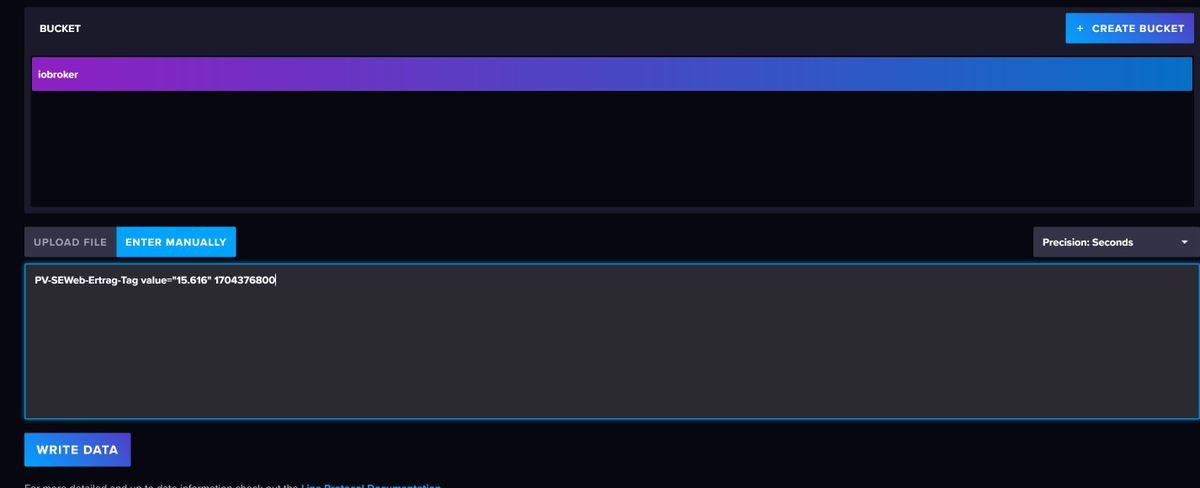
        Ich habe jetzt das ```
        PV-SEWeb-Ertrag-Tag value="15.616" 1704376800

        
        Ist das Update einfach über die Shell zu machen oder ?
        Marc BergM Thomas BraunT 2 Replies Last reply
        0
        • B bitwicht

          @Marc-Berg

          Ich habe jetzt das ```
          PV-SEWeb-Ertrag-Tag value="15.616" 1704376800

          
          Ist das Update einfach über die Shell zu machen oder ?
          Marc BergM Online
          Marc BergM Online
          Marc Berg
          Most Active
          wrote on last edited by
          #65

          @bitwicht sagte in Ertrag (Tag, Monat, Jahr) berechnen und in Datei speichern:

          Ist das Update einfach über die Shell zu machen oder ?

          Ja, das hängt aber auch davon ab, wie du die DB ursprünglich installiert hattest. Wenn du es über den Paket Manager gemacht hast (hier die Anleitung von @Thomas-Braun ), dann kämen die Updates mit einem sudo apt update/sudo apt upgrade mit.

          NUC10I3+Ubuntu+Docker+ioBroker+influxDB2+Node Red+EMQX+Grafana

          Pi-hole, Traefik, Checkmk, Conbee II+Zigbee2MQTT, ESPSomfy-RTS, LoRaWAN, Arduino, KiCad

          Benutzt das Voting im Beitrag, wenn er euch geholfen hat.

          1 Reply Last reply
          0
          • B bitwicht

            @Marc-Berg

            Ich habe jetzt das ```
            PV-SEWeb-Ertrag-Tag value="15.616" 1704376800

            
            Ist das Update einfach über die Shell zu machen oder ?
            Thomas BraunT Online
            Thomas BraunT Online
            Thomas Braun
            Most Active
            wrote on last edited by
            #66

            @bitwicht sagte in Ertrag (Tag, Monat, Jahr) berechnen und in Datei speichern:

            Ist das Update einfach über die Shell zu machen oder ?

            sudo apt update
            apt policy influxdb*
            

            sagt dazu? Grundsätzlich werden Softwarepakete unter 'Linux' immer über den Paketmanager installiert. Da gibt es nur ganz wenige Ausnahmen da anders vorzugehen. Und das machen auch besser nur 'Profis' am vorgesehen Weg vorbei.

            Linux-Werkzeugkasten:
            https://forum.iobroker.net/topic/42952/der-kleine-iobroker-linux-werkzeugkasten
            NodeJS Fixer Skript:
            https://forum.iobroker.net/topic/68035/iob-node-fix-skript
            iob_diag: curl -sLf -o diag.sh https://iobroker.net/diag.sh && bash diag.sh

            1 Reply Last reply
            1
            • B Offline
              B Offline
              bitwicht
              wrote on last edited by
              #67

              @Marc-Berg

              Das ist ein Problem. Ich hatte da Hilfe und so weit ich mich erinnere wurde entweder iobroker oder die influx nicht über den Paketmanager installiert.

              Kann ich das irgendwie sehen wie das installiert wurde ?

              Thomas BraunT 1 Reply Last reply
              0
              • B bitwicht

                @Marc-Berg

                Das ist ein Problem. Ich hatte da Hilfe und so weit ich mich erinnere wurde entweder iobroker oder die influx nicht über den Paketmanager installiert.

                Kann ich das irgendwie sehen wie das installiert wurde ?

                Thomas BraunT Online
                Thomas BraunT Online
                Thomas Braun
                Most Active
                wrote on last edited by
                #68

                @bitwicht sagte in Ertrag (Tag, Monat, Jahr) berechnen und in Datei speichern:

                Kann ich das irgendwie sehen wie das installiert wurde ?

                Siehe vorstehende Antwort.

                Linux-Werkzeugkasten:
                https://forum.iobroker.net/topic/42952/der-kleine-iobroker-linux-werkzeugkasten
                NodeJS Fixer Skript:
                https://forum.iobroker.net/topic/68035/iob-node-fix-skript
                iob_diag: curl -sLf -o diag.sh https://iobroker.net/diag.sh && bash diag.sh

                1 Reply Last reply
                0
                • B Offline
                  B Offline
                  bitwicht
                  wrote on last edited by
                  #69

                  @Thomas-Braun

                  beim update eine Warnung:

                  W: An error occurred during the signature verification. The repository is not updated and the previous index files will be used. GPG error: https://apt.grafana.com stable InRelease: The following signatures couldn't be verified because the public key is not available: NO_PUBKEY 963FA27710458545
                  W: Failed to fetch https://apt.grafana.com/dists/stable/InRelease  The following signatures couldn't be verified because the public key is not available: NO_PUBKEY 963FA27710458545
                  W: Some index files failed to download. They have been ignored, or old ones used instead.
                  

                  und dann:

                  pi@raspberrypi:~ $ apt policy influxdb*
                  N: Unable to locate package influxdb2-2.5.1-arm64.deb
                  N: Couldn't find any package by glob 'influxdb2-2.5.1-arm64.deb'
                  N: Unable to locate package influxdb2-client-2.5.0-linux-arm64
                  N: Couldn't find any package by glob 'influxdb2-client-2.5.0-linux-arm64'
                  N: Unable to locate package influxdb2-client-2.5.0-linux-arm64.tar.gz
                  N: Couldn't find any package by glob 'influxdb2-client-2.5.0-linux-arm64.tar.gz'
                  
                  
                  Thomas BraunT 1 Reply Last reply
                  0
                  • B bitwicht

                    @Thomas-Braun

                    beim update eine Warnung:

                    W: An error occurred during the signature verification. The repository is not updated and the previous index files will be used. GPG error: https://apt.grafana.com stable InRelease: The following signatures couldn't be verified because the public key is not available: NO_PUBKEY 963FA27710458545
                    W: Failed to fetch https://apt.grafana.com/dists/stable/InRelease  The following signatures couldn't be verified because the public key is not available: NO_PUBKEY 963FA27710458545
                    W: Some index files failed to download. They have been ignored, or old ones used instead.
                    

                    und dann:

                    pi@raspberrypi:~ $ apt policy influxdb*
                    N: Unable to locate package influxdb2-2.5.1-arm64.deb
                    N: Couldn't find any package by glob 'influxdb2-2.5.1-arm64.deb'
                    N: Unable to locate package influxdb2-client-2.5.0-linux-arm64
                    N: Couldn't find any package by glob 'influxdb2-client-2.5.0-linux-arm64'
                    N: Unable to locate package influxdb2-client-2.5.0-linux-arm64.tar.gz
                    N: Couldn't find any package by glob 'influxdb2-client-2.5.0-linux-arm64.tar.gz'
                    
                    
                    Thomas BraunT Online
                    Thomas BraunT Online
                    Thomas Braun
                    Most Active
                    wrote on last edited by
                    #70

                    @bitwicht

                    rm influxdb*
                    

                    Zu grafana:

                    sudo rm /etc/apt/sources.list.d/graf*
                    sudo apt-get install -y apt-transport-https
                    sudo apt-get install -y software-properties-common wget
                    sudo wget -q -O /usr/share/keyrings/grafana.key https://apt.grafana.com/gpg.key
                    echo "deb [signed-by=/usr/share/keyrings/grafana.key] https://apt.grafana.com stable main" | sudo tee /etc/apt/sources.list.d/grafana.list
                    

                    Dann nochmal

                    sudo apt update
                    apt policy influx*
                    

                    Linux-Werkzeugkasten:
                    https://forum.iobroker.net/topic/42952/der-kleine-iobroker-linux-werkzeugkasten
                    NodeJS Fixer Skript:
                    https://forum.iobroker.net/topic/68035/iob-node-fix-skript
                    iob_diag: curl -sLf -o diag.sh https://iobroker.net/diag.sh && bash diag.sh

                    1 Reply Last reply
                    0
                    • B Offline
                      B Offline
                      bitwicht
                      wrote on last edited by
                      #71

                      @Thomas-Braun

                      das geht schon nicht

                      pi@raspberrypi:~ $ rm influxdb*
                      rm: cannot remove 'influxdb2-client-2.5.0-linux-arm64': Is a directory
                      
                      
                      Thomas BraunT 1 Reply Last reply
                      0
                      • B bitwicht

                        @Thomas-Braun

                        das geht schon nicht

                        pi@raspberrypi:~ $ rm influxdb*
                        rm: cannot remove 'influxdb2-client-2.5.0-linux-arm64': Is a directory
                        
                        
                        Thomas BraunT Online
                        Thomas BraunT Online
                        Thomas Braun
                        Most Active
                        wrote on last edited by
                        #72

                        @bitwicht

                        Dann musst du die grobe Drahtbürste verwenden.

                        rm -rf influxdb*
                        

                        Linux-Werkzeugkasten:
                        https://forum.iobroker.net/topic/42952/der-kleine-iobroker-linux-werkzeugkasten
                        NodeJS Fixer Skript:
                        https://forum.iobroker.net/topic/68035/iob-node-fix-skript
                        iob_diag: curl -sLf -o diag.sh https://iobroker.net/diag.sh && bash diag.sh

                        1 Reply Last reply
                        0
                        • B Offline
                          B Offline
                          bitwicht
                          wrote on last edited by bitwicht
                          #73

                          das ging

                          pi@raspberrypi:~ $ rm -rf influxdb*
                          
                          pi@raspberrypi:~ $ apt policy influx*
                          influxdb2-cli:
                            Installed: (none)
                            Candidate: (none)
                            Version table:
                          influxdb-client:
                            Installed: (none)
                            Candidate: 1.6.7~rc0-1+b5
                            Version table:
                               1.6.7~rc0-1+b5 500
                                  500 http://deb.debian.org/debian bullseye/main arm64 Packages
                          influxdb-dev:
                            Installed: (none)
                            Candidate: (none)
                            Version table:
                          influxdb:
                            Installed: (none)
                            Candidate: 1.6.7~rc0-1+b5
                            Version table:
                               1.6.7~rc0-1+b5 500
                                  500 http://deb.debian.org/debian bullseye/main arm64 Packages
                                  100 /var/lib/dpkg/status
                          influxdb2:
                            Installed: 2.5.1-1
                            Candidate: 2.5.1-1
                            Version table:
                           *** 2.5.1-1 100
                                  100 /var/lib/dpkg/status


                          Thomas BraunT 1 Reply Last reply
                          0
                          • B bitwicht

                            das ging

                            pi@raspberrypi:~ $ rm -rf influxdb*
                            
                            pi@raspberrypi:~ $ apt policy influx*
                            influxdb2-cli:
                              Installed: (none)
                              Candidate: (none)
                              Version table:
                            influxdb-client:
                              Installed: (none)
                              Candidate: 1.6.7~rc0-1+b5
                              Version table:
                                 1.6.7~rc0-1+b5 500
                                    500 http://deb.debian.org/debian bullseye/main arm64 Packages
                            influxdb-dev:
                              Installed: (none)
                              Candidate: (none)
                              Version table:
                            influxdb:
                              Installed: (none)
                              Candidate: 1.6.7~rc0-1+b5
                              Version table:
                                 1.6.7~rc0-1+b5 500
                                    500 http://deb.debian.org/debian bullseye/main arm64 Packages
                                    100 /var/lib/dpkg/status
                            influxdb2:
                              Installed: 2.5.1-1
                              Candidate: 2.5.1-1
                              Version table:
                             *** 2.5.1-1 100
                                    100 /var/lib/dpkg/status


                            Thomas BraunT Online
                            Thomas BraunT Online
                            Thomas Braun
                            Most Active
                            wrote on last edited by
                            #74

                            @bitwicht

                            Bitte auch den abschließenden, neuen Prompt zeigen. Dann sehe ich auch das die ganze Sache durchgelaufen ist.

                            Linux-Werkzeugkasten:
                            https://forum.iobroker.net/topic/42952/der-kleine-iobroker-linux-werkzeugkasten
                            NodeJS Fixer Skript:
                            https://forum.iobroker.net/topic/68035/iob-node-fix-skript
                            iob_diag: curl -sLf -o diag.sh https://iobroker.net/diag.sh && bash diag.sh

                            1 Reply Last reply
                            0
                            • B Offline
                              B Offline
                              bitwicht
                              wrote on last edited by
                              #75

                              da kam sonst nix

                              pi@raspberrypi:~ $ rm -rf influxdb*
                              pi@raspberrypi:~ $ 
                              
                              
                              Thomas BraunT 1 Reply Last reply
                              0
                              • B bitwicht

                                da kam sonst nix

                                pi@raspberrypi:~ $ rm -rf influxdb*
                                pi@raspberrypi:~ $ 
                                
                                
                                Thomas BraunT Online
                                Thomas BraunT Online
                                Thomas Braun
                                Most Active
                                wrote on last edited by
                                #76

                                @bitwicht sagte in Ertrag (Tag, Monat, Jahr) berechnen und in Datei speichern:

                                da kam sonst nix

                                Die Info ist wichtig.

                                wget -q https://repos.influxdata.com/influxdata-archive_compat.key
                                echo '393e8779c89ac8d958f81f942f9ad7fb82a25e133faddaf92e15b16e6ac9ce4c influxdata-archive_compat.key' | sha256sum -c && cat influxdata-archive_compat.key | gpg --dearmor | sudo tee /usr/share/keyrings/influxdata-archive_compat.gpg > /dev/null
                                echo 'deb [signed-by=/usr/share/keyrings/influxdata-archive_compat.gpg] https://repos.influxdata.com/debian stable main' | sudo tee /etc/apt/sources.list.d/influxdata.list
                                rm influxdata-archive_compat.key
                                

                                Grafana hast du berichtigt? Siehe oben.

                                Linux-Werkzeugkasten:
                                https://forum.iobroker.net/topic/42952/der-kleine-iobroker-linux-werkzeugkasten
                                NodeJS Fixer Skript:
                                https://forum.iobroker.net/topic/68035/iob-node-fix-skript
                                iob_diag: curl -sLf -o diag.sh https://iobroker.net/diag.sh && bash diag.sh

                                1 Reply Last reply
                                0
                                • B Offline
                                  B Offline
                                  bitwicht
                                  wrote on last edited by bitwicht
                                  #77

                                  Entschuldige, ich dachte wir machen erst influx

                                  hier bitte:

                                  pi@raspberrypi:~ $ sudo rm /etc/apt/sources.list.d/graf*
                                  pi@raspberrypi:~ $ sudo apt-get install -y apt-transport-https
                                  Reading package lists... Done
                                  Building dependency tree... Done
                                  Reading state information... Done
                                  apt-transport-https is already the newest version (2.2.4).
                                  0 upgraded, 0 newly installed, 0 to remove and 39 not upgraded.
                                  pi@raspberrypi:~ $ sudo apt-get install -y software-properties-common wget
                                  Reading package lists... Done
                                  Building dependency tree... Done
                                  Reading state information... Done
                                  software-properties-common is already the newest version (0.96.20.2-2.1).
                                  wget is already the newest version (1.21-1+deb11u1).
                                  0 upgraded, 0 newly installed, 0 to remove and 39 not upgraded.
                                  pi@raspberrypi:~ $ sudo wget -q -O /usr/share/keyrings/grafana.key https://apt.grafana.com/gpg.key
                                  pi@raspberrypi:~ $ sudo wget -q -O /usr/share/keyrings/grafana.key https://apt.grafana.com/gpg.key
                                  echo "deb [signed-by=/usr/share/keyrings/grafana.key] https://apt.grafana.com stable main" | sudo tee /etc/apt/sources.list.d/grafana.list
                                  deb [signed-by=/usr/share/keyrings/grafana.key] https://apt.grafana.com stable main
                                  pi@raspberrypi:~ $
                                  
                                  
                                  pi@raspberrypi:~ $ sudo apt update
                                  apt policy influx*
                                  Hit:1 http://deb.debian.org/debian bullseye InRelease
                                  Hit:2 http://deb.debian.org/debian bullseye-updates InRelease
                                  Hit:3 http://security.debian.org/debian-security bullseye-security InRelease
                                  Hit:4 http://archive.raspberrypi.org/debian bullseye InRelease
                                  Get:5 https://apt.grafana.com stable InRelease [5,983 B]
                                  Get:6 https://deb.nodesource.com/node_16.x bullseye InRelease [4,586 B]
                                  Get:7 https://dl.cloudsmith.io/public/evcc/stable/deb/debian bullseye InRelease [5,127 B]
                                  Get:8 https://apt.grafana.com stable/main armhf Packages [114 kB]
                                  Get:9 https://apt.grafana.com stable/main arm64 Packages [147 kB]
                                  Fetched 272 kB in 2s (127 kB/s)
                                  Reading package lists... Done
                                  Building dependency tree... Done
                                  Reading state information... Done
                                  40 packages can be upgraded. Run 'apt list --upgradable' to see them.
                                  influxdb2-cli:
                                    Installed: (none)
                                    Candidate: (none)
                                    Version table:
                                  influxdb-client:
                                    Installed: (none)
                                    Candidate: 1.6.7~rc0-1+b5
                                    Version table:
                                       1.6.7~rc0-1+b5 500
                                          500 http://deb.debian.org/debian bullseye/main arm64 Packages
                                  influxdb-dev:
                                    Installed: (none)
                                    Candidate: (none)
                                    Version table:
                                  influxdb:
                                    Installed: (none)
                                    Candidate: 1.6.7~rc0-1+b5
                                    Version table:
                                       1.6.7~rc0-1+b5 500
                                          500 http://deb.debian.org/debian bullseye/main arm64 Packages
                                          100 /var/lib/dpkg/status
                                  influxdb2:
                                    Installed: 2.5.1-1
                                    Candidate: 2.5.1-1
                                    Version table:
                                   *** 2.5.1-1 100
                                          100 /var/lib/dpkg/status
                                  pi@raspberrypi:~ $
                                  
                                  
                                  Thomas BraunT 1 Reply Last reply
                                  0
                                  • B bitwicht

                                    Entschuldige, ich dachte wir machen erst influx

                                    hier bitte:

                                    pi@raspberrypi:~ $ sudo rm /etc/apt/sources.list.d/graf*
                                    pi@raspberrypi:~ $ sudo apt-get install -y apt-transport-https
                                    Reading package lists... Done
                                    Building dependency tree... Done
                                    Reading state information... Done
                                    apt-transport-https is already the newest version (2.2.4).
                                    0 upgraded, 0 newly installed, 0 to remove and 39 not upgraded.
                                    pi@raspberrypi:~ $ sudo apt-get install -y software-properties-common wget
                                    Reading package lists... Done
                                    Building dependency tree... Done
                                    Reading state information... Done
                                    software-properties-common is already the newest version (0.96.20.2-2.1).
                                    wget is already the newest version (1.21-1+deb11u1).
                                    0 upgraded, 0 newly installed, 0 to remove and 39 not upgraded.
                                    pi@raspberrypi:~ $ sudo wget -q -O /usr/share/keyrings/grafana.key https://apt.grafana.com/gpg.key
                                    pi@raspberrypi:~ $ sudo wget -q -O /usr/share/keyrings/grafana.key https://apt.grafana.com/gpg.key
                                    echo "deb [signed-by=/usr/share/keyrings/grafana.key] https://apt.grafana.com stable main" | sudo tee /etc/apt/sources.list.d/grafana.list
                                    deb [signed-by=/usr/share/keyrings/grafana.key] https://apt.grafana.com stable main
                                    pi@raspberrypi:~ $
                                    
                                    
                                    pi@raspberrypi:~ $ sudo apt update
                                    apt policy influx*
                                    Hit:1 http://deb.debian.org/debian bullseye InRelease
                                    Hit:2 http://deb.debian.org/debian bullseye-updates InRelease
                                    Hit:3 http://security.debian.org/debian-security bullseye-security InRelease
                                    Hit:4 http://archive.raspberrypi.org/debian bullseye InRelease
                                    Get:5 https://apt.grafana.com stable InRelease [5,983 B]
                                    Get:6 https://deb.nodesource.com/node_16.x bullseye InRelease [4,586 B]
                                    Get:7 https://dl.cloudsmith.io/public/evcc/stable/deb/debian bullseye InRelease [5,127 B]
                                    Get:8 https://apt.grafana.com stable/main armhf Packages [114 kB]
                                    Get:9 https://apt.grafana.com stable/main arm64 Packages [147 kB]
                                    Fetched 272 kB in 2s (127 kB/s)
                                    Reading package lists... Done
                                    Building dependency tree... Done
                                    Reading state information... Done
                                    40 packages can be upgraded. Run 'apt list --upgradable' to see them.
                                    influxdb2-cli:
                                      Installed: (none)
                                      Candidate: (none)
                                      Version table:
                                    influxdb-client:
                                      Installed: (none)
                                      Candidate: 1.6.7~rc0-1+b5
                                      Version table:
                                         1.6.7~rc0-1+b5 500
                                            500 http://deb.debian.org/debian bullseye/main arm64 Packages
                                    influxdb-dev:
                                      Installed: (none)
                                      Candidate: (none)
                                      Version table:
                                    influxdb:
                                      Installed: (none)
                                      Candidate: 1.6.7~rc0-1+b5
                                      Version table:
                                         1.6.7~rc0-1+b5 500
                                            500 http://deb.debian.org/debian bullseye/main arm64 Packages
                                            100 /var/lib/dpkg/status
                                    influxdb2:
                                      Installed: 2.5.1-1
                                      Candidate: 2.5.1-1
                                      Version table:
                                     *** 2.5.1-1 100
                                            100 /var/lib/dpkg/status
                                    pi@raspberrypi:~ $
                                    
                                    
                                    Thomas BraunT Online
                                    Thomas BraunT Online
                                    Thomas Braun
                                    Most Active
                                    wrote on last edited by
                                    #78

                                    @bitwicht

                                    iob nodejs-update
                                    

                                    Linux-Werkzeugkasten:
                                    https://forum.iobroker.net/topic/42952/der-kleine-iobroker-linux-werkzeugkasten
                                    NodeJS Fixer Skript:
                                    https://forum.iobroker.net/topic/68035/iob-node-fix-skript
                                    iob_diag: curl -sLf -o diag.sh https://iobroker.net/diag.sh && bash diag.sh

                                    1 Reply Last reply
                                    0
                                    • B Offline
                                      B Offline
                                      bitwicht
                                      wrote on last edited by
                                      #79

                                      pi@raspberrypi:~ $ iob nodejs-update
                                      curl: no URL specified!
                                      curl: try 'curl --help' or 'curl --manual' for more information
                                      pi@raspberrypi:~ $

                                      Thomas BraunT 1 Reply Last reply
                                      0
                                      • B bitwicht

                                        pi@raspberrypi:~ $ iob nodejs-update
                                        curl: no URL specified!
                                        curl: try 'curl --help' or 'curl --manual' for more information
                                        pi@raspberrypi:~ $

                                        Thomas BraunT Online
                                        Thomas BraunT Online
                                        Thomas Braun
                                        Most Active
                                        wrote on last edited by
                                        #80

                                        @bitwicht

                                        iob stop
                                        iob fix
                                        iob start
                                        
                                        wget -q https://repos.influxdata.com/influxdata-archive_compat.key
                                        echo '393e8779c89ac8d958f81f942f9ad7fb82a25e133faddaf92e15b16e6ac9ce4c influxdata-archive_compat.key' | sha256sum -c && cat influxdata-archive_compat.key | gpg --dearmor | sudo tee /usr/share/keyrings/influxdata-archive_compat.gpg > /dev/null
                                        echo 'deb [signed-by=/usr/share/keyrings/influxdata-archive_compat.gpg] https://repos.influxdata.com/debian stable main' | sudo tee /etc/apt/sources.list.d/influxdata.list
                                        rm influxdata-archive_compat.key
                                        
                                        iobroker nodejs-update
                                        

                                        Linux-Werkzeugkasten:
                                        https://forum.iobroker.net/topic/42952/der-kleine-iobroker-linux-werkzeugkasten
                                        NodeJS Fixer Skript:
                                        https://forum.iobroker.net/topic/68035/iob-node-fix-skript
                                        iob_diag: curl -sLf -o diag.sh https://iobroker.net/diag.sh && bash diag.sh

                                        1 Reply Last reply
                                        0
                                        • B Offline
                                          B Offline
                                          bitwicht
                                          wrote on last edited by
                                          #81

                                          ich habe das gemacht aber kann nicht mehr alles kopieren
                                          es kommt:

                                          Nothing to do - Your installation is using the correct paths.
                                          You are running nodejs v16.18.1. Do you want to install recommended version 18.19.0?
                                          Press <y> to continue or any other key to quit

                                          alles mit y bestätigen ?

                                          Thomas BraunT 1 Reply Last reply
                                          0
                                          Reply
                                          • Reply as topic
                                          Log in to reply
                                          • Oldest to Newest
                                          • Newest to Oldest
                                          • Most Votes


                                          Support us

                                          ioBroker
                                          Community Adapters
                                          Donate

                                          680

                                          Online

                                          32.6k

                                          Users

                                          82.3k

                                          Topics

                                          1.3m

                                          Posts
                                          Community
                                          Impressum | Datenschutz-Bestimmungen | Nutzungsbedingungen | Einwilligungseinstellungen
                                          ioBroker Community 2014-2025
                                          logo
                                          • Login

                                          • Don't have an account? Register

                                          • Login or register to search.
                                          • First post
                                            Last post
                                          0
                                          • Home
                                          • Recent
                                          • Tags
                                          • Unread 0
                                          • Categories
                                          • Unreplied
                                          • Popular
                                          • GitHub
                                          • Docu
                                          • Hilfe