




Alle Instanzen rot,
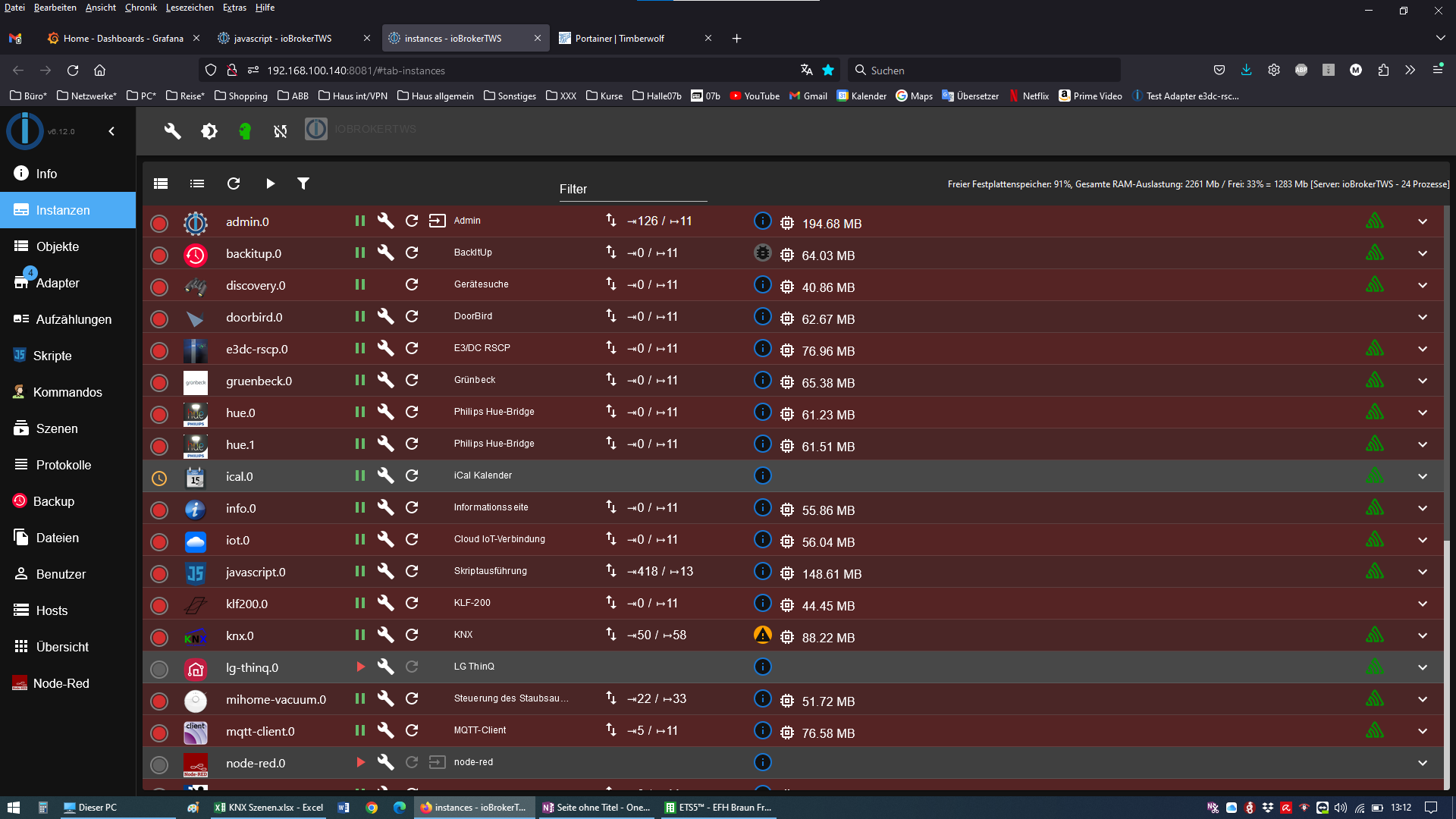
-
@mibr85 sagte in Alle Instanzen rot,:
irgendwas stimmt da nicht
jo, und wie kann man da jetzt helfen ohne Infos zu Deinem System ?
mal die Ausgabe von
iob diagbitte zeigen.
@djmarc75 sagte in Alle Instanzen rot,:
iob diag
Skript v.2023-10-10

*** BASE SYSTEM ***
Hardware Vendor : PC Engines
Kernel          : x86_64
Userland        : amd64
Docker          : v8.1.0
Virtualization  : container-other
Kernel          : x86_64
Userland        : amd64

Systemuptime and Load:
 13:37:33 up 10 days, 20:49,  0 users,  load average: 1.38, 1.56, 1.89
CPU threads: 4


*** Time and Time Zones ***
Sun Nov 12 12:37:33 UTC 2023
Sun Nov 12 13:37:33 CET 2023
CET +0100
Etc/UTC

*** User and Groups ***
root
/root
root

*** X-Server-Setup ***
X-Server:       false
Desktop:
Terminal:


*** MEMORY ***
               total        used        free      shared  buff/cache   available
Mem:            3.9G        2.4G        343M        9.0M        1.2G        1.3G
Swap:           2.0G        769M        1.3G
Total:          6.0G        3.1G        1.6G

         3939 M total memory
         2356 M used memory
         1986 M active memory
         1055 M inactive memory
          343 M free memory
          564 M buffer memory
          675 M swap cache
         2043 M total swap
          769 M used swap
         1274 M free swap

*** FILESYSTEM ***
Filesystem         Type     Size  Used Avail Use% Mounted on
overlay            overlay  434G   39G  373G  10% /
tmpfs              tmpfs     64M     0   64M   0% /dev
tmpfs              tmpfs    2.0G     0  2.0G   0% /sys/fs/cgroup
shm                tmpfs     64M     0   64M   0% /dev/shm
/dev/mapper/system ext4     434G   39G  373G  10% /opt/iobroker
tmpfs              tmpfs    2.0G     0  2.0G   0% /proc/asound
tmpfs              tmpfs    2.0G     0  2.0G   0% /proc/acpi
tmpfs              tmpfs    2.0G     0  2.0G   0% /sys/firmware

Messages concerning ext4 filesystem in dmesg:
dmesg: read kernel buffer failed: Operation not permitted

Show mounted filesystems \(real ones only\):
TARGET           SOURCE                                                                                                                      FSTYPE OPTIONS
/opt/iobroker    /dev/mapper/system[/var/lib/docker/volumes/iobroker_volume_new/_data]                                                       ext4   rw,noatime,discard,errors=remount-ro,data=ordered
/etc/resolv.conf /dev/mapper/system[/var/lib/docker/containers/b8a23e09a240d48998b8749f2f7a8813378221bd5f2447cc348042651e82cbf0/resolv.conf] ext4   rw,noatime,discard,errors=remount-ro,data=ordered
/etc/hostname    /dev/mapper/system[/var/lib/docker/containers/b8a23e09a240d48998b8749f2f7a8813378221bd5f2447cc348042651e82cbf0/hostname]    ext4   rw,noatime,discard,errors=remount-ro,data=ordered
/etc/hosts       /dev/mapper/system[/var/lib/docker/containers/b8a23e09a240d48998b8749f2f7a8813378221bd5f2447cc348042651e82cbf0/hosts]       ext4   rw,noatime,discard,errors=remount-ro,data=ordered

Files in neuralgic directories:

/var:
34M     /var/
32M     /var/lib
18M     /var/lib/apt/lists
18M     /var/lib/apt
14M     /var/lib/dpkg


/opt/iobroker/backups:
35M     /opt/iobroker/backups/

/opt/iobroker/iobroker-data:
319M    /opt/iobroker/iobroker-data/
210M    /opt/iobroker/iobroker-data/files
77M     /opt/iobroker/iobroker-data/backup-objects
52M     /opt/iobroker/iobroker-data/files/javascript.admin
34M     /opt/iobroker/iobroker-data/files/javascript.admin/static

The five largest files in iobroker-data are:
21M     /opt/iobroker/iobroker-data/objects.jsonl
21M     /opt/iobroker/iobroker-data/files/web.admin/static/js/main.e564fb87.js.map
19M     /opt/iobroker/iobroker-data/files/iot.admin/static/js/main.2975a411.js.map
18M     /opt/iobroker/iobroker-data/files/text2command.admin/static/js/main.274a4d8d.js.map
11M     /opt/iobroker/iobroker-data/states.jsonl

USB-Devices by-id:
USB-Sticks -  Avoid direct links to /dev/* in your adapter setups, please always prefer the links 'by-id':

find: '/dev/serial/by-id/': No such file or directory

*** NodeJS-Installation ***

/home/iobroker/.diag.sh: line 277: nodejs: command not found

/usr/bin/node           v18.17.1
/usr/bin/npm            9.6.7
/usr/bin/npx            9.6.7
/usr/bin/corepack       0.18.0
/home/iobroker/.diag.sh: line 288: nodejs: command not found
*** nodejs is NOT correctly installed ***

nodejs:
  Installed: 18.17.1-deb-1nodesource1
  Candidate: 18.17.1-deb-1nodesource1
  Version table:
 *** 18.17.1-deb-1nodesource1 500
        500 https://deb.nodesource.com/node_18.x bullseye/main amd64 Packages
        100 /var/lib/dpkg/status
     12.22.12~dfsg-1~deb11u4 500
        500 http://deb.debian.org/debian bullseye/main amd64 Packages
        500 http://deb.debian.org/debian-security bullseye-security/main amd64 Packages

Temp directories causing npm8 problem: 0
No problems detected

Errors in npm tree:

*** ioBroker-Installation ***

ioBroker Status
iobroker is running on this host.


Objects type: jsonl
States  type: jsonl

Core adapters versions
js-controller:  5.0.12
admin:          6.12.0
javascript:     7.1.4

Adapters from github:   1

Adapter State
+ system.adapter.admin.0                  : admin                 : ioBrokerTWS                              -  enabled, port: 8081, bind: 0.0.0.0, run as: admin
+ system.adapter.backitup.0               : backitup              : ioBrokerTWS                              -  enabled
+ system.adapter.discovery.0              : discovery             : ioBrokerTWS                              -  enabled
+ system.adapter.doorbird.0               : doorbird              : ioBrokerTWS                              -  enabled
+ system.adapter.e3dc-rscp.0              : e3dc-rscp             : ioBrokerTWS                              -  enabled
+ system.adapter.gruenbeck.0              : gruenbeck             : ioBrokerTWS                              -  enabled
+ system.adapter.hue.0                    : hue                   : ioBrokerTWS                              -  enabled, port: 443
+ system.adapter.hue.1                    : hue                   : ioBrokerTWS                              -  enabled, port: 443
  system.adapter.ical.0                   : ical                  : ioBrokerTWS                              -  enabled
+ system.adapter.info.0                   : info                  : ioBrokerTWS                              -  enabled
+ system.adapter.iot.0                    : iot                   : ioBrokerTWS                              -  enabled
+ system.adapter.javascript.0             : javascript            : ioBrokerTWS                              -  enabled
+ system.adapter.klf200.0                 : klf200                : ioBrokerTWS                              -  enabled
+ system.adapter.knx.0                    : knx                   : ioBrokerTWS                              -  enabled
  system.adapter.lg-thinq.0               : lg-thinq              : ioBrokerTWS                              - disabled
+ system.adapter.mihome-vacuum.0          : mihome-vacuum         : ioBrokerTWS                              -  enabled, port: 54321
+ system.adapter.mqtt-client.0            : mqtt-client           : ioBrokerTWS                              -  enabled, port: 1883
  system.adapter.node-red.0               : node-red              : ioBrokerTWS                              - disabled, port: 1880, bind: 0.0.0.0
+ system.adapter.procon-ip.0              : procon-ip             : ioBrokerTWS                              -  enabled
  system.adapter.pvforecast.0             : pvforecast            : ioBrokerTWS                              - disabled
  system.adapter.scenes.0                 : scenes                : ioBrokerTWS                              - disabled
+ system.adapter.shelly.0                 : shelly                : ioBrokerTWS                              -  enabled, port: 1882, bind: 0.0.0.0
+ system.adapter.statistics.0             : statistics            : ioBrokerTWS                              -  enabled
  system.adapter.synology.0               : synology              : ioBrokerTWS                              - disabled, port: 5001
+ system.adapter.telegram.0               : telegram              : ioBrokerTWS                              -  enabled, port: 8443, bind: 0.0.0.0
+ system.adapter.telegram.1               : telegram              : ioBrokerTWS                              -  enabled, port: 8443, bind: 0.0.0.0
+ system.adapter.text2command.0           : text2command          : ioBrokerTWS                              -  enabled
  system.adapter.unifi.0                  : unifi                 : ioBrokerTWS                              - disabled
+ system.adapter.viessmannapi.0           : viessmannapi          : ioBrokerTWS                              -  enabled
+ system.adapter.web.0                    : web                   : ioBrokerTWS                              -  enabled, port: 8082, bind: 0.0.0.0, run as: admin
  system.adapter.yahka.0                  : yahka                 : ioBrokerTWS                              - disabled

+ instance is alive

Enabled adapters with bindings
+ system.adapter.admin.0                  : admin                 : ioBrokerTWS                              -  enabled, port: 8081, bind: 0.0.0.0, run as: admin
+ system.adapter.hue.0                    : hue                   : ioBrokerTWS                              -  enabled, port: 443
+ system.adapter.hue.1                    : hue                   : ioBrokerTWS                              -  enabled, port: 443
+ system.adapter.mihome-vacuum.0          : mihome-vacuum         : ioBrokerTWS                              -  enabled, port: 54321
+ system.adapter.mqtt-client.0            : mqtt-client           : ioBrokerTWS                              -  enabled, port: 1883
+ system.adapter.shelly.0                 : shelly                : ioBrokerTWS                              -  enabled, port: 1882, bind: 0.0.0.0
+ system.adapter.telegram.0               : telegram              : ioBrokerTWS                              -  enabled, port: 8443, bind: 0.0.0.0
+ system.adapter.telegram.1               : telegram              : ioBrokerTWS                              -  enabled, port: 8443, bind: 0.0.0.0
+ system.adapter.web.0                    : web                   : ioBrokerTWS                              -  enabled, port: 8082, bind: 0.0.0.0, run as: admin

ioBroker-Repositories
stable        : http://download.iobroker.net/sources-dist.json
beta          : http://download.iobroker.net/sources-dist-latest.json

Active repo(s): stable

Installed ioBroker-Instances
Used repository: stable
Adapter    "admin"        : 6.12.0   , installed 6.12.0
Adapter    "backitup"     : 2.8.7    , installed 2.8.7
Adapter    "discovery"    : 4.2.0    , installed 3.1.0  [Updatable]
Adapter    "doorbird"     : 1.3.0    , installed 1.3.0
Adapter    "e3dc-rscp"    : 1.2.3    , installed 1.2.3
Adapter    "gruenbeck"    : 0.0.42   , installed 0.0.42
Adapter    "habpanel"     : 0.5.0    , installed 0.5.0
Adapter    "hue"          : 3.10.1   , installed 3.10.1
Adapter    "ical"         : 1.13.3   , installed 1.13.3
Adapter    "info"         : 2.0.0    , installed 2.0.0
Adapter    "iot"          : 2.0.11   , installed 1.14.5 [Updatable]
Adapter    "javascript"   : 7.1.4    , installed 7.1.4
Controller "js-controller": 5.0.12   , installed 5.0.12
Adapter    "klf200"       : 1.1.2    , installed 1.1.2
Adapter    "knx"          : 2.0.23   , installed 2.0.22 [Updatable]
Adapter    "lg-thinq"     : 0.1.4    , installed 0.1.4
Adapter    "mihome-vacuum": 4.0.0    , installed 4.0.0
Adapter    "mqtt-client"  : 1.6.5    , installed 1.6.5
Adapter    "node-red"     : 4.0.3    , installed 4.0.3
Adapter    "procon-ip"    : 1.4.0    , installed 1.4.0
Adapter    "pvforecast"   : 2.9.0    , installed 2.9.0
Adapter    "scenes"       : 2.3.9    , installed 2.3.9
Adapter    "shelly"       : 6.6.1    , installed 6.6.1
Adapter    "simple-api"   : 2.7.2    , installed 2.7.2
Adapter    "socketio"     : 6.5.5    , installed 6.5.2  [Updatable]
Adapter    "sprinklecontrol": 0.2.13 , installed 0.2.13
Adapter    "statistics"   : 2.3.0    , installed 2.3.0
Adapter    "synology"     : 3.0.1    , installed 3.0.1
Adapter    "telegram"     : 2.0.1    , installed 2.0.1
Adapter    "text2command" : 3.0.2    , installed 3.0.2
Adapter    "unifi"        : 0.6.6    , installed 0.6.6
Adapter    "viessmannapi" : 2.3.0    , installed 2.3.0
Adapter    "web"          : 6.1.10   , installed 6.1.0  [Updatable]
Adapter    "ws"           : 2.5.8    , installed 2.5.3  [Updatable]
Adapter    "yahka"        : 1.0.3    , installed 1.0.3

Objects and States
leider ist mein Consolenfenster zuklein in der Portainer.io Container console, kann also nicht alles sehen.
Hier noch die zusammenfassung:
======================= SUMMARY ======================= v.2023-10-10 model name : AMD GX-412TC SOC Kernel : x86_64 Userland : amd64 Docker : v8.1.0 Installation: Docker Kernel: x86_64 Userland: amd64 Timezone: Etc/UTC User-ID: 0 X-Server: false Pending OS-Updates: 33 Pending iob updates: 6 /home/iobroker/.diag.sh: line 486: nodejs: command not found Nodejs-Installation: /usr/bin/node v18.17.1 /usr/bin/npm 9.6.7 /usr/bin/npx 9.6.7 /usr/bin/corepack 0.18.0 Recommended versions are nodejs 18.18.2 and npm 9.8.1 *** nodejs is NOT correctly installed *** Wrong installation path detected. This needs to be fixed. Please check https://forum.iobroker.net/topic/35090/howto-nodejs-installation-und-upgrades-unter-debian for more information on how to fix these errors. MEMORY: total used free shared buff/cache available Mem: 3.9G 2.4G 509M 8.0M 1.1G 1.3G Swap: 2.0G 770M 1.3G Total: 6.0G 3.1G 1.8G Active iob-Instances: 24 Active repo(s): stable ioBroker Core: js-controller 5.0.12 admin 6.12.0 ioBroker Status: iobroker is running on this host. Objects type: jsonl States type: jsonl Status admin and web instance: + system.adapter.admin.0 : admin : ioBrokerTWS - enabled, port: 8081, bind: 0.0.0.0, run as: admin + system.adapter.web.0 : web : ioBrokerTWS - enabled, port: 8082, bind: 0.0.0.0, run as: admin Objects: 22206 States: 16744 Size of iob-Database: 27M /opt/iobroker/iobroker-data/objects.jsonl 15M /opt/iobroker/iobroker-data/states.jsonl =================== END OF SUMMARY ==================== -
@djmarc75 sagte in Alle Instanzen rot,:
iob diag
Skript v.2023-10-10

*** BASE SYSTEM ***
Hardware Vendor : PC Engines
Kernel          : x86_64
Userland        : amd64
Docker          : v8.1.0
Virtualization  : container-other
Kernel          : x86_64
Userland        : amd64

Systemuptime and Load:
 13:37:33 up 10 days, 20:49,  0 users,  load average: 1.38, 1.56, 1.89
CPU threads: 4


*** Time and Time Zones ***
Sun Nov 12 12:37:33 UTC 2023
Sun Nov 12 13:37:33 CET 2023
CET +0100
Etc/UTC

*** User and Groups ***
root
/root
root

*** X-Server-Setup ***
X-Server:       false
Desktop:
Terminal:


*** MEMORY ***
               total        used        free      shared  buff/cache   available
Mem:            3.9G        2.4G        343M        9.0M        1.2G        1.3G
Swap:           2.0G        769M        1.3G
Total:          6.0G        3.1G        1.6G

         3939 M total memory
         2356 M used memory
         1986 M active memory
         1055 M inactive memory
          343 M free memory
          564 M buffer memory
          675 M swap cache
         2043 M total swap
          769 M used swap
         1274 M free swap

*** FILESYSTEM ***
Filesystem         Type     Size  Used Avail Use% Mounted on
overlay            overlay  434G   39G  373G  10% /
tmpfs              tmpfs     64M     0   64M   0% /dev
tmpfs              tmpfs    2.0G     0  2.0G   0% /sys/fs/cgroup
shm                tmpfs     64M     0   64M   0% /dev/shm
/dev/mapper/system ext4     434G   39G  373G  10% /opt/iobroker
tmpfs              tmpfs    2.0G     0  2.0G   0% /proc/asound
tmpfs              tmpfs    2.0G     0  2.0G   0% /proc/acpi
tmpfs              tmpfs    2.0G     0  2.0G   0% /sys/firmware

Messages concerning ext4 filesystem in dmesg:
dmesg: read kernel buffer failed: Operation not permitted

Show mounted filesystems \(real ones only\):
TARGET           SOURCE                                                                                                                      FSTYPE OPTIONS
/opt/iobroker    /dev/mapper/system[/var/lib/docker/volumes/iobroker_volume_new/_data]                                                       ext4   rw,noatime,discard,errors=remount-ro,data=ordered
/etc/resolv.conf /dev/mapper/system[/var/lib/docker/containers/b8a23e09a240d48998b8749f2f7a8813378221bd5f2447cc348042651e82cbf0/resolv.conf] ext4   rw,noatime,discard,errors=remount-ro,data=ordered
/etc/hostname    /dev/mapper/system[/var/lib/docker/containers/b8a23e09a240d48998b8749f2f7a8813378221bd5f2447cc348042651e82cbf0/hostname]    ext4   rw,noatime,discard,errors=remount-ro,data=ordered
/etc/hosts       /dev/mapper/system[/var/lib/docker/containers/b8a23e09a240d48998b8749f2f7a8813378221bd5f2447cc348042651e82cbf0/hosts]       ext4   rw,noatime,discard,errors=remount-ro,data=ordered

Files in neuralgic directories:

/var:
34M     /var/
32M     /var/lib
18M     /var/lib/apt/lists
18M     /var/lib/apt
14M     /var/lib/dpkg


/opt/iobroker/backups:
35M     /opt/iobroker/backups/

/opt/iobroker/iobroker-data:
319M    /opt/iobroker/iobroker-data/
210M    /opt/iobroker/iobroker-data/files
77M     /opt/iobroker/iobroker-data/backup-objects
52M     /opt/iobroker/iobroker-data/files/javascript.admin
34M     /opt/iobroker/iobroker-data/files/javascript.admin/static

The five largest files in iobroker-data are:
21M     /opt/iobroker/iobroker-data/objects.jsonl
21M     /opt/iobroker/iobroker-data/files/web.admin/static/js/main.e564fb87.js.map
19M     /opt/iobroker/iobroker-data/files/iot.admin/static/js/main.2975a411.js.map
18M     /opt/iobroker/iobroker-data/files/text2command.admin/static/js/main.274a4d8d.js.map
11M     /opt/iobroker/iobroker-data/states.jsonl

USB-Devices by-id:
USB-Sticks -  Avoid direct links to /dev/* in your adapter setups, please always prefer the links 'by-id':

find: '/dev/serial/by-id/': No such file or directory

*** NodeJS-Installation ***

/home/iobroker/.diag.sh: line 277: nodejs: command not found

/usr/bin/node           v18.17.1
/usr/bin/npm            9.6.7
/usr/bin/npx            9.6.7
/usr/bin/corepack       0.18.0
/home/iobroker/.diag.sh: line 288: nodejs: command not found
*** nodejs is NOT correctly installed ***

nodejs:
  Installed: 18.17.1-deb-1nodesource1
  Candidate: 18.17.1-deb-1nodesource1
  Version table:
 *** 18.17.1-deb-1nodesource1 500
        500 https://deb.nodesource.com/node_18.x bullseye/main amd64 Packages
        100 /var/lib/dpkg/status
     12.22.12~dfsg-1~deb11u4 500
        500 http://deb.debian.org/debian bullseye/main amd64 Packages
        500 http://deb.debian.org/debian-security bullseye-security/main amd64 Packages

Temp directories causing npm8 problem: 0
No problems detected

Errors in npm tree:

*** ioBroker-Installation ***

ioBroker Status
iobroker is running on this host.


Objects type: jsonl
States  type: jsonl

Core adapters versions
js-controller:  5.0.12
admin:          6.12.0
javascript:     7.1.4

Adapters from github:   1

Adapter State
+ system.adapter.admin.0                  : admin                 : ioBrokerTWS                              -  enabled, port: 8081, bind: 0.0.0.0, run as: admin
+ system.adapter.backitup.0               : backitup              : ioBrokerTWS                              -  enabled
+ system.adapter.discovery.0              : discovery             : ioBrokerTWS                              -  enabled
+ system.adapter.doorbird.0               : doorbird              : ioBrokerTWS                              -  enabled
+ system.adapter.e3dc-rscp.0              : e3dc-rscp             : ioBrokerTWS                              -  enabled
+ system.adapter.gruenbeck.0              : gruenbeck             : ioBrokerTWS                              -  enabled
+ system.adapter.hue.0                    : hue                   : ioBrokerTWS                              -  enabled, port: 443
+ system.adapter.hue.1                    : hue                   : ioBrokerTWS                              -  enabled, port: 443
  system.adapter.ical.0                   : ical                  : ioBrokerTWS                              -  enabled
+ system.adapter.info.0                   : info                  : ioBrokerTWS                              -  enabled
+ system.adapter.iot.0                    : iot                   : ioBrokerTWS                              -  enabled
+ system.adapter.javascript.0             : javascript            : ioBrokerTWS                              -  enabled
+ system.adapter.klf200.0                 : klf200                : ioBrokerTWS                              -  enabled
+ system.adapter.knx.0                    : knx                   : ioBrokerTWS                              -  enabled
  system.adapter.lg-thinq.0               : lg-thinq              : ioBrokerTWS                              - disabled
+ system.adapter.mihome-vacuum.0          : mihome-vacuum         : ioBrokerTWS                              -  enabled, port: 54321
+ system.adapter.mqtt-client.0            : mqtt-client           : ioBrokerTWS                              -  enabled, port: 1883
  system.adapter.node-red.0               : node-red              : ioBrokerTWS                              - disabled, port: 1880, bind: 0.0.0.0
+ system.adapter.procon-ip.0              : procon-ip             : ioBrokerTWS                              -  enabled
  system.adapter.pvforecast.0             : pvforecast            : ioBrokerTWS                              - disabled
  system.adapter.scenes.0                 : scenes                : ioBrokerTWS                              - disabled
+ system.adapter.shelly.0                 : shelly                : ioBrokerTWS                              -  enabled, port: 1882, bind: 0.0.0.0
+ system.adapter.statistics.0             : statistics            : ioBrokerTWS                              -  enabled
  system.adapter.synology.0               : synology              : ioBrokerTWS                              - disabled, port: 5001
+ system.adapter.telegram.0               : telegram              : ioBrokerTWS                              -  enabled, port: 8443, bind: 0.0.0.0
+ system.adapter.telegram.1               : telegram              : ioBrokerTWS                              -  enabled, port: 8443, bind: 0.0.0.0
+ system.adapter.text2command.0           : text2command          : ioBrokerTWS                              -  enabled
  system.adapter.unifi.0                  : unifi                 : ioBrokerTWS                              - disabled
+ system.adapter.viessmannapi.0           : viessmannapi          : ioBrokerTWS                              -  enabled
+ system.adapter.web.0                    : web                   : ioBrokerTWS                              -  enabled, port: 8082, bind: 0.0.0.0, run as: admin
  system.adapter.yahka.0                  : yahka                 : ioBrokerTWS                              - disabled

+ instance is alive

Enabled adapters with bindings
+ system.adapter.admin.0                  : admin                 : ioBrokerTWS                              -  enabled, port: 8081, bind: 0.0.0.0, run as: admin
+ system.adapter.hue.0                    : hue                   : ioBrokerTWS                              -  enabled, port: 443
+ system.adapter.hue.1                    : hue                   : ioBrokerTWS                              -  enabled, port: 443
+ system.adapter.mihome-vacuum.0          : mihome-vacuum         : ioBrokerTWS                              -  enabled, port: 54321
+ system.adapter.mqtt-client.0            : mqtt-client           : ioBrokerTWS                              -  enabled, port: 1883
+ system.adapter.shelly.0                 : shelly                : ioBrokerTWS                              -  enabled, port: 1882, bind: 0.0.0.0
+ system.adapter.telegram.0               : telegram              : ioBrokerTWS                              -  enabled, port: 8443, bind: 0.0.0.0
+ system.adapter.telegram.1               : telegram              : ioBrokerTWS                              -  enabled, port: 8443, bind: 0.0.0.0
+ system.adapter.web.0                    : web                   : ioBrokerTWS                              -  enabled, port: 8082, bind: 0.0.0.0, run as: admin

ioBroker-Repositories
stable        : http://download.iobroker.net/sources-dist.json
beta          : http://download.iobroker.net/sources-dist-latest.json

Active repo(s): stable

Installed ioBroker-Instances
Used repository: stable
Adapter    "admin"        : 6.12.0   , installed 6.12.0
Adapter    "backitup"     : 2.8.7    , installed 2.8.7
Adapter    "discovery"    : 4.2.0    , installed 3.1.0  [Updatable]
Adapter    "doorbird"     : 1.3.0    , installed 1.3.0
Adapter    "e3dc-rscp"    : 1.2.3    , installed 1.2.3
Adapter    "gruenbeck"    : 0.0.42   , installed 0.0.42
Adapter    "habpanel"     : 0.5.0    , installed 0.5.0
Adapter    "hue"          : 3.10.1   , installed 3.10.1
Adapter    "ical"         : 1.13.3   , installed 1.13.3
Adapter    "info"         : 2.0.0    , installed 2.0.0
Adapter    "iot"          : 2.0.11   , installed 1.14.5 [Updatable]
Adapter    "javascript"   : 7.1.4    , installed 7.1.4
Controller "js-controller": 5.0.12   , installed 5.0.12
Adapter    "klf200"       : 1.1.2    , installed 1.1.2
Adapter    "knx"          : 2.0.23   , installed 2.0.22 [Updatable]
Adapter    "lg-thinq"     : 0.1.4    , installed 0.1.4
Adapter    "mihome-vacuum": 4.0.0    , installed 4.0.0
Adapter    "mqtt-client"  : 1.6.5    , installed 1.6.5
Adapter    "node-red"     : 4.0.3    , installed 4.0.3
Adapter    "procon-ip"    : 1.4.0    , installed 1.4.0
Adapter    "pvforecast"   : 2.9.0    , installed 2.9.0
Adapter    "scenes"       : 2.3.9    , installed 2.3.9
Adapter    "shelly"       : 6.6.1    , installed 6.6.1
Adapter    "simple-api"   : 2.7.2    , installed 2.7.2
Adapter    "socketio"     : 6.5.5    , installed 6.5.2  [Updatable]
Adapter    "sprinklecontrol": 0.2.13 , installed 0.2.13
Adapter    "statistics"   : 2.3.0    , installed 2.3.0
Adapter    "synology"     : 3.0.1    , installed 3.0.1
Adapter    "telegram"     : 2.0.1    , installed 2.0.1
Adapter    "text2command" : 3.0.2    , installed 3.0.2
Adapter    "unifi"        : 0.6.6    , installed 0.6.6
Adapter    "viessmannapi" : 2.3.0    , installed 2.3.0
Adapter    "web"          : 6.1.10   , installed 6.1.0  [Updatable]
Adapter    "ws"           : 2.5.8    , installed 2.5.3  [Updatable]
Adapter    "yahka"        : 1.0.3    , installed 1.0.3

Objects and States
leider ist mein Consolenfenster zuklein in der Portainer.io Container console, kann also nicht alles sehen.
Hier noch die zusammenfassung:
======================= SUMMARY ======================= v.2023-10-10 model name : AMD GX-412TC SOC Kernel : x86_64 Userland : amd64 Docker : v8.1.0 Installation: Docker Kernel: x86_64 Userland: amd64 Timezone: Etc/UTC User-ID: 0 X-Server: false Pending OS-Updates: 33 Pending iob updates: 6 /home/iobroker/.diag.sh: line 486: nodejs: command not found Nodejs-Installation: /usr/bin/node v18.17.1 /usr/bin/npm 9.6.7 /usr/bin/npx 9.6.7 /usr/bin/corepack 0.18.0 Recommended versions are nodejs 18.18.2 and npm 9.8.1 *** nodejs is NOT correctly installed *** Wrong installation path detected. This needs to be fixed. Please check https://forum.iobroker.net/topic/35090/howto-nodejs-installation-und-upgrades-unter-debian for more information on how to fix these errors. MEMORY: total used free shared buff/cache available Mem: 3.9G 2.4G 509M 8.0M 1.1G 1.3G Swap: 2.0G 770M 1.3G Total: 6.0G 3.1G 1.8G Active iob-Instances: 24 Active repo(s): stable ioBroker Core: js-controller 5.0.12 admin 6.12.0 ioBroker Status: iobroker is running on this host. Objects type: jsonl States type: jsonl Status admin and web instance: + system.adapter.admin.0 : admin : ioBrokerTWS - enabled, port: 8081, bind: 0.0.0.0, run as: admin + system.adapter.web.0 : web : ioBrokerTWS - enabled, port: 8082, bind: 0.0.0.0, run as: admin Objects: 22206 States: 16744 Size of iob-Database: 27M /opt/iobroker/iobroker-data/objects.jsonl 15M /opt/iobroker/iobroker-data/states.jsonl =================== END OF SUMMARY ==================== -
Node Version ist nicht aktuell und falsch installiert .
Und dann könnte Probleme mit den 2 Instanzen von HUE geben.
Wieso 2? -
@haselchen
wie bekomme ich die Node.js installation korrigiert?Ich habe zwei hue bridges also benötige ich auch zwei instanzen ;-)
https://forum.iobroker.net/topic/69067/neuer-befehl-iob-nodejs-update?_=1699794162915
Und das funktioniert mit den beiden Bridges?
Hatte ich auch mal , war eine Katastrophe. Kann sein das Philipps da nachgebessert hat.
Die Dinger laufen auf Port 443 bei Dir.
Hab da oft von Problemen gelesen. Workaround wäre 80.
Wie ist das Polling bei Beiden eingestellt ? -
https://forum.iobroker.net/topic/69067/neuer-befehl-iob-nodejs-update?_=1699794162915
Und das funktioniert mit den beiden Bridges?
Hatte ich auch mal , war eine Katastrophe. Kann sein das Philipps da nachgebessert hat.
Die Dinger laufen auf Port 443 bei Dir.
Hab da oft von Problemen gelesen. Workaround wäre 80.
Wie ist das Polling bei Beiden eingestellt ?@haselchen
der Link nützt mir leider nix da mein system im docker läuft..
mit den zwei Hue bridges läuft es problemlos auf standard einstellungen.Warum kommt beim antworten auf einen Beitrag und rechts öfters Fehler forbidden
-
@haselchen
der Link nützt mir leider nix da mein system im docker läuft..
mit den zwei Hue bridges läuft es problemlos auf standard einstellungen.Warum kommt beim antworten auf einen Beitrag und rechts öfters Fehler forbidden
-
@mibr85 sagte in Alle Instanzen rot,:
rechts öfters Fehler forbidden
weil Du wahrscheinlich mehrere Fenster (Tabs) vom Forum geöffnet hast ?!
-
@mibr85 sagte in Alle Instanzen rot,:
das dies ein Problem darstellt
Ein Problem stellt das nur dann dar wenn Du in den verschiedenen Tabs aktiv bist. Wenn Du dann in einem Anderen, nicht aktualisiertem Tab einen Beitrag schreibst/editierst dann kommt der Error.
Deshalb sollte man auch nur ein Tab aufmachen, dann klappts auch mit dem Nachbarn ;)Ist jetzt aber OffTopic genug... back to the roots - zu Deinem "Problem"
Ich vermute bei Dir einige Amok-Skripte. Da mal ansetzen
-
@mibr85 sagte in Alle Instanzen rot,:
das dies ein Problem darstellt
Ein Problem stellt das nur dann dar wenn Du in den verschiedenen Tabs aktiv bist. Wenn Du dann in einem Anderen, nicht aktualisiertem Tab einen Beitrag schreibst/editierst dann kommt der Error.
Deshalb sollte man auch nur ein Tab aufmachen, dann klappts auch mit dem Nachbarn ;)Ist jetzt aber OffTopic genug... back to the roots - zu Deinem "Problem"
Ich vermute bei Dir einige Amok-Skripte. Da mal ansetzen
@djmarc75
mhhh das es was mit meinen scripten zu tun hat, hatte ich auch schon im hinterkopf aber wie setz ich da bei der Fehlersuche am besten an? alle stoppen und einzeln wieder aktivieren? aber wo kann ich denn sehen das ein "Script amok läuft"? -
@djmarc75
mhhh das es was mit meinen scripten zu tun hat, hatte ich auch schon im hinterkopf aber wie setz ich da bei der Fehlersuche am besten an? alle stoppen und einzeln wieder aktivieren? aber wo kann ich denn sehen das ein "Script amok läuft"?@mibr85 sagte in Alle Instanzen rot,:
alle stoppen und einzeln wieder aktivieren?
geht, aber die 50/50 Mezhode ist schneller.
50% aktiviert lassen.
Problem -> davon 50% deaktivieren....
kein Problem -> von den übrigen 50% die Hälfte aktivieren.....@mibr85 sagte in Alle Instanzen rot,:
aber wo kann ich denn sehen das ein "Script amok läuft"?
an der erzeugten Last, z.B. mit
top -
@haselchen
der Link nützt mir leider nix da mein system im docker läuft..
mit den zwei Hue bridges läuft es problemlos auf standard einstellungen.Warum kommt beim antworten auf einen Beitrag und rechts öfters Fehler forbidden
Dann machste es halt so, wie ich es hier beschrieben habe:
https://forum.iobroker.net/topic/68035/iob-node-fix-skript/85?page=5
Allerdings müsstest Du vorher Deine Installation korrigieren.
Die Jetzige ist falsch installiert worden.
Das wird Dir zukünftig definitiv vor die Füsse fallen. -
Dann machste es halt so, wie ich es hier beschrieben habe:
https://forum.iobroker.net/topic/68035/iob-node-fix-skript/85?page=5
Allerdings müsstest Du vorher Deine Installation korrigieren.
Die Jetzige ist falsch installiert worden.
Das wird Dir zukünftig definitiv vor die Füsse fallen. -
@haselchen
ok aber wie kann ich denn meine istallation koorigieren mit iob fix?Mit einem aktuellen Docker.
-
Wäre auch meine Idee (von @Thomas-Braun )
Backup machen.
Neuen Container starten mit identischen Einstellungen und Backup einspielen. -
Wäre auch meine Idee (von @Thomas-Braun )
Backup machen.
Neuen Container starten mit identischen Einstellungen und Backup einspielen.Ja Habe ich gerade versucht einen ganz nackten Container mit neuem Volume aufzusetzen, leider startet der container nicht:
-------------------------------------------------------------------------------- ------------------------- 2023-11-12 15:35:11 ------------------------- -------------------------------------------------------------------------------- ----- ----- ----- ██╗ ██████╗ ██████╗ ██████╗ ██████╗ ██╗ ██╗ ███████╗ ██████╗ ----- ----- ██║ ██╔═══██╗ ██╔══██╗ ██╔══██╗ ██╔═══██╗ ██║ ██╔╝ ██╔════╝ ██╔══██╗ ----- ----- ██║ ██║ ██║ ██████╔╝ ██████╔╝ ██║ ██║ █████╔╝ █████╗ ██████╔╝ ----- ----- ██║ ██║ ██║ ██╔══██╗ ██╔══██╗ ██║ ██║ ██╔═██╗ ██╔══╝ ██╔══██╗ ----- ----- ██║ ╚██████╔╝ ██████╔╝ ██║ ██║ ╚██████╔╝ ██║ ██╗ ███████╗ ██║ ██║ ----- ----- ╚═╝ ╚═════╝ ╚═════╝ ╚═╝ ╚═╝ ╚═════╝ ╚═╝ ╚═╝ ╚══════╝ ╚═╝ ╚═╝ ----- ----- ----- ----- Welcome to your ioBroker Docker container! ----- ----- Startupscript is now running! ----- ----- Please be patient! ----- -------------------------------------------------------------------------------- -------------------------------------------------------------------------------- ----- System Information ----- ----- arch: x86_64 ----- ----- hostname: ioBrokerTWS ----- ----- ----- ----- Version Information ----- ----- image: v9.0.1 ----- ----- build: 2023-11-11T23:44:48+00:00 ----- ----- node: v18.18.2 ----- ----- node[22]: ../src/node_platform.cc:68:std::unique_ptr<long unsigned int> node::WorkerThreadsTaskRunner::DelayedTaskScheduler::Start(): Assertion `(0) == (uv_thread_create(t.get(), start_thread, this))' failed. 1: 0xb85bc0 node::Abort() [node] 2: 0xb85c3e [node] 3: 0xbf30fe [node] 4: 0xbf31e1 node::NodePlatform::NodePlatform(int, v8::TracingController*, v8::PageAllocator*) [node] 5: 0xb438f3 node::InitializeOncePerProcess(std::vector<std::__cxx11::basic_string<char, std::char_traits<char>, std::allocator<char> >, std::allocator<std::__cxx11::basic_string<char, std::char_traits<char>, std::allocator<char> > > > const&, node::ProcessFlags::Flags) [node] 6: 0xb43f4b node::Start(int, char**) [node] 7: 0x7f489d0e71ca [/lib/x86_64-linux-gnu/libc.so.6] 8: 0x7f489d0e7285 __libc_start_main [/lib/x86_64-linux-gnu/libc.so.6] 9: 0xac1f4e _start [node] npm: ----- ----- ----- ----- Environment Variables ----- ----- SETGID: 1000 ----- ----- SETUID: 1000 ----- -------------------------------------------------------------------------------- -------------------------------------------------------------------------------- ----- Step 1 of 5: Preparing container ----- -------------------------------------------------------------------------------- Updating Linux packages on first run... Error: Updating failed. Registering maintenance script as command... Done. -------------------------------------------------------------------------------- ----- Step 2 of 5: Detecting ioBroker installation ----- -------------------------------------------------------------------------------- Existing installation of ioBroker detected in "/opt/iobroker". -------------------------------------------------------------------------------- ----- Step 3 of 5: Checking ioBroker installation ----- -------------------------------------------------------------------------------- (Re)setting permissions (This might take a while! Please be patient!)... Done. Checking Database connection... Failed. Please check your configuration and try again. For more information see ioBroker Docker Image Docs (https://docs.buanet.de/iobroker-docker-image/docs). This Script will exit now. -
Ja Habe ich gerade versucht einen ganz nackten Container mit neuem Volume aufzusetzen, leider startet der container nicht:
-------------------------------------------------------------------------------- ------------------------- 2023-11-12 15:35:11 ------------------------- -------------------------------------------------------------------------------- ----- ----- ----- ██╗ ██████╗ ██████╗ ██████╗ ██████╗ ██╗ ██╗ ███████╗ ██████╗ ----- ----- ██║ ██╔═══██╗ ██╔══██╗ ██╔══██╗ ██╔═══██╗ ██║ ██╔╝ ██╔════╝ ██╔══██╗ ----- ----- ██║ ██║ ██║ ██████╔╝ ██████╔╝ ██║ ██║ █████╔╝ █████╗ ██████╔╝ ----- ----- ██║ ██║ ██║ ██╔══██╗ ██╔══██╗ ██║ ██║ ██╔═██╗ ██╔══╝ ██╔══██╗ ----- ----- ██║ ╚██████╔╝ ██████╔╝ ██║ ██║ ╚██████╔╝ ██║ ██╗ ███████╗ ██║ ██║ ----- ----- ╚═╝ ╚═════╝ ╚═════╝ ╚═╝ ╚═╝ ╚═════╝ ╚═╝ ╚═╝ ╚══════╝ ╚═╝ ╚═╝ ----- ----- ----- ----- Welcome to your ioBroker Docker container! ----- ----- Startupscript is now running! ----- ----- Please be patient! ----- -------------------------------------------------------------------------------- -------------------------------------------------------------------------------- ----- System Information ----- ----- arch: x86_64 ----- ----- hostname: ioBrokerTWS ----- ----- ----- ----- Version Information ----- ----- image: v9.0.1 ----- ----- build: 2023-11-11T23:44:48+00:00 ----- ----- node: v18.18.2 ----- ----- node[22]: ../src/node_platform.cc:68:std::unique_ptr<long unsigned int> node::WorkerThreadsTaskRunner::DelayedTaskScheduler::Start(): Assertion `(0) == (uv_thread_create(t.get(), start_thread, this))' failed. 1: 0xb85bc0 node::Abort() [node] 2: 0xb85c3e [node] 3: 0xbf30fe [node] 4: 0xbf31e1 node::NodePlatform::NodePlatform(int, v8::TracingController*, v8::PageAllocator*) [node] 5: 0xb438f3 node::InitializeOncePerProcess(std::vector<std::__cxx11::basic_string<char, std::char_traits<char>, std::allocator<char> >, std::allocator<std::__cxx11::basic_string<char, std::char_traits<char>, std::allocator<char> > > > const&, node::ProcessFlags::Flags) [node] 6: 0xb43f4b node::Start(int, char**) [node] 7: 0x7f489d0e71ca [/lib/x86_64-linux-gnu/libc.so.6] 8: 0x7f489d0e7285 __libc_start_main [/lib/x86_64-linux-gnu/libc.so.6] 9: 0xac1f4e _start [node] npm: ----- ----- ----- ----- Environment Variables ----- ----- SETGID: 1000 ----- ----- SETUID: 1000 ----- -------------------------------------------------------------------------------- -------------------------------------------------------------------------------- ----- Step 1 of 5: Preparing container ----- -------------------------------------------------------------------------------- Updating Linux packages on first run... Error: Updating failed. Registering maintenance script as command... Done. -------------------------------------------------------------------------------- ----- Step 2 of 5: Detecting ioBroker installation ----- -------------------------------------------------------------------------------- Existing installation of ioBroker detected in "/opt/iobroker". -------------------------------------------------------------------------------- ----- Step 3 of 5: Checking ioBroker installation ----- -------------------------------------------------------------------------------- (Re)setting permissions (This might take a while! Please be patient!)... Done. Checking Database connection... Failed. Please check your configuration and try again. For more information see ioBroker Docker Image Docs (https://docs.buanet.de/iobroker-docker-image/docs). This Script will exit now. -
Wie genau aufgesetzt?
Da gibt es ja anscheinend x Möglichkeiten.
Ich mach das mit ner Synology.
Du vermutlich.....anders?! -
@haselchen
über Portainer auf einem Timberwolfserver. läuft eigentlich seit 2 Jahren ohne grössere Problem aber gerade hakt es -
@mibr85 sagte in Alle Instanzen rot,:
aber gerade hakt es
Hast Du die eventuellen (Amok) Skripte schon geprüft?
-
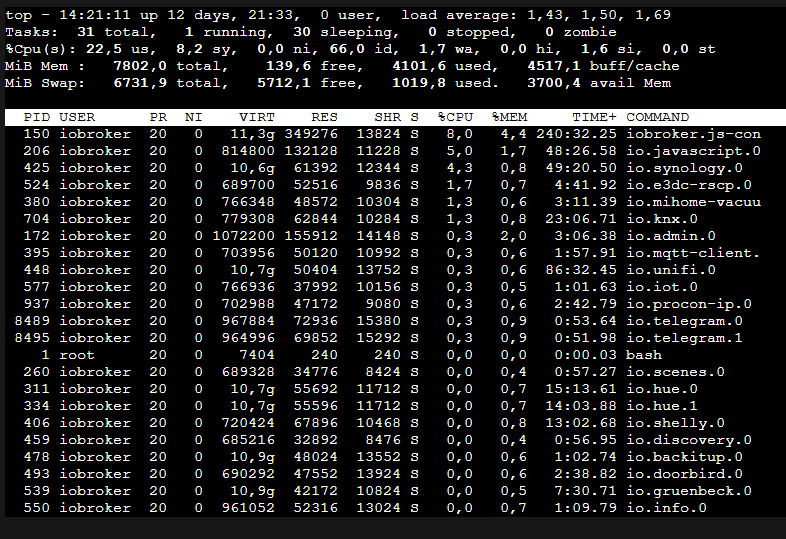
kleines Update ich habe jetzt mal meinen Container neu aufgesetzt und das Backup wieder eingespielt.
Läuft erstmal wieder.
Bei den scripten habe ich erst mal alle Scripte ohne timeout wieder aktiviert, da ich glaube das evtl irgendwo immer wieder neue timer getrigert werden.
kann man irgendwo sehen welche timeouts im hintergrund laufen bzw kann man sich anzeigen lassen wenn ein neuer timer getriggert und wieder gestoppt wird.wenn ich mit dem befehl top in der console arbeite bekommt man ja erst nach einer gewissen Zeit mit ob da mehr leistung gezogen wird, wenn es wirklich an den timeouts liegt, oder?
Gibt es noch andere möglichkeiten Amokscripte zu identifizieren? Debug oder silly log einstellung für Javascripz adapter evtl?
zur zeit sieht es nicht schlecht aus mMn:



Hey! Du scheinst an dieser Unterhaltung interessiert zu sein, hast aber noch kein Konto.
Hast du es satt, bei jedem Besuch durch die gleichen Beiträge zu scrollen? Wenn du dich für ein Konto anmeldest, kommst du immer genau dorthin zurück, wo du zuvor warst, und kannst dich über neue Antworten benachrichtigen lassen (entweder per E-Mail oder Push-Benachrichtigung). Du kannst auch Lesezeichen speichern und Beiträge positiv bewerten, um anderen Community-Mitgliedern deine Wertschätzung zu zeigen.
Mit deinem Input könnte dieser Beitrag noch besser werden 💗
Registrieren Anmelden321
Online33.0k
Benutzende83.7k
Themen1.3m
Beiträge