



Skip to content
  • Home
  • Recent
  • Tags
  • 0 Unread 0
  • Categories
  • Unreplied
  • Popular
  • GitHub
  • Docu
  • Hilfe
Skins
  • Light
  • Brite
  • Cerulean
  • Cosmo
  • Flatly
  • Journal
  • Litera
  • Lumen
  • Lux
  • Materia
  • Minty
  • Morph
  • Pulse
  • Sandstone
  • Simplex
  • Sketchy
  • Spacelab
  • United
  • Yeti
  • Zephyr
  • Dark
  • Cyborg
  • Darkly
  • Quartz
  • Slate
  • Solar
  • Superhero
  • Vapor

  • Default (No Skin)
  • No Skin
Collapse
ioBroker Logo

Community Forum

donate donate
  1. ioBroker Community Home
  2. Deutsch
  3. Einsteigerfragen
  4. ioBroker auf neuer Maschine aufgesetzt und Adapter Probleme

NEWS

  • Neuer ioBroker-Blog online: Monatsrückblick März/April 2026
    BluefoxB
    Bluefox
    5
    1
    113

  • Verwendung von KI bitte immer deutlich kennzeichnen
    HomoranH
    Homoran
    8
    1
    156

  • Monatsrückblick Januar/Februar 2026 ist online!
    BluefoxB
    Bluefox
    18
    1
    865

ioBroker auf neuer Maschine aufgesetzt und Adapter Probleme

Scheduled Pinned Locked Moved Einsteigerfragen
267 Posts 8 Posters 45.0k Views 8 Watching
  • Oldest to Newest
  • Newest to Oldest
  • Most Votes
Reply
  • Reply as topic
Log in to reply
This topic has been deleted. Only users with topic management privileges can see it.
  • G Gismoh

    @crunchip
    muss ich leider auf später verschieben.

    crunchipC Away
    crunchipC Away
    crunchip
    Forum Testing Most Active Developer
    wrote on last edited by
    #67

    @gismoh und wie du siehst, der vis bug, denn laut deinem log wurde vis nicht installiert

    umgestiegen von Proxmox auf Unraid

    G 1 Reply Last reply
    0
    • crunchipC crunchip

      @gismoh und wie du siehst, der vis bug, denn laut deinem log wurde vis nicht installiert

      G Offline
      G Offline
      Gismoh
      wrote on last edited by
      #68

      @crunchip
      ist für mich ok mit VIS, wenn alles wieder da ist, wenn ich nur den Adapter neu installiere.

      ansonsten:

      Verzeichnis „/opt/iobroker/node_modules/node-gyp/gyp/pylib/gyp existiert nicht
      

      Mache dann später weiter.

      ioBroker auf: Lenovo ThinkCentre M910Q Tiny i5-7500T 16 GB mit proxmox in VM (Bookworm)

      crunchipC 1 Reply Last reply
      0
      • G Gismoh

        @crunchip
        ist für mich ok mit VIS, wenn alles wieder da ist, wenn ich nur den Adapter neu installiere.

        ansonsten:

        Verzeichnis „/opt/iobroker/node_modules/node-gyp/gyp/pylib/gyp existiert nicht
        

        Mache dann später weiter.

        crunchipC Away
        crunchipC Away
        crunchip
        Forum Testing Most Active Developer
        wrote on last edited by
        #69

        @gismoh seltsam, dann probier mal so

        iob stop
        iob fix
        
        cd /opt/iobroker 
        npm install iobroker.ble
        iobroker upload ble
        iobroker start ble
        

        umgestiegen von Proxmox auf Unraid

        G 1 Reply Last reply
        1
        • crunchipC crunchip

          @gismoh seltsam, dann probier mal so

          iob stop
          iob fix
          
          cd /opt/iobroker 
          npm install iobroker.ble
          iobroker upload ble
          iobroker start ble
          
          G Offline
          G Offline
          Gismoh
          wrote on last edited by
          #70

          @crunchip

          npm ERR! code 1
          npm ERR! path /opt/iobroker/node_modules/iobroker.ble/node_modules/@abandonware/noble
          npm ERR! command failed
          npm ERR! command sh -c node-gyp-build
          npm ERR! gyp info it worked if it ends with ok
          npm ERR! gyp info using node-gyp@7.1.2
          npm ERR! gyp info using node@18.18.2 | linux | x64
          npm ERR! gyp info find Python using Python version 3.11.2 found at "/usr/bin/python3"
          npm ERR! (node:3121) [DEP0150] DeprecationWarning: Setting process.config is deprecated. In the future the property will be read-only.
          npm ERR! (Use `node --trace-deprecation ...` to show where the warning was created)
          npm ERR! gyp info spawn /usr/bin/python3
          npm ERR! gyp info spawn args [
          npm ERR! gyp info spawn args   '/opt/iobroker/node_modules/node-gyp/gyp/gyp_main.py',
          npm ERR! gyp info spawn args   'binding.gyp',
          npm ERR! gyp info spawn args   '-f',
          npm ERR! gyp info spawn args   'make',
          npm ERR! gyp info spawn args   '-I',
          npm ERR! gyp info spawn args   '/opt/iobroker/node_modules/iobroker.ble/node_modules/@abandonware/noble/build/config.gypi',
          npm ERR! gyp info spawn args   '-I',
          npm ERR! gyp info spawn args   '/opt/iobroker/node_modules/node-gyp/addon.gypi',
          npm ERR! gyp info spawn args   '-I',
          npm ERR! gyp info spawn args   '/home/iobroker/.cache/node-gyp/18.18.2/include/node/common.gypi',
          npm ERR! gyp info spawn args   '-Dlibrary=shared_library',
          npm ERR! gyp info spawn args   '-Dvisibility=default',
          npm ERR! gyp info spawn args   '-Dnode_root_dir=/home/iobroker/.cache/node-gyp/18.18.2',
          npm ERR! gyp info spawn args   '-Dnode_gyp_dir=/opt/iobroker/node_modules/node-gyp',
          npm ERR! gyp info spawn args   '-Dnode_lib_file=/home/iobroker/.cache/node-gyp/18.18.2/<(target_arch)/node.lib',
          npm ERR! gyp info spawn args   '-Dmodule_root_dir=/opt/iobroker/node_modules/iobroker.ble/node_modules/@abandonware/noble',
          npm ERR! gyp info spawn args   '-Dnode_engine=v8',
          npm ERR! gyp info spawn args   '--depth=.',
          npm ERR! gyp info spawn args   '--no-parallel',
          npm ERR! gyp info spawn args   '--generator-output',
          npm ERR! gyp info spawn args   'build',
          npm ERR! gyp info spawn args   '-Goutput_dir=.'
          npm ERR! gyp info spawn args ]
          npm ERR! Traceback (most recent call last):
          npm ERR!   File "/opt/iobroker/node_modules/node-gyp/gyp/gyp_main.py", line 51, in <module>
          npm ERR!     sys.exit(gyp.script_main())
          npm ERR!              ^^^^^^^^^^^^^^^^^
          npm ERR!   File "/opt/iobroker/node_modules/node-gyp/gyp/pylib/gyp/__init__.py", line 670, in script_main
          npm ERR!     return main(sys.argv[1:])
          npm ERR!            ^^^^^^^^^^^^^^^^^^
          npm ERR!   File "/opt/iobroker/node_modules/node-gyp/gyp/pylib/gyp/__init__.py", line 662, in main
          npm ERR!     return gyp_main(args)
          npm ERR!            ^^^^^^^^^^^^^^
          npm ERR!   File "/opt/iobroker/node_modules/node-gyp/gyp/pylib/gyp/__init__.py", line 629, in gyp_main
          npm ERR!     [generator, flat_list, targets, data] = Load(
          npm ERR!                                             ^^^^^
          npm ERR!   File "/opt/iobroker/node_modules/node-gyp/gyp/pylib/gyp/__init__.py", line 150, in Load
          npm ERR!     result = gyp.input.Load(
          npm ERR!              ^^^^^^^^^^^^^^^
          npm ERR!   File "/opt/iobroker/node_modules/node-gyp/gyp/pylib/gyp/input.py", line 3021, in Load
          npm ERR!     LoadTargetBuildFile(
          npm ERR!   File "/opt/iobroker/node_modules/node-gyp/gyp/pylib/gyp/input.py", line 411, in LoadTargetBuildFile
          npm ERR!     build_file_data = LoadOneBuildFile(
          npm ERR!                       ^^^^^^^^^^^^^^^^^
          npm ERR!   File "/opt/iobroker/node_modules/node-gyp/gyp/pylib/gyp/input.py", line 239, in LoadOneBuildFile
          npm ERR!     build_file_contents = open(build_file_path, "rU").read()
          npm ERR!                           ^^^^^^^^^^^^^^^^^^^^^^^^^^^
          npm ERR! ValueError: invalid mode: 'rU' while trying to load binding.gyp
          npm ERR! gyp ERR! configure error 
          npm ERR! gyp ERR! stack Error: `gyp` failed with exit code: 1
          npm ERR! gyp ERR! stack     at ChildProcess.onCpExit (/opt/iobroker/node_modules/node-gyp/lib/configure.js:351:16)
          npm ERR! gyp ERR! stack     at ChildProcess.emit (node:events:517:28)
          npm ERR! gyp ERR! stack     at ChildProcess._handle.onexit (node:internal/child_process:292:12)
          npm ERR! gyp ERR! System Linux 6.1.0-13-amd64
          npm ERR! gyp ERR! command "/usr/bin/node" "/opt/iobroker/node_modules/node-gyp/bin/node-gyp.js" "rebuild"
          npm ERR! gyp ERR! cwd /opt/iobroker/node_modules/iobroker.ble/node_modules/@abandonware/noble
          npm ERR! gyp ERR! node -v v18.18.2
          npm ERR! gyp ERR! node-gyp -v v7.1.2
          npm ERR! gyp ERR! not ok
          
          npm ERR! A complete log of this run can be found in: /home/iobroker/.npm/_logs/2023-11-08T21_11_08_735Z-debug-0.log
          

          Verstehe es wirklich nicht, warum der ble läuft, aber nach dem einspielen des Backups nicht mehr.

          Kann man den ble irgendwie "sperren", so das das Backitup den nicht "anfasst" ?

          ioBroker auf: Lenovo ThinkCentre M910Q Tiny i5-7500T 16 GB mit proxmox in VM (Bookworm)

          Thomas BraunT 1 Reply Last reply
          0
          • G Gismoh

            @crunchip

            npm ERR! code 1
            npm ERR! path /opt/iobroker/node_modules/iobroker.ble/node_modules/@abandonware/noble
            npm ERR! command failed
            npm ERR! command sh -c node-gyp-build
            npm ERR! gyp info it worked if it ends with ok
            npm ERR! gyp info using node-gyp@7.1.2
            npm ERR! gyp info using node@18.18.2 | linux | x64
            npm ERR! gyp info find Python using Python version 3.11.2 found at "/usr/bin/python3"
            npm ERR! (node:3121) [DEP0150] DeprecationWarning: Setting process.config is deprecated. In the future the property will be read-only.
            npm ERR! (Use `node --trace-deprecation ...` to show where the warning was created)
            npm ERR! gyp info spawn /usr/bin/python3
            npm ERR! gyp info spawn args [
            npm ERR! gyp info spawn args   '/opt/iobroker/node_modules/node-gyp/gyp/gyp_main.py',
            npm ERR! gyp info spawn args   'binding.gyp',
            npm ERR! gyp info spawn args   '-f',
            npm ERR! gyp info spawn args   'make',
            npm ERR! gyp info spawn args   '-I',
            npm ERR! gyp info spawn args   '/opt/iobroker/node_modules/iobroker.ble/node_modules/@abandonware/noble/build/config.gypi',
            npm ERR! gyp info spawn args   '-I',
            npm ERR! gyp info spawn args   '/opt/iobroker/node_modules/node-gyp/addon.gypi',
            npm ERR! gyp info spawn args   '-I',
            npm ERR! gyp info spawn args   '/home/iobroker/.cache/node-gyp/18.18.2/include/node/common.gypi',
            npm ERR! gyp info spawn args   '-Dlibrary=shared_library',
            npm ERR! gyp info spawn args   '-Dvisibility=default',
            npm ERR! gyp info spawn args   '-Dnode_root_dir=/home/iobroker/.cache/node-gyp/18.18.2',
            npm ERR! gyp info spawn args   '-Dnode_gyp_dir=/opt/iobroker/node_modules/node-gyp',
            npm ERR! gyp info spawn args   '-Dnode_lib_file=/home/iobroker/.cache/node-gyp/18.18.2/<(target_arch)/node.lib',
            npm ERR! gyp info spawn args   '-Dmodule_root_dir=/opt/iobroker/node_modules/iobroker.ble/node_modules/@abandonware/noble',
            npm ERR! gyp info spawn args   '-Dnode_engine=v8',
            npm ERR! gyp info spawn args   '--depth=.',
            npm ERR! gyp info spawn args   '--no-parallel',
            npm ERR! gyp info spawn args   '--generator-output',
            npm ERR! gyp info spawn args   'build',
            npm ERR! gyp info spawn args   '-Goutput_dir=.'
            npm ERR! gyp info spawn args ]
            npm ERR! Traceback (most recent call last):
            npm ERR!   File "/opt/iobroker/node_modules/node-gyp/gyp/gyp_main.py", line 51, in <module>
            npm ERR!     sys.exit(gyp.script_main())
            npm ERR!              ^^^^^^^^^^^^^^^^^
            npm ERR!   File "/opt/iobroker/node_modules/node-gyp/gyp/pylib/gyp/__init__.py", line 670, in script_main
            npm ERR!     return main(sys.argv[1:])
            npm ERR!            ^^^^^^^^^^^^^^^^^^
            npm ERR!   File "/opt/iobroker/node_modules/node-gyp/gyp/pylib/gyp/__init__.py", line 662, in main
            npm ERR!     return gyp_main(args)
            npm ERR!            ^^^^^^^^^^^^^^
            npm ERR!   File "/opt/iobroker/node_modules/node-gyp/gyp/pylib/gyp/__init__.py", line 629, in gyp_main
            npm ERR!     [generator, flat_list, targets, data] = Load(
            npm ERR!                                             ^^^^^
            npm ERR!   File "/opt/iobroker/node_modules/node-gyp/gyp/pylib/gyp/__init__.py", line 150, in Load
            npm ERR!     result = gyp.input.Load(
            npm ERR!              ^^^^^^^^^^^^^^^
            npm ERR!   File "/opt/iobroker/node_modules/node-gyp/gyp/pylib/gyp/input.py", line 3021, in Load
            npm ERR!     LoadTargetBuildFile(
            npm ERR!   File "/opt/iobroker/node_modules/node-gyp/gyp/pylib/gyp/input.py", line 411, in LoadTargetBuildFile
            npm ERR!     build_file_data = LoadOneBuildFile(
            npm ERR!                       ^^^^^^^^^^^^^^^^^
            npm ERR!   File "/opt/iobroker/node_modules/node-gyp/gyp/pylib/gyp/input.py", line 239, in LoadOneBuildFile
            npm ERR!     build_file_contents = open(build_file_path, "rU").read()
            npm ERR!                           ^^^^^^^^^^^^^^^^^^^^^^^^^^^
            npm ERR! ValueError: invalid mode: 'rU' while trying to load binding.gyp
            npm ERR! gyp ERR! configure error 
            npm ERR! gyp ERR! stack Error: `gyp` failed with exit code: 1
            npm ERR! gyp ERR! stack     at ChildProcess.onCpExit (/opt/iobroker/node_modules/node-gyp/lib/configure.js:351:16)
            npm ERR! gyp ERR! stack     at ChildProcess.emit (node:events:517:28)
            npm ERR! gyp ERR! stack     at ChildProcess._handle.onexit (node:internal/child_process:292:12)
            npm ERR! gyp ERR! System Linux 6.1.0-13-amd64
            npm ERR! gyp ERR! command "/usr/bin/node" "/opt/iobroker/node_modules/node-gyp/bin/node-gyp.js" "rebuild"
            npm ERR! gyp ERR! cwd /opt/iobroker/node_modules/iobroker.ble/node_modules/@abandonware/noble
            npm ERR! gyp ERR! node -v v18.18.2
            npm ERR! gyp ERR! node-gyp -v v7.1.2
            npm ERR! gyp ERR! not ok
            
            npm ERR! A complete log of this run can be found in: /home/iobroker/.npm/_logs/2023-11-08T21_11_08_735Z-debug-0.log
            

            Verstehe es wirklich nicht, warum der ble läuft, aber nach dem einspielen des Backups nicht mehr.

            Kann man den ble irgendwie "sperren", so das das Backitup den nicht "anfasst" ?

            Thomas BraunT Online
            Thomas BraunT Online
            Thomas Braun
            Most Active
            wrote on last edited by
            #71

            @gismoh sagte in ioBroker auf neuer Maschine aufgesetzt und Adapter Probleme:

            ValueError: invalid mode: 'rU'

            Da muss in einer Datei was umgestellt werden. Hatte den Fall erst unlängst. Such mal im Forum danach.

            Linux-Werkzeugkasten:
            https://forum.iobroker.net/topic/42952/der-kleine-iobroker-linux-werkzeugkasten
            NodeJS Fixer Skript:
            https://forum.iobroker.net/topic/68035/iob-node-fix-skript
            iob_diag: curl -sLf -o diag.sh https://iobroker.net/diag.sh && bash diag.sh

            crunchipC 1 Reply Last reply
            0
            • Thomas BraunT Thomas Braun

              @gismoh sagte in ioBroker auf neuer Maschine aufgesetzt und Adapter Probleme:

              ValueError: invalid mode: 'rU'

              Da muss in einer Datei was umgestellt werden. Hatte den Fall erst unlängst. Such mal im Forum danach.

              crunchipC Away
              crunchipC Away
              crunchip
              Forum Testing Most Active Developer
              wrote on last edited by
              #72

              @thomas-braun das ahb ich ihm ja oben schon geschrieben, er findet sie aber nicht in seinem System

              umgestiegen von Proxmox auf Unraid

              G 1 Reply Last reply
              0
              • crunchipC crunchip

                @thomas-braun das ahb ich ihm ja oben schon geschrieben, er findet sie aber nicht in seinem System

                G Offline
                G Offline
                Gismoh
                wrote on last edited by
                #73

                @crunchip
                verstehe ich nicht:

                root@ioBrokerVM:/# cd /opt
                root@ioBrokerVM:/opt# ls
                iobroker
                root@ioBrokerVM:/opt# cd /iobroker
                -bash: cd: /iobroker: Datei oder Verzeichnis nicht gefunden
                root@ioBrokerVM:/opt# 
                

                er zeigt mit das Verzeichnis iobroker erst an, dann sagt er, er hätte nichts gefunden.
                Ober ist meine Eingabe falsch?

                ioBroker auf: Lenovo ThinkCentre M910Q Tiny i5-7500T 16 GB mit proxmox in VM (Bookworm)

                Thomas BraunT HomoranH 2 Replies Last reply
                0
                • G Gismoh

                  @crunchip
                  verstehe ich nicht:

                  root@ioBrokerVM:/# cd /opt
                  root@ioBrokerVM:/opt# ls
                  iobroker
                  root@ioBrokerVM:/opt# cd /iobroker
                  -bash: cd: /iobroker: Datei oder Verzeichnis nicht gefunden
                  root@ioBrokerVM:/opt# 
                  

                  er zeigt mit das Verzeichnis iobroker erst an, dann sagt er, er hätte nichts gefunden.
                  Ober ist meine Eingabe falsch?

                  Thomas BraunT Online
                  Thomas BraunT Online
                  Thomas Braun
                  Most Active
                  wrote on last edited by Thomas Braun
                  #74

                  @gismoh sagte in ioBroker auf neuer Maschine aufgesetzt und Adapter Probleme:

                  Ober ist meine Eingabe falsch?

                  Dein Herumgehampel als root ist falsch.

                  Und relative Pfade werden ohne / angesprochen. Absolute Pfade halt mit /
                  Linux-Grundschule, Herr root.

                  Linux-Werkzeugkasten:
                  https://forum.iobroker.net/topic/42952/der-kleine-iobroker-linux-werkzeugkasten
                  NodeJS Fixer Skript:
                  https://forum.iobroker.net/topic/68035/iob-node-fix-skript
                  iob_diag: curl -sLf -o diag.sh https://iobroker.net/diag.sh && bash diag.sh

                  1 Reply Last reply
                  0
                  • G Gismoh

                    @crunchip
                    verstehe ich nicht:

                    root@ioBrokerVM:/# cd /opt
                    root@ioBrokerVM:/opt# ls
                    iobroker
                    root@ioBrokerVM:/opt# cd /iobroker
                    -bash: cd: /iobroker: Datei oder Verzeichnis nicht gefunden
                    root@ioBrokerVM:/opt# 
                    

                    er zeigt mit das Verzeichnis iobroker erst an, dann sagt er, er hätte nichts gefunden.
                    Ober ist meine Eingabe falsch?

                    HomoranH Do not disturb
                    HomoranH Do not disturb
                    Homoran
                    Global Moderator Administrators
                    wrote on last edited by Homoran
                    #75

                    @gismoh cd /opt/iobroker
                    oder

                    cd /opt
                    cd iobroker
                    

                    beim zweiten kein / davor

                    kein Support per PN! - Fragen im Forum stellen -
                    Benutzt das Voting rechts unten im Beitrag wenn er euch geholfen hat.
                    Das Forum freut sich über eine Spende. Benutzt dazu den Spendenbutton oben rechts. Danke!
                    der Installationsfixer: curl -fsL https://iobroker.net/fix.sh | bash -

                    G 1 Reply Last reply
                    0
                    • HomoranH Homoran

                      @gismoh cd /opt/iobroker
                      oder

                      cd /opt
                      cd iobroker
                      

                      beim zweiten kein / davor

                      G Offline
                      G Offline
                      Gismoh
                      wrote on last edited by
                      #76

                      @homoran
                      argh, merci, ein Verzeichniswechsel dacht ich da muss ein "/" vor merci

                      ioBroker auf: Lenovo ThinkCentre M910Q Tiny i5-7500T 16 GB mit proxmox in VM (Bookworm)

                      HomoranH 1 Reply Last reply
                      0
                      • G Gismoh

                        @homoran
                        argh, merci, ein Verzeichniswechsel dacht ich da muss ein "/" vor merci

                        HomoranH Do not disturb
                        HomoranH Do not disturb
                        Homoran
                        Global Moderator Administrators
                        wrote on last edited by
                        #77

                        @gismoh sagte in ioBroker auf neuer Maschine aufgesetzt und Adapter Probleme:

                        da muss ein "/" vor merci

                        das bringt dich wieder in die root-ebene

                        was nicht bedeutet dass man da als root rumläuft

                        kein Support per PN! - Fragen im Forum stellen -
                        Benutzt das Voting rechts unten im Beitrag wenn er euch geholfen hat.
                        Das Forum freut sich über eine Spende. Benutzt dazu den Spendenbutton oben rechts. Danke!
                        der Installationsfixer: curl -fsL https://iobroker.net/fix.sh | bash -

                        G 1 Reply Last reply
                        0
                        • HomoranH Homoran

                          @gismoh sagte in ioBroker auf neuer Maschine aufgesetzt und Adapter Probleme:

                          da muss ein "/" vor merci

                          das bringt dich wieder in die root-ebene

                          was nicht bedeutet dass man da als root rumläuft

                          G Offline
                          G Offline
                          Gismoh
                          wrote on last edited by
                          #78

                          @homoran
                          Okay, hatte ich nach einer Anleitung aufgesetzt, dort wurde es mit "root" gemacht, sogar auch in weiteren.

                          also das Verzeichnis node-gyp gibt es bei mir nicht, nur ein node-gyp-build.

                          Dieser taucht dann auf, wenn ich mich mit etwas anderem anmelde?
                          Ich suche mal nach ner Anleitung, wie ich mich andres anmelde.
                          Merci

                          ioBroker auf: Lenovo ThinkCentre M910Q Tiny i5-7500T 16 GB mit proxmox in VM (Bookworm)

                          Thomas BraunT crunchipC 2 Replies Last reply
                          0
                          • G Gismoh

                            @homoran
                            Okay, hatte ich nach einer Anleitung aufgesetzt, dort wurde es mit "root" gemacht, sogar auch in weiteren.

                            also das Verzeichnis node-gyp gibt es bei mir nicht, nur ein node-gyp-build.

                            Dieser taucht dann auf, wenn ich mich mit etwas anderem anmelde?
                            Ich suche mal nach ner Anleitung, wie ich mich andres anmelde.
                            Merci

                            Thomas BraunT Online
                            Thomas BraunT Online
                            Thomas Braun
                            Most Active
                            wrote on last edited by
                            #79

                            @gismoh sagte in ioBroker auf neuer Maschine aufgesetzt und Adapter Probleme:

                            Okay, hatte ich nach einer Anleitung aufgesetzt, dort wurde es mit "root" gemacht, sogar auch in weiteren.

                            Dann schmeiß die Anleitung weg, leg dir einen User an, falls noch keiner vorhanden ist und stolper mit dem durch das System.

                            Linux-Werkzeugkasten:
                            https://forum.iobroker.net/topic/42952/der-kleine-iobroker-linux-werkzeugkasten
                            NodeJS Fixer Skript:
                            https://forum.iobroker.net/topic/68035/iob-node-fix-skript
                            iob_diag: curl -sLf -o diag.sh https://iobroker.net/diag.sh && bash diag.sh

                            1 Reply Last reply
                            0
                            • G Gismoh

                              @homoran
                              Okay, hatte ich nach einer Anleitung aufgesetzt, dort wurde es mit "root" gemacht, sogar auch in weiteren.

                              also das Verzeichnis node-gyp gibt es bei mir nicht, nur ein node-gyp-build.

                              Dieser taucht dann auf, wenn ich mich mit etwas anderem anmelde?
                              Ich suche mal nach ner Anleitung, wie ich mich andres anmelde.
                              Merci

                              crunchipC Away
                              crunchipC Away
                              crunchip
                              Forum Testing Most Active Developer
                              wrote on last edited by
                              #80

                              @gismoh sagte in ioBroker auf neuer Maschine aufgesetzt und Adapter Probleme:

                              Dieser taucht dann auf, wenn ich mich mit etwas anderem anmelde?

                              ?

                              Ich hab dir den Befehl doch oben geschrieben
                              https://forum.iobroker.net/post/1076264

                              umgestiegen von Proxmox auf Unraid

                              G 1 Reply Last reply
                              0
                              • crunchipC crunchip

                                @gismoh sagte in ioBroker auf neuer Maschine aufgesetzt und Adapter Probleme:

                                Dieser taucht dann auf, wenn ich mich mit etwas anderem anmelde?

                                ?

                                Ich hab dir den Befehl doch oben geschrieben
                                https://forum.iobroker.net/post/1076264

                                G Offline
                                G Offline
                                Gismoh
                                wrote on last edited by
                                #81

                                @crunchip
                                ja, hatte ich ja auch gelesen, aber den Pfad gibt es ja bei mir (aktuell) nicht.

                                Verzeichnis „/opt/iobroker/node_modules/node-gyp/gyp/pylib/gyp“ existiert nicht
                                

                                So wie ich @Thomas-Braun verstanden habe liegt das daran, das ich mit root unterwegs bin. Versuche also gleich einen anderen user anzulegen, und dann komme ich wohl zur Datei ;)

                                ioBroker auf: Lenovo ThinkCentre M910Q Tiny i5-7500T 16 GB mit proxmox in VM (Bookworm)

                                Thomas BraunT G 2 Replies Last reply
                                0
                                • crunchipC crunchip

                                  @gismoh
                                  du musst die Zeile
                                  /opt/iobroker/node_modules/node-gyp/gyp/pylib/gyp/input.py
                                  mit nano aufrufen und das U in der entsprechenden Zeile entfernen
                                  abspeichern, fertig

                                  sudo nano /opt/iobroker/node_modules/node-gyp/gyp/pylib/gyp/input.py

                                  dabei musst du ein stück nach unten blättern
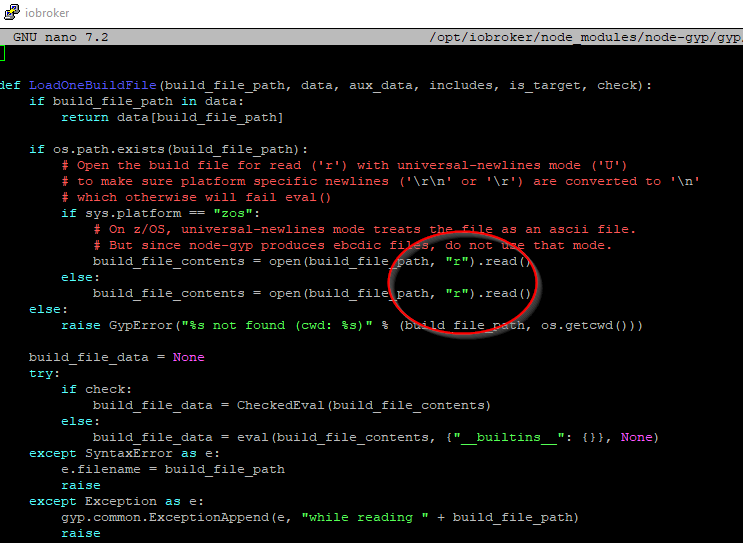
                                  ec23dd89-feac-4fb7-8663-aa4437f0cf07-image.png

                                  Thomas BraunT Online
                                  Thomas BraunT Online
                                  Thomas Braun
                                  Most Active
                                  wrote on last edited by
                                  #82

                                  @crunchip sagte in ioBroker auf neuer Maschine aufgesetzt und Adapter Probleme:

                                  sudo nano /opt/iobroker/node_modules/node-gyp/gyp/pylib/gyp/input.py

                                  Bei mir kommt die direkt über nodejs/gyp:

                                  echad@chet:~ $ locate input.py
                                  /usr/lib/node_modules/npm/node_modules/node-gyp/gyp/pylib/gyp/input.py
                                  

                                  Linux-Werkzeugkasten:
                                  https://forum.iobroker.net/topic/42952/der-kleine-iobroker-linux-werkzeugkasten
                                  NodeJS Fixer Skript:
                                  https://forum.iobroker.net/topic/68035/iob-node-fix-skript
                                  iob_diag: curl -sLf -o diag.sh https://iobroker.net/diag.sh && bash diag.sh

                                  1 Reply Last reply
                                  0
                                  • G Gismoh

                                    @crunchip
                                    ja, hatte ich ja auch gelesen, aber den Pfad gibt es ja bei mir (aktuell) nicht.

                                    Verzeichnis „/opt/iobroker/node_modules/node-gyp/gyp/pylib/gyp“ existiert nicht
                                    

                                    So wie ich @Thomas-Braun verstanden habe liegt das daran, das ich mit root unterwegs bin. Versuche also gleich einen anderen user anzulegen, und dann komme ich wohl zur Datei ;)

                                    Thomas BraunT Online
                                    Thomas BraunT Online
                                    Thomas Braun
                                    Most Active
                                    wrote on last edited by
                                    #83

                                    @gismoh sagte in ioBroker auf neuer Maschine aufgesetzt und Adapter Probleme:

                                    So wie ich @Thomas-Braun verstanden habe liegt das daran, das ich mit root unterwegs bin.

                                    Die Datei ist auch für einen anderen user nicht vorhanden. Aber grundsätzlich kapsert man nicht als root durch das System. Schon mal gar nicht, wenn man überhaupt keine Ahnung hat was man da wo warum überhaupt macht.

                                    Linux-Werkzeugkasten:
                                    https://forum.iobroker.net/topic/42952/der-kleine-iobroker-linux-werkzeugkasten
                                    NodeJS Fixer Skript:
                                    https://forum.iobroker.net/topic/68035/iob-node-fix-skript
                                    iob_diag: curl -sLf -o diag.sh https://iobroker.net/diag.sh && bash diag.sh

                                    1 Reply Last reply
                                    0
                                    • G Gismoh

                                      @crunchip
                                      ja, hatte ich ja auch gelesen, aber den Pfad gibt es ja bei mir (aktuell) nicht.

                                      Verzeichnis „/opt/iobroker/node_modules/node-gyp/gyp/pylib/gyp“ existiert nicht
                                      

                                      So wie ich @Thomas-Braun verstanden habe liegt das daran, das ich mit root unterwegs bin. Versuche also gleich einen anderen user anzulegen, und dann komme ich wohl zur Datei ;)

                                      G Offline
                                      G Offline
                                      Gismoh
                                      wrote on last edited by
                                      #84

                                      hmm, irgendwie bekomme ich njun mit dem anderen user diese Meldung:

                                      idash@ioBrokersudo nano /opt/iobroker/node_modules/node-gyp/gyp/pylib/gyp/input.pyput.[sudo] Passwort für idash: 
                                      Sorry, user idash is not allowed to execute '/usr/bin/nano /opt/iobroker/node_modules/node-gyp/gyp/pylib/gyp/input.py' as root on ioBrokerVM.
                                      idash@ioBrokerVM:~$ 
                                      

                                      ioBroker auf: Lenovo ThinkCentre M910Q Tiny i5-7500T 16 GB mit proxmox in VM (Bookworm)

                                      Thomas BraunT 1 Reply Last reply
                                      0
                                      • G Gismoh

                                        hmm, irgendwie bekomme ich njun mit dem anderen user diese Meldung:

                                        idash@ioBrokersudo nano /opt/iobroker/node_modules/node-gyp/gyp/pylib/gyp/input.pyput.[sudo] Passwort für idash: 
                                        Sorry, user idash is not allowed to execute '/usr/bin/nano /opt/iobroker/node_modules/node-gyp/gyp/pylib/gyp/input.py' as root on ioBrokerVM.
                                        idash@ioBrokerVM:~$ 
                                        
                                        Thomas BraunT Online
                                        Thomas BraunT Online
                                        Thomas Braun
                                        Most Active
                                        wrote on last edited by Thomas Braun
                                        #85

                                        @gismoh sagte in ioBroker auf neuer Maschine aufgesetzt und Adapter Probleme:

                                        hmm, irgendwie bekomme ich njun mit dem anderen user diese Meldung:

                                        groups
                                        

                                        sagt? Der ist mit Sicherheit nicht in der Gruppe 'sudo' drin.

                                        Ist aber auch für diese Datei nicht erforderlich, da mit root-Rechten zu agieren.

                                        Linux-Werkzeugkasten:
                                        https://forum.iobroker.net/topic/42952/der-kleine-iobroker-linux-werkzeugkasten
                                        NodeJS Fixer Skript:
                                        https://forum.iobroker.net/topic/68035/iob-node-fix-skript
                                        iob_diag: curl -sLf -o diag.sh https://iobroker.net/diag.sh && bash diag.sh

                                        G 1 Reply Last reply
                                        0
                                        • Thomas BraunT Thomas Braun

                                          @gismoh sagte in ioBroker auf neuer Maschine aufgesetzt und Adapter Probleme:

                                          hmm, irgendwie bekomme ich njun mit dem anderen user diese Meldung:

                                          groups
                                          

                                          sagt? Der ist mit Sicherheit nicht in der Gruppe 'sudo' drin.

                                          Ist aber auch für diese Datei nicht erforderlich, da mit root-Rechten zu agieren.

                                          G Offline
                                          G Offline
                                          Gismoh
                                          wrote on last edited by
                                          #86

                                          @thomas-braun

                                          idash@ioBrokerVM:~$ groups
                                          idash users
                                          

                                          ioBroker auf: Lenovo ThinkCentre M910Q Tiny i5-7500T 16 GB mit proxmox in VM (Bookworm)

                                          Thomas BraunT 1 Reply Last reply
                                          0

                                          Hello! It looks like you're interested in this conversation, but you don't have an account yet.

                                          Getting fed up of having to scroll through the same posts each visit? When you register for an account, you'll always come back to exactly where you were before, and choose to be notified of new replies (either via email, or push notification). You'll also be able to save bookmarks and upvote posts to show your appreciation to other community members.

                                          With your input, this post could be even better 💗

                                          Register Login
                                          Reply
                                          • Reply as topic
                                          Log in to reply
                                          • Oldest to Newest
                                          • Newest to Oldest
                                          • Most Votes


                                          Support us

                                          ioBroker
                                          Community Adapters
                                          Donate

                                          499

                                          Online

                                          32.8k

                                          Users

                                          82.7k

                                          Topics

                                          1.3m

                                          Posts
                                          Community
                                          Impressum | Datenschutz-Bestimmungen | Nutzungsbedingungen | Einwilligungseinstellungen
                                          ioBroker Community 2014-2025
                                          logo
                                          • Login

                                          • Don't have an account? Register

                                          • Login or register to search.
                                          • First post
                                            Last post
                                          0
                                          • Home
                                          • Recent
                                          • Tags
                                          • Unread 0
                                          • Categories
                                          • Unreplied
                                          • Popular
                                          • GitHub
                                          • Docu
                                          • Hilfe