




ioBroker auf neuer Maschine aufgesetzt und Adapter Probleme
-
@crunchip
dann werde ich mich mal ransetzen, wird aber vermutlich dauern, da ich vorher noch ein Karten-Kopie mache usw.Besten Dank an dich und dir eine schöne Nachtruhe!
Scheinbar ist das Backup einspielen von ioBroker (ohne Influx) doch schneller, als ich so gelesen habe.
CPU und Netz-Auslastung sind nach 12 Minuten wieder quasi im Ruhezustand.
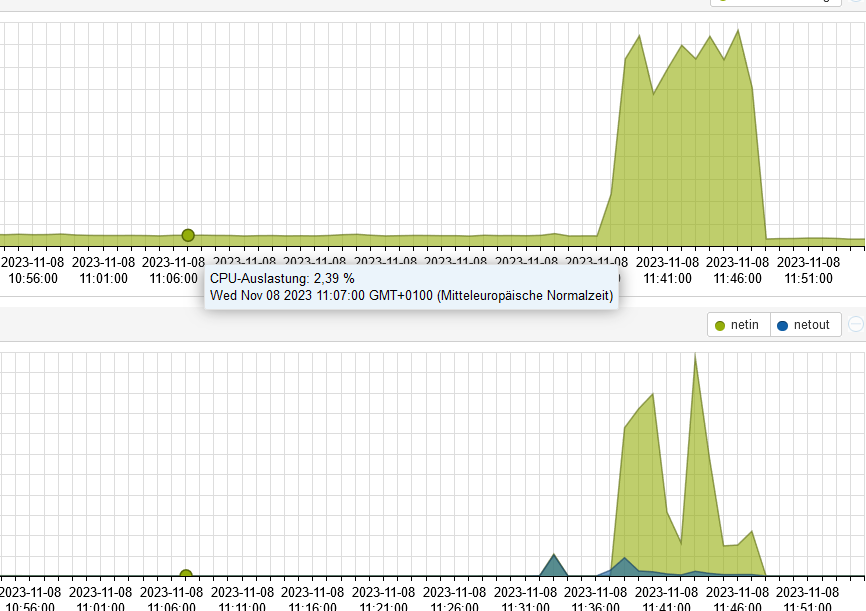
Warte aber nun sicherheitshalber noch weiter ab.ioBroker auf: Lenovo ThinkCentre M910Q Tiny i5-7500T 16 GB mit proxmox in VM (Bookworm)
-
Scheinbar ist das Backup einspielen von ioBroker (ohne Influx) doch schneller, als ich so gelesen habe.
CPU und Netz-Auslastung sind nach 12 Minuten wieder quasi im Ruhezustand.
Warte aber nun sicherheitshalber noch weiter ab.@gismoh sagte in ioBroker auf neuer Maschine aufgesetzt und Adapter Probleme:
Warte aber nun sicherheitshalber noch weiter ab.
einfach eine Konsole deiner Wahl aufmachen und das aktuelle log anschauen
iob logs --watch -
@gismoh sagte in ioBroker auf neuer Maschine aufgesetzt und Adapter Probleme:
Warte aber nun sicherheitshalber noch weiter ab.
einfach eine Konsole deiner Wahl aufmachen und das aktuelle log anschauen
iob logs --watch@crunchip
merci, den Befehl kannte ich noch nicht ;)
hier ein Auszug, scheint wirklich, das er nach 12 Minuten nichts mehr gemacht hatte:2023-11-08 11:45:41.207 - info: host.ioBrokerVM iobroker npm-install: host.ioBrokerVM object system.adapter.vis-timeandweather created/updated 2023-11-08 11:45:42.267 - info: host.ioBrokerVM iobroker npm-install: exit 0 2023-11-08 11:45:43.267 - warn: host.ioBrokerVM startInstance cannot find adapter "vis@1.4.16". Try to install it... 1 attempt 2023-11-08 11:45:43.268 - info: host.ioBrokerVM iobroker install vis@1.4.16 using installedFrom 2023-11-08 11:45:44.908 - info: host.ioBrokerVM iobroker npm-install: NPM version: 9.8.1 2023-11-08 11:45:44.909 - info: host.ioBrokerVM iobroker npm-install: Installing iobroker.vis@1.4.16... (System call) 2023-11-08 11:45:49.371 - info: vis.0 (6542) starting. Version 1.4.16 in /opt/iobroker/node_modules/iobroker.vis, node: v18.18.2, js-controller: 5.0.12 2023-11-08 11:45:49.603 - info: vis.0 (6542) vis license is OK. 2023-11-08 11:45:49.792 - error: vis.0 (6542) Unhandled promise rejection. This error originated either by throwing inside of an async function without a catch block, or by rejecting a promise which was not handled with .catch(). 2023-11-08 11:45:49.793 - error: vis.0 (6542) unhandled promise rejection: Not exists 2023-11-08 11:45:49.793 - error: vis.0 (6542) Error: Not exists at ObjectsInRedisClient._readFile (/opt/iobroker/node_modules/@iobroker/db-objects-redis/build/lib/objects/objectsInRedisClient.js:854:19) at Immediate.<anonymous> (/opt/iobroker/node_modules/@iobroker/db-objects-redis/build/lib/objects/objectsInRedisClient.js:891:59) at process.processImmediate (node:internal/timers:478:21) 2023-11-08 11:45:49.794 - error: vis.0 (6542) Not exists 2023-11-08 11:45:50.298 - info: vis.0 (6542) terminating 2023-11-08 11:45:50.299 - warn: vis.0 (6542) Terminated (UNCAUGHT_EXCEPTION): Without reason 2023-11-08 11:45:50.965 - error: host.ioBrokerVM iobroker npm-install: npm ERR! code 6npm ERR! path /opt/iobroker/node_modules/iobroker.visnpm ERR! command failednpm ERR! command sh -c node main.js --installnpm ERR! A complete log of this run can be found in: /home/iobroker/.npm/_logs/2023-11-08T10_45_45_224Z-debug-0.log 2023-11-08 11:45:50.965 - error: host.ioBrokerVM iobroker npm-install: host.ioBrokerVM Cannot install iobroker.vis@1.4.16: 6 2023-11-08 11:45:51.981 - info: host.ioBrokerVM iobroker npm-install: exit 25 2023-11-08 11:45:52.982 - warn: host.ioBrokerVM startInstance cannot find adapter "web@4.3.0". Try to install it... 1 attempt 2023-11-08 11:45:52.982 - info: host.ioBrokerVM iobroker install web@4.3.0 using installedFrom 2023-11-08 11:45:54.660 - info: host.ioBrokerVM iobroker npm-install: NPM version: 9.8.1 2023-11-08 11:45:54.661 - info: host.ioBrokerVM iobroker npm-install: Installing iobroker.web@4.3.0... (System call) 2023-11-08 11:46:01.177 - info: host.ioBrokerVM iobroker npm-install: added 12 packages in 6s 2023-11-08 11:46:01.178 - info: host.ioBrokerVM iobroker npm-install: 2023-11-08 11:46:01.178 - info: host.ioBrokerVM iobroker npm-install: 150 packages are looking for funding 2023-11-08 11:46:01.178 - info: host.ioBrokerVM iobroker npm-install: run `npm fund` for details 2023-11-08 11:46:01.205 - info: host.ioBrokerVM iobroker npm-install: host.ioBrokerVM install adapter web@4.3.0 2023-11-08 11:46:01.278 - info: host.ioBrokerVM iobroker npm-install: upload [16] web.admin /opt/iobroker/node_modules/iobroker.web/admin/asset-manifest.json asset-manifest.json application/json 2023-11-08 11:46:01.285 - info: host.ioBrokerVM iobroker npm-install: upload [15] web.admin /opt/iobroker/node_modules/iobroker.web/admin/favicon.ico favicon.ico image/vnd.microsoft.icon 2023-11-08 11:46:01.290 - info: host.ioBrokerVM iobroker npm-install: upload [14] web.admin /opt/iobroker/node_modules/iobroker.web/admin/index_m.html index_m.html text/html 2023-11-08 11:46:01.293 - info: host.ioBrokerVM iobroker npm-install: upload [13] web.admin /opt/iobroker/node_modules/iobroker.web/admin/manifest.json manifest.json application/json 2023-11-08 11:46:01.297 - info: host.ioBrokerVM iobroker npm-install: upload [12] web.admin /opt/iobroker/node_modules/iobroker.web/admin/static/css/2.faf2f676.chunk.css static/css/2.faf2f676.chunk.css text/css 2023-11-08 11:46:01.301 - info: host.ioBrokerVM iobroker npm-install: upload [11] web.admin /opt/iobroker/node_modules/iobroker.web/admin/static/css/2.faf2f676.chunk.css.map static/css/2.faf2f676.chunk.css.map application/json 2023-11-08 11:46:01.305 - info: host.ioBrokerVM iobroker npm-install: upload [10] web.admin /opt/iobroker/node_modules/iobroker.web/admin/static/css/main.e2d673ee.chunk.css static/css/main.e2d673ee.chunk.css text/css 2023-11-08 11:46:01.309 - info: host.ioBrokerVM iobroker npm-install: upload [9] web.admin /opt/iobroker/node_modules/iobroker.web/admin/static/css/main.e2d673ee.chunk.css.map static/css/main.e2d673ee.chunk.css.map application/json 2023-11-08 11:46:01.313 - info: host.ioBrokerVM iobroker npm-install: upload [8] web.admin /opt/iobroker/node_modules/iobroker.web/admin/static/js/2.b1d56998.chunk.js static/js/2.b1d56998.chunk.js application/javascript 2023-11-08 11:46:01.329 - info: host.ioBrokerVM iobroker npm-install: upload [7] web.admin /opt/iobroker/node_modules/iobroker.web/admin/static/js/2.b1d56998.chunk.js.LICENSE.txt static/js/2.b1d56998.chunk.js.LICENSE.txt text/plain 2023-11-08 11:46:01.333 - info: host.ioBrokerVM iobroker npm-install: upload [6] web.admin /opt/iobroker/node_modules/iobroker.web/admin/static/js/2.b1d56998.chunk.js.map static/js/2.b1d56998.chunk.js.map application/json 2023-11-08 11:46:01.679 - info: host.ioBrokerVM iobroker npm-install: upload [5] web.admin /opt/iobroker/node_modules/iobroker.web/admin/static/js/main.034751df.chunk.js static/js/main.034751df.chunk.js application/javascript 2023-11-08 11:46:01.683 - info: host.ioBrokerVM iobroker npm-install: upload [4] web.admin /opt/iobroker/node_modules/iobroker.web/admin/static/js/main.034751df.chunk.js.map static/js/main.034751df.chunk.js.map application/json 2023-11-08 11:46:01.686 - info: host.ioBrokerVM iobroker npm-install: upload [3] web.admin /opt/iobroker/node_modules/iobroker.web/admin/static/js/runtime-main.7278cf1c.js static/js/runtime-main.7278cf1c.js application/javascript 2023-11-08 11:46:01.693 - info: host.ioBrokerVM iobroker npm-install: upload [2] web.admin /opt/iobroker/node_modules/iobroker.web/admin/static/js/runtime-main.7278cf1c.js.map static/js/runtime-main.7278cf1c.js.map application/json 2023-11-08 11:46:01.696 - info: host.ioBrokerVM iobroker npm-install: upload [1] web.admin /opt/iobroker/node_modules/iobroker.web/admin/static/media/le.eb63b1db.png static/media/le.eb63b1db.png image/png 2023-11-08 11:46:01.699 - info: host.ioBrokerVM iobroker npm-install: upload [0] web.admin /opt/iobroker/node_modules/iobroker.web/admin/web.png web.png image/png 2023-11-08 11:46:01.748 - info: host.ioBrokerVM iobroker npm-install: upload [396] web /opt/iobroker/node_modules/iobroker.web/www/admin/img/admin.png admin/img/admin.png image/png 2023-11-08 11:46:01.875 - info: host.ioBrokerVM iobroker npm-install: upload [350] web /opt/iobroker/node_modules/iobroker.web/www/lib/css/themes/jquery-ui/blitzer/images/ui-bg_highlight-soft_15_cc0000_1x100.png lib/css/themes/jquery-ui/blitzer/images/ui-bg_highlight-soft_15_cc0000_1x100.png image/png 2023-11-08 11:46:02.022 - info: host.ioBrokerVM iobroker npm-install: upload [300] web /opt/iobroker/node_modules/iobroker.web/www/lib/css/themes/jquery-ui/custom-light/jquery-ui.theme.min.css lib/css/themes/jquery-ui/custom-light/jquery-ui.theme.min.css text/css 2023-11-08 11:46:02.170 - info: host.ioBrokerVM iobroker npm-install: upload [250] web /opt/iobroker/node_modules/iobroker.web/www/lib/css/themes/jquery-ui/eggplant/images/ui-bg_highlight-soft_100_eae6ea_1x100.png lib/css/themes/jquery-ui/eggplant/images/ui-bg_highlight-soft_100_eae6ea_1x100.png image/png 2023-11-08 11:46:02.346 - info: host.ioBrokerVM iobroker npm-install: upload [200] web /opt/iobroker/node_modules/iobroker.web/www/lib/css/themes/jquery-ui/hot-sneaks/images/ui-bg_flat_75_ba9217_40x100.png lib/css/themes/jquery-ui/hot-sneaks/images/ui-bg_flat_75_ba9217_40x100.png image/png 2023-11-08 11:46:02.520 - info: host.ioBrokerVM iobroker npm-install: upload [150] web /opt/iobroker/node_modules/iobroker.web/www/lib/css/themes/jquery-ui/redmond/images/ui-bg_glass_85_dfeffc_1x400.png lib/css/themes/jquery-ui/redmond/images/ui-bg_glass_85_dfeffc_1x400.png image/png 2023-11-08 11:46:02.705 - info: host.ioBrokerVM iobroker npm-install: upload [100] web /opt/iobroker/node_modules/iobroker.web/www/lib/css/themes/jquery-ui/sunny/images/ui-bg_diagonals-medium_20_d34d17_40x40.png lib/css/themes/jquery-ui/sunny/images/ui-bg_diagonals-medium_20_d34d17_40x40.png image/png 2023-11-08 11:46:02.739 - info: host.ioBrokerVM iobroker npm-install: upload [90] web /opt/iobroker/node_modules/iobroker.web/www/lib/css/themes/jquery-ui/sunny/images/ui-icons_bd7b00_256x240.png lib/css/themes/jquery-ui/sunny/images/ui-icons_bd7b00_256x240.png image/png 2023-11-08 11:46:02.776 - info: host.ioBrokerVM iobroker npm-install: upload [80] web /opt/iobroker/node_modules/iobroker.web/www/lib/css/themes/jquery-ui/ui-darkness/images/ui-bg_flat_50_5c5c5c_40x100.png lib/css/themes/jquery-ui/ui-darkness/images/ui-bg_flat_50_5c5c5c_40x100.png image/png 2023-11-08 11:46:02.808 - info: host.ioBrokerVM iobroker npm-install: upload [70] web /opt/iobroker/node_modules/iobroker.web/www/lib/css/themes/jquery-ui/ui-darkness/images/ui-icons_a83300_256x240.png lib/css/themes/jquery-ui/ui-darkness/images/ui-icons_a83300_256x240.png image/png 2023-11-08 11:46:02.844 - info: host.ioBrokerVM iobroker npm-install: upload [60] web /opt/iobroker/node_modules/iobroker.web/www/lib/css/themes/jquery-ui/ui-lightness/images/ui-bg_glass_100_fdf5ce_1x400.png lib/css/themes/jquery-ui/ui-lightness/images/ui-bg_glass_100_fdf5ce_1x400.png image/png 2023-11-08 11:46:02.897 - info: host.ioBrokerVM iobroker npm-install: upload [50] web /opt/iobroker/node_modules/iobroker.web/www/lib/css/themes/jquery-ui/ui-lightness/jquery-ui.css lib/css/themes/jquery-ui/ui-lightness/jquery-ui.css text/css 2023-11-08 11:46:02.932 - info: host.ioBrokerVM iobroker npm-install: upload [40] web /opt/iobroker/node_modules/iobroker.web/www/lib/css/themes/jquery-ui/vader/images/ui-bg_inset-soft_15_121212_1x100.png lib/css/themes/jquery-ui/vader/images/ui-bg_inset-soft_15_121212_1x100.png image/png 2023-11-08 11:46:02.967 - info: host.ioBrokerVM iobroker npm-install: upload [30] web /opt/iobroker/node_modules/iobroker.web/www/lib/css/themes/jquery-ui/vader/theme.css lib/css/themes/jquery-ui/vader/theme.css text/css 2023-11-08 11:46:03.003 - info: host.ioBrokerVM iobroker npm-install: upload [20] web /opt/iobroker/node_modules/iobroker.web/www/lib/js/jquery-1.11.2.min.js lib/js/jquery-1.11.2.min.js application/javascript 2023-11-08 11:46:03.008 - info: host.ioBrokerVM iobroker npm-install: upload [19] web /opt/iobroker/node_modules/iobroker.web/www/lib/js/jquery-1.11.2.min.map lib/js/jquery-1.11.2.min.map application/json 2023-11-08 11:46:03.029 - info: host.ioBrokerVM iobroker npm-install: upload [18] web /opt/iobroker/node_modules/iobroker.web/www/lib/js/jquery-3.2.1.min.js lib/js/jquery-3.2.1.min.js application/javascript 2023-11-08 11:46:03.033 - info: host.ioBrokerVM iobroker npm-install: upload [17] web /opt/iobroker/node_modules/iobroker.web/www/lib/js/jquery-3.2.1.min.map lib/js/jquery-3.2.1.min.map application/json 2023-11-08 11:46:03.040 - info: host.ioBrokerVM iobroker npm-install: upload [16] web /opt/iobroker/node_modules/iobroker.web/www/lib/js/jquery-ui-1.10.3.full.min.js lib/js/jquery-ui-1.10.3.full.min.js application/javascript 2023-11-08 11:46:03.046 - info: host.ioBrokerVM iobroker npm-install: upload [15] web /opt/iobroker/node_modules/iobroker.web/www/lib/js/jquery-ui-1.11.3.full.min.js lib/js/jquery-ui-1.11.3.full.min.js application/javascript 2023-11-08 11:46:03.050 - info: host.ioBrokerVM iobroker npm-install: upload [14] web /opt/iobroker/node_modules/iobroker.web/www/lib/js/jquery-ui-1.11.4.full.min.js lib/js/jquery-ui-1.11.4.full.min.js application/javascript 2023-11-08 11:46:03.056 - info: host.ioBrokerVM iobroker npm-install: upload [13] web /opt/iobroker/node_modules/iobroker.web/www/lib/js/jquery-ui.1.11.2.slider.min.js lib/js/jquery-ui.1.11.2.slider.min.js application/javascript 2023-11-08 11:46:03.061 - info: host.ioBrokerVM iobroker npm-install: upload [12] web /opt/iobroker/node_modules/iobroker.web/www/lib/js/jquery-ui.min.js lib/js/jquery-ui.min.js application/javascript 2023-11-08 11:46:03.066 - info: host.ioBrokerVM iobroker npm-install: upload [11] web /opt/iobroker/node_modules/iobroker.web/www/lib/js/jquery.fancytree-all.min.js lib/js/jquery.fancytree-all.min.js application/javascript 2023-11-08 11:46:03.071 - info: host.ioBrokerVM iobroker npm-install: upload [10] web /opt/iobroker/node_modules/iobroker.web/www/lib/js/jquery.fancytree-all.min.js.map lib/js/jquery.fancytree-all.min.js.map application/json 2023-11-08 11:46:03.079 - info: host.ioBrokerVM iobroker npm-install: upload [9] web /opt/iobroker/node_modules/iobroker.web/www/lib/js/jquery.jqGrid-4.5.4.min.js lib/js/jquery.jqGrid-4.5.4.min.js application/javascript 2023-11-08 11:46:03.085 - info: host.ioBrokerVM iobroker npm-install: upload [8] web /opt/iobroker/node_modules/iobroker.web/www/lib/js/loStorage.js lib/js/loStorage.js application/javascript 2023-11-08 11:46:03.089 - info: host.ioBrokerVM iobroker npm-install: upload [7] web /opt/iobroker/node_modules/iobroker.web/www/lib/js/materialize.js lib/js/materialize.js application/javascript 2023-11-08 11:46:03.100 - info: host.ioBrokerVM iobroker npm-install: upload [6] web /opt/iobroker/node_modules/iobroker.web/www/lib/js/materialize.js.map lib/js/materialize.js.map application/json 2023-11-08 11:46:03.107 - info: host.ioBrokerVM iobroker npm-install: upload [5] web /opt/iobroker/node_modules/iobroker.web/www/lib/js/selectID.js lib/js/selectID.js application/javascript 2023-11-08 11:46:03.124 - info: host.ioBrokerVM iobroker npm-install: upload [4] web /opt/iobroker/node_modules/iobroker.web/www/lib/js/showdown.min.js lib/js/showdown.min.js application/javascript 2023-11-08 11:46:03.135 - info: host.ioBrokerVM iobroker npm-install: upload [3] web /opt/iobroker/node_modules/iobroker.web/www/lib/js/socket.io.js lib/js/socket.io.js application/javascript 2023-11-08 11:46:03.139 - info: host.ioBrokerVM iobroker npm-install: upload [2] web /opt/iobroker/node_modules/iobroker.web/www/lib/js/translate.js lib/js/translate.js application/javascript 2023-11-08 11:46:03.143 - info: host.ioBrokerVM iobroker npm-install: upload [1] web /opt/iobroker/node_modules/iobroker.web/www/login/favicon.ico login/favicon.ico image/vnd.microsoft.icon 2023-11-08 11:46:03.147 - info: host.ioBrokerVM iobroker npm-install: upload [0] web /opt/iobroker/node_modules/iobroker.web/www/login/index.html login/index.html text/html 2023-11-08 11:46:03.328 - info: host.ioBrokerVM iobroker npm-install: host.ioBrokerVM object system.adapter.web created/updated 2023-11-08 11:46:04.395 - info: host.ioBrokerVM iobroker npm-install: exit 0 2023-11-08 11:46:05.396 - warn: host.ioBrokerVM startInstance cannot find adapter "worx@2.3.2". Try to install it... 1 attempt 2023-11-08 11:46:05.396 - info: host.ioBrokerVM iobroker install worx@2.3.2 using installedFrom 2023-11-08 11:46:07.069 - info: host.ioBrokerVM iobroker npm-install: NPM version: 9.8.1 2023-11-08 11:46:07.070 - info: host.ioBrokerVM iobroker npm-install: Installing iobroker.worx@2.3.2... (System call) 2023-11-08 11:46:17.160 - info: host.ioBrokerVM iobroker npm-install: added 42 packages in 10s152 packages are looking for funding run `npm fund` for details 2023-11-08 11:46:17.184 - info: host.ioBrokerVM iobroker npm-install: host.ioBrokerVM install adapter worx@2.3.2 2023-11-08 11:46:17.263 - info: host.ioBrokerVM iobroker npm-install: upload [13] worx.admin /opt/iobroker/node_modules/iobroker.worx/admin/i18n/de/translations.json i18n/de/translations.json application/json 2023-11-08 11:46:17.270 - info: host.ioBrokerVM iobroker npm-install: upload [12] worx.admin /opt/iobroker/node_modules/iobroker.worx/admin/i18n/en/translations.json i18n/en/translations.json application/json 2023-11-08 11:46:17.274 - info: host.ioBrokerVM iobroker npm-install: upload [11] worx.admin /opt/iobroker/node_modules/iobroker.worx/admin/i18n/es/translations.json i18n/es/translations.json application/json 2023-11-08 11:46:17.281 - info: host.ioBrokerVM iobroker npm-install: upload [10] worx.admin /opt/iobroker/node_modules/iobroker.worx/admin/i18n/fr/translations.json i18n/fr/translations.json application/json 2023-11-08 11:46:17.285 - info: host.ioBrokerVM iobroker npm-install: upload [9] worx.admin /opt/iobroker/node_modules/iobroker.worx/admin/i18n/it/translations.json i18n/it/translations.json application/json 2023-11-08 11:46:17.288 - info: host.ioBrokerVM iobroker npm-install: upload [8] worx.admin /opt/iobroker/node_modules/iobroker.worx/admin/i18n/nl/translations.json i18n/nl/translations.json application/json 2023-11-08 11:46:17.291 - info: host.ioBrokerVM iobroker npm-install: upload [7] worx.admin /opt/iobroker/node_modules/iobroker.worx/admin/i18n/pl/translations.json i18n/pl/translations.json application/json 2023-11-08 11:46:17.294 - info: host.ioBrokerVM iobroker npm-install: upload [6] worx.admin /opt/iobroker/node_modules/iobroker.worx/admin/i18n/pt/translations.json i18n/pt/translations.json application/json 2023-11-08 11:46:17.298 - info: host.ioBrokerVM iobroker npm-install: upload [5] worx.admin /opt/iobroker/node_modules/iobroker.worx/admin/i18n/ru/translations.json i18n/ru/translations.json application/json 2023-11-08 11:46:17.301 - info: host.ioBrokerVM iobroker npm-install: upload [4] worx.admin /opt/iobroker/node_modules/iobroker.worx/admin/i18n/uk/translations.json i18n/uk/translations.json application/json 2023-11-08 11:46:17.304 - info: host.ioBrokerVM iobroker npm-install: upload [3] worx.admin /opt/iobroker/node_modules/iobroker.worx/admin/i18n/zh-cn/translations.json i18n/zh-cn/translations.json application/json 2023-11-08 11:46:17.307 - info: host.ioBrokerVM iobroker npm-install: upload [2] worx.admin /opt/iobroker/node_modules/iobroker.worx/admin/index_m.html index_m.html text/html 2023-11-08 11:46:17.310 - info: host.ioBrokerVM iobroker npm-install: upload [1] worx.admin /opt/iobroker/node_modules/iobroker.worx/admin/jsonConfig.json jsonConfig.json application/json 2023-11-08 11:46:17.313 - info: host.ioBrokerVM iobroker npm-install: upload [0] worx.admin /opt/iobroker/node_modules/iobroker.worx/admin/worx.png worx.png image/png 2023-11-08 11:46:17.434 - info: host.ioBrokerVM iobroker npm-install: host.ioBrokerVM object system.adapter.worx created/updated 2023-11-08 11:46:18.498 - info: host.ioBrokerVM iobroker npm-install: exit 0 2023-11-08 11:46:19.499 - warn: host.ioBrokerVM startInstance cannot find adapter "vis@1.4.16". Try to install it... 2 attempt 2023-11-08 11:46:19.499 - info: host.ioBrokerVM iobroker install vis@1.4.16 using installedFrom 2023-11-08 11:46:21.160 - info: host.ioBrokerVM iobroker npm-install: NPM version: 9.8.1 2023-11-08 11:46:21.161 - info: host.ioBrokerVM iobroker npm-install: Installing iobroker.vis@1.4.16... (System call) 2023-11-08 11:46:25.314 - info: vis.0 (6854) starting. Version 1.4.16 in /opt/iobroker/node_modules/iobroker.vis, node: v18.18.2, js-controller: 5.0.12 2023-11-08 11:46:25.483 - info: vis.0 (6854) vis license is OK. 2023-11-08 11:46:25.699 - error: vis.0 (6854) Unhandled promise rejection. This error originated either by throwing inside of an async function without a catch block, or by rejecting a promise which was not handled with .catch(). 2023-11-08 11:46:25.699 - error: vis.0 (6854) unhandled promise rejection: Not exists 2023-11-08 11:46:25.700 - error: vis.0 (6854) Error: Not exists at ObjectsInRedisClient._readFile (/opt/iobroker/node_modules/@iobroker/db-objects-redis/build/lib/objects/objectsInRedisClient.js:854:19) at Immediate.<anonymous> (/opt/iobroker/node_modules/@iobroker/db-objects-redis/build/lib/objects/objectsInRedisClient.js:891:59) at process.processImmediate (node:internal/timers:478:21) 2023-11-08 11:46:25.700 - error: vis.0 (6854) Not exists 2023-11-08 11:46:26.207 - info: vis.0 (6854) terminating 2023-11-08 11:46:26.208 - warn: vis.0 (6854) Terminated (UNCAUGHT_EXCEPTION): Without reason 2023-11-08 11:46:26.909 - error: host.ioBrokerVM iobroker npm-install: npm ERR! code 6npm ERR! path /opt/iobroker/node_modules/iobroker.visnpm ERR! command failednpm ERR! command sh -c node main.js --installnpm ERR! A complete log of this run can be found in: /home/iobroker/.npm/_logs/2023-11-08T10_46_21_469Z-debug-0.loghost.ioBrokerVM Cannot install iobroker.vis@1.4.16: 6 2023-11-08 11:46:27.929 - info: host.ioBrokerVM iobroker npm-install: exit 25 2023-11-08 11:46:28.929 - warn: host.ioBrokerVM startInstance cannot find adapter "vis@1.4.16". Try to install it... 3 attempt 2023-11-08 11:46:28.929 - info: host.ioBrokerVM iobroker install vis@1.4.16 using installedVersion 2023-11-08 11:46:30.593 - info: host.ioBrokerVM iobroker npm-install: NPM version: 9.8.1 2023-11-08 11:46:30.594 - info: host.ioBrokerVM iobroker npm-install: Installing iobroker.vis@1.4.16... (System call) 2023-11-08 11:46:34.599 - info: vis.0 (6963) starting. Version 1.4.16 in /opt/iobroker/node_modules/iobroker.vis, node: v18.18.2, js-controller: 5.0.12 2023-11-08 11:46:34.921 - info: vis.0 (6963) vis license is OK. 2023-11-08 11:46:35.089 - error: vis.0 (6963) Unhandled promise rejection. This error originated either by throwing inside of an async function without a catch block, or by rejecting a promise which was not handled with .catch(). 2023-11-08 11:46:35.089 - error: vis.0 (6963) unhandled promise rejection: Not exists 2023-11-08 11:46:35.090 - error: vis.0 (6963) Error: Not exists at ObjectsInRedisClient._readFile (/opt/iobroker/node_modules/@iobroker/db-objects-redis/build/lib/objects/objectsInRedisClient.js:854:19) at Immediate.<anonymous> (/opt/iobroker/node_modules/@iobroker/db-objects-redis/build/lib/objects/objectsInRedisClient.js:891:59) at process.processImmediate (node:internal/timers:478:21) 2023-11-08 11:46:35.090 - error: vis.0 (6963) Not exists 2023-11-08 11:46:35.593 - info: vis.0 (6963) terminating 2023-11-08 11:46:35.594 - warn: vis.0 (6963) Terminated (UNCAUGHT_EXCEPTION): Without reason 2023-11-08 11:46:36.231 - error: host.ioBrokerVM iobroker npm-install: npm ERR! code 6npm ERR! path /opt/iobroker/node_modules/iobroker.visnpm ERR! command failednpm ERR! command sh -c node main.js --installnpm ERR! A complete log of this run can be found in: /home/iobroker/.npm/_logs/2023-11-08T10_46_30_898Z-debug-0.log 2023-11-08 11:46:36.231 - error: host.ioBrokerVM iobroker npm-install: host.ioBrokerVM Cannot install iobroker.vis@1.4.16: 6 2023-11-08 11:46:37.248 - info: host.ioBrokerVM iobroker npm-install: exit 25 2023-11-08 11:46:38.248 - warn: host.ioBrokerVM startInstance cannot find adapter "vis@1.4.16". Try to install it... 4 attempt 2023-11-08 11:46:38.249 - info: host.ioBrokerVM iobroker install vis@1.4.16 using installedVersion 2023-11-08 11:46:39.906 - info: host.ioBrokerVM iobroker npm-install: NPM version: 9.8.1 2023-11-08 11:46:39.908 - info: host.ioBrokerVM iobroker npm-install: Installing iobroker.vis@1.4.16... (System call) 2023-11-08 11:46:43.890 - info: vis.0 (7072) starting. Version 1.4.16 in /opt/iobroker/node_modules/iobroker.vis, node: v18.18.2, js-controller: 5.0.12 2023-11-08 11:46:44.072 - info: vis.0 (7072) vis license is OK. 2023-11-08 11:46:44.242 - error: vis.0 (7072) Unhandled promise rejection. This error originated either by throwing inside of an async function without a catch block, or by rejecting a promise which was not handled with .catch(). 2023-11-08 11:46:44.242 - error: vis.0 (7072) unhandled promise rejection: Not exists 2023-11-08 11:46:44.243 - error: vis.0 (7072) Error: Not exists at ObjectsInRedisClient._readFile (/opt/iobroker/node_modules/@iobroker/db-objects-redis/build/lib/objects/objectsInRedisClient.js:854:19) at Immediate.<anonymous> (/opt/iobroker/node_modules/@iobroker/db-objects-redis/build/lib/objects/objectsInRedisClient.js:891:59) at process.processImmediate (node:internal/timers:478:21) 2023-11-08 11:46:44.243 - error: vis.0 (7072) Not exists 2023-11-08 11:46:44.747 - info: vis.0 (7072) terminating 2023-11-08 11:46:44.747 - warn: vis.0 (7072) Terminated (UNCAUGHT_EXCEPTION): Without reason 2023-11-08 11:46:45.412 - error: host.ioBrokerVM iobroker npm-install: npm ERR! code 6npm ERR! path /opt/iobroker/node_modules/iobroker.visnpm ERR! command failednpm ERR! command sh -c node main.js --installnpm ERR! A complete log of this run can be found in: /home/iobroker/.npm/_logs/2023-11-08T10_46_40_207Z-debug-0.log 2023-11-08 11:46:45.413 - error: host.ioBrokerVM iobroker npm-install: host.ioBrokerVM Cannot install iobroker.vis@1.4.16: 6 2023-11-08 11:46:46.434 - info: host.ioBrokerVM iobroker npm-install: exit 25 2023-11-08 11:46:47.435 - error: host.ioBrokerVM Cannot download and install adapter "vis@1.4.16". To retry it disable/enable the adapter or restart host. Also check the error messages in the log! -
@crunchip
merci, den Befehl kannte ich noch nicht ;)
hier ein Auszug, scheint wirklich, das er nach 12 Minuten nichts mehr gemacht hatte:2023-11-08 11:45:41.207 - info: host.ioBrokerVM iobroker npm-install: host.ioBrokerVM object system.adapter.vis-timeandweather created/updated 2023-11-08 11:45:42.267 - info: host.ioBrokerVM iobroker npm-install: exit 0 2023-11-08 11:45:43.267 - warn: host.ioBrokerVM startInstance cannot find adapter "vis@1.4.16". Try to install it... 1 attempt 2023-11-08 11:45:43.268 - info: host.ioBrokerVM iobroker install vis@1.4.16 using installedFrom 2023-11-08 11:45:44.908 - info: host.ioBrokerVM iobroker npm-install: NPM version: 9.8.1 2023-11-08 11:45:44.909 - info: host.ioBrokerVM iobroker npm-install: Installing iobroker.vis@1.4.16... (System call) 2023-11-08 11:45:49.371 - info: vis.0 (6542) starting. Version 1.4.16 in /opt/iobroker/node_modules/iobroker.vis, node: v18.18.2, js-controller: 5.0.12 2023-11-08 11:45:49.603 - info: vis.0 (6542) vis license is OK. 2023-11-08 11:45:49.792 - error: vis.0 (6542) Unhandled promise rejection. This error originated either by throwing inside of an async function without a catch block, or by rejecting a promise which was not handled with .catch(). 2023-11-08 11:45:49.793 - error: vis.0 (6542) unhandled promise rejection: Not exists 2023-11-08 11:45:49.793 - error: vis.0 (6542) Error: Not exists at ObjectsInRedisClient._readFile (/opt/iobroker/node_modules/@iobroker/db-objects-redis/build/lib/objects/objectsInRedisClient.js:854:19) at Immediate.<anonymous> (/opt/iobroker/node_modules/@iobroker/db-objects-redis/build/lib/objects/objectsInRedisClient.js:891:59) at process.processImmediate (node:internal/timers:478:21) 2023-11-08 11:45:49.794 - error: vis.0 (6542) Not exists 2023-11-08 11:45:50.298 - info: vis.0 (6542) terminating 2023-11-08 11:45:50.299 - warn: vis.0 (6542) Terminated (UNCAUGHT_EXCEPTION): Without reason 2023-11-08 11:45:50.965 - error: host.ioBrokerVM iobroker npm-install: npm ERR! code 6npm ERR! path /opt/iobroker/node_modules/iobroker.visnpm ERR! command failednpm ERR! command sh -c node main.js --installnpm ERR! A complete log of this run can be found in: /home/iobroker/.npm/_logs/2023-11-08T10_45_45_224Z-debug-0.log 2023-11-08 11:45:50.965 - error: host.ioBrokerVM iobroker npm-install: host.ioBrokerVM Cannot install iobroker.vis@1.4.16: 6 2023-11-08 11:45:51.981 - info: host.ioBrokerVM iobroker npm-install: exit 25 2023-11-08 11:45:52.982 - warn: host.ioBrokerVM startInstance cannot find adapter "web@4.3.0". Try to install it... 1 attempt 2023-11-08 11:45:52.982 - info: host.ioBrokerVM iobroker install web@4.3.0 using installedFrom 2023-11-08 11:45:54.660 - info: host.ioBrokerVM iobroker npm-install: NPM version: 9.8.1 2023-11-08 11:45:54.661 - info: host.ioBrokerVM iobroker npm-install: Installing iobroker.web@4.3.0... (System call) 2023-11-08 11:46:01.177 - info: host.ioBrokerVM iobroker npm-install: added 12 packages in 6s 2023-11-08 11:46:01.178 - info: host.ioBrokerVM iobroker npm-install: 2023-11-08 11:46:01.178 - info: host.ioBrokerVM iobroker npm-install: 150 packages are looking for funding 2023-11-08 11:46:01.178 - info: host.ioBrokerVM iobroker npm-install: run `npm fund` for details 2023-11-08 11:46:01.205 - info: host.ioBrokerVM iobroker npm-install: host.ioBrokerVM install adapter web@4.3.0 2023-11-08 11:46:01.278 - info: host.ioBrokerVM iobroker npm-install: upload [16] web.admin /opt/iobroker/node_modules/iobroker.web/admin/asset-manifest.json asset-manifest.json application/json 2023-11-08 11:46:01.285 - info: host.ioBrokerVM iobroker npm-install: upload [15] web.admin /opt/iobroker/node_modules/iobroker.web/admin/favicon.ico favicon.ico image/vnd.microsoft.icon 2023-11-08 11:46:01.290 - info: host.ioBrokerVM iobroker npm-install: upload [14] web.admin /opt/iobroker/node_modules/iobroker.web/admin/index_m.html index_m.html text/html 2023-11-08 11:46:01.293 - info: host.ioBrokerVM iobroker npm-install: upload [13] web.admin /opt/iobroker/node_modules/iobroker.web/admin/manifest.json manifest.json application/json 2023-11-08 11:46:01.297 - info: host.ioBrokerVM iobroker npm-install: upload [12] web.admin /opt/iobroker/node_modules/iobroker.web/admin/static/css/2.faf2f676.chunk.css static/css/2.faf2f676.chunk.css text/css 2023-11-08 11:46:01.301 - info: host.ioBrokerVM iobroker npm-install: upload [11] web.admin /opt/iobroker/node_modules/iobroker.web/admin/static/css/2.faf2f676.chunk.css.map static/css/2.faf2f676.chunk.css.map application/json 2023-11-08 11:46:01.305 - info: host.ioBrokerVM iobroker npm-install: upload [10] web.admin /opt/iobroker/node_modules/iobroker.web/admin/static/css/main.e2d673ee.chunk.css static/css/main.e2d673ee.chunk.css text/css 2023-11-08 11:46:01.309 - info: host.ioBrokerVM iobroker npm-install: upload [9] web.admin /opt/iobroker/node_modules/iobroker.web/admin/static/css/main.e2d673ee.chunk.css.map static/css/main.e2d673ee.chunk.css.map application/json 2023-11-08 11:46:01.313 - info: host.ioBrokerVM iobroker npm-install: upload [8] web.admin /opt/iobroker/node_modules/iobroker.web/admin/static/js/2.b1d56998.chunk.js static/js/2.b1d56998.chunk.js application/javascript 2023-11-08 11:46:01.329 - info: host.ioBrokerVM iobroker npm-install: upload [7] web.admin /opt/iobroker/node_modules/iobroker.web/admin/static/js/2.b1d56998.chunk.js.LICENSE.txt static/js/2.b1d56998.chunk.js.LICENSE.txt text/plain 2023-11-08 11:46:01.333 - info: host.ioBrokerVM iobroker npm-install: upload [6] web.admin /opt/iobroker/node_modules/iobroker.web/admin/static/js/2.b1d56998.chunk.js.map static/js/2.b1d56998.chunk.js.map application/json 2023-11-08 11:46:01.679 - info: host.ioBrokerVM iobroker npm-install: upload [5] web.admin /opt/iobroker/node_modules/iobroker.web/admin/static/js/main.034751df.chunk.js static/js/main.034751df.chunk.js application/javascript 2023-11-08 11:46:01.683 - info: host.ioBrokerVM iobroker npm-install: upload [4] web.admin /opt/iobroker/node_modules/iobroker.web/admin/static/js/main.034751df.chunk.js.map static/js/main.034751df.chunk.js.map application/json 2023-11-08 11:46:01.686 - info: host.ioBrokerVM iobroker npm-install: upload [3] web.admin /opt/iobroker/node_modules/iobroker.web/admin/static/js/runtime-main.7278cf1c.js static/js/runtime-main.7278cf1c.js application/javascript 2023-11-08 11:46:01.693 - info: host.ioBrokerVM iobroker npm-install: upload [2] web.admin /opt/iobroker/node_modules/iobroker.web/admin/static/js/runtime-main.7278cf1c.js.map static/js/runtime-main.7278cf1c.js.map application/json 2023-11-08 11:46:01.696 - info: host.ioBrokerVM iobroker npm-install: upload [1] web.admin /opt/iobroker/node_modules/iobroker.web/admin/static/media/le.eb63b1db.png static/media/le.eb63b1db.png image/png 2023-11-08 11:46:01.699 - info: host.ioBrokerVM iobroker npm-install: upload [0] web.admin /opt/iobroker/node_modules/iobroker.web/admin/web.png web.png image/png 2023-11-08 11:46:01.748 - info: host.ioBrokerVM iobroker npm-install: upload [396] web /opt/iobroker/node_modules/iobroker.web/www/admin/img/admin.png admin/img/admin.png image/png 2023-11-08 11:46:01.875 - info: host.ioBrokerVM iobroker npm-install: upload [350] web /opt/iobroker/node_modules/iobroker.web/www/lib/css/themes/jquery-ui/blitzer/images/ui-bg_highlight-soft_15_cc0000_1x100.png lib/css/themes/jquery-ui/blitzer/images/ui-bg_highlight-soft_15_cc0000_1x100.png image/png 2023-11-08 11:46:02.022 - info: host.ioBrokerVM iobroker npm-install: upload [300] web /opt/iobroker/node_modules/iobroker.web/www/lib/css/themes/jquery-ui/custom-light/jquery-ui.theme.min.css lib/css/themes/jquery-ui/custom-light/jquery-ui.theme.min.css text/css 2023-11-08 11:46:02.170 - info: host.ioBrokerVM iobroker npm-install: upload [250] web /opt/iobroker/node_modules/iobroker.web/www/lib/css/themes/jquery-ui/eggplant/images/ui-bg_highlight-soft_100_eae6ea_1x100.png lib/css/themes/jquery-ui/eggplant/images/ui-bg_highlight-soft_100_eae6ea_1x100.png image/png 2023-11-08 11:46:02.346 - info: host.ioBrokerVM iobroker npm-install: upload [200] web /opt/iobroker/node_modules/iobroker.web/www/lib/css/themes/jquery-ui/hot-sneaks/images/ui-bg_flat_75_ba9217_40x100.png lib/css/themes/jquery-ui/hot-sneaks/images/ui-bg_flat_75_ba9217_40x100.png image/png 2023-11-08 11:46:02.520 - info: host.ioBrokerVM iobroker npm-install: upload [150] web /opt/iobroker/node_modules/iobroker.web/www/lib/css/themes/jquery-ui/redmond/images/ui-bg_glass_85_dfeffc_1x400.png lib/css/themes/jquery-ui/redmond/images/ui-bg_glass_85_dfeffc_1x400.png image/png 2023-11-08 11:46:02.705 - info: host.ioBrokerVM iobroker npm-install: upload [100] web /opt/iobroker/node_modules/iobroker.web/www/lib/css/themes/jquery-ui/sunny/images/ui-bg_diagonals-medium_20_d34d17_40x40.png lib/css/themes/jquery-ui/sunny/images/ui-bg_diagonals-medium_20_d34d17_40x40.png image/png 2023-11-08 11:46:02.739 - info: host.ioBrokerVM iobroker npm-install: upload [90] web /opt/iobroker/node_modules/iobroker.web/www/lib/css/themes/jquery-ui/sunny/images/ui-icons_bd7b00_256x240.png lib/css/themes/jquery-ui/sunny/images/ui-icons_bd7b00_256x240.png image/png 2023-11-08 11:46:02.776 - info: host.ioBrokerVM iobroker npm-install: upload [80] web /opt/iobroker/node_modules/iobroker.web/www/lib/css/themes/jquery-ui/ui-darkness/images/ui-bg_flat_50_5c5c5c_40x100.png lib/css/themes/jquery-ui/ui-darkness/images/ui-bg_flat_50_5c5c5c_40x100.png image/png 2023-11-08 11:46:02.808 - info: host.ioBrokerVM iobroker npm-install: upload [70] web /opt/iobroker/node_modules/iobroker.web/www/lib/css/themes/jquery-ui/ui-darkness/images/ui-icons_a83300_256x240.png lib/css/themes/jquery-ui/ui-darkness/images/ui-icons_a83300_256x240.png image/png 2023-11-08 11:46:02.844 - info: host.ioBrokerVM iobroker npm-install: upload [60] web /opt/iobroker/node_modules/iobroker.web/www/lib/css/themes/jquery-ui/ui-lightness/images/ui-bg_glass_100_fdf5ce_1x400.png lib/css/themes/jquery-ui/ui-lightness/images/ui-bg_glass_100_fdf5ce_1x400.png image/png 2023-11-08 11:46:02.897 - info: host.ioBrokerVM iobroker npm-install: upload [50] web /opt/iobroker/node_modules/iobroker.web/www/lib/css/themes/jquery-ui/ui-lightness/jquery-ui.css lib/css/themes/jquery-ui/ui-lightness/jquery-ui.css text/css 2023-11-08 11:46:02.932 - info: host.ioBrokerVM iobroker npm-install: upload [40] web /opt/iobroker/node_modules/iobroker.web/www/lib/css/themes/jquery-ui/vader/images/ui-bg_inset-soft_15_121212_1x100.png lib/css/themes/jquery-ui/vader/images/ui-bg_inset-soft_15_121212_1x100.png image/png 2023-11-08 11:46:02.967 - info: host.ioBrokerVM iobroker npm-install: upload [30] web /opt/iobroker/node_modules/iobroker.web/www/lib/css/themes/jquery-ui/vader/theme.css lib/css/themes/jquery-ui/vader/theme.css text/css 2023-11-08 11:46:03.003 - info: host.ioBrokerVM iobroker npm-install: upload [20] web /opt/iobroker/node_modules/iobroker.web/www/lib/js/jquery-1.11.2.min.js lib/js/jquery-1.11.2.min.js application/javascript 2023-11-08 11:46:03.008 - info: host.ioBrokerVM iobroker npm-install: upload [19] web /opt/iobroker/node_modules/iobroker.web/www/lib/js/jquery-1.11.2.min.map lib/js/jquery-1.11.2.min.map application/json 2023-11-08 11:46:03.029 - info: host.ioBrokerVM iobroker npm-install: upload [18] web /opt/iobroker/node_modules/iobroker.web/www/lib/js/jquery-3.2.1.min.js lib/js/jquery-3.2.1.min.js application/javascript 2023-11-08 11:46:03.033 - info: host.ioBrokerVM iobroker npm-install: upload [17] web /opt/iobroker/node_modules/iobroker.web/www/lib/js/jquery-3.2.1.min.map lib/js/jquery-3.2.1.min.map application/json 2023-11-08 11:46:03.040 - info: host.ioBrokerVM iobroker npm-install: upload [16] web /opt/iobroker/node_modules/iobroker.web/www/lib/js/jquery-ui-1.10.3.full.min.js lib/js/jquery-ui-1.10.3.full.min.js application/javascript 2023-11-08 11:46:03.046 - info: host.ioBrokerVM iobroker npm-install: upload [15] web /opt/iobroker/node_modules/iobroker.web/www/lib/js/jquery-ui-1.11.3.full.min.js lib/js/jquery-ui-1.11.3.full.min.js application/javascript 2023-11-08 11:46:03.050 - info: host.ioBrokerVM iobroker npm-install: upload [14] web /opt/iobroker/node_modules/iobroker.web/www/lib/js/jquery-ui-1.11.4.full.min.js lib/js/jquery-ui-1.11.4.full.min.js application/javascript 2023-11-08 11:46:03.056 - info: host.ioBrokerVM iobroker npm-install: upload [13] web /opt/iobroker/node_modules/iobroker.web/www/lib/js/jquery-ui.1.11.2.slider.min.js lib/js/jquery-ui.1.11.2.slider.min.js application/javascript 2023-11-08 11:46:03.061 - info: host.ioBrokerVM iobroker npm-install: upload [12] web /opt/iobroker/node_modules/iobroker.web/www/lib/js/jquery-ui.min.js lib/js/jquery-ui.min.js application/javascript 2023-11-08 11:46:03.066 - info: host.ioBrokerVM iobroker npm-install: upload [11] web /opt/iobroker/node_modules/iobroker.web/www/lib/js/jquery.fancytree-all.min.js lib/js/jquery.fancytree-all.min.js application/javascript 2023-11-08 11:46:03.071 - info: host.ioBrokerVM iobroker npm-install: upload [10] web /opt/iobroker/node_modules/iobroker.web/www/lib/js/jquery.fancytree-all.min.js.map lib/js/jquery.fancytree-all.min.js.map application/json 2023-11-08 11:46:03.079 - info: host.ioBrokerVM iobroker npm-install: upload [9] web /opt/iobroker/node_modules/iobroker.web/www/lib/js/jquery.jqGrid-4.5.4.min.js lib/js/jquery.jqGrid-4.5.4.min.js application/javascript 2023-11-08 11:46:03.085 - info: host.ioBrokerVM iobroker npm-install: upload [8] web /opt/iobroker/node_modules/iobroker.web/www/lib/js/loStorage.js lib/js/loStorage.js application/javascript 2023-11-08 11:46:03.089 - info: host.ioBrokerVM iobroker npm-install: upload [7] web /opt/iobroker/node_modules/iobroker.web/www/lib/js/materialize.js lib/js/materialize.js application/javascript 2023-11-08 11:46:03.100 - info: host.ioBrokerVM iobroker npm-install: upload [6] web /opt/iobroker/node_modules/iobroker.web/www/lib/js/materialize.js.map lib/js/materialize.js.map application/json 2023-11-08 11:46:03.107 - info: host.ioBrokerVM iobroker npm-install: upload [5] web /opt/iobroker/node_modules/iobroker.web/www/lib/js/selectID.js lib/js/selectID.js application/javascript 2023-11-08 11:46:03.124 - info: host.ioBrokerVM iobroker npm-install: upload [4] web /opt/iobroker/node_modules/iobroker.web/www/lib/js/showdown.min.js lib/js/showdown.min.js application/javascript 2023-11-08 11:46:03.135 - info: host.ioBrokerVM iobroker npm-install: upload [3] web /opt/iobroker/node_modules/iobroker.web/www/lib/js/socket.io.js lib/js/socket.io.js application/javascript 2023-11-08 11:46:03.139 - info: host.ioBrokerVM iobroker npm-install: upload [2] web /opt/iobroker/node_modules/iobroker.web/www/lib/js/translate.js lib/js/translate.js application/javascript 2023-11-08 11:46:03.143 - info: host.ioBrokerVM iobroker npm-install: upload [1] web /opt/iobroker/node_modules/iobroker.web/www/login/favicon.ico login/favicon.ico image/vnd.microsoft.icon 2023-11-08 11:46:03.147 - info: host.ioBrokerVM iobroker npm-install: upload [0] web /opt/iobroker/node_modules/iobroker.web/www/login/index.html login/index.html text/html 2023-11-08 11:46:03.328 - info: host.ioBrokerVM iobroker npm-install: host.ioBrokerVM object system.adapter.web created/updated 2023-11-08 11:46:04.395 - info: host.ioBrokerVM iobroker npm-install: exit 0 2023-11-08 11:46:05.396 - warn: host.ioBrokerVM startInstance cannot find adapter "worx@2.3.2". Try to install it... 1 attempt 2023-11-08 11:46:05.396 - info: host.ioBrokerVM iobroker install worx@2.3.2 using installedFrom 2023-11-08 11:46:07.069 - info: host.ioBrokerVM iobroker npm-install: NPM version: 9.8.1 2023-11-08 11:46:07.070 - info: host.ioBrokerVM iobroker npm-install: Installing iobroker.worx@2.3.2... (System call) 2023-11-08 11:46:17.160 - info: host.ioBrokerVM iobroker npm-install: added 42 packages in 10s152 packages are looking for funding run `npm fund` for details 2023-11-08 11:46:17.184 - info: host.ioBrokerVM iobroker npm-install: host.ioBrokerVM install adapter worx@2.3.2 2023-11-08 11:46:17.263 - info: host.ioBrokerVM iobroker npm-install: upload [13] worx.admin /opt/iobroker/node_modules/iobroker.worx/admin/i18n/de/translations.json i18n/de/translations.json application/json 2023-11-08 11:46:17.270 - info: host.ioBrokerVM iobroker npm-install: upload [12] worx.admin /opt/iobroker/node_modules/iobroker.worx/admin/i18n/en/translations.json i18n/en/translations.json application/json 2023-11-08 11:46:17.274 - info: host.ioBrokerVM iobroker npm-install: upload [11] worx.admin /opt/iobroker/node_modules/iobroker.worx/admin/i18n/es/translations.json i18n/es/translations.json application/json 2023-11-08 11:46:17.281 - info: host.ioBrokerVM iobroker npm-install: upload [10] worx.admin /opt/iobroker/node_modules/iobroker.worx/admin/i18n/fr/translations.json i18n/fr/translations.json application/json 2023-11-08 11:46:17.285 - info: host.ioBrokerVM iobroker npm-install: upload [9] worx.admin /opt/iobroker/node_modules/iobroker.worx/admin/i18n/it/translations.json i18n/it/translations.json application/json 2023-11-08 11:46:17.288 - info: host.ioBrokerVM iobroker npm-install: upload [8] worx.admin /opt/iobroker/node_modules/iobroker.worx/admin/i18n/nl/translations.json i18n/nl/translations.json application/json 2023-11-08 11:46:17.291 - info: host.ioBrokerVM iobroker npm-install: upload [7] worx.admin /opt/iobroker/node_modules/iobroker.worx/admin/i18n/pl/translations.json i18n/pl/translations.json application/json 2023-11-08 11:46:17.294 - info: host.ioBrokerVM iobroker npm-install: upload [6] worx.admin /opt/iobroker/node_modules/iobroker.worx/admin/i18n/pt/translations.json i18n/pt/translations.json application/json 2023-11-08 11:46:17.298 - info: host.ioBrokerVM iobroker npm-install: upload [5] worx.admin /opt/iobroker/node_modules/iobroker.worx/admin/i18n/ru/translations.json i18n/ru/translations.json application/json 2023-11-08 11:46:17.301 - info: host.ioBrokerVM iobroker npm-install: upload [4] worx.admin /opt/iobroker/node_modules/iobroker.worx/admin/i18n/uk/translations.json i18n/uk/translations.json application/json 2023-11-08 11:46:17.304 - info: host.ioBrokerVM iobroker npm-install: upload [3] worx.admin /opt/iobroker/node_modules/iobroker.worx/admin/i18n/zh-cn/translations.json i18n/zh-cn/translations.json application/json 2023-11-08 11:46:17.307 - info: host.ioBrokerVM iobroker npm-install: upload [2] worx.admin /opt/iobroker/node_modules/iobroker.worx/admin/index_m.html index_m.html text/html 2023-11-08 11:46:17.310 - info: host.ioBrokerVM iobroker npm-install: upload [1] worx.admin /opt/iobroker/node_modules/iobroker.worx/admin/jsonConfig.json jsonConfig.json application/json 2023-11-08 11:46:17.313 - info: host.ioBrokerVM iobroker npm-install: upload [0] worx.admin /opt/iobroker/node_modules/iobroker.worx/admin/worx.png worx.png image/png 2023-11-08 11:46:17.434 - info: host.ioBrokerVM iobroker npm-install: host.ioBrokerVM object system.adapter.worx created/updated 2023-11-08 11:46:18.498 - info: host.ioBrokerVM iobroker npm-install: exit 0 2023-11-08 11:46:19.499 - warn: host.ioBrokerVM startInstance cannot find adapter "vis@1.4.16". Try to install it... 2 attempt 2023-11-08 11:46:19.499 - info: host.ioBrokerVM iobroker install vis@1.4.16 using installedFrom 2023-11-08 11:46:21.160 - info: host.ioBrokerVM iobroker npm-install: NPM version: 9.8.1 2023-11-08 11:46:21.161 - info: host.ioBrokerVM iobroker npm-install: Installing iobroker.vis@1.4.16... (System call) 2023-11-08 11:46:25.314 - info: vis.0 (6854) starting. Version 1.4.16 in /opt/iobroker/node_modules/iobroker.vis, node: v18.18.2, js-controller: 5.0.12 2023-11-08 11:46:25.483 - info: vis.0 (6854) vis license is OK. 2023-11-08 11:46:25.699 - error: vis.0 (6854) Unhandled promise rejection. This error originated either by throwing inside of an async function without a catch block, or by rejecting a promise which was not handled with .catch(). 2023-11-08 11:46:25.699 - error: vis.0 (6854) unhandled promise rejection: Not exists 2023-11-08 11:46:25.700 - error: vis.0 (6854) Error: Not exists at ObjectsInRedisClient._readFile (/opt/iobroker/node_modules/@iobroker/db-objects-redis/build/lib/objects/objectsInRedisClient.js:854:19) at Immediate.<anonymous> (/opt/iobroker/node_modules/@iobroker/db-objects-redis/build/lib/objects/objectsInRedisClient.js:891:59) at process.processImmediate (node:internal/timers:478:21) 2023-11-08 11:46:25.700 - error: vis.0 (6854) Not exists 2023-11-08 11:46:26.207 - info: vis.0 (6854) terminating 2023-11-08 11:46:26.208 - warn: vis.0 (6854) Terminated (UNCAUGHT_EXCEPTION): Without reason 2023-11-08 11:46:26.909 - error: host.ioBrokerVM iobroker npm-install: npm ERR! code 6npm ERR! path /opt/iobroker/node_modules/iobroker.visnpm ERR! command failednpm ERR! command sh -c node main.js --installnpm ERR! A complete log of this run can be found in: /home/iobroker/.npm/_logs/2023-11-08T10_46_21_469Z-debug-0.loghost.ioBrokerVM Cannot install iobroker.vis@1.4.16: 6 2023-11-08 11:46:27.929 - info: host.ioBrokerVM iobroker npm-install: exit 25 2023-11-08 11:46:28.929 - warn: host.ioBrokerVM startInstance cannot find adapter "vis@1.4.16". Try to install it... 3 attempt 2023-11-08 11:46:28.929 - info: host.ioBrokerVM iobroker install vis@1.4.16 using installedVersion 2023-11-08 11:46:30.593 - info: host.ioBrokerVM iobroker npm-install: NPM version: 9.8.1 2023-11-08 11:46:30.594 - info: host.ioBrokerVM iobroker npm-install: Installing iobroker.vis@1.4.16... (System call) 2023-11-08 11:46:34.599 - info: vis.0 (6963) starting. Version 1.4.16 in /opt/iobroker/node_modules/iobroker.vis, node: v18.18.2, js-controller: 5.0.12 2023-11-08 11:46:34.921 - info: vis.0 (6963) vis license is OK. 2023-11-08 11:46:35.089 - error: vis.0 (6963) Unhandled promise rejection. This error originated either by throwing inside of an async function without a catch block, or by rejecting a promise which was not handled with .catch(). 2023-11-08 11:46:35.089 - error: vis.0 (6963) unhandled promise rejection: Not exists 2023-11-08 11:46:35.090 - error: vis.0 (6963) Error: Not exists at ObjectsInRedisClient._readFile (/opt/iobroker/node_modules/@iobroker/db-objects-redis/build/lib/objects/objectsInRedisClient.js:854:19) at Immediate.<anonymous> (/opt/iobroker/node_modules/@iobroker/db-objects-redis/build/lib/objects/objectsInRedisClient.js:891:59) at process.processImmediate (node:internal/timers:478:21) 2023-11-08 11:46:35.090 - error: vis.0 (6963) Not exists 2023-11-08 11:46:35.593 - info: vis.0 (6963) terminating 2023-11-08 11:46:35.594 - warn: vis.0 (6963) Terminated (UNCAUGHT_EXCEPTION): Without reason 2023-11-08 11:46:36.231 - error: host.ioBrokerVM iobroker npm-install: npm ERR! code 6npm ERR! path /opt/iobroker/node_modules/iobroker.visnpm ERR! command failednpm ERR! command sh -c node main.js --installnpm ERR! A complete log of this run can be found in: /home/iobroker/.npm/_logs/2023-11-08T10_46_30_898Z-debug-0.log 2023-11-08 11:46:36.231 - error: host.ioBrokerVM iobroker npm-install: host.ioBrokerVM Cannot install iobroker.vis@1.4.16: 6 2023-11-08 11:46:37.248 - info: host.ioBrokerVM iobroker npm-install: exit 25 2023-11-08 11:46:38.248 - warn: host.ioBrokerVM startInstance cannot find adapter "vis@1.4.16". Try to install it... 4 attempt 2023-11-08 11:46:38.249 - info: host.ioBrokerVM iobroker install vis@1.4.16 using installedVersion 2023-11-08 11:46:39.906 - info: host.ioBrokerVM iobroker npm-install: NPM version: 9.8.1 2023-11-08 11:46:39.908 - info: host.ioBrokerVM iobroker npm-install: Installing iobroker.vis@1.4.16... (System call) 2023-11-08 11:46:43.890 - info: vis.0 (7072) starting. Version 1.4.16 in /opt/iobroker/node_modules/iobroker.vis, node: v18.18.2, js-controller: 5.0.12 2023-11-08 11:46:44.072 - info: vis.0 (7072) vis license is OK. 2023-11-08 11:46:44.242 - error: vis.0 (7072) Unhandled promise rejection. This error originated either by throwing inside of an async function without a catch block, or by rejecting a promise which was not handled with .catch(). 2023-11-08 11:46:44.242 - error: vis.0 (7072) unhandled promise rejection: Not exists 2023-11-08 11:46:44.243 - error: vis.0 (7072) Error: Not exists at ObjectsInRedisClient._readFile (/opt/iobroker/node_modules/@iobroker/db-objects-redis/build/lib/objects/objectsInRedisClient.js:854:19) at Immediate.<anonymous> (/opt/iobroker/node_modules/@iobroker/db-objects-redis/build/lib/objects/objectsInRedisClient.js:891:59) at process.processImmediate (node:internal/timers:478:21) 2023-11-08 11:46:44.243 - error: vis.0 (7072) Not exists 2023-11-08 11:46:44.747 - info: vis.0 (7072) terminating 2023-11-08 11:46:44.747 - warn: vis.0 (7072) Terminated (UNCAUGHT_EXCEPTION): Without reason 2023-11-08 11:46:45.412 - error: host.ioBrokerVM iobroker npm-install: npm ERR! code 6npm ERR! path /opt/iobroker/node_modules/iobroker.visnpm ERR! command failednpm ERR! command sh -c node main.js --installnpm ERR! A complete log of this run can be found in: /home/iobroker/.npm/_logs/2023-11-08T10_46_40_207Z-debug-0.log 2023-11-08 11:46:45.413 - error: host.ioBrokerVM iobroker npm-install: host.ioBrokerVM Cannot install iobroker.vis@1.4.16: 6 2023-11-08 11:46:46.434 - info: host.ioBrokerVM iobroker npm-install: exit 25 2023-11-08 11:46:47.435 - error: host.ioBrokerVM Cannot download and install adapter "vis@1.4.16". To retry it disable/enable the adapter or restart host. Also check the error messages in the log!@gismoh said in ioBroker auf neuer Maschine aufgesetzt und Adapter Probleme:
@crunchip
merci, den Befehl kannte ich noch nicht ;)
hier ein Auszug, scheint wirklich, das er nach 12 Minuten nichts mehr gemacht hatte:2023-11-08 11:45:41.207 - info: host.ioBrokerVM iobroker npm-install: host.ioBrokerVM object system.adapter.vis-timeandweather created/updated 2023-11-08 11:45:42.267 - info: host.ioBrokerVM iobroker npm-install: exit 0 2023-11-08 11:45:43.267 - warn: host.ioBrokerVM startInstance cannot find adapter "vis@1.4.16". Try to install it... 1 attempt 2023-11-08 11:45:43.268 - info: host.ioBrokerVM iobroker install vis@1.4.16 using installedFrom 2023-11-08 11:45:44.908 - info: host.ioBrokerVM iobroker npm-install: NPM version: 9.8.1 2023-11-08 11:45:44.909 - info: host.ioBrokerVM iobroker npm-install: Installing iobroker.vis@1.4.16... (System call) 2023-11-08 11:45:49.371 - info: vis.0 (6542) starting. Version 1.4.16 in /opt/iobroker/node_modules/iobroker.vis, node: v18.18.2, js-controller: 5.0.12 2023-11-08 11:45:49.603 - info: vis.0 (6542) vis license is OK. 2023-11-08 11:45:49.792 - error: vis.0 (6542) Unhandled promise rejection. This error originated either by throwing inside of an async function without a catch block, or by rejecting a promise which was not handled with .catch(). 2023-11-08 11:45:49.793 - error: vis.0 (6542) unhandled promise rejection: Not exists 2023-11-08 11:45:49.793 - error: vis.0 (6542) Error: Not exists at ObjectsInRedisClient._readFile (/opt/iobroker/node_modules/@iobroker/db-objects-redis/build/lib/objects/objectsInRedisClient.js:854:19) at Immediate.<anonymous> (/opt/iobroker/node_modules/@iobroker/db-objects-redis/build/lib/objects/objectsInRedisClient.js:891:59) at process.processImmediate (node:internal/timers:478:21) 2023-11-08 11:45:49.794 - error: vis.0 (6542) Not exists 2023-11-08 11:45:50.298 - info: vis.0 (6542) terminating 2023-11-08 11:45:50.299 - warn: vis.0 (6542) Terminated (UNCAUGHT_EXCEPTION): Without reason 2023-11-08 11:45:50.965 - error: host.ioBrokerVM iobroker npm-install: npm ERR! code 6npm ERR! path /opt/iobroker/node_modules/iobroker.visnpm ERR! command failednpm ERR! command sh -c node main.js --installnpm ERR! A complete log of this run can be found in: /home/iobroker/.npm/_logs/2023-11-08T10_45_45_224Z-debug-0.log 2023-11-08 11:45:50.965 - error: host.ioBrokerVM iobroker npm-install: host.ioBrokerVM Cannot install iobroker.vis@1.4.16: 6 2023-11-08 11:45:51.981 - info: host.ioBrokerVM iobroker npm-install: exit 25 2023-11-08 11:45:52.982 - warn: host.ioBrokerVM startInstance cannot find adapter "web@4.3.0". Try to install it... 1 attempt 2023-11-08 11:45:52.982 - info: host.ioBrokerVM iobroker install web@4.3.0 using installedFrom 2023-11-08 11:45:54.660 - info: host.ioBrokerVM iobroker npm-install: NPM version: 9.8.1 2023-11-08 11:45:54.661 - info: host.ioBrokerVM iobroker npm-install: Installing iobroker.web@4.3.0... (System call) 2023-11-08 11:46:01.177 - info: host.ioBrokerVM iobroker npm-install: added 12 packages in 6s 2023-11-08 11:46:01.178 - info: host.ioBrokerVM iobroker npm-install: 2023-11-08 11:46:01.178 - info: host.ioBrokerVM iobroker npm-install: 150 packages are looking for funding 2023-11-08 11:46:01.178 - info: host.ioBrokerVM iobroker npm-install: run `npm fund` for details 2023-11-08 11:46:01.205 - info: host.ioBrokerVM iobroker npm-install: host.ioBrokerVM install adapter web@4.3.0 2023-11-08 11:46:01.278 - info: host.ioBrokerVM iobroker npm-install: upload [16] web.admin /opt/iobroker/node_modules/iobroker.web/admin/asset-manifest.json asset-manifest.json application/json 2023-11-08 11:46:01.285 - info: host.ioBrokerVM iobroker npm-install: upload [15] web.admin /opt/iobroker/node_modules/iobroker.web/admin/favicon.ico favicon.ico image/vnd.microsoft.icon 2023-11-08 11:46:01.290 - info: host.ioBrokerVM iobroker npm-install: upload [14] web.admin /opt/iobroker/node_modules/iobroker.web/admin/index_m.html index_m.html text/html 2023-11-08 11:46:01.293 - info: host.ioBrokerVM iobroker npm-install: upload [13] web.admin /opt/iobroker/node_modules/iobroker.web/admin/manifest.json manifest.json application/json 2023-11-08 11:46:01.297 - info: host.ioBrokerVM iobroker npm-install: upload [12] web.admin /opt/iobroker/node_modules/iobroker.web/admin/static/css/2.faf2f676.chunk.css static/css/2.faf2f676.chunk.css text/css 2023-11-08 11:46:01.301 - info: host.ioBrokerVM iobroker npm-install: upload [11] web.admin /opt/iobroker/node_modules/iobroker.web/admin/static/css/2.faf2f676.chunk.css.map static/css/2.faf2f676.chunk.css.map application/json 2023-11-08 11:46:01.305 - info: host.ioBrokerVM iobroker npm-install: upload [10] web.admin /opt/iobroker/node_modules/iobroker.web/admin/static/css/main.e2d673ee.chunk.css static/css/main.e2d673ee.chunk.css text/css 2023-11-08 11:46:01.309 - info: host.ioBrokerVM iobroker npm-install: upload [9] web.admin /opt/iobroker/node_modules/iobroker.web/admin/static/css/main.e2d673ee.chunk.css.map static/css/main.e2d673ee.chunk.css.map application/json 2023-11-08 11:46:01.313 - info: host.ioBrokerVM iobroker npm-install: upload [8] web.admin /opt/iobroker/node_modules/iobroker.web/admin/static/js/2.b1d56998.chunk.js static/js/2.b1d56998.chunk.js application/javascript 2023-11-08 11:46:01.329 - info: host.ioBrokerVM iobroker npm-install: upload [7] web.admin /opt/iobroker/node_modules/iobroker.web/admin/static/js/2.b1d56998.chunk.js.LICENSE.txt static/js/2.b1d56998.chunk.js.LICENSE.txt text/plain 2023-11-08 11:46:01.333 - info: host.ioBrokerVM iobroker npm-install: upload [6] web.admin /opt/iobroker/node_modules/iobroker.web/admin/static/js/2.b1d56998.chunk.js.map static/js/2.b1d56998.chunk.js.map application/json 2023-11-08 11:46:01.679 - info: host.ioBrokerVM iobroker npm-install: upload [5] web.admin /opt/iobroker/node_modules/iobroker.web/admin/static/js/main.034751df.chunk.js static/js/main.034751df.chunk.js application/javascript 2023-11-08 11:46:01.683 - info: host.ioBrokerVM iobroker npm-install: upload [4] web.admin /opt/iobroker/node_modules/iobroker.web/admin/static/js/main.034751df.chunk.js.map static/js/main.034751df.chunk.js.map application/json 2023-11-08 11:46:01.686 - info: host.ioBrokerVM iobroker npm-install: upload [3] web.admin /opt/iobroker/node_modules/iobroker.web/admin/static/js/runtime-main.7278cf1c.js static/js/runtime-main.7278cf1c.js application/javascript 2023-11-08 11:46:01.693 - info: host.ioBrokerVM iobroker npm-install: upload [2] web.admin /opt/iobroker/node_modules/iobroker.web/admin/static/js/runtime-main.7278cf1c.js.map static/js/runtime-main.7278cf1c.js.map application/json 2023-11-08 11:46:01.696 - info: host.ioBrokerVM iobroker npm-install: upload [1] web.admin /opt/iobroker/node_modules/iobroker.web/admin/static/media/le.eb63b1db.png static/media/le.eb63b1db.png image/png 2023-11-08 11:46:01.699 - info: host.ioBrokerVM iobroker npm-install: upload [0] web.admin /opt/iobroker/node_modules/iobroker.web/admin/web.png web.png image/png 2023-11-08 11:46:01.748 - info: host.ioBrokerVM iobroker npm-install: upload [396] web /opt/iobroker/node_modules/iobroker.web/www/admin/img/admin.png admin/img/admin.png image/png 2023-11-08 11:46:01.875 - info: host.ioBrokerVM iobroker npm-install: upload [350] web /opt/iobroker/node_modules/iobroker.web/www/lib/css/themes/jquery-ui/blitzer/images/ui-bg_highlight-soft_15_cc0000_1x100.png lib/css/themes/jquery-ui/blitzer/images/ui-bg_highlight-soft_15_cc0000_1x100.png image/png 2023-11-08 11:46:02.022 - info: host.ioBrokerVM iobroker npm-install: upload [300] web /opt/iobroker/node_modules/iobroker.web/www/lib/css/themes/jquery-ui/custom-light/jquery-ui.theme.min.css lib/css/themes/jquery-ui/custom-light/jquery-ui.theme.min.css text/css 2023-11-08 11:46:02.170 - info: host.ioBrokerVM iobroker npm-install: upload [250] web /opt/iobroker/node_modules/iobroker.web/www/lib/css/themes/jquery-ui/eggplant/images/ui-bg_highlight-soft_100_eae6ea_1x100.png lib/css/themes/jquery-ui/eggplant/images/ui-bg_highlight-soft_100_eae6ea_1x100.png image/png 2023-11-08 11:46:02.346 - info: host.ioBrokerVM iobroker npm-install: upload [200] web /opt/iobroker/node_modules/iobroker.web/www/lib/css/themes/jquery-ui/hot-sneaks/images/ui-bg_flat_75_ba9217_40x100.png lib/css/themes/jquery-ui/hot-sneaks/images/ui-bg_flat_75_ba9217_40x100.png image/png 2023-11-08 11:46:02.520 - info: host.ioBrokerVM iobroker npm-install: upload [150] web /opt/iobroker/node_modules/iobroker.web/www/lib/css/themes/jquery-ui/redmond/images/ui-bg_glass_85_dfeffc_1x400.png lib/css/themes/jquery-ui/redmond/images/ui-bg_glass_85_dfeffc_1x400.png image/png 2023-11-08 11:46:02.705 - info: host.ioBrokerVM iobroker npm-install: upload [100] web /opt/iobroker/node_modules/iobroker.web/www/lib/css/themes/jquery-ui/sunny/images/ui-bg_diagonals-medium_20_d34d17_40x40.png lib/css/themes/jquery-ui/sunny/images/ui-bg_diagonals-medium_20_d34d17_40x40.png image/png 2023-11-08 11:46:02.739 - info: host.ioBrokerVM iobroker npm-install: upload [90] web /opt/iobroker/node_modules/iobroker.web/www/lib/css/themes/jquery-ui/sunny/images/ui-icons_bd7b00_256x240.png lib/css/themes/jquery-ui/sunny/images/ui-icons_bd7b00_256x240.png image/png 2023-11-08 11:46:02.776 - info: host.ioBrokerVM iobroker npm-install: upload [80] web /opt/iobroker/node_modules/iobroker.web/www/lib/css/themes/jquery-ui/ui-darkness/images/ui-bg_flat_50_5c5c5c_40x100.png lib/css/themes/jquery-ui/ui-darkness/images/ui-bg_flat_50_5c5c5c_40x100.png image/png 2023-11-08 11:46:02.808 - info: host.ioBrokerVM iobroker npm-install: upload [70] web /opt/iobroker/node_modules/iobroker.web/www/lib/css/themes/jquery-ui/ui-darkness/images/ui-icons_a83300_256x240.png lib/css/themes/jquery-ui/ui-darkness/images/ui-icons_a83300_256x240.png image/png 2023-11-08 11:46:02.844 - info: host.ioBrokerVM iobroker npm-install: upload [60] web /opt/iobroker/node_modules/iobroker.web/www/lib/css/themes/jquery-ui/ui-lightness/images/ui-bg_glass_100_fdf5ce_1x400.png lib/css/themes/jquery-ui/ui-lightness/images/ui-bg_glass_100_fdf5ce_1x400.png image/png 2023-11-08 11:46:02.897 - info: host.ioBrokerVM iobroker npm-install: upload [50] web /opt/iobroker/node_modules/iobroker.web/www/lib/css/themes/jquery-ui/ui-lightness/jquery-ui.css lib/css/themes/jquery-ui/ui-lightness/jquery-ui.css text/css 2023-11-08 11:46:02.932 - info: host.ioBrokerVM iobroker npm-install: upload [40] web /opt/iobroker/node_modules/iobroker.web/www/lib/css/themes/jquery-ui/vader/images/ui-bg_inset-soft_15_121212_1x100.png lib/css/themes/jquery-ui/vader/images/ui-bg_inset-soft_15_121212_1x100.png image/png 2023-11-08 11:46:02.967 - info: host.ioBrokerVM iobroker npm-install: upload [30] web /opt/iobroker/node_modules/iobroker.web/www/lib/css/themes/jquery-ui/vader/theme.css lib/css/themes/jquery-ui/vader/theme.css text/css 2023-11-08 11:46:03.003 - info: host.ioBrokerVM iobroker npm-install: upload [20] web /opt/iobroker/node_modules/iobroker.web/www/lib/js/jquery-1.11.2.min.js lib/js/jquery-1.11.2.min.js application/javascript 2023-11-08 11:46:03.008 - info: host.ioBrokerVM iobroker npm-install: upload [19] web /opt/iobroker/node_modules/iobroker.web/www/lib/js/jquery-1.11.2.min.map lib/js/jquery-1.11.2.min.map application/json 2023-11-08 11:46:03.029 - info: host.ioBrokerVM iobroker npm-install: upload [18] web /opt/iobroker/node_modules/iobroker.web/www/lib/js/jquery-3.2.1.min.js lib/js/jquery-3.2.1.min.js application/javascript 2023-11-08 11:46:03.033 - info: host.ioBrokerVM iobroker npm-install: upload [17] web /opt/iobroker/node_modules/iobroker.web/www/lib/js/jquery-3.2.1.min.map lib/js/jquery-3.2.1.min.map application/json 2023-11-08 11:46:03.040 - info: host.ioBrokerVM iobroker npm-install: upload [16] web /opt/iobroker/node_modules/iobroker.web/www/lib/js/jquery-ui-1.10.3.full.min.js lib/js/jquery-ui-1.10.3.full.min.js application/javascript 2023-11-08 11:46:03.046 - info: host.ioBrokerVM iobroker npm-install: upload [15] web /opt/iobroker/node_modules/iobroker.web/www/lib/js/jquery-ui-1.11.3.full.min.js lib/js/jquery-ui-1.11.3.full.min.js application/javascript 2023-11-08 11:46:03.050 - info: host.ioBrokerVM iobroker npm-install: upload [14] web /opt/iobroker/node_modules/iobroker.web/www/lib/js/jquery-ui-1.11.4.full.min.js lib/js/jquery-ui-1.11.4.full.min.js application/javascript 2023-11-08 11:46:03.056 - info: host.ioBrokerVM iobroker npm-install: upload [13] web /opt/iobroker/node_modules/iobroker.web/www/lib/js/jquery-ui.1.11.2.slider.min.js lib/js/jquery-ui.1.11.2.slider.min.js application/javascript 2023-11-08 11:46:03.061 - info: host.ioBrokerVM iobroker npm-install: upload [12] web /opt/iobroker/node_modules/iobroker.web/www/lib/js/jquery-ui.min.js lib/js/jquery-ui.min.js application/javascript 2023-11-08 11:46:03.066 - info: host.ioBrokerVM iobroker npm-install: upload [11] web /opt/iobroker/node_modules/iobroker.web/www/lib/js/jquery.fancytree-all.min.js lib/js/jquery.fancytree-all.min.js application/javascript 2023-11-08 11:46:03.071 - info: host.ioBrokerVM iobroker npm-install: upload [10] web /opt/iobroker/node_modules/iobroker.web/www/lib/js/jquery.fancytree-all.min.js.map lib/js/jquery.fancytree-all.min.js.map application/json 2023-11-08 11:46:03.079 - info: host.ioBrokerVM iobroker npm-install: upload [9] web /opt/iobroker/node_modules/iobroker.web/www/lib/js/jquery.jqGrid-4.5.4.min.js lib/js/jquery.jqGrid-4.5.4.min.js application/javascript 2023-11-08 11:46:03.085 - info: host.ioBrokerVM iobroker npm-install: upload [8] web /opt/iobroker/node_modules/iobroker.web/www/lib/js/loStorage.js lib/js/loStorage.js application/javascript 2023-11-08 11:46:03.089 - info: host.ioBrokerVM iobroker npm-install: upload [7] web /opt/iobroker/node_modules/iobroker.web/www/lib/js/materialize.js lib/js/materialize.js application/javascript 2023-11-08 11:46:03.100 - info: host.ioBrokerVM iobroker npm-install: upload [6] web /opt/iobroker/node_modules/iobroker.web/www/lib/js/materialize.js.map lib/js/materialize.js.map application/json 2023-11-08 11:46:03.107 - info: host.ioBrokerVM iobroker npm-install: upload [5] web /opt/iobroker/node_modules/iobroker.web/www/lib/js/selectID.js lib/js/selectID.js application/javascript 2023-11-08 11:46:03.124 - info: host.ioBrokerVM iobroker npm-install: upload [4] web /opt/iobroker/node_modules/iobroker.web/www/lib/js/showdown.min.js lib/js/showdown.min.js application/javascript 2023-11-08 11:46:03.135 - info: host.ioBrokerVM iobroker npm-install: upload [3] web /opt/iobroker/node_modules/iobroker.web/www/lib/js/socket.io.js lib/js/socket.io.js application/javascript 2023-11-08 11:46:03.139 - info: host.ioBrokerVM iobroker npm-install: upload [2] web /opt/iobroker/node_modules/iobroker.web/www/lib/js/translate.js lib/js/translate.js application/javascript 2023-11-08 11:46:03.143 - info: host.ioBrokerVM iobroker npm-install: upload [1] web /opt/iobroker/node_modules/iobroker.web/www/login/favicon.ico login/favicon.ico image/vnd.microsoft.icon 2023-11-08 11:46:03.147 - info: host.ioBrokerVM iobroker npm-install: upload [0] web /opt/iobroker/node_modules/iobroker.web/www/login/index.html login/index.html text/html 2023-11-08 11:46:03.328 - info: host.ioBrokerVM iobroker npm-install: host.ioBrokerVM object system.adapter.web created/updated 2023-11-08 11:46:04.395 - info: host.ioBrokerVM iobroker npm-install: exit 0 2023-11-08 11:46:05.396 - warn: host.ioBrokerVM startInstance cannot find adapter "worx@2.3.2". Try to install it... 1 attempt 2023-11-08 11:46:05.396 - info: host.ioBrokerVM iobroker install worx@2.3.2 using installedFrom 2023-11-08 11:46:07.069 - info: host.ioBrokerVM iobroker npm-install: NPM version: 9.8.1 2023-11-08 11:46:07.070 - info: host.ioBrokerVM iobroker npm-install: Installing iobroker.worx@2.3.2... (System call) 2023-11-08 11:46:17.160 - info: host.ioBrokerVM iobroker npm-install: added 42 packages in 10s152 packages are looking for funding run `npm fund` for details 2023-11-08 11:46:17.184 - info: host.ioBrokerVM iobroker npm-install: host.ioBrokerVM install adapter worx@2.3.2 2023-11-08 11:46:17.263 - info: host.ioBrokerVM iobroker npm-install: upload [13] worx.admin /opt/iobroker/node_modules/iobroker.worx/admin/i18n/de/translations.json i18n/de/translations.json application/json 2023-11-08 11:46:17.270 - info: host.ioBrokerVM iobroker npm-install: upload [12] worx.admin /opt/iobroker/node_modules/iobroker.worx/admin/i18n/en/translations.json i18n/en/translations.json application/json 2023-11-08 11:46:17.274 - info: host.ioBrokerVM iobroker npm-install: upload [11] worx.admin /opt/iobroker/node_modules/iobroker.worx/admin/i18n/es/translations.json i18n/es/translations.json application/json 2023-11-08 11:46:17.281 - info: host.ioBrokerVM iobroker npm-install: upload [10] worx.admin /opt/iobroker/node_modules/iobroker.worx/admin/i18n/fr/translations.json i18n/fr/translations.json application/json 2023-11-08 11:46:17.285 - info: host.ioBrokerVM iobroker npm-install: upload [9] worx.admin /opt/iobroker/node_modules/iobroker.worx/admin/i18n/it/translations.json i18n/it/translations.json application/json 2023-11-08 11:46:17.288 - info: host.ioBrokerVM iobroker npm-install: upload [8] worx.admin /opt/iobroker/node_modules/iobroker.worx/admin/i18n/nl/translations.json i18n/nl/translations.json application/json 2023-11-08 11:46:17.291 - info: host.ioBrokerVM iobroker npm-install: upload [7] worx.admin /opt/iobroker/node_modules/iobroker.worx/admin/i18n/pl/translations.json i18n/pl/translations.json application/json 2023-11-08 11:46:17.294 - info: host.ioBrokerVM iobroker npm-install: upload [6] worx.admin /opt/iobroker/node_modules/iobroker.worx/admin/i18n/pt/translations.json i18n/pt/translations.json application/json 2023-11-08 11:46:17.298 - info: host.ioBrokerVM iobroker npm-install: upload [5] worx.admin /opt/iobroker/node_modules/iobroker.worx/admin/i18n/ru/translations.json i18n/ru/translations.json application/json 2023-11-08 11:46:17.301 - info: host.ioBrokerVM iobroker npm-install: upload [4] worx.admin /opt/iobroker/node_modules/iobroker.worx/admin/i18n/uk/translations.json i18n/uk/translations.json application/json 2023-11-08 11:46:17.304 - info: host.ioBrokerVM iobroker npm-install: upload [3] worx.admin /opt/iobroker/node_modules/iobroker.worx/admin/i18n/zh-cn/translations.json i18n/zh-cn/translations.json application/json 2023-11-08 11:46:17.307 - info: host.ioBrokerVM iobroker npm-install: upload [2] worx.admin /opt/iobroker/node_modules/iobroker.worx/admin/index_m.html index_m.html text/html 2023-11-08 11:46:17.310 - info: host.ioBrokerVM iobroker npm-install: upload [1] worx.admin /opt/iobroker/node_modules/iobroker.worx/admin/jsonConfig.json jsonConfig.json application/json 2023-11-08 11:46:17.313 - info: host.ioBrokerVM iobroker npm-install: upload [0] worx.admin /opt/iobroker/node_modules/iobroker.worx/admin/worx.png worx.png image/png 2023-11-08 11:46:17.434 - info: host.ioBrokerVM iobroker npm-install: host.ioBrokerVM object system.adapter.worx created/updated 2023-11-08 11:46:18.498 - info: host.ioBrokerVM iobroker npm-install: exit 0 2023-11-08 11:46:19.499 - warn: host.ioBrokerVM startInstance cannot find adapter "vis@1.4.16". Try to install it... 2 attempt 2023-11-08 11:46:19.499 - info: host.ioBrokerVM iobroker install vis@1.4.16 using installedFrom 2023-11-08 11:46:21.160 - info: host.ioBrokerVM iobroker npm-install: NPM version: 9.8.1 2023-11-08 11:46:21.161 - info: host.ioBrokerVM iobroker npm-install: Installing iobroker.vis@1.4.16... (System call) 2023-11-08 11:46:25.314 - info: vis.0 (6854) starting. Version 1.4.16 in /opt/iobroker/node_modules/iobroker.vis, node: v18.18.2, js-controller: 5.0.12 2023-11-08 11:46:25.483 - info: vis.0 (6854) vis license is OK. 2023-11-08 11:46:25.699 - error: vis.0 (6854) Unhandled promise rejection. This error originated either by throwing inside of an async function without a catch block, or by rejecting a promise which was not handled with .catch(). 2023-11-08 11:46:25.699 - error: vis.0 (6854) unhandled promise rejection: Not exists 2023-11-08 11:46:25.700 - error: vis.0 (6854) Error: Not exists at ObjectsInRedisClient._readFile (/opt/iobroker/node_modules/@iobroker/db-objects-redis/build/lib/objects/objectsInRedisClient.js:854:19) at Immediate.<anonymous> (/opt/iobroker/node_modules/@iobroker/db-objects-redis/build/lib/objects/objectsInRedisClient.js:891:59) at process.processImmediate (node:internal/timers:478:21) 2023-11-08 11:46:25.700 - error: vis.0 (6854) Not exists 2023-11-08 11:46:26.207 - info: vis.0 (6854) terminating 2023-11-08 11:46:26.208 - warn: vis.0 (6854) Terminated (UNCAUGHT_EXCEPTION): Without reason 2023-11-08 11:46:26.909 - error: host.ioBrokerVM iobroker npm-install: npm ERR! code 6npm ERR! path /opt/iobroker/node_modules/iobroker.visnpm ERR! command failednpm ERR! command sh -c node main.js --installnpm ERR! A complete log of this run can be found in: /home/iobroker/.npm/_logs/2023-11-08T10_46_21_469Z-debug-0.loghost.ioBrokerVM Cannot install iobroker.vis@1.4.16: 6 2023-11-08 11:46:27.929 - info: host.ioBrokerVM iobroker npm-install: exit 25 2023-11-08 11:46:28.929 - warn: host.ioBrokerVM startInstance cannot find adapter "vis@1.4.16". Try to install it... 3 attempt 2023-11-08 11:46:28.929 - info: host.ioBrokerVM iobroker install vis@1.4.16 using installedVersion 2023-11-08 11:46:30.593 - info: host.ioBrokerVM iobroker npm-install: NPM version: 9.8.1 2023-11-08 11:46:30.594 - info: host.ioBrokerVM iobroker npm-install: Installing iobroker.vis@1.4.16... (System call) 2023-11-08 11:46:34.599 - info: vis.0 (6963) starting. Version 1.4.16 in /opt/iobroker/node_modules/iobroker.vis, node: v18.18.2, js-controller: 5.0.12 2023-11-08 11:46:34.921 - info: vis.0 (6963) vis license is OK. 2023-11-08 11:46:35.089 - error: vis.0 (6963) Unhandled promise rejection. This error originated either by throwing inside of an async function without a catch block, or by rejecting a promise which was not handled with .catch(). 2023-11-08 11:46:35.089 - error: vis.0 (6963) unhandled promise rejection: Not exists 2023-11-08 11:46:35.090 - error: vis.0 (6963) Error: Not exists at ObjectsInRedisClient._readFile (/opt/iobroker/node_modules/@iobroker/db-objects-redis/build/lib/objects/objectsInRedisClient.js:854:19) at Immediate.<anonymous> (/opt/iobroker/node_modules/@iobroker/db-objects-redis/build/lib/objects/objectsInRedisClient.js:891:59) at process.processImmediate (node:internal/timers:478:21) 2023-11-08 11:46:35.090 - error: vis.0 (6963) Not exists 2023-11-08 11:46:35.593 - info: vis.0 (6963) terminating 2023-11-08 11:46:35.594 - warn: vis.0 (6963) Terminated (UNCAUGHT_EXCEPTION): Without reason 2023-11-08 11:46:36.231 - error: host.ioBrokerVM iobroker npm-install: npm ERR! code 6npm ERR! path /opt/iobroker/node_modules/iobroker.visnpm ERR! command failednpm ERR! command sh -c node main.js --installnpm ERR! A complete log of this run can be found in: /home/iobroker/.npm/_logs/2023-11-08T10_46_30_898Z-debug-0.log 2023-11-08 11:46:36.231 - error: host.ioBrokerVM iobroker npm-install: host.ioBrokerVM Cannot install iobroker.vis@1.4.16: 6 2023-11-08 11:46:37.248 - info: host.ioBrokerVM iobroker npm-install: exit 25 2023-11-08 11:46:38.248 - warn: host.ioBrokerVM startInstance cannot find adapter "vis@1.4.16". Try to install it... 4 attempt 2023-11-08 11:46:38.249 - info: host.ioBrokerVM iobroker install vis@1.4.16 using installedVersion 2023-11-08 11:46:39.906 - info: host.ioBrokerVM iobroker npm-install: NPM version: 9.8.1 2023-11-08 11:46:39.908 - info: host.ioBrokerVM iobroker npm-install: Installing iobroker.vis@1.4.16... (System call) 2023-11-08 11:46:43.890 - info: vis.0 (7072) starting. Version 1.4.16 in /opt/iobroker/node_modules/iobroker.vis, node: v18.18.2, js-controller: 5.0.12 2023-11-08 11:46:44.072 - info: vis.0 (7072) vis license is OK. 2023-11-08 11:46:44.242 - error: vis.0 (7072) Unhandled promise rejection. This error originated either by throwing inside of an async function without a catch block, or by rejecting a promise which was not handled with .catch(). 2023-11-08 11:46:44.242 - error: vis.0 (7072) unhandled promise rejection: Not exists 2023-11-08 11:46:44.243 - error: vis.0 (7072) Error: Not exists at ObjectsInRedisClient._readFile (/opt/iobroker/node_modules/@iobroker/db-objects-redis/build/lib/objects/objectsInRedisClient.js:854:19) at Immediate.<anonymous> (/opt/iobroker/node_modules/@iobroker/db-objects-redis/build/lib/objects/objectsInRedisClient.js:891:59) at process.processImmediate (node:internal/timers:478:21) 2023-11-08 11:46:44.243 - error: vis.0 (7072) Not exists 2023-11-08 11:46:44.747 - info: vis.0 (7072) terminating 2023-11-08 11:46:44.747 - warn: vis.0 (7072) Terminated (UNCAUGHT_EXCEPTION): Without reason 2023-11-08 11:46:45.412 - error: host.ioBrokerVM iobroker npm-install: npm ERR! code 6npm ERR! path /opt/iobroker/node_modules/iobroker.visnpm ERR! command failednpm ERR! command sh -c node main.js --installnpm ERR! A complete log of this run can be found in: /home/iobroker/.npm/_logs/2023-11-08T10_46_40_207Z-debug-0.log 2023-11-08 11:46:45.413 - error: host.ioBrokerVM iobroker npm-install: host.ioBrokerVM Cannot install iobroker.vis@1.4.16: 6 2023-11-08 11:46:46.434 - info: host.ioBrokerVM iobroker npm-install: exit 25 2023-11-08 11:46:47.435 - error: host.ioBrokerVM Cannot download and install adapter "vis@1.4.16". To retry it disable/enable the adapter or restart host. Also check the error messages in the log!Mist, der ble wurde doch entfernt..... bzw. ist nicht mehr da
-
@gismoh said in ioBroker auf neuer Maschine aufgesetzt und Adapter Probleme:
@crunchip
merci, den Befehl kannte ich noch nicht ;)
hier ein Auszug, scheint wirklich, das er nach 12 Minuten nichts mehr gemacht hatte:2023-11-08 11:45:41.207 - info: host.ioBrokerVM iobroker npm-install: host.ioBrokerVM object system.adapter.vis-timeandweather created/updated 2023-11-08 11:45:42.267 - info: host.ioBrokerVM iobroker npm-install: exit 0 2023-11-08 11:45:43.267 - warn: host.ioBrokerVM startInstance cannot find adapter "vis@1.4.16". Try to install it... 1 attempt 2023-11-08 11:45:43.268 - info: host.ioBrokerVM iobroker install vis@1.4.16 using installedFrom 2023-11-08 11:45:44.908 - info: host.ioBrokerVM iobroker npm-install: NPM version: 9.8.1 2023-11-08 11:45:44.909 - info: host.ioBrokerVM iobroker npm-install: Installing iobroker.vis@1.4.16... (System call) 2023-11-08 11:45:49.371 - info: vis.0 (6542) starting. Version 1.4.16 in /opt/iobroker/node_modules/iobroker.vis, node: v18.18.2, js-controller: 5.0.12 2023-11-08 11:45:49.603 - info: vis.0 (6542) vis license is OK. 2023-11-08 11:45:49.792 - error: vis.0 (6542) Unhandled promise rejection. This error originated either by throwing inside of an async function without a catch block, or by rejecting a promise which was not handled with .catch(). 2023-11-08 11:45:49.793 - error: vis.0 (6542) unhandled promise rejection: Not exists 2023-11-08 11:45:49.793 - error: vis.0 (6542) Error: Not exists at ObjectsInRedisClient._readFile (/opt/iobroker/node_modules/@iobroker/db-objects-redis/build/lib/objects/objectsInRedisClient.js:854:19) at Immediate.<anonymous> (/opt/iobroker/node_modules/@iobroker/db-objects-redis/build/lib/objects/objectsInRedisClient.js:891:59) at process.processImmediate (node:internal/timers:478:21) 2023-11-08 11:45:49.794 - error: vis.0 (6542) Not exists 2023-11-08 11:45:50.298 - info: vis.0 (6542) terminating 2023-11-08 11:45:50.299 - warn: vis.0 (6542) Terminated (UNCAUGHT_EXCEPTION): Without reason 2023-11-08 11:45:50.965 - error: host.ioBrokerVM iobroker npm-install: npm ERR! code 6npm ERR! path /opt/iobroker/node_modules/iobroker.visnpm ERR! command failednpm ERR! command sh -c node main.js --installnpm ERR! A complete log of this run can be found in: /home/iobroker/.npm/_logs/2023-11-08T10_45_45_224Z-debug-0.log 2023-11-08 11:45:50.965 - error: host.ioBrokerVM iobroker npm-install: host.ioBrokerVM Cannot install iobroker.vis@1.4.16: 6 2023-11-08 11:45:51.981 - info: host.ioBrokerVM iobroker npm-install: exit 25 2023-11-08 11:45:52.982 - warn: host.ioBrokerVM startInstance cannot find adapter "web@4.3.0". Try to install it... 1 attempt 2023-11-08 11:45:52.982 - info: host.ioBrokerVM iobroker install web@4.3.0 using installedFrom 2023-11-08 11:45:54.660 - info: host.ioBrokerVM iobroker npm-install: NPM version: 9.8.1 2023-11-08 11:45:54.661 - info: host.ioBrokerVM iobroker npm-install: Installing iobroker.web@4.3.0... (System call) 2023-11-08 11:46:01.177 - info: host.ioBrokerVM iobroker npm-install: added 12 packages in 6s 2023-11-08 11:46:01.178 - info: host.ioBrokerVM iobroker npm-install: 2023-11-08 11:46:01.178 - info: host.ioBrokerVM iobroker npm-install: 150 packages are looking for funding 2023-11-08 11:46:01.178 - info: host.ioBrokerVM iobroker npm-install: run `npm fund` for details 2023-11-08 11:46:01.205 - info: host.ioBrokerVM iobroker npm-install: host.ioBrokerVM install adapter web@4.3.0 2023-11-08 11:46:01.278 - info: host.ioBrokerVM iobroker npm-install: upload [16] web.admin /opt/iobroker/node_modules/iobroker.web/admin/asset-manifest.json asset-manifest.json application/json 2023-11-08 11:46:01.285 - info: host.ioBrokerVM iobroker npm-install: upload [15] web.admin /opt/iobroker/node_modules/iobroker.web/admin/favicon.ico favicon.ico image/vnd.microsoft.icon 2023-11-08 11:46:01.290 - info: host.ioBrokerVM iobroker npm-install: upload [14] web.admin /opt/iobroker/node_modules/iobroker.web/admin/index_m.html index_m.html text/html 2023-11-08 11:46:01.293 - info: host.ioBrokerVM iobroker npm-install: upload [13] web.admin /opt/iobroker/node_modules/iobroker.web/admin/manifest.json manifest.json application/json 2023-11-08 11:46:01.297 - info: host.ioBrokerVM iobroker npm-install: upload [12] web.admin /opt/iobroker/node_modules/iobroker.web/admin/static/css/2.faf2f676.chunk.css static/css/2.faf2f676.chunk.css text/css 2023-11-08 11:46:01.301 - info: host.ioBrokerVM iobroker npm-install: upload [11] web.admin /opt/iobroker/node_modules/iobroker.web/admin/static/css/2.faf2f676.chunk.css.map static/css/2.faf2f676.chunk.css.map application/json 2023-11-08 11:46:01.305 - info: host.ioBrokerVM iobroker npm-install: upload [10] web.admin /opt/iobroker/node_modules/iobroker.web/admin/static/css/main.e2d673ee.chunk.css static/css/main.e2d673ee.chunk.css text/css 2023-11-08 11:46:01.309 - info: host.ioBrokerVM iobroker npm-install: upload [9] web.admin /opt/iobroker/node_modules/iobroker.web/admin/static/css/main.e2d673ee.chunk.css.map static/css/main.e2d673ee.chunk.css.map application/json 2023-11-08 11:46:01.313 - info: host.ioBrokerVM iobroker npm-install: upload [8] web.admin /opt/iobroker/node_modules/iobroker.web/admin/static/js/2.b1d56998.chunk.js static/js/2.b1d56998.chunk.js application/javascript 2023-11-08 11:46:01.329 - info: host.ioBrokerVM iobroker npm-install: upload [7] web.admin /opt/iobroker/node_modules/iobroker.web/admin/static/js/2.b1d56998.chunk.js.LICENSE.txt static/js/2.b1d56998.chunk.js.LICENSE.txt text/plain 2023-11-08 11:46:01.333 - info: host.ioBrokerVM iobroker npm-install: upload [6] web.admin /opt/iobroker/node_modules/iobroker.web/admin/static/js/2.b1d56998.chunk.js.map static/js/2.b1d56998.chunk.js.map application/json 2023-11-08 11:46:01.679 - info: host.ioBrokerVM iobroker npm-install: upload [5] web.admin /opt/iobroker/node_modules/iobroker.web/admin/static/js/main.034751df.chunk.js static/js/main.034751df.chunk.js application/javascript 2023-11-08 11:46:01.683 - info: host.ioBrokerVM iobroker npm-install: upload [4] web.admin /opt/iobroker/node_modules/iobroker.web/admin/static/js/main.034751df.chunk.js.map static/js/main.034751df.chunk.js.map application/json 2023-11-08 11:46:01.686 - info: host.ioBrokerVM iobroker npm-install: upload [3] web.admin /opt/iobroker/node_modules/iobroker.web/admin/static/js/runtime-main.7278cf1c.js static/js/runtime-main.7278cf1c.js application/javascript 2023-11-08 11:46:01.693 - info: host.ioBrokerVM iobroker npm-install: upload [2] web.admin /opt/iobroker/node_modules/iobroker.web/admin/static/js/runtime-main.7278cf1c.js.map static/js/runtime-main.7278cf1c.js.map application/json 2023-11-08 11:46:01.696 - info: host.ioBrokerVM iobroker npm-install: upload [1] web.admin /opt/iobroker/node_modules/iobroker.web/admin/static/media/le.eb63b1db.png static/media/le.eb63b1db.png image/png 2023-11-08 11:46:01.699 - info: host.ioBrokerVM iobroker npm-install: upload [0] web.admin /opt/iobroker/node_modules/iobroker.web/admin/web.png web.png image/png 2023-11-08 11:46:01.748 - info: host.ioBrokerVM iobroker npm-install: upload [396] web /opt/iobroker/node_modules/iobroker.web/www/admin/img/admin.png admin/img/admin.png image/png 2023-11-08 11:46:01.875 - info: host.ioBrokerVM iobroker npm-install: upload [350] web /opt/iobroker/node_modules/iobroker.web/www/lib/css/themes/jquery-ui/blitzer/images/ui-bg_highlight-soft_15_cc0000_1x100.png lib/css/themes/jquery-ui/blitzer/images/ui-bg_highlight-soft_15_cc0000_1x100.png image/png 2023-11-08 11:46:02.022 - info: host.ioBrokerVM iobroker npm-install: upload [300] web /opt/iobroker/node_modules/iobroker.web/www/lib/css/themes/jquery-ui/custom-light/jquery-ui.theme.min.css lib/css/themes/jquery-ui/custom-light/jquery-ui.theme.min.css text/css 2023-11-08 11:46:02.170 - info: host.ioBrokerVM iobroker npm-install: upload [250] web /opt/iobroker/node_modules/iobroker.web/www/lib/css/themes/jquery-ui/eggplant/images/ui-bg_highlight-soft_100_eae6ea_1x100.png lib/css/themes/jquery-ui/eggplant/images/ui-bg_highlight-soft_100_eae6ea_1x100.png image/png 2023-11-08 11:46:02.346 - info: host.ioBrokerVM iobroker npm-install: upload [200] web /opt/iobroker/node_modules/iobroker.web/www/lib/css/themes/jquery-ui/hot-sneaks/images/ui-bg_flat_75_ba9217_40x100.png lib/css/themes/jquery-ui/hot-sneaks/images/ui-bg_flat_75_ba9217_40x100.png image/png 2023-11-08 11:46:02.520 - info: host.ioBrokerVM iobroker npm-install: upload [150] web /opt/iobroker/node_modules/iobroker.web/www/lib/css/themes/jquery-ui/redmond/images/ui-bg_glass_85_dfeffc_1x400.png lib/css/themes/jquery-ui/redmond/images/ui-bg_glass_85_dfeffc_1x400.png image/png 2023-11-08 11:46:02.705 - info: host.ioBrokerVM iobroker npm-install: upload [100] web /opt/iobroker/node_modules/iobroker.web/www/lib/css/themes/jquery-ui/sunny/images/ui-bg_diagonals-medium_20_d34d17_40x40.png lib/css/themes/jquery-ui/sunny/images/ui-bg_diagonals-medium_20_d34d17_40x40.png image/png 2023-11-08 11:46:02.739 - info: host.ioBrokerVM iobroker npm-install: upload [90] web /opt/iobroker/node_modules/iobroker.web/www/lib/css/themes/jquery-ui/sunny/images/ui-icons_bd7b00_256x240.png lib/css/themes/jquery-ui/sunny/images/ui-icons_bd7b00_256x240.png image/png 2023-11-08 11:46:02.776 - info: host.ioBrokerVM iobroker npm-install: upload [80] web /opt/iobroker/node_modules/iobroker.web/www/lib/css/themes/jquery-ui/ui-darkness/images/ui-bg_flat_50_5c5c5c_40x100.png lib/css/themes/jquery-ui/ui-darkness/images/ui-bg_flat_50_5c5c5c_40x100.png image/png 2023-11-08 11:46:02.808 - info: host.ioBrokerVM iobroker npm-install: upload [70] web /opt/iobroker/node_modules/iobroker.web/www/lib/css/themes/jquery-ui/ui-darkness/images/ui-icons_a83300_256x240.png lib/css/themes/jquery-ui/ui-darkness/images/ui-icons_a83300_256x240.png image/png 2023-11-08 11:46:02.844 - info: host.ioBrokerVM iobroker npm-install: upload [60] web /opt/iobroker/node_modules/iobroker.web/www/lib/css/themes/jquery-ui/ui-lightness/images/ui-bg_glass_100_fdf5ce_1x400.png lib/css/themes/jquery-ui/ui-lightness/images/ui-bg_glass_100_fdf5ce_1x400.png image/png 2023-11-08 11:46:02.897 - info: host.ioBrokerVM iobroker npm-install: upload [50] web /opt/iobroker/node_modules/iobroker.web/www/lib/css/themes/jquery-ui/ui-lightness/jquery-ui.css lib/css/themes/jquery-ui/ui-lightness/jquery-ui.css text/css 2023-11-08 11:46:02.932 - info: host.ioBrokerVM iobroker npm-install: upload [40] web /opt/iobroker/node_modules/iobroker.web/www/lib/css/themes/jquery-ui/vader/images/ui-bg_inset-soft_15_121212_1x100.png lib/css/themes/jquery-ui/vader/images/ui-bg_inset-soft_15_121212_1x100.png image/png 2023-11-08 11:46:02.967 - info: host.ioBrokerVM iobroker npm-install: upload [30] web /opt/iobroker/node_modules/iobroker.web/www/lib/css/themes/jquery-ui/vader/theme.css lib/css/themes/jquery-ui/vader/theme.css text/css 2023-11-08 11:46:03.003 - info: host.ioBrokerVM iobroker npm-install: upload [20] web /opt/iobroker/node_modules/iobroker.web/www/lib/js/jquery-1.11.2.min.js lib/js/jquery-1.11.2.min.js application/javascript 2023-11-08 11:46:03.008 - info: host.ioBrokerVM iobroker npm-install: upload [19] web /opt/iobroker/node_modules/iobroker.web/www/lib/js/jquery-1.11.2.min.map lib/js/jquery-1.11.2.min.map application/json 2023-11-08 11:46:03.029 - info: host.ioBrokerVM iobroker npm-install: upload [18] web /opt/iobroker/node_modules/iobroker.web/www/lib/js/jquery-3.2.1.min.js lib/js/jquery-3.2.1.min.js application/javascript 2023-11-08 11:46:03.033 - info: host.ioBrokerVM iobroker npm-install: upload [17] web /opt/iobroker/node_modules/iobroker.web/www/lib/js/jquery-3.2.1.min.map lib/js/jquery-3.2.1.min.map application/json 2023-11-08 11:46:03.040 - info: host.ioBrokerVM iobroker npm-install: upload [16] web /opt/iobroker/node_modules/iobroker.web/www/lib/js/jquery-ui-1.10.3.full.min.js lib/js/jquery-ui-1.10.3.full.min.js application/javascript 2023-11-08 11:46:03.046 - info: host.ioBrokerVM iobroker npm-install: upload [15] web /opt/iobroker/node_modules/iobroker.web/www/lib/js/jquery-ui-1.11.3.full.min.js lib/js/jquery-ui-1.11.3.full.min.js application/javascript 2023-11-08 11:46:03.050 - info: host.ioBrokerVM iobroker npm-install: upload [14] web /opt/iobroker/node_modules/iobroker.web/www/lib/js/jquery-ui-1.11.4.full.min.js lib/js/jquery-ui-1.11.4.full.min.js application/javascript 2023-11-08 11:46:03.056 - info: host.ioBrokerVM iobroker npm-install: upload [13] web /opt/iobroker/node_modules/iobroker.web/www/lib/js/jquery-ui.1.11.2.slider.min.js lib/js/jquery-ui.1.11.2.slider.min.js application/javascript 2023-11-08 11:46:03.061 - info: host.ioBrokerVM iobroker npm-install: upload [12] web /opt/iobroker/node_modules/iobroker.web/www/lib/js/jquery-ui.min.js lib/js/jquery-ui.min.js application/javascript 2023-11-08 11:46:03.066 - info: host.ioBrokerVM iobroker npm-install: upload [11] web /opt/iobroker/node_modules/iobroker.web/www/lib/js/jquery.fancytree-all.min.js lib/js/jquery.fancytree-all.min.js application/javascript 2023-11-08 11:46:03.071 - info: host.ioBrokerVM iobroker npm-install: upload [10] web /opt/iobroker/node_modules/iobroker.web/www/lib/js/jquery.fancytree-all.min.js.map lib/js/jquery.fancytree-all.min.js.map application/json 2023-11-08 11:46:03.079 - info: host.ioBrokerVM iobroker npm-install: upload [9] web /opt/iobroker/node_modules/iobroker.web/www/lib/js/jquery.jqGrid-4.5.4.min.js lib/js/jquery.jqGrid-4.5.4.min.js application/javascript 2023-11-08 11:46:03.085 - info: host.ioBrokerVM iobroker npm-install: upload [8] web /opt/iobroker/node_modules/iobroker.web/www/lib/js/loStorage.js lib/js/loStorage.js application/javascript 2023-11-08 11:46:03.089 - info: host.ioBrokerVM iobroker npm-install: upload [7] web /opt/iobroker/node_modules/iobroker.web/www/lib/js/materialize.js lib/js/materialize.js application/javascript 2023-11-08 11:46:03.100 - info: host.ioBrokerVM iobroker npm-install: upload [6] web /opt/iobroker/node_modules/iobroker.web/www/lib/js/materialize.js.map lib/js/materialize.js.map application/json 2023-11-08 11:46:03.107 - info: host.ioBrokerVM iobroker npm-install: upload [5] web /opt/iobroker/node_modules/iobroker.web/www/lib/js/selectID.js lib/js/selectID.js application/javascript 2023-11-08 11:46:03.124 - info: host.ioBrokerVM iobroker npm-install: upload [4] web /opt/iobroker/node_modules/iobroker.web/www/lib/js/showdown.min.js lib/js/showdown.min.js application/javascript 2023-11-08 11:46:03.135 - info: host.ioBrokerVM iobroker npm-install: upload [3] web /opt/iobroker/node_modules/iobroker.web/www/lib/js/socket.io.js lib/js/socket.io.js application/javascript 2023-11-08 11:46:03.139 - info: host.ioBrokerVM iobroker npm-install: upload [2] web /opt/iobroker/node_modules/iobroker.web/www/lib/js/translate.js lib/js/translate.js application/javascript 2023-11-08 11:46:03.143 - info: host.ioBrokerVM iobroker npm-install: upload [1] web /opt/iobroker/node_modules/iobroker.web/www/login/favicon.ico login/favicon.ico image/vnd.microsoft.icon 2023-11-08 11:46:03.147 - info: host.ioBrokerVM iobroker npm-install: upload [0] web /opt/iobroker/node_modules/iobroker.web/www/login/index.html login/index.html text/html 2023-11-08 11:46:03.328 - info: host.ioBrokerVM iobroker npm-install: host.ioBrokerVM object system.adapter.web created/updated 2023-11-08 11:46:04.395 - info: host.ioBrokerVM iobroker npm-install: exit 0 2023-11-08 11:46:05.396 - warn: host.ioBrokerVM startInstance cannot find adapter "worx@2.3.2". Try to install it... 1 attempt 2023-11-08 11:46:05.396 - info: host.ioBrokerVM iobroker install worx@2.3.2 using installedFrom 2023-11-08 11:46:07.069 - info: host.ioBrokerVM iobroker npm-install: NPM version: 9.8.1 2023-11-08 11:46:07.070 - info: host.ioBrokerVM iobroker npm-install: Installing iobroker.worx@2.3.2... (System call) 2023-11-08 11:46:17.160 - info: host.ioBrokerVM iobroker npm-install: added 42 packages in 10s152 packages are looking for funding run `npm fund` for details 2023-11-08 11:46:17.184 - info: host.ioBrokerVM iobroker npm-install: host.ioBrokerVM install adapter worx@2.3.2 2023-11-08 11:46:17.263 - info: host.ioBrokerVM iobroker npm-install: upload [13] worx.admin /opt/iobroker/node_modules/iobroker.worx/admin/i18n/de/translations.json i18n/de/translations.json application/json 2023-11-08 11:46:17.270 - info: host.ioBrokerVM iobroker npm-install: upload [12] worx.admin /opt/iobroker/node_modules/iobroker.worx/admin/i18n/en/translations.json i18n/en/translations.json application/json 2023-11-08 11:46:17.274 - info: host.ioBrokerVM iobroker npm-install: upload [11] worx.admin /opt/iobroker/node_modules/iobroker.worx/admin/i18n/es/translations.json i18n/es/translations.json application/json 2023-11-08 11:46:17.281 - info: host.ioBrokerVM iobroker npm-install: upload [10] worx.admin /opt/iobroker/node_modules/iobroker.worx/admin/i18n/fr/translations.json i18n/fr/translations.json application/json 2023-11-08 11:46:17.285 - info: host.ioBrokerVM iobroker npm-install: upload [9] worx.admin /opt/iobroker/node_modules/iobroker.worx/admin/i18n/it/translations.json i18n/it/translations.json application/json 2023-11-08 11:46:17.288 - info: host.ioBrokerVM iobroker npm-install: upload [8] worx.admin /opt/iobroker/node_modules/iobroker.worx/admin/i18n/nl/translations.json i18n/nl/translations.json application/json 2023-11-08 11:46:17.291 - info: host.ioBrokerVM iobroker npm-install: upload [7] worx.admin /opt/iobroker/node_modules/iobroker.worx/admin/i18n/pl/translations.json i18n/pl/translations.json application/json 2023-11-08 11:46:17.294 - info: host.ioBrokerVM iobroker npm-install: upload [6] worx.admin /opt/iobroker/node_modules/iobroker.worx/admin/i18n/pt/translations.json i18n/pt/translations.json application/json 2023-11-08 11:46:17.298 - info: host.ioBrokerVM iobroker npm-install: upload [5] worx.admin /opt/iobroker/node_modules/iobroker.worx/admin/i18n/ru/translations.json i18n/ru/translations.json application/json 2023-11-08 11:46:17.301 - info: host.ioBrokerVM iobroker npm-install: upload [4] worx.admin /opt/iobroker/node_modules/iobroker.worx/admin/i18n/uk/translations.json i18n/uk/translations.json application/json 2023-11-08 11:46:17.304 - info: host.ioBrokerVM iobroker npm-install: upload [3] worx.admin /opt/iobroker/node_modules/iobroker.worx/admin/i18n/zh-cn/translations.json i18n/zh-cn/translations.json application/json 2023-11-08 11:46:17.307 - info: host.ioBrokerVM iobroker npm-install: upload [2] worx.admin /opt/iobroker/node_modules/iobroker.worx/admin/index_m.html index_m.html text/html 2023-11-08 11:46:17.310 - info: host.ioBrokerVM iobroker npm-install: upload [1] worx.admin /opt/iobroker/node_modules/iobroker.worx/admin/jsonConfig.json jsonConfig.json application/json 2023-11-08 11:46:17.313 - info: host.ioBrokerVM iobroker npm-install: upload [0] worx.admin /opt/iobroker/node_modules/iobroker.worx/admin/worx.png worx.png image/png 2023-11-08 11:46:17.434 - info: host.ioBrokerVM iobroker npm-install: host.ioBrokerVM object system.adapter.worx created/updated 2023-11-08 11:46:18.498 - info: host.ioBrokerVM iobroker npm-install: exit 0 2023-11-08 11:46:19.499 - warn: host.ioBrokerVM startInstance cannot find adapter "vis@1.4.16". Try to install it... 2 attempt 2023-11-08 11:46:19.499 - info: host.ioBrokerVM iobroker install vis@1.4.16 using installedFrom 2023-11-08 11:46:21.160 - info: host.ioBrokerVM iobroker npm-install: NPM version: 9.8.1 2023-11-08 11:46:21.161 - info: host.ioBrokerVM iobroker npm-install: Installing iobroker.vis@1.4.16... (System call) 2023-11-08 11:46:25.314 - info: vis.0 (6854) starting. Version 1.4.16 in /opt/iobroker/node_modules/iobroker.vis, node: v18.18.2, js-controller: 5.0.12 2023-11-08 11:46:25.483 - info: vis.0 (6854) vis license is OK. 2023-11-08 11:46:25.699 - error: vis.0 (6854) Unhandled promise rejection. This error originated either by throwing inside of an async function without a catch block, or by rejecting a promise which was not handled with .catch(). 2023-11-08 11:46:25.699 - error: vis.0 (6854) unhandled promise rejection: Not exists 2023-11-08 11:46:25.700 - error: vis.0 (6854) Error: Not exists at ObjectsInRedisClient._readFile (/opt/iobroker/node_modules/@iobroker/db-objects-redis/build/lib/objects/objectsInRedisClient.js:854:19) at Immediate.<anonymous> (/opt/iobroker/node_modules/@iobroker/db-objects-redis/build/lib/objects/objectsInRedisClient.js:891:59) at process.processImmediate (node:internal/timers:478:21) 2023-11-08 11:46:25.700 - error: vis.0 (6854) Not exists 2023-11-08 11:46:26.207 - info: vis.0 (6854) terminating 2023-11-08 11:46:26.208 - warn: vis.0 (6854) Terminated (UNCAUGHT_EXCEPTION): Without reason 2023-11-08 11:46:26.909 - error: host.ioBrokerVM iobroker npm-install: npm ERR! code 6npm ERR! path /opt/iobroker/node_modules/iobroker.visnpm ERR! command failednpm ERR! command sh -c node main.js --installnpm ERR! A complete log of this run can be found in: /home/iobroker/.npm/_logs/2023-11-08T10_46_21_469Z-debug-0.loghost.ioBrokerVM Cannot install iobroker.vis@1.4.16: 6 2023-11-08 11:46:27.929 - info: host.ioBrokerVM iobroker npm-install: exit 25 2023-11-08 11:46:28.929 - warn: host.ioBrokerVM startInstance cannot find adapter "vis@1.4.16". Try to install it... 3 attempt 2023-11-08 11:46:28.929 - info: host.ioBrokerVM iobroker install vis@1.4.16 using installedVersion 2023-11-08 11:46:30.593 - info: host.ioBrokerVM iobroker npm-install: NPM version: 9.8.1 2023-11-08 11:46:30.594 - info: host.ioBrokerVM iobroker npm-install: Installing iobroker.vis@1.4.16... (System call) 2023-11-08 11:46:34.599 - info: vis.0 (6963) starting. Version 1.4.16 in /opt/iobroker/node_modules/iobroker.vis, node: v18.18.2, js-controller: 5.0.12 2023-11-08 11:46:34.921 - info: vis.0 (6963) vis license is OK. 2023-11-08 11:46:35.089 - error: vis.0 (6963) Unhandled promise rejection. This error originated either by throwing inside of an async function without a catch block, or by rejecting a promise which was not handled with .catch(). 2023-11-08 11:46:35.089 - error: vis.0 (6963) unhandled promise rejection: Not exists 2023-11-08 11:46:35.090 - error: vis.0 (6963) Error: Not exists at ObjectsInRedisClient._readFile (/opt/iobroker/node_modules/@iobroker/db-objects-redis/build/lib/objects/objectsInRedisClient.js:854:19) at Immediate.<anonymous> (/opt/iobroker/node_modules/@iobroker/db-objects-redis/build/lib/objects/objectsInRedisClient.js:891:59) at process.processImmediate (node:internal/timers:478:21) 2023-11-08 11:46:35.090 - error: vis.0 (6963) Not exists 2023-11-08 11:46:35.593 - info: vis.0 (6963) terminating 2023-11-08 11:46:35.594 - warn: vis.0 (6963) Terminated (UNCAUGHT_EXCEPTION): Without reason 2023-11-08 11:46:36.231 - error: host.ioBrokerVM iobroker npm-install: npm ERR! code 6npm ERR! path /opt/iobroker/node_modules/iobroker.visnpm ERR! command failednpm ERR! command sh -c node main.js --installnpm ERR! A complete log of this run can be found in: /home/iobroker/.npm/_logs/2023-11-08T10_46_30_898Z-debug-0.log 2023-11-08 11:46:36.231 - error: host.ioBrokerVM iobroker npm-install: host.ioBrokerVM Cannot install iobroker.vis@1.4.16: 6 2023-11-08 11:46:37.248 - info: host.ioBrokerVM iobroker npm-install: exit 25 2023-11-08 11:46:38.248 - warn: host.ioBrokerVM startInstance cannot find adapter "vis@1.4.16". Try to install it... 4 attempt 2023-11-08 11:46:38.249 - info: host.ioBrokerVM iobroker install vis@1.4.16 using installedVersion 2023-11-08 11:46:39.906 - info: host.ioBrokerVM iobroker npm-install: NPM version: 9.8.1 2023-11-08 11:46:39.908 - info: host.ioBrokerVM iobroker npm-install: Installing iobroker.vis@1.4.16... (System call) 2023-11-08 11:46:43.890 - info: vis.0 (7072) starting. Version 1.4.16 in /opt/iobroker/node_modules/iobroker.vis, node: v18.18.2, js-controller: 5.0.12 2023-11-08 11:46:44.072 - info: vis.0 (7072) vis license is OK. 2023-11-08 11:46:44.242 - error: vis.0 (7072) Unhandled promise rejection. This error originated either by throwing inside of an async function without a catch block, or by rejecting a promise which was not handled with .catch(). 2023-11-08 11:46:44.242 - error: vis.0 (7072) unhandled promise rejection: Not exists 2023-11-08 11:46:44.243 - error: vis.0 (7072) Error: Not exists at ObjectsInRedisClient._readFile (/opt/iobroker/node_modules/@iobroker/db-objects-redis/build/lib/objects/objectsInRedisClient.js:854:19) at Immediate.<anonymous> (/opt/iobroker/node_modules/@iobroker/db-objects-redis/build/lib/objects/objectsInRedisClient.js:891:59) at process.processImmediate (node:internal/timers:478:21) 2023-11-08 11:46:44.243 - error: vis.0 (7072) Not exists 2023-11-08 11:46:44.747 - info: vis.0 (7072) terminating 2023-11-08 11:46:44.747 - warn: vis.0 (7072) Terminated (UNCAUGHT_EXCEPTION): Without reason 2023-11-08 11:46:45.412 - error: host.ioBrokerVM iobroker npm-install: npm ERR! code 6npm ERR! path /opt/iobroker/node_modules/iobroker.visnpm ERR! command failednpm ERR! command sh -c node main.js --installnpm ERR! A complete log of this run can be found in: /home/iobroker/.npm/_logs/2023-11-08T10_46_40_207Z-debug-0.log 2023-11-08 11:46:45.413 - error: host.ioBrokerVM iobroker npm-install: host.ioBrokerVM Cannot install iobroker.vis@1.4.16: 6 2023-11-08 11:46:46.434 - info: host.ioBrokerVM iobroker npm-install: exit 25 2023-11-08 11:46:47.435 - error: host.ioBrokerVM Cannot download and install adapter "vis@1.4.16". To retry it disable/enable the adapter or restart host. Also check the error messages in the log!Mist, der ble wurde doch entfernt..... bzw. ist nicht mehr da
diesmal vor Update der anderen Adapter versucht ble hinzuzufügen, wieder selbe Meldung:
Installing iobroker.ble@0.13.4... (System call)

npm ERR! code 1npm ERR! path /opt/iobroker/node_modules/iobroker.ble/node_modules/@abandonware/noblenpm ERR! command failednpm ERR! command sh -c node-gyp-buildnpm ERR! (node:7362) [DEP0150] DeprecationWarning: Setting process.config is deprecated. In the future the property will be read-only.npm ERR! (Use `node --trace-deprecation ...` to show where the warning was created)npm ERR! Traceback (most recent call last):npm ERR! File "/opt/iobroker/node_modules/node-gyp/gyp/gyp_main.py", line 51, in <module>npm ERR! sys.exit(gyp.script_main())npm ERR! ^^^^^^^^^^^^^^^^^npm ERR! File "/opt/iobroker/node_modules/node-gyp/gyp/pylib/gyp/__init__.py", line 670, in script_mainnpm ERR! return main(sys.argv[1:])npm ERR! ^^^^^^^^^^^^^^^^^^npm ERR! File "/opt/iobroker/node_modules/node-gyp/gyp/pylib/gyp/__init__.py", line 662, in mainnpm ERR! return gyp_main(args)npm ERR! ^^^^^^^^^^^^^^npm ERR! File "/opt/iobroker/node_modules/node-gyp/gyp/pylib/gyp/__init__.py", line 629, in gyp_mainnpm ERR! [generator, flat_list, targets, data] = Load(npm ERR! ^^^^^npm ERR! File "/opt/iobroker/node_modules/node-gyp/gyp/pylib/gyp/__init__.py", line 150, in Loadnpm ERR! result = gyp.input.Load(npm ERR! ^^^^^^^^^^^^^^^npm ERR! File "/opt/iobroker/node_modules/node-gyp/gyp/pylib/gyp/input.py", line 3021, in Loadnpm ERR! LoadTargetBuildFile(npm ERR! File "/opt/iobroker/node_modules/node-gyp/gyp/pylib/gyp/input.py", line 411, in LoadTargetBuildFilenpm ERR! build_file_data = LoadOneBuildFile(npm ERR! ^^^^^^^^^^^^^^^^^npm ERR! File "/opt/iobroker/node_modules/node-gyp/gyp/pylib/gyp/input.py", line 239, in LoadOneBuildFilenpm ERR! build_file_contents = open(build_file_path, "rU").read()npm ERR! ^^^^^^^^^^^^^^^^^^^^^^^^^^^npm ERR! ValueError: invalid mode: 'rU' while trying to load binding.gypnpm ERR! gyp ERR! configure error npm ERR! gyp ERR! stack Error: `gyp` failed with exit code: 1npm ERR! gyp ERR! stack at ChildProcess.onCpExit (/opt/iobroker/node_modules/node-gyp/lib/configure.js:351:16)npm ERR! gyp ERR! stack at ChildProcess.emit (node:events:517:28)npm ERR! gyp ERR! stack at ChildProcess._handle.onexit (node:internal/child_process:292:12)npm ERR! gyp ERR! System Linux 6.1.0-13-amd64npm ERR! gyp ERR! command "/usr/bin/node" "/opt/iobroker/node_modules/node-gyp/bin/node-gyp.js" "rebuild"npm ERR! gyp ERR! cwd /opt/iobroker/node_modules/iobroker.ble/node_modules/@abandonware/noblenpm ERR! gyp ERR! node -v v18.18.2npm ERR! gyp ERR! node-gyp -v v7.1.2npm ERR! gyp ERR! not oknpm ERR! A complete log of this run can be found in: /home/iobroker/.npm/_logs/2023-11-08T12_24_29_118Z-debug-0.log

host.ioBrokerVM Cannot install iobroker.ble@0.13.4: 1

ERROR: Process exited with code 25
ioBroker auf: Lenovo ThinkCentre M910Q Tiny i5-7500T 16 GB mit proxmox in VM (Bookworm)
-
diesmal vor Update der anderen Adapter versucht ble hinzuzufügen, wieder selbe Meldung:
Installing iobroker.ble@0.13.4... (System call) npm ERR! code 1npm ERR! path /opt/iobroker/node_modules/iobroker.ble/node_modules/@abandonware/noblenpm ERR! command failednpm ERR! command sh -c node-gyp-buildnpm ERR! (node:7362) [DEP0150] DeprecationWarning: Setting process.config is deprecated. In the future the property will be read-only.npm ERR! (Use `node --trace-deprecation ...` to show where the warning was created)npm ERR! Traceback (most recent call last):npm ERR! File "/opt/iobroker/node_modules/node-gyp/gyp/gyp_main.py", line 51, in <module>npm ERR! sys.exit(gyp.script_main())npm ERR! ^^^^^^^^^^^^^^^^^npm ERR! File "/opt/iobroker/node_modules/node-gyp/gyp/pylib/gyp/__init__.py", line 670, in script_mainnpm ERR! return main(sys.argv[1:])npm ERR! ^^^^^^^^^^^^^^^^^^npm ERR! File "/opt/iobroker/node_modules/node-gyp/gyp/pylib/gyp/__init__.py", line 662, in mainnpm ERR! return gyp_main(args)npm ERR! ^^^^^^^^^^^^^^npm ERR! File "/opt/iobroker/node_modules/node-gyp/gyp/pylib/gyp/__init__.py", line 629, in gyp_mainnpm ERR! [generator, flat_list, targets, data] = Load(npm ERR! ^^^^^npm ERR! File "/opt/iobroker/node_modules/node-gyp/gyp/pylib/gyp/__init__.py", line 150, in Loadnpm ERR! result = gyp.input.Load(npm ERR! ^^^^^^^^^^^^^^^npm ERR! File "/opt/iobroker/node_modules/node-gyp/gyp/pylib/gyp/input.py", line 3021, in Loadnpm ERR! LoadTargetBuildFile(npm ERR! File "/opt/iobroker/node_modules/node-gyp/gyp/pylib/gyp/input.py", line 411, in LoadTargetBuildFilenpm ERR! build_file_data = LoadOneBuildFile(npm ERR! ^^^^^^^^^^^^^^^^^npm ERR! File "/opt/iobroker/node_modules/node-gyp/gyp/pylib/gyp/input.py", line 239, in LoadOneBuildFilenpm ERR! build_file_contents = open(build_file_path, "rU").read()npm ERR! ^^^^^^^^^^^^^^^^^^^^^^^^^^^npm ERR! ValueError: invalid mode: 'rU' while trying to load binding.gypnpm ERR! gyp ERR! configure error npm ERR! gyp ERR! stack Error: `gyp` failed with exit code: 1npm ERR! gyp ERR! stack at ChildProcess.onCpExit (/opt/iobroker/node_modules/node-gyp/lib/configure.js:351:16)npm ERR! gyp ERR! stack at ChildProcess.emit (node:events:517:28)npm ERR! gyp ERR! stack at ChildProcess._handle.onexit (node:internal/child_process:292:12)npm ERR! gyp ERR! System Linux 6.1.0-13-amd64npm ERR! gyp ERR! command "/usr/bin/node" "/opt/iobroker/node_modules/node-gyp/bin/node-gyp.js" "rebuild"npm ERR! gyp ERR! cwd /opt/iobroker/node_modules/iobroker.ble/node_modules/@abandonware/noblenpm ERR! gyp ERR! node -v v18.18.2npm ERR! gyp ERR! node-gyp -v v7.1.2npm ERR! gyp ERR! not oknpm ERR! A complete log of this run can be found in: /home/iobroker/.npm/_logs/2023-11-08T12_24_29_118Z-debug-0.log host.ioBrokerVM Cannot install iobroker.ble@0.13.4: 1 ERROR: Process exited with code 25@gismoh dann seh doch jetzt nach, ob der Pfad/ Datei, die zu ändern wäre, nun vorhanden ist
-
@gismoh dann seh doch jetzt nach, ob der Pfad/ Datei, die zu ändern wäre, nun vorhanden ist
-
@gismoh und wie du siehst, der vis bug, denn laut deinem log wurde vis nicht installiert
-
@crunchip
ist für mich ok mit VIS, wenn alles wieder da ist, wenn ich nur den Adapter neu installiere.ansonsten:
Verzeichnis „/opt/iobroker/node_modules/node-gyp/gyp/pylib/gyp existiert nichtMache dann später weiter.
ioBroker auf: Lenovo ThinkCentre M910Q Tiny i5-7500T 16 GB mit proxmox in VM (Bookworm)
-
@crunchip
ist für mich ok mit VIS, wenn alles wieder da ist, wenn ich nur den Adapter neu installiere.ansonsten:
Verzeichnis „/opt/iobroker/node_modules/node-gyp/gyp/pylib/gyp existiert nichtMache dann später weiter.
@gismoh seltsam, dann probier mal so
iob stop
iob fix
cd /opt/iobroker npm install iobroker.ble iobroker upload ble iobroker start ble -
@gismoh seltsam, dann probier mal so
iob stop
iob fix
cd /opt/iobroker npm install iobroker.ble iobroker upload ble iobroker start blenpm ERR! code 1 npm ERR! path /opt/iobroker/node_modules/iobroker.ble/node_modules/@abandonware/noble npm ERR! command failed npm ERR! command sh -c node-gyp-build npm ERR! gyp info it worked if it ends with ok npm ERR! gyp info using node-gyp@7.1.2 npm ERR! gyp info using node@18.18.2 | linux | x64 npm ERR! gyp info find Python using Python version 3.11.2 found at "/usr/bin/python3" npm ERR! (node:3121) [DEP0150] DeprecationWarning: Setting process.config is deprecated. In the future the property will be read-only. npm ERR! (Use `node --trace-deprecation ...` to show where the warning was created) npm ERR! gyp info spawn /usr/bin/python3 npm ERR! gyp info spawn args [ npm ERR! gyp info spawn args '/opt/iobroker/node_modules/node-gyp/gyp/gyp_main.py', npm ERR! gyp info spawn args 'binding.gyp', npm ERR! gyp info spawn args '-f', npm ERR! gyp info spawn args 'make', npm ERR! gyp info spawn args '-I', npm ERR! gyp info spawn args '/opt/iobroker/node_modules/iobroker.ble/node_modules/@abandonware/noble/build/config.gypi', npm ERR! gyp info spawn args '-I', npm ERR! gyp info spawn args '/opt/iobroker/node_modules/node-gyp/addon.gypi', npm ERR! gyp info spawn args '-I', npm ERR! gyp info spawn args '/home/iobroker/.cache/node-gyp/18.18.2/include/node/common.gypi', npm ERR! gyp info spawn args '-Dlibrary=shared_library', npm ERR! gyp info spawn args '-Dvisibility=default', npm ERR! gyp info spawn args '-Dnode_root_dir=/home/iobroker/.cache/node-gyp/18.18.2', npm ERR! gyp info spawn args '-Dnode_gyp_dir=/opt/iobroker/node_modules/node-gyp', npm ERR! gyp info spawn args '-Dnode_lib_file=/home/iobroker/.cache/node-gyp/18.18.2/<(target_arch)/node.lib', npm ERR! gyp info spawn args '-Dmodule_root_dir=/opt/iobroker/node_modules/iobroker.ble/node_modules/@abandonware/noble', npm ERR! gyp info spawn args '-Dnode_engine=v8', npm ERR! gyp info spawn args '--depth=.', npm ERR! gyp info spawn args '--no-parallel', npm ERR! gyp info spawn args '--generator-output', npm ERR! gyp info spawn args 'build', npm ERR! gyp info spawn args '-Goutput_dir=.' npm ERR! gyp info spawn args ] npm ERR! Traceback (most recent call last): npm ERR! File "/opt/iobroker/node_modules/node-gyp/gyp/gyp_main.py", line 51, in <module> npm ERR! sys.exit(gyp.script_main()) npm ERR! ^^^^^^^^^^^^^^^^^ npm ERR! File "/opt/iobroker/node_modules/node-gyp/gyp/pylib/gyp/__init__.py", line 670, in script_main npm ERR! return main(sys.argv[1:]) npm ERR! ^^^^^^^^^^^^^^^^^^ npm ERR! File "/opt/iobroker/node_modules/node-gyp/gyp/pylib/gyp/__init__.py", line 662, in main npm ERR! return gyp_main(args) npm ERR! ^^^^^^^^^^^^^^ npm ERR! File "/opt/iobroker/node_modules/node-gyp/gyp/pylib/gyp/__init__.py", line 629, in gyp_main npm ERR! [generator, flat_list, targets, data] = Load( npm ERR! ^^^^^ npm ERR! File "/opt/iobroker/node_modules/node-gyp/gyp/pylib/gyp/__init__.py", line 150, in Load npm ERR! result = gyp.input.Load( npm ERR! ^^^^^^^^^^^^^^^ npm ERR! File "/opt/iobroker/node_modules/node-gyp/gyp/pylib/gyp/input.py", line 3021, in Load npm ERR! LoadTargetBuildFile( npm ERR! File "/opt/iobroker/node_modules/node-gyp/gyp/pylib/gyp/input.py", line 411, in LoadTargetBuildFile npm ERR! build_file_data = LoadOneBuildFile( npm ERR! ^^^^^^^^^^^^^^^^^ npm ERR! File "/opt/iobroker/node_modules/node-gyp/gyp/pylib/gyp/input.py", line 239, in LoadOneBuildFile npm ERR! build_file_contents = open(build_file_path, "rU").read() npm ERR! ^^^^^^^^^^^^^^^^^^^^^^^^^^^ npm ERR! ValueError: invalid mode: 'rU' while trying to load binding.gyp npm ERR! gyp ERR! configure error npm ERR! gyp ERR! stack Error: `gyp` failed with exit code: 1 npm ERR! gyp ERR! stack at ChildProcess.onCpExit (/opt/iobroker/node_modules/node-gyp/lib/configure.js:351:16) npm ERR! gyp ERR! stack at ChildProcess.emit (node:events:517:28) npm ERR! gyp ERR! stack at ChildProcess._handle.onexit (node:internal/child_process:292:12) npm ERR! gyp ERR! System Linux 6.1.0-13-amd64 npm ERR! gyp ERR! command "/usr/bin/node" "/opt/iobroker/node_modules/node-gyp/bin/node-gyp.js" "rebuild" npm ERR! gyp ERR! cwd /opt/iobroker/node_modules/iobroker.ble/node_modules/@abandonware/noble npm ERR! gyp ERR! node -v v18.18.2 npm ERR! gyp ERR! node-gyp -v v7.1.2 npm ERR! gyp ERR! not ok npm ERR! A complete log of this run can be found in: /home/iobroker/.npm/_logs/2023-11-08T21_11_08_735Z-debug-0.logVerstehe es wirklich nicht, warum der ble läuft, aber nach dem einspielen des Backups nicht mehr.
Kann man den ble irgendwie "sperren", so das das Backitup den nicht "anfasst" ?
ioBroker auf: Lenovo ThinkCentre M910Q Tiny i5-7500T 16 GB mit proxmox in VM (Bookworm)
-
npm ERR! code 1
npm ERR! path /opt/iobroker/node_modules/iobroker.ble/node_modules/@abandonware/noble
npm ERR! command failed
npm ERR! command sh -c node-gyp-build
npm ERR! gyp info it worked if it ends with ok
npm ERR! gyp info using node-gyp@7.1.2
npm ERR! gyp info using node@18.18.2 | linux | x64
npm ERR! gyp info find Python using Python version 3.11.2 found at "/usr/bin/python3"
npm ERR! (node:3121) [DEP0150] DeprecationWarning: Setting process.config is deprecated. In the future the property will be read-only.
npm ERR! (Use `node --trace-deprecation ...` to show where the warning was created)
npm ERR! gyp info spawn /usr/bin/python3
npm ERR! gyp info spawn args [
npm ERR! gyp info spawn args   '/opt/iobroker/node_modules/node-gyp/gyp/gyp_main.py',
npm ERR! gyp info spawn args   'binding.gyp',
npm ERR! gyp info spawn args   '-f',
npm ERR! gyp info spawn args   'make',
npm ERR! gyp info spawn args   '-I',
npm ERR! gyp info spawn args   '/opt/iobroker/node_modules/iobroker.ble/node_modules/@abandonware/noble/build/config.gypi',
npm ERR! gyp info spawn args   '-I',
npm ERR! gyp info spawn args   '/opt/iobroker/node_modules/node-gyp/addon.gypi',
npm ERR! gyp info spawn args   '-I',
npm ERR! gyp info spawn args   '/home/iobroker/.cache/node-gyp/18.18.2/include/node/common.gypi',
npm ERR! gyp info spawn args   '-Dlibrary=shared_library',
npm ERR! gyp info spawn args   '-Dvisibility=default',
npm ERR! gyp info spawn args   '-Dnode_root_dir=/home/iobroker/.cache/node-gyp/18.18.2',
npm ERR! gyp info spawn args   '-Dnode_gyp_dir=/opt/iobroker/node_modules/node-gyp',
npm ERR! gyp info spawn args   '-Dnode_lib_file=/home/iobroker/.cache/node-gyp/18.18.2/<(target_arch)/node.lib',
npm ERR! gyp info spawn args   '-Dmodule_root_dir=/opt/iobroker/node_modules/iobroker.ble/node_modules/@abandonware/noble',
npm ERR! gyp info spawn args   '-Dnode_engine=v8',
npm ERR! gyp info spawn args   '--depth=.',
npm ERR! gyp info spawn args   '--no-parallel',
npm ERR! gyp info spawn args   '--generator-output',
npm ERR! gyp info spawn args   'build',
npm ERR! gyp info spawn args   '-Goutput_dir=.'
npm ERR! gyp info spawn args ]
npm ERR! Traceback (most recent call last):
npm ERR!   File "/opt/iobroker/node_modules/node-gyp/gyp/gyp_main.py", line 51, in <module>
npm ERR!     sys.exit(gyp.script_main())
npm ERR!              ^^^^^^^^^^^^^^^^^
npm ERR!   File "/opt/iobroker/node_modules/node-gyp/gyp/pylib/gyp/__init__.py", line 670, in script_main
npm ERR!     return main(sys.argv[1:])
npm ERR!            ^^^^^^^^^^^^^^^^^^
npm ERR!   File "/opt/iobroker/node_modules/node-gyp/gyp/pylib/gyp/__init__.py", line 662, in main
npm ERR!     return gyp_main(args)
npm ERR!            ^^^^^^^^^^^^^^
npm ERR!   File "/opt/iobroker/node_modules/node-gyp/gyp/pylib/gyp/__init__.py", line 629, in gyp_main
npm ERR!     [generator, flat_list, targets, data] = Load(
npm ERR!                                             ^^^^^
npm ERR!   File "/opt/iobroker/node_modules/node-gyp/gyp/pylib/gyp/__init__.py", line 150, in Load
npm ERR!     result = gyp.input.Load(
npm ERR!              ^^^^^^^^^^^^^^^
npm ERR!   File "/opt/iobroker/node_modules/node-gyp/gyp/pylib/gyp/input.py", line 3021, in Load
npm ERR!     LoadTargetBuildFile(
npm ERR!   File "/opt/iobroker/node_modules/node-gyp/gyp/pylib/gyp/input.py", line 411, in LoadTargetBuildFile
npm ERR!     build_file_data = LoadOneBuildFile(
npm ERR!                       ^^^^^^^^^^^^^^^^^
npm ERR!   File "/opt/iobroker/node_modules/node-gyp/gyp/pylib/gyp/input.py", line 239, in LoadOneBuildFile
npm ERR!     build_file_contents = open(build_file_path, "rU").read()
npm ERR!                           ^^^^^^^^^^^^^^^^^^^^^^^^^^^
npm ERR! ValueError: invalid mode: 'rU' while trying to load binding.gyp
npm ERR! gyp ERR! configure error
npm ERR! gyp ERR! stack Error: `gyp` failed with exit code: 1
npm ERR! gyp ERR! stack     at ChildProcess.onCpExit (/opt/iobroker/node_modules/node-gyp/lib/configure.js:351:16)
npm ERR! gyp ERR! stack     at ChildProcess.emit (node:events:517:28)
npm ERR! gyp ERR! stack     at ChildProcess._handle.onexit (node:internal/child_process:292:12)
npm ERR! gyp ERR! System Linux 6.1.0-13-amd64
npm ERR! gyp ERR! command "/usr/bin/node" "/opt/iobroker/node_modules/node-gyp/bin/node-gyp.js" "rebuild"
npm ERR! gyp ERR! cwd /opt/iobroker/node_modules/iobroker.ble/node_modules/@abandonware/noble
npm ERR! gyp ERR! node -v v18.18.2
npm ERR! gyp ERR! node-gyp -v v7.1.2
npm ERR! gyp ERR! not ok

npm ERR! A complete log of this run can be found in: /home/iobroker/.npm/_logs/2023-11-08T21_11_08_735Z-debug-0.log
Verstehe es wirklich nicht, warum der ble läuft, aber nach dem einspielen des Backups nicht mehr.
Kann man den ble irgendwie "sperren", so das das Backitup den nicht "anfasst" ?
@gismoh sagte in ioBroker auf neuer Maschine aufgesetzt und Adapter Probleme:
ValueError: invalid mode: 'rU'
Da muss in einer Datei was umgestellt werden. Hatte den Fall erst unlängst. Such mal im Forum danach.
Linux-Werkzeugkasten:
https://forum.iobroker.net/topic/42952/der-kleine-iobroker-linux-werkzeugkasten
NodeJS Fixer Skript:
https://forum.iobroker.net/topic/68035/iob-node-fix-skript
iob_diag: curl -sLf -o diag.sh https://iobroker.net/diag.sh && bash diag.sh -
@gismoh sagte in ioBroker auf neuer Maschine aufgesetzt und Adapter Probleme:
ValueError: invalid mode: 'rU'
Da muss in einer Datei was umgestellt werden. Hatte den Fall erst unlängst. Such mal im Forum danach.
@thomas-braun das ahb ich ihm ja oben schon geschrieben, er findet sie aber nicht in seinem System
-
@thomas-braun das ahb ich ihm ja oben schon geschrieben, er findet sie aber nicht in seinem System
@crunchip
verstehe ich nicht:root@ioBrokerVM:/# cd /opt root@ioBrokerVM:/opt# ls iobroker root@ioBrokerVM:/opt# cd /iobroker -bash: cd: /iobroker: Datei oder Verzeichnis nicht gefunden root@ioBrokerVM:/opt#er zeigt mit das Verzeichnis iobroker erst an, dann sagt er, er hätte nichts gefunden.
Ober ist meine Eingabe falsch?ioBroker auf: Lenovo ThinkCentre M910Q Tiny i5-7500T 16 GB mit proxmox in VM (Bookworm)
-
@crunchip
verstehe ich nicht:root@ioBrokerVM:/# cd /opt root@ioBrokerVM:/opt# ls iobroker root@ioBrokerVM:/opt# cd /iobroker -bash: cd: /iobroker: Datei oder Verzeichnis nicht gefunden root@ioBrokerVM:/opt#er zeigt mit das Verzeichnis iobroker erst an, dann sagt er, er hätte nichts gefunden.
Ober ist meine Eingabe falsch?@gismoh sagte in ioBroker auf neuer Maschine aufgesetzt und Adapter Probleme:
Ober ist meine Eingabe falsch?
Dein Herumgehampel als root ist falsch.
Und relative Pfade werden ohne / angesprochen. Absolute Pfade halt mit /
Linux-Grundschule, Herr root. -
@crunchip
verstehe ich nicht:root@ioBrokerVM:/# cd /opt root@ioBrokerVM:/opt# ls iobroker root@ioBrokerVM:/opt# cd /iobroker -bash: cd: /iobroker: Datei oder Verzeichnis nicht gefunden root@ioBrokerVM:/opt#er zeigt mit das Verzeichnis iobroker erst an, dann sagt er, er hätte nichts gefunden.
Ober ist meine Eingabe falsch? -
@gismoh sagte in ioBroker auf neuer Maschine aufgesetzt und Adapter Probleme:
da muss ein "/" vor merci
das bringt dich wieder in die root-ebene
was nicht bedeutet dass man da als root rumläuft
@homoran
Okay, hatte ich nach einer Anleitung aufgesetzt, dort wurde es mit "root" gemacht, sogar auch in weiteren.also das Verzeichnis node-gyp gibt es bei mir nicht, nur ein node-gyp-build.
Dieser taucht dann auf, wenn ich mich mit etwas anderem anmelde?
Ich suche mal nach ner Anleitung, wie ich mich andres anmelde.
MerciioBroker auf: Lenovo ThinkCentre M910Q Tiny i5-7500T 16 GB mit proxmox in VM (Bookworm)
-
@homoran
Okay, hatte ich nach einer Anleitung aufgesetzt, dort wurde es mit "root" gemacht, sogar auch in weiteren.also das Verzeichnis node-gyp gibt es bei mir nicht, nur ein node-gyp-build.
Dieser taucht dann auf, wenn ich mich mit etwas anderem anmelde?
Ich suche mal nach ner Anleitung, wie ich mich andres anmelde.
Merci@gismoh sagte in ioBroker auf neuer Maschine aufgesetzt und Adapter Probleme:
Okay, hatte ich nach einer Anleitung aufgesetzt, dort wurde es mit "root" gemacht, sogar auch in weiteren.
Dann schmeiß die Anleitung weg, leg dir einen User an, falls noch keiner vorhanden ist und stolper mit dem durch das System.



Hey! Du scheinst an dieser Unterhaltung interessiert zu sein, hast aber noch kein Konto.
Hast du es satt, bei jedem Besuch durch die gleichen Beiträge zu scrollen? Wenn du dich für ein Konto anmeldest, kommst du immer genau dorthin zurück, wo du zuvor warst, und kannst dich über neue Antworten benachrichtigen lassen (entweder per E-Mail oder Push-Benachrichtigung). Du kannst auch Lesezeichen speichern und Beiträge positiv bewerten, um anderen Community-Mitgliedern deine Wertschätzung zu zeigen.
Mit deinem Input könnte dieser Beitrag noch besser werden 💗
Registrieren AnmeldenSupport us
472
Online33.1k
Benutzende83.9k
Themen1.4m
Beiträge