
NEWS




Backup wiederherstellen
-
backitup.0 2023-11-09 13:54:13.412 error [pgsql] Is the server running on that host and accepting TCP/IP connections? backitup.0 2023-11-09 13:54:13.407 error [pgsql] pg_dump: error: connection to database "anko_iobroker_v1" failed: connection to server at "192.168.100.104", port 5432 failed: Connection refused backitup.0 2023-11-09 13:53:56.020 error [pgsql] postgresql Restore not completed backitup.0 2023-11-09 13:53:56.015 error [pgsql] Error: EPERM: operation not permitted, utime '/opt/iobroker/backups/pgsql_restore_backupiobroker.sql'@andré-koschnik sagte in Backup wiederherstellen:
backitup.0
	2023-11-09 13:54:13.412	error	[pgsql] Is the server running on that host and accepting TCP/IP connections?
backitup.0
	2023-11-09 13:54:13.407	error	[pgsql] pg_dump: error: connection to database "anko_iobroker_v1" failed: connection to server at "192.168.100.104", port 5432 failed: Connection refused
backitup.0
	2023-11-09 13:53:56.020	error	[pgsql] postgresql Restore not completed
backitup.0
	2023-11-09 13:53:56.015	error	[pgsql] Error: EPERM: operation not permitted, utime '/opt/iobroker/backups/pgsql_restore_backupiobroker.sql'
da ist kein debug-log!
https://forum.iobroker.net/topic/51555/hinweise-für-gute-forenbeiträge/1
LESEN!
kein Support per PN! - Fragen im Forum stellen - es gibt fast nichts, was nicht auch für andere interessant ist.
Benutzt das Voting rechts unten im Beitrag wenn er euch geholfen hat.
der Installationsfixer: curl -fsL https://iobroker.net/fix.sh | bash -
-
@andré-koschnik sagte in Backup wiederherstellen:
backitup.0
	2023-11-09 13:54:13.412	error	[pgsql] Is the server running on that host and accepting TCP/IP connections?
backitup.0
	2023-11-09 13:54:13.407	error	[pgsql] pg_dump: error: connection to database "anko_iobroker_v1" failed: connection to server at "192.168.100.104", port 5432 failed: Connection refused
backitup.0
	2023-11-09 13:53:56.020	error	[pgsql] postgresql Restore not completed
backitup.0
	2023-11-09 13:53:56.015	error	[pgsql] Error: EPERM: operation not permitted, utime '/opt/iobroker/backups/pgsql_restore_backupiobroker.sql'
da ist kein debug-log!
https://forum.iobroker.net/topic/51555/hinweise-für-gute-forenbeiträge/1
LESEN!
@homoran sagte in Backup wiederherstellen:
connection to server at "192.168.100.104", port 5432 failed: Connection refused
was ist das für eine IP?
-
backitup.0 2023-11-09 13:54:13.412 error [pgsql] Is the server running on that host and accepting TCP/IP connections? backitup.0 2023-11-09 13:54:13.407 error [pgsql] pg_dump: error: connection to database "anko_iobroker_v1" failed: connection to server at "192.168.100.104", port 5432 failed: Connection refused backitup.0 2023-11-09 13:53:56.020 error [pgsql] postgresql Restore not completed backitup.0 2023-11-09 13:53:56.015 error [pgsql] Error: EPERM: operation not permitted, utime '/opt/iobroker/backups/pgsql_restore_backupiobroker.sql'@andré-koschnik sagte in Backup wiederherstellen:
EPERM: operation not permitted
Dem user 'iobroker' fehlen die Mittel / die Rechte dazu.
Mit
sudo psqlbulldoozerst du da mit root durch die Gegend. -
@homoran sagte in Backup wiederherstellen:
connection to server at "192.168.100.104", port 5432 failed: Connection refused
was ist das für eine IP?
-
@homoran
das ist der localhost.hab auch mal mit der ip versucht. weil sol komme ich auch von extern
@andré-koschnik sagte in Backup wiederherstellen:
das ist der localhost.
localhost ist 127.0.0.1
also: wo kommt diese IP her?
-
@andré-koschnik sagte in Backup wiederherstellen:
EPERM: operation not permitted
Dem user 'iobroker' fehlen die Mittel / die Rechte dazu.
Mit
sudo psqlbulldoozerst du da mit root durch die Gegend.im pg admin habe ich den user zum db owner gemacht.
was brauch er noch -
@andré-koschnik sagte in Backup wiederherstellen:
backitup.0
	2023-11-09 13:54:13.412	error	[pgsql] Is the server running on that host and accepting TCP/IP connections?
backitup.0
	2023-11-09 13:54:13.407	error	[pgsql] pg_dump: error: connection to database "anko_iobroker_v1" failed: connection to server at "192.168.100.104", port 5432 failed: Connection refused
backitup.0
	2023-11-09 13:53:56.020	error	[pgsql] postgresql Restore not completed
backitup.0
	2023-11-09 13:53:56.015	error	[pgsql] Error: EPERM: operation not permitted, utime '/opt/iobroker/backups/pgsql_restore_backupiobroker.sql'
da ist kein debug-log!
https://forum.iobroker.net/topic/51555/hinweise-für-gute-forenbeiträge/1
LESEN!
backitup.0
	2023-11-09 14:05:26.207	debug	[pgsql] postgresql Restore completed successfully
backitup.0
	2023-11-09 14:05:26.197	error	[pgsql] Is the server running on that host and accepting TCP/IP connections?
backitup.0
	2023-11-09 14:05:26.195	error	[pgsql] pg_dump: error: connection to database "anko_iobroker_v1" failed: connection to server at "192.168.100.104", port 5432 failed: Connection refused
backitup.0
	2023-11-09 14:05:21.988	debug	[pgsql] Start postgresql Restore ...
backitup.0
	2023-11-09 14:05:12.557	error	Error: Command failed: sudo mount -t cifs -o username=iobroker,password=****,domain=leevan.de,rw,uid=iobroker,gid=iobroker,file_mode=0777,dir_mode=0777 //192.168.100.2/share/ioBrokerbackupDir /opt/iobroker/backupsmount error(16): Device or resource busyRefer to the mount.cifs(8) manual page (e.g. man mount.cifs) and kernel log messages (dmesg)
backitup.0
	2023-11-09 14:05:12.498	debug	cifs-mount command: "sudo mount -t cifs -o username=iobroker,password=****,domain=leevan.de,rw,uid=iobroker,gid=iobroker,file_mode=0777,dir_mode=0777 //192.168.100.2share/ioBrokerbackupDir /opt/iobroker/backups"
backitup.0
	2023-11-09 14:05:12.498	debug	first mount attempt with smb option failed. try next mount attempt without smb option ...
backitup.0
	2023-11-09 14:05:12.464	debug	Backup list be read ...
backitup.0
	2023-11-09 14:05:12.451	debug	cifs-mount command: "sudo mount -t cifs -o username=iobroker,password=****,domain=leevan.de,rw,uid=iobroker,gid=iobroker,file_mode=0777,dir_mode=0777,vers=1.0 //192.168.100.2share/ioBrokerbackupDir /opt/iobroker/backups"
backitup.0
	2023-11-09 14:05:12.450	debug	noserverino option: false
backitup.0
	2023-11-09 14:05:02.502	error	[pgsql] postgresql Restore not completed
backitup.0
	2023-11-09 14:05:02.499	error	[pgsql] Error: EPERM: operation not permitted, utime '/opt/iobroker/backups/pgsql_restore_backupiobroker.sql'
backitup.0
	2023-11-09 14:04:58.928	debug	[pgsql] Start postgresql Restore ...
backitup.0
	2023-11-09 14:04:48.623	debug	mount successfully completed
backitup.0
	2023-11-09 14:04:48.096	debug	Backup list be read ...
backitup.0
	2023-11-09 14:04:48.085	debug	cifs-mount command: "sudo mount -t cifs -o username=iobroker,password=****,domain=leevan.de,rw,uid=iobroker,gid=iobroker,file_mode=0777,dir_mode=0777,vers=1.0 //192.168.100.2share/ioBrokerbackupDir /opt/iobroker/backups"
backitup.0
	2023-11-09 14:04:48.084	debug	noserverino option: false
backitup.0
	2023-11-09 14:04:44.139	debug	The local storage check was completed successfully. On the host "iobroker" are currently 231995 MB free space available!
backitup.0
	2023-11-09 14:04:25.778	debug	detect last backup file: iobroker_2023_10_30-02_40_21_backupiobroker.tar.gz
backitup.0
	2023-11-09 14:04:25.777	debug	detect backup file 29 from NAS: iobroker_2023_10_30-02_40_21_backupiobroker.tar.gz
backitup.0
	2023-11-09 14:04:25.777	debug	detect backup file 28 from NAS: iobroker_2023_10_23-02_40_20_backupiobroker.tar.gz
backitup.0
	2023-11-09 14:04:25.776	debug	detect backup file 27 from NAS: iobroker_2023_10_16-02_40_21_backupiobroker.tar.gz
backitup.0
	2023-11-09 14:04:25.776	debug	detect backup file 26 from NAS: iobroker_2023_10_09-02_40_20_backupiobroker.tar.gz
backitup.0
	2023-11-09 14:04:25.775	debug	detect backup file 25 from NAS: iobroker_2023_10_02-02_40_20_backupiobroker.tar.gz
backitup.0
	2023-11-09 14:04:25.775	debug	detect backup file 24 from NAS: iobroker_2023_09_25-02_40_20_backupiobroker.tar.gz
backitup.0
	2023-11-09 14:04:25.775	debug	detect backup file 23 from NAS: iobroker_2023_09_18-02_40_20_backupiobroker.tar.gz
backitup.0
	2023-11-09 14:04:25.775	debug	detect backup file 22 from NAS: iobroker_2023_09_11-02_40_20_backupiobroker.tar.gz
backitup.0
	2023-11-09 14:04:25.774	debug	detect backup file 21 from NAS: iobroker_2023_09_04-02_40_20_backupiobroker.tar.gz
backitup.0
	2023-11-09 14:04:25.774	debug	detect backup file 20 from NAS: iobroker_2023_08_28-02_40_20_backupiobroker.tar.gz
backitup.0
	2023-11-09 14:04:25.774	debug	detect backup file 19 from NAS: iobroker_2023_08_21-02_40_20_backupiobroker.tar.gz
backitup.0
	2023-11-09 14:04:25.774	debug	detect backup file 18 from NAS: iobroker_2023_08_14-02_40_20_backupiobroker.tar.gz
backitup.0
	2023-11-09 14:04:25.773	debug	detect backup file 17 from NAS: iobroker_2023_08_07-02_40_20_backupiobroker.tar.gz
backitup.0
	2023-11-09 14:04:25.773	debug	detect backup file 16 from NAS: iobroker_2023_07_31-02_40_20_backupiobroker.tar.gz
backitup.0
	2023-11-09 14:04:25.773	debug	detect backup file 15 from NAS: iobroker_2023_07_24-02_40_20_backupiobroker.tar.gz
backitup.0
	2023-11-09 14:04:25.773	debug	detect backup file 14 from NAS: iobroker_2023_07_17-06_17_58_backupiobroker.tar.gz
backitup.0
	2023-11-09 14:04:25.772	debug	detect backup file 13 from NAS: iobroker_2023_07_10-02_40_20_backupiobroker.tar.gz
backitup.0
	2023-11-09 14:04:25.772	debug	detect backup file 12 from NAS: iobroker_2023_07_03-02_40_20_backupiobroker.tar.gz
backitup.0
	2023-11-09 14:04:25.772	debug	detect backup file 11 from NAS: iobroker_2023_06_26-02_40_20_backupiobroker.tar.gz
backitup.0
	2023-11-09 14:04:25.771	debug	detect backup file 10 from NAS: iobroker_2023_06_19-02_40_21_backupiobroker.tar.gz
backitup.0
	2023-11-09 14:04:25.770	debug	detect backup file 9 from NAS: iobroker_2023_06_12-02_40_20_backupiobroker.tar.gz
backitup.0
	2023-11-09 14:04:25.770	debug	detect backup file 8 from NAS: iobroker_2023_06_05-02_40_20_backupiobroker.tar.gz
backitup.0
	2023-11-09 14:04:25.770	debug	detect backup file 7 from NAS: iobroker_2023_05_29-02_40_21_backupiobroker.tar.gz
backitup.0
	2023-11-09 14:04:25.770	debug	detect backup file 6 from NAS: iobroker_2023_05_26-13_56_02_backupiobroker.tar.gz
backitup.0
	2023-11-09 14:04:25.769	debug	detect backup file 5 from NAS: iobroker_2023_05_22-02_40_20_backupiobroker.tar.gz
backitup.0
	2023-11-09 14:04:25.769	debug	detect backup file 4 from NAS: iobroker_2023_05_15-02_40_21_backupiobroker.tar.gz
backitup.0
	2023-11-09 14:04:25.768	debug	detect backup file 3 from NAS: iobroker_2023_05_08-02_40_20_backupiobroker.tar.gz
backitup.0
	2023-11-09 14:04:25.767	debug	detect backup file 2 from NAS: iobroker_2023_05_01-02_40_20_backupiobroker.tar.gz
backitup.0
	2023-11-09 14:04:25.766	debug	detect backup file 1 from NAS: iobroker_2023_04_24-17_29_54_backupiobroker.tar.gz
backitup.0
	2023-11-09 14:04:23.736	debug	mount successfully completed
backitup.0
	2023-11-09 14:04:23.037	debug	cifs-mount command: "sudo mount -t cifs -o username=iobroker,password=****,domain=leevan.de,rw,uid=iobroker,gid=iobroker,file_mode=0777,dir_mode=0777,vers=1.0 //192.168.100.2share/ioBrokerbackupDir /opt/iobroker/backups"
backitup.0
	2023-11-09 14:04:23.036	debug	noserverino option: false
backitup.0
	2023-11-09 14:04:22.937	info	[iobroker] backup will be activated at 02:40 every 1 day(s)
backitup.0
	2023-11-09 14:04:22.909	debug	Backitup has recognized a linux system
backitup.0
	2023-11-09 14:04:22.849	info	starting. Version 2.8.7 in /opt/iobroker/node_modules/iobroker.backitup, node: v18.18.2, js-controller: 5.0.12
backitup.0
	2023-11-09 14:04:22.314	debug	Plugin sentry Initialize Plugin (enabled=true)
backitup.0
	2023-11-09 14:04:22.161	debug	States connected to redis: 127.0.0.1:9000
backitup.0
	2023-11-09 14:04:22.075	debug	States create User PubSub Client
backitup.0
	2023-11-09 14:04:22.073	debug	States create System PubSub Client
backitup.0
	2023-11-09 14:04:22.047	debug	Redis States: Use Redis connection: 127.0.0.1:9000
backitup.0
	2023-11-09 14:04:21.651	debug	Objects connected to redis: 127.0.0.1:9001
backitup.0
	2023-11-09 14:04:21.448	debug	Objects client initialize lua scripts
backitup.0
	2023-11-09 14:04:21.318	debug	Objects create User PubSub Client
backitup.0
	2023-11-09 14:04:21.316	debug	Objects create System PubSub Client
backitup.0
	2023-11-09 14:04:21.261	debug	Objects client ready ... initialize now
backitup.0
	2023-11-09 14:04:21.189	debug	Redis Objects: Use Redis connection: 127.0.0.1:9001
backitup.0
	2023-11-09 14:04:17.000	info	terminating
backitup.0
	2023-11-09 14:04:16.497	info	Terminated (ADAPTER_REQUESTED_TERMINATION): Without reason
backitup.0
	2023-11-09 14:04:16.494	info	terminating
backitup.0
	2023-11-09 14:04:16.490	info	cleaned everything up...
backitup.0
	2023-11-09 14:04:16.486	info	Got terminate signal TERMINATE_YOURSELF
MOD-EDIT: Code-tags korrigiert!
-
backitup.0
	2023-11-09 14:05:26.207	debug	[pgsql] postgresql Restore completed successfully
backitup.0
	2023-11-09 14:05:26.197	error	[pgsql] Is the server running on that host and accepting TCP/IP connections?
backitup.0
	2023-11-09 14:05:26.195	error	[pgsql] pg_dump: error: connection to database "anko_iobroker_v1" failed: connection to server at "192.168.100.104", port 5432 failed: Connection refused
backitup.0
	2023-11-09 14:05:21.988	debug	[pgsql] Start postgresql Restore ...
backitup.0
	2023-11-09 14:05:12.557	error	Error: Command failed: sudo mount -t cifs -o username=iobroker,password=****,domain=leevan.de,rw,uid=iobroker,gid=iobroker,file_mode=0777,dir_mode=0777 //192.168.100.2/share/ioBrokerbackupDir /opt/iobroker/backupsmount error(16): Device or resource busyRefer to the mount.cifs(8) manual page (e.g. man mount.cifs) and kernel log messages (dmesg)
backitup.0
	2023-11-09 14:05:12.498	debug	cifs-mount command: "sudo mount -t cifs -o username=iobroker,password=****,domain=leevan.de,rw,uid=iobroker,gid=iobroker,file_mode=0777,dir_mode=0777 //192.168.100.2share/ioBrokerbackupDir /opt/iobroker/backups"
backitup.0
	2023-11-09 14:05:12.498	debug	first mount attempt with smb option failed. try next mount attempt without smb option ...
backitup.0
	2023-11-09 14:05:12.464	debug	Backup list be read ...
backitup.0
	2023-11-09 14:05:12.451	debug	cifs-mount command: "sudo mount -t cifs -o username=iobroker,password=****,domain=leevan.de,rw,uid=iobroker,gid=iobroker,file_mode=0777,dir_mode=0777,vers=1.0 //192.168.100.2share/ioBrokerbackupDir /opt/iobroker/backups"
backitup.0
	2023-11-09 14:05:12.450	debug	noserverino option: false
backitup.0
	2023-11-09 14:05:02.502	error	[pgsql] postgresql Restore not completed
backitup.0
	2023-11-09 14:05:02.499	error	[pgsql] Error: EPERM: operation not permitted, utime '/opt/iobroker/backups/pgsql_restore_backupiobroker.sql'
backitup.0
	2023-11-09 14:04:58.928	debug	[pgsql] Start postgresql Restore ...
backitup.0
	2023-11-09 14:04:48.623	debug	mount successfully completed
backitup.0
	2023-11-09 14:04:48.096	debug	Backup list be read ...
backitup.0
	2023-11-09 14:04:48.085	debug	cifs-mount command: "sudo mount -t cifs -o username=iobroker,password=****,domain=leevan.de,rw,uid=iobroker,gid=iobroker,file_mode=0777,dir_mode=0777,vers=1.0 //192.168.100.2share/ioBrokerbackupDir /opt/iobroker/backups"
backitup.0
	2023-11-09 14:04:48.084	debug	noserverino option: false
backitup.0
	2023-11-09 14:04:44.139	debug	The local storage check was completed successfully. On the host "iobroker" are currently 231995 MB free space available!
backitup.0
	2023-11-09 14:04:25.778	debug	detect last backup file: iobroker_2023_10_30-02_40_21_backupiobroker.tar.gz
backitup.0
	2023-11-09 14:04:25.777	debug	detect backup file 29 from NAS: iobroker_2023_10_30-02_40_21_backupiobroker.tar.gz
backitup.0
	2023-11-09 14:04:25.777	debug	detect backup file 28 from NAS: iobroker_2023_10_23-02_40_20_backupiobroker.tar.gz
backitup.0
	2023-11-09 14:04:25.776	debug	detect backup file 27 from NAS: iobroker_2023_10_16-02_40_21_backupiobroker.tar.gz
backitup.0
	2023-11-09 14:04:25.776	debug	detect backup file 26 from NAS: iobroker_2023_10_09-02_40_20_backupiobroker.tar.gz
backitup.0
	2023-11-09 14:04:25.775	debug	detect backup file 25 from NAS: iobroker_2023_10_02-02_40_20_backupiobroker.tar.gz
backitup.0
	2023-11-09 14:04:25.775	debug	detect backup file 24 from NAS: iobroker_2023_09_25-02_40_20_backupiobroker.tar.gz
backitup.0
	2023-11-09 14:04:25.775	debug	detect backup file 23 from NAS: iobroker_2023_09_18-02_40_20_backupiobroker.tar.gz
backitup.0
	2023-11-09 14:04:25.775	debug	detect backup file 22 from NAS: iobroker_2023_09_11-02_40_20_backupiobroker.tar.gz
backitup.0
	2023-11-09 14:04:25.774	debug	detect backup file 21 from NAS: iobroker_2023_09_04-02_40_20_backupiobroker.tar.gz
backitup.0
	2023-11-09 14:04:25.774	debug	detect backup file 20 from NAS: iobroker_2023_08_28-02_40_20_backupiobroker.tar.gz
backitup.0
	2023-11-09 14:04:25.774	debug	detect backup file 19 from NAS: iobroker_2023_08_21-02_40_20_backupiobroker.tar.gz
backitup.0
	2023-11-09 14:04:25.774	debug	detect backup file 18 from NAS: iobroker_2023_08_14-02_40_20_backupiobroker.tar.gz
backitup.0
	2023-11-09 14:04:25.773	debug	detect backup file 17 from NAS: iobroker_2023_08_07-02_40_20_backupiobroker.tar.gz
backitup.0
	2023-11-09 14:04:25.773	debug	detect backup file 16 from NAS: iobroker_2023_07_31-02_40_20_backupiobroker.tar.gz
backitup.0
	2023-11-09 14:04:25.773	debug	detect backup file 15 from NAS: iobroker_2023_07_24-02_40_20_backupiobroker.tar.gz
backitup.0
	2023-11-09 14:04:25.773	debug	detect backup file 14 from NAS: iobroker_2023_07_17-06_17_58_backupiobroker.tar.gz
backitup.0
	2023-11-09 14:04:25.772	debug	detect backup file 13 from NAS: iobroker_2023_07_10-02_40_20_backupiobroker.tar.gz
backitup.0
	2023-11-09 14:04:25.772	debug	detect backup file 12 from NAS: iobroker_2023_07_03-02_40_20_backupiobroker.tar.gz
backitup.0
	2023-11-09 14:04:25.772	debug	detect backup file 11 from NAS: iobroker_2023_06_26-02_40_20_backupiobroker.tar.gz
backitup.0
	2023-11-09 14:04:25.771	debug	detect backup file 10 from NAS: iobroker_2023_06_19-02_40_21_backupiobroker.tar.gz
backitup.0
	2023-11-09 14:04:25.770	debug	detect backup file 9 from NAS: iobroker_2023_06_12-02_40_20_backupiobroker.tar.gz
backitup.0
	2023-11-09 14:04:25.770	debug	detect backup file 8 from NAS: iobroker_2023_06_05-02_40_20_backupiobroker.tar.gz
backitup.0
	2023-11-09 14:04:25.770	debug	detect backup file 7 from NAS: iobroker_2023_05_29-02_40_21_backupiobroker.tar.gz
backitup.0
	2023-11-09 14:04:25.770	debug	detect backup file 6 from NAS: iobroker_2023_05_26-13_56_02_backupiobroker.tar.gz
backitup.0
	2023-11-09 14:04:25.769	debug	detect backup file 5 from NAS: iobroker_2023_05_22-02_40_20_backupiobroker.tar.gz
backitup.0
	2023-11-09 14:04:25.769	debug	detect backup file 4 from NAS: iobroker_2023_05_15-02_40_21_backupiobroker.tar.gz
backitup.0
	2023-11-09 14:04:25.768	debug	detect backup file 3 from NAS: iobroker_2023_05_08-02_40_20_backupiobroker.tar.gz
backitup.0
	2023-11-09 14:04:25.767	debug	detect backup file 2 from NAS: iobroker_2023_05_01-02_40_20_backupiobroker.tar.gz
backitup.0
	2023-11-09 14:04:25.766	debug	detect backup file 1 from NAS: iobroker_2023_04_24-17_29_54_backupiobroker.tar.gz
backitup.0
	2023-11-09 14:04:23.736	debug	mount successfully completed
backitup.0
	2023-11-09 14:04:23.037	debug	cifs-mount command: "sudo mount -t cifs -o username=iobroker,password=****,domain=leevan.de,rw,uid=iobroker,gid=iobroker,file_mode=0777,dir_mode=0777,vers=1.0 //192.168.100.2share/ioBrokerbackupDir /opt/iobroker/backups"
backitup.0
	2023-11-09 14:04:23.036	debug	noserverino option: false
backitup.0
	2023-11-09 14:04:22.937	info	[iobroker] backup will be activated at 02:40 every 1 day(s)
backitup.0
	2023-11-09 14:04:22.909	debug	Backitup has recognized a linux system
backitup.0
	2023-11-09 14:04:22.849	info	starting. Version 2.8.7 in /opt/iobroker/node_modules/iobroker.backitup, node: v18.18.2, js-controller: 5.0.12
backitup.0
	2023-11-09 14:04:22.314	debug	Plugin sentry Initialize Plugin (enabled=true)
backitup.0
	2023-11-09 14:04:22.161	debug	States connected to redis: 127.0.0.1:9000
backitup.0
	2023-11-09 14:04:22.075	debug	States create User PubSub Client
backitup.0
	2023-11-09 14:04:22.073	debug	States create System PubSub Client
backitup.0
	2023-11-09 14:04:22.047	debug	Redis States: Use Redis connection: 127.0.0.1:9000
backitup.0
	2023-11-09 14:04:21.651	debug	Objects connected to redis: 127.0.0.1:9001
backitup.0
	2023-11-09 14:04:21.448	debug	Objects client initialize lua scripts
backitup.0
	2023-11-09 14:04:21.318	debug	Objects create User PubSub Client
backitup.0
	2023-11-09 14:04:21.316	debug	Objects create System PubSub Client
backitup.0
	2023-11-09 14:04:21.261	debug	Objects client ready ... initialize now
backitup.0
	2023-11-09 14:04:21.189	debug	Redis Objects: Use Redis connection: 127.0.0.1:9001
backitup.0
	2023-11-09 14:04:17.000	info	terminating
backitup.0
	2023-11-09 14:04:16.497	info	Terminated (ADAPTER_REQUESTED_TERMINATION): Without reason
backitup.0
	2023-11-09 14:04:16.494	info	terminating
backitup.0
	2023-11-09 14:04:16.490	info	cleaned everything up...
backitup.0
	2023-11-09 14:04:16.486	info	Got terminate signal TERMINATE_YOURSELF
MOD-EDIT: Code-tags korrigiert!
@andré-koschnik sagte in Backup wiederherstellen:
and: "sudo mount -t cifs -o username=iobroker,password=****,domain=leevan.de,rw,uid=iobroker,gid=iobroker,file_mode=0777,dir_mode=0777,vers=1.0 //192.168.100.2share/ioBrokerbackupDir /opt/iobroker/backups"
was ist denn das für eine Konfiguration?
kein Support per PN! - Fragen im Forum stellen - es gibt fast nichts, was nicht auch für andere interessant ist.
Benutzt das Voting rechts unten im Beitrag wenn er euch geholfen hat.
der Installationsfixer: curl -fsL https://iobroker.net/fix.sh | bash -
-
@andré-koschnik sagte in Backup wiederherstellen:
and: "sudo mount -t cifs -o username=iobroker,password=****,domain=leevan.de,rw,uid=iobroker,gid=iobroker,file_mode=0777,dir_mode=0777,vers=1.0 //192.168.100.2share/ioBrokerbackupDir /opt/iobroker/backups"
was ist denn das für eine Konfiguration?
so besser :grimacing: :hugging_face:
backitup.0 2023-11-09 14:21:43.083 debug umount successfully completed backitup.0 2023-11-09 14:21:42.042 debug [pgsql] postgresql Restore completed successfully backitup.0 2023-11-09 14:21:42.005 error [pgsql] Is the server running on that host and accepting TCP/IP connections? backitup.0 2023-11-09 14:21:42.004 error [pgsql] pg_dump: error: connection to database "anko_iobroker_v1" failed: connection to server at "192.168.100.104", port 5432 failed: Connection refused backitup.0 2023-11-09 14:21:41.033 debug mount activ... umount in 2 Seconds!! backitup.0 2023-11-09 14:21:38.406 debug [pgsql] Start postgresql Restore ... backitup.0 2023-11-09 14:21:33.875 debug detect last backup file: iobroker_2023_10_30-02_40_21_backupiobroker.tar.gz backitup.0 2023-11-09 14:21:33.872 debug detect backup file 29 from NAS: iobroker_2023_10_30-02_40_21_backupiobroker.tar.gz backitup.0 2023-11-09 14:21:33.871 debug detect backup file 28 from NAS: iobroker_2023_10_23-02_40_20_backupiobroker.tar.gz backitup.0 2023-11-09 14:21:33.870 debug detect backup file 27 from NAS: iobroker_2023_10_16-02_40_21_backupiobroker.tar.gz backitup.0 2023-11-09 14:21:33.870 debug detect backup file 26 from NAS: iobroker_2023_10_09-02_40_20_backupiobroker.tar.gz backitup.0 2023-11-09 14:21:33.869 debug detect backup file 25 from NAS: iobroker_2023_10_02-02_40_20_backupiobroker.tar.gz backitup.0 2023-11-09 14:21:33.868 debug detect backup file 24 from NAS: iobroker_2023_09_25-02_40_20_backupiobroker.tar.gz backitup.0 2023-11-09 14:21:33.868 debug detect backup file 23 from NAS: iobroker_2023_09_18-02_40_20_backupiobroker.tar.gz backitup.0 2023-11-09 14:21:33.867 debug detect backup file 22 from NAS: iobroker_2023_09_11-02_40_20_backupiobroker.tar.gz backitup.0 2023-11-09 14:21:33.866 debug detect backup file 21 from NAS: iobroker_2023_09_04-02_40_20_backupiobroker.tar.gz backitup.0 2023-11-09 14:21:33.864 debug detect backup file 20 from NAS: iobroker_2023_08_28-02_40_20_backupiobroker.tar.gz backitup.0 2023-11-09 14:21:33.864 debug detect backup file 19 from NAS: iobroker_2023_08_21-02_40_20_backupiobroker.tar.gz backitup.0 2023-11-09 14:21:33.863 debug detect backup file 18 from NAS: iobroker_2023_08_14-02_40_20_backupiobroker.tar.gz backitup.0 2023-11-09 14:21:33.862 debug detect backup file 17 from NAS: iobroker_2023_08_07-02_40_20_backupiobroker.tar.gz backitup.0 2023-11-09 14:21:33.861 debug detect backup file 16 from NAS: iobroker_2023_07_31-02_40_20_backupiobroker.tar.gz backitup.0 2023-11-09 14:21:33.861 debug detect backup file 15 from NAS: iobroker_2023_07_24-02_40_20_backupiobroker.tar.gz backitup.0 2023-11-09 14:21:33.860 debug detect backup file 14 from NAS: iobroker_2023_07_17-06_17_58_backupiobroker.tar.gz backitup.0 2023-11-09 14:21:33.859 debug detect backup file 13 from NAS: iobroker_2023_07_10-02_40_20_backupiobroker.tar.gz backitup.0 2023-11-09 14:21:33.858 debug detect backup file 12 from NAS: iobroker_2023_07_03-02_40_20_backupiobroker.tar.gz backitup.0 2023-11-09 14:21:33.857 debug detect backup file 11 from NAS: iobroker_2023_06_26-02_40_20_backupiobroker.tar.gz backitup.0 2023-11-09 14:21:33.855 debug detect backup file 10 from NAS: iobroker_2023_06_19-02_40_21_backupiobroker.tar.gz backitup.0 2023-11-09 14:21:33.854 debug detect backup file 9 from NAS: iobroker_2023_06_12-02_40_20_backupiobroker.tar.gz backitup.0 2023-11-09 14:21:33.854 debug detect backup file 8 from NAS: iobroker_2023_06_05-02_40_20_backupiobroker.tar.gz backitup.0 2023-11-09 14:21:33.853 debug detect backup file 7 from NAS: iobroker_2023_05_29-02_40_21_backupiobroker.tar.gz backitup.0 2023-11-09 14:21:33.852 debug detect backup file 6 from NAS: iobroker_2023_05_26-13_56_02_backupiobroker.tar.gz backitup.0 2023-11-09 14:21:33.851 debug detect backup file 5 from NAS: iobroker_2023_05_22-02_40_20_backupiobroker.tar.gz backitup.0 2023-11-09 14:21:33.850 debug detect backup file 4 from NAS: iobroker_2023_05_15-02_40_21_backupiobroker.tar.gz backitup.0 2023-11-09 14:21:33.850 debug detect backup file 3 from NAS: iobroker_2023_05_08-02_40_20_backupiobroker.tar.gz backitup.0 2023-11-09 14:21:33.849 debug detect backup file 2 from NAS: iobroker_2023_05_01-02_40_20_backupiobroker.tar.gz backitup.0 2023-11-09 14:21:33.847 debug detect backup file 1 from NAS: iobroker_2023_04_24-17_29_54_backupiobroker.tar.gz backitup.0 2023-11-09 14:21:32.169 debug mount successfully completed backitup.0 2023-11-09 14:21:31.852 debug cifs-mount command: "sudo mount -t cifs -o username=gb,password=****,domain=leevan.de,rw,uid=iobroker,gid=iobroker,file_mode=0777,dir_mode=0777 //192.168.100.2/share/ioBrokerbackupDir/ /opt/iobroker/backups" backitup.0 2023-11-09 14:21:31.851 debug first mount attempt with smb option failed. try next mount attempt without smb option ... backitup.0 2023-11-09 14:21:31.813 debug mount successfully completed backitup.0 2023-11-09 14:21:31.812 debug Backup list be read ... backitup.0 2023-11-09 14:21:31.797 debug cifs-mount command: "sudo mount -t cifs -o username=gb,password=****,domain=leevan.de,rw,uid=iobroker,gid=iobroker,file_mode=0777,dir_mode=0777,vers=1.0 //192.168.100.2/share/ioBrokerbackupDir/ /opt/iobroker/backups" backitup.0 2023-11-09 14:21:31.796 debug noserverino option: false backitup.0 2023-11-09 14:21:31.107 debug cifs-mount command: "sudo mount -t cifs -o username=gb,password=****,domain=leevan.de,rw,uid=iobroker,gid=iobroker,file_mode=0777,dir_mode=0777,vers=1.0 //192.168.100.2/share/ioBrokerbackupDir/ /opt/iobroker/backups" backitup.0 2023-11-09 14:21:31.107 debug noserverino option: false backitup.0 2023-11-09 14:21:31.019 info [iobroker] backup will be activated at 02:40 every 1 day(s) backitup.0 2023-11-09 14:21:30.992 debug Backitup has recognized a linux system backitup.0 2023-11-09 14:21:30.926 info starting. Version 2.8.7 in /opt/iobroker/node_modules/iobroker.backitup, node: v18.18.2, js-controller: 5.0.12 backitup.0 2023-11-09 14:21:30.420 debug Plugin sentry Initialize Plugin (enabled=true) backitup.0 2023-11-09 14:21:30.265 debug States connected to redis: 127.0.0.1:9000 backitup.0 2023-11-09 14:21:30.171 debug States create User PubSub Client backitup.0 2023-11-09 14:21:30.170 debug States create System PubSub Client backitup.0 2023-11-09 14:21:30.142 debug Redis States: Use Redis connection: 127.0.0.1:9000 backitup.0 2023-11-09 14:21:30.075 debug Objects connected to redis: 127.0.0.1:9001 backitup.0 2023-11-09 14:21:30.066 debug Objects client initialize lua scripts -
so besser :grimacing: :hugging_face:
backitup.0 2023-11-09 14:21:43.083 debug umount successfully completed backitup.0 2023-11-09 14:21:42.042 debug [pgsql] postgresql Restore completed successfully backitup.0 2023-11-09 14:21:42.005 error [pgsql] Is the server running on that host and accepting TCP/IP connections? backitup.0 2023-11-09 14:21:42.004 error [pgsql] pg_dump: error: connection to database "anko_iobroker_v1" failed: connection to server at "192.168.100.104", port 5432 failed: Connection refused backitup.0 2023-11-09 14:21:41.033 debug mount activ... umount in 2 Seconds!! backitup.0 2023-11-09 14:21:38.406 debug [pgsql] Start postgresql Restore ... backitup.0 2023-11-09 14:21:33.875 debug detect last backup file: iobroker_2023_10_30-02_40_21_backupiobroker.tar.gz backitup.0 2023-11-09 14:21:33.872 debug detect backup file 29 from NAS: iobroker_2023_10_30-02_40_21_backupiobroker.tar.gz backitup.0 2023-11-09 14:21:33.871 debug detect backup file 28 from NAS: iobroker_2023_10_23-02_40_20_backupiobroker.tar.gz backitup.0 2023-11-09 14:21:33.870 debug detect backup file 27 from NAS: iobroker_2023_10_16-02_40_21_backupiobroker.tar.gz backitup.0 2023-11-09 14:21:33.870 debug detect backup file 26 from NAS: iobroker_2023_10_09-02_40_20_backupiobroker.tar.gz backitup.0 2023-11-09 14:21:33.869 debug detect backup file 25 from NAS: iobroker_2023_10_02-02_40_20_backupiobroker.tar.gz backitup.0 2023-11-09 14:21:33.868 debug detect backup file 24 from NAS: iobroker_2023_09_25-02_40_20_backupiobroker.tar.gz backitup.0 2023-11-09 14:21:33.868 debug detect backup file 23 from NAS: iobroker_2023_09_18-02_40_20_backupiobroker.tar.gz backitup.0 2023-11-09 14:21:33.867 debug detect backup file 22 from NAS: iobroker_2023_09_11-02_40_20_backupiobroker.tar.gz backitup.0 2023-11-09 14:21:33.866 debug detect backup file 21 from NAS: iobroker_2023_09_04-02_40_20_backupiobroker.tar.gz backitup.0 2023-11-09 14:21:33.864 debug detect backup file 20 from NAS: iobroker_2023_08_28-02_40_20_backupiobroker.tar.gz backitup.0 2023-11-09 14:21:33.864 debug detect backup file 19 from NAS: iobroker_2023_08_21-02_40_20_backupiobroker.tar.gz backitup.0 2023-11-09 14:21:33.863 debug detect backup file 18 from NAS: iobroker_2023_08_14-02_40_20_backupiobroker.tar.gz backitup.0 2023-11-09 14:21:33.862 debug detect backup file 17 from NAS: iobroker_2023_08_07-02_40_20_backupiobroker.tar.gz backitup.0 2023-11-09 14:21:33.861 debug detect backup file 16 from NAS: iobroker_2023_07_31-02_40_20_backupiobroker.tar.gz backitup.0 2023-11-09 14:21:33.861 debug detect backup file 15 from NAS: iobroker_2023_07_24-02_40_20_backupiobroker.tar.gz backitup.0 2023-11-09 14:21:33.860 debug detect backup file 14 from NAS: iobroker_2023_07_17-06_17_58_backupiobroker.tar.gz backitup.0 2023-11-09 14:21:33.859 debug detect backup file 13 from NAS: iobroker_2023_07_10-02_40_20_backupiobroker.tar.gz backitup.0 2023-11-09 14:21:33.858 debug detect backup file 12 from NAS: iobroker_2023_07_03-02_40_20_backupiobroker.tar.gz backitup.0 2023-11-09 14:21:33.857 debug detect backup file 11 from NAS: iobroker_2023_06_26-02_40_20_backupiobroker.tar.gz backitup.0 2023-11-09 14:21:33.855 debug detect backup file 10 from NAS: iobroker_2023_06_19-02_40_21_backupiobroker.tar.gz backitup.0 2023-11-09 14:21:33.854 debug detect backup file 9 from NAS: iobroker_2023_06_12-02_40_20_backupiobroker.tar.gz backitup.0 2023-11-09 14:21:33.854 debug detect backup file 8 from NAS: iobroker_2023_06_05-02_40_20_backupiobroker.tar.gz backitup.0 2023-11-09 14:21:33.853 debug detect backup file 7 from NAS: iobroker_2023_05_29-02_40_21_backupiobroker.tar.gz backitup.0 2023-11-09 14:21:33.852 debug detect backup file 6 from NAS: iobroker_2023_05_26-13_56_02_backupiobroker.tar.gz backitup.0 2023-11-09 14:21:33.851 debug detect backup file 5 from NAS: iobroker_2023_05_22-02_40_20_backupiobroker.tar.gz backitup.0 2023-11-09 14:21:33.850 debug detect backup file 4 from NAS: iobroker_2023_05_15-02_40_21_backupiobroker.tar.gz backitup.0 2023-11-09 14:21:33.850 debug detect backup file 3 from NAS: iobroker_2023_05_08-02_40_20_backupiobroker.tar.gz backitup.0 2023-11-09 14:21:33.849 debug detect backup file 2 from NAS: iobroker_2023_05_01-02_40_20_backupiobroker.tar.gz backitup.0 2023-11-09 14:21:33.847 debug detect backup file 1 from NAS: iobroker_2023_04_24-17_29_54_backupiobroker.tar.gz backitup.0 2023-11-09 14:21:32.169 debug mount successfully completed backitup.0 2023-11-09 14:21:31.852 debug cifs-mount command: "sudo mount -t cifs -o username=gb,password=****,domain=leevan.de,rw,uid=iobroker,gid=iobroker,file_mode=0777,dir_mode=0777 //192.168.100.2/share/ioBrokerbackupDir/ /opt/iobroker/backups" backitup.0 2023-11-09 14:21:31.851 debug first mount attempt with smb option failed. try next mount attempt without smb option ... backitup.0 2023-11-09 14:21:31.813 debug mount successfully completed backitup.0 2023-11-09 14:21:31.812 debug Backup list be read ... backitup.0 2023-11-09 14:21:31.797 debug cifs-mount command: "sudo mount -t cifs -o username=gb,password=****,domain=leevan.de,rw,uid=iobroker,gid=iobroker,file_mode=0777,dir_mode=0777,vers=1.0 //192.168.100.2/share/ioBrokerbackupDir/ /opt/iobroker/backups" backitup.0 2023-11-09 14:21:31.796 debug noserverino option: false backitup.0 2023-11-09 14:21:31.107 debug cifs-mount command: "sudo mount -t cifs -o username=gb,password=****,domain=leevan.de,rw,uid=iobroker,gid=iobroker,file_mode=0777,dir_mode=0777,vers=1.0 //192.168.100.2/share/ioBrokerbackupDir/ /opt/iobroker/backups" backitup.0 2023-11-09 14:21:31.107 debug noserverino option: false backitup.0 2023-11-09 14:21:31.019 info [iobroker] backup will be activated at 02:40 every 1 day(s) backitup.0 2023-11-09 14:21:30.992 debug Backitup has recognized a linux system backitup.0 2023-11-09 14:21:30.926 info starting. Version 2.8.7 in /opt/iobroker/node_modules/iobroker.backitup, node: v18.18.2, js-controller: 5.0.12 backitup.0 2023-11-09 14:21:30.420 debug Plugin sentry Initialize Plugin (enabled=true) backitup.0 2023-11-09 14:21:30.265 debug States connected to redis: 127.0.0.1:9000 backitup.0 2023-11-09 14:21:30.171 debug States create User PubSub Client backitup.0 2023-11-09 14:21:30.170 debug States create System PubSub Client backitup.0 2023-11-09 14:21:30.142 debug Redis States: Use Redis connection: 127.0.0.1:9000 backitup.0 2023-11-09 14:21:30.075 debug Objects connected to redis: 127.0.0.1:9001 backitup.0 2023-11-09 14:21:30.066 debug Objects client initialize lua scripts@andré-koschnik kaum macht man es richtig schon klappt es.
aber vorher auf alles andere schimpfen :rage; statt die notwendigen Infos zu Beginn beizubringen!
Lesen
https://forum.iobroker.net/topic/51555/hinweise-für-gute-forenbeiträge/1beim nächsten mal auswendig lernen!
kein Support per PN! - Fragen im Forum stellen - es gibt fast nichts, was nicht auch für andere interessant ist.
Benutzt das Voting rechts unten im Beitrag wenn er euch geholfen hat.
der Installationsfixer: curl -fsL https://iobroker.net/fix.sh | bash -
-
@andré-koschnik kaum macht man es richtig schon klappt es.
aber vorher auf alles andere schimpfen :rage; statt die notwendigen Infos zu Beginn beizubringen!
Lesen
https://forum.iobroker.net/topic/51555/hinweise-für-gute-forenbeiträge/1beim nächsten mal auswendig lernen!
sorry das backup wieder einpielen hat nicht funktioniert.
2023-11-09 14:21:42.004 error [pgsql] pg_dump: error: connection to database "anko_iobroker_v1" failed: connection to server at "192.168.100.104", port 5432 failed: Connection refusedUnd ich wollte auf keinen fall rumpöbeln. Wenn das der fall war enschuldige ich mich.
https://forum.iobroker.net/topic/51555/hinweise-für-gute-forenbeiträge/1
beim nächsten mal auswendig lernen!:+1: -
sorry das backup wieder einpielen hat nicht funktioniert.
2023-11-09 14:21:42.004 error [pgsql] pg_dump: error: connection to database "anko_iobroker_v1" failed: connection to server at "192.168.100.104", port 5432 failed: Connection refusedUnd ich wollte auf keinen fall rumpöbeln. Wenn das der fall war enschuldige ich mich.
https://forum.iobroker.net/topic/51555/hinweise-für-gute-forenbeiträge/1
beim nächsten mal auswendig lernen!:+1:@andré-koschnik da kommt kurz vorher
umount in 2 secnicht dass der mount da schon weg war und noch nicht wieder neu aufgebaut wurde -
im pg admin habe ich den user zum db owner gemacht.
was brauch er noch@andré-koschnik sagte in Backup wiederherstellen:
im pg admin habe ich den user zum db owner gemacht.
was brauch er nochKeine Ahnung. Ich kenne 'pg admin' nicht.
-
@andré-koschnik sagte in Backup wiederherstellen:
im pg admin habe ich den user zum db owner gemacht.
was brauch er nochKeine Ahnung. Ich kenne 'pg admin' nicht.
ich geb gleich auf. das file ist über 100mb groß und es wurde nix zurückgespiel.
2023-11-09 16:20:36.459 - debug: backitup.0 (17585) Redis Objects: Use Redis connection: 127.0.0.1:9001 2023-11-09 16:20:36.513 - debug: backitup.0 (17585) Objects client ready ... initialize now 2023-11-09 16:20:36.516 - debug: backitup.0 (17585) Objects create System PubSub Client 2023-11-09 16:20:36.518 - debug: backitup.0 (17585) Objects create User PubSub Client 2023-11-09 16:20:36.622 - debug: backitup.0 (17585) Objects client initialize lua scripts 2023-11-09 16:20:36.630 - debug: backitup.0 (17585) Objects connected to redis: 127.0.0.1:9001 2023-11-09 16:20:36.694 - debug: backitup.0 (17585) Redis States: Use Redis connection: 127.0.0.1:9000 2023-11-09 16:20:36.721 - debug: backitup.0 (17585) States create System PubSub Client 2023-11-09 16:20:36.722 - debug: backitup.0 (17585) States create User PubSub Client 2023-11-09 16:20:36.809 - debug: backitup.0 (17585) States connected to redis: 127.0.0.1:9000 2023-11-09 16:20:36.964 - debug: backitup.0 (17585) Plugin sentry Initialize Plugin (enabled=true) 2023-11-09 16:20:37.483 - info: backitup.0 (17585) starting. Version 2.8.7 in /opt/iobroker/node_modules/iobroker.backitup, node: v18.18.2, js-controller: 5.0.12 2023-11-09 16:20:37.553 - debug: backitup.0 (17585) Backitup has recognized a linux system 2023-11-09 16:20:37.581 - info: backitup.0 (17585) [iobroker] backup will be activated at 02:40 every 1 day(s) 2023-11-09 16:20:37.669 - debug: backitup.0 (17585) noserverino option: false 2023-11-09 16:20:37.670 - debug: backitup.0 (17585) cifs-mount command: "sudo mount -t cifs -o username=gb,password=****,domain=leevan.de,rw,uid=iobroker,gid=iobroker,file_mode=0777,dir_mode=0777,vers=1.0 //192.168.100.2/share/ioBrokerbackupDir/ /opt/iobroker/backups" 2023-11-09 16:20:38.339 - debug: backitup.0 (17585) noserverino option: false 2023-11-09 16:20:38.339 - debug: backitup.0 (17585) cifs-mount command: "sudo mount -t cifs -o username=gb,password=****,domain=leevan.de,rw,uid=iobroker,gid=iobroker,file_mode=0777,dir_mode=0777,vers=1.0 //192.168.100.2/share/ioBrokerbackupDir/ /opt/iobroker/backups" 2023-11-09 16:20:38.354 - debug: backitup.0 (17585) Backup list be read ... 2023-11-09 16:20:38.356 - debug: backitup.0 (17585) mount successfully completed 2023-11-09 16:20:38.406 - debug: backitup.0 (17585) first mount attempt with smb option failed. try next mount attempt without smb option ... 2023-11-09 16:20:38.407 - debug: backitup.0 (17585) cifs-mount command: "sudo mount -t cifs -o username=gb,password=****,domain=leevan.de,rw,uid=iobroker,gid=iobroker,file_mode=0777,dir_mode=0777 //192.168.100.2/share/ioBrokerbackupDir/ /opt/iobroker/backups" 2023-11-09 16:20:38.528 - debug: backitup.0 (17585) mount successfully completed 2023-11-09 16:20:40.390 - debug: backitup.0 (17585) detect backup file 1 from NAS: iobroker_2023_04_24-17_29_54_backupiobroker.tar.gz 2023-11-09 16:20:40.390 - debug: backitup.0 (17585) detect backup file 2 from NAS: iobroker_2023_05_01-02_40_20_backupiobroker.tar.gz 2023-11-09 16:20:40.391 - debug: backitup.0 (17585) detect backup file 3 from NAS: iobroker_2023_05_08-02_40_20_backupiobroker.tar.gz 2023-11-09 16:20:40.391 - debug: backitup.0 (17585) detect backup file 4 from NAS: iobroker_2023_05_15-02_40_21_backupiobroker.tar.gz 2023-11-09 16:20:40.391 - debug: backitup.0 (17585) detect backup file 5 from NAS: iobroker_2023_05_22-02_40_20_backupiobroker.tar.gz 2023-11-09 16:20:40.392 - debug: backitup.0 (17585) detect backup file 6 from NAS: iobroker_2023_05_26-13_56_02_backupiobroker.tar.gz 2023-11-09 16:20:40.392 - debug: backitup.0 (17585) detect backup file 7 from NAS: iobroker_2023_05_29-02_40_21_backupiobroker.tar.gz 2023-11-09 16:20:40.392 - debug: backitup.0 (17585) detect backup file 8 from NAS: iobroker_2023_06_05-02_40_20_backupiobroker.tar.gz 2023-11-09 16:20:40.393 - debug: backitup.0 (17585) detect backup file 9 from NAS: iobroker_2023_06_12-02_40_20_backupiobroker.tar.gz 2023-11-09 16:20:40.393 - debug: backitup.0 (17585) detect backup file 10 from NAS: iobroker_2023_06_19-02_40_21_backupiobroker.tar.gz 2023-11-09 16:20:40.394 - debug: backitup.0 (17585) detect backup file 11 from NAS: iobroker_2023_06_26-02_40_20_backupiobroker.tar.gz 2023-11-09 16:20:40.394 - debug: backitup.0 (17585) detect backup file 12 from NAS: iobroker_2023_07_03-02_40_20_backupiobroker.tar.gz 2023-11-09 16:20:40.394 - debug: backitup.0 (17585) detect backup file 13 from NAS: iobroker_2023_07_10-02_40_20_backupiobroker.tar.gz 2023-11-09 16:20:40.395 - debug: backitup.0 (17585) detect backup file 14 from NAS: iobroker_2023_07_17-06_17_58_backupiobroker.tar.gz 2023-11-09 16:20:40.395 - debug: backitup.0 (17585) detect backup file 15 from NAS: iobroker_2023_07_24-02_40_20_backupiobroker.tar.gz 2023-11-09 16:20:40.395 - debug: backitup.0 (17585) detect backup file 16 from NAS: iobroker_2023_07_31-02_40_20_backupiobroker.tar.gz 2023-11-09 16:20:40.395 - debug: backitup.0 (17585) detect backup file 17 from NAS: iobroker_2023_08_07-02_40_20_backupiobroker.tar.gz 2023-11-09 16:20:40.396 - debug: backitup.0 (17585) detect backup file 18 from NAS: iobroker_2023_08_14-02_40_20_backupiobroker.tar.gz 2023-11-09 16:20:40.396 - debug: backitup.0 (17585) detect backup file 19 from NAS: iobroker_2023_08_21-02_40_20_backupiobroker.tar.gz 2023-11-09 16:20:40.396 - debug: backitup.0 (17585) detect backup file 20 from NAS: iobroker_2023_08_28-02_40_20_backupiobroker.tar.gz 2023-11-09 16:20:40.397 - debug: backitup.0 (17585) detect backup file 21 from NAS: iobroker_2023_09_04-02_40_20_backupiobroker.tar.gz 2023-11-09 16:20:40.397 - debug: backitup.0 (17585) detect backup file 22 from NAS: iobroker_2023_09_11-02_40_20_backupiobroker.tar.gz 2023-11-09 16:20:40.397 - debug: backitup.0 (17585) detect backup file 23 from NAS: iobroker_2023_09_18-02_40_20_backupiobroker.tar.gz 2023-11-09 16:20:40.398 - debug: backitup.0 (17585) detect backup file 24 from NAS: iobroker_2023_09_25-02_40_20_backupiobroker.tar.gz 2023-11-09 16:20:40.398 - debug: backitup.0 (17585) detect backup file 25 from NAS: iobroker_2023_10_02-02_40_20_backupiobroker.tar.gz 2023-11-09 16:20:40.398 - debug: backitup.0 (17585) detect backup file 26 from NAS: iobroker_2023_10_09-02_40_20_backupiobroker.tar.gz 2023-11-09 16:20:40.398 - debug: backitup.0 (17585) detect backup file 27 from NAS: iobroker_2023_10_16-02_40_21_backupiobroker.tar.gz 2023-11-09 16:20:40.399 - debug: backitup.0 (17585) detect backup file 28 from NAS: iobroker_2023_10_23-02_40_20_backupiobroker.tar.gz 2023-11-09 16:20:40.399 - debug: backitup.0 (17585) detect backup file 29 from NAS: iobroker_2023_10_30-02_40_21_backupiobroker.tar.gz 2023-11-09 16:20:40.400 - debug: backitup.0 (17585) detect last backup file: iobroker_2023_10_30-02_40_21_backupiobroker.tar.gz 2023-11-09 16:20:44.138 - debug: backitup.0 (17585) [pgsql] Start postgresql Restore ... 2023-11-09 16:20:47.586 - debug: backitup.0 (17585) mount activ... umount in 2 Seconds!! 2023-11-09 16:20:47.943 - debug: backitup.0 (17585) [pgsql] postgresql Restore completed successfully 2023-11-09 16:20:49.632 - debug: backitup.0 (17585) umount successfully completed -
ich geb gleich auf. das file ist über 100mb groß und es wurde nix zurückgespiel.
2023-11-09 16:20:36.459 - debug: backitup.0 (17585) Redis Objects: Use Redis connection: 127.0.0.1:9001 2023-11-09 16:20:36.513 - debug: backitup.0 (17585) Objects client ready ... initialize now 2023-11-09 16:20:36.516 - debug: backitup.0 (17585) Objects create System PubSub Client 2023-11-09 16:20:36.518 - debug: backitup.0 (17585) Objects create User PubSub Client 2023-11-09 16:20:36.622 - debug: backitup.0 (17585) Objects client initialize lua scripts 2023-11-09 16:20:36.630 - debug: backitup.0 (17585) Objects connected to redis: 127.0.0.1:9001 2023-11-09 16:20:36.694 - debug: backitup.0 (17585) Redis States: Use Redis connection: 127.0.0.1:9000 2023-11-09 16:20:36.721 - debug: backitup.0 (17585) States create System PubSub Client 2023-11-09 16:20:36.722 - debug: backitup.0 (17585) States create User PubSub Client 2023-11-09 16:20:36.809 - debug: backitup.0 (17585) States connected to redis: 127.0.0.1:9000 2023-11-09 16:20:36.964 - debug: backitup.0 (17585) Plugin sentry Initialize Plugin (enabled=true) 2023-11-09 16:20:37.483 - info: backitup.0 (17585) starting. Version 2.8.7 in /opt/iobroker/node_modules/iobroker.backitup, node: v18.18.2, js-controller: 5.0.12 2023-11-09 16:20:37.553 - debug: backitup.0 (17585) Backitup has recognized a linux system 2023-11-09 16:20:37.581 - info: backitup.0 (17585) [iobroker] backup will be activated at 02:40 every 1 day(s) 2023-11-09 16:20:37.669 - debug: backitup.0 (17585) noserverino option: false 2023-11-09 16:20:37.670 - debug: backitup.0 (17585) cifs-mount command: "sudo mount -t cifs -o username=gb,password=****,domain=leevan.de,rw,uid=iobroker,gid=iobroker,file_mode=0777,dir_mode=0777,vers=1.0 //192.168.100.2/share/ioBrokerbackupDir/ /opt/iobroker/backups" 2023-11-09 16:20:38.339 - debug: backitup.0 (17585) noserverino option: false 2023-11-09 16:20:38.339 - debug: backitup.0 (17585) cifs-mount command: "sudo mount -t cifs -o username=gb,password=****,domain=leevan.de,rw,uid=iobroker,gid=iobroker,file_mode=0777,dir_mode=0777,vers=1.0 //192.168.100.2/share/ioBrokerbackupDir/ /opt/iobroker/backups" 2023-11-09 16:20:38.354 - debug: backitup.0 (17585) Backup list be read ... 2023-11-09 16:20:38.356 - debug: backitup.0 (17585) mount successfully completed 2023-11-09 16:20:38.406 - debug: backitup.0 (17585) first mount attempt with smb option failed. try next mount attempt without smb option ... 2023-11-09 16:20:38.407 - debug: backitup.0 (17585) cifs-mount command: "sudo mount -t cifs -o username=gb,password=****,domain=leevan.de,rw,uid=iobroker,gid=iobroker,file_mode=0777,dir_mode=0777 //192.168.100.2/share/ioBrokerbackupDir/ /opt/iobroker/backups" 2023-11-09 16:20:38.528 - debug: backitup.0 (17585) mount successfully completed 2023-11-09 16:20:40.390 - debug: backitup.0 (17585) detect backup file 1 from NAS: iobroker_2023_04_24-17_29_54_backupiobroker.tar.gz 2023-11-09 16:20:40.390 - debug: backitup.0 (17585) detect backup file 2 from NAS: iobroker_2023_05_01-02_40_20_backupiobroker.tar.gz 2023-11-09 16:20:40.391 - debug: backitup.0 (17585) detect backup file 3 from NAS: iobroker_2023_05_08-02_40_20_backupiobroker.tar.gz 2023-11-09 16:20:40.391 - debug: backitup.0 (17585) detect backup file 4 from NAS: iobroker_2023_05_15-02_40_21_backupiobroker.tar.gz 2023-11-09 16:20:40.391 - debug: backitup.0 (17585) detect backup file 5 from NAS: iobroker_2023_05_22-02_40_20_backupiobroker.tar.gz 2023-11-09 16:20:40.392 - debug: backitup.0 (17585) detect backup file 6 from NAS: iobroker_2023_05_26-13_56_02_backupiobroker.tar.gz 2023-11-09 16:20:40.392 - debug: backitup.0 (17585) detect backup file 7 from NAS: iobroker_2023_05_29-02_40_21_backupiobroker.tar.gz 2023-11-09 16:20:40.392 - debug: backitup.0 (17585) detect backup file 8 from NAS: iobroker_2023_06_05-02_40_20_backupiobroker.tar.gz 2023-11-09 16:20:40.393 - debug: backitup.0 (17585) detect backup file 9 from NAS: iobroker_2023_06_12-02_40_20_backupiobroker.tar.gz 2023-11-09 16:20:40.393 - debug: backitup.0 (17585) detect backup file 10 from NAS: iobroker_2023_06_19-02_40_21_backupiobroker.tar.gz 2023-11-09 16:20:40.394 - debug: backitup.0 (17585) detect backup file 11 from NAS: iobroker_2023_06_26-02_40_20_backupiobroker.tar.gz 2023-11-09 16:20:40.394 - debug: backitup.0 (17585) detect backup file 12 from NAS: iobroker_2023_07_03-02_40_20_backupiobroker.tar.gz 2023-11-09 16:20:40.394 - debug: backitup.0 (17585) detect backup file 13 from NAS: iobroker_2023_07_10-02_40_20_backupiobroker.tar.gz 2023-11-09 16:20:40.395 - debug: backitup.0 (17585) detect backup file 14 from NAS: iobroker_2023_07_17-06_17_58_backupiobroker.tar.gz 2023-11-09 16:20:40.395 - debug: backitup.0 (17585) detect backup file 15 from NAS: iobroker_2023_07_24-02_40_20_backupiobroker.tar.gz 2023-11-09 16:20:40.395 - debug: backitup.0 (17585) detect backup file 16 from NAS: iobroker_2023_07_31-02_40_20_backupiobroker.tar.gz 2023-11-09 16:20:40.395 - debug: backitup.0 (17585) detect backup file 17 from NAS: iobroker_2023_08_07-02_40_20_backupiobroker.tar.gz 2023-11-09 16:20:40.396 - debug: backitup.0 (17585) detect backup file 18 from NAS: iobroker_2023_08_14-02_40_20_backupiobroker.tar.gz 2023-11-09 16:20:40.396 - debug: backitup.0 (17585) detect backup file 19 from NAS: iobroker_2023_08_21-02_40_20_backupiobroker.tar.gz 2023-11-09 16:20:40.396 - debug: backitup.0 (17585) detect backup file 20 from NAS: iobroker_2023_08_28-02_40_20_backupiobroker.tar.gz 2023-11-09 16:20:40.397 - debug: backitup.0 (17585) detect backup file 21 from NAS: iobroker_2023_09_04-02_40_20_backupiobroker.tar.gz 2023-11-09 16:20:40.397 - debug: backitup.0 (17585) detect backup file 22 from NAS: iobroker_2023_09_11-02_40_20_backupiobroker.tar.gz 2023-11-09 16:20:40.397 - debug: backitup.0 (17585) detect backup file 23 from NAS: iobroker_2023_09_18-02_40_20_backupiobroker.tar.gz 2023-11-09 16:20:40.398 - debug: backitup.0 (17585) detect backup file 24 from NAS: iobroker_2023_09_25-02_40_20_backupiobroker.tar.gz 2023-11-09 16:20:40.398 - debug: backitup.0 (17585) detect backup file 25 from NAS: iobroker_2023_10_02-02_40_20_backupiobroker.tar.gz 2023-11-09 16:20:40.398 - debug: backitup.0 (17585) detect backup file 26 from NAS: iobroker_2023_10_09-02_40_20_backupiobroker.tar.gz 2023-11-09 16:20:40.398 - debug: backitup.0 (17585) detect backup file 27 from NAS: iobroker_2023_10_16-02_40_21_backupiobroker.tar.gz 2023-11-09 16:20:40.399 - debug: backitup.0 (17585) detect backup file 28 from NAS: iobroker_2023_10_23-02_40_20_backupiobroker.tar.gz 2023-11-09 16:20:40.399 - debug: backitup.0 (17585) detect backup file 29 from NAS: iobroker_2023_10_30-02_40_21_backupiobroker.tar.gz 2023-11-09 16:20:40.400 - debug: backitup.0 (17585) detect last backup file: iobroker_2023_10_30-02_40_21_backupiobroker.tar.gz 2023-11-09 16:20:44.138 - debug: backitup.0 (17585) [pgsql] Start postgresql Restore ... 2023-11-09 16:20:47.586 - debug: backitup.0 (17585) mount activ... umount in 2 Seconds!! 2023-11-09 16:20:47.943 - debug: backitup.0 (17585) [pgsql] postgresql Restore completed successfully 2023-11-09 16:20:49.632 - debug: backitup.0 (17585) umount successfully completed@andré-koschnik Geht der Restore per CLI?
-
@andré-koschnik Geht der Restore per CLI?
-
ehrlich gesagt weiß ich nicht was CLI ist.
ich habe die 4 mill. einträge mit einem python script in ein insert into für die entsprechen tabellen umgewandelt.
der import läut seit 5 min, ich hoffe ich hab kein fehler drin.@andré-koschnik sagte in Backup wiederherstellen:
ehrlich gesagt weiß ich nicht was CLI ist.
Command Line Interface ... also die Konsole.
-
@andré-koschnik sagte in Backup wiederherstellen:
ehrlich gesagt weiß ich nicht was CLI ist.
Command Line Interface ... also die Konsole.
Ich habe ioBroker neu auf eine größere microSSD installier. Vorher habe ich ein Backup auf eine an der FritzBox angeschlossene USB Festplatte gemacht.
Wie mache ich die Wiederherstellung mit backitup. Die Nas-Festplatte der FritzBox kennt backttup nicht. -
Ich habe ioBroker neu auf eine größere microSSD installier. Vorher habe ich ein Backup auf eine an der FritzBox angeschlossene USB Festplatte gemacht.
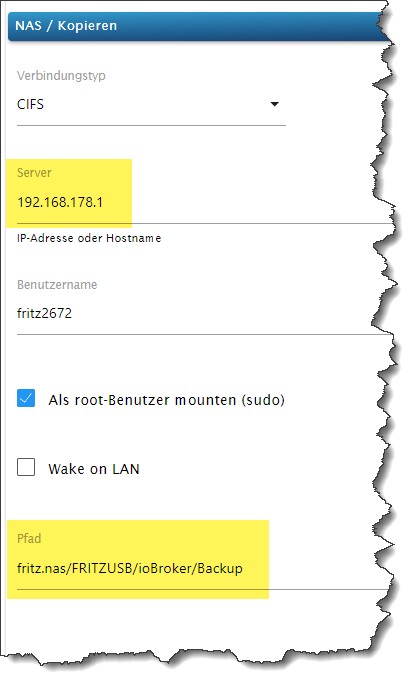
Wie mache ich die Wiederherstellung mit backitup. Die Nas-Festplatte der FritzBox kennt backttup nicht.@pistus sagte in Backup wiederherstellen:
Die Nas-Festplatte der FritzBox kennt backttup nicht.
Dann musst Du die dem Adapter bekanntmachen.
-
Ich habe ioBroker neu auf eine größere microSSD installier. Vorher habe ich ein Backup auf eine an der FritzBox angeschlossene USB Festplatte gemacht.
Wie mache ich die Wiederherstellung mit backitup. Die Nas-Festplatte der FritzBox kennt backttup nicht.@pistus sagte in Backup wiederherstellen:
Die Nas-Festplatte der FritzBox kennt backttup nicht.
Muss halt eigerichtet werden. Im Wiki zum Adapter gibt es näheres dazu.





639
Online32.4k
Users81.5k
Topics1.3m
Posts