




Zigbee Adapter startet nicht mehr
-
könntest du konkret werden? du hast davon gesprochen das es ohne Meldungen schwer ist, was vollkommen richtig ist! Allerdings hast du auch keine angefragt die ich nicht zurück gemeldet habe.
Was genau ist jetzt dein Thema? -
das hat folgendes ausgespuckt
======== Start marking the full check here =========

Skript v.2023-10-10

*** BASE SYSTEM ***
 Static hostname: iobroker
       Icon name: computer
Operating System: Debian GNU/Linux 12 (bookworm)
          Kernel: Linux 6.1.0-rpi4-rpi-v8
    Architecture: arm64

Model           : Raspberry Pi 4 Model B Rev 1.2
Docker          : false
Virtualization  : none
Kernel          : aarch64
Userland        : arm64

Systemuptime and Load:
 16:21:03 up 2 min,  2 users,  load average: 0.62, 0.35, 0.14
CPU threads: 4


*** RASPBERRY THROTTLING ***
Current issues:
No throttling issues detected.

Previously detected issues:
No throttling issues detected.

*** Time and Time Zones ***
               Local time: Sat 2023-10-28 16:21:04 CEST
           Universal time: Sat 2023-10-28 14:21:04 UTC
                 RTC time: n/a
                Time zone: Europe/Berlin (CEST, +0200)
System clock synchronized: yes
              NTP service: active
          RTC in local TZ: no

*** User and Groups ***
pi
/home/pi
pi adm dialout cdrom sudo audio video plugdev games users input render netdev gpio i2c spi iobroker

*** X-Server-Setup ***
X-Server:       false
Desktop:
Terminal:       tty
Boot Target:    multi-user.target

*** MEMORY ***
               total        used        free      shared  buff/cache   available
Mem:            4.0G        544M        3.3G        1.2M        254M        3.4G
Swap:           104M          0B        104M
Total:          4.1G        544M        3.4G

         3793 M total memory
          519 M used memory
          521 M active memory
           79 M inactive memory
         3101 M free memory
           21 M buffer memory
          221 M swap cache
           99 M total swap
            0 M used swap
           99 M free swap

Raspberry only:
oom events: 0
lifetime oom required: 0 Mbytes
total time in oom handler: 0 ms
max time spent in oom handler: 0 ms

*** FAILED SERVICES ***

  UNIT LOAD ACTIVE SUB DESCRIPTION
0 loaded units listed.

*** FILESYSTEM ***
Filesystem     Type      Size  Used Avail Use% Mounted on
udev           devtmpfs  1.6G     0  1.6G   0% /dev
tmpfs          tmpfs     380M  1.2M  379M   1% /run
/dev/mmcblk0p2 ext4       57G  2.8G   52G   6% /
tmpfs          tmpfs     1.9G     0  1.9G   0% /dev/shm
tmpfs          tmpfs     5.0M   16K  5.0M   1% /run/lock
/dev/mmcblk0p1 vfat      510M   61M  450M  12% /boot/firmware
tmpfs          tmpfs     380M     0  380M   0% /run/user/1000

Messages concerning ext4 filesystem in dmesg:
[Sat Oct 28 16:18:39 2023] Kernel command line: coherent_pool=1M 8250.nr_uarts=0 snd_bcm2835.enable_headphones=0 snd_bcm2835.enable_headphones=1 snd_bcm2835.enable_hdmi=1 snd_bcm2835.enable_hdmi=0  smsc95xx.macaddr=DC:A6:32:8D:C3:A3 vc_mem.mem_base=0x3ec00000 vc_mem.mem_size=0x40000000  console=ttyS0,115200 console=tty1 root=PARTUUID=5aa7add2-02 rootfstype=ext4 fsck.repair=yes rootwait
[Sat Oct 28 16:18:42 2023] EXT4-fs (mmcblk0p2): mounted filesystem with ordered data mode. Quota mode: none.
[Sat Oct 28 16:18:44 2023] EXT4-fs (mmcblk0p2): re-mounted. Quota mode: none.

Show mounted filesystems \(real ones only\):
TARGET           SOURCE         FSTYPE OPTIONS
/                /dev/mmcblk0p2 ext4   rw,noatime
`-/boot/firmware /dev/mmcblk0p1 vfat   rw,relatime,fmask=0022,dmask=0022,codepage=437,iocharset=ascii,shortname=mixed,errors=remount-ro

Files in neuralgic directories:

/var:
510M    /var/
202M    /var/cache
196M    /var/cache/apt
159M    /var/lib
130M    /var/lib/apt/lists

Archived and active journals take up 48.0M in the file system.

/opt/iobroker/backups:
4.0K    /opt/iobroker/backups/

/opt/iobroker/iobroker-data:
26M     /opt/iobroker/iobroker-data/
22M     /opt/iobroker/iobroker-data/files
13M     /opt/iobroker/iobroker-data/files/admin.admin/custom/static/js
13M     /opt/iobroker/iobroker-data/files/admin.admin/custom/static
13M     /opt/iobroker/iobroker-data/files/admin.admin/custom

The five largest files in iobroker-data are:
6.3M    /opt/iobroker/iobroker-data/files/admin.admin/custom/static/js/vendors-node_modules_iobroker_adapter-react-v5_assets_devices_parseNames_js-node_modules_iobr-99c23e.847b8ad9.chunk.js.map
3.8M    /opt/iobroker/iobroker-data/objects.jsonl
2.8M    /opt/iobroker/iobroker-data/files/admin.admin/custom/static/js/vendors-node_modules_iobroker_adapter-react-v5_assets_devices_parseNames_js-node_modules_iobr-99c23e.847b8ad9.chunk.js
1.6M    /opt/iobroker/iobroker-data/files/admin.admin/custom/static/js/vendors-node_modules_mui_material_Accordion_index_js-node_modules_mui_material_AccordionDetai-57e02d.0886b730.chunk.js.map
652K    /opt/iobroker/iobroker-data/files/admin.admin/custom/static/js/vendors-node_modules_mui_material_index_js.40e01f69.chunk.js.map

USB-Devices by-id:
USB-Sticks -  Avoid direct links to /dev/* in your adapter setups, please always prefer the links 'by-id':

/dev/serial/by-id/usb-Texas_Instruments_XDS110__03.00.00.15__Embed_with_CMSIS-DAP_L1100GZZ-if03
/dev/serial/by-id/usb-Texas_Instruments_XDS110__03.00.00.15__Embed_with_CMSIS-DAP_L1100GZZ-if00

*** NodeJS-Installation ***

/usr/bin/nodejs         v18.18.2
/usr/bin/node           v18.18.2
/usr/bin/npm            9.8.1
/usr/bin/npx            9.8.1
/usr/bin/corepack       0.19.0


nodejs:
  Installed: 18.18.2-1nodesource1
  Candidate: 18.18.2-1nodesource1
  Version table:
 *** 18.18.2-1nodesource1 500
        500 https://deb.nodesource.com/node_18.x nodistro/main arm64 Packages
        100 /var/lib/dpkg/status
     18.18.1-1nodesource1 500
        500 https://deb.nodesource.com/node_18.x nodistro/main arm64 Packages
     18.18.0-1nodesource1 500
        500 https://deb.nodesource.com/node_18.x nodistro/main arm64 Packages
     18.17.1-1nodesource1 500
        500 https://deb.nodesource.com/node_18.x nodistro/main arm64 Packages
     18.17.0-1nodesource1 500
        500 https://deb.nodesource.com/node_18.x nodistro/main arm64 Packages
     18.16.1-1nodesource1 500
        500 https://deb.nodesource.com/node_18.x nodistro/main arm64 Packages
     18.16.0-1nodesource1 500
        500 https://deb.nodesource.com/node_18.x nodistro/main arm64 Packages
     18.15.0-1nodesource1 500
        500 https://deb.nodesource.com/node_18.x nodistro/main arm64 Packages
     18.14.2-1nodesource1 500
        500 https://deb.nodesource.com/node_18.x nodistro/main arm64 Packages
     18.14.1-1nodesource1 500
        500 https://deb.nodesource.com/node_18.x nodistro/main arm64 Packages
     18.14.0-1nodesource1 500
        500 https://deb.nodesource.com/node_18.x nodistro/main arm64 Packages
     18.13.0+dfsg1-1 500
        500 http://deb.debian.org/debian bookworm/main arm64 Packages
     18.13.0-1nodesource1 500
        500 https://deb.nodesource.com/node_18.x nodistro/main arm64 Packages
     18.12.0-1nodesource1 500
        500 https://deb.nodesource.com/node_18.x nodistro/main arm64 Packages
     18.11.0-1nodesource1 500
        500 https://deb.nodesource.com/node_18.x nodistro/main arm64 Packages
     18.10.0-1nodesource1 500
        500 https://deb.nodesource.com/node_18.x nodistro/main arm64 Packages
     18.9.1-1nodesource1 500
        500 https://deb.nodesource.com/node_18.x nodistro/main arm64 Packages
     18.9.0-1nodesource1 500
        500 https://deb.nodesource.com/node_18.x nodistro/main arm64 Packages
     18.8.0-1nodesource1 500
        500 https://deb.nodesource.com/node_18.x nodistro/main arm64 Packages
     18.7.0-1nodesource1 500
        500 https://deb.nodesource.com/node_18.x nodistro/main arm64 Packages
     18.6.0-1nodesource1 500
        500 https://deb.nodesource.com/node_18.x nodistro/main arm64 Packages
     18.5.0-1nodesource1 500
        500 https://deb.nodesource.com/node_18.x nodistro/main arm64 Packages
     18.4.0-1nodesource1 500
        500 https://deb.nodesource.com/node_18.x nodistro/main arm64 Packages
     18.3.0-1nodesource1 500
        500 https://deb.nodesource.com/node_18.x nodistro/main arm64 Packages
     18.2.0-1nodesource1 500
        500 https://deb.nodesource.com/node_18.x nodistro/main arm64 Packages
     18.1.0-1nodesource1 500
        500 https://deb.nodesource.com/node_18.x nodistro/main arm64 Packages
     18.0.0-1nodesource1 500
        500 https://deb.nodesource.com/node_18.x nodistro/main arm64 Packages

Temp directories causing npm8 problem: 0
No problems detected

Errors in npm tree:

*** ioBroker-Installation ***

ioBroker Status
iobroker is running on this host.


Objects type: jsonl
States  type: jsonl

Core adapters versions
js-controller:  5.0.12
admin:          6.10.1
javascript:     "javascript" not found

Adapters from github:   0

Adapter State
+ system.adapter.admin.0                  : admin                 : iobroker                                 -  enabled, port: 8081, bind: 0.0.0.0, run as: admin
+ system.adapter.backitup.0               : backitup              : iobroker                                 -  enabled
+ system.adapter.discovery.0              : discovery             : iobroker                                 -  enabled
+ system.adapter.zigbee.0                 : zigbee                : iobroker                                 -  enabled, port: /dev/serial/by-id/usb-Texas_Instruments_XDS110__03.00.00.15__Embed_with_CMSIS-DAP_L1100GZZ-if00

+ instance is alive

Enabled adapters with bindings
+ system.adapter.admin.0                  : admin                 : iobroker                                 -  enabled, port: 8081, bind: 0.0.0.0, run as: admin
+ system.adapter.zigbee.0                 : zigbee                : iobroker                                 -  enabled, port: /dev/serial/by-id/usb-Texas_Instruments_XDS110__03.00.00.15__Embed_with_CMSIS-DAP_L1100GZZ-if00

ioBroker-Repositories
stable        : http://download.iobroker.net/sources-dist.json
beta          : http://download.iobroker.net/sources-dist-latest.json

Active repo(s): stable

Installed ioBroker-Instances
Used repository: stable
Adapter    "admin"        : 6.12.0   , installed 6.10.1 [Updatable]
Adapter    "backitup"     : 2.8.1    , installed 2.8.1
Adapter    "discovery"    : 3.1.0    , installed 3.1.0
Controller "js-controller": 5.0.12   , installed 5.0.12
Adapter    "zigbee"       : 1.8.23   , installed 1.8.23

Objects and States
Please stand by - This may take a while
Objects:        172
States:         126

*** OS-Repositories and Updates ***
Hit:1 http://deb.debian.org/debian bookworm InRelease
Hit:2 http://deb.debian.org/debian-security bookworm-security InRelease
Hit:3 http://archive.raspberrypi.com/debian bookworm InRelease
Hit:4 http://deb.debian.org/debian bookworm-updates InRelease
Hit:5 https://deb.nodesource.com/node_18.x nodistro InRelease
Reading package lists...
Pending Updates: 11

*** Listening Ports ***
Active Internet connections (only servers)
Proto Recv-Q Send-Q Local Address           Foreign Address         State       User       Inode      PID/Program name
tcp        0      0 0.0.0.0:22              0.0.0.0:*               LISTEN      0          15611      689/sshd: /usr/sbin
tcp        0      0 127.0.0.1:9000          0.0.0.0:*               LISTEN      1001       16481      681/iobroker.js-con
tcp        0      0 127.0.0.1:9001          0.0.0.0:*               LISTEN      1001       16474      681/iobroker.js-con
tcp6       0      0 :::22                   :::*                    LISTEN      0          15622      689/sshd: /usr/sbin
tcp6       0      0 :::8081                 :::*                    LISTEN      1001       15687      725/io.admin.0
udp        0      0 0.0.0.0:46103           0.0.0.0:*                           104        14563      535/avahi-daemon: r
udp        0      0 0.0.0.0:5353            0.0.0.0:*                           104        14561      535/avahi-daemon: r
udp6       0      0 :::39506                :::*                                104        14564      535/avahi-daemon: r
udp6       0      0 :::5353                 :::*                                104        14562      535/avahi-daemon: r

*** Log File - Last 25 Lines ***

2023-10-28 16:19:21.027  - info: admin.0 (725) <== Disconnect system.user.admin from ::ffff:192.168.0.134 admin
2023-10-28 16:19:21.218  - info: admin.0 (725) ==> Connected system.user.admin from ::ffff:192.168.0.134
2023-10-28 16:19:21.223  - info: admin.0 (725) <== Disconnect system.user.admin from ::ffff:192.168.0.134 admin
2023-10-28 16:19:22.932  - info: admin.0 (725) ==> Connected system.user.admin from ::ffff:192.168.0.134
2023-10-28 16:20:03.442  - info: admin.0 (725) <== Disconnect system.user.admin from ::ffff:192.168.0.134 admin
2023-10-28 16:20:04.701  - info: admin.0 (725) ==> Connected system.user.admin from ::ffff:192.168.0.134
2023-10-28 16:20:11.292  - info: admin.0 (725) ==> Connected system.user.admin from ::ffff:192.168.0.134
2023-10-28 16:20:11.566  - error: zigbee.0 (788) getGroups: caught error: TypeError: Cannot read properties of undefined (reading 'getGroups')
2023-10-28 16:20:11.844  - info: zigbee.0 (788) List of port: [{"path":"/dev/ttyACM0","manufacturer":"Texas Instruments","serialNumber":"L1100GZZ","pnpId":"usb-Texas_Instruments_XDS110__03.00.00.15__Embed_with_CMSIS-DAP_L1100GZZ-if00","vendorId":"0451","productId":"bef3"},{"path":"/dev/ttyACM1","manufacturer":"Texas Instruments","serialNumber":"L1100GZZ","pnpId":"usb-Texas_Instruments_XDS110__03.00.00.15__Embed_with_CMSIS-DAP_L1100GZZ-if03","vendorId":"0451","productId":"bef3"}]
2023-10-28 16:20:34.566  - info: admin.0 (725) <== Disconnect system.user.admin from ::ffff:192.168.0.134
2023-10-28 16:20:37.443  - info: admin.0 (725) ==> Connected system.user.admin from ::ffff:192.168.0.134
2023-10-28 16:20:37.549  - error: zigbee.0 (788) getGroups: caught error: TypeError: Cannot read properties of undefined (reading 'getGroups')
2023-10-28 16:20:37.820  - info: zigbee.0 (788) List of port: [{"path":"/dev/ttyACM0","manufacturer":"Texas Instruments","serialNumber":"L1100GZZ","pnpId":"usb-Texas_Instruments_XDS110__03.00.00.15__Embed_with_CMSIS-DAP_L1100GZZ-if00","vendorId":"0451","productId":"bef3"},{"path":"/dev/ttyACM1","manufacturer":"Texas Instruments","serialNumber":"L1100GZZ","pnpId":"usb-Texas_Instruments_XDS110__03.00.00.15__Embed_with_CMSIS-DAP_L1100GZZ-if03","vendorId":"0451","productId":"bef3"}]

============ Mark until here for C&P =============

iob diag has finished.
BETRIEBSSYSTEM: LINUX
ARCHITEKTUR: ARM
CPUS: 4
GESCHWINDIGKEIT: 1500 MHZ
MODELL: ARMV7 PROCESSOR REV 3 (V7L)
RAM: 3.7 GB -
das hat folgendes ausgespuckt
======== Start marking the full check here ========= Skript v.2023-10-10 *** BASE SYSTEM *** Static hostname: iobroker Icon name: computer Operating System: Debian GNU/Linux 12 (bookworm) Kernel: Linux 6.1.0-rpi4-rpi-v8 Architecture: arm64 Model : Raspberry Pi 4 Model B Rev 1.2 Docker : false Virtualization : none Kernel : aarch64 Userland : arm64 Systemuptime and Load: 16:21:03 up 2 min, 2 users, load average: 0.62, 0.35, 0.14 CPU threads: 4 *** RASPBERRY THROTTLING *** Current issues: No throttling issues detected. Previously detected issues: No throttling issues detected. *** Time and Time Zones *** Local time: Sat 2023-10-28 16:21:04 CEST Universal time: Sat 2023-10-28 14:21:04 UTC RTC time: n/a Time zone: Europe/Berlin (CEST, +0200) System clock synchronized: yes NTP service: active RTC in local TZ: no *** User and Groups *** pi /home/pi pi adm dialout cdrom sudo audio video plugdev games users input render netdev gpio i2c spi iobroker *** X-Server-Setup *** X-Server: false Desktop: Terminal: tty Boot Target: multi-user.target *** MEMORY *** total used free shared buff/cache available Mem: 4.0G 544M 3.3G 1.2M 254M 3.4G Swap: 104M 0B 104M Total: 4.1G 544M 3.4G 3793 M total memory 519 M used memory 521 M active memory 79 M inactive memory 3101 M free memory 21 M buffer memory 221 M swap cache 99 M total swap 0 M used swap 99 M free swap Raspberry only: oom events: 0 lifetime oom required: 0 Mbytes total time in oom handler: 0 ms max time spent in oom handler: 0 ms *** FAILED SERVICES *** UNIT LOAD ACTIVE SUB DESCRIPTION 0 loaded units listed. *** FILESYSTEM *** Filesystem Type Size Used Avail Use% Mounted on udev devtmpfs 1.6G 0 1.6G 0% /dev tmpfs tmpfs 380M 1.2M 379M 1% /run /dev/mmcblk0p2 ext4 57G 2.8G 52G 6% / tmpfs tmpfs 1.9G 0 1.9G 0% /dev/shm tmpfs tmpfs 5.0M 16K 5.0M 1% /run/lock /dev/mmcblk0p1 vfat 510M 61M 450M 12% /boot/firmware tmpfs tmpfs 380M 0 380M 0% /run/user/1000 Messages concerning ext4 filesystem in dmesg: [Sat Oct 28 16:18:39 2023] Kernel command line: coherent_pool=1M 8250.nr_uarts=0 snd_bcm2835.enable_headphones=0 snd_bcm2835.enable_headphones=1 snd_bcm2835.enable_hdmi=1 snd_bcm2835.enable_hdmi=0 smsc95xx.macaddr=DC:A6:32:8D:C3:A3 vc_mem.mem_base=0x3ec00000 vc_mem.mem_size=0x40000000 console=ttyS0,115200 console=tty1 root=PARTUUID=5aa7add2-02 rootfstype=ext4 fsck.repair=yes rootwait [Sat Oct 28 16:18:42 2023] EXT4-fs (mmcblk0p2): mounted filesystem with ordered data mode. Quota mode: none. [Sat Oct 28 16:18:44 2023] EXT4-fs (mmcblk0p2): re-mounted. Quota mode: none. Show mounted filesystems \(real ones only\): TARGET SOURCE FSTYPE OPTIONS / /dev/mmcblk0p2 ext4 rw,noatime `-/boot/firmware /dev/mmcblk0p1 vfat rw,relatime,fmask=0022,dmask=0022,codepage=437,iocharset=ascii,shortname=mixed,errors=remount-ro Files in neuralgic directories: /var: 510M /var/ 202M /var/cache 196M /var/cache/apt 159M /var/lib 130M /var/lib/apt/lists Archived and active journals take up 48.0M in the file system. /opt/iobroker/backups: 4.0K /opt/iobroker/backups/ /opt/iobroker/iobroker-data: 26M /opt/iobroker/iobroker-data/ 22M /opt/iobroker/iobroker-data/files 13M /opt/iobroker/iobroker-data/files/admin.admin/custom/static/js 13M /opt/iobroker/iobroker-data/files/admin.admin/custom/static 13M /opt/iobroker/iobroker-data/files/admin.admin/custom The five largest files in iobroker-data are: 6.3M /opt/iobroker/iobroker-data/files/admin.admin/custom/static/js/vendors-node_modules_iobroker_adapter-react-v5_assets_devices_parseNames_js-node_modules_iobr-99c23e.847b8ad9.chunk.js.map 3.8M /opt/iobroker/iobroker-data/objects.jsonl 2.8M /opt/iobroker/iobroker-data/files/admin.admin/custom/static/js/vendors-node_modules_iobroker_adapter-react-v5_assets_devices_parseNames_js-node_modules_iobr-99c23e.847b8ad9.chunk.js 1.6M /opt/iobroker/iobroker-data/files/admin.admin/custom/static/js/vendors-node_modules_mui_material_Accordion_index_js-node_modules_mui_material_AccordionDetai-57e02d.0886b730.chunk.js.map 652K /opt/iobroker/iobroker-data/files/admin.admin/custom/static/js/vendors-node_modules_mui_material_index_js.40e01f69.chunk.js.map USB-Devices by-id: USB-Sticks - Avoid direct links to /dev/* in your adapter setups, please always prefer the links 'by-id': /dev/serial/by-id/usb-Texas_Instruments_XDS110__03.00.00.15__Embed_with_CMSIS-DAP_L1100GZZ-if03 /dev/serial/by-id/usb-Texas_Instruments_XDS110__03.00.00.15__Embed_with_CMSIS-DAP_L1100GZZ-if00 *** NodeJS-Installation *** /usr/bin/nodejs v18.18.2 /usr/bin/node v18.18.2 /usr/bin/npm 9.8.1 /usr/bin/npx 9.8.1 /usr/bin/corepack 0.19.0 nodejs: Installed: 18.18.2-1nodesource1 Candidate: 18.18.2-1nodesource1 Version table: *** 18.18.2-1nodesource1 500 500 https://deb.nodesource.com/node_18.x nodistro/main arm64 Packages 100 /var/lib/dpkg/status 18.18.1-1nodesource1 500 500 https://deb.nodesource.com/node_18.x nodistro/main arm64 Packages 18.18.0-1nodesource1 500 500 https://deb.nodesource.com/node_18.x nodistro/main arm64 Packages 18.17.1-1nodesource1 500 500 https://deb.nodesource.com/node_18.x nodistro/main arm64 Packages 18.17.0-1nodesource1 500 500 https://deb.nodesource.com/node_18.x nodistro/main arm64 Packages 18.16.1-1nodesource1 500 500 https://deb.nodesource.com/node_18.x nodistro/main arm64 Packages 18.16.0-1nodesource1 500 500 https://deb.nodesource.com/node_18.x nodistro/main arm64 Packages 18.15.0-1nodesource1 500 500 https://deb.nodesource.com/node_18.x nodistro/main arm64 Packages 18.14.2-1nodesource1 500 500 https://deb.nodesource.com/node_18.x nodistro/main arm64 Packages 18.14.1-1nodesource1 500 500 https://deb.nodesource.com/node_18.x nodistro/main arm64 Packages 18.14.0-1nodesource1 500 500 https://deb.nodesource.com/node_18.x nodistro/main arm64 Packages 18.13.0+dfsg1-1 500 500 http://deb.debian.org/debian bookworm/main arm64 Packages 18.13.0-1nodesource1 500 500 https://deb.nodesource.com/node_18.x nodistro/main arm64 Packages 18.12.0-1nodesource1 500 500 https://deb.nodesource.com/node_18.x nodistro/main arm64 Packages 18.11.0-1nodesource1 500 500 https://deb.nodesource.com/node_18.x nodistro/main arm64 Packages 18.10.0-1nodesource1 500 500 https://deb.nodesource.com/node_18.x nodistro/main arm64 Packages 18.9.1-1nodesource1 500 500 https://deb.nodesource.com/node_18.x nodistro/main arm64 Packages 18.9.0-1nodesource1 500 500 https://deb.nodesource.com/node_18.x nodistro/main arm64 Packages 18.8.0-1nodesource1 500 500 https://deb.nodesource.com/node_18.x nodistro/main arm64 Packages 18.7.0-1nodesource1 500 500 https://deb.nodesource.com/node_18.x nodistro/main arm64 Packages 18.6.0-1nodesource1 500 500 https://deb.nodesource.com/node_18.x nodistro/main arm64 Packages 18.5.0-1nodesource1 500 500 https://deb.nodesource.com/node_18.x nodistro/main arm64 Packages 18.4.0-1nodesource1 500 500 https://deb.nodesource.com/node_18.x nodistro/main arm64 Packages 18.3.0-1nodesource1 500 500 https://deb.nodesource.com/node_18.x nodistro/main arm64 Packages 18.2.0-1nodesource1 500 500 https://deb.nodesource.com/node_18.x nodistro/main arm64 Packages 18.1.0-1nodesource1 500 500 https://deb.nodesource.com/node_18.x nodistro/main arm64 Packages 18.0.0-1nodesource1 500 500 https://deb.nodesource.com/node_18.x nodistro/main arm64 Packages Temp directories causing npm8 problem: 0 No problems detected Errors in npm tree: *** ioBroker-Installation *** ioBroker Status iobroker is running on this host. Objects type: jsonl States type: jsonl Core adapters versions js-controller: 5.0.12 admin: 6.10.1 javascript: "javascript" not found Adapters from github: 0 Adapter State + system.adapter.admin.0 : admin : iobroker - enabled, port: 8081, bind: 0.0.0.0, run as: admin + system.adapter.backitup.0 : backitup : iobroker - enabled + system.adapter.discovery.0 : discovery : iobroker - enabled + system.adapter.zigbee.0 : zigbee : iobroker - enabled, port: /dev/serial/by-id/usb-Texas_Instruments_XDS110__03.00.00.15__Embed_with_CMSIS-DAP_L1100GZZ-if00 + instance is alive Enabled adapters with bindings + system.adapter.admin.0 : admin : iobroker - enabled, port: 8081, bind: 0.0.0.0, run as: admin + system.adapter.zigbee.0 : zigbee : iobroker - enabled, port: /dev/serial/by-id/usb-Texas_Instruments_XDS110__03.00.00.15__Embed_with_CMSIS-DAP_L1100GZZ-if00 ioBroker-Repositories stable : http://download.iobroker.net/sources-dist.json beta : http://download.iobroker.net/sources-dist-latest.json Active repo(s): stable Installed ioBroker-Instances Used repository: stable Adapter "admin" : 6.12.0 , installed 6.10.1 [Updatable] Adapter "backitup" : 2.8.1 , installed 2.8.1 Adapter "discovery" : 3.1.0 , installed 3.1.0 Controller "js-controller": 5.0.12 , installed 5.0.12 Adapter "zigbee" : 1.8.23 , installed 1.8.23 Objects and States Please stand by - This may take a while Objects: 172 States: 126 *** OS-Repositories and Updates *** Hit:1 http://deb.debian.org/debian bookworm InRelease Hit:2 http://deb.debian.org/debian-security bookworm-security InRelease Hit:3 http://archive.raspberrypi.com/debian bookworm InRelease Hit:4 http://deb.debian.org/debian bookworm-updates InRelease Hit:5 https://deb.nodesource.com/node_18.x nodistro InRelease Reading package lists... Pending Updates: 11 *** Listening Ports *** Active Internet connections (only servers) Proto Recv-Q Send-Q Local Address Foreign Address State User Inode PID/Program name tcp 0 0 0.0.0.0:22 0.0.0.0:* LISTEN 0 15611 689/sshd: /usr/sbin tcp 0 0 127.0.0.1:9000 0.0.0.0:* LISTEN 1001 16481 681/iobroker.js-con tcp 0 0 127.0.0.1:9001 0.0.0.0:* LISTEN 1001 16474 681/iobroker.js-con tcp6 0 0 :::22 :::* LISTEN 0 15622 689/sshd: /usr/sbin tcp6 0 0 :::8081 :::* LISTEN 1001 15687 725/io.admin.0 udp 0 0 0.0.0.0:46103 0.0.0.0:* 104 14563 535/avahi-daemon: r udp 0 0 0.0.0.0:5353 0.0.0.0:* 104 14561 535/avahi-daemon: r udp6 0 0 :::39506 :::* 104 14564 535/avahi-daemon: r udp6 0 0 :::5353 :::* 104 14562 535/avahi-daemon: r *** Log File - Last 25 Lines *** 2023-10-28 16:19:21.027 - info: admin.0 (725) <== Disconnect system.user.admin from ::ffff:192.168.0.134 admin 2023-10-28 16:19:21.218 - info: admin.0 (725) ==> Connected system.user.admin from ::ffff:192.168.0.134 2023-10-28 16:19:21.223 - info: admin.0 (725) <== Disconnect system.user.admin from ::ffff:192.168.0.134 admin 2023-10-28 16:19:22.932 - info: admin.0 (725) ==> Connected system.user.admin from ::ffff:192.168.0.134 2023-10-28 16:20:03.442 - info: admin.0 (725) <== Disconnect system.user.admin from ::ffff:192.168.0.134 admin 2023-10-28 16:20:04.701 - info: admin.0 (725) ==> Connected system.user.admin from ::ffff:192.168.0.134 2023-10-28 16:20:11.292 - info: admin.0 (725) ==> Connected system.user.admin from ::ffff:192.168.0.134 2023-10-28 16:20:11.566 - error: zigbee.0 (788) getGroups: caught error: TypeError: Cannot read properties of undefined (reading 'getGroups') 2023-10-28 16:20:11.844 - info: zigbee.0 (788) List of port: [{"path":"/dev/ttyACM0","manufacturer":"Texas Instruments","serialNumber":"L1100GZZ","pnpId":"usb-Texas_Instruments_XDS110__03.00.00.15__Embed_with_CMSIS-DAP_L1100GZZ-if00","vendorId":"0451","productId":"bef3"},{"path":"/dev/ttyACM1","manufacturer":"Texas Instruments","serialNumber":"L1100GZZ","pnpId":"usb-Texas_Instruments_XDS110__03.00.00.15__Embed_with_CMSIS-DAP_L1100GZZ-if03","vendorId":"0451","productId":"bef3"}] 2023-10-28 16:20:34.566 - info: admin.0 (725) <== Disconnect system.user.admin from ::ffff:192.168.0.134 2023-10-28 16:20:37.443 - info: admin.0 (725) ==> Connected system.user.admin from ::ffff:192.168.0.134 2023-10-28 16:20:37.549 - error: zigbee.0 (788) getGroups: caught error: TypeError: Cannot read properties of undefined (reading 'getGroups') 2023-10-28 16:20:37.820 - info: zigbee.0 (788) List of port: [{"path":"/dev/ttyACM0","manufacturer":"Texas Instruments","serialNumber":"L1100GZZ","pnpId":"usb-Texas_Instruments_XDS110__03.00.00.15__Embed_with_CMSIS-DAP_L1100GZZ-if00","vendorId":"0451","productId":"bef3"},{"path":"/dev/ttyACM1","manufacturer":"Texas Instruments","serialNumber":"L1100GZZ","pnpId":"usb-Texas_Instruments_XDS110__03.00.00.15__Embed_with_CMSIS-DAP_L1100GZZ-if03","vendorId":"0451","productId":"bef3"}] ============ Mark until here for C&P ============= iob diag has finished.@anselra sagte in Zigbee Adapter startet nicht mehr:
Pending Updates: 11
Zieh die mal rein.
Und dann zeig nochmal einen kompletten Kaltstart des zigbee-Adapters.
Und die Einstellungen des Adapters. -
@anselra sagte in Zigbee Adapter startet nicht mehr:
Pending Updates: 11
Zieh die mal rein.
Und dann zeig nochmal einen kompletten Kaltstart des zigbee-Adapters.
Und die Einstellungen des Adapters.Skript v.2023-10-10 *** BASE SYSTEM *** Static hostname: iobroker Icon name: computer Operating System: Debian GNU/Linux 12 (bookworm) Kernel: Linux 6.1.0-rpi4-rpi-v8 Architecture: arm64 Model : Raspberry Pi 4 Model B Rev 1.2 Docker : false Virtualization : none Kernel : aarch64 Userland : arm64 Systemuptime and Load: 16:40:33 up 2 min, 2 users, load average: 0.26, 0.22, 0.09 CPU threads: 4 *** RASPBERRY THROTTLING *** Current issues: No throttling issues detected. Previously detected issues: No throttling issues detected. *** Time and Time Zones *** Local time: Sat 2023-10-28 16:40:33 CEST Universal time: Sat 2023-10-28 14:40:33 UTC RTC time: n/a Time zone: Europe/Berlin (CEST, +0200) System clock synchronized: yes NTP service: active RTC in local TZ: no *** User and Groups *** pi /home/pi pi adm dialout cdrom sudo audio video plugdev games users input render netdev gpio i2c spi iobroker *** X-Server-Setup *** X-Server: false Desktop: Terminal: tty Boot Target: multi-user.target *** MEMORY *** total used free shared buff/cache available Mem: 4.0G 498M 3.3G 1.2M 242M 3.5G Swap: 104M 0B 104M Total: 4.1G 498M 3.4G 3793 M total memory 476 M used memory 475 M active memory 68 M inactive memory 3155 M free memory 21 M buffer memory 209 M swap cache 99 M total swap 0 M used swap 99 M free swap Raspberry only: oom events: 0 lifetime oom required: 0 Mbytes total time in oom handler: 0 ms max time spent in oom handler: 0 ms *** FAILED SERVICES *** UNIT LOAD ACTIVE SUB DESCRIPTION 0 loaded units listed. *** FILESYSTEM *** Filesystem Type Size Used Avail Use% Mounted on udev devtmpfs 1.6G 0 1.6G 0% /dev tmpfs tmpfs 380M 1.2M 379M 1% /run /dev/mmcblk0p2 ext4 57G 2.8G 52G 6% / tmpfs tmpfs 1.9G 0 1.9G 0% /dev/shm tmpfs tmpfs 5.0M 16K 5.0M 1% /run/lock /dev/mmcblk0p1 vfat 510M 61M 450M 12% /boot/firmware tmpfs tmpfs 380M 0 380M 0% /run/user/1000 Messages concerning ext4 filesystem in dmesg: [Sat Oct 28 16:38:27 2023] Kernel command line: coherent_pool=1M 8250.nr_uarts=0 snd_bcm2835.enable_headphones=0 snd_bcm2835.enable_headphones=1 snd_bcm2835.enable_hdmi=1 snd_bcm2835.enable_hdmi=0 smsc95xx.macaddr=DC:A6:32:8D:C3:A3 vc_mem.mem_base=0x3ec00000 vc_mem.mem_size=0x40000000 console=ttyS0,115200 console=tty1 root=PARTUUID=5aa7add2-02 rootfstype=ext4 fsck.repair=yes rootwait [Sat Oct 28 16:38:30 2023] EXT4-fs (mmcblk0p2): mounted filesystem with ordered data mode. Quota mode: none. [Sat Oct 28 16:38:32 2023] EXT4-fs (mmcblk0p2): re-mounted. Quota mode: none. Show mounted filesystems \(real ones only\): TARGET SOURCE FSTYPE OPTIONS / /dev/mmcblk0p2 ext4 rw,noatime `-/boot/firmware /dev/mmcblk0p1 vfat rw,relatime,fmask=0022,dmask=0022,codepage=437,iocharset=ascii,shortname=mixed,errors=remount-ro Files in neuralgic directories: /var: 533M /var/ 209M /var/cache 203M /var/cache/apt 159M /var/lib 130M /var/lib/apt/lists Archived and active journals take up 64.0M in the file system. /opt/iobroker/backups: 4.0K /opt/iobroker/backups/ /opt/iobroker/iobroker-data: 30M /opt/iobroker/iobroker-data/ 22M /opt/iobroker/iobroker-data/files 13M /opt/iobroker/iobroker-data/files/admin.admin/custom/static/js 13M /opt/iobroker/iobroker-data/files/admin.admin/custom/static 13M /opt/iobroker/iobroker-data/files/admin.admin/custom The five largest files in iobroker-data are: 7.6M /opt/iobroker/iobroker-data/objects.jsonl 6.3M /opt/iobroker/iobroker-data/files/admin.admin/custom/static/js/vendors-node_modules_iobroker_adapter-react-v5_assets_devices_parseNames_js-node_modules_iobr-99c23e.847b8ad9.chunk.js.map 2.8M /opt/iobroker/iobroker-data/files/admin.admin/custom/static/js/vendors-node_modules_iobroker_adapter-react-v5_assets_devices_parseNames_js-node_modules_iobr-99c23e.847b8ad9.chunk.js 1.6M /opt/iobroker/iobroker-data/files/admin.admin/custom/static/js/vendors-node_modules_mui_material_Accordion_index_js-node_modules_mui_material_AccordionDetai-57e02d.0886b730.chunk.js.map 652K /opt/iobroker/iobroker-data/files/admin.admin/custom/static/js/vendors-node_modules_mui_material_index_js.40e01f69.chunk.js.map USB-Devices by-id: USB-Sticks - Avoid direct links to /dev/* in your adapter setups, please always prefer the links 'by-id': /dev/serial/by-id/usb-Texas_Instruments_XDS110__03.00.00.15__Embed_with_CMSIS-DAP_L1100GZZ-if03 /dev/serial/by-id/usb-Texas_Instruments_XDS110__03.00.00.15__Embed_with_CMSIS-DAP_L1100GZZ-if00 *** NodeJS-Installation *** /usr/bin/nodejs v18.18.2 /usr/bin/node v18.18.2 /usr/bin/npm 9.8.1 /usr/bin/npx 9.8.1 /usr/bin/corepack 0.19.0 nodejs: Installed: 18.18.2-1nodesource1 Candidate: 18.18.2-1nodesource1 Version table: *** 18.18.2-1nodesource1 500 500 https://deb.nodesource.com/node_18.x nodistro/main arm64 Packages 100 /var/lib/dpkg/status 18.18.1-1nodesource1 500 500 https://deb.nodesource.com/node_18.x nodistro/main arm64 Packages 18.18.0-1nodesource1 500 500 https://deb.nodesource.com/node_18.x nodistro/main arm64 Packages 18.17.1-1nodesource1 500 500 https://deb.nodesource.com/node_18.x nodistro/main arm64 Packages 18.17.0-1nodesource1 500 500 https://deb.nodesource.com/node_18.x nodistro/main arm64 Packages 18.16.1-1nodesource1 500 500 https://deb.nodesource.com/node_18.x nodistro/main arm64 Packages 18.16.0-1nodesource1 500 500 https://deb.nodesource.com/node_18.x nodistro/main arm64 Packages 18.15.0-1nodesource1 500 500 https://deb.nodesource.com/node_18.x nodistro/main arm64 Packages 18.14.2-1nodesource1 500 500 https://deb.nodesource.com/node_18.x nodistro/main arm64 Packages 18.14.1-1nodesource1 500 500 https://deb.nodesource.com/node_18.x nodistro/main arm64 Packages 18.14.0-1nodesource1 500 500 https://deb.nodesource.com/node_18.x nodistro/main arm64 Packages 18.13.0+dfsg1-1 500 500 http://deb.debian.org/debian bookworm/main arm64 Packages 18.13.0-1nodesource1 500 500 https://deb.nodesource.com/node_18.x nodistro/main arm64 Packages 18.12.0-1nodesource1 500 500 https://deb.nodesource.com/node_18.x nodistro/main arm64 Packages 18.11.0-1nodesource1 500 500 https://deb.nodesource.com/node_18.x nodistro/main arm64 Packages 18.10.0-1nodesource1 500 500 https://deb.nodesource.com/node_18.x nodistro/main arm64 Packages 18.9.1-1nodesource1 500 500 https://deb.nodesource.com/node_18.x nodistro/main arm64 Packages 18.9.0-1nodesource1 500 500 https://deb.nodesource.com/node_18.x nodistro/main arm64 Packages 18.8.0-1nodesource1 500 500 https://deb.nodesource.com/node_18.x nodistro/main arm64 Packages 18.7.0-1nodesource1 500 500 https://deb.nodesource.com/node_18.x nodistro/main arm64 Packages 18.6.0-1nodesource1 500 500 https://deb.nodesource.com/node_18.x nodistro/main arm64 Packages 18.5.0-1nodesource1 500 500 https://deb.nodesource.com/node_18.x nodistro/main arm64 Packages 18.4.0-1nodesource1 500 500 https://deb.nodesource.com/node_18.x nodistro/main arm64 Packages 18.3.0-1nodesource1 500 500 https://deb.nodesource.com/node_18.x nodistro/main arm64 Packages 18.2.0-1nodesource1 500 500 https://deb.nodesource.com/node_18.x nodistro/main arm64 Packages 18.1.0-1nodesource1 500 500 https://deb.nodesource.com/node_18.x nodistro/main arm64 Packages 18.0.0-1nodesource1 500 500 https://deb.nodesource.com/node_18.x nodistro/main arm64 Packages Temp directories causing npm8 problem: 0 No problems detected Errors in npm tree: *** ioBroker-Installation *** ioBroker Status iobroker is running on this host. Objects type: jsonl States type: jsonl Core adapters versions js-controller: 5.0.12 admin: 6.10.1 javascript: "javascript" not found Adapters from github: 0 Adapter State + system.adapter.admin.0 : admin : iobroker - enabled, port: 8081, bind: 0.0.0.0, run as: admin + system.adapter.backitup.0 : backitup : iobroker - enabled + system.adapter.discovery.0 : discovery : iobroker - enabled + system.adapter.zigbee.0 : zigbee : iobroker - enabled, port: /dev/serial/by-id/usb-Texas_Instruments_XDS110__03.00.00.15__Embed_with_CMSIS-DAP_L1100GZZ-if00 + instance is alive Enabled adapters with bindings + system.adapter.admin.0 : admin : iobroker - enabled, port: 8081, bind: 0.0.0.0, run as: admin + system.adapter.zigbee.0 : zigbee : iobroker - enabled, port: /dev/serial/by-id/usb-Texas_Instruments_XDS110__03.00.00.15__Embed_with_CMSIS-DAP_L1100GZZ-if00 ioBroker-Repositories stable : http://download.iobroker.net/sources-dist.json beta : http://download.iobroker.net/sources-dist-latest.json Active repo(s): stable Installed ioBroker-Instances Used repository: stable Adapter "admin" : 6.12.0 , installed 6.10.1 [Updatable] Adapter "backitup" : 2.8.1 , installed 2.8.1 Adapter "discovery" : 3.1.0 , installed 3.1.0 Controller "js-controller": 5.0.12 , installed 5.0.12 Adapter "zigbee" : 1.8.23 , installed 1.8.23 Objects and States Please stand by - This may take a while Objects: 172 States: 126 *** OS-Repositories and Updates *** Hit:1 http://deb.debian.org/debian bookworm InRelease Hit:2 http://deb.debian.org/debian-security bookworm-security InRelease Hit:3 http://archive.raspberrypi.com/debian bookworm InRelease Hit:4 http://deb.debian.org/debian bookworm-updates InRelease Hit:5 https://deb.nodesource.com/node_18.x nodistro InRelease Reading package lists... Pending Updates: 0 *** Listening Ports *** Active Internet connections (only servers) Proto Recv-Q Send-Q Local Address Foreign Address State User Inode PID/Program name tcp 0 0 0.0.0.0:22 0.0.0.0:* LISTEN 0 14691 689/sshd: /usr/sbin tcp 0 0 127.0.0.1:9001 0.0.0.0:* LISTEN 1001 14751 680/iobroker.js-con tcp 0 0 127.0.0.1:9000 0.0.0.0:* LISTEN 1001 14758 680/iobroker.js-con tcp6 0 0 :::22 :::* LISTEN 0 14693 689/sshd: /usr/sbin tcp6 0 0 :::8081 :::* LISTEN 1001 16541 724/io.admin.0 udp 0 0 0.0.0.0:36003 0.0.0.0:* 104 14643 535/avahi-daemon: r udp 0 0 0.0.0.0:5353 0.0.0.0:* 104 14641 535/avahi-daemon: r udp6 0 0 :::5353 :::* 104 14642 535/avahi-daemon: r udp6 0 0 :::55452 :::* 104 14644 535/avahi-daemon: r *** Log File - Last 25 Lines *** 2023-10-28 16:38:08.012 - info: admin.0 (724) ==> Connected system.user.admin from ::ffff:192.168.0.134 2023-10-28 16:38:09.611 - info: host.iobroker instance system.adapter.discovery.0 started with pid 806 2023-10-28 16:38:12.001 - info: zigbee.0 (787) starting. Version 1.8.23 in /opt/iobroker/node_modules/iobroker.zigbee, node: v18.18.2, js-controller: 5.0.12 2023-10-28 16:38:12.162 - info: zigbee.0 (787) Starting Zigbee npm ... 2023-10-28 16:38:12.245 - info: discovery.0 (806) starting. Version 3.1.0 in /opt/iobroker/node_modules/iobroker.discovery, node: v18.18.2, js-controller: 5.0.12 2023-10-28 16:38:12.668 - info: zigbee.0 (787) Installed Version: iobroker.zigbee@1.8.23 2023-10-28 16:38:13.276 - error: zigbee.0 (787) Starting zigbee-herdsman problem : "Error while opening serialport 'Error: Error: Device or resource busy, cannot open /dev/serial/by-id/usb-Texas_Instruments_XDS110__03.00.00.15__Embed_with_CMSIS-DAP_L1100GZZ-if00'" 2023-10-28 16:38:13.277 - error: zigbee.0 (787) Failed to start Zigbee 2023-10-28 16:38:13.278 - error: zigbee.0 (787) Error herdsman start 2023-10-28 16:38:13.621 - info: host.iobroker instance system.adapter.backitup.0 started with pid 830 2023-10-28 16:38:15.999 - info: backitup.0 (830) starting. Version 2.8.1 in /opt/iobroker/node_modules/iobroker.backitup, node: v18.18.2, js-controller: 5.0.12 2023-10-28 16:38:16.097 - info: backitup.0 (830) [iobroker] backup will be activated at 02:40 every 1 day(s) 2023-10-28 16:38:23.282 - info: zigbee.0 (787) Try to reconnect. 1 attempts left 2023-10-28 16:38:23.284 - info: zigbee.0 (787) Starting Zigbee npm ... 2023-10-28 16:38:23.334 - info: zigbee.0 (787) Installed Version: iobroker.zigbee@1.8.23 2023-10-28 16:38:23.667 - error: zigbee.0 (787) Starting zigbee-herdsman problem : "Error while opening serialport 'Error: Error: Device or resource busy, cannot open /dev/serial/by-id/usb-Texas_Instruments_XDS110__03.00.00.15__Embed_with_CMSIS-DAP_L1100GZZ-if00'" 2023-10-28 16:38:23.668 - error: zigbee.0 (787) Failed to start Zigbee 2023-10-28 16:38:23.670 - error: zigbee.0 (787) Error herdsman start 2023-10-28 16:39:09.804 - info: admin.0 (724) <== Disconnect system.user.admin from ::ffff:192.168.0.134 2023-10-28 16:39:09.820 - info: admin.0 (724) ==> Connected system.user.admin from ::ffff:192.168.0.134 2023-10-28 16:39:09.826 - info: admin.0 (724) <== Disconnect system.user.admin from ::ffff:192.168.0.134 admin 2023-10-28 16:39:09.879 - info: admin.0 (724) ==> Connected system.user.admin from ::ffff:192.168.0.134 2023-10-28 16:39:11.223 - info: admin.0 (724) <== Disconnect system.user.admin from ::ffff:192.168.0.134 admin 2023-10-28 16:39:11.359 - info: admin.0 (724) ==> Connected system.user.admin from ::ffff:192.168.0.134 2023-10-28 16:39:18.894 - info: admin.0 (724) <== Disconnect system.user.admin from ::ffff:192.168.0.134Update ist durch und nach Reboot folgende Zigbee Meldungen
zigbee.0 2023-10-28 16:38:23.670 error Error herdsman start zigbee.0 2023-10-28 16:38:23.668 error Failed to start Zigbee zigbee.0 2023-10-28 16:38:23.667 error Starting zigbee-herdsman problem : "Error while opening serialport 'Error: Error: Device or resource busy, cannot open /dev/serial/by-id/usb-Texas_Instruments_XDS110__03.00.00.15__Embed_with_CMSIS-DAP_L1100GZZ-if00'" zigbee.0 2023-10-28 16:38:23.334 info Installed Version: iobroker.zigbee@1.8.23 zigbee.0 2023-10-28 16:38:23.284 info Starting Zigbee npm ... zigbee.0 2023-10-28 16:38:23.282 info Try to reconnect. 1 attempts left zigbee.0 2023-10-28 16:38:13.278 error Error herdsman start zigbee.0 2023-10-28 16:38:13.277 error Failed to start Zigbee zigbee.0 2023-10-28 16:38:13.276 error Starting zigbee-herdsman problem : "Error while opening serialport 'Error: Error: Device or resource busy, cannot open /dev/serial/by-id/usb-Texas_Instruments_XDS110__03.00.00.15__Embed_with_CMSIS-DAP_L1100GZZ-if00'" zigbee.0 2023-10-28 16:38:12.668 info Installed Version: iobroker.zigbee@1.8.23 zigbee.0 2023-10-28 16:38:12.162 info Starting Zigbee npm ... zigbee.0 2023-10-28 16:38:12.001 info starting. Version 1.8.23 in /opt/iobroker/node_modules/iobroker.zigbee, node: v18.18.2, js-controller: 5.0.12 zigbee.0 2023-10-28 16:37:47.901 warn Failed to stop zigbee during startup zigbee.0 2023-10-28 16:37:41.769 info Zigbee: disabling joining new devices. zigbee.0 2023-10-28 16:37:41.763 info cleaned everything up.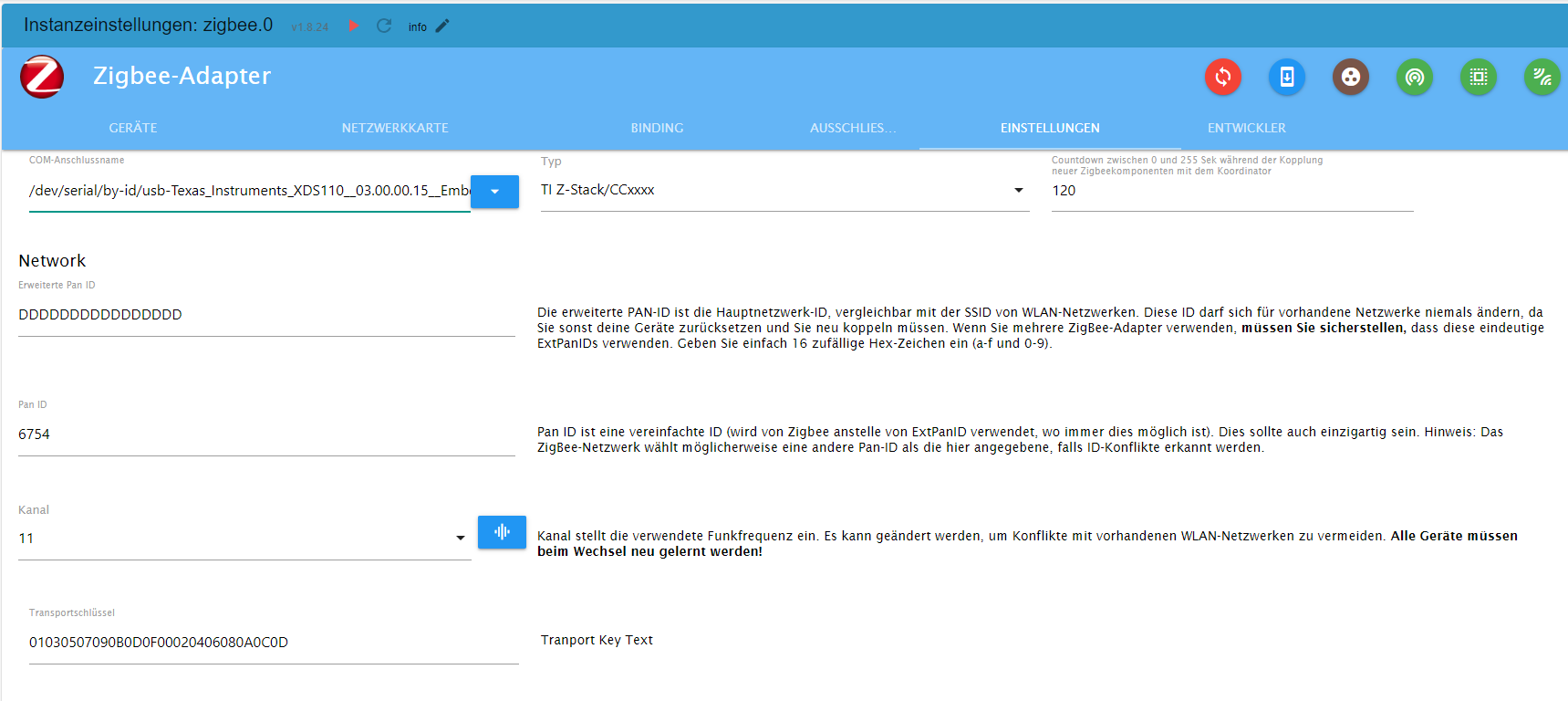
und noch die Einstellungen
BETRIEBSSYSTEM: LINUX
ARCHITEKTUR: ARM
CPUS: 4
GESCHWINDIGKEIT: 1500 MHZ
MODELL: ARMV7 PROCESSOR REV 3 (V7L)
RAM: 3.7 GB -
kurze Info,
Ich habe es mit Bookworm lite und:
pi@iobroker:~ $ apt policy udev udev: Installed: 252.17-1~deb12u1 Candidate: 252.17-1~deb12u1 Version table: *** 252.17-1~deb12u1 500 500 http://deb.debian.org/debian bookworm/main arm64 Packages 100 /var/lib/dpkg/statusnicht zum laufen gebracht.
Bin zurück auf Bullseye lite und mit der https://forum.iobroker.net/topic/65017/zigbee-conbee2-funktioniert-nach-update-nicht-mehr-udev läuft jetzt wieder alles.
Nicht ganz das gewünschte Ergebnis.@anselra sagte in Zigbee Adapter startet nicht mehr:
Ich habe es mit Bookworm lite und:
Ich hatte dasselbe Problem auch.
thomas@rpizigbee:~ $ apt policy udev udev: Installiert: 252.17-1~deb12u1 Installationskandidat: 252.17-1~deb12u1 Versionstabelle: *** 252.17-1~deb12u1 500 500 http://deb.debian.org/debian bookworm/main arm64 Packages 100 /var/lib/dpkg/statusSo habe ich es gestern auch eingerichtet, und der Zigbee wurde partout nicht grün.
Also habe ich direkt in der Konsole den entsprechenden Wert rauskopiert:
thomas@rpizigbee:~ $ ls -lah /dev/serial/by-id insgesamt 0 drwxr-xr-x 2 root root 100 27. Okt 17:56 . drwxr-xr-x 4 root root 80 27. Okt 17:56 .. lrwxrwxrwx 1 root root 13 27. Okt 17:56 usb-1a86_USB_Serial-if00-port0 -> ../../ttyUSB0 lrwxrwxrwx 1 root root 13 27. Okt 17:56 usb-Texas_Instruments_XDS110__03.00.00.13__Embed_with_CMSIS-DAP_L1100MSJ-if00 -> ../../ttyACM0 lrwxrwxrwx 1 root root 13 27. Okt 17:56 usb-Texas_Instruments_XDS110__03.00.00.13__Embed_with_CMSIS-DAP_L1100MSJ-if03 -> ../../ttyACM1, als
/dev/serial/by-id/usb-Texas_Instruments_XDS110__03.00.00.13__Embed_with_CMSIS-DAP_L1100MSJ-if00in die Einstellungen der Instanz eingefügt, und die Verbindung ist geglückt.
Ich war mir sicher, dass exakt diese Bezeichnung vorher auch drin stand, aber wie war das nochmal mit Teufel und Eichhörnchen. :man-shrugging:
-
Skript v.2023-10-10

*** BASE SYSTEM ***
 Static hostname: iobroker
       Icon name: computer
Operating System: Debian GNU/Linux 12 (bookworm)
          Kernel: Linux 6.1.0-rpi4-rpi-v8
    Architecture: arm64

Model           : Raspberry Pi 4 Model B Rev 1.2
Docker          : false
Virtualization  : none
Kernel          : aarch64
Userland        : arm64

Systemuptime and Load:
 16:40:33 up 2 min,  2 users,  load average: 0.26, 0.22, 0.09
CPU threads: 4


*** RASPBERRY THROTTLING ***
Current issues:
No throttling issues detected.

Previously detected issues:
No throttling issues detected.

*** Time and Time Zones ***
               Local time: Sat 2023-10-28 16:40:33 CEST
           Universal time: Sat 2023-10-28 14:40:33 UTC
                 RTC time: n/a
                Time zone: Europe/Berlin (CEST, +0200)
System clock synchronized: yes
              NTP service: active
          RTC in local TZ: no

*** User and Groups ***
pi
/home/pi
pi adm dialout cdrom sudo audio video plugdev games users input render netdev gpio i2c spi iobroker

*** X-Server-Setup ***
X-Server:       false
Desktop:
Terminal:       tty
Boot Target:    multi-user.target

*** MEMORY ***
               total        used        free      shared  buff/cache   available
Mem:            4.0G        498M        3.3G        1.2M        242M        3.5G
Swap:           104M          0B        104M
Total:          4.1G        498M        3.4G

         3793 M total memory
          476 M used memory
          475 M active memory
           68 M inactive memory
         3155 M free memory
           21 M buffer memory
          209 M swap cache
           99 M total swap
            0 M used swap
           99 M free swap

Raspberry only:
oom events: 0
lifetime oom required: 0 Mbytes
total time in oom handler: 0 ms
max time spent in oom handler: 0 ms

*** FAILED SERVICES ***

  UNIT LOAD ACTIVE SUB DESCRIPTION
0 loaded units listed.

*** FILESYSTEM ***
Filesystem     Type      Size  Used Avail Use% Mounted on
udev           devtmpfs  1.6G     0  1.6G   0% /dev
tmpfs          tmpfs     380M  1.2M  379M   1% /run
/dev/mmcblk0p2 ext4       57G  2.8G   52G   6% /
tmpfs          tmpfs     1.9G     0  1.9G   0% /dev/shm
tmpfs          tmpfs     5.0M   16K  5.0M   1% /run/lock
/dev/mmcblk0p1 vfat      510M   61M  450M  12% /boot/firmware
tmpfs          tmpfs     380M     0  380M   0% /run/user/1000

Messages concerning ext4 filesystem in dmesg:
[Sat Oct 28 16:38:27 2023] Kernel command line: coherent_pool=1M 8250.nr_uarts=0 snd_bcm2835.enable_headphones=0 snd_bcm2835.enable_headphones=1 snd_bcm2835.enable_hdmi=1 snd_bcm2835.enable_hdmi=0  smsc95xx.macaddr=DC:A6:32:8D:C3:A3 vc_mem.mem_base=0x3ec00000 vc_mem.mem_size=0x40000000  console=ttyS0,115200 console=tty1 root=PARTUUID=5aa7add2-02 rootfstype=ext4 fsck.repair=yes rootwait
[Sat Oct 28 16:38:30 2023] EXT4-fs (mmcblk0p2): mounted filesystem with ordered data mode. Quota mode: none.
[Sat Oct 28 16:38:32 2023] EXT4-fs (mmcblk0p2): re-mounted. Quota mode: none.

Show mounted filesystems \(real ones only\):
TARGET           SOURCE         FSTYPE OPTIONS
/                /dev/mmcblk0p2 ext4   rw,noatime
`-/boot/firmware /dev/mmcblk0p1 vfat   rw,relatime,fmask=0022,dmask=0022,codepage=437,iocharset=ascii,shortname=mixed,errors=remount-ro

Files in neuralgic directories:

/var:
533M    /var/
209M    /var/cache
203M    /var/cache/apt
159M    /var/lib
130M    /var/lib/apt/lists

Archived and active journals take up 64.0M in the file system.

/opt/iobroker/backups:
4.0K    /opt/iobroker/backups/

/opt/iobroker/iobroker-data:
30M     /opt/iobroker/iobroker-data/
22M     /opt/iobroker/iobroker-data/files
13M     /opt/iobroker/iobroker-data/files/admin.admin/custom/static/js
13M     /opt/iobroker/iobroker-data/files/admin.admin/custom/static
13M     /opt/iobroker/iobroker-data/files/admin.admin/custom

The five largest files in iobroker-data are:
7.6M    /opt/iobroker/iobroker-data/objects.jsonl
6.3M    /opt/iobroker/iobroker-data/files/admin.admin/custom/static/js/vendors-node_modules_iobroker_adapter-react-v5_assets_devices_parseNames_js-node_modules_iobr-99c23e.847b8ad9.chunk.js.map
2.8M    /opt/iobroker/iobroker-data/files/admin.admin/custom/static/js/vendors-node_modules_iobroker_adapter-react-v5_assets_devices_parseNames_js-node_modules_iobr-99c23e.847b8ad9.chunk.js
1.6M    /opt/iobroker/iobroker-data/files/admin.admin/custom/static/js/vendors-node_modules_mui_material_Accordion_index_js-node_modules_mui_material_AccordionDetai-57e02d.0886b730.chunk.js.map
652K    /opt/iobroker/iobroker-data/files/admin.admin/custom/static/js/vendors-node_modules_mui_material_index_js.40e01f69.chunk.js.map

USB-Devices by-id:
USB-Sticks -  Avoid direct links to /dev/* in your adapter setups, please always prefer the links 'by-id':

/dev/serial/by-id/usb-Texas_Instruments_XDS110__03.00.00.15__Embed_with_CMSIS-DAP_L1100GZZ-if03
/dev/serial/by-id/usb-Texas_Instruments_XDS110__03.00.00.15__Embed_with_CMSIS-DAP_L1100GZZ-if00

*** NodeJS-Installation ***

/usr/bin/nodejs         v18.18.2
/usr/bin/node           v18.18.2
/usr/bin/npm            9.8.1
/usr/bin/npx            9.8.1
/usr/bin/corepack       0.19.0


nodejs:
  Installed: 18.18.2-1nodesource1
  Candidate: 18.18.2-1nodesource1
  Version table:
 *** 18.18.2-1nodesource1 500
        500 https://deb.nodesource.com/node_18.x nodistro/main arm64 Packages
        100 /var/lib/dpkg/status
     18.18.1-1nodesource1 500
        500 https://deb.nodesource.com/node_18.x nodistro/main arm64 Packages
     18.18.0-1nodesource1 500
        500 https://deb.nodesource.com/node_18.x nodistro/main arm64 Packages
     18.17.1-1nodesource1 500
        500 https://deb.nodesource.com/node_18.x nodistro/main arm64 Packages
     18.17.0-1nodesource1 500
        500 https://deb.nodesource.com/node_18.x nodistro/main arm64 Packages
     18.16.1-1nodesource1 500
        500 https://deb.nodesource.com/node_18.x nodistro/main arm64 Packages
     18.16.0-1nodesource1 500
        500 https://deb.nodesource.com/node_18.x nodistro/main arm64 Packages
     18.15.0-1nodesource1 500
        500 https://deb.nodesource.com/node_18.x nodistro/main arm64 Packages
     18.14.2-1nodesource1 500
        500 https://deb.nodesource.com/node_18.x nodistro/main arm64 Packages
     18.14.1-1nodesource1 500
        500 https://deb.nodesource.com/node_18.x nodistro/main arm64 Packages
     18.14.0-1nodesource1 500
        500 https://deb.nodesource.com/node_18.x nodistro/main arm64 Packages
     18.13.0+dfsg1-1 500
        500 http://deb.debian.org/debian bookworm/main arm64 Packages
     18.13.0-1nodesource1 500
        500 https://deb.nodesource.com/node_18.x nodistro/main arm64 Packages
     18.12.0-1nodesource1 500
        500 https://deb.nodesource.com/node_18.x nodistro/main arm64 Packages
     18.11.0-1nodesource1 500
        500 https://deb.nodesource.com/node_18.x nodistro/main arm64 Packages
     18.10.0-1nodesource1 500
        500 https://deb.nodesource.com/node_18.x nodistro/main arm64 Packages
     18.9.1-1nodesource1 500
        500 https://deb.nodesource.com/node_18.x nodistro/main arm64 Packages
     18.9.0-1nodesource1 500
        500 https://deb.nodesource.com/node_18.x nodistro/main arm64 Packages
     18.8.0-1nodesource1 500
        500 https://deb.nodesource.com/node_18.x nodistro/main arm64 Packages
     18.7.0-1nodesource1 500
        500 https://deb.nodesource.com/node_18.x nodistro/main arm64 Packages
     18.6.0-1nodesource1 500
        500 https://deb.nodesource.com/node_18.x nodistro/main arm64 Packages
     18.5.0-1nodesource1 500
        500 https://deb.nodesource.com/node_18.x nodistro/main arm64 Packages
     18.4.0-1nodesource1 500
        500 https://deb.nodesource.com/node_18.x nodistro/main arm64 Packages
     18.3.0-1nodesource1 500
        500 https://deb.nodesource.com/node_18.x nodistro/main arm64 Packages
     18.2.0-1nodesource1 500
        500 https://deb.nodesource.com/node_18.x nodistro/main arm64 Packages
     18.1.0-1nodesource1 500
        500 https://deb.nodesource.com/node_18.x nodistro/main arm64 Packages
     18.0.0-1nodesource1 500
        500 https://deb.nodesource.com/node_18.x nodistro/main arm64 Packages

Temp directories causing npm8 problem: 0
No problems detected

Errors in npm tree:

*** ioBroker-Installation ***

ioBroker Status
iobroker is running on this host.


Objects type: jsonl
States  type: jsonl

Core adapters versions
js-controller:  5.0.12
admin:          6.10.1
javascript:     "javascript" not found

Adapters from github:   0

Adapter State
+ system.adapter.admin.0                  : admin                 : iobroker                                 -  enabled, port: 8081, bind: 0.0.0.0, run as: admin
+ system.adapter.backitup.0               : backitup              : iobroker                                 -  enabled
+ system.adapter.discovery.0              : discovery             : iobroker                                 -  enabled
+ system.adapter.zigbee.0                 : zigbee                : iobroker                                 -  enabled, port: /dev/serial/by-id/usb-Texas_Instruments_XDS110__03.00.00.15__Embed_with_CMSIS-DAP_L1100GZZ-if00

+ instance is alive

Enabled adapters with bindings
+ system.adapter.admin.0                  : admin                 : iobroker                                 -  enabled, port: 8081, bind: 0.0.0.0, run as: admin
+ system.adapter.zigbee.0                 : zigbee                : iobroker                                 -  enabled, port: /dev/serial/by-id/usb-Texas_Instruments_XDS110__03.00.00.15__Embed_with_CMSIS-DAP_L1100GZZ-if00

ioBroker-Repositories
stable        : http://download.iobroker.net/sources-dist.json
beta          : http://download.iobroker.net/sources-dist-latest.json

Active repo(s): stable

Installed ioBroker-Instances
Used repository: stable
Adapter    "admin"        : 6.12.0   , installed 6.10.1 [Updatable]
Adapter    "backitup"     : 2.8.1    , installed 2.8.1
Adapter    "discovery"    : 3.1.0    , installed 3.1.0
Controller "js-controller": 5.0.12   , installed 5.0.12
Adapter    "zigbee"       : 1.8.23   , installed 1.8.23

Objects and States
Please stand by - This may take a while
Objects:        172
States:         126

*** OS-Repositories and Updates ***
Hit:1 http://deb.debian.org/debian bookworm InRelease
Hit:2 http://deb.debian.org/debian-security bookworm-security InRelease
Hit:3 http://archive.raspberrypi.com/debian bookworm InRelease
Hit:4 http://deb.debian.org/debian bookworm-updates InRelease
Hit:5 https://deb.nodesource.com/node_18.x nodistro InRelease
Reading package lists...
Pending Updates: 0

*** Listening Ports ***
Active Internet connections (only servers)
Proto Recv-Q Send-Q Local Address           Foreign Address         State       User       Inode      PID/Program name
tcp        0      0 0.0.0.0:22              0.0.0.0:*               LISTEN      0          14691      689/sshd: /usr/sbin
tcp        0      0 127.0.0.1:9001          0.0.0.0:*               LISTEN      1001       14751      680/iobroker.js-con
tcp        0      0 127.0.0.1:9000          0.0.0.0:*               LISTEN      1001       14758      680/iobroker.js-con
tcp6       0      0 :::22                   :::*                    LISTEN      0          14693      689/sshd: /usr/sbin
tcp6       0      0 :::8081                 :::*                    LISTEN      1001       16541      724/io.admin.0
udp        0      0 0.0.0.0:36003           0.0.0.0:*                           104        14643      535/avahi-daemon: r
udp        0      0 0.0.0.0:5353            0.0.0.0:*                           104        14641      535/avahi-daemon: r
udp6       0      0 :::5353                 :::*                                104        14642      535/avahi-daemon: r
udp6       0      0 :::55452                :::*                                104        14644      535/avahi-daemon: r

*** Log File - Last 25 Lines ***

2023-10-28 16:38:08.012  - info: admin.0 (724) ==> Connected system.user.admin from ::ffff:192.168.0.134
2023-10-28 16:38:09.611  - info: host.iobroker instance system.adapter.discovery.0 started with pid 806
2023-10-28 16:38:12.001  - info: zigbee.0 (787) starting. Version 1.8.23 in /opt/iobroker/node_modules/iobroker.zigbee, node: v18.18.2, js-controller: 5.0.12
2023-10-28 16:38:12.162  - info: zigbee.0 (787) Starting Zigbee  npm ...
2023-10-28 16:38:12.245  - info: discovery.0 (806) starting. Version 3.1.0 in /opt/iobroker/node_modules/iobroker.discovery, node: v18.18.2, js-controller: 5.0.12
2023-10-28 16:38:12.668  - info: zigbee.0 (787) Installed Version: iobroker.zigbee@1.8.23
2023-10-28 16:38:13.276  - error: zigbee.0 (787) Starting zigbee-herdsman problem : "Error while opening serialport 'Error: Error: Device or resource busy, cannot open /dev/serial/by-id/usb-Texas_Instruments_XDS110__03.00.00.15__Embed_with_CMSIS-DAP_L1100GZZ-if00'"
2023-10-28 16:38:13.277  - error: zigbee.0 (787) Failed to start Zigbee
2023-10-28 16:38:13.278  - error: zigbee.0 (787) Error herdsman start
2023-10-28 16:38:13.621  - info: host.iobroker instance system.adapter.backitup.0 started with pid 830
2023-10-28 16:38:15.999  - info: backitup.0 (830) starting. Version 2.8.1 in /opt/iobroker/node_modules/iobroker.backitup, node: v18.18.2, js-controller: 5.0.12
2023-10-28 16:38:16.097  - info: backitup.0 (830) [iobroker] backup will be activated at 02:40 every 1 day(s)
2023-10-28 16:38:23.282  - info: zigbee.0 (787) Try to reconnect. 1 attempts left
2023-10-28 16:38:23.284  - info: zigbee.0 (787) Starting Zigbee  npm ...
2023-10-28 16:38:23.334  - info: zigbee.0 (787) Installed Version: iobroker.zigbee@1.8.23
2023-10-28 16:38:23.667  - error: zigbee.0 (787) Starting zigbee-herdsman problem : "Error while opening serialport 'Error: Error: Device or resource busy, cannot open /dev/serial/by-id/usb-Texas_Instruments_XDS110__03.00.00.15__Embed_with_CMSIS-DAP_L1100GZZ-if00'"
2023-10-28 16:38:23.668  - error: zigbee.0 (787) Failed to start Zigbee
2023-10-28 16:38:23.670  - error: zigbee.0 (787) Error herdsman start
2023-10-28 16:39:09.804  - info: admin.0 (724) <== Disconnect system.user.admin from ::ffff:192.168.0.134
2023-10-28 16:39:09.820  - info: admin.0 (724) ==> Connected system.user.admin from ::ffff:192.168.0.134
2023-10-28 16:39:09.826  - info: admin.0 (724) <== Disconnect system.user.admin from ::ffff:192.168.0.134 admin
2023-10-28 16:39:09.879  - info: admin.0 (724) ==> Connected system.user.admin from ::ffff:192.168.0.134
2023-10-28 16:39:11.223  - info: admin.0 (724) <== Disconnect system.user.admin from ::ffff:192.168.0.134 admin
2023-10-28 16:39:11.359  - info: admin.0 (724) ==> Connected system.user.admin from ::ffff:192.168.0.134
2023-10-28 16:39:18.894  - info: admin.0 (724) <== Disconnect system.user.admin from ::ffff:192.168.0.134
Update ist durch und nach Reboot folgende Zigbee Meldungen
zigbee.0
2023-10-28 16:38:23.670	error	Error herdsman start

zigbee.0
2023-10-28 16:38:23.668	error	Failed to start Zigbee

zigbee.0
2023-10-28 16:38:23.667	error	Starting zigbee-herdsman problem : "Error while opening serialport 'Error: Error: Device or resource busy, cannot open /dev/serial/by-id/usb-Texas_Instruments_XDS110__03.00.00.15__Embed_with_CMSIS-DAP_L1100GZZ-if00'"

zigbee.0
2023-10-28 16:38:23.334	info	Installed Version: iobroker.zigbee@1.8.23

zigbee.0
2023-10-28 16:38:23.284	info	Starting Zigbee npm ...

zigbee.0
2023-10-28 16:38:23.282	info	Try to reconnect. 1 attempts left

zigbee.0
2023-10-28 16:38:13.278	error	Error herdsman start

zigbee.0
2023-10-28 16:38:13.277	error	Failed to start Zigbee

zigbee.0
2023-10-28 16:38:13.276	error	Starting zigbee-herdsman problem : "Error while opening serialport 'Error: Error: Device or resource busy, cannot open /dev/serial/by-id/usb-Texas_Instruments_XDS110__03.00.00.15__Embed_with_CMSIS-DAP_L1100GZZ-if00'"

zigbee.0
2023-10-28 16:38:12.668	info	Installed Version: iobroker.zigbee@1.8.23

zigbee.0
2023-10-28 16:38:12.162	info	Starting Zigbee npm ...

zigbee.0
2023-10-28 16:38:12.001	info	starting. Version 1.8.23 in /opt/iobroker/node_modules/iobroker.zigbee, node: v18.18.2, js-controller: 5.0.12

zigbee.0
2023-10-28 16:37:47.901	warn	Failed to stop zigbee during startup

zigbee.0
2023-10-28 16:37:41.769	info	Zigbee: disabling joining new devices.

zigbee.0
2023-10-28 16:37:41.763	info	cleaned everything up.
und noch die Einstellungen
fuser -mv /dev/serial/by-id/usb-Texas_Instruments_XDS110__03.00.00.15__Embed_with_CMSIS-DAP_L1100GZZ-if00 fuser -mv `readlink -f /dev/serial/by-id/usb-Texas_Instruments_XDS110__03.00.00.15__Embed_with_CMSIS-DAP_L1100GZZ-if00` -
fuser -mv /dev/serial/by-id/usb-Texas_Instruments_XDS110__03.00.00.15__Embed_with_CMSIS-DAP_L1100GZZ-if00 fuser -mv `readlink -f /dev/serial/by-id/usb-Texas_Instruments_XDS110__03.00.00.15__Embed_with_CMSIS-DAP_L1100GZZ-if00`pi@iobroker:~ $ fuser -mv /dev/serial/by-id/usb-Texas_Instruments_XDS110__03.00.00.15__Embed_with_CMSIS-DAP_L1100GZZ-if00 USER PID ACCESS COMMAND /dev/ttyACM0: root kernel mount /dev pi@iobroker:~ $ fuser -mv `readlink -f /dev/serial/by-id/usb-Texas_Instruments_XDS110__03.00.00.15__Embed_with_CMSIS-DAP_L1100GZZ-if00` USER PID ACCESS COMMAND /dev/ttyACM0: root kernel mount /devzigbee.0 2023-10-28 17:03:25.648 error Error herdsman start zigbee.0 2023-10-28 17:03:25.647 error Failed to start Zigbee zigbee.0 2023-10-28 17:03:25.645 error Starting zigbee-herdsman problem : "Error while opening serialport 'Error: Error Resource temporarily unavailable Cannot lock port'" zigbee.0 2023-10-28 17:03:25.306 info Installed Version: ioBroker/ioBroker.zigbee#e233808d509f6fc4ddb3176d79633f4492146a83 zigbee.0 2023-10-28 17:03:25.278 info Starting Zigbee npm ... zigbee.0 2023-10-28 17:03:25.276 info Try to reconnect. 1 attempts left zigbee.0 2023-10-28 17:03:15.274 error Error herdsman start zigbee.0 2023-10-28 17:03:15.273 error Failed to start Zigbee zigbee.0 2023-10-28 17:03:15.272 error Starting zigbee-herdsman problem : "Failed to connect to the adapter (Error: SRSP - SYS - ping after 6000ms)" zigbee.0 2023-10-28 17:02:54.320 info Installed Version: ioBroker/ioBroker.zigbee#e233808d509f6fc4ddb3176d79633f4492146a83 zigbee.0 2023-10-28 17:02:53.826 info Starting Zigbee npm ... zigbee.0 2023-10-28 17:02:53.819 info delete old Backup files. keep only last 10 zigbee.0 2023-10-28 17:02:53.634 info starting. Version 1.8.24 (non-npm: ioBroker/ioBroker.zigbee#e233808d509f6fc4ddb3176d79633f4492146a83) in /opt/iobroker/node_modules/iobroker.zigbee, node: v18.18.2, js-controller: 5.0.12 zigbee.0 2023-10-28 17:02:50.476 info Plugin sentry Sentry Plugin disabled for this process because sending of statistic data is disabled for the system -
@anselra sagte in Zigbee Adapter startet nicht mehr:
Ich habe es mit Bookworm lite und:
Ich hatte dasselbe Problem auch.
thomas@rpizigbee:~ $ apt policy udev
udev:
  Installiert:           252.17-1~deb12u1
  Installationskandidat: 252.17-1~deb12u1
  Versionstabelle:
 *** 252.17-1~deb12u1 500
        500 http://deb.debian.org/debian bookworm/main arm64 Packages
        100 /var/lib/dpkg/status
So habe ich es gestern auch eingerichtet, und der Zigbee wurde partout nicht grün.
Also habe ich direkt in der Konsole den entsprechenden Wert rauskopiert:
thomas@rpizigbee:~ $ ls -lah /dev/serial/by-id
insgesamt 0
drwxr-xr-x 2 root root 100 27. Okt 17:56 .
drwxr-xr-x 4 root root  80 27. Okt 17:56 ..
lrwxrwxrwx 1 root root  13 27. Okt 17:56 usb-1a86_USB_Serial-if00-port0 -> ../../ttyUSB0
lrwxrwxrwx 1 root root  13 27. Okt 17:56 usb-Texas_Instruments_XDS110__03.00.00.13__Embed_with_CMSIS-DAP_L1100MSJ-if00 -> ../../ttyACM0
lrwxrwxrwx 1 root root  13 27. Okt 17:56 usb-Texas_Instruments_XDS110__03.00.00.13__Embed_with_CMSIS-DAP_L1100MSJ-if03 -> ../../ttyACM1
, als
/dev/serial/by-id/usb-Texas_Instruments_XDS110__03.00.00.13__Embed_with_CMSIS-DAP_L1100MSJ-if00in die Einstellungen der Instanz eingefügt, und die Verbindung ist geglückt.
Ich war mir sicher, dass exakt diese Bezeichnung vorher auch drin stand, aber wie war das nochmal mit Teufel und Eichhörnchen. :man-shrugging:
@meister-mopper said in Zigbee Adapter startet nicht mehr:
@anselra sagte in Zigbee Adapter startet nicht mehr:
Ich habe es mit Bookworm lite und:
Ich hatte dasselbe Problem auch.
thomas@rpizigbee:~ $ apt policy udev
udev:
  Installiert:           252.17-1~deb12u1
  Installationskandidat: 252.17-1~deb12u1
  Versionstabelle:
 *** 252.17-1~deb12u1 500
        500 http://deb.debian.org/debian bookworm/main arm64 Packages
        100 /var/lib/dpkg/status
So habe ich es gestern auch eingerichtet, und der Zigbee wurde partout nicht grün.
Also habe ich direkt in der Konsole den entsprechenden Wert rauskopiert:
thomas@rpizigbee:~ $ ls -lah /dev/serial/by-id
insgesamt 0
drwxr-xr-x 2 root root 100 27. Okt 17:56 .
drwxr-xr-x 4 root root  80 27. Okt 17:56 ..
lrwxrwxrwx 1 root root  13 27. Okt 17:56 usb-1a86_USB_Serial-if00-port0 -> ../../ttyUSB0
lrwxrwxrwx 1 root root  13 27. Okt 17:56 usb-Texas_Instruments_XDS110__03.00.00.13__Embed_with_CMSIS-DAP_L1100MSJ-if00 -> ../../ttyACM0
lrwxrwxrwx 1 root root  13 27. Okt 17:56 usb-Texas_Instruments_XDS110__03.00.00.13__Embed_with_CMSIS-DAP_L1100MSJ-if03 -> ../../ttyACM1
, als
/dev/serial/by-id/usb-Texas_Instruments_XDS110__03.00.00.13__Embed_with_CMSIS-DAP_L1100MSJ-if00in die Einstellungen der Instanz eingefügt, und die Verbindung ist geglückt.
Ich war mir sicher, dass exakt diese Bezeichnung vorher auch drin stand, aber wie war das nochmal mit Teufel und Eichhörnchen. :man-shrugging:
Hat bei mir leider nichts gebracht, ich kopiere alles immer aus meiner Install doku
BETRIEBSSYSTEM: LINUX
ARCHITEKTUR: ARM
CPUS: 4
GESCHWINDIGKEIT: 1500 MHZ
MODELL: ARMV7 PROCESSOR REV 3 (V7L)
RAM: 3.7 GB -
@meister-mopper said in Zigbee Adapter startet nicht mehr:
@anselra sagte in Zigbee Adapter startet nicht mehr:
Ich habe es mit Bookworm lite und:
Ich hatte dasselbe Problem auch.
thomas@rpizigbee:~ $ apt policy udev
udev:
  Installiert:           252.17-1~deb12u1
  Installationskandidat: 252.17-1~deb12u1
  Versionstabelle:
 *** 252.17-1~deb12u1 500
        500 http://deb.debian.org/debian bookworm/main arm64 Packages
        100 /var/lib/dpkg/status
So habe ich es gestern auch eingerichtet, und der Zigbee wurde partout nicht grün.
Also habe ich direkt in der Konsole den entsprechenden Wert rauskopiert:
thomas@rpizigbee:~ $ ls -lah /dev/serial/by-id
insgesamt 0
drwxr-xr-x 2 root root 100 27. Okt 17:56 .
drwxr-xr-x 4 root root  80 27. Okt 17:56 ..
lrwxrwxrwx 1 root root  13 27. Okt 17:56 usb-1a86_USB_Serial-if00-port0 -> ../../ttyUSB0
lrwxrwxrwx 1 root root  13 27. Okt 17:56 usb-Texas_Instruments_XDS110__03.00.00.13__Embed_with_CMSIS-DAP_L1100MSJ-if00 -> ../../ttyACM0
lrwxrwxrwx 1 root root  13 27. Okt 17:56 usb-Texas_Instruments_XDS110__03.00.00.13__Embed_with_CMSIS-DAP_L1100MSJ-if03 -> ../../ttyACM1
, als
/dev/serial/by-id/usb-Texas_Instruments_XDS110__03.00.00.13__Embed_with_CMSIS-DAP_L1100MSJ-if00in die Einstellungen der Instanz eingefügt, und die Verbindung ist geglückt.
Ich war mir sicher, dass exakt diese Bezeichnung vorher auch drin stand, aber wie war das nochmal mit Teufel und Eichhörnchen. :man-shrugging:
Hat bei mir leider nichts gebracht, ich kopiere alles immer aus meiner Install doku
@anselra sagte in Zigbee Adapter startet nicht mehr:
ich kopiere alles immer aus meiner Install doku
Kopier es lieber aus der Konsole.
/dev/serial/by-id/usb-Texas_Instruments_XDS110__03.00.00.15__Embed_with_CMSIS-DAP_L1100GZZ-if00Wo bei die Meldung bei einem falschen Dateinamen eine andere wäre.
-
@anselra sagte in Zigbee Adapter startet nicht mehr:
ich kopiere alles immer aus meiner Install doku
Kopier es lieber aus der Konsole.
/dev/serial/by-id/usb-Texas_Instruments_XDS110__03.00.00.15__Embed_with_CMSIS-DAP_L1100GZZ-if00Wo bei die Meldung bei einem falschen Dateinamen eine andere wäre.
habs nochmal alles neu raus kopiert
zigbee.0
2023-10-28 17:14:15.866	error	Error herdsman start

zigbee.0
2023-10-28 17:14:15.865	error	Failed to start Zigbee

zigbee.0
2023-10-28 17:14:15.863	error	Starting zigbee-herdsman problem : "Error while opening serialport 'Error: Error Resource temporarily unavailable Cannot lock port'"

zigbee.0
2023-10-28 17:14:15.445	info	Installed Version: ioBroker/ioBroker.zigbee#e233808d509f6fc4ddb3176d79633f4492146a83

zigbee.0
2023-10-28 17:14:15.372	info	Starting Zigbee npm ...

zigbee.0
2023-10-28 17:14:15.370	info	Try to reconnect. 1 attempts left

zigbee.0
2023-10-28 17:14:05.368	error	Error herdsman start

zigbee.0
2023-10-28 17:14:05.367	error	Failed to start Zigbee

zigbee.0
2023-10-28 17:14:05.366	error	Starting zigbee-herdsman problem : "Failed to connect to the adapter (Error: SRSP - SYS - ping after 6000ms)"

zigbee.0
2023-10-28 17:13:44.744	info	Installed Version: ioBroker/ioBroker.zigbee#e233808d509f6fc4ddb3176d79633f4492146a83

zigbee.0
2023-10-28 17:13:44.178	info	Starting Zigbee npm ...

zigbee.0
2023-10-28 17:13:44.173	info	delete old Backup files. keep only last 10

zigbee.0
2023-10-28 17:13:43.935	info	starting. Version 1.8.24 (non-npm: ioBroker/ioBroker.zigbee#e233808d509f6fc4ddb3176d79633f4492146a83) in /opt/iobroker/node_modules/iobroker.zigbee, node: v18.18.2, js-controller: 5.0.12

zigbee.0
2023-10-28 17:13:43.564	info	Plugin sentry Sentry Plugin disabled for this process because sending of statistic data is disabled for the system

zigbee.0
2023-10-28 17:13:34.018	info	debug devices set to []

zigbee.0
2023-10-28 17:13:33.927	info	terminating

zigbee.0
2023-10-28 17:13:33.926	info	Terminated (ADAPTER_REQUESTED_TERMINATION): Without reason

zigbee.0
2023-10-28 17:13:33.923	info	terminating

zigbee.0
2023-10-28 17:13:33.922	warn	Failed to stop zigbee during startup

zigbee.0
2023-10-28 17:13:33.872	info	Zigbee: disabling joining new devices.

zigbee.0
2023-10-28 17:13:33.129	info	cleaned everything up...

zigbee.0
2023-10-28 17:13:33.126	info	Got terminate signal TERMINATE_YOURSELF

zigbee.0
2023-10-28 17:13:23.941	info	List of port: [{"path":"/dev/ttyACM0","manufacturer":"Texas Instruments","serialNumber":"L1100GZZ","pnpId":"usb-Texas_Instruments_XDS110__03.00.00.15__Embed_with_CMSIS-DAP_L1100GZZ-if00","vendorId":"0451","productId":"bef3"},{"path":"/dev/ttyACM1","manufacturer":"Texas Instruments","serialNumber":"L1100GZZ","pnpId":"usb-Texas_Instruments_XDS110__03.00.00.15__Embed_with_CMSIS-DAP_L1100GZZ-if03","vendorId":"0451","productId":"bef3"}]

zigbee.0
2023-10-28 17:13:23.559	error	getGroups: caught error: TypeError: Cannot read properties of undefined (reading 'getGroups')
BETRIEBSSYSTEM: LINUX
ARCHITEKTUR: ARM
CPUS: 4
GESCHWINDIGKEIT: 1500 MHZ
MODELL: ARMV7 PROCESSOR REV 3 (V7L)
RAM: 3.7 GB -
habs nochmal alles neu raus kopiert
zigbee.0 2023-10-28 17:14:15.866 error Error herdsman start zigbee.0 2023-10-28 17:14:15.865 error Failed to start Zigbee zigbee.0 2023-10-28 17:14:15.863 error Starting zigbee-herdsman problem : "Error while opening serialport 'Error: Error Resource temporarily unavailable Cannot lock port'" zigbee.0 2023-10-28 17:14:15.445 info Installed Version: ioBroker/ioBroker.zigbee#e233808d509f6fc4ddb3176d79633f4492146a83 zigbee.0 2023-10-28 17:14:15.372 info Starting Zigbee npm ... zigbee.0 2023-10-28 17:14:15.370 info Try to reconnect. 1 attempts left zigbee.0 2023-10-28 17:14:05.368 error Error herdsman start zigbee.0 2023-10-28 17:14:05.367 error Failed to start Zigbee zigbee.0 2023-10-28 17:14:05.366 error Starting zigbee-herdsman problem : "Failed to connect to the adapter (Error: SRSP - SYS - ping after 6000ms)" zigbee.0 2023-10-28 17:13:44.744 info Installed Version: ioBroker/ioBroker.zigbee#e233808d509f6fc4ddb3176d79633f4492146a83 zigbee.0 2023-10-28 17:13:44.178 info Starting Zigbee npm ... zigbee.0 2023-10-28 17:13:44.173 info delete old Backup files. keep only last 10 zigbee.0 2023-10-28 17:13:43.935 info starting. Version 1.8.24 (non-npm: ioBroker/ioBroker.zigbee#e233808d509f6fc4ddb3176d79633f4492146a83) in /opt/iobroker/node_modules/iobroker.zigbee, node: v18.18.2, js-controller: 5.0.12 zigbee.0 2023-10-28 17:13:43.564 info Plugin sentry Sentry Plugin disabled for this process because sending of statistic data is disabled for the system zigbee.0 2023-10-28 17:13:34.018 info debug devices set to [] zigbee.0 2023-10-28 17:13:33.927 info terminating zigbee.0 2023-10-28 17:13:33.926 info Terminated (ADAPTER_REQUESTED_TERMINATION): Without reason zigbee.0 2023-10-28 17:13:33.923 info terminating zigbee.0 2023-10-28 17:13:33.922 warn Failed to stop zigbee during startup zigbee.0 2023-10-28 17:13:33.872 info Zigbee: disabling joining new devices. zigbee.0 2023-10-28 17:13:33.129 info cleaned everything up... zigbee.0 2023-10-28 17:13:33.126 info Got terminate signal TERMINATE_YOURSELF zigbee.0 2023-10-28 17:13:23.941 info List of port: [{"path":"/dev/ttyACM0","manufacturer":"Texas Instruments","serialNumber":"L1100GZZ","pnpId":"usb-Texas_Instruments_XDS110__03.00.00.15__Embed_with_CMSIS-DAP_L1100GZZ-if00","vendorId":"0451","productId":"bef3"},{"path":"/dev/ttyACM1","manufacturer":"Texas Instruments","serialNumber":"L1100GZZ","pnpId":"usb-Texas_Instruments_XDS110__03.00.00.15__Embed_with_CMSIS-DAP_L1100GZZ-if03","vendorId":"0451","productId":"bef3"}] zigbee.0 2023-10-28 17:13:23.559 error getGroups: caught error: TypeError: Cannot read properties of undefined (reading 'getGroups')@anselra sagte in Zigbee Adapter startet nicht mehr:
"Failed to connect to the adapter (Error: SRSP - SYS - ping after 6000ms)"
Das ist gerne was aus der Firmware-Ecke.
-
@anselra sagte in Zigbee Adapter startet nicht mehr:
"Failed to connect to the adapter (Error: SRSP - SYS - ping after 6000ms)"
Das ist gerne was aus der Firmware-Ecke.
möchte ungern jetzt was an der Firmware machen, hab noch Sticks die versuche ich mal.
melde mich :-) -
@anselra sagte in Zigbee Adapter startet nicht mehr:
"Failed to connect to the adapter (Error: SRSP - SYS - ping after 6000ms)"
Das ist gerne was aus der Firmware-Ecke.
na was soll ich sagen, mit dem Zigbee CC2531 USB Dongle geht es mit dem dev Board CC26X2R1 nicht.
Mal schauen was für Firmware wo drauf ist falls man das findetBETRIEBSSYSTEM: LINUX
ARCHITEKTUR: ARM
CPUS: 4
GESCHWINDIGKEIT: 1500 MHZ
MODELL: ARMV7 PROCESSOR REV 3 (V7L)
RAM: 3.7 GB -
na was soll ich sagen, mit dem Zigbee CC2531 USB Dongle geht es mit dem dev Board CC26X2R1 nicht.
Mal schauen was für Firmware wo drauf ist falls man das findet -
update gemacht dev Board CC26X2R1 auf Z-Stack_3.x.0 coordinator 20230507
zigbee.0
2023-10-28 19:10:12.178	error	Error herdsman start

zigbee.0
2023-10-28 19:10:12.178	error	Failed to start Zigbee

zigbee.0
2023-10-28 19:10:12.177	error	Starting zigbee-herdsman problem : "Error while opening serialport 'Error: Error Resource temporarily unavailable Cannot lock port'"

zigbee.0
2023-10-28 19:10:11.815	info	Installed Version: ioBroker/ioBroker.zigbee#e233808d509f6fc4ddb3176d79633f4492146a83

zigbee.0
2023-10-28 19:10:11.785	info	Starting Zigbee npm ...

zigbee.0
2023-10-28 19:10:11.783	info	Try to reconnect. 1 attempts left

zigbee.0
2023-10-28 19:10:01.781	error	Error herdsman start

zigbee.0
2023-10-28 19:10:01.780	error	Failed to start Zigbee

zigbee.0
2023-10-28 19:10:01.779	error	Starting zigbee-herdsman problem : "Failed to connect to the adapter (Error: SRSP - SYS - ping after 6000ms)"

zigbee.0
2023-10-28 19:09:41.317	info	Installed Version: ioBroker/ioBroker.zigbee#e233808d509f6fc4ddb3176d79633f4492146a83

zigbee.0
2023-10-28 19:09:40.896	info	Starting Zigbee npm ...

zigbee.0
2023-10-28 19:09:40.893	info	delete old Backup files. keep only last 10

zigbee.0
2023-10-28 19:09:40.708	info	starting. Version 1.8.24 (non-npm: ioBroker/ioBroker.zigbee#e233808d509f6fc4ddb3176d79633f4492146a83) in /opt/iobroker/node_modules/iobroker.zigbee, node: v18.18.2, js-controller: 5.0.12

zigbee.0
2023-10-28 19:09:40.385	info	Plugin sentry Sentry Plugin disabled for this process because sending of statistic data is disabled for the system

zigbee.0
2023-10-28 19:09:31.457	info	terminating

zigbee.0
2023-10-28 19:09:31.431	info	debug devices set to []

zigbee.0
2023-10-28 19:09:31.351	info	Terminated (ADAPTER_REQUESTED_TERMINATION): Without reason

zigbee.0
2023-10-28 19:09:31.350	info	terminating

zigbee.0
2023-10-28 19:09:31.349	warn	Failed to stop zigbee during startup

zigbee.0
2023-10-28 19:09:31.285	info	Zigbee: disabling joining new devices.

zigbee.0
2023-10-28 19:09:30.951	info	cleaned everything up...

zigbee.0
2023-10-28 19:09:30.949	info	Got terminate signal TERMINATE_YOURSELF
leider das gleiche Ergebnis
Bezeichnung wurde angepasst im Adapter
usb-Texas_Instruments_XDS110__03.00.00.26__Embed_with_CMSIS-DAP_L1100GZZ-if00 -> ../../ttyACM0BETRIEBSSYSTEM: LINUX
ARCHITEKTUR: ARM
CPUS: 4
GESCHWINDIGKEIT: 1500 MHZ
MODELL: ARMV7 PROCESSOR REV 3 (V7L)
RAM: 3.7 GB -
update gemacht dev Board CC26X2R1 auf Z-Stack_3.x.0 coordinator 20230507
zigbee.0
2023-10-28 19:10:12.178	error	Error herdsman start

zigbee.0
2023-10-28 19:10:12.178	error	Failed to start Zigbee

zigbee.0
2023-10-28 19:10:12.177	error	Starting zigbee-herdsman problem : "Error while opening serialport 'Error: Error Resource temporarily unavailable Cannot lock port'"

zigbee.0
2023-10-28 19:10:11.815	info	Installed Version: ioBroker/ioBroker.zigbee#e233808d509f6fc4ddb3176d79633f4492146a83

zigbee.0
2023-10-28 19:10:11.785	info	Starting Zigbee npm ...

zigbee.0
2023-10-28 19:10:11.783	info	Try to reconnect. 1 attempts left

zigbee.0
2023-10-28 19:10:01.781	error	Error herdsman start

zigbee.0
2023-10-28 19:10:01.780	error	Failed to start Zigbee

zigbee.0
2023-10-28 19:10:01.779	error	Starting zigbee-herdsman problem : "Failed to connect to the adapter (Error: SRSP - SYS - ping after 6000ms)"

zigbee.0
2023-10-28 19:09:41.317	info	Installed Version: ioBroker/ioBroker.zigbee#e233808d509f6fc4ddb3176d79633f4492146a83

zigbee.0
2023-10-28 19:09:40.896	info	Starting Zigbee npm ...

zigbee.0
2023-10-28 19:09:40.893	info	delete old Backup files. keep only last 10

zigbee.0
2023-10-28 19:09:40.708	info	starting. Version 1.8.24 (non-npm: ioBroker/ioBroker.zigbee#e233808d509f6fc4ddb3176d79633f4492146a83) in /opt/iobroker/node_modules/iobroker.zigbee, node: v18.18.2, js-controller: 5.0.12

zigbee.0
2023-10-28 19:09:40.385	info	Plugin sentry Sentry Plugin disabled for this process because sending of statistic data is disabled for the system

zigbee.0
2023-10-28 19:09:31.457	info	terminating

zigbee.0
2023-10-28 19:09:31.431	info	debug devices set to []

zigbee.0
2023-10-28 19:09:31.351	info	Terminated (ADAPTER_REQUESTED_TERMINATION): Without reason

zigbee.0
2023-10-28 19:09:31.350	info	terminating

zigbee.0
2023-10-28 19:09:31.349	warn	Failed to stop zigbee during startup

zigbee.0
2023-10-28 19:09:31.285	info	Zigbee: disabling joining new devices.

zigbee.0
2023-10-28 19:09:30.951	info	cleaned everything up...

zigbee.0
2023-10-28 19:09:30.949	info	Got terminate signal TERMINATE_YOURSELF
leider das gleiche Ergebnis
Bezeichnung wurde angepasst im Adapter
usb-Texas_Instruments_XDS110__03.00.00.26__Embed_with_CMSIS-DAP_L1100GZZ-if00 -> ../../ttyACM0@anselra sagte in Zigbee Adapter startet nicht mehr:
usb-Texas_Instruments_XDS110__03.00.00.26__Embed_with_CMSIS-DAP_L1100GZZ-if00 -> ../../ttyACM0
Dann solltest du aber diesen Teil
-> ../../ttyACM0abschneiden. -
@anselra sagte in Zigbee Adapter startet nicht mehr:
usb-Texas_Instruments_XDS110__03.00.00.26__Embed_with_CMSIS-DAP_L1100GZZ-if00 -> ../../ttyACM0
Dann solltest du aber diesen Teil
-> ../../ttyACM0abschneiden.sorry mein kopierfehler, ist natürlich nicht mit dabei


Hey! Du scheinst an dieser Unterhaltung interessiert zu sein, hast aber noch kein Konto.
Hast du es satt, bei jedem Besuch durch die gleichen Beiträge zu scrollen? Wenn du dich für ein Konto anmeldest, kommst du immer genau dorthin zurück, wo du zuvor warst, und kannst dich über neue Antworten benachrichtigen lassen (entweder per E-Mail oder Push-Benachrichtigung). Du kannst auch Lesezeichen speichern und Beiträge positiv bewerten, um anderen Community-Mitgliedern deine Wertschätzung zu zeigen.
Mit deinem Input könnte dieser Beitrag noch besser werden 💗
Registrieren Anmelden355
Online33.0k
Benutzer83.4k
Themen1.3m
Beiträge