
NEWS




Update ioBroker klappt nicht - gelöst durch neuinstallation
-
@dlaurenz sagte in Update ioBroker klappt nicht:
willst du mir sagen dass ein update auf bulls-eye das problem behebt?
Nö. Aber verschafft erstmal eine sinnvolle Basis für weiteres.
deine anmerkungen gehen überhaupt nicht in richtung lösungsfindung
Warum nicht?
gut mache ich - melde mich
-
@dlaurenz sagte in Update ioBroker klappt nicht:
willst du mir sagen dass ein update auf bulls-eye das problem behebt?
Nö. Aber verschafft erstmal eine sinnvolle Basis für weiteres.
deine anmerkungen gehen überhaupt nicht in richtung lösungsfindung
Warum nicht?
-
"hampelst"....
übirgens habe ich noch einen buster-pi, der lässt sich einwandfrei updaten und sieht genauso aus...
(salt, webmin, root)
ich betreibe das ganze schon seit den anfangstagen von iobroker
Und das bedeutet jetzt für den Patienten genau was?
-
Und das bedeutet jetzt für den Patienten genau was?
2x raspbian, 2x debian buster, 2x iobroker, 2x Node 18, einer lässt sich updaten, der andere nicht.
Wie wahrscheinlich ist es, dass es am OS liegt?
-
gern
pi@io-fhem:~ $ iob fix
library: loaded
Library version=2023-10-10

==========================================================================

    Welcome to the ioBroker installation fixer!
    Script version: 2023-04-02

    You might need to enter your password a couple of times.

==========================================================================


==========================================================================
    Installing prerequisites (1/5)
==========================================================================

OK:1 http://raspbian.raspberrypi.org/raspbian buster InRelease
OK:2 http://archive.raspberrypi.org/debian buster InRelease
OK:3 https://repo.saltproject.io/py3/debian/10/amd64/latest buster InRelease
OK:4 https://deb.nodesource.com/node_18.x nodistro InRelease
Ign:5 https://download.webmin.com/download/repository sarge InRelease
OK:6 https://download.webmin.com/download/repository sarge Release
Paketlisten werden gelesen... Fertig
E: Paket gcc-c+ kann nicht gefunden werden.
E: Mittels regulärem Ausdruck »gcc-c+« konnte kein Paket gefunden werden.
Installed gcc-c++

==========================================================================
    Checking ioBroker user and directory permissions (2/5)
==========================================================================

Created /etc/sudoers.d/iobroker
Fixing directory permissions...

==========================================================================
    Check and cleanup npm temporary directories (3/5)
==========================================================================

Done.

==========================================================================
    Database maintenance (4/5)
==========================================================================

Checking for uncompressed JSONL databases... This might take a while!

No relevant JSONL files found to compress, skip

==========================================================================
    Checking autostart (5/5)
==========================================================================

Enabling autostart...
Autostart enabled!

==========================================================================

    Your installation was fixed successfully
    Run iobroker start to start ioBroker again!

==========================================================================
und danach iob diag:
pi@io-fhem:~ $ iob diag *** iob diag is starting up, please wait *** The state system.host.io-fhem.versions.nodeNewestNext was not found! The state system.host.io-fhem.versions.npmNewestNext was not found! The state system.host.io-fhem.versions.nodeCurrent was not found! *** ioBroker Diagnosis *** Please stretch the window of your terminal programm (puTTY) as wide as possible or switch to full screen The following checks may give hints to potential malconfigurations or errors, please post them in our forum: https://forum.iobroker.net Just copy and paste the Summary Page, including the ``` characters at start and end. It helps us to help you! Press any key to continue ======== Start marking the full check here ========= Skript v.2023-10-10 *** BASE SYSTEM *** Static hostname: io-fhem Icon name: computer Operating System: Raspbian GNU/Linux 10 (buster) Kernel: Linux 5.10.103-v7+ Architecture: arm Model : Raspberry Pi 3 Model B Rev 1.2 Docker : false Virtualization : none Kernel : armv7l Userland : armhf Systemuptime and Load: 05:49:13 up 11:03, 1 user, load average: 0.74, 0.52, 0.35 CPU threads: 4 *** RASPBERRY THROTTLING *** Current issues: No throttling issues detected. Previously detected issues: No throttling issues detected. *** Time and Time Zones *** Local time: Thu 2023-10-12 05:49:13 CEST Universal time: Thu 2023-10-12 03:49:13 UTC RTC time: n/a Time zone: Europe/Berlin (CEST, +0200) System clock synchronized: yes NTP service: inactive RTC in local TZ: no *** User and Groups *** pi /home/pi pi adm dialout cdrom sudo audio video plugdev games users input netdev gpio i2c spi iobroker *** X-Server-Setup *** X-Server: false Desktop: Terminal: Boot Target: multi-user.target *** MEMORY *** total used free shared buff/cache available Mem: 972M 142M 222M 3.0M 607M 762M Swap: 99M 57M 42M Total: 1.1G 200M 265M 972 M total memory 142 M used memory 458 M active memory 168 M inactive memory 222 M free memory 130 M buffer memory 476 M swap cache 99 M total swap 57 M used swap 42 M free swap Raspberry only: oom events: 0 lifetime oom required: 0 Mbytes total time in oom handler: 0 ms max time spent in oom handler: 0 ms *** FAILED SERVICES *** UNIT LOAD ACTIVE SUB DESCRIPTION * iobroker.service loaded failed failed ioBroker Server LOAD = Reflects whether the unit definition was properly loaded. ACTIVE = The high-level unit activation state, i.e. generalization of SUB. SUB = The low-level unit activation state, values depend on unit type. 1 loaded units listed. Pass --all to see loaded but inactive units, too. To show all installed unit files use 'systemctl list-unit-files'. *** FILESYSTEM *** Filesystem Type Size Used Avail Use% Mounted on /dev/root ext4 30G 7.6G 20G 28% / devtmpfs devtmpfs 454M 0 454M 0% /dev tmpfs tmpfs 487M 8.0K 487M 1% /dev/shm tmpfs tmpfs 487M 13M 474M 3% /run tmpfs tmpfs 5.0M 4.0K 5.0M 1% /run/lock tmpfs tmpfs 487M 0 487M 0% /sys/fs/cgroup /dev/mmcblk0p1 vfat 43M 25M 18M 59% /boot tmpfs tmpfs 98M 0 98M 0% /run/user/0 fs01.samba.laurenz.ws:/BACKUPS nfs 11T 7.2T 3.4T 69% /autofs/backup fs04.samba.laurenz.ws:/SOFTWARE nfs 8.2T 5.9T 2.3T 73% /autofs/software fs04.samba.laurenz.ws:/MAILFUJITSU nfs 8.2T 5.9T 2.3T 73% /autofs/mailfujitsu fs01.samba.laurenz.ws:/NFS nfs 11T 7.2T 3.4T 69% /autofs/nfs Messages concerning ext4 filesystem in dmesg: [Wed Oct 11 18:45:40 2023] Kernel command line: coherent_pool=1M 8250.nr_uarts=0 snd_bcm2835.enable_compat_alsa=0 snd_bcm2835.enable_hdmi=1 bcm2708_fb.fbwidth=656 bcm2708_fb.fbheight=416 bcm2708_fb.fbdepth=16 bcm2708_fb.fbswap=1 vc_mem.mem_base=0x3f000000 vc_mem.mem_size=0x3f600000 dwc_otg.lpm_enable=0 console=ttyS0,115200 console=tty1 root=PARTUUID=1bf224e2-02 rootfstype=ext4 elevator=deadline fsck.repair=yes rootwait [Wed Oct 11 18:45:43 2023] EXT4-fs (mmcblk0p2): mounted filesystem with ordered data mode. Opts: (null) [Wed Oct 11 18:45:43 2023] VFS: Mounted root (ext4 filesystem) readonly on device 179:2. [Wed Oct 11 18:45:45 2023] EXT4-fs (mmcblk0p2): re-mounted. Opts: (null) [Wed Oct 11 23:32:51 2023] [<802b0ee8>] (filemap_fault) from [<8042d260>] (ext4_filemap_fault+0x38/0x4c) [Wed Oct 11 23:32:51 2023] [<8042d228>] (ext4_filemap_fault) from [<802e8900>] (__do_fault+0x48/0x14c) Show mounted filesystems \(real ones only\): TARGET SOURCE FSTYPE OPTIONS / /dev/mmcblk0p2 ext4 rw,noatime |-/sys/fs/bpf none bpf rw,nosuid,nodev,noexec,relatime,mode=700 |-/boot /dev/mmcblk0p1 vfat rw,relatime,fmask=0022,dmask=0022,codepage=437,iocharset=ascii,shortname=mixed,errors=remount-ro |-/autofs/software fs04.samba.laurenz.ws:/SOFTWARE nfs rw,relatime,sync,vers=3,rsize=32768,wsize=32768,namlen=255,hard,proto=tcp,timeo=14,retrans=2,sec=sys,mountaddr=192.168.2.74,mountvers=3,mountport=30000,mountproto=udp,local_lock=none,addr=192.168.2.74 |-/autofs/mailfujitsu fs04.samba.laurenz.ws:/MAILFUJITSU nfs rw,relatime,sync,vers=3,rsize=32768,wsize=32768,namlen=255,hard,proto=tcp,timeo=14,retrans=2,sec=sys,mountaddr=192.168.2.74,mountvers=3,mountport=30000,mountproto=udp,local_lock=none,addr=192.168.2.74 |-/autofs/backup fs01.samba.laurenz.ws:/BACKUPS nfs rw,relatime,sync,vers=3,rsize=32768,wsize=32768,namlen=255,hard,proto=tcp,timeo=14,retrans=2,sec=sys,mountaddr=192.168.2.72,mountvers=3,mountport=30000,mountproto=udp,local_lock=none,addr=192.168.2.72 `-/autofs/nfs fs01.samba.laurenz.ws:/NFS nfs rw,relatime,sync,vers=3,rsize=32768,wsize=32768,namlen=255,hard,proto=tcp,timeo=14,retrans=2,sec=sys,mountaddr=192.168.2.72,mountvers=3,mountport=30000,mountproto=udp,local_lock=none,addr=192.168.2.72 Files in neuralgic directories: /var: 1.7G /var/ 881M /var/cache 705M /var/cache/apt 645M /var/cache/apt/archives 583M /var/mail Archived and active journals take up 12.1M in the file system. /opt/iobroker/backups: 4.0K /opt/iobroker/backups/ /opt/iobroker/iobroker-data: 5.2M /opt/iobroker/iobroker-data/ 776K /opt/iobroker/iobroker-data/backup-objects 532K /opt/iobroker/iobroker-data/files 440K /opt/iobroker/iobroker-data/files/discovery.admin 88K /opt/iobroker/iobroker-data/files/admin.admin The five largest files in iobroker-data are: 1.5M /opt/iobroker/iobroker-data/objects.jsonl 1.5M /opt/iobroker/iobroker-data/objects.json.migrated 964K /opt/iobroker/iobroker-data/objects.json.bak.migrated 448K /opt/iobroker/iobroker-data/backup-objects/2020-08-24_00-13_objects.json.gz 288K /opt/iobroker/iobroker-data/backup-objects/2019-05-10_23-20_objects.json.gz USB-Devices by-id: USB-Sticks - Avoid direct links to /dev/* in your adapter setups, please always prefer the links 'by-id': /dev/serial/by-id/usb-FTDI_FT230X_Basic_UART_DJ00TW49-if00-port0 /dev/serial/by-id/usb-Texas_Instruments_TI_CC2531_USB_CDC___0X00124B0014B93EF0-if00 *** NodeJS-Installation *** /usr/bin/nodejs v18.18.1 /usr/bin/node v18.18.1 /usr/bin/npm 10.2.0 /usr/bin/npx 10.2.0 /usr/bin/corepack 0.21.0 nodejs: Installed: 18.18.1-1nodesource1 Candidate: 18.18.1-1nodesource1 Version table: *** 18.18.1-1nodesource1 500 500 https://deb.nodesource.com/node_18.x nodistro/main armhf Packages 100 /var/lib/dpkg/status 18.18.0-1nodesource1 500 500 https://deb.nodesource.com/node_18.x nodistro/main armhf Packages 18.17.1-1nodesource1 500 500 https://deb.nodesource.com/node_18.x nodistro/main armhf Packages 18.17.0-1nodesource1 500 500 https://deb.nodesource.com/node_18.x nodistro/main armhf Packages 18.16.1-1nodesource1 500 500 https://deb.nodesource.com/node_18.x nodistro/main armhf Packages 18.16.0-1nodesource1 500 500 https://deb.nodesource.com/node_18.x nodistro/main armhf Packages 18.15.0-1nodesource1 500 500 https://deb.nodesource.com/node_18.x nodistro/main armhf Packages 18.14.2-1nodesource1 500 500 https://deb.nodesource.com/node_18.x nodistro/main armhf Packages 18.14.1-1nodesource1 500 500 https://deb.nodesource.com/node_18.x nodistro/main armhf Packages 18.14.0-1nodesource1 500 500 https://deb.nodesource.com/node_18.x nodistro/main armhf Packages 18.13.0-1nodesource1 500 500 https://deb.nodesource.com/node_18.x nodistro/main armhf Packages 18.12.0-1nodesource1 500 500 https://deb.nodesource.com/node_18.x nodistro/main armhf Packages 18.11.0-1nodesource1 500 500 https://deb.nodesource.com/node_18.x nodistro/main armhf Packages 18.10.0-1nodesource1 500 500 https://deb.nodesource.com/node_18.x nodistro/main armhf Packages 18.9.1-1nodesource1 500 500 https://deb.nodesource.com/node_18.x nodistro/main armhf Packages 18.9.0-1nodesource1 500 500 https://deb.nodesource.com/node_18.x nodistro/main armhf Packages 18.8.0-1nodesource1 500 500 https://deb.nodesource.com/node_18.x nodistro/main armhf Packages 18.7.0-1nodesource1 500 500 https://deb.nodesource.com/node_18.x nodistro/main armhf Packages 18.6.0-1nodesource1 500 500 https://deb.nodesource.com/node_18.x nodistro/main armhf Packages 18.5.0-1nodesource1 500 500 https://deb.nodesource.com/node_18.x nodistro/main armhf Packages 18.4.0-1nodesource1 500 500 https://deb.nodesource.com/node_18.x nodistro/main armhf Packages 18.3.0-1nodesource1 500 500 https://deb.nodesource.com/node_18.x nodistro/main armhf Packages 18.2.0-1nodesource1 500 500 https://deb.nodesource.com/node_18.x nodistro/main armhf Packages 18.1.0-1nodesource1 500 500 https://deb.nodesource.com/node_18.x nodistro/main armhf Packages 18.0.0-1nodesource1 500 500 https://deb.nodesource.com/node_18.x nodistro/main armhf Packages 10.24.0~dfsg-1~deb10u3 500 500 http://raspbian.raspberrypi.org/raspbian buster/main armhf Packages Temp directories causing npm8 problem: 0 No problems detected Errors in npm tree: npm ERR! code ELSPROBLEMS npm ERR! invalid: iobroker.js-controller@5.0.13 /opt/iobroker/node_modules/iobroker.js-controller npm ERR! invalid: osx-temperature-sensor@ /opt/iobroker/node_modules/osx-temperature-sensor npm ERR! invalid: fsevents@ /opt/iobroker/node_modules/fsevents npm ERR! A complete log of this run can be found in: /home/pi/.npm/_logs/2023-10-12T03_49_27_265Z-debug-0.log *** ioBroker-Installation *** ioBroker Status iobroker is not running on this host. At least one iobroker host is running. Objects type: jsonl States type: jsonl Core adapters versions js-controller: 5.0.13 admin: 6.2.23 javascript: "javascript" not found npm ERR! code ELSPROBLEMS npm ERR! invalid: iobroker.js-controller@5.0.13 /opt/iobroker/node_modules/iobroker.js-controller npm ERR! A complete log of this run can be found in: /home/pi/.npm/_logs/2023-10-12T03_49_54_984Z-debug-0.log Adapters from github: 0 Adapter State + system.adapter.admin.0 : admin : io-master - enabled, port: 8081, bind: 0.0.0.0, run as: admin system.adapter.admin.1 : admin : io-vis - disabled, port: 8081, bind: 127.0.0.1, run as: admin system.adapter.admin.2 : admin : io-blegw02 - disabled, port: 8081, bind: 0.0.0.0, run as: admin system.adapter.admin.3 : admin : io-influxdb - disabled, port: 8081, bind: 0.0.0.0, run as: admin + system.adapter.backitup.0 : backitup : io-master - enabled system.adapter.backitup.1 : backitup : io-fhem - disabled + system.adapter.ble.0 : ble : io-blegw02 - enabled system.adapter.daswetter.0 : daswetter : io-vis - enabled + system.adapter.discovery.0 : discovery : io-master - enabled system.adapter.dwd.0 : dwd : io-vis - enabled system.adapter.fhem.0 : fhem : io-fhem - enabled, port: 7072 system.adapter.flot.0 : flot : io-vis - enabled + system.adapter.fritzdect.0 : fritzdect : io-master - enabled + system.adapter.hmip.0 : hmip : io-master - enabled system.adapter.homeconnect.0 : homeconnect : io-master - disabled system.adapter.icons-addictive-flavour-png.0: icons-addictive-flavour-png: io-vis - enabled system.adapter.icons-fatcow-hosting.0 : icons-fatcow-hosting : io-vis - enabled system.adapter.icons-icons8.0 : icons-icons8 : io-vis - enabled system.adapter.icons-material-png.0 : icons-material-png : io-vis - enabled system.adapter.icons-mfd-png.0 : icons-mfd-png : io-vis - enabled system.adapter.icons-mfd-svg.0 : icons-mfd-svg : io-vis - enabled system.adapter.icons-open-icon-library-png.0: icons-open-icon-library-png: io-vis - enabled system.adapter.icons-ultimate-png.0 : icons-ultimate-png : io-vis - enabled + system.adapter.influxdb.0 : influxdb : io-influxdb - enabled, port: 8086 + system.adapter.info.0 : info : io-master - enabled + system.adapter.meross.0 : meross : io-master - enabled system.adapter.smartgarden.0 : smartgarden : io-master - disabled system.adapter.vis-bars.0 : vis-bars : io-vis - enabled system.adapter.vis-canvas-gauges.0 : vis-canvas-gauges : io-vis - enabled system.adapter.vis-colorpicker.0 : vis-colorpicker : io-vis - enabled system.adapter.vis-fancyswitch.0 : vis-fancyswitch : io-vis - enabled system.adapter.vis-history.0 : vis-history : io-vis - enabled system.adapter.vis-jqui-mfd.0 : vis-jqui-mfd : io-vis - enabled system.adapter.vis-justgage.0 : vis-justgage : io-vis - enabled system.adapter.vis-lcars.0 : vis-lcars : io-vis - enabled system.adapter.vis-material.0 : vis-material : io-vis - enabled system.adapter.vis-metro.0 : vis-metro : io-vis - enabled system.adapter.vis-rgraph.0 : vis-rgraph : io-vis - enabled system.adapter.vis-timeandweather.0 : vis-timeandweather : io-vis - enabled system.adapter.vis-weather.0 : vis-weather : io-vis - enabled system.adapter.vis.0 : vis : io-vis - enabled + system.adapter.web.0 : web : io-vis - enabled, port: 8082, bind: 192.168.2.112, run as: admin system.adapter.zigbee.0 : zigbee : io-fhem - disabled, port: /dev/ttyACM0 + instance is alive Enabled adapters with bindings + system.adapter.admin.0 : admin : io-master - enabled, port: 8081, bind: 0.0.0.0, run as: admin system.adapter.fhem.0 : fhem : io-fhem - enabled, port: 7072 + system.adapter.influxdb.0 : influxdb : io-influxdb - enabled, port: 8086 + system.adapter.web.0 : web : io-vis - enabled, port: 8082, bind: 192.168.2.112, run as: admin ioBroker-Repositories stable : http://download.iobroker.net/sources-dist.json beta : http://download.iobroker.net/sources-dist-latest.json Active repo(s): beta Installed ioBroker-Instances Used repository: beta Adapter "admin" : 6.10.7 , installed 6.2.23 [Updatable] Adapter "backitup" : 2.8.4 , installed 2.5.6 [Updatable] Adapter "ble" : 0.13.4 , installed 0.13.4 Adapter "discovery" : 4.2.0 , installed 3.2.0 [Updatable] Adapter "fhem" : 2.0.5 , installed 2.0.3 [Updatable] Adapter "flot" : 1.12.0 , installed 1.12.0 Adapter "fritzdect" : 2.4.1 , installed 2.3.1 [Updatable] Adapter "homeconnect" : 1.1.1 , installed 1.0.1 [Updatable] Adapter "info" : 2.0.0 , installed 1.9.26 [Updatable] Controller "js-controller": 5.0.13 , installed 5.0.13 Adapter "simple-api" : 2.7.2 , installed 2.7.2 Adapter "socketio" : 6.5.8 , installed 6.5.2 [Updatable] Adapter "vis" : 1.4.16 , installed 1.4.16 Adapter "web" : 6.1.5 , installed 5.5.3 [Updatable] Adapter "ws" : 2.5.8 , installed 2.5.3 [Updatable] Adapter "zigbee" : 1.8.24 , installed 1.8.10 [Updatable] Objects and States Please stand by - This may take a while Objects: 4796 States: 4194 *** OS-Repositories and Updates *** Hit:1 http://archive.raspberrypi.org/debian buster InRelease Hit:2 http://raspbian.raspberrypi.org/raspbian buster InRelease Hit:3 https://repo.saltproject.io/py3/debian/10/amd64/latest buster InRelease Hit:4 https://deb.nodesource.com/node_18.x nodistro InRelease Ign:5 https://download.webmin.com/download/repository sarge InRelease Hit:6 https://download.webmin.com/download/repository sarge Release Reading package lists... Pending Updates: 2 *** Listening Ports *** Active Internet connections (only servers) Proto Recv-Q Send-Q Local Address Foreign Address State User Inode PID/Program name tcp 0 0 0.0.0.0:111 0.0.0.0:* LISTEN 0 23649 1/init tcp 0 0 0.0.0.0:10000 0.0.0.0:* LISTEN 0 515393 4086/perl tcp 0 0 0.0.0.0:8083 0.0.0.0:* LISTEN 999 520728 4302/perl tcp 0 0 0.0.0.0:48531 0.0.0.0:* LISTEN 106 514537 4093/rpc.statd tcp 0 0 0.0.0.0:43957 0.0.0.0:* LISTEN 0 165832 - tcp 0 0 0.0.0.0:22 0.0.0.0:* LISTEN 0 17133 679/sshd tcp 0 0 0.0.0.0:7072 0.0.0.0:* LISTEN 999 518479 4302/perl tcp6 0 0 :::42983 :::* LISTEN 0 165834 - tcp6 0 0 :::111 :::* LISTEN 0 23655 1/init tcp6 0 0 :::22 :::* LISTEN 0 17135 679/sshd tcp6 0 0 :::6556 :::* LISTEN 998 657078 5951/cmk-agent-ctl tcp6 0 0 :::47389 :::* LISTEN 106 514541 4093/rpc.statd udp 0 0 0.0.0.0:68 0.0.0.0:* 0 15128 512/dhcpcd udp 0 0 0.0.0.0:111 0.0.0.0:* 0 23651 1/init udp 0 0 192.168.2.113:123 0.0.0.0:* 109 20456 583/ntpd udp 0 0 127.0.0.1:123 0.0.0.0:* 0 16992 583/ntpd udp 0 0 0.0.0.0:123 0.0.0.0:* 0 16988 583/ntpd udp 0 0 0.0.0.0:56477 0.0.0.0:* 108 12093 362/avahi-daemon: r udp 0 0 0.0.0.0:51910 0.0.0.0:* 0 165831 - udp 0 0 0.0.0.0:5353 0.0.0.0:* 108 12091 362/avahi-daemon: r udp 0 0 0.0.0.0:10000 0.0.0.0:* 0 515394 4086/perl udp 0 0 127.0.0.1:877 0.0.0.0:* 0 514531 4093/rpc.statd udp 0 0 0.0.0.0:56857 0.0.0.0:* 106 514535 4093/rpc.statd udp6 0 0 :::35385 :::* 108 12094 362/avahi-daemon: r udp6 0 0 :::111 :::* 0 21979 1/init udp6 0 0 :::53872 :::* 106 514539 4093/rpc.statd udp6 0 0 :::123 :::* 0 16985 583/ntpd udp6 0 0 :::5353 :::* 108 12092 362/avahi-daemon: r udp6 0 0 :::53242 :::* 0 165833 - *** Log File - Last 25 Lines *** 2023-10-12 04:42:14.144 - info: fhem.0 (5908) stateChange (out): fhem.0.info.Commands.sendFHEM | set fhem.0.alive on-for-timer 360 > set fhem.0.alive on-for-timer 360 2023-10-12 04:47:14.127 - info: fhem.0 (5908) stateChange (out): fhem.0.info.Commands.sendFHEM | set fhem.0.alive on-for-timer 360 > set fhem.0.alive on-for-timer 360 2023-10-12 04:52:14.129 - info: fhem.0 (5908) stateChange (out): fhem.0.info.Commands.sendFHEM | set fhem.0.alive on-for-timer 360 > set fhem.0.alive on-for-timer 360 2023-10-12 04:57:14.131 - info: fhem.0 (5908) stateChange (out): fhem.0.info.Commands.sendFHEM | set fhem.0.alive on-for-timer 360 > set fhem.0.alive on-for-timer 360 2023-10-12 05:02:14.132 - info: fhem.0 (5908) stateChange (out): fhem.0.info.Commands.sendFHEM | set fhem.0.alive on-for-timer 360 > set fhem.0.alive on-for-timer 360 2023-10-12 05:07:14.134 - info: fhem.0 (5908) stateChange (out): fhem.0.info.Commands.sendFHEM | set fhem.0.alive on-for-timer 360 > set fhem.0.alive on-for-timer 360 2023-10-12 05:12:14.137 - info: fhem.0 (5908) stateChange (out): fhem.0.info.Commands.sendFHEM | set fhem.0.alive on-for-timer 360 > set fhem.0.alive on-for-timer 360 2023-10-12 05:17:14.136 - info: fhem.0 (5908) stateChange (out): fhem.0.info.Commands.sendFHEM | set fhem.0.alive on-for-timer 360 > set fhem.0.alive on-for-timer 360 2023-10-12 05:22:14.140 - info: fhem.0 (5908) stateChange (out): fhem.0.info.Commands.sendFHEM | set fhem.0.alive on-for-timer 360 > set fhem.0.alive on-for-timer 360 2023-10-12 05:27:14.141 - info: fhem.0 (5908) stateChange (out): fhem.0.info.Commands.sendFHEM | set fhem.0.alive on-for-timer 360 > set fhem.0.alive on-for-timer 360 2023-10-12 05:32:14.143 - info: fhem.0 (5908) stateChange (out): fhem.0.info.Commands.sendFHEM | set fhem.0.alive on-for-timer 360 > set fhem.0.alive on-for-timer 360 2023-10-12 05:37:14.146 - info: fhem.0 (5908) stateChange (out): fhem.0.info.Commands.sendFHEM | set fhem.0.alive on-for-timer 360 > set fhem.0.alive on-for-timer 360 2023-10-12 05:42:14.147 - info: fhem.0 (5908) stateChange (out): fhem.0.info.Commands.sendFHEM | set fhem.0.alive on-for-timer 360 > set fhem.0.alive on-for-timer 360 2023-10-12 05:44:01.807 - info: host.io-fhem received SIGTERM 2023-10-12 05:44:01.820 - info: host.io-fhem stopInstance system.adapter.fhem.0 (force=false, process=true) 2023-10-12 05:44:01.824 - info: host.io-fhem stopInstance system.adapter.zigbee.0 (force=false, process=false) 2023-10-12 05:44:01.825 - info: host.io-fhem stopInstance system.adapter.backitup.1 (force=false, process=false) 2023-10-12 05:44:01.830 - info: fhem.0 (5908) terminating 2023-10-12 05:44:01.834 - info: host.io-fhem stopInstance system.adapter.fhem.0 send kill signal 2023-10-12 05:44:01.833 - info: fhem.0 (5908) Terminated (NO_ERROR): Without reason 2023-10-12 05:44:01.837 - info: fhem.0 (5908) Got terminate signal TERMINATE_YOURSELF 2023-10-12 05:44:02.327 - info: fhem.0 (5908) terminating 2023-10-12 05:44:02.638 - info: host.io-fhem instance system.adapter.fhem.0 terminated with code 0 (NO_ERROR) 2023-10-12 05:44:02.640 - info: host.io-fhem All instances are stopped. 2023-10-12 05:44:02.664 - info: host.io-fhem terminated ============ Mark until here for C&P ==================================== SUMMARY ======================= v.2023-10-10 Static hostname: io-fhem Icon name: computer Operating System: Raspbian GNU/Linux 10 (buster) Kernel: Linux 5.10.103-v7+ Architecture: arm Installation: native Kernel: armv7l Userland: armhf Timezone: Europe/Berlin (CEST, +0200) User-ID: 1000 X-Server: false Boot Target: multi-user.target Pending OS-Updates: 2 Pending iob updates: 11 Nodejs-Installation: /usr/bin/nodejs v18.18.1 /usr/bin/node v18.18.1 /usr/bin/npm 10.2.0 /usr/bin/npx 10.2.0 /usr/bin/corepack 0.21.0 Recommended versions are nodejs and npm Your nodejs installation is correct MEMORY: total used free shared buff/cache available Mem: 972M 142M 214M 3.0M 616M 763M Swap: 99M 57M 42M Total: 1.1G 199M 256M Active iob-Instances: 11 Active repo(s): beta ioBroker Core: js-controller 5.0.13 admin 6.2.23 ioBroker Status: iobroker is not running on this host. At least one iobroker host is running. Objects type: jsonl States type: jsonl Status admin and web instance: + system.adapter.admin.0 : admin : io-master - enabled, port: 8081, bind: 0.0.0.0, run as: admin system.adapter.admin.1 : admin : io-vis - disabled, port: 8081, bind: 127.0.0.1, run as: admin system.adapter.admin.2 : admin : io-blegw02 - disabled, port: 8081, bind: 0.0.0.0, run as: admin system.adapter.admin.3 : admin : io-influxdb - disabled, port: 8081, bind: 0.0.0.0, run as: admin + system.adapter.web.0 : web : io-vis - enabled, port: 8082, bind: 192.168.2.112, run as: admin Objects: 4796 States: 4194 Size of iob-Database: 1.5M /opt/iobroker/iobroker-data/objects.jsonl 1.5M /opt/iobroker/iobroker-data/objects.json.migrated 964K /opt/iobroker/iobroker-data/objects.json.bak.migrated 8.0K /opt/iobroker/iobroker-data/states.jsonl 8.0K /opt/iobroker/iobroker-data/states.json.migrated 8.0K /opt/iobroker/iobroker-data/states.json.bak.migrated =================== END OF SUMMARY ==================== -
laut iob diag ok....
Nodejs-Installation:    /usr/bin/nodejs         v18.18.1
                        /usr/bin/node           v18.18.1
                        /usr/bin/npm            10.2.0
                        /usr/bin/npx            10.2.0
                        /usr/bin/corepack       0.21.0

Recommended versions are nodejs  and npm
Your nodejs installation is correct
wie bekomme ich die hoch? bzw. welche version muss es sein?
-
Buster ist tot und du hampelst da als root herum und für 1GB läuft da auch viel zu viel komisches Zeug mit.
Was ist saltprojext? Was macht webmin auf der Kiste? Was sind das für seltsame mounts?
@thomas-braun sagte in Update ioBroker klappt nicht:
Buster ist tot und du hampelst da als root herum und für 1GB läuft da auch viel zu viel komisches Zeug mit.
Was ist saltprojext? Was macht webmin auf der Kiste? Was sind das für seltsame mounts?
ich muss gerade schmunzeln während das update zu bulls-eye läuft....
ihr liefert selber ein Image mit buster aus?
Image basiert auf dem aktuellen Raspberry Pi OS (Buster) Litehttps://forum.iobroker.net/topic/41520/raspberry-os-lite-image-for-with-iobroker
-
2x raspbian, 2x debian buster, 2x iobroker, 2x Node 18, einer lässt sich updaten, der andere nicht.
Wie wahrscheinlich ist es, dass es am OS liegt?
@dlaurenz sagte in Update ioBroker klappt nicht:
Wie wahrscheinlich ist es, dass es am OS liegt?
Egal. Die Version ist obsolet... TOT.
@dlaurenz sagte in Update ioBroker klappt nicht:
wie bekomme ich die hoch? bzw. welche version muss es sein?
sudo apt install --reinstall nodejs -
laut iob diag ok....
Nodejs-Installation:    /usr/bin/nodejs         v18.18.1
                        /usr/bin/node           v18.18.1
                        /usr/bin/npm            10.2.0
                        /usr/bin/npx            10.2.0
                        /usr/bin/corepack       0.21.0

Recommended versions are nodejs  and npm
Your nodejs installation is correct
wie bekomme ich die hoch? bzw. welche version muss es sein?
@dlaurenz sagte in Update ioBroker klappt nicht:
laut iob diag ok....
Nö. Der sagt Dir lediglich, dass Node korrekt installiert ist.
Der zur Node-Version passende NPM hat immer die "halbe" Versionsnummer.
Node 18 also mit NPM 9. Node 20 dementsprechend NPM 10.Ohne @Thomas-Braun hier zu nahe treten oder seine Arbeit an der Ecke schmälern zu wollen: iob diag ist ein Hilfsmittel ... mehr nicht.
Es nimmt einem nicht die Arbeit ab."hampelst"....
Das allererste was ein Linux-Admin lernt: Man agiert im System nicht als User "root".
Alles was man mit der Hand am Arm im System treibt, wird allerhöchstens mit temporären Rechten per "sudo" ausgeführt. Da mit "root" unterwegs zu sein, ist reine Bequemlichkeit und führt in aller Regel zu Fehlern.
Es gibt da so einen schönen Spruch, der sinngemäß lautet: "Nur ausgewiesene Profis sollten sich als root anmelden - und die werden es nicht tun"Ansonsten wurde ja schon erwähnt:
Ein Pi3 mit 1 GB RAM ist die absolute Minimalausstattung und mittlerweile fast nicht mehr sinnvoll (produktiv) einsetzbar. Da noch zusätzliche Verwaltungstools einzusetzen verbietet sich fast von selbst.
Debian "buster" liegt inzwischen 2 Versionen zurück und ist definitiv tot. Inzwischen gibt's auch offiziell "bookworm" für den Pi."Any fool can write code that a computer can understand. Good programmers write code that humans can understand." (Martin Fowler, "Refactoring")
Proxmox 9.1.1 LXC|8 GB|Core i7-6700
HmIP|ZigBee|Tasmota|Unifi
Zabbix Certified Specialist
Konnte ich Dir helfen? Dann benutze bitte das Voting unten rechts im Beitrag -
@dlaurenz sagte in Update ioBroker klappt nicht:
laut iob diag ok....
Nö. Der sagt Dir lediglich, dass Node korrekt installiert ist.
Der zur Node-Version passende NPM hat immer die "halbe" Versionsnummer.
Node 18 also mit NPM 9. Node 20 dementsprechend NPM 10.Ohne @Thomas-Braun hier zu nahe treten oder seine Arbeit an der Ecke schmälern zu wollen: iob diag ist ein Hilfsmittel ... mehr nicht.
Es nimmt einem nicht die Arbeit ab."hampelst"....
Das allererste was ein Linux-Admin lernt: Man agiert im System nicht als User "root".
Alles was man mit der Hand am Arm im System treibt, wird allerhöchstens mit temporären Rechten per "sudo" ausgeführt. Da mit "root" unterwegs zu sein, ist reine Bequemlichkeit und führt in aller Regel zu Fehlern.
Es gibt da so einen schönen Spruch, der sinngemäß lautet: "Nur ausgewiesene Profis sollten sich als root anmelden - und die werden es nicht tun"Ansonsten wurde ja schon erwähnt:
Ein Pi3 mit 1 GB RAM ist die absolute Minimalausstattung und mittlerweile fast nicht mehr sinnvoll (produktiv) einsetzbar. Da noch zusätzliche Verwaltungstools einzusetzen verbietet sich fast von selbst.
Debian "buster" liegt inzwischen 2 Versionen zurück und ist definitiv tot. Inzwischen gibt's auch offiziell "bookworm" für den Pi.@codierknecht sagte in Update ioBroker klappt nicht:
iob diag ist ein Hilfsmittel ... mehr nicht.
Es nimmt einem nicht die Arbeit ab.Mehr soll es auch nicht sein.
-
@thomas-braun sagte in Update ioBroker klappt nicht:
Buster ist tot und du hampelst da als root herum und für 1GB läuft da auch viel zu viel komisches Zeug mit.
Was ist saltprojext? Was macht webmin auf der Kiste? Was sind das für seltsame mounts?
ich muss gerade schmunzeln während das update zu bulls-eye läuft....
ihr liefert selber ein Image mit buster aus?
Image basiert auf dem aktuellen Raspberry Pi OS (Buster) Litehttps://forum.iobroker.net/topic/41520/raspberry-os-lite-image-for-with-iobroker
-
@dlaurenz sagte in Update ioBroker klappt nicht:
ihr liefert selber ein Image mit buster aus?
datum gelesen?
Das war 2021 -
@homoran
genau, deswegen ist es auch offiziell verlinkt.... wenn etwas nicht mehr freigegeben oder supported ist, gehört es entsprechend makiert, macht man so...@dlaurenz sagte in Update ioBroker klappt nicht:
@homoran
genau, deswegen ist es auch offiziell verlinkt.... wenn etwas nicht mehr freigegeben oder supported ist, gehört es entsprechend makiert, macht man so...????
Wenn du den Download nutzen würdest, würdest du ein aktuelle Image bekommen, kein Buster.
der Beitrag ist historisch. Den lässt man so.
-
@dlaurenz sagte in Update ioBroker klappt nicht:
laut iob diag ok....
Nö. Der sagt Dir lediglich, dass Node korrekt installiert ist.
Der zur Node-Version passende NPM hat immer die "halbe" Versionsnummer.
Node 18 also mit NPM 9. Node 20 dementsprechend NPM 10.Ohne @Thomas-Braun hier zu nahe treten oder seine Arbeit an der Ecke schmälern zu wollen: iob diag ist ein Hilfsmittel ... mehr nicht.
Es nimmt einem nicht die Arbeit ab."hampelst"....
Das allererste was ein Linux-Admin lernt: Man agiert im System nicht als User "root".
Alles was man mit der Hand am Arm im System treibt, wird allerhöchstens mit temporären Rechten per "sudo" ausgeführt. Da mit "root" unterwegs zu sein, ist reine Bequemlichkeit und führt in aller Regel zu Fehlern.
Es gibt da so einen schönen Spruch, der sinngemäß lautet: "Nur ausgewiesene Profis sollten sich als root anmelden - und die werden es nicht tun"Ansonsten wurde ja schon erwähnt:
Ein Pi3 mit 1 GB RAM ist die absolute Minimalausstattung und mittlerweile fast nicht mehr sinnvoll (produktiv) einsetzbar. Da noch zusätzliche Verwaltungstools einzusetzen verbietet sich fast von selbst.
Debian "buster" liegt inzwischen 2 Versionen zurück und ist definitiv tot. Inzwischen gibt's auch offiziell "bookworm" für den Pi.können wir mal über die sinn oder unsinnhaftigkeit bei mir aufhören zu sprechen und uns dem problem widmen? bisher hat sich keiner die mühe gemacht, zu fragen warum dinge so laufen sondern es wird wie üblich der oberlehrer rausgekehrt...
ich kenn linux schon seit dem es noch bookware war, ich weiß also was ich tue oder nicht tue... das dürften so ca. 25 jahre sein...
danke!
-
@dlaurenz sagte in Update ioBroker klappt nicht:
Wie wahrscheinlich ist es, dass es am OS liegt?
Egal. Die Version ist obsolet... TOT.
@dlaurenz sagte in Update ioBroker klappt nicht:
wie bekomme ich die hoch? bzw. welche version muss es sein?
sudo apt install --reinstall nodejsso erledigt:
root@io-fhem:~# apt install --reinstall nodejs
Paketlisten werden gelesen… Fertig
Abhängigkeitsbaum wird aufgebaut… Fertig
Statusinformationen werden eingelesen… Fertig
Die folgenden Pakete wurden automatisch installiert und werden nicht mehr benötigt:
  libdns-export1110 libisc-export1105 openresolv
Verwenden Sie »apt autoremove«, um sie zu entfernen.
0 aktualisiert, 0 neu installiert, 1 erneut installiert, 0 zu entfernen und 1 nicht aktualisiert.
Es müssen noch 0 B von 26,7 MB an Archiven heruntergeladen werden.
Nach dieser Operation werden 0 B Plattenplatz zusätzlich benutzt.
(Lese Datenbank ... 97255 Dateien und Verzeichnisse sind derzeit installiert.)
Vorbereitung zum Entpacken von .../nodejs_18.18.1-1nodesource1_armhf.deb ...
Detected old npm client, removing...
Entpacken von nodejs (18.18.1-1nodesource1) über (18.18.1-1nodesource1) ...
nodejs (18.18.1-1nodesource1) wird eingerichtet ...
Trigger für man-db (2.9.4-2) werden verarbeitet ...
Prüfe Prozesse...
Prüfe Kandidaten...
Scanning processor microcode...
Prüfe Linux-Kernel...

Der laufende Kernel ist aktuell.

Fehler beim Ermitteln von verfügbaren Prozessor Mikrocode-Upgrades.

Dienste werden neu gestartet...
 systemctl restart iobroker.service

Es müssen keine Container neu gestartet werden.

Es gibt keine Nutzer-Sitzungen mit veralteten Prozessen.
root@io-fhem:~# npm -v
9.8.1
übrigens OS auch aktualisiert:
root@io-fhem:~# cat /etc/os-release
PRETTY_NAME="Raspbian GNU/Linux 11 (bullseye)"
NAME="Raspbian GNU/Linux"
VERSION_ID="11"
VERSION="11 (bullseye)"
VERSION_CODENAME=bullseye
ID=raspbian
ID_LIKE=debian
HOME_URL="http://www.raspbian.org/"
SUPPORT_URL="http://www.raspbian.org/RaspbianForums"
BUG_REPORT_URL="http://www.raspbian.org/RaspbianBugs"
wie zu erwarten ist das alles NICHT DAS PROBLEM...
root@io-fhem:~# iob upgrade fritzdect --debug

This upgrade of "fritzdect" will introduce the following changes:
==========================================================================
-> 2.4.1:
correctionts reported by adapter-checker

-> 2.4.0:
new function for routines, correction for templates
==========================================================================

Would you like to upgrade fritzdect from @2.3.1 to @2.4.1 now? [(y)es, (n)o]: y
Update fritzdect from @2.3.1 to @2.4.1
NPM version: 9.8.1
Installing iobroker.fritzdect@2.4.1... (System call)
npm ERR! code ENOTEMPTY
npm ERR! syscall rename
npm ERR! path /opt/iobroker/node_modules/@abandonware/bluetooth-hci-socket
npm ERR! dest /opt/iobroker/node_modules/@abandonware/.bluetooth-hci-socket-0H6suKAo
npm ERR! errno -39
npm ERR! ENOTEMPTY: directory not empty, rename '/opt/iobroker/node_modules/@abandonware/bluetooth-hci-socket' -> '/opt/iobroker/node_modules/@abandonware/.bluetooth-hci-socket-0H6suKAo'

npm ERR! A complete log of this run can be found in: /home/iobroker/.npm/_logs/2023-10-12T09_12_07_605Z-debug-0.log
host.io-fhem Cannot install iobroker.fritzdect@2.4.1: 217
achso - zur Auslastung des Systems: (die letzte 35 Tage)
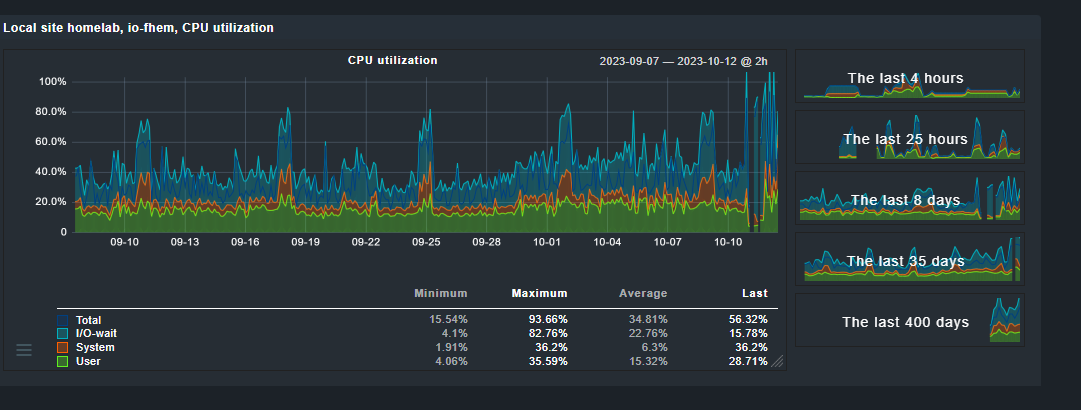
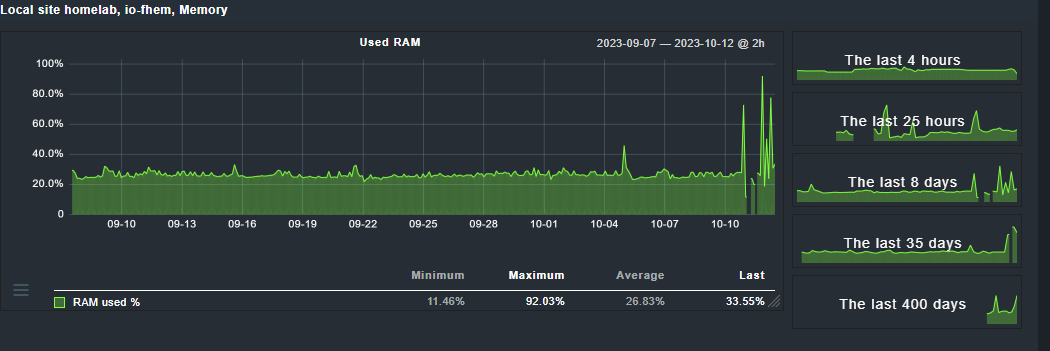
Last ist immer nur wenn Sicherungen laufen....
der macht genau 2 Dinge - zigbee gateway & fhem host (für selve rolläden) das war es dann auch schon
Könnten wir dann mit der analyse starten? das wäre fein
-
so erledigt:
root@io-fhem:~# apt install --reinstall nodejs
Paketlisten werden gelesen… Fertig
Abhängigkeitsbaum wird aufgebaut… Fertig
Statusinformationen werden eingelesen… Fertig
Die folgenden Pakete wurden automatisch installiert und werden nicht mehr benötigt:
  libdns-export1110 libisc-export1105 openresolv
Verwenden Sie »apt autoremove«, um sie zu entfernen.
0 aktualisiert, 0 neu installiert, 1 erneut installiert, 0 zu entfernen und 1 nicht aktualisiert.
Es müssen noch 0 B von 26,7 MB an Archiven heruntergeladen werden.
Nach dieser Operation werden 0 B Plattenplatz zusätzlich benutzt.
(Lese Datenbank ... 97255 Dateien und Verzeichnisse sind derzeit installiert.)
Vorbereitung zum Entpacken von .../nodejs_18.18.1-1nodesource1_armhf.deb ...
Detected old npm client, removing...
Entpacken von nodejs (18.18.1-1nodesource1) über (18.18.1-1nodesource1) ...
nodejs (18.18.1-1nodesource1) wird eingerichtet ...
Trigger für man-db (2.9.4-2) werden verarbeitet ...
Prüfe Prozesse...
Prüfe Kandidaten...
Scanning processor microcode...
Prüfe Linux-Kernel...

Der laufende Kernel ist aktuell.

Fehler beim Ermitteln von verfügbaren Prozessor Mikrocode-Upgrades.

Dienste werden neu gestartet...
 systemctl restart iobroker.service

Es müssen keine Container neu gestartet werden.

Es gibt keine Nutzer-Sitzungen mit veralteten Prozessen.
root@io-fhem:~# npm -v
9.8.1
übrigens OS auch aktualisiert:
root@io-fhem:~# cat /etc/os-release
PRETTY_NAME="Raspbian GNU/Linux 11 (bullseye)"
NAME="Raspbian GNU/Linux"
VERSION_ID="11"
VERSION="11 (bullseye)"
VERSION_CODENAME=bullseye
ID=raspbian
ID_LIKE=debian
HOME_URL="http://www.raspbian.org/"
SUPPORT_URL="http://www.raspbian.org/RaspbianForums"
BUG_REPORT_URL="http://www.raspbian.org/RaspbianBugs"
wie zu erwarten ist das alles NICHT DAS PROBLEM...
root@io-fhem:~# iob upgrade fritzdect --debug

This upgrade of "fritzdect" will introduce the following changes:
==========================================================================
-> 2.4.1:
correctionts reported by adapter-checker

-> 2.4.0:
new function for routines, correction for templates
==========================================================================

Would you like to upgrade fritzdect from @2.3.1 to @2.4.1 now? [(y)es, (n)o]: y
Update fritzdect from @2.3.1 to @2.4.1
NPM version: 9.8.1
Installing iobroker.fritzdect@2.4.1... (System call)
npm ERR! code ENOTEMPTY
npm ERR! syscall rename
npm ERR! path /opt/iobroker/node_modules/@abandonware/bluetooth-hci-socket
npm ERR! dest /opt/iobroker/node_modules/@abandonware/.bluetooth-hci-socket-0H6suKAo
npm ERR! errno -39
npm ERR! ENOTEMPTY: directory not empty, rename '/opt/iobroker/node_modules/@abandonware/bluetooth-hci-socket' -> '/opt/iobroker/node_modules/@abandonware/.bluetooth-hci-socket-0H6suKAo'

npm ERR! A complete log of this run can be found in: /home/iobroker/.npm/_logs/2023-10-12T09_12_07_605Z-debug-0.log
host.io-fhem Cannot install iobroker.fritzdect@2.4.1: 217
achso - zur Auslastung des Systems: (die letzte 35 Tage)
Last ist immer nur wenn Sicherungen laufen....
der macht genau 2 Dinge - zigbee gateway & fhem host (für selve rolläden) das war es dann auch schon
Könnten wir dann mit der analyse starten? das wäre fein
@dlaurenz sagte in Update ioBroker klappt nicht:
wie zu erwarten ist das alles NICHT DAS PROBLEM...
Das hat auch NIEMAND behauptet.
-
können wir mal über die sinn oder unsinnhaftigkeit bei mir aufhören zu sprechen und uns dem problem widmen? bisher hat sich keiner die mühe gemacht, zu fragen warum dinge so laufen sondern es wird wie üblich der oberlehrer rausgekehrt...
ich kenn linux schon seit dem es noch bookware war, ich weiß also was ich tue oder nicht tue... das dürften so ca. 25 jahre sein...
danke!
@dlaurenz sagte in Update ioBroker klappt nicht:
ich weiß also was ich tue oder nicht tue
Warum fragst Du dann hier nach?
Da Probleme beim Update des ioBroker nach meiner Erfahrung nicht an ihm sondern am Unterbau liegen, sollte das Beheben der Ursache ja kein Problem sein.
Ich bin dann hier raus.
Viel Erfolg! -
so erledigt:
root@io-fhem:~# apt install --reinstall nodejs
Paketlisten werden gelesen… Fertig
Abhängigkeitsbaum wird aufgebaut… Fertig
Statusinformationen werden eingelesen… Fertig
Die folgenden Pakete wurden automatisch installiert und werden nicht mehr benötigt:
  libdns-export1110 libisc-export1105 openresolv
Verwenden Sie »apt autoremove«, um sie zu entfernen.
0 aktualisiert, 0 neu installiert, 1 erneut installiert, 0 zu entfernen und 1 nicht aktualisiert.
Es müssen noch 0 B von 26,7 MB an Archiven heruntergeladen werden.
Nach dieser Operation werden 0 B Plattenplatz zusätzlich benutzt.
(Lese Datenbank ... 97255 Dateien und Verzeichnisse sind derzeit installiert.)
Vorbereitung zum Entpacken von .../nodejs_18.18.1-1nodesource1_armhf.deb ...
Detected old npm client, removing...
Entpacken von nodejs (18.18.1-1nodesource1) über (18.18.1-1nodesource1) ...
nodejs (18.18.1-1nodesource1) wird eingerichtet ...
Trigger für man-db (2.9.4-2) werden verarbeitet ...
Prüfe Prozesse...
Prüfe Kandidaten...
Scanning processor microcode...
Prüfe Linux-Kernel...

Der laufende Kernel ist aktuell.

Fehler beim Ermitteln von verfügbaren Prozessor Mikrocode-Upgrades.

Dienste werden neu gestartet...
 systemctl restart iobroker.service

Es müssen keine Container neu gestartet werden.

Es gibt keine Nutzer-Sitzungen mit veralteten Prozessen.
root@io-fhem:~# npm -v
9.8.1
übrigens OS auch aktualisiert:
root@io-fhem:~# cat /etc/os-release
PRETTY_NAME="Raspbian GNU/Linux 11 (bullseye)"
NAME="Raspbian GNU/Linux"
VERSION_ID="11"
VERSION="11 (bullseye)"
VERSION_CODENAME=bullseye
ID=raspbian
ID_LIKE=debian
HOME_URL="http://www.raspbian.org/"
SUPPORT_URL="http://www.raspbian.org/RaspbianForums"
BUG_REPORT_URL="http://www.raspbian.org/RaspbianBugs"
wie zu erwarten ist das alles NICHT DAS PROBLEM...
root@io-fhem:~# iob upgrade fritzdect --debug

This upgrade of "fritzdect" will introduce the following changes:
==========================================================================
-> 2.4.1:
correctionts reported by adapter-checker

-> 2.4.0:
new function for routines, correction for templates
==========================================================================

Would you like to upgrade fritzdect from @2.3.1 to @2.4.1 now? [(y)es, (n)o]: y
Update fritzdect from @2.3.1 to @2.4.1
NPM version: 9.8.1
Installing iobroker.fritzdect@2.4.1... (System call)
npm ERR! code ENOTEMPTY
npm ERR! syscall rename
npm ERR! path /opt/iobroker/node_modules/@abandonware/bluetooth-hci-socket
npm ERR! dest /opt/iobroker/node_modules/@abandonware/.bluetooth-hci-socket-0H6suKAo
npm ERR! errno -39
npm ERR! ENOTEMPTY: directory not empty, rename '/opt/iobroker/node_modules/@abandonware/bluetooth-hci-socket' -> '/opt/iobroker/node_modules/@abandonware/.bluetooth-hci-socket-0H6suKAo'

npm ERR! A complete log of this run can be found in: /home/iobroker/.npm/_logs/2023-10-12T09_12_07_605Z-debug-0.log
host.io-fhem Cannot install iobroker.fritzdect@2.4.1: 217
achso - zur Auslastung des Systems: (die letzte 35 Tage)
Last ist immer nur wenn Sicherungen laufen....
der macht genau 2 Dinge - zigbee gateway & fhem host (für selve rolläden) das war es dann auch schon
Könnten wir dann mit der analyse starten? das wäre fein
@dlaurenz sagte in Update ioBroker klappt nicht:
wie zu erwarten ist das alles NICHT DAS PROBLEM...
bitte nicht als root arbeiten. Das kann alle möglichen Rechte verbiegen.
Bitte
iob fixals user ausführen in der Hoffnung, dass der Fixer die Rechte wiederherstellen kann. -
so erledigt:
root@io-fhem:~# apt install --reinstall nodejs
Paketlisten werden gelesen… Fertig
Abhängigkeitsbaum wird aufgebaut… Fertig
Statusinformationen werden eingelesen… Fertig
Die folgenden Pakete wurden automatisch installiert und werden nicht mehr benötigt:
  libdns-export1110 libisc-export1105 openresolv
Verwenden Sie »apt autoremove«, um sie zu entfernen.
0 aktualisiert, 0 neu installiert, 1 erneut installiert, 0 zu entfernen und 1 nicht aktualisiert.
Es müssen noch 0 B von 26,7 MB an Archiven heruntergeladen werden.
Nach dieser Operation werden 0 B Plattenplatz zusätzlich benutzt.
(Lese Datenbank ... 97255 Dateien und Verzeichnisse sind derzeit installiert.)
Vorbereitung zum Entpacken von .../nodejs_18.18.1-1nodesource1_armhf.deb ...
Detected old npm client, removing...
Entpacken von nodejs (18.18.1-1nodesource1) über (18.18.1-1nodesource1) ...
nodejs (18.18.1-1nodesource1) wird eingerichtet ...
Trigger für man-db (2.9.4-2) werden verarbeitet ...
Prüfe Prozesse...
Prüfe Kandidaten...
Scanning processor microcode...
Prüfe Linux-Kernel...

Der laufende Kernel ist aktuell.

Fehler beim Ermitteln von verfügbaren Prozessor Mikrocode-Upgrades.

Dienste werden neu gestartet...
 systemctl restart iobroker.service

Es müssen keine Container neu gestartet werden.

Es gibt keine Nutzer-Sitzungen mit veralteten Prozessen.
root@io-fhem:~# npm -v
9.8.1
übrigens OS auch aktualisiert:
root@io-fhem:~# cat /etc/os-release
PRETTY_NAME="Raspbian GNU/Linux 11 (bullseye)"
NAME="Raspbian GNU/Linux"
VERSION_ID="11"
VERSION="11 (bullseye)"
VERSION_CODENAME=bullseye
ID=raspbian
ID_LIKE=debian
HOME_URL="http://www.raspbian.org/"
SUPPORT_URL="http://www.raspbian.org/RaspbianForums"
BUG_REPORT_URL="http://www.raspbian.org/RaspbianBugs"
wie zu erwarten ist das alles NICHT DAS PROBLEM...
root@io-fhem:~# iob upgrade fritzdect --debug

This upgrade of "fritzdect" will introduce the following changes:
==========================================================================
-> 2.4.1:
correctionts reported by adapter-checker

-> 2.4.0:
new function for routines, correction for templates
==========================================================================

Would you like to upgrade fritzdect from @2.3.1 to @2.4.1 now? [(y)es, (n)o]: y
Update fritzdect from @2.3.1 to @2.4.1
NPM version: 9.8.1
Installing iobroker.fritzdect@2.4.1... (System call)
npm ERR! code ENOTEMPTY
npm ERR! syscall rename
npm ERR! path /opt/iobroker/node_modules/@abandonware/bluetooth-hci-socket
npm ERR! dest /opt/iobroker/node_modules/@abandonware/.bluetooth-hci-socket-0H6suKAo
npm ERR! errno -39
npm ERR! ENOTEMPTY: directory not empty, rename '/opt/iobroker/node_modules/@abandonware/bluetooth-hci-socket' -> '/opt/iobroker/node_modules/@abandonware/.bluetooth-hci-socket-0H6suKAo'

npm ERR! A complete log of this run can be found in: /home/iobroker/.npm/_logs/2023-10-12T09_12_07_605Z-debug-0.log
host.io-fhem Cannot install iobroker.fritzdect@2.4.1: 217
achso - zur Auslastung des Systems: (die letzte 35 Tage)
Last ist immer nur wenn Sicherungen laufen....
der macht genau 2 Dinge - zigbee gateway & fhem host (für selve rolläden) das war es dann auch schon
Könnten wir dann mit der analyse starten? das wäre fein
@dlaurenz sagte in Update ioBroker klappt nicht:
Könnten wir dann mit der analyse starten? das wäre fein
*** FAILED SERVICES ***
  UNIT             LOAD   ACTIVE SUB    DESCRIPTION

* iobroker.service loaded failed failed ioBroker Server
Warum auch immer.
Das bauen von serialport geht in die Hose:
npm ERR! make: *** [bindings.target.mk:114: Release/obj.target/bindings/src/serialport.o] Fehler 1

npm ERR! gyp ERR! build error

npm ERR! gyp ERR! stack Error: `make` failed with exit code: 2
Warum auch immer. Vielleicht wegen alter Versionen vom gcc...
npm ERR! invalid: iobroker.js-controller@5.0.13 /opt/iobroker/node_modules/iobroker.js-controllerInstallier den js-controller nochmal drüber.
cd /opt/iobroker
sudo -H -u iobroker npm install iobroker.js-controller
Linux-Werkzeugkasten:
https://forum.iobroker.net/topic/42952/der-kleine-iobroker-linux-werkzeugkasten
NodeJS Fixer Skript:
https://forum.iobroker.net/topic/68035/iob-node-fix-skript
iob_diag: curl -sLf -o diag.sh https://iobroker.net/diag.sh && bash diag.sh -
danke...
geht auch nicht weiter
root@io-fhem:~# gcc -v
Using built-in specs.
COLLECT_GCC=gcc
COLLECT_LTO_WRAPPER=/usr/lib/gcc/arm-linux-gnueabihf/10/lto-wrapper
Target: arm-linux-gnueabihf
Configured with: ../src/configure -v --with-pkgversion='Raspbian 10.2.1-6+rpi1' --with-bugurl=file:///usr/share/doc/gcc-10/README.Bugs --enable-languages=c,ada,c++,go,d,fortran,objc,obj-c++,m2 --prefix=/usr --with-gcc-major-version-only --program-suffix=-10 --program-prefix=arm-linux-gnueabihf- --enable-shared --enable-linker-build-id --libexecdir=/usr/lib --without-included-gettext --enable-threads=posix --libdir=/usr/lib --enable-nls --enable-bootstrap --enable-clocale=gnu --enable-libstdcxx-debug --enable-libstdcxx-time=yes --with-default-libstdcxx-abi=new --enable-gnu-unique-object --disable-libitm --disable-libquadmath --disable-libquadmath-support --enable-plugin --with-system-zlib --enable-libphobos-checking=release --with-target-system-zlib=auto --enable-objc-gc=auto --enable-multiarch --disable-sjlj-exceptions --with-arch=armv6 --with-fpu=vfp --with-float=hard --disable-werror --enable-checking=release --build=arm-linux-gnueabihf --host=arm-linux-gnueabihf --target=arm-linux-gnueabihf
Thread model: posix
Supported LTO compression algorithms: zlib zstd
gcc version 10.2.1 20210110 (Raspbian 10.2.1-6+rpi1)
hier der output.... lösche ich dann das jeweiliger verzeichnis.... land ich wieder da
iob fixroot@io-fhem:~# cd /opt/iobroker root@io-fhem:/opt/iobroker# su - pi pi@io-fhem:~ $ cd /opt/iobroker/ pi@io-fhem:/opt/iobroker $ sudo -H -u iobroker npm install iobroker.js-controller npm ERR! code ENOTEMPTY npm ERR! syscall rename npm ERR! path /opt/iobroker/node_modules/@abandonware/bluetooth-hci-socket npm ERR! dest /opt/iobroker/node_modules/@abandonware/.bluetooth-hci-socket-0H6suKAo npm ERR! errno -39 npm ERR! ENOTEMPTY: directory not empty, rename '/opt/iobroker/node_modules/@abandonware/bluetooth-hci-socket' -> '/opt/iobroker/node_modules/@abandonware/.bluetooth-hci-socket-0H6suKAo' npm ERR! A complete log of this run can be found in: /home/iobroker/.npm/_logs/2023-10-12T09_59_41_164Z-debug-0.loghab jetzt noch mal iob fix laufen lassen und dann nochmal
pi@io-fhem:/opt/iobroker $ iob fix
library: loaded
Library version=2023-10-10

==========================================================================

    Welcome to the ioBroker installation fixer!
    Script version: 2023-04-02

    You might need to enter your password a couple of times.

==========================================================================


==========================================================================
    Installing prerequisites (1/5)
==========================================================================

OK:1 http://archive.raspberrypi.org/debian bullseye InRelease
OK:2 http://raspbian.raspberrypi.org/raspbian bullseye InRelease
OK:3 https://deb.nodesource.com/node_18.x nodistro InRelease
Ign:4 https://download.webmin.com/download/repository sarge InRelease
OK:5 https://repo.saltproject.io/salt/py3/debian/11/arm64/latest bullseye InRelease
OK:6 https://download.webmin.com/download/repository sarge Release
Paketlisten werden gelesen… Fertig
E: Paket gcc-c+ kann nicht gefunden werden.
E: Mittels regulärem Ausdruck »gcc-c+« konnte kein Paket gefunden werden.
Installed gcc-c++

==========================================================================
    Checking ioBroker user and directory permissions (2/5)
==========================================================================

Created /etc/sudoers.d/iobroker
Fixing directory permissions...

==========================================================================
    Check and cleanup npm temporary directories (3/5)
==========================================================================

Done.

==========================================================================
    Database maintenance (4/5)
==========================================================================

Checking for uncompressed JSONL databases... This might take a while!

No relevant JSONL files found to compress, skip

==========================================================================
    Checking autostart (5/5)
==========================================================================

Enabling autostart...
Autostart enabled!

==========================================================================

    Your installation was fixed successfully
    Run iobroker start to start ioBroker again!

==========================================================================
jetzt ist es etwas anders... was ist mit den ganzen depricated warnungen?
pi@io-fhem:/opt/iobroker $ sudo -H -u iobroker npm install iobroker.js-controller
npm WARN deprecated dgram@1.0.1: npm is holding this package for security reasons. As it's a core Node module, we will not transfer it over to other users. You may safely remove the package from your dependencies.
npm WARN deprecated har-validator@5.1.5: this library is no longer supported
npm WARN deprecated debug@4.1.1: Debug versions >=3.2.0 <3.2.7 || >=4 <4.3.1 have a low-severity ReDos regression when used in a Node.js environment. It is recommended you upgrade to 3.2.7 or 4.3.1. (https://github.com/visionmedia/debug/issues/797)
npm WARN deprecated debug@4.1.1: Debug versions >=3.2.0 <3.2.7 || >=4 <4.3.1 have a low-severity ReDos regression when used in a Node.js environment. It is recommended you upgrade to 3.2.7 or 4.3.1. (https://github.com/visionmedia/debug/issues/797)
npm WARN deprecated debug@4.1.1: Debug versions >=3.2.0 <3.2.7 || >=4 <4.3.1 have a low-severity ReDos regression when used in a Node.js environment. It is recommended you upgrade to 3.2.7 or 4.3.1. (https://github.com/visionmedia/debug/issues/797)
npm WARN deprecated uuid@3.4.0: Please upgrade  to version 7 or higher.  Older versions may use Math.random() in certain circumstances, which is known to be problematic.  See https://v8.dev/blog/math-random for details.
npm WARN deprecated request@2.88.2: request has been deprecated, see https://github.com/request/request/issues/3142
npm WARN cleanup Failed to remove some directories [
npm WARN cleanup   [
npm WARN cleanup     '/opt/iobroker/node_modules/@abandonware/bluetooth-hci-socket',
npm WARN cleanup     [Error: ENOTEMPTY: directory not empty, rmdir '/opt/iobroker/node_modules/@abandonware/bluetooth-hci-socket/build/Release'] {
npm WARN cleanup       errno: -39,
npm WARN cleanup       code: 'ENOTEMPTY',
npm WARN cleanup       syscall: 'rmdir',
npm WARN cleanup       path: '/opt/iobroker/node_modules/@abandonware/bluetooth-hci-socket/build/Release'
npm WARN cleanup     }
npm WARN cleanup   ],
npm WARN cleanup   [
npm WARN cleanup     '/opt/iobroker/node_modules/@abandonware/bluetooth-hci-socket',
npm WARN cleanup     [Error: ENOTEMPTY: directory not empty, rmdir '/opt/iobroker/node_modules/@abandonware/bluetooth-hci-socket/build/Release'] {
npm WARN cleanup       errno: -39,
npm WARN cleanup       code: 'ENOTEMPTY',
npm WARN cleanup       syscall: 'rmdir',
npm WARN cleanup       path: '/opt/iobroker/node_modules/@abandonware/bluetooth-hci-socket/build/Release'
npm WARN cleanup     }
npm WARN cleanup   ]
npm WARN cleanup ]
npm ERR! code 1
npm ERR! path /opt/iobroker/node_modules/@serialport/bindings
npm ERR! command failed
npm ERR! command sh -c prebuild-install --tag-prefix @serialport/bindings@ || node-gyp rebuild
npm ERR! make: Verzeichnis „/opt/iobroker/node_modules/@serialport/bindings/build“ wird betreten
npm ERR!   CXX(target) Release/obj.target/bindings/src/serialport.o
npm ERR! make: Verzeichnis „/opt/iobroker/node_modules/@serialport/bindings/build“ wird verlassen
npm ERR! gyp info it worked if it ends with ok
npm ERR! gyp info using node-gyp@9.4.0
npm ERR! gyp info using node@18.18.1 | linux | arm
npm ERR! gyp info find Python using Python version 3.9.2 found at "/usr/bin/python3"
npm ERR! gyp info spawn /usr/bin/python3
npm ERR! gyp info spawn args [
npm ERR! gyp info spawn args   '/usr/lib/node_modules/npm/node_modules/node-gyp/gyp/gyp_main.py',
npm ERR! gyp info spawn args   'binding.gyp',
npm ERR! gyp info spawn args   '-f',
npm ERR! gyp info spawn args   'make',
npm ERR! gyp info spawn args   '-I',
npm ERR! gyp info spawn args   '/opt/iobroker/node_modules/@serialport/bindings/build/config.gypi',
npm ERR! gyp info spawn args   '-I',
npm ERR! gyp info spawn args   '/usr/lib/node_modules/npm/node_modules/node-gyp/addon.gypi',
npm ERR! gyp info spawn args   '-I',
npm ERR! gyp info spawn args   '/home/iobroker/.cache/node-gyp/18.18.1/include/node/common.gypi',
npm ERR! gyp info spawn args   '-Dlibrary=shared_library',
npm ERR! gyp info spawn args   '-Dvisibility=default',
npm ERR! gyp info spawn args   '-Dnode_root_dir=/home/iobroker/.cache/node-gyp/18.18.1',
npm ERR! gyp info spawn args   '-Dnode_gyp_dir=/usr/lib/node_modules/npm/node_modules/node-gyp',
npm ERR! gyp info spawn args   '-Dnode_lib_file=/home/iobroker/.cache/node-gyp/18.18.1/<(target_arch)/node.lib',
npm ERR! gyp info spawn args   '-Dmodule_root_dir=/opt/iobroker/node_modules/@serialport/bindings',
npm ERR! gyp info spawn args   '-Dnode_engine=v8',
npm ERR! gyp info spawn args   '--depth=.',
npm ERR! gyp info spawn args   '--no-parallel',
npm ERR! gyp info spawn args   '--generator-output',
npm ERR! gyp info spawn args   'build',
npm ERR! gyp info spawn args   '-Goutput_dir=.'
npm ERR! gyp info spawn args ]
npm ERR! gyp info spawn make
npm ERR! gyp info spawn args [ 'BUILDTYPE=Release', '-C', 'build' ]
npm ERR! ../src/serialport.cpp: In function ‘Nan::NAN_METHOD_RETURN_TYPE Open(Nan::NAN_METHOD_ARGS_TYPE)’:
npm ERR! ../src/serialport.cpp:78:51: warning: cast between incompatible function types from ‘void (*)(uv_work_t*)’ {aka ‘void (*)(uv_work_s*)’} to ‘uv_after_work_cb’ {aka ‘void (*)(uv_work_s*, int)’} [-Wcast-function-type]
npm ERR!    78 |   uv_queue_work(uv_default_loop(), req, EIO_Open, (uv_after_work_cb)EIO_AfterOpen);
npm ERR!       |                                                   ^~~~~~~~~~~~~~~~~~~~~~~~~~~~~~~
npm ERR! ../src/serialport.cpp: In function ‘Nan::NAN_METHOD_RETURN_TYPE Update(Nan::NAN_METHOD_ARGS_TYPE)’:
npm ERR! ../src/serialport.cpp:135:53: warning: cast between incompatible function types from ‘void (*)(uv_work_t*)’ {aka ‘void (*)(uv_work_s*)’} to ‘uv_after_work_cb’ {aka ‘void (*)(uv_work_s*, int)’} [-Wcast-function-type]
npm ERR!   135 |   uv_queue_work(uv_default_loop(), req, EIO_Update, (uv_after_work_cb)EIO_AfterUpdate);
npm ERR!       |                                                     ^~~~~~~~~~~~~~~~~~~~~~~~~~~~~~~~~
npm ERR! ../src/serialport.cpp: In function ‘Nan::NAN_METHOD_RETURN_TYPE Close(Nan::NAN_METHOD_ARGS_TYPE)’:
npm ERR! ../src/serialport.cpp:175:52: warning: cast between incompatible function types from ‘void (*)(uv_work_t*)’ {aka ‘void (*)(uv_work_s*)’} to ‘uv_after_work_cb’ {aka ‘void (*)(uv_work_s*, int)’} [-Wcast-function-type]
npm ERR!   175 |   uv_queue_work(uv_default_loop(), req, EIO_Close, (uv_after_work_cb)EIO_AfterClose);
npm ERR!       |                                                    ^~~~~~~~~~~~~~~~~~~~~~~~~~~~~~~~
npm ERR! ../src/serialport.cpp: In function ‘Nan::NAN_METHOD_RETURN_TYPE Flush(Nan::NAN_METHOD_ARGS_TYPE)’:
npm ERR! ../src/serialport.cpp:215:52: warning: cast between incompatible function types from ‘void (*)(uv_work_t*)’ {aka ‘void (*)(uv_work_s*)’} to ‘uv_after_work_cb’ {aka ‘void (*)(uv_work_s*, int)’} [-Wcast-function-type]
npm ERR!   215 |   uv_queue_work(uv_default_loop(), req, EIO_Flush, (uv_after_work_cb)EIO_AfterFlush);
npm ERR!       |                                                    ^~~~~~~~~~~~~~~~~~~~~~~~~~~~~~~~
npm ERR! ../src/serialport.cpp: In function ‘Nan::NAN_METHOD_RETURN_TYPE Set(Nan::NAN_METHOD_ARGS_TYPE)’:
npm ERR! ../src/serialport.cpp:270:50: warning: cast between incompatible function types from ‘void (*)(uv_work_t*)’ {aka ‘void (*)(uv_work_s*)’} to ‘uv_after_work_cb’ {aka ‘void (*)(uv_work_s*, int)’} [-Wcast-function-type]
npm ERR!   270 |   uv_queue_work(uv_default_loop(), req, EIO_Set, (uv_after_work_cb)EIO_AfterSet);
npm ERR!       |                                                  ^~~~~~~~~~~~~~~~~~~~~~~~~~~~~~
npm ERR! ../src/serialport.cpp: In function ‘Nan::NAN_METHOD_RETURN_TYPE Get(Nan::NAN_METHOD_ARGS_TYPE)’:
npm ERR! ../src/serialport.cpp:314:50: warning: cast between incompatible function types from ‘void (*)(uv_work_t*)’ {aka ‘void (*)(uv_work_s*)’} to ‘uv_after_work_cb’ {aka ‘void (*)(uv_work_s*, int)’} [-Wcast-function-type]
npm ERR!   314 |   uv_queue_work(uv_default_loop(), req, EIO_Get, (uv_after_work_cb)EIO_AfterGet);
npm ERR!       |                                                  ^~~~~~~~~~~~~~~~~~~~~~~~~~~~~~
npm ERR! ../src/serialport.cpp: In function ‘void EIO_AfterGet(uv_work_t*)’:
npm ERR! ../src/serialport.cpp:329:96: error: no matching function for call to ‘v8::Object::Set(v8::Local<v8::String>, Nan::imp::FactoryBase<v8::Boolean>::return_t)’
npm ERR!   329 |     results->Set(Nan::New<v8::String>("cts").ToLocalChecked(), Nan::New<v8::Boolean>(data->cts));
npm ERR!       |                                                                                                ^
npm ERR! In file included from /home/iobroker/.cache/node-gyp/18.18.1/include/node/v8-array-buffer.h:13,
npm ERR!                  from /home/iobroker/.cache/node-gyp/18.18.1/include/node/v8.h:24,
npm ERR!                  from /home/iobroker/.cache/node-gyp/18.18.1/include/node/node.h:73,
npm ERR!                  from ../../../nan/nan.h:62,
npm ERR!                  from ../src/./serialport.h:6,
npm ERR!                  from ../src/serialport.cpp:1:
npm ERR! /home/iobroker/.cache/node-gyp/18.18.1/include/node/v8-object.h:244:37: note: candidate: ‘v8::Maybe<bool> v8::Object::Set(v8::Local<v8::Context>, v8::Local<v8::Value>, v8::Local<v8::Value>)’
npm ERR!   244 |   V8_WARN_UNUSED_RESULT Maybe<bool> Set(Local<Context> context,
npm ERR!       |                                     ^~~
npm ERR! /home/iobroker/.cache/node-gyp/18.18.1/include/node/v8-object.h:244:37: note:   candidate expects 3 arguments, 2 provided
npm ERR! /home/iobroker/.cache/node-gyp/18.18.1/include/node/v8-object.h:247:37: note: candidate: ‘v8::Maybe<bool> v8::Object::Set(v8::Local<v8::Context>, uint32_t, v8::Local<v8::Value>)’
npm ERR!   247 |   V8_WARN_UNUSED_RESULT Maybe<bool> Set(Local<Context> context, uint32_t index,
npm ERR!       |                                     ^~~
npm ERR! /home/iobroker/.cache/node-gyp/18.18.1/include/node/v8-object.h:247:37: note:   candidate expects 3 arguments, 2 provided
npm ERR! ../src/serialport.cpp:330:96: error: no matching function for call to ‘v8::Object::Set(v8::Local<v8::String>, Nan::imp::FactoryBase<v8::Boolean>::return_t)’
npm ERR!   330 |     results->Set(Nan::New<v8::String>("dsr").ToLocalChecked(), Nan::New<v8::Boolean>(data->dsr));
npm ERR!       |                                                                                                ^
npm ERR! In file included from /home/iobroker/.cache/node-gyp/18.18.1/include/node/v8-array-buffer.h:13,
npm ERR!                  from /home/iobroker/.cache/node-gyp/18.18.1/include/node/v8.h:24,
npm ERR!                  from /home/iobroker/.cache/node-gyp/18.18.1/include/node/node.h:73,
npm ERR!                  from ../../../nan/nan.h:62,
npm ERR!                  from ../src/./serialport.h:6,
npm ERR!                  from ../src/serialport.cpp:1:
npm ERR! /home/iobroker/.cache/node-gyp/18.18.1/include/node/v8-object.h:244:37: note: candidate: ‘v8::Maybe<bool> v8::Object::Set(v8::Local<v8::Context>, v8::Local<v8::Value>, v8::Local<v8::Value>)’
npm ERR!   244 |   V8_WARN_UNUSED_RESULT Maybe<bool> Set(Local<Context> context,
npm ERR!       |                                     ^~~
npm ERR! /home/iobroker/.cache/node-gyp/18.18.1/include/node/v8-object.h:244:37: note:   candidate expects 3 arguments, 2 provided
npm ERR! /home/iobroker/.cache/node-gyp/18.18.1/include/node/v8-object.h:247:37: note: candidate: ‘v8::Maybe<bool> v8::Object::Set(v8::Local<v8::Context>, uint32_t, v8::Local<v8::Value>)’
npm ERR!   247 |   V8_WARN_UNUSED_RESULT Maybe<bool> Set(Local<Context> context, uint32_t index,
npm ERR!       |                                     ^~~
npm ERR! /home/iobroker/.cache/node-gyp/18.18.1/include/node/v8-object.h:247:37: note:   candidate expects 3 arguments, 2 provided
npm ERR! ../src/serialport.cpp:331:96: error: no matching function for call to ‘v8::Object::Set(v8::Local<v8::String>, Nan::imp::FactoryBase<v8::Boolean>::return_t)’
npm ERR!   331 |     results->Set(Nan::New<v8::String>("dcd").ToLocalChecked(), Nan::New<v8::Boolean>(data->dcd));
npm ERR!       |                                                                                                ^
npm ERR! In file included from /home/iobroker/.cache/node-gyp/18.18.1/include/node/v8-array-buffer.h:13,
npm ERR!                  from /home/iobroker/.cache/node-gyp/18.18.1/include/node/v8.h:24,
npm ERR!                  from /home/iobroker/.cache/node-gyp/18.18.1/include/node/node.h:73,
npm ERR!                  from ../../../nan/nan.h:62,
npm ERR!                  from ../src/./serialport.h:6,
npm ERR!                  from ../src/serialport.cpp:1:
npm ERR! /home/iobroker/.cache/node-gyp/18.18.1/include/node/v8-object.h:244:37: note: candidate: ‘v8::Maybe<bool> v8::Object::Set(v8::Local<v8::Context>, v8::Local<v8::Value>, v8::Local<v8::Value>)’
npm ERR!   244 |   V8_WARN_UNUSED_RESULT Maybe<bool> Set(Local<Context> context,
npm ERR!       |                                     ^~~
npm ERR! /home/iobroker/.cache/node-gyp/18.18.1/include/node/v8-object.h:244:37: note:   candidate expects 3 arguments, 2 provided
npm ERR! /home/iobroker/.cache/node-gyp/18.18.1/include/node/v8-object.h:247:37: note: candidate: ‘v8::Maybe<bool> v8::Object::Set(v8::Local<v8::Context>, uint32_t, v8::Local<v8::Value>)’
npm ERR!   247 |   V8_WARN_UNUSED_RESULT Maybe<bool> Set(Local<Context> context, uint32_t index,
npm ERR!       |                                     ^~~
npm ERR! /home/iobroker/.cache/node-gyp/18.18.1/include/node/v8-object.h:247:37: note:   candidate expects 3 arguments, 2 provided
npm ERR! ../src/serialport.cpp: In function ‘Nan::NAN_METHOD_RETURN_TYPE GetBaudRate(Nan::NAN_METHOD_ARGS_TYPE)’:
npm ERR! ../src/serialport.cpp:363:58: warning: cast between incompatible function types from ‘void (*)(uv_work_t*)’ {aka ‘void (*)(uv_work_s*)’} to ‘uv_after_work_cb’ {aka ‘void (*)(uv_work_s*, int)’} [-Wcast-function-type]
npm ERR!   363 |   uv_queue_work(uv_default_loop(), req, EIO_GetBaudRate, (uv_after_work_cb)EIO_AfterGetBaudRate);
npm ERR!       |                                                          ^~~~~~~~~~~~~~~~~~~~~~~~~~~~~~~~~~~~~~
npm ERR! ../src/serialport.cpp: In function ‘void EIO_AfterGetBaudRate(uv_work_t*)’:
npm ERR! ../src/serialport.cpp:378:106: error: no matching function for call to ‘v8::Object::Set(v8::Local<v8::String>, Nan::imp::IntegerFactory<v8::Integer>::return_t)’
npm ERR!   378 |     results->Set(Nan::New<v8::String>("baudRate").ToLocalChecked(), Nan::New<v8::Integer>(data->baudRate));
npm ERR!       |                                                                                                          ^
npm ERR! In file included from /home/iobroker/.cache/node-gyp/18.18.1/include/node/v8-array-buffer.h:13,
npm ERR!                  from /home/iobroker/.cache/node-gyp/18.18.1/include/node/v8.h:24,
npm ERR!                  from /home/iobroker/.cache/node-gyp/18.18.1/include/node/node.h:73,
npm ERR!                  from ../../../nan/nan.h:62,
npm ERR!                  from ../src/./serialport.h:6,
npm ERR!                  from ../src/serialport.cpp:1:
npm ERR! /home/iobroker/.cache/node-gyp/18.18.1/include/node/v8-object.h:244:37: note: candidate: ‘v8::Maybe<bool> v8::Object::Set(v8::Local<v8::Context>, v8::Local<v8::Value>, v8::Local<v8::Value>)’
npm ERR!   244 |   V8_WARN_UNUSED_RESULT Maybe<bool> Set(Local<Context> context,
npm ERR!       |                                     ^~~
npm ERR! /home/iobroker/.cache/node-gyp/18.18.1/include/node/v8-object.h:244:37: note:   candidate expects 3 arguments, 2 provided
npm ERR! /home/iobroker/.cache/node-gyp/18.18.1/include/node/v8-object.h:247:37: note: candidate: ‘v8::Maybe<bool> v8::Object::Set(v8::Local<v8::Context>, uint32_t, v8::Local<v8::Value>)’
npm ERR!   247 |   V8_WARN_UNUSED_RESULT Maybe<bool> Set(Local<Context> context, uint32_t index,
npm ERR!       |                                     ^~~
npm ERR! /home/iobroker/.cache/node-gyp/18.18.1/include/node/v8-object.h:247:37: note:   candidate expects 3 arguments, 2 provided
npm ERR! ../src/serialport.cpp: In function ‘Nan::NAN_METHOD_RETURN_TYPE Drain(Nan::NAN_METHOD_ARGS_TYPE)’:
npm ERR! ../src/serialport.cpp:409:52: warning: cast between incompatible function types from ‘void (*)(uv_work_t*)’ {aka ‘void (*)(uv_work_s*)’} to ‘uv_after_work_cb’ {aka ‘void (*)(uv_work_s*, int)’} [-Wcast-function-type]
npm ERR!   409 |   uv_queue_work(uv_default_loop(), req, EIO_Drain, (uv_after_work_cb)EIO_AfterDrain);
npm ERR!       |                                                    ^~~~~~~~~~~~~~~~~~~~~~~~~~~~~~~~
npm ERR! ../src/serialport.cpp: At global scope:
npm ERR! ../src/serialport.cpp:430:28: warning: unnecessary parentheses in declaration of ‘ToParityEnum’ [-Wparentheses]
npm ERR!   430 | SerialPortParity NAN_INLINE(ToParityEnum(const v8::Local<v8::String>& v8str)) {
npm ERR!       |                            ^
npm ERR! ../src/serialport.cpp:449:30: warning: unnecessary parentheses in declaration of ‘ToStopBitEnum’ [-Wparentheses]
npm ERR!   449 | SerialPortStopBits NAN_INLINE(ToStopBitEnum(double stopBits)) {
npm ERR!       |                              ^
npm ERR! In file included from ../../../nan/nan.h:62,
npm ERR!                  from ../src/./serialport.h:6,
npm ERR!                  from ../src/serialport.cpp:1:
npm ERR! /home/iobroker/.cache/node-gyp/18.18.1/include/node/node.h:1014:7: warning: cast between incompatible function types from ‘void (*)(Nan::ADDON_REGISTER_FUNCTION_ARGS_TYPE)’ {aka ‘void (*)(v8::Local<v8::Object>)’} to ‘node::addon_register_func’ {aka ‘void (*)(v8::Local<v8::Object>, v8::Local<v8::Value>, void*)’} [-Wcast-function-type]
npm ERR!  1014 |       (node::addon_register_func) (regfunc),                          \
npm ERR!       |       ^~~~~~~~~~~~~~~~~~~~~~~~~~~~~~~~~~~~~
npm ERR! /home/iobroker/.cache/node-gyp/18.18.1/include/node/node.h:1048:3: note: in expansion of macro ‘NODE_MODULE_X’
npm ERR!  1048 |   NODE_MODULE_X(modname, regfunc, NULL, 0)  // NOLINT (readability/null_usage)
npm ERR!       |   ^~~~~~~~~~~~~
npm ERR! ../src/serialport.cpp:483:1: note: in expansion of macro ‘NODE_MODULE’
npm ERR!   483 | NODE_MODULE(serialport, init);
npm ERR!       | ^~~~~~~~~~~
npm ERR! make: *** [bindings.target.mk:114: Release/obj.target/bindings/src/serialport.o] Fehler 1
npm ERR! gyp ERR! build error
npm ERR! gyp ERR! stack Error: `make` failed with exit code: 2
npm ERR! gyp ERR! stack     at ChildProcess.onExit (/usr/lib/node_modules/npm/node_modules/node-gyp/lib/build.js:203:23)
npm ERR! gyp ERR! stack     at ChildProcess.emit (node:events:517:28)
npm ERR! gyp ERR! stack     at ChildProcess._handle.onexit (node:internal/child_process:292:12)
npm ERR! gyp ERR! System Linux 5.10.103-v7+
npm ERR! gyp ERR! command "/usr/bin/node" "/usr/lib/node_modules/npm/node_modules/node-gyp/bin/node-gyp.js" "rebuild"
npm ERR! gyp ERR! cwd /opt/iobroker/node_modules/@serialport/bindings
npm ERR! gyp ERR! node -v v18.18.1
npm ERR! gyp ERR! node-gyp -v v9.4.0
npm ERR! gyp ERR! not ok

npm ERR! A complete log of this run can be found in: /home/iobroker/.npm/_logs/2023-10-12T10_03_57_827Z-debug-0.log
Der witz ist, die datei ist während des befehls erstellt worden:
pi@io-fhem:/opt/iobroker $ ls -la /opt/iobroker/node_modules/@abandonware/bluetooth-hci-socket/build/Release
insgesamt 72
drwxrwxr-x+ 2 iobroker iobroker  4096 12. Okt 12:06 .
drwxrwxr-x+ 3 iobroker iobroker  4096 12. Okt 12:06 ..
-rwxrwxr-x+ 2 iobroker iobroker 62052 12. Okt 12:06 bluetooth_hci_socket.node



Hey! Du scheinst an dieser Unterhaltung interessiert zu sein, hast aber noch kein Konto.
Hast du es satt, bei jedem Besuch durch die gleichen Beiträge zu scrollen? Wenn du dich für ein Konto anmeldest, kommst du immer genau dorthin zurück, wo du zuvor warst, und kannst dich über neue Antworten benachrichtigen lassen (entweder per E-Mail oder Push-Benachrichtigung). Du kannst auch Lesezeichen speichern und Beiträge positiv bewerten, um anderen Community-Mitgliedern deine Wertschätzung zu zeigen.
Mit deinem Input könnte dieser Beitrag noch besser werden 💗
Registrieren Anmelden377
Online33.1k
Benutzende83.7k
Themen1.3m
Beiträge