



Skip to content
  • Home
  • Recent
  • Tags
  • 0 Unread 0
  • Categories
  • Unreplied
  • Popular
  • GitHub
  • Docu
  • Hilfe
Skins
  • Light
  • Brite
  • Cerulean
  • Cosmo
  • Flatly
  • Journal
  • Litera
  • Lumen
  • Lux
  • Materia
  • Minty
  • Morph
  • Pulse
  • Sandstone
  • Simplex
  • Sketchy
  • Spacelab
  • United
  • Yeti
  • Zephyr
  • Dark
  • Cyborg
  • Darkly
  • Quartz
  • Slate
  • Solar
  • Superhero
  • Vapor

  • Default (No Skin)
  • No Skin
Collapse
ioBroker Logo

Community Forum

donate donate
  1. ioBroker Community Home
  2. Deutsch
  3. ioBroker Allgemein
  4. Performance Probleme durch Shelly Adapter?

NEWS

  • Jahresrückblick 2025 – unser neuer Blogbeitrag ist online! ✨
    BluefoxB
    Bluefox
    17
    1
    3.5k

  • Neuer Blogbeitrag: Monatsrückblick - Dezember 2025 🎄
    BluefoxB
    Bluefox
    13
    1
    1.1k

  • Weihnachtsangebot 2025! 🎄
    BluefoxB
    Bluefox
    25
    1
    2.5k

Performance Probleme durch Shelly Adapter?

Scheduled Pinned Locked Moved ioBroker Allgemein
256 Posts 14 Posters 54.3k Views 9 Watching
  • Oldest to Newest
  • Newest to Oldest
  • Most Votes
Reply
  • Reply as topic
Log in to reply
This topic has been deleted. Only users with topic management privileges can see it.
  • GlasfaserG Glasfaser

    @schtallone

    pkill -u iobroker
    iob fix
    

    Container danach neu starten

    dann nochmal

    iob list instances | grep port
    

    und

    iob status
    

    zeigen

    S Offline
    S Offline
    Schtallone
    wrote on last edited by
    #45

    @glasfaser said in Performance Probleme durch Shelly Adapter?:

    iob list instances | grep port
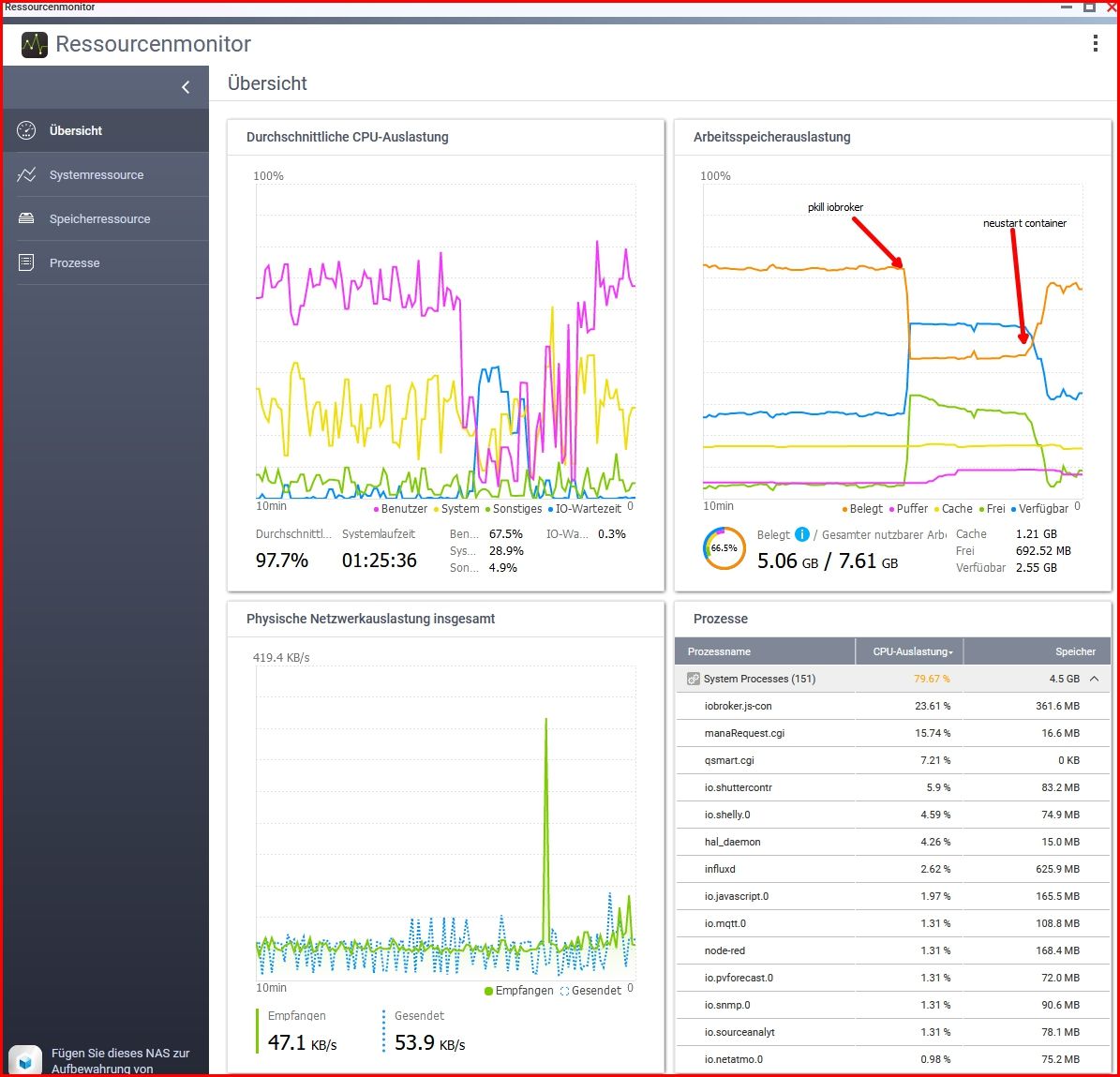
    Snap-2023-09-16-14-36-20.jpg

    root@iobroker:/opt/iobroker# iob list instances | grep port
    + system.adapter.admin.0                  : admin                 : iobroker                                 -  enabled, port: 8081, bind: 0.0.0.0, run as: admin
    + system.adapter.influxdb.0               : influxdb              : iobroker                                 -  enabled, port: 8086
    + system.adapter.mqtt.0                   : mqtt                  : iobroker                                 -  enabled, port: 1883, bind: 0.0.0.0
    + system.adapter.mqtt.1                   : mqtt                  : iobroker                                 -  enabled, port: 1883, bind: 0.0.0.0
    + system.adapter.node-red.0               : node-red              : iobroker                                 -  enabled, port: 1880, bind: 192.168.1.10
    + system.adapter.shelly.0                 : shelly                : iobroker                                 -  enabled, port: 1882, bind: 192.168.1.10
      system.adapter.telegram.0               : telegram              : iobroker                                 - disabled, port: 8443, bind: 0.0.0.0
    + system.adapter.terminal.0               : terminal              : iobroker                                 -  enabled, port: 8088, bind: 192.168.1.10, run as: admin
    + system.adapter.web.0                    : web                   : iobroker                                 -  enabled, port: 8082, bind: 0.0.0.0, run as: admin
    
    root@iobroker:/opt/iobroker# iob status
    iobroker is running on this host.
    
    
    Objects type: jsonl
    States  type: jsonl
    
    GlasfaserG 2 Replies Last reply
    0
    • ? Offline
      ? Offline
      A Former User
      wrote on last edited by
      #46

      @schtallone sagte in Performance Probleme durch Shelly Adapter?:

      • system.adapter.mqtt.0 : mqtt : iobroker - enabled, port: 1883, bind: 0.0.0.0

      Moin,

      zwei mal den gleichen Port?

      + system.adapter.mqtt.0                   : mqtt                  : iobroker                                 -  enabled, port: 1883, bind: 0.0.0.0
      + system.adapter.mqtt.1                   : mqtt                  : iobroker                                 -  enabled, port: 1883, bind: 0.0.0.0
      

      VG
      Bernd

      S 2 Replies Last reply
      0
      • S Schtallone

        @glasfaser said in Performance Probleme durch Shelly Adapter?:

        iob list instances | grep port

        Snap-2023-09-16-14-36-20.jpg

        root@iobroker:/opt/iobroker# iob list instances | grep port
        + system.adapter.admin.0                  : admin                 : iobroker                                 -  enabled, port: 8081, bind: 0.0.0.0, run as: admin
        + system.adapter.influxdb.0               : influxdb              : iobroker                                 -  enabled, port: 8086
        + system.adapter.mqtt.0                   : mqtt                  : iobroker                                 -  enabled, port: 1883, bind: 0.0.0.0
        + system.adapter.mqtt.1                   : mqtt                  : iobroker                                 -  enabled, port: 1883, bind: 0.0.0.0
        + system.adapter.node-red.0               : node-red              : iobroker                                 -  enabled, port: 1880, bind: 192.168.1.10
        + system.adapter.shelly.0                 : shelly                : iobroker                                 -  enabled, port: 1882, bind: 192.168.1.10
          system.adapter.telegram.0               : telegram              : iobroker                                 - disabled, port: 8443, bind: 0.0.0.0
        + system.adapter.terminal.0               : terminal              : iobroker                                 -  enabled, port: 8088, bind: 192.168.1.10, run as: admin
        + system.adapter.web.0                    : web                   : iobroker                                 -  enabled, port: 8082, bind: 0.0.0.0, run as: admin
        
        root@iobroker:/opt/iobroker# iob status
        iobroker is running on this host.
        
        
        Objects type: jsonl
        States  type: jsonl
        
        GlasfaserG Offline
        GlasfaserG Offline
        Glasfaser
        wrote on last edited by
        #47

        @schtallone sagte in Performance Probleme durch Shelly Adapter?:

        • system.adapter.terminal.0 : terminal : iobroker - enabled, port: 8088, bind: 192.168.1.10, run as: admin

        Den kannst du ausschalten / deinstallieren !

        Synology 918+ 16GB - ioBroker in Docker v9 , VISO auf Trekstor Primebook C13 13,3" , Hikvision Domkameras mit Surveillance Station .. CCU RaspberryMatic in Synology VM .. Zigbee CC2538+CC2592 .. Sonoff .. KNX .. Modbus ..

        1 Reply Last reply
        0
        • ? A Former User

          @schtallone sagte in Performance Probleme durch Shelly Adapter?:

          • system.adapter.mqtt.0 : mqtt : iobroker - enabled, port: 1883, bind: 0.0.0.0

          Moin,

          zwei mal den gleichen Port?

          + system.adapter.mqtt.0                   : mqtt                  : iobroker                                 -  enabled, port: 1883, bind: 0.0.0.0
          + system.adapter.mqtt.1                   : mqtt                  : iobroker                                 -  enabled, port: 1883, bind: 0.0.0.0
          

          VG
          Bernd

          S Offline
          S Offline
          Schtallone
          wrote on last edited by Schtallone
          #48

          @dp20eic

          MQTT.0 ist von der openWB Wallbox.

          MQTT.1 ist von einem Mosquitto MQTT Server, welcher unter der IP 192.168.1.8 per Docker läuft

          Ich glaube ich wollte unabhängig von der Wallbox mit MQTT sein, daher habe ich dies so eingerichtet. DIe Shellys werden ja über 1882 mittels des Shelly Adapters abgerufen
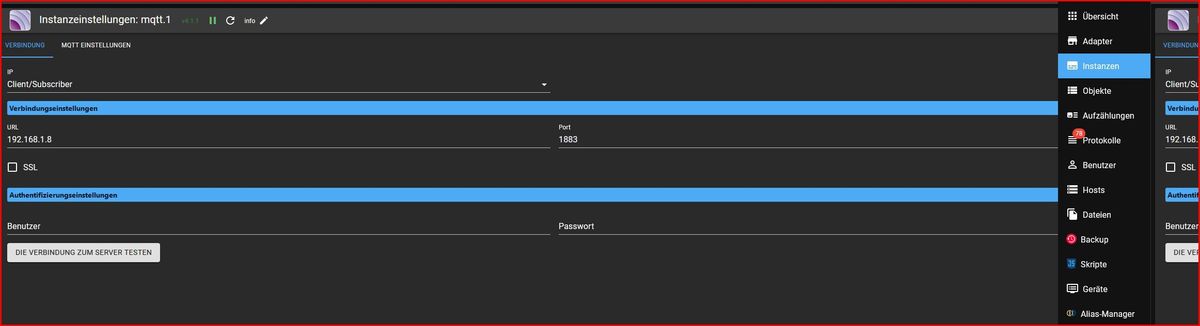
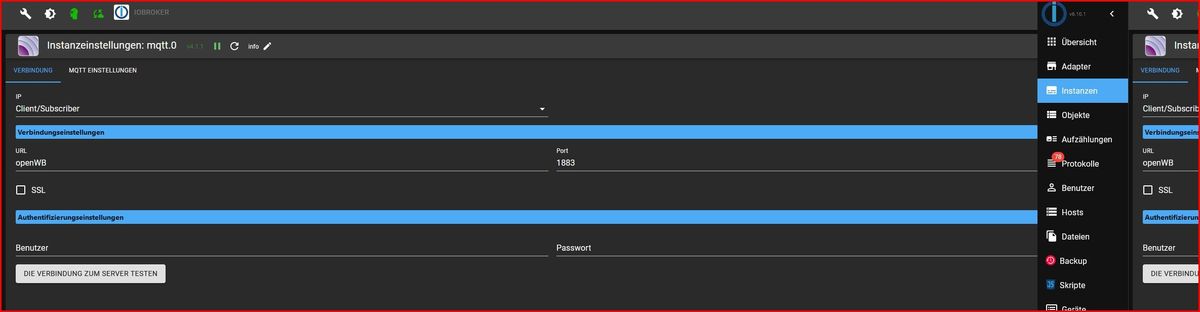
          Snap-2023-09-16-14-46-12.jpg

          Snap-2023-09-16-14-45-39.jpg

          Snap-2023-09-16-14-49-58.jpg

          crunchipC 1 Reply Last reply
          0
          • S Schtallone

            @glasfaser said in Performance Probleme durch Shelly Adapter?:

            iob list instances | grep port

            Snap-2023-09-16-14-36-20.jpg

            root@iobroker:/opt/iobroker# iob list instances | grep port
            + system.adapter.admin.0                  : admin                 : iobroker                                 -  enabled, port: 8081, bind: 0.0.0.0, run as: admin
            + system.adapter.influxdb.0               : influxdb              : iobroker                                 -  enabled, port: 8086
            + system.adapter.mqtt.0                   : mqtt                  : iobroker                                 -  enabled, port: 1883, bind: 0.0.0.0
            + system.adapter.mqtt.1                   : mqtt                  : iobroker                                 -  enabled, port: 1883, bind: 0.0.0.0
            + system.adapter.node-red.0               : node-red              : iobroker                                 -  enabled, port: 1880, bind: 192.168.1.10
            + system.adapter.shelly.0                 : shelly                : iobroker                                 -  enabled, port: 1882, bind: 192.168.1.10
              system.adapter.telegram.0               : telegram              : iobroker                                 - disabled, port: 8443, bind: 0.0.0.0
            + system.adapter.terminal.0               : terminal              : iobroker                                 -  enabled, port: 8088, bind: 192.168.1.10, run as: admin
            + system.adapter.web.0                    : web                   : iobroker                                 -  enabled, port: 8082, bind: 0.0.0.0, run as: admin
            
            root@iobroker:/opt/iobroker# iob status
            iobroker is running on this host.
            
            
            Objects type: jsonl
            States  type: jsonl
            
            GlasfaserG Offline
            GlasfaserG Offline
            Glasfaser
            wrote on last edited by Glasfaser
            #49

            @schtallone sagte in Performance Probleme durch Shelly Adapter?:

            • system.adapter.node-red.0 : node-red : iobroker - enabled, port: 1880, bind: 192.168.1.10
            • system.adapter.shelly.0 : shelly : iobroker - enabled, port: 1882, bind: 192.168.1.10

            das ist doch die IP von deinem ioBroker im Docker ,
            stelle auf 0.0.0.0 um

            Synology 918+ 16GB - ioBroker in Docker v9 , VISO auf Trekstor Primebook C13 13,3" , Hikvision Domkameras mit Surveillance Station .. CCU RaspberryMatic in Synology VM .. Zigbee CC2538+CC2592 .. Sonoff .. KNX .. Modbus ..

            S 2 Replies Last reply
            0
            • S Schtallone

              @dp20eic

              MQTT.0 ist von der openWB Wallbox.

              MQTT.1 ist von einem Mosquitto MQTT Server, welcher unter der IP 192.168.1.8 per Docker läuft

              Ich glaube ich wollte unabhängig von der Wallbox mit MQTT sein, daher habe ich dies so eingerichtet. DIe Shellys werden ja über 1882 mittels des Shelly Adapters abgerufen
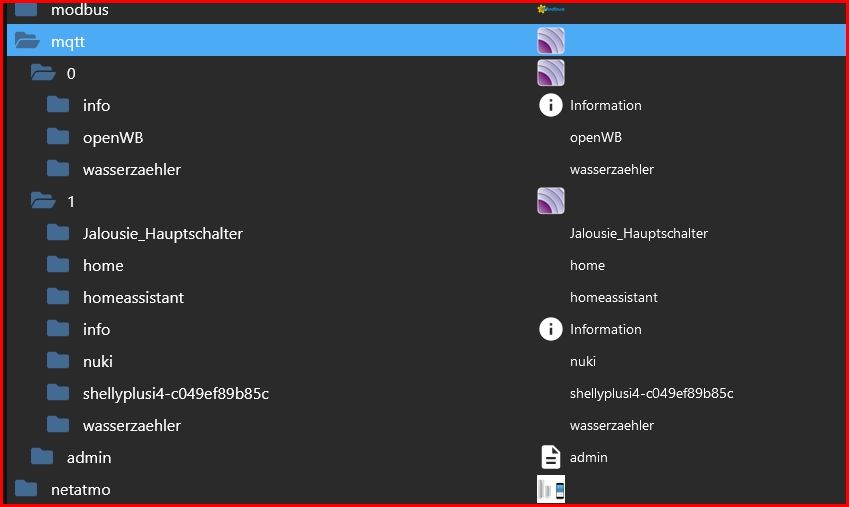
              Snap-2023-09-16-14-46-12.jpg

              Snap-2023-09-16-14-45-39.jpg

              Snap-2023-09-16-14-49-58.jpg

              crunchipC Offline
              crunchipC Offline
              crunchip
              Forum Testing Most Active
              wrote on last edited by
              #50

              @schtallone sagte in Performance Probleme durch Shelly Adapter?:

              DIe Shellys werden ja über 1882 mittels des Shelly Adapters abgerufen

              da is aber ein shelly unter mqtt.1

              umgestiegen von Proxmox auf Unraid

              S 1 Reply Last reply
              0
              • ? A Former User

                @schtallone sagte in Performance Probleme durch Shelly Adapter?:

                • system.adapter.mqtt.0 : mqtt : iobroker - enabled, port: 1883, bind: 0.0.0.0

                Moin,

                zwei mal den gleichen Port?

                + system.adapter.mqtt.0                   : mqtt                  : iobroker                                 -  enabled, port: 1883, bind: 0.0.0.0
                + system.adapter.mqtt.1                   : mqtt                  : iobroker                                 -  enabled, port: 1883, bind: 0.0.0.0
                

                VG
                Bernd

                S Offline
                S Offline
                Schtallone
                wrote on last edited by
                #51

                @dp20eic said in Performance Probleme durch Shelly Adapter?:

                @schtallone sagte in Performance Probleme durch Shelly Adapter?:

                • system.adapter.mqtt.0 : mqtt : iobroker - enabled, port: 1883, bind: 0.0.0.0

                dieser Befehl funktioniert so nichht, muss das "iob set" davor?

                1 Reply Last reply
                0
                • crunchipC crunchip

                  @schtallone sagte in Performance Probleme durch Shelly Adapter?:

                  DIe Shellys werden ja über 1882 mittels des Shelly Adapters abgerufen

                  da is aber ein shelly unter mqtt.1

                  S Offline
                  S Offline
                  Schtallone
                  wrote on last edited by
                  #52

                  @crunchip

                  stimmt. :anguished:

                  Ichh frage überhaut: Macht es Sinn, den Shelly Adapter zu nutzen, oder lieber einen MQTT Adapter. Eigentlich macht der doch auch nur MQTT, oder?

                  GlasfaserG crunchipC 2 Replies Last reply
                  0
                  • S Schtallone

                    @crunchip

                    stimmt. :anguished:

                    Ichh frage überhaut: Macht es Sinn, den Shelly Adapter zu nutzen, oder lieber einen MQTT Adapter. Eigentlich macht der doch auch nur MQTT, oder?

                    GlasfaserG Offline
                    GlasfaserG Offline
                    Glasfaser
                    wrote on last edited by
                    #53

                    @schtallone sagte in Performance Probleme durch Shelly Adapter?:

                    Macht es Sinn, den Shelly Adapter zu nutzen,

                    Kurz und knapp ... JA !

                    Synology 918+ 16GB - ioBroker in Docker v9 , VISO auf Trekstor Primebook C13 13,3" , Hikvision Domkameras mit Surveillance Station .. CCU RaspberryMatic in Synology VM .. Zigbee CC2538+CC2592 .. Sonoff .. KNX .. Modbus ..

                    S 1 Reply Last reply
                    0
                    • GlasfaserG Glasfaser

                      @schtallone sagte in Performance Probleme durch Shelly Adapter?:

                      Macht es Sinn, den Shelly Adapter zu nutzen,

                      Kurz und knapp ... JA !

                      S Offline
                      S Offline
                      Schtallone
                      wrote on last edited by
                      #54

                      @glasfaser
                      Wenn es nicht zu aufwändig ist, gerne auch erläutern. Ich möchte ja dazu lernen. DANKE

                      GlasfaserG 1 Reply Last reply
                      0
                      • S Schtallone

                        @glasfaser
                        Wenn es nicht zu aufwändig ist, gerne auch erläutern. Ich möchte ja dazu lernen. DANKE

                        GlasfaserG Offline
                        GlasfaserG Offline
                        Glasfaser
                        wrote on last edited by
                        #55

                        @schtallone

                        Lese die DOKU davon ... da steht alles drin ... warum er besser ist !

                        Synology 918+ 16GB - ioBroker in Docker v9 , VISO auf Trekstor Primebook C13 13,3" , Hikvision Domkameras mit Surveillance Station .. CCU RaspberryMatic in Synology VM .. Zigbee CC2538+CC2592 .. Sonoff .. KNX .. Modbus ..

                        S 1 Reply Last reply
                        0
                        • GlasfaserG Glasfaser

                          @schtallone sagte in Performance Probleme durch Shelly Adapter?:

                          • system.adapter.node-red.0 : node-red : iobroker - enabled, port: 1880, bind: 192.168.1.10
                          • system.adapter.shelly.0 : shelly : iobroker - enabled, port: 1882, bind: 192.168.1.10

                          das ist doch die IP von deinem ioBroker im Docker ,
                          stelle auf 0.0.0.0 um

                          S Offline
                          S Offline
                          Schtallone
                          wrote on last edited by
                          #56

                          @glasfaser Und das verstehe ich auch nicht und bräuchte eine Erleuchtung?!

                          was passiert denn wenn man auf 0.0.0.0 umstellt? Ich denke die Adapter benötigen eine IP und Port, um die Daten zu sammeln?

                          S GlasfaserG 2 Replies Last reply
                          0
                          • S Schtallone

                            @glasfaser Und das verstehe ich auch nicht und bräuchte eine Erleuchtung?!

                            was passiert denn wenn man auf 0.0.0.0 umstellt? Ich denke die Adapter benötigen eine IP und Port, um die Daten zu sammeln?

                            S Offline
                            S Offline
                            Schtallone
                            wrote on last edited by
                            #57

                            0.0.0.0 --> von allen IPs. Ah....:face_palm:
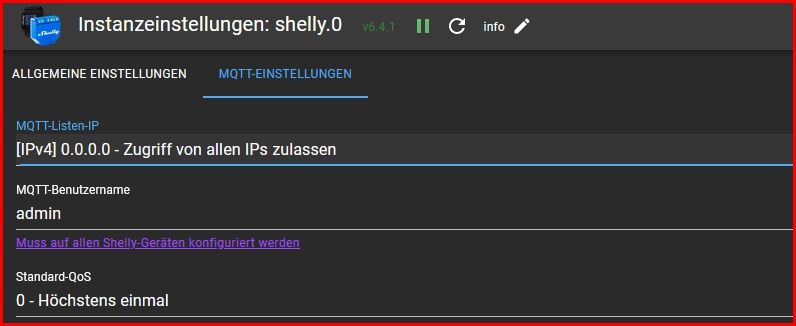
                            Snap-2023-09-16-15-00-24.jpg

                            1 Reply Last reply
                            0
                            • S Schtallone

                              @glasfaser Und das verstehe ich auch nicht und bräuchte eine Erleuchtung?!

                              was passiert denn wenn man auf 0.0.0.0 umstellt? Ich denke die Adapter benötigen eine IP und Port, um die Daten zu sammeln?

                              GlasfaserG Offline
                              GlasfaserG Offline
                              Glasfaser
                              wrote on last edited by
                              #58

                              @schtallone sagte in Performance Probleme durch Shelly Adapter?:

                              was passiert denn wenn man auf 0.0.0.0 umstellt?

                              Das gleich war gestern mit dem Admin ... die Erklärung dazu hast du gestern schon dazu bekommen
                              einmal von mir
                              und von :

                              https://forum.iobroker.net/post/1044256

                              Synology 918+ 16GB - ioBroker in Docker v9 , VISO auf Trekstor Primebook C13 13,3" , Hikvision Domkameras mit Surveillance Station .. CCU RaspberryMatic in Synology VM .. Zigbee CC2538+CC2592 .. Sonoff .. KNX .. Modbus ..

                              1 Reply Last reply
                              0
                              • GlasfaserG Glasfaser

                                @schtallone

                                Lese die DOKU davon ... da steht alles drin ... warum er besser ist !

                                S Offline
                                S Offline
                                Schtallone
                                wrote on last edited by
                                #59

                                @glasfaser ok, werde ich nochmals detailliert tun.

                                Aber einer der beiden MQTTs kann ja weg, oder? Die machen doch beide das selbe denke ich, und beißen sich vielleicht sogar dabei..

                                GlasfaserG 1 Reply Last reply
                                0
                                • S Schtallone

                                  @crunchip

                                  stimmt. :anguished:

                                  Ichh frage überhaut: Macht es Sinn, den Shelly Adapter zu nutzen, oder lieber einen MQTT Adapter. Eigentlich macht der doch auch nur MQTT, oder?

                                  crunchipC Offline
                                  crunchipC Offline
                                  crunchip
                                  Forum Testing Most Active
                                  wrote on last edited by
                                  #60

                                  @schtallone sagte in Performance Probleme durch Shelly Adapter?:

                                  Eigentlich macht der doch auch nur MQTT, oder?

                                  und bereitet dir alles auf, mit dem mqtt Adapter musst du selbst Hand anlegen, z.b deine zu steuernden Datenpunkte manuell anlegen.

                                  @schtallone sagte in Performance Probleme durch Shelly Adapter?:

                                  Wenn es nicht zu aufwändig ist,

                                  ist es nicht, nur der Port 1882 im Adapter sowie in allen shelly verwenden

                                  umgestiegen von Proxmox auf Unraid

                                  S 1 Reply Last reply
                                  0
                                  • S Schtallone

                                    @glasfaser ok, werde ich nochmals detailliert tun.

                                    Aber einer der beiden MQTTs kann ja weg, oder? Die machen doch beide das selbe denke ich, und beißen sich vielleicht sogar dabei..

                                    GlasfaserG Offline
                                    GlasfaserG Offline
                                    Glasfaser
                                    wrote on last edited by
                                    #61

                                    @schtallone sagte in Performance Probleme durch Shelly Adapter?:

                                    und beißen sich vielleicht sogar dabei..

                                    ja , da auch gleicher Port !

                                    Synology 918+ 16GB - ioBroker in Docker v9 , VISO auf Trekstor Primebook C13 13,3" , Hikvision Domkameras mit Surveillance Station .. CCU RaspberryMatic in Synology VM .. Zigbee CC2538+CC2592 .. Sonoff .. KNX .. Modbus ..

                                    1 Reply Last reply
                                    0
                                    • crunchipC crunchip

                                      @schtallone sagte in Performance Probleme durch Shelly Adapter?:

                                      Eigentlich macht der doch auch nur MQTT, oder?

                                      und bereitet dir alles auf, mit dem mqtt Adapter musst du selbst Hand anlegen, z.b deine zu steuernden Datenpunkte manuell anlegen.

                                      @schtallone sagte in Performance Probleme durch Shelly Adapter?:

                                      Wenn es nicht zu aufwändig ist,

                                      ist es nicht, nur der Port 1882 im Adapter sowie in allen shelly verwenden

                                      S Offline
                                      S Offline
                                      Schtallone
                                      wrote on last edited by
                                      #62

                                      @crunchip

                                      ist es nicht, nur der Port 1882 im Adapter sowie in allen shelly verwenden

                                      Das gilt aber nur für die Shellys, alle anderen "Geräte" weiterhin über 1883 und nur einem MQTT Adapter?

                                      crunchipC 1 Reply Last reply
                                      0
                                      • S Schtallone

                                        @crunchip

                                        ist es nicht, nur der Port 1882 im Adapter sowie in allen shelly verwenden

                                        Das gilt aber nur für die Shellys, alle anderen "Geräte" weiterhin über 1883 und nur einem MQTT Adapter?

                                        crunchipC Offline
                                        crunchipC Offline
                                        crunchip
                                        Forum Testing Most Active
                                        wrote on last edited by
                                        #63

                                        @schtallone ja

                                        umgestiegen von Proxmox auf Unraid

                                        1 Reply Last reply
                                        0
                                        • GlasfaserG Glasfaser

                                          @schtallone sagte in Performance Probleme durch Shelly Adapter?:

                                          • system.adapter.node-red.0 : node-red : iobroker - enabled, port: 1880, bind: 192.168.1.10
                                          • system.adapter.shelly.0 : shelly : iobroker - enabled, port: 1882, bind: 192.168.1.10

                                          das ist doch die IP von deinem ioBroker im Docker ,
                                          stelle auf 0.0.0.0 um

                                          S Offline
                                          S Offline
                                          Schtallone
                                          wrote on last edited by
                                          #64

                                          @glasfaser

                                          root@iobroker:/opt/iobroker# iob list instances | grep port
                                          + system.adapter.admin.0                  : admin                 : iobroker                                 -  enabled, port: 8081, bind: 0.0.0.0, run as: admin
                                          + system.adapter.influxdb.0               : influxdb              : iobroker                                 -  enabled, port: 8086
                                            system.adapter.mqtt.0                   : mqtt                  : iobroker                                 - disabled, port: 1883, bind: 0.0.0.0
                                          + system.adapter.mqtt.1                   : mqtt                  : iobroker                                 -  enabled, port: 1883, bind: 0.0.0.0
                                          + system.adapter.node-red.0               : node-red              : iobroker                                 -  enabled, port: 1880, bind: 0.0.0.0
                                          + system.adapter.shelly.0                 : shelly                : iobroker                                 -  enabled, port: 1882, bind: 0.0.0.0
                                            system.adapter.telegram.0               : telegram              : iobroker                                 - disabled, port: 8443, bind: 0.0.0.0
                                          + system.adapter.web.0                    : web                   : iobroker                                 -  enabled, port: 8082, bind: 0.0.0.0, run as: admin
                                          root@iobroker:/opt/iobroker# 

                                          
                                          GlasfaserG 1 Reply Last reply
                                          0
                                          Reply
                                          • Reply as topic
                                          Log in to reply
                                          • Oldest to Newest
                                          • Newest to Oldest
                                          • Most Votes


                                          Support us

                                          ioBroker
                                          Community Adapters
                                          Donate
                                          FAQ Cloud / IOT
                                          HowTo: Node.js-Update
                                          HowTo: Backup/Restore
                                          Downloads
                                          BLOG

                                          520

                                          Online

                                          32.7k

                                          Users

                                          82.4k

                                          Topics

                                          1.3m

                                          Posts
                                          Community
                                          Impressum | Datenschutz-Bestimmungen | Nutzungsbedingungen | Einwilligungseinstellungen
                                          ioBroker Community 2014-2025
                                          logo
                                          • Login

                                          • Don't have an account? Register

                                          • Login or register to search.
                                          • First post
                                            Last post
                                          0
                                          • Home
                                          • Recent
                                          • Tags
                                          • Unread 0
                                          • Categories
                                          • Unreplied
                                          • Popular
                                          • GitHub
                                          • Docu
                                          • Hilfe
