
NEWS




Lesekopf-probleme wegen udev-Bug
-
@spaceman25
Mit welchen Einstellungen hast Du Deinen GS303 (Plus?) denn zum Verbinden überredet?
Ich versuche seit Tagen alle möglichen Parameter aus und bekomme immer ein "rotes Kreuz" bei "Verbunden mit Gerät oder Dienst" und "No or too long answer from Serial Device after last request." im Log.
BTW: Der Lesekopf ist in Ordnung.@lukas-g sagte in Adapter "smartmeter":
Ich versuche seit Tagen alle möglichen Parameter aus
Und welche sind das?
Ein (Neu)-Start des Adapters schlägt sich wie im LogFile nieder? -
@lukas-g sagte in Adapter "smartmeter":
Ich versuche seit Tagen alle möglichen Parameter aus
Und welche sind das?
Ein (Neu)-Start des Adapters schlägt sich wie im LogFile nieder?@thomas-braun
Entsprechend des Handbuches habe ich folgendes eingestellt:
Datenabfrageintervall: 30s
Datenübertragung: Serielle Daten werden nur gelesen
Daten-Protokoll: D0 (WakeUp, SignOn, Data)
Sprache der Datenpunktnamen: Deutsch
Serielles Gerät: /dev/serial/by-id/usb-Silicon_Labs_CP2102_USB_to_UART_Bridge_Controller_0001-if00-port0 (/dev/ttyUSB0)
Serielles Gerät: Baudrate: 300 baud
Serielles Gerät: Data-Bits: 7
Serielles Gerät: Stop-Bits: 1
Serielles Gerät: Parität: even
Wartezeit auf serielle Antwort: 2s
Einstellungen Datenprotokoll
D0: Anzahl WakeUp-Zeichen: 0
D0: Geräteadresse:
D0: Kommando SignOn-Nachricht: /?!
D0: Überschreiben des Modus: C
D0: Überschreiben der Baudrate-Änderung: 9600 baud
Verzögerung zwischen zwei SignOn-Nachrichten: 1000 ms
D0: Ersatz OBIS-Medium: 1: StromBei "Wartezeit auf serielle Antwort" habe ich auch 15, 30, 60 Sekunden probiert.
"Mit" und "ohne" "Baudrate-Änderung" ergeben keine Änderung.
Auch SAML habe ich probiert.Ein frisches Log sieht wie folgt aus:
2023-07-20 21:38:29.278 - info: host.rpi stopInstance system.adapter.smartmeter.0 (force=false, process=true)
2023-07-20 21:38:29.323 - info: smartmeter.0 (1896) Got terminate signal TERMINATE_YOURSELF
2023-07-20 21:38:29.372 - info: smartmeter.0 (1896) terminating
2023-07-20 21:38:29.381 - info: smartmeter.0 (1896) Terminated (ADAPTER_REQUESTED_TERMINATION): Without reason
2023-07-20 21:38:29.434 - info: host.rpi stopInstance system.adapter.smartmeter.0 send kill signal
2023-07-20 21:38:30.147 - info: host.rpi instance system.adapter.smartmeter.0 terminated with code 11 (ADAPTER_REQUESTED_TERMINATION)
2023-07-20 21:38:32.577 - info: host.rpi instance system.adapter.smartmeter.0 started with pid 1914
2023-07-20 21:38:53.284 - info: smartmeter.0 (1914) starting. Version 3.3.4 in /opt/iobroker/node_modules/iobroker.smartmeter, node: v16.20.1, js-controller: 4.0.24
2023-07-20 21:38:55.780 - info: smartmeter.0 (1914) Error: No or too long answer from Serial Device after last request.
2023-07-20 21:38:55.800 - warn: smartmeter.0 (1914) No or too long answer from Serial Device after last request.
2023-07-20 21:39:27.866 - info: smartmeter.0 (1914) Error: No or too long answer from Serial Device after last request.
2023-07-20 21:39:27.908 - warn: smartmeter.0 (1914) No or too long answer from Serial Device after last request.
2023-07-20 21:39:59.973 - info: smartmeter.0 (1914) Error: No or too long answer from Serial Device after last request.
2023-07-20 21:39:59.977 - warn: smartmeter.0 (1914) No or too long answer from Serial Device after last request.
2023-07-20 21:40:32.002 - info: smartmeter.0 (1914) Error: No or too long answer from Serial Device after last request.
2023-07-20 21:40:32.009 - warn: smartmeter.0 (1914) No or too long answer from Serial Device after last request.
MOD-EDIT: Code in code-tags gesetzt!
PS: Ist es eigentlich richtig, alles zum iobroker.smartmeter in diesen einen Thread zu schreiben? Es scheint so üblich zu sein...
-
@thomas-braun
Entsprechend des Handbuches habe ich folgendes eingestellt:
Datenabfrageintervall: 30s
Datenübertragung: Serielle Daten werden nur gelesen
Daten-Protokoll: D0 (WakeUp, SignOn, Data)
Sprache der Datenpunktnamen: Deutsch
Serielles Gerät: /dev/serial/by-id/usb-Silicon_Labs_CP2102_USB_to_UART_Bridge_Controller_0001-if00-port0 (/dev/ttyUSB0)
Serielles Gerät: Baudrate: 300 baud
Serielles Gerät: Data-Bits: 7
Serielles Gerät: Stop-Bits: 1
Serielles Gerät: Parität: even
Wartezeit auf serielle Antwort: 2s
Einstellungen Datenprotokoll
D0: Anzahl WakeUp-Zeichen: 0
D0: Geräteadresse:
D0: Kommando SignOn-Nachricht: /?!
D0: Überschreiben des Modus: C
D0: Überschreiben der Baudrate-Änderung: 9600 baud
Verzögerung zwischen zwei SignOn-Nachrichten: 1000 ms
D0: Ersatz OBIS-Medium: 1: StromBei "Wartezeit auf serielle Antwort" habe ich auch 15, 30, 60 Sekunden probiert.
"Mit" und "ohne" "Baudrate-Änderung" ergeben keine Änderung.
Auch SAML habe ich probiert.Ein frisches Log sieht wie folgt aus:
2023-07-20 21:38:29.278 - info: host.rpi stopInstance system.adapter.smartmeter.0 (force=false, process=true)
2023-07-20 21:38:29.323 - info: smartmeter.0 (1896) Got terminate signal TERMINATE_YOURSELF
2023-07-20 21:38:29.372 - info: smartmeter.0 (1896) terminating
2023-07-20 21:38:29.381 - info: smartmeter.0 (1896) Terminated (ADAPTER_REQUESTED_TERMINATION): Without reason
2023-07-20 21:38:29.434 - info: host.rpi stopInstance system.adapter.smartmeter.0 send kill signal
2023-07-20 21:38:30.147 - info: host.rpi instance system.adapter.smartmeter.0 terminated with code 11 (ADAPTER_REQUESTED_TERMINATION)
2023-07-20 21:38:32.577 - info: host.rpi instance system.adapter.smartmeter.0 started with pid 1914
2023-07-20 21:38:53.284 - info: smartmeter.0 (1914) starting. Version 3.3.4 in /opt/iobroker/node_modules/iobroker.smartmeter, node: v16.20.1, js-controller: 4.0.24
2023-07-20 21:38:55.780 - info: smartmeter.0 (1914) Error: No or too long answer from Serial Device after last request.
2023-07-20 21:38:55.800 - warn: smartmeter.0 (1914) No or too long answer from Serial Device after last request.
2023-07-20 21:39:27.866 - info: smartmeter.0 (1914) Error: No or too long answer from Serial Device after last request.
2023-07-20 21:39:27.908 - warn: smartmeter.0 (1914) No or too long answer from Serial Device after last request.
2023-07-20 21:39:59.973 - info: smartmeter.0 (1914) Error: No or too long answer from Serial Device after last request.
2023-07-20 21:39:59.977 - warn: smartmeter.0 (1914) No or too long answer from Serial Device after last request.
2023-07-20 21:40:32.002 - info: smartmeter.0 (1914) Error: No or too long answer from Serial Device after last request.
2023-07-20 21:40:32.009 - warn: smartmeter.0 (1914) No or too long answer from Serial Device after last request.
MOD-EDIT: Code in code-tags gesetzt!
PS: Ist es eigentlich richtig, alles zum iobroker.smartmeter in diesen einen Thread zu schreiben? Es scheint so üblich zu sein...
@lukas-g sagte in Adapter "smartmeter":
folgendes eingestellt
bitte als Screenshot zeigen.
Grundsätzlich erst mal alles auf default lassen!
https://forum.iobroker.net/topic/51555/hinweise-für-gute-forenbeiträge/1
-
@thomas-braun
Entsprechend des Handbuches habe ich folgendes eingestellt:
Datenabfrageintervall: 30s
Datenübertragung: Serielle Daten werden nur gelesen
Daten-Protokoll: D0 (WakeUp, SignOn, Data)
Sprache der Datenpunktnamen: Deutsch
Serielles Gerät: /dev/serial/by-id/usb-Silicon_Labs_CP2102_USB_to_UART_Bridge_Controller_0001-if00-port0 (/dev/ttyUSB0)
Serielles Gerät: Baudrate: 300 baud
Serielles Gerät: Data-Bits: 7
Serielles Gerät: Stop-Bits: 1
Serielles Gerät: Parität: even
Wartezeit auf serielle Antwort: 2s
Einstellungen Datenprotokoll
D0: Anzahl WakeUp-Zeichen: 0
D0: Geräteadresse:
D0: Kommando SignOn-Nachricht: /?!
D0: Überschreiben des Modus: C
D0: Überschreiben der Baudrate-Änderung: 9600 baud
Verzögerung zwischen zwei SignOn-Nachrichten: 1000 ms
D0: Ersatz OBIS-Medium: 1: StromBei "Wartezeit auf serielle Antwort" habe ich auch 15, 30, 60 Sekunden probiert.
"Mit" und "ohne" "Baudrate-Änderung" ergeben keine Änderung.
Auch SAML habe ich probiert.Ein frisches Log sieht wie folgt aus:
2023-07-20 21:38:29.278 - info: host.rpi stopInstance system.adapter.smartmeter.0 (force=false, process=true)
2023-07-20 21:38:29.323 - info: smartmeter.0 (1896) Got terminate signal TERMINATE_YOURSELF
2023-07-20 21:38:29.372 - info: smartmeter.0 (1896) terminating
2023-07-20 21:38:29.381 - info: smartmeter.0 (1896) Terminated (ADAPTER_REQUESTED_TERMINATION): Without reason
2023-07-20 21:38:29.434 - info: host.rpi stopInstance system.adapter.smartmeter.0 send kill signal
2023-07-20 21:38:30.147 - info: host.rpi instance system.adapter.smartmeter.0 terminated with code 11 (ADAPTER_REQUESTED_TERMINATION)
2023-07-20 21:38:32.577 - info: host.rpi instance system.adapter.smartmeter.0 started with pid 1914
2023-07-20 21:38:53.284 - info: smartmeter.0 (1914) starting. Version 3.3.4 in /opt/iobroker/node_modules/iobroker.smartmeter, node: v16.20.1, js-controller: 4.0.24
2023-07-20 21:38:55.780 - info: smartmeter.0 (1914) Error: No or too long answer from Serial Device after last request.
2023-07-20 21:38:55.800 - warn: smartmeter.0 (1914) No or too long answer from Serial Device after last request.
2023-07-20 21:39:27.866 - info: smartmeter.0 (1914) Error: No or too long answer from Serial Device after last request.
2023-07-20 21:39:27.908 - warn: smartmeter.0 (1914) No or too long answer from Serial Device after last request.
2023-07-20 21:39:59.973 - info: smartmeter.0 (1914) Error: No or too long answer from Serial Device after last request.
2023-07-20 21:39:59.977 - warn: smartmeter.0 (1914) No or too long answer from Serial Device after last request.
2023-07-20 21:40:32.002 - info: smartmeter.0 (1914) Error: No or too long answer from Serial Device after last request.
2023-07-20 21:40:32.009 - warn: smartmeter.0 (1914) No or too long answer from Serial Device after last request.
MOD-EDIT: Code in code-tags gesetzt!
PS: Ist es eigentlich richtig, alles zum iobroker.smartmeter in diesen einen Thread zu schreiben? Es scheint so üblich zu sein...
@lukas-g sagte in Adapter "smartmeter":
Datenübertragung: Serielle Daten werden nur gelesen
und
@lukas-g sagte in Adapter "smartmeter":
Daten-Protokoll: D0 (WakeUp, SignOn, Data)
passt IMHO nicht zusammen
@lukas-g sagte in Adapter "smartmeter":
D0: Kommando SignOn-Nachricht: /?!
macht der Adapter schon! 2x macht Ärger
-
@lukas-g sagte in Adapter "smartmeter":
Datenübertragung: Serielle Daten werden nur gelesen
und
@lukas-g sagte in Adapter "smartmeter":
Daten-Protokoll: D0 (WakeUp, SignOn, Data)
passt IMHO nicht zusammen
@lukas-g sagte in Adapter "smartmeter":
D0: Kommando SignOn-Nachricht: /?!
macht der Adapter schon! 2x macht Ärger
@homoran
Der Widerspruch von "nur lesen" und "WakeUp" war mir tatsächlich aufgefallen. Da keimte kurz Hoffnung auf, dass ich "nur" zu blöd bin.
Leider hat das keinen Einfluss.Ich habe nun die smartmeter-Instanz nochmal weggeworfen und mit Standardwerten angefangen (für D0 und SML).
Dabei habe ich immer "Serielle Daten werden nur gelesen" und "Serielles Gerät mit bidir. Komm" probiert.
Letztlich nochmal die mutmaßlich vollständige Konfiguration:
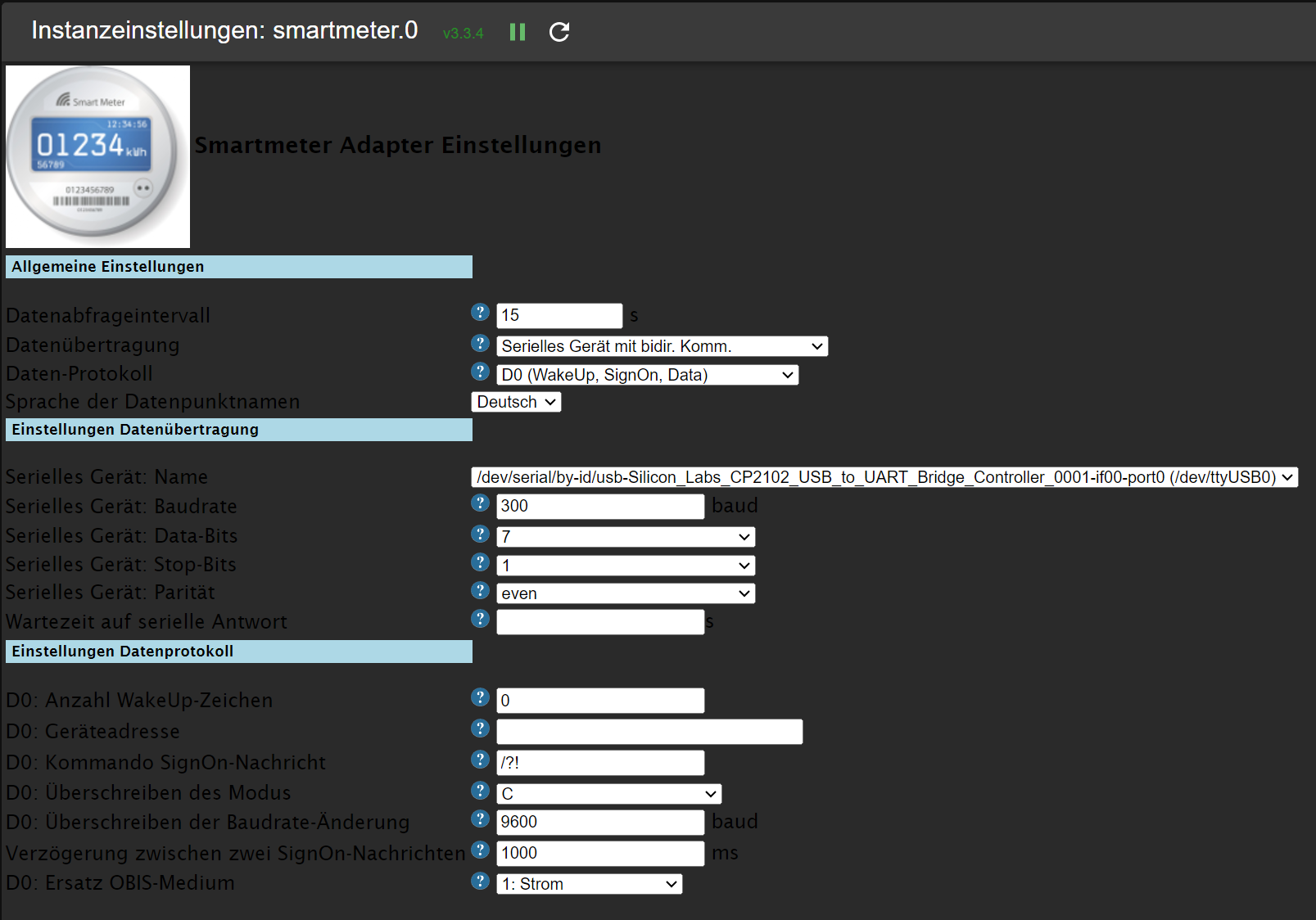
Auch die vielleicht unnötige SignOn-Nachricht habe ich nochmal weggelassen.
Immer das gleiche Ergebnis: "No or too long answer from Serial Device after last request."
Zum Schluss noch ein Hinweis: Es kommt immer mal wieder vor, dass iobroker recht unvermittelt meldet, dass eine "Langsame Verbindung erkannt" wurde. Vielleicht hat das ja doch eine konkrete Bewandnis. Allerdings finde ich dazu nichts weiter konkretes in den Logs.
-
@homoran
Der Widerspruch von "nur lesen" und "WakeUp" war mir tatsächlich aufgefallen. Da keimte kurz Hoffnung auf, dass ich "nur" zu blöd bin.
Leider hat das keinen Einfluss.Ich habe nun die smartmeter-Instanz nochmal weggeworfen und mit Standardwerten angefangen (für D0 und SML).
Dabei habe ich immer "Serielle Daten werden nur gelesen" und "Serielles Gerät mit bidir. Komm" probiert.
Letztlich nochmal die mutmaßlich vollständige Konfiguration:
Auch die vielleicht unnötige SignOn-Nachricht habe ich nochmal weggelassen.
Immer das gleiche Ergebnis: "No or too long answer from Serial Device after last request."
Zum Schluss noch ein Hinweis: Es kommt immer mal wieder vor, dass iobroker recht unvermittelt meldet, dass eine "Langsame Verbindung erkannt" wurde. Vielleicht hat das ja doch eine konkrete Bewandnis. Allerdings finde ich dazu nichts weiter konkretes in den Logs.
@lukas-g sagte in Adapter "smartmeter":
Letztlich nochmal die mutmaßlich vollständige Konfiguration:
bitte nicht!
@lukas-g sagte in Adapter "smartmeter":
Auch die vielleicht unnötige SignOn-Nachricht habe ich nochmal weggelassen.
die darf da nicht stehen!
lass alles leer bis auf de USB Port.
wobei du da ggf. mit dem udev Bug zu kämpfen haben könntest
was steht im debug log beim Adapter start? -
@lukas-g sagte in Adapter "smartmeter":
Letztlich nochmal die mutmaßlich vollständige Konfiguration:
bitte nicht!
@lukas-g sagte in Adapter "smartmeter":
Auch die vielleicht unnötige SignOn-Nachricht habe ich nochmal weggelassen.
die darf da nicht stehen!
lass alles leer bis auf de USB Port.
wobei du da ggf. mit dem udev Bug zu kämpfen haben könntest
was steht im debug log beim Adapter start?@homoran
Frische Instanz mit USB-Auswahl:
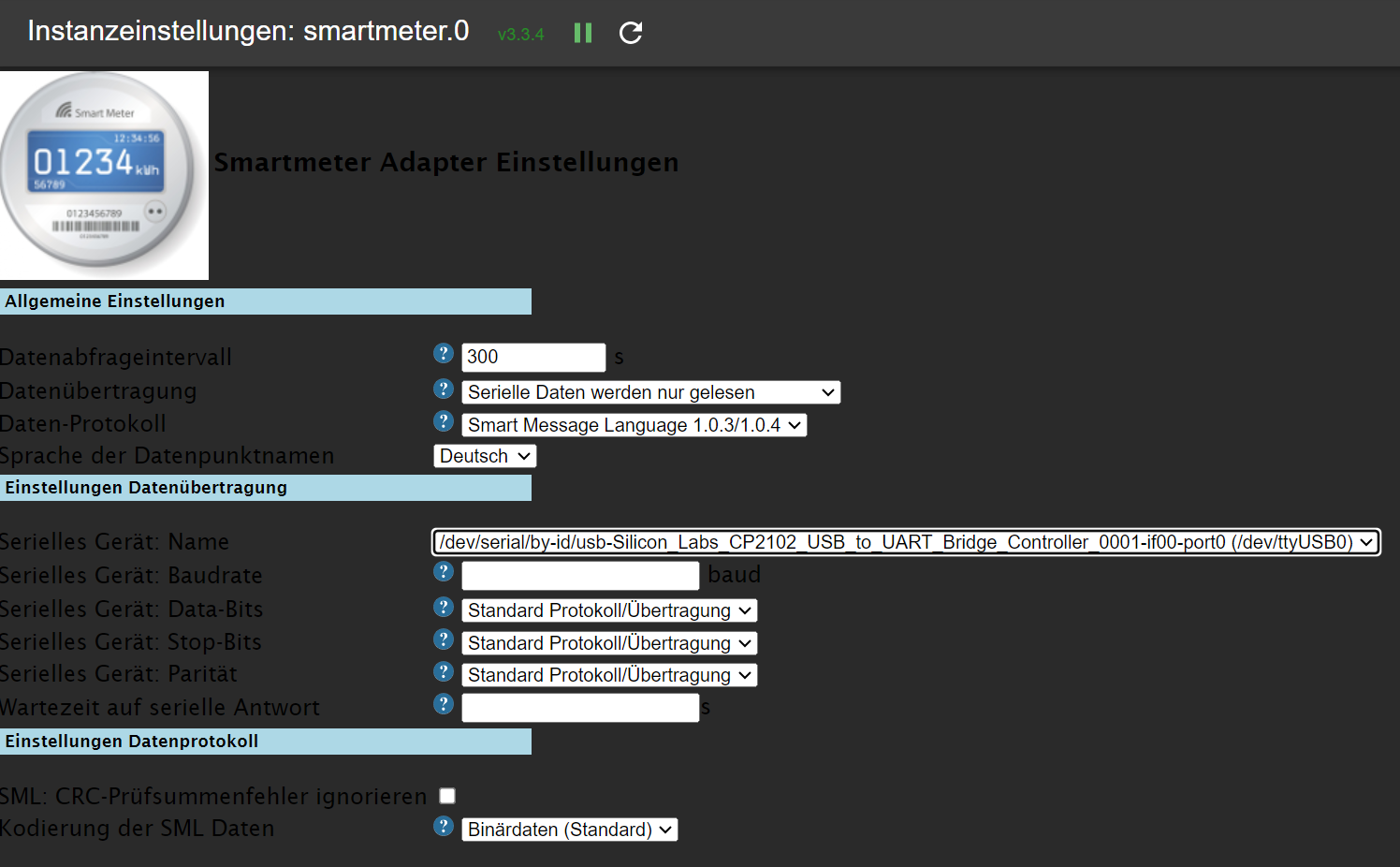
Debug Log:
2023-07-20 22:48:32.300 - info: host.rpi-lg2 iobroker add smartmeter 0 --host rpi-lg2 --debug 2023-07-20 22:48:49.549 - info: host.rpi-lg2 iobroker host.rpi-lg2 create instance smartmeter 2023-07-20 22:48:49.672 - info: host.rpi-lg2 iobroker host.rpi-lg2 object system.adapter.smartmeter.0.alive created 2023-07-20 22:48:49.742 - info: host.rpi-lg2 iobroker host.rpi-lg2 object system.adapter.smartmeter.0.connected created 2023-07-20 22:48:49.809 - info: host.rpi-lg2 iobroker host.rpi-lg2 object system.adapter.smartmeter.0.compactMode created 2023-07-20 22:48:49.885 - info: host.rpi-lg2 iobroker host.rpi-lg2 object system.adapter.smartmeter.0.cpu created 2023-07-20 22:48:49.949 - info: host.rpi-lg2 iobroker host.rpi-lg2 object system.adapter.smartmeter.0.cputime created 2023-07-20 22:48:50.007 - info: host.rpi-lg2 iobroker host.rpi-lg2 object system.adapter.smartmeter.0.memHeapUsed created 2023-07-20 22:48:50.082 - info: host.rpi-lg2 iobroker host.rpi-lg2 object system.adapter.smartmeter.0.memHeapTotal created 2023-07-20 22:48:50.143 - info: host.rpi-lg2 iobroker host.rpi-lg2 object system.adapter.smartmeter.0.memRss created 2023-07-20 22:48:50.206 - info: host.rpi-lg2 iobroker host.rpi-lg2 object system.adapter.smartmeter.0.uptime created 2023-07-20 22:48:50.277 - info: host.rpi-lg2 iobroker host.rpi-lg2 object system.adapter.smartmeter.0.inputCount created 2023-07-20 22:48:50.333 - info: host.rpi-lg2 iobroker host.rpi-lg2 object system.adapter.smartmeter.0.outputCount created 2023-07-20 22:48:50.463 - info: host.rpi-lg2 iobroker host.rpi-lg2 object system.adapter.smartmeter.0.eventLoopLag created 2023-07-20 22:48:50.559 - info: host.rpi-lg2 iobroker host.rpi-lg2 object system.adapter.smartmeter.0.sigKill created 2023-07-20 22:48:50.643 - info: host.rpi-lg2 iobroker host.rpi-lg2 object system.adapter.smartmeter.0.logLevel created 2023-07-20 22:48:50.727 - info: host.rpi-lg2 iobroker host.rpi-lg2 object smartmeter.0.info created 2023-07-20 22:48:50.798 - info: host.rpi-lg2 iobroker host.rpi-lg2 object smartmeter.0.info.connection created 2023-07-20 22:48:50.832 - info: host.rpi-lg2 iobroker host.rpi-lg2 Set default value of smartmeter.0.info.connection: false 2023-07-20 22:48:50.935 - info: host.rpi-lg2 iobroker host.rpi-lg2 object system.adapter.smartmeter.0 created 2023-07-20 22:48:52.158 - info: host.rpi-lg2 iobroker exit 0 2023-07-20 22:48:54.569 - info: host.rpi-lg2 instance system.adapter.smartmeter.0 started with pid 2385 2023-07-20 22:48:55.329 - info: admin.0 (781) ==> Connected system.user.admin from ::ffff:192.168.100.202 2023-07-20 22:49:15.281 - info: smartmeter.0 (2385) starting. Version 3.3.4 in /opt/iobroker/node_modules/iobroker.smartmeter, node: v16.20.1, js-controller: 4.0.24 2023-07-20 22:49:15.488 - error: smartmeter.0 (2385) Serial port device is undefined, check your configuration! 2023-07-20 22:49:17.488 - info: smartmeter.0 (2385) List of port: [{"path":"/dev/ttyAMA0"},{"path":"/dev/ttyUSB0","manufacturer":"Silicon Labs","serialNumber":"0001","pnpId":"usb-Silicon_Labs_CP2102_USB_to_UART_Bridge_Controller_0001-if00-port0","vendorId":"10c4","productId":"ea60"}] 2023-07-20 22:50:48.066 - info: host.rpi-lg2 stopInstance system.adapter.smartmeter.0 (force=false, process=true) 2023-07-20 22:50:48.111 - info: smartmeter.0 (2385) Got terminate signal TERMINATE_YOURSELF 2023-07-20 22:50:48.185 - info: admin.0 (781) <== Disconnect system.user.admin from ::ffff:192.168.100.202 2023-07-20 22:50:48.141 - info: smartmeter.0 (2385) terminating 2023-07-20 22:50:48.170 - info: smartmeter.0 (2385) Terminated (ADAPTER_REQUESTED_TERMINATION): Without reason 2023-07-20 22:50:48.304 - info: host.rpi-lg2 stopInstance system.adapter.smartmeter.0 send kill signal 2023-07-20 22:50:48.964 - info: host.rpi-lg2 instance system.adapter.smartmeter.0 terminated with code 11 (ADAPTER_REQUESTED_TERMINATION) 2023-07-20 22:50:51.457 - info: host.rpi-lg2 instance system.adapter.smartmeter.0 started with pid 2401 2023-07-20 22:51:11.310 - info: smartmeter.0 (2401) starting. Version 3.3.4 in /opt/iobroker/node_modules/iobroker.smartmeter, node: v16.20.1, js-controller: 4.0.24 2023-07-20 22:51:17.340 - info: host.rpi-lg2 stopInstance system.adapter.smartmeter.0 (force=false, process=true) 2023-07-20 22:51:17.389 - info: smartmeter.0 (2401) Got terminate signal TERMINATE_YOURSELF 2023-07-20 22:51:17.447 - info: smartmeter.0 (2401) terminating 2023-07-20 22:51:17.479 - info: smartmeter.0 (2401) Terminated (ADAPTER_REQUESTED_TERMINATION): Without reason 2023-07-20 22:51:17.559 - info: host.rpi-lg2 stopInstance system.adapter.smartmeter.0 send kill signal 2023-07-20 22:51:18.307 - info: host.rpi-lg2 instance system.adapter.smartmeter.0 terminated with code 11 (ADAPTER_REQUESTED_TERMINATION) 2023-07-20 22:51:20.701 - info: host.rpi-lg2 instance system.adapter.smartmeter.0 started with pid 2416 2023-07-20 22:51:36.525 - debug: smartmeter.0 (2416) Redis Objects: Use Redis connection: 127.0.0.1:9001 2023-07-20 22:51:36.859 - debug: smartmeter.0 (2416) Objects client ready ... initialize now 2023-07-20 22:51:36.878 - debug: smartmeter.0 (2416) Objects create System PubSub Client 2023-07-20 22:51:36.889 - debug: smartmeter.0 (2416) Objects create User PubSub Client 2023-07-20 22:51:37.075 - debug: smartmeter.0 (2416) Objects client initialize lua scripts 2023-07-20 22:51:37.147 - debug: smartmeter.0 (2416) Objects connected to redis: 127.0.0.1:9001 2023-07-20 22:51:37.306 - debug: smartmeter.0 (2416) Redis States: Use Redis connection: 127.0.0.1:9000 2023-07-20 22:51:37.380 - debug: smartmeter.0 (2416) States create System PubSub Client 2023-07-20 22:51:37.391 - debug: smartmeter.0 (2416) States create User PubSub Client 2023-07-20 22:51:37.527 - debug: smartmeter.0 (2416) States connected to redis: 127.0.0.1:9000 2023-07-20 22:51:37.738 - debug: smartmeter.0 (2416) Plugin sentry Initialize Plugin (enabled=true) 2023-07-20 22:51:40.509 - info: smartmeter.0 (2416) starting. Version 3.3.4 in /opt/iobroker/node_modules/iobroker.smartmeter, node: v16.20.1, js-controller: 4.0.24 2023-07-20 22:51:40.708 - debug: smartmeter.0 (2416) SmartmeterObis options: {"debug":2,"protocol":"SmlProtocol","transport":"SerialResponseTransport","requestInterval":"300","anotherQueryDelay":"1000","transportSerialPort":"/dev/serial/by-id/usb-Silicon_Labs_CP2102_USB_to_UART_Bridge_Controller_0001-if00-port0","transportSerialBaudrate":null,"transportSerialMessageTimeout":null,"protocolSmlIgnoreInvalidCRC":false} 2023-07-20 22:51:40.727 - debug: smartmeter.0 (2416) CREATE SERIALPORT: 9600 8 1 none 2023-07-20 22:51:40.834 - debug: smartmeter.0 (2416) SERIALPORT OPEN 2023-07-20 22:51:40.985 - debug: smartmeter.0 (2416) SET MESSAGE TIMEOUT TIMER: 120000 2023-07-20 22:51:41.084 - debug: smartmeter.0 (2416) connected set to false 2023-07-20 22:53:40.992 - debug: smartmeter.0 (2416) MESSAGE TIMEOUT TRIGGERED 2023-07-20 22:53:41.002 - debug: smartmeter.0 (2416) Error: No or too long answer from Serial Device after last request. 2023-07-20 22:53:41.012 - warn: smartmeter.0 (2416) No or too long answer from Serial Device after last request. 2023-07-20 22:53:41.017 - debug: smartmeter.0 (2416) Error: No or too long answer from Serial Device after last request. 2023-07-20 22:53:41.022 - debug: smartmeter.0 (2416) Transport Reset!! Restart = true 2023-07-20 22:53:41.043 - debug: smartmeter.0 (2416) SERIALPORT CLOSE 2023-07-20 22:53:41.049 - debug: smartmeter.0 (2416) SCHEDULE NEXT RUN IN 300s 2023-07-20 22:58:41.052 - debug: smartmeter.0 (2416) CREATE SERIALPORT: 9600 8 1 none 2023-07-20 22:58:41.064 - debug: smartmeter.0 (2416) SERIALPORT OPEN 2023-07-20 22:58:41.082 - debug: smartmeter.0 (2416) SET MESSAGE TIMEOUT TIMER: 120000 2023-07-20 23:00:41.093 - debug: smartmeter.0 (2416) MESSAGE TIMEOUT TRIGGERED 2023-07-20 23:00:41.097 - debug: smartmeter.0 (2416) Error: No or too long answer from Serial Device after last request. 2023-07-20 23:00:41.101 - warn: smartmeter.0 (2416) No or too long answer from Serial Device after last request. 2023-07-20 23:00:41.103 - debug: smartmeter.0 (2416) Error: No or too long answer from Serial Device after last request. 2023-07-20 23:00:41.106 - debug: smartmeter.0 (2416) Transport Reset!! Restart = true 2023-07-20 23:00:41.114 - debug: smartmeter.0 (2416) SERIALPORT CLOSE 2023-07-20 23:00:41.118 - debug: smartmeter.0 (2416) SCHEDULE NEXT RUN IN 300s@homoran said in Adapter "smartmeter":
wobei du da ggf. mit dem udev Bug zu kämpfen haben könntest
Verrate mir bitte, was Du mit "dem udev Bug" meinst.
-
@homoran
Frische Instanz mit USB-Auswahl:
Debug Log:
2023-07-20 22:48:32.300 - info: host.rpi-lg2 iobroker add smartmeter 0 --host rpi-lg2 --debug 2023-07-20 22:48:49.549 - info: host.rpi-lg2 iobroker host.rpi-lg2 create instance smartmeter 2023-07-20 22:48:49.672 - info: host.rpi-lg2 iobroker host.rpi-lg2 object system.adapter.smartmeter.0.alive created 2023-07-20 22:48:49.742 - info: host.rpi-lg2 iobroker host.rpi-lg2 object system.adapter.smartmeter.0.connected created 2023-07-20 22:48:49.809 - info: host.rpi-lg2 iobroker host.rpi-lg2 object system.adapter.smartmeter.0.compactMode created 2023-07-20 22:48:49.885 - info: host.rpi-lg2 iobroker host.rpi-lg2 object system.adapter.smartmeter.0.cpu created 2023-07-20 22:48:49.949 - info: host.rpi-lg2 iobroker host.rpi-lg2 object system.adapter.smartmeter.0.cputime created 2023-07-20 22:48:50.007 - info: host.rpi-lg2 iobroker host.rpi-lg2 object system.adapter.smartmeter.0.memHeapUsed created 2023-07-20 22:48:50.082 - info: host.rpi-lg2 iobroker host.rpi-lg2 object system.adapter.smartmeter.0.memHeapTotal created 2023-07-20 22:48:50.143 - info: host.rpi-lg2 iobroker host.rpi-lg2 object system.adapter.smartmeter.0.memRss created 2023-07-20 22:48:50.206 - info: host.rpi-lg2 iobroker host.rpi-lg2 object system.adapter.smartmeter.0.uptime created 2023-07-20 22:48:50.277 - info: host.rpi-lg2 iobroker host.rpi-lg2 object system.adapter.smartmeter.0.inputCount created 2023-07-20 22:48:50.333 - info: host.rpi-lg2 iobroker host.rpi-lg2 object system.adapter.smartmeter.0.outputCount created 2023-07-20 22:48:50.463 - info: host.rpi-lg2 iobroker host.rpi-lg2 object system.adapter.smartmeter.0.eventLoopLag created 2023-07-20 22:48:50.559 - info: host.rpi-lg2 iobroker host.rpi-lg2 object system.adapter.smartmeter.0.sigKill created 2023-07-20 22:48:50.643 - info: host.rpi-lg2 iobroker host.rpi-lg2 object system.adapter.smartmeter.0.logLevel created 2023-07-20 22:48:50.727 - info: host.rpi-lg2 iobroker host.rpi-lg2 object smartmeter.0.info created 2023-07-20 22:48:50.798 - info: host.rpi-lg2 iobroker host.rpi-lg2 object smartmeter.0.info.connection created 2023-07-20 22:48:50.832 - info: host.rpi-lg2 iobroker host.rpi-lg2 Set default value of smartmeter.0.info.connection: false 2023-07-20 22:48:50.935 - info: host.rpi-lg2 iobroker host.rpi-lg2 object system.adapter.smartmeter.0 created 2023-07-20 22:48:52.158 - info: host.rpi-lg2 iobroker exit 0 2023-07-20 22:48:54.569 - info: host.rpi-lg2 instance system.adapter.smartmeter.0 started with pid 2385 2023-07-20 22:48:55.329 - info: admin.0 (781) ==> Connected system.user.admin from ::ffff:192.168.100.202 2023-07-20 22:49:15.281 - info: smartmeter.0 (2385) starting. Version 3.3.4 in /opt/iobroker/node_modules/iobroker.smartmeter, node: v16.20.1, js-controller: 4.0.24 2023-07-20 22:49:15.488 - error: smartmeter.0 (2385) Serial port device is undefined, check your configuration! 2023-07-20 22:49:17.488 - info: smartmeter.0 (2385) List of port: [{"path":"/dev/ttyAMA0"},{"path":"/dev/ttyUSB0","manufacturer":"Silicon Labs","serialNumber":"0001","pnpId":"usb-Silicon_Labs_CP2102_USB_to_UART_Bridge_Controller_0001-if00-port0","vendorId":"10c4","productId":"ea60"}] 2023-07-20 22:50:48.066 - info: host.rpi-lg2 stopInstance system.adapter.smartmeter.0 (force=false, process=true) 2023-07-20 22:50:48.111 - info: smartmeter.0 (2385) Got terminate signal TERMINATE_YOURSELF 2023-07-20 22:50:48.185 - info: admin.0 (781) <== Disconnect system.user.admin from ::ffff:192.168.100.202 2023-07-20 22:50:48.141 - info: smartmeter.0 (2385) terminating 2023-07-20 22:50:48.170 - info: smartmeter.0 (2385) Terminated (ADAPTER_REQUESTED_TERMINATION): Without reason 2023-07-20 22:50:48.304 - info: host.rpi-lg2 stopInstance system.adapter.smartmeter.0 send kill signal 2023-07-20 22:50:48.964 - info: host.rpi-lg2 instance system.adapter.smartmeter.0 terminated with code 11 (ADAPTER_REQUESTED_TERMINATION) 2023-07-20 22:50:51.457 - info: host.rpi-lg2 instance system.adapter.smartmeter.0 started with pid 2401 2023-07-20 22:51:11.310 - info: smartmeter.0 (2401) starting. Version 3.3.4 in /opt/iobroker/node_modules/iobroker.smartmeter, node: v16.20.1, js-controller: 4.0.24 2023-07-20 22:51:17.340 - info: host.rpi-lg2 stopInstance system.adapter.smartmeter.0 (force=false, process=true) 2023-07-20 22:51:17.389 - info: smartmeter.0 (2401) Got terminate signal TERMINATE_YOURSELF 2023-07-20 22:51:17.447 - info: smartmeter.0 (2401) terminating 2023-07-20 22:51:17.479 - info: smartmeter.0 (2401) Terminated (ADAPTER_REQUESTED_TERMINATION): Without reason 2023-07-20 22:51:17.559 - info: host.rpi-lg2 stopInstance system.adapter.smartmeter.0 send kill signal 2023-07-20 22:51:18.307 - info: host.rpi-lg2 instance system.adapter.smartmeter.0 terminated with code 11 (ADAPTER_REQUESTED_TERMINATION) 2023-07-20 22:51:20.701 - info: host.rpi-lg2 instance system.adapter.smartmeter.0 started with pid 2416 2023-07-20 22:51:36.525 - debug: smartmeter.0 (2416) Redis Objects: Use Redis connection: 127.0.0.1:9001 2023-07-20 22:51:36.859 - debug: smartmeter.0 (2416) Objects client ready ... initialize now 2023-07-20 22:51:36.878 - debug: smartmeter.0 (2416) Objects create System PubSub Client 2023-07-20 22:51:36.889 - debug: smartmeter.0 (2416) Objects create User PubSub Client 2023-07-20 22:51:37.075 - debug: smartmeter.0 (2416) Objects client initialize lua scripts 2023-07-20 22:51:37.147 - debug: smartmeter.0 (2416) Objects connected to redis: 127.0.0.1:9001 2023-07-20 22:51:37.306 - debug: smartmeter.0 (2416) Redis States: Use Redis connection: 127.0.0.1:9000 2023-07-20 22:51:37.380 - debug: smartmeter.0 (2416) States create System PubSub Client 2023-07-20 22:51:37.391 - debug: smartmeter.0 (2416) States create User PubSub Client 2023-07-20 22:51:37.527 - debug: smartmeter.0 (2416) States connected to redis: 127.0.0.1:9000 2023-07-20 22:51:37.738 - debug: smartmeter.0 (2416) Plugin sentry Initialize Plugin (enabled=true) 2023-07-20 22:51:40.509 - info: smartmeter.0 (2416) starting. Version 3.3.4 in /opt/iobroker/node_modules/iobroker.smartmeter, node: v16.20.1, js-controller: 4.0.24 2023-07-20 22:51:40.708 - debug: smartmeter.0 (2416) SmartmeterObis options: {"debug":2,"protocol":"SmlProtocol","transport":"SerialResponseTransport","requestInterval":"300","anotherQueryDelay":"1000","transportSerialPort":"/dev/serial/by-id/usb-Silicon_Labs_CP2102_USB_to_UART_Bridge_Controller_0001-if00-port0","transportSerialBaudrate":null,"transportSerialMessageTimeout":null,"protocolSmlIgnoreInvalidCRC":false} 2023-07-20 22:51:40.727 - debug: smartmeter.0 (2416) CREATE SERIALPORT: 9600 8 1 none 2023-07-20 22:51:40.834 - debug: smartmeter.0 (2416) SERIALPORT OPEN 2023-07-20 22:51:40.985 - debug: smartmeter.0 (2416) SET MESSAGE TIMEOUT TIMER: 120000 2023-07-20 22:51:41.084 - debug: smartmeter.0 (2416) connected set to false 2023-07-20 22:53:40.992 - debug: smartmeter.0 (2416) MESSAGE TIMEOUT TRIGGERED 2023-07-20 22:53:41.002 - debug: smartmeter.0 (2416) Error: No or too long answer from Serial Device after last request. 2023-07-20 22:53:41.012 - warn: smartmeter.0 (2416) No or too long answer from Serial Device after last request. 2023-07-20 22:53:41.017 - debug: smartmeter.0 (2416) Error: No or too long answer from Serial Device after last request. 2023-07-20 22:53:41.022 - debug: smartmeter.0 (2416) Transport Reset!! Restart = true 2023-07-20 22:53:41.043 - debug: smartmeter.0 (2416) SERIALPORT CLOSE 2023-07-20 22:53:41.049 - debug: smartmeter.0 (2416) SCHEDULE NEXT RUN IN 300s 2023-07-20 22:58:41.052 - debug: smartmeter.0 (2416) CREATE SERIALPORT: 9600 8 1 none 2023-07-20 22:58:41.064 - debug: smartmeter.0 (2416) SERIALPORT OPEN 2023-07-20 22:58:41.082 - debug: smartmeter.0 (2416) SET MESSAGE TIMEOUT TIMER: 120000 2023-07-20 23:00:41.093 - debug: smartmeter.0 (2416) MESSAGE TIMEOUT TRIGGERED 2023-07-20 23:00:41.097 - debug: smartmeter.0 (2416) Error: No or too long answer from Serial Device after last request. 2023-07-20 23:00:41.101 - warn: smartmeter.0 (2416) No or too long answer from Serial Device after last request. 2023-07-20 23:00:41.103 - debug: smartmeter.0 (2416) Error: No or too long answer from Serial Device after last request. 2023-07-20 23:00:41.106 - debug: smartmeter.0 (2416) Transport Reset!! Restart = true 2023-07-20 23:00:41.114 - debug: smartmeter.0 (2416) SERIALPORT CLOSE 2023-07-20 23:00:41.118 - debug: smartmeter.0 (2416) SCHEDULE NEXT RUN IN 300s@homoran said in Adapter "smartmeter":
wobei du da ggf. mit dem udev Bug zu kämpfen haben könntest
Verrate mir bitte, was Du mit "dem udev Bug" meinst.
@lukas-g
sudo apt update
apt policy udev
ausführen.
-
@homoran
Frische Instanz mit USB-Auswahl:
Debug Log:
2023-07-20 22:48:32.300 - info: host.rpi-lg2 iobroker add smartmeter 0 --host rpi-lg2 --debug 2023-07-20 22:48:49.549 - info: host.rpi-lg2 iobroker host.rpi-lg2 create instance smartmeter 2023-07-20 22:48:49.672 - info: host.rpi-lg2 iobroker host.rpi-lg2 object system.adapter.smartmeter.0.alive created 2023-07-20 22:48:49.742 - info: host.rpi-lg2 iobroker host.rpi-lg2 object system.adapter.smartmeter.0.connected created 2023-07-20 22:48:49.809 - info: host.rpi-lg2 iobroker host.rpi-lg2 object system.adapter.smartmeter.0.compactMode created 2023-07-20 22:48:49.885 - info: host.rpi-lg2 iobroker host.rpi-lg2 object system.adapter.smartmeter.0.cpu created 2023-07-20 22:48:49.949 - info: host.rpi-lg2 iobroker host.rpi-lg2 object system.adapter.smartmeter.0.cputime created 2023-07-20 22:48:50.007 - info: host.rpi-lg2 iobroker host.rpi-lg2 object system.adapter.smartmeter.0.memHeapUsed created 2023-07-20 22:48:50.082 - info: host.rpi-lg2 iobroker host.rpi-lg2 object system.adapter.smartmeter.0.memHeapTotal created 2023-07-20 22:48:50.143 - info: host.rpi-lg2 iobroker host.rpi-lg2 object system.adapter.smartmeter.0.memRss created 2023-07-20 22:48:50.206 - info: host.rpi-lg2 iobroker host.rpi-lg2 object system.adapter.smartmeter.0.uptime created 2023-07-20 22:48:50.277 - info: host.rpi-lg2 iobroker host.rpi-lg2 object system.adapter.smartmeter.0.inputCount created 2023-07-20 22:48:50.333 - info: host.rpi-lg2 iobroker host.rpi-lg2 object system.adapter.smartmeter.0.outputCount created 2023-07-20 22:48:50.463 - info: host.rpi-lg2 iobroker host.rpi-lg2 object system.adapter.smartmeter.0.eventLoopLag created 2023-07-20 22:48:50.559 - info: host.rpi-lg2 iobroker host.rpi-lg2 object system.adapter.smartmeter.0.sigKill created 2023-07-20 22:48:50.643 - info: host.rpi-lg2 iobroker host.rpi-lg2 object system.adapter.smartmeter.0.logLevel created 2023-07-20 22:48:50.727 - info: host.rpi-lg2 iobroker host.rpi-lg2 object smartmeter.0.info created 2023-07-20 22:48:50.798 - info: host.rpi-lg2 iobroker host.rpi-lg2 object smartmeter.0.info.connection created 2023-07-20 22:48:50.832 - info: host.rpi-lg2 iobroker host.rpi-lg2 Set default value of smartmeter.0.info.connection: false 2023-07-20 22:48:50.935 - info: host.rpi-lg2 iobroker host.rpi-lg2 object system.adapter.smartmeter.0 created 2023-07-20 22:48:52.158 - info: host.rpi-lg2 iobroker exit 0 2023-07-20 22:48:54.569 - info: host.rpi-lg2 instance system.adapter.smartmeter.0 started with pid 2385 2023-07-20 22:48:55.329 - info: admin.0 (781) ==> Connected system.user.admin from ::ffff:192.168.100.202 2023-07-20 22:49:15.281 - info: smartmeter.0 (2385) starting. Version 3.3.4 in /opt/iobroker/node_modules/iobroker.smartmeter, node: v16.20.1, js-controller: 4.0.24 2023-07-20 22:49:15.488 - error: smartmeter.0 (2385) Serial port device is undefined, check your configuration! 2023-07-20 22:49:17.488 - info: smartmeter.0 (2385) List of port: [{"path":"/dev/ttyAMA0"},{"path":"/dev/ttyUSB0","manufacturer":"Silicon Labs","serialNumber":"0001","pnpId":"usb-Silicon_Labs_CP2102_USB_to_UART_Bridge_Controller_0001-if00-port0","vendorId":"10c4","productId":"ea60"}] 2023-07-20 22:50:48.066 - info: host.rpi-lg2 stopInstance system.adapter.smartmeter.0 (force=false, process=true) 2023-07-20 22:50:48.111 - info: smartmeter.0 (2385) Got terminate signal TERMINATE_YOURSELF 2023-07-20 22:50:48.185 - info: admin.0 (781) <== Disconnect system.user.admin from ::ffff:192.168.100.202 2023-07-20 22:50:48.141 - info: smartmeter.0 (2385) terminating 2023-07-20 22:50:48.170 - info: smartmeter.0 (2385) Terminated (ADAPTER_REQUESTED_TERMINATION): Without reason 2023-07-20 22:50:48.304 - info: host.rpi-lg2 stopInstance system.adapter.smartmeter.0 send kill signal 2023-07-20 22:50:48.964 - info: host.rpi-lg2 instance system.adapter.smartmeter.0 terminated with code 11 (ADAPTER_REQUESTED_TERMINATION) 2023-07-20 22:50:51.457 - info: host.rpi-lg2 instance system.adapter.smartmeter.0 started with pid 2401 2023-07-20 22:51:11.310 - info: smartmeter.0 (2401) starting. Version 3.3.4 in /opt/iobroker/node_modules/iobroker.smartmeter, node: v16.20.1, js-controller: 4.0.24 2023-07-20 22:51:17.340 - info: host.rpi-lg2 stopInstance system.adapter.smartmeter.0 (force=false, process=true) 2023-07-20 22:51:17.389 - info: smartmeter.0 (2401) Got terminate signal TERMINATE_YOURSELF 2023-07-20 22:51:17.447 - info: smartmeter.0 (2401) terminating 2023-07-20 22:51:17.479 - info: smartmeter.0 (2401) Terminated (ADAPTER_REQUESTED_TERMINATION): Without reason 2023-07-20 22:51:17.559 - info: host.rpi-lg2 stopInstance system.adapter.smartmeter.0 send kill signal 2023-07-20 22:51:18.307 - info: host.rpi-lg2 instance system.adapter.smartmeter.0 terminated with code 11 (ADAPTER_REQUESTED_TERMINATION) 2023-07-20 22:51:20.701 - info: host.rpi-lg2 instance system.adapter.smartmeter.0 started with pid 2416 2023-07-20 22:51:36.525 - debug: smartmeter.0 (2416) Redis Objects: Use Redis connection: 127.0.0.1:9001 2023-07-20 22:51:36.859 - debug: smartmeter.0 (2416) Objects client ready ... initialize now 2023-07-20 22:51:36.878 - debug: smartmeter.0 (2416) Objects create System PubSub Client 2023-07-20 22:51:36.889 - debug: smartmeter.0 (2416) Objects create User PubSub Client 2023-07-20 22:51:37.075 - debug: smartmeter.0 (2416) Objects client initialize lua scripts 2023-07-20 22:51:37.147 - debug: smartmeter.0 (2416) Objects connected to redis: 127.0.0.1:9001 2023-07-20 22:51:37.306 - debug: smartmeter.0 (2416) Redis States: Use Redis connection: 127.0.0.1:9000 2023-07-20 22:51:37.380 - debug: smartmeter.0 (2416) States create System PubSub Client 2023-07-20 22:51:37.391 - debug: smartmeter.0 (2416) States create User PubSub Client 2023-07-20 22:51:37.527 - debug: smartmeter.0 (2416) States connected to redis: 127.0.0.1:9000 2023-07-20 22:51:37.738 - debug: smartmeter.0 (2416) Plugin sentry Initialize Plugin (enabled=true) 2023-07-20 22:51:40.509 - info: smartmeter.0 (2416) starting. Version 3.3.4 in /opt/iobroker/node_modules/iobroker.smartmeter, node: v16.20.1, js-controller: 4.0.24 2023-07-20 22:51:40.708 - debug: smartmeter.0 (2416) SmartmeterObis options: {"debug":2,"protocol":"SmlProtocol","transport":"SerialResponseTransport","requestInterval":"300","anotherQueryDelay":"1000","transportSerialPort":"/dev/serial/by-id/usb-Silicon_Labs_CP2102_USB_to_UART_Bridge_Controller_0001-if00-port0","transportSerialBaudrate":null,"transportSerialMessageTimeout":null,"protocolSmlIgnoreInvalidCRC":false} 2023-07-20 22:51:40.727 - debug: smartmeter.0 (2416) CREATE SERIALPORT: 9600 8 1 none 2023-07-20 22:51:40.834 - debug: smartmeter.0 (2416) SERIALPORT OPEN 2023-07-20 22:51:40.985 - debug: smartmeter.0 (2416) SET MESSAGE TIMEOUT TIMER: 120000 2023-07-20 22:51:41.084 - debug: smartmeter.0 (2416) connected set to false 2023-07-20 22:53:40.992 - debug: smartmeter.0 (2416) MESSAGE TIMEOUT TRIGGERED 2023-07-20 22:53:41.002 - debug: smartmeter.0 (2416) Error: No or too long answer from Serial Device after last request. 2023-07-20 22:53:41.012 - warn: smartmeter.0 (2416) No or too long answer from Serial Device after last request. 2023-07-20 22:53:41.017 - debug: smartmeter.0 (2416) Error: No or too long answer from Serial Device after last request. 2023-07-20 22:53:41.022 - debug: smartmeter.0 (2416) Transport Reset!! Restart = true 2023-07-20 22:53:41.043 - debug: smartmeter.0 (2416) SERIALPORT CLOSE 2023-07-20 22:53:41.049 - debug: smartmeter.0 (2416) SCHEDULE NEXT RUN IN 300s 2023-07-20 22:58:41.052 - debug: smartmeter.0 (2416) CREATE SERIALPORT: 9600 8 1 none 2023-07-20 22:58:41.064 - debug: smartmeter.0 (2416) SERIALPORT OPEN 2023-07-20 22:58:41.082 - debug: smartmeter.0 (2416) SET MESSAGE TIMEOUT TIMER: 120000 2023-07-20 23:00:41.093 - debug: smartmeter.0 (2416) MESSAGE TIMEOUT TRIGGERED 2023-07-20 23:00:41.097 - debug: smartmeter.0 (2416) Error: No or too long answer from Serial Device after last request. 2023-07-20 23:00:41.101 - warn: smartmeter.0 (2416) No or too long answer from Serial Device after last request. 2023-07-20 23:00:41.103 - debug: smartmeter.0 (2416) Error: No or too long answer from Serial Device after last request. 2023-07-20 23:00:41.106 - debug: smartmeter.0 (2416) Transport Reset!! Restart = true 2023-07-20 23:00:41.114 - debug: smartmeter.0 (2416) SERIALPORT CLOSE 2023-07-20 23:00:41.118 - debug: smartmeter.0 (2416) SCHEDULE NEXT RUN IN 300s@homoran said in Adapter "smartmeter":
wobei du da ggf. mit dem udev Bug zu kämpfen haben könntest
Verrate mir bitte, was Du mit "dem udev Bug" meinst.
@lukas-g sagte in Adapter "smartmeter":
Verrate mir bitte, was Du mit "dem udev Bug" meinst.
hat Thomas bereits gemacht. Jetzt bi ich gespannt, ob bei
@lukas-g sagte in Adapter "smartmeter":
SERIALPORT OPEN
trotzdem udev defekt sein kann
kein Support per PN! - Fragen im Forum stellen - es gibt fast nichts, was nicht auch für andere interessant ist.
Benutzt das Voting rechts unten im Beitrag wenn er euch geholfen hat.
der Installationsfixer: curl -fsL https://iobroker.net/fix.sh | bash -
-
@lukas-g sagte in Adapter "smartmeter":
Verrate mir bitte, was Du mit "dem udev Bug" meinst.
hat Thomas bereits gemacht. Jetzt bi ich gespannt, ob bei
@lukas-g sagte in Adapter "smartmeter":
SERIALPORT OPEN
trotzdem udev defekt sein kann
Irgendwas ist aber mit dem Port:
2023-07-20 22:49:15.488 - error: smartmeter.0 (2385) Serial port device is undefined, check your configuration! -
Irgendwas ist aber mit dem Port:
2023-07-20 22:49:15.488 - error: smartmeter.0 (2385) Serial port device is undefined, check your configuration!@thomas-braun wieso sehe ich das nicht. :cry: könnte passen!
kein Support per PN! - Fragen im Forum stellen - es gibt fast nichts, was nicht auch für andere interessant ist.
Benutzt das Voting rechts unten im Beitrag wenn er euch geholfen hat.
der Installationsfixer: curl -fsL https://iobroker.net/fix.sh | bash -
-
@thomas-braun wieso sehe ich das nicht. :cry: könnte passen!
-
@lukas-g
sudo apt update
apt policy udev
ausführen.
lukas@rpi-lg2:~ $ sudo apt update Get:1 http://raspbian.raspberrypi.org/raspbian bullseye InRelease [15.0 kB] Get:2 http://archive.raspberrypi.org/debian bullseye InRelease [23.6 kB] Get:3 http://raspbian.raspberrypi.org/raspbian bullseye/main armhf Packages [13.2 MB] Get:4 http://archive.raspberrypi.org/debian bullseye/main armhf Packages [314 kB] Fetched 13.6 MB in 36s (376 kB/s) Reading package lists... Done Building dependency tree... Done Reading state information... Done 4 packages can be upgraded. Run 'apt list --upgradable' to see them. lukas@rpi-lg2:~ $ sudo apt list --upgradable Listing... Done libcamera-apps-lite/stable 1.2.1-1 armhf [upgradable from: 0~git20230301+54a781d-1] libcamera0/stable 0~git20230707+2783c8d8-1 armhf [upgradable from: 0~git20230302+923f5d70-1] python3-libcamera/stable 0~git20230707+2783c8d8-1 armhf [upgradable from: 0~git20230302+923f5d70-1] python3-picamera2/stable 0.3.12-1 all [upgradable from: 0.3.9-1] lukas@rpi-lg2:~ $ apt policy udev udev: Installed: 247.3-7+rpi1+deb11u2 Candidate: 247.3-7+rpi1+deb11u2 Version table: *** 247.3-7+rpi1+deb11u2 500 500 http://raspbian.raspberrypi.org/raspbian bullseye/main armhf Packages 100 /var/lib/dpkg/status -
lukas@rpi-lg2:~ $ sudo apt update Get:1 http://raspbian.raspberrypi.org/raspbian bullseye InRelease [15.0 kB] Get:2 http://archive.raspberrypi.org/debian bullseye InRelease [23.6 kB] Get:3 http://raspbian.raspberrypi.org/raspbian bullseye/main armhf Packages [13.2 MB] Get:4 http://archive.raspberrypi.org/debian bullseye/main armhf Packages [314 kB] Fetched 13.6 MB in 36s (376 kB/s) Reading package lists... Done Building dependency tree... Done Reading state information... Done 4 packages can be upgraded. Run 'apt list --upgradable' to see them. lukas@rpi-lg2:~ $ sudo apt list --upgradable Listing... Done libcamera-apps-lite/stable 1.2.1-1 armhf [upgradable from: 0~git20230301+54a781d-1] libcamera0/stable 0~git20230707+2783c8d8-1 armhf [upgradable from: 0~git20230302+923f5d70-1] python3-libcamera/stable 0~git20230707+2783c8d8-1 armhf [upgradable from: 0~git20230302+923f5d70-1] python3-picamera2/stable 0.3.12-1 all [upgradable from: 0.3.9-1] lukas@rpi-lg2:~ $ apt policy udev udev: Installed: 247.3-7+rpi1+deb11u2 Candidate: 247.3-7+rpi1+deb11u2 Version table: *** 247.3-7+rpi1+deb11u2 500 500 http://raspbian.raspberrypi.org/raspbian bullseye/main armhf Packages 100 /var/lib/dpkg/status@lukas-g
Ja, das ist das kaputte udev.
Gibt einen Thread dazu von @mickym -
Hallo,
leider bekomme ich meinen Adapter nicht installiert.
Ich habe ein Landis+Gyr e350 und folgende Werte gemäß Volkszähler (https://wiki.volkszaehler.org/hardware/channels/meters/power/edl-ehz/landisgyr_e350) eingegeben:
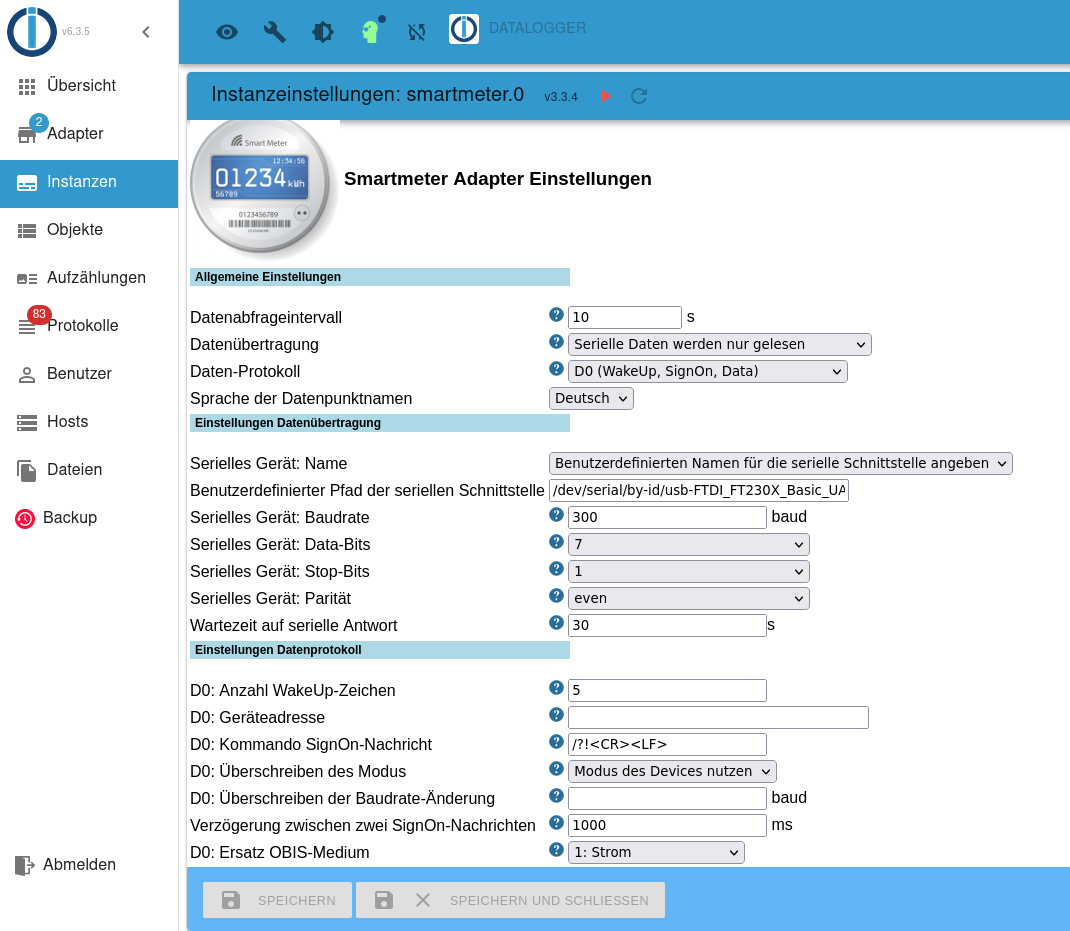
Könnt Ihr mir bitte weiterhelfen?
Habe ich die Initialisierungssequenz richtig eingegeben?
Vielen Dank für Eure Hilfe! -
Hallo,
leider bekomme ich meinen Adapter nicht installiert.
Ich habe ein Landis+Gyr e350 und folgende Werte gemäß Volkszähler (https://wiki.volkszaehler.org/hardware/channels/meters/power/edl-ehz/landisgyr_e350) eingegeben:
Könnt Ihr mir bitte weiterhelfen?
Habe ich die Initialisierungssequenz richtig eingegeben?
Vielen Dank für Eure Hilfe!@tomasog sagte in Adapter "smartmeter":
Könnt Ihr mir bitte weiterhelfen?
Für dich gilt das selbe wie beim Fall unmittelbar davor!
@homoran sagte in Adapter "smartmeter":
Grundsätzlich erst mal alles auf default lassen!
@homoran sagte in Adapter "smartmeter":
lass alles leer bis auf de USB Port.
wobei du da ggf. mit dem udev Bug zu kämpfen haben könntest
was steht im debug log beim Adapter start? -
@lukas-g
Ja, das ist das kaputte udev.
Gibt einen Thread dazu von @mickym@thomas-braun said in Adapter "smartmeter":
Ja, das ist das kaputte udev.
Sicher, dass es kaputt ist, auch wenn
ls -la /dev/serial/by-iddas Gerät wie erwartet anzeigt? -
@thomas-braun said in Adapter "smartmeter":
Ja, das ist das kaputte udev.
Sicher, dass es kaputt ist, auch wenn
ls -la /dev/serial/by-iddas Gerät wie erwartet anzeigt?@lukas-g
Ja.
Installed: 247.3-7+rpi1+deb11u2
Ist die kaputte Version -
@lukas-g sagte in Adapter "smartmeter":
Sicher, dass es kaputt ist,
Moin,
kannst Du mal schauen, ob er Dir Binär etwas auf der Konsole ausgibt?
sudo cat /dev/ttyUSB0Hast Du schon mal den die ID des Sticks genutzt?
ls -la /dev/serial/by-id/Durch Umstecken kann sich das
/dev/ttyU*mal ändern, dieIDbleibt aber immer gleich.
Ich hoffe, dass es bei den Hitch-USB auch so ist, wie bei den Zigbee Sticks, dass er da etwas unter/dev/serial/anlegen.VG
BerndP.S.: schon mal einen kompletten
Rebootgemacht? -
@lukas-g sagte in Adapter "smartmeter":
Sicher, dass es kaputt ist,
Moin,
kannst Du mal schauen, ob er Dir Binär etwas auf der Konsole ausgibt?
sudo cat /dev/ttyUSB0Hast Du schon mal den die ID des Sticks genutzt?
ls -la /dev/serial/by-id/Durch Umstecken kann sich das
/dev/ttyU*mal ändern, dieIDbleibt aber immer gleich.
Ich hoffe, dass es bei den Hitch-USB auch so ist, wie bei den Zigbee Sticks, dass er da etwas unter/dev/serial/anlegen.VG
BerndP.S.: schon mal einen kompletten
Rebootgemacht?@dp20eic sagte in Adapter "smartmeter":
Ich hoffe, dass es bei den Hitch-USB auch so ist, wie bei den Zigbee Sticks, dass er da etwas unter /dev/serial/ anlegen.
meiner macht das, sollte also funktionieren
Gruß Tom
https://github.com/tt-tom17
Wenn meine Hilfe erfolgreich war, benutze bitte das Voting unten rechts im BeitragNSPanel Script Wiki
https://github.com/joBr99/nspanel-lovelace-ui/wikiNSPanel Adapter Wiki
https://github.com/ticaki/ioBroker.nspanel-lovelace-ui/wiki




758
Online32.4k
Users81.5k
Topics1.3m
Posts