




InfluxDB auf Raspberry PI4 meldet: 404 page not found
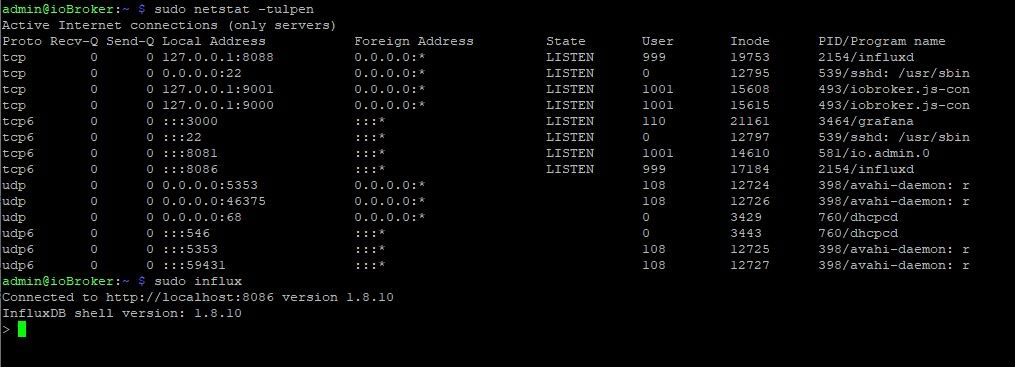
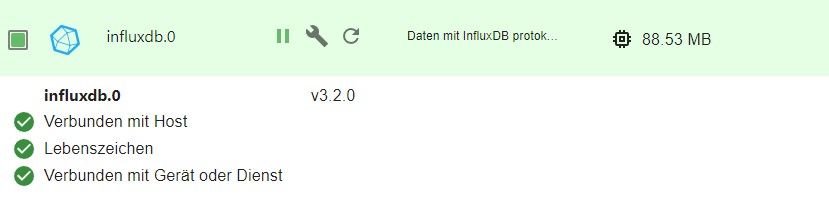

-
@thomas-braun
ohne sudo kommt die gleiche Meldunginflux setup Error: failed to check if already set up: 404 Not FoundJemand anders eine idee, weil jetzt geht garnichts mehr

@alexander-apel dazu muss doch noch die influx CLI installiert werden
umgestiegen von Proxmox auf Unraid
-
@alexander-apel dazu muss doch noch die influx CLI installiert werden
@crunchip das habe ich bereits
Installiert nach https://docs.influxdata.com/influxdb/v2.2/tools/influx-cli/?t=Linux
und eine Config habe ich auch bereits angelegtadmin@ioBroker:~ $ influx config Active Name URL Org localconfig http://localhost:8086 iobroker admin@ioBroker:~ $ influx setup Error: failed to check if already set up: 404 Not Foundaber dennoch kommt immer 404 wenn ich das Setup starten will, egal ob über das Terminal oder über die WebUI
-
@crunchip das habe ich bereits
Installiert nach https://docs.influxdata.com/influxdb/v2.2/tools/influx-cli/?t=Linux
und eine Config habe ich auch bereits angelegtadmin@ioBroker:~ $ influx config Active Name URL Org localconfig http://localhost:8086 iobroker admin@ioBroker:~ $ influx setup Error: failed to check if already set up: 404 Not Foundaber dennoch kommt immer 404 wenn ich das Setup starten will, egal ob über das Terminal oder über die WebUI
-
@thomas-braun
nichts guten :-(admin@ioBroker:~ $ apt policy influx* N: Unable to locate package influxdata-archive_compat.key N: Unable to locate package influxdb2-client-2.2.1-linux-arm64 N: Couldn't find any package by glob 'influxdb2-client-2.2.1-linux-arm64' N: Unable to locate package influxdb2-client-2.2.1-linux-arm64.tar.gz N: Couldn't find any package by glob 'influxdb2-client-2.2.1-linux-arm64.tar.gz' N: Unable to locate package influxdb.key N: Couldn't find any package by glob 'influxdb.key' N: Unable to locate package influxdb.key.1 N: Couldn't find any package by glob 'influxdb.key.1' -
@thomas-braun
nichts guten :-(admin@ioBroker:~ $ apt policy influx* N: Unable to locate package influxdata-archive_compat.key N: Unable to locate package influxdb2-client-2.2.1-linux-arm64 N: Couldn't find any package by glob 'influxdb2-client-2.2.1-linux-arm64' N: Unable to locate package influxdb2-client-2.2.1-linux-arm64.tar.gz N: Couldn't find any package by glob 'influxdb2-client-2.2.1-linux-arm64.tar.gz' N: Unable to locate package influxdb.key N: Couldn't find any package by glob 'influxdb.key' N: Unable to locate package influxdb.key.1 N: Couldn't find any package by glob 'influxdb.key.1'rm influxd* sudo apt update apt policy influx*Hast du versucht den client über den tarball zu installieren? Macht man nicht, man verwendet IMMER seinen Paketmanager für Software-Installationen. Dafür ist der nämlich da.
-
rm influxd*
sudo apt update
apt policy influx*
Hast du versucht den client über den tarball zu installieren? Macht man nicht, man verwendet IMMER seinen Paketmanager für Software-Installationen. Dafür ist der nämlich da.
@thomas-braun
ich habe keine Ahnung was tarball ist ist, ich habe mich an die Anleitung von influx data gehalten.
Irgendwie hat da auch was funktioniert weil die Version 2.2.1 ist wohl installiertinflux version Influx CLI 2.2.1 (git: 31ac783) build_date: 2021-11-09T21:24:22Zaber wahrscheinlich sind diese letzten Fehler hier das Problem warum es nicht weiter geht...
admin@ioBroker:~ $ rm influxd* rm: cannot remove 'influxdb2-client-2.2.1-linux-arm64': Is a directory admin@ioBroker:~ $ sudo apt update Hit:1 http://security.debian.org/debian-security bullseye-security InRelease Hit:2 http://deb.debian.org/debian bullseye InRelease Get:3 http://deb.debian.org/debian bullseye-updates InRelease [44.1 kB] Hit:4 http://archive.raspberrypi.org/debian bullseye InRelease Hit:5 https://packages.grafana.com/oss/deb stable InRelease Get:6 https://repos.influxdata.com/debian stable InRelease [6,892 B] Hit:7 https://deb.nodesource.com/node_18.x bullseye InRelease Hit:8 https://repos.influxdata.com/debian bullseye InRelease Err:6 https://repos.influxdata.com/debian stable InRelease The following signatures couldn't be verified because the public key is not available: NO_PUBKEY D8FF8E1F7DF8B07E Reading package lists... Done W: GPG error: https://repos.influxdata.com/debian stable InRelease: The following signatures couldn't be verified because the public key is not available: NO_PUBKEY D8FF8E1F7DF8B07E E: The repository 'https://repos.influxdata.com/debian stable InRelease' is not signed. N: Updating from such a repository can't be done securely, and is therefore disabled by default. N: See apt-secure(8) manpage for repository creation and user configuration details. admin@ioBroker:~ $ apt policy influx* N: Unable to locate package influxdb2-client-2.2.1-linux-arm64 N: Couldn't find any package by glob 'influxdb2-client-2.2.1-linux-arm64' -
@thomas-braun
ich habe keine Ahnung was tarball ist ist, ich habe mich an die Anleitung von influx data gehalten.
Irgendwie hat da auch was funktioniert weil die Version 2.2.1 ist wohl installiertinflux version Influx CLI 2.2.1 (git: 31ac783) build_date: 2021-11-09T21:24:22Zaber wahrscheinlich sind diese letzten Fehler hier das Problem warum es nicht weiter geht...
admin@ioBroker:~ $ rm influxd* rm: cannot remove 'influxdb2-client-2.2.1-linux-arm64': Is a directory admin@ioBroker:~ $ sudo apt update Hit:1 http://security.debian.org/debian-security bullseye-security InRelease Hit:2 http://deb.debian.org/debian bullseye InRelease Get:3 http://deb.debian.org/debian bullseye-updates InRelease [44.1 kB] Hit:4 http://archive.raspberrypi.org/debian bullseye InRelease Hit:5 https://packages.grafana.com/oss/deb stable InRelease Get:6 https://repos.influxdata.com/debian stable InRelease [6,892 B] Hit:7 https://deb.nodesource.com/node_18.x bullseye InRelease Hit:8 https://repos.influxdata.com/debian bullseye InRelease Err:6 https://repos.influxdata.com/debian stable InRelease The following signatures couldn't be verified because the public key is not available: NO_PUBKEY D8FF8E1F7DF8B07E Reading package lists... Done W: GPG error: https://repos.influxdata.com/debian stable InRelease: The following signatures couldn't be verified because the public key is not available: NO_PUBKEY D8FF8E1F7DF8B07E E: The repository 'https://repos.influxdata.com/debian stable InRelease' is not signed. N: Updating from such a repository can't be done securely, and is therefore disabled by default. N: See apt-secure(8) manpage for repository creation and user configuration details. admin@ioBroker:~ $ apt policy influx* N: Unable to locate package influxdb2-client-2.2.1-linux-arm64 N: Couldn't find any package by glob 'influxdb2-client-2.2.1-linux-arm64'@alexander-apel sagte in InfluxDB auf Raspberry PI4 meldet: 404 page not found:
ich habe mich an die Anleitung von influx data gehalten
Die ist so allgemein gehalten, die ist für deine Situation 'falsch'.
rm -rf influxd* sudo rm /etc/apt/source.list.d/infl* wget -q https://repos.influxdata.com/influxdata-archive_compat.key echo '393e8779c89ac8d958f81f942f9ad7fb82a25e133faddaf92e15b16e6ac9ce4c influxdata-archive_compat.key' | sha256sum -c && cat influxdata-archive_compat.key | gpg --dearmor | sudo tee /usr/share/keyrings/influxdata-archive_compat.gpg > /dev/null echo 'deb [signed-by=/usr/share/keyrings/influxdata-archive_compat.gpg] https://repos.influxdata.com/debian stable main' | sudo tee /etc/apt/sources.list.d/influxdata.list rm influxdata-archive_compat.key sudo apt update -
@alexander-apel sagte in InfluxDB auf Raspberry PI4 meldet: 404 page not found:
ich habe mich an die Anleitung von influx data gehalten
Die ist so allgemein gehalten, die ist für deine Situation 'falsch'.
rm -rf influxd* sudo rm /etc/apt/source.list.d/infl* wget -q https://repos.influxdata.com/influxdata-archive_compat.key echo '393e8779c89ac8d958f81f942f9ad7fb82a25e133faddaf92e15b16e6ac9ce4c influxdata-archive_compat.key' | sha256sum -c && cat influxdata-archive_compat.key | gpg --dearmor | sudo tee /usr/share/keyrings/influxdata-archive_compat.gpg > /dev/null echo 'deb [signed-by=/usr/share/keyrings/influxdata-archive_compat.gpg] https://repos.influxdata.com/debian stable main' | sudo tee /etc/apt/sources.list.d/influxdata.list rm influxdata-archive_compat.key sudo apt update@thomas-braun
ja wie gesagt, das sind meine "ersten Schritt" und ich habe keine Ahnung was ich hier tue und es tut mir auch voll leid das ich euch so dumme Fragen stellen muss :-(
jetzt kam dieser Fehlersudo rm /etc/apt/source.list.d/infl* rm: cannot remove '/etc/apt/source.list.d/infl*': No such file or directoryaber der Rest ging durch und die policy sieht jetzt so aus
apt policy influx*
influxdb2-cli:
  Installed: 2.7.3-1
  Candidate: 2.7.3-1
  Version table:
 *** 2.7.3-1 500
        500 https://repos.influxdata.com/debian stable/main arm64 Packages
        500 https://repos.influxdata.com/debian bullseye/stable arm64 Packages
        100 /var/lib/dpkg/status
     2.7.1-2 500
        500 https://repos.influxdata.com/debian stable/main arm64 Packages
        500 https://repos.influxdata.com/debian bullseye/stable arm64 Packages
     2.6.1 500
        500 https://repos.influxdata.com/debian stable/main arm64 Packages
        500 https://repos.influxdata.com/debian bullseye/stable arm64 Packages
     2.6.0 500
        500 https://repos.influxdata.com/debian stable/main arm64 Packages
        500 https://repos.influxdata.com/debian bullseye/stable arm64 Packages
     2.5.0 500
        500 https://repos.influxdata.com/debian stable/main arm64 Packages
        500 https://repos.influxdata.com/debian bullseye/stable arm64 Packages
     2.4.0 500
        500 https://repos.influxdata.com/debian stable/main arm64 Packages
        500 https://repos.influxdata.com/debian bullseye/stable arm64 Packages
     2.3.0 500
        500 https://repos.influxdata.com/debian stable/main arm64 Packages
        500 https://repos.influxdata.com/debian bullseye/stable arm64 Packages
influxdb-client:
  Installed: (none)
  Candidate: 1.6.7~rc0-1+b5
  Version table:
     1.6.7~rc0-1+b5 500
        500 http://deb.debian.org/debian bullseye/main arm64 Packages
influxdb-dev:
  Installed: (none)
  Candidate: (none)
  Version table:
influxdb2-client:
  Installed: (none)
  Candidate: 2.7.1-1
  Version table:
     2.7.1-1 500
        500 https://repos.influxdata.com/debian stable/main arm64 Packages
        500 https://repos.influxdata.com/debian bullseye/stable arm64 Packages
influxdb:
  Installed: (none)
  Candidate: 1.8.10-1
  Version table:
     1.8.10-1 500
        500 https://repos.influxdata.com/debian stable/main arm64 Packages
        500 https://repos.influxdata.com/debian bullseye/stable arm64 Packages
     1.6.7~rc0-1+b5 500
        500 http://deb.debian.org/debian bullseye/main arm64 Packages
influxdb2:
  Installed: 2.7.1-1
  Candidate: 2.7.1-1
  Version table:
 *** 2.7.1-1 500
        500 https://repos.influxdata.com/debian stable/main arm64 Packages
        500 https://repos.influxdata.com/debian bullseye/stable arm64 Packages
        100 /var/lib/dpkg/status
     2.7.0-1 500
        500 https://repos.influxdata.com/debian stable/main arm64 Packages
        500 https://repos.influxdata.com/debian bullseye/stable arm64 Packages
     2.6.1-1 500
        500 https://repos.influxdata.com/debian stable/main arm64 Packages
        500 https://repos.influxdata.com/debian bullseye/stable arm64 Packages
     2.6.0-1 500
        500 https://repos.influxdata.com/debian stable/main arm64 Packages
        500 https://repos.influxdata.com/debian bullseye/stable arm64 Packages
     2.5.1-1 500
        500 https://repos.influxdata.com/debian stable/main arm64 Packages
        500 https://repos.influxdata.com/debian bullseye/stable arm64 Packages
     2.4.0-1 500
        500 https://repos.influxdata.com/debian stable/main arm64 Packages
        500 https://repos.influxdata.com/debian bullseye/stable arm64 Packages
     2.3.0-1 500
        500 https://repos.influxdata.com/debian stable/main arm64 Packages
        500 https://repos.influxdata.com/debian bullseye/stable arm64 Packages
     2.2.0 500
        500 https://repos.influxdata.com/debian stable/main arm64 Packages
        500 https://repos.influxdata.com/debian bullseye/stable arm64 Packages
*edit: Das Setup geht immer noch nicht - wieder oder besser immer noch 404 not Found
-
@thomas-braun
ja wie gesagt, das sind meine "ersten Schritt" und ich habe keine Ahnung was ich hier tue und es tut mir auch voll leid das ich euch so dumme Fragen stellen muss :-(
jetzt kam dieser Fehlersudo rm /etc/apt/source.list.d/infl* rm: cannot remove '/etc/apt/source.list.d/infl*': No such file or directoryaber der Rest ging durch und die policy sieht jetzt so aus
apt policy influx*
influxdb2-cli:
  Installed: 2.7.3-1
  Candidate: 2.7.3-1
  Version table:
 *** 2.7.3-1 500
        500 https://repos.influxdata.com/debian stable/main arm64 Packages
        500 https://repos.influxdata.com/debian bullseye/stable arm64 Packages
        100 /var/lib/dpkg/status
     2.7.1-2 500
        500 https://repos.influxdata.com/debian stable/main arm64 Packages
        500 https://repos.influxdata.com/debian bullseye/stable arm64 Packages
     2.6.1 500
        500 https://repos.influxdata.com/debian stable/main arm64 Packages
        500 https://repos.influxdata.com/debian bullseye/stable arm64 Packages
     2.6.0 500
        500 https://repos.influxdata.com/debian stable/main arm64 Packages
        500 https://repos.influxdata.com/debian bullseye/stable arm64 Packages
     2.5.0 500
        500 https://repos.influxdata.com/debian stable/main arm64 Packages
        500 https://repos.influxdata.com/debian bullseye/stable arm64 Packages
     2.4.0 500
        500 https://repos.influxdata.com/debian stable/main arm64 Packages
        500 https://repos.influxdata.com/debian bullseye/stable arm64 Packages
     2.3.0 500
        500 https://repos.influxdata.com/debian stable/main arm64 Packages
        500 https://repos.influxdata.com/debian bullseye/stable arm64 Packages
influxdb-client:
  Installed: (none)
  Candidate: 1.6.7~rc0-1+b5
  Version table:
     1.6.7~rc0-1+b5 500
        500 http://deb.debian.org/debian bullseye/main arm64 Packages
influxdb-dev:
  Installed: (none)
  Candidate: (none)
  Version table:
influxdb2-client:
  Installed: (none)
  Candidate: 2.7.1-1
  Version table:
     2.7.1-1 500
        500 https://repos.influxdata.com/debian stable/main arm64 Packages
        500 https://repos.influxdata.com/debian bullseye/stable arm64 Packages
influxdb:
  Installed: (none)
  Candidate: 1.8.10-1
  Version table:
     1.8.10-1 500
        500 https://repos.influxdata.com/debian stable/main arm64 Packages
        500 https://repos.influxdata.com/debian bullseye/stable arm64 Packages
     1.6.7~rc0-1+b5 500
        500 http://deb.debian.org/debian bullseye/main arm64 Packages
influxdb2:
  Installed: 2.7.1-1
  Candidate: 2.7.1-1
  Version table:
 *** 2.7.1-1 500
        500 https://repos.influxdata.com/debian stable/main arm64 Packages
        500 https://repos.influxdata.com/debian bullseye/stable arm64 Packages
        100 /var/lib/dpkg/status
     2.7.0-1 500
        500 https://repos.influxdata.com/debian stable/main arm64 Packages
        500 https://repos.influxdata.com/debian bullseye/stable arm64 Packages
     2.6.1-1 500
        500 https://repos.influxdata.com/debian stable/main arm64 Packages
        500 https://repos.influxdata.com/debian bullseye/stable arm64 Packages
     2.6.0-1 500
        500 https://repos.influxdata.com/debian stable/main arm64 Packages
        500 https://repos.influxdata.com/debian bullseye/stable arm64 Packages
     2.5.1-1 500
        500 https://repos.influxdata.com/debian stable/main arm64 Packages
        500 https://repos.influxdata.com/debian bullseye/stable arm64 Packages
     2.4.0-1 500
        500 https://repos.influxdata.com/debian stable/main arm64 Packages
        500 https://repos.influxdata.com/debian bullseye/stable arm64 Packages
     2.3.0-1 500
        500 https://repos.influxdata.com/debian stable/main arm64 Packages
        500 https://repos.influxdata.com/debian bullseye/stable arm64 Packages
     2.2.0 500
        500 https://repos.influxdata.com/debian stable/main arm64 Packages
        500 https://repos.influxdata.com/debian bullseye/stable arm64 Packages
*edit: Das Setup geht immer noch nicht - wieder oder besser immer noch 404 not Found
@alexander-apel sagte in InfluxDB auf Raspberry PI4 meldet: 404 page not found:
influxdb2-cli
sudo apt remove influxdb2-cli
sudo apt install influxdb2-client
Und du hast eine Doublette irgendwo.
Schau pergrep -rn '/etc/apt/' -e 'influx'nach in welcher Datei das ist. Dann die Zeile, die nicht
bullseyeenthält löschen. -
@alexander-apel sagte in InfluxDB auf Raspberry PI4 meldet: 404 page not found:
influxdb2-cli
sudo apt remove influxdb2-cli
sudo apt install influxdb2-client
Und du hast eine Doublette irgendwo.
Schau pergrep -rn '/etc/apt/' -e 'influx'nach in welcher Datei das ist. Dann die Zeile, die nicht
bullseyeenthält löschen.@thomas-braun
habe den falschen Part auskommentiertgrep -rn '/etc/apt/' -e 'influx' grep: /etc/apt/trusted.gpg~: binary file matches grep: /etc/apt/trusted.gpg: binary file matches /etc/apt/sources.list.d/influxdata.list:1:#deb [signed-by=/usr/share/keyrings/influxdata-archive_compat.gpg] https://repos.influxdata.com/debian stable main /etc/apt/sources.list.d/influxdb.list:1:deb https://repos.influxdata.com/debian bullseye stable grep: /etc/apt/trusted.gpg.d/influxdata-archive_compat.gpg: binary file matches grep: /etc/apt/trusted.gpg.d/influxdb.gpg: binary file matchesund neuinstalliert, aber nach wie vor...
admin@ioBroker:~ $ influx ping OK admin@ioBroker:~ $ influx version Influx CLI 2.2.1 (git: 31ac783) build_date: 2021-11-09T21:24:22Z admin@ioBroker:~ $ influx setup Error: failed to check if already set up: 404 Not Found -
@thomas-braun
habe den falschen Part auskommentiertgrep -rn '/etc/apt/' -e 'influx' grep: /etc/apt/trusted.gpg~: binary file matches grep: /etc/apt/trusted.gpg: binary file matches /etc/apt/sources.list.d/influxdata.list:1:#deb [signed-by=/usr/share/keyrings/influxdata-archive_compat.gpg] https://repos.influxdata.com/debian stable main /etc/apt/sources.list.d/influxdb.list:1:deb https://repos.influxdata.com/debian bullseye stable grep: /etc/apt/trusted.gpg.d/influxdata-archive_compat.gpg: binary file matches grep: /etc/apt/trusted.gpg.d/influxdb.gpg: binary file matchesund neuinstalliert, aber nach wie vor...
admin@ioBroker:~ $ influx ping OK admin@ioBroker:~ $ influx version Influx CLI 2.2.1 (git: 31ac783) build_date: 2021-11-09T21:24:22Z admin@ioBroker:~ $ influx setup Error: failed to check if already set up: 404 Not Found@alexander-apel sagte in InfluxDB auf Raspberry PI4 meldet: 404 page not found:
Okay, Kommando zurück.
Mach die influxdata.list wieder aktiv, dafür löschst dusudo rm /etc/apt/sources.list.d/influxdb.listund
sudo rm /etc/apt/trusted.gpg.d/influx*sudo apt update -
@alexander-apel sagte in InfluxDB auf Raspberry PI4 meldet: 404 page not found:
Okay, Kommando zurück.
Mach die influxdata.list wieder aktiv, dafür löschst dusudo rm /etc/apt/sources.list.d/influxdb.listund
sudo rm /etc/apt/trusted.gpg.d/influx*sudo apt update@thomas-braun alles erledigt, aber gleiches Ergebnis. Aber die policy sieht jetzt schonmal besser aus :-)
admin@ioBroker:~ $ influx ping
OK
admin@ioBroker:~ $ influx version
Influx CLI 2.2.1 (git: 31ac783) build_date: 2021-11-09T21:24:22Z
admin@ioBroker:~ $ influx setup
Error: failed to check if already set up: 404 Not Found
admin@ioBroker:~ $ apt policy influx*
influxdb2-cli:
  Installed: (none)
  Candidate: (none)
  Version table:
influxdb-client:
  Installed: (none)
  Candidate: 1.6.7~rc0-1+b5
  Version table:
     1.6.7~rc0-1+b5 500
        500 http://deb.debian.org/debian bullseye/main arm64 Packages
influxdb-dev:
  Installed: (none)
  Candidate: (none)
  Version table:
influxdb2-client:
  Installed: 2.7.1-1
  Candidate: 2.7.1-1
  Version table:
 *** 2.7.1-1 100
        100 /var/lib/dpkg/status
influxdb:
  Installed: (none)
  Candidate: 1.6.7~rc0-1+b5
  Version table:
     1.6.7~rc0-1+b5 500
        500 http://deb.debian.org/debian bullseye/main arm64 Packages
influxdb2:
  Installed: 2.7.1-1
  Candidate: 2.7.1-1
  Version table:
 *** 2.7.1-1 100
        100 /var/lib/dpkg/status
oder sehe ich das richtig das die CLI jetzt fehlt?
-
@thomas-braun alles erledigt, aber gleiches Ergebnis. Aber die policy sieht jetzt schonmal besser aus :-)
admin@ioBroker:~ $ influx ping
OK
admin@ioBroker:~ $ influx version
Influx CLI 2.2.1 (git: 31ac783) build_date: 2021-11-09T21:24:22Z
admin@ioBroker:~ $ influx setup
Error: failed to check if already set up: 404 Not Found
admin@ioBroker:~ $ apt policy influx*
influxdb2-cli:
  Installed: (none)
  Candidate: (none)
  Version table:
influxdb-client:
  Installed: (none)
  Candidate: 1.6.7~rc0-1+b5
  Version table:
     1.6.7~rc0-1+b5 500
        500 http://deb.debian.org/debian bullseye/main arm64 Packages
influxdb-dev:
  Installed: (none)
  Candidate: (none)
  Version table:
influxdb2-client:
  Installed: 2.7.1-1
  Candidate: 2.7.1-1
  Version table:
 *** 2.7.1-1 100
        100 /var/lib/dpkg/status
influxdb:
  Installed: (none)
  Candidate: 1.6.7~rc0-1+b5
  Version table:
     1.6.7~rc0-1+b5 500
        500 http://deb.debian.org/debian bullseye/main arm64 Packages
influxdb2:
  Installed: 2.7.1-1
  Candidate: 2.7.1-1
  Version table:
 *** 2.7.1-1 100
        100 /var/lib/dpkg/status
oder sehe ich das richtig das die CLI jetzt fehlt?
@alexander-apel sagte in InfluxDB auf Raspberry PI4 meldet: 404 page not found:
oder sehe ich das richtig das die CLI jetzt fehlt?
Nein, dir fehlt aber eine aktive Quelle dafür. Nimm das Kommentarzeichen aus der
/etc/apt/sources.list.d/influxdata.listwieder raus.Dann
sudo apt update -
@alexander-apel sagte in InfluxDB auf Raspberry PI4 meldet: 404 page not found:
oder sehe ich das richtig das die CLI jetzt fehlt?
Nein, dir fehlt aber eine aktive Quelle dafür. Nimm das Kommentarzeichen aus der
/etc/apt/sources.list.d/influxdata.listwieder raus.Dann
sudo apt update@thomas-braun
ok aber installed steht noneadmin@ioBroker:~ $ apt policy influx* influxdb2-cli: Installed: (none) Candidate: 2.7.3-1 Version table: 2.7.3-1 500 500 https://repos.influxdata.com/debian stable/main arm64 Packages 2.7.1-2 500 500 https://repos.influxdata.com/debian stable/main arm64 Packages 2.6.1 500 500 https://repos.influxdata.com/debian stable/main arm64 Packages 2.6.0 500 500 https://repos.influxdata.com/debian stable/main arm64 Packages 2.5.0 500 500 https://repos.influxdata.com/debian stable/main arm64 Packages 2.4.0 500 500 https://repos.influxdata.com/debian stable/main arm64 Packages 2.3.0 500 500 https://repos.influxdata.com/debian stable/main arm64 Packages influxdb-client: Installed: (none) Candidate: 1.6.7~rc0-1+b5 Version table: 1.6.7~rc0-1+b5 500 500 http://deb.debian.org/debian bullseye/main arm64 Packages influxdb-dev: Installed: (none) Candidate: (none) Version table: influxdb2-client: Installed: 2.7.1-1 Candidate: 2.7.1-1 Version table: *** 2.7.1-1 500 500 https://repos.influxdata.com/debian stable/main arm64 Packages 100 /var/lib/dpkg/status influxdb: Installed: (none) Candidate: 1.8.10-1 Version table: 1.8.10-1 500 500 https://repos.influxdata.com/debian stable/main arm64 Packages 1.6.7~rc0-1+b5 500 500 http://deb.debian.org/debian bullseye/main arm64 Packages influxdb2: Installed: 2.7.1-1 Candidate: 2.7.1-1 Version table: *** 2.7.1-1 500 500 https://repos.influxdata.com/debian stable/main arm64 Packages 100 /var/lib/dpkg/status 2.7.0-1 500 500 https://repos.influxdata.com/debian stable/main arm64 Packages 2.6.1-1 500 500 https://repos.influxdata.com/debian stable/main arm64 Packages 2.6.0-1 500 500 https://repos.influxdata.com/debian stable/main arm64 Packages 2.5.1-1 500 500 https://repos.influxdata.com/debian stable/main arm64 Packages 2.4.0-1 500 500 https://repos.influxdata.com/debian stable/main arm64 Packages 2.3.0-1 500 500 https://repos.influxdata.com/debian stable/main arm64 Packages 2.2.0 500 500 https://repos.influxdata.com/debian stable/main arm64 Packages -
@thomas-braun
ok aber installed steht noneadmin@ioBroker:~ $ apt policy influx* influxdb2-cli: Installed: (none) Candidate: 2.7.3-1 Version table: 2.7.3-1 500 500 https://repos.influxdata.com/debian stable/main arm64 Packages 2.7.1-2 500 500 https://repos.influxdata.com/debian stable/main arm64 Packages 2.6.1 500 500 https://repos.influxdata.com/debian stable/main arm64 Packages 2.6.0 500 500 https://repos.influxdata.com/debian stable/main arm64 Packages 2.5.0 500 500 https://repos.influxdata.com/debian stable/main arm64 Packages 2.4.0 500 500 https://repos.influxdata.com/debian stable/main arm64 Packages 2.3.0 500 500 https://repos.influxdata.com/debian stable/main arm64 Packages influxdb-client: Installed: (none) Candidate: 1.6.7~rc0-1+b5 Version table: 1.6.7~rc0-1+b5 500 500 http://deb.debian.org/debian bullseye/main arm64 Packages influxdb-dev: Installed: (none) Candidate: (none) Version table: influxdb2-client: Installed: 2.7.1-1 Candidate: 2.7.1-1 Version table: *** 2.7.1-1 500 500 https://repos.influxdata.com/debian stable/main arm64 Packages 100 /var/lib/dpkg/status influxdb: Installed: (none) Candidate: 1.8.10-1 Version table: 1.8.10-1 500 500 https://repos.influxdata.com/debian stable/main arm64 Packages 1.6.7~rc0-1+b5 500 500 http://deb.debian.org/debian bullseye/main arm64 Packages influxdb2: Installed: 2.7.1-1 Candidate: 2.7.1-1 Version table: *** 2.7.1-1 500 500 https://repos.influxdata.com/debian stable/main arm64 Packages 100 /var/lib/dpkg/status 2.7.0-1 500 500 https://repos.influxdata.com/debian stable/main arm64 Packages 2.6.1-1 500 500 https://repos.influxdata.com/debian stable/main arm64 Packages 2.6.0-1 500 500 https://repos.influxdata.com/debian stable/main arm64 Packages 2.5.1-1 500 500 https://repos.influxdata.com/debian stable/main arm64 Packages 2.4.0-1 500 500 https://repos.influxdata.com/debian stable/main arm64 Packages 2.3.0-1 500 500 https://repos.influxdata.com/debian stable/main arm64 Packages 2.2.0 500 500 https://repos.influxdata.com/debian stable/main arm64 Packages@alexander-apel sagte in InfluxDB auf Raspberry PI4 meldet: 404 page not found:
Du möchtest influxdb2-client statt influxdb2-cli installiert haben. Hast du auch:influxdb2-client: Installed: 2.7.1-1 Candidate: 2.7.1-1 -
@alexander-apel sagte in InfluxDB auf Raspberry PI4 meldet: 404 page not found:
Du möchtest influxdb2-client statt influxdb2-cli installiert haben. Hast du auch:influxdb2-client: Installed: 2.7.1-1 Candidate: 2.7.1-1@thomas-braun ah ok, das teil macht mich noch wahnsinnig

aber gut, ich habe es nochmal versucht und mein Freund 404 ist leider immer noch vorhanden -
@thomas-braun ah ok, das teil macht mich noch wahnsinnig
aber gut, ich habe es nochmal versucht und mein Freund 404 ist leider immer noch vorhandenHast du mal den Service (neu)gestartet? Alternativ den ganzen Rechner.
systemctl status influx*sagt?
-
Hast du mal den Service (neu)gestartet? Alternativ den ganzen Rechner.
systemctl status influx*sagt?
@thomas-braun
das habe ich auch gerade gesehen, laut der Anleitungen im Netz sollte hier auch "InfluxDB started" oder sowas mit "http Port 8086" stehen, das tut es aber nicht.admin@ioBroker:~ $ systemctl status influx* ● influxdb.service - InfluxDB is an open-source, distributed, time series database Loaded: loaded (/lib/systemd/system/influxdb.service; enabled; vendor preset: enabled) Active: active (running) since Sun 2023-07-02 13:08:50 CEST; 22h ago Docs: https://docs.influxdata.com/influxdb/ Main PID: 2154 (influxd) Tasks: 14 (limit: 3933) CPU: 4min 52.245s CGroup: /system.slice/influxdb.service └─2154 /usr/bin/influxd -config /etc/influxdb/influxdb.conf Jul 03 11:46:42 ioBroker influxd-systemd-start.sh[2154]: [httpd] 127.0.0.1 - admin [03/Jul/2023:11:46:42 +0200] "POST /write?database=iobroker&db=iobroker&p=%5BREDACTED%5D&precision=ms&u=admin HTTP/1.1> Jul 03 11:51:01 ioBroker influxd-systemd-start.sh[2154]: [httpd] 127.0.0.1 - admin [03/Jul/2023:11:51:01 +0200] "POST /write?database=iobroker&db=iobroker&p=%5BREDACTED%5D&precision=ms&u=admin HTTP/1.1> Jul 03 11:51:01 ioBroker influxd-systemd-start.sh[2154]: [httpd] 127.0.0.1 - admin [03/Jul/2023:11:51:01 +0200] "POST /write?database=iobroker&db=iobroker&p=%5BREDACTED%5D&precision=ms&u=admin HTTP/1.1> Jul 03 11:51:42 ioBroker influxd-systemd-start.sh[2154]: [httpd] 127.0.0.1 - admin [03/Jul/2023:11:51:42 +0200] "POST /write?database=iobroker&db=iobroker&p=%5BREDACTED%5D&precision=ms&u=admin HTTP/1.1> Jul 03 11:51:42 ioBroker influxd-systemd-start.sh[2154]: [httpd] 127.0.0.1 - admin [03/Jul/2023:11:51:42 +0200] "POST /write?database=iobroker&db=iobroker&p=%5BREDACTED%5D&precision=ms&u=admin HTTP/1.1> Jul 03 11:56:02 ioBroker influxd-systemd-start.sh[2154]: [httpd] 127.0.0.1 - admin [03/Jul/2023:11:56:02 +0200] "POST /write?database=iobroker&db=iobroker&p=%5BREDACTED%5D&precision=ms&u=admin HTTP/1.1> Jul 03 11:56:42 ioBroker influxd-systemd-start.sh[2154]: [httpd] 127.0.0.1 - admin [03/Jul/2023:11:56:42 +0200] "POST /write?database=iobroker&db=iobroker&p=%5BREDACTED%5D&precision=ms&u=admin HTTP/1.1> Jul 03 11:56:42 ioBroker influxd-systemd-start.sh[2154]: [httpd] 127.0.0.1 - admin [03/Jul/2023:11:56:42 +0200] "POST /write?database=iobroker&db=iobroker&p=%5BREDACTED%5D&precision=ms&u=admin HTTP/1.1> Jul 03 12:01:42 ioBroker influxd-systemd-start.sh[2154]: [httpd] 127.0.0.1 - admin [03/Jul/2023:12:01:42 +0200] "POST /write?database=iobroker&db=iobroker&p=%5BREDACTED%5D&precision=ms&u=admin HTTP/1.1> Jul 03 12:01:42 ioBroker influxd-systemd-start.sh[2154]: [httpd] 127.0.0.1 - admin [03/Jul/2023:12:01:42 +0200] "POST /write?database=iobroker&db=iobroker&p=%5BREDACTED%5D&precision=ms&u=admin HTTP/1.1> lines 1-20/20 (END) -
@thomas-braun
das habe ich auch gerade gesehen, laut der Anleitungen im Netz sollte hier auch "InfluxDB started" oder sowas mit "http Port 8086" stehen, das tut es aber nicht.admin@ioBroker:~ $ systemctl status influx* ● influxdb.service - InfluxDB is an open-source, distributed, time series database Loaded: loaded (/lib/systemd/system/influxdb.service; enabled; vendor preset: enabled) Active: active (running) since Sun 2023-07-02 13:08:50 CEST; 22h ago Docs: https://docs.influxdata.com/influxdb/ Main PID: 2154 (influxd) Tasks: 14 (limit: 3933) CPU: 4min 52.245s CGroup: /system.slice/influxdb.service └─2154 /usr/bin/influxd -config /etc/influxdb/influxdb.conf Jul 03 11:46:42 ioBroker influxd-systemd-start.sh[2154]: [httpd] 127.0.0.1 - admin [03/Jul/2023:11:46:42 +0200] "POST /write?database=iobroker&db=iobroker&p=%5BREDACTED%5D&precision=ms&u=admin HTTP/1.1> Jul 03 11:51:01 ioBroker influxd-systemd-start.sh[2154]: [httpd] 127.0.0.1 - admin [03/Jul/2023:11:51:01 +0200] "POST /write?database=iobroker&db=iobroker&p=%5BREDACTED%5D&precision=ms&u=admin HTTP/1.1> Jul 03 11:51:01 ioBroker influxd-systemd-start.sh[2154]: [httpd] 127.0.0.1 - admin [03/Jul/2023:11:51:01 +0200] "POST /write?database=iobroker&db=iobroker&p=%5BREDACTED%5D&precision=ms&u=admin HTTP/1.1> Jul 03 11:51:42 ioBroker influxd-systemd-start.sh[2154]: [httpd] 127.0.0.1 - admin [03/Jul/2023:11:51:42 +0200] "POST /write?database=iobroker&db=iobroker&p=%5BREDACTED%5D&precision=ms&u=admin HTTP/1.1> Jul 03 11:51:42 ioBroker influxd-systemd-start.sh[2154]: [httpd] 127.0.0.1 - admin [03/Jul/2023:11:51:42 +0200] "POST /write?database=iobroker&db=iobroker&p=%5BREDACTED%5D&precision=ms&u=admin HTTP/1.1> Jul 03 11:56:02 ioBroker influxd-systemd-start.sh[2154]: [httpd] 127.0.0.1 - admin [03/Jul/2023:11:56:02 +0200] "POST /write?database=iobroker&db=iobroker&p=%5BREDACTED%5D&precision=ms&u=admin HTTP/1.1> Jul 03 11:56:42 ioBroker influxd-systemd-start.sh[2154]: [httpd] 127.0.0.1 - admin [03/Jul/2023:11:56:42 +0200] "POST /write?database=iobroker&db=iobroker&p=%5BREDACTED%5D&precision=ms&u=admin HTTP/1.1> Jul 03 11:56:42 ioBroker influxd-systemd-start.sh[2154]: [httpd] 127.0.0.1 - admin [03/Jul/2023:11:56:42 +0200] "POST /write?database=iobroker&db=iobroker&p=%5BREDACTED%5D&precision=ms&u=admin HTTP/1.1> Jul 03 12:01:42 ioBroker influxd-systemd-start.sh[2154]: [httpd] 127.0.0.1 - admin [03/Jul/2023:12:01:42 +0200] "POST /write?database=iobroker&db=iobroker&p=%5BREDACTED%5D&precision=ms&u=admin HTTP/1.1> Jul 03 12:01:42 ioBroker influxd-systemd-start.sh[2154]: [httpd] 127.0.0.1 - admin [03/Jul/2023:12:01:42 +0200] "POST /write?database=iobroker&db=iobroker&p=%5BREDACTED%5D&precision=ms&u=admin HTTP/1.1> lines 1-20/20 (END)@alexander-apel sagte in InfluxDB auf Raspberry PI4 meldet: 404 page not found:
influxdb.service
Ich weiß nicht ob das nicht der Prozess zur influxdb1 ist.
Müsste dir jemand sagen, bei dem influxdb2 läuft. -
@alexander-apel sagte in InfluxDB auf Raspberry PI4 meldet: 404 page not found:
influxdb.service
Ich weiß nicht ob das nicht der Prozess zur influxdb1 ist.
Müsste dir jemand sagen, bei dem influxdb2 läuft.@thomas-braun sagte in InfluxDB auf Raspberry PI4 meldet: 404 page not found:
Ich weiß nicht ob das nicht der Prozess zur influxdb1 ist.
@alexander-apel sagte in InfluxDB auf Raspberry PI4 meldet: 404 page not found:
active (running) since Sun 2023-07-02 13:08:50 CEST; 22h ago
scheint wohl so
hat er wohl nicht
@crunchip sagte in InfluxDB auf Raspberry PI4 meldet: 404 page not found:
influxdb deinstallieren
sudo apt-get autoremove --purge influxdbausgeführt
umgestiegen von Proxmox auf Unraid



Hey! Du scheinst an dieser Unterhaltung interessiert zu sein, hast aber noch kein Konto.
Hast du es satt, bei jedem Besuch durch die gleichen Beiträge zu scrollen? Wenn du dich für ein Konto anmeldest, kommst du immer genau dorthin zurück, wo du zuvor warst, und kannst dich über neue Antworten benachrichtigen lassen (entweder per E-Mail oder Push-Benachrichtigung). Du kannst auch Lesezeichen speichern und Beiträge positiv bewerten, um anderen Community-Mitgliedern deine Wertschätzung zu zeigen.
Mit deinem Input könnte dieser Beitrag noch besser werden 💗
Registrieren AnmeldenSupport us
321
Online33.0k
Benutzer83.6k
Themen1.3m
Beiträge