



Skip to content
  • Home
  • Recent
  • Tags
  • 0 Unread 0
  • Categories
  • Unreplied
  • Popular
  • GitHub
  • Docu
  • Hilfe
Skins
  • Light
  • Brite
  • Cerulean
  • Cosmo
  • Flatly
  • Journal
  • Litera
  • Lumen
  • Lux
  • Materia
  • Minty
  • Morph
  • Pulse
  • Sandstone
  • Simplex
  • Sketchy
  • Spacelab
  • United
  • Yeti
  • Zephyr
  • Dark
  • Cyborg
  • Darkly
  • Quartz
  • Slate
  • Solar
  • Superhero
  • Vapor

  • Default (No Skin)
  • No Skin
Collapse
ioBroker Logo

Community Forum

donate donate
  1. ioBroker Community Home
  2. Deutsch
  3. Einsteigerfragen
  4. Einbindung von Geräten
  5. [gelöst] Keine Verbindung zu mqtt-Server/Broker

NEWS

  • UPDATE 31.10.: Amazon Alexa - ioBroker Skill läuft aus ?
    apollon77A
    apollon77
    48
    3
    8.8k

  • Monatsrückblick – September 2025
    BluefoxB
    Bluefox
    13
    1
    2.2k

  • Neues Video "KI im Smart Home" - ioBroker plus n8n
    BluefoxB
    Bluefox
    16
    1
    3.2k

[gelöst] Keine Verbindung zu mqtt-Server/Broker

Scheduled Pinned Locked Moved Einbindung von Geräten
37 Posts 5 Posters 3.4k Views 3 Watching
  • Oldest to Newest
  • Newest to Oldest
  • Most Votes
Reply
  • Reply as topic
Log in to reply
This topic has been deleted. Only users with topic management privileges can see it.
  • M MiPl

    Hi,
    in diesem Thread Lay-Z-Spa Wifi Control wird u. a. auch beschrieben, wie die Anbindung an den mqtt-Server/Broker erfolgen kann. Ich habe dies mit allen möglichen Variationen versucht, kann jedoch keine Verbindung herstellen. Ich bin mit meinem Latein am Ende was ich noch machen könnte und wäre daher für Hilfe dankbar.

    Ich gebe in der Software für die Poolsteuerung unter dem Punkt MQTT folgendes ein:

    MQTT aktivieren (Haken setzen)
    lokale IP Adresse = Raspberry Pi 3B+ auf dem ioBroker mit MQTT-Adapter läuft
    Port 1883
    Username xyz
    Password abc
    ClientID layzspa
    Base Topic layzspa
    Telemetry interval (s) 10

    Im MQTT-Adapter
    IP Server/Broker
    IP Adresse [iPv4] 0.0.0.0 - Zugriff von allen IPs zulassen
    Port 1883
    WebSockets benutzen ja und nein versucht
    Benutzer xyz
    Password abc

    Wenn ich dann in der Software für den Pool etwas ändere sollte doch eine Verbindung aufgebaut werden, oder? Es passiert aber nicht. Die Software sagt "disconnected" und der Adapter bleibt auf gelb.

    Was mache ich falsch?
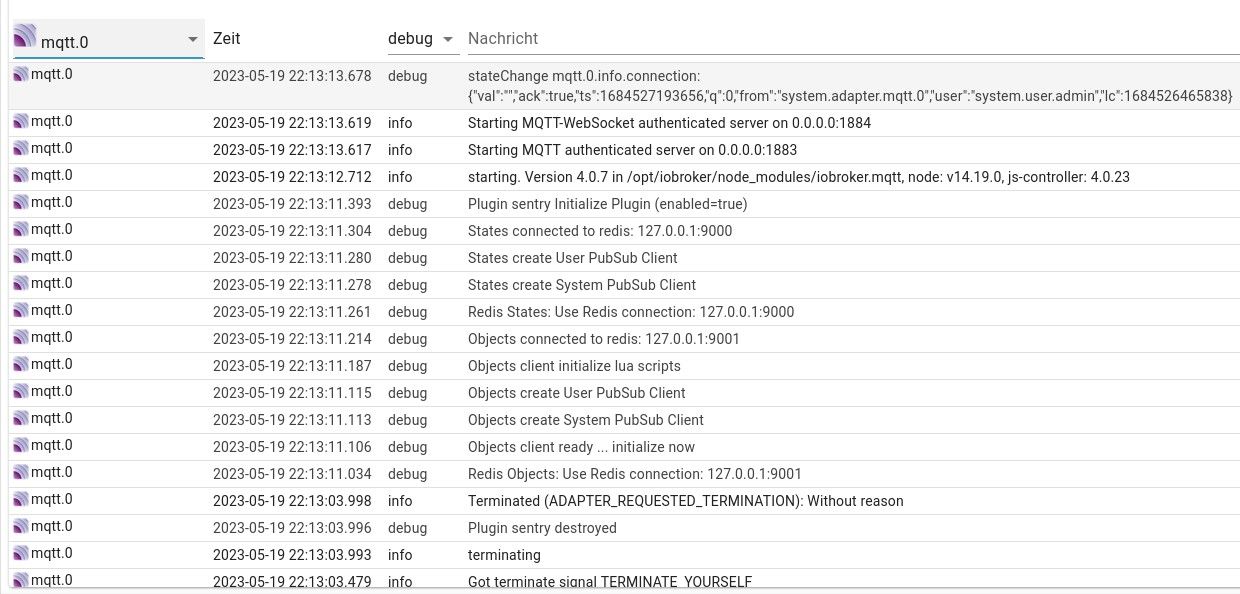
    Log-MQTT.jpg

    Danke für Eure Hilfe.

    Michael

    crunchipC Away
    crunchipC Away
    crunchip
    Forum Testing Most Active
    wrote on last edited by crunchip
    #2

    @mipl bring mal dein System(nodejs) auf Stand
    In der mqtt Instanz unter Einstellungen irgend etwas angehakt?

    umgestiegen von Proxmox auf Unraid

    M 1 Reply Last reply
    0
    • crunchipC crunchip

      @mipl bring mal dein System(nodejs) auf Stand
      In der mqtt Instanz unter Einstellungen irgend etwas angehakt?

      M Offline
      M Offline
      MiPl
      wrote on last edited by MiPl
      #3

      @crunchip
      Hallo, iobroker ist auf dem aktuellen Stand. Hatte gestern ein Systemupdate/-upgrade gemacht. Dabei habe ich aber gesehen, dass der MQTT-Adapter "updateable" auf 4.1.1 sein soll (ich habe 4.0.7), wurde aber nicht aktualisiert.

      Habe gerade ein node.js update auf 18.16.0 gemacht. Ich wusste nicht, dass man sich darum kümmern muss - wieder was dazu gelernt. Adapter derzeit gelb (und leider auch ein paar andere :-( )

      Meine MQTT-Einstellungen sehen so aus:
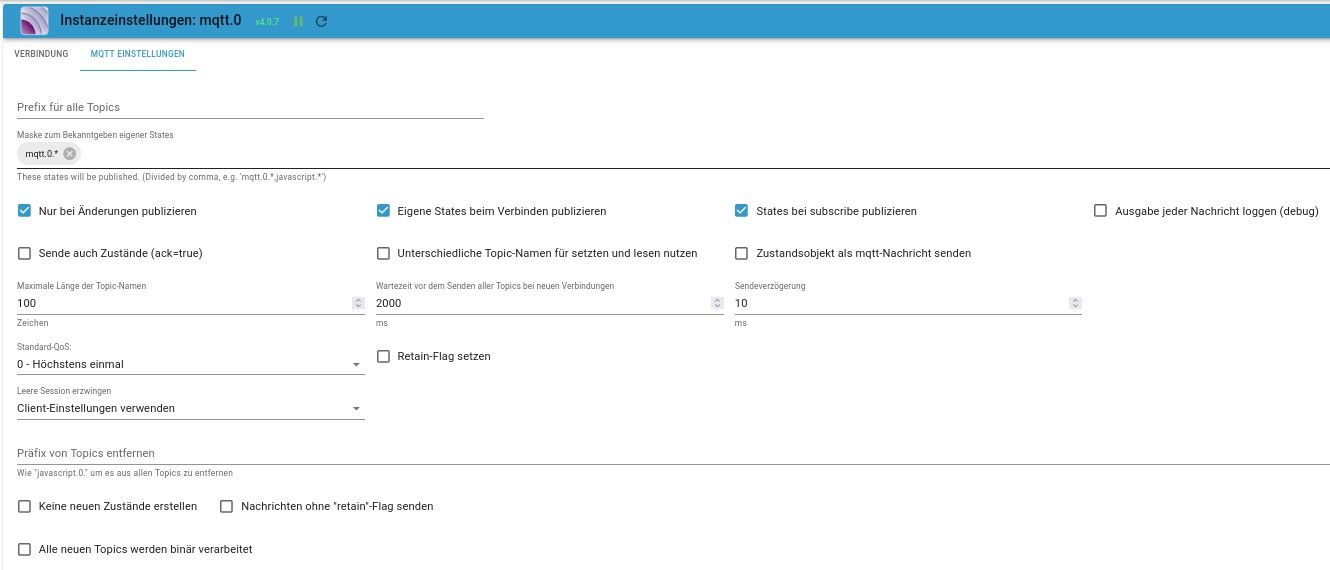
      MQTT-Einstellungen.jpg

      crunchipC 1 Reply Last reply
      0
      • M MiPl

        @crunchip
        Hallo, iobroker ist auf dem aktuellen Stand. Hatte gestern ein Systemupdate/-upgrade gemacht. Dabei habe ich aber gesehen, dass der MQTT-Adapter "updateable" auf 4.1.1 sein soll (ich habe 4.0.7), wurde aber nicht aktualisiert.

        Habe gerade ein node.js update auf 18.16.0 gemacht. Ich wusste nicht, dass man sich darum kümmern muss - wieder was dazu gelernt. Adapter derzeit gelb (und leider auch ein paar andere :-( )

        Meine MQTT-Einstellungen sehen so aus:
        MQTT-Einstellungen.jpg

        crunchipC Away
        crunchipC Away
        crunchip
        Forum Testing Most Active
        wrote on last edited by crunchip
        #4

        @mipl dann zeig mal die Ausgabe von

        iob diag
        

        Bei einigen Adaptern dauert es ein wenig und wird üblicherweise ein automatisches rebuild ausgeführt.

        Die Ip deines Pi?
        Irgendwelche Sonderzeichen in Benutzername/Passwort?

        umgestiegen von Proxmox auf Unraid

        1 Reply Last reply
        0
        • M Offline
          M Offline
          MiPl
          wrote on last edited by
          #5

          @crunchip
          ich komme gerade nicht mehr in meinen Pi rein - auch per ssh nicht. Ich war mit dem Speicher vor dem Update node.js schon knapp dran. Wird wohl nun nicht besser geworden sein. Ich werde ein wenig warten. Vielleicht arbeitet das System ja noch im Untergrund.

          IP des PI: 10.56.78.50
          Keine Sonderzeichen im Benutzernamen oder Passwort

          crunchipC 2 Replies Last reply
          0
          • M MiPl

            @crunchip
            ich komme gerade nicht mehr in meinen Pi rein - auch per ssh nicht. Ich war mit dem Speicher vor dem Update node.js schon knapp dran. Wird wohl nun nicht besser geworden sein. Ich werde ein wenig warten. Vielleicht arbeitet das System ja noch im Untergrund.

            IP des PI: 10.56.78.50
            Keine Sonderzeichen im Benutzernamen oder Passwort

            crunchipC Away
            crunchipC Away
            crunchip
            Forum Testing Most Active
            wrote on last edited by
            #6

            @mipl sagte in Keine Verbindung zu mqtt-Server/Broker:

            auch per ssh nicht. Ich war mit dem Speicher vor dem Update node.js schon knapp dran.

            Dass ist natürlich nicht gut
            Eine Pi 3B+ ist ja auch nur begrenzt, da liegt es nahe über etwas größeres nachzudenken.

            umgestiegen von Proxmox auf Unraid

            M 1 Reply Last reply
            0
            • crunchipC crunchip

              @mipl sagte in Keine Verbindung zu mqtt-Server/Broker:

              auch per ssh nicht. Ich war mit dem Speicher vor dem Update node.js schon knapp dran.

              Dass ist natürlich nicht gut
              Eine Pi 3B+ ist ja auch nur begrenzt, da liegt es nahe über etwas größeres nachzudenken.

              M Offline
              M Offline
              MiPl
              wrote on last edited by
              #7

              @crunchip
              momentan leider nur teuer zu bekommen - warte bereits seit Monaten auf die angekündigte Lieferung.

              HomoranH crunchipC 2 Replies Last reply
              0
              • M MiPl

                @crunchip
                ich komme gerade nicht mehr in meinen Pi rein - auch per ssh nicht. Ich war mit dem Speicher vor dem Update node.js schon knapp dran. Wird wohl nun nicht besser geworden sein. Ich werde ein wenig warten. Vielleicht arbeitet das System ja noch im Untergrund.

                IP des PI: 10.56.78.50
                Keine Sonderzeichen im Benutzernamen oder Passwort

                crunchipC Away
                crunchipC Away
                crunchip
                Forum Testing Most Active
                wrote on last edited by
                #8

                @mipl sagte in Keine Verbindung zu mqtt-Server/Broker:

                ich komme gerade nicht mehr in meinen Pi rein - auch per ssh nicht

                nach dem update oder durch die Ausgabe von iob diag?

                @mipl sagte in Keine Verbindung zu mqtt-Server/Broker:

                Ich werde ein wenig warten. Vielleicht arbeitet das System ja noch im Untergrund.

                wie lange wartest du schon?, ja erstmal nicht einfach den Stecker ziehen, ist unter umständen tödlich

                umgestiegen von Proxmox auf Unraid

                M 2 Replies Last reply
                0
                • M MiPl

                  @crunchip
                  momentan leider nur teuer zu bekommen - warte bereits seit Monaten auf die angekündigte Lieferung.

                  HomoranH Do not disturb
                  HomoranH Do not disturb
                  Homoran
                  Global Moderator Administrators
                  wrote on last edited by
                  #9

                  @mipl sagte in Keine Verbindung zu mqtt-Server/Broker:

                  warte bereits seit Monaten auf die angekündigte Lieferung.

                  was es nicht unbedingt billiger macht.

                  kein Support per PN! - Fragen im Forum stellen - es gibt fast nichts, was nicht auch für andere interessant ist.

                  Benutzt das Voting rechts unten im Beitrag wenn er euch geholfen hat.

                  der Installationsfixer: curl -fsL https://iobroker.net/fix.sh | bash -

                  1 Reply Last reply
                  0
                  • crunchipC crunchip

                    @mipl sagte in Keine Verbindung zu mqtt-Server/Broker:

                    ich komme gerade nicht mehr in meinen Pi rein - auch per ssh nicht

                    nach dem update oder durch die Ausgabe von iob diag?

                    @mipl sagte in Keine Verbindung zu mqtt-Server/Broker:

                    Ich werde ein wenig warten. Vielleicht arbeitet das System ja noch im Untergrund.

                    wie lange wartest du schon?, ja erstmal nicht einfach den Stecker ziehen, ist unter umständen tödlich

                    M Offline
                    M Offline
                    MiPl
                    wrote on last edited by
                    #10

                    @crunchip
                    nach dem update von node.js
                    iob diag konnte ich bisher nicht eingeben. Komme immer noch nicht rein. Der Raspi resettet sich immer wieder.

                    1 Reply Last reply
                    0
                    • M MiPl

                      @crunchip
                      momentan leider nur teuer zu bekommen - warte bereits seit Monaten auf die angekündigte Lieferung.

                      crunchipC Away
                      crunchipC Away
                      crunchip
                      Forum Testing Most Active
                      wrote on last edited by
                      #11

                      @mipl sagte in Keine Verbindung zu mqtt-Server/Broker:

                      leider nur teuer zu bekommen

                      aktuell für 176€,
                      allerdings bekommt man für den Preis sogar fast ne bessere gebrauchte alternative

                      umgestiegen von Proxmox auf Unraid

                      HomoranH 1 Reply Last reply
                      0
                      • crunchipC crunchip

                        @mipl sagte in Keine Verbindung zu mqtt-Server/Broker:

                        ich komme gerade nicht mehr in meinen Pi rein - auch per ssh nicht

                        nach dem update oder durch die Ausgabe von iob diag?

                        @mipl sagte in Keine Verbindung zu mqtt-Server/Broker:

                        Ich werde ein wenig warten. Vielleicht arbeitet das System ja noch im Untergrund.

                        wie lange wartest du schon?, ja erstmal nicht einfach den Stecker ziehen, ist unter umständen tödlich

                        M Offline
                        M Offline
                        MiPl
                        wrote on last edited by Homoran
                        #12

                        @crunchip
                        einen Teil habe ich nun von iob diag erhalten können

                        ======== Start marking the full check here =========

                        Skript v.2023-04-16
                        
                        *** BASE SYSTEM ***
                        Model           : Raspberry Pi 3 Model B Rev 1.2
                        Architecture    : armv7l
                        Docker          : false
                        Virtualization  : none
                        Distributor ID: Raspbian
                        Description:    Raspbian GNU/Linux 10 (buster)
                        Release:        10
                        Codename:       buster
                        
                        PRETTY_NAME="Raspbian GNU/Linux 10 (buster)"
                        NAME="Raspbian GNU/Linux"
                        VERSION_ID="10"
                        VERSION="10 (buster)"
                        VERSION_CODENAME=buster
                        ID=raspbian
                        ID_LIKE=debian
                        HOME_URL="http://www.raspbian.org/"
                        SUPPORT_URL="http://www.raspbian.org/RaspbianForums"
                        BUG_REPORT_URL="http://www.raspbian.org/RaspbianBugs"
                        
                        Systemuptime and Load:
                         09:47:53 up 2 min,  3 users,  load average: 12.29, 4.86, 1.79
                        CPU threads: 4
                        
                        Raspberry only:
                        throttled=0x20000
                        Other values than 0x0 hint to temperature/voltage problems
                        temp=76.3'C
                        volt=1.2813V
                        
                        *** Time and Time Zones ***
                                       Local time: Sun 2023-05-21 09:47:55 CEST
                                   Universal time: Sun 2023-05-21 07:47:55 UTC
                                         RTC time: n/a
                                        Time zone: Europe/Berlin (CEST, +0200)
                        System clock synchronized: yes
                                      NTP service: active
                                  RTC in local TZ: no
                        
                        *** User and Groups ***
                        pi
                        /home/pi
                        pi adm dialout cdrom sudo audio video plugdev games users input netdev lpadmin gpio i2c spi iobroker
                        
                        *** X-Server-Setup ***
                        X-Server:       true
                        Desktop: 
                        Terminal:       tty
                        Boot Target:    graphical.target
                        
                        *** MEMORY ***
                                      total        used        free      shared  buff/cache   available
                        Mem:           923M        774M         23M        8.0M        125M         87M
                        Swap:           99M         99M        0.0K
                        Total:         1.0G        874M         23M
                        
                                  923 M total memory
                                  773 M used memory
                                  145 M active memory
                                  685 M inactive memory
                                   23 M free memory
                                    6 M buffer memory
                                  119 M swap cache
                                   99 M total swap
                                   99 M used swap
                                    0 M free swap
                        
                        Raspberry only:
                        oom events: 0
                        lifetime oom required: 0 Mbytes
                        total time in oom handler: 0 ms
                        max time spent in oom handler: 0 ms
                        
                        *** FILESYSTEM ***
                        Filesystem     Type      Size  Used Avail Use% Mounted on
                        /dev/root      ext4       29G  6.0G   22G  22% /
                        devtmpfs       devtmpfs  430M     0  430M   0% /dev
                        tmpfs          tmpfs     462M   16M  446M   4% /dev/shm
                        tmpfs          tmpfs     462M  6.4M  456M   2% /run
                        tmpfs          tmpfs     5.0M  4.0K  5.0M   1% /run/lock
                        tmpfs          tmpfs     462M     0  462M   0% /sys/fs/cgroup
                        /dev/sda1      ext4       29G  1.2G   26G   5% /media/pi
                        /dev/mmcblk0p1 vfat      253M   49M  204M  20% /boot
                        tmpfs          tmpfs      93M  4.0K   93M   1% /run/user/1000
                        
                        Messages concerning ext4 filesystem in dmesg:
                        [Sun May 21 09:45:14 2023] Kernel command line: coherent_pool=1M 8250.nr_uarts=0 snd_bcm2835.enable_compat_alsa=0 snd_bcm2835.enable_hdmi=1 bcm2708_fb.fbwidth=800 bcm2708_fb.fbheight=480 bcm2708_fb.fbswap=1 vc_mem.mem_base=0x3ec00000 vc_mem.mem_size=0x40000000  console=ttyS0,115200 console=tty1 root=PARTUUID=97bb3741-02 rootfstype=ext4 elevator=deadline fsck.repair=yes rootwait quiet splash plymouth.ignore-serial-consoles
                        [Sun May 21 09:45:17 2023] EXT4-fs (mmcblk0p2): INFO: recovery required on readonly filesystem
                        [Sun May 21 09:45:17 2023] EXT4-fs (mmcblk0p2): write access will be enabled during recovery
                        [Sun May 21 09:45:18 2023] EXT4-fs (mmcblk0p2): orphan cleanup on readonly fs
                        [Sun May 21 09:45:18 2023] EXT4-fs (mmcblk0p2): 4 orphan inodes deleted
                        [Sun May 21 09:45:18 2023] EXT4-fs (mmcblk0p2): recovery complete
                        [Sun May 21 09:45:18 2023] EXT4-fs (mmcblk0p2): mounted filesystem with ordered data mode. Opts: (null)
                        [Sun May 21 09:45:18 2023] VFS: Mounted root (ext4 filesystem) readonly on device 179:2.
                        [Sun May 21 09:45:21 2023] EXT4-fs (mmcblk0p2): re-mounted. Opts: (null)
                        [Sun May 21 09:45:24 2023] EXT4-fs (sda1): mounted filesystem with ordered data mode. Opts: (null)
                        
                        Show mounted filesystems (real ones only):
                        TARGET                SOURCE         FSTYPE          OPTIONS
                        /                     /dev/mmcblk0p2 ext4            rw,noatime
                        |-/sys/fs/bpf         none           bpf             rw,nosuid,nodev,noexec,relatime,mode=700
                        |-/run/user/1000/gvfs gvfsd-fuse     fuse.gvfsd-fuse rw,nosuid,nodev,relatime,user_id=1000,group_id=1000
                        |-/media/pi           /dev/sda1      ext4            rw,nosuid,nodev,relatime
                        `-/boot               /dev/mmcblk0p1 vfat            rw,relatime,fmask=0022,dmask=0022,codepage=437,iocharset=ascii,shortname=mixed,errors=remount-ro
                        
                        Files in neuralgic directories:
                        
                        /var:
                        1.2G    /var/
                        520M    /var/lib
                        520M    /var/cache
                        511M    /var/cache/apt
                        452M    /var/cache/apt/archives
                        
                        Archived and active journals take up 5.7M in the file system.
                        
                        /opt/iobroker/backups:
                        111M    /opt/iobroker/backups/
                        
                        /opt/iobroker/iobroker-data:
                        223M    /opt/iobroker/iobroker-data/
                        145M    /opt/iobroker/iobroker-data/files
                        63M     /opt/iobroker/iobroker-data/backup-objects
                        51M     /opt/iobroker/iobroker-data/files/javascript.admin
                        32M     /opt/iobroker/iobroker-data/files/javascript.admin/static/js
                        
                        The five largest files in iobroker-data are:
                        6.9M    /opt/iobroker/iobroker-data/files/javascript.admin/static/js/610.de0231c9.chunk.js.map
                        6.6M    /opt/iobroker/iobroker-data/files/modbus.admin/static/js/main.8083c40d.js.map
                        6.3M    /opt/iobroker/iobroker-data/files/admin.admin/custom/static/js/vendors-node_modules_iobroker_adapter-react-v5_assets_devices_parseNames_js-node_modules_iobr-99c23e.847b8ad9.chunk.js.map
                        5.7M    /opt/iobroker/iobroker-data/objects.jsonl
                        4.9M    /opt/iobroker/iobroker-data/files/javascript.admin/static/js/848.7424922d.chunk.js.map
                        
                        *** NodeJS-Installation ***
                        
                        /usr/bin/nodejs         v18.16.0
                        /usr/bin/node           v18.16.0
                        /usr/bin/npm            9.5.1


                        crunchipC Thomas BraunT 2 Replies Last reply
                        0
                        • M MiPl

                          @crunchip
                          einen Teil habe ich nun von iob diag erhalten können

                          ======== Start marking the full check here =========

                          Skript v.2023-04-16
                          
                          *** BASE SYSTEM ***
                          Model           : Raspberry Pi 3 Model B Rev 1.2
                          Architecture    : armv7l
                          Docker          : false
                          Virtualization  : none
                          Distributor ID: Raspbian
                          Description:    Raspbian GNU/Linux 10 (buster)
                          Release:        10
                          Codename:       buster
                          
                          PRETTY_NAME="Raspbian GNU/Linux 10 (buster)"
                          NAME="Raspbian GNU/Linux"
                          VERSION_ID="10"
                          VERSION="10 (buster)"
                          VERSION_CODENAME=buster
                          ID=raspbian
                          ID_LIKE=debian
                          HOME_URL="http://www.raspbian.org/"
                          SUPPORT_URL="http://www.raspbian.org/RaspbianForums"
                          BUG_REPORT_URL="http://www.raspbian.org/RaspbianBugs"
                          
                          Systemuptime and Load:
                           09:47:53 up 2 min,  3 users,  load average: 12.29, 4.86, 1.79
                          CPU threads: 4
                          
                          Raspberry only:
                          throttled=0x20000
                          Other values than 0x0 hint to temperature/voltage problems
                          temp=76.3'C
                          volt=1.2813V
                          
                          *** Time and Time Zones ***
                                         Local time: Sun 2023-05-21 09:47:55 CEST
                                     Universal time: Sun 2023-05-21 07:47:55 UTC
                                           RTC time: n/a
                                          Time zone: Europe/Berlin (CEST, +0200)
                          System clock synchronized: yes
                                        NTP service: active
                                    RTC in local TZ: no
                          
                          *** User and Groups ***
                          pi
                          /home/pi
                          pi adm dialout cdrom sudo audio video plugdev games users input netdev lpadmin gpio i2c spi iobroker
                          
                          *** X-Server-Setup ***
                          X-Server:       true
                          Desktop: 
                          Terminal:       tty
                          Boot Target:    graphical.target
                          
                          *** MEMORY ***
                                        total        used        free      shared  buff/cache   available
                          Mem:           923M        774M         23M        8.0M        125M         87M
                          Swap:           99M         99M        0.0K
                          Total:         1.0G        874M         23M
                          
                                    923 M total memory
                                    773 M used memory
                                    145 M active memory
                                    685 M inactive memory
                                     23 M free memory
                                      6 M buffer memory
                                    119 M swap cache
                                     99 M total swap
                                     99 M used swap
                                      0 M free swap
                          
                          Raspberry only:
                          oom events: 0
                          lifetime oom required: 0 Mbytes
                          total time in oom handler: 0 ms
                          max time spent in oom handler: 0 ms
                          
                          *** FILESYSTEM ***
                          Filesystem     Type      Size  Used Avail Use% Mounted on
                          /dev/root      ext4       29G  6.0G   22G  22% /
                          devtmpfs       devtmpfs  430M     0  430M   0% /dev
                          tmpfs          tmpfs     462M   16M  446M   4% /dev/shm
                          tmpfs          tmpfs     462M  6.4M  456M   2% /run
                          tmpfs          tmpfs     5.0M  4.0K  5.0M   1% /run/lock
                          tmpfs          tmpfs     462M     0  462M   0% /sys/fs/cgroup
                          /dev/sda1      ext4       29G  1.2G   26G   5% /media/pi
                          /dev/mmcblk0p1 vfat      253M   49M  204M  20% /boot
                          tmpfs          tmpfs      93M  4.0K   93M   1% /run/user/1000
                          
                          Messages concerning ext4 filesystem in dmesg:
                          [Sun May 21 09:45:14 2023] Kernel command line: coherent_pool=1M 8250.nr_uarts=0 snd_bcm2835.enable_compat_alsa=0 snd_bcm2835.enable_hdmi=1 bcm2708_fb.fbwidth=800 bcm2708_fb.fbheight=480 bcm2708_fb.fbswap=1 vc_mem.mem_base=0x3ec00000 vc_mem.mem_size=0x40000000  console=ttyS0,115200 console=tty1 root=PARTUUID=97bb3741-02 rootfstype=ext4 elevator=deadline fsck.repair=yes rootwait quiet splash plymouth.ignore-serial-consoles
                          [Sun May 21 09:45:17 2023] EXT4-fs (mmcblk0p2): INFO: recovery required on readonly filesystem
                          [Sun May 21 09:45:17 2023] EXT4-fs (mmcblk0p2): write access will be enabled during recovery
                          [Sun May 21 09:45:18 2023] EXT4-fs (mmcblk0p2): orphan cleanup on readonly fs
                          [Sun May 21 09:45:18 2023] EXT4-fs (mmcblk0p2): 4 orphan inodes deleted
                          [Sun May 21 09:45:18 2023] EXT4-fs (mmcblk0p2): recovery complete
                          [Sun May 21 09:45:18 2023] EXT4-fs (mmcblk0p2): mounted filesystem with ordered data mode. Opts: (null)
                          [Sun May 21 09:45:18 2023] VFS: Mounted root (ext4 filesystem) readonly on device 179:2.
                          [Sun May 21 09:45:21 2023] EXT4-fs (mmcblk0p2): re-mounted. Opts: (null)
                          [Sun May 21 09:45:24 2023] EXT4-fs (sda1): mounted filesystem with ordered data mode. Opts: (null)
                          
                          Show mounted filesystems (real ones only):
                          TARGET                SOURCE         FSTYPE          OPTIONS
                          /                     /dev/mmcblk0p2 ext4            rw,noatime
                          |-/sys/fs/bpf         none           bpf             rw,nosuid,nodev,noexec,relatime,mode=700
                          |-/run/user/1000/gvfs gvfsd-fuse     fuse.gvfsd-fuse rw,nosuid,nodev,relatime,user_id=1000,group_id=1000
                          |-/media/pi           /dev/sda1      ext4            rw,nosuid,nodev,relatime
                          `-/boot               /dev/mmcblk0p1 vfat            rw,relatime,fmask=0022,dmask=0022,codepage=437,iocharset=ascii,shortname=mixed,errors=remount-ro
                          
                          Files in neuralgic directories:
                          
                          /var:
                          1.2G    /var/
                          520M    /var/lib
                          520M    /var/cache
                          511M    /var/cache/apt
                          452M    /var/cache/apt/archives
                          
                          Archived and active journals take up 5.7M in the file system.
                          
                          /opt/iobroker/backups:
                          111M    /opt/iobroker/backups/
                          
                          /opt/iobroker/iobroker-data:
                          223M    /opt/iobroker/iobroker-data/
                          145M    /opt/iobroker/iobroker-data/files
                          63M     /opt/iobroker/iobroker-data/backup-objects
                          51M     /opt/iobroker/iobroker-data/files/javascript.admin
                          32M     /opt/iobroker/iobroker-data/files/javascript.admin/static/js
                          
                          The five largest files in iobroker-data are:
                          6.9M    /opt/iobroker/iobroker-data/files/javascript.admin/static/js/610.de0231c9.chunk.js.map
                          6.6M    /opt/iobroker/iobroker-data/files/modbus.admin/static/js/main.8083c40d.js.map
                          6.3M    /opt/iobroker/iobroker-data/files/admin.admin/custom/static/js/vendors-node_modules_iobroker_adapter-react-v5_assets_devices_parseNames_js-node_modules_iobr-99c23e.847b8ad9.chunk.js.map
                          5.7M    /opt/iobroker/iobroker-data/objects.jsonl
                          4.9M    /opt/iobroker/iobroker-data/files/javascript.admin/static/js/848.7424922d.chunk.js.map
                          
                          *** NodeJS-Installation ***
                          
                          /usr/bin/nodejs         v18.16.0
                          /usr/bin/node           v18.16.0
                          /usr/bin/npm            9.5.1


                          crunchipC Away
                          crunchipC Away
                          crunchip
                          Forum Testing Most Active
                          wrote on last edited by crunchip
                          #13

                          @mipl sagte in Keine Verbindung zu mqtt-Server/Broker:

                          X-Server: true

                          ebenfalls tödlich und dadurch auch kein Ram mehr zur Verfügung, siehe

                          @mipl sagte in Keine Verbindung zu mqtt-Server/Broker:

                          Mem: 923M 774M 23M 8.0M 125M 87M
                          Swap: 99M 99M 0.0K
                          Total: 1.0G 874M 23M

                          @mipl sagte in Keine Verbindung zu mqtt-Server/Broker:

                          load average: 12.29, 4.86, 1.79

                          ja der is aktuell schwer am werkeln

                          @mipl sagte in Keine Verbindung zu mqtt-Server/Broker:

                          Codename: buster

                          ist ebenfalls tot

                          würde jetzt erstmal den iobroker stoppen

                          iob stop
                          

                          danach
                          raspi config Desktop deaktivieren
                          anschließend neu booten

                          umgestiegen von Proxmox auf Unraid

                          M 1 Reply Last reply
                          0
                          • M MiPl

                            @crunchip
                            einen Teil habe ich nun von iob diag erhalten können

                            ======== Start marking the full check here =========

                            Skript v.2023-04-16
                            
                            *** BASE SYSTEM ***
                            Model           : Raspberry Pi 3 Model B Rev 1.2
                            Architecture    : armv7l
                            Docker          : false
                            Virtualization  : none
                            Distributor ID: Raspbian
                            Description:    Raspbian GNU/Linux 10 (buster)
                            Release:        10
                            Codename:       buster
                            
                            PRETTY_NAME="Raspbian GNU/Linux 10 (buster)"
                            NAME="Raspbian GNU/Linux"
                            VERSION_ID="10"
                            VERSION="10 (buster)"
                            VERSION_CODENAME=buster
                            ID=raspbian
                            ID_LIKE=debian
                            HOME_URL="http://www.raspbian.org/"
                            SUPPORT_URL="http://www.raspbian.org/RaspbianForums"
                            BUG_REPORT_URL="http://www.raspbian.org/RaspbianBugs"
                            
                            Systemuptime and Load:
                             09:47:53 up 2 min,  3 users,  load average: 12.29, 4.86, 1.79
                            CPU threads: 4
                            
                            Raspberry only:
                            throttled=0x20000
                            Other values than 0x0 hint to temperature/voltage problems
                            temp=76.3'C
                            volt=1.2813V
                            
                            *** Time and Time Zones ***
                                           Local time: Sun 2023-05-21 09:47:55 CEST
                                       Universal time: Sun 2023-05-21 07:47:55 UTC
                                             RTC time: n/a
                                            Time zone: Europe/Berlin (CEST, +0200)
                            System clock synchronized: yes
                                          NTP service: active
                                      RTC in local TZ: no
                            
                            *** User and Groups ***
                            pi
                            /home/pi
                            pi adm dialout cdrom sudo audio video plugdev games users input netdev lpadmin gpio i2c spi iobroker
                            
                            *** X-Server-Setup ***
                            X-Server:       true
                            Desktop: 
                            Terminal:       tty
                            Boot Target:    graphical.target
                            
                            *** MEMORY ***
                                          total        used        free      shared  buff/cache   available
                            Mem:           923M        774M         23M        8.0M        125M         87M
                            Swap:           99M         99M        0.0K
                            Total:         1.0G        874M         23M
                            
                                      923 M total memory
                                      773 M used memory
                                      145 M active memory
                                      685 M inactive memory
                                       23 M free memory
                                        6 M buffer memory
                                      119 M swap cache
                                       99 M total swap
                                       99 M used swap
                                        0 M free swap
                            
                            Raspberry only:
                            oom events: 0
                            lifetime oom required: 0 Mbytes
                            total time in oom handler: 0 ms
                            max time spent in oom handler: 0 ms
                            
                            *** FILESYSTEM ***
                            Filesystem     Type      Size  Used Avail Use% Mounted on
                            /dev/root      ext4       29G  6.0G   22G  22% /
                            devtmpfs       devtmpfs  430M     0  430M   0% /dev
                            tmpfs          tmpfs     462M   16M  446M   4% /dev/shm
                            tmpfs          tmpfs     462M  6.4M  456M   2% /run
                            tmpfs          tmpfs     5.0M  4.0K  5.0M   1% /run/lock
                            tmpfs          tmpfs     462M     0  462M   0% /sys/fs/cgroup
                            /dev/sda1      ext4       29G  1.2G   26G   5% /media/pi
                            /dev/mmcblk0p1 vfat      253M   49M  204M  20% /boot
                            tmpfs          tmpfs      93M  4.0K   93M   1% /run/user/1000
                            
                            Messages concerning ext4 filesystem in dmesg:
                            [Sun May 21 09:45:14 2023] Kernel command line: coherent_pool=1M 8250.nr_uarts=0 snd_bcm2835.enable_compat_alsa=0 snd_bcm2835.enable_hdmi=1 bcm2708_fb.fbwidth=800 bcm2708_fb.fbheight=480 bcm2708_fb.fbswap=1 vc_mem.mem_base=0x3ec00000 vc_mem.mem_size=0x40000000  console=ttyS0,115200 console=tty1 root=PARTUUID=97bb3741-02 rootfstype=ext4 elevator=deadline fsck.repair=yes rootwait quiet splash plymouth.ignore-serial-consoles
                            [Sun May 21 09:45:17 2023] EXT4-fs (mmcblk0p2): INFO: recovery required on readonly filesystem
                            [Sun May 21 09:45:17 2023] EXT4-fs (mmcblk0p2): write access will be enabled during recovery
                            [Sun May 21 09:45:18 2023] EXT4-fs (mmcblk0p2): orphan cleanup on readonly fs
                            [Sun May 21 09:45:18 2023] EXT4-fs (mmcblk0p2): 4 orphan inodes deleted
                            [Sun May 21 09:45:18 2023] EXT4-fs (mmcblk0p2): recovery complete
                            [Sun May 21 09:45:18 2023] EXT4-fs (mmcblk0p2): mounted filesystem with ordered data mode. Opts: (null)
                            [Sun May 21 09:45:18 2023] VFS: Mounted root (ext4 filesystem) readonly on device 179:2.
                            [Sun May 21 09:45:21 2023] EXT4-fs (mmcblk0p2): re-mounted. Opts: (null)
                            [Sun May 21 09:45:24 2023] EXT4-fs (sda1): mounted filesystem with ordered data mode. Opts: (null)
                            
                            Show mounted filesystems (real ones only):
                            TARGET                SOURCE         FSTYPE          OPTIONS
                            /                     /dev/mmcblk0p2 ext4            rw,noatime
                            |-/sys/fs/bpf         none           bpf             rw,nosuid,nodev,noexec,relatime,mode=700
                            |-/run/user/1000/gvfs gvfsd-fuse     fuse.gvfsd-fuse rw,nosuid,nodev,relatime,user_id=1000,group_id=1000
                            |-/media/pi           /dev/sda1      ext4            rw,nosuid,nodev,relatime
                            `-/boot               /dev/mmcblk0p1 vfat            rw,relatime,fmask=0022,dmask=0022,codepage=437,iocharset=ascii,shortname=mixed,errors=remount-ro
                            
                            Files in neuralgic directories:
                            
                            /var:
                            1.2G    /var/
                            520M    /var/lib
                            520M    /var/cache
                            511M    /var/cache/apt
                            452M    /var/cache/apt/archives
                            
                            Archived and active journals take up 5.7M in the file system.
                            
                            /opt/iobroker/backups:
                            111M    /opt/iobroker/backups/
                            
                            /opt/iobroker/iobroker-data:
                            223M    /opt/iobroker/iobroker-data/
                            145M    /opt/iobroker/iobroker-data/files
                            63M     /opt/iobroker/iobroker-data/backup-objects
                            51M     /opt/iobroker/iobroker-data/files/javascript.admin
                            32M     /opt/iobroker/iobroker-data/files/javascript.admin/static/js
                            
                            The five largest files in iobroker-data are:
                            6.9M    /opt/iobroker/iobroker-data/files/javascript.admin/static/js/610.de0231c9.chunk.js.map
                            6.6M    /opt/iobroker/iobroker-data/files/modbus.admin/static/js/main.8083c40d.js.map
                            6.3M    /opt/iobroker/iobroker-data/files/admin.admin/custom/static/js/vendors-node_modules_iobroker_adapter-react-v5_assets_devices_parseNames_js-node_modules_iobr-99c23e.847b8ad9.chunk.js.map
                            5.7M    /opt/iobroker/iobroker-data/objects.jsonl
                            4.9M    /opt/iobroker/iobroker-data/files/javascript.admin/static/js/848.7424922d.chunk.js.map
                            
                            *** NodeJS-Installation ***
                            
                            /usr/bin/nodejs         v18.16.0
                            /usr/bin/node           v18.16.0
                            /usr/bin/npm            9.5.1


                            Thomas BraunT Online
                            Thomas BraunT Online
                            Thomas Braun
                            Most Active
                            wrote on last edited by Thomas Braun
                            #14

                            @mipl
                            Die Möhre wird auch zu heiß:

                            Raspberry only:
                            throttled=0x20000
                            Other values than 0x0 hint to temperature/voltage problems
                            temp=76.3'C
                            volt=1.2813V
                            

                            Da wurde dann in den Notbetrieb gewechselt.

                            Linux-Werkzeugkasten:
                            https://forum.iobroker.net/topic/42952/der-kleine-iobroker-linux-werkzeugkasten
                            NodeJS Fixer Skript:
                            https://forum.iobroker.net/topic/68035/iob-node-fix-skript
                            iob_diag: curl -sLf -o diag.sh https://iobroker.net/diag.sh && bash diag.sh

                            1 Reply Last reply
                            0
                            • crunchipC crunchip

                              @mipl sagte in Keine Verbindung zu mqtt-Server/Broker:

                              X-Server: true

                              ebenfalls tödlich und dadurch auch kein Ram mehr zur Verfügung, siehe

                              @mipl sagte in Keine Verbindung zu mqtt-Server/Broker:

                              Mem: 923M 774M 23M 8.0M 125M 87M
                              Swap: 99M 99M 0.0K
                              Total: 1.0G 874M 23M

                              @mipl sagte in Keine Verbindung zu mqtt-Server/Broker:

                              load average: 12.29, 4.86, 1.79

                              ja der is aktuell schwer am werkeln

                              @mipl sagte in Keine Verbindung zu mqtt-Server/Broker:

                              Codename: buster

                              ist ebenfalls tot

                              würde jetzt erstmal den iobroker stoppen

                              iob stop
                              

                              danach
                              raspi config Desktop deaktivieren
                              anschließend neu booten

                              M Offline
                              M Offline
                              MiPl
                              wrote on last edited by
                              #15

                              @crunchip said in Keine Verbindung zu mqtt-Server/Broker:

                              raspi config Desktop deaktivieren

                              iob stop
                              raspi-config: Desktop deaktiviert
                              Neustart

                              ok, hab ich gemacht und ioBroker steht wieder auf.

                              Nun erst "Codename: buster - ist ebenfalls tot" erledigen = Systemupdate oder sollte ich anders vorgehen?

                              crunchipC 1 Reply Last reply
                              0
                              • M MiPl

                                @crunchip said in Keine Verbindung zu mqtt-Server/Broker:

                                raspi config Desktop deaktivieren

                                iob stop
                                raspi-config: Desktop deaktiviert
                                Neustart

                                ok, hab ich gemacht und ioBroker steht wieder auf.

                                Nun erst "Codename: buster - ist ebenfalls tot" erledigen = Systemupdate oder sollte ich anders vorgehen?

                                crunchipC Away
                                crunchipC Away
                                crunchip
                                Forum Testing Most Active
                                wrote on last edited by
                                #16

                                @mipl sagte in Keine Verbindung zu mqtt-Server/Broker:

                                Nun erst "Codename: buster - ist ebenfalls tot" erledigen = Systemupdate oder sollte ich anders vorgehen?

                                wäre theoretisch das OS neu aufsetzen, ist allerdings auch möglich ein Update zu fahren ohne Neuinstallation, dies kann muss aber nicht auf Anhieb funktionieren.

                                Wenn du Zeitnah eh vor hast dir etwas besseres anzuschaffen, würde ichs erstmal so belassen.

                                umgestiegen von Proxmox auf Unraid

                                M 1 Reply Last reply
                                0
                                • crunchipC crunchip

                                  @mipl sagte in Keine Verbindung zu mqtt-Server/Broker:

                                  Nun erst "Codename: buster - ist ebenfalls tot" erledigen = Systemupdate oder sollte ich anders vorgehen?

                                  wäre theoretisch das OS neu aufsetzen, ist allerdings auch möglich ein Update zu fahren ohne Neuinstallation, dies kann muss aber nicht auf Anhieb funktionieren.

                                  Wenn du Zeitnah eh vor hast dir etwas besseres anzuschaffen, würde ichs erstmal so belassen.

                                  M Offline
                                  M Offline
                                  MiPl
                                  wrote on last edited by
                                  #17

                                  @crunchip
                                  ok, es wird ein größerer Raspi kommen. Wahrscheinlich nehme ich diesen Vorgang auch als Anlass heute ein teureres Modell anzuschaffen.

                                  mqtt.0 hat weiterhin keine Verbindung. Auch das ändern von Parametern am Device ändert daran weiterhin nichts.

                                  ble.0 ist weiterhin rot. Im Protokoll steht: Terminating because A dependency requires a rebuild.

                                  crunchipC Thomas BraunT 2 Replies Last reply
                                  0
                                  • M MiPl

                                    @crunchip
                                    ok, es wird ein größerer Raspi kommen. Wahrscheinlich nehme ich diesen Vorgang auch als Anlass heute ein teureres Modell anzuschaffen.

                                    mqtt.0 hat weiterhin keine Verbindung. Auch das ändern von Parametern am Device ändert daran weiterhin nichts.

                                    ble.0 ist weiterhin rot. Im Protokoll steht: Terminating because A dependency requires a rebuild.

                                    crunchipC Away
                                    crunchipC Away
                                    crunchip
                                    Forum Testing Most Active
                                    wrote on last edited by
                                    #18

                                    @mipl sagte in Keine Verbindung zu mqtt-Server/Broker:

                                    mqtt.0 hat weiterhin keine Verbindung. Auch das ändern von Parametern am Device ändert daran weiterhin nichts.

                                    dann scheint irgend etwas noch nicht zu stimmen
                                    Ausgabe von

                                    sudo netstat -ltp
                                    

                                    @mipl sagte in Keine Verbindung zu mqtt-Server/Broker:

                                    Im Protokoll steht:

                                    mehr nicht?

                                    umgestiegen von Proxmox auf Unraid

                                    M 1 Reply Last reply
                                    0
                                    • M MiPl

                                      @crunchip
                                      ok, es wird ein größerer Raspi kommen. Wahrscheinlich nehme ich diesen Vorgang auch als Anlass heute ein teureres Modell anzuschaffen.

                                      mqtt.0 hat weiterhin keine Verbindung. Auch das ändern von Parametern am Device ändert daran weiterhin nichts.

                                      ble.0 ist weiterhin rot. Im Protokoll steht: Terminating because A dependency requires a rebuild.

                                      Thomas BraunT Online
                                      Thomas BraunT Online
                                      Thomas Braun
                                      Most Active
                                      wrote on last edited by
                                      #19

                                      @mipl sagte in Keine Verbindung zu mqtt-Server/Broker:

                                      Terminating because A dependency requires a rebuild.

                                      Dann mach das.

                                      iobroker rebuild ble
                                      

                                      Zur Not den Adapter nochmal neu installieren.

                                      Linux-Werkzeugkasten:
                                      https://forum.iobroker.net/topic/42952/der-kleine-iobroker-linux-werkzeugkasten
                                      NodeJS Fixer Skript:
                                      https://forum.iobroker.net/topic/68035/iob-node-fix-skript
                                      iob_diag: curl -sLf -o diag.sh https://iobroker.net/diag.sh && bash diag.sh

                                      M 1 Reply Last reply
                                      0
                                      • crunchipC crunchip

                                        @mipl sagte in Keine Verbindung zu mqtt-Server/Broker:

                                        mqtt.0 hat weiterhin keine Verbindung. Auch das ändern von Parametern am Device ändert daran weiterhin nichts.

                                        dann scheint irgend etwas noch nicht zu stimmen
                                        Ausgabe von

                                        sudo netstat -ltp
                                        

                                        @mipl sagte in Keine Verbindung zu mqtt-Server/Broker:

                                        Im Protokoll steht:

                                        mehr nicht?

                                        M Offline
                                        M Offline
                                        MiPl
                                        wrote on last edited by MiPl
                                        #20

                                        @crunchip

                                        sudo netstat -ltp liefert:

                                        Aktive Internetverbindungen (Nur Server)
                                        Proto Recv-Q Send-Q Local Address           Foreign Address         State       PID/Program name    
                                        tcp        0      0 localhost:9000          0.0.0.0:*               LISTEN      494/iobroker.js-con 
                                        tcp        0      0 localhost:9001          0.0.0.0:*               LISTEN      494/iobroker.js-con 
                                        tcp        0      0 localhost:mysql         0.0.0.0:*               LISTEN      589/mysqld          
                                        tcp        0      0 0.0.0.0:tproxy          0.0.0.0:*               LISTEN      762/motion          
                                        tcp        0      0 0.0.0.0:ssh             0.0.0.0:*               LISTEN      516/sshd            
                                        tcp        0      0 localhost:ipp           0.0.0.0:*               LISTEN      435/cupsd           
                                        tcp        0      0 0.0.0.0:1883            0.0.0.0:*               LISTEN      886/io.mqtt.0       
                                        tcp        0      0 0.0.0.0:1884            0.0.0.0:*               LISTEN      886/io.mqtt.0       
                                        tcp        0      0 0.0.0.0:8765            0.0.0.0:*               LISTEN      392/python          
                                        tcp        0      0 localhost:7999          0.0.0.0:*               LISTEN      762/motion          
                                        tcp6       0      0 [::]:8082               [::]:*                  LISTEN      789/io.admin.0      
                                        tcp6       0      0 [::]:8083               [::]:*                  LISTEN      976/io.web.0        
                                        tcp6       0      0 [::]:ssh                [::]:*                  LISTEN      516/sshd            
                                        tcp6       0      0 localhost:3350          [::]:*                  LISTEN      525/xrdp-sesman     
                                        tcp6       0      0 localhost:ipp           [::]:*                  LISTEN      435/cupsd           
                                        tcp6       0      0 [::]:3389               [::]:*                  LISTEN      545/xrdp 
                                        

                                        und zum ble.0-Adapter sieht das Protokoll so aus:

                                        2023-05-21 11:05:20.210	error	Terminating because A dependency requires a rebuild.
                                        2023-05-21 11:05:18.823	info	starting scanner process...
                                        2023-05-21 11:05:18.763	info	monitored services: fe95
                                        2023-05-21 11:05:18.758	info	enabled plugins: mi-flora, _default
                                        2023-05-21 11:05:18.753	info	loaded plugins: Xiaomi, mi-flora, ruuvi-tag, _default
                                        2023-05-21 11:05:18.633	info	starting. Version 0.13.0 in /opt/iobroker/node_modules/iobroker.ble, node: v18.16.0, js-controller: 4.0.24
                                        2023-05-21 11:05:18.116	debug	States connected to redis: 127.0.0.1:9000
                                        2023-05-21 11:05:18.087	debug	States create User PubSub Client
                                        2023-05-21 11:05:18.083	debug	States create System PubSub Client
                                        2023-05-21 11:05:18.063	debug	Redis States: Use Redis connection: 127.0.0.1:9000
                                        2023-05-21 11:05:18.012	debug	Objects connected to redis: 127.0.0.1:9001
                                        2023-05-21 11:05:17.990	debug	Objects client initialize lua scripts
                                        2023-05-21 11:05:17.919	debug	Objects create User PubSub Client
                                        2023-05-21 11:05:17.903	debug	Objects create System PubSub Client
                                        2023-05-21 11:05:17.898	debug	Objects client ready ... initialize now
                                        2023-05-21 11:05:17.813	debug	Redis Objects: Use Redis connection: 127.0.0.1:9001
                                        
                                        crunchipC 1 Reply Last reply
                                        0
                                        • M MiPl

                                          @crunchip

                                          sudo netstat -ltp liefert:

                                          Aktive Internetverbindungen (Nur Server)
                                          Proto Recv-Q Send-Q Local Address           Foreign Address         State       PID/Program name    
                                          tcp        0      0 localhost:9000          0.0.0.0:*               LISTEN      494/iobroker.js-con 
                                          tcp        0      0 localhost:9001          0.0.0.0:*               LISTEN      494/iobroker.js-con 
                                          tcp        0      0 localhost:mysql         0.0.0.0:*               LISTEN      589/mysqld          
                                          tcp        0      0 0.0.0.0:tproxy          0.0.0.0:*               LISTEN      762/motion          
                                          tcp        0      0 0.0.0.0:ssh             0.0.0.0:*               LISTEN      516/sshd            
                                          tcp        0      0 localhost:ipp           0.0.0.0:*               LISTEN      435/cupsd           
                                          tcp        0      0 0.0.0.0:1883            0.0.0.0:*               LISTEN      886/io.mqtt.0       
                                          tcp        0      0 0.0.0.0:1884            0.0.0.0:*               LISTEN      886/io.mqtt.0       
                                          tcp        0      0 0.0.0.0:8765            0.0.0.0:*               LISTEN      392/python          
                                          tcp        0      0 localhost:7999          0.0.0.0:*               LISTEN      762/motion          
                                          tcp6       0      0 [::]:8082               [::]:*                  LISTEN      789/io.admin.0      
                                          tcp6       0      0 [::]:8083               [::]:*                  LISTEN      976/io.web.0        
                                          tcp6       0      0 [::]:ssh                [::]:*                  LISTEN      516/sshd            
                                          tcp6       0      0 localhost:3350          [::]:*                  LISTEN      525/xrdp-sesman     
                                          tcp6       0      0 localhost:ipp           [::]:*                  LISTEN      435/cupsd           
                                          tcp6       0      0 [::]:3389               [::]:*                  LISTEN      545/xrdp 
                                          

                                          und zum ble.0-Adapter sieht das Protokoll so aus:

                                          2023-05-21 11:05:20.210	error	Terminating because A dependency requires a rebuild.
                                          2023-05-21 11:05:18.823	info	starting scanner process...
                                          2023-05-21 11:05:18.763	info	monitored services: fe95
                                          2023-05-21 11:05:18.758	info	enabled plugins: mi-flora, _default
                                          2023-05-21 11:05:18.753	info	loaded plugins: Xiaomi, mi-flora, ruuvi-tag, _default
                                          2023-05-21 11:05:18.633	info	starting. Version 0.13.0 in /opt/iobroker/node_modules/iobroker.ble, node: v18.16.0, js-controller: 4.0.24
                                          2023-05-21 11:05:18.116	debug	States connected to redis: 127.0.0.1:9000
                                          2023-05-21 11:05:18.087	debug	States create User PubSub Client
                                          2023-05-21 11:05:18.083	debug	States create System PubSub Client
                                          2023-05-21 11:05:18.063	debug	Redis States: Use Redis connection: 127.0.0.1:9000
                                          2023-05-21 11:05:18.012	debug	Objects connected to redis: 127.0.0.1:9001
                                          2023-05-21 11:05:17.990	debug	Objects client initialize lua scripts
                                          2023-05-21 11:05:17.919	debug	Objects create User PubSub Client
                                          2023-05-21 11:05:17.903	debug	Objects create System PubSub Client
                                          2023-05-21 11:05:17.898	debug	Objects client ready ... initialize now
                                          2023-05-21 11:05:17.813	debug	Redis Objects: Use Redis connection: 127.0.0.1:9001
                                          
                                          crunchipC Away
                                          crunchipC Away
                                          crunchip
                                          Forum Testing Most Active
                                          wrote on last edited by crunchip
                                          #21

                                          @mipl sagte in Keine Verbindung zu mqtt-Server/Broker:

                                          localhost:7999 0.0.0.0:* LISTEN 762/motion

                                          da wundert mich die Auslastung nicht, wenn motioneye auch noch darauf läuft

                                          ansonsten passen die Ports
                                          und du bist sicher das die Zugangsdaten für mqtt stimmen, möglicher Kopierfehler Leerzeichen oder so?

                                          @mipl sagte in Keine Verbindung zu mqtt-Server/Broker:

                                          error Terminating because A dependency requires a rebuild

                                          wenn er kein automatisches erfolgreiches rebuild tätigt, dann installier in neu bzw selbst wie oben erwähnt ein rebuild anstoßen

                                          umgestiegen von Proxmox auf Unraid

                                          Thomas BraunT M 2 Replies Last reply
                                          0
                                          Reply
                                          • Reply as topic
                                          Log in to reply
                                          • Oldest to Newest
                                          • Newest to Oldest
                                          • Most Votes


                                          Support us

                                          ioBroker
                                          Community Adapters
                                          Donate

                                          710

                                          Online

                                          32.4k

                                          Users

                                          81.5k

                                          Topics

                                          1.3m

                                          Posts
                                          Community
                                          Impressum | Datenschutz-Bestimmungen | Nutzungsbedingungen | Einwilligungseinstellungen
                                          ioBroker Community 2014-2025
                                          logo
                                          • Login

                                          • Don't have an account? Register

                                          • Login or register to search.
                                          • First post
                                            Last post
                                          0
                                          • Home
                                          • Recent
                                          • Tags
                                          • Unread 0
                                          • Categories
                                          • Unreplied
                                          • Popular
                                          • GitHub
                                          • Docu
                                          • Hilfe
