Skip to content
  • Home
  • Recent
  • Tags
  • 0 Unread 0
  • Categories
  • Unreplied
  • Popular
  • GitHub
  • Docu
  • Hilfe
Skins
  • Light
  • Brite
  • Cerulean
  • Cosmo
  • Flatly
  • Journal
  • Litera
  • Lumen
  • Lux
  • Materia
  • Minty
  • Morph
  • Pulse
  • Sandstone
  • Simplex
  • Sketchy
  • Spacelab
  • United
  • Yeti
  • Zephyr
  • Dark
  • Cyborg
  • Darkly
  • Quartz
  • Slate
  • Solar
  • Superhero
  • Vapor

  • Default (No Skin)
  • No Skin
Collapse
ioBroker Logo

Community Forum

donate donate
  1. ioBroker Community Home
  2. Deutsch
  3. Tester
  4. Test Adapter Awtrix-Light (Awtrix 3)

NEWS

  • Monatsrückblick Januar/Februar 2026 ist online!
    BluefoxB
    Bluefox
    12
    1
    131

  • Jahresrückblick 2025 – unser neuer Blogbeitrag ist online! ✨
    BluefoxB
    Bluefox
    17
    1
    4.3k

  • Neuer Blogbeitrag: Monatsrückblick - Dezember 2025 🎄
    BluefoxB
    Bluefox
    13
    1
    1.2k

Test Adapter Awtrix-Light (Awtrix 3)

Scheduled Pinned Locked Moved Tester
2.2k Posts 165 Posters 1.3m Views 142 Watching
  • Oldest to Newest
  • Newest to Oldest
  • Most Votes
Reply
  • Reply as topic
Log in to reply
This topic has been deleted. Only users with topic management privileges can see it.
  • haus-automatisierungH haus-automatisierung

    @mcu sagte in Test Adapter Awtrix-Light:

    @haus-automatisierung Habe jetzt mal versucht einen Sound abzuspielen. Das piept mehr als das ein Sound gespielt wird?

    Man kann nur RTTTL sounds abspielen. Siehe https://blueforcer.github.io/awtrix-light/#/sounds

    M Online
    M Online
    MCU
    wrote on last edited by
    #317

    @haus-automatisierung Am PC hört es sich richtig an, nur nicht auf dem ULANZI.

    NUC i7 64GB mit Proxmox ---- Jarvis Infos Aktualisierungen der Doku auf Instagram verfolgen -> mcuiobroker Instagram
    Wenn Euch mein Vorschlag geholfen hat, bitte rechts "^" klicken.

    1 Reply Last reply
    0
    • M MCU

      @haus-automatisierung Habe jetzt mal versucht einen Sound abzuspielen. Das piept mehr als das ein Sound gespielt wird?
      Muss man noch irgendwo was einstellen?
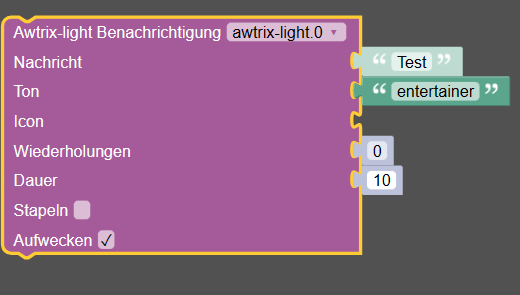
      48c72ae1-76fe-43e9-99de-bfb77cdc018a-image.png
      26994834-5087-4cf4-82d9-236ecb3b8d34-image.png

      Fehler bei der Eingabe zgl
      appDisplayTime
      Gibt man dort 3000 ein bzw. bestätigt diese.
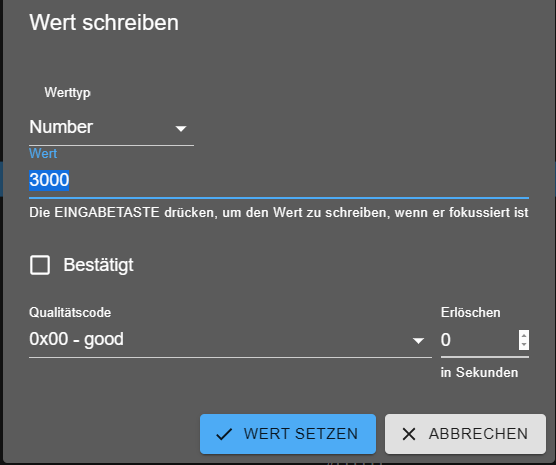
      8e28d51b-b3e7-4d62-b0f9-a0d23534f015-image.png
      erhält man:
      7178ce78-a32a-47c7-b89a-a01e7c1c4e83-image.png

      Wie wird der Wochentag angezeigt?
      Habe displayWeekDay aktiviert.

      f17be4b7-dc33-4c81-855b-4d73ee9a6375-image.png
      Muss man bei Datum noch was eintragen?

      Trage ich %w ein wird heute 2 angezeigt.

      05a2c88f-0576-48ed-b214-16fd079c4979-image.png

      Setze ich dann anschließend displayWeekday auf false, wird trotzdem noch die 2 angezeigt.

      haus-automatisierungH Online
      haus-automatisierungH Online
      haus-automatisierung
      Developer Most Active
      wrote on last edited by
      #318

      @mcu sagte in Test Adapter Awtrix-Light:

      Wie wird der Wochentag angezeigt?
      Habe displayWeekDay aktiviert.

      Das sagt nur aus, dass diese Striche unterhalb des Datums auftauchen sollen. Bitte selbst etwas in die Doku einlesen ich kann nicht jedes Feature der Firmware im Thread zum Adapter erklären :)

      🧑‍🎓 Autor des beliebten ioBroker-Master-Kurses
      🎥 Tutorials rund um das Thema DIY-Smart-Home: https://haus-automatisierung.com/
      📚 Meine inoffizielle ioBroker Dokumentation

      P 1 Reply Last reply
      3
      • Elektroniker86E Offline
        Elektroniker86E Offline
        Elektroniker86
        wrote on last edited by
        #319

        Moin, bei mir lässt sich der Adapter nicht mehr updaten.
        Habe schon beim Reiter Github und beim Reiter benutzerdefiniert probiert.
        Es kommen keine Fehler aber die Version steht immer noch bei 0.0.6?

        Was mach ich falsch?

        Screenshot 2023-06-07 074220.png

        Screenshot 2023-06-07 074302.png

        arteckA 1 Reply Last reply
        0
        • Elektroniker86E Elektroniker86

          Moin, bei mir lässt sich der Adapter nicht mehr updaten.
          Habe schon beim Reiter Github und beim Reiter benutzerdefiniert probiert.
          Es kommen keine Fehler aber die Version steht immer noch bei 0.0.6?

          Was mach ich falsch?

          Screenshot 2023-06-07 074220.png

          Screenshot 2023-06-07 074302.png

          arteckA Offline
          arteckA Offline
          arteck
          Developer Most Active
          wrote on last edited by
          #320

          @elektroniker86 sagte in Test Adapter Awtrix-Light:

          Es kommen keine Fehler

          was kommt den überhaupt. LOG her

          zigbee hab ich, zwave auch, nuc's genauso und HA auch

          Elektroniker86E 1 Reply Last reply
          0
          • arteckA arteck

            @elektroniker86 sagte in Test Adapter Awtrix-Light:

            Es kommen keine Fehler

            was kommt den überhaupt. LOG her

            Elektroniker86E Offline
            Elektroniker86E Offline
            Elektroniker86
            wrote on last edited by
            #321

            @arteck

            Beim Reiter Github kommt das:

            $ iobroker url klein0r/ioBroker.awtrix-light --host iobroker --debug
            
            install klein0r/ioBroker.awtrix-light
            
            NPM version: 9.5.1
            
            Installing klein0r/ioBroker.awtrix-light... (System call)
            
            npm ERR! code EBADENGINE
            
            upload [13] awtrix-light.admin /opt/iobroker/node_modules/iobroker.awtrix-light/admin/awtrix-light.png awtrix-light.png image/png
            
            upload [12] awtrix-light.admin /opt/iobroker/node_modules/iobroker.awtrix-light/admin/blockly.js blockly.js application/javascript
            
            upload [0] awtrix-light.admin /opt/iobroker/node_modules/iobroker.awtrix-light/admin/jsonConfig.json jsonConfig.json application/json
            
            Process exited with code 0
            

            Und wenn ich beim Reiter benutzerdefiniert mit dem Link von ganz oben installiere kommt das:

            $ iobroker url https://github.com/klein0r/ioBroker.awtrix-light --host iobroker --debug
            
            install klein0r/ioBroker.awtrix-light#5d422eff24094736a501da17cb9addaf5158e3e1
            
            NPM version: 9.5.1
            
            Installing klein0r/ioBroker.awtrix-light#5d422eff24094736a501da17cb9addaf5158e3e1... (System call)
            
            npm ERR! code EBADENGINEnpm ERR! engine Unsupported enginenpm ERR! engine Not compatible with your version of node/npm: iobroker.daikin-cloud@0.2.3
            
            upload [13] awtrix-light.admin /opt/iobroker/node_modules/iobroker.awtrix-light/admin/awtrix-light.png awtrix-light.png image/png
            
            upload [12] awtrix-light.admin /opt/iobroker/node_modules/iobroker.awtrix-light/admin/blockly.js blockly.js application/javascript
            
            upload [6] awtrix-light.admin /opt/iobroker/node_modules/iobroker.awtrix-light/admin/i18n/nl/translations.json i18n/nl/translations.json application/json
            
            upload [0] awtrix-light.admin /opt/iobroker/node_modules/iobroker.awtrix-light/admin/jsonConfig.json jsonConfig.json application/json
            
            Update "system.adapter.awtrix-light.0"
            
            Process exited with code 0
            

            Am Ende bleibt der Adapter bei 0.0.6 stehen aktuell ist ja 0.0.10?
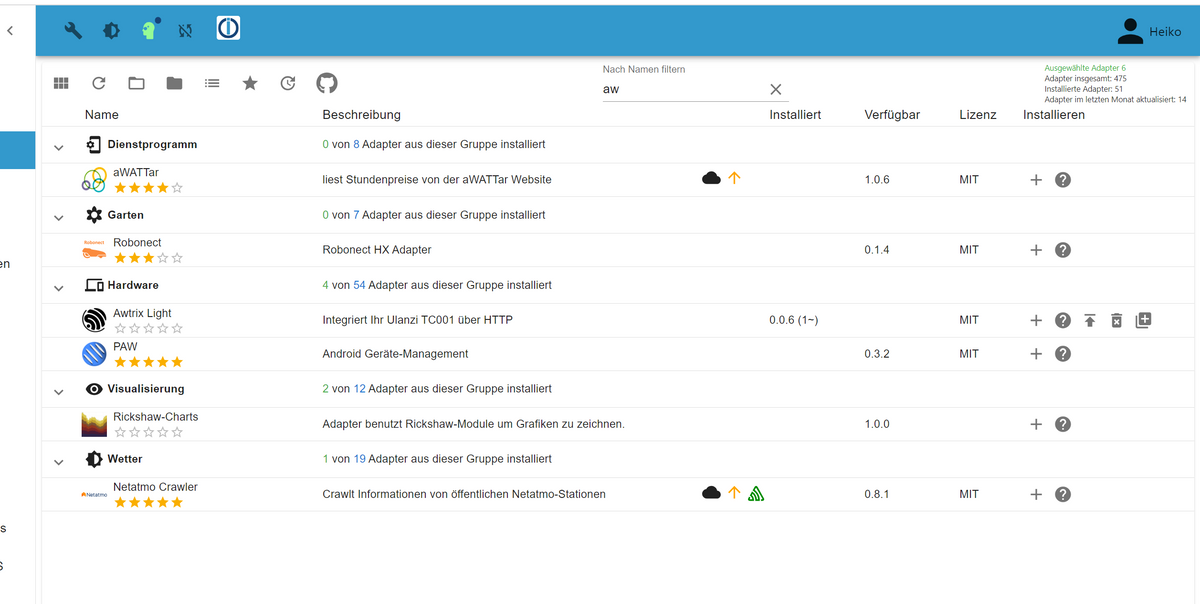
            Screenshot 2023-06-07 080039.png

            C 1 Reply Last reply
            0
            • Elektroniker86E Elektroniker86

              @arteck

              Beim Reiter Github kommt das:

              $ iobroker url klein0r/ioBroker.awtrix-light --host iobroker --debug
              
              install klein0r/ioBroker.awtrix-light
              
              NPM version: 9.5.1
              
              Installing klein0r/ioBroker.awtrix-light... (System call)
              
              npm ERR! code EBADENGINE
              
              upload [13] awtrix-light.admin /opt/iobroker/node_modules/iobroker.awtrix-light/admin/awtrix-light.png awtrix-light.png image/png
              
              upload [12] awtrix-light.admin /opt/iobroker/node_modules/iobroker.awtrix-light/admin/blockly.js blockly.js application/javascript
              
              upload [0] awtrix-light.admin /opt/iobroker/node_modules/iobroker.awtrix-light/admin/jsonConfig.json jsonConfig.json application/json
              
              Process exited with code 0
              

              Und wenn ich beim Reiter benutzerdefiniert mit dem Link von ganz oben installiere kommt das:

              $ iobroker url https://github.com/klein0r/ioBroker.awtrix-light --host iobroker --debug
              
              install klein0r/ioBroker.awtrix-light#5d422eff24094736a501da17cb9addaf5158e3e1
              
              NPM version: 9.5.1
              
              Installing klein0r/ioBroker.awtrix-light#5d422eff24094736a501da17cb9addaf5158e3e1... (System call)
              
              npm ERR! code EBADENGINEnpm ERR! engine Unsupported enginenpm ERR! engine Not compatible with your version of node/npm: iobroker.daikin-cloud@0.2.3
              
              upload [13] awtrix-light.admin /opt/iobroker/node_modules/iobroker.awtrix-light/admin/awtrix-light.png awtrix-light.png image/png
              
              upload [12] awtrix-light.admin /opt/iobroker/node_modules/iobroker.awtrix-light/admin/blockly.js blockly.js application/javascript
              
              upload [6] awtrix-light.admin /opt/iobroker/node_modules/iobroker.awtrix-light/admin/i18n/nl/translations.json i18n/nl/translations.json application/json
              
              upload [0] awtrix-light.admin /opt/iobroker/node_modules/iobroker.awtrix-light/admin/jsonConfig.json jsonConfig.json application/json
              
              Update "system.adapter.awtrix-light.0"
              
              Process exited with code 0
              

              Am Ende bleibt der Adapter bei 0.0.6 stehen aktuell ist ja 0.0.10?

              Screenshot 2023-06-07 080039.png

              C Offline
              C Offline
              cacherwolf
              wrote on last edited by
              #322

              @elektroniker86 said in Test Adapter Awtrix-Light:

              npm ERR! code EBADENGINEnpm ERR! engine Unsupported enginenpm ERR! engine Not compatible with your version of node/npm: iobroker.daikin-cloud@0.2.3

              Zeile 9:

              npm ERR! code EBADENGINEnpm ERR! engine Unsupported enginenpm ERR! engine Not compatible with your version of node/npm: iobroker.daikin-cloud@0.2.3

              Elektroniker86E 1 Reply Last reply
              0
              • C cacherwolf

                @elektroniker86 said in Test Adapter Awtrix-Light:

                npm ERR! code EBADENGINEnpm ERR! engine Unsupported enginenpm ERR! engine Not compatible with your version of node/npm: iobroker.daikin-cloud@0.2.3

                Zeile 9:

                npm ERR! code EBADENGINEnpm ERR! engine Unsupported enginenpm ERR! engine Not compatible with your version of node/npm: iobroker.daikin-cloud@0.2.3

                Elektroniker86E Offline
                Elektroniker86E Offline
                Elektroniker86
                wrote on last edited by
                #323

                @cacherwolf
                Was heißt das ? Ich bin doch aktuell unterwegs?

                Thomas BraunT 1 Reply Last reply
                0
                • Elektroniker86E Elektroniker86

                  @cacherwolf
                  Was heißt das ? Ich bin doch aktuell unterwegs?

                  Thomas BraunT Online
                  Thomas BraunT Online
                  Thomas Braun
                  Most Active
                  wrote on last edited by Thomas Braun
                  #324

                  @elektroniker86

                  Nodejs/npm sauber in welchen Versionen installiert?
                  Das gleiche für daikin-cloud.

                  Schau per

                  iob diag 
                  

                  rein.

                  Ist aber jetzt hier OT. Bitte ggfls. einen eigenen Thread dazu eröffnen.

                  Linux-Werkzeugkasten:
                  https://forum.iobroker.net/topic/42952/der-kleine-iobroker-linux-werkzeugkasten
                  NodeJS Fixer Skript:
                  https://forum.iobroker.net/topic/68035/iob-node-fix-skript
                  iob_diag: curl -sLf -o diag.sh https://iobroker.net/diag.sh && bash diag.sh

                  Elektroniker86E 1 Reply Last reply
                  0
                  • Thomas BraunT Thomas Braun

                    @elektroniker86

                    Nodejs/npm sauber in welchen Versionen installiert?
                    Das gleiche für daikin-cloud.

                    Schau per

                    iob diag 
                    

                    rein.

                    Ist aber jetzt hier OT. Bitte ggfls. einen eigenen Thread dazu eröffnen.

                    Elektroniker86E Offline
                    Elektroniker86E Offline
                    Elektroniker86
                    wrote on last edited by
                    #325

                    @thomas-braun

                    *** NodeJS-Installation ***
                    
                    /usr/bin/nodejs         v18.16.0
                    /usr/bin/node           v18.16.0
                    /usr/bin/npm            9.5.1
                    /usr/bin/npx            9.5.1
                    
                    
                    nodejs:
                      Installed: 18.16.0-deb-1nodesource1
                      Candidate: 18.16.0-deb-1nodesource1
                      Version table:
                     *** 18.16.0-deb-1nodesource1 500
                            500 https://deb.nodesource.com/node_18.x jammy/main amd64 Packages
                            100 /var/lib/dpkg/status
                         12.22.9~dfsg-1ubuntu3 500
                            500 http://de.archive.ubuntu.com/ubuntu jammy/universe amd64 Packages
                    
                    Temp directories causing npm8 problem: 0
                    No problems detected
                    
                    *** ioBroker-Installation ***
                    
                    ioBroker Status
                    iobroker is running on this host.
                    
                    
                    Objects type: jsonl
                    States  type: jsonl
                    
                    MULTIHOSTSERVICE/enabled: false
                    
                    Core adapters versions
                    js-controller:  4.0.24
                    admin:          6.3.5
                    javascript:     6.1.4
                    
                    Adapters from github:   1
                    
                    Adapter State
                    + system.adapter.admin.0                  : admin                 : iobroker                                 -  enabled, port: 8081, bind: 0.0.0.0, run as: admin
                    + system.adapter.admin.1                  : admin                 : iobroker-slave-wp                        -  enabled, port: 8081, bind: 0.0.0.0, run as: admin
                      system.adapter.alarm.0                  : alarm                 : iobroker                                 - disabled
                    + system.adapter.alexa2.0                 : alexa2                : iobroker                                 -  enabled
                    + system.adapter.awtrix-light.0           : awtrix-light          : iobroker                                 -  enabled
                    + system.adapter.backitup.0               : backitup              : iobroker                                 -  enabled
                    + system.adapter.canbus.0                 : canbus                : iobroker-slave-wp                        -  enabled
                    + system.adapter.cloud.0                  : cloud                 : iobroker                                 -  enabled
                      system.adapter.daikin-cloud.0           : daikin-cloud          : iobroker                                 - disabled
                      system.adapter.daswetter.0              : daswetter             : iobroker                                 -  enabled
                    + system.adapter.harmony.0                : harmony               : iobroker                                 -  enabled
                      system.adapter.ical.0                   : ical                  : iobroker                                 -  enabled
                      system.adapter.icons-icons8.0           : icons-icons8          : iobroker                                 - disabled
                      system.adapter.icons-mfd-png.0          : icons-mfd-png         : iobroker                                 - disabled
                      system.adapter.icons-ultimate-png.0     : icons-ultimate-png    : iobroker                                 - disabled
                    + system.adapter.info.0                   : info                  : iobroker                                 -  enabled
                    + system.adapter.iot.0                    : iot                   : iobroker                                 -  enabled
                    + system.adapter.iqontrol.0               : iqontrol              : iobroker                                 -  enabled
                    + system.adapter.javascript.0             : javascript            : iobroker                                 -  enabled
                    + system.adapter.linux-control.0          : linux-control         : iobroker                                 -  enabled
                    + system.adapter.mihome-vacuum.0          : mihome-vacuum         : iobroker                                 -  enabled, port: 54321
                    + system.adapter.mihome-vacuum.1          : mihome-vacuum         : iobroker                                 -  enabled, port: 54321
                    + system.adapter.modbus.0                 : modbus                : iobroker                                 -  enabled
                    + system.adapter.modbus.1                 : modbus                : iobroker                                 -  enabled
                    + system.adapter.mqtt.0                   : mqtt                  : iobroker                                 -  enabled, port: 1883, bind: 192.168.1.240
                    + system.adapter.mqtt.1                   : mqtt                  : iobroker                                 -  enabled, port: 1889, bind: 0.0.0.0
                    + system.adapter.mqtt.2                   : mqtt                  : iobroker                                 -  enabled, port: 1884, bind: 0.0.0.0
                    + system.adapter.ping.0                   : ping                  : iobroker                                 -  enabled
                    + system.adapter.s7.0                     : s7                    : iobroker                                 -  enabled
                    + system.adapter.s7.1                     : s7                    : iobroker                                 -  enabled
                    + system.adapter.s7.2                     : s7                    : iobroker                                 -  enabled
                    + system.adapter.s7.3                     : s7                    : iobroker                                 -  enabled
                    + system.adapter.s7.4                     : s7                    : iobroker                                 -  enabled
                    + system.adapter.s7.5                     : s7                    : iobroker                                 -  enabled
                    + system.adapter.s7.6                     : s7                    : iobroker                                 -  enabled
                    + system.adapter.shelly.0                 : shelly                : iobroker                                 -  enabled, port: 1882, bind: 192.168.1.240
                    + system.adapter.smartmeter.0             : smartmeter            : iobroker                                 -  enabled
                    + system.adapter.sonos.0                  : sonos                 : iobroker                                 -  enabled
                    + system.adapter.sourceanalytix.0         : sourceanalytix        : iobroker                                 -  enabled
                    + system.adapter.telegram.0               : telegram              : iobroker                                 -  enabled, port: 8443, bind: 0.0.0.0
                    + system.adapter.trashschedule.0          : trashschedule         : iobroker                                 -  enabled
                    + system.adapter.tuya.0                   : tuya                  : iobroker                                 -  enabled
                    + system.adapter.unifi.0                  : unifi                 : iobroker                                 -  enabled
                      system.adapter.vis-canvas-gauges.0      : vis-canvas-gauges     : iobroker                                 - disabled
                      system.adapter.vis-history.0            : vis-history           : iobroker                                 - disabled
                      system.adapter.vis-hqwidgets.0          : vis-hqwidgets         : iobroker                                 - disabled
                      system.adapter.vis-icontwo.0            : vis-icontwo           : iobroker                                 - disabled
                    + system.adapter.vis-inventwo.0           : vis-inventwo          : iobroker                                 -  enabled
                      system.adapter.vis-jqui-mfd.0           : vis-jqui-mfd          : iobroker                                 - disabled
                      system.adapter.vis-justgage.0           : vis-justgage          : iobroker                                 - disabled
                      system.adapter.vis-keyboard.0           : vis-keyboard          : iobroker                                 - disabled
                      system.adapter.vis-plumb.0              : vis-plumb             : iobroker                                 - disabled
                      system.adapter.vis-rgraph.0             : vis-rgraph            : iobroker                                 - disabled
                      system.adapter.vis-timeandweather.0     : vis-timeandweather    : iobroker                                 - disabled
                      system.adapter.vis-weather.0            : vis-weather           : iobroker                                 - disabled
                      system.adapter.vis.0                    : vis                   : iobroker                                 -  enabled
                    + system.adapter.web.0                    : web                   : iobroker                                 -  enabled, port: 8082, bind: 0.0.0.0, run as: admin
                    + system.adapter.wled.0                   : wled                  : iobroker                                 -  enabled
                    
                    + instance is alive
                    
                    Enabled adapters with bindings
                    + system.adapter.admin.0                  : admin                 : iobroker                                 -  enabled, port: 8081, bind: 0.0.0.0, run as: admin
                    + system.adapter.admin.1                  : admin                 : iobroker-slave-wp                        -  enabled, port: 8081, bind: 0.0.0.0, run as: admin
                    + system.adapter.mihome-vacuum.0          : mihome-vacuum         : iobroker                                 -  enabled, port: 54321
                    + system.adapter.mihome-vacuum.1          : mihome-vacuum         : iobroker                                 -  enabled, port: 54321
                    + system.adapter.mqtt.0                   : mqtt                  : iobroker                                 -  enabled, port: 1883, bind: 192.168.1.240
                    + system.adapter.mqtt.1                   : mqtt                  : iobroker                                 -  enabled, port: 1889, bind: 0.0.0.0
                    + system.adapter.mqtt.2                   : mqtt                  : iobroker                                 -  enabled, port: 1884, bind: 0.0.0.0
                    + system.adapter.shelly.0                 : shelly                : iobroker                                 -  enabled, port: 1882, bind: 192.168.1.240
                    + system.adapter.telegram.0               : telegram              : iobroker                                 -  enabled, port: 8443, bind: 0.0.0.0
                    + system.adapter.web.0                    : web                   : iobroker                                 -  enabled, port: 8082, bind: 0.0.0.0, run as: admin


                    Möchtest du noch etwas sehen?

                    Thomas BraunT 1 Reply Last reply
                    0
                    • Elektroniker86E Elektroniker86

                      @thomas-braun

                      *** NodeJS-Installation ***
                      
                      /usr/bin/nodejs         v18.16.0
                      /usr/bin/node           v18.16.0
                      /usr/bin/npm            9.5.1
                      /usr/bin/npx            9.5.1
                      
                      
                      nodejs:
                        Installed: 18.16.0-deb-1nodesource1
                        Candidate: 18.16.0-deb-1nodesource1
                        Version table:
                       *** 18.16.0-deb-1nodesource1 500
                              500 https://deb.nodesource.com/node_18.x jammy/main amd64 Packages
                              100 /var/lib/dpkg/status
                           12.22.9~dfsg-1ubuntu3 500
                              500 http://de.archive.ubuntu.com/ubuntu jammy/universe amd64 Packages
                      
                      Temp directories causing npm8 problem: 0
                      No problems detected
                      
                      *** ioBroker-Installation ***
                      
                      ioBroker Status
                      iobroker is running on this host.
                      
                      
                      Objects type: jsonl
                      States  type: jsonl
                      
                      MULTIHOSTSERVICE/enabled: false
                      
                      Core adapters versions
                      js-controller:  4.0.24
                      admin:          6.3.5
                      javascript:     6.1.4
                      
                      Adapters from github:   1
                      
                      Adapter State
                      + system.adapter.admin.0                  : admin                 : iobroker                                 -  enabled, port: 8081, bind: 0.0.0.0, run as: admin
                      + system.adapter.admin.1                  : admin                 : iobroker-slave-wp                        -  enabled, port: 8081, bind: 0.0.0.0, run as: admin
                        system.adapter.alarm.0                  : alarm                 : iobroker                                 - disabled
                      + system.adapter.alexa2.0                 : alexa2                : iobroker                                 -  enabled
                      + system.adapter.awtrix-light.0           : awtrix-light          : iobroker                                 -  enabled
                      + system.adapter.backitup.0               : backitup              : iobroker                                 -  enabled
                      + system.adapter.canbus.0                 : canbus                : iobroker-slave-wp                        -  enabled
                      + system.adapter.cloud.0                  : cloud                 : iobroker                                 -  enabled
                        system.adapter.daikin-cloud.0           : daikin-cloud          : iobroker                                 - disabled
                        system.adapter.daswetter.0              : daswetter             : iobroker                                 -  enabled
                      + system.adapter.harmony.0                : harmony               : iobroker                                 -  enabled
                        system.adapter.ical.0                   : ical                  : iobroker                                 -  enabled
                        system.adapter.icons-icons8.0           : icons-icons8          : iobroker                                 - disabled
                        system.adapter.icons-mfd-png.0          : icons-mfd-png         : iobroker                                 - disabled
                        system.adapter.icons-ultimate-png.0     : icons-ultimate-png    : iobroker                                 - disabled
                      + system.adapter.info.0                   : info                  : iobroker                                 -  enabled
                      + system.adapter.iot.0                    : iot                   : iobroker                                 -  enabled
                      + system.adapter.iqontrol.0               : iqontrol              : iobroker                                 -  enabled
                      + system.adapter.javascript.0             : javascript            : iobroker                                 -  enabled
                      + system.adapter.linux-control.0          : linux-control         : iobroker                                 -  enabled
                      + system.adapter.mihome-vacuum.0          : mihome-vacuum         : iobroker                                 -  enabled, port: 54321
                      + system.adapter.mihome-vacuum.1          : mihome-vacuum         : iobroker                                 -  enabled, port: 54321
                      + system.adapter.modbus.0                 : modbus                : iobroker                                 -  enabled
                      + system.adapter.modbus.1                 : modbus                : iobroker                                 -  enabled
                      + system.adapter.mqtt.0                   : mqtt                  : iobroker                                 -  enabled, port: 1883, bind: 192.168.1.240
                      + system.adapter.mqtt.1                   : mqtt                  : iobroker                                 -  enabled, port: 1889, bind: 0.0.0.0
                      + system.adapter.mqtt.2                   : mqtt                  : iobroker                                 -  enabled, port: 1884, bind: 0.0.0.0
                      + system.adapter.ping.0                   : ping                  : iobroker                                 -  enabled
                      + system.adapter.s7.0                     : s7                    : iobroker                                 -  enabled
                      + system.adapter.s7.1                     : s7                    : iobroker                                 -  enabled
                      + system.adapter.s7.2                     : s7                    : iobroker                                 -  enabled
                      + system.adapter.s7.3                     : s7                    : iobroker                                 -  enabled
                      + system.adapter.s7.4                     : s7                    : iobroker                                 -  enabled
                      + system.adapter.s7.5                     : s7                    : iobroker                                 -  enabled
                      + system.adapter.s7.6                     : s7                    : iobroker                                 -  enabled
                      + system.adapter.shelly.0                 : shelly                : iobroker                                 -  enabled, port: 1882, bind: 192.168.1.240
                      + system.adapter.smartmeter.0             : smartmeter            : iobroker                                 -  enabled
                      + system.adapter.sonos.0                  : sonos                 : iobroker                                 -  enabled
                      + system.adapter.sourceanalytix.0         : sourceanalytix        : iobroker                                 -  enabled
                      + system.adapter.telegram.0               : telegram              : iobroker                                 -  enabled, port: 8443, bind: 0.0.0.0
                      + system.adapter.trashschedule.0          : trashschedule         : iobroker                                 -  enabled
                      + system.adapter.tuya.0                   : tuya                  : iobroker                                 -  enabled
                      + system.adapter.unifi.0                  : unifi                 : iobroker                                 -  enabled
                        system.adapter.vis-canvas-gauges.0      : vis-canvas-gauges     : iobroker                                 - disabled
                        system.adapter.vis-history.0            : vis-history           : iobroker                                 - disabled
                        system.adapter.vis-hqwidgets.0          : vis-hqwidgets         : iobroker                                 - disabled
                        system.adapter.vis-icontwo.0            : vis-icontwo           : iobroker                                 - disabled
                      + system.adapter.vis-inventwo.0           : vis-inventwo          : iobroker                                 -  enabled
                        system.adapter.vis-jqui-mfd.0           : vis-jqui-mfd          : iobroker                                 - disabled
                        system.adapter.vis-justgage.0           : vis-justgage          : iobroker                                 - disabled
                        system.adapter.vis-keyboard.0           : vis-keyboard          : iobroker                                 - disabled
                        system.adapter.vis-plumb.0              : vis-plumb             : iobroker                                 - disabled
                        system.adapter.vis-rgraph.0             : vis-rgraph            : iobroker                                 - disabled
                        system.adapter.vis-timeandweather.0     : vis-timeandweather    : iobroker                                 - disabled
                        system.adapter.vis-weather.0            : vis-weather           : iobroker                                 - disabled
                        system.adapter.vis.0                    : vis                   : iobroker                                 -  enabled
                      + system.adapter.web.0                    : web                   : iobroker                                 -  enabled, port: 8082, bind: 0.0.0.0, run as: admin
                      + system.adapter.wled.0                   : wled                  : iobroker                                 -  enabled
                      
                      + instance is alive
                      
                      Enabled adapters with bindings
                      + system.adapter.admin.0                  : admin                 : iobroker                                 -  enabled, port: 8081, bind: 0.0.0.0, run as: admin
                      + system.adapter.admin.1                  : admin                 : iobroker-slave-wp                        -  enabled, port: 8081, bind: 0.0.0.0, run as: admin
                      + system.adapter.mihome-vacuum.0          : mihome-vacuum         : iobroker                                 -  enabled, port: 54321
                      + system.adapter.mihome-vacuum.1          : mihome-vacuum         : iobroker                                 -  enabled, port: 54321
                      + system.adapter.mqtt.0                   : mqtt                  : iobroker                                 -  enabled, port: 1883, bind: 192.168.1.240
                      + system.adapter.mqtt.1                   : mqtt                  : iobroker                                 -  enabled, port: 1889, bind: 0.0.0.0
                      + system.adapter.mqtt.2                   : mqtt                  : iobroker                                 -  enabled, port: 1884, bind: 0.0.0.0
                      + system.adapter.shelly.0                 : shelly                : iobroker                                 -  enabled, port: 1882, bind: 192.168.1.240
                      + system.adapter.telegram.0               : telegram              : iobroker                                 -  enabled, port: 8443, bind: 0.0.0.0
                      + system.adapter.web.0                    : web                   : iobroker                                 -  enabled, port: 8082, bind: 0.0.0.0, run as: admin


                      Möchtest du noch etwas sehen?

                      Thomas BraunT Online
                      Thomas BraunT Online
                      Thomas Braun
                      Most Active
                      wrote on last edited by
                      #326

                      @elektroniker86

                      daikin-cloud aktualisieren.

                      Linux-Werkzeugkasten:
                      https://forum.iobroker.net/topic/42952/der-kleine-iobroker-linux-werkzeugkasten
                      NodeJS Fixer Skript:
                      https://forum.iobroker.net/topic/68035/iob-node-fix-skript
                      iob_diag: curl -sLf -o diag.sh https://iobroker.net/diag.sh && bash diag.sh

                      Elektroniker86E 1 Reply Last reply
                      1
                      • Thomas BraunT Thomas Braun

                        @elektroniker86

                        daikin-cloud aktualisieren.

                        Elektroniker86E Offline
                        Elektroniker86E Offline
                        Elektroniker86
                        wrote on last edited by
                        #327

                        @thomas-braun

                        Alles klar, ich habe es gerade bemerkt das der daikin.cloud Probleme macht und nicht läuft.
                        Da gibts auch ein Thread dazu. So wie ich sehe muss ich den auch von Github aus updaten da wäre er für Nodejs 18 angepasst.

                        Danke für deine Hilfe!!!

                        Thomas BraunT 1 Reply Last reply
                        0
                        • Elektroniker86E Elektroniker86

                          @thomas-braun

                          Alles klar, ich habe es gerade bemerkt das der daikin.cloud Probleme macht und nicht läuft.
                          Da gibts auch ein Thread dazu. So wie ich sehe muss ich den auch von Github aus updaten da wäre er für Nodejs 18 angepasst.

                          Danke für deine Hilfe!!!

                          Thomas BraunT Online
                          Thomas BraunT Online
                          Thomas Braun
                          Most Active
                          wrote on last edited by
                          #328

                          @elektroniker86

                          Ja, ist nur im GitHub gefixt im Moment:

                          https://github.com/Apollon77/ioBroker.daikin-cloud/commit/4eff1929cbddfeeadd4d45e6a04ea285c7f48f4b

                          Linux-Werkzeugkasten:
                          https://forum.iobroker.net/topic/42952/der-kleine-iobroker-linux-werkzeugkasten
                          NodeJS Fixer Skript:
                          https://forum.iobroker.net/topic/68035/iob-node-fix-skript
                          iob_diag: curl -sLf -o diag.sh https://iobroker.net/diag.sh && bash diag.sh

                          1 Reply Last reply
                          0
                          • P Offline
                            P Offline
                            peer69
                            Forum Testing
                            wrote on last edited by
                            #329

                            Wenn die Uhr nicht erreichbar ist (ausgeschaltet, WLAN verloren, Akku leer), wird alle 2 Sekunden ein Log-Entry geschrieben. Kann man den Adapter vielleicht weniger gesprächig gestalten? Ein Eintrag als Warn oder Error, wenn das Gerät nicht mehr gefunden wird ist sicher gut, alle 2 Sekunden scheint mir aber übertrieben :).

                            awtrix-light.0
                            2023-06-07 09:30:18.004	error	Unable to perform action for 0_userdata.0.PV-Anlage.0_Hausverbrauch - API is not connected (device not reachable?)
                            awtrix-light.0
                            2023-06-07 09:30:16.002	error	Unable to perform action for 0_userdata.0.PV-Anlage.0_Hausverbrauch - API is not connected (device not reachable?)
                            awtrix-light.0
                            2023-06-07 09:30:14.001	error	Unable to perform action for 0_userdata.0.PV-Anlage.0_Hausverbrauch - API is not connected (device not reachable?)
                            awtrix-light.0
                            2023-06-07 09:30:12.003	error	Unable to perform action for 0_userdata.0.PV-Anlage.0_Hausverbrauch - API is not connected (device not reachable?)
                            awtrix-light.0
                            2023-06-07 09:30:10.002	error	Unable to perform action for 0_userdata.0.PV-Anlage.0_Hausverbrauch - API is not connected (device not reachable?)
                            awtrix-light.0
                            2023-06-07 09:30:08.002	error	Unable to perform action for 0_userdata.0.PV-Anlage.0_Hausverbrauch - API is not connected (device not reachable?)
                            awtrix-light.0
                            2023-06-07 09:30:06.004	error	Unable to perform action for 0_userdata.0.PV-Anlage.0_Hausverbrauch - API is not connected (device not reachable?)
                            
                            arteckA 1 Reply Last reply
                            0
                            • P peer69

                              Wenn die Uhr nicht erreichbar ist (ausgeschaltet, WLAN verloren, Akku leer), wird alle 2 Sekunden ein Log-Entry geschrieben. Kann man den Adapter vielleicht weniger gesprächig gestalten? Ein Eintrag als Warn oder Error, wenn das Gerät nicht mehr gefunden wird ist sicher gut, alle 2 Sekunden scheint mir aber übertrieben :).

                              awtrix-light.0
                              2023-06-07 09:30:18.004	error	Unable to perform action for 0_userdata.0.PV-Anlage.0_Hausverbrauch - API is not connected (device not reachable?)
                              awtrix-light.0
                              2023-06-07 09:30:16.002	error	Unable to perform action for 0_userdata.0.PV-Anlage.0_Hausverbrauch - API is not connected (device not reachable?)
                              awtrix-light.0
                              2023-06-07 09:30:14.001	error	Unable to perform action for 0_userdata.0.PV-Anlage.0_Hausverbrauch - API is not connected (device not reachable?)
                              awtrix-light.0
                              2023-06-07 09:30:12.003	error	Unable to perform action for 0_userdata.0.PV-Anlage.0_Hausverbrauch - API is not connected (device not reachable?)
                              awtrix-light.0
                              2023-06-07 09:30:10.002	error	Unable to perform action for 0_userdata.0.PV-Anlage.0_Hausverbrauch - API is not connected (device not reachable?)
                              awtrix-light.0
                              2023-06-07 09:30:08.002	error	Unable to perform action for 0_userdata.0.PV-Anlage.0_Hausverbrauch - API is not connected (device not reachable?)
                              awtrix-light.0
                              2023-06-07 09:30:06.004	error	Unable to perform action for 0_userdata.0.PV-Anlage.0_Hausverbrauch - API is not connected (device not reachable?)
                              
                              arteckA Offline
                              arteckA Offline
                              arteck
                              Developer Most Active
                              wrote on last edited by
                              #330

                              @peer69 garnicht aufgefallen... würder eher sagen als error object im tree
                              würde reichen.. im log evtl. als warning..

                              zigbee hab ich, zwave auch, nuc's genauso und HA auch

                              1 Reply Last reply
                              0
                              • haus-automatisierungH haus-automatisierung

                                @mcu sagte in Test Adapter Awtrix-Light:

                                Wie wird der Wochentag angezeigt?
                                Habe displayWeekDay aktiviert.

                                Das sagt nur aus, dass diese Striche unterhalb des Datums auftauchen sollen. Bitte selbst etwas in die Doku einlesen ich kann nicht jedes Feature der Firmware im Thread zum Adapter erklären :)

                                P Offline
                                P Offline
                                pfeiferj12
                                wrote on last edited by pfeiferj12
                                #331

                                @haus-automatisierung Hallo, hab eben auf 0.0.10 aktualisert und kann jetzt aber keine Änderungen mehr bei den Custom Apps speichern:
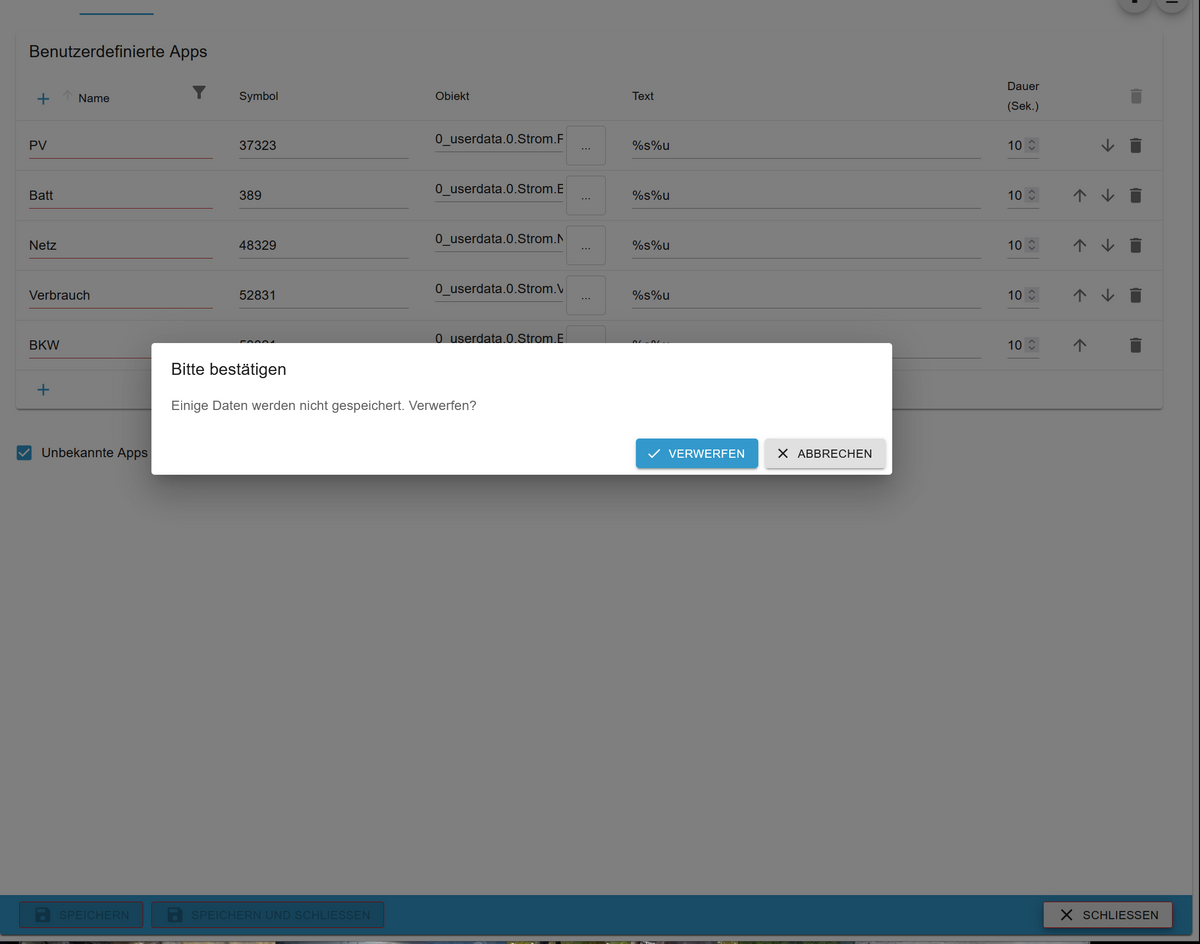
                                e57af037-15f4-487b-b124-dd032d8e7d80-grafik.png

                                Hat jemand einen Tip für mich?

                                H 1 Reply Last reply
                                0
                                • U Offline
                                  U Offline
                                  umichel
                                  wrote on last edited by
                                  #332

                                  So ... meine Ulanzi ist auch gestern gekommen.
                                  Vielleicht noch ein paar Tips zum Flashen und der Firmware:

                                  1. Unter Windows ist ein Treiber nötig (Link dazu gab es hier schon)
                                  2. USB Datenkabel verwenden (das mitgelieferte fuktionierte bei mir dafür nicht)
                                  3. USB Kabel in eine USB Port auf dem Motherboard (bei mir funktionierte ein Front-USB Port am Gehäude nicht)
                                  4. Firmware Update geht über das Gerät selbst (Menütaste halten und die Option Update auswählen)

                                  Jetzt aber zum Adpater:
                                  Bisher habe ich MQTT nur über die Sonoff Adapter genutzt.
                                  Dazu brauchte ich keinne zusätzlichen MQTT Broker Adapter oder ähnliches.
                                  Jetzt habe ich den Adpater von Matthias installiert und erscheint lediglich ein leerer admin Eintrag unter Objekte.
                                  Keine Instanz ... nichts.
                                  Gibt es irgendwelche voraussetzungen für den awtrix Adapter?
                                  Und wie muss ich in der Firmware MQTT konfigurieren?

                                  LG

                                  C 1 Reply Last reply
                                  0
                                  • P pfeiferj12

                                    @haus-automatisierung Hallo, hab eben auf 0.0.10 aktualisert und kann jetzt aber keine Änderungen mehr bei den Custom Apps speichern:

                                    e57af037-15f4-487b-b124-dd032d8e7d80-grafik.png

                                    Hat jemand einen Tip für mich?

                                    H Online
                                    H Online
                                    holgerwolf
                                    wrote on last edited by
                                    #333

                                    @pfeiferj12 Schreib die App Namen mal in kleinen Buchstaben

                                    P 1 Reply Last reply
                                    1
                                    • U umichel

                                      So ... meine Ulanzi ist auch gestern gekommen.
                                      Vielleicht noch ein paar Tips zum Flashen und der Firmware:

                                      1. Unter Windows ist ein Treiber nötig (Link dazu gab es hier schon)
                                      2. USB Datenkabel verwenden (das mitgelieferte fuktionierte bei mir dafür nicht)
                                      3. USB Kabel in eine USB Port auf dem Motherboard (bei mir funktionierte ein Front-USB Port am Gehäude nicht)
                                      4. Firmware Update geht über das Gerät selbst (Menütaste halten und die Option Update auswählen)

                                      Jetzt aber zum Adpater:
                                      Bisher habe ich MQTT nur über die Sonoff Adapter genutzt.
                                      Dazu brauchte ich keinne zusätzlichen MQTT Broker Adapter oder ähnliches.
                                      Jetzt habe ich den Adpater von Matthias installiert und erscheint lediglich ein leerer admin Eintrag unter Objekte.
                                      Keine Instanz ... nichts.
                                      Gibt es irgendwelche voraussetzungen für den awtrix Adapter?
                                      Und wie muss ich in der Firmware MQTT konfigurieren?

                                      LG

                                      C Offline
                                      C Offline
                                      cacherwolf
                                      wrote on last edited by cacherwolf
                                      #334

                                      @umichel

                                      Du brauchst den MQTT Broker/Client Adapter und den dann als Server/Broker einrichten.
                                      Die Werte aus dem Adapter dann unter MQTT in der AWTRIX eintragen.

                                      U 1 Reply Last reply
                                      0
                                      • H holgerwolf

                                        @pfeiferj12 Schreib die App Namen mal in kleinen Buchstaben

                                        P Offline
                                        P Offline
                                        pfeiferj12
                                        wrote on last edited by
                                        #335

                                        @holgerwolf Hey Danke für den Tip. Das war je einfach und hat funktioniert! Kannst du mir den Grund sagen warum Großschreibung das Problem macht??

                                        Thomas BraunT haus-automatisierungH 2 Replies Last reply
                                        0
                                        • P pfeiferj12

                                          @holgerwolf Hey Danke für den Tip. Das war je einfach und hat funktioniert! Kannst du mir den Grund sagen warum Großschreibung das Problem macht??

                                          Thomas BraunT Online
                                          Thomas BraunT Online
                                          Thomas Braun
                                          Most Active
                                          wrote on last edited by
                                          #336

                                          @pfeiferj12 sagte in Test Adapter Awtrix-Light:

                                          warum Großschreibung das Problem macht??

                                          Weil Pfade unter Linux eigentlich grundsätzlich kleingeschrieben werden. Und keine Sonderzeichen enthalten.


                                          Linux-Werkzeugkasten:
                                          https://forum.iobroker.net/topic/42952/der-kleine-iobroker-linux-werkzeugkasten
                                          NodeJS Fixer Skript:
                                          https://forum.iobroker.net/topic/68035/iob-node-fix-skript
                                          iob_diag: curl -sLf -o diag.sh https://iobroker.net/diag.sh && bash diag.sh

                                          P 1 Reply Last reply
                                          2
                                          Reply
                                          • Reply as topic
                                          Log in to reply
                                          • Oldest to Newest
                                          • Newest to Oldest
                                          • Most Votes


                                          Support us

                                          ioBroker
                                          Community Adapters
                                          Donate

                                          545

                                          Online

                                          32.7k

                                          Users

                                          82.4k

                                          Topics

                                          1.3m

                                          Posts
                                          Community
                                          Impressum | Datenschutz-Bestimmungen | Nutzungsbedingungen | Einwilligungseinstellungen
                                          ioBroker Community 2014-2025
                                          logo
                                          • Login

                                          • Don't have an account? Register

                                          • Login or register to search.
                                          • First post
                                            Last post
                                          0
                                          • Home
                                          • Recent
                                          • Tags
                                          • Unread 0
                                          • Categories
                                          • Unreplied
                                          • Popular
                                          • GitHub
                                          • Docu
                                          • Hilfe