Skip to content
  • Home
  • Recent
  • Tags
  • 0 Unread 0
  • Categories
  • Unreplied
  • Popular
  • GitHub
  • Docu
  • Hilfe
Skins
  • Light
  • Brite
  • Cerulean
  • Cosmo
  • Flatly
  • Journal
  • Litera
  • Lumen
  • Lux
  • Materia
  • Minty
  • Morph
  • Pulse
  • Sandstone
  • Simplex
  • Sketchy
  • Spacelab
  • United
  • Yeti
  • Zephyr
  • Dark
  • Cyborg
  • Darkly
  • Quartz
  • Slate
  • Solar
  • Superhero
  • Vapor

  • Default (No Skin)
  • No Skin
Collapse
ioBroker Logo

Community Forum

donate donate
  1. ioBroker Community Home
  2. Deutsch
  3. Hardware
  4. (FAQ) Zigbee LAN-USB-WLAN Gateway CC2652P
NEWS

  • Jahresrückblick 2025 – unser neuer Blogbeitrag ist online! ✨
    BluefoxB
    Bluefox
    16
    1
    1.9k

  • Neuer Blogbeitrag: Monatsrückblick - Dezember 2025 🎄
    BluefoxB
    Bluefox
    13
    1
    905

  • Weihnachtsangebot 2025! 🎄
    BluefoxB
    Bluefox
    25
    1
    2.2k

(FAQ) Zigbee LAN-USB-WLAN Gateway CC2652P
Scheduled Pinned Locked Moved Hardware
90 Posts 13 Posters 15.8k Views 23 Watching
  • Oldest to Newest
  • Newest to Oldest
  • Most Votes
Reply
  • Reply as topic
Log in to reply
This topic has been deleted. Only users with topic management privileges can see it.
  • ? A Former User

    @dave83 sagte in (FAQ) Zigbee LAN/USB/WLAN Gateway CC2652P:

    Gibt es eine Anleitung oder ein Paper

    Moin,

    schau mal hier-> https://www.zigbee2mqtt.io/advanced/zigbee/02_improve_network_range_and_stability.html

    Ist vielleicht was dabei.

    VG
    Bernd

    K Offline
    K Offline
    kiste01
    wrote on last edited by
    #37

    Hallo @dimaiv,

    ich habe leider nicht deinen Rat befolgt und bei laufender Instanz den Stick vom Strom getrennt. Und das auch nur, weil ich nach dem DSL Anbieter Wechsel ein Problem mit der Fritzbox hatte und diese dann blöderweise kurz vom Strom genommen habe und an der Box hängt der Stick. Sch...

    Das Log sagt:

    zigbee.0
    2023-11-28 16:24:38.564	warn	Terminated (UNCAUGHT_EXCEPTION): Without reason
    zigbee.0
    2023-11-28 16:24:38.562	info	terminating
    zigbee.0
    2023-11-28 16:24:38.170	info	Zigbee: disabling joining new devices.
    zigbee.0
    2023-11-28 16:24:38.061	info	cleaned everything up...
    zigbee.0
    2023-11-28 16:24:38.040	error	undefined
    zigbee.0
    2023-11-28 16:24:38.040	error	unhandled promise rejection: undefined
    zigbee.0
    2023-11-28 16:24:38.039	error	Unhandled promise rejection. This error originated either by throwing inside of an async function without a catch block, or by rejecting a promise which was not handled with .catch().
    
    zigbee.0
    2023-11-28 16:24:18.481	info	debug devices set to []
    
    zigbee.0
    2023-11-28 16:24:18.309	warn	download icon from https://www.zigbee2mqtt.io/images/devices/P3Z.jpg saved into /opt/iobroker/node_modules/iobroker.zigbee/admin/img/P3Z.png
    
    zigbee.0
    2023-11-28 16:24:18.230	info	Zigbee started
    

    Das letzte was ich davor noch erfolgreich machen konnte, was das Anlernen der Lampe P3Z. Also entweder ist beim Anlernen was passiert oder eben beim Stromlos machen.

    Der Stick zeigt:

    Socket :  0 d 00:04:01
    Uptime : 1 d 04:52:06
    ESP temperature : 39.78 °C
    FW version : 0.6.10
    Hardware : WT32-ETH01
    ESP32 model : ESP32-D0WDQ5
    CPU : 2 cores @ 240 MHz
    Flash : 4 Mb, external
    Free heap : 226 / 303 KiB
    

    Wie kann ich den Stick wieder erwecken?

    Torsten

    D 1 Reply Last reply
    0
    • K kiste01

      Hallo @dimaiv,

      ich habe leider nicht deinen Rat befolgt und bei laufender Instanz den Stick vom Strom getrennt. Und das auch nur, weil ich nach dem DSL Anbieter Wechsel ein Problem mit der Fritzbox hatte und diese dann blöderweise kurz vom Strom genommen habe und an der Box hängt der Stick. Sch...

      Das Log sagt:

      zigbee.0
      2023-11-28 16:24:38.564	warn	Terminated (UNCAUGHT_EXCEPTION): Without reason
      zigbee.0
      2023-11-28 16:24:38.562	info	terminating
      zigbee.0
      2023-11-28 16:24:38.170	info	Zigbee: disabling joining new devices.
      zigbee.0
      2023-11-28 16:24:38.061	info	cleaned everything up...
      zigbee.0
      2023-11-28 16:24:38.040	error	undefined
      zigbee.0
      2023-11-28 16:24:38.040	error	unhandled promise rejection: undefined
      zigbee.0
      2023-11-28 16:24:38.039	error	Unhandled promise rejection. This error originated either by throwing inside of an async function without a catch block, or by rejecting a promise which was not handled with .catch().
      
      zigbee.0
      2023-11-28 16:24:18.481	info	debug devices set to []
      
      zigbee.0
      2023-11-28 16:24:18.309	warn	download icon from https://www.zigbee2mqtt.io/images/devices/P3Z.jpg saved into /opt/iobroker/node_modules/iobroker.zigbee/admin/img/P3Z.png
      
      zigbee.0
      2023-11-28 16:24:18.230	info	Zigbee started
      

      Das letzte was ich davor noch erfolgreich machen konnte, was das Anlernen der Lampe P3Z. Also entweder ist beim Anlernen was passiert oder eben beim Stromlos machen.

      Der Stick zeigt:

      Socket :  0 d 00:04:01
      Uptime : 1 d 04:52:06
      ESP temperature : 39.78 °C
      FW version : 0.6.10
      Hardware : WT32-ETH01
      ESP32 model : ESP32-D0WDQ5
      CPU : 2 cores @ 240 MHz
      Flash : 4 Mb, external
      Free heap : 226 / 303 KiB
      

      Wie kann ich den Stick wieder erwecken?

      Torsten

      D Offline
      D Offline
      dimaiv
      wrote on last edited by
      #38

      @kiste01

      1. Zigbee Instanz stoppen!
      2. Stick für 30 sek vom Strom nehmen.
      3. Zigbee Instanz Log-Stufe auf Debug setzen.
      4. Zigbee Instanz starten.
      5. Logausgabe posten.

      ioBroker- NUC8i3 / Proxmox / VM
      Node.js v22.21.0
      NPM v10.9.4
      JS controller 7.1.0
      Admin 7.7.20
      ZigBee Adapter 3.3.1alpha.0
      Zigbee LAN Gateway CC2652P
      Zigbee Firmware 20250321

      K D 3 Replies Last reply
      0
      • D dimaiv

        @kiste01

        1. Zigbee Instanz stoppen!
        2. Stick für 30 sek vom Strom nehmen.
        3. Zigbee Instanz Log-Stufe auf Debug setzen.
        4. Zigbee Instanz starten.
        5. Logausgabe posten.
        K Offline
        K Offline
        kiste01
        wrote on last edited by
        #39

        @dimaiv

        Ich befürchte, ich hab neue Probleme bekommen. Nach dem Debug setzen der Zigbee Instanz wollte ich das Logfile runterladen. Die Meldungen wurden blockweise angezeigt, weil es so viele waren. Das Logfile zeigte irgendwann 35 MB.

        Ob es daran lag oder an etwas anderem ... keine Ahnung. Auf jeden Fall bekomme ich den iobroker nicht mehr zum Laufen.

        iob status zeigt

        pi@iobroker:~$ pi@iobroker:~$ iob status
        Server Cannot start inMem-objects on port 9001: Failed to lock DB file "/opt/iob                                                           roker/iobroker-data/objects.jsonl"!
        

        Mein System läuft unter proxmox

        Der iob fix zeigt

        pi@iobroker:~$ iob fix
        library: loaded
        Library version=2023-10-13
        
        ==========================================================================
        
            Welcome to the ioBroker installation fixer!
            Script version: 2023-10-13
        
            You might need to enter your password a couple of times.
        
        ==========================================================================
        
        
        ==========================================================================
            Installing prerequisites (1/5)
        ==========================================================================
        
        [sudo] Passwort für pi:
        Holen:1 http://security.debian.org/debian-security bullseye-security InRelease [                                                           48,4 kB]
        Fehl:1 http://security.debian.org/debian-security bullseye-security InRelease
          Fehler beim Schreiben in Datei - write (28: Auf dem Gerät ist kein Speicherpla                                                           tz mehr verfügbar) [IP: 2a04:4e42:8d::644 80]
        OK:2 http://deb.debian.org/debian bullseye InRelease
        Holen:3 http://deb.debian.org/debian bullseye-updates InRelease [44,1 kB]
        Fehl:3 http://deb.debian.org/debian bullseye-updates InRelease
          Fehler beim Schreiben in Datei - write (28: Auf dem Gerät ist kein Speicherpla                                                           tz mehr verfügbar) [IP: 2a04:4e42:8d::644 80]
        Fehl:2 http://deb.debian.org/debian bullseye InRelease
          Splitting up /var/lib/apt/lists/deb.debian.org_debian_dists_bullseye_InRelease                                                            into data and signature failed
        Holen:4 https://dl.yarnpkg.com/debian stable InRelease [17,1 kB]
        Fehl:4 https://dl.yarnpkg.com/debian stable InRelease
          Fehler beim Schreiben in Datei - write (28: Auf dem Gerät ist kein Speicherpla                                                           tz mehr verfügbar) [IP: 2606:4700::6812:7e64 443]
        OK:5 https://deb.nodesource.com/node_18.x nodistro InRelease
        Fehl:5 https://deb.nodesource.com/node_18.x nodistro InRelease
          Splitting up /var/lib/apt/lists/deb.nodesource.com_node%5f18.x_dists_nodistro_                                                           InRelease into data and signature failed
        Paketlisten werden gelesen… Fertig
        W: Während der Überprüfung der Signatur trat ein Fehler auf. Das Depot wurde nic                                                           ht aktualisiert und die vorherigen Indexdateien werden verwendet. GPG-Fehler: ht                                                           tp://deb.debian.org/debian bullseye InRelease: Splitting up /var/lib/apt/lists/d                                                           eb.debian.org_debian_dists_bullseye_InRelease into data and signature failed
        W: Während der Überprüfung der Signatur trat ein Fehler auf. Das Depot wurde nic                                                           ht aktualisiert und die vorherigen Indexdateien werden verwendet. GPG-Fehler: ht                                                           tps://deb.nodesource.com/node_18.x nodistro InRelease: Splitting up /var/lib/apt                                                           /lists/deb.nodesource.com_node%5f18.x_dists_nodistro_InRelease into data and sig                                                           nature failed
        W: Fehlschlag beim Holen von http://deb.debian.org/debian/dists/bullseye/InRelea                                                           se Splitting up /var/lib/apt/lists/deb.debian.org_debian_dists_bullseye_InReleas                                                           e into data and signature failed
        W: Fehlschlag beim Holen von http://security.debian.org/debian-security/dists/bu                                                           llseye-security/InRelease Fehler beim Schreiben in Datei - write (28: Auf dem Ge                                                           rät ist kein Speicherplatz mehr verfügbar) [IP: 2a04:4e42:8d::644 80]
        W: Fehlschlag beim Holen von http://deb.debian.org/debian/dists/bullseye-updates                                                           /InRelease Fehler beim Schreiben in Datei - write (28: Auf dem Gerät ist kein Sp                                                           eicherplatz mehr verfügbar) [IP: 2a04:4e42:8d::644 80]
        W: Fehlschlag beim Holen von https://deb.nodesource.com/node_18.x/dists/nodistro                                                           /InRelease Splitting up /var/lib/apt/lists/deb.nodesource.com_node%5f18.x_dists_                                                           nodistro_InRelease into data and signature failed
        W: Fehlschlag beim Holen von https://dl.yarnpkg.com/debian/dists/stable/InReleas                                                           e Fehler beim Schreiben in Datei - write (28: Auf dem Gerät ist kein Speicherpla                                                           tz mehr verfügbar) [IP: 2606:4700::6812:7e64 443]
        W: Einige Indexdateien konnten nicht heruntergeladen werden. Sie wurden ignorier                                                           t oder alte an ihrer Stelle benutzt.
        
        ==========================================================================
            Checking ioBroker user and directory permissions (2/5)
        ==========================================================================
        
        main: Zeile 700: echo: Schreibfehler: Auf dem Gerät ist kein Speicherplatz mehr                                                            verfügbar.
        Created /etc/sudoers.d/iobroker
        Fixing directory permissions...
        
        ==========================================================================
            Check and cleanup npm temporary directories (3/5)
        ==========================================================================
        
        Done.
        
        ==========================================================================
            Database maintenance (4/5)
        ==========================================================================
        
        Checking for uncompressed JSONL databases... This might take a while!
        
        npm ERR! code ENOSPC
        npm ERR! syscall write
        npm ERR! errno -28
        npm ERR! nospc ENOSPC: no space left on device, write
        npm ERR! nospc There appears to be insufficient space on your system to finish.
        npm ERR! nospc Clear up some disk space and try again.
        
        npm ERR! A complete log of this run can be found in: /home/iobroker/.npm/_logs/2023-11-28T20_56_09_663Z-debug-0.log
        main: Zeile 12: [: -lt: Einstelliger (unärer) Operator erwartet.
        npm ERR! code ENOSPC
        npm ERR! syscall write
        npm ERR! errno -28
        npm ERR! nospc ENOSPC: no space left on device, write
        npm ERR! nospc There appears to be insufficient space on your system to finish.
        npm ERR! nospc Clear up some disk space and try again.
        
        npm ERR! A complete log of this run can be found in: /home/iobroker/.npm/_logs/2023-11-28T20_56_10_005Z-debug-0.log
        
        ==========================================================================
            Checking autostart (5/5)
        ==========================================================================
        
        Enabling autostart...
        Autostart enabled!
        
        ==========================================================================
        
            Your installation was fixed successfully
            Run iobroker start to start ioBroker again!
        
        ==========================================================================
        
        pi@iobroker:~$ iob start
        
        Thomas BraunT 1 Reply Last reply
        0
        • K kiste01

          @dimaiv

          Ich befürchte, ich hab neue Probleme bekommen. Nach dem Debug setzen der Zigbee Instanz wollte ich das Logfile runterladen. Die Meldungen wurden blockweise angezeigt, weil es so viele waren. Das Logfile zeigte irgendwann 35 MB.

          Ob es daran lag oder an etwas anderem ... keine Ahnung. Auf jeden Fall bekomme ich den iobroker nicht mehr zum Laufen.

          iob status zeigt

          pi@iobroker:~$ pi@iobroker:~$ iob status
          Server Cannot start inMem-objects on port 9001: Failed to lock DB file "/opt/iob                                                           roker/iobroker-data/objects.jsonl"!
          

          Mein System läuft unter proxmox

          Der iob fix zeigt

          pi@iobroker:~$ iob fix
          library: loaded
          Library version=2023-10-13
          
          ==========================================================================
          
              Welcome to the ioBroker installation fixer!
              Script version: 2023-10-13
          
              You might need to enter your password a couple of times.
          
          ==========================================================================
          
          
          ==========================================================================
              Installing prerequisites (1/5)
          ==========================================================================
          
          [sudo] Passwort für pi:
          Holen:1 http://security.debian.org/debian-security bullseye-security InRelease [                                                           48,4 kB]
          Fehl:1 http://security.debian.org/debian-security bullseye-security InRelease
            Fehler beim Schreiben in Datei - write (28: Auf dem Gerät ist kein Speicherpla                                                           tz mehr verfügbar) [IP: 2a04:4e42:8d::644 80]
          OK:2 http://deb.debian.org/debian bullseye InRelease
          Holen:3 http://deb.debian.org/debian bullseye-updates InRelease [44,1 kB]
          Fehl:3 http://deb.debian.org/debian bullseye-updates InRelease
            Fehler beim Schreiben in Datei - write (28: Auf dem Gerät ist kein Speicherpla                                                           tz mehr verfügbar) [IP: 2a04:4e42:8d::644 80]
          Fehl:2 http://deb.debian.org/debian bullseye InRelease
            Splitting up /var/lib/apt/lists/deb.debian.org_debian_dists_bullseye_InRelease                                                            into data and signature failed
          Holen:4 https://dl.yarnpkg.com/debian stable InRelease [17,1 kB]
          Fehl:4 https://dl.yarnpkg.com/debian stable InRelease
            Fehler beim Schreiben in Datei - write (28: Auf dem Gerät ist kein Speicherpla                                                           tz mehr verfügbar) [IP: 2606:4700::6812:7e64 443]
          OK:5 https://deb.nodesource.com/node_18.x nodistro InRelease
          Fehl:5 https://deb.nodesource.com/node_18.x nodistro InRelease
            Splitting up /var/lib/apt/lists/deb.nodesource.com_node%5f18.x_dists_nodistro_                                                           InRelease into data and signature failed
          Paketlisten werden gelesen… Fertig
          W: Während der Überprüfung der Signatur trat ein Fehler auf. Das Depot wurde nic                                                           ht aktualisiert und die vorherigen Indexdateien werden verwendet. GPG-Fehler: ht                                                           tp://deb.debian.org/debian bullseye InRelease: Splitting up /var/lib/apt/lists/d                                                           eb.debian.org_debian_dists_bullseye_InRelease into data and signature failed
          W: Während der Überprüfung der Signatur trat ein Fehler auf. Das Depot wurde nic                                                           ht aktualisiert und die vorherigen Indexdateien werden verwendet. GPG-Fehler: ht                                                           tps://deb.nodesource.com/node_18.x nodistro InRelease: Splitting up /var/lib/apt                                                           /lists/deb.nodesource.com_node%5f18.x_dists_nodistro_InRelease into data and sig                                                           nature failed
          W: Fehlschlag beim Holen von http://deb.debian.org/debian/dists/bullseye/InRelea                                                           se Splitting up /var/lib/apt/lists/deb.debian.org_debian_dists_bullseye_InReleas                                                           e into data and signature failed
          W: Fehlschlag beim Holen von http://security.debian.org/debian-security/dists/bu                                                           llseye-security/InRelease Fehler beim Schreiben in Datei - write (28: Auf dem Ge                                                           rät ist kein Speicherplatz mehr verfügbar) [IP: 2a04:4e42:8d::644 80]
          W: Fehlschlag beim Holen von http://deb.debian.org/debian/dists/bullseye-updates                                                           /InRelease Fehler beim Schreiben in Datei - write (28: Auf dem Gerät ist kein Sp                                                           eicherplatz mehr verfügbar) [IP: 2a04:4e42:8d::644 80]
          W: Fehlschlag beim Holen von https://deb.nodesource.com/node_18.x/dists/nodistro                                                           /InRelease Splitting up /var/lib/apt/lists/deb.nodesource.com_node%5f18.x_dists_                                                           nodistro_InRelease into data and signature failed
          W: Fehlschlag beim Holen von https://dl.yarnpkg.com/debian/dists/stable/InReleas                                                           e Fehler beim Schreiben in Datei - write (28: Auf dem Gerät ist kein Speicherpla                                                           tz mehr verfügbar) [IP: 2606:4700::6812:7e64 443]
          W: Einige Indexdateien konnten nicht heruntergeladen werden. Sie wurden ignorier                                                           t oder alte an ihrer Stelle benutzt.
          
          ==========================================================================
              Checking ioBroker user and directory permissions (2/5)
          ==========================================================================
          
          main: Zeile 700: echo: Schreibfehler: Auf dem Gerät ist kein Speicherplatz mehr                                                            verfügbar.
          Created /etc/sudoers.d/iobroker
          Fixing directory permissions...
          
          ==========================================================================
              Check and cleanup npm temporary directories (3/5)
          ==========================================================================
          
          Done.
          
          ==========================================================================
              Database maintenance (4/5)
          ==========================================================================
          
          Checking for uncompressed JSONL databases... This might take a while!
          
          npm ERR! code ENOSPC
          npm ERR! syscall write
          npm ERR! errno -28
          npm ERR! nospc ENOSPC: no space left on device, write
          npm ERR! nospc There appears to be insufficient space on your system to finish.
          npm ERR! nospc Clear up some disk space and try again.
          
          npm ERR! A complete log of this run can be found in: /home/iobroker/.npm/_logs/2023-11-28T20_56_09_663Z-debug-0.log
          main: Zeile 12: [: -lt: Einstelliger (unärer) Operator erwartet.
          npm ERR! code ENOSPC
          npm ERR! syscall write
          npm ERR! errno -28
          npm ERR! nospc ENOSPC: no space left on device, write
          npm ERR! nospc There appears to be insufficient space on your system to finish.
          npm ERR! nospc Clear up some disk space and try again.
          
          npm ERR! A complete log of this run can be found in: /home/iobroker/.npm/_logs/2023-11-28T20_56_10_005Z-debug-0.log
          
          ==========================================================================
              Checking autostart (5/5)
          ==========================================================================
          
          Enabling autostart...
          Autostart enabled!
          
          ==========================================================================
          
              Your installation was fixed successfully
              Run iobroker start to start ioBroker again!
          
          ==========================================================================
          
          pi@iobroker:~$ iob start
          
          Thomas BraunT Online
          Thomas BraunT Online
          Thomas Braun
          Most Active
          wrote on last edited by
          #40

          @kiste01

          Der Datenträger ist rappelvoll. Oder 'read-only' gemountet.

          Linux-Werkzeugkasten:
          https://forum.iobroker.net/topic/42952/der-kleine-iobroker-linux-werkzeugkasten
          NodeJS Fixer Skript:
          https://forum.iobroker.net/topic/68035/iob-node-fix-skript
          iob_diag: curl -sLf -o diag.sh https://iobroker.net/diag.sh && bash diag.sh

          K 1 Reply Last reply
          0
          • Thomas BraunT Thomas Braun

            @kiste01

            Der Datenträger ist rappelvoll. Oder 'read-only' gemountet.

            K Offline
            K Offline
            kiste01
            wrote on last edited by
            #41

            @thomas-braun

            der proxmox Knoten zeigt 86% von 29 GB und der iobroker hat 10 GB. Gibt es Verzeichniss im iobroker, wo ich was löschen könnte zb alte backups o.ä.?

            'read-only' gemountet verstehe ich nicht

            Thomas BraunT 1 Reply Last reply
            0
            • K kiste01

              @thomas-braun

              der proxmox Knoten zeigt 86% von 29 GB und der iobroker hat 10 GB. Gibt es Verzeichniss im iobroker, wo ich was löschen könnte zb alte backups o.ä.?

              'read-only' gemountet verstehe ich nicht

              Thomas BraunT Online
              Thomas BraunT Online
              Thomas Braun
              Most Active
              wrote on last edited by
              #42

              @kiste01

              iob diag
              

              sagt?

              Linux-Werkzeugkasten:
              https://forum.iobroker.net/topic/42952/der-kleine-iobroker-linux-werkzeugkasten
              NodeJS Fixer Skript:
              https://forum.iobroker.net/topic/68035/iob-node-fix-skript
              iob_diag: curl -sLf -o diag.sh https://iobroker.net/diag.sh && bash diag.sh

              K 1 Reply Last reply
              0
              • Thomas BraunT Thomas Braun

                @kiste01

                iob diag
                

                sagt?

                K Offline
                K Offline
                kiste01
                wrote on last edited by
                #43

                @thomas-braun

                bleibt leer

                pi@iobroker:~$ iob start
                pi@iobroker:~$ iob diag
                pi@iobroker:~$
                
                
                Thomas BraunT 1 Reply Last reply
                0
                • K kiste01

                  @thomas-braun

                  bleibt leer

                  pi@iobroker:~$ iob start
                  pi@iobroker:~$ iob diag
                  pi@iobroker:~$
                  
                  
                  Thomas BraunT Online
                  Thomas BraunT Online
                  Thomas Braun
                  Most Active
                  wrote on last edited by
                  #44

                  @kiste01

                  Mhm.

                  df -h
                  

                  sagt?

                  Linux-Werkzeugkasten:
                  https://forum.iobroker.net/topic/42952/der-kleine-iobroker-linux-werkzeugkasten
                  NodeJS Fixer Skript:
                  https://forum.iobroker.net/topic/68035/iob-node-fix-skript
                  iob_diag: curl -sLf -o diag.sh https://iobroker.net/diag.sh && bash diag.sh

                  K 1 Reply Last reply
                  0
                  • Thomas BraunT Thomas Braun

                    @kiste01

                    Mhm.

                    df -h
                    

                    sagt?

                    K Offline
                    K Offline
                    kiste01
                    wrote on last edited by
                    #45

                    @thomas-braun sagte in (FAQ) Zigbee LAN-USB-WLAN Gateway CC2652P:

                    df -h

                    pi@iobroker:~$ df -h
                    Dateisystem    Größe Benutzt Verf. Verw% Eingehängt auf
                    udev            3,9G       0  3,9G    0% /dev
                    tmpfs           795M    528K  794M    1% /run
                    /dev/sda1       8,9G    8,4G     0  100% /
                    tmpfs           3,9G       0  3,9G    0% /dev/shm
                    tmpfs           5,0M       0  5,0M    0% /run/lock
                    tmpfs           795M       0  795M    0% /run/user/1000
                    
                    
                    Thomas BraunT 1 Reply Last reply
                    0
                    • K kiste01

                      @thomas-braun sagte in (FAQ) Zigbee LAN-USB-WLAN Gateway CC2652P:

                      df -h

                      pi@iobroker:~$ df -h
                      Dateisystem    Größe Benutzt Verf. Verw% Eingehängt auf
                      udev            3,9G       0  3,9G    0% /dev
                      tmpfs           795M    528K  794M    1% /run
                      /dev/sda1       8,9G    8,4G     0  100% /
                      tmpfs           3,9G       0  3,9G    0% /dev/shm
                      tmpfs           5,0M       0  5,0M    0% /run/lock
                      tmpfs           795M       0  795M    0% /run/user/1000
                      
                      
                      Thomas BraunT Online
                      Thomas BraunT Online
                      Thomas Braun
                      Most Active
                      wrote on last edited by
                      #46

                      @kiste01

                      Rappelvoll:

                      /dev/sda1       8,9G    8,4G     0  100% /
                      

                      Das ist ja auch recht schmal bemessen...

                      Linux-Werkzeugkasten:
                      https://forum.iobroker.net/topic/42952/der-kleine-iobroker-linux-werkzeugkasten
                      NodeJS Fixer Skript:
                      https://forum.iobroker.net/topic/68035/iob-node-fix-skript
                      iob_diag: curl -sLf -o diag.sh https://iobroker.net/diag.sh && bash diag.sh

                      D 1 Reply Last reply
                      0
                      • Thomas BraunT Thomas Braun

                        @kiste01

                        Rappelvoll:

                        /dev/sda1       8,9G    8,4G     0  100% /
                        

                        Das ist ja auch recht schmal bemessen...

                        D Offline
                        D Offline
                        dimaiv
                        wrote on last edited by dimaiv
                        #47

                        @thomas-braun
                        @kiste01

                        cd /opt/iobroker
                        npm cache clean --force
                        

                        Im Iobroker Verzeichnis gibt bei mir manchmal viel frei

                        ioBroker- NUC8i3 / Proxmox / VM
                        Node.js v22.21.0
                        NPM v10.9.4
                        JS controller 7.1.0
                        Admin 7.7.20
                        ZigBee Adapter 3.3.1alpha.0
                        Zigbee LAN Gateway CC2652P
                        Zigbee Firmware 20250321

                        K 1 Reply Last reply
                        0
                        • D dimaiv

                          @thomas-braun
                          @kiste01

                          cd /opt/iobroker
                          npm cache clean --force
                          

                          Im Iobroker Verzeichnis gibt bei mir manchmal viel frei

                          K Offline
                          K Offline
                          kiste01
                          wrote on last edited by
                          #48

                          @dimaiv sagte in (FAQ) Zigbee LAN-USB-WLAN Gateway CC2652P:

                          npm cache clean --force

                          dort?

                          pi@iobroker:/opt/iobroker$
                          
                          D 1 Reply Last reply
                          0
                          • K kiste01

                            @dimaiv sagte in (FAQ) Zigbee LAN-USB-WLAN Gateway CC2652P:

                            npm cache clean --force

                            dort?

                            pi@iobroker:/opt/iobroker$
                            
                            D Offline
                            D Offline
                            dimaiv
                            wrote on last edited by
                            #49

                            @kiste01
                            ja

                            ioBroker- NUC8i3 / Proxmox / VM
                            Node.js v22.21.0
                            NPM v10.9.4
                            JS controller 7.1.0
                            Admin 7.7.20
                            ZigBee Adapter 3.3.1alpha.0
                            Zigbee LAN Gateway CC2652P
                            Zigbee Firmware 20250321

                            1 Reply Last reply
                            0
                            • K Offline
                              K Offline
                              kiste01
                              wrote on last edited by
                              #50

                              @dimaiv

                              pi@iobroker:/opt/iobroker$ npm cache clean --force
                              npm WARN using --force Recommended protections disabled.
                              

                              Ich habe parallel mal das LW local_lvm auf 25 GB gesetzt

                              iob startet jetzt wieder.

                              pi@iobroker:/opt/iobroker$ df -h
                              Dateisystem    Größe Benutzt Verf. Verw% Eingehängt auf
                              udev            3,9G       0  3,9G    0% /dev
                              tmpfs           795M    524K  794M    1% /run
                              /dev/sda1       8,9G    6,4G  2,0G   77% /
                              tmpfs           3,9G       0  3,9G    0% /dev/shm
                              tmpfs           5,0M       0  5,0M    0% /run/lock
                              tmpfs           795M       0  795M    0% /run/user/1000
                              
                              Thomas BraunT 1 Reply Last reply
                              0
                              • K kiste01

                                @dimaiv

                                pi@iobroker:/opt/iobroker$ npm cache clean --force
                                npm WARN using --force Recommended protections disabled.
                                

                                Ich habe parallel mal das LW local_lvm auf 25 GB gesetzt

                                iob startet jetzt wieder.

                                pi@iobroker:/opt/iobroker$ df -h
                                Dateisystem    Größe Benutzt Verf. Verw% Eingehängt auf
                                udev            3,9G       0  3,9G    0% /dev
                                tmpfs           795M    524K  794M    1% /run
                                /dev/sda1       8,9G    6,4G  2,0G   77% /
                                tmpfs           3,9G       0  3,9G    0% /dev/shm
                                tmpfs           5,0M       0  5,0M    0% /run/lock
                                tmpfs           795M       0  795M    0% /run/user/1000
                                
                                Thomas BraunT Online
                                Thomas BraunT Online
                                Thomas Braun
                                Most Active
                                wrote on last edited by
                                #51

                                @kiste01

                                Der wird dir in absehbarer Zeit wieder auf die Füße fallen.

                                /dev/sda1       8,9G    6,4G  2,0G   77% /
                                

                                Linux-Werkzeugkasten:
                                https://forum.iobroker.net/topic/42952/der-kleine-iobroker-linux-werkzeugkasten
                                NodeJS Fixer Skript:
                                https://forum.iobroker.net/topic/68035/iob-node-fix-skript
                                iob_diag: curl -sLf -o diag.sh https://iobroker.net/diag.sh && bash diag.sh

                                K 1 Reply Last reply
                                0
                                • Thomas BraunT Thomas Braun

                                  @kiste01

                                  Der wird dir in absehbarer Zeit wieder auf die Füße fallen.

                                  /dev/sda1       8,9G    6,4G  2,0G   77% /
                                  
                                  K Offline
                                  K Offline
                                  kiste01
                                  wrote on last edited by
                                  #52

                                  @thomas-braun

                                  Hab schon mal nach Anleitungen gesucht dafür gesucht, mal sehen was ich morgen vielleicht finde.

                                  Danke bis hierher und für heute

                                  @dimaiv

                                  Das zigbee Thema schau ich mir morgen nochmal an. Danke auch dir

                                  1 Reply Last reply
                                  0
                                  • D dimaiv

                                    @kiste01

                                    1. Zigbee Instanz stoppen!
                                    2. Stick für 30 sek vom Strom nehmen.
                                    3. Zigbee Instanz Log-Stufe auf Debug setzen.
                                    4. Zigbee Instanz starten.
                                    5. Logausgabe posten.
                                    D Offline
                                    D Offline
                                    Dave83
                                    wrote on last edited by
                                    #53

                                    @dimaiv said in (FAQ) Zigbee LAN-USB-WLAN Gateway CC2652P:

                                    Zigbee Instanz stoppen!
                                    Stick für 30 sek vom Strom nehmen.
                                    Zigbee Instanz Log-Stufe auf Debug setzen.
                                    Zigbee Instanz starten.
                                    Logausgabe posten.

                                    Ich würd das gerne machen. Wie setze ich die Log-Stufe auf Debug ein? Wo find eich das?

                                    K 1 Reply Last reply
                                    0
                                    • D Dave83

                                      @dimaiv said in (FAQ) Zigbee LAN-USB-WLAN Gateway CC2652P:

                                      Zigbee Instanz stoppen!
                                      Stick für 30 sek vom Strom nehmen.
                                      Zigbee Instanz Log-Stufe auf Debug setzen.
                                      Zigbee Instanz starten.
                                      Logausgabe posten.

                                      Ich würd das gerne machen. Wie setze ich die Log-Stufe auf Debug ein? Wo find eich das?

                                      K Offline
                                      K Offline
                                      kiste01
                                      wrote on last edited by
                                      #54

                                      @dave83

                                      Hi,
                                      Du musst den Expertenmodus einschalten und dann kannst du den Log Level in der zigbee Instanz auf debug setzen

                                      1 Reply Last reply
                                      0
                                      • D dimaiv

                                        @kiste01

                                        1. Zigbee Instanz stoppen!
                                        2. Stick für 30 sek vom Strom nehmen.
                                        3. Zigbee Instanz Log-Stufe auf Debug setzen.
                                        4. Zigbee Instanz starten.
                                        5. Logausgabe posten.
                                        D Offline
                                        D Offline
                                        Dave83
                                        wrote on last edited by
                                        #55

                                        @dimaiv said in (FAQ) Zigbee LAN-USB-WLAN Gateway CC2652P:

                                        @kiste01

                                        1. Zigbee Instanz stoppen!
                                        2. Stick für 30 sek vom Strom nehmen.
                                        3. Zigbee Instanz Log-Stufe auf Debug setzen.
                                        4. Zigbee Instanz starten.
                                        5. Logausgabe posten.

                                        Was siehst du bei mir?

                                        https://mclo.gs/gFGyEHE
                                        
                                        1 Reply Last reply
                                        0
                                        • O Away
                                          O Away
                                          oFbEQnpoLKKl6mbY5e13
                                          wrote on last edited by
                                          #56

                                          @dimaiv

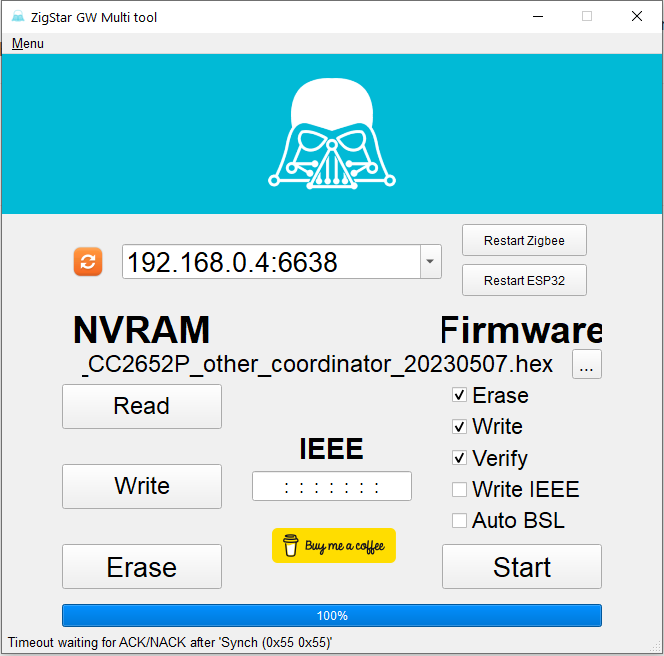
                                          Wenn man auf deinem Gateway (Ebyte Chip) eine neuere Firmware installieren will (weshalb auch immer), muss man da vorher eine Taste drücken? Ich erhalte folgende Fehlermeldung beim Versuch:
                                          timeout.PNG

                                          D 1 Reply Last reply
                                          0
                                          Reply
                                          • Reply as topic
                                          Log in to reply
                                          • Oldest to Newest
                                          • Newest to Oldest
                                          • Most Votes


                                          Support us

                                          ioBroker
                                          Community Adapters
                                          Donate

                                          405

                                          Online

                                          32.6k

                                          Users

                                          82.2k

                                          Topics

                                          1.3m

                                          Posts
                                          Community
                                          Impressum | Datenschutz-Bestimmungen | Nutzungsbedingungen | Einwilligungseinstellungen
                                          ioBroker Community 2014-2025
                                          logo
                                          • Login

                                          • Don't have an account? Register

                                          • Login or register to search.
                                          • First post
                                            Last post
                                          0
                                          • Home
                                          • Recent
                                          • Tags
                                          • Unread 0
                                          • Categories
                                          • Unreplied
                                          • Popular
                                          • GitHub
                                          • Docu
                                          • Hilfe