



Weiter zum Inhalt
  • Home
  • Aktuell
  • Tags
  • 0 Ungelesen 0
  • Kategorien
  • Unreplied
  • Beliebt
  • GitHub
  • Docu
  • Hilfe
Skins
  • Hell
  • Brite
  • Cerulean
  • Cosmo
  • Flatly
  • Journal
  • Litera
  • Lumen
  • Lux
  • Materia
  • Minty
  • Morph
  • Pulse
  • Sandstone
  • Simplex
  • Sketchy
  • Spacelab
  • United
  • Yeti
  • Zephyr
  • Dunkel
  • Cyborg
  • Darkly
  • Quartz
  • Slate
  • Solar
  • Superhero
  • Vapor

  • Standard: (Kein Skin)
  • Kein Skin
Einklappen
ioBroker Logo

Community Forum

donate donate
  1. ioBroker Community Home
  2. Deutsch
  3. ioBroker Allgemein
  4. Nach einspielen von Sicherung Telegram & TR-64 Defekt.

NEWS

  • Neuer ioBroker-Blog online: Monatsrückblick März/April 2026
    BluefoxB
    Bluefox
    8
    1
    821

  • Verwendung von KI bitte immer deutlich kennzeichnen
    HomoranH
    Homoran
    10
    1
    616

  • Monatsrückblick Januar/Februar 2026 ist online!
    BluefoxB
    Bluefox
    18
    1
    1.1k

Nach einspielen von Sicherung Telegram & TR-64 Defekt.

Geplant Angeheftet Gesperrt Verschoben ioBroker Allgemein
36 Beiträge 5 Kommentatoren 3.0k Aufrufe 4 Beobachtet
  • Älteste zuerst
  • Neuste zuerst
  • Meiste Stimmen
Antworten
  • In einem neuen Thema antworten
Anmelden zum Antworten
Dieses Thema wurde gelöscht. Nur Nutzer mit entsprechenden Rechten können es sehen.
  • Walter WhiteW Walter White

    Habe mein Pi neu gemacht da neue SSD und habe eben meine iobroker Sicherung aus Gdrive eingespielt, jetzt geht aber Telegram und TR-64 Adapter nicht mehr.
    habe schon deinstalliert, reboot, hilft alles nicht.
    Wie repariere ich das wieder?
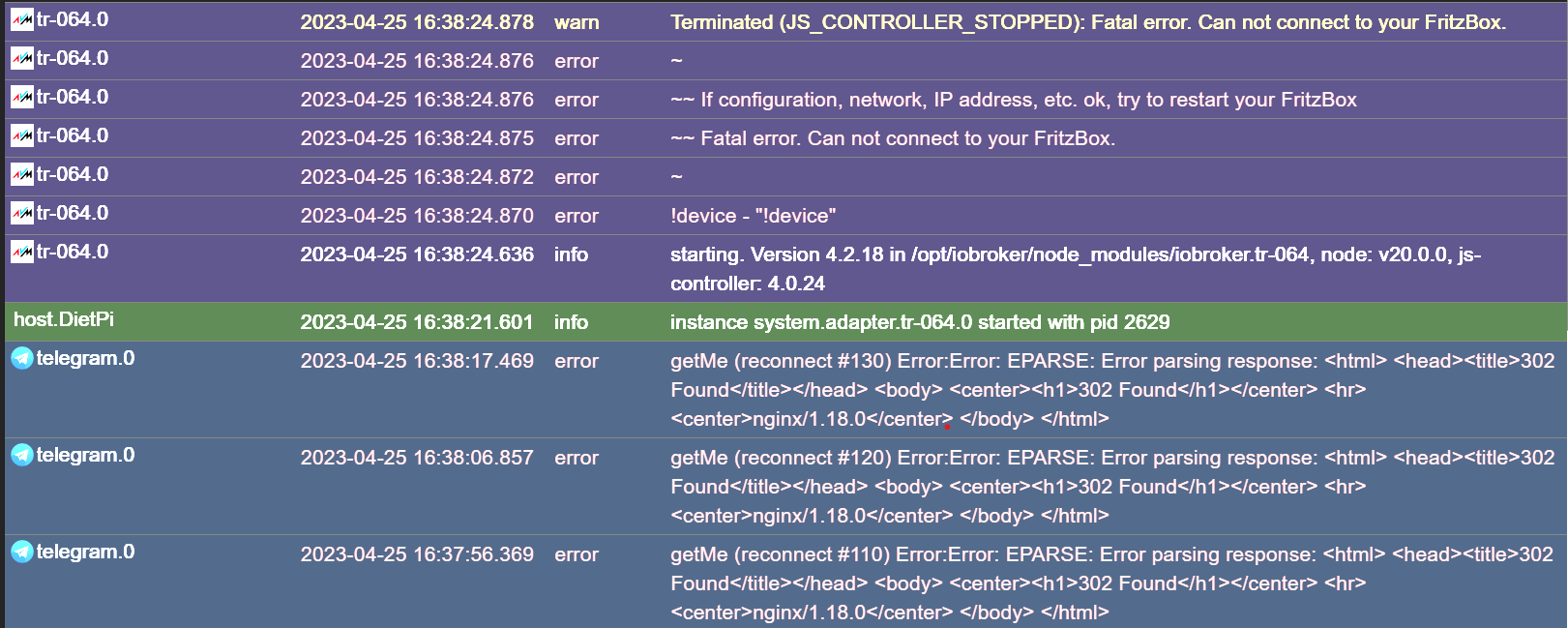
    Screenshot 2023-04-25 163931.png

    Thomas BraunT Online
    Thomas BraunT Online
    Thomas Braun
    Most Active
    schrieb am zuletzt editiert von Thomas Braun
    #2

    @walter-white

    Zunächst mal Text auch als Text in CodeTags eingebettet posten, nicht als Screenshot.
    Dann per

    iob diag
    

    uns wissen lassen wie du da jetzt unterwegs bist.

    Linux-Werkzeugkasten:
    https://forum.iobroker.net/topic/42952/der-kleine-iobroker-linux-werkzeugkasten
    NodeJS Fixer Skript:
    https://forum.iobroker.net/topic/68035/iob-node-fix-skript
    iob_diag: curl -sLf -o diag.sh https://iobroker.net/diag.sh && bash diag.sh

    1 Antwort Letzte Antwort
    1
    • Walter WhiteW Walter White

      Habe mein Pi neu gemacht da neue SSD und habe eben meine iobroker Sicherung aus Gdrive eingespielt, jetzt geht aber Telegram und TR-64 Adapter nicht mehr.
      habe schon deinstalliert, reboot, hilft alles nicht.
      Wie repariere ich das wieder?
      Screenshot 2023-04-25 163931.png

      crunchipC Abwesend
      crunchipC Abwesend
      crunchip
      Forum Testing Most Active Developer
      schrieb am zuletzt editiert von
      #3

      @walter-white node v20 falsch, geh zurück auf die 18

      umgestiegen von Proxmox auf Unraid

      Walter WhiteW 1 Antwort Letzte Antwort
      3
      • crunchipC crunchip

        @walter-white node v20 falsch, geh zurück auf die 18

        Walter WhiteW Offline
        Walter WhiteW Offline
        Walter White
        schrieb am zuletzt editiert von
        #4

        @crunchip und not correctly installed sehe ich schon im diag.

        Moment dann erst mal das machen!

        Das Node kommt von dietpi.

        Thomas BraunT 1 Antwort Letzte Antwort
        0
        • Walter WhiteW Walter White

          @crunchip und not correctly installed sehe ich schon im diag.

          Moment dann erst mal das machen!

          Das Node kommt von dietpi.

          Thomas BraunT Online
          Thomas BraunT Online
          Thomas Braun
          Most Active
          schrieb am zuletzt editiert von
          #5

          @walter-white sagte in Nach einspielen von Sicherung Telegram & TR-64 Defekt.:

          Das Node kommt von dietpi.

          Mit Sicherheit nicht.

          Linux-Werkzeugkasten:
          https://forum.iobroker.net/topic/42952/der-kleine-iobroker-linux-werkzeugkasten
          NodeJS Fixer Skript:
          https://forum.iobroker.net/topic/68035/iob-node-fix-skript
          iob_diag: curl -sLf -o diag.sh https://iobroker.net/diag.sh && bash diag.sh

          Walter WhiteW 1 Antwort Letzte Antwort
          0
          • Thomas BraunT Thomas Braun

            @walter-white sagte in Nach einspielen von Sicherung Telegram & TR-64 Defekt.:

            Das Node kommt von dietpi.

            Mit Sicherheit nicht.

            Walter WhiteW Offline
            Walter WhiteW Offline
            Walter White
            schrieb am zuletzt editiert von Walter White
            #6

            @thomas-braun Doch aus deren software bibliothek, war mein Fehler das bei der Pi einrichtung zu nehmen.

            Alle adapter wieder grün, node 19 selber installiert! 🤙

            Danke euch besonders für: iob diag

            HomoranH Thomas BraunT 4 Antworten Letzte Antwort
            0
            • Walter WhiteW Walter White

              @thomas-braun Doch aus deren software bibliothek, war mein Fehler das bei der Pi einrichtung zu nehmen.

              Alle adapter wieder grün, node 19 selber installiert! 🤙

              Danke euch besonders für: iob diag

              HomoranH Nicht stören
              HomoranH Nicht stören
              Homoran
              Global Moderator Administrators
              schrieb am zuletzt editiert von
              #7

              @walter-white jetzt mal langsam!

              wo ist der output von iob diag?
              node 19 ist noch falscher, da unstabile Entwicklerversion.

              https://forum.iobroker.net/topic/51555/hinweise-für-gute-forenbeiträge/1

              kein Support per PN! - Fragen im Forum stellen -
              Benutzt das Voting rechts unten im Beitrag wenn er euch geholfen hat.
              Das Forum freut sich über eine Spende. Benutzt dazu den Spendenbutton oben rechts. Danke!
              der Installationsfixer: curl -fsL https://iobroker.net/fix.sh | bash -

              1 Antwort Letzte Antwort
              1
              • Walter WhiteW Walter White

                @thomas-braun Doch aus deren software bibliothek, war mein Fehler das bei der Pi einrichtung zu nehmen.

                Alle adapter wieder grün, node 19 selber installiert! 🤙

                Danke euch besonders für: iob diag

                Thomas BraunT Online
                Thomas BraunT Online
                Thomas Braun
                Most Active
                schrieb am zuletzt editiert von
                #8

                @walter-white sagte in Nach einspielen von Sicherung Telegram & TR-64 Defekt.:

                node 19

                Node18 ist nicht ohne Grund die derzeitige Vorgabe für den iobroker.

                Linux-Werkzeugkasten:
                https://forum.iobroker.net/topic/42952/der-kleine-iobroker-linux-werkzeugkasten
                NodeJS Fixer Skript:
                https://forum.iobroker.net/topic/68035/iob-node-fix-skript
                iob_diag: curl -sLf -o diag.sh https://iobroker.net/diag.sh && bash diag.sh

                Walter WhiteW 1 Antwort Letzte Antwort
                0
                • Walter WhiteW Walter White

                  @thomas-braun Doch aus deren software bibliothek, war mein Fehler das bei der Pi einrichtung zu nehmen.

                  Alle adapter wieder grün, node 19 selber installiert! 🤙

                  Danke euch besonders für: iob diag

                  Thomas BraunT Online
                  Thomas BraunT Online
                  Thomas Braun
                  Most Active
                  schrieb am zuletzt editiert von
                  #9

                  @walter-white sagte in Nach einspielen von Sicherung Telegram & TR-64 Defekt.:

                  Danke euch besonders für: iob diag

                  Und was hat dir das alles verraten?

                  Linux-Werkzeugkasten:
                  https://forum.iobroker.net/topic/42952/der-kleine-iobroker-linux-werkzeugkasten
                  NodeJS Fixer Skript:
                  https://forum.iobroker.net/topic/68035/iob-node-fix-skript
                  iob_diag: curl -sLf -o diag.sh https://iobroker.net/diag.sh && bash diag.sh

                  1 Antwort Letzte Antwort
                  0
                  • Thomas BraunT Thomas Braun

                    @walter-white sagte in Nach einspielen von Sicherung Telegram & TR-64 Defekt.:

                    node 19

                    Node18 ist nicht ohne Grund die derzeitige Vorgabe für den iobroker.

                    Walter WhiteW Offline
                    Walter WhiteW Offline
                    Walter White
                    schrieb am zuletzt editiert von
                    #10

                    @thomas-braun said in Nach einspielen von Sicherung Telegram & TR-64 Defekt.:

                    @walter-white sagte in Nach einspielen von Sicherung Telegram & TR-64 Defekt.:

                    node 19

                    Node18 ist nicht ohne Grund die derzeitige Vorgabe für den iobroker.

                    Oh hab jetzt 19, ist das schlimm?
                    Funktioniert zumindest alles, und hatte ich vor dem neu machen auch.

                    Also es hat mir verraten das node nicht korrekt installiert war, es war version 20 aus den dietpi software bibliotheken.

                    Thomas BraunT 1 Antwort Letzte Antwort
                    0
                    • Walter WhiteW Walter White

                      @thomas-braun said in Nach einspielen von Sicherung Telegram & TR-64 Defekt.:

                      @walter-white sagte in Nach einspielen von Sicherung Telegram & TR-64 Defekt.:

                      node 19

                      Node18 ist nicht ohne Grund die derzeitige Vorgabe für den iobroker.

                      Oh hab jetzt 19, ist das schlimm?
                      Funktioniert zumindest alles, und hatte ich vor dem neu machen auch.

                      Also es hat mir verraten das node nicht korrekt installiert war, es war version 20 aus den dietpi software bibliotheken.

                      Thomas BraunT Online
                      Thomas BraunT Online
                      Thomas Braun
                      Most Active
                      schrieb am zuletzt editiert von
                      #11

                      @walter-white sagte in Nach einspielen von Sicherung Telegram & TR-64 Defekt.:

                      ist das schlimm?

                      Das ist eine Entwicklerversion und läuft in absehbarer Zeit aus.

                      Linux-Werkzeugkasten:
                      https://forum.iobroker.net/topic/42952/der-kleine-iobroker-linux-werkzeugkasten
                      NodeJS Fixer Skript:
                      https://forum.iobroker.net/topic/68035/iob-node-fix-skript
                      iob_diag: curl -sLf -o diag.sh https://iobroker.net/diag.sh && bash diag.sh

                      Walter WhiteW 1 Antwort Letzte Antwort
                      1
                      • Thomas BraunT Thomas Braun

                        @walter-white sagte in Nach einspielen von Sicherung Telegram & TR-64 Defekt.:

                        ist das schlimm?

                        Das ist eine Entwicklerversion und läuft in absehbarer Zeit aus.

                        Walter WhiteW Offline
                        Walter WhiteW Offline
                        Walter White
                        schrieb am zuletzt editiert von
                        #12

                        @thomas-braun dann ein downgrade machen, oder lassen und dann auf 20 wenn es so weit ist?

                        HomoranH Thomas BraunT 2 Antworten Letzte Antwort
                        0
                        • Walter WhiteW Walter White

                          @thomas-braun dann ein downgrade machen, oder lassen und dann auf 20 wenn es so weit ist?

                          HomoranH Nicht stören
                          HomoranH Nicht stören
                          Homoran
                          Global Moderator Administrators
                          schrieb am zuletzt editiert von
                          #13

                          @walter-white sagte in Nach einspielen von Sicherung Telegram & TR-64 Defekt.:

                          @thomas-braun dann ein downgrade machen, oder lassen und dann auf 20 wenn es so weit ist?

                          wir wissen von deiner Installation: nix!

                          bitte den Output von iob diag zeigen

                          in code-tags!

                          kein Support per PN! - Fragen im Forum stellen -
                          Benutzt das Voting rechts unten im Beitrag wenn er euch geholfen hat.
                          Das Forum freut sich über eine Spende. Benutzt dazu den Spendenbutton oben rechts. Danke!
                          der Installationsfixer: curl -fsL https://iobroker.net/fix.sh | bash -

                          1 Antwort Letzte Antwort
                          0
                          • Walter WhiteW Walter White

                            @thomas-braun dann ein downgrade machen, oder lassen und dann auf 20 wenn es so weit ist?

                            Thomas BraunT Online
                            Thomas BraunT Online
                            Thomas Braun
                            Most Active
                            schrieb am zuletzt editiert von
                            #14

                            @walter-white

                            Zeig mal die vollständige Ausgabe von

                            iob diag
                            

                            Linux-Werkzeugkasten:
                            https://forum.iobroker.net/topic/42952/der-kleine-iobroker-linux-werkzeugkasten
                            NodeJS Fixer Skript:
                            https://forum.iobroker.net/topic/68035/iob-node-fix-skript
                            iob_diag: curl -sLf -o diag.sh https://iobroker.net/diag.sh && bash diag.sh

                            Walter WhiteW 1 Antwort Letzte Antwort
                            0
                            • Thomas BraunT Thomas Braun

                              @walter-white

                              Zeig mal die vollständige Ausgabe von

                              iob diag
                              
                              Walter WhiteW Offline
                              Walter WhiteW Offline
                              Walter White
                              schrieb am zuletzt editiert von Homoran
                              #15

                              ======== Start marking the full check here =========

                              Skript v.2023-04-16
                              
                              *** BASE SYSTEM ***
                              Model           : Raspberry Pi 4 Model B Rev 1.1
                              Architecture    : aarch64
                              Docker          : false
                              Virtualization  : none
                              Distributor ID: Debian
                              Description:    Debian GNU/Linux 11 (bullseye)
                              Release:        11
                              Codename:       bullseye
                              
                              PRETTY_NAME="Debian GNU/Linux 11 (bullseye)"
                              NAME="Debian GNU/Linux"
                              VERSION_ID="11"
                              VERSION="11 (bullseye)"
                              VERSION_CODENAME=bullseye
                              ID=debian
                              HOME_URL="https://www.debian.org/"
                              SUPPORT_URL="https://www.debian.org/support"
                              BUG_REPORT_URL="https://bugs.debian.org/"
                              
                              Systemuptime and Load:
                               17:50:03 up 45 min,  1 user,  load average: 3.67, 3.92, 3.44
                              CPU threads: 4
                              
                              Raspberry only:
                              Can't open device file: /dev/vcio
                              Try creating a device file with: sudo mknod /dev/vcio c 100 0
                              Other values than 0x0 hint to temperature/voltage problems
                              Can't open device file: /dev/vcio
                              Try creating a device file with: sudo mknod /dev/vcio c 100 0
                              Can't open device file: /dev/vcio
                              Try creating a device file with: sudo mknod /dev/vcio c 100 0
                              
                              *** Time and Time Zones ***
                              Failed to connect to bus: No such file or directory
                              
                              *** User and Groups ***
                              dietpi
                              /home/dietpi
                              dietpi iobroker
                              
                              *** X-Server-Setup ***
                              X-Server:       false
                              Desktop:
                              Terminal:
                              Failed to connect to bus: No such file or directory
                              Boot Target:
                              
                              *** MEMORY ***
                                             total        used        free      shared  buff/cache   available
                              Mem:            3.8G        1.5G        597M         68M        1.8G        2.2G
                              Swap:           4.1G          0B        4.1G
                              Total:          7.9G        1.5G        4.7G
                              
                                       3844 M total memory
                                       1485 M used memory
                                       1811 M active memory
                                       1196 M inactive memory
                                        595 M free memory
                                         72 M buffer memory
                                       1690 M swap cache
                                       4095 M total swap
                                          0 M used swap
                                       4095 M free swap
                              
                              Raspberry only:
                              Can't open device file: /dev/vcio
                              Try creating a device file with: sudo mknod /dev/vcio c 100 0
                              
                              *** FILESYSTEM ***
                              Filesystem     Type      Size  Used Avail Use% Mounted on
                              /dev/root      ext4      916G  260G  656G  29% /
                              devtmpfs       devtmpfs  1.9G     0  1.9G   0% /dev
                              tmpfs          tmpfs     1.9G  3.5M  1.9G   1% /dev/shm
                              tmpfs          tmpfs     769M  8.7M  761M   2% /run
                              tmpfs          tmpfs     5.0M     0  5.0M   0% /run/lock
                              tmpfs          tmpfs     2.9G   27M  2.9G   1% /tmp
                              tmpfs          tmpfs      50M   36K   50M   1% /var/log
                              /dev/mmcblk0p1 vfat      127M   32M   95M  26% /boot
                              
                              Messages concerning ext4 filesystem in dmesg:
                              [Tue Apr 25 17:04:12 2023] Kernel command line: coherent_pool=1M 8250.nr_uarts=1 snd_bcm28   35.enable_headphones=0 snd_bcm2835.enable_headphones=0 snd_bcm2835.enable_hdmi=0 bcm2708_f   b.fbwidth=0 bcm2708_fb.fbheight=0 bcm2708_fb.fbdepth=16 bcm2708_fb.fbswap=1 smsc95xx.macad   dr=DC:A6:32:5B:7E:AF vc_mem.mem_base=0x3f000000 vc_mem.mem_size=0x3f600000  root=PARTUUID=   44913460-8f3c-4a1b-8c50-6793f20b7a73 rootfstype=ext4 rootwait net.ifnames=0 logo.nologo co   nsole=tty1 console=ttyAMA0,115200
                              [Tue Apr 25 17:04:15 2023] EXT4-fs (sda1): mounted filesystem with ordered data mode. Quot   a mode: none.
                              [Tue Apr 25 17:04:15 2023] VFS: Mounted root (ext4 filesystem) readonly on device 8:1.
                              [Tue Apr 25 17:04:16 2023] EXT4-fs (sda1): re-mounted. Quota mode: none.
                              
                              Show mounted filesystems (real ones only):
                              TARGET  SOURCE         FSTYPE OPTIONS
                              /       /dev/sda1      ext4   rw,noatime,lazytime,stripe=8191
                              `-/boot /dev/mmcblk0p1 vfat   rw,noatime,lazytime,fmask=0022,dmask=0022,codepage=437,iocha   rset=ascii,shortname=mixed,errors=remount-ro
                              
                              Files in neuralgic directories:
                              
                              /var:
                              2.8G    /var/
                              518M    /var/www
                              509M    /var/www/nextcloud
                              268M    /var/www/nextcloud/apps
                              215M    /var/lib
                              
                              Hint: You are currently not seeing messages from other users and the system.
                                    Users in groups 'adm', 'systemd-journal' can see all messages.
                                    Pass -q to turn off this notice.
                              No journal files were opened due to insufficient permissions.
                              
                              /opt/iobroker/backups:
                              11M     /opt/iobroker/backups/
                              
                              /opt/iobroker/iobroker-data:
                              165M    /opt/iobroker/iobroker-data/
                              137M    /opt/iobroker/iobroker-data/files
                              51M     /opt/iobroker/iobroker-data/files/javascript.admin
                              48M     /opt/iobroker/iobroker-data/files/telegram.admin
                              32M     /opt/iobroker/iobroker-data/files/javascript.admin/static/js
                              
                              The five largest files in iobroker-data are:
                              15M     /opt/iobroker/iobroker-data/files/telegram.admin/rules/static/js/vendors-node_modu   les_iobroker_adapter-react-v5_assets_devices_parseNames_d_ts-node_modules_io-1d9f06.44fe4a   3f.chunk.js.map
                              11M     /opt/iobroker/iobroker-data/objects.jsonl
                              7.6M    /opt/iobroker/iobroker-data/states.jsonl
                              7.2M    /opt/iobroker/iobroker-data/files/telegram.admin/rules/static/js/vendors-node_modu   les_iobroker_adapter-react-v5_assets_devices_parseNames_d_ts-node_modules_io-1d9f06.44fe4a   3f.chunk.js
                              6.9M    /opt/iobroker/iobroker-data/files/telegram.admin/custom/static/js/vendors-node_mod   ules_mui_icons-material_esm_index_js.8fdf8cb7.chunk.js.map
                              
                              *** NodeJS-Installation ***
                              
                              /usr/bin/nodejs         v19.9.0
                              /usr/bin/node           v19.9.0
                              /usr/bin/npm            9.6.3
                              /usr/bin/npx            9.6.3
                              
                              
                              nodejs:
                                Installed: 19.9.0-deb-1nodesource1
                                Candidate: 19.9.0-deb-1nodesource1
                                Version table:
                               *** 19.9.0-deb-1nodesource1 500
                                      500 https://deb.nodesource.com/node_19.x bullseye/main arm64 Packages
                                      100 /var/lib/dpkg/status
                                   12.22.12~dfsg-1~deb11u3 500
                                      500 https://deb.debian.org/debian-security bullseye-security/main arm64 Packages
                                   12.22.5~dfsg-2~11u1 500
                                      500 https://deb.debian.org/debian bullseye/main arm64 Packages
                              
                              Temp directories causing npm8 problem: 0
                              No problems detected
                              
                              *** ioBroker-Installation ***
                              
                              ioBroker Status
                              iobroker is running on this host.
                              
                              
                              Objects type: jsonl
                              States  type: jsonl
                              
                              MULTIHOSTSERVICE/enabled: false
                              
                              Core adapters versions
                              js-controller:  4.0.24
                              admin:          6.3.5
                              javascript:     6.1.4
                              
                              Adapters from github:   0
                              
                              Adapter State
                              + system.adapter.accuweather.0            : accuweather           : DietPi                                   -  enabled
                              + system.adapter.admin.0                  : admin                 : DietPi                                   -  enabled, port: 8081, bind: 0.0.0.0, run as: admin
                              + system.adapter.alexa2.0                 : alexa2                : DietPi                                   -  enabled
                              + system.adapter.backitup.0               : backitup              : DietPi                                   -  enabled
                              + system.adapter.discovery.0              : discovery             : DietPi                                   -  enabled
                                system.adapter.dwd.0                    : dwd                   : DietPi                                   -  enabled
                              + system.adapter.fb-checkpresence.0       : fb-checkpresence      : DietPi                                   -  enabled
                              + system.adapter.history.0                : history               : DietPi                                   -  enabled
                              + system.adapter.hue.0                    : hue                   : DietPi                                   -  enabled, port: 443
                              + system.adapter.javascript.0             : javascript            : DietPi                                   -  enabled
                                system.adapter.luftdaten.0              : luftdaten             : DietPi                                   -  enabled
                                system.adapter.netatmo-crawler.0        : netatmo-crawler       : DietPi                                   -  enabled
                              + system.adapter.nina.0                   : nina                  : DietPi                                   -  enabled
                              + system.adapter.parcel.0                 : parcel                : DietPi                                   -  enabled
                              + system.adapter.parcel.1                 : parcel                : DietPi                                   -  enabled
                              + system.adapter.telegram.0               : telegram              : DietPi                                   -  enabled, port: 8443, bind: 0.0.0.0
                              + system.adapter.tr-064.0                 : tr-064                : DietPi                                   -  enabled
                              + system.adapter.web.0                    : web                   : DietPi                                   -  enabled, port: 8082, bind: 0.0.0.0, run as: admin
                              + system.adapter.zigbee.0                 : zigbee                : DietPi                                   -  enabled, port: /dev/ttyUSB0
                              
                              + instance is alive
                              
                              Enabled adapters with bindings
                              + system.adapter.admin.0                  : admin                 : DietPi                                   -  enabled, port: 8081, bind: 0.0.0.0, run as: admin
                              + system.adapter.hue.0                    : hue                   : DietPi                                   -  enabled, port: 443
                              + system.adapter.telegram.0               : telegram              : DietPi                                   -  enabled, port: 8443, bind: 0.0.0.0
                              + system.adapter.web.0                    : web                   : DietPi                                   -  enabled, port: 8082, bind: 0.0.0.0, run as: admin
                              + system.adapter.zigbee.0                 : zigbee                : DietPi                                   -  enabled, port: /dev/ttyUSB0
                              
                              ioBroker-Repositories
                              stable        : http://download.iobroker.net/sources-dist.json
                              beta          : http://download.iobroker.net/sources-dist-latest.json
                              
                              Active repo(s): stable
                              
                              Installed ioBroker-Instances
                              Used repository: stable
                              Adapter    "accuweather"  : 1.2.1    , installed 1.2.1
                              Adapter    "admin"        : 6.3.5    , installed 6.3.5
                              Adapter    "alexa2"       : 3.23.2   , installed 3.23.2
                              Adapter    "backitup"     : 2.6.16   , installed 2.6.16
                              Adapter    "discovery"    : 3.1.0    , installed 3.1.0
                              Adapter    "dwd"          : 2.8.3    , installed 2.8.3
                              Adapter    "fb-checkpresence": 1.1.26, installed 1.1.26
                              Adapter    "history"      : 2.2.4    , installed 2.2.4
                              Adapter    "hue"          : 3.7.1    , installed 3.7.1
                              Adapter    "javascript"   : 6.1.4    , installed 6.1.4
                              Controller "js-controller": 4.0.24   , installed 4.0.24
                              Adapter    "luftdaten"    : 2.2.4    , installed 2.2.4
                              Adapter    "netatmo-crawler": 0.8.1  , installed 0.8.1
                              Adapter    "nina"         : 0.0.25   , installed 0.0.25
                              Adapter    "parcel"       : 0.0.27   , installed 0.0.27
                              Adapter    "simple-api"   : 2.7.2    , installed 2.7.2
                              Adapter    "socketio"     : 4.2.0    , installed 4.2.0
                              Adapter    "telegram"     : 1.15.2   , installed 1.15.2
                              Adapter    "tr-064"       : 4.2.18   , installed 4.2.18
                              Adapter    "web"          : 4.3.0    , installed 4.3.0
                              Adapter    "ws"           : 1.3.0    , installed 1.3.0
                              Adapter    "zigbee"       : 1.8.10   , installed 1.8.10
                              
                              Objects and States
                              Please stand by - This may take a while
                              Objects:        7613
                              States:         6647
                              
                              *** OS-Repositories and Updates ***
                              Hit:1 https://downloads.plex.tv/repo/deb public InRelease
                              Hit:2 https://deb.nodesource.com/node_19.x bullseye InRelease
                              Hit:3 https://deb.debian.org/debian bullseye InRelease
                              Hit:4 https://deb.debian.org/debian bullseye-updates InRelease
                              Hit:5 https://deb.debian.org/debian-security bullseye-security InRelease
                              Hit:6 https://archive.raspberrypi.org/debian bullseye InRelease
                              Hit:7 https://deb.debian.org/debian bullseye-backports InRelease
                              Reading package lists...
                              Pending Updates: 0
                              
                              *** Listening Ports ***
                              Active Internet connections (only servers)
                              Proto Recv-Q Send-Q Local Address           Foreign Address         State       User       Inode      PID/Program name
                              tcp        0      0 127.0.0.1:32600         0.0.0.0:*               LISTEN      997        52966      4850/Plex Tuner Ser
                              tcp        0      0 0.0.0.0:8888            0.0.0.0:*               LISTEN      0          1785       478/perl
                              tcp        0      0 127.0.0.1:32401         0.0.0.0:*               LISTEN      997        50097      4708/Plex Media Ser
                              tcp        0      0 127.0.0.1:3306          0.0.0.0:*               LISTEN      104        13319      627/mariadbd
                              tcp        0      0 0.0.0.0:111             0.0.0.0:*               LISTEN      0          11819      1/init
                              tcp        0      0 0.0.0.0:22              0.0.0.0:*               LISTEN      0          368        362/dropbear
                              tcp        0      0 0.0.0.0:53              0.0.0.0:*               LISTEN      998        12203      555/pihole-FTL
                              tcp        0      0 127.0.0.1:39821         0.0.0.0:*               LISTEN      997        54375      4918/Plex Plug-in [
                              tcp        0      0 127.0.0.1:9000          0.0.0.0:*               LISTEN      1001       808        843/iobroker.js-con
                              tcp        0      0 127.0.0.1:9001          0.0.0.0:*               LISTEN      1001       776        843/iobroker.js-con
                              tcp        0      0 0.0.0.0:32469           0.0.0.0:*               LISTEN      997        50165      4849/Plex DLNA Serv
                              tcp        0      0 127.0.0.1:4711          0.0.0.0:*               LISTEN      998        12209      555/pihole-FTL
                              tcp        0      0 127.0.0.1:37179         0.0.0.0:*               LISTEN      997        50862      4733/Plex Plug-in [
                              tcp        0      0 0.0.0.0:1247            0.0.0.0:*               LISTEN      997        50158      4849/Plex DLNA Serv
                              tcp        0      0 127.0.0.1:6379          0.0.0.0:*               LISTEN      105        486        547/redis-server 12
                              tcp6       0      0 ::1:4711                :::*                    LISTEN      998        12210      555/pihole-FTL
                              tcp6       0      0 ::1:6379                :::*                    LISTEN      105        487        547/redis-server 12
                              tcp6       0      0 :::80                   :::*                    LISTEN      0          13013      748/apache2
                              tcp6       0      0 :::111                  :::*                    LISTEN      0          12539      1/init
                              tcp6       0      0 :::22                   :::*                    LISTEN      0          369        362/dropbear
                              tcp6       0      0 :::53                   :::*                    LISTEN      998        12205      555/pihole-FTL
                              tcp6       0      0 :::8082                 :::*                    LISTEN      1001       20977      1996/io.web.0
                              tcp6       0      0 :::8081                 :::*                    LISTEN      1001       15861      1502/io.admin.0
                              tcp6       0      0 :::32400                :::*                    LISTEN      997        50095      4708/Plex Media Ser
                              tcp6       0      0 :::5252                 :::*                    LISTEN      0          1828       528/dietpi-dashboar
                              udp        0      0 192.168.178.20:5353     0.0.0.0:*                           1001       16135      1744/io.tr-064.0
                              udp        0      0 127.0.0.1:50431         0.0.0.0:*                           997        52960      4708/Plex Media Ser
                              udp        0      0 192.168.178.20:44520    0.0.0.0:*                           997        52963      4708/Plex Media Ser
                              udp        0      0 192.168.178.20:40439    0.0.0.0:*                           997        52961      4708/Plex Media Ser
                              udp        0      0 0.0.0.0:46598           0.0.0.0:*                           997        50171      4849/Plex DLNA Serv
                              udp        0      0 0.0.0.0:32410           0.0.0.0:*                           997        52955      4708/Plex Media Ser
                              udp        0      0 0.0.0.0:32412           0.0.0.0:*                           997        52956      4708/Plex Media Ser
                              udp        0      0 0.0.0.0:32413           0.0.0.0:*                           997        52957      4708/Plex Media Ser
                              udp        0      0 0.0.0.0:32414           0.0.0.0:*                           997        52954      4708/Plex Media Ser
                              udp        0      0 0.0.0.0:1900            0.0.0.0:*                           997        50155      4849/Plex DLNA Serv
                              udp        0      0 0.0.0.0:1901            0.0.0.0:*                           997        52962      4708/Plex Media Ser
                              udp        0      0 0.0.0.0:53              0.0.0.0:*                           998        12202      555/pihole-FTL
                              udp        0      0 0.0.0.0:68              0.0.0.0:*                           0          388        425/dhclient
                              udp        0      0 0.0.0.0:111             0.0.0.0:*                           0          39         1/init
                              udp        0      0 127.0.0.1:49458         0.0.0.0:*                           997        52958      4708/Plex Media Ser
                              udp        0      0 192.168.178.20:45382    0.0.0.0:*                           997        52959      4708/Plex Media Ser
                              udp        0      0 0.0.0.0:10753           0.0.0.0:*                           997        50162      4849/Plex DLNA Serv
                              udp        0      0 0.0.0.0:45758           0.0.0.0:*                           997        50168      4849/Plex DLNA Serv
                              udp6       0      0 :::53                   :::*                                998        12204      555/pihole-FTL
                              udp6       0      0 :::111                  :::*                                0          42         1/init
                              
                              *** Log File - Last 25 Lines ***
                              
                              2023-04-25 17:46:10.862  - info: admin.0 (1502) ==> Connected system.user.admin from ::ffff:192.168.178.54
                              2023-04-25 17:46:11.294  - info: zigbee.0 (1778) List of port: [{"path":"/dev/ttyUSB0","manufacturer":"Silicon Labs","serialNumber":"0001","pnpId":"usb-Silicon_Labs_Sonoff_Zigbee_3.0_USB_Dongle_Plus_0001-if00-port0","vendorId":"10c4","productId":"ea60"},{"path":"/dev/ttyAMA0"},{"path":"/dev/ttyS0"}]
                              2023-04-25 17:46:13.265  - info: zigbee.0 (1778) Zigbee: allowing new devices to join.
                              2023-04-25 17:46:26.868  - warn: zigbee.0 (1778) Device '0x00158d000320d688' announced itself
                              2023-04-25 17:46:36.536  - warn: zigbee.0 (1778) Device '0x00158d00090e87ed' announced itself
                              2023-04-25 17:46:53.324  - warn: zigbee.0 (1778) Device '0x00158d0008f13899' announced itself
                              2023-04-25 17:47:08.010  - warn: zigbee.0 (1778) Device '0x00158d00047b8146' announced itself
                              2023-04-25 17:47:14.552  - info: zigbee.0 (1778) Zigbee: stop joining
                              2023-04-25 17:48:30.256  - info: admin.0 (1502) <== Disconnect system.user.admin from ::ffff:192.168.178.54
                              2023-04-25 17:48:40.284  - info: admin.0 (1502) ==> Connected system.user.admin from ::ffff:192.168.178.54
                              2023-04-25 17:48:50.465  - info: javascript.0 (1657) Stop script script.js.Eigene.Telegram_Logfile
                              2023-04-25 17:48:51.717  - info: javascript.0 (1657) Start javascript script.js.Eigene.Telegram_Logfile
                              2023-04-25 17:48:51.774  - info: javascript.0 (1657) script.js.Eigene.Telegram_Logfile: registered 0 subscriptions, 1 schedule, 0 messages, 0 logs and 0 file subscriptions
                              2023-04-25 17:49:22.347  - info: admin.0 (1502) <== Disconnect system.user.admin from ::ffff:192.168.178.54 javascript
                              2023-04-25 17:49:22.363  - info: admin.0 (1502) <== Disconnect system.user.admin from ::ffff:192.168.178.54 admin
                              2023-04-25 17:50:00.124  - info: host.DietPi instance system.adapter.netatmo-crawler.0 started with pid 13942
                              2023-04-25 17:50:04.161  - info: host.DietPi instance system.adapter.dwd.0 started with pid 14015
                              2023-04-25 17:50:05.215  - info: netatmo-crawler.0 (13942) starting. Version 0.8.1 in /opt/iobroker/node_modules/iobroker.netatmo-crawler, node: v19.9.0, js-controller: 4.0.24
                              2023-04-25 17:50:05.389  - info: netatmo-crawler.0 (13942) Getting data for stationid:70:ee:50:65:8b:78
                              2023-04-25 17:50:08.045  - info: netatmo-crawler.0 (13942) Getting data for stationid:70:ee:50:13:60:32
                              2023-04-25 17:50:09.385  - info: dwd.0 (14015) starting. Version 2.8.3 in /opt/iobroker/node_modules/iobroker.dwd, node: v19.9.0, js-controller: 4.0.24
                              2023-04-25 17:50:09.761  - info: netatmo-crawler.0 (13942) Terminated (ADAPTER_REQUESTED_TERMINATION): Everything done. Going to terminate till next schedule
                              2023-04-25 17:50:10.348  - info: host.DietPi instance system.adapter.netatmo-crawler.0 terminated with code 11 (ADAPTER_REQUESTED_TERMINATION)
                              2023-04-25 17:50:12.874  - info: dwd.0 (14015) Terminated (ADAPTER_REQUESTED_TERMINATION): Without reason
                              2023-04-25 17:50:13.439  - info: host.DietPi instance system.adapter.dwd.0 terminated with code 11 (ADAPTER_REQUESTED_TERMINATION)


                              ============ Mark until here for C&P =============

                              iob diag has finished.

                              HomoranH 1 Antwort Letzte Antwort
                              0
                              • Walter WhiteW Walter White

                                ======== Start marking the full check here =========

                                Skript v.2023-04-16
                                
                                *** BASE SYSTEM ***
                                Model           : Raspberry Pi 4 Model B Rev 1.1
                                Architecture    : aarch64
                                Docker          : false
                                Virtualization  : none
                                Distributor ID: Debian
                                Description:    Debian GNU/Linux 11 (bullseye)
                                Release:        11
                                Codename:       bullseye
                                
                                PRETTY_NAME="Debian GNU/Linux 11 (bullseye)"
                                NAME="Debian GNU/Linux"
                                VERSION_ID="11"
                                VERSION="11 (bullseye)"
                                VERSION_CODENAME=bullseye
                                ID=debian
                                HOME_URL="https://www.debian.org/"
                                SUPPORT_URL="https://www.debian.org/support"
                                BUG_REPORT_URL="https://bugs.debian.org/"
                                
                                Systemuptime and Load:
                                 17:50:03 up 45 min,  1 user,  load average: 3.67, 3.92, 3.44
                                CPU threads: 4
                                
                                Raspberry only:
                                Can't open device file: /dev/vcio
                                Try creating a device file with: sudo mknod /dev/vcio c 100 0
                                Other values than 0x0 hint to temperature/voltage problems
                                Can't open device file: /dev/vcio
                                Try creating a device file with: sudo mknod /dev/vcio c 100 0
                                Can't open device file: /dev/vcio
                                Try creating a device file with: sudo mknod /dev/vcio c 100 0
                                
                                *** Time and Time Zones ***
                                Failed to connect to bus: No such file or directory
                                
                                *** User and Groups ***
                                dietpi
                                /home/dietpi
                                dietpi iobroker
                                
                                *** X-Server-Setup ***
                                X-Server:       false
                                Desktop:
                                Terminal:
                                Failed to connect to bus: No such file or directory
                                Boot Target:
                                
                                *** MEMORY ***
                                               total        used        free      shared  buff/cache   available
                                Mem:            3.8G        1.5G        597M         68M        1.8G        2.2G
                                Swap:           4.1G          0B        4.1G
                                Total:          7.9G        1.5G        4.7G
                                
                                         3844 M total memory
                                         1485 M used memory
                                         1811 M active memory
                                         1196 M inactive memory
                                          595 M free memory
                                           72 M buffer memory
                                         1690 M swap cache
                                         4095 M total swap
                                            0 M used swap
                                         4095 M free swap
                                
                                Raspberry only:
                                Can't open device file: /dev/vcio
                                Try creating a device file with: sudo mknod /dev/vcio c 100 0
                                
                                *** FILESYSTEM ***
                                Filesystem     Type      Size  Used Avail Use% Mounted on
                                /dev/root      ext4      916G  260G  656G  29% /
                                devtmpfs       devtmpfs  1.9G     0  1.9G   0% /dev
                                tmpfs          tmpfs     1.9G  3.5M  1.9G   1% /dev/shm
                                tmpfs          tmpfs     769M  8.7M  761M   2% /run
                                tmpfs          tmpfs     5.0M     0  5.0M   0% /run/lock
                                tmpfs          tmpfs     2.9G   27M  2.9G   1% /tmp
                                tmpfs          tmpfs      50M   36K   50M   1% /var/log
                                /dev/mmcblk0p1 vfat      127M   32M   95M  26% /boot
                                
                                Messages concerning ext4 filesystem in dmesg:
                                [Tue Apr 25 17:04:12 2023] Kernel command line: coherent_pool=1M 8250.nr_uarts=1 snd_bcm28   35.enable_headphones=0 snd_bcm2835.enable_headphones=0 snd_bcm2835.enable_hdmi=0 bcm2708_f   b.fbwidth=0 bcm2708_fb.fbheight=0 bcm2708_fb.fbdepth=16 bcm2708_fb.fbswap=1 smsc95xx.macad   dr=DC:A6:32:5B:7E:AF vc_mem.mem_base=0x3f000000 vc_mem.mem_size=0x3f600000  root=PARTUUID=   44913460-8f3c-4a1b-8c50-6793f20b7a73 rootfstype=ext4 rootwait net.ifnames=0 logo.nologo co   nsole=tty1 console=ttyAMA0,115200
                                [Tue Apr 25 17:04:15 2023] EXT4-fs (sda1): mounted filesystem with ordered data mode. Quot   a mode: none.
                                [Tue Apr 25 17:04:15 2023] VFS: Mounted root (ext4 filesystem) readonly on device 8:1.
                                [Tue Apr 25 17:04:16 2023] EXT4-fs (sda1): re-mounted. Quota mode: none.
                                
                                Show mounted filesystems (real ones only):
                                TARGET  SOURCE         FSTYPE OPTIONS
                                /       /dev/sda1      ext4   rw,noatime,lazytime,stripe=8191
                                `-/boot /dev/mmcblk0p1 vfat   rw,noatime,lazytime,fmask=0022,dmask=0022,codepage=437,iocha   rset=ascii,shortname=mixed,errors=remount-ro
                                
                                Files in neuralgic directories:
                                
                                /var:
                                2.8G    /var/
                                518M    /var/www
                                509M    /var/www/nextcloud
                                268M    /var/www/nextcloud/apps
                                215M    /var/lib
                                
                                Hint: You are currently not seeing messages from other users and the system.
                                      Users in groups 'adm', 'systemd-journal' can see all messages.
                                      Pass -q to turn off this notice.
                                No journal files were opened due to insufficient permissions.
                                
                                /opt/iobroker/backups:
                                11M     /opt/iobroker/backups/
                                
                                /opt/iobroker/iobroker-data:
                                165M    /opt/iobroker/iobroker-data/
                                137M    /opt/iobroker/iobroker-data/files
                                51M     /opt/iobroker/iobroker-data/files/javascript.admin
                                48M     /opt/iobroker/iobroker-data/files/telegram.admin
                                32M     /opt/iobroker/iobroker-data/files/javascript.admin/static/js
                                
                                The five largest files in iobroker-data are:
                                15M     /opt/iobroker/iobroker-data/files/telegram.admin/rules/static/js/vendors-node_modu   les_iobroker_adapter-react-v5_assets_devices_parseNames_d_ts-node_modules_io-1d9f06.44fe4a   3f.chunk.js.map
                                11M     /opt/iobroker/iobroker-data/objects.jsonl
                                7.6M    /opt/iobroker/iobroker-data/states.jsonl
                                7.2M    /opt/iobroker/iobroker-data/files/telegram.admin/rules/static/js/vendors-node_modu   les_iobroker_adapter-react-v5_assets_devices_parseNames_d_ts-node_modules_io-1d9f06.44fe4a   3f.chunk.js
                                6.9M    /opt/iobroker/iobroker-data/files/telegram.admin/custom/static/js/vendors-node_mod   ules_mui_icons-material_esm_index_js.8fdf8cb7.chunk.js.map
                                
                                *** NodeJS-Installation ***
                                
                                /usr/bin/nodejs         v19.9.0
                                /usr/bin/node           v19.9.0
                                /usr/bin/npm            9.6.3
                                /usr/bin/npx            9.6.3
                                
                                
                                nodejs:
                                  Installed: 19.9.0-deb-1nodesource1
                                  Candidate: 19.9.0-deb-1nodesource1
                                  Version table:
                                 *** 19.9.0-deb-1nodesource1 500
                                        500 https://deb.nodesource.com/node_19.x bullseye/main arm64 Packages
                                        100 /var/lib/dpkg/status
                                     12.22.12~dfsg-1~deb11u3 500
                                        500 https://deb.debian.org/debian-security bullseye-security/main arm64 Packages
                                     12.22.5~dfsg-2~11u1 500
                                        500 https://deb.debian.org/debian bullseye/main arm64 Packages
                                
                                Temp directories causing npm8 problem: 0
                                No problems detected
                                
                                *** ioBroker-Installation ***
                                
                                ioBroker Status
                                iobroker is running on this host.
                                
                                
                                Objects type: jsonl
                                States  type: jsonl
                                
                                MULTIHOSTSERVICE/enabled: false
                                
                                Core adapters versions
                                js-controller:  4.0.24
                                admin:          6.3.5
                                javascript:     6.1.4
                                
                                Adapters from github:   0
                                
                                Adapter State
                                + system.adapter.accuweather.0            : accuweather           : DietPi                                   -  enabled
                                + system.adapter.admin.0                  : admin                 : DietPi                                   -  enabled, port: 8081, bind: 0.0.0.0, run as: admin
                                + system.adapter.alexa2.0                 : alexa2                : DietPi                                   -  enabled
                                + system.adapter.backitup.0               : backitup              : DietPi                                   -  enabled
                                + system.adapter.discovery.0              : discovery             : DietPi                                   -  enabled
                                  system.adapter.dwd.0                    : dwd                   : DietPi                                   -  enabled
                                + system.adapter.fb-checkpresence.0       : fb-checkpresence      : DietPi                                   -  enabled
                                + system.adapter.history.0                : history               : DietPi                                   -  enabled
                                + system.adapter.hue.0                    : hue                   : DietPi                                   -  enabled, port: 443
                                + system.adapter.javascript.0             : javascript            : DietPi                                   -  enabled
                                  system.adapter.luftdaten.0              : luftdaten             : DietPi                                   -  enabled
                                  system.adapter.netatmo-crawler.0        : netatmo-crawler       : DietPi                                   -  enabled
                                + system.adapter.nina.0                   : nina                  : DietPi                                   -  enabled
                                + system.adapter.parcel.0                 : parcel                : DietPi                                   -  enabled
                                + system.adapter.parcel.1                 : parcel                : DietPi                                   -  enabled
                                + system.adapter.telegram.0               : telegram              : DietPi                                   -  enabled, port: 8443, bind: 0.0.0.0
                                + system.adapter.tr-064.0                 : tr-064                : DietPi                                   -  enabled
                                + system.adapter.web.0                    : web                   : DietPi                                   -  enabled, port: 8082, bind: 0.0.0.0, run as: admin
                                + system.adapter.zigbee.0                 : zigbee                : DietPi                                   -  enabled, port: /dev/ttyUSB0
                                
                                + instance is alive
                                
                                Enabled adapters with bindings
                                + system.adapter.admin.0                  : admin                 : DietPi                                   -  enabled, port: 8081, bind: 0.0.0.0, run as: admin
                                + system.adapter.hue.0                    : hue                   : DietPi                                   -  enabled, port: 443
                                + system.adapter.telegram.0               : telegram              : DietPi                                   -  enabled, port: 8443, bind: 0.0.0.0
                                + system.adapter.web.0                    : web                   : DietPi                                   -  enabled, port: 8082, bind: 0.0.0.0, run as: admin
                                + system.adapter.zigbee.0                 : zigbee                : DietPi                                   -  enabled, port: /dev/ttyUSB0
                                
                                ioBroker-Repositories
                                stable        : http://download.iobroker.net/sources-dist.json
                                beta          : http://download.iobroker.net/sources-dist-latest.json
                                
                                Active repo(s): stable
                                
                                Installed ioBroker-Instances
                                Used repository: stable
                                Adapter    "accuweather"  : 1.2.1    , installed 1.2.1
                                Adapter    "admin"        : 6.3.5    , installed 6.3.5
                                Adapter    "alexa2"       : 3.23.2   , installed 3.23.2
                                Adapter    "backitup"     : 2.6.16   , installed 2.6.16
                                Adapter    "discovery"    : 3.1.0    , installed 3.1.0
                                Adapter    "dwd"          : 2.8.3    , installed 2.8.3
                                Adapter    "fb-checkpresence": 1.1.26, installed 1.1.26
                                Adapter    "history"      : 2.2.4    , installed 2.2.4
                                Adapter    "hue"          : 3.7.1    , installed 3.7.1
                                Adapter    "javascript"   : 6.1.4    , installed 6.1.4
                                Controller "js-controller": 4.0.24   , installed 4.0.24
                                Adapter    "luftdaten"    : 2.2.4    , installed 2.2.4
                                Adapter    "netatmo-crawler": 0.8.1  , installed 0.8.1
                                Adapter    "nina"         : 0.0.25   , installed 0.0.25
                                Adapter    "parcel"       : 0.0.27   , installed 0.0.27
                                Adapter    "simple-api"   : 2.7.2    , installed 2.7.2
                                Adapter    "socketio"     : 4.2.0    , installed 4.2.0
                                Adapter    "telegram"     : 1.15.2   , installed 1.15.2
                                Adapter    "tr-064"       : 4.2.18   , installed 4.2.18
                                Adapter    "web"          : 4.3.0    , installed 4.3.0
                                Adapter    "ws"           : 1.3.0    , installed 1.3.0
                                Adapter    "zigbee"       : 1.8.10   , installed 1.8.10
                                
                                Objects and States
                                Please stand by - This may take a while
                                Objects:        7613
                                States:         6647
                                
                                *** OS-Repositories and Updates ***
                                Hit:1 https://downloads.plex.tv/repo/deb public InRelease
                                Hit:2 https://deb.nodesource.com/node_19.x bullseye InRelease
                                Hit:3 https://deb.debian.org/debian bullseye InRelease
                                Hit:4 https://deb.debian.org/debian bullseye-updates InRelease
                                Hit:5 https://deb.debian.org/debian-security bullseye-security InRelease
                                Hit:6 https://archive.raspberrypi.org/debian bullseye InRelease
                                Hit:7 https://deb.debian.org/debian bullseye-backports InRelease
                                Reading package lists...
                                Pending Updates: 0
                                
                                *** Listening Ports ***
                                Active Internet connections (only servers)
                                Proto Recv-Q Send-Q Local Address           Foreign Address         State       User       Inode      PID/Program name
                                tcp        0      0 127.0.0.1:32600         0.0.0.0:*               LISTEN      997        52966      4850/Plex Tuner Ser
                                tcp        0      0 0.0.0.0:8888            0.0.0.0:*               LISTEN      0          1785       478/perl
                                tcp        0      0 127.0.0.1:32401         0.0.0.0:*               LISTEN      997        50097      4708/Plex Media Ser
                                tcp        0      0 127.0.0.1:3306          0.0.0.0:*               LISTEN      104        13319      627/mariadbd
                                tcp        0      0 0.0.0.0:111             0.0.0.0:*               LISTEN      0          11819      1/init
                                tcp        0      0 0.0.0.0:22              0.0.0.0:*               LISTEN      0          368        362/dropbear
                                tcp        0      0 0.0.0.0:53              0.0.0.0:*               LISTEN      998        12203      555/pihole-FTL
                                tcp        0      0 127.0.0.1:39821         0.0.0.0:*               LISTEN      997        54375      4918/Plex Plug-in [
                                tcp        0      0 127.0.0.1:9000          0.0.0.0:*               LISTEN      1001       808        843/iobroker.js-con
                                tcp        0      0 127.0.0.1:9001          0.0.0.0:*               LISTEN      1001       776        843/iobroker.js-con
                                tcp        0      0 0.0.0.0:32469           0.0.0.0:*               LISTEN      997        50165      4849/Plex DLNA Serv
                                tcp        0      0 127.0.0.1:4711          0.0.0.0:*               LISTEN      998        12209      555/pihole-FTL
                                tcp        0      0 127.0.0.1:37179         0.0.0.0:*               LISTEN      997        50862      4733/Plex Plug-in [
                                tcp        0      0 0.0.0.0:1247            0.0.0.0:*               LISTEN      997        50158      4849/Plex DLNA Serv
                                tcp        0      0 127.0.0.1:6379          0.0.0.0:*               LISTEN      105        486        547/redis-server 12
                                tcp6       0      0 ::1:4711                :::*                    LISTEN      998        12210      555/pihole-FTL
                                tcp6       0      0 ::1:6379                :::*                    LISTEN      105        487        547/redis-server 12
                                tcp6       0      0 :::80                   :::*                    LISTEN      0          13013      748/apache2
                                tcp6       0      0 :::111                  :::*                    LISTEN      0          12539      1/init
                                tcp6       0      0 :::22                   :::*                    LISTEN      0          369        362/dropbear
                                tcp6       0      0 :::53                   :::*                    LISTEN      998        12205      555/pihole-FTL
                                tcp6       0      0 :::8082                 :::*                    LISTEN      1001       20977      1996/io.web.0
                                tcp6       0      0 :::8081                 :::*                    LISTEN      1001       15861      1502/io.admin.0
                                tcp6       0      0 :::32400                :::*                    LISTEN      997        50095      4708/Plex Media Ser
                                tcp6       0      0 :::5252                 :::*                    LISTEN      0          1828       528/dietpi-dashboar
                                udp        0      0 192.168.178.20:5353     0.0.0.0:*                           1001       16135      1744/io.tr-064.0
                                udp        0      0 127.0.0.1:50431         0.0.0.0:*                           997        52960      4708/Plex Media Ser
                                udp        0      0 192.168.178.20:44520    0.0.0.0:*                           997        52963      4708/Plex Media Ser
                                udp        0      0 192.168.178.20:40439    0.0.0.0:*                           997        52961      4708/Plex Media Ser
                                udp        0      0 0.0.0.0:46598           0.0.0.0:*                           997        50171      4849/Plex DLNA Serv
                                udp        0      0 0.0.0.0:32410           0.0.0.0:*                           997        52955      4708/Plex Media Ser
                                udp        0      0 0.0.0.0:32412           0.0.0.0:*                           997        52956      4708/Plex Media Ser
                                udp        0      0 0.0.0.0:32413           0.0.0.0:*                           997        52957      4708/Plex Media Ser
                                udp        0      0 0.0.0.0:32414           0.0.0.0:*                           997        52954      4708/Plex Media Ser
                                udp        0      0 0.0.0.0:1900            0.0.0.0:*                           997        50155      4849/Plex DLNA Serv
                                udp        0      0 0.0.0.0:1901            0.0.0.0:*                           997        52962      4708/Plex Media Ser
                                udp        0      0 0.0.0.0:53              0.0.0.0:*                           998        12202      555/pihole-FTL
                                udp        0      0 0.0.0.0:68              0.0.0.0:*                           0          388        425/dhclient
                                udp        0      0 0.0.0.0:111             0.0.0.0:*                           0          39         1/init
                                udp        0      0 127.0.0.1:49458         0.0.0.0:*                           997        52958      4708/Plex Media Ser
                                udp        0      0 192.168.178.20:45382    0.0.0.0:*                           997        52959      4708/Plex Media Ser
                                udp        0      0 0.0.0.0:10753           0.0.0.0:*                           997        50162      4849/Plex DLNA Serv
                                udp        0      0 0.0.0.0:45758           0.0.0.0:*                           997        50168      4849/Plex DLNA Serv
                                udp6       0      0 :::53                   :::*                                998        12204      555/pihole-FTL
                                udp6       0      0 :::111                  :::*                                0          42         1/init
                                
                                *** Log File - Last 25 Lines ***
                                
                                2023-04-25 17:46:10.862  - info: admin.0 (1502) ==> Connected system.user.admin from ::ffff:192.168.178.54
                                2023-04-25 17:46:11.294  - info: zigbee.0 (1778) List of port: [{"path":"/dev/ttyUSB0","manufacturer":"Silicon Labs","serialNumber":"0001","pnpId":"usb-Silicon_Labs_Sonoff_Zigbee_3.0_USB_Dongle_Plus_0001-if00-port0","vendorId":"10c4","productId":"ea60"},{"path":"/dev/ttyAMA0"},{"path":"/dev/ttyS0"}]
                                2023-04-25 17:46:13.265  - info: zigbee.0 (1778) Zigbee: allowing new devices to join.
                                2023-04-25 17:46:26.868  - warn: zigbee.0 (1778) Device '0x00158d000320d688' announced itself
                                2023-04-25 17:46:36.536  - warn: zigbee.0 (1778) Device '0x00158d00090e87ed' announced itself
                                2023-04-25 17:46:53.324  - warn: zigbee.0 (1778) Device '0x00158d0008f13899' announced itself
                                2023-04-25 17:47:08.010  - warn: zigbee.0 (1778) Device '0x00158d00047b8146' announced itself
                                2023-04-25 17:47:14.552  - info: zigbee.0 (1778) Zigbee: stop joining
                                2023-04-25 17:48:30.256  - info: admin.0 (1502) <== Disconnect system.user.admin from ::ffff:192.168.178.54
                                2023-04-25 17:48:40.284  - info: admin.0 (1502) ==> Connected system.user.admin from ::ffff:192.168.178.54
                                2023-04-25 17:48:50.465  - info: javascript.0 (1657) Stop script script.js.Eigene.Telegram_Logfile
                                2023-04-25 17:48:51.717  - info: javascript.0 (1657) Start javascript script.js.Eigene.Telegram_Logfile
                                2023-04-25 17:48:51.774  - info: javascript.0 (1657) script.js.Eigene.Telegram_Logfile: registered 0 subscriptions, 1 schedule, 0 messages, 0 logs and 0 file subscriptions
                                2023-04-25 17:49:22.347  - info: admin.0 (1502) <== Disconnect system.user.admin from ::ffff:192.168.178.54 javascript
                                2023-04-25 17:49:22.363  - info: admin.0 (1502) <== Disconnect system.user.admin from ::ffff:192.168.178.54 admin
                                2023-04-25 17:50:00.124  - info: host.DietPi instance system.adapter.netatmo-crawler.0 started with pid 13942
                                2023-04-25 17:50:04.161  - info: host.DietPi instance system.adapter.dwd.0 started with pid 14015
                                2023-04-25 17:50:05.215  - info: netatmo-crawler.0 (13942) starting. Version 0.8.1 in /opt/iobroker/node_modules/iobroker.netatmo-crawler, node: v19.9.0, js-controller: 4.0.24
                                2023-04-25 17:50:05.389  - info: netatmo-crawler.0 (13942) Getting data for stationid:70:ee:50:65:8b:78
                                2023-04-25 17:50:08.045  - info: netatmo-crawler.0 (13942) Getting data for stationid:70:ee:50:13:60:32
                                2023-04-25 17:50:09.385  - info: dwd.0 (14015) starting. Version 2.8.3 in /opt/iobroker/node_modules/iobroker.dwd, node: v19.9.0, js-controller: 4.0.24
                                2023-04-25 17:50:09.761  - info: netatmo-crawler.0 (13942) Terminated (ADAPTER_REQUESTED_TERMINATION): Everything done. Going to terminate till next schedule
                                2023-04-25 17:50:10.348  - info: host.DietPi instance system.adapter.netatmo-crawler.0 terminated with code 11 (ADAPTER_REQUESTED_TERMINATION)
                                2023-04-25 17:50:12.874  - info: dwd.0 (14015) Terminated (ADAPTER_REQUESTED_TERMINATION): Without reason
                                2023-04-25 17:50:13.439  - info: host.DietPi instance system.adapter.dwd.0 terminated with code 11 (ADAPTER_REQUESTED_TERMINATION)


                                ============ Mark until here for C&P =============

                                iob diag has finished.

                                HomoranH Nicht stören
                                HomoranH Nicht stören
                                Homoran
                                Global Moderator Administrators
                                schrieb am zuletzt editiert von
                                #16

                                @walter-white sagte in Nach einspielen von Sicherung Telegram & TR-64 Defekt.:

                                load average: 3.67, 3.92, 3.44

                                heftig was zu tun?
                                was läuft da alles?

                                kein Support per PN! - Fragen im Forum stellen -
                                Benutzt das Voting rechts unten im Beitrag wenn er euch geholfen hat.
                                Das Forum freut sich über eine Spende. Benutzt dazu den Spendenbutton oben rechts. Danke!
                                der Installationsfixer: curl -fsL https://iobroker.net/fix.sh | bash -

                                Walter WhiteW 1 Antwort Letzte Antwort
                                0
                                • HomoranH Homoran

                                  @walter-white sagte in Nach einspielen von Sicherung Telegram & TR-64 Defekt.:

                                  load average: 3.67, 3.92, 3.44

                                  heftig was zu tun?
                                  was läuft da alles?

                                  Walter WhiteW Offline
                                  Walter WhiteW Offline
                                  Walter White
                                  schrieb am zuletzt editiert von
                                  #17

                                  @homoran Plex, Nextcloud, iobroker, pihole, dietpidashboard, rpimonitor.

                                  Ist das schlimm?

                                  HomoranH 1 Antwort Letzte Antwort
                                  0
                                  • Walter WhiteW Walter White

                                    @homoran Plex, Nextcloud, iobroker, pihole, dietpidashboard, rpimonitor.

                                    Ist das schlimm?

                                    HomoranH Nicht stören
                                    HomoranH Nicht stören
                                    Homoran
                                    Global Moderator Administrators
                                    schrieb am zuletzt editiert von
                                    #18

                                    @walter-white sagte in Nach einspielen von Sicherung Telegram & TR-64 Defekt.:

                                    Ist das schlimm?

                                    du bist am Anschlag!

                                    load average >4 ist beim pi4 im roten Bereich

                                    kein Support per PN! - Fragen im Forum stellen -
                                    Benutzt das Voting rechts unten im Beitrag wenn er euch geholfen hat.
                                    Das Forum freut sich über eine Spende. Benutzt dazu den Spendenbutton oben rechts. Danke!
                                    der Installationsfixer: curl -fsL https://iobroker.net/fix.sh | bash -

                                    Walter WhiteW 1 Antwort Letzte Antwort
                                    1
                                    • HomoranH Homoran

                                      @walter-white sagte in Nach einspielen von Sicherung Telegram & TR-64 Defekt.:

                                      Ist das schlimm?

                                      du bist am Anschlag!

                                      load average >4 ist beim pi4 im roten Bereich

                                      Walter WhiteW Offline
                                      Walter WhiteW Offline
                                      Walter White
                                      schrieb am zuletzt editiert von
                                      #19

                                      @homoran Ja der kopiert gerade meine Musik auf die SSD und Plex Scannt dazu noch. 😄

                                      Normal ist ca 1GB von 4GB RAM frei, und hab noch 2GB als Z-RAM wenn das mal mehr benötigt, 2GB SWAP die aber nicht benutzt werden sollen, aber man weis ja nie.
                                      CPU ist normal bei ca. 40° und kaum/nicht ausgelastet, ist passiv gekühlt normal temp bei der alten Pi4 revision.
                                      SD karte ist nur Boot, alles ist auf 1TB Externer SSD, die dürfte wenn fertig bei unter 50% Füllstand sein.

                                      Also das legt sich alles wieder wenn das hier mal fertig wird.

                                      HomoranH 1 Antwort Letzte Antwort
                                      0
                                      • Walter WhiteW Walter White

                                        @homoran Ja der kopiert gerade meine Musik auf die SSD und Plex Scannt dazu noch. 😄

                                        Normal ist ca 1GB von 4GB RAM frei, und hab noch 2GB als Z-RAM wenn das mal mehr benötigt, 2GB SWAP die aber nicht benutzt werden sollen, aber man weis ja nie.
                                        CPU ist normal bei ca. 40° und kaum/nicht ausgelastet, ist passiv gekühlt normal temp bei der alten Pi4 revision.
                                        SD karte ist nur Boot, alles ist auf 1TB Externer SSD, die dürfte wenn fertig bei unter 50% Füllstand sein.

                                        Also das legt sich alles wieder wenn das hier mal fertig wird.

                                        HomoranH Nicht stören
                                        HomoranH Nicht stören
                                        Homoran
                                        Global Moderator Administrators
                                        schrieb am zuletzt editiert von
                                        #20

                                        @walter-white sagte in Nach einspielen von Sicherung Telegram & TR-64 Defekt.:

                                        alles ist auf 1TB Externer SSD

                                        hoffentlich nicht an USB3

                                        kein Support per PN! - Fragen im Forum stellen -
                                        Benutzt das Voting rechts unten im Beitrag wenn er euch geholfen hat.
                                        Das Forum freut sich über eine Spende. Benutzt dazu den Spendenbutton oben rechts. Danke!
                                        der Installationsfixer: curl -fsL https://iobroker.net/fix.sh | bash -

                                        Walter WhiteW 1 Antwort Letzte Antwort
                                        0
                                        • HomoranH Homoran

                                          @walter-white sagte in Nach einspielen von Sicherung Telegram & TR-64 Defekt.:

                                          alles ist auf 1TB Externer SSD

                                          hoffentlich nicht an USB3

                                          Walter WhiteW Offline
                                          Walter WhiteW Offline
                                          Walter White
                                          schrieb am zuletzt editiert von Walter White
                                          #21

                                          @homoran said in Nach einspielen von Sicherung Telegram & TR-64 Defekt.:

                                          @walter-white sagte in Nach einspielen von Sicherung Telegram & TR-64 Defekt.:

                                          alles ist auf 1TB Externer SSD

                                          hoffentlich nicht an USB3

                                          Warum? 😲

                                          Ist an USB3, eine M.2 in einem Gehäuse.

                                          HomoranH 1 Antwort Letzte Antwort
                                          0

                                          Hey! Du scheinst an dieser Unterhaltung interessiert zu sein, hast aber noch kein Konto.

                                          Hast du es satt, bei jedem Besuch durch die gleichen Beiträge zu scrollen? Wenn du dich für ein Konto anmeldest, kommst du immer genau dorthin zurück, wo du zuvor warst, und kannst dich über neue Antworten benachrichtigen lassen (entweder per E-Mail oder Push-Benachrichtigung). Du kannst auch Lesezeichen speichern und Beiträge positiv bewerten, um anderen Community-Mitgliedern deine Wertschätzung zu zeigen.

                                          Mit deinem Input könnte dieser Beitrag noch besser werden 💗

                                          Registrieren Anmelden
                                          Antworten
                                          • In einem neuen Thema antworten
                                          Anmelden zum Antworten
                                          • Älteste zuerst
                                          • Neuste zuerst
                                          • Meiste Stimmen


                                          Support us

                                          ioBroker
                                          Community Adapters
                                          Donate
                                          FAQ Cloud / IOT
                                          HowTo: Node.js-Update
                                          HowTo: Backup/Restore
                                          Downloads
                                          BLOG

                                          476

                                          Online

                                          32.8k

                                          Benutzer

                                          82.9k

                                          Themen

                                          1.3m

                                          Beiträge
                                          Community
                                          Impressum | Datenschutz-Bestimmungen | Nutzungsbedingungen | Einwilligungseinstellungen
                                          ioBroker Community 2014-2025
                                          logo
                                          • Anmelden

                                          • Du hast noch kein Konto? Registrieren

                                          • Anmelden oder registrieren, um zu suchen
                                          • Erster Beitrag
                                            Letzter Beitrag
                                          0
                                          • Home
                                          • Aktuell
                                          • Tags
                                          • Ungelesen 0
                                          • Kategorien
                                          • Unreplied
                                          • Beliebt
                                          • GitHub
                                          • Docu
                                          • Hilfe
