




Test ioBroker unter Windows installieren - 2023 Edition
-
@gaspode
iobroker.bat war nicht daFixer läuft nicht durch
C:\ioBroker>dir iobroker.bat
 Volume in Laufwerk C: hat keine Bezeichnung.
 Volumeseriennummer: B41E-9983

 Verzeichnis von C:\ioBroker

Datei nicht gefunden

C:\ioBroker>iob fix
Need to install the following packages:
@iobroker/fix@5.0.0
Ok to proceed? (y) y
Windows installation starting... (fixing = true)
NPM version: 10.2.3

Usage: npm <command>

where <command> is one of:
    access, adduser, audit, bin, bugs, c, cache, ci, cit,
    clean-install, clean-install-test, completion, config,
    create, ddp, dedupe, deprecate, dist-tag, docs, doctor,
    edit, explore, fund, get, help, help-search, hook, i, init,
    install, install-ci-test, install-test, it, link, list, ln,
    login, logout, ls, org, outdated, owner, pack, ping, prefix,
    profile, prune, publish, rb, rebuild, repo, restart, root,
    run, run-script, s, se, search, set, shrinkwrap, star,
    stars, start, stop, t, team, test, token, tst, un,
    uninstall, unpublish, unstar, up, update, v, version, view,
    whoami

npm <command> -h  quick help on <command>
npm -l            display full usage info
npm help <term>   search for help on <term>
npm help npm      involved overview

Specify configs in the ini-formatted file:
    C:\Users\JS\.npmrc
or on the command line via: npm <command> --key value
Config info can be viewed via: npm help config

npm@6.14.17 C:\ioBroker\node_modules\npm

node:child_process:965
    throw err;
    ^

Error: Command failed: npm x --yes @iobroker/jsonltool@latest
    at checkExecSyncError (node:child_process:890:11)
    at execSync (node:child_process:962:15)
    at Object.<anonymous> (C:\Users\JS\AppData\Local\npm-cache\_npx\19d197aa1f8fa98c\node_modules\@iobroker\fix\lib-npx\install.js:71:17)
    at Module._compile (node:internal/modules/cjs/loader:1356:14)
    at Module._extensions..js (node:internal/modules/cjs/loader:1414:10)
    at Module.load (node:internal/modules/cjs/loader:1197:32)
    at Module._load (node:internal/modules/cjs/loader:1013:12)
    at Function.executeUserEntryPoint [as runMain] (node:internal/modules/run_main:128:12)
    at node:internal/main/run_main_module:28:49 {
  status: 1,
  signal: null,
  output: [ null, null, null ],
  pid: 10736,
  stdout: null,
  stderr: null
}

Node.js v18.19.0

C:\ioBroker>
Irgendwie sehe ich da zwei verschiedene npm Versionen
@klassisch ähm, könnte das hier
https://forum.iobroker.net/topic/71478/plötzliche-probleme-durch-nodejs-dfsg-version-npm-fehlt
zutreffen?
kein Support per PN! - Fragen im Forum stellen - Benutzt das Voting rechts unten im Beitrag wenn er euch geholfen hat.
Das Forum freut sich über eine Spende. Benutzt dazu den Spendenbutton oben rechts. Danke!
der Installationsfixer: curl -fsL https://iobroker.net/fix.sh | bash - -
@gaspode
iobroker.bat war nicht daFixer läuft nicht durch
C:\ioBroker>dir iobroker.bat
 Volume in Laufwerk C: hat keine Bezeichnung.
 Volumeseriennummer: B41E-9983

 Verzeichnis von C:\ioBroker

Datei nicht gefunden

C:\ioBroker>iob fix
Need to install the following packages:
@iobroker/fix@5.0.0
Ok to proceed? (y) y
Windows installation starting... (fixing = true)
NPM version: 10.2.3

Usage: npm <command>

where <command> is one of:
    access, adduser, audit, bin, bugs, c, cache, ci, cit,
    clean-install, clean-install-test, completion, config,
    create, ddp, dedupe, deprecate, dist-tag, docs, doctor,
    edit, explore, fund, get, help, help-search, hook, i, init,
    install, install-ci-test, install-test, it, link, list, ln,
    login, logout, ls, org, outdated, owner, pack, ping, prefix,
    profile, prune, publish, rb, rebuild, repo, restart, root,
    run, run-script, s, se, search, set, shrinkwrap, star,
    stars, start, stop, t, team, test, token, tst, un,
    uninstall, unpublish, unstar, up, update, v, version, view,
    whoami

npm <command> -h  quick help on <command>
npm -l            display full usage info
npm help <term>   search for help on <term>
npm help npm      involved overview

Specify configs in the ini-formatted file:
    C:\Users\JS\.npmrc
or on the command line via: npm <command> --key value
Config info can be viewed via: npm help config

npm@6.14.17 C:\ioBroker\node_modules\npm

node:child_process:965
    throw err;
    ^

Error: Command failed: npm x --yes @iobroker/jsonltool@latest
    at checkExecSyncError (node:child_process:890:11)
    at execSync (node:child_process:962:15)
    at Object.<anonymous> (C:\Users\JS\AppData\Local\npm-cache\_npx\19d197aa1f8fa98c\node_modules\@iobroker\fix\lib-npx\install.js:71:17)
    at Module._compile (node:internal/modules/cjs/loader:1356:14)
    at Module._extensions..js (node:internal/modules/cjs/loader:1414:10)
    at Module.load (node:internal/modules/cjs/loader:1197:32)
    at Module._load (node:internal/modules/cjs/loader:1013:12)
    at Function.executeUserEntryPoint [as runMain] (node:internal/modules/run_main:128:12)
    at node:internal/main/run_main_module:28:49 {
  status: 1,
  signal: null,
  output: [ null, null, null ],
  pid: 10736,
  stdout: null,
  stderr: null
}

Node.js v18.19.0

C:\ioBroker>
Irgendwie sehe ich da zwei verschiedene npm Versionen
Ui, das ging ja fix.
@klassisch said in Test ioBroker unter Windows installieren - 2023 Edition:
Irgendwie sehe ich da zwei verschiedene npm Versionen
Ja, so was hab ich vermutet, allerdings hätte ich erwartet, dass man das mit
npm -g lssieht, dass da noch was krumm ist.
Was sagt eigentlich
npm -vund
node -v@homoran said in Test ioBroker unter Windows installieren - 2023 Edition:
@klassisch ähm, könnte das hier
https://forum.iobroker.net/topic/71478/plötzliche-probleme-durch-nodejs-dfsg-version-npm-fehlt
zutreffen?
Nee, eher nicht. Auf Windows funktioniert die npm/node Installation ja anders.
-
@klassisch ähm, könnte das hier
https://forum.iobroker.net/topic/71478/plötzliche-probleme-durch-nodejs-dfsg-version-npm-fehlt
zutreffen?
@homoran Vielen Dank!
Aber eigentlich habe ich keine Probleme mit ioBroker an sich. Lediglich der Fixer, welcher durch den Installer/Updater automatisch ausgeführt wid, läuft auf ein Problem. Ist für mich eher ein Luxusproblem solange alles läuft .....
Ansonsten:
C:\ioBroker>iob diag
iobroker [command]

Commands:
  iobroker setup                                               Setup ioBroker
  iobroker start [all|<adapter>.<instance>|<adapter>]          Starts the js-controller or a specified adapter instance or all instances of an adapter
  iobroker stop [<adapter>.<instance>|<adapter>]               stops the js-controller or a specified adapter instance or all instances of an adapter
  iobroker restart [<adapter>.<instance>|<adapter>]            Restarts js-controller or a specified adapter instance or all instances of an adapter  [aliases: r]
  iobroker debug <adapter>[.<instance>]                        Starts a Node.js debugging session for the adapter instance
  iobroker info                                                Shows the host info
  iobroker logs [<adapter>]                                    Monitor log
  iobroker add <adapter> [desiredNumber]                       Add instance of adapter  [aliases: a]
  iobroker install <adapter>                                   Installs a specified adapter  [aliases: i]
  iobroker rebuild [<module>]                                  Rebuild all native modules or path
  iobroker url <url> [<name>]                                  Install adapter from specified url, e.g. GitHub
  iobroker del <adapter>                                       Remove adapter and all instances from this host  [aliases: delete]
  iobroker del <adapter>.<instance>                            Remove adapter instance  [aliases: delete]
  iobroker update [<repositoryUrl>]                            Update repository and list adapters
  iobroker upgrade                                             Upgrade management
  iobroker upload [all|<adapter>]                              Upload management  [aliases: u]
  iobroker object                                              Object management  [aliases: o]
  iobroker state                                               State management  [aliases: s]
  iobroker message <adapter>[.instance] <command> [<message>]  Send message to adapter instance/s
  iobroker list <type> [<filter>]                              List all entries, like objects
  iobroker chmod <mode> <file>                                 Change file rights
  iobroker chown <user> <group> <file>                         Change file ownership
  iobroker touch <file>                                        Touch file
  iobroker rm <file>                                           Remove file
  iobroker file                                                File management
  iobroker user                                                User commands
  iobroker group                                               group management
  iobroker host <hostname>                                     Set host to given hostname
  iobroker set <adapter>.<instance>                            Change settings of adapter config
  iobroker license <license.file or license.text>              Update license by given file
  iobroker cert                                                Certificate management
  iobroker clean <yes>                                         Clears all objects and states
  iobroker backup                                              Create backup
  iobroker restore <backup name or path>                       Restore a specified backup
  iobroker validate <backup name or path>                      Validate a specified backup
  iobroker status [all|<adapter>.<instance>]                   Status of ioBroker or adapter instance  [aliases: isrun]
  iobroker repo [<name>]                                       Show repo information
  iobroker uuid                                                Show uuid of the installation  [aliases: id]
  iobroker unsetup                                             Reset license, installation secret and language
  iobroker fix                                                 Execute the installation fixer script, this updates your ioBroker installation
  iobroker nodejs-update [<major-version>]                     Upgrade the Node.JS installation to the current LTS
  iobroker multihost                                           Multihost management
  iobroker compact                                             compact group management
  iobroker plugin                                              Plugin management
  iobroker vendor <passphrase> [<vendor.json>]                 Update the vendor information using given passphrase
  iobroker version [<adapter>]                                 Show version of js-controller or specified adapter  [aliases: v]

Options:
  --help  Show help  [boolean]

C:\ioBroker>npm -v
10.2.3

C:\ioBroker>node -v
v18.19.0

C:\ioBroker>
npm ist da und die node-Version sieht auch gut aus. Kein +dfsg-6~deb12u1 sichtbar. Kam ja mit dem Installer mit. Und ich bin ja zurückhaltend und update nicht gleich auf jede neu aufblitzende Version :-)
Info sagt das auch:
System-Betriebszeit
02:40:09
Node.js
v18.19.0
time
1704219201213
timeOffset
-60
NPM
10.2.3
Die Adapter, die ich brauche laufen - Ausser RFLink. Das könnte aber andere Gründe haben.
-
@homoran Vielen Dank!
Aber eigentlich habe ich keine Probleme mit ioBroker an sich. Lediglich der Fixer, welcher durch den Installer/Updater automatisch ausgeführt wid, läuft auf ein Problem. Ist für mich eher ein Luxusproblem solange alles läuft .....
Ansonsten:
C:\ioBroker>iob diag
iobroker [command]

Commands:
  iobroker setup                                               Setup ioBroker
  iobroker start [all|<adapter>.<instance>|<adapter>]          Starts the js-controller or a specified adapter instance or all instances of an adapter
  iobroker stop [<adapter>.<instance>|<adapter>]               stops the js-controller or a specified adapter instance or all instances of an adapter
  iobroker restart [<adapter>.<instance>|<adapter>]            Restarts js-controller or a specified adapter instance or all instances of an adapter  [aliases: r]
  iobroker debug <adapter>[.<instance>]                        Starts a Node.js debugging session for the adapter instance
  iobroker info                                                Shows the host info
  iobroker logs [<adapter>]                                    Monitor log
  iobroker add <adapter> [desiredNumber]                       Add instance of adapter  [aliases: a]
  iobroker install <adapter>                                   Installs a specified adapter  [aliases: i]
  iobroker rebuild [<module>]                                  Rebuild all native modules or path
  iobroker url <url> [<name>]                                  Install adapter from specified url, e.g. GitHub
  iobroker del <adapter>                                       Remove adapter and all instances from this host  [aliases: delete]
  iobroker del <adapter>.<instance>                            Remove adapter instance  [aliases: delete]
  iobroker update [<repositoryUrl>]                            Update repository and list adapters
  iobroker upgrade                                             Upgrade management
  iobroker upload [all|<adapter>]                              Upload management  [aliases: u]
  iobroker object                                              Object management  [aliases: o]
  iobroker state                                               State management  [aliases: s]
  iobroker message <adapter>[.instance] <command> [<message>]  Send message to adapter instance/s
  iobroker list <type> [<filter>]                              List all entries, like objects
  iobroker chmod <mode> <file>                                 Change file rights
  iobroker chown <user> <group> <file>                         Change file ownership
  iobroker touch <file>                                        Touch file
  iobroker rm <file>                                           Remove file
  iobroker file                                                File management
  iobroker user                                                User commands
  iobroker group                                               group management
  iobroker host <hostname>                                     Set host to given hostname
  iobroker set <adapter>.<instance>                            Change settings of adapter config
  iobroker license <license.file or license.text>              Update license by given file
  iobroker cert                                                Certificate management
  iobroker clean <yes>                                         Clears all objects and states
  iobroker backup                                              Create backup
  iobroker restore <backup name or path>                       Restore a specified backup
  iobroker validate <backup name or path>                      Validate a specified backup
  iobroker status [all|<adapter>.<instance>]                   Status of ioBroker or adapter instance  [aliases: isrun]
  iobroker repo [<name>]                                       Show repo information
  iobroker uuid                                                Show uuid of the installation  [aliases: id]
  iobroker unsetup                                             Reset license, installation secret and language
  iobroker fix                                                 Execute the installation fixer script, this updates your ioBroker installation
  iobroker nodejs-update [<major-version>]                     Upgrade the Node.JS installation to the current LTS
  iobroker multihost                                           Multihost management
  iobroker compact                                             compact group management
  iobroker plugin                                              Plugin management
  iobroker vendor <passphrase> [<vendor.json>]                 Update the vendor information using given passphrase
  iobroker version [<adapter>]                                 Show version of js-controller or specified adapter  [aliases: v]

Options:
  --help  Show help  [boolean]

C:\ioBroker>npm -v
10.2.3

C:\ioBroker>node -v
v18.19.0

C:\ioBroker>
npm ist da und die node-Version sieht auch gut aus. Kein +dfsg-6~deb12u1 sichtbar. Kam ja mit dem Installer mit. Und ich bin ja zurückhaltend und update nicht gleich auf jede neu aufblitzende Version :-)
Info sagt das auch:
System-Betriebszeit
02:40:09
Node.js
v18.19.0
time
1704219201213
timeOffset
-60
NPM
10.2.3
Die Adapter, die ich brauche laufen - Ausser RFLink. Das könnte aber andere Gründe haben.
@klassisch sagte in Test ioBroker unter Windows installieren - 2023 Edition:
:\ioBroker>iob diag
gibbet nicht für Windows.
@klassisch sagte in Test ioBroker unter Windows installieren - 2023 Edition:
npm ist da und die node-Version sieht auch gut aus. Kein +dfsg-6~deb12u1 sichtbar
dann ist gut!
Ich war nur durch diese npm Meldungen verunsichert!ist RF Link überhaupt WIN fähig?
PS natürlich noch ein gutes neues Jahr!
-
@homoran Vielen Dank!
Aber eigentlich habe ich keine Probleme mit ioBroker an sich. Lediglich der Fixer, welcher durch den Installer/Updater automatisch ausgeführt wid, läuft auf ein Problem. Ist für mich eher ein Luxusproblem solange alles läuft .....
Ansonsten:
C:\ioBroker>iob diag
iobroker [command]

Commands:
  iobroker setup                                               Setup ioBroker
  iobroker start [all|<adapter>.<instance>|<adapter>]          Starts the js-controller or a specified adapter instance or all instances of an adapter
  iobroker stop [<adapter>.<instance>|<adapter>]               stops the js-controller or a specified adapter instance or all instances of an adapter
  iobroker restart [<adapter>.<instance>|<adapter>]            Restarts js-controller or a specified adapter instance or all instances of an adapter  [aliases: r]
  iobroker debug <adapter>[.<instance>]                        Starts a Node.js debugging session for the adapter instance
  iobroker info                                                Shows the host info
  iobroker logs [<adapter>]                                    Monitor log
  iobroker add <adapter> [desiredNumber]                       Add instance of adapter  [aliases: a]
  iobroker install <adapter>                                   Installs a specified adapter  [aliases: i]
  iobroker rebuild [<module>]                                  Rebuild all native modules or path
  iobroker url <url> [<name>]                                  Install adapter from specified url, e.g. GitHub
  iobroker del <adapter>                                       Remove adapter and all instances from this host  [aliases: delete]
  iobroker del <adapter>.<instance>                            Remove adapter instance  [aliases: delete]
  iobroker update [<repositoryUrl>]                            Update repository and list adapters
  iobroker upgrade                                             Upgrade management
  iobroker upload [all|<adapter>]                              Upload management  [aliases: u]
  iobroker object                                              Object management  [aliases: o]
  iobroker state                                               State management  [aliases: s]
  iobroker message <adapter>[.instance] <command> [<message>]  Send message to adapter instance/s
  iobroker list <type> [<filter>]                              List all entries, like objects
  iobroker chmod <mode> <file>                                 Change file rights
  iobroker chown <user> <group> <file>                         Change file ownership
  iobroker touch <file>                                        Touch file
  iobroker rm <file>                                           Remove file
  iobroker file                                                File management
  iobroker user                                                User commands
  iobroker group                                               group management
  iobroker host <hostname>                                     Set host to given hostname
  iobroker set <adapter>.<instance>                            Change settings of adapter config
  iobroker license <license.file or license.text>              Update license by given file
  iobroker cert                                                Certificate management
  iobroker clean <yes>                                         Clears all objects and states
  iobroker backup                                              Create backup
  iobroker restore <backup name or path>                       Restore a specified backup
  iobroker validate <backup name or path>                      Validate a specified backup
  iobroker status [all|<adapter>.<instance>]                   Status of ioBroker or adapter instance  [aliases: isrun]
  iobroker repo [<name>]                                       Show repo information
  iobroker uuid                                                Show uuid of the installation  [aliases: id]
  iobroker unsetup                                             Reset license, installation secret and language
  iobroker fix                                                 Execute the installation fixer script, this updates your ioBroker installation
  iobroker nodejs-update [<major-version>]                     Upgrade the Node.JS installation to the current LTS
  iobroker multihost                                           Multihost management
  iobroker compact                                             compact group management
  iobroker plugin                                              Plugin management
  iobroker vendor <passphrase> [<vendor.json>]                 Update the vendor information using given passphrase
  iobroker version [<adapter>]                                 Show version of js-controller or specified adapter  [aliases: v]

Options:
  --help  Show help  [boolean]

C:\ioBroker>npm -v
10.2.3

C:\ioBroker>node -v
v18.19.0

C:\ioBroker>
npm ist da und die node-Version sieht auch gut aus. Kein +dfsg-6~deb12u1 sichtbar. Kam ja mit dem Installer mit. Und ich bin ja zurückhaltend und update nicht gleich auf jede neu aufblitzende Version :-)
Info sagt das auch:
System-Betriebszeit
02:40:09
Node.js
v18.19.0
time
1704219201213
timeOffset
-60
NPM
10.2.3
Die Adapter, die ich brauche laufen - Ausser RFLink. Das könnte aber andere Gründe haben.
iob diagGibt es unter Windows leider nicht.
Irgendwo wird unter bestimmten Umständen ein npm Aufruf zu einer alten Version verbogen, was zu dem Fehler führt. Die Kunst ist jetzt, raus zu bekommen, wo das krumm ist.
-
@klassisch ähm, könnte das hier
https://forum.iobroker.net/topic/71478/plötzliche-probleme-durch-nodejs-dfsg-version-npm-fehlt
zutreffen?
Das Thema 'dfsg-Version' ist exklusive für Debian 12 'Bookworm'. Und auch dort nur bei einem Teil der Installationen.
-
@klassisch sagte in Test ioBroker unter Windows installieren - 2023 Edition:
:\ioBroker>iob diag
gibbet nicht für Windows.
@klassisch sagte in Test ioBroker unter Windows installieren - 2023 Edition:
npm ist da und die node-Version sieht auch gut aus. Kein +dfsg-6~deb12u1 sichtbar
dann ist gut!
Ich war nur durch diese npm Meldungen verunsichert!ist RF Link überhaupt WIN fähig?
PS natürlich noch ein gutes neues Jahr!
[OT]
@homoran sagte in Test ioBroker unter Windows installieren - 2023 Edition:natürlich noch ein gutes neues Jahr!
Danke, und selbstverständlich die besten Wünsche zurück!
ist RF Link überhaupt WIN fähig?
Das lief jahrelang bis zu einem Umzug von ioBroker mit nodejs update, python update etc..
Da gab es wohl Problem mit einem seriellen Schnittstellen-Modul und der Adapter wurde nicht maschinell zusammengebaut. Ich habe mich dann durch die Fehlermeldungen gefressen und solange rumgemacht, bis es wieder lief. Das ist dort dokumentiert https://forum.iobroker.net/topic/60173/rflink-auf-win-rechner-cannot-find-adapter-rflink-2-1-6Ich habe einen ordentlichen Zoo von 433MHz Sensoren, eine schöne Groundplane Antenne dafür und komme durch das ganze Haus. RFLink ist für mich wichtig.
Habe nach den vielen Updates, Stops, Starts etc. heute jetzt mal alles wieder frisch gebootet und der Schluckauf scheint weg zu sein.Habe auch noch eine Sonderkonfiguration über eine Virtuelle COM weil ich das RFLink umgebastelt habe. Der RFLink Arduino wird ja normalerweise über USB angeschlossen. Mag ich aber nicht und habe einen USRIOT serial <-> LAN Konverter dazwischen geschaltet. Da der RFLink Adapter - anders als z.B. Smartmeter oder Zigbee - kein Ethernet einbinden kann, brauche ich auch noch eine virtuelle COM.
-
@klassisch
Wie gesagt, du scheinst noch irgendwo (aus alten Zeiten?) eine alte Version von npm auf deinem Rechner zu haben, evtl. auch in irgendeinem npm cache. Ich würde dem gerne auf den Grund gehen, evtl. kann man einen entsprechenden Check in den Installer einbauen, wenn man das Problem versteht.Kannst du bei Gelegenheit bitte mal im ioBroker Cmd Window die folgenden Befehle absetzen und den Output posten:
npm -v
node -v
where npm
Und könntest du dann noch das kleine Script aus dem Anhang in dein ioBroker root Verzeichnis legen (also wahrscheinlich bei dir c:\ioBroker) und es dann ausführen mit
node test.jsWas wird da ausgegeben?
Schon mal vielen Dank.
-
@klassisch
Wie gesagt, du scheinst noch irgendwo (aus alten Zeiten?) eine alte Version von npm auf deinem Rechner zu haben, evtl. auch in irgendeinem npm cache. Ich würde dem gerne auf den Grund gehen, evtl. kann man einen entsprechenden Check in den Installer einbauen, wenn man das Problem versteht.Kannst du bei Gelegenheit bitte mal im ioBroker Cmd Window die folgenden Befehle absetzen und den Output posten:
npm -v
node -v
where npm
Und könntest du dann noch das kleine Script aus dem Anhang in dein ioBroker root Verzeichnis legen (also wahrscheinlich bei dir c:\ioBroker) und es dann ausführen mit
node test.jsWas wird da ausgegeben?
Schon mal vielen Dank.
Vielen Dank! sieht bei mir so aus:
C:\ioBroker>npm -v
10.2.3

C:\ioBroker>
C:\ioBroker>node -v
v18.19.0

C:\ioBroker>
C:\ioBroker>where npm
C:\Program Files\nodejs\npm
C:\Program Files\nodejs\npm.cmd

C:\ioBroker>node testnpm.js
10.2.3

C:\ioBroker>
Was ich nicht verstehe ist das:
C:\ioBroker>where npm
C:\Program Files\nodejs\npm
C:\Program Files\nodejs\npm.cmd
EDIT: Ich finde npm files noch unter Visual Studio.
Ich kann man die Platte scannen. Nach welchen Dateien soll ich suchen? -
@klassisch
Wie gesagt, du scheinst noch irgendwo (aus alten Zeiten?) eine alte Version von npm auf deinem Rechner zu haben, evtl. auch in irgendeinem npm cache. Ich würde dem gerne auf den Grund gehen, evtl. kann man einen entsprechenden Check in den Installer einbauen, wenn man das Problem versteht.Kannst du bei Gelegenheit bitte mal im ioBroker Cmd Window die folgenden Befehle absetzen und den Output posten:
npm -v
node -v
where npm
Und könntest du dann noch das kleine Script aus dem Anhang in dein ioBroker root Verzeichnis legen (also wahrscheinlich bei dir c:\ioBroker) und es dann ausführen mit
node test.jsWas wird da ausgegeben?
Schon mal vielen Dank.
@gaspode
Habe jetzt mal nach node.cmd gesucht:c:\ioBroker\node_modules\.bin\npm.cmd c:\Program Files\nodejs\node_modules\corepack\shims\nodewin\npm.cmd c:\Program Files\nodejs\node_modules\corepack\shims\npm.cmd c:\Program Files\nodejs\node_modules\npm\bin\npm.cmd c:\Program Files\nodejs\npm.cmd c:\Program Files\Microsoft Visual Studio\2022\Community\MSBuild\Microsoft\VisualStudio\NodeJs\npm.cmd c:\Program Files\Microsoft Visual Studio\2022\Community\MSBuild\Microsoft\VisualStudio\NodeJs\node_modules\npm\bin\npm.cmd c:\Program Files\Microsoft Visual Studio\2022\Community\MSBuild\Microsoft\VisualStudio\NodeJs\node_modules\.bin\npm.cmd c:\ioBroker\node_modules\npm\bin\npm.cmd c:\Users\JS\AppData\Local\npm-cache\_npx\df100e174afb6ecd\node_modules\npx\node_modules\.bin\npm.cmd c:\Users\JS\AppData\Local\npm-cache\_npx\df100e174afb6ecd\node_modules\npx\node_modules\npm\bin\npm.cmd -
Vielen Dank! sieht bei mir so aus:
C:\ioBroker>npm -v
10.2.3

C:\ioBroker>
C:\ioBroker>node -v
v18.19.0

C:\ioBroker>
C:\ioBroker>where npm
C:\Program Files\nodejs\npm
C:\Program Files\nodejs\npm.cmd

C:\ioBroker>node testnpm.js
10.2.3

C:\ioBroker>
Was ich nicht verstehe ist das:
C:\ioBroker>where npm
C:\Program Files\nodejs\npm
C:\Program Files\nodejs\npm.cmd
EDIT: Ich finde npm files noch unter Visual Studio.
Ich kann man die Platte scannen. Nach welchen Dateien soll ich suchen?@klassisch said in Test ioBroker unter Windows installieren - 2023 Edition:
Was ich nicht verstehe ist das:
Das sieht unter Windows immer so aus, ist also OK.
Das muss wieder mal irgend was mit dem npx Aufruf zu tun haben. Irgendwo wird da was verbogen. Der legt da an den unmöglichsten Stellen gecachte Daten ab. Du kannst mal versuchen, den Cache aufzuräumen:
npm cache verifyOder die Hardcore Variante
npm cache clean --forceIch befürchte nur, das wird auch nix nützen. Ich muss heute Abend mal Google anwerfen. ;)
-
@klassisch said in Test ioBroker unter Windows installieren - 2023 Edition:
Was ich nicht verstehe ist das:
Das sieht unter Windows immer so aus, ist also OK.
Das muss wieder mal irgend was mit dem npx Aufruf zu tun haben. Irgendwo wird da was verbogen. Der legt da an den unmöglichsten Stellen gecachte Daten ab. Du kannst mal versuchen, den Cache aufzuräumen:
npm cache verifyOder die Hardcore Variante
npm cache clean --forceIch befürchte nur, das wird auch nix nützen. Ich muss heute Abend mal Google anwerfen. ;)
@gaspode sagte in Test ioBroker unter Windows installieren - 2023 Edition:
npm cache verify
Vielen Dank, sieht so aus:
C:\ioBroker>npm cache verify Cache verified and compressed (~\AppData\Local\npm-cache\_cacache) Content verified: 1625 (120608749 bytes) Content garbage-collected: 251 (33744871 bytes) Index entries: 1625 Finished in 15.391s -
@gaspode sagte in Test ioBroker unter Windows installieren - 2023 Edition:
npm cache verify
Vielen Dank, sieht so aus:
C:\ioBroker>npm cache verify Cache verified and compressed (~\AppData\Local\npm-cache\_cacache) Content verified: 1625 (120608749 bytes) Content garbage-collected: 251 (33744871 bytes) Index entries: 1625 Finished in 15.391s@klassisch said in Test ioBroker unter Windows installieren - 2023 Edition:
Vielen Dank, sieht so aus:
Das Problem ist, man sieht dem Ergebnis nicht wirklich an, welche Auswirkungen das hat.
Du kannst ja nochmal ein Fix probieren. -
@klassisch said in Test ioBroker unter Windows installieren - 2023 Edition:
Vielen Dank, sieht so aus:
Das Problem ist, man sieht dem Ergebnis nicht wirklich an, welche Auswirkungen das hat.
Du kannst ja nochmal ein Fix probieren.C:\ioBroker>iob fix Windows installation starting... (fixing = true) NPM version: 10.2.3 Usage: npm <command> where <command> is one of: access, adduser, audit, bin, bugs, c, cache, ci, cit, clean-install, clean-install-test, completion, config, create, ddp, dedupe, deprecate, dist-tag, docs, doctor, edit, explore, fund, get, help, help-search, hook, i, init, install, install-ci-test, install-test, it, link, list, ln, login, logout, ls, org, outdated, owner, pack, ping, prefix, profile, prune, publish, rb, rebuild, repo, restart, root, run, run-script, s, se, search, set, shrinkwrap, star, stars, start, stop, t, team, test, token, tst, un, uninstall, unpublish, unstar, up, update, v, version, view, whoami npm <command> -h quick help on <command> npm -l display full usage info npm help <term> search for help on <term> npm help npm involved overview Specify configs in the ini-formatted file: C:\Users\JS\.npmrc or on the command line via: npm <command> --key value Config info can be viewed via: npm help config npm@6.14.17 C:\ioBroker\node_modules\npm node:child_process:965 throw err; ^ Error: Command failed: npm x --yes @iobroker/jsonltool@latest at checkExecSyncError (node:child_process:890:11) at execSync (node:child_process:962:15) at Object.<anonymous> (C:\Users\JS\AppData\Local\npm-cache\_npx\19d197aa1f8fa98c\node_modules\@iobroker\fix\lib-npx\install.js:71:17) at Module._compile (node:internal/modules/cjs/loader:1356:14) at Module._extensions..js (node:internal/modules/cjs/loader:1414:10) at Module.load (node:internal/modules/cjs/loader:1197:32) at Module._load (node:internal/modules/cjs/loader:1013:12) at Function.executeUserEntryPoint [as runMain] (node:internal/modules/run_main:128:12) at node:internal/main/run_main_module:28:49 { status: 1, signal: null, output: [ null, null, null ], pid: 11992, stdout: null, stderr: null } Node.js v18.19.0Auch nach dem Bereinigen des Chaches:
C:\ioBroker>npm cache clean --force npm WARN using --force Recommended protections disabled. C:\ioBroker>iob fix Windows installation starting... (fixing = true) NPM version: 10.2.3 Usage: npm <command> where <command> is one of: access, adduser, audit, bin, bugs, c, cache, ci, cit, clean-install, clean-install-test, completion, config, create, ddp, dedupe, deprecate, dist-tag, docs, doctor, edit, explore, fund, get, help, help-search, hook, i, init, install, install-ci-test, install-test, it, link, list, ln, login, logout, ls, org, outdated, owner, pack, ping, prefix, profile, prune, publish, rb, rebuild, repo, restart, root, run, run-script, s, se, search, set, shrinkwrap, star, stars, start, stop, t, team, test, token, tst, un, uninstall, unpublish, unstar, up, update, v, version, view, whoami npm <command> -h quick help on <command> npm -l display full usage info npm help <term> search for help on <term> npm help npm involved overview Specify configs in the ini-formatted file: C:\Users\JS\.npmrc or on the command line via: npm <command> --key value Config info can be viewed via: npm help config npm@6.14.17 C:\ioBroker\node_modules\npm node:child_process:965 throw err; ^ Error: Command failed: npm x --yes @iobroker/jsonltool@latest at checkExecSyncError (node:child_process:890:11) at execSync (node:child_process:962:15) at Object.<anonymous> (C:\Users\JS\AppData\Local\npm-cache\_npx\19d197aa1f8fa98c\node_modules\@iobroker\fix\lib-npx\install.js:71:17) at Module._compile (node:internal/modules/cjs/loader:1356:14) at Module._extensions..js (node:internal/modules/cjs/loader:1414:10) at Module.load (node:internal/modules/cjs/loader:1197:32) at Module._load (node:internal/modules/cjs/loader:1013:12) at Function.executeUserEntryPoint [as runMain] (node:internal/modules/run_main:128:12) at node:internal/main/run_main_module:28:49 { status: 1, signal: null, output: [ null, null, null ], pid: 1972, stdout: null, stderr: null } Node.js v18.19.0 C:\ioBroker> -
C:\ioBroker>iob fix
Windows installation starting... (fixing = true)
NPM version: 10.2.3

Usage: npm <command>

where <command> is one of:
    access, adduser, audit, bin, bugs, c, cache, ci, cit,
    clean-install, clean-install-test, completion, config,
    create, ddp, dedupe, deprecate, dist-tag, docs, doctor,
    edit, explore, fund, get, help, help-search, hook, i, init,
    install, install-ci-test, install-test, it, link, list, ln,
    login, logout, ls, org, outdated, owner, pack, ping, prefix,
    profile, prune, publish, rb, rebuild, repo, restart, root,
    run, run-script, s, se, search, set, shrinkwrap, star,
    stars, start, stop, t, team, test, token, tst, un,
    uninstall, unpublish, unstar, up, update, v, version, view,
    whoami

npm <command> -h  quick help on <command>
npm -l            display full usage info
npm help <term>   search for help on <term>
npm help npm      involved overview

Specify configs in the ini-formatted file:
    C:\Users\JS\.npmrc
or on the command line via: npm <command> --key value
Config info can be viewed via: npm help config

npm@6.14.17 C:\ioBroker\node_modules\npm

node:child_process:965
    throw err;
    ^

Error: Command failed: npm x --yes @iobroker/jsonltool@latest
    at checkExecSyncError (node:child_process:890:11)
    at execSync (node:child_process:962:15)
    at Object.<anonymous> (C:\Users\JS\AppData\Local\npm-cache\_npx\19d197aa1f8fa98c\node_modules\@iobroker\fix\lib-npx\install.js:71:17)
    at Module._compile (node:internal/modules/cjs/loader:1356:14)
    at Module._extensions..js (node:internal/modules/cjs/loader:1414:10)
    at Module.load (node:internal/modules/cjs/loader:1197:32)
    at Module._load (node:internal/modules/cjs/loader:1013:12)
    at Function.executeUserEntryPoint [as runMain] (node:internal/modules/run_main:128:12)
    at node:internal/main/run_main_module:28:49 {
  status: 1,
  signal: null,
  output: [ null, null, null ],
  pid: 11992,
  stdout: null,
  stderr: null
}

Node.js v18.19.0
Auch nach dem Bereinigen des Chaches:
C:\ioBroker>npm cache clean --force npm WARN using --force Recommended protections disabled. C:\ioBroker>iob fix Windows installation starting... (fixing = true) NPM version: 10.2.3 Usage: npm <command> where <command> is one of: access, adduser, audit, bin, bugs, c, cache, ci, cit, clean-install, clean-install-test, completion, config, create, ddp, dedupe, deprecate, dist-tag, docs, doctor, edit, explore, fund, get, help, help-search, hook, i, init, install, install-ci-test, install-test, it, link, list, ln, login, logout, ls, org, outdated, owner, pack, ping, prefix, profile, prune, publish, rb, rebuild, repo, restart, root, run, run-script, s, se, search, set, shrinkwrap, star, stars, start, stop, t, team, test, token, tst, un, uninstall, unpublish, unstar, up, update, v, version, view, whoami npm <command> -h quick help on <command> npm -l display full usage info npm help <term> search for help on <term> npm help npm involved overview Specify configs in the ini-formatted file: C:\Users\JS\.npmrc or on the command line via: npm <command> --key value Config info can be viewed via: npm help config npm@6.14.17 C:\ioBroker\node_modules\npm node:child_process:965 throw err; ^ Error: Command failed: npm x --yes @iobroker/jsonltool@latest at checkExecSyncError (node:child_process:890:11) at execSync (node:child_process:962:15) at Object.<anonymous> (C:\Users\JS\AppData\Local\npm-cache\_npx\19d197aa1f8fa98c\node_modules\@iobroker\fix\lib-npx\install.js:71:17) at Module._compile (node:internal/modules/cjs/loader:1356:14) at Module._extensions..js (node:internal/modules/cjs/loader:1414:10) at Module.load (node:internal/modules/cjs/loader:1197:32) at Module._load (node:internal/modules/cjs/loader:1013:12) at Function.executeUserEntryPoint [as runMain] (node:internal/modules/run_main:128:12) at node:internal/main/run_main_module:28:49 { status: 1, signal: null, output: [ null, null, null ], pid: 1972, stdout: null, stderr: null } Node.js v18.19.0 C:\ioBroker>@klassisch
Hatte ich befürchtet. Wie gesagt, ich muss heute Abend mal Tante Googel bemühen, wenn vorher niemand anders einen Tipp hat. -
@klassisch
Hatte ich befürchtet. Wie gesagt, ich muss heute Abend mal Tante Googel bemühen, wenn vorher niemand anders einen Tipp hat.@gaspode
Habe mal alle npm.cmd gesucht und auf Version getestet.
Versprengte 8er und 5er gefunden. Leider nicht die 6er, die manchmal aufblitztC:\ioBroker>"\Program Files\Microsoft Visual Studio\2022\Community\MSBuild\Microsoft\VisualStudio\NodeJs\npm" -v 8.3.1 C:\ioBroker>"\Program Files\Microsoft Visual Studio\2022\Community\MSBuild\Microsoft\VisualStudio\NodeJs\node_modules\.bin\npm" -v 8.3.1 C:\ioBroker>"\Users\JS\AppData\Local\npm-cache\_npx\df100e174afb6ecd\node_modules\npx\node_modules\.bin\npm" -v 5.1.0 -
@gaspode
Habe mal alle npm.cmd gesucht und auf Version getestet.
Versprengte 8er und 5er gefunden. Leider nicht die 6er, die manchmal aufblitztC:\ioBroker>"\Program Files\Microsoft Visual Studio\2022\Community\MSBuild\Microsoft\VisualStudio\NodeJs\npm" -v 8.3.1 C:\ioBroker>"\Program Files\Microsoft Visual Studio\2022\Community\MSBuild\Microsoft\VisualStudio\NodeJs\node_modules\.bin\npm" -v 8.3.1 C:\ioBroker>"\Users\JS\AppData\Local\npm-cache\_npx\df100e174afb6ecd\node_modules\npx\node_modules\.bin\npm" -v 5.1.0@klassisch
Hmm, npx scheint ja noch einige Leichen im Keller zu haben.Ich bin jetzt auf folgendes Package gestoßen: https://www.npmjs.com/package/clear-npx-cache
Usage:npx clear-npx-cacheWobei das Package, so wie ich es sehe, nix anderes macht, als alle Einträge im npx Cache Verzeichnis zu löschen. Das Cache Verzeichnis wird mit ...
npm config get cache... ermittelt und darin wird der Inhalt des Verzeichnisses _npx gelöscht.
Die etwas vorsichtigere Variante wäre also, einfach das Verzeichnis _npx dort umzubenennen und zu gucken, ob sich das Verhalten bessert.
-
@klassisch
Hmm, npx scheint ja noch einige Leichen im Keller zu haben.Ich bin jetzt auf folgendes Package gestoßen: https://www.npmjs.com/package/clear-npx-cache
Usage:npx clear-npx-cacheWobei das Package, so wie ich es sehe, nix anderes macht, als alle Einträge im npx Cache Verzeichnis zu löschen. Das Cache Verzeichnis wird mit ...
npm config get cache... ermittelt und darin wird der Inhalt des Verzeichnisses _npx gelöscht.
Die etwas vorsichtigere Variante wäre also, einfach das Verzeichnis _npx dort umzubenennen und zu gucken, ob sich das Verhalten bessert.
@gaspode Vielen Dank und Sorry, hatte gestern Abend leider keine Zeit für ioBroker
C:\ioBroker>npm config get cache
C:\Users\JS\AppData\Local\npm-cache
Habe jetzt mal
c:\Users\JS\AppData\Local\npm-cache\_npx\in
c:\Users\JS\AppData\Local\npm-cache\Renamed_npx\umbenannt.
ErgebnisC:\ioBroker>iob fix Need to install the following packages: @iobroker/fix@5.0.0 Ok to proceed? (y) y Windows installation starting... (fixing = true) NPM version: 10.2.3 Usage: npm <command> where <command> is one of: access, adduser, audit, bin, bugs, c, cache, ci, cit, clean-install, clean-install-test, completion, config, create, ddp, dedupe, deprecate, dist-tag, docs, doctor, edit, explore, fund, get, help, help-search, hook, i, init, install, install-ci-test, install-test, it, link, list, ln, login, logout, ls, org, outdated, owner, pack, ping, prefix, profile, prune, publish, rb, rebuild, repo, restart, root, run, run-script, s, se, search, set, shrinkwrap, star, stars, start, stop, t, team, test, token, tst, un, uninstall, unpublish, unstar, up, update, v, version, view, whoami npm <command> -h quick help on <command> npm -l display full usage info npm help <term> search for help on <term> npm help npm involved overview Specify configs in the ini-formatted file: C:\Users\JS\.npmrc or on the command line via: npm <command> --key value Config info can be viewed via: npm help config npm@6.14.17 C:\ioBroker\node_modules\npm node:child_process:965 throw err; ^ Error: Command failed: npm x --yes @iobroker/jsonltool@latest at checkExecSyncError (node:child_process:890:11) at execSync (node:child_process:962:15) at Object.<anonymous> (C:\Users\JS\AppData\Local\npm-cache\_npx\19d197aa1f8fa98c\node_modules\@iobroker\fix\lib-npx\install.js:71:17) at Module._compile (node:internal/modules/cjs/loader:1356:14) at Module._extensions..js (node:internal/modules/cjs/loader:1414:10) at Module.load (node:internal/modules/cjs/loader:1197:32) at Module._load (node:internal/modules/cjs/loader:1013:12) at Function.executeUserEntryPoint [as runMain] (node:internal/modules/run_main:128:12) at node:internal/main/run_main_module:28:49 { status: 1, signal: null, output: [ null, null, null ], pid: 1132, stdout: null, stderr: null } Node.js v18.19.0 C:\ioBroker>Nach Neustart des Rechners wurde das Verzeichnis
c:\Users\JS\AppData\Local\npm-cache\_npx\neu angelegt
Fix bricht leider immer noch abC:\ioBroker>iob fix Windows installation starting... (fixing = true) NPM version: 10.2.3 Usage: npm <command> where <command> is one of: access, adduser, audit, bin, bugs, c, cache, ci, cit, clean-install, clean-install-test, completion, config, create, ddp, dedupe, deprecate, dist-tag, docs, doctor, edit, explore, fund, get, help, help-search, hook, i, init, install, install-ci-test, install-test, it, link, list, ln, login, logout, ls, org, outdated, owner, pack, ping, prefix, profile, prune, publish, rb, rebuild, repo, restart, root, run, run-script, s, se, search, set, shrinkwrap, star, stars, start, stop, t, team, test, token, tst, un, uninstall, unpublish, unstar, up, update, v, version, view, whoami npm <command> -h quick help on <command> npm -l display full usage info npm help <term> search for help on <term> npm help npm involved overview Specify configs in the ini-formatted file: C:\Users\JS\.npmrc or on the command line via: npm <command> --key value Config info can be viewed via: npm help config npm@6.14.17 C:\ioBroker\node_modules\npm node:child_process:965 throw err; ^ Error: Command failed: npm x --yes @iobroker/jsonltool@latest at checkExecSyncError (node:child_process:890:11) at execSync (node:child_process:962:15) at Object.<anonymous> (C:\Users\JS\AppData\Local\npm-cache\_npx\19d197aa1f8fa98c\node_modules\@iobroker\fix\lib-npx\install.js:71:17) at Module._compile (node:internal/modules/cjs/loader:1356:14) at Module._extensions..js (node:internal/modules/cjs/loader:1414:10) at Module.load (node:internal/modules/cjs/loader:1197:32) at Module._load (node:internal/modules/cjs/loader:1013:12) at Function.executeUserEntryPoint [as runMain] (node:internal/modules/run_main:128:12) at node:internal/main/run_main_module:28:49 { status: 1, signal: null, output: [ null, null, null ], pid: 12764, stdout: null, stderr: null } Node.js v18.19.0 C:\ioBroker> -
@gaspode Vielen Dank und Sorry, hatte gestern Abend leider keine Zeit für ioBroker
C:\ioBroker>npm config get cache
C:\Users\JS\AppData\Local\npm-cache
Habe jetzt mal
c:\Users\JS\AppData\Local\npm-cache\_npx\in
c:\Users\JS\AppData\Local\npm-cache\Renamed_npx\umbenannt.
ErgebnisC:\ioBroker>iob fix Need to install the following packages: @iobroker/fix@5.0.0 Ok to proceed? (y) y Windows installation starting... (fixing = true) NPM version: 10.2.3 Usage: npm <command> where <command> is one of: access, adduser, audit, bin, bugs, c, cache, ci, cit, clean-install, clean-install-test, completion, config, create, ddp, dedupe, deprecate, dist-tag, docs, doctor, edit, explore, fund, get, help, help-search, hook, i, init, install, install-ci-test, install-test, it, link, list, ln, login, logout, ls, org, outdated, owner, pack, ping, prefix, profile, prune, publish, rb, rebuild, repo, restart, root, run, run-script, s, se, search, set, shrinkwrap, star, stars, start, stop, t, team, test, token, tst, un, uninstall, unpublish, unstar, up, update, v, version, view, whoami npm <command> -h quick help on <command> npm -l display full usage info npm help <term> search for help on <term> npm help npm involved overview Specify configs in the ini-formatted file: C:\Users\JS\.npmrc or on the command line via: npm <command> --key value Config info can be viewed via: npm help config npm@6.14.17 C:\ioBroker\node_modules\npm node:child_process:965 throw err; ^ Error: Command failed: npm x --yes @iobroker/jsonltool@latest at checkExecSyncError (node:child_process:890:11) at execSync (node:child_process:962:15) at Object.<anonymous> (C:\Users\JS\AppData\Local\npm-cache\_npx\19d197aa1f8fa98c\node_modules\@iobroker\fix\lib-npx\install.js:71:17) at Module._compile (node:internal/modules/cjs/loader:1356:14) at Module._extensions..js (node:internal/modules/cjs/loader:1414:10) at Module.load (node:internal/modules/cjs/loader:1197:32) at Module._load (node:internal/modules/cjs/loader:1013:12) at Function.executeUserEntryPoint [as runMain] (node:internal/modules/run_main:128:12) at node:internal/main/run_main_module:28:49 { status: 1, signal: null, output: [ null, null, null ], pid: 1132, stdout: null, stderr: null } Node.js v18.19.0 C:\ioBroker>Nach Neustart des Rechners wurde das Verzeichnis
c:\Users\JS\AppData\Local\npm-cache\_npx\neu angelegt
Fix bricht leider immer noch abC:\ioBroker>iob fix Windows installation starting... (fixing = true) NPM version: 10.2.3 Usage: npm <command> where <command> is one of: access, adduser, audit, bin, bugs, c, cache, ci, cit, clean-install, clean-install-test, completion, config, create, ddp, dedupe, deprecate, dist-tag, docs, doctor, edit, explore, fund, get, help, help-search, hook, i, init, install, install-ci-test, install-test, it, link, list, ln, login, logout, ls, org, outdated, owner, pack, ping, prefix, profile, prune, publish, rb, rebuild, repo, restart, root, run, run-script, s, se, search, set, shrinkwrap, star, stars, start, stop, t, team, test, token, tst, un, uninstall, unpublish, unstar, up, update, v, version, view, whoami npm <command> -h quick help on <command> npm -l display full usage info npm help <term> search for help on <term> npm help npm involved overview Specify configs in the ini-formatted file: C:\Users\JS\.npmrc or on the command line via: npm <command> --key value Config info can be viewed via: npm help config npm@6.14.17 C:\ioBroker\node_modules\npm node:child_process:965 throw err; ^ Error: Command failed: npm x --yes @iobroker/jsonltool@latest at checkExecSyncError (node:child_process:890:11) at execSync (node:child_process:962:15) at Object.<anonymous> (C:\Users\JS\AppData\Local\npm-cache\_npx\19d197aa1f8fa98c\node_modules\@iobroker\fix\lib-npx\install.js:71:17) at Module._compile (node:internal/modules/cjs/loader:1356:14) at Module._extensions..js (node:internal/modules/cjs/loader:1414:10) at Module.load (node:internal/modules/cjs/loader:1197:32) at Module._load (node:internal/modules/cjs/loader:1013:12) at Function.executeUserEntryPoint [as runMain] (node:internal/modules/run_main:128:12) at node:internal/main/run_main_module:28:49 { status: 1, signal: null, output: [ null, null, null ], pid: 12764, stdout: null, stderr: null } Node.js v18.19.0 C:\ioBroker>@klassisch said in Test ioBroker unter Windows installieren - 2023 Edition:
Sorry, hatte gestern Abend leider keine Zeit für ioBroker
Kein Problem. Ich danke dir, dass du so geduldig mit hilfst. Wie gesagt, ich würde das Problem gerne verstehen, um es in Zukunft entweder im Installer zu berücksichtigen oder es zumindest in die Doku aufzunehmen.
@klassisch said in Test ioBroker unter Windows installieren - 2023 Edition:
Fix bricht leider immer noch ab
So langsam gehen mir die Ideen aus. ;)
Die Meldung "Usage: npm < command>" etc. kommt daher, dass bei dir aus mir bisher unerklärlichen Gründen npm in der Version 6.14.17 verwendet wird. Das Kommando "npm x ...", das im Fixer zum Einsatz kommt, kennt npm in der Version 6.14.17 noch nicht. Und jetzt wird es interessant bzw. seltsam: In Zeile 31 deines letzten Logs wird ausgegeben, wo die verwendete npm Version liegt:
npm@6.14.17 C:\ioBroker\node_modules\npmDemnach ist das ein lokales Package(!?) in deinem ioBroker Verzeichnis. Allerdings hat ...
npm ls... das nicht bei dir als installiertes Package angezeigt (so wie es auch sein soll). Guck bitte zunächst mal, ob das Verzeichnis da ist und was drin ist. Im nächsten Schritt könntest du - wenn es da ist - mal versuchen, es umzubenennen oder evtl. besser mit ...
npm uninstall npmlos zu werden. Das dürfte nix kaputt machen, aber eine Garantie gibt es bei so was halt nie.
-
@klassisch said in Test ioBroker unter Windows installieren - 2023 Edition:
Sorry, hatte gestern Abend leider keine Zeit für ioBroker
Kein Problem. Ich danke dir, dass du so geduldig mit hilfst. Wie gesagt, ich würde das Problem gerne verstehen, um es in Zukunft entweder im Installer zu berücksichtigen oder es zumindest in die Doku aufzunehmen.
@klassisch said in Test ioBroker unter Windows installieren - 2023 Edition:
Fix bricht leider immer noch ab
So langsam gehen mir die Ideen aus. ;)
Die Meldung "Usage: npm < command>" etc. kommt daher, dass bei dir aus mir bisher unerklärlichen Gründen npm in der Version 6.14.17 verwendet wird. Das Kommando "npm x ...", das im Fixer zum Einsatz kommt, kennt npm in der Version 6.14.17 noch nicht. Und jetzt wird es interessant bzw. seltsam: In Zeile 31 deines letzten Logs wird ausgegeben, wo die verwendete npm Version liegt:
npm@6.14.17 C:\ioBroker\node_modules\npmDemnach ist das ein lokales Package(!?) in deinem ioBroker Verzeichnis. Allerdings hat ...
npm ls... das nicht bei dir als installiertes Package angezeigt (so wie es auch sein soll). Guck bitte zunächst mal, ob das Verzeichnis da ist und was drin ist. Im nächsten Schritt könntest du - wenn es da ist - mal versuchen, es umzubenennen oder evtl. besser mit ...
npm uninstall npmlos zu werden. Das dürfte nix kaputt machen, aber eine Garantie gibt es bei so was halt nie.
@gaspode sagte in Test ioBroker unter Windows installieren - 2023 Edition:
npm@6.14.17 C:\ioBroker\node_modules\npm
war mir auch schon aufgefallen. Aber
C:\ioBroker>cd C:\ioBroker\node_modules\npm

C:\ioBroker\node_modules\npm>npm -v
10.2.3
Das Verzeichnis existiert:
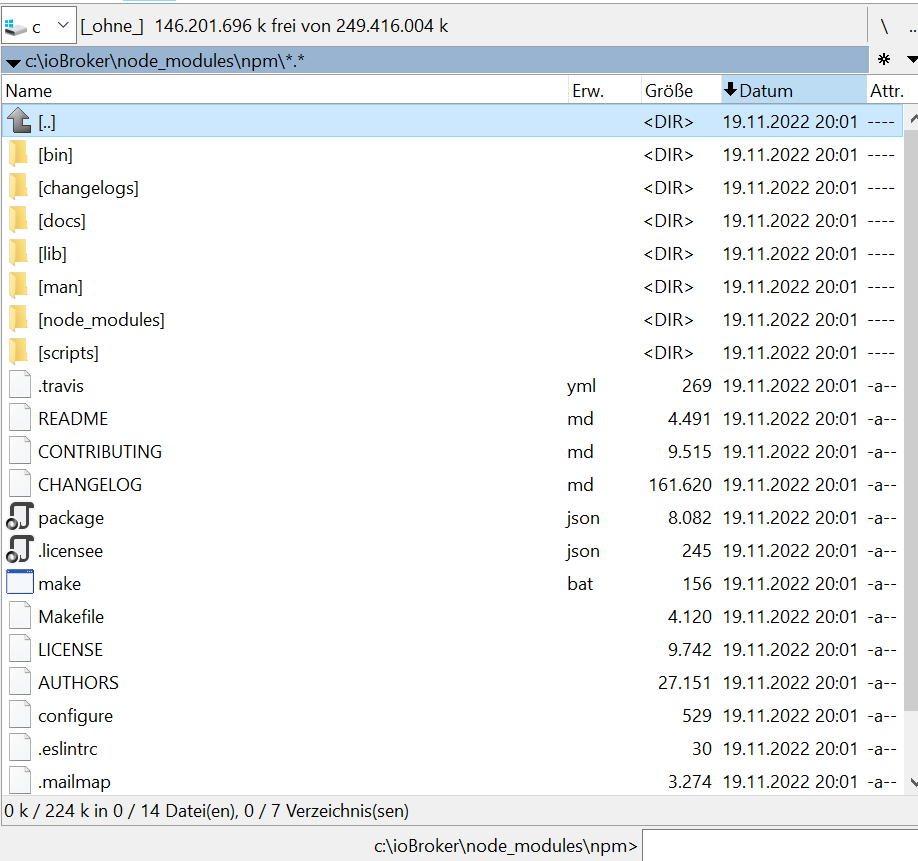
C:\ioBroker\node_modules\npm>dir
 Volume in Laufwerk C: hat keine Bezeichnung.
 Volumeseriennummer: B41E-9983

 Verzeichnis von C:\ioBroker\node_modules\npm

19.11.2022  20:01    <DIR>          .
19.11.2022  20:01    <DIR>          ..
19.11.2022  20:01                30 .eslintrc
19.11.2022  20:01               245 .licensee.json
19.11.2022  20:01             3.274 .mailmap
19.11.2022  20:01               368 .npmignore
19.11.2022  20:01               269 .travis.yml
19.11.2022  20:01            27.151 AUTHORS
19.11.2022  20:01    <DIR>          bin
19.11.2022  20:01           161.620 CHANGELOG.md
19.11.2022  20:01    <DIR>          changelogs
19.11.2022  20:01               529 configure
19.11.2022  20:01             9.515 CONTRIBUTING.md
19.11.2022  20:01    <DIR>          docs
19.11.2022  20:01    <DIR>          lib
19.11.2022  20:01             9.742 LICENSE
19.11.2022  20:01               156 make.bat
19.11.2022  20:01             4.120 Makefile
19.11.2022  20:01    <DIR>          man
19.11.2022  20:01    <DIR>          node_modules
19.11.2022  20:01             8.082 package.json
19.11.2022  20:01             4.491 README.md
19.11.2022  20:01    <DIR>          scripts
              14 Datei(en),        229.592 Bytes
               9 Verzeichnis(se), 149.716.340.736 Bytes frei

C:\ioBroker\node_modules\npm>
Kann ich vor dem enfernen feststellen / anfragen, welche Version er entfernt.
Bisher hat er auf eine Anfrage npm - v immer mit einer 10er geantwortet. Nur dem Fixer antwortet er mit 6er. Kann ich diesen Schritt auf der Konsole irgendwie nachvollziehen?
Edit: npm ls aus diesem Verzeichnis zeigt die 6er und etliche Fehler:
C:\ioBroker\node_modules\npm\node_modules>npm ls
npm ERR! code ELSPROBLEMS
npm ERR! missing: bl@^3.0.1, required by npm@6.14.17
npm ERR! missing: deep-equal@^1.0.1, required by npm@6.14.17
npm ERR! missing: licensee@^7.0.3, required by npm@6.14.17
npm ERR! missing: marked-man@^0.7.0, required by npm@6.14.17
npm ERR! missing: marked@^0.7.0, required by npm@6.14.17
npm ERR! missing: npm-registry-mock@^1.3.1, required by npm@6.14.17
npm ERR! missing: require-inject@^1.4.4, required by npm@6.14.17
npm ERR! missing: sprintf-js@^1.1.2, required by npm@6.14.17
npm ERR! missing: standard@^11.0.1, required by npm@6.14.17
npm ERR! missing: tacks@^1.3.0, required by npm@6.14.17
npm ERR! missing: tap@^12.7.0, required by npm@6.14.17
npm ERR! missing: tar-stream@^2.1.0, required by npm@6.14.17
npm@6.14.17 C:\ioBroker\node_modules\npm
+-- abbrev@1.1.1
+-- ansicolors@0.3.2
+-- ansistyles@0.1.3
+-- aproba@2.0.0
+-- archy@1.0.0
+-- bin-links@1.1.8
+-- UNMET DEPENDENCY bl@^3.0.1
+-- bluebird@3.5.5
+-- byte-size@5.0.1
+-- cacache@12.0.3
+-- call-limit@1.1.1
+-- chownr@1.1.4
+-- ci-info@2.0.0
+-- cli-columns@3.1.2
+-- cli-table3@0.5.1
+-- cmd-shim@3.0.3
+-- columnify@1.5.4
+-- config-chain@1.1.12
+-- UNMET DEPENDENCY deep-equal@^1.0.1
+-- detect-indent@5.0.0
+-- detect-newline@2.1.0
+-- dezalgo@1.0.3
+-- editor@1.0.0
+-- figgy-pudding@3.5.1
+-- find-npm-prefix@1.0.2
+-- fs-vacuum@1.2.10
+-- fs-write-stream-atomic@1.0.10
+-- gentle-fs@2.3.1
+-- get-stream@4.1.0
+-- glob@7.1.6
+-- graceful-fs@4.2.4
+-- has-unicode@2.0.1
+-- hosted-git-info@2.8.9
+-- iferr@1.0.2
+-- infer-owner@1.0.4
+-- inflight@1.0.6
+-- inherits@2.0.4
+-- ini@1.3.8
+-- init-package-json@1.10.3
+-- is-cidr@3.0.0
+-- json-parse-better-errors@1.0.2
+-- JSONStream@1.3.5
+-- lazy-property@1.0.0
+-- libcipm@4.0.8
+-- libnpm@3.0.1
+-- libnpmaccess@3.0.2
+-- libnpmhook@5.0.3
+-- libnpmorg@1.0.1
+-- libnpmsearch@2.0.2
+-- libnpmteam@1.0.2
+-- libnpx@10.2.4
+-- UNMET DEPENDENCY licensee@^7.0.3
+-- lock-verify@2.1.0
+-- lockfile@1.0.4
+-- lodash._baseuniq@4.6.0
+-- lodash.clonedeep@4.5.0
+-- lodash.union@4.6.0
+-- lodash.uniq@4.5.0
+-- lodash.without@4.4.0
+-- lru-cache@5.1.1
+-- UNMET DEPENDENCY marked-man@^0.7.0
+-- UNMET DEPENDENCY marked@^0.7.0
+-- meant@1.0.2
+-- mississippi@3.0.0
+-- mkdirp@0.5.5
+-- move-concurrently@1.0.1
+-- node-gyp@5.1.0
+-- nopt@4.0.3
+-- normalize-package-data@2.5.0
+-- npm-audit-report@1.3.3
+-- npm-cache-filename@1.0.2
+-- npm-install-checks@3.0.2
+-- npm-lifecycle@3.1.5
+-- npm-package-arg@6.1.1
+-- npm-packlist@1.4.8
+-- npm-pick-manifest@3.0.2
+-- npm-profile@4.0.4
+-- npm-registry-fetch@4.0.7
+-- UNMET DEPENDENCY npm-registry-mock@^1.3.1
+-- npm-user-validate@1.0.1
+-- npmlog@4.1.2
+-- once@1.4.0
+-- opener@1.5.2
+-- osenv@0.1.5
+-- pacote@9.5.12
+-- path-is-inside@1.0.2
+-- promise-inflight@1.0.1
+-- qrcode-terminal@0.12.0
+-- query-string@6.8.2
+-- qw@1.0.1
+-- read-cmd-shim@1.0.5
+-- read-installed@4.0.3
+-- read-package-json@2.1.1
+-- read-package-tree@5.3.1
+-- read@1.0.7
+-- readable-stream@3.6.0
+-- readdir-scoped-modules@1.1.0
+-- request@2.88.0
+-- UNMET DEPENDENCY require-inject@^1.4.4
+-- retry@0.12.0
+-- rimraf@2.7.1
+-- safe-buffer@5.1.2
+-- semver@5.7.1
+-- sha@3.0.0
+-- slide@1.1.6
+-- sorted-object@2.0.1
+-- sorted-union-stream@2.1.3
+-- UNMET DEPENDENCY sprintf-js@^1.1.2
+-- ssri@6.0.2
+-- UNMET DEPENDENCY standard@^11.0.1
+-- stringify-package@1.0.1
+-- UNMET DEPENDENCY tacks@^1.3.0
+-- UNMET DEPENDENCY tap@^12.7.0
+-- UNMET DEPENDENCY tar-stream@^2.1.0
+-- tar@4.4.19
+-- text-table@0.2.0
+-- tiny-relative-date@1.3.0
+-- uid-number@0.0.6
+-- umask@1.1.0
+-- unique-filename@1.1.1
+-- unpipe@1.0.0
+-- update-notifier@2.5.0
+-- uuid@3.3.3
+-- validate-npm-package-license@3.0.4
+-- validate-npm-package-name@3.0.0
+-- which@1.3.1
+-- worker-farm@1.7.0
`-- write-file-atomic@2.4.3


npm ERR! A complete log of this run can be found in: C:\Users\JS\AppData\Local\npm-cache\_logs\2024-01-04T07_25_50_881Z-debug-0.log

C:\ioBroker\node_modules\npm\node_modules>
Edit 2: der npm ls aus dem ioBroker Verzeichnis sieht hingegen anders aus:
C:\ioBroker>npm ls
iobroker.inst@4.1.11 C:\ioBroker
+-- fs-extra@10.1.0
+-- iobroker.admin@6.12.0
+-- iobroker.alias-manager@1.2.6
+-- iobroker.backitup@2.9.8
+-- iobroker.bydbatt@1.1.0
+-- iobroker.bydhvs@1.5.0
+-- iobroker.coronavirus-statistics@0.9.0
+-- iobroker.daswetter@3.0.4
+-- iobroker.discovery@3.0.3
+-- iobroker.dwd@2.8.5
+-- iobroker.echarts@1.0.12
+-- iobroker.email@1.2.1
+-- iobroker.energiefluss@3.3.1 (git+ssh://git@github.com/SKB-CGN/ioBroker.energiefluss.git#d56d6644148f54ad23e17c1b1af19e5f83306c72)
+-- iobroker.envertech-pv@0.0.8 (git+ssh://git@github.com/adcrafter27/ioBroker.envertech-pv.git#46284699d12834e862402428e0153f1150a2b307)
+-- iobroker.flot@1.12.0
+-- iobroker.fritzdect@2.2.6
+-- iobroker.fronius-solarweb@0.1.0 (git+ssh://git@github.com/TA2k/ioBroker.fronius-solarweb.git#ca2f1a4972992cbd0d14bb25f5f7546219dd5b9e)
+-- iobroker.fronius-wattpilot@4.6.2
+-- iobroker.fronius@2.0.2
+-- iobroker.fullybrowser@2.0.1
+-- iobroker.habpanel@0.4.3
+-- iobroker.heatingcontrol@2.11.1
+-- iobroker.heizoel@1.0.3
+-- iobroker.history@2.2.4
+-- iobroker.hm-rega@4.0.0
+-- iobroker.hm-rpc@1.15.19
+-- iobroker.ical@1.7.0
+-- iobroker.icons-mfd-png@1.2.1
+-- iobroker.icons-mfd-svg@1.0.2
+-- iobroker.influxdb@3.2.0
+-- iobroker.info@2.0.0
+-- iobroker.iqontrol@2.3.0
+-- iobroker.javascript@5.2.13
+-- iobroker.js-controller@5.0.17
+-- iobroker.lowpass-filter@2.2.3
+-- iobroker.material@1.3.1
+-- iobroker.mercedesme@0.1.6 (git+ssh://git@github.com/TA2k/ioBroker.mercedesme.git#b58e9673d5c28e358830fd45d231dd97ab425219)
+-- iobroker.mihome-vacuum@2.1.1
+-- iobroker.mobile@1.0.1
+-- iobroker.modbus@6.0.1
+-- iobroker.mqtt@5.1.0
+-- iobroker.node-red@4.0.3
+-- iobroker.nut@1.6.0
+-- iobroker.odl@3.0.1
+-- iobroker.opendtu@1.0.1
+-- iobroker.parser@2.0.7
+-- iobroker.paw@0.3.2
+-- iobroker.pid@0.0.8 (git+ssh://git@github.com/iobroker-community-adapters/ioBroker.pid.git#bf251adf86f5816a530d73b83939bad2272f4d2b)
+-- iobroker.ping@1.6.2
+-- iobroker.pvforecast@2.9.0
+-- iobroker.rflink@2.1.6 (git+ssh://git@github.com/ioBroker/ioBroker.rflink.git#361e6e65f4bf3aede6e53a754571b24cb73b5ebe)
+-- iobroker.rickshaw@1.0.0
+-- iobroker.robonect@0.1.3
+-- iobroker.shelly@4.0.7
+-- iobroker.shuttercontrol@1.2.0
+-- iobroker.simple-api@2.7.2
+-- iobroker.smartcontrol@1.2.1
+-- iobroker.smartmeter@3.4.0
+-- iobroker.socketio@6.6.0
+-- iobroker.sonoff@2.4.0
+-- iobroker.sourceanalytix@0.4.8-alpha.2 (git+ssh://git@github.com/iobroker-community-adapters/ioBroker.sourceanalytix.git#488f8c151b7049a1e6579b27cb02686ea0cc5f72)
+-- iobroker.sql@2.2.0
+-- iobroker.statistics@2.4.0
+-- iobroker.stromgedacht@0.1.0 (git+ssh://git@github.com/ANierbeck/ioBroker.stromgedacht.git#8ed32a0da352be5991778945053545edea235ed0)
+-- iobroker.telegram@3.0.0
+-- iobroker.tr-064@4.2.12
+-- iobroker.tradfri@2.6.5
+-- iobroker.vis-hqwidgets@1.1.4
+-- iobroker.vis-jqui-mfd@1.0.12
+-- iobroker.vis-timeandweather@1.1.7
+-- iobroker.vis@1.5.4
+-- iobroker.weatherunderground@3.2.1
+-- iobroker.web@6.1.10
+-- iobroker.whatsapp-cmb@0.2.2
+-- iobroker.wifilight@1.1.0
+-- iobroker.zigbee@1.9.5
+-- iobroker.zwave2@1.8.11
+-- node-windows@1.0.0-beta.6
+-- semver@7.5.4
`-- yargs@17.6.2


C:\ioBroker>


Hey! Du scheinst an dieser Unterhaltung interessiert zu sein, hast aber noch kein Konto.
Hast du es satt, bei jedem Besuch durch die gleichen Beiträge zu scrollen? Wenn du dich für ein Konto anmeldest, kommst du immer genau dorthin zurück, wo du zuvor warst, und kannst dich über neue Antworten benachrichtigen lassen (entweder per E-Mail oder Push-Benachrichtigung). Du kannst auch Lesezeichen speichern und Beiträge positiv bewerten, um anderen Community-Mitgliedern deine Wertschätzung zu zeigen.
Mit deinem Input könnte dieser Beitrag noch besser werden 💗
Registrieren AnmeldenSupport us
425
Online33.0k
Benutzer83.6k
Themen1.3m
Beiträge