




Test ioBroker unter Windows installieren - 2023 Edition
-
Vielen Dank! sieht bei mir so aus:
C:\ioBroker>npm -v
10.2.3

C:\ioBroker>
C:\ioBroker>node -v
v18.19.0

C:\ioBroker>
C:\ioBroker>where npm
C:\Program Files\nodejs\npm
C:\Program Files\nodejs\npm.cmd

C:\ioBroker>node testnpm.js
10.2.3

C:\ioBroker>
Was ich nicht verstehe ist das:
C:\ioBroker>where npm
C:\Program Files\nodejs\npm
C:\Program Files\nodejs\npm.cmd
EDIT: Ich finde npm files noch unter Visual Studio.
Ich kann man die Platte scannen. Nach welchen Dateien soll ich suchen?@klassisch said in Test ioBroker unter Windows installieren - 2023 Edition:
Was ich nicht verstehe ist das:
Das sieht unter Windows immer so aus, ist also OK.
Das muss wieder mal irgend was mit dem npx Aufruf zu tun haben. Irgendwo wird da was verbogen. Der legt da an den unmöglichsten Stellen gecachte Daten ab. Du kannst mal versuchen, den Cache aufzuräumen:
npm cache verifyOder die Hardcore Variante
npm cache clean --forceIch befürchte nur, das wird auch nix nützen. Ich muss heute Abend mal Google anwerfen. ;)
-
@klassisch said in Test ioBroker unter Windows installieren - 2023 Edition:
Was ich nicht verstehe ist das:
Das sieht unter Windows immer so aus, ist also OK.
Das muss wieder mal irgend was mit dem npx Aufruf zu tun haben. Irgendwo wird da was verbogen. Der legt da an den unmöglichsten Stellen gecachte Daten ab. Du kannst mal versuchen, den Cache aufzuräumen:
npm cache verifyOder die Hardcore Variante
npm cache clean --forceIch befürchte nur, das wird auch nix nützen. Ich muss heute Abend mal Google anwerfen. ;)
@gaspode sagte in Test ioBroker unter Windows installieren - 2023 Edition:
npm cache verify
Vielen Dank, sieht so aus:
C:\ioBroker>npm cache verify Cache verified and compressed (~\AppData\Local\npm-cache\_cacache) Content verified: 1625 (120608749 bytes) Content garbage-collected: 251 (33744871 bytes) Index entries: 1625 Finished in 15.391s -
@gaspode sagte in Test ioBroker unter Windows installieren - 2023 Edition:
npm cache verify
Vielen Dank, sieht so aus:
C:\ioBroker>npm cache verify Cache verified and compressed (~\AppData\Local\npm-cache\_cacache) Content verified: 1625 (120608749 bytes) Content garbage-collected: 251 (33744871 bytes) Index entries: 1625 Finished in 15.391s@klassisch said in Test ioBroker unter Windows installieren - 2023 Edition:
Vielen Dank, sieht so aus:
Das Problem ist, man sieht dem Ergebnis nicht wirklich an, welche Auswirkungen das hat.
Du kannst ja nochmal ein Fix probieren. -
@klassisch said in Test ioBroker unter Windows installieren - 2023 Edition:
Vielen Dank, sieht so aus:
Das Problem ist, man sieht dem Ergebnis nicht wirklich an, welche Auswirkungen das hat.
Du kannst ja nochmal ein Fix probieren.C:\ioBroker>iob fix Windows installation starting... (fixing = true) NPM version: 10.2.3 Usage: npm <command> where <command> is one of: access, adduser, audit, bin, bugs, c, cache, ci, cit, clean-install, clean-install-test, completion, config, create, ddp, dedupe, deprecate, dist-tag, docs, doctor, edit, explore, fund, get, help, help-search, hook, i, init, install, install-ci-test, install-test, it, link, list, ln, login, logout, ls, org, outdated, owner, pack, ping, prefix, profile, prune, publish, rb, rebuild, repo, restart, root, run, run-script, s, se, search, set, shrinkwrap, star, stars, start, stop, t, team, test, token, tst, un, uninstall, unpublish, unstar, up, update, v, version, view, whoami npm <command> -h quick help on <command> npm -l display full usage info npm help <term> search for help on <term> npm help npm involved overview Specify configs in the ini-formatted file: C:\Users\JS\.npmrc or on the command line via: npm <command> --key value Config info can be viewed via: npm help config npm@6.14.17 C:\ioBroker\node_modules\npm node:child_process:965 throw err; ^ Error: Command failed: npm x --yes @iobroker/jsonltool@latest at checkExecSyncError (node:child_process:890:11) at execSync (node:child_process:962:15) at Object.<anonymous> (C:\Users\JS\AppData\Local\npm-cache\_npx\19d197aa1f8fa98c\node_modules\@iobroker\fix\lib-npx\install.js:71:17) at Module._compile (node:internal/modules/cjs/loader:1356:14) at Module._extensions..js (node:internal/modules/cjs/loader:1414:10) at Module.load (node:internal/modules/cjs/loader:1197:32) at Module._load (node:internal/modules/cjs/loader:1013:12) at Function.executeUserEntryPoint [as runMain] (node:internal/modules/run_main:128:12) at node:internal/main/run_main_module:28:49 { status: 1, signal: null, output: [ null, null, null ], pid: 11992, stdout: null, stderr: null } Node.js v18.19.0Auch nach dem Bereinigen des Chaches:
C:\ioBroker>npm cache clean --force npm WARN using --force Recommended protections disabled. C:\ioBroker>iob fix Windows installation starting... (fixing = true) NPM version: 10.2.3 Usage: npm <command> where <command> is one of: access, adduser, audit, bin, bugs, c, cache, ci, cit, clean-install, clean-install-test, completion, config, create, ddp, dedupe, deprecate, dist-tag, docs, doctor, edit, explore, fund, get, help, help-search, hook, i, init, install, install-ci-test, install-test, it, link, list, ln, login, logout, ls, org, outdated, owner, pack, ping, prefix, profile, prune, publish, rb, rebuild, repo, restart, root, run, run-script, s, se, search, set, shrinkwrap, star, stars, start, stop, t, team, test, token, tst, un, uninstall, unpublish, unstar, up, update, v, version, view, whoami npm <command> -h quick help on <command> npm -l display full usage info npm help <term> search for help on <term> npm help npm involved overview Specify configs in the ini-formatted file: C:\Users\JS\.npmrc or on the command line via: npm <command> --key value Config info can be viewed via: npm help config npm@6.14.17 C:\ioBroker\node_modules\npm node:child_process:965 throw err; ^ Error: Command failed: npm x --yes @iobroker/jsonltool@latest at checkExecSyncError (node:child_process:890:11) at execSync (node:child_process:962:15) at Object.<anonymous> (C:\Users\JS\AppData\Local\npm-cache\_npx\19d197aa1f8fa98c\node_modules\@iobroker\fix\lib-npx\install.js:71:17) at Module._compile (node:internal/modules/cjs/loader:1356:14) at Module._extensions..js (node:internal/modules/cjs/loader:1414:10) at Module.load (node:internal/modules/cjs/loader:1197:32) at Module._load (node:internal/modules/cjs/loader:1013:12) at Function.executeUserEntryPoint [as runMain] (node:internal/modules/run_main:128:12) at node:internal/main/run_main_module:28:49 { status: 1, signal: null, output: [ null, null, null ], pid: 1972, stdout: null, stderr: null } Node.js v18.19.0 C:\ioBroker> -
C:\ioBroker>iob fix
Windows installation starting... (fixing = true)
NPM version: 10.2.3

Usage: npm <command>

where <command> is one of:
    access, adduser, audit, bin, bugs, c, cache, ci, cit,
    clean-install, clean-install-test, completion, config,
    create, ddp, dedupe, deprecate, dist-tag, docs, doctor,
    edit, explore, fund, get, help, help-search, hook, i, init,
    install, install-ci-test, install-test, it, link, list, ln,
    login, logout, ls, org, outdated, owner, pack, ping, prefix,
    profile, prune, publish, rb, rebuild, repo, restart, root,
    run, run-script, s, se, search, set, shrinkwrap, star,
    stars, start, stop, t, team, test, token, tst, un,
    uninstall, unpublish, unstar, up, update, v, version, view,
    whoami

npm <command> -h  quick help on <command>
npm -l            display full usage info
npm help <term>   search for help on <term>
npm help npm      involved overview

Specify configs in the ini-formatted file:
    C:\Users\JS\.npmrc
or on the command line via: npm <command> --key value
Config info can be viewed via: npm help config

npm@6.14.17 C:\ioBroker\node_modules\npm

node:child_process:965
    throw err;
    ^

Error: Command failed: npm x --yes @iobroker/jsonltool@latest
    at checkExecSyncError (node:child_process:890:11)
    at execSync (node:child_process:962:15)
    at Object.<anonymous> (C:\Users\JS\AppData\Local\npm-cache\_npx\19d197aa1f8fa98c\node_modules\@iobroker\fix\lib-npx\install.js:71:17)
    at Module._compile (node:internal/modules/cjs/loader:1356:14)
    at Module._extensions..js (node:internal/modules/cjs/loader:1414:10)
    at Module.load (node:internal/modules/cjs/loader:1197:32)
    at Module._load (node:internal/modules/cjs/loader:1013:12)
    at Function.executeUserEntryPoint [as runMain] (node:internal/modules/run_main:128:12)
    at node:internal/main/run_main_module:28:49 {
  status: 1,
  signal: null,
  output: [ null, null, null ],
  pid: 11992,
  stdout: null,
  stderr: null
}

Node.js v18.19.0
Auch nach dem Bereinigen des Chaches:
C:\ioBroker>npm cache clean --force npm WARN using --force Recommended protections disabled. C:\ioBroker>iob fix Windows installation starting... (fixing = true) NPM version: 10.2.3 Usage: npm <command> where <command> is one of: access, adduser, audit, bin, bugs, c, cache, ci, cit, clean-install, clean-install-test, completion, config, create, ddp, dedupe, deprecate, dist-tag, docs, doctor, edit, explore, fund, get, help, help-search, hook, i, init, install, install-ci-test, install-test, it, link, list, ln, login, logout, ls, org, outdated, owner, pack, ping, prefix, profile, prune, publish, rb, rebuild, repo, restart, root, run, run-script, s, se, search, set, shrinkwrap, star, stars, start, stop, t, team, test, token, tst, un, uninstall, unpublish, unstar, up, update, v, version, view, whoami npm <command> -h quick help on <command> npm -l display full usage info npm help <term> search for help on <term> npm help npm involved overview Specify configs in the ini-formatted file: C:\Users\JS\.npmrc or on the command line via: npm <command> --key value Config info can be viewed via: npm help config npm@6.14.17 C:\ioBroker\node_modules\npm node:child_process:965 throw err; ^ Error: Command failed: npm x --yes @iobroker/jsonltool@latest at checkExecSyncError (node:child_process:890:11) at execSync (node:child_process:962:15) at Object.<anonymous> (C:\Users\JS\AppData\Local\npm-cache\_npx\19d197aa1f8fa98c\node_modules\@iobroker\fix\lib-npx\install.js:71:17) at Module._compile (node:internal/modules/cjs/loader:1356:14) at Module._extensions..js (node:internal/modules/cjs/loader:1414:10) at Module.load (node:internal/modules/cjs/loader:1197:32) at Module._load (node:internal/modules/cjs/loader:1013:12) at Function.executeUserEntryPoint [as runMain] (node:internal/modules/run_main:128:12) at node:internal/main/run_main_module:28:49 { status: 1, signal: null, output: [ null, null, null ], pid: 1972, stdout: null, stderr: null } Node.js v18.19.0 C:\ioBroker>@klassisch
Hatte ich befürchtet. Wie gesagt, ich muss heute Abend mal Tante Googel bemühen, wenn vorher niemand anders einen Tipp hat. -
@klassisch
Hatte ich befürchtet. Wie gesagt, ich muss heute Abend mal Tante Googel bemühen, wenn vorher niemand anders einen Tipp hat.@gaspode
Habe mal alle npm.cmd gesucht und auf Version getestet.
Versprengte 8er und 5er gefunden. Leider nicht die 6er, die manchmal aufblitztC:\ioBroker>"\Program Files\Microsoft Visual Studio\2022\Community\MSBuild\Microsoft\VisualStudio\NodeJs\npm" -v 8.3.1 C:\ioBroker>"\Program Files\Microsoft Visual Studio\2022\Community\MSBuild\Microsoft\VisualStudio\NodeJs\node_modules\.bin\npm" -v 8.3.1 C:\ioBroker>"\Users\JS\AppData\Local\npm-cache\_npx\df100e174afb6ecd\node_modules\npx\node_modules\.bin\npm" -v 5.1.0 -
@gaspode
Habe mal alle npm.cmd gesucht und auf Version getestet.
Versprengte 8er und 5er gefunden. Leider nicht die 6er, die manchmal aufblitztC:\ioBroker>"\Program Files\Microsoft Visual Studio\2022\Community\MSBuild\Microsoft\VisualStudio\NodeJs\npm" -v 8.3.1 C:\ioBroker>"\Program Files\Microsoft Visual Studio\2022\Community\MSBuild\Microsoft\VisualStudio\NodeJs\node_modules\.bin\npm" -v 8.3.1 C:\ioBroker>"\Users\JS\AppData\Local\npm-cache\_npx\df100e174afb6ecd\node_modules\npx\node_modules\.bin\npm" -v 5.1.0@klassisch
Hmm, npx scheint ja noch einige Leichen im Keller zu haben.Ich bin jetzt auf folgendes Package gestoßen: https://www.npmjs.com/package/clear-npx-cache
Usage:npx clear-npx-cacheWobei das Package, so wie ich es sehe, nix anderes macht, als alle Einträge im npx Cache Verzeichnis zu löschen. Das Cache Verzeichnis wird mit ...
npm config get cache... ermittelt und darin wird der Inhalt des Verzeichnisses _npx gelöscht.
Die etwas vorsichtigere Variante wäre also, einfach das Verzeichnis _npx dort umzubenennen und zu gucken, ob sich das Verhalten bessert.
-
@klassisch
Hmm, npx scheint ja noch einige Leichen im Keller zu haben.Ich bin jetzt auf folgendes Package gestoßen: https://www.npmjs.com/package/clear-npx-cache
Usage:npx clear-npx-cacheWobei das Package, so wie ich es sehe, nix anderes macht, als alle Einträge im npx Cache Verzeichnis zu löschen. Das Cache Verzeichnis wird mit ...
npm config get cache... ermittelt und darin wird der Inhalt des Verzeichnisses _npx gelöscht.
Die etwas vorsichtigere Variante wäre also, einfach das Verzeichnis _npx dort umzubenennen und zu gucken, ob sich das Verhalten bessert.
@gaspode Vielen Dank und Sorry, hatte gestern Abend leider keine Zeit für ioBroker
C:\ioBroker>npm config get cache
C:\Users\JS\AppData\Local\npm-cache
Habe jetzt mal
c:\Users\JS\AppData\Local\npm-cache\_npx\in
c:\Users\JS\AppData\Local\npm-cache\Renamed_npx\umbenannt.
ErgebnisC:\ioBroker>iob fix Need to install the following packages: @iobroker/fix@5.0.0 Ok to proceed? (y) y Windows installation starting... (fixing = true) NPM version: 10.2.3 Usage: npm <command> where <command> is one of: access, adduser, audit, bin, bugs, c, cache, ci, cit, clean-install, clean-install-test, completion, config, create, ddp, dedupe, deprecate, dist-tag, docs, doctor, edit, explore, fund, get, help, help-search, hook, i, init, install, install-ci-test, install-test, it, link, list, ln, login, logout, ls, org, outdated, owner, pack, ping, prefix, profile, prune, publish, rb, rebuild, repo, restart, root, run, run-script, s, se, search, set, shrinkwrap, star, stars, start, stop, t, team, test, token, tst, un, uninstall, unpublish, unstar, up, update, v, version, view, whoami npm <command> -h quick help on <command> npm -l display full usage info npm help <term> search for help on <term> npm help npm involved overview Specify configs in the ini-formatted file: C:\Users\JS\.npmrc or on the command line via: npm <command> --key value Config info can be viewed via: npm help config npm@6.14.17 C:\ioBroker\node_modules\npm node:child_process:965 throw err; ^ Error: Command failed: npm x --yes @iobroker/jsonltool@latest at checkExecSyncError (node:child_process:890:11) at execSync (node:child_process:962:15) at Object.<anonymous> (C:\Users\JS\AppData\Local\npm-cache\_npx\19d197aa1f8fa98c\node_modules\@iobroker\fix\lib-npx\install.js:71:17) at Module._compile (node:internal/modules/cjs/loader:1356:14) at Module._extensions..js (node:internal/modules/cjs/loader:1414:10) at Module.load (node:internal/modules/cjs/loader:1197:32) at Module._load (node:internal/modules/cjs/loader:1013:12) at Function.executeUserEntryPoint [as runMain] (node:internal/modules/run_main:128:12) at node:internal/main/run_main_module:28:49 { status: 1, signal: null, output: [ null, null, null ], pid: 1132, stdout: null, stderr: null } Node.js v18.19.0 C:\ioBroker>Nach Neustart des Rechners wurde das Verzeichnis
c:\Users\JS\AppData\Local\npm-cache\_npx\neu angelegt
Fix bricht leider immer noch abC:\ioBroker>iob fix Windows installation starting... (fixing = true) NPM version: 10.2.3 Usage: npm <command> where <command> is one of: access, adduser, audit, bin, bugs, c, cache, ci, cit, clean-install, clean-install-test, completion, config, create, ddp, dedupe, deprecate, dist-tag, docs, doctor, edit, explore, fund, get, help, help-search, hook, i, init, install, install-ci-test, install-test, it, link, list, ln, login, logout, ls, org, outdated, owner, pack, ping, prefix, profile, prune, publish, rb, rebuild, repo, restart, root, run, run-script, s, se, search, set, shrinkwrap, star, stars, start, stop, t, team, test, token, tst, un, uninstall, unpublish, unstar, up, update, v, version, view, whoami npm <command> -h quick help on <command> npm -l display full usage info npm help <term> search for help on <term> npm help npm involved overview Specify configs in the ini-formatted file: C:\Users\JS\.npmrc or on the command line via: npm <command> --key value Config info can be viewed via: npm help config npm@6.14.17 C:\ioBroker\node_modules\npm node:child_process:965 throw err; ^ Error: Command failed: npm x --yes @iobroker/jsonltool@latest at checkExecSyncError (node:child_process:890:11) at execSync (node:child_process:962:15) at Object.<anonymous> (C:\Users\JS\AppData\Local\npm-cache\_npx\19d197aa1f8fa98c\node_modules\@iobroker\fix\lib-npx\install.js:71:17) at Module._compile (node:internal/modules/cjs/loader:1356:14) at Module._extensions..js (node:internal/modules/cjs/loader:1414:10) at Module.load (node:internal/modules/cjs/loader:1197:32) at Module._load (node:internal/modules/cjs/loader:1013:12) at Function.executeUserEntryPoint [as runMain] (node:internal/modules/run_main:128:12) at node:internal/main/run_main_module:28:49 { status: 1, signal: null, output: [ null, null, null ], pid: 12764, stdout: null, stderr: null } Node.js v18.19.0 C:\ioBroker> -
@gaspode Vielen Dank und Sorry, hatte gestern Abend leider keine Zeit für ioBroker
C:\ioBroker>npm config get cache
C:\Users\JS\AppData\Local\npm-cache
Habe jetzt mal
c:\Users\JS\AppData\Local\npm-cache\_npx\in
c:\Users\JS\AppData\Local\npm-cache\Renamed_npx\umbenannt.
ErgebnisC:\ioBroker>iob fix Need to install the following packages: @iobroker/fix@5.0.0 Ok to proceed? (y) y Windows installation starting... (fixing = true) NPM version: 10.2.3 Usage: npm <command> where <command> is one of: access, adduser, audit, bin, bugs, c, cache, ci, cit, clean-install, clean-install-test, completion, config, create, ddp, dedupe, deprecate, dist-tag, docs, doctor, edit, explore, fund, get, help, help-search, hook, i, init, install, install-ci-test, install-test, it, link, list, ln, login, logout, ls, org, outdated, owner, pack, ping, prefix, profile, prune, publish, rb, rebuild, repo, restart, root, run, run-script, s, se, search, set, shrinkwrap, star, stars, start, stop, t, team, test, token, tst, un, uninstall, unpublish, unstar, up, update, v, version, view, whoami npm <command> -h quick help on <command> npm -l display full usage info npm help <term> search for help on <term> npm help npm involved overview Specify configs in the ini-formatted file: C:\Users\JS\.npmrc or on the command line via: npm <command> --key value Config info can be viewed via: npm help config npm@6.14.17 C:\ioBroker\node_modules\npm node:child_process:965 throw err; ^ Error: Command failed: npm x --yes @iobroker/jsonltool@latest at checkExecSyncError (node:child_process:890:11) at execSync (node:child_process:962:15) at Object.<anonymous> (C:\Users\JS\AppData\Local\npm-cache\_npx\19d197aa1f8fa98c\node_modules\@iobroker\fix\lib-npx\install.js:71:17) at Module._compile (node:internal/modules/cjs/loader:1356:14) at Module._extensions..js (node:internal/modules/cjs/loader:1414:10) at Module.load (node:internal/modules/cjs/loader:1197:32) at Module._load (node:internal/modules/cjs/loader:1013:12) at Function.executeUserEntryPoint [as runMain] (node:internal/modules/run_main:128:12) at node:internal/main/run_main_module:28:49 { status: 1, signal: null, output: [ null, null, null ], pid: 1132, stdout: null, stderr: null } Node.js v18.19.0 C:\ioBroker>Nach Neustart des Rechners wurde das Verzeichnis
c:\Users\JS\AppData\Local\npm-cache\_npx\neu angelegt
Fix bricht leider immer noch abC:\ioBroker>iob fix Windows installation starting... (fixing = true) NPM version: 10.2.3 Usage: npm <command> where <command> is one of: access, adduser, audit, bin, bugs, c, cache, ci, cit, clean-install, clean-install-test, completion, config, create, ddp, dedupe, deprecate, dist-tag, docs, doctor, edit, explore, fund, get, help, help-search, hook, i, init, install, install-ci-test, install-test, it, link, list, ln, login, logout, ls, org, outdated, owner, pack, ping, prefix, profile, prune, publish, rb, rebuild, repo, restart, root, run, run-script, s, se, search, set, shrinkwrap, star, stars, start, stop, t, team, test, token, tst, un, uninstall, unpublish, unstar, up, update, v, version, view, whoami npm <command> -h quick help on <command> npm -l display full usage info npm help <term> search for help on <term> npm help npm involved overview Specify configs in the ini-formatted file: C:\Users\JS\.npmrc or on the command line via: npm <command> --key value Config info can be viewed via: npm help config npm@6.14.17 C:\ioBroker\node_modules\npm node:child_process:965 throw err; ^ Error: Command failed: npm x --yes @iobroker/jsonltool@latest at checkExecSyncError (node:child_process:890:11) at execSync (node:child_process:962:15) at Object.<anonymous> (C:\Users\JS\AppData\Local\npm-cache\_npx\19d197aa1f8fa98c\node_modules\@iobroker\fix\lib-npx\install.js:71:17) at Module._compile (node:internal/modules/cjs/loader:1356:14) at Module._extensions..js (node:internal/modules/cjs/loader:1414:10) at Module.load (node:internal/modules/cjs/loader:1197:32) at Module._load (node:internal/modules/cjs/loader:1013:12) at Function.executeUserEntryPoint [as runMain] (node:internal/modules/run_main:128:12) at node:internal/main/run_main_module:28:49 { status: 1, signal: null, output: [ null, null, null ], pid: 12764, stdout: null, stderr: null } Node.js v18.19.0 C:\ioBroker>@klassisch said in Test ioBroker unter Windows installieren - 2023 Edition:
Sorry, hatte gestern Abend leider keine Zeit für ioBroker
Kein Problem. Ich danke dir, dass du so geduldig mit hilfst. Wie gesagt, ich würde das Problem gerne verstehen, um es in Zukunft entweder im Installer zu berücksichtigen oder es zumindest in die Doku aufzunehmen.
@klassisch said in Test ioBroker unter Windows installieren - 2023 Edition:
Fix bricht leider immer noch ab
So langsam gehen mir die Ideen aus. ;)
Die Meldung "Usage: npm < command>" etc. kommt daher, dass bei dir aus mir bisher unerklärlichen Gründen npm in der Version 6.14.17 verwendet wird. Das Kommando "npm x ...", das im Fixer zum Einsatz kommt, kennt npm in der Version 6.14.17 noch nicht. Und jetzt wird es interessant bzw. seltsam: In Zeile 31 deines letzten Logs wird ausgegeben, wo die verwendete npm Version liegt:
npm@6.14.17 C:\ioBroker\node_modules\npmDemnach ist das ein lokales Package(!?) in deinem ioBroker Verzeichnis. Allerdings hat ...
npm ls... das nicht bei dir als installiertes Package angezeigt (so wie es auch sein soll). Guck bitte zunächst mal, ob das Verzeichnis da ist und was drin ist. Im nächsten Schritt könntest du - wenn es da ist - mal versuchen, es umzubenennen oder evtl. besser mit ...
npm uninstall npmlos zu werden. Das dürfte nix kaputt machen, aber eine Garantie gibt es bei so was halt nie.
-
@klassisch said in Test ioBroker unter Windows installieren - 2023 Edition:
Sorry, hatte gestern Abend leider keine Zeit für ioBroker
Kein Problem. Ich danke dir, dass du so geduldig mit hilfst. Wie gesagt, ich würde das Problem gerne verstehen, um es in Zukunft entweder im Installer zu berücksichtigen oder es zumindest in die Doku aufzunehmen.
@klassisch said in Test ioBroker unter Windows installieren - 2023 Edition:
Fix bricht leider immer noch ab
So langsam gehen mir die Ideen aus. ;)
Die Meldung "Usage: npm < command>" etc. kommt daher, dass bei dir aus mir bisher unerklärlichen Gründen npm in der Version 6.14.17 verwendet wird. Das Kommando "npm x ...", das im Fixer zum Einsatz kommt, kennt npm in der Version 6.14.17 noch nicht. Und jetzt wird es interessant bzw. seltsam: In Zeile 31 deines letzten Logs wird ausgegeben, wo die verwendete npm Version liegt:
npm@6.14.17 C:\ioBroker\node_modules\npmDemnach ist das ein lokales Package(!?) in deinem ioBroker Verzeichnis. Allerdings hat ...
npm ls... das nicht bei dir als installiertes Package angezeigt (so wie es auch sein soll). Guck bitte zunächst mal, ob das Verzeichnis da ist und was drin ist. Im nächsten Schritt könntest du - wenn es da ist - mal versuchen, es umzubenennen oder evtl. besser mit ...
npm uninstall npmlos zu werden. Das dürfte nix kaputt machen, aber eine Garantie gibt es bei so was halt nie.
@gaspode sagte in Test ioBroker unter Windows installieren - 2023 Edition:
npm@6.14.17 C:\ioBroker\node_modules\npm
war mir auch schon aufgefallen. Aber
C:\ioBroker>cd C:\ioBroker\node_modules\npm

C:\ioBroker\node_modules\npm>npm -v
10.2.3
Das Verzeichnis existiert:
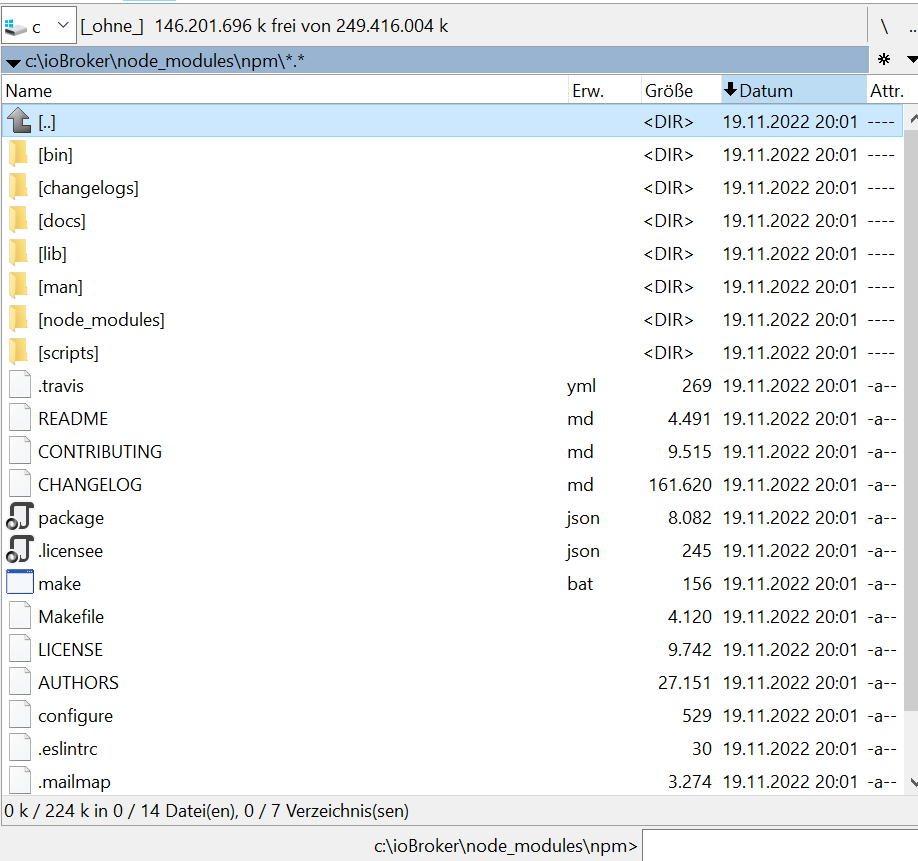
C:\ioBroker\node_modules\npm>dir
 Volume in Laufwerk C: hat keine Bezeichnung.
 Volumeseriennummer: B41E-9983

 Verzeichnis von C:\ioBroker\node_modules\npm

19.11.2022  20:01    <DIR>          .
19.11.2022  20:01    <DIR>          ..
19.11.2022  20:01                30 .eslintrc
19.11.2022  20:01               245 .licensee.json
19.11.2022  20:01             3.274 .mailmap
19.11.2022  20:01               368 .npmignore
19.11.2022  20:01               269 .travis.yml
19.11.2022  20:01            27.151 AUTHORS
19.11.2022  20:01    <DIR>          bin
19.11.2022  20:01           161.620 CHANGELOG.md
19.11.2022  20:01    <DIR>          changelogs
19.11.2022  20:01               529 configure
19.11.2022  20:01             9.515 CONTRIBUTING.md
19.11.2022  20:01    <DIR>          docs
19.11.2022  20:01    <DIR>          lib
19.11.2022  20:01             9.742 LICENSE
19.11.2022  20:01               156 make.bat
19.11.2022  20:01             4.120 Makefile
19.11.2022  20:01    <DIR>          man
19.11.2022  20:01    <DIR>          node_modules
19.11.2022  20:01             8.082 package.json
19.11.2022  20:01             4.491 README.md
19.11.2022  20:01    <DIR>          scripts
              14 Datei(en),        229.592 Bytes
               9 Verzeichnis(se), 149.716.340.736 Bytes frei

C:\ioBroker\node_modules\npm>
Kann ich vor dem enfernen feststellen / anfragen, welche Version er entfernt.
Bisher hat er auf eine Anfrage npm - v immer mit einer 10er geantwortet. Nur dem Fixer antwortet er mit 6er. Kann ich diesen Schritt auf der Konsole irgendwie nachvollziehen?
Edit: npm ls aus diesem Verzeichnis zeigt die 6er und etliche Fehler:
C:\ioBroker\node_modules\npm\node_modules>npm ls
npm ERR! code ELSPROBLEMS
npm ERR! missing: bl@^3.0.1, required by npm@6.14.17
npm ERR! missing: deep-equal@^1.0.1, required by npm@6.14.17
npm ERR! missing: licensee@^7.0.3, required by npm@6.14.17
npm ERR! missing: marked-man@^0.7.0, required by npm@6.14.17
npm ERR! missing: marked@^0.7.0, required by npm@6.14.17
npm ERR! missing: npm-registry-mock@^1.3.1, required by npm@6.14.17
npm ERR! missing: require-inject@^1.4.4, required by npm@6.14.17
npm ERR! missing: sprintf-js@^1.1.2, required by npm@6.14.17
npm ERR! missing: standard@^11.0.1, required by npm@6.14.17
npm ERR! missing: tacks@^1.3.0, required by npm@6.14.17
npm ERR! missing: tap@^12.7.0, required by npm@6.14.17
npm ERR! missing: tar-stream@^2.1.0, required by npm@6.14.17
npm@6.14.17 C:\ioBroker\node_modules\npm
+-- abbrev@1.1.1
+-- ansicolors@0.3.2
+-- ansistyles@0.1.3
+-- aproba@2.0.0
+-- archy@1.0.0
+-- bin-links@1.1.8
+-- UNMET DEPENDENCY bl@^3.0.1
+-- bluebird@3.5.5
+-- byte-size@5.0.1
+-- cacache@12.0.3
+-- call-limit@1.1.1
+-- chownr@1.1.4
+-- ci-info@2.0.0
+-- cli-columns@3.1.2
+-- cli-table3@0.5.1
+-- cmd-shim@3.0.3
+-- columnify@1.5.4
+-- config-chain@1.1.12
+-- UNMET DEPENDENCY deep-equal@^1.0.1
+-- detect-indent@5.0.0
+-- detect-newline@2.1.0
+-- dezalgo@1.0.3
+-- editor@1.0.0
+-- figgy-pudding@3.5.1
+-- find-npm-prefix@1.0.2
+-- fs-vacuum@1.2.10
+-- fs-write-stream-atomic@1.0.10
+-- gentle-fs@2.3.1
+-- get-stream@4.1.0
+-- glob@7.1.6
+-- graceful-fs@4.2.4
+-- has-unicode@2.0.1
+-- hosted-git-info@2.8.9
+-- iferr@1.0.2
+-- infer-owner@1.0.4
+-- inflight@1.0.6
+-- inherits@2.0.4
+-- ini@1.3.8
+-- init-package-json@1.10.3
+-- is-cidr@3.0.0
+-- json-parse-better-errors@1.0.2
+-- JSONStream@1.3.5
+-- lazy-property@1.0.0
+-- libcipm@4.0.8
+-- libnpm@3.0.1
+-- libnpmaccess@3.0.2
+-- libnpmhook@5.0.3
+-- libnpmorg@1.0.1
+-- libnpmsearch@2.0.2
+-- libnpmteam@1.0.2
+-- libnpx@10.2.4
+-- UNMET DEPENDENCY licensee@^7.0.3
+-- lock-verify@2.1.0
+-- lockfile@1.0.4
+-- lodash._baseuniq@4.6.0
+-- lodash.clonedeep@4.5.0
+-- lodash.union@4.6.0
+-- lodash.uniq@4.5.0
+-- lodash.without@4.4.0
+-- lru-cache@5.1.1
+-- UNMET DEPENDENCY marked-man@^0.7.0
+-- UNMET DEPENDENCY marked@^0.7.0
+-- meant@1.0.2
+-- mississippi@3.0.0
+-- mkdirp@0.5.5
+-- move-concurrently@1.0.1
+-- node-gyp@5.1.0
+-- nopt@4.0.3
+-- normalize-package-data@2.5.0
+-- npm-audit-report@1.3.3
+-- npm-cache-filename@1.0.2
+-- npm-install-checks@3.0.2
+-- npm-lifecycle@3.1.5
+-- npm-package-arg@6.1.1
+-- npm-packlist@1.4.8
+-- npm-pick-manifest@3.0.2
+-- npm-profile@4.0.4
+-- npm-registry-fetch@4.0.7
+-- UNMET DEPENDENCY npm-registry-mock@^1.3.1
+-- npm-user-validate@1.0.1
+-- npmlog@4.1.2
+-- once@1.4.0
+-- opener@1.5.2
+-- osenv@0.1.5
+-- pacote@9.5.12
+-- path-is-inside@1.0.2
+-- promise-inflight@1.0.1
+-- qrcode-terminal@0.12.0
+-- query-string@6.8.2
+-- qw@1.0.1
+-- read-cmd-shim@1.0.5
+-- read-installed@4.0.3
+-- read-package-json@2.1.1
+-- read-package-tree@5.3.1
+-- read@1.0.7
+-- readable-stream@3.6.0
+-- readdir-scoped-modules@1.1.0
+-- request@2.88.0
+-- UNMET DEPENDENCY require-inject@^1.4.4
+-- retry@0.12.0
+-- rimraf@2.7.1
+-- safe-buffer@5.1.2
+-- semver@5.7.1
+-- sha@3.0.0
+-- slide@1.1.6
+-- sorted-object@2.0.1
+-- sorted-union-stream@2.1.3
+-- UNMET DEPENDENCY sprintf-js@^1.1.2
+-- ssri@6.0.2
+-- UNMET DEPENDENCY standard@^11.0.1
+-- stringify-package@1.0.1
+-- UNMET DEPENDENCY tacks@^1.3.0
+-- UNMET DEPENDENCY tap@^12.7.0
+-- UNMET DEPENDENCY tar-stream@^2.1.0
+-- tar@4.4.19
+-- text-table@0.2.0
+-- tiny-relative-date@1.3.0
+-- uid-number@0.0.6
+-- umask@1.1.0
+-- unique-filename@1.1.1
+-- unpipe@1.0.0
+-- update-notifier@2.5.0
+-- uuid@3.3.3
+-- validate-npm-package-license@3.0.4
+-- validate-npm-package-name@3.0.0
+-- which@1.3.1
+-- worker-farm@1.7.0
`-- write-file-atomic@2.4.3


npm ERR! A complete log of this run can be found in: C:\Users\JS\AppData\Local\npm-cache\_logs\2024-01-04T07_25_50_881Z-debug-0.log

C:\ioBroker\node_modules\npm\node_modules>
Edit 2: der npm ls aus dem ioBroker Verzeichnis sieht hingegen anders aus:
C:\ioBroker>npm ls iobroker.inst@4.1.11 C:\ioBroker +-- fs-extra@10.1.0 +-- iobroker.admin@6.12.0 +-- iobroker.alias-manager@1.2.6 +-- iobroker.backitup@2.9.8 +-- iobroker.bydbatt@1.1.0 +-- iobroker.bydhvs@1.5.0 +-- iobroker.coronavirus-statistics@0.9.0 +-- iobroker.daswetter@3.0.4 +-- iobroker.discovery@3.0.3 +-- iobroker.dwd@2.8.5 +-- iobroker.echarts@1.0.12 +-- iobroker.email@1.2.1 +-- iobroker.energiefluss@3.3.1 (git+ssh://git@github.com/SKB-CGN/ioBroker.energiefluss.git#d56d6644148f54ad23e17c1b1af19e5f83306c72) +-- iobroker.envertech-pv@0.0.8 (git+ssh://git@github.com/adcrafter27/ioBroker.envertech-pv.git#46284699d12834e862402428e0153f1150a2b307) +-- iobroker.flot@1.12.0 +-- iobroker.fritzdect@2.2.6 +-- iobroker.fronius-solarweb@0.1.0 (git+ssh://git@github.com/TA2k/ioBroker.fronius-solarweb.git#ca2f1a4972992cbd0d14bb25f5f7546219dd5b9e) +-- iobroker.fronius-wattpilot@4.6.2 +-- iobroker.fronius@2.0.2 +-- iobroker.fullybrowser@2.0.1 +-- iobroker.habpanel@0.4.3 +-- iobroker.heatingcontrol@2.11.1 +-- iobroker.heizoel@1.0.3 +-- iobroker.history@2.2.4 +-- iobroker.hm-rega@4.0.0 +-- iobroker.hm-rpc@1.15.19 +-- iobroker.ical@1.7.0 +-- iobroker.icons-mfd-png@1.2.1 +-- iobroker.icons-mfd-svg@1.0.2 +-- iobroker.influxdb@3.2.0 +-- iobroker.info@2.0.0 +-- iobroker.iqontrol@2.3.0 +-- iobroker.javascript@5.2.13 +-- iobroker.js-controller@5.0.17 +-- iobroker.lowpass-filter@2.2.3 +-- iobroker.material@1.3.1 +-- iobroker.mercedesme@0.1.6 (git+ssh://git@github.com/TA2k/ioBroker.mercedesme.git#b58e9673d5c28e358830fd45d231dd97ab425219) +-- iobroker.mihome-vacuum@2.1.1 +-- iobroker.mobile@1.0.1 +-- iobroker.modbus@6.0.1 +-- iobroker.mqtt@5.1.0 +-- iobroker.node-red@4.0.3 +-- iobroker.nut@1.6.0 +-- iobroker.odl@3.0.1 +-- iobroker.opendtu@1.0.1 +-- iobroker.parser@2.0.7 +-- iobroker.paw@0.3.2 +-- iobroker.pid@0.0.8 (git+ssh://git@github.com/iobroker-community-adapters/ioBroker.pid.git#bf251adf86f5816a530d73b83939bad2272f4d2b) +-- iobroker.ping@1.6.2 +-- iobroker.pvforecast@2.9.0 +-- iobroker.rflink@2.1.6 (git+ssh://git@github.com/ioBroker/ioBroker.rflink.git#361e6e65f4bf3aede6e53a754571b24cb73b5ebe) +-- iobroker.rickshaw@1.0.0 +-- iobroker.robonect@0.1.3 +-- iobroker.shelly@4.0.7 +-- iobroker.shuttercontrol@1.2.0 +-- iobroker.simple-api@2.7.2 +-- iobroker.smartcontrol@1.2.1 +-- iobroker.smartmeter@3.4.0 +-- iobroker.socketio@6.6.0 +-- iobroker.sonoff@2.4.0 +-- iobroker.sourceanalytix@0.4.8-alpha.2 (git+ssh://git@github.com/iobroker-community-adapters/ioBroker.sourceanalytix.git#488f8c151b7049a1e6579b27cb02686ea0cc5f72) +-- iobroker.sql@2.2.0 +-- iobroker.statistics@2.4.0 +-- iobroker.stromgedacht@0.1.0 (git+ssh://git@github.com/ANierbeck/ioBroker.stromgedacht.git#8ed32a0da352be5991778945053545edea235ed0) +-- iobroker.telegram@3.0.0 +-- iobroker.tr-064@4.2.12 +-- iobroker.tradfri@2.6.5 +-- iobroker.vis-hqwidgets@1.1.4 +-- iobroker.vis-jqui-mfd@1.0.12 +-- iobroker.vis-timeandweather@1.1.7 +-- iobroker.vis@1.5.4 +-- iobroker.weatherunderground@3.2.1 +-- iobroker.web@6.1.10 +-- iobroker.whatsapp-cmb@0.2.2 +-- iobroker.wifilight@1.1.0 +-- iobroker.zigbee@1.9.5 +-- iobroker.zwave2@1.8.11 +-- node-windows@1.0.0-beta.6 +-- semver@7.5.4 `-- yargs@17.6.2 C:\ioBroker> -
@gaspode sagte in Test ioBroker unter Windows installieren - 2023 Edition:
npm@6.14.17 C:\ioBroker\node_modules\npm
war mir auch schon aufgefallen. Aber
C:\ioBroker>cd C:\ioBroker\node_modules\npm

C:\ioBroker\node_modules\npm>npm -v
10.2.3
Das Verzeichnis existiert:
C:\ioBroker\node_modules\npm>dir
 Volume in Laufwerk C: hat keine Bezeichnung.
 Volumeseriennummer: B41E-9983

 Verzeichnis von C:\ioBroker\node_modules\npm

19.11.2022  20:01    <DIR>          .
19.11.2022  20:01    <DIR>          ..
19.11.2022  20:01                30 .eslintrc
19.11.2022  20:01               245 .licensee.json
19.11.2022  20:01             3.274 .mailmap
19.11.2022  20:01               368 .npmignore
19.11.2022  20:01               269 .travis.yml
19.11.2022  20:01            27.151 AUTHORS
19.11.2022  20:01    <DIR>          bin
19.11.2022  20:01           161.620 CHANGELOG.md
19.11.2022  20:01    <DIR>          changelogs
19.11.2022  20:01               529 configure
19.11.2022  20:01             9.515 CONTRIBUTING.md
19.11.2022  20:01    <DIR>          docs
19.11.2022  20:01    <DIR>          lib
19.11.2022  20:01             9.742 LICENSE
19.11.2022  20:01               156 make.bat
19.11.2022  20:01             4.120 Makefile
19.11.2022  20:01    <DIR>          man
19.11.2022  20:01    <DIR>          node_modules
19.11.2022  20:01             8.082 package.json
19.11.2022  20:01             4.491 README.md
19.11.2022  20:01    <DIR>          scripts
              14 Datei(en),        229.592 Bytes
               9 Verzeichnis(se), 149.716.340.736 Bytes frei

C:\ioBroker\node_modules\npm>
Kann ich vor dem enfernen feststellen / anfragen, welche Version er entfernt.
Bisher hat er auf eine Anfrage npm - v immer mit einer 10er geantwortet. Nur dem Fixer antwortet er mit 6er. Kann ich diesen Schritt auf der Konsole irgendwie nachvollziehen?
Edit: npm ls aus diesem Verzeichnis zeigt die 6er und etliche Fehler:
C:\ioBroker\node_modules\npm\node_modules>npm ls
npm ERR! code ELSPROBLEMS
npm ERR! missing: bl@^3.0.1, required by npm@6.14.17
npm ERR! missing: deep-equal@^1.0.1, required by npm@6.14.17
npm ERR! missing: licensee@^7.0.3, required by npm@6.14.17
npm ERR! missing: marked-man@^0.7.0, required by npm@6.14.17
npm ERR! missing: marked@^0.7.0, required by npm@6.14.17
npm ERR! missing: npm-registry-mock@^1.3.1, required by npm@6.14.17
npm ERR! missing: require-inject@^1.4.4, required by npm@6.14.17
npm ERR! missing: sprintf-js@^1.1.2, required by npm@6.14.17
npm ERR! missing: standard@^11.0.1, required by npm@6.14.17
npm ERR! missing: tacks@^1.3.0, required by npm@6.14.17
npm ERR! missing: tap@^12.7.0, required by npm@6.14.17
npm ERR! missing: tar-stream@^2.1.0, required by npm@6.14.17
npm@6.14.17 C:\ioBroker\node_modules\npm
+-- abbrev@1.1.1
+-- ansicolors@0.3.2
+-- ansistyles@0.1.3
+-- aproba@2.0.0
+-- archy@1.0.0
+-- bin-links@1.1.8
+-- UNMET DEPENDENCY bl@^3.0.1
+-- bluebird@3.5.5
+-- byte-size@5.0.1
+-- cacache@12.0.3
+-- call-limit@1.1.1
+-- chownr@1.1.4
+-- ci-info@2.0.0
+-- cli-columns@3.1.2
+-- cli-table3@0.5.1
+-- cmd-shim@3.0.3
+-- columnify@1.5.4
+-- config-chain@1.1.12
+-- UNMET DEPENDENCY deep-equal@^1.0.1
+-- detect-indent@5.0.0
+-- detect-newline@2.1.0
+-- dezalgo@1.0.3
+-- editor@1.0.0
+-- figgy-pudding@3.5.1
+-- find-npm-prefix@1.0.2
+-- fs-vacuum@1.2.10
+-- fs-write-stream-atomic@1.0.10
+-- gentle-fs@2.3.1
+-- get-stream@4.1.0
+-- glob@7.1.6
+-- graceful-fs@4.2.4
+-- has-unicode@2.0.1
+-- hosted-git-info@2.8.9
+-- iferr@1.0.2
+-- infer-owner@1.0.4
+-- inflight@1.0.6
+-- inherits@2.0.4
+-- ini@1.3.8
+-- init-package-json@1.10.3
+-- is-cidr@3.0.0
+-- json-parse-better-errors@1.0.2
+-- JSONStream@1.3.5
+-- lazy-property@1.0.0
+-- libcipm@4.0.8
+-- libnpm@3.0.1
+-- libnpmaccess@3.0.2
+-- libnpmhook@5.0.3
+-- libnpmorg@1.0.1
+-- libnpmsearch@2.0.2
+-- libnpmteam@1.0.2
+-- libnpx@10.2.4
+-- UNMET DEPENDENCY licensee@^7.0.3
+-- lock-verify@2.1.0
+-- lockfile@1.0.4
+-- lodash._baseuniq@4.6.0
+-- lodash.clonedeep@4.5.0
+-- lodash.union@4.6.0
+-- lodash.uniq@4.5.0
+-- lodash.without@4.4.0
+-- lru-cache@5.1.1
+-- UNMET DEPENDENCY marked-man@^0.7.0
+-- UNMET DEPENDENCY marked@^0.7.0
+-- meant@1.0.2
+-- mississippi@3.0.0
+-- mkdirp@0.5.5
+-- move-concurrently@1.0.1
+-- node-gyp@5.1.0
+-- nopt@4.0.3
+-- normalize-package-data@2.5.0
+-- npm-audit-report@1.3.3
+-- npm-cache-filename@1.0.2
+-- npm-install-checks@3.0.2
+-- npm-lifecycle@3.1.5
+-- npm-package-arg@6.1.1
+-- npm-packlist@1.4.8
+-- npm-pick-manifest@3.0.2
+-- npm-profile@4.0.4
+-- npm-registry-fetch@4.0.7
+-- UNMET DEPENDENCY npm-registry-mock@^1.3.1
+-- npm-user-validate@1.0.1
+-- npmlog@4.1.2
+-- once@1.4.0
+-- opener@1.5.2
+-- osenv@0.1.5
+-- pacote@9.5.12
+-- path-is-inside@1.0.2
+-- promise-inflight@1.0.1
+-- qrcode-terminal@0.12.0
+-- query-string@6.8.2
+-- qw@1.0.1
+-- read-cmd-shim@1.0.5
+-- read-installed@4.0.3
+-- read-package-json@2.1.1
+-- read-package-tree@5.3.1
+-- read@1.0.7
+-- readable-stream@3.6.0
+-- readdir-scoped-modules@1.1.0
+-- request@2.88.0
+-- UNMET DEPENDENCY require-inject@^1.4.4
+-- retry@0.12.0
+-- rimraf@2.7.1
+-- safe-buffer@5.1.2
+-- semver@5.7.1
+-- sha@3.0.0
+-- slide@1.1.6
+-- sorted-object@2.0.1
+-- sorted-union-stream@2.1.3
+-- UNMET DEPENDENCY sprintf-js@^1.1.2
+-- ssri@6.0.2
+-- UNMET DEPENDENCY standard@^11.0.1
+-- stringify-package@1.0.1
+-- UNMET DEPENDENCY tacks@^1.3.0
+-- UNMET DEPENDENCY tap@^12.7.0
+-- UNMET DEPENDENCY tar-stream@^2.1.0
+-- tar@4.4.19
+-- text-table@0.2.0
+-- tiny-relative-date@1.3.0
+-- uid-number@0.0.6
+-- umask@1.1.0
+-- unique-filename@1.1.1
+-- unpipe@1.0.0
+-- update-notifier@2.5.0
+-- uuid@3.3.3
+-- validate-npm-package-license@3.0.4
+-- validate-npm-package-name@3.0.0
+-- which@1.3.1
+-- worker-farm@1.7.0
`-- write-file-atomic@2.4.3


npm ERR! A complete log of this run can be found in: C:\Users\JS\AppData\Local\npm-cache\_logs\2024-01-04T07_25_50_881Z-debug-0.log

C:\ioBroker\node_modules\npm\node_modules>
Edit 2: der npm ls aus dem ioBroker Verzeichnis sieht hingegen anders aus:
C:\ioBroker>npm ls iobroker.inst@4.1.11 C:\ioBroker +-- fs-extra@10.1.0 +-- iobroker.admin@6.12.0 +-- iobroker.alias-manager@1.2.6 +-- iobroker.backitup@2.9.8 +-- iobroker.bydbatt@1.1.0 +-- iobroker.bydhvs@1.5.0 +-- iobroker.coronavirus-statistics@0.9.0 +-- iobroker.daswetter@3.0.4 +-- iobroker.discovery@3.0.3 +-- iobroker.dwd@2.8.5 +-- iobroker.echarts@1.0.12 +-- iobroker.email@1.2.1 +-- iobroker.energiefluss@3.3.1 (git+ssh://git@github.com/SKB-CGN/ioBroker.energiefluss.git#d56d6644148f54ad23e17c1b1af19e5f83306c72) +-- iobroker.envertech-pv@0.0.8 (git+ssh://git@github.com/adcrafter27/ioBroker.envertech-pv.git#46284699d12834e862402428e0153f1150a2b307) +-- iobroker.flot@1.12.0 +-- iobroker.fritzdect@2.2.6 +-- iobroker.fronius-solarweb@0.1.0 (git+ssh://git@github.com/TA2k/ioBroker.fronius-solarweb.git#ca2f1a4972992cbd0d14bb25f5f7546219dd5b9e) +-- iobroker.fronius-wattpilot@4.6.2 +-- iobroker.fronius@2.0.2 +-- iobroker.fullybrowser@2.0.1 +-- iobroker.habpanel@0.4.3 +-- iobroker.heatingcontrol@2.11.1 +-- iobroker.heizoel@1.0.3 +-- iobroker.history@2.2.4 +-- iobroker.hm-rega@4.0.0 +-- iobroker.hm-rpc@1.15.19 +-- iobroker.ical@1.7.0 +-- iobroker.icons-mfd-png@1.2.1 +-- iobroker.icons-mfd-svg@1.0.2 +-- iobroker.influxdb@3.2.0 +-- iobroker.info@2.0.0 +-- iobroker.iqontrol@2.3.0 +-- iobroker.javascript@5.2.13 +-- iobroker.js-controller@5.0.17 +-- iobroker.lowpass-filter@2.2.3 +-- iobroker.material@1.3.1 +-- iobroker.mercedesme@0.1.6 (git+ssh://git@github.com/TA2k/ioBroker.mercedesme.git#b58e9673d5c28e358830fd45d231dd97ab425219) +-- iobroker.mihome-vacuum@2.1.1 +-- iobroker.mobile@1.0.1 +-- iobroker.modbus@6.0.1 +-- iobroker.mqtt@5.1.0 +-- iobroker.node-red@4.0.3 +-- iobroker.nut@1.6.0 +-- iobroker.odl@3.0.1 +-- iobroker.opendtu@1.0.1 +-- iobroker.parser@2.0.7 +-- iobroker.paw@0.3.2 +-- iobroker.pid@0.0.8 (git+ssh://git@github.com/iobroker-community-adapters/ioBroker.pid.git#bf251adf86f5816a530d73b83939bad2272f4d2b) +-- iobroker.ping@1.6.2 +-- iobroker.pvforecast@2.9.0 +-- iobroker.rflink@2.1.6 (git+ssh://git@github.com/ioBroker/ioBroker.rflink.git#361e6e65f4bf3aede6e53a754571b24cb73b5ebe) +-- iobroker.rickshaw@1.0.0 +-- iobroker.robonect@0.1.3 +-- iobroker.shelly@4.0.7 +-- iobroker.shuttercontrol@1.2.0 +-- iobroker.simple-api@2.7.2 +-- iobroker.smartcontrol@1.2.1 +-- iobroker.smartmeter@3.4.0 +-- iobroker.socketio@6.6.0 +-- iobroker.sonoff@2.4.0 +-- iobroker.sourceanalytix@0.4.8-alpha.2 (git+ssh://git@github.com/iobroker-community-adapters/ioBroker.sourceanalytix.git#488f8c151b7049a1e6579b27cb02686ea0cc5f72) +-- iobroker.sql@2.2.0 +-- iobroker.statistics@2.4.0 +-- iobroker.stromgedacht@0.1.0 (git+ssh://git@github.com/ANierbeck/ioBroker.stromgedacht.git#8ed32a0da352be5991778945053545edea235ed0) +-- iobroker.telegram@3.0.0 +-- iobroker.tr-064@4.2.12 +-- iobroker.tradfri@2.6.5 +-- iobroker.vis-hqwidgets@1.1.4 +-- iobroker.vis-jqui-mfd@1.0.12 +-- iobroker.vis-timeandweather@1.1.7 +-- iobroker.vis@1.5.4 +-- iobroker.weatherunderground@3.2.1 +-- iobroker.web@6.1.10 +-- iobroker.whatsapp-cmb@0.2.2 +-- iobroker.wifilight@1.1.0 +-- iobroker.zigbee@1.9.5 +-- iobroker.zwave2@1.8.11 +-- node-windows@1.0.0-beta.6 +-- semver@7.5.4 `-- yargs@17.6.2 C:\ioBroker>@klassisch said in Test ioBroker unter Windows installieren - 2023 Edition:
Edit: npm ls aus diesem Verzeichnis zeigt die 6er und etliche Fehler:
Auf jeden Fall hat npm als lokales Package da normalerweise nix verloren. Mir ist auch kein Fall bekannt, wo das Sinn ergeben würde.
Im übergeordneten package.json (also c:\ioBroker\package.json) ist es ja anscheinend auch nicht drin, sonst hätte "npm ls" im ioBroker root Verzeichnis es ja aufgelistet. Wenn dir "npm uninstall npm" zu gefährlich erscheint, kannst du es ja auch zuerst mal einfach umbenennen. -
@klassisch said in Test ioBroker unter Windows installieren - 2023 Edition:
Edit: npm ls aus diesem Verzeichnis zeigt die 6er und etliche Fehler:
Auf jeden Fall hat npm als lokales Package da normalerweise nix verloren. Mir ist auch kein Fall bekannt, wo das Sinn ergeben würde.
Im übergeordneten package.json (also c:\ioBroker\package.json) ist es ja anscheinend auch nicht drin, sonst hätte "npm ls" im ioBroker root Verzeichnis es ja aufgelistet. Wenn dir "npm uninstall npm" zu gefährlich erscheint, kannst du es ja auch zuerst mal einfach umbenennen. -
@gaspode
Hatte inzwischen zum obigen Posts noch einige Edits mit npm ls aus verschiedenen Verzeichnissen gepostet. Vielleicht hilft das.Was soll ich umbenennen? Das Verzeichnis
C:\ioBroker\node_modules\npm?
@klassisch said in Test ioBroker unter Windows installieren - 2023 Edition:
Was soll ich umbenennen?
Ja, npm in npm_xxx oder so.
-
@klassisch said in Test ioBroker unter Windows installieren - 2023 Edition:
Was soll ich umbenennen?
Ja, npm in npm_xxx oder so.
@gaspode
Irgedwie half-way. Die 6er taucht jetzt nicht mehr auf, dafür wird irgendwo noch auf das umbenannte Verzeichnis verwiesen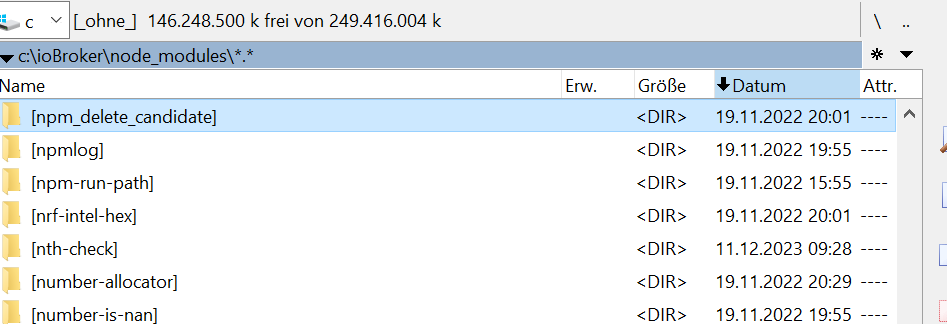
C:\ioBroker>iob fix
Windows installation starting... (fixing = true)
NPM version: 10.2.3
node:internal/modules/cjs/loader:1137
  throw err;
  ^

Error: Cannot find module 'C:\ioBroker\node_modules\npm\bin\npm-cli.js'
    at Module._resolveFilename (node:internal/modules/cjs/loader:1134:15)
    at Module._load (node:internal/modules/cjs/loader:975:27)
    at Function.executeUserEntryPoint [as runMain] (node:internal/modules/run_main:128:12)
    at node:internal/main/run_main_module:28:49 {
  code: 'MODULE_NOT_FOUND',
  requireStack: []
}

Node.js v18.19.0
node:child_process:965
    throw err;
    ^

Error: Command failed: npm x --yes @iobroker/jsonltool@latest
    at checkExecSyncError (node:child_process:890:11)
    at execSync (node:child_process:962:15)
    at Object.<anonymous> (C:\Users\JS\AppData\Local\npm-cache\_npx\19d197aa1f8fa98c\node_modules\@iobroker\fix\lib-npx\install.js:71:17)
    at Module._compile (node:internal/modules/cjs/loader:1356:14)
    at Module._extensions..js (node:internal/modules/cjs/loader:1414:10)
    at Module.load (node:internal/modules/cjs/loader:1197:32)
    at Module._load (node:internal/modules/cjs/loader:1013:12)
    at Function.executeUserEntryPoint [as runMain] (node:internal/modules/run_main:128:12)
    at node:internal/main/run_main_module:28:49 {
  status: 1,
  signal: null,
  output: [ null, null, null ],
  pid: 2672,
  stdout: null,
  stderr: null
}

Node.js v18.19.0

C:\ioBroker>
Ich boote jetzt mal den Rechner neu
-
@gaspode
Irgedwie half-way. Die 6er taucht jetzt nicht mehr auf, dafür wird irgendwo noch auf das umbenannte Verzeichnis verwiesenC:\ioBroker>iob fix Windows installation starting... (fixing = true) NPM version: 10.2.3 node:internal/modules/cjs/loader:1137 throw err; ^ Error: Cannot find module 'C:\ioBroker\node_modules\npm\bin\npm-cli.js' at Module._resolveFilename (node:internal/modules/cjs/loader:1134:15) at Module._load (node:internal/modules/cjs/loader:975:27) at Function.executeUserEntryPoint [as runMain] (node:internal/modules/run_main:128:12) at node:internal/main/run_main_module:28:49 { code: 'MODULE_NOT_FOUND', requireStack: [] } Node.js v18.19.0 node:child_process:965 throw err; ^ Error: Command failed: npm x --yes @iobroker/jsonltool@latest at checkExecSyncError (node:child_process:890:11) at execSync (node:child_process:962:15) at Object.<anonymous> (C:\Users\JS\AppData\Local\npm-cache\_npx\19d197aa1f8fa98c\node_modules\@iobroker\fix\lib-npx\install.js:71:17) at Module._compile (node:internal/modules/cjs/loader:1356:14) at Module._extensions..js (node:internal/modules/cjs/loader:1414:10) at Module.load (node:internal/modules/cjs/loader:1197:32) at Module._load (node:internal/modules/cjs/loader:1013:12) at Function.executeUserEntryPoint [as runMain] (node:internal/modules/run_main:128:12) at node:internal/main/run_main_module:28:49 { status: 1, signal: null, output: [ null, null, null ], pid: 2672, stdout: null, stderr: null } Node.js v18.19.0 C:\ioBroker>Ich boote jetzt mal den Rechner neu
@klassisch said in Test ioBroker unter Windows installieren - 2023 Edition:
Die 6er taucht jetzt nicht mehr auf, dafür wird irgendwo noch auf das umbenannte Verzeichnis verwiesen
Deshalb halte ich ja die Variante "npm uninstall npm" für erfolgsversprechender. Evtl. wird das damit glatt gezogen.
-
@klassisch said in Test ioBroker unter Windows installieren - 2023 Edition:
Die 6er taucht jetzt nicht mehr auf, dafür wird irgendwo noch auf das umbenannte Verzeichnis verwiesen
Deshalb halte ich ja die Variante "npm uninstall npm" für erfolgsversprechender. Evtl. wird das damit glatt gezogen.
@gaspode sagte in Test ioBroker unter Windows installieren - 2023 Edition:
Reboot hat nicht geholfen
Aus welchem Verzeichnis heraus soll ichnpm uninstall npm
starten?
Und muß ich danach das "richtige" npm nochmals installieren?
Ich will halt ioBroker lauffähig halten. Der steuert bei mir auch die Wohungsbeleuchtung und vieles anderes mehr. Also nicht mehr nur nice to have. -
@gaspode sagte in Test ioBroker unter Windows installieren - 2023 Edition:
Reboot hat nicht geholfen
Aus welchem Verzeichnis heraus soll ichnpm uninstall npm
starten?
Und muß ich danach das "richtige" npm nochmals installieren?
Ich will halt ioBroker lauffähig halten. Der steuert bei mir auch die Wohungsbeleuchtung und vieles anderes mehr. Also nicht mehr nur nice to have.@klassisch said in Test ioBroker unter Windows installieren - 2023 Edition:
Und muß ich danach das "richtige" npm nochmals installieren?
Das "npm uninstall npm" in c:\ioBroker ausführen.
Es muss danach nichts installiert werden, denn npm wird normalerweise nicht als package installiert, schon gar nicht lokal. Ich habe keine Ahnung, wie das bei dir da hin gekommen sein könnte. Das Datum ist 19.11.2022. Hast du evtl. mal ein node_modules Verzeichnis selbst kopiert oder so?@klassisch said in Test ioBroker unter Windows installieren - 2023 Edition:
Ich will halt ioBroker lauffähig halten. Der steuert bei mir auch die Wohungsbeleuchtung und vieles anderes mehr. Also nicht mehr nur nice to have.
Ja, das kann ich gut verstehen. Ich kann halt auch nicht garantieren, dass nix kaputt geht, weil ich die Hintergründe bei dir nicht kenne. Ich probiere die Schritte, die ich empfehle jedenfalls soweit möglich immer auf einem meiner Testsysteme aus, soweit das geht.
-
@klassisch said in Test ioBroker unter Windows installieren - 2023 Edition:
Und muß ich danach das "richtige" npm nochmals installieren?
Das "npm uninstall npm" in c:\ioBroker ausführen.
Es muss danach nichts installiert werden, denn npm wird normalerweise nicht als package installiert, schon gar nicht lokal. Ich habe keine Ahnung, wie das bei dir da hin gekommen sein könnte. Das Datum ist 19.11.2022. Hast du evtl. mal ein node_modules Verzeichnis selbst kopiert oder so?@klassisch said in Test ioBroker unter Windows installieren - 2023 Edition:
Ich will halt ioBroker lauffähig halten. Der steuert bei mir auch die Wohungsbeleuchtung und vieles anderes mehr. Also nicht mehr nur nice to have.
Ja, das kann ich gut verstehen. Ich kann halt auch nicht garantieren, dass nix kaputt geht, weil ich die Hintergründe bei dir nicht kenne. Ich probiere die Schritte, die ich empfehle jedenfalls soweit möglich immer auf einem meiner Testsysteme aus, soweit das geht.
Jetzt taucht plötzlich die 6er wieder auf
C:\ioBroker>iob fix
Windows installation starting... (fixing = true)
NPM version: 10.2.3

Usage: npm <command>

where <command> is one of:
    access, adduser, audit, bin, bugs, c, cache, ci, cit,
    clean-install, clean-install-test, completion, config,
    create, ddp, dedupe, deprecate, dist-tag, docs, doctor,
    edit, explore, fund, get, help, help-search, hook, i, init,
    install, install-ci-test, install-test, it, link, list, ln,
    login, logout, ls, org, outdated, owner, pack, ping, prefix,
    profile, prune, publish, rb, rebuild, repo, restart, root,
    run, run-script, s, se, search, set, shrinkwrap, star,
    stars, start, stop, t, team, test, token, tst, un,
    uninstall, unpublish, unstar, up, update, v, version, view,
    whoami

npm <command> -h  quick help on <command>
npm -l            display full usage info
npm help <term>   search for help on <term>
npm help npm      involved overview

Specify configs in the ini-formatted file:
    C:\Users\JS\.npmrc
or on the command line via: npm <command> --key value
Config info can be viewed via: npm help config

npm@6.14.17 C:\ioBroker\node_modules\npm

node:child_process:965
    throw err;
    ^

Error: Command failed: npm x --yes @iobroker/jsonltool@latest
    at checkExecSyncError (node:child_process:890:11)
    at execSync (node:child_process:962:15)
    at Object.<anonymous> (C:\Users\JS\AppData\Local\npm-cache\_npx\19d197aa1f8fa98c\node_modules\@iobroker\fix\lib-npx\install.js:71:17)
    at Module._compile (node:internal/modules/cjs/loader:1356:14)
    at Module._extensions..js (node:internal/modules/cjs/loader:1414:10)
    at Module.load (node:internal/modules/cjs/loader:1197:32)
    at Module._load (node:internal/modules/cjs/loader:1013:12)
    at Function.executeUserEntryPoint [as runMain] (node:internal/modules/run_main:128:12)
    at node:internal/main/run_main_module:28:49 {
  status: 1,
  signal: null,
  output: [ null, null, null ],
  pid: 5424,
  stdout: null,
  stderr: null
}

Node.js v18.19.0

C:\ioBroker>npm -v
10.2.3

C:\ioBroker>
Ich erinnere mich nicht wissentlich und willentlich npm installiert zu haben. Kann das aber nicht ausschließen. Wie gesagt, das System ist im Grunde recht alt und hat etliche Migrationen hinter sich.
-
Jetzt taucht plötzlich die 6er wieder auf
C:\ioBroker>iob fix
Windows installation starting... (fixing = true)
NPM version: 10.2.3

Usage: npm <command>

where <command> is one of:
    access, adduser, audit, bin, bugs, c, cache, ci, cit,
    clean-install, clean-install-test, completion, config,
    create, ddp, dedupe, deprecate, dist-tag, docs, doctor,
    edit, explore, fund, get, help, help-search, hook, i, init,
    install, install-ci-test, install-test, it, link, list, ln,
    login, logout, ls, org, outdated, owner, pack, ping, prefix,
    profile, prune, publish, rb, rebuild, repo, restart, root,
    run, run-script, s, se, search, set, shrinkwrap, star,
    stars, start, stop, t, team, test, token, tst, un,
    uninstall, unpublish, unstar, up, update, v, version, view,
    whoami

npm <command> -h  quick help on <command>
npm -l            display full usage info
npm help <term>   search for help on <term>
npm help npm      involved overview

Specify configs in the ini-formatted file:
    C:\Users\JS\.npmrc
or on the command line via: npm <command> --key value
Config info can be viewed via: npm help config

npm@6.14.17 C:\ioBroker\node_modules\npm

node:child_process:965
    throw err;
    ^

Error: Command failed: npm x --yes @iobroker/jsonltool@latest
    at checkExecSyncError (node:child_process:890:11)
    at execSync (node:child_process:962:15)
    at Object.<anonymous> (C:\Users\JS\AppData\Local\npm-cache\_npx\19d197aa1f8fa98c\node_modules\@iobroker\fix\lib-npx\install.js:71:17)
    at Module._compile (node:internal/modules/cjs/loader:1356:14)
    at Module._extensions..js (node:internal/modules/cjs/loader:1414:10)
    at Module.load (node:internal/modules/cjs/loader:1197:32)
    at Module._load (node:internal/modules/cjs/loader:1013:12)
    at Function.executeUserEntryPoint [as runMain] (node:internal/modules/run_main:128:12)
    at node:internal/main/run_main_module:28:49 {
  status: 1,
  signal: null,
  output: [ null, null, null ],
  pid: 5424,
  stdout: null,
  stderr: null
}

Node.js v18.19.0

C:\ioBroker>npm -v
10.2.3

C:\ioBroker>
Ich erinnere mich nicht wissentlich und willentlich npm installiert zu haben. Kann das aber nicht ausschließen. Wie gesagt, das System ist im Grunde recht alt und hat etliche Migrationen hinter sich.
@klassisch said in Test ioBroker unter Windows installieren - 2023 Edition:
Jetzt taucht plötzlich die 6er wieder auf
Was hast du genau gemacht? npm Ordner in node_modules wieder umbenannt und dann in c:\iobroker "npm uninstall npm" ausgeführt? Hast du davon ein Log?
-
@klassisch said in Test ioBroker unter Windows installieren - 2023 Edition:
Jetzt taucht plötzlich die 6er wieder auf
Was hast du genau gemacht? npm Ordner in node_modules wieder umbenannt und dann in c:\iobroker "npm uninstall npm" ausgeführt? Hast du davon ein Log?
@gaspode sagte in Test ioBroker unter Windows installieren - 2023 Edition:
Was hast du genau gemacht? npm Ordner in node_modules wieder umbenannt und dann in c:\iobroker "npm uninstall npm" ausgeführt? Hast du davon ein Log?
Ja, das habe ich wohl verkorkst
Das Rückumbenennen hatte ich leider nicht gemacht. War dumm und wurde mir recht schnell klar.
Aber nach dem npm uninstall npm war auch der umbenannte Ordner weg.Logfile: Hat npm ein eigenes logfile?

Hey! Du scheinst an dieser Unterhaltung interessiert zu sein, hast aber noch kein Konto.
Hast du es satt, bei jedem Besuch durch die gleichen Beiträge zu scrollen? Wenn du dich für ein Konto anmeldest, kommst du immer genau dorthin zurück, wo du zuvor warst, und kannst dich über neue Antworten benachrichtigen lassen (entweder per E-Mail oder Push-Benachrichtigung). Du kannst auch Lesezeichen speichern und Beiträge positiv bewerten, um anderen Community-Mitgliedern deine Wertschätzung zu zeigen.
Mit deinem Input könnte dieser Beitrag noch besser werden 💗
Registrieren AnmeldenSupport us
431
Online33.0k
Benutzer83.6k
Themen1.3m
Beiträge