Skip to content
  • Home
  • Recent
  • Tags
  • 0 Unread 0
  • Categories
  • Unreplied
  • Popular
  • GitHub
  • Docu
  • Hilfe
Skins
  • Light
  • Brite
  • Cerulean
  • Cosmo
  • Flatly
  • Journal
  • Litera
  • Lumen
  • Lux
  • Materia
  • Minty
  • Morph
  • Pulse
  • Sandstone
  • Simplex
  • Sketchy
  • Spacelab
  • United
  • Yeti
  • Zephyr
  • Dark
  • Cyborg
  • Darkly
  • Quartz
  • Slate
  • Solar
  • Superhero
  • Vapor

  • Default (No Skin)
  • No Skin
Collapse
ioBroker Logo

Community Forum

donate donate
  1. ioBroker Community Home
  2. Deutsch
  3. Off Topic
  4. Proxmox
  5. Proxmox / Influxdb V1 zu V2... wie?

NEWS

  • Jahresrückblick 2025 – unser neuer Blogbeitrag ist online! ✨
    BluefoxB
    Bluefox
    17
    1
    2.5k

  • Neuer Blogbeitrag: Monatsrückblick - Dezember 2025 🎄
    BluefoxB
    Bluefox
    13
    1
    993

  • Weihnachtsangebot 2025! 🎄
    BluefoxB
    Bluefox
    25
    1
    2.3k

Proxmox / Influxdb V1 zu V2... wie?

Scheduled Pinned Locked Moved Proxmox
221 Posts 20 Posters 40.2k Views 24 Watching
  • Oldest to Newest
  • Newest to Oldest
  • Most Votes
Reply
  • Reply as topic
Log in to reply
This topic has been deleted. Only users with topic management privileges can see it.
  • BoronsbruderB Boronsbruder

    @massiveattack
    Posted doch bitte die cmdline die den Fehler auslöst immer mit dazu

    MassiveAttackM Offline
    MassiveAttackM Offline
    MassiveAttack
    wrote on last edited by
    #108

    @boronsbruder

    root@QNAP:/# influx_inspect export -database iobroker -out /tmp/test.lp -lponly
    flag provided but not defined: -lponly
    Exports TSM files into InfluxDB line protocol format.
    
    BoronsbruderB 1 Reply Last reply
    0
    • MassiveAttackM MassiveAttack

      @boronsbruder

      root@QNAP:/# influx_inspect export -database iobroker -out /tmp/test.lp -lponly
      flag provided but not defined: -lponly
      Exports TSM files into InfluxDB line protocol format.
      
      BoronsbruderB Offline
      BoronsbruderB Offline
      Boronsbruder
      wrote on last edited by
      #109

      @massiveattack
      poste doch mal bitte
      influx -v

      MassiveAttackM 1 Reply Last reply
      0
      • BoronsbruderB Boronsbruder

        @massiveattack
        poste doch mal bitte
        influx -v

        MassiveAttackM Offline
        MassiveAttackM Offline
        MassiveAttack
        wrote on last edited by
        #110

        @boronsbruder

        root@QNAP:/# influx -v
        flag provided but not defined: -v
        Usage of influx:
          -version
                                Display the version and exit.
          -path-prefix 'url path'
                                Path that follows the host and port
          -host 'host name'
                                Host to connect to.
          -port 'port #'
                                Port to connect to.
          -socket 'unix domain socket'
                                Unix socket to connect to.
          -database 'database name'
                                Database to connect to the server.
          -password 'password'
                                Password to connect to the server.  Leaving blank will prompt for password (--password '').
          -username 'username'
                                Username to connect to the server.
          -ssl
                                Use https for requests.
          -unsafeSsl
                                Set this when connecting to the cluster using https and not use SSL verification.
          -execute 'command'
                                Execute command and quit.
          -type 'influxql|flux'
                                Type specifies the query language for executing commands or when invoking the REPL.
          -format 'json|csv|column'
                                Format specifies the format of the server responses:  json, csv, or column.
          -precision 'rfc3339|h|m|s|ms|u|ns'
                                Precision specifies the format of the timestamp:  rfc3339, h, m, s, ms, u or ns.
          -consistency 'any|one|quorum|all'
                                Set write consistency level: any, one, quorum, or all
          -pretty
                                Turns on pretty print for the json format.
          -import
                                Import a previous database export from file
          -pps
                                How many points per second the import will allow.  By default it is zero and will not throttle importing.
          -path
                                Path to file to import
          -compressed
                                Set to true if the import file is compressed
        
        Examples:
        
            # Use influx in a non-interactive mode to query the database "metrics" and pretty print json:
            $ influx -database 'metrics' -execute 'select * from cpu' -format 'json' -pretty
        
            # Connect to a specific database on startup and set database context:
            $ influx -database 'metrics' -host 'localhost' -port '8086'
        
        BoronsbruderB 1 Reply Last reply
        0
        • MassiveAttackM MassiveAttack

          @boronsbruder

          root@QNAP:/# influx -v
          flag provided but not defined: -v
          Usage of influx:
            -version
                                  Display the version and exit.
            -path-prefix 'url path'
                                  Path that follows the host and port
            -host 'host name'
                                  Host to connect to.
            -port 'port #'
                                  Port to connect to.
            -socket 'unix domain socket'
                                  Unix socket to connect to.
            -database 'database name'
                                  Database to connect to the server.
            -password 'password'
                                  Password to connect to the server.  Leaving blank will prompt for password (--password '').
            -username 'username'
                                  Username to connect to the server.
            -ssl
                                  Use https for requests.
            -unsafeSsl
                                  Set this when connecting to the cluster using https and not use SSL verification.
            -execute 'command'
                                  Execute command and quit.
            -type 'influxql|flux'
                                  Type specifies the query language for executing commands or when invoking the REPL.
            -format 'json|csv|column'
                                  Format specifies the format of the server responses:  json, csv, or column.
            -precision 'rfc3339|h|m|s|ms|u|ns'
                                  Precision specifies the format of the timestamp:  rfc3339, h, m, s, ms, u or ns.
            -consistency 'any|one|quorum|all'
                                  Set write consistency level: any, one, quorum, or all
            -pretty
                                  Turns on pretty print for the json format.
            -import
                                  Import a previous database export from file
            -pps
                                  How many points per second the import will allow.  By default it is zero and will not throttle importing.
            -path
                                  Path to file to import
            -compressed
                                  Set to true if the import file is compressed
          
          Examples:
          
              # Use influx in a non-interactive mode to query the database "metrics" and pretty print json:
              $ influx -database 'metrics' -execute 'select * from cpu' -format 'json' -pretty
          
              # Connect to a specific database on startup and set database context:
              $ influx -database 'metrics' -host 'localhost' -port '8086'
          
          BoronsbruderB Offline
          BoronsbruderB Offline
          Boronsbruder
          wrote on last edited by
          #111

          @massiveattack
          influx -version

          MassiveAttackM 1 Reply Last reply
          0
          • BoronsbruderB Boronsbruder

            @massiveattack
            influx -version

            MassiveAttackM Offline
            MassiveAttackM Offline
            MassiveAttack
            wrote on last edited by
            #112

            @boronsbruder

            root@QNAP:/# influx -version
            InfluxDB shell version: 1.8.0
            
            BoronsbruderB 1 Reply Last reply
            0
            • MassiveAttackM MassiveAttack

              @boronsbruder

              root@QNAP:/# influx -version
              InfluxDB shell version: 1.8.0
              
              BoronsbruderB Offline
              BoronsbruderB Offline
              Boronsbruder
              wrote on last edited by
              #113

              @massiveattack
              okay ist nicht zu alt...
              was sagt influx_inspect export --help

              MassiveAttackM Marc BergM 2 Replies Last reply
              0
              • BoronsbruderB Boronsbruder

                @massiveattack
                okay ist nicht zu alt...
                was sagt influx_inspect export --help

                MassiveAttackM Offline
                MassiveAttackM Offline
                MassiveAttack
                wrote on last edited by
                #114

                @boronsbruder sagte in Proxmox / Influxdb V1 zu V2... wie?:

                influx_inspect export --help

                root@QNAP:/# influx_inspect export --help
                Exports TSM files into InfluxDB line protocol format.
                
                Usage: influx_inspect export [flags]
                
                  -compress
                        Compress the output
                  -database string
                        Optional: the database to export
                  -datadir string
                        Data storage path (default "/root/.influxdb/data")
                  -end string
                        Optional: the end time to export (RFC3339 format)
                  -out string
                        Destination file to export to (default "/root/.influxdb/export")
                  -retention string
                        Optional: the retention policy to export (requires -database)
                  -start string
                        Optional: the start time to export (RFC3339 format)
                  -waldir string
                        WAL storage path (default "/root/.influxdb/wal")
                
                BoronsbruderB 1 Reply Last reply
                0
                • BoronsbruderB Boronsbruder

                  @massiveattack
                  okay ist nicht zu alt...
                  was sagt influx_inspect export --help

                  Marc BergM Offline
                  Marc BergM Offline
                  Marc Berg
                  Most Active
                  wrote on last edited by
                  #115

                  @boronsbruder sagte in Proxmox / Influxdb V1 zu V2... wie?:

                  @massiveattack
                  okay ist nicht zu alt...
                  was sagt influx_inspect export --help

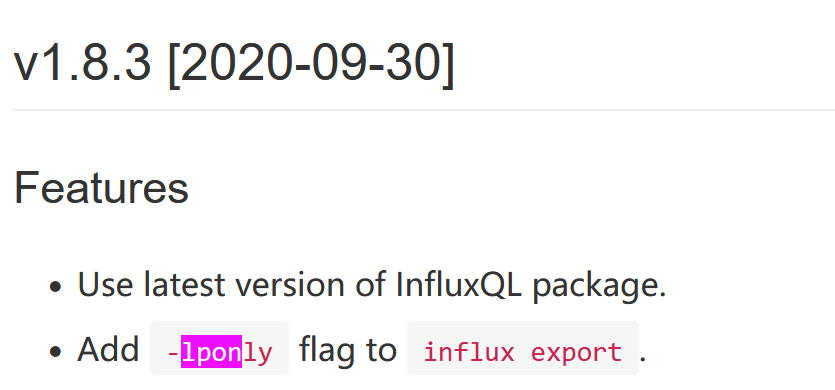
                  Doch, ist zu alt

                  eeef5330-f85c-432b-b819-b39c1b68f87a-grafik.png

                  NUC10I3+Ubuntu+Docker+ioBroker+influxDB2+Node Red+EMQX+Grafana

                  Pi-hole, Traefik, Checkmk, Conbee II+Zigbee2MQTT, ESPSomfy-RTS, LoRaWAN, Arduino, KiCad

                  Benutzt das Voting im Beitrag, wenn er euch geholfen hat.

                  MassiveAttackM 1 Reply Last reply
                  1
                  • Marc BergM Marc Berg

                    @boronsbruder sagte in Proxmox / Influxdb V1 zu V2... wie?:

                    @massiveattack
                    okay ist nicht zu alt...
                    was sagt influx_inspect export --help

                    Doch, ist zu alt

                    eeef5330-f85c-432b-b819-b39c1b68f87a-grafik.png

                    MassiveAttackM Offline
                    MassiveAttackM Offline
                    MassiveAttack
                    wrote on last edited by
                    #116

                    @marc-berg

                    d.h. ich bekomme die Daten nicht aus der v1 in die v2?

                    Marc BergM 1 Reply Last reply
                    0
                    • MassiveAttackM MassiveAttack

                      @marc-berg

                      d.h. ich bekomme die Daten nicht aus der v1 in die v2?

                      Marc BergM Offline
                      Marc BergM Offline
                      Marc Berg
                      Most Active
                      wrote on last edited by
                      #117

                      @massiveattack sagte in Proxmox / Influxdb V1 zu V2... wie?:

                      @marc-berg

                      d.h. ich bekomme die Daten nicht aus der v1 in die v2?

                      So, wie ich das sehe, mit dieser Methode erst nach einem Update auf mindestens 1.8.3

                      NUC10I3+Ubuntu+Docker+ioBroker+influxDB2+Node Red+EMQX+Grafana

                      Pi-hole, Traefik, Checkmk, Conbee II+Zigbee2MQTT, ESPSomfy-RTS, LoRaWAN, Arduino, KiCad

                      Benutzt das Voting im Beitrag, wenn er euch geholfen hat.

                      MassiveAttackM 1 Reply Last reply
                      0
                      • Marc BergM Marc Berg

                        @massiveattack sagte in Proxmox / Influxdb V1 zu V2... wie?:

                        @marc-berg

                        d.h. ich bekomme die Daten nicht aus der v1 in die v2?

                        So, wie ich das sehe, mit dieser Methode erst nach einem Update auf mindestens 1.8.3

                        MassiveAttackM Offline
                        MassiveAttackM Offline
                        MassiveAttack
                        wrote on last edited by
                        #118

                        @marc-berg

                        wie ich diese useability liebe :disappointed_relieved: :cry:

                        1 Reply Last reply
                        0
                        • MassiveAttackM MassiveAttack

                          @boronsbruder sagte in Proxmox / Influxdb V1 zu V2... wie?:

                          influx_inspect export --help

                          root@QNAP:/# influx_inspect export --help
                          Exports TSM files into InfluxDB line protocol format.
                          
                          Usage: influx_inspect export [flags]
                          
                            -compress
                                  Compress the output
                            -database string
                                  Optional: the database to export
                            -datadir string
                                  Data storage path (default "/root/.influxdb/data")
                            -end string
                                  Optional: the end time to export (RFC3339 format)
                            -out string
                                  Destination file to export to (default "/root/.influxdb/export")
                            -retention string
                                  Optional: the retention policy to export (requires -database)
                            -start string
                                  Optional: the start time to export (RFC3339 format)
                            -waldir string
                                  WAL storage path (default "/root/.influxdb/wal")
                          
                          BoronsbruderB Offline
                          BoronsbruderB Offline
                          Boronsbruder
                          wrote on last edited by Boronsbruder
                          #119

                          @massiveattack
                          ja, da fehlt -lponly

                          Jetzt hast du 2 Möglichkeiten...

                          1. Eine für dein Betriebsystem passende influx_inspect finden

                          oder

                          Einen Texteditor benutzen um den Header (die ersten paar Zeile mit #)

                          # INFLUXDB EXPORT: 2023-01-01T01:59:59+01:00 - 2262-04-12T00:47:16+01:00
                          # DDL
                          CREATE DATABASE iobroker WITH NAME autogen
                          # DML
                          # CONTEXT-DATABASE:iobroker
                          # CONTEXT-RETENTION-POLICY:autogen
                          # writing tsm data
                          0_userdata.0.Wetter.Mittel.1 ack=false 1672617060016000000
                          

                          entfernen und dann importieren. Vorher natürlich entpacken.

                          Der Editor muss aber die riesige Datei verkraften und linux-kompatibles Format benutzen. Nicht dass Windows-Sonderzeichen für Zeilenumbrüche usw. Probleme machen.

                          BoronsbruderB Marc BergM 2 Replies Last reply
                          1
                          • BoronsbruderB Boronsbruder

                            @massiveattack
                            ja, da fehlt -lponly

                            Jetzt hast du 2 Möglichkeiten...

                            1. Eine für dein Betriebsystem passende influx_inspect finden

                            oder

                            Einen Texteditor benutzen um den Header (die ersten paar Zeile mit #)

                            # INFLUXDB EXPORT: 2023-01-01T01:59:59+01:00 - 2262-04-12T00:47:16+01:00
                            # DDL
                            CREATE DATABASE iobroker WITH NAME autogen
                            # DML
                            # CONTEXT-DATABASE:iobroker
                            # CONTEXT-RETENTION-POLICY:autogen
                            # writing tsm data
                            0_userdata.0.Wetter.Mittel.1 ack=false 1672617060016000000
                            

                            entfernen und dann importieren. Vorher natürlich entpacken.

                            Der Editor muss aber die riesige Datei verkraften und linux-kompatibles Format benutzen. Nicht dass Windows-Sonderzeichen für Zeilenumbrüche usw. Probleme machen.

                            BoronsbruderB Offline
                            BoronsbruderB Offline
                            Boronsbruder
                            wrote on last edited by
                            #120

                            ich benutze hier auf Windows Notepad++

                            1 Reply Last reply
                            0
                            • BoronsbruderB Boronsbruder

                              @massiveattack
                              ja, da fehlt -lponly

                              Jetzt hast du 2 Möglichkeiten...

                              1. Eine für dein Betriebsystem passende influx_inspect finden

                              oder

                              Einen Texteditor benutzen um den Header (die ersten paar Zeile mit #)

                              # INFLUXDB EXPORT: 2023-01-01T01:59:59+01:00 - 2262-04-12T00:47:16+01:00
                              # DDL
                              CREATE DATABASE iobroker WITH NAME autogen
                              # DML
                              # CONTEXT-DATABASE:iobroker
                              # CONTEXT-RETENTION-POLICY:autogen
                              # writing tsm data
                              0_userdata.0.Wetter.Mittel.1 ack=false 1672617060016000000
                              

                              entfernen und dann importieren. Vorher natürlich entpacken.

                              Der Editor muss aber die riesige Datei verkraften und linux-kompatibles Format benutzen. Nicht dass Windows-Sonderzeichen für Zeilenumbrüche usw. Probleme machen.

                              Marc BergM Offline
                              Marc BergM Offline
                              Marc Berg
                              Most Active
                              wrote on last edited by Marc Berg
                              #121

                              @boronsbruder sagte in Proxmox / Influxdb V1 zu V2... wie?:

                              Jetzt hast du 2 Möglichkeiten...

                              1. Eine für dein Betriebsystem passende influx_inspect finden

                              Hier https://dl.influxdata.com/influxdb/releases/influxdb-1.8.10_linux_amd64.tar.gz
                              wäre eine aktuellere influx_inspect enthalten. Aber ob die mit der 1.8.0 DB läuft?

                              NUC10I3+Ubuntu+Docker+ioBroker+influxDB2+Node Red+EMQX+Grafana

                              Pi-hole, Traefik, Checkmk, Conbee II+Zigbee2MQTT, ESPSomfy-RTS, LoRaWAN, Arduino, KiCad

                              Benutzt das Voting im Beitrag, wenn er euch geholfen hat.

                              BoronsbruderB 1 Reply Last reply
                              0
                              • Marc BergM Marc Berg

                                @boronsbruder sagte in Proxmox / Influxdb V1 zu V2... wie?:

                                Jetzt hast du 2 Möglichkeiten...

                                1. Eine für dein Betriebsystem passende influx_inspect finden

                                Hier https://dl.influxdata.com/influxdb/releases/influxdb-1.8.10_linux_amd64.tar.gz
                                wäre eine aktuellere influx_inspect enthalten. Aber ob die mit der 1.8.0 DB läuft?

                                BoronsbruderB Offline
                                BoronsbruderB Offline
                                Boronsbruder
                                wrote on last edited by Boronsbruder
                                #122

                                @marc-berg
                                ich würde erst die variante mit Zeilen entfernen versuchen ;)

                                z.B. entpacken und

                                sed '/^[#]/d' DATEINAME > NEUER_DATEINAME
                                

                                (entfernt alle Zeilen beginnend mit # und schreibt das Resultat in eine neue Datei)

                                danach mit

                                gzip NEUER_DATEINAME
                                

                                wieder packen

                                Marc BergM 1 Reply Last reply
                                0
                                • BoronsbruderB Boronsbruder

                                  @marc-berg
                                  ich würde erst die variante mit Zeilen entfernen versuchen ;)

                                  z.B. entpacken und

                                  sed '/^[#]/d' DATEINAME > NEUER_DATEINAME
                                  

                                  (entfernt alle Zeilen beginnend mit # und schreibt das Resultat in eine neue Datei)

                                  danach mit

                                  gzip NEUER_DATEINAME
                                  

                                  wieder packen

                                  Marc BergM Offline
                                  Marc BergM Offline
                                  Marc Berg
                                  Most Active
                                  wrote on last edited by
                                  #123

                                  @boronsbruder sagte in Proxmox / Influxdb V1 zu V2... wie?:

                                  sed '/^[#]/d' DATEINAME > NEUER_DATEINAME

                                  (entfernt alle Zeilen beginnend mit # und schreibt das Resultat in eine neue Datei)
                                  

                                  Was ich nicht verstehe ist: Wenn diese Zeile hier angemeckert wird

                                  Error: failed to write data: 400 Bad Request: unable to parse 'CREATE DATABASE iobroker WITH NAME autogen': invalid field format
                                  

                                  und vor dieser Zeile kein "#" steht, was bringt das denn?

                                  NUC10I3+Ubuntu+Docker+ioBroker+influxDB2+Node Red+EMQX+Grafana

                                  Pi-hole, Traefik, Checkmk, Conbee II+Zigbee2MQTT, ESPSomfy-RTS, LoRaWAN, Arduino, KiCad

                                  Benutzt das Voting im Beitrag, wenn er euch geholfen hat.

                                  BoronsbruderB 1 Reply Last reply
                                  0
                                  • Marc BergM Marc Berg

                                    @boronsbruder sagte in Proxmox / Influxdb V1 zu V2... wie?:

                                    sed '/^[#]/d' DATEINAME > NEUER_DATEINAME

                                    (entfernt alle Zeilen beginnend mit # und schreibt das Resultat in eine neue Datei)
                                    

                                    Was ich nicht verstehe ist: Wenn diese Zeile hier angemeckert wird

                                    Error: failed to write data: 400 Bad Request: unable to parse 'CREATE DATABASE iobroker WITH NAME autogen': invalid field format
                                    

                                    und vor dieser Zeile kein "#" steht, was bringt das denn?

                                    BoronsbruderB Offline
                                    BoronsbruderB Offline
                                    Boronsbruder
                                    wrote on last edited by Boronsbruder
                                    #124

                                    @marc-berg
                                    Hast natürlich recht...
                                    Copy und paste...

                                    EDIT

                                    besser noch

                                    sed -e '/^[#]/d' -e '/^CREATE/d' DATEINAME > NEUER_DATEINAME
                                    

                                    Sonst kann es passieren, dass er Zeilen mit löscht, die CREATE irgendwo im TEXT haben.
                                    Hier wird nur gelöscht nur wenn die Zeichen am Anfang sind...

                                    MassiveAttackM 1 Reply Last reply
                                    0
                                    • BoronsbruderB Boronsbruder

                                      @marc-berg
                                      Hast natürlich recht...
                                      Copy und paste...

                                      EDIT

                                      besser noch

                                      sed -e '/^[#]/d' -e '/^CREATE/d' DATEINAME > NEUER_DATEINAME
                                      

                                      Sonst kann es passieren, dass er Zeilen mit löscht, die CREATE irgendwo im TEXT haben.
                                      Hier wird nur gelöscht nur wenn die Zeichen am Anfang sind...

                                      MassiveAttackM Offline
                                      MassiveAttackM Offline
                                      MassiveAttack
                                      wrote on last edited by MassiveAttack
                                      #125

                                      @boronsbruder

                                      ich bekomme jetzt ein permission denied, ich hab keine lust mehr

                                      unexpected error writing points to database: mkdir /var: permission denied / "unexpected error writing points to database: mkdir /var: permission denied""
                                      

                                      im Verzeichnis /var habe ich schon chmod 777 gesetzt, bringt nix

                                      BoronsbruderB Marc BergM 2 Replies Last reply
                                      0
                                      • MassiveAttackM MassiveAttack

                                        @boronsbruder

                                        ich bekomme jetzt ein permission denied, ich hab keine lust mehr

                                        unexpected error writing points to database: mkdir /var: permission denied / "unexpected error writing points to database: mkdir /var: permission denied""
                                        

                                        im Verzeichnis /var habe ich schon chmod 777 gesetzt, bringt nix

                                        BoronsbruderB Offline
                                        BoronsbruderB Offline
                                        Boronsbruder
                                        wrote on last edited by
                                        #126

                                        @massiveattack
                                        langsam...
                                        nicht unbedacht irgenwelche Berechtigungen verbiegen...

                                        Was löst den Fehler aus....

                                        Mit welchem Benutzer?

                                        Ist influxv2 sauber installiert?

                                        MassiveAttackM 1 Reply Last reply
                                        0
                                        • BoronsbruderB Boronsbruder

                                          @massiveattack
                                          langsam...
                                          nicht unbedacht irgenwelche Berechtigungen verbiegen...

                                          Was löst den Fehler aus....

                                          Mit welchem Benutzer?

                                          Ist influxv2 sauber installiert?

                                          MassiveAttackM Offline
                                          MassiveAttackM Offline
                                          MassiveAttack
                                          wrote on last edited by
                                          #127

                                          @boronsbruder

                                          influx write -b iobroker -o universe -t KUArezBLNDbZWty0PcwTbD0rme4qIR2JZ0sffRAU8mcT2eXMB12jp6-aTRiH0Gtw0UsY4aEr1U3JXMiYWFTlWg== -f export
                                          

                                          root
                                          ja

                                          Diese v2 DB dient mir grad mal als Testobjekt, da verbiege ich alles wenn notwendig ;)

                                          1 Reply Last reply
                                          0
                                          Reply
                                          • Reply as topic
                                          Log in to reply
                                          • Oldest to Newest
                                          • Newest to Oldest
                                          • Most Votes


                                          Support us

                                          ioBroker
                                          Community Adapters
                                          Donate

                                          710

                                          Online

                                          32.6k

                                          Users

                                          82.3k

                                          Topics

                                          1.3m

                                          Posts
                                          Community
                                          Impressum | Datenschutz-Bestimmungen | Nutzungsbedingungen | Einwilligungseinstellungen
                                          ioBroker Community 2014-2025
                                          logo
                                          • Login

                                          • Don't have an account? Register

                                          • Login or register to search.
                                          • First post
                                            Last post
                                          0
                                          • Home
                                          • Recent
                                          • Tags
                                          • Unread 0
                                          • Categories
                                          • Unreplied
                                          • Popular
                                          • GitHub
                                          • Docu
                                          • Hilfe