Skip to content
  • Home
  • Recent
  • Tags
  • 0 Unread 0
  • Categories
  • Unreplied
  • Popular
  • GitHub
  • Docu
  • Hilfe
Skins
  • Light
  • Brite
  • Cerulean
  • Cosmo
  • Flatly
  • Journal
  • Litera
  • Lumen
  • Lux
  • Materia
  • Minty
  • Morph
  • Pulse
  • Sandstone
  • Simplex
  • Sketchy
  • Spacelab
  • United
  • Yeti
  • Zephyr
  • Dark
  • Cyborg
  • Darkly
  • Quartz
  • Slate
  • Solar
  • Superhero
  • Vapor

  • Default (No Skin)
  • No Skin
Collapse
ioBroker Logo

Community Forum

donate donate
  1. ioBroker Community Home
  2. Deutsch
  3. ioBroker Allgemein
  4. Shelly Geräte einbinden

NEWS

  • Monatsrückblick Januar/Februar 2026 ist online!
    BluefoxB
    Bluefox
    11
    1
    116

  • Jahresrückblick 2025 – unser neuer Blogbeitrag ist online! ✨
    BluefoxB
    Bluefox
    17
    1
    4.3k

  • Neuer Blogbeitrag: Monatsrückblick - Dezember 2025 🎄
    BluefoxB
    Bluefox
    13
    1
    1.2k

Shelly Geräte einbinden

Scheduled Pinned Locked Moved ioBroker Allgemein
117 Posts 8 Posters 13.5k Views 4 Watching
  • Oldest to Newest
  • Newest to Oldest
  • Most Votes
Reply
  • Reply as topic
Log in to reply
This topic has been deleted. Only users with topic management privileges can see it.
  • W WilliKlein

    @spacerx

    ich bin auf Router 2 und der raspberry pi auch und ich möchte jetzt den shelly hier auf Router 2 erstmal wieder im iobroker drin haben.

    Der shelly ist mit fester IP.

    Ich habe jetzt alles so gemacht, wie es in Github steht.

    das Kästchen ist aber noch nicht grün.

    das Log kann ich runterladen, wie bekomme ich das in "Codetags "

    S Offline
    S Offline
    SpacerX
    wrote on last edited by
    #79

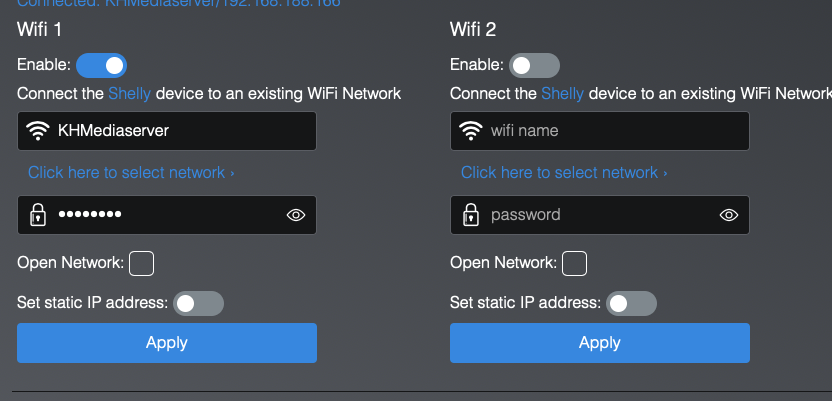
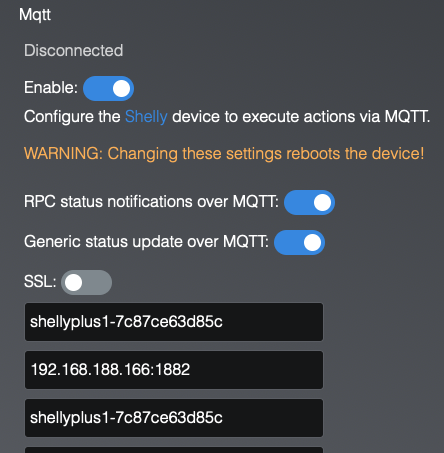
    @williklein zeig mal die Einstellungen vom Shelly. Networks/Wifi und Networks/MQtt

    DS720|Nuc8i3BEH|Proxmox|RaspberryMatic|ioBroker|influxDB2|Grafana

    1 Reply Last reply
    0
    • W WilliKlein

      @spacerx

      ich bin auf Router 2 und der raspberry pi auch und ich möchte jetzt den shelly hier auf Router 2 erstmal wieder im iobroker drin haben.

      Der shelly ist mit fester IP.

      Ich habe jetzt alles so gemacht, wie es in Github steht.

      das Kästchen ist aber noch nicht grün.

      das Log kann ich runterladen, wie bekomme ich das in "Codetags "

      da_WoodyD Online
      da_WoodyD Online
      da_Woody
      wrote on last edited by da_Woody
      #80

      @williklein sagte in Shelly Geräte einbinden:

      das Log kann ich runterladen, wie bekomme ich das in "Codetags "

      den text im log kopieren und dann f5a00c6f-a95d-4e8c-8246-1395d5d9c7a2-grafik.png einfügen
      gruß vom Woody
      HAPPINESS is not a DESTINATION, it's a WAY of LIFE!

      W 2 Replies Last reply
      0
      • W WilliKlein

        @spacerx

        ich bin auf Router 2 und der raspberry pi auch und ich möchte jetzt den shelly hier auf Router 2 erstmal wieder im iobroker drin haben.

        Der shelly ist mit fester IP.

        Ich habe jetzt alles so gemacht, wie es in Github steht.

        das Kästchen ist aber noch nicht grün.

        das Log kann ich runterladen, wie bekomme ich das in "Codetags "

        crunchipC Away
        crunchipC Away
        crunchip
        Forum Testing Most Active
        wrote on last edited by
        #81

        @williklein sagte in Shelly Geräte einbinden:

        ich bin auf Router 2 und der raspberry pi auch und ich möchte jetzt den shelly hier auf Router 2 erstmal wieder im iobroker drin haben.
        Der shelly ist mit fester IP.

        dann lass ihn doch auf DHCP, somit umgehst du schon mal irgendwelche Konfiguration Fehler

        @williklein sagte in Shelly Geräte einbinden:

        Ich habe jetzt alles so gemacht, wie es in Github steht.

        dann sollte es auch grün werden:stuck_out_tongue_winking_eye:

        @williklein sagte in Shelly Geräte einbinden:

        muss ich jetzt den shelly resetten ??
        muss ich im iobroker den shelly Adapter löschen ??

        NEIN!

        umgestiegen von Proxmox auf Unraid

        W 1 Reply Last reply
        0
        • da_WoodyD da_Woody

          @williklein sagte in Shelly Geräte einbinden:

          das Log kann ich runterladen, wie bekomme ich das in "Codetags "

          den text im log kopieren und dann f5a00c6f-a95d-4e8c-8246-1395d5d9c7a2-grafik.png einfügen

          W Offline
          W Offline
          WilliKlein
          wrote on last edited by
          #82

          @da_woody

          Bildschirmfoto 2022-10-23 um 19.19.05.png

          Bildschirmfoto 2022-10-23 um 19.19.42.png

          1 Reply Last reply
          0
          • crunchipC crunchip

            @williklein sagte in Shelly Geräte einbinden:

            ich bin auf Router 2 und der raspberry pi auch und ich möchte jetzt den shelly hier auf Router 2 erstmal wieder im iobroker drin haben.
            Der shelly ist mit fester IP.

            dann lass ihn doch auf DHCP, somit umgehst du schon mal irgendwelche Konfiguration Fehler

            @williklein sagte in Shelly Geräte einbinden:

            Ich habe jetzt alles so gemacht, wie es in Github steht.

            dann sollte es auch grün werden:stuck_out_tongue_winking_eye:

            @williklein sagte in Shelly Geräte einbinden:

            muss ich jetzt den shelly resetten ??
            muss ich im iobroker den shelly Adapter löschen ??

            NEIN!

            W Offline
            W Offline
            WilliKlein
            wrote on last edited by
            #83

            @crunchip said in Shelly Geräte einbinden:

            dann lass ihn doch auf DHCP, somit umgehst du schon mal irgendwelche Konfiguration Fehler

            Wo kann ich DHCP das einstellen

            crunchipC 1 Reply Last reply
            0
            • W WilliKlein

              @crunchip said in Shelly Geräte einbinden:

              dann lass ihn doch auf DHCP, somit umgehst du schon mal irgendwelche Konfiguration Fehler

              Wo kann ich DHCP das einstellen

              crunchipC Away
              crunchipC Away
              crunchip
              Forum Testing Most Active
              wrote on last edited by crunchip
              #84

              @williklein hast du doch, weil du keinn static IP eingebgeben hast, bzw es nicht aktiv ist, also alles ok
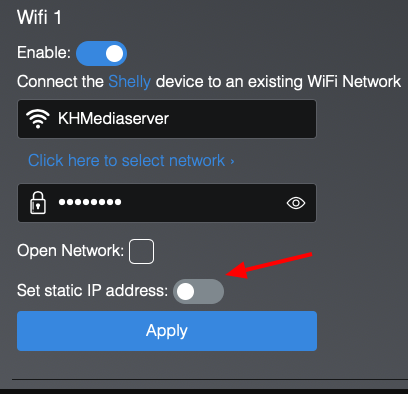
              b8cd7138-08ff-4883-a1a7-b69ffc1cb4bd-image.png

              zeig mal die mqtt Einstellung im Adapter

              umgestiegen von Proxmox auf Unraid

              W 1 Reply Last reply
              0
              • crunchipC crunchip

                @williklein hast du doch, weil du keinn static IP eingebgeben hast, bzw es nicht aktiv ist, also alles ok
                b8cd7138-08ff-4883-a1a7-b69ffc1cb4bd-image.png

                zeig mal die mqtt Einstellung im Adapter

                W Offline
                W Offline
                WilliKlein
                wrote on last edited by
                #85

                @crunchip

                ich habe eine feste IP in der Fritz Box angeklickt

                Name Zurücksetzen
                IPv4-Adresse 192.168.188.166
                Diesem Netzwerkgerät immer die gleiche IPv4-Adresse zuweisen.

                Bildschirmfoto 2022-10-23 um 19.29.50.png

                crunchipC 1 Reply Last reply
                0
                • da_WoodyD da_Woody

                  @williklein sagte in Shelly Geräte einbinden:

                  das Log kann ich runterladen, wie bekomme ich das in "Codetags "

                  den text im log kopieren und dann f5a00c6f-a95d-4e8c-8246-1395d5d9c7a2-grafik.png einfügen

                  W Offline
                  W Offline
                  WilliKlein
                  wrote on last edited by
                  #86

                  @da_woody

                  Bildschirmfoto 2022-10-23 um 19.31.26.png

                  wo stehen diese Zeichen ??

                  da_WoodyD 1 Reply Last reply
                  0
                  • W WilliKlein

                    @crunchip

                    ich habe eine feste IP in der Fritz Box angeklickt

                    Name Zurücksetzen
                    IPv4-Adresse 192.168.188.166
                    Diesem Netzwerkgerät immer die gleiche IPv4-Adresse zuweisen.

                    Bildschirmfoto 2022-10-23 um 19.29.50.png

                    crunchipC Away
                    crunchipC Away
                    crunchip
                    Forum Testing Most Active
                    wrote on last edited by crunchip
                    #87

                    @williklein sagte in Shelly Geräte einbinden:

                    feste IP in der Fritz Box angeklickt

                    das ist keine statische, das bedeutet nur das innerhalb des dhcp die selbe zugewiesen wird.

                    @williklein sagte in Shelly Geräte einbinden:

                    IPv4-Adresse 192.168.188.166

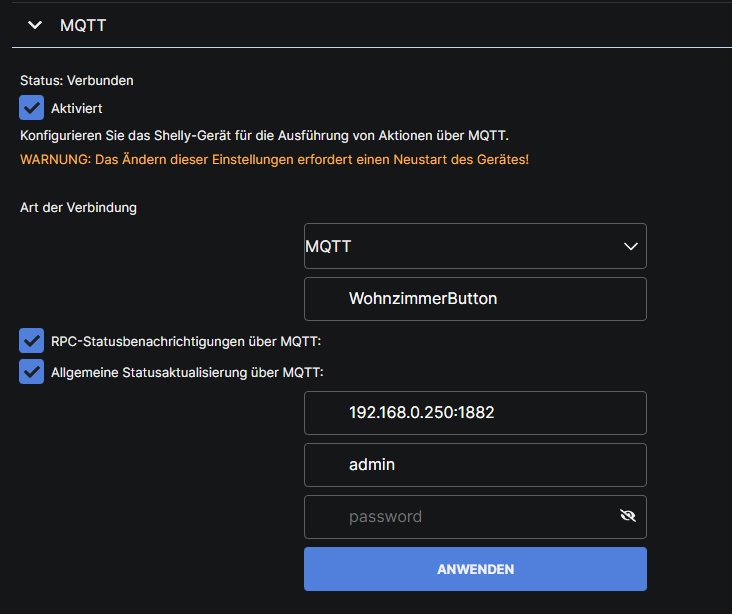
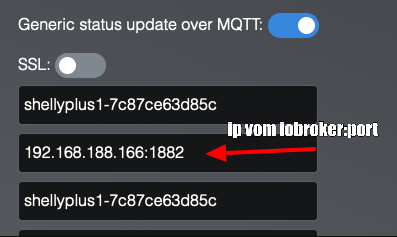
                    das ist der shelly? und im shelly hast du die selbse eingetragen, da muss die deines iobroker rein
                    02668519-992f-4fa7-b079-52027abd4ffa-image.png

                    umgestiegen von Proxmox auf Unraid

                    W S 2 Replies Last reply
                    0
                    • W WilliKlein

                      @da_woody

                      Bildschirmfoto 2022-10-23 um 19.31.26.png

                      wo stehen diese Zeichen ??

                      da_WoodyD Online
                      da_WoodyD Online
                      da_Woody
                      wrote on last edited by
                      #88

                      @williklein 93e53ba4-b8e8-4d65-b949-964bbf715844-grafik.png
                      mit deiner netzconfig kann ich dir so nicht helfen.

                      gruß vom Woody
                      HAPPINESS is not a DESTINATION, it's a WAY of LIFE!

                      W 1 Reply Last reply
                      0
                      • da_WoodyD da_Woody

                        @williklein 93e53ba4-b8e8-4d65-b949-964bbf715844-grafik.png
                        mit deiner netzconfig kann ich dir so nicht helfen.

                        W Offline
                        W Offline
                        WilliKlein
                        wrote on last edited by
                        #89

                        @da_woody

                        Das mit der Netzkonfiguration kriege ich schon hin. Da hole ich mit gegebenenfalls einen Repaeter

                        Ich sollte den Log Text irgendwo einfügen, da weiss ich nicht wo.

                        da_WoodyD 1 Reply Last reply
                        0
                        • W WilliKlein

                          @da_woody

                          Das mit der Netzkonfiguration kriege ich schon hin. Da hole ich mit gegebenenfalls einen Repaeter

                          Ich sollte den Log Text irgendwo einfügen, da weiss ich nicht wo.

                          da_WoodyD Online
                          da_WoodyD Online
                          da_Woody
                          wrote on last edited by da_Woody
                          #90

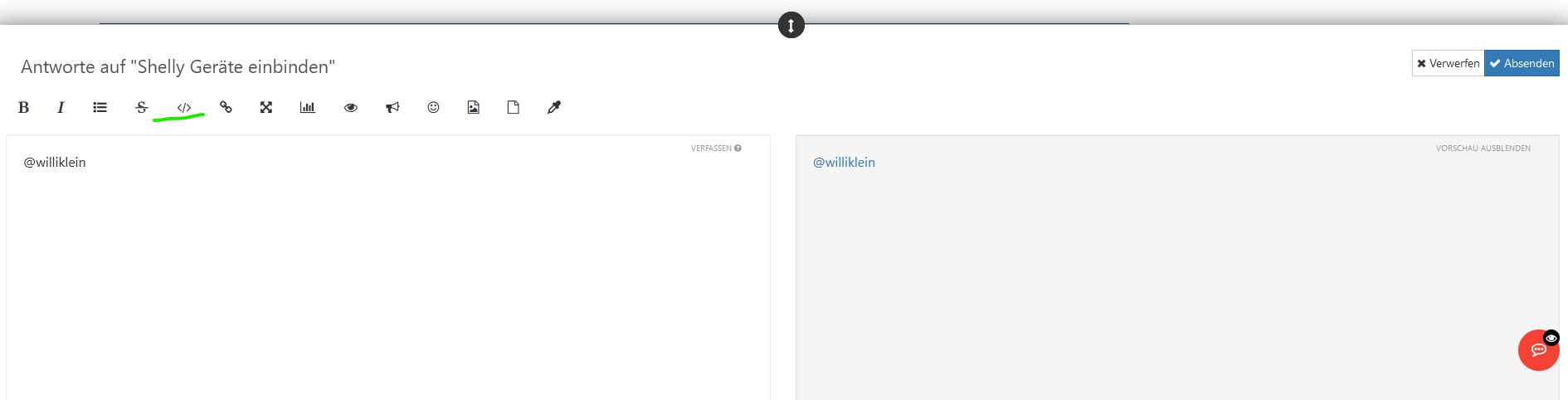
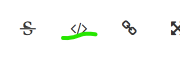
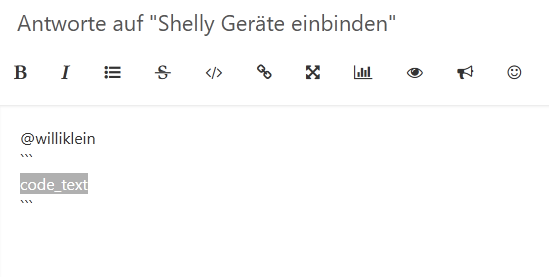
                          @williklein noch deutlicher gehts nicht. auf antworten klicken, dann </> oben anklicken, text einfügen.
                          a6e7c2a6-1f38-4054-9702-e9c57c1a5b97-grafik.png

                          gruß vom Woody
                          HAPPINESS is not a DESTINATION, it's a WAY of LIFE!

                          W 1 Reply Last reply
                          0
                          • crunchipC crunchip

                            @williklein sagte in Shelly Geräte einbinden:

                            feste IP in der Fritz Box angeklickt

                            das ist keine statische, das bedeutet nur das innerhalb des dhcp die selbe zugewiesen wird.

                            @williklein sagte in Shelly Geräte einbinden:

                            IPv4-Adresse 192.168.188.166

                            das ist der shelly? und im shelly hast du die selbse eingetragen, da muss die deines iobroker rein
                            02668519-992f-4fa7-b079-52027abd4ffa-image.png

                            W Offline
                            W Offline
                            WilliKlein
                            wrote on last edited by
                            #91

                            @crunchip said in Shelly Geräte einbinden:

                            das ist keine statische, das bedeutet nur das innerhalb des dhcp die selbe zugewiesen wird.
                            @williklein sagte in Shelly Geräte einbinden:

                            IPv4-Adresse 192.168.188.166

                            das ist der shelly? und im shelly hast du die selbse eingetragen, da muss die deines iobroker rein

                            Wo genau muss im shelly muss der iobroker rein ??

                            das was ich da gepostet habe mit der festen IP war aus der Fritz Box.

                            Muss da der iobroker rein, oder in der MQTT Einstellung

                            da_WoodyD 1 Reply Last reply
                            0
                            • crunchipC crunchip

                              @williklein sagte in Shelly Geräte einbinden:

                              feste IP in der Fritz Box angeklickt

                              das ist keine statische, das bedeutet nur das innerhalb des dhcp die selbe zugewiesen wird.

                              @williklein sagte in Shelly Geräte einbinden:

                              IPv4-Adresse 192.168.188.166

                              das ist der shelly? und im shelly hast du die selbse eingetragen, da muss die deines iobroker rein
                              02668519-992f-4fa7-b079-52027abd4ffa-image.png

                              S Offline
                              S Offline
                              SpacerX
                              wrote on last edited by SpacerX
                              #92

                              @crunchip sagte in Shelly Geräte einbinden:

                              @williklein sagte in Shelly Geräte einbinden:

                              feste IP in der Fritz Box angeklickt

                              das ist keine statische, das bedeutet nur das innerhalb des dhcp die selbe zugewiesen wird.

                              @williklein sagte in Shelly Geräte einbinden:

                              IPv4-Adresse 192.168.188.166

                              das ist der shelly? und im shelly hast du die selbse eingetragen, da muss die deines iobroker rein
                              02668519-992f-4fa7-b079-52027abd4ffa-image.png

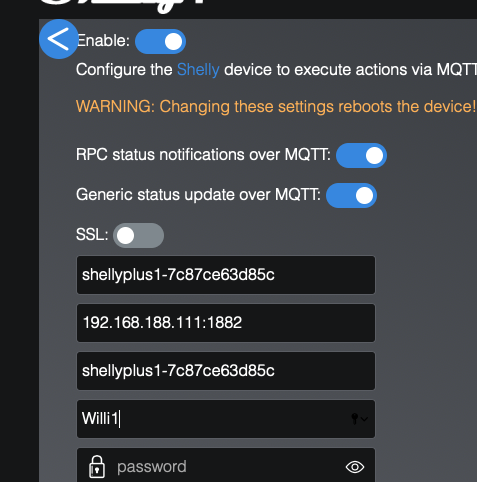
                              hier rein kommt die Adresse vom ioBroker plus der port :1882

                              DS720|Nuc8i3BEH|Proxmox|RaspberryMatic|ioBroker|influxDB2|Grafana

                              W 1 Reply Last reply
                              0
                              • W WilliKlein

                                @crunchip said in Shelly Geräte einbinden:

                                das ist keine statische, das bedeutet nur das innerhalb des dhcp die selbe zugewiesen wird.
                                @williklein sagte in Shelly Geräte einbinden:

                                IPv4-Adresse 192.168.188.166

                                das ist der shelly? und im shelly hast du die selbse eingetragen, da muss die deines iobroker rein

                                Wo genau muss im shelly muss der iobroker rein ??

                                das was ich da gepostet habe mit der festen IP war aus der Fritz Box.

                                Muss da der iobroker rein, oder in der MQTT Einstellung

                                da_WoodyD Online
                                da_WoodyD Online
                                da_Woody
                                wrote on last edited by
                                #93

                                @williklein 95242f1c-c36b-4a1a-9cc2-299d83edc500-grafik.png
                                die ioB adresse.

                                gruß vom Woody
                                HAPPINESS is not a DESTINATION, it's a WAY of LIFE!

                                1 Reply Last reply
                                0
                                • da_WoodyD da_Woody

                                  @williklein noch deutlicher gehts nicht. auf antworten klicken, dann </> oben anklicken, text einfügen.
                                  a6e7c2a6-1f38-4054-9702-e9c57c1a5b97-grafik.png

                                  W Offline
                                  W Offline
                                  WilliKlein
                                  wrote on last edited by
                                  #94

                                  @da_woody

                                  ich bin da nicht so firm.

                                  code_text
                                  
                                  da_WoodyD S 2 Replies Last reply
                                  0
                                  • W WilliKlein

                                    @da_woody

                                    ich bin da nicht so firm.

                                    code_text
                                    
                                    da_WoodyD Online
                                    da_WoodyD Online
                                    da_Woody
                                    wrote on last edited by
                                    #95

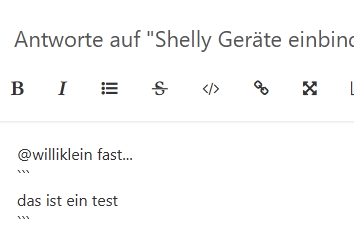
                                    @williklein fast...

                                    das ist ein test
                                    

                                    06dce616-7ede-450b-be53-738446d336fb-grafik.png

                                    gruß vom Woody
                                    HAPPINESS is not a DESTINATION, it's a WAY of LIFE!

                                    1 Reply Last reply
                                    0
                                    • W WilliKlein

                                      @da_woody

                                      ich bin da nicht so firm.

                                      code_text
                                      
                                      S Offline
                                      S Offline
                                      SpacerX
                                      wrote on last edited by
                                      #96

                                      @williklein Egal jetzt!

                                      Die ip vom ioBroker muss in den Mqtt Einstellungen eingetragen werden.

                                      Die Einstellungen in der Fritz Box sagen nur das dieses Gerät immer peer DHCP die gleiche IP bekommt.

                                      DS720|Nuc8i3BEH|Proxmox|RaspberryMatic|ioBroker|influxDB2|Grafana

                                      da_WoodyD 1 Reply Last reply
                                      0
                                      • S SpacerX

                                        @crunchip sagte in Shelly Geräte einbinden:

                                        @williklein sagte in Shelly Geräte einbinden:

                                        feste IP in der Fritz Box angeklickt

                                        das ist keine statische, das bedeutet nur das innerhalb des dhcp die selbe zugewiesen wird.

                                        @williklein sagte in Shelly Geräte einbinden:

                                        IPv4-Adresse 192.168.188.166

                                        das ist der shelly? und im shelly hast du die selbse eingetragen, da muss die deines iobroker rein
                                        02668519-992f-4fa7-b079-52027abd4ffa-image.png

                                        hier rein kommt die Adresse vom ioBroker plus der port :1882

                                        W Offline
                                        W Offline
                                        WilliKlein
                                        wrote on last edited by
                                        #97

                                        @spacerx

                                        den habe ich drin

                                        Bildschirmfoto 2022-10-23 um 20.05.12.png

                                        S da_WoodyD W 3 Replies Last reply
                                        0
                                        • S SpacerX

                                          @williklein Egal jetzt!

                                          Die ip vom ioBroker muss in den Mqtt Einstellungen eingetragen werden.

                                          Die Einstellungen in der Fritz Box sagen nur das dieses Gerät immer peer DHCP die gleiche IP bekommt.

                                          da_WoodyD Online
                                          da_WoodyD Online
                                          da_Woody
                                          wrote on last edited by
                                          #98

                                          @spacerx sagte in Shelly Geräte einbinden:

                                          Die Einstellungen in der Fritz Box sagen nur das dieses Gerät immer peer DHCP die gleiche IP bekommt.

                                          ist sogut wie eine reservierte IP. :+1: kenn mich mit dem frittenzeuch nicht aus. bei mir aufm synology router lööpt das etwas anders.


                                          gruß vom Woody
                                          HAPPINESS is not a DESTINATION, it's a WAY of LIFE!

                                          1 Reply Last reply
                                          0
                                          Reply
                                          • Reply as topic
                                          Log in to reply
                                          • Oldest to Newest
                                          • Newest to Oldest
                                          • Most Votes


                                          Support us

                                          ioBroker
                                          Community Adapters
                                          Donate
                                          FAQ Cloud / IOT
                                          HowTo: Node.js-Update
                                          HowTo: Backup/Restore
                                          Downloads
                                          BLOG

                                          501

                                          Online

                                          32.7k

                                          Users

                                          82.4k

                                          Topics

                                          1.3m

                                          Posts
                                          Community
                                          Impressum | Datenschutz-Bestimmungen | Nutzungsbedingungen | Einwilligungseinstellungen
                                          ioBroker Community 2014-2025
                                          logo
                                          • Login

                                          • Don't have an account? Register

                                          • Login or register to search.
                                          • First post
                                            Last post
                                          0
                                          • Home
                                          • Recent
                                          • Tags
                                          • Unread 0
                                          • Categories
                                          • Unreplied
                                          • Popular
                                          • GitHub
                                          • Docu
                                          • Hilfe