




Backup Wiederherstellung nicht möglich
-
@iced112
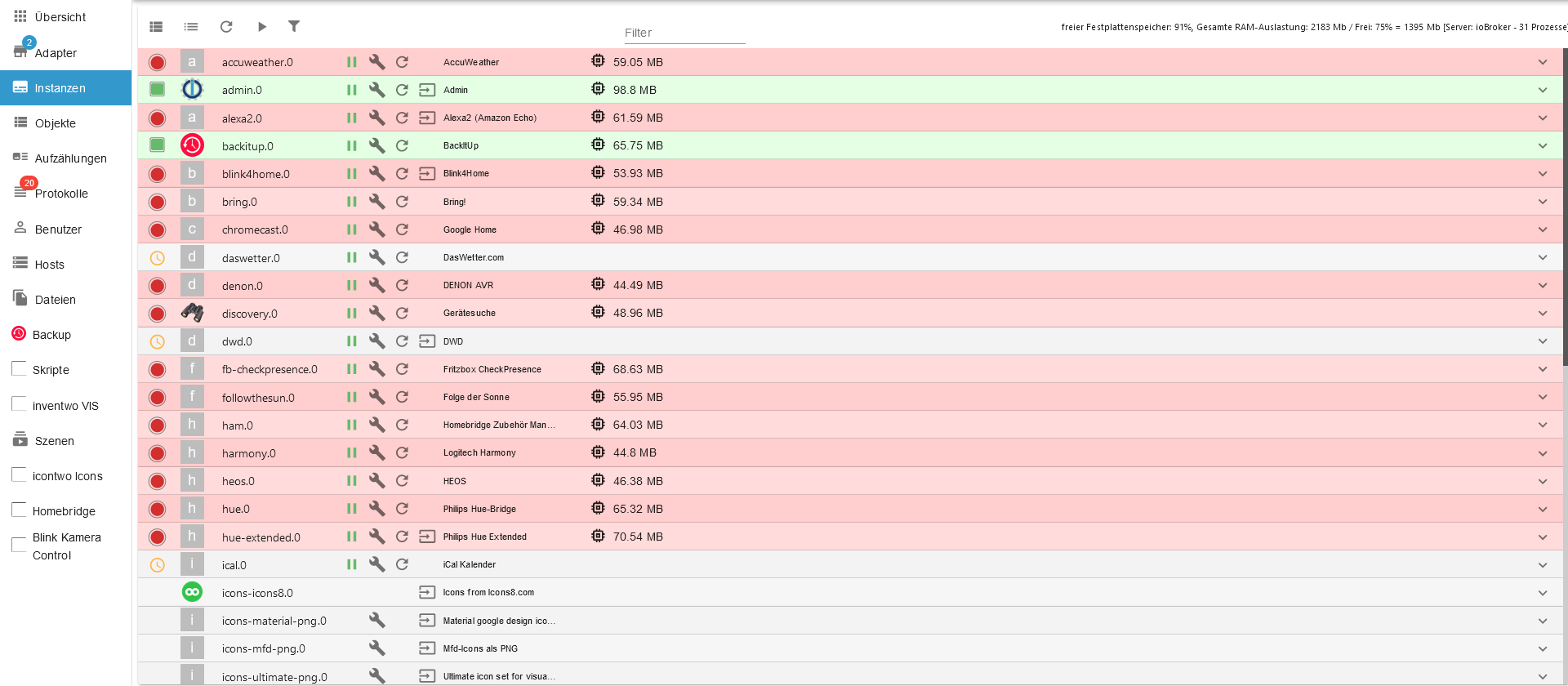
also... das sieht schonmal um einiges besser auf der Adminoberfläche...die Adapter sind noch alle rot und unten, bei den Scripten ist noch nichts...
-
@iced112 sagte in Backup Wiederherstellung nicht möglich:
die Adapter sind noch alle rot und unten, bei den Scripten ist noch nichts...
was war an
@homoran sagte in Backup Wiederherstellung nicht möglich:
und jetzt WARTEN!
kann noch eine Stunde dauern!
nichts am System machennicht verständlich?
-
ok, den admin beobachten und ab und zu F5 drücken bis alle Instanzen ihre icons haben ist in Ordnung.
Auch ein Blick ins log (Protokolle) ist erlaubt. -
ok, den admin beobachten und ab und zu F5 drücken bis alle Instanzen ihre icons haben ist in Ordnung.
Auch ein Blick ins log (Protokolle) ist erlaubt.@homoran ich werds beobachten...
Aber bitte gerne noch zwei Fragen:
-
im BackitUp Adapter kann man ja auch die Skripte seperat speichern lassen (das hatte ich auch getan). sind meine geschriebenen Skripte nicht im iobroker Backup beinhaltet? Wenn ja, warum kann man die da noch seperat sichern? wenn nein, führe ich dann ein restore der skripte analog wie iob Backup durch?
-
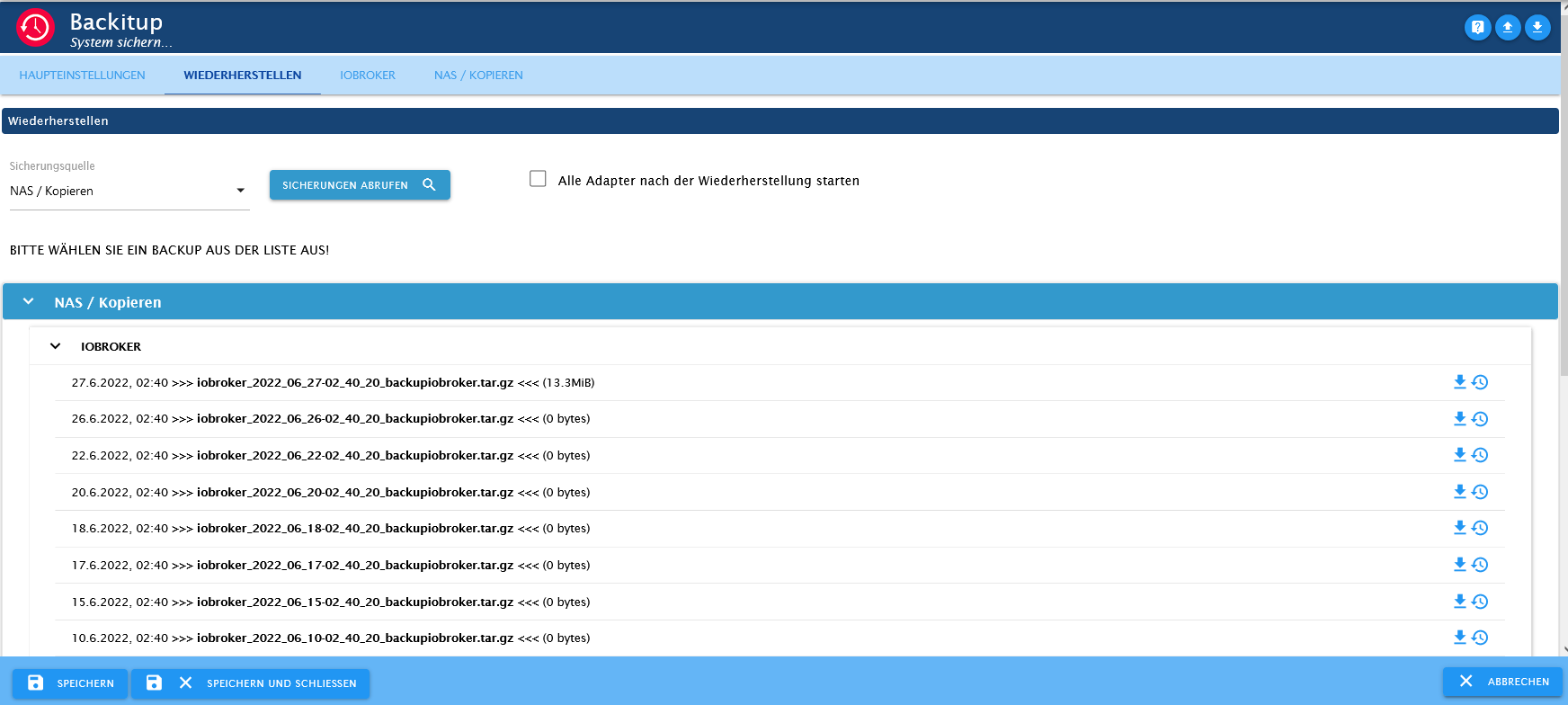
Was habe ich falsch gemacht, oder warum sind meine anderen Backups alle leer und nur ab und zu ist das Backup mit Daten gefüllt? das verstehe ich irgendwie nicht
-
-
@homoran ich werds beobachten...
Aber bitte gerne noch zwei Fragen:
-
im BackitUp Adapter kann man ja auch die Skripte seperat speichern lassen (das hatte ich auch getan). sind meine geschriebenen Skripte nicht im iobroker Backup beinhaltet? Wenn ja, warum kann man die da noch seperat sichern? wenn nein, führe ich dann ein restore der skripte analog wie iob Backup durch?
-
Was habe ich falsch gemacht, oder warum sind meine anderen Backups alle leer und nur ab und zu ist das Backup mit Daten gefüllt? das verstehe ich irgendwie nicht
@iced112 sagte in Backup Wiederherstellung nicht möglich:
sind meine geschriebenen Skripte nicht im iobroker Backup beinhaltet
doch
@iced112 sagte in Backup Wiederherstellung nicht möglich:
warum kann man die da noch seperat sichern
weil das gewünscht wurde. Skripte braucht man och am ehesten einmal, wenn was schiefgelaufen war.
@iced112 sagte in Backup Wiederherstellung nicht möglich:
warum sind meine anderen Backups alle leer und nur ab und zu ist das Backup mit Daten gefüllt?
das kann man jetzt nicht mehr sagen.
das hätte im log des Tages gestanden.Möglicherweise hattest du öfters ein Problem mit dem mount
-
-
@iced112 sagte in Backup Wiederherstellung nicht möglich:
sind meine geschriebenen Skripte nicht im iobroker Backup beinhaltet
doch
@iced112 sagte in Backup Wiederherstellung nicht möglich:
warum kann man die da noch seperat sichern
weil das gewünscht wurde. Skripte braucht man och am ehesten einmal, wenn was schiefgelaufen war.
@iced112 sagte in Backup Wiederherstellung nicht möglich:
warum sind meine anderen Backups alle leer und nur ab und zu ist das Backup mit Daten gefüllt?
das kann man jetzt nicht mehr sagen.
das hätte im log des Tages gestanden.Möglicherweise hattest du öfters ein Problem mit dem mount
@homoran said in Backup Wiederherstellung nicht möglich:
Möglicherweise hattest du öfters ein Problem mit dem mount
Dann kläre mich mal kurz auf... ist damit der USB Stick an der Fritte gemeint oder was meinst du mit "Problem mit dem mount"
-
@homoran said in Backup Wiederherstellung nicht möglich:
Möglicherweise hattest du öfters ein Problem mit dem mount
Dann kläre mich mal kurz auf... ist damit der USB Stick an der Fritte gemeint oder was meinst du mit "Problem mit dem mount"
@iced112 sagte in Backup Wiederherstellung nicht möglich:
@homoran said in Backup Wiederherstellung nicht möglich:
Möglicherweise hattest du öfters ein Problem mit dem mount
Dann kläre mich mal kurz auf... ist damit der USB Stick an der Fritte gemeint oder was meinst du mit "Problem mit dem mount"
backitup speichert immer in /opt/iobroker/backups
wenn duxes richtig konfiguriert hast wird dort aber eine Verbindung zur Fritte verlinkt.
das ist der Mount
der wird vor dem Backup gesetzt, und nach dem Backup gelöscht.Du hattest aber heute die Meldung Ressource busy, als der mount gesetzt wrden sollte. das passiert wenn der vorherige mount nicht gelöscht (unmounted) wurde.
dann besteht keine Verbindung zur Fritte.
Anscheinend wird trotzdem der Dateiname geschrieben.Vielleicht kann dir das @Thomas-Braun besser erklären, der kann richtig linux, ich stammel da nur etwas
-
@homoran said in Backup Wiederherstellung nicht möglich:
Möglicherweise hattest du öfters ein Problem mit dem mount
Dann kläre mich mal kurz auf... ist damit der USB Stick an der Fritte gemeint oder was meinst du mit "Problem mit dem mount"
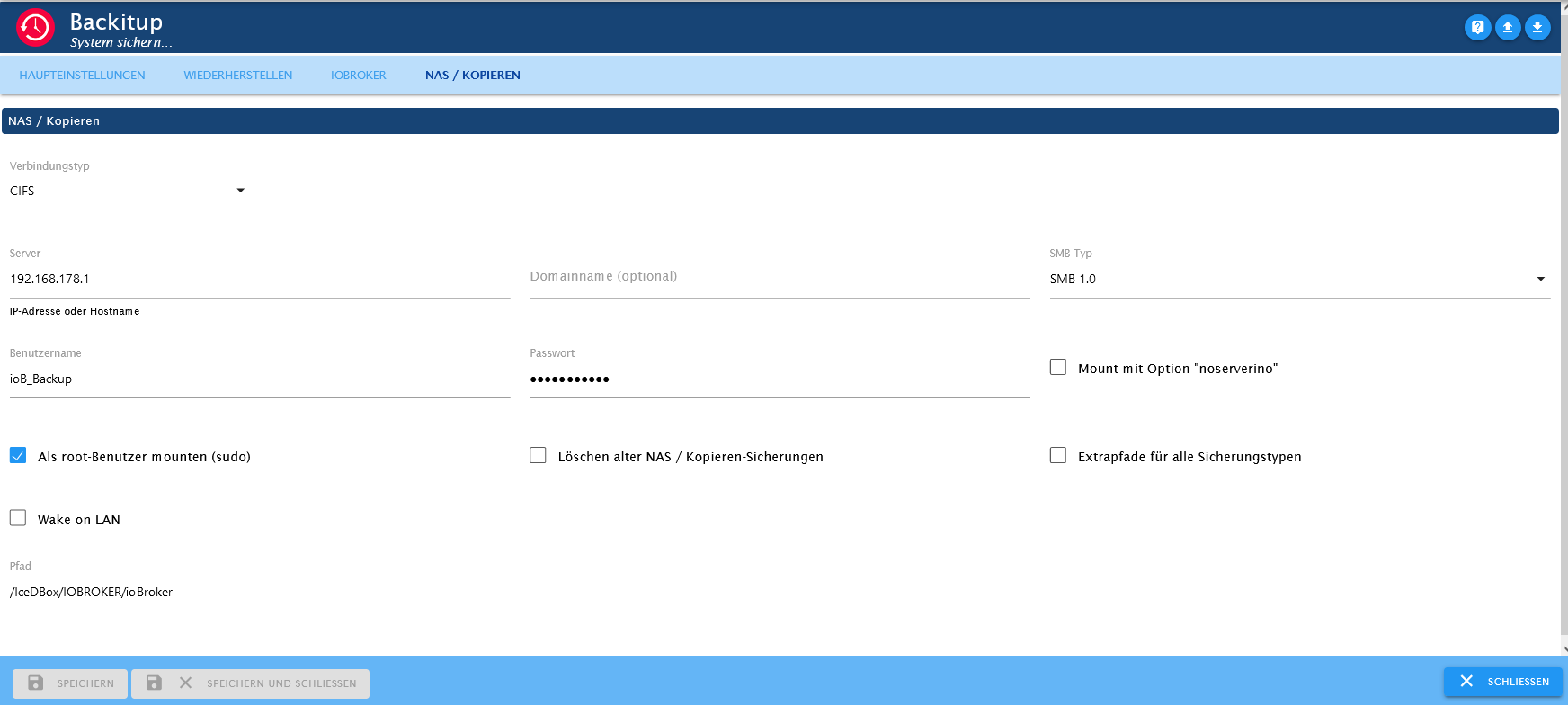
Wie mountest du den Stick? Per CIFS/SMB? Mit welchen Parametern?
-
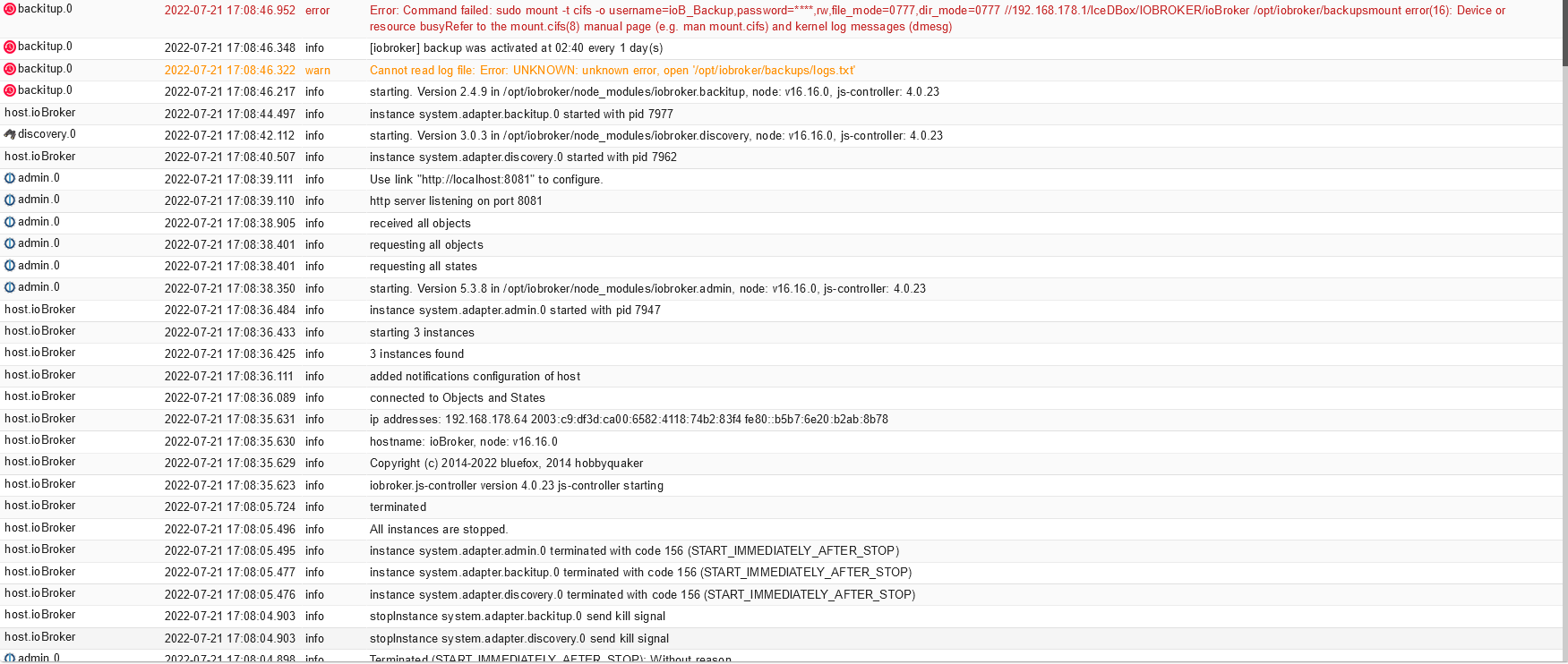
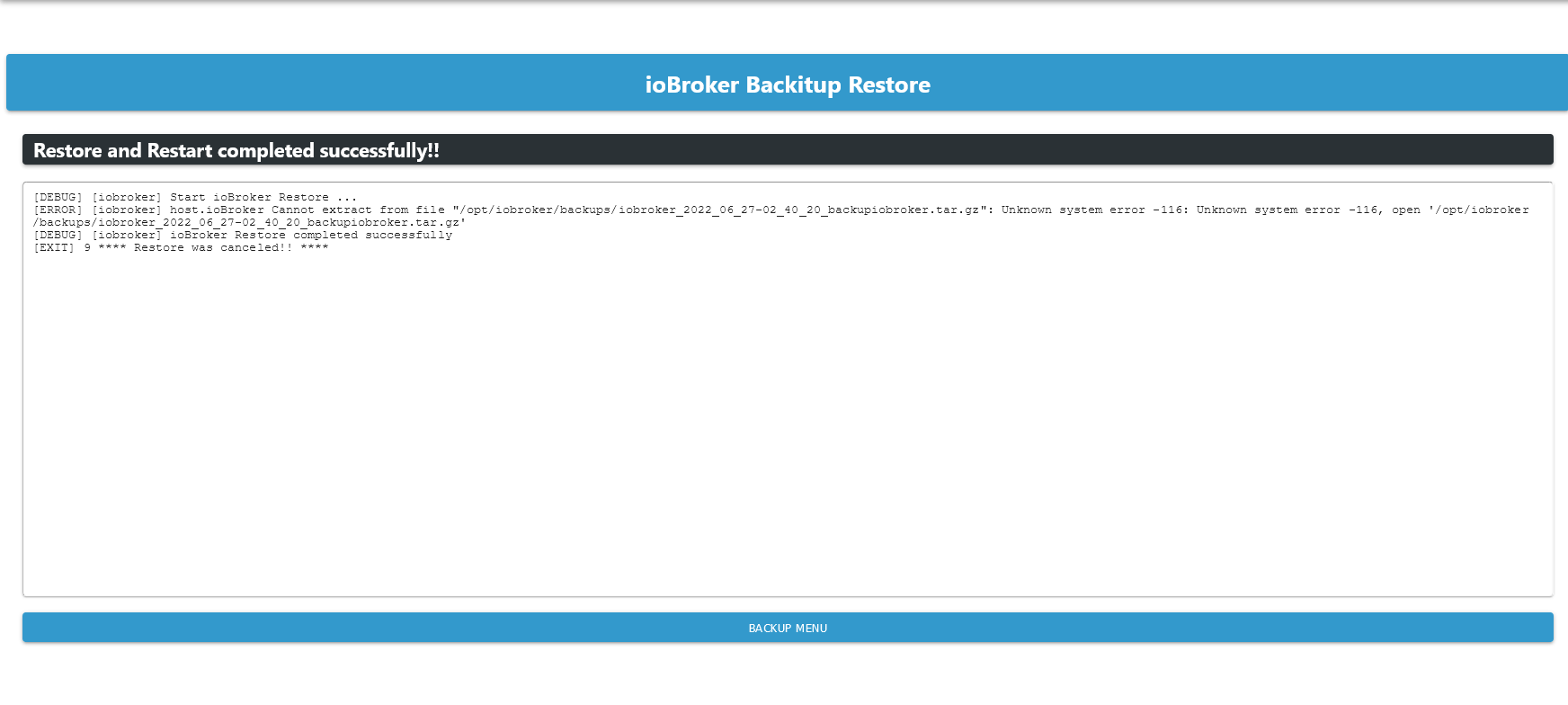
2022-07-21 16:08:50.155 - info: host.ioBroker iobroker.js-controller version 4.0.23 js-controller starting 2022-07-21 16:08:50.161 - info: host.ioBroker Copyright (c) 2014-2022 bluefox, 2014 hobbyquaker 2022-07-21 16:08:50.162 - info: host.ioBroker hostname: ioBroker, node: v16.16.0 2022-07-21 16:08:50.163 - info: host.ioBroker ip addresses: 192.168.178.64 2003:c9:df3d:ca00:6582:4118:74b2:83f4 fe80::b5b7:6e20:b2ab:8b78 2022-07-21 16:08:50.472 - info: host.ioBroker connected to Objects and States 2022-07-21 16:08:50.516 - info: host.ioBroker Node.js version has changed from unknown to 16.16.0 2022-07-21 16:08:50.561 - info: host.ioBroker Successfully updated capabilities "cap_net_admin, cap_net_bind_service, cap_net_raw" for /usr/bin/node 2022-07-21 16:08:50.579 - info: host.ioBroker added notifications configuration of host 2022-07-21 16:08:50.867 - info: host.ioBroker 3 instances found 2022-07-21 16:08:50.877 - info: host.ioBroker starting 3 instances 2022-07-21 16:08:50.936 - info: host.ioBroker instance system.adapter.admin.0 started with pid 7050 2022-07-21 16:08:52.820 - info: admin.0 (7050) starting. Version 5.3.8 in /opt/iobroker/node_modules/iobroker.admin, node: v16.16.0, js-controller: 4.0.23 2022-07-21 16:08:52.867 - info: admin.0 (7050) requesting all states 2022-07-21 16:08:52.868 - info: admin.0 (7050) requesting all objects 2022-07-21 16:08:52.961 - info: admin.0 (7050) received all objects 2022-07-21 16:08:53.061 - info: admin.0 (7050) http server listening on port 8081 2022-07-21 16:08:53.062 - info: admin.0 (7050) Use link "http://localhost:8081" to configure. 2022-07-21 16:08:53.128 - warn: admin.0 (7050) Repository cannot be read: Active repo - stable 2022-07-21 16:08:53.129 - warn: admin.0 (7050) Active repository "stable cannot be read 2022-07-21 16:08:54.934 - info: host.ioBroker instance system.adapter.discovery.0 started with pid 7065 2022-07-21 16:08:56.581 - info: discovery.0 (7065) starting. Version 3.0.3 in /opt/iobroker/node_modules/iobroker.discovery, node: v16.16.0, js-controller: 4.0.23 2022-07-21 16:08:58.929 - info: host.ioBroker instance system.adapter.backitup.0 started with pid 7080 2022-07-21 16:09:00.650 - info: backitup.0 (7080) starting. Version 2.4.9 in /opt/iobroker/node_modules/iobroker.backitup, node: v16.16.0, js-controller: 4.0.23 2022-07-21 16:09:00.714 - info: backitup.0 (7080) [iobroker] backup was activated at 02:40 every 1 day(s) 2022-07-21 16:09:49.819 - info: host.ioBroker Updating repository "stable" under "http://download.iobroker.net/sources-dist.json" 2022-07-21 16:18:29.975 - info: host.ioBroker stopInstance system.adapter.backitup.0 (force=false, process=true) 2022-07-21 16:18:29.995 - info: backitup.0 (7080) Got terminate signal TERMINATE_YOURSELF 2022-07-21 16:18:30.005 - info: host.ioBroker stopInstance system.adapter.backitup.0 send kill signal 2022-07-21 16:18:29.998 - info: backitup.0 (7080) cleaned everything up... 2022-07-21 16:18:30.001 - info: backitup.0 (7080) terminating 2022-07-21 16:18:30.005 - info: backitup.0 (7080) Terminated (ADAPTER_REQUESTED_TERMINATION): Without reason 2022-07-21 16:18:30.554 - info: host.ioBroker instance system.adapter.backitup.0 terminated with code 11 (ADAPTER_REQUESTED_TERMINATION) 2022-07-21 16:18:33.087 - info: host.ioBroker instance system.adapter.backitup.0 started with pid 7187 2022-07-21 16:18:34.750 - info: backitup.0 (7187) starting. Version 2.4.9 in /opt/iobroker/node_modules/iobroker.backitup, node: v16.16.0, js-controller: 4.0.23 2022-07-21 16:18:34.820 - info: backitup.0 (7187) [iobroker] backup was activated at 02:40 every 1 day(s) 2022-07-21 16:21:18.496 - info: host.ioBroker stopInstance system.adapter.backitup.0 (force=false, process=true) 2022-07-21 16:21:18.508 - info: backitup.0 (7187) Got terminate signal TERMINATE_YOURSELF 2022-07-21 16:21:18.512 - info: backitup.0 (7187) cleaned everything up... 2022-07-21 16:21:18.515 - info: backitup.0 (7187) terminating 2022-07-21 16:21:18.518 - info: backitup.0 (7187) Terminated (ADAPTER_REQUESTED_TERMINATION): Without reason 2022-07-21 16:21:18.553 - info: host.ioBroker stopInstance system.adapter.backitup.0 send kill signal 2022-07-21 16:21:19.090 - info: host.ioBroker instance system.adapter.backitup.0 terminated with code 11 (ADAPTER_REQUESTED_TERMINATION) 2022-07-21 16:21:21.598 - info: host.ioBroker instance system.adapter.backitup.0 started with pid 7231 2022-07-21 16:21:23.337 - info: backitup.0 (7231) starting. Version 2.4.9 in /opt/iobroker/node_modules/iobroker.backitup, node: v16.16.0, js-controller: 4.0.23 2022-07-21 16:21:23.437 - info: backitup.0 (7231) [iobroker] backup was activated at 02:40 every 1 day(s) 2022-07-21 16:21:24.008 - error: backitup.0 (7231) Error: Command failed: sudo mount :/sharename/backupDir /opt/iobroker/backups mount.nfs: Failed to resolve server : Name or service not known 2022-07-21 16:39:36.896 - info: host.ioBroker stopInstance system.adapter.backitup.0 (force=false, process=true) 2022-07-21 16:39:36.915 - info: host.ioBroker stopInstance system.adapter.backitup.0 send kill signal 2022-07-21 16:39:36.916 - info: backitup.0 (7231) Got terminate signal TERMINATE_YOURSELF 2022-07-21 16:39:36.921 - info: backitup.0 (7231) cleaned everything up... 2022-07-21 16:39:36.924 - info: backitup.0 (7231) terminating 2022-07-21 16:39:36.928 - info: backitup.0 (7231) Terminated (ADAPTER_REQUESTED_TERMINATION): Without reason 2022-07-21 16:39:37.463 - info: host.ioBroker instance system.adapter.backitup.0 terminated with code 11 (ADAPTER_REQUESTED_TERMINATION) 2022-07-21 16:39:39.971 - info: host.ioBroker instance system.adapter.backitup.0 started with pid 7354 2022-07-21 16:39:41.649 - info: backitup.0 (7354) starting. Version 2.4.9 in /opt/iobroker/node_modules/iobroker.backitup, node: v16.16.0, js-controller: 4.0.23 2022-07-21 16:39:41.720 - info: backitup.0 (7354) [iobroker] backup was activated at 02:40 every 1 day(s) 2022-07-21 16:39:42.375 - error: backitup.0 (7354) Error: Command failed: sudo mount -t cifs -o username=ioB_Backup,password=****,rw,file_mode=0777,dir_mode=0777 //192.168.178.1/IceDBox/IOBROCKER /opt/iobroker/backups mount error(2): No such file or directory Refer to the mount.cifs(8) manual page (e.g. man mount.cifs) and kernel log messages (dmesg) 2022-07-21 16:39:48.275 - error: backitup.0 (7354) Error: Command failed: sudo mount -t cifs -o username=ioB_Backup,password=****,rw,file_mode=0777,dir_mode=0777 //192.168.178.1/IceDBox/IOBROCKER /opt/iobroker/backups mount error(2): No such file or directory Refer to the mount.cifs(8) manual page (e.g. man mount.cifs) and kernel log messages (dmesg) 2022-07-21 16:40:48.795 - info: host.ioBroker stopInstance system.adapter.backitup.0 (force=false, process=true) 2022-07-21 16:40:48.804 - info: host.ioBroker stopInstance system.adapter.backitup.0 send kill signal 2022-07-21 16:40:48.805 - info: backitup.0 (7354) Got terminate signal TERMINATE_YOURSELF 2022-07-21 16:40:48.809 - info: backitup.0 (7354) cleaned everything up... 2022-07-21 16:40:48.811 - info: backitup.0 (7354) terminating 2022-07-21 16:40:48.815 - info: backitup.0 (7354) Terminated (ADAPTER_REQUESTED_TERMINATION): Without reason 2022-07-21 16:40:49.392 - info: host.ioBroker instance system.adapter.backitup.0 terminated with code 11 (ADAPTER_REQUESTED_TERMINATION) 2022-07-21 16:40:51.853 - info: host.ioBroker instance system.adapter.backitup.0 started with pid 7416 2022-07-21 16:40:53.563 - info: backitup.0 (7416) starting. Version 2.4.9 in /opt/iobroker/node_modules/iobroker.backitup, node: v16.16.0, js-controller: 4.0.23 2022-07-21 16:40:53.629 - info: backitup.0 (7416) [iobroker] backup was activated at 02:40 every 1 day(s) 2022-07-21 16:40:54.210 - error: backitup.0 (7416) Error: Command failed: sudo mount -t cifs -o username=ioB_Backup,password=****,rw,file_mode=0777,dir_mode=0777 //192.168.178.1/IceDBox/IOBROCKER/ioBroker /opt/iobroker/backups mount error(2): No such file or directory Refer to the mount.cifs(8) manual page (e.g. man mount.cifs) and kernel log messages (dmesg) 2022-07-21 16:40:59.247 - error: backitup.0 (7416) Error: Command failed: sudo mount -t cifs -o username=ioB_Backup,password=****,rw,file_mode=0777,dir_mode=0777 //192.168.178.1/IceDBox/IOBROCKER/ioBroker /opt/iobroker/backups mount error(2): No such file or directory Refer to the mount.cifs(8) manual page (e.g. man mount.cifs) and kernel log messages (dmesg) 2022-07-21 16:41:36.174 - info: host.ioBroker stopInstance system.adapter.backitup.0 (force=false, process=true) 2022-07-21 16:41:36.181 - info: host.ioBroker stopInstance system.adapter.backitup.0 send kill signal 2022-07-21 16:41:36.181 - info: backitup.0 (7416) Got terminate signal TERMINATE_YOURSELF 2022-07-21 16:41:36.185 - info: backitup.0 (7416) cleaned everything up... 2022-07-21 16:41:36.187 - info: backitup.0 (7416) terminating 2022-07-21 16:41:36.189 - info: backitup.0 (7416) Terminated (ADAPTER_REQUESTED_TERMINATION): Without reason 2022-07-21 16:41:36.767 - info: host.ioBroker instance system.adapter.backitup.0 terminated with code 11 (ADAPTER_REQUESTED_TERMINATION) 2022-07-21 16:41:39.227 - info: host.ioBroker instance system.adapter.backitup.0 started with pid 7456 2022-07-21 16:41:40.919 - info: backitup.0 (7456) starting. Version 2.4.9 in /opt/iobroker/node_modules/iobroker.backitup, node: v16.16.0, js-controller: 4.0.23 2022-07-21 16:41:40.985 - info: backitup.0 (7456) [iobroker] backup was activated at 02:40 every 1 day(s) 2022-07-21 16:41:41.624 - error: backitup.0 (7456) Error: Command failed: sudo mount -t cifs -o username=ioB_Backup,password=****,rw,file_mode=0777,dir_mode=0777 //192.168.178.1/IceDBox/IOBROCKER/ioBroker /opt/iobroker/backups mount error(2): No such file or directory Refer to the mount.cifs(8) manual page (e.g. man mount.cifs) and kernel log messages (dmesg) 2022-07-21 16:42:34.476 - info: host.ioBroker stopInstance system.adapter.backitup.0 (force=false, process=true) 2022-07-21 16:42:34.482 - info: host.ioBroker stopInstance system.adapter.backitup.0 send kill signal 2022-07-21 16:42:34.482 - info: backitup.0 (7456) Got terminate signal TERMINATE_YOURSELF 2022-07-21 16:42:34.486 - info: backitup.0 (7456) cleaned everything up... 2022-07-21 16:42:34.487 - info: backitup.0 (7456) terminating 2022-07-21 16:42:34.490 - info: backitup.0 (7456) Terminated (ADAPTER_REQUESTED_TERMINATION): Without reason 2022-07-21 16:42:35.070 - info: host.ioBroker instance system.adapter.backitup.0 terminated with code 11 (ADAPTER_REQUESTED_TERMINATION) 2022-07-21 16:42:37.537 - info: host.ioBroker instance system.adapter.backitup.0 started with pid 7484 2022-07-21 16:42:39.213 - info: backitup.0 (7484) starting. Version 2.4.9 in /opt/iobroker/node_modules/iobroker.backitup, node: v16.16.0, js-controller: 4.0.23 2022-07-21 16:42:39.279 - info: backitup.0 (7484) [iobroker] backup was activated at 02:40 every 1 day(s) 2022-07-21 16:42:43.889 - error: backitup.0 (7484) Error: Command failed: sudo mount -t cifs -o username=ioB_Backup,password=****,rw,file_mode=0777,dir_mode=0777 //192.168.178.1/IceDBox/IOBROKER/ioBroker /opt/iobroker/backups mount error(16): Device or resource busy Refer to the mount.cifs(8) manual page (e.g. man mount.cifs) and kernel log messages (dmesg) 2022-07-21 16:44:43.858 - error: backitup.0 (7484) umount: /opt/iobroker/backups: not mounted. 2022-07-21 16:54:32.398 - info: host.ioBroker stopInstance system.adapter.backitup.0 (force=false, process=true) 2022-07-21 16:54:32.410 - info: host.ioBroker stopInstance system.adapter.backitup.0 send kill signal 2022-07-21 16:54:32.410 - info: backitup.0 (7484) Got terminate signal TERMINATE_YOURSELF 2022-07-21 16:54:32.414 - info: backitup.0 (7484) cleaned everything up... 2022-07-21 16:54:32.416 - info: backitup.0 (7484) terminating 2022-07-21 16:54:32.421 - info: backitup.0 (7484) Terminated (ADAPTER_REQUESTED_TERMINATION): Without reason 2022-07-21 16:54:32.997 - info: host.ioBroker instance system.adapter.backitup.0 terminated with code 11 (ADAPTER_REQUESTED_TERMINATION) 2022-07-21 16:54:35.467 - info: host.ioBroker instance system.adapter.backitup.0 started with pid 7608 2022-07-21 16:54:37.146 - info: backitup.0 (7608) starting. Version 2.4.9 in /opt/iobroker/node_modules/iobroker.backitup, node: v16.16.0, js-controller: 4.0.23 2022-07-21 16:54:37.237 - info: backitup.0 (7608) [iobroker] backup was activated at 02:40 every 1 day(s) 2022-07-21 16:54:37.887 - error: backitup.0 (7608) Error: Command failed: sudo mount -t cifs -o username=ioB_Backup,password=****,rw,file_mode=0777,dir_mode=0777 //192.168.178.1/IceDBox/IOBROKER/ioBroker /opt/iobroker/backups mount error(16): Device or resource busy Refer to the mount.cifs(8) manual page (e.g. man mount.cifs) and kernel log messages (dmesg) 2022-07-21 16:56:37.953 - error: backitup.0 (7608) umount: /opt/iobroker/backups: not mounted. 2022-07-21 17:06:48.664 - info: backitup.0 (7608) cleaned everything up... 2022-07-21 17:06:48.662 - info: host.ioBroker received SIGTERM 2022-07-21 17:06:48.666 - info: admin.0 (7050) terminating http server on port 8081 2022-07-21 17:06:48.667 - info: host.ioBroker stopInstance system.adapter.admin.0 (force=false, process=true) 2022-07-21 17:06:48.668 - info: host.ioBroker stopInstance system.adapter.discovery.0 (force=false, process=true) 2022-07-21 17:06:48.669 - info: host.ioBroker stopInstance system.adapter.backitup.0 (force=false, process=true) 2022-07-21 17:06:48.683 - info: admin.0 (7050) Got terminate signal TERMINATE_YOURSELF 2022-07-21 17:06:48.685 - info: discovery.0 (7065) Got terminate signal TERMINATE_YOURSELF 2022-07-21 17:06:48.687 - info: backitup.0 (7608) Got terminate signal TERMINATE_YOURSELF 2022-07-21 17:06:48.691 - info: discovery.0 (7065) Terminated (START_IMMEDIATELY_AFTER_STOP): Without reason 2022-07-21 17:06:48.691 - info: backitup.0 (7608) Terminated (START_IMMEDIATELY_AFTER_STOP): Without reason 2022-07-21 17:06:48.692 - info: host.ioBroker stopInstance system.adapter.admin.0 send kill signal 2022-07-21 17:06:48.694 - info: admin.0 (7050) Terminated (START_IMMEDIATELY_AFTER_STOP): Without reason 2022-07-21 17:06:48.696 - info: host.ioBroker stopInstance system.adapter.discovery.0 send kill signal 2022-07-21 17:06:48.696 - info: host.ioBroker stopInstance system.adapter.backitup.0 send kill signal 2022-07-21 17:06:49.267 - info: host.ioBroker instance system.adapter.discovery.0 terminated with code 156 (START_IMMEDIATELY_AFTER_STOP) 2022-07-21 17:06:49.271 - info: host.ioBroker instance system.adapter.admin.0 terminated with code 156 (START_IMMEDIATELY_AFTER_STOP) 2022-07-21 17:06:49.272 - info: host.ioBroker instance system.adapter.backitup.0 terminated with code 156 (START_IMMEDIATELY_AFTER_STOP) 2022-07-21 17:06:49.273 - info: host.ioBroker All instances are stopped. 2022-07-21 17:06:49.326 - info: host.ioBroker terminated 2022-07-21 17:07:18.998 - info: host.ioBroker iobroker.js-controller version 4.0.23 js-controller starting 2022-07-21 17:07:19.004 - info: host.ioBroker Copyright (c) 2014-2022 bluefox, 2014 hobbyquaker 2022-07-21 17:07:19.005 - info: host.ioBroker hostname: ioBroker, node: v16.16.0 2022-07-21 17:07:19.006 - info: host.ioBroker ip addresses: 192.168.178.64 2003:c9:df3d:ca00:6582:4118:74b2:83f4 fe80::b5b7:6e20:b2ab:8b78 2022-07-21 17:07:19.493 - info: host.ioBroker connected to Objects and States 2022-07-21 17:07:19.516 - info: host.ioBroker added notifications configuration of host 2022-07-21 17:07:19.788 - info: host.ioBroker 3 instances found 2022-07-21 17:07:19.796 - info: host.ioBroker starting 3 instances 2022-07-21 17:07:19.838 - info: host.ioBroker instance system.adapter.admin.0 started with pid 7796 2022-07-21 17:07:21.688 - info: admin.0 (7796) starting. Version 5.3.8 in /opt/iobroker/node_modules/iobroker.admin, node: v16.16.0, js-controller: 4.0.23 2022-07-21 17:07:21.739 - info: admin.0 (7796) requesting all states 2022-07-21 17:07:21.739 - info: admin.0 (7796) requesting all objects 2022-07-21 17:07:22.198 - info: admin.0 (7796) received all objects 2022-07-21 17:07:22.402 - info: admin.0 (7796) http server listening on port 8081 2022-07-21 17:07:22.403 - info: admin.0 (7796) Use link "http://localhost:8081" to configure. 2022-07-21 17:07:24.066 - info: host.ioBroker instance system.adapter.discovery.0 started with pid 7812 2022-07-21 17:07:26.124 - info: discovery.0 (7812) starting. Version 3.0.3 in /opt/iobroker/node_modules/iobroker.discovery, node: v16.16.0, js-controller: 4.0.23 2022-07-21 17:07:27.858 - info: host.ioBroker instance system.adapter.backitup.0 started with pid 7839 2022-07-21 17:07:29.593 - info: backitup.0 (7839) starting. Version 2.4.9 in /opt/iobroker/node_modules/iobroker.backitup, node: v16.16.0, js-controller: 4.0.23 2022-07-21 17:07:29.710 - warn: backitup.0 (7839) Cannot read log file: Error: UNKNOWN: unknown error, open '/opt/iobroker/backups/logs.txt' 2022-07-21 17:07:29.734 - info: backitup.0 (7839) [iobroker] backup was activated at 02:40 every 1 day(s) 2022-07-21 17:07:30.380 - error: backitup.0 (7839) Error: Command failed: sudo mount -t cifs -o username=ioB_Backup,password=****,rw,file_mode=0777,dir_mode=0777 //192.168.178.1/IceDBox/IOBROKER/ioBroker /opt/iobroker/backups mount error(16): Device or resource busy Refer to the mount.cifs(8) manual page (e.g. man mount.cifs) and kernel log messages (dmesg) 2022-07-21 17:08:04.860 - info: host.ioBroker received SIGTERM 2022-07-21 17:08:04.866 - info: backitup.0 (7839) cleaned everything up... 2022-07-21 17:08:04.864 - info: admin.0 (7796) terminating http server on port 8081 2022-07-21 17:08:04.866 - info: host.ioBroker stopInstance system.adapter.admin.0 (force=false, process=true) 2022-07-21 17:08:04.867 - info: host.ioBroker stopInstance system.adapter.discovery.0 (force=false, process=true) 2022-07-21 17:08:04.868 - info: host.ioBroker stopInstance system.adapter.backitup.0 (force=false, process=true) 2022-07-21 17:08:04.885 - info: admin.0 (7796) Got terminate signal TERMINATE_YOURSELF 2022-07-21 17:08:04.887 - info: discovery.0 (7812) Got terminate signal TERMINATE_YOURSELF 2022-07-21 17:08:04.887 - info: backitup.0 (7839) Got terminate signal TERMINATE_YOURSELF 2022-07-21 17:08:04.894 - info: backitup.0 (7839) Terminated (START_IMMEDIATELY_AFTER_STOP): Without reason 2022-07-21 17:08:04.894 - info: discovery.0 (7812) Terminated (START_IMMEDIATELY_AFTER_STOP): Without reason 2022-07-21 17:08:04.897 - info: host.ioBroker stopInstance system.adapter.admin.0 send kill signal 2022-07-21 17:08:04.898 - info: admin.0 (7796) Terminated (START_IMMEDIATELY_AFTER_STOP): Without reason 2022-07-21 17:08:04.903 - info: host.ioBroker stopInstance system.adapter.discovery.0 send kill signal 2022-07-21 17:08:04.903 - info: host.ioBroker stopInstance system.adapter.backitup.0 send kill signal 2022-07-21 17:08:05.476 - info: host.ioBroker instance system.adapter.discovery.0 terminated with code 156 (START_IMMEDIATELY_AFTER_STOP) 2022-07-21 17:08:05.477 - info: host.ioBroker instance system.adapter.backitup.0 terminated with code 156 (START_IMMEDIATELY_AFTER_STOP) 2022-07-21 17:08:05.495 - info: host.ioBroker instance system.adapter.admin.0 terminated with code 156 (START_IMMEDIATELY_AFTER_STOP) 2022-07-21 17:08:05.496 - info: host.ioBroker All instances are stopped. 2022-07-21 17:08:05.724 - info: host.ioBroker terminated 2022-07-21 17:08:35.623 - info: host.ioBroker iobroker.js-controller version 4.0.23 js-controller starting 2022-07-21 17:08:35.629 - info: host.ioBroker Copyright (c) 2014-2022 bluefox, 2014 hobbyquaker 2022-07-21 17:08:35.630 - info: host.ioBroker hostname: ioBroker, node: v16.16.0 2022-07-21 17:08:35.631 - info: host.ioBroker ip addresses: 192.168.178.64 2003:c9:df3d:ca00:6582:4118:74b2:83f4 fe80::b5b7:6e20:b2ab:8b78 2022-07-21 17:08:36.089 - info: host.ioBroker connected to Objects and States 2022-07-21 17:08:36.111 - info: host.ioBroker added notifications configuration of host 2022-07-21 17:08:36.425 - info: host.ioBroker 3 instances found 2022-07-21 17:08:36.433 - info: host.ioBroker starting 3 instances 2022-07-21 17:08:36.484 - info: host.ioBroker instance system.adapter.admin.0 started with pid 7947 2022-07-21 17:08:38.350 - info: admin.0 (7947) starting. Version 5.3.8 in /opt/iobroker/node_modules/iobroker.admin, node: v16.16.0, js-controller: 4.0.23 2022-07-21 17:08:38.401 - info: admin.0 (7947) requesting all states 2022-07-21 17:08:38.401 - info: admin.0 (7947) requesting all objects 2022-07-21 17:08:38.905 - info: admin.0 (7947) received all objects 2022-07-21 17:08:39.110 - info: admin.0 (7947) http server listening on port 8081 2022-07-21 17:08:39.111 - info: admin.0 (7947) Use link "http://localhost:8081" to configure. 2022-07-21 17:08:40.507 - info: host.ioBroker instance system.adapter.discovery.0 started with pid 7962 2022-07-21 17:08:42.112 - info: discovery.0 (7962) starting. Version 3.0.3 in /opt/iobroker/node_modules/iobroker.discovery, node: v16.16.0, js-controller: 4.0.23 2022-07-21 17:08:44.497 - info: host.ioBroker instance system.adapter.backitup.0 started with pid 7977 2022-07-21 17:08:46.217 - info: backitup.0 (7977) starting. Version 2.4.9 in /opt/iobroker/node_modules/iobroker.backitup, node: v16.16.0, js-controller: 4.0.23 2022-07-21 17:08:46.322 - warn: backitup.0 (7977) Cannot read log file: Error: UNKNOWN: unknown error, open '/opt/iobroker/backups/logs.txt' 2022-07-21 17:08:46.348 - info: backitup.0 (7977) [iobroker] backup was activated at 02:40 every 1 day(s) 2022-07-21 17:08:46.952 - error: backitup.0 (7977) Error: Command failed: sudo mount -t cifs -o username=ioB_Backup,password=****,rw,file_mode=0777,dir_mode=0777 //192.168.178.1/IceDBox/IOBROKER/ioBroker /opt/iobroker/backups mount error(16): Device or resource busy Refer to the mount.cifs(8) manual page (e.g. man mount.cifs) and kernel log messages (dmesg) 2022-07-21 17:10:47.004 - error: backitup.0 (7977) umount: /opt/iobroker/backups: not mounted. 2022-07-21 17:11:48.247 - info: host.ioBroker stopInstance system.adapter.backitup.0 (force=false, process=true) 2022-07-21 17:11:48.265 - info: backitup.0 (7977) Got terminate signal TERMINATE_YOURSELF 2022-07-21 17:11:48.267 - info: backitup.0 (7977) cleaned everything up... 2022-07-21 17:11:48.267 - info: backitup.0 (7977) terminating 2022-07-21 17:11:48.269 - info: backitup.0 (7977) Terminated (ADAPTER_REQUESTED_TERMINATION): Without reason 2022-07-21 17:11:48.271 - info: host.ioBroker stopInstance system.adapter.backitup.0 send kill signal 2022-07-21 17:11:48.813 - info: host.ioBroker instance system.adapter.backitup.0 terminated with code 11 (ADAPTER_REQUESTED_TERMINATION) 2022-07-21 17:11:51.322 - info: host.ioBroker instance system.adapter.backitup.0 started with pid 8023 2022-07-21 17:11:53.101 - info: backitup.0 (8023) starting. Version 2.4.9 in /opt/iobroker/node_modules/iobroker.backitup, node: v16.16.0, js-controller: 4.0.23 2022-07-21 17:11:53.175 - info: backitup.0 (8023) [iobroker] backup was activated at 02:40 every 1 day(s) 2022-07-21 17:12:03.423 - error: backitup.0 (8023) Error: Command failed: sudo mount -t cifs -o username=ioB_Backup,password=****,rw,file_mode=0777,dir_mode=0777 //192.168.178.1/IceDBox/IOBROKER/ioBroker /opt/iobroker/backups mount error(16): Device or resource busy Refer to the mount.cifs(8) manual page (e.g. man mount.cifs) and kernel log messages (dmesg) 2022-07-21 17:12:17.772 - info: host.ioBroker received SIGTERM 2022-07-21 17:12:17.774 - info: admin.0 (7947) terminating http server on port 8081 2022-07-21 17:12:17.777 - info: backitup.0 (8023) cleaned everything up... 2022-07-21 17:12:17.774 - info: host.ioBroker stopInstance system.adapter.admin.0 (force=false, process=true) 2022-07-21 17:12:17.775 - info: host.ioBroker stopInstance system.adapter.discovery.0 (force=false, process=true) 2022-07-21 17:12:17.776 - info: host.ioBroker stopInstance system.adapter.backitup.0 (force=false, process=true) 2022-07-21 17:12:17.791 - info: admin.0 (7947) Got terminate signal TERMINATE_YOURSELF 2022-07-21 17:12:17.793 - info: discovery.0 (7962) Got terminate signal TERMINATE_YOURSELF 2022-07-21 17:12:17.793 - info: backitup.0 (8023) Got terminate signal TERMINATE_YOURSELF 2022-07-21 17:12:17.797 - info: discovery.0 (7962) Terminated (START_IMMEDIATELY_AFTER_STOP): Without reason 2022-07-21 17:12:17.799 - info: admin.0 (7947) Terminated (START_IMMEDIATELY_AFTER_STOP): Without reason 2022-07-21 17:12:17.800 - info: host.ioBroker stopInstance system.adapter.admin.0 send kill signal 2022-07-21 17:12:17.802 - info: backitup.0 (8023) Terminated (START_IMMEDIATELY_AFTER_STOP): Without reason 2022-07-21 17:12:17.804 - info: host.ioBroker stopInstance system.adapter.discovery.0 send kill signal 2022-07-21 17:12:17.804 - info: host.ioBroker stopInstance system.adapter.backitup.0 send kill signal 2022-07-21 17:12:18.350 - info: host.ioBroker instance system.adapter.discovery.0 terminated with code 156 (START_IMMEDIATELY_AFTER_STOP) 2022-07-21 17:12:18.367 - info: host.ioBroker instance system.adapter.admin.0 terminated with code 156 (START_IMMEDIATELY_AFTER_STOP) 2022-07-21 17:12:18.415 - info: host.ioBroker instance system.adapter.backitup.0 terminated with code 156 (START_IMMEDIATELY_AFTER_STOP) 2022-07-21 17:12:18.417 - info: host.ioBroker All instances are stopped. 2022-07-21 17:12:18.634 - info: host.ioBroker terminated 2022-07-21 17:12:48.139 - info: host.ioBroker iobroker.js-controller version 4.0.23 js-controller starting 2022-07-21 17:12:48.145 - info: host.ioBroker Copyright (c) 2014-2022 bluefox, 2014 hobbyquaker 2022-07-21 17:12:48.146 - info: host.ioBroker hostname: ioBroker, node: v16.16.0 2022-07-21 17:12:48.147 - info: host.ioBroker ip addresses: 192.168.178.64 2003:c9:df3d:ca00:6582:4118:74b2:83f4 fe80::b5b7:6e20:b2ab:8b78 2022-07-21 17:12:48.645 - info: host.ioBroker connected to Objects and States 2022-07-21 17:12:48.668 - info: host.ioBroker added notifications configuration of host 2022-07-21 17:12:48.984 - info: host.ioBroker 3 instances found 2022-07-21 17:12:48.992 - info: host.ioBroker starting 3 instances 2022-07-21 17:12:49.043 - info: host.ioBroker instance system.adapter.admin.0 started with pid 8135 2022-07-21 17:12:50.836 - info: admin.0 (8135) starting. Version 5.3.8 in /opt/iobroker/node_modules/iobroker.admin, node: v16.16.0, js-controller: 4.0.23 2022-07-21 17:12:50.884 - info: admin.0 (8135) requesting all states 2022-07-21 17:12:50.885 - info: admin.0 (8135) requesting all objects 2022-07-21 17:12:51.384 - info: admin.0 (8135) received all objects 2022-07-21 17:12:51.614 - info: admin.0 (8135) http server listening on port 8081 2022-07-21 17:12:51.615 - info: admin.0 (8135) Use link "http://localhost:8081" to configure. 2022-07-21 17:12:53.065 - info: host.ioBroker instance system.adapter.discovery.0 started with pid 8150 2022-07-21 17:12:54.686 - info: discovery.0 (8150) starting. Version 3.0.3 in /opt/iobroker/node_modules/iobroker.discovery, node: v16.16.0, js-controller: 4.0.23 2022-07-21 17:12:57.057 - info: host.ioBroker instance system.adapter.backitup.0 started with pid 8166 2022-07-21 17:12:58.768 - info: backitup.0 (8166) starting. Version 2.4.9 in /opt/iobroker/node_modules/iobroker.backitup, node: v16.16.0, js-controller: 4.0.23 2022-07-21 17:12:58.823 - error: backitup.0 (8166) [ERROR] [iobroker] host.ioBroker Cannot extract from file "/opt/iobroker/backups/iobroker_2022_05_26-02_40_20_backupiobroker.tar.gz": TAR_BAD_ARCHIVE: Unrecognized archive format 2022-07-21 17:12:58.849 - info: backitup.0 (8166) [iobroker] backup was activated at 02:40 every 1 day(s)@iced112 sagte in Backup Wiederherstellung nicht möglich:
Command failed: sudo mount -t cifs -o username=ioB_Backup,password=****,rw,file_mode=0777,dir_mode=0777 //192.168.178.1/IceDBox/IOBROCKER /opt/iobroker/backups
mount error(2): No such file or directory -
Wie mountest du den Stick? Per CIFS/SMB? Mit welchen Parametern?
-
Danke @Homoran das habe ich vom Prinzip verstanden
Welches FritzOS?
Wenn was aktuelles: SMB-Version 3.1.1 und 'noserverino' muss aktiviert sein.Kann man auch in der sehr guten Anleitung zum Backitup-Adapter nachlesen...
-
Welches FritzOS?
Wenn was aktuelles: SMB-Version 3.1.1 und 'noserverino' muss aktiviert sein.Kann man auch in der sehr guten Anleitung zum Backitup-Adapter nachlesen...
-
FritzOS 07.29
Das ist aktuell. Also verwendest du die falschen Einstellungen.
-
ok, den admin beobachten und ab und zu F5 drücken bis alle Instanzen ihre icons haben ist in Ordnung.
Auch ein Blick ins log (Protokolle) ist erlaubt.@homoran
also alle Adapter sind nun grün. Der LOG hat bisher keine Fehler geschrieben.Kann es sein, dass die VIS auch etwas länger brauch, bis da die Aktionen funktionieren? Über den Browser komme ich auf die Projekte, aber er schreibt oben rechts in der Ecke, wenn ich beispielsweise den Runtime laden will "verbindungsfehler"
-
Das ist aktuell. Also verwendest du die falschen Einstellungen.
-
@homoran
also alle Adapter sind nun grün. Der LOG hat bisher keine Fehler geschrieben.Kann es sein, dass die VIS auch etwas länger brauch, bis da die Aktionen funktionieren? Über den Browser komme ich auf die Projekte, aber er schreibt oben rechts in der Ecke, wenn ich beispielsweise den Runtime laden will "verbindungsfehler"
@iced112 sagte in Backup Wiederherstellung nicht möglich:
"verbindungsfehler"
Dazu das
https://forum.iobroker.net/topic/56545/vis-probleme-verbindunsprobleme-gelöst?_=1658423180233
-
@thomas-braun hab ich dann mal auf 3.1.1 geändert
@iced112 sagte in Backup Wiederherstellung nicht möglich:
hab ich dann mal auf 3.1.1 geändert
UND 'noserverino' aktivieren!
-
@iced112 sagte in Backup Wiederherstellung nicht möglich:
hab ich dann mal auf 3.1.1 geändert
UND 'noserverino' aktivieren!
@thomas-braun habsch...:+1:
-
@iced112 sagte in Backup Wiederherstellung nicht möglich:
ist noch nichts...
..... bitte warten
wie schon oben erwähnt
So, die Mühle scheint wieder zu rennen... Hab mal grob alles durchgetestet. Die abendlichen Skripte sind bereits schon angelaufen und die VIS lassen sich auch wieder bedienen.
Ich danke nochmal herzlich für eure Hilfe und eure Geduld...
Die Änderungen bei den Backups werde ich dann die Tage mal beobachten ob der mount nochmal schwierigkeiten macht
-
So, die Mühle scheint wieder zu rennen... Hab mal grob alles durchgetestet. Die abendlichen Skripte sind bereits schon angelaufen und die VIS lassen sich auch wieder bedienen.
Ich danke nochmal herzlich für eure Hilfe und eure Geduld...
Die Änderungen bei den Backups werde ich dann die Tage mal beobachten ob der mount nochmal schwierigkeiten macht
Ist jetzt /opt/iobroker/backups leer? Sonst läufst du da Gefahr das es weiter Trouble mit dem mount gibt. Mountpunkte müssen immer leer sein, sonst überlagern sich da Dateien/Inodes.



585
Online32.7k
Users82.6k
Topics1.3m
Posts