




Fritzbox mit Grafana visualisieren [Version 2022]
-
@damrak2022 les mal nochmal deinen ersten Beitrag, zwecks warnmeldung
@crunchip Ich werde jetzt nochmal die 5 Befehle aus der Anleitung nacheinander eingeben.
Ansonsten mache ich morgen weiter# Erst Fritzconnection sudo apt install python3-pip pip install fritzconnection # Dann Fritz InfluxDB sudo apt install virtualenv python3-lxml git cd /opt sudo git clone https://github.com/yunity/fritzinfluxdb.git cd fritzinfluxdb sudo virtualenv --system-site-packages -p python3 .venv . .venv/bin/activate # ab hier im (.venv)-modus pip3 install -r requirements.txtVielleicht bringt es ja was
Erstmal DANKE an EuchMit besten Grüßen
Andy -
@crunchip Ich werde jetzt nochmal die 5 Befehle aus der Anleitung nacheinander eingeben.
Ansonsten mache ich morgen weiter# Erst Fritzconnection sudo apt install python3-pip pip install fritzconnection # Dann Fritz InfluxDB sudo apt install virtualenv python3-lxml git cd /opt sudo git clone https://github.com/yunity/fritzinfluxdb.git cd fritzinfluxdb sudo virtualenv --system-site-packages -p python3 .venv . .venv/bin/activate # ab hier im (.venv)-modus pip3 install -r requirements.txtVielleicht bringt es ja was
Erstmal DANKE an EuchIch merk gerade, das mit dem export in den $PATH war unnötig. Wird ja über die venv gemacht.
Naja, egal, ist beim nächsten Neustart eh weg. -
Ich merk gerade, das mit dem export in den $PATH war unnötig. Wird ja über die venv gemacht.
Naja, egal, ist beim nächsten Neustart eh weg.@thomas-braun Es hat bei mir wahrscheinlich was mit der Warnmeldung nach dem Befehl der frzconnection installation zu tun:
pi@homebridge:~ $ pip install fritzconnection
Looking in indexes: https://pypi.org/simple, https://www.piwheels.org/simple
Collecting fritzconnection
  Using cached https://www.piwheels.org/simple/fritzconnection/fritzconnection-1.9.1-py3-none-any.whl (50 kB)
Requirement already satisfied: requests>=2.22.0 in /usr/local/lib/python3.9/dist-packages (from fritzconnection) (2.22.0)
Requirement already satisfied: urllib3!=1.25.0,!=1.25.1,<1.26,>=1.21.1 in /usr/local/lib/python3.9/dist-packages (from requests>=2.22.0->fritzconnection) (1.25.11)
Requirement already satisfied: idna<2.9,>=2.5 in /usr/local/lib/python3.9/dist-packages (from requests>=2.22.0->fritzconnection) (2.8)
Requirement already satisfied: chardet<3.1.0,>=3.0.2 in /usr/local/lib/python3.9/dist-packages (from requests>=2.22.0->fritzconnection) (3.0.4)
Requirement already satisfied: certifi>=2017.4.17 in /usr/lib/python3/dist-packages (from requests>=2.22.0->fritzconnection) (2020.6.20)
Installing collected packages: fritzconnection
  WARNING: The scripts fritzcall, fritzconnection, fritzhomeauto, fritzhosts, fritzmonitor, fritzphonebook, fritzstatus and fritzwlan are installed in '/home/pi/.local/bin' which is not on PATH.
  Consider adding this directory to PATH or, if you prefer to suppress this warning, use --no-warn-script-location.
Successfully installed fritzconnection-1.9.1
Anscheinen muss ich hier was korrigieren, obwohl es seit die Installation sei erfolgreich
Mit besten Grüßen
Andy -
@thomas-braun Es hat bei mir wahrscheinlich was mit der Warnmeldung nach dem Befehl der frzconnection installation zu tun:
pi@homebridge:~ $ pip install fritzconnection
Looking in indexes: https://pypi.org/simple, https://www.piwheels.org/simple
Collecting fritzconnection
  Using cached https://www.piwheels.org/simple/fritzconnection/fritzconnection-1.9.1-py3-none-any.whl (50 kB)
Requirement already satisfied: requests>=2.22.0 in /usr/local/lib/python3.9/dist-packages (from fritzconnection) (2.22.0)
Requirement already satisfied: urllib3!=1.25.0,!=1.25.1,<1.26,>=1.21.1 in /usr/local/lib/python3.9/dist-packages (from requests>=2.22.0->fritzconnection) (1.25.11)
Requirement already satisfied: idna<2.9,>=2.5 in /usr/local/lib/python3.9/dist-packages (from requests>=2.22.0->fritzconnection) (2.8)
Requirement already satisfied: chardet<3.1.0,>=3.0.2 in /usr/local/lib/python3.9/dist-packages (from requests>=2.22.0->fritzconnection) (3.0.4)
Requirement already satisfied: certifi>=2017.4.17 in /usr/lib/python3/dist-packages (from requests>=2.22.0->fritzconnection) (2020.6.20)
Installing collected packages: fritzconnection
  WARNING: The scripts fritzcall, fritzconnection, fritzhomeauto, fritzhosts, fritzmonitor, fritzphonebook, fritzstatus and fritzwlan are installed in '/home/pi/.local/bin' which is not on PATH.
  Consider adding this directory to PATH or, if you prefer to suppress this warning, use --no-warn-script-location.
Successfully installed fritzconnection-1.9.1
Anscheinen muss ich hier was korrigieren, obwohl es seit die Installation sei erfolgreich
Nee, das ist okay.
-
Nee, das ist okay.
@thomas-braun Jetzt scheint es zu gehen,, sind aber noch viele errors drin:
(.venv) pi@homebridge:/opt/fritzinfluxdb $ ./fritzinfluxdb.py
2022-04-23 00:14:07,252 - INFO: Done parsing config file
2022-04-23 00:14:07,265 - INFO: Database <db> not found, trying to create it
2022-04-23 00:14:07,276 - INFO: Connection to InfluxDB established and database present
2022-04-23 00:14:08,899 - INFO: Successfully connected to FritzBox
2022-04-23 00:14:08,900 - INFO: Starting main loop
2022-04-23 00:14:09,201 - ERROR: Requested invalid action 'GetInfo' for service: WANDSLInterfaceConfig
2022-04-23 00:14:09,212 - ERROR: Requested invalid action 'GetStatisticsTotal' for service: WANDSLInterfaceConfig
2022-04-23 00:14:09,313 - ERROR: Requested invalid action 'GetInfo' for service: WANPPPConnection:1
2022-04-23 00:14:09,314 - ERROR: Encountered problems while requesting data. Data might be incomplete.
2022-04-23 00:14:18,832 - ERROR: Requested invalid action 'GetInfo' for service: WANDSLInterfaceConfig
2022-04-23 00:14:18,844 - ERROR: Requested invalid action 'GetStatisticsTotal' for service: WANDSLInterfaceConfig
2022-04-23 00:14:18,943 - ERROR: Requested invalid action 'GetInfo' for service: WANPPPConnection:1
2022-04-23 00:14:18,943 - ERROR: Encountered problems while requesting data. Data might be incomplete.
2022-04-23 00:14:28,634 - ERROR: Requested invalid action 'GetInfo' for service: WANDSLInterfaceConfig
2022-04-23 00:14:28,679 - ERROR: Requested invalid action 'GetStatisticsTotal' for service: WANDSLInterfaceConfig
2022-04-23 00:14:28,777 - ERROR: Requested invalid action 'GetInfo' for service: WANPPPConnection:1
2022-04-23 00:14:28,777 - ERROR: Encountered problems while requesting data. Data might be incomplete.
Ich habe in der .ini noch keinen Datenbanknamen vergeben.
Mit besten Grüßen
Andy -
@thomas-braun Jetzt scheint es zu gehen,, sind aber noch viele errors drin:
(.venv) pi@homebridge:/opt/fritzinfluxdb $ ./fritzinfluxdb.py
2022-04-23 00:14:07,252 - INFO: Done parsing config file
2022-04-23 00:14:07,265 - INFO: Database <db> not found, trying to create it
2022-04-23 00:14:07,276 - INFO: Connection to InfluxDB established and database present
2022-04-23 00:14:08,899 - INFO: Successfully connected to FritzBox
2022-04-23 00:14:08,900 - INFO: Starting main loop
2022-04-23 00:14:09,201 - ERROR: Requested invalid action 'GetInfo' for service: WANDSLInterfaceConfig
2022-04-23 00:14:09,212 - ERROR: Requested invalid action 'GetStatisticsTotal' for service: WANDSLInterfaceConfig
2022-04-23 00:14:09,313 - ERROR: Requested invalid action 'GetInfo' for service: WANPPPConnection:1
2022-04-23 00:14:09,314 - ERROR: Encountered problems while requesting data. Data might be incomplete.
2022-04-23 00:14:18,832 - ERROR: Requested invalid action 'GetInfo' for service: WANDSLInterfaceConfig
2022-04-23 00:14:18,844 - ERROR: Requested invalid action 'GetStatisticsTotal' for service: WANDSLInterfaceConfig
2022-04-23 00:14:18,943 - ERROR: Requested invalid action 'GetInfo' for service: WANPPPConnection:1
2022-04-23 00:14:18,943 - ERROR: Encountered problems while requesting data. Data might be incomplete.
2022-04-23 00:14:28,634 - ERROR: Requested invalid action 'GetInfo' for service: WANDSLInterfaceConfig
2022-04-23 00:14:28,679 - ERROR: Requested invalid action 'GetStatisticsTotal' for service: WANDSLInterfaceConfig
2022-04-23 00:14:28,777 - ERROR: Requested invalid action 'GetInfo' for service: WANPPPConnection:1
2022-04-23 00:14:28,777 - ERROR: Encountered problems while requesting data. Data might be incomplete.
Ich habe in der .ini noch keinen Datenbanknamen vergeben.
@damrak2022 sagte in Fritzbox mit Grafana visualisieren [Version 2022]:
Ich denke da muss jetzt der user und dessen Passwort auf der Fritzbox angegeben werden. Sonst kann der Kram nicht von dort ausgelesen werden.
-
@damrak2022 sagte in Fritzbox mit Grafana visualisieren [Version 2022]:
Ich denke da muss jetzt der user und dessen Passwort auf der Fritzbox angegeben werden. Sonst kann der Kram nicht von dort ausgelesen werden.
@thomas-braun Der ist drin. Ich schaue mal was ich noch hinbekomme. Ansonsten frage ich heute nochmal bei Dir ich.
Bis dann und DankeMit besten Grüßen
Andy -
@thomas-braun Der ist drin. Ich schaue mal was ich noch hinbekomme. Ansonsten frage ich heute nochmal bei Dir ich.
Bis dann und DankeIst das ein Kabelanschluss?
WANDSLInterfaceConfig hört sich nach DSL an. Das dürfte auf einer FritzCable-Box nicht vorhanden sein. -
Ist das ein Kabelanschluss?
WANDSLInterfaceConfig hört sich nach DSL an. Das dürfte auf einer FritzCable-Box nicht vorhanden sein.@thomas-braun Jepp, da gibt es auch schon einiges bei Github, weil die Anleitung sich wohl mehr auf eine DSL Box bezieht, aber viele eine 6591 Cable, so wie ich haben.
Ich habe da auch schon gepostet und hoffe, das sich irgendwann auch eine Cable Box vollständig abfragen lässt. Jetzt werde ich mal versuchen das Grafana Dashboard zu realisieren. -
@thomas-braun Jetzt scheint es zu gehen,, sind aber noch viele errors drin:
(.venv) pi@homebridge:/opt/fritzinfluxdb $ ./fritzinfluxdb.py
2022-04-23 00:14:07,252 - INFO: Done parsing config file
2022-04-23 00:14:07,265 - INFO: Database <db> not found, trying to create it
2022-04-23 00:14:07,276 - INFO: Connection to InfluxDB established and database present
2022-04-23 00:14:08,899 - INFO: Successfully connected to FritzBox
2022-04-23 00:14:08,900 - INFO: Starting main loop
2022-04-23 00:14:09,201 - ERROR: Requested invalid action 'GetInfo' for service: WANDSLInterfaceConfig
2022-04-23 00:14:09,212 - ERROR: Requested invalid action 'GetStatisticsTotal' for service: WANDSLInterfaceConfig
2022-04-23 00:14:09,313 - ERROR: Requested invalid action 'GetInfo' for service: WANPPPConnection:1
2022-04-23 00:14:09,314 - ERROR: Encountered problems while requesting data. Data might be incomplete.
2022-04-23 00:14:18,832 - ERROR: Requested invalid action 'GetInfo' for service: WANDSLInterfaceConfig
2022-04-23 00:14:18,844 - ERROR: Requested invalid action 'GetStatisticsTotal' for service: WANDSLInterfaceConfig
2022-04-23 00:14:18,943 - ERROR: Requested invalid action 'GetInfo' for service: WANPPPConnection:1
2022-04-23 00:14:18,943 - ERROR: Encountered problems while requesting data. Data might be incomplete.
2022-04-23 00:14:28,634 - ERROR: Requested invalid action 'GetInfo' for service: WANDSLInterfaceConfig
2022-04-23 00:14:28,679 - ERROR: Requested invalid action 'GetStatisticsTotal' for service: WANDSLInterfaceConfig
2022-04-23 00:14:28,777 - ERROR: Requested invalid action 'GetInfo' for service: WANPPPConnection:1
2022-04-23 00:14:28,777 - ERROR: Encountered problems while requesting data. Data might be incomplete.
Ich habe in der .ini noch keinen Datenbanknamen vergeben.
@damrak2022 said in Fritzbox mit Grafana visualisieren [Version 2022]:
2022-04-23 00:14:07,265 - INFO: Database <db> not found, trying to create it 2022-04-23 00:14:07,276 - INFO: Connection to InfluxDB established and database present
Hi,
doch Du hattest den Standard in der "fritzinfluxdb.ini", daher heißt Deine Datenbank in "influxdb" jetzt "db".VG
Bernd -
@damrak2022 said in Fritzbox mit Grafana visualisieren [Version 2022]:
2022-04-23 00:14:07,265 - INFO: Database <db> not found, trying to create it 2022-04-23 00:14:07,276 - INFO: Connection to InfluxDB established and database present
Hi,
doch Du hattest den Standard in der "fritzinfluxdb.ini", daher heißt Deine Datenbank in "influxdb" jetzt "db".VG
Bernd@dp20eic Ich danke Dir, das klappt jetzt glücklicherweise alles
Mit besten Grüßen
Andy -
@dp20eic Ich danke Dir, das klappt jetzt glücklicherweise alles
Kannst du mir vielleicht helfen ich bekomme es nicht am laufen was hast du bei dir in der .ini alles drin???
Habe ne fritzbox 6490
So läuft aber bekomme keine daten..(.venv) pi@raspberrypi:/opt/fritzinfluxdb $ python3 ./fritzinfluxdb.py 2022-09-02 23:07:51,955 - INFO: Starting fritzinfluxdb v1.0.1 (2022-08-22) 2022-09-02 23:07:51,957 - INFO: Done reading config files 2022-09-02 23:07:52,011 - INFO: Successfully parsed config 2022-09-02 23:07:52,024 - INFO: Connection to InfluxDB 1.8.10 established and database present 2022-09-02 23:07:53,656 - INFO: Successfully established FritzBox TR-069 session 2022-09-02 23:07:54,735 - INFO: Successfully established FritzBox Lua session 2022-09-02 23:07:54,735 - INFO: Successfully connected to FritzBox '192.168.178.1' (fritzbox) Model: FRITZ!Box 6490 Cable - FW: 7.29 2022-09-02 23:07:54,741 - INFO: Starting main loop 2022-09-02 23:07:55,460 - INFO: Requested invalid action 'GetInfo' for service: WANDSLInterfaceConfig 2022-09-02 23:07:55,460 - INFO: Querying action 'GetInfo' will be disabled 2022-09-02 23:07:55,474 - INFO: Requested invalid action 'GetStatisticsTotal' for service: WANDSLInterfaceConfig 2022-09-02 23:07:55,475 - INFO: Querying action 'GetStatisticsTotal' will be disabled 2022-09-02 23:07:55,488 - INFO: Requested invalid action 'X_AVM-DE_GetDSLInfo' for service: WANDSLInterfaceConfig 2022-09-02 23:07:55,488 - INFO: Querying action 'X_AVM-DE_GetDSLInfo' will be disabled 2022-09-02 23:07:55,488 - INFO: All actions for service 'WANDSLInterfaceConfig' are unavailable. Disabling service. 2022-09-02 23:07:55,544 - INFO: Requested invalid action 'GetInfo' for service: WANPPPConnection:1 2022-09-02 23:07:55,544 - INFO: Querying action 'GetInfo' will be disabled 2022-09-02 23:07:55,545 - INFO: All actions for service 'WANPPPConnection:1' are unavailable. Disabling service. 2022-09-02 23:08:19,603 - INFO: Unable to request FritzBox Lua service 'DSL Info' 2022-09-02 23:08:19,603 - INFO: FritzBox Lua service 'DSL Info' will be disabled.Gruß
Rene -
@damrak2022 sagte in Fritzbox mit Grafana visualisieren [Version 2022]:
Wieso nicht installiert?
was kommt wenn du es so probierst?
sudo apt-get remove --auto-remove grafanabzw zeig mal zuvor die Ausgabe von
apt policy grafanaUnhandled python exception in init callback: OSError: fritzcollectd: Failed to connect to fritz.box", was mir sagt das mein FritzOS wohl zu neu ist.
Ich hatte das Problem auch. Allerdings liegt es nicht an einer zu neuen FB sondern daran, dass der Connect etwas laenger dauert und fritzcollectd keinen Connect Retry hat. Den habe ich eingebaut und schon ist die Fehlermeldung weg :-). Der Fix steht ich hier in meinem Fork zur allgemeinen Verfuegung.
Jan 28 23:53:22 raspberrypi-bullseye-docker-64 collectd[547]: fritzcollectd: Connecting to FRITZ Box ... Jan 28 23:53:22 raspberrypi-bullseye-docker-64 collectd[547]: fritzcollectd: Retrying in 3 seconds ... Jan 28 23:53:25 raspberrypi-bullseye-docker-64 collectd[547]: fritzcollectd: Connecting to FRITZ Box ... Jan 28 23:53:25 raspberrypi-bullseye-docker-64 collectd[547]: fritzcollectd: Retrying in 3 seconds ... Jan 28 23:53:28 raspberrypi-bullseye-docker-64 collectd[547]: fritzcollectd: Connecting to FRITZ Box ... Jan 28 23:53:33 raspberrypi-bullseye-docker-64 collectd[547]: Initialization complete, entering read-loop. -
@damrak2022 les mal nochmal deinen ersten Beitrag, zwecks warnmeldung
@crunchip Hallo, ich antworte jetzt einfach mal Dir.
Ich habe noch wenig Erfahrung mit iobroker und grafana,
habe aber nach der obigen Anweisung hier und den weiteren Hilfen in diesem Beitrag, die Installationen denke ich richtig hinbekommen.
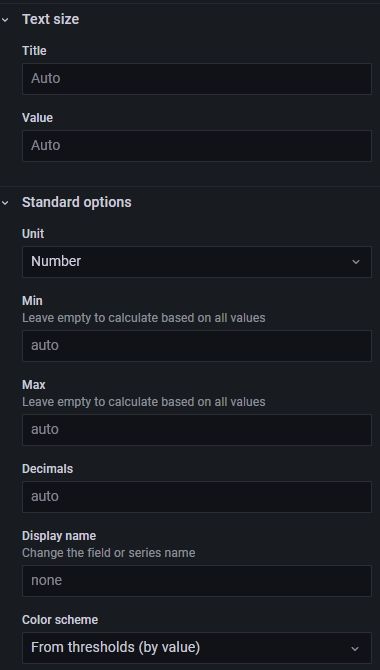
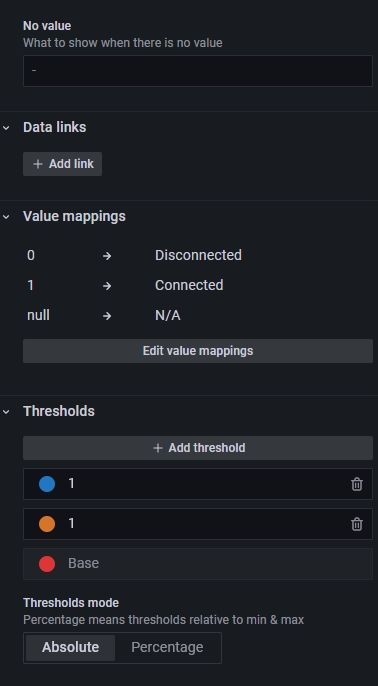
Da das BeispielDashboard in obigen Beitrag nicht mehr aufrufbar ist, habe ich aus einem anderen Beitrag hier (ganz am Ende des Textes) das Dashboard hier importiert.
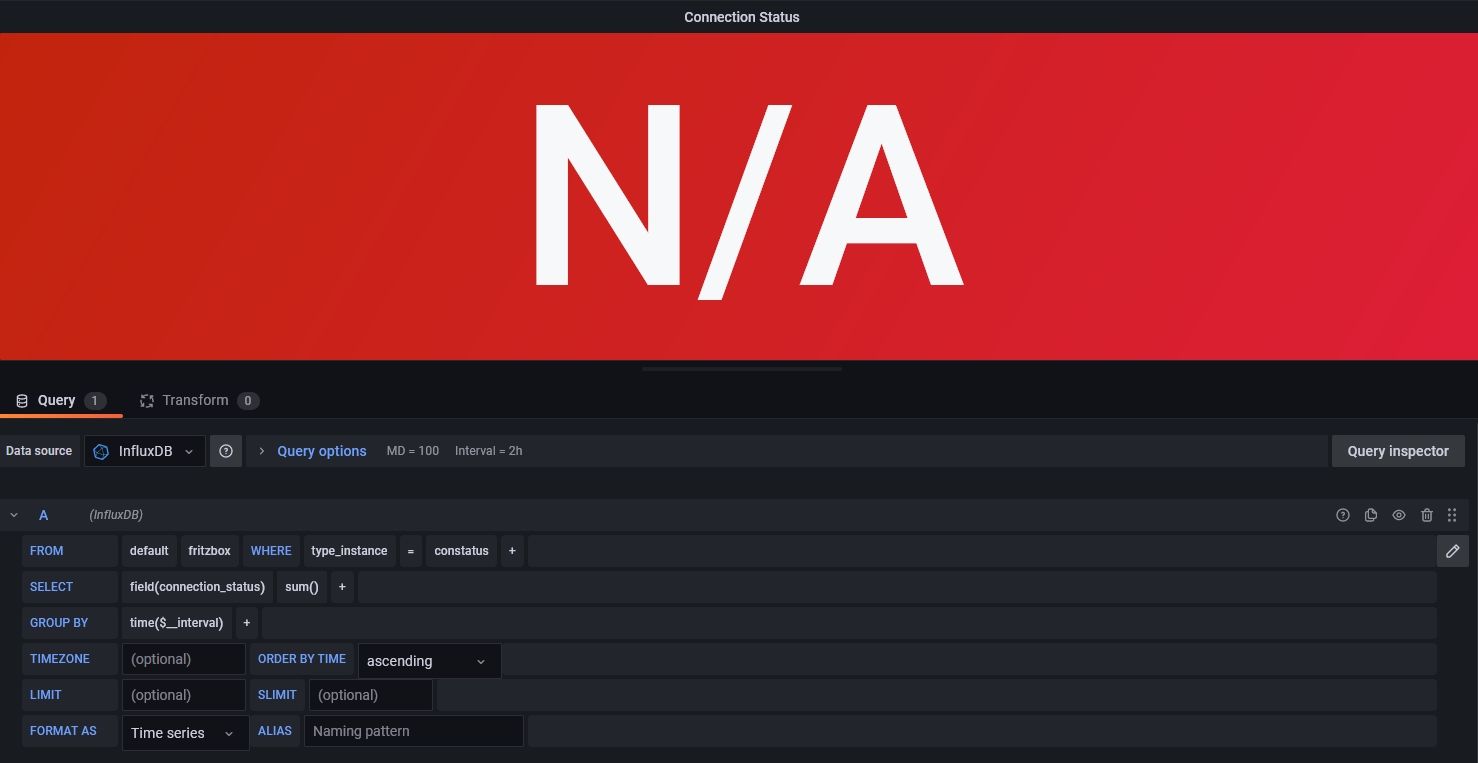
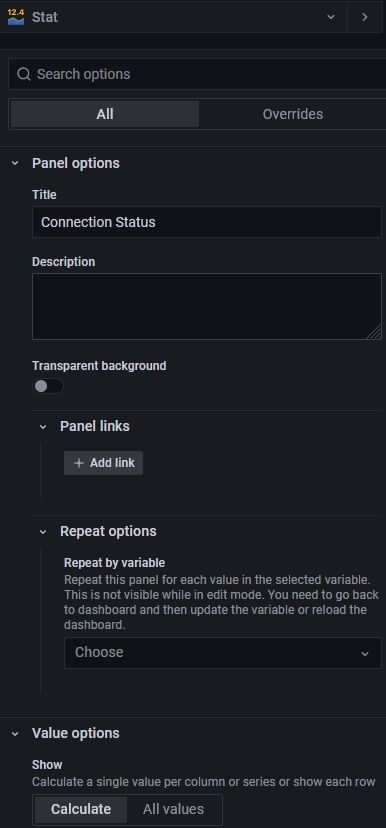
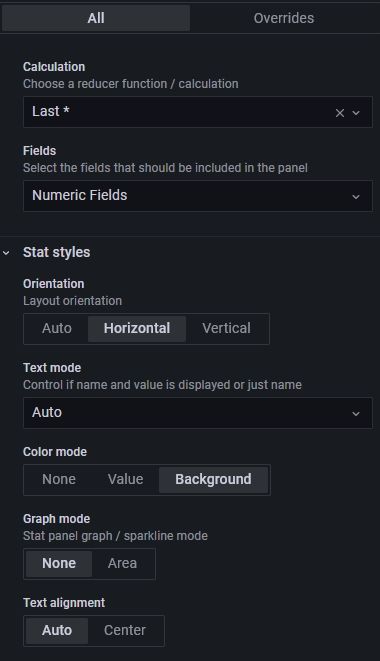
Leider zeigt Grafana keine Werte an, obwohl ich die vorhandene influxdb zugewiesen habe und auch den Wert für die FritzBox entsprechend ausgewählt habe.
Habe ich noch etwas vergessen, übersehen oder falsch gemacht?
Ich bitte um Eure Hilfe, danke.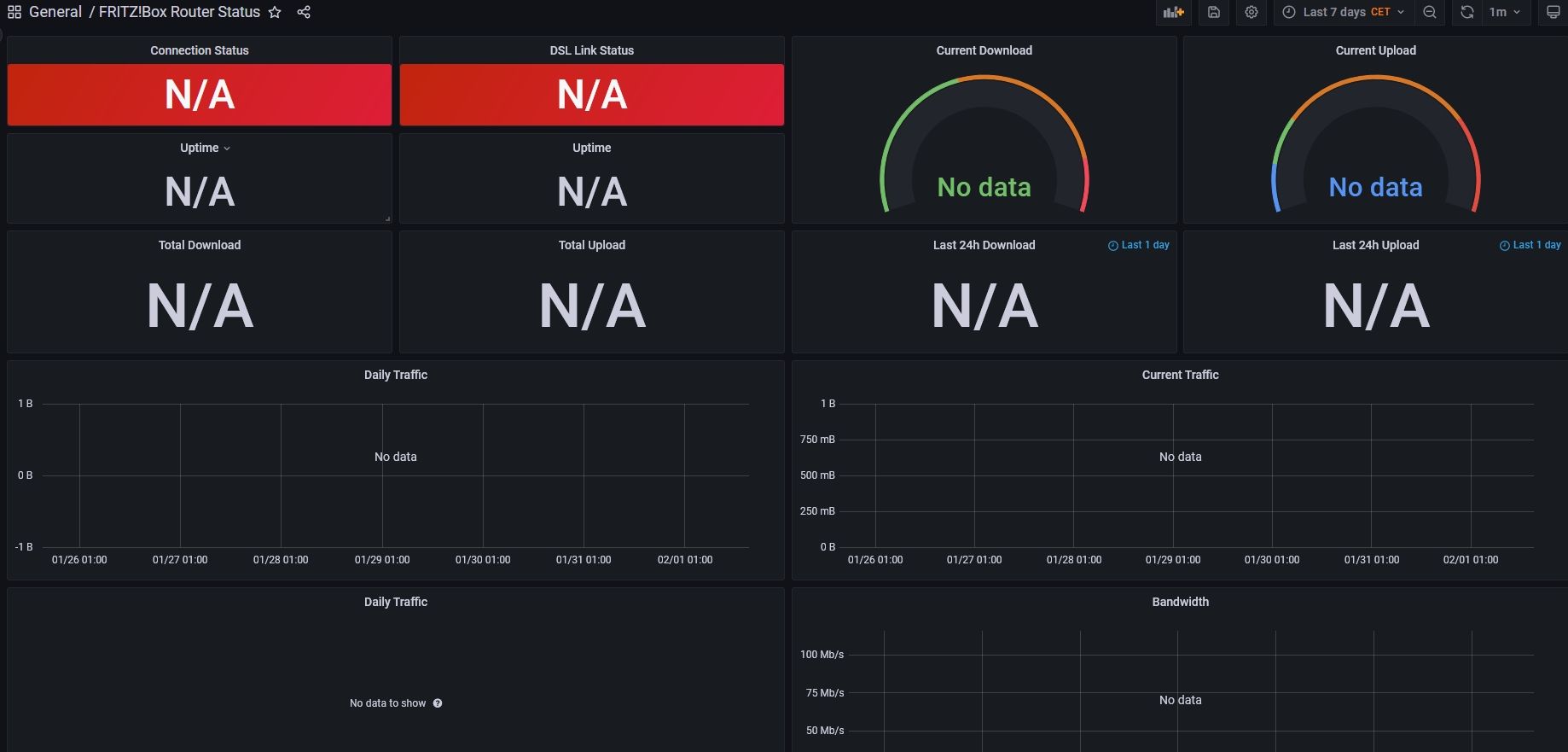
-
@crunchip Hallo, ich antworte jetzt einfach mal Dir.
Ich habe noch wenig Erfahrung mit iobroker und grafana,
habe aber nach der obigen Anweisung hier und den weiteren Hilfen in diesem Beitrag, die Installationen denke ich richtig hinbekommen.
Da das BeispielDashboard in obigen Beitrag nicht mehr aufrufbar ist, habe ich aus einem anderen Beitrag hier (ganz am Ende des Textes) das Dashboard hier importiert.
Leider zeigt Grafana keine Werte an, obwohl ich die vorhandene influxdb zugewiesen habe und auch den Wert für die FritzBox entsprechend ausgewählt habe.
Habe ich noch etwas vergessen, übersehen oder falsch gemacht?
Ich bitte um Eure Hilfe, danke.Moin,
warum bist Du nicht nach dem offiziellen Installations Doku vorgegangen fritzinfluxdb?
Benutzt DuinfluxDB V. 1.8oderinfluxDB V.2.x?
Welche Version setzt Du vonfritzinfluxdbein (Aktuell ist 1.2.1)
IstinfluxDBauch der korrekte Name der Datenbank, Zeig mal die zufitzinfluxdbpassende Konfiguration/opt/fritzinfluxdb/fritzinfluxdb.ini
!!!Achtung!!! da können User und Passwort im Klartext stehenInstallations Beispiel für Ubuntu, sieh obigen link
sudo apt-get install python3-virtualenv
cd /opt
git clone https://github.com/bb-Ricardo/fritzinfluxdb.git
cd fritzinfluxdb
virtualenv -p python3 .venv
. .venv/bin/activate
pip3 install -r requirements.txt
modify your configuration and test it ./fritzinfluxdb.pyWenn Du das ganze über
systemdstartest, was sagt dir# systemctl status fritzinfluxdb.serviceBei mir sieht das so aus:
[dp20eic@loki fritzinfluxdb]$ systemctl status fritzinfluxdb.service
* fritzinfluxdb.service - Fritz to InfluxDB daemon
     Loaded: loaded (/usr/lib/systemd/system/fritzinfluxdb.service; enabled; preset: disabled)
     Active: active (running) since Wed 2023-02-01 17:11:39 CET; 3min 5s ago
   Main PID: 187969 (python)
      Tasks: 1 (limit: 38366)
     Memory: 34.4M
     CGroup: /system.slice/fritzinfluxdb.service
             `-187969 /opt/fritzinfluxdb/.venv/bin/python /opt/fritzinfluxdb/fritzinfluxdb.py -d

Feb 01 17:11:40 loki fritzinfluxdb[187969]: INFO: Connection to InfluxDB 2.5.1 established and bucket is present
Feb 01 17:11:45 loki fritzinfluxdb[187969]: INFO: Unknown FritzBox link type 'Ethernet'. Please report this link type as issue to the gi>
Feb 01 17:11:45 loki fritzinfluxdb[187969]: INFO: Successfully established FritzBox TR-069 session
Feb 01 17:11:46 loki fritzinfluxdb[187969]: INFO: Successfully established FritzBox Lua session
Feb 01 17:11:46 loki fritzinfluxdb[187969]: INFO: Successfully connected to FritzBox '192.168.178.1' (fritz.box) Model: FRITZ!Box 7590 (>
Feb 01 17:11:46 loki fritzinfluxdb[187969]: /opt/fritzinfluxdb/fritzinfluxdb.py:141: DeprecationWarning: There is no current event loop
Feb 01 17:11:46 loki fritzinfluxdb[187969]:   loop = asyncio.get_event_loop()
Feb 01 17:11:46 loki fritzinfluxdb[187969]: INFO: Starting main loop
Feb 01 17:11:48 loki fritzinfluxdb[187969]: INFO: Service 'DSL Info (Fritz!OS 7.29 - latest)' not applicable for this FritzBox Model Lin>
Feb 01 17:11:48 loki fritzinfluxdb[187969]: INFO: Service 'Cable Info (Fritz!OS 7.29 - latest)' not applicable for this FritzBox Model L>
[dp20eic@loki fritzinfluxdb]$
Die original Dashboards liegen, wenn Du alles richtig gemacht hast unter den jeweiligen Ordnern für
influx1/influx2[dp20eic@loki ~]$ ls -la /opt/fritzinfluxdb/grafana/ total 555 drwxr-xr-x 4 root root 6 Jan 25 14:00 . drwxr-xr-x 7 root root 18 Jan 25 14:03 .. -rw-r--r-- 1 root root 356744 Jan 25 14:00 grafana_dashboard.png -rw-r--r-- 1 root root 164338 Jan 25 14:00 grafana_home-automation_dashboard.png drwxr-xr-x 2 root root 5 Jan 25 14:00 influx1_dashboards drwxr-xr-x 2 root root 6 Jan 25 14:00 influx2_dashboards!!!Achtung!!!
fritzinfluxdb fürinfluxDb V. 1.8wird vom Developer nicht mehr weiter entwickelt.VG
Bernd -
@crunchip Hallo, ich antworte jetzt einfach mal Dir.
Ich habe noch wenig Erfahrung mit iobroker und grafana,
habe aber nach der obigen Anweisung hier und den weiteren Hilfen in diesem Beitrag, die Installationen denke ich richtig hinbekommen.
Da das BeispielDashboard in obigen Beitrag nicht mehr aufrufbar ist, habe ich aus einem anderen Beitrag hier (ganz am Ende des Textes) das Dashboard hier importiert.
Leider zeigt Grafana keine Werte an, obwohl ich die vorhandene influxdb zugewiesen habe und auch den Wert für die FritzBox entsprechend ausgewählt habe.
Habe ich noch etwas vergessen, übersehen oder falsch gemacht?
Ich bitte um Eure Hilfe, danke.@iobrojb sagte in Fritzbox mit Grafana visualisieren [Version 2022]:
Leider zeigt Grafana keine Werte an, obwohl ich die vorhandene influxdb zugewiesen habe
Sind denn auch Daten in der Datenbank?
Ich hatte das wie weiter oben geschrieben, per upnp Adapter laufen, der die Daten holte und die query's im Dashboard entsprechend angepasst.
Nutze das allerdings seit rund 3 Jahren nicht mehr
-
Moin,
warum bist Du nicht nach dem offiziellen Installations Doku vorgegangen fritzinfluxdb?
Benutzt DuinfluxDB V. 1.8oderinfluxDB V.2.x?
Welche Version setzt Du vonfritzinfluxdbein (Aktuell ist 1.2.1)
IstinfluxDBauch der korrekte Name der Datenbank, Zeig mal die zufitzinfluxdbpassende Konfiguration/opt/fritzinfluxdb/fritzinfluxdb.ini
!!!Achtung!!! da können User und Passwort im Klartext stehenInstallations Beispiel für Ubuntu, sieh obigen link
sudo apt-get install python3-virtualenv
cd /opt
git clone https://github.com/bb-Ricardo/fritzinfluxdb.git
cd fritzinfluxdb
virtualenv -p python3 .venv
. .venv/bin/activate
pip3 install -r requirements.txt
modify your configuration and test it ./fritzinfluxdb.pyWenn Du das ganze über
systemdstartest, was sagt dir# systemctl status fritzinfluxdb.serviceBei mir sieht das so aus:
[dp20eic@loki fritzinfluxdb]$ systemctl status fritzinfluxdb.service
* fritzinfluxdb.service - Fritz to InfluxDB daemon
     Loaded: loaded (/usr/lib/systemd/system/fritzinfluxdb.service; enabled; preset: disabled)
     Active: active (running) since Wed 2023-02-01 17:11:39 CET; 3min 5s ago
   Main PID: 187969 (python)
      Tasks: 1 (limit: 38366)
     Memory: 34.4M
     CGroup: /system.slice/fritzinfluxdb.service
             `-187969 /opt/fritzinfluxdb/.venv/bin/python /opt/fritzinfluxdb/fritzinfluxdb.py -d

Feb 01 17:11:40 loki fritzinfluxdb[187969]: INFO: Connection to InfluxDB 2.5.1 established and bucket is present
Feb 01 17:11:45 loki fritzinfluxdb[187969]: INFO: Unknown FritzBox link type 'Ethernet'. Please report this link type as issue to the gi>
Feb 01 17:11:45 loki fritzinfluxdb[187969]: INFO: Successfully established FritzBox TR-069 session
Feb 01 17:11:46 loki fritzinfluxdb[187969]: INFO: Successfully established FritzBox Lua session
Feb 01 17:11:46 loki fritzinfluxdb[187969]: INFO: Successfully connected to FritzBox '192.168.178.1' (fritz.box) Model: FRITZ!Box 7590 (>
Feb 01 17:11:46 loki fritzinfluxdb[187969]: /opt/fritzinfluxdb/fritzinfluxdb.py:141: DeprecationWarning: There is no current event loop
Feb 01 17:11:46 loki fritzinfluxdb[187969]:   loop = asyncio.get_event_loop()
Feb 01 17:11:46 loki fritzinfluxdb[187969]: INFO: Starting main loop
Feb 01 17:11:48 loki fritzinfluxdb[187969]: INFO: Service 'DSL Info (Fritz!OS 7.29 - latest)' not applicable for this FritzBox Model Lin>
Feb 01 17:11:48 loki fritzinfluxdb[187969]: INFO: Service 'Cable Info (Fritz!OS 7.29 - latest)' not applicable for this FritzBox Model L>
[dp20eic@loki fritzinfluxdb]$
Die original Dashboards liegen, wenn Du alles richtig gemacht hast unter den jeweiligen Ordnern für
influx1/influx2[dp20eic@loki ~]$ ls -la /opt/fritzinfluxdb/grafana/ total 555 drwxr-xr-x 4 root root 6 Jan 25 14:00 . drwxr-xr-x 7 root root 18 Jan 25 14:03 .. -rw-r--r-- 1 root root 356744 Jan 25 14:00 grafana_dashboard.png -rw-r--r-- 1 root root 164338 Jan 25 14:00 grafana_home-automation_dashboard.png drwxr-xr-x 2 root root 5 Jan 25 14:00 influx1_dashboards drwxr-xr-x 2 root root 6 Jan 25 14:00 influx2_dashboards!!!Achtung!!!
fritzinfluxdb fürinfluxDb V. 1.8wird vom Developer nicht mehr weiter entwickelt.VG
Bernd@dp20eic
hi, ist ein alter Thread aber ich versuch es trotzdem.Ich habe jetzt schon Proxmox LXC Container mit Debian 11 + 12, Ubuntu 22.04 + 23.04 versucht das Teil ans Laufen zu bringen.
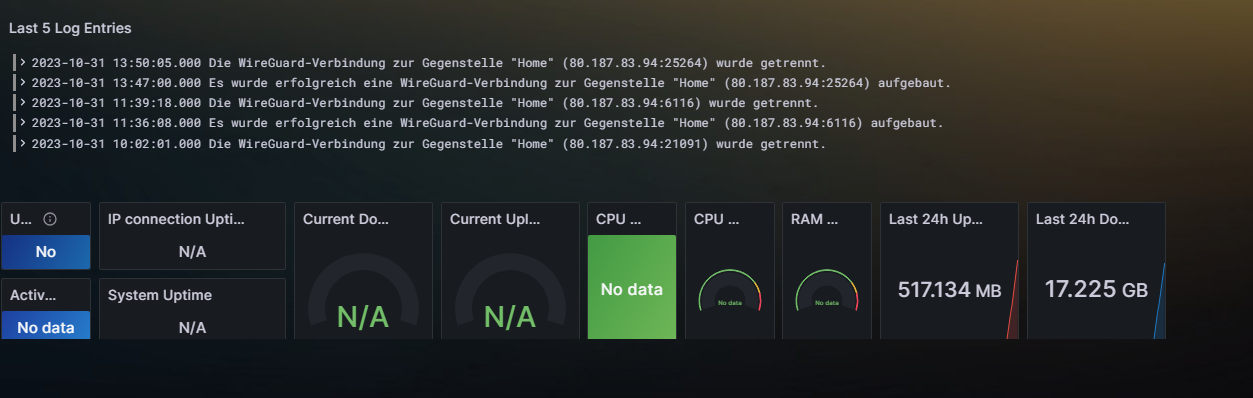
Auch mit nem Docker auf dem Synology NAS hab ich es versucht. Was soll ich sagen? Es klappt einfach nicht. Kann das an meiner Fritte liegen. Das ist die 7590 AX. Wäre super, wenn mir jemand noch n Tipp geben könnte. Hier die Logs dazu.(.venv) stefan@helper:/opt/fritzinfluxdb$ ./fritzinfluxdb.py 2023-10-31 18:15:40,918 - INFO: Starting fritzinfluxdb v1.2.1 (2023-01-26) 2023-10-31 18:15:40,918 - INFO: Done reading config files 2023-10-31 18:15:40,938 - INFO: Successfully parsed config 2023-10-31 18:15:40,940 - INFO: Connection to InfluxDB 2 established 2023-10-31 18:15:46,412 - INFO: Successfully established FritzBox TR-069 session 2023-10-31 18:15:47,135 - INFO: Successfully established FritzBox Lua session 2023-10-31 18:15:47,136 - INFO: Successfully connected to FritzBox '192.168.178.1' (fritz.box) Model: FRITZ!Box 7590 AX (DSL) - FW: 7. 57 2023-10-31 18:15:47,136 - INFO: Starting main loop 2023-10-31 18:15:59,125 - INFO: Service 'Cable Info (Fritz!OS 7.29 - latest)' not applicable for this FritzBox Model Link type 'DSL' 2023-10-31 18:16:00,134 - ERROR: Unable to convert FritzBox Lua value '0-673710080' for 'ha_alert' to '<class 'int'>': invalid literal for int() with base 10: '0-673710080' 2023-10-31 18:16:00,134 - ERROR: Unable to convert FritzBox Lua value '0-1865154560' for 'ha_alert' to '<class 'int'>': invalid litera l for int() with base 10: '0-1865154560' 2023-10-31 18:16:24,525 - ERROR: Failed to write to InfluxDB '192.168.178.139': 422: failure writing points to database: partial write : field type conflict: input field "ha_alert" on measurement "fritzbox" is type string, already exists as type integer dropped=2 2023-10-31 18:16:30,738 - ERROR: Unable to convert FritzBox Lua value '0-673710080' for 'ha_alert' to '<class 'int'>': invalid literal for int() with base 10: '0-673710080' 2023-10-31 18:16:30,738 - ERROR: Unable to convert FritzBox Lua value '0-1865154560' for 'ha_alert' to '<class 'int'>': invalid litera l for int() with base 10: '0-1865154560' 2023-10-31 18:16:30,767 - ERROR: Failed to write to InfluxDB '192.168.178.139': 422: failure writing points to database: partial write : field type conflict: input field "ha_alert" on measurement "fritzbox" is type string, already exists as type integer dropped=2 2023-10-31 18:16:35,802 - ERROR: Failed to write to InfluxDB '192.168.178.139': 422: failure writing points to database: partial write : field type conflict: input field "ha_alert" on measurement "fritzbox" is type string, already exists as type integer dropped=2 2023-10-31 18:16:40,870 - ERROR: Failed to write to InfluxDB '192.168.178.139': 422: failure writing points to database: partial write : field type conflict: input field "ha_alert" on measurement "fritzbox" is type string, already exists as type integer dropped=2 2023-10-31 18:16:45,920 - ERROR: Failed to write to InfluxDB '192.168.178.139': 422: failure writing points to database: partial write : field type conflict: input field "ha_alert" on measurement "fritzbox" is type string, already exists as type integer dropped=2 2023-10-31 18:16:50,991 - ERROR: Failed to write to InfluxDB '192.168.178.139': 422: failure writing points to database: partial write : field type conflict: input field "ha_alert" on measurement "fritzbox" is type string, already exists as type integer dropped=2 2023-10-31 18:16:56,016 - ERROR: Failed to write to InfluxDB '192.168.178.139': 422: failure writing points to database: partial write : field type conflict: input field "ha_alert" on measurement "fritzbox" is type string, already exists as type integer dropped=2 2023-10-31 18:17:02,085 - ERROR: Unable to convert FritzBox Lua value '0-673710080' for 'ha_alert' to '<class 'int'>': invalid literal for int() with base 10: '0-673710080' 2023-10-31 18:17:02,085 - ERROR: Unable to convert FritzBox Lua value '0-1865154560' for 'ha_alert' to '<class 'int'>': invalid litera l for int() with base 10: '0-1865154560' 2023-10-31 18:17:03,083 - ERROR: Failed to write to InfluxDB '192.168.178.139': 422: failure writing points to database: partial write : field type conflict: input field "ha_alert" on measurement "fritzbox" is type string, already exists as type integer dropped=2 2023-10-31 18:17:08,623 - ERROR: Failed to write to InfluxDB '192.168.178.139': 422: failure writing points to database: partial write : field type conflict: input field "ha_alert" on measurement "fritzbox" is type string, already exists as type integer dropped=2 2023-10-31 18:17:14,134 - ERROR: Failed to write to InfluxDB '192.168.178.139': 422: failure writing points to database: partial write : field type conflict: input field "ha_alert" on measurement "fritzbox" is type string, already exists as type integer dropped=2 2023-10-31 18:17:19,203 - ERROR: Failed to write to InfluxDB '192.168.178.139': 422: failure writing points to database: partial write : field type conflict: input field "ha_alert" on measurement "fritzbox" is type string, already exists as type integer dropped=2 2023-10-31 18:17:24,889 - ERROR: Failed to write to InfluxDB '192.168.178.139': 422: failure writing points to database: partial write : field type conflict: input field "ha_alert" on measurement "fritzbox" is type string, already exists as type integer dropped=2 2023-10-31 18:17:30,976 - ERROR: Failed to write to InfluxDB '192.168.178.139': 422: failure writing points to database: partial write : field type conflict: input field "ha_alert" on measurement "fritzbox" is type string, already exists as type integer dropped=2 2023-10-31 18:17:33,338 - ERROR: Unable to convert FritzBox Lua value '0-673710080' for 'ha_alert' to '<class 'int'>': invalid literal for int() with base 10: '0-673710080' 2023-10-31 18:17:33,339 - ERROR: Unable to convert FritzBox Lua value '0-1865154560' for 'ha_alert' to '<class 'int'>': invalid litera l for int() with base 10: '0-1865154560' 2023-10-31 18:17:36,381 - ERROR: Failed to write to InfluxDB '192.168.178.139': 422: failure writing points to database: partial write : field type conflict: input field "ha_alert" on measurement "fritzbox" is type string, already exists as type integer dropped=2 2023-10-31 18:17:41,420 - ERROR: Failed to write to InfluxDB '192.168.178.139': 422: failure writing points to database: partial write : field type conflict: input field "ha_alert" on measurement "fritzbox" is type string, already exists as type integer dropped=2 2023-10-31 18:17:46,463 - ERROR: Failed to write to InfluxDB '192.168.178.139': 422: failure writing points to database: partial write : field type conflict: input field "ha_alert" on measurement "fritzbox" is type string, already exists as type integer dropped=2 2023-10-31 18:17:51,571 - ERROR: Failed to write to InfluxDB '192.168.178.139': 422: failure writing points to database: partial write : field type conflict: input field "ha_alert" on measurement "fritzbox" is type string, already exists as type integer dropped=2 2023-10-31 18:17:56,971 - ERROR: Failed to write to InfluxDB '192.168.178.139': 422: failure writing points to database: partial write : field type conflict: input field "ha_alert" on measurement "fritzbox" is type string, already exists as type integer dropped=2 2023-10-31 18:18:02,262 - ERROR: Failed to write to InfluxDB '192.168.178.139': 422: failure writing points to database: partial write : field type conflict: input field "ha_alert" on measurement "fritzbox" is type string, already exists as type integer dropped=2 2023-10-31 18:18:05,602 - ERROR: Unable to convert FritzBox Lua value '0-673710080' for 'ha_alert' to '<class 'int'>': invalid literal for int() with base 10: '0-673710080' 2023-10-31 18:18:05,602 - ERROR: Unable to convert FritzBox Lua value '0-1865154560' for 'ha_alert' to '<class 'int'>': invalid litera l for int() with base 10: '0-1865154560' 2023-10-31 18:18:07,437 - ERROR: Failed to write to InfluxDB '192.168.178.139': 422: failure writing points to database: partial write : field type conflict: input field "ha_alert" on measurement "fritzbox" is type string, already exists as type integer dropped=2 2023-10-31 18:18:17,150 - ERROR: Failed to write to InfluxDB '192.168.178.139': 422: failure writing points to database: partial write : field type conflict: input field "ha_alert" on measurement "fritzbox" is type string, already exists as type integer dropped=2 2023-10-31 18:18:22,474 - ERROR: Failed to write to InfluxDB '192.168.178.139': 422: failure writing points to database: partial write : field type conflict: input field "ha_alert" on measurement "fritzbox" is type string, already exists as type integer dropped=2 2023-10-31 18:18:29,000 - ERROR: Failed to write to InfluxDB '192.168.178.139': 422: failure writing points to database: partial write : field type conflict: input field "ha_alert" on measurement "fritzbox" is type string, already exists as type integer dropped=2 2023-10-31 18:18:35,006 - ERROR: Failed to write to InfluxDB '192.168.178.139': 422: failure writing points to database: partial write : field type conflict: input field "ha_alert" on measurement "fritzbox" is type string, already exists as type integer dropped=2 2023-10-31 18:18:36,383 - ERROR: Unable to convert FritzBox Lua value '0-673710080' for 'ha_alert' to '<class 'int'>': invalid literal for int() with base 10: '0-673710080' 2023-10-31 18:18:36,383 - ERROR: Unable to convert FritzBox Lua value '0-1865154560' for 'ha_alert' to '<class 'int'>': invalid litera l for int() with base 10: '0-1865154560' 2023-10-31 18:18:40,422 - ERROR: Failed to write to InfluxDB '192.168.178.139': 422: failure writing points to database: partial write : field type conflict: input field "ha_alert" on measurement "fritzbox" is type string, already exists as type integer dropped=2 2023-10-31 18:18:45,471 - ERROR: Failed to write to InfluxDB '192.168.178.139': 422: failure writing points to database: partial write : field type conflict: input field "ha_alert" on measurement "fritzbox" is type string, already exists as type integer dropped=2 2023-10-31 18:18:51,073 - ERROR: Failed to write to InfluxDB '192.168.178.139': 422: failure writing points to database: partial write : field type conflict: input field "ha_alert" on measurement "fritzbox" is type string, already exists as type integer dropped=2 2023-10-31 18:18:56,581 - ERROR: Failed to write to InfluxDB '192.168.178.139': 422: failure writing points to database: partial write : field type conflict: input field "ha_alert" on measurement "fritzbox" is type string, already exists as type integer dropped=2 ^C2023-10-31 18:19:01,953 - INFO: Received exit signal SIGINT... 2023-10-31 18:19:01,954 - INFO: Cancelling 4 outstanding tasks 2023-10-31 18:19:01,955 - INFO: Closed FritzBox TR-069 connection 2023-10-31 18:19:01,955 - INFO: Closed FritzBox Lua connection 2023-10-31 18:19:01,955 - INFO: Closed InfluxDB session 2023-10-31 18:19:01,955 - INFO: Successfully shutdown fritzinfluxdb (.venv) stefan@helper:/opt/fritzinfluxdb$Die Datenbank wird kurz mit Daten gefüttert, die ich auch mit Grafana darstellen sehe, aber nach ca. einer Minute sind die Daten wieder weg, N/A.
-
@dp20eic
hi, ist ein alter Thread aber ich versuch es trotzdem.Ich habe jetzt schon Proxmox LXC Container mit Debian 11 + 12, Ubuntu 22.04 + 23.04 versucht das Teil ans Laufen zu bringen.
Auch mit nem Docker auf dem Synology NAS hab ich es versucht. Was soll ich sagen? Es klappt einfach nicht. Kann das an meiner Fritte liegen. Das ist die 7590 AX. Wäre super, wenn mir jemand noch n Tipp geben könnte. Hier die Logs dazu.(.venv) stefan@helper:/opt/fritzinfluxdb$ ./fritzinfluxdb.py 2023-10-31 18:15:40,918 - INFO: Starting fritzinfluxdb v1.2.1 (2023-01-26) 2023-10-31 18:15:40,918 - INFO: Done reading config files 2023-10-31 18:15:40,938 - INFO: Successfully parsed config 2023-10-31 18:15:40,940 - INFO: Connection to InfluxDB 2 established 2023-10-31 18:15:46,412 - INFO: Successfully established FritzBox TR-069 session 2023-10-31 18:15:47,135 - INFO: Successfully established FritzBox Lua session 2023-10-31 18:15:47,136 - INFO: Successfully connected to FritzBox '192.168.178.1' (fritz.box) Model: FRITZ!Box 7590 AX (DSL) - FW: 7. 57 2023-10-31 18:15:47,136 - INFO: Starting main loop 2023-10-31 18:15:59,125 - INFO: Service 'Cable Info (Fritz!OS 7.29 - latest)' not applicable for this FritzBox Model Link type 'DSL' 2023-10-31 18:16:00,134 - ERROR: Unable to convert FritzBox Lua value '0-673710080' for 'ha_alert' to '<class 'int'>': invalid literal for int() with base 10: '0-673710080' 2023-10-31 18:16:00,134 - ERROR: Unable to convert FritzBox Lua value '0-1865154560' for 'ha_alert' to '<class 'int'>': invalid litera l for int() with base 10: '0-1865154560' 2023-10-31 18:16:24,525 - ERROR: Failed to write to InfluxDB '192.168.178.139': 422: failure writing points to database: partial write : field type conflict: input field "ha_alert" on measurement "fritzbox" is type string, already exists as type integer dropped=2 2023-10-31 18:16:30,738 - ERROR: Unable to convert FritzBox Lua value '0-673710080' for 'ha_alert' to '<class 'int'>': invalid literal for int() with base 10: '0-673710080' 2023-10-31 18:16:30,738 - ERROR: Unable to convert FritzBox Lua value '0-1865154560' for 'ha_alert' to '<class 'int'>': invalid litera l for int() with base 10: '0-1865154560' 2023-10-31 18:16:30,767 - ERROR: Failed to write to InfluxDB '192.168.178.139': 422: failure writing points to database: partial write : field type conflict: input field "ha_alert" on measurement "fritzbox" is type string, already exists as type integer dropped=2 2023-10-31 18:16:35,802 - ERROR: Failed to write to InfluxDB '192.168.178.139': 422: failure writing points to database: partial write : field type conflict: input field "ha_alert" on measurement "fritzbox" is type string, already exists as type integer dropped=2 2023-10-31 18:16:40,870 - ERROR: Failed to write to InfluxDB '192.168.178.139': 422: failure writing points to database: partial write : field type conflict: input field "ha_alert" on measurement "fritzbox" is type string, already exists as type integer dropped=2 2023-10-31 18:16:45,920 - ERROR: Failed to write to InfluxDB '192.168.178.139': 422: failure writing points to database: partial write : field type conflict: input field "ha_alert" on measurement "fritzbox" is type string, already exists as type integer dropped=2 2023-10-31 18:16:50,991 - ERROR: Failed to write to InfluxDB '192.168.178.139': 422: failure writing points to database: partial write : field type conflict: input field "ha_alert" on measurement "fritzbox" is type string, already exists as type integer dropped=2 2023-10-31 18:16:56,016 - ERROR: Failed to write to InfluxDB '192.168.178.139': 422: failure writing points to database: partial write : field type conflict: input field "ha_alert" on measurement "fritzbox" is type string, already exists as type integer dropped=2 2023-10-31 18:17:02,085 - ERROR: Unable to convert FritzBox Lua value '0-673710080' for 'ha_alert' to '<class 'int'>': invalid literal for int() with base 10: '0-673710080' 2023-10-31 18:17:02,085 - ERROR: Unable to convert FritzBox Lua value '0-1865154560' for 'ha_alert' to '<class 'int'>': invalid litera l for int() with base 10: '0-1865154560' 2023-10-31 18:17:03,083 - ERROR: Failed to write to InfluxDB '192.168.178.139': 422: failure writing points to database: partial write : field type conflict: input field "ha_alert" on measurement "fritzbox" is type string, already exists as type integer dropped=2 2023-10-31 18:17:08,623 - ERROR: Failed to write to InfluxDB '192.168.178.139': 422: failure writing points to database: partial write : field type conflict: input field "ha_alert" on measurement "fritzbox" is type string, already exists as type integer dropped=2 2023-10-31 18:17:14,134 - ERROR: Failed to write to InfluxDB '192.168.178.139': 422: failure writing points to database: partial write : field type conflict: input field "ha_alert" on measurement "fritzbox" is type string, already exists as type integer dropped=2 2023-10-31 18:17:19,203 - ERROR: Failed to write to InfluxDB '192.168.178.139': 422: failure writing points to database: partial write : field type conflict: input field "ha_alert" on measurement "fritzbox" is type string, already exists as type integer dropped=2 2023-10-31 18:17:24,889 - ERROR: Failed to write to InfluxDB '192.168.178.139': 422: failure writing points to database: partial write : field type conflict: input field "ha_alert" on measurement "fritzbox" is type string, already exists as type integer dropped=2 2023-10-31 18:17:30,976 - ERROR: Failed to write to InfluxDB '192.168.178.139': 422: failure writing points to database: partial write : field type conflict: input field "ha_alert" on measurement "fritzbox" is type string, already exists as type integer dropped=2 2023-10-31 18:17:33,338 - ERROR: Unable to convert FritzBox Lua value '0-673710080' for 'ha_alert' to '<class 'int'>': invalid literal for int() with base 10: '0-673710080' 2023-10-31 18:17:33,339 - ERROR: Unable to convert FritzBox Lua value '0-1865154560' for 'ha_alert' to '<class 'int'>': invalid litera l for int() with base 10: '0-1865154560' 2023-10-31 18:17:36,381 - ERROR: Failed to write to InfluxDB '192.168.178.139': 422: failure writing points to database: partial write : field type conflict: input field "ha_alert" on measurement "fritzbox" is type string, already exists as type integer dropped=2 2023-10-31 18:17:41,420 - ERROR: Failed to write to InfluxDB '192.168.178.139': 422: failure writing points to database: partial write : field type conflict: input field "ha_alert" on measurement "fritzbox" is type string, already exists as type integer dropped=2 2023-10-31 18:17:46,463 - ERROR: Failed to write to InfluxDB '192.168.178.139': 422: failure writing points to database: partial write : field type conflict: input field "ha_alert" on measurement "fritzbox" is type string, already exists as type integer dropped=2 2023-10-31 18:17:51,571 - ERROR: Failed to write to InfluxDB '192.168.178.139': 422: failure writing points to database: partial write : field type conflict: input field "ha_alert" on measurement "fritzbox" is type string, already exists as type integer dropped=2 2023-10-31 18:17:56,971 - ERROR: Failed to write to InfluxDB '192.168.178.139': 422: failure writing points to database: partial write : field type conflict: input field "ha_alert" on measurement "fritzbox" is type string, already exists as type integer dropped=2 2023-10-31 18:18:02,262 - ERROR: Failed to write to InfluxDB '192.168.178.139': 422: failure writing points to database: partial write : field type conflict: input field "ha_alert" on measurement "fritzbox" is type string, already exists as type integer dropped=2 2023-10-31 18:18:05,602 - ERROR: Unable to convert FritzBox Lua value '0-673710080' for 'ha_alert' to '<class 'int'>': invalid literal for int() with base 10: '0-673710080' 2023-10-31 18:18:05,602 - ERROR: Unable to convert FritzBox Lua value '0-1865154560' for 'ha_alert' to '<class 'int'>': invalid litera l for int() with base 10: '0-1865154560' 2023-10-31 18:18:07,437 - ERROR: Failed to write to InfluxDB '192.168.178.139': 422: failure writing points to database: partial write : field type conflict: input field "ha_alert" on measurement "fritzbox" is type string, already exists as type integer dropped=2 2023-10-31 18:18:17,150 - ERROR: Failed to write to InfluxDB '192.168.178.139': 422: failure writing points to database: partial write : field type conflict: input field "ha_alert" on measurement "fritzbox" is type string, already exists as type integer dropped=2 2023-10-31 18:18:22,474 - ERROR: Failed to write to InfluxDB '192.168.178.139': 422: failure writing points to database: partial write : field type conflict: input field "ha_alert" on measurement "fritzbox" is type string, already exists as type integer dropped=2 2023-10-31 18:18:29,000 - ERROR: Failed to write to InfluxDB '192.168.178.139': 422: failure writing points to database: partial write : field type conflict: input field "ha_alert" on measurement "fritzbox" is type string, already exists as type integer dropped=2 2023-10-31 18:18:35,006 - ERROR: Failed to write to InfluxDB '192.168.178.139': 422: failure writing points to database: partial write : field type conflict: input field "ha_alert" on measurement "fritzbox" is type string, already exists as type integer dropped=2 2023-10-31 18:18:36,383 - ERROR: Unable to convert FritzBox Lua value '0-673710080' for 'ha_alert' to '<class 'int'>': invalid literal for int() with base 10: '0-673710080' 2023-10-31 18:18:36,383 - ERROR: Unable to convert FritzBox Lua value '0-1865154560' for 'ha_alert' to '<class 'int'>': invalid litera l for int() with base 10: '0-1865154560' 2023-10-31 18:18:40,422 - ERROR: Failed to write to InfluxDB '192.168.178.139': 422: failure writing points to database: partial write : field type conflict: input field "ha_alert" on measurement "fritzbox" is type string, already exists as type integer dropped=2 2023-10-31 18:18:45,471 - ERROR: Failed to write to InfluxDB '192.168.178.139': 422: failure writing points to database: partial write : field type conflict: input field "ha_alert" on measurement "fritzbox" is type string, already exists as type integer dropped=2 2023-10-31 18:18:51,073 - ERROR: Failed to write to InfluxDB '192.168.178.139': 422: failure writing points to database: partial write : field type conflict: input field "ha_alert" on measurement "fritzbox" is type string, already exists as type integer dropped=2 2023-10-31 18:18:56,581 - ERROR: Failed to write to InfluxDB '192.168.178.139': 422: failure writing points to database: partial write : field type conflict: input field "ha_alert" on measurement "fritzbox" is type string, already exists as type integer dropped=2 ^C2023-10-31 18:19:01,953 - INFO: Received exit signal SIGINT... 2023-10-31 18:19:01,954 - INFO: Cancelling 4 outstanding tasks 2023-10-31 18:19:01,955 - INFO: Closed FritzBox TR-069 connection 2023-10-31 18:19:01,955 - INFO: Closed FritzBox Lua connection 2023-10-31 18:19:01,955 - INFO: Closed InfluxDB session 2023-10-31 18:19:01,955 - INFO: Successfully shutdown fritzinfluxdb (.venv) stefan@helper:/opt/fritzinfluxdb$Die Datenbank wird kurz mit Daten gefüttert, die ich auch mit Grafana darstellen sehe, aber nach ca. einer Minute sind die Daten wieder weg, N/A.
@maxtor62 sagte in Fritzbox mit Grafana visualisieren [Version 2022]:
Es klappt einfach nicht.
Moin,
wie ist die FritzBox eingerichtet, welchen User nutzt Du zum Login?
Die Einrichtung im LX Container hast Du nach Vorgabe wie auf der Github Seite gemacht, also auchfritzconnectionund alle Python Module installiert?Zeig mal die
fritzinfluxdb.iniaber nimm vorher den User und das Passwort raus, oder x es ausVG
Bernd -
@maxtor62 sagte in Fritzbox mit Grafana visualisieren [Version 2022]:
Es klappt einfach nicht.
Moin,
wie ist die FritzBox eingerichtet, welchen User nutzt Du zum Login?
Die Einrichtung im LX Container hast Du nach Vorgabe wie auf der Github Seite gemacht, also auchfritzconnectionund alle Python Module installiert?Zeig mal die
fritzinfluxdb.iniaber nimm vorher den User und das Passwort raus, oder x es ausVG
Bernd@dp20eic
hi sorry für meine Ungeduld. Hab halt schon so viel probiert.
Auf der Fritte hab ich extra ein User eingerichtet den ich dafür nehme. Hat alle Rechte.
Die Einrichtung habe ich jedes Mal genau so wie Du oder auf Github beschrieben, gemacht.
Fritzconnection und alle Python Module installiert.Hier die fritzinfluxdb.ini
[influxdb]

# requires a hostname or IP which points to your InfluxDB instance
hostname = 192.168.178.139

# define the port your InfluxDB instance is listening on
port = 8086

# weather TLS encryption is enabled or disabled
#tls_enabled = false

# set this to 'true' to enforces TLS certificate validation
#verify_tls = false

# set a measurement name which is used to write the data to InfluxDB
# If this is changed from the default then it also has to be changed
# from the default value during the Grafana dashboard installation
measurement_name = fritzbox

# The amount of days the data should be stored in InfluxDB.
# Older data will be deleted.
# Attention: THIS IS ONLY CONFIGURED ON NEW DB/BUCKET CREATION!
data_retention_days = 365

# define which InfluxDB version you are using
version = 2

##### InfluxDB version 1.x options

# username and password to use to write data to InfluxDB
username =
password =

# defines the InfluxDB database to write the data to
# if the credentials permit to create databases then this
# will be created automatically
database =


##### InfluxDB version 2.x options

# requires an InfluxDB API token with permissions to write to the desired bucket
token = RRoG5NJBBUqnql1OKaHuxo3d2xqz0YpA-2AOO-fviu1Ft5mpafJizebVkpiQdGxwdtQvDv3AUJvXWLMreSQ1NA==

# a valid InfluxDB organisation needs to be defined which is used during login
organisation = home

# defines the InfluxDB bucket to write the data to
# if the credentials permit to create buckets then this
# will be created automatically
bucket = fritzbox


###
### [fritzbox]
###
### Controls the parameters for connecting to your InfluxDB instance.
###

[fritzbox]
# changes the default FritzBox IP
hostname = 192.168.178.1

# username and password to connect to the FritzBox
username = XXXX
password = XXXX

# Define the port the FritzBox is listening on
# change to 49443 if you use ssl
port = 49000

# weather TLS encryption is enabled or disabled (will set port to 49443 if port is undefined)
#tls_enabled = false

# set this to 'true' to enforces TLS certificate validation (only affects Lua sessions)
#verify_tls = false

# defines the InfluxDB measurement tag which is used
# to tag data from this FritzBox
#box_tag = fritz.box

# Define the FritzBox time zone. Used to convert dates/times from FritzBox to correct UTC Timestamp
timezone = Europe/Berlin

# the maximum of time in seconds which a connection to the FritzBox is allowed to take
connect_timeout = 30

# interval to request data from FritzBox in seconds
# the value CAN'T be lower then 10 seconds
request_interval = 30


# EOF
Danke und Grüße
-
@dp20eic
hi sorry für meine Ungeduld. Hab halt schon so viel probiert.
Auf der Fritte hab ich extra ein User eingerichtet den ich dafür nehme. Hat alle Rechte.
Die Einrichtung habe ich jedes Mal genau so wie Du oder auf Github beschrieben, gemacht.
Fritzconnection und alle Python Module installiert.Hier die fritzinfluxdb.ini
[influxdb]

# requires a hostname or IP which points to your InfluxDB instance
hostname = 192.168.178.139

# define the port your InfluxDB instance is listening on
port = 8086

# weather TLS encryption is enabled or disabled
#tls_enabled = false

# set this to 'true' to enforces TLS certificate validation
#verify_tls = false

# set a measurement name which is used to write the data to InfluxDB
# If this is changed from the default then it also has to be changed
# from the default value during the Grafana dashboard installation
measurement_name = fritzbox

# The amount of days the data should be stored in InfluxDB.
# Older data will be deleted.
# Attention: THIS IS ONLY CONFIGURED ON NEW DB/BUCKET CREATION!
data_retention_days = 365

# define which InfluxDB version you are using
version = 2

##### InfluxDB version 1.x options

# username and password to use to write data to InfluxDB
username =
password =

# defines the InfluxDB database to write the data to
# if the credentials permit to create databases then this
# will be created automatically
database =


##### InfluxDB version 2.x options

# requires an InfluxDB API token with permissions to write to the desired bucket
token = RRoG5NJBBUqnql1OKaHuxo3d2xqz0YpA-2AOO-fviu1Ft5mpafJizebVkpiQdGxwdtQvDv3AUJvXWLMreSQ1NA==

# a valid InfluxDB organisation needs to be defined which is used during login
organisation = home

# defines the InfluxDB bucket to write the data to
# if the credentials permit to create buckets then this
# will be created automatically
bucket = fritzbox


###
### [fritzbox]
###
### Controls the parameters for connecting to your InfluxDB instance.
###

[fritzbox]
# changes the default FritzBox IP
hostname = 192.168.178.1

# username and password to connect to the FritzBox
username = XXXX
password = XXXX

# Define the port the FritzBox is listening on
# change to 49443 if you use ssl
port = 49000

# weather TLS encryption is enabled or disabled (will set port to 49443 if port is undefined)
#tls_enabled = false

# set this to 'true' to enforces TLS certificate validation (only affects Lua sessions)
#verify_tls = false

# defines the InfluxDB measurement tag which is used
# to tag data from this FritzBox
#box_tag = fritz.box

# Define the FritzBox time zone. Used to convert dates/times from FritzBox to correct UTC Timestamp
timezone = Europe/Berlin

# the maximum of time in seconds which a connection to the FritzBox is allowed to take
connect_timeout = 30

# interval to request data from FritzBox in seconds
# the value CAN'T be lower then 10 seconds
request_interval = 30


# EOF
Danke und Grüße
@maxtor62 sagte in Fritzbox mit Grafana visualisieren [Version 2022]:
Hier die fritzinfluxdb.ini
Moin,
also da sehe ich erst einmal keine Klinke.
Ich habe mal nach dem im Log aufgeführten Fehlerha_alertim Source auf Github gesucht, das kommt wohl aus dem Bereichhomeauto.py, jetzt kann ich damit aber auch nicht mehr anfangen, ob das jetzt an der FritzBox liegt, oder ob die Version 7.57 da für die AX eine Macke hat oder ob Du da vielleicht Geräte inSamrt Homeeingerichtet hast und deswegen der Fehler kommt.Warte einfach mal ab, was
bb-Ricardozu dem Fehler sagt.VG
Bernd





Hey! Du scheinst an dieser Unterhaltung interessiert zu sein, hast aber noch kein Konto.
Hast du es satt, bei jedem Besuch durch die gleichen Beiträge zu scrollen? Wenn du dich für ein Konto anmeldest, kommst du immer genau dorthin zurück, wo du zuvor warst, und kannst dich über neue Antworten benachrichtigen lassen (entweder per E-Mail oder Push-Benachrichtigung). Du kannst auch Lesezeichen speichern und Beiträge positiv bewerten, um anderen Community-Mitgliedern deine Wertschätzung zu zeigen.
Mit deinem Input könnte dieser Beitrag noch besser werden 💗
Registrieren AnmeldenSupport us
453
Online33.0k
Benutzer83.6k
Themen1.3m
Beiträge