Skip to content
  • Home
  • Recent
  • Tags
  • 0 Unread 0
  • Categories
  • Unreplied
  • Popular
  • GitHub
  • Docu
  • Hilfe
Skins
  • Light
  • Brite
  • Cerulean
  • Cosmo
  • Flatly
  • Journal
  • Litera
  • Lumen
  • Lux
  • Materia
  • Minty
  • Morph
  • Pulse
  • Sandstone
  • Simplex
  • Sketchy
  • Spacelab
  • United
  • Yeti
  • Zephyr
  • Dark
  • Cyborg
  • Darkly
  • Quartz
  • Slate
  • Solar
  • Superhero
  • Vapor

  • Default (No Skin)
  • No Skin
Collapse
ioBroker Logo

Community Forum

donate donate
  1. ioBroker Community Home
  2. Deutsch
  3. ioBroker Allgemein
  4. Server Cannot start inMem-objects on port 9001

NEWS

  • Neuer Blogbeitrag: Monatsrückblick - Dezember 2025 🎄
    BluefoxB
    Bluefox
    4
    1
    25

  • Weihnachtsangebot 2025! 🎄
    BluefoxB
    Bluefox
    24
    1
    1.4k

  • UPDATE 31.10.: Amazon Alexa - ioBroker Skill läuft aus ?
    apollon77A
    apollon77
    48
    3
    9.3k

Server Cannot start inMem-objects on port 9001

Scheduled Pinned Locked Moved ioBroker Allgemein
429 Posts 40 Posters 99.3k Views 39 Watching
  • Oldest to Newest
  • Newest to Oldest
  • Most Votes
Reply
  • Reply as topic
Log in to reply
This topic has been deleted. Only users with topic management privileges can see it.
  • W Worn

    @thomas-braun

    Wie gesagt ist veraltet :). Dennoch läuft alles noch einwandfrei.

    Screenshot - 28.05.2023 , 13_43_50.png

    Thomas BraunT Online
    Thomas BraunT Online
    Thomas Braun
    Most Active
    wrote on last edited by Thomas Braun
    #417

    @worn

    Keine Screenshots von Text.

    Linux-Werkzeugkasten:
    https://forum.iobroker.net/topic/42952/der-kleine-iobroker-linux-werkzeugkasten
    NodeJS Fixer Skript:
    https://forum.iobroker.net/topic/68035/iob-node-fix-skript
    iob_diag: curl -sLf -o diag.sh https://iobroker.net/diag.sh && bash diag.sh

    1 Reply Last reply
    0
    • W Worn

      @thomas-braun

      Wie gesagt ist veraltet :). Dennoch läuft alles noch einwandfrei.

      Screenshot - 28.05.2023 , 13_43_50.png

      crunchipC Away
      crunchipC Away
      crunchip
      Forum Testing Most Active
      wrote on last edited by
      #418

      @worn also mit stretch und nodejs12 haste aber Glück bzw die passenden Adapter am laufen, denn einige bzw viele Adapter unterstützen dies in der aktuellen Version gar nicht mehr

      umgestiegen von Proxmox auf Unraid

      W 1 Reply Last reply
      0
      • crunchipC crunchip

        @worn also mit stretch und nodejs12 haste aber Glück bzw die passenden Adapter am laufen, denn einige bzw viele Adapter unterstützen dies in der aktuellen Version gar nicht mehr

        W Offline
        W Offline
        Worn
        wrote on last edited by
        #419

        @crunchip : Raspi befindet sich eh in Ablöse :).

        @Thomas-Braun : Danke für die Info.

        1 Reply Last reply
        0
        • DJMarc75D DJMarc75

          @bot1000 sagte in Server Cannot start inMem-objects on port 9001:

          Jemand noch ne Idee?

          ja, wie wäre es wenn Du tatsächlich Deine Installation auf den aktuellen Stand bringen würdest ?

          Also Node auf die empfohlene Version bringen.
          https://forum.iobroker.net/topic/64032/update-nodejs-best-practise-supported-16-und-18

          B Offline
          B Offline
          bot1000
          wrote on last edited by
          #420

          @djmarc75 Nach dem Update funktioniert alles wieder!

          B 1 Reply Last reply
          0
          • B bot1000

            @djmarc75 Nach dem Update funktioniert alles wieder!

            B Offline
            B Offline
            bot1000
            wrote on last edited by
            #421

            @bot1000 Was wird eigentlich in iobroker-data/objects.jsonl gespeichert? Wenn die Datei weiter so wächst, habe ich da früher oder später Probleme. Würde das gerne verhinden

            Thomas BraunT apollon77A 2 Replies Last reply
            0
            • B bot1000

              @bot1000 Was wird eigentlich in iobroker-data/objects.jsonl gespeichert? Wenn die Datei weiter so wächst, habe ich da früher oder später Probleme. Würde das gerne verhinden

              Thomas BraunT Online
              Thomas BraunT Online
              Thomas Braun
              Most Active
              wrote on last edited by
              #422

              @bot1000 sagte in Server Cannot start inMem-objects on port 9001:

              Würde das gerne verhinden

              Ein aktueller js-controller, der auf jsonl/jsonl läuft macht das von alleine.
              Alternativ regelmäßig den iob fix laufen lassen, der macht das u. a. auch.

              Linux-Werkzeugkasten:
              https://forum.iobroker.net/topic/42952/der-kleine-iobroker-linux-werkzeugkasten
              NodeJS Fixer Skript:
              https://forum.iobroker.net/topic/68035/iob-node-fix-skript
              iob_diag: curl -sLf -o diag.sh https://iobroker.net/diag.sh && bash diag.sh

              1 Reply Last reply
              2
              • B bot1000

                @bot1000 Was wird eigentlich in iobroker-data/objects.jsonl gespeichert? Wenn die Datei weiter so wächst, habe ich da früher oder später Probleme. Würde das gerne verhinden

                apollon77A Offline
                apollon77A Offline
                apollon77
                wrote on last edited by
                #423

                @bot1000 wie Thomas sagt. Js-Controller 4.0.24 is your friend.

                Beitrag hat geholfen? Votet rechts unten im Beitrag :-) https://paypal.me/Apollon77 / https://github.com/sponsors/Apollon77

                • Debug-Log für Instanz einschalten? Admin -> Instanzen -> Expertenmodus -> Instanz aufklappen - Loglevel ändern
                • Logfiles auf Platte /opt/iobroker/log/… nutzen, Admin schneidet Zeilen ab
                Thomas BraunT 1 Reply Last reply
                0
                • apollon77A apollon77

                  @bot1000 wie Thomas sagt. Js-Controller 4.0.24 is your friend.

                  Thomas BraunT Online
                  Thomas BraunT Online
                  Thomas Braun
                  Most Active
                  wrote on last edited by
                  #424

                  @apollon77 @bot1000

                  Soviel dann zu

                  Wie gesagt ist veraltet :). Dennoch läuft alles noch einwandfrei.

                  Ich sag's ja wieder und wieder: Haltet einfach die Kisten immer auf Stand...

                  Linux-Werkzeugkasten:
                  https://forum.iobroker.net/topic/42952/der-kleine-iobroker-linux-werkzeugkasten
                  NodeJS Fixer Skript:
                  https://forum.iobroker.net/topic/68035/iob-node-fix-skript
                  iob_diag: curl -sLf -o diag.sh https://iobroker.net/diag.sh && bash diag.sh

                  1 Reply Last reply
                  0
                  • Thomas BraunT Thomas Braun

                    @dieter_p sagte in Server Cannot start inMem-objects on port 9001:

                    Sorry da stimmte was nicht:

                    Da stimmt immer noch was nicht...

                    Egal.

                    cd /opt/iobroker
                    sudo -H -u iobroker npm install iobroker.js-controller
                    
                    AphofisA Offline
                    AphofisA Offline
                    Aphofis
                    wrote on last edited by Aphofis
                    #425

                    @thomas-braun
                    Mega!
                    War gerade dabei iobroker up zu daten und hatte fehler beim starten mit dem selben Fehler wie hier beschrieben diese kombi hat geholfen.

                    /usr/bin/nodejs
                    /usr/bin/node
                    /usr/bin/npm
                    v16.20.2
                    v16.20.2
                    8.19.4
                    pi
                    /opt/iobroker


                    nach dem ich

                    cd /opt/iobroker
                    sudo -H -u iobroker npm install iobroker.js-controller
                    

                    ausgeführt hatte und dann iobroker gestartet hatte war der Fehler weg!

                    Der Fehler war nach dem normalen update upgrade self:

                    pi@AquaPi:~ $ iob status
                    /opt/iobroker/node_modules/standard-as-callback/built/index.js:6
                            throw e;
                            ^
                    
                    Error: Connection is closed.
                        at close (/opt/iobroker/node_modules/ioredis/built/redis/event_handler.js:18                                                                                                             4:25)
                        at Socket.<anonymous> (/opt/iobroker/node_modules/ioredis/built/redis/event_                                                                                                             handler.js:151:20)
                        at Object.onceWrapper (node:events:628:26)
                        at Socket.emit (node:events:513:28)
                        at TCP.<anonymous> (node:net:301:12)
                    Emitted 'error' event on ScanStream instance at:
                        at /opt/iobroker/node_modules/ioredis/built/ScanStream.js:38:22
                        at tryCatcher (/opt/iobroker/node_modules/standard-as-callback/built/utils.j                                                                                                             s:12:23)
                        at /opt/iobroker/node_modules/standard-as-callback/built/index.js:33:51
                        at processTicksAndRejections (node:internal/process/task_queues:96:5)


                    also besten Dank!!!

                    A 1 Reply Last reply
                    0
                    • AphofisA Aphofis

                      @thomas-braun
                      Mega!
                      War gerade dabei iobroker up zu daten und hatte fehler beim starten mit dem selben Fehler wie hier beschrieben diese kombi hat geholfen.

                      /usr/bin/nodejs
                      /usr/bin/node
                      /usr/bin/npm
                      v16.20.2
                      v16.20.2
                      8.19.4
                      pi
                      /opt/iobroker


                      nach dem ich

                      cd /opt/iobroker
                      sudo -H -u iobroker npm install iobroker.js-controller
                      

                      ausgeführt hatte und dann iobroker gestartet hatte war der Fehler weg!

                      Der Fehler war nach dem normalen update upgrade self:

                      pi@AquaPi:~ $ iob status
                      /opt/iobroker/node_modules/standard-as-callback/built/index.js:6
                              throw e;
                              ^
                      
                      Error: Connection is closed.
                          at close (/opt/iobroker/node_modules/ioredis/built/redis/event_handler.js:18                                                                                                             4:25)
                          at Socket.<anonymous> (/opt/iobroker/node_modules/ioredis/built/redis/event_                                                                                                             handler.js:151:20)
                          at Object.onceWrapper (node:events:628:26)
                          at Socket.emit (node:events:513:28)
                          at TCP.<anonymous> (node:net:301:12)
                      Emitted 'error' event on ScanStream instance at:
                          at /opt/iobroker/node_modules/ioredis/built/ScanStream.js:38:22
                          at tryCatcher (/opt/iobroker/node_modules/standard-as-callback/built/utils.j                                                                                                             s:12:23)
                          at /opt/iobroker/node_modules/standard-as-callback/built/index.js:33:51
                          at processTicksAndRejections (node:internal/process/task_queues:96:5)


                      also besten Dank!!!

                      A Offline
                      A Offline
                      Alex-Smarthome
                      wrote on last edited by Alex-Smarthome
                      #426

                      Hallo Leute, ich muss euch mal wieder zu Rate ziehen. Sonntag war bei uns Stromausfall, und wie sollte es als IT-Elektroniker auch anders sein, habe ich den NUC auf dem Debian 12 mit IoBroker läuft in die falsche Steckdose stecken gehabt und so hat meine USV nicht gegriffen. Seid dem bekomme ich den Fehler
                      „Server Cannot start inMem-objects on port 9001: Failed to lock DB file "/opt/iobroker/iobroker-data/objects.jsonl"!“
                      Ich habe mich seit dem durch sämtliche Posts hier und auch in anderen Foren gekämpft, immer dasselbe. Der IoB Fix gibt aus das alles wieder ok ist, aber ich komme nicht mehr auf mein Admin.

                      ~$ iob status
                      
                      <--- Last few GCs --->
                      
                      [4348:0x6e90870]    17147 ms: Mark-sweep (reduce) 2047.6 (2069.5) -> 2047.2 (2066.4) MB, 26.2 / 0.0 ms  (+ 2.2 ms in 32 steps since start of marking, biggest step 1.9 ms, walltime since start of marking 32 ms) (average mu = 0.238, current mu = 0.149) allo
                      
                      <--- JS stacktrace --->
                      
                      FATAL ERROR: Reached heap limit Allocation failed - JavaScript heap out of memory
                       1: 0xb95b60 node::Abort() [node]
                       2: 0xa9a7f8  [node]
                       3: 0xd6f2f0 v8::Utils::ReportOOMFailure(v8::internal::Isolate*, char const*, bool) [node]
                       4: 0xd6f697 v8::internal::V8::FatalProcessOutOfMemory(v8::internal::Isolate*, char const*, bool) [node]
                       5: 0xf4cba5  [node]
                       6: 0xf5f08d v8::internal::Heap::CollectGarbage(v8::internal::AllocationSpace, v8::internal::GarbageCollectionReason, v8::GCCallbackFlags) [node]
                       7: 0xf3978e v8::internal::HeapAllocator::AllocateRawWithLightRetrySlowPath(int, v8::internal::AllocationType, v8::internal::AllocationOrigin, v8::internal::AllocationAlignment) [node]
                       8: 0xf3ab57 v8::internal::HeapAllocator::AllocateRawWithRetryOrFailSlowPath(int, v8::internal::AllocationType, v8::internal::AllocationOrigin, v8::internal::AllocationAlignment) [node]
                       9: 0xf1b0a0 v8::internal::Factory::AllocateRaw(int, v8::internal::AllocationType, v8::internal::AllocationAlignment) [node]
                      10: 0xf12b14 v8::internal::FactoryBase<v8::internal::Factory>::AllocateRawWithImmortalMap(int, v8::internal::AllocationType, v8::internal::Map, v8::internal::AllocationAlignment) [node]
                      11: 0xf14ea8 v8::internal::FactoryBase<v8::internal::Factory>::NewRawTwoByteString(int, v8::internal::AllocationType) [node]
                      12: 0xf1e35c v8::internal::Factory::NewStringFromUtf8(v8::base::Vector<char const> const&, v8::internal::AllocationType) [node]
                      13: 0xd7e3a3 v8::String::NewFromUtf8(v8::Isolate*, char const*, v8::NewStringType, int) [node]
                      14: 0xc84d71  [node]
                      15: 0xc84e8d node::StringDecoder::DecodeData(v8::Isolate*, char const*, unsigned long*) [node]
                      16: 0xc8545e  [node]
                      17: 0x169372f  [node]
                      /usr/bin/iob: Zeile 12:  4346 Abgebrochen             sudo -H -u iobroker node /opt/iobroker/node_modules/iobroker.js-controller/iobroker.js "$@"


                      Über Hilfe wäre ich sehr dankbar, da jetzt alles was so schön lief jetzt wieder Manuel gesteuert werden muss.

                      Thomas BraunT 1 Reply Last reply
                      0
                      • A Alex-Smarthome

                        Hallo Leute, ich muss euch mal wieder zu Rate ziehen. Sonntag war bei uns Stromausfall, und wie sollte es als IT-Elektroniker auch anders sein, habe ich den NUC auf dem Debian 12 mit IoBroker läuft in die falsche Steckdose stecken gehabt und so hat meine USV nicht gegriffen. Seid dem bekomme ich den Fehler
                        „Server Cannot start inMem-objects on port 9001: Failed to lock DB file "/opt/iobroker/iobroker-data/objects.jsonl"!“
                        Ich habe mich seit dem durch sämtliche Posts hier und auch in anderen Foren gekämpft, immer dasselbe. Der IoB Fix gibt aus das alles wieder ok ist, aber ich komme nicht mehr auf mein Admin.

                        ~$ iob status
                        
                        <--- Last few GCs --->
                        
                        [4348:0x6e90870]    17147 ms: Mark-sweep (reduce) 2047.6 (2069.5) -> 2047.2 (2066.4) MB, 26.2 / 0.0 ms  (+ 2.2 ms in 32 steps since start of marking, biggest step 1.9 ms, walltime since start of marking 32 ms) (average mu = 0.238, current mu = 0.149) allo
                        
                        <--- JS stacktrace --->
                        
                        FATAL ERROR: Reached heap limit Allocation failed - JavaScript heap out of memory
                         1: 0xb95b60 node::Abort() [node]
                         2: 0xa9a7f8  [node]
                         3: 0xd6f2f0 v8::Utils::ReportOOMFailure(v8::internal::Isolate*, char const*, bool) [node]
                         4: 0xd6f697 v8::internal::V8::FatalProcessOutOfMemory(v8::internal::Isolate*, char const*, bool) [node]
                         5: 0xf4cba5  [node]
                         6: 0xf5f08d v8::internal::Heap::CollectGarbage(v8::internal::AllocationSpace, v8::internal::GarbageCollectionReason, v8::GCCallbackFlags) [node]
                         7: 0xf3978e v8::internal::HeapAllocator::AllocateRawWithLightRetrySlowPath(int, v8::internal::AllocationType, v8::internal::AllocationOrigin, v8::internal::AllocationAlignment) [node]
                         8: 0xf3ab57 v8::internal::HeapAllocator::AllocateRawWithRetryOrFailSlowPath(int, v8::internal::AllocationType, v8::internal::AllocationOrigin, v8::internal::AllocationAlignment) [node]
                         9: 0xf1b0a0 v8::internal::Factory::AllocateRaw(int, v8::internal::AllocationType, v8::internal::AllocationAlignment) [node]
                        10: 0xf12b14 v8::internal::FactoryBase<v8::internal::Factory>::AllocateRawWithImmortalMap(int, v8::internal::AllocationType, v8::internal::Map, v8::internal::AllocationAlignment) [node]
                        11: 0xf14ea8 v8::internal::FactoryBase<v8::internal::Factory>::NewRawTwoByteString(int, v8::internal::AllocationType) [node]
                        12: 0xf1e35c v8::internal::Factory::NewStringFromUtf8(v8::base::Vector<char const> const&, v8::internal::AllocationType) [node]
                        13: 0xd7e3a3 v8::String::NewFromUtf8(v8::Isolate*, char const*, v8::NewStringType, int) [node]
                        14: 0xc84d71  [node]
                        15: 0xc84e8d node::StringDecoder::DecodeData(v8::Isolate*, char const*, unsigned long*) [node]
                        16: 0xc8545e  [node]
                        17: 0x169372f  [node]
                        /usr/bin/iob: Zeile 12:  4346 Abgebrochen             sudo -H -u iobroker node /opt/iobroker/node_modules/iobroker.js-controller/iobroker.js "$@"


                        Über Hilfe wäre ich sehr dankbar, da jetzt alles was so schön lief jetzt wieder Manuel gesteuert werden muss.

                        Thomas BraunT Online
                        Thomas BraunT Online
                        Thomas Braun
                        Most Active
                        wrote on last edited by
                        #427

                        @alex-smarthome

                        Mach einen eigenen Thread auf. Und dann dort die Ausgaben zu

                        iob diag
                        

                        rein.

                        Linux-Werkzeugkasten:
                        https://forum.iobroker.net/topic/42952/der-kleine-iobroker-linux-werkzeugkasten
                        NodeJS Fixer Skript:
                        https://forum.iobroker.net/topic/68035/iob-node-fix-skript
                        iob_diag: curl -sLf -o diag.sh https://iobroker.net/diag.sh && bash diag.sh

                        A 1 Reply Last reply
                        0
                        • Thomas BraunT Thomas Braun

                          @alex-smarthome

                          Mach einen eigenen Thread auf. Und dann dort die Ausgaben zu

                          iob diag
                          

                          rein.

                          A Offline
                          A Offline
                          Alex-Smarthome
                          wrote on last edited by
                          #428

                          @thomas-braun da fängt es schon an, im root sagt er mir das ich " iobroker diag" als Standard User ausführen soll und im Standard User sagt er das ich keine Berechtigung dafür habe. ich habe aber trotzdem einen neuen Thread aufgemacht.

                          Thomas BraunT 1 Reply Last reply
                          0
                          • A Alex-Smarthome

                            @thomas-braun da fängt es schon an, im root sagt er mir das ich " iobroker diag" als Standard User ausführen soll und im Standard User sagt er das ich keine Berechtigung dafür habe. ich habe aber trotzdem einen neuen Thread aufgemacht.

                            Thomas BraunT Online
                            Thomas BraunT Online
                            Thomas Braun
                            Most Active
                            wrote on last edited by
                            #429

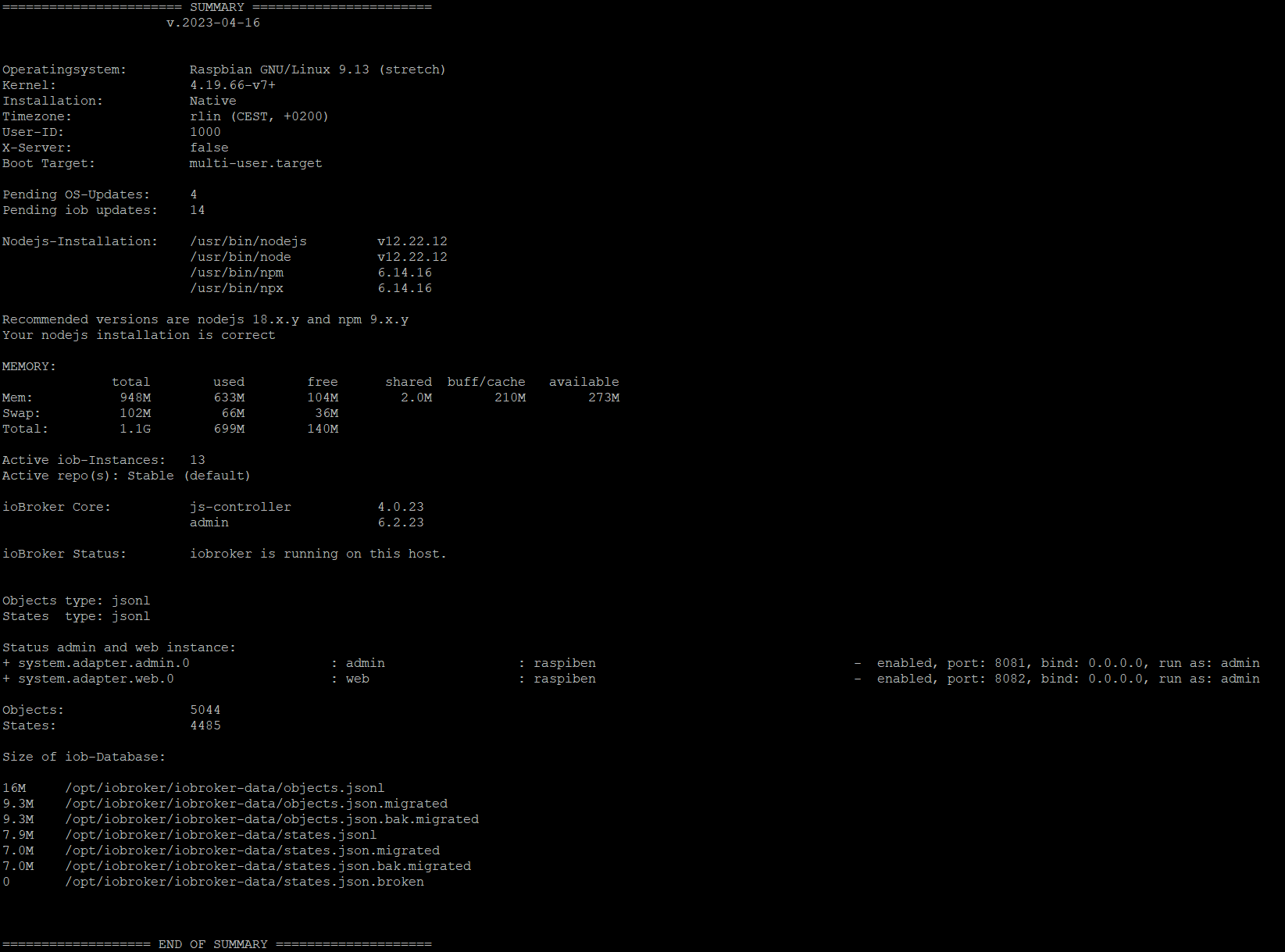
                            @alex-smarthome sagte in Server Cannot start inMem-objects on port 9001:

                            im root sagt er

                            Ja, du sollst ja auch nicht als root herumhampeln.
                            Linux-Werkzeugkasten:
                            https://forum.iobroker.net/topic/42952/der-kleine-iobroker-linux-werkzeugkasten
                            NodeJS Fixer Skript:
                            https://forum.iobroker.net/topic/68035/iob-node-fix-skript
                            iob_diag: curl -sLf -o diag.sh https://iobroker.net/diag.sh && bash diag.sh

                            1 Reply Last reply
                            0
                            Reply
                            • Reply as topic
                            Log in to reply
                            • Oldest to Newest
                            • Newest to Oldest
                            • Most Votes


                            Support us

                            ioBroker
                            Community Adapters
                            Donate
                            FAQ Cloud / IOT
                            HowTo: Node.js-Update
                            HowTo: Backup/Restore
                            Downloads
                            BLOG

                            696

                            Online

                            32.5k

                            Users

                            81.7k

                            Topics

                            1.3m

                            Posts
                            Community
                            Impressum | Datenschutz-Bestimmungen | Nutzungsbedingungen | Einwilligungseinstellungen
                            ioBroker Community 2014-2025
                            logo
                            • Login

                            • Don't have an account? Register

                            • Login or register to search.
                            • First post
                              Last post
                            0
                            • Home
                            • Recent
                            • Tags
                            • Unread 0
                            • Categories
                            • Unreplied
                            • Popular
                            • GitHub
                            • Docu
                            • Hilfe