Skip to content
  • Home
  • Aktuell
  • Tags
  • 0 Ungelesen 0
  • Kategorien
  • Unreplied
  • Beliebt
  • GitHub
  • Docu
  • Hilfe
Skins
  • Light
  • Brite
  • Cerulean
  • Cosmo
  • Flatly
  • Journal
  • Litera
  • Lumen
  • Lux
  • Materia
  • Minty
  • Morph
  • Pulse
  • Sandstone
  • Simplex
  • Sketchy
  • Spacelab
  • United
  • Yeti
  • Zephyr
  • Dark
  • Cyborg
  • Darkly
  • Quartz
  • Slate
  • Solar
  • Superhero
  • Vapor

  • Standard: (Kein Skin)
  • Kein Skin
Einklappen
ioBroker Logo

Community Forum

donate donate
  1. ioBroker Community Home
  2. Deutsch
  3. Error/Bug
  4. Backitup für kein Automatisches Backup aus
NEWS

  • Monatsrückblick Januar/Februar 2026 ist online!
    BluefoxB
    Bluefox
    16
    1
    221

  • Jahresrückblick 2025 – unser neuer Blogbeitrag ist online! ✨
    BluefoxB
    Bluefox
    17
    1
    4.4k

  • Neuer Blogbeitrag: Monatsrückblick - Dezember 2025 🎄
    BluefoxB
    Bluefox
    13
    1
    1.3k

Backitup für kein Automatisches Backup aus

Geplant Angeheftet Gesperrt Verschoben Error/Bug
29 Beiträge 5 Kommentatoren 596 Aufrufe 5 Watching
  • Älteste zuerst
  • Neuste zuerst
  • Meiste Stimmen
Antworten
  • In einem neuen Thema antworten
Anmelden zum Antworten
Dieses Thema wurde gelöscht. Nur Nutzer mit entsprechenden Rechten können es sehen.
  • ChrisNettC ChrisNett

    @simatec

    ja das Backup läuft jetzt aber nur die beiden fehler, was müss ich da angeben?

    backitup.0	2021-06-02 07:51:15.521	info	(22053) [iobroker] backup was activated at 07:49 every 1 day(s)
    backitup.0	2021-06-02 07:51:15.420	info	(22053) starting. Version 2.1.6 in /opt/iobroker/node_modules/iobroker.backitup, node: v12.22.1, js-controller: 3.3.9
    backitup.0	2021-06-02 07:51:07.730	info	(20698) Terminated (ADAPTER_REQUESTED_TERMINATION): Without reason
    backitup.0	2021-06-02 07:51:07.728	info	(20698) terminating
    backitup.0	2021-06-02 07:51:07.727	info	(20698) cleaned everything up...
    backitup.0	2021-06-02 07:51:07.726	info	(20698) Got terminate signal TERMINATE_YOURSELF
    backitup.0	2021-06-02 07:45:44.462	info	(20698) [iobroker] backup was activated at 07:49 every 1 day(s)
    backitup.0	2021-06-02 07:45:44.351	info	(20698) starting. Version 2.1.6 in /opt/iobroker/node_modules/iobroker.backitup, node: v12.22.1, js-controller: 3.3.9
    backitup.0	2021-06-02 07:45:36.733	info	(18982) Terminated (ADAPTER_REQUESTED_TERMINATION): Without reason
    backitup.0	2021-06-02 07:45:36.730	info	(18982) terminating
    backitup.0	2021-06-02 07:45:36.729	info	(18982) cleaned everything up...
    backitup.0	2021-06-02 07:45:36.727	info	(18982) Got terminate signal TERMINATE_YOURSELF
    
    simatecS Offline
    simatecS Offline
    simatec
    Developer Most Active
    schrieb am zuletzt editiert von
    #8

    @christian-sandkaulen Der Log sagt leider nichts aus, außer dass du den Adapter neu gestartet hast

    • Besuche meine Github Seite
    • Beitrag hat geholfen oder willst du mich unterstützen
    • HowTo Restore ioBroker
    ChrisNettC 1 Antwort Letzte Antwort
    0
    • simatecS simatec

      @christian-sandkaulen Der Log sagt leider nichts aus, außer dass du den Adapter neu gestartet hast

      ChrisNettC Offline
      ChrisNettC Offline
      ChrisNett
      schrieb am zuletzt editiert von
      #9

      @simatec
      sorry dachte da seht das bei..

      Started iobroker ...
      [DEBUG] [iobroker] - host.PI4 6271 states saved
      
      [DEBUG] [iobroker] - host.PI4 7753 objects saved
      
      [DEBUG] [iobroker] - Backup created: /opt/iobroker/backups/iobroker_2021_06_02-08_01_32_backupiobroker.tar.gz
      
      [DEBUG] [iobroker] - done
      [DEBUG] [historyDB] - compress from historyDB started ...
      [ERROR] [historyDB] - [IGNORED] Backitup cannot found source "undefined" for compress!
      [DEBUG] [zigbee] - found zigbee database: zigbee.0,zigbee.1
      [DEBUG] [zigbee] - done
      [DEBUG] [javascripts] - javascript directory "" not found
      [DEBUG] [javascripts] - done
      [DEBUG] [googledrive] - Google Drive: Copy iobroker_2021_06_02-08_01_32_backupiobroker.tar.gz...
      [ERROR] [googledrive] - Google Drive: File "/opt/iobroker/backups/historyDB_2021_06_02-08_01_45_backupiobroker.tar.gz" not found
      [DEBUG] [googledrive] - Google Drive: Copy zigbee.0_2021_06_02-08_01_45_backupiobroker.tar.gz...
      [DEBUG] [googledrive] - Google Drive: Copy zigbee.1_2021_06_02-08_01_45_backupiobroker.tar.gz...
      [ERROR] [googledrive] - Google Drive: File "/opt/iobroker/backups/javascripts_2021_06_02-08_01_46_backupiobroker.tar.gz" not found
      [DEBUG] [googledrive] - done
      [ERROR] [clean] - Backup files not deleted from /opt/iobroker/backups because some errors.
      [DEBUG] [clean] - done
      [DEBUG] [telegram] - done
      [DEBUG] [historyHTML] - new history html values created
      [DEBUG] [historyHTML] - done
      [DEBUG] [historyJSON] - new history json values created
      [DEBUG] [historyJSON] - done
      [EXIT] 0
      

      js.jpg hd.jpg

      simatecS 1 Antwort Letzte Antwort
      0
      • ChrisNettC ChrisNett

        @simatec

        ja das Backup läuft jetzt aber nur die beiden fehler, was müss ich da angeben?

        backitup.0	2021-06-02 07:51:15.521	info	(22053) [iobroker] backup was activated at 07:49 every 1 day(s)
        backitup.0	2021-06-02 07:51:15.420	info	(22053) starting. Version 2.1.6 in /opt/iobroker/node_modules/iobroker.backitup, node: v12.22.1, js-controller: 3.3.9
        backitup.0	2021-06-02 07:51:07.730	info	(20698) Terminated (ADAPTER_REQUESTED_TERMINATION): Without reason
        backitup.0	2021-06-02 07:51:07.728	info	(20698) terminating
        backitup.0	2021-06-02 07:51:07.727	info	(20698) cleaned everything up...
        backitup.0	2021-06-02 07:51:07.726	info	(20698) Got terminate signal TERMINATE_YOURSELF
        backitup.0	2021-06-02 07:45:44.462	info	(20698) [iobroker] backup was activated at 07:49 every 1 day(s)
        backitup.0	2021-06-02 07:45:44.351	info	(20698) starting. Version 2.1.6 in /opt/iobroker/node_modules/iobroker.backitup, node: v12.22.1, js-controller: 3.3.9
        backitup.0	2021-06-02 07:45:36.733	info	(18982) Terminated (ADAPTER_REQUESTED_TERMINATION): Without reason
        backitup.0	2021-06-02 07:45:36.730	info	(18982) terminating
        backitup.0	2021-06-02 07:45:36.729	info	(18982) cleaned everything up...
        backitup.0	2021-06-02 07:45:36.727	info	(18982) Got terminate signal TERMINATE_YOURSELF
        
        GlasfaserG Online
        GlasfaserG Online
        Glasfaser
        schrieb am zuletzt editiert von
        #10

        @christian-sandkaulen sagte in Backitup für kein Automatisches Backup aus:

        js-controller: 3.3.9

        Biste du im BETA Kanal unterwegs !?

        Synology 918+ 16GB - ioBroker in Docker v9 , VISO auf Trekstor Primebook C13 13,3" , Hikvision Domkameras mit Surveillance Station .. CCU RaspberryMatic in Synology VM .. Zigbee CC2538+CC2592 .. Sonoff .. KNX .. Modbus ..

        ChrisNettC 1 Antwort Letzte Antwort
        0
        • GlasfaserG Glasfaser

          @christian-sandkaulen sagte in Backitup für kein Automatisches Backup aus:

          js-controller: 3.3.9

          Biste du im BETA Kanal unterwegs !?

          ChrisNettC Offline
          ChrisNettC Offline
          ChrisNett
          schrieb am zuletzt editiert von
          #11

          @glasfaser
          nicht das ich wüsste sol ich das ändern?

          GlasfaserG 1 Antwort Letzte Antwort
          0
          • ChrisNettC ChrisNett

            @glasfaser
            nicht das ich wüsste sol ich das ändern?

            GlasfaserG Online
            GlasfaserG Online
            Glasfaser
            schrieb am zuletzt editiert von
            #12

            @christian-sandkaulen sagte in Backitup für kein Automatisches Backup aus:

            nicht das ich wüsste

            Zeige mal :

            iobroker version
            iobroker repo list
            which nodejs node npm && nodejs -v && node -v && npm -v && sudo apt update && sudo apt update && apt policy nodejs
            

            Synology 918+ 16GB - ioBroker in Docker v9 , VISO auf Trekstor Primebook C13 13,3" , Hikvision Domkameras mit Surveillance Station .. CCU RaspberryMatic in Synology VM .. Zigbee CC2538+CC2592 .. Sonoff .. KNX .. Modbus ..

            ChrisNettC 1 Antwort Letzte Antwort
            0
            • ChrisNettC ChrisNett

              @simatec
              sorry dachte da seht das bei..

              Started iobroker ...
              [DEBUG] [iobroker] - host.PI4 6271 states saved
              
              [DEBUG] [iobroker] - host.PI4 7753 objects saved
              
              [DEBUG] [iobroker] - Backup created: /opt/iobroker/backups/iobroker_2021_06_02-08_01_32_backupiobroker.tar.gz
              
              [DEBUG] [iobroker] - done
              [DEBUG] [historyDB] - compress from historyDB started ...
              [ERROR] [historyDB] - [IGNORED] Backitup cannot found source "undefined" for compress!
              [DEBUG] [zigbee] - found zigbee database: zigbee.0,zigbee.1
              [DEBUG] [zigbee] - done
              [DEBUG] [javascripts] - javascript directory "" not found
              [DEBUG] [javascripts] - done
              [DEBUG] [googledrive] - Google Drive: Copy iobroker_2021_06_02-08_01_32_backupiobroker.tar.gz...
              [ERROR] [googledrive] - Google Drive: File "/opt/iobroker/backups/historyDB_2021_06_02-08_01_45_backupiobroker.tar.gz" not found
              [DEBUG] [googledrive] - Google Drive: Copy zigbee.0_2021_06_02-08_01_45_backupiobroker.tar.gz...
              [DEBUG] [googledrive] - Google Drive: Copy zigbee.1_2021_06_02-08_01_45_backupiobroker.tar.gz...
              [ERROR] [googledrive] - Google Drive: File "/opt/iobroker/backups/javascripts_2021_06_02-08_01_46_backupiobroker.tar.gz" not found
              [DEBUG] [googledrive] - done
              [ERROR] [clean] - Backup files not deleted from /opt/iobroker/backups because some errors.
              [DEBUG] [clean] - done
              [DEBUG] [telegram] - done
              [DEBUG] [historyHTML] - new history html values created
              [DEBUG] [historyHTML] - done
              [DEBUG] [historyJSON] - new history json values created
              [DEBUG] [historyJSON] - done
              [EXIT] 0
              

              js.jpg hd.jpg

              simatecS Offline
              simatecS Offline
              simatec
              Developer Most Active
              schrieb am zuletzt editiert von
              #13

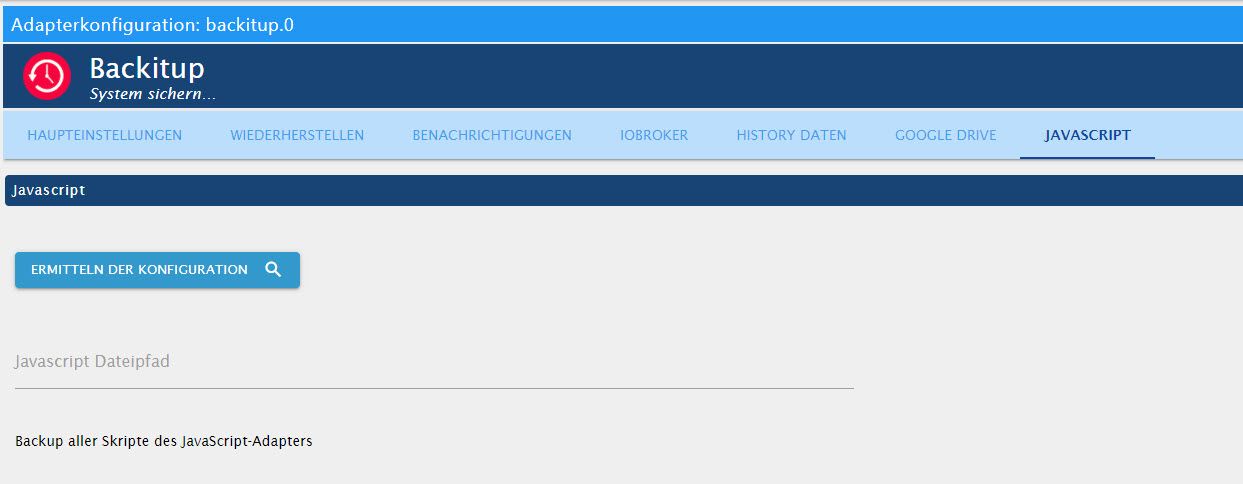
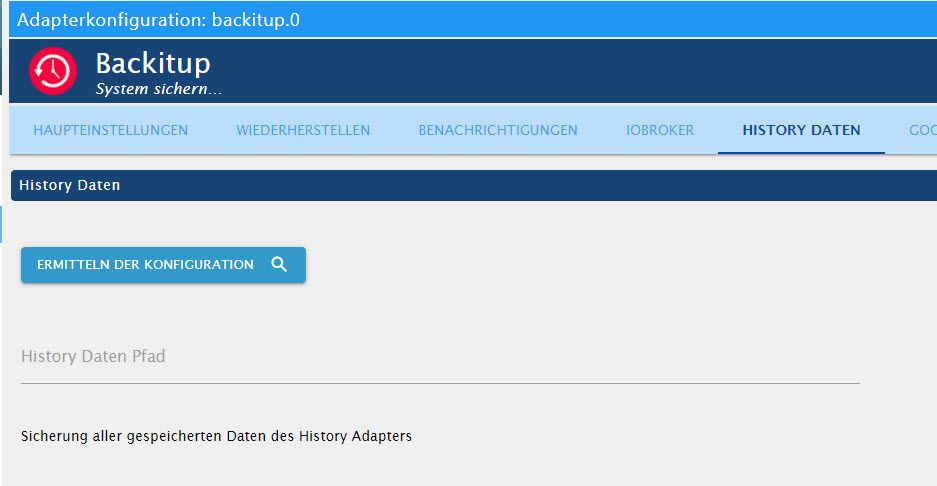
              @christian-sandkaulen Du hast weder bei dem History Backup einen Pfad angegeben noch beim Javascript.
              Wenn du die beiden Optionen mitsichern willst, dann musst dort die Pfadangabe rein. Wenn nicht die beiden Optionen in den Haupteinstellungen deaktivieren

              • Besuche meine Github Seite
              • Beitrag hat geholfen oder willst du mich unterstützen
              • HowTo Restore ioBroker
              ChrisNettC 1 Antwort Letzte Antwort
              0
              • GlasfaserG Glasfaser

                @christian-sandkaulen sagte in Backitup für kein Automatisches Backup aus:

                nicht das ich wüsste

                Zeige mal :

                iobroker version
                iobroker repo list
                which nodejs node npm && nodejs -v && node -v && npm -v && sudo apt update && sudo apt update && apt policy nodejs
                
                ChrisNettC Offline
                ChrisNettC Offline
                ChrisNett
                schrieb am zuletzt editiert von
                #14

                @glasfaser

                pi@PI4:~ $ iobroker version
                3.3.9
                pi@PI4:~ $ iobroker repo list
                Stable (default): http://download.iobroker.net/sources-dist.json
                Beta (latest): http://download.iobroker.net/sources-dist-latest.json
                
                Active repo: Stable (default)
                pi@PI4:~ $ which nodejs node npm && nodejs -v && node -v && npm -v && sudo apt update && sudo apt update && apt policy nodejs
                /usr/bin/nodejs
                /usr/bin/node
                /usr/bin/npm
                v12.22.1
                v12.22.1
                6.14.12
                Holen:1 http://archive.raspberrypi.org/debian buster InRelease [32,7 kB]
                Holen:2 http://raspbian.raspberrypi.org/raspbian buster InRelease [15,0 kB]
                Holen:3 http://packages.microsoft.com/repos/code stable InRelease [10,4 kB]
                OK:4 https://deb.nodesource.com/node_12.x buster InRelease
                Holen:5 http://raspbian.raspberrypi.org/raspbian buster/main armhf Packages [13,0 MB]
                Holen:6 http://packages.microsoft.com/repos/code stable/main armhf Packages [30,9 kB]
                Holen:7 http://packages.microsoft.com/repos/code stable/main arm64 Packages [30,9 kB]
                Holen:8 http://packages.microsoft.com/repos/code stable/main amd64 Packages [29,9 kB]
                Holen:9 http://archive.raspberrypi.org/debian buster/main armhf Packages [376 kB]
                Es wurden 13,5 MB in 13 s geholt (1.077 kB/s).
                Paketlisten werden gelesen... Fertig
                Abhängigkeitsbaum wird aufgebaut.
                Statusinformationen werden eingelesen.... Fertig
                Aktualisierung für 73 Pakete verfügbar. Führen Sie »apt list --upgradable« aus, um sie anzuzeigen.
                OK:1 http://raspbian.raspberrypi.org/raspbian buster InRelease
                OK:2 http://archive.raspberrypi.org/debian buster InRelease
                OK:3 http://packages.microsoft.com/repos/code stable InRelease
                OK:4 https://deb.nodesource.com/node_12.x buster InRelease
                Paketlisten werden gelesen... Fertig
                Abhängigkeitsbaum wird aufgebaut.
                Statusinformationen werden eingelesen.... Fertig
                Aktualisierung für 73 Pakete verfügbar. Führen Sie »apt list --upgradable« aus, um sie anzuzeigen.
                nodejs:
                  Installiert:           12.22.1-1nodesource1
                  Installationskandidat: 12.22.1-1nodesource1
                  Versionstabelle:
                 *** 12.22.1-1nodesource1 500
                        500 https://deb.nodesource.com/node_12.x buster/main armhf Packages
                        100 /var/lib/dpkg/status
                     10.24.0~dfsg-1~deb10u1 500
                        500 http://raspbian.raspberrypi.org/raspbian buster/main armhf Packages
                
                
                Thomas BraunT 1 Antwort Letzte Antwort
                0
                • simatecS simatec

                  @christian-sandkaulen Du hast weder bei dem History Backup einen Pfad angegeben noch beim Javascript.
                  Wenn du die beiden Optionen mitsichern willst, dann musst dort die Pfadangabe rein. Wenn nicht die beiden Optionen in den Haupteinstellungen deaktivieren

                  ChrisNettC Offline
                  ChrisNettC Offline
                  ChrisNett
                  schrieb am zuletzt editiert von
                  #15

                  @simatec
                  wie bekomme ich die Pfade raus ?

                  simatecS 1 Antwort Letzte Antwort
                  0
                  • ChrisNettC ChrisNett

                    @simatec
                    wie bekomme ich die Pfade raus ?

                    simatecS Offline
                    simatecS Offline
                    simatec
                    Developer Most Active
                    schrieb am zuletzt editiert von
                    #16

                    @christian-sandkaulen Jeweils auf den Button ermitteln klicken.
                    Wenn Javascript und der History Adapter richtig konfiguriert sind, holt sich Backitup die Daten

                    https://github.com/simatec/ioBroker.backitup/blob/master/docs/de/backitup.md#Javascript-Backup

                    • Besuche meine Github Seite
                    • Beitrag hat geholfen oder willst du mich unterstützen
                    • HowTo Restore ioBroker
                    ChrisNettC 1 Antwort Letzte Antwort
                    0
                    • ChrisNettC ChrisNett

                      @glasfaser

                      pi@PI4:~ $ iobroker version
                      3.3.9
                      pi@PI4:~ $ iobroker repo list
                      Stable (default): http://download.iobroker.net/sources-dist.json
                      Beta (latest): http://download.iobroker.net/sources-dist-latest.json
                      
                      Active repo: Stable (default)
                      pi@PI4:~ $ which nodejs node npm && nodejs -v && node -v && npm -v && sudo apt update && sudo apt update && apt policy nodejs
                      /usr/bin/nodejs
                      /usr/bin/node
                      /usr/bin/npm
                      v12.22.1
                      v12.22.1
                      6.14.12
                      Holen:1 http://archive.raspberrypi.org/debian buster InRelease [32,7 kB]
                      Holen:2 http://raspbian.raspberrypi.org/raspbian buster InRelease [15,0 kB]
                      Holen:3 http://packages.microsoft.com/repos/code stable InRelease [10,4 kB]
                      OK:4 https://deb.nodesource.com/node_12.x buster InRelease
                      Holen:5 http://raspbian.raspberrypi.org/raspbian buster/main armhf Packages [13,0 MB]
                      Holen:6 http://packages.microsoft.com/repos/code stable/main armhf Packages [30,9 kB]
                      Holen:7 http://packages.microsoft.com/repos/code stable/main arm64 Packages [30,9 kB]
                      Holen:8 http://packages.microsoft.com/repos/code stable/main amd64 Packages [29,9 kB]
                      Holen:9 http://archive.raspberrypi.org/debian buster/main armhf Packages [376 kB]
                      Es wurden 13,5 MB in 13 s geholt (1.077 kB/s).
                      Paketlisten werden gelesen... Fertig
                      Abhängigkeitsbaum wird aufgebaut.
                      Statusinformationen werden eingelesen.... Fertig
                      Aktualisierung für 73 Pakete verfügbar. Führen Sie »apt list --upgradable« aus, um sie anzuzeigen.
                      OK:1 http://raspbian.raspberrypi.org/raspbian buster InRelease
                      OK:2 http://archive.raspberrypi.org/debian buster InRelease
                      OK:3 http://packages.microsoft.com/repos/code stable InRelease
                      OK:4 https://deb.nodesource.com/node_12.x buster InRelease
                      Paketlisten werden gelesen... Fertig
                      Abhängigkeitsbaum wird aufgebaut.
                      Statusinformationen werden eingelesen.... Fertig
                      Aktualisierung für 73 Pakete verfügbar. Führen Sie »apt list --upgradable« aus, um sie anzuzeigen.
                      nodejs:
                        Installiert:           12.22.1-1nodesource1
                        Installationskandidat: 12.22.1-1nodesource1
                        Versionstabelle:
                       *** 12.22.1-1nodesource1 500
                              500 https://deb.nodesource.com/node_12.x buster/main armhf Packages
                              100 /var/lib/dpkg/status
                           10.24.0~dfsg-1~deb10u1 500
                              500 http://raspbian.raspberrypi.org/raspbian buster/main armhf Packages
                      
                      
                      Thomas BraunT Online
                      Thomas BraunT Online
                      Thomas Braun
                      Most Active
                      schrieb am zuletzt editiert von
                      #17

                      @christian-sandkaulen
                      Eigentlich alles richtig eingestellt.
                      Du musst aber irgendwann mal die Beta-Version des js-controllers eingespielt haben, 3.3.9 war nie im Stable verfügbar.

                      Die 73 hängenden Upgrades würde ich reinholen:

                      sudo apt dist-upgrade
                      sudo reboot
                      

                      Linux-Werkzeugkasten:
                      https://forum.iobroker.net/topic/42952/der-kleine-iobroker-linux-werkzeugkasten
                      NodeJS Fixer Skript:
                      https://forum.iobroker.net/topic/68035/iob-node-fix-skript
                      iob_diag: curl -sLf -o diag.sh https://iobroker.net/diag.sh && bash diag.sh

                      ChrisNettC 2 Antworten Letzte Antwort
                      0
                      • Thomas BraunT Thomas Braun

                        @christian-sandkaulen
                        Eigentlich alles richtig eingestellt.
                        Du musst aber irgendwann mal die Beta-Version des js-controllers eingespielt haben, 3.3.9 war nie im Stable verfügbar.

                        Die 73 hängenden Upgrades würde ich reinholen:

                        sudo apt dist-upgrade
                        sudo reboot
                        
                        ChrisNettC Offline
                        ChrisNettC Offline
                        ChrisNett
                        schrieb am zuletzt editiert von
                        #18

                        @thomas-braun
                        ja das kann sein als ich problem mit Zigbee hatte ist das gemacht worden, update mache ich gleich.

                        1 Antwort Letzte Antwort
                        0
                        • simatecS simatec

                          @christian-sandkaulen Jeweils auf den Button ermitteln klicken.
                          Wenn Javascript und der History Adapter richtig konfiguriert sind, holt sich Backitup die Daten

                          https://github.com/simatec/ioBroker.backitup/blob/master/docs/de/backitup.md#Javascript-Backup

                          ChrisNettC Offline
                          ChrisNettC Offline
                          ChrisNett
                          schrieb am zuletzt editiert von
                          #19

                          @simatec

                          danke JS habe ich ümgestellt aber was muss hier rein?

                          a8c0cd56-b9fc-417c-8b87-3a24d8d2526f-image.png

                          Thomas BraunT 1 Antwort Letzte Antwort
                          0
                          • ChrisNettC ChrisNett

                            @simatec

                            danke JS habe ich ümgestellt aber was muss hier rein?

                            a8c0cd56-b9fc-417c-8b87-3a24d8d2526f-image.png

                            Thomas BraunT Online
                            Thomas BraunT Online
                            Thomas Braun
                            Most Active
                            schrieb am zuletzt editiert von
                            #20

                            @christian-sandkaulen

                            Bei mir habe ich da (analog zu den JS-skripten) ein Spiegelverzeichnis in /home/iobroker/history angelegt. Also außerhalb von /opt/iobroker

                            Linux-Werkzeugkasten:
                            https://forum.iobroker.net/topic/42952/der-kleine-iobroker-linux-werkzeugkasten
                            NodeJS Fixer Skript:
                            https://forum.iobroker.net/topic/68035/iob-node-fix-skript
                            iob_diag: curl -sLf -o diag.sh https://iobroker.net/diag.sh && bash diag.sh

                            1 Antwort Letzte Antwort
                            0
                            • Thomas BraunT Thomas Braun

                              @christian-sandkaulen
                              Eigentlich alles richtig eingestellt.
                              Du musst aber irgendwann mal die Beta-Version des js-controllers eingespielt haben, 3.3.9 war nie im Stable verfügbar.

                              Die 73 hängenden Upgrades würde ich reinholen:

                              sudo apt dist-upgrade
                              sudo reboot
                              
                              ChrisNettC Offline
                              ChrisNettC Offline
                              ChrisNett
                              schrieb am zuletzt editiert von
                              #21

                              @thomas-braun

                              
                              73 aktualisiert, 0 neu installiert, 0 zu entfernen und 0 nicht aktualisiert.
                              Es müssen 149 MB an Archiven heruntergeladen werden.
                              Nach dieser Operation werden 4.907 kB Plattenplatz zusätzlich benutzt.
                              Möchten Sie fortfahren? [J/n] J
                              Abbruch.
                              pi@PI4:~ $


                              warum bricht der das mit "J" ab?

                              Thomas BraunT 1 Antwort Letzte Antwort
                              0
                              • ChrisNettC ChrisNett

                                @thomas-braun

                                
                                73 aktualisiert, 0 neu installiert, 0 zu entfernen und 0 nicht aktualisiert.
                                Es müssen 149 MB an Archiven heruntergeladen werden.
                                Nach dieser Operation werden 4.907 kB Plattenplatz zusätzlich benutzt.
                                Möchten Sie fortfahren? [J/n] J
                                Abbruch.
                                pi@PI4:~ $


                                warum bricht der das mit "J" ab?

                                Thomas BraunT Online
                                Thomas BraunT Online
                                Thomas Braun
                                Most Active
                                schrieb am zuletzt editiert von
                                #22

                                @christian-sandkaulen
                                Keine Ahnung. Mit kleinem j mal probiert?
                                Oder y?

                                Linux-Werkzeugkasten:
                                https://forum.iobroker.net/topic/42952/der-kleine-iobroker-linux-werkzeugkasten
                                NodeJS Fixer Skript:
                                https://forum.iobroker.net/topic/68035/iob-node-fix-skript
                                iob_diag: curl -sLf -o diag.sh https://iobroker.net/diag.sh && bash diag.sh

                                ChrisNettC 2 Antworten Letzte Antwort
                                0
                                • Thomas BraunT Thomas Braun

                                  @christian-sandkaulen
                                  Keine Ahnung. Mit kleinem j mal probiert?
                                  Oder y?

                                  ChrisNettC Offline
                                  ChrisNettC Offline
                                  ChrisNett
                                  schrieb am zuletzt editiert von
                                  #23

                                  @thomas-braun

                                  ja auch und mit n bricht er auch ab...

                                  aber backup geht jetzt

                                  Started iobroker ...
                                  [DEBUG] [iobroker] - host.PI4 6316 states saved
                                  
                                  [DEBUG] [iobroker] - host.PI4 7766 objects saved
                                  
                                  [DEBUG] [iobroker] - Backup created: /opt/iobroker/backups/iobroker_2021_06_02-10_34_43_backupiobroker.tar.gz
                                  
                                  [DEBUG] [iobroker] - done
                                  [DEBUG] [historyDB] - compress from historyDB started ...
                                  [DEBUG] [historyDB] - Backup created: /opt/iobroker/backups/historyDB_2021_06_02-10_34_54_backupiobroker.tar.gz
                                  [DEBUG] [historyDB] - done
                                  [DEBUG] [zigbee] - found zigbee database: zigbee.0,zigbee.1
                                  [DEBUG] [zigbee] - done
                                  [DEBUG] [javascripts] - Backup created: /opt/iobroker/backups/javascripts_2021_06_02-10_34_55_backupiobroker.tar.gz
                                  [DEBUG] [javascripts] - done
                                  [DEBUG] [googledrive] - Google Drive: Copy iobroker_2021_06_02-10_34_43_backupiobroker.tar.gz...
                                  [DEBUG] [googledrive] - Google Drive: Copy historyDB_2021_06_02-10_34_54_backupiobroker.tar.gz...
                                  [DEBUG] [googledrive] - Google Drive: Copy zigbee.0_2021_06_02-10_34_54_backupiobroker.tar.gz...
                                  [DEBUG] [googledrive] - Google Drive: Copy zigbee.1_2021_06_02-10_34_54_backupiobroker.tar.gz...
                                  [DEBUG] [googledrive] - Google Drive: Copy javascripts_2021_06_02-10_34_55_backupiobroker.tar.gz...
                                  [DEBUG] [googledrive] - done
                                  [DEBUG] [clean] - done
                                  [DEBUG] [telegram] - done
                                  [DEBUG] [historyHTML] - new history html values created
                                  [DEBUG] [historyHTML] - done
                                  [DEBUG] [historyJSON] - new history json values created
                                  [DEBUG] [historyJSON] - done
                                  [EXIT] 0
                                  

                                  :-) danke

                                  Thomas BraunT 1 Antwort Letzte Antwort
                                  0
                                  • ChrisNettC ChrisNett

                                    @thomas-braun

                                    ja auch und mit n bricht er auch ab...

                                    aber backup geht jetzt

                                    Started iobroker ...
                                    [DEBUG] [iobroker] - host.PI4 6316 states saved
                                    
                                    [DEBUG] [iobroker] - host.PI4 7766 objects saved
                                    
                                    [DEBUG] [iobroker] - Backup created: /opt/iobroker/backups/iobroker_2021_06_02-10_34_43_backupiobroker.tar.gz
                                    
                                    [DEBUG] [iobroker] - done
                                    [DEBUG] [historyDB] - compress from historyDB started ...
                                    [DEBUG] [historyDB] - Backup created: /opt/iobroker/backups/historyDB_2021_06_02-10_34_54_backupiobroker.tar.gz
                                    [DEBUG] [historyDB] - done
                                    [DEBUG] [zigbee] - found zigbee database: zigbee.0,zigbee.1
                                    [DEBUG] [zigbee] - done
                                    [DEBUG] [javascripts] - Backup created: /opt/iobroker/backups/javascripts_2021_06_02-10_34_55_backupiobroker.tar.gz
                                    [DEBUG] [javascripts] - done
                                    [DEBUG] [googledrive] - Google Drive: Copy iobroker_2021_06_02-10_34_43_backupiobroker.tar.gz...
                                    [DEBUG] [googledrive] - Google Drive: Copy historyDB_2021_06_02-10_34_54_backupiobroker.tar.gz...
                                    [DEBUG] [googledrive] - Google Drive: Copy zigbee.0_2021_06_02-10_34_54_backupiobroker.tar.gz...
                                    [DEBUG] [googledrive] - Google Drive: Copy zigbee.1_2021_06_02-10_34_54_backupiobroker.tar.gz...
                                    [DEBUG] [googledrive] - Google Drive: Copy javascripts_2021_06_02-10_34_55_backupiobroker.tar.gz...
                                    [DEBUG] [googledrive] - done
                                    [DEBUG] [clean] - done
                                    [DEBUG] [telegram] - done
                                    [DEBUG] [historyHTML] - new history html values created
                                    [DEBUG] [historyHTML] - done
                                    [DEBUG] [historyJSON] - new history json values created
                                    [DEBUG] [historyJSON] - done
                                    [EXIT] 0
                                    

                                    :-) danke

                                    Thomas BraunT Online
                                    Thomas BraunT Online
                                    Thomas Braun
                                    Most Active
                                    schrieb am zuletzt editiert von
                                    #24

                                    @christian-sandkaulen

                                    Komisch.
                                    Versuch mal

                                    sudo apt update && sudo apt dist-upgrade -y
                                    

                                    Linux-Werkzeugkasten:
                                    https://forum.iobroker.net/topic/42952/der-kleine-iobroker-linux-werkzeugkasten
                                    NodeJS Fixer Skript:
                                    https://forum.iobroker.net/topic/68035/iob-node-fix-skript
                                    iob_diag: curl -sLf -o diag.sh https://iobroker.net/diag.sh && bash diag.sh

                                    1 Antwort Letzte Antwort
                                    0
                                    • Thomas BraunT Thomas Braun

                                      @christian-sandkaulen
                                      Keine Ahnung. Mit kleinem j mal probiert?
                                      Oder y?

                                      ChrisNettC Offline
                                      ChrisNettC Offline
                                      ChrisNett
                                      schrieb am zuletzt editiert von
                                      #25

                                      @thomas-braun

                                      habe mal zuerst

                                      sudo reboot
                                      

                                      gemacht und dann noch mal das update

                                      sudo apt dist-upgrade
                                      

                                      jetzt läuft es

                                      ChrisNettC 1 Antwort Letzte Antwort
                                      0
                                      • ChrisNettC ChrisNett

                                        @thomas-braun

                                        habe mal zuerst

                                        sudo reboot
                                        

                                        gemacht und dann noch mal das update

                                        sudo apt dist-upgrade
                                        

                                        jetzt läuft es

                                        ChrisNettC Offline
                                        ChrisNettC Offline
                                        ChrisNett
                                        schrieb am zuletzt editiert von
                                        #26

                                        @christian-sandkaulen

                                        ich Frage noch kann ich auch nur zigbee wiederherstellen oder ist da immer alles drin?

                                        Thomas BraunT 1 Antwort Letzte Antwort
                                        0
                                        • ChrisNettC ChrisNett

                                          @christian-sandkaulen

                                          ich Frage noch kann ich auch nur zigbee wiederherstellen oder ist da immer alles drin?

                                          Thomas BraunT Online
                                          Thomas BraunT Online
                                          Thomas Braun
                                          Most Active
                                          schrieb am zuletzt editiert von
                                          #27

                                          @christian-sandkaulen
                                          Für zigbee gibt es eine eigene Einstellung im Backitup-Adapter.

                                          Linux-Werkzeugkasten:
                                          https://forum.iobroker.net/topic/42952/der-kleine-iobroker-linux-werkzeugkasten
                                          NodeJS Fixer Skript:
                                          https://forum.iobroker.net/topic/68035/iob-node-fix-skript
                                          iob_diag: curl -sLf -o diag.sh https://iobroker.net/diag.sh && bash diag.sh

                                          ChrisNettC 1 Antwort Letzte Antwort
                                          0
                                          Antworten
                                          • In einem neuen Thema antworten
                                          Anmelden zum Antworten
                                          • Älteste zuerst
                                          • Neuste zuerst
                                          • Meiste Stimmen


                                          Support us

                                          ioBroker
                                          Community Adapters
                                          Donate

                                          540

                                          Online

                                          32.7k

                                          Benutzer

                                          82.5k

                                          Themen

                                          1.3m

                                          Beiträge
                                          Community
                                          Impressum | Datenschutz-Bestimmungen | Nutzungsbedingungen | Einwilligungseinstellungen
                                          ioBroker Community 2014-2025
                                          logo
                                          • Anmelden

                                          • Du hast noch kein Konto? Registrieren

                                          • Anmelden oder registrieren, um zu suchen
                                          • Erster Beitrag
                                            Letzter Beitrag
                                          0
                                          • Home
                                          • Aktuell
                                          • Tags
                                          • Ungelesen 0
                                          • Kategorien
                                          • Unreplied
                                          • Beliebt
                                          • GitHub
                                          • Docu
                                          • Hilfe