Skip to content
  • Home
  • Recent
  • Tags
  • 0 Unread 0
  • Categories
  • Unreplied
  • Popular
  • GitHub
  • Docu
  • Hilfe
Skins
  • Light
  • Brite
  • Cerulean
  • Cosmo
  • Flatly
  • Journal
  • Litera
  • Lumen
  • Lux
  • Materia
  • Minty
  • Morph
  • Pulse
  • Sandstone
  • Simplex
  • Sketchy
  • Spacelab
  • United
  • Yeti
  • Zephyr
  • Dark
  • Cyborg
  • Darkly
  • Quartz
  • Slate
  • Solar
  • Superhero
  • Vapor

  • Default (No Skin)
  • No Skin
Collapse
ioBroker Logo

Community Forum

donate donate
  1. ioBroker Community Home
  2. Deutsch
  3. ioBroker Allgemein
  4. js-controller 3.3 jetzt im Beta

NEWS

  • Jahresrückblick 2025 – unser neuer Blogbeitrag ist online! ✨
    BluefoxB
    Bluefox
    16
    1
    2.0k

  • Neuer Blogbeitrag: Monatsrückblick - Dezember 2025 🎄
    BluefoxB
    Bluefox
    13
    1
    921

  • Weihnachtsangebot 2025! 🎄
    BluefoxB
    Bluefox
    25
    1
    2.2k

js-controller 3.3 jetzt im Beta

Scheduled Pinned Locked Moved ioBroker Allgemein
791 Posts 75 Posters 236.8k Views 56 Watching
  • Oldest to Newest
  • Newest to Oldest
  • Most Votes
Reply
  • Reply as topic
Log in to reply
This topic has been deleted. Only users with topic management privileges can see it.
  • Thomas BraunT Thomas Braun

    @passuff

    Zitat aus dem ersten Posting...

    Die alte Version des js-controller kann im Notfall einfach wieder per npm install iobroker.js-controller@version installiert werden und sollte alles wieder herstellen.

    (Achso... Unter Windows meinst du?)

    P Offline
    P Offline
    passuff
    wrote on last edited by passuff
    #187

    @thomas-braun sagte in js-controller 3.3 jetzt im Latest:

    npm install iobroker.js-controller@

    z.B.:

    npm install iobroker.js-controller@3.3.8
    

    ?

    3eaa906a-7345-4b37-8927-b422cb6dd0ab-image.png
    Das führt bei mir leider nicht zum Erfolg, wobei ich jetzt auch keinen Fehler erkennen kann:

    root@iobroker:~# npm install iobroker.js-controller@3.3.8
    npm WARN deprecated request@2.88.2: request has been deprecated, see https://git          hub.com/request/request/issues/3142
    npm WARN deprecated har-validator@5.1.5: this library is no longer supported
    
    > iobroker.js-controller@3.3.8 preinstall /root/node_modules/iobroker.js-control          ler
    > node lib/preinstallCheck.js
    
    NPM version: 6.14.6
    
    > unix-dgram@2.0.3 install /root/node_modules/unix-dgram
    > node-gyp rebuild
    
    make: Entering directory '/root/node_modules/unix-dgram/build'
      CXX(target) Release/obj.target/unix_dgram/src/unix_dgram.o
    In file included from ../../nan/nan.h:56,
                     from ../src/unix_dgram.cc:5:
    /root/.cache/node-gyp/12.18.3/include/node/node.h:608:43: warning: cast between           incompatible function types from ‘void (*)(v8::Local<v8::Object>)’ to ‘node::add          on_register_func’ {aka ‘void (*)(v8::Local<v8::Object>, v8::Local<v8::Value>, vo          id*)’} [-Wcast-function-type]
           (node::addon_register_func) (regfunc),                          \
                                               ^
    /root/.cache/node-gyp/12.18.3/include/node/node.h:642:3: note: in expansion of m          acro ‘NODE_MODULE_X’
       NODE_MODULE_X(modname, regfunc, NULL, 0)  // NOLINT (readability/null_usage)
       ^~~~~~~~~~~~~
    ../src/unix_dgram.cc:404:1: note: in expansion of macro ‘NODE_MODULE’
     NODE_MODULE(unix_dgram, Initialize)
     ^~~~~~~~~~~
      SOLINK_MODULE(target) Release/obj.target/unix_dgram.node
      COPY Release/unix_dgram.node
    make: Leaving directory '/root/node_modules/unix-dgram/build'
    
    > ursa-optional@0.9.10 install /root/node_modules/ursa-optional
    > node rebuild.js
    
    ursaNative bindings compilation fail. This is not an issue. Modules that depend           on it will use fallbacks.
    
    > diskusage@1.1.3 install /root/node_modules/diskusage
    > node-gyp rebuild
    
    make: Entering directory '/root/node_modules/diskusage/build'
      CXX(target) Release/obj.target/diskusage/src/main.o
    In file included from ../../nan/nan.h:56,
                     from ../src/main.cpp:3:
    /root/.cache/node-gyp/12.18.3/include/node/node.h:608:43: warning: cast between           incompatible function types from ‘void (*)(v8::Local<v8::Object>)’ to ‘node::add          on_register_func’ {aka ‘void (*)(v8::Local<v8::Object>, v8::Local<v8::Value>, vo          id*)’} [-Wcast-function-type]
           (node::addon_register_func) (regfunc),                          \
                                               ^
    /root/.cache/node-gyp/12.18.3/include/node/node.h:642:3: note: in expansion of m          acro ‘NODE_MODULE_X’
       NODE_MODULE_X(modname, regfunc, NULL, 0)  // NOLINT (readability/null_usage)
       ^~~~~~~~~~~~~
    ../src/main.cpp:42:1: note: in expansion of macro ‘NODE_MODULE’
     NODE_MODULE(diskusage, Init)
     ^~~~~~~~~~~
      CXX(target) Release/obj.target/diskusage/src/diskusage_posix.o
      SOLINK_MODULE(target) Release/obj.target/diskusage.node
      COPY Release/diskusage.node
    make: Leaving directory '/root/node_modules/diskusage/build'
    
    > iobroker.js-controller@3.3.8 install /root/node_modules/iobroker.js-controller
    > node iobroker.js setup first
    
    creating conf/iobroker.json
    Server Cannot load /root/iobroker-data/objects.json: Database file /root/iobroke          r-data/objects.json does not exists.. We try last Backup!
    Server Cannot load /root/iobroker-data/states.json: Database file /root/iobroker          -data/states.json does not exists.. We try last Backup!
    Server Cannot load /root/iobroker-data/objects.json.bak: Database file /root/iob          roker-data/objects.json.bak does not exists.. Continue with empty dataset!
    Server If this is no Migration or initial start please restore the last backup f          rom /root/iobroker-data/backup-objects
    Server Cannot load /root/iobroker-data/states.json.bak: Database file /root/iobr          oker-data/states.json.bak does not exists.. Continue with empty dataset!
    Server If this is no Migration or initial start please restore the last backup f          rom /root/iobroker-data/backup-objects
     Cannot read system.config: null (OK when migrating or restoring)
    object 0_userdata.0.example_state created
    object 0_userdata.0 created
    object alias.0 created
    object system.certificates created
    object system.repositories created
    object system.config created
    object enum.functions created
    object enum.rooms created
    object system.group.user created
    object system.group.administrator created
    object _design/system created
    object system.meta.uuid created: 80d389c4-478f-2efa-58c6-25887e373b23
    object system.user.admin created
    
    ATTENTION: Error reporting via Sentry will be activated on next start of ioBroke          r
    
    ioBroker wants to make sure to deliver the most stable smart home system.
    To allow this we decided to implement an automatic error and crash reporting sol          ution into the js-controller and also into adapters.
    
    THIS REPORTING WILL BE ENABLED WITH THE NEXT START OF YOUR IOBROKER!
    
    For any error that leads to the crash of the js-controller or one of the relevan          t adapters the error details are send to a server. For the js-controller and cor          e adapters this server is located and operated in germany. For community adapter          s please check the Github Readme of the affected adapter for details which Sentr          y server is used.
    
    If you want to disable the error reporting you can use the command
    'iobroker plugin disable sentry'
    This command will also make sure that no adapter that runs on this host will sen          d crash reporting data to sentry.
    
    
    The object "system.certificates" was updated successfully.
    
    > @root/acme@3.1.0 postinstall /root/node_modules/@root/acme
    > node scripts/postinstall
    
    
    > esbuild@0.11.18 postinstall /root/node_modules/esbuild
    > node install.js
    
    npm WARN saveError ENOENT: no such file or directory, open '/root/package.json'
    npm notice created a lockfile as package-lock.json. You should commit this file.
    npm WARN optional SKIPPING OPTIONAL DEPENDENCY: fsevents@~2.3.1 (node_modules/ch          okidar/node_modules/fsevents):
    npm WARN notsup SKIPPING OPTIONAL DEPENDENCY: Unsupported platform for fsevents@          2.3.2: wanted {"os":"darwin","arch":"any"} (current: {"os":"linux","arch":"x64"}          )
    npm WARN enoent ENOENT: no such file or directory, open '/root/package.json'
    npm WARN root No description
    npm WARN root No repository field.
    npm WARN root No README data
    npm WARN root No license field.
    
    + iobroker.js-controller@3.3.8
    added 296 packages from 280 contributors and audited 297 packages in 60.707s
    
    11 packages are looking for funding
      run `npm fund` for details
    
    found 1 high severity vulnerability
      run `npm audit fix` to fix them, or `npm audit` for details
    
    
       ╭────────────────────────────────────────────────────────────────╮
       │                                                                │
       │      New patch version of npm available! 6.14.6 → 6.14.8       │
       │   Changelog: https://github.com/npm/cli/releases/tag/v6.14.8   │
       │               Run npm install -g npm to update!                │
       │                                                                │
       ╰────────────────────────────────────────────────────────────────╯


    EDIT:

    npm install iobroker.js-controller@3.3.8
    iobroker update
    iobroker upgrade self
    

    und schon funktioniert es....

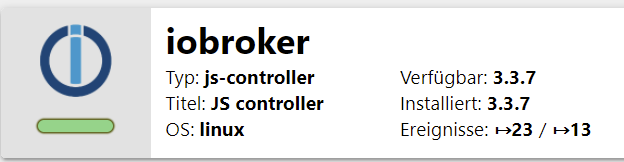
    Thomas BraunT 1 Reply Last reply
    0
    • P passuff

      @thomas-braun sagte in js-controller 3.3 jetzt im Latest:

      npm install iobroker.js-controller@

      z.B.:

      npm install iobroker.js-controller@3.3.8
      

      ?

      3eaa906a-7345-4b37-8927-b422cb6dd0ab-image.png
      Das führt bei mir leider nicht zum Erfolg, wobei ich jetzt auch keinen Fehler erkennen kann:

      root@iobroker:~# npm install iobroker.js-controller@3.3.8
      npm WARN deprecated request@2.88.2: request has been deprecated, see https://git          hub.com/request/request/issues/3142
      npm WARN deprecated har-validator@5.1.5: this library is no longer supported
      
      > iobroker.js-controller@3.3.8 preinstall /root/node_modules/iobroker.js-control          ler
      > node lib/preinstallCheck.js
      
      NPM version: 6.14.6
      
      > unix-dgram@2.0.3 install /root/node_modules/unix-dgram
      > node-gyp rebuild
      
      make: Entering directory '/root/node_modules/unix-dgram/build'
        CXX(target) Release/obj.target/unix_dgram/src/unix_dgram.o
      In file included from ../../nan/nan.h:56,
                       from ../src/unix_dgram.cc:5:
      /root/.cache/node-gyp/12.18.3/include/node/node.h:608:43: warning: cast between           incompatible function types from ‘void (*)(v8::Local<v8::Object>)’ to ‘node::add          on_register_func’ {aka ‘void (*)(v8::Local<v8::Object>, v8::Local<v8::Value>, vo          id*)’} [-Wcast-function-type]
             (node::addon_register_func) (regfunc),                          \
                                                 ^
      /root/.cache/node-gyp/12.18.3/include/node/node.h:642:3: note: in expansion of m          acro ‘NODE_MODULE_X’
         NODE_MODULE_X(modname, regfunc, NULL, 0)  // NOLINT (readability/null_usage)
         ^~~~~~~~~~~~~
      ../src/unix_dgram.cc:404:1: note: in expansion of macro ‘NODE_MODULE’
       NODE_MODULE(unix_dgram, Initialize)
       ^~~~~~~~~~~
        SOLINK_MODULE(target) Release/obj.target/unix_dgram.node
        COPY Release/unix_dgram.node
      make: Leaving directory '/root/node_modules/unix-dgram/build'
      
      > ursa-optional@0.9.10 install /root/node_modules/ursa-optional
      > node rebuild.js
      
      ursaNative bindings compilation fail. This is not an issue. Modules that depend           on it will use fallbacks.
      
      > diskusage@1.1.3 install /root/node_modules/diskusage
      > node-gyp rebuild
      
      make: Entering directory '/root/node_modules/diskusage/build'
        CXX(target) Release/obj.target/diskusage/src/main.o
      In file included from ../../nan/nan.h:56,
                       from ../src/main.cpp:3:
      /root/.cache/node-gyp/12.18.3/include/node/node.h:608:43: warning: cast between           incompatible function types from ‘void (*)(v8::Local<v8::Object>)’ to ‘node::add          on_register_func’ {aka ‘void (*)(v8::Local<v8::Object>, v8::Local<v8::Value>, vo          id*)’} [-Wcast-function-type]
             (node::addon_register_func) (regfunc),                          \
                                                 ^
      /root/.cache/node-gyp/12.18.3/include/node/node.h:642:3: note: in expansion of m          acro ‘NODE_MODULE_X’
         NODE_MODULE_X(modname, regfunc, NULL, 0)  // NOLINT (readability/null_usage)
         ^~~~~~~~~~~~~
      ../src/main.cpp:42:1: note: in expansion of macro ‘NODE_MODULE’
       NODE_MODULE(diskusage, Init)
       ^~~~~~~~~~~
        CXX(target) Release/obj.target/diskusage/src/diskusage_posix.o
        SOLINK_MODULE(target) Release/obj.target/diskusage.node
        COPY Release/diskusage.node
      make: Leaving directory '/root/node_modules/diskusage/build'
      
      > iobroker.js-controller@3.3.8 install /root/node_modules/iobroker.js-controller
      > node iobroker.js setup first
      
      creating conf/iobroker.json
      Server Cannot load /root/iobroker-data/objects.json: Database file /root/iobroke          r-data/objects.json does not exists.. We try last Backup!
      Server Cannot load /root/iobroker-data/states.json: Database file /root/iobroker          -data/states.json does not exists.. We try last Backup!
      Server Cannot load /root/iobroker-data/objects.json.bak: Database file /root/iob          roker-data/objects.json.bak does not exists.. Continue with empty dataset!
      Server If this is no Migration or initial start please restore the last backup f          rom /root/iobroker-data/backup-objects
      Server Cannot load /root/iobroker-data/states.json.bak: Database file /root/iobr          oker-data/states.json.bak does not exists.. Continue with empty dataset!
      Server If this is no Migration or initial start please restore the last backup f          rom /root/iobroker-data/backup-objects
       Cannot read system.config: null (OK when migrating or restoring)
      object 0_userdata.0.example_state created
      object 0_userdata.0 created
      object alias.0 created
      object system.certificates created
      object system.repositories created
      object system.config created
      object enum.functions created
      object enum.rooms created
      object system.group.user created
      object system.group.administrator created
      object _design/system created
      object system.meta.uuid created: 80d389c4-478f-2efa-58c6-25887e373b23
      object system.user.admin created
      
      ATTENTION: Error reporting via Sentry will be activated on next start of ioBroke          r
      
      ioBroker wants to make sure to deliver the most stable smart home system.
      To allow this we decided to implement an automatic error and crash reporting sol          ution into the js-controller and also into adapters.
      
      THIS REPORTING WILL BE ENABLED WITH THE NEXT START OF YOUR IOBROKER!
      
      For any error that leads to the crash of the js-controller or one of the relevan          t adapters the error details are send to a server. For the js-controller and cor          e adapters this server is located and operated in germany. For community adapter          s please check the Github Readme of the affected adapter for details which Sentr          y server is used.
      
      If you want to disable the error reporting you can use the command
      'iobroker plugin disable sentry'
      This command will also make sure that no adapter that runs on this host will sen          d crash reporting data to sentry.
      
      
      The object "system.certificates" was updated successfully.
      
      > @root/acme@3.1.0 postinstall /root/node_modules/@root/acme
      > node scripts/postinstall
      
      
      > esbuild@0.11.18 postinstall /root/node_modules/esbuild
      > node install.js
      
      npm WARN saveError ENOENT: no such file or directory, open '/root/package.json'
      npm notice created a lockfile as package-lock.json. You should commit this file.
      npm WARN optional SKIPPING OPTIONAL DEPENDENCY: fsevents@~2.3.1 (node_modules/ch          okidar/node_modules/fsevents):
      npm WARN notsup SKIPPING OPTIONAL DEPENDENCY: Unsupported platform for fsevents@          2.3.2: wanted {"os":"darwin","arch":"any"} (current: {"os":"linux","arch":"x64"}          )
      npm WARN enoent ENOENT: no such file or directory, open '/root/package.json'
      npm WARN root No description
      npm WARN root No repository field.
      npm WARN root No README data
      npm WARN root No license field.
      
      + iobroker.js-controller@3.3.8
      added 296 packages from 280 contributors and audited 297 packages in 60.707s
      
      11 packages are looking for funding
        run `npm fund` for details
      
      found 1 high severity vulnerability
        run `npm audit fix` to fix them, or `npm audit` for details
      
      
         ╭────────────────────────────────────────────────────────────────╮
         │                                                                │
         │      New patch version of npm available! 6.14.6 → 6.14.8       │
         │   Changelog: https://github.com/npm/cli/releases/tag/v6.14.8   │
         │               Run npm install -g npm to update!                │
         │                                                                │
         ╰────────────────────────────────────────────────────────────────╯


      EDIT:

      npm install iobroker.js-controller@3.3.8
      iobroker update
      iobroker upgrade self
      

      und schon funktioniert es....

      Thomas BraunT Online
      Thomas BraunT Online
      Thomas Braun
      Most Active
      wrote on last edited by
      #188

      @passuff
      Ich sehe direkt in den ersten vier Zeichen schon einen.

      Linux-Werkzeugkasten:
      https://forum.iobroker.net/topic/42952/der-kleine-iobroker-linux-werkzeugkasten
      NodeJS Fixer Skript:
      https://forum.iobroker.net/topic/68035/iob-node-fix-skript
      iob_diag: curl -sLf -o diag.sh https://iobroker.net/diag.sh && bash diag.sh

      P 1 Reply Last reply
      0
      • Thomas BraunT Thomas Braun

        @passuff
        Ich sehe direkt in den ersten vier Zeichen schon einen.

        P Offline
        P Offline
        passuff
        wrote on last edited by
        #189

        @thomas-braun
        dann lass den mal außen vor...
        Upgrade von 3.3.7 auf 3.3.8 war erfolgreich- leider ist das log immer noch voll mit Fehlermeldungen.
        Wie komme ich wieder zurück auf 3.3.5 oder eine andere, niedrigere Version?

        AsgothianA 1 Reply Last reply
        0
        • P passuff

          @thomas-braun
          dann lass den mal außen vor...
          Upgrade von 3.3.7 auf 3.3.8 war erfolgreich- leider ist das log immer noch voll mit Fehlermeldungen.
          Wie komme ich wieder zurück auf 3.3.5 oder eine andere, niedrigere Version?

          AsgothianA Offline
          AsgothianA Offline
          Asgothian
          Developer
          wrote on last edited by
          #190

          @passuff

          npm install iobroker.js-controller@<your-desired-version-number-here>
          

          Würde ich sagen.

          A.

          ioBroker auf RPi4 - Hardware soweit wie möglich via Zigbee.
          "Shit don't work" ist keine Fehlermeldung, sondern ein Fluch.

          HomoranH P 2 Replies Last reply
          2
          • AsgothianA Asgothian

            @passuff

            npm install iobroker.js-controller@<your-desired-version-number-here>
            

            Würde ich sagen.

            A.

            HomoranH Do not disturb
            HomoranH Do not disturb
            Homoran
            Global Moderator Administrators
            wrote on last edited by
            #191

            @asgothian sagte in js-controller 3.3 jetzt im Latest:

            @passuff

            npm install iobroker.js-controller@<your-desired-version-number-here>
            

            Würde ich sagen.

            A.

            bevor wieder einer @version schreibt?

            kein Support per PN! - Fragen im Forum stellen - es gibt fast nichts, was nicht auch für andere interessant ist.

            Benutzt das Voting rechts unten im Beitrag wenn er euch geholfen hat.

            der Installationsfixer: curl -fsL https://iobroker.net/fix.sh | bash -

            1 Reply Last reply
            0
            • AsgothianA Asgothian

              @passuff

              npm install iobroker.js-controller@<your-desired-version-number-here>
              

              Würde ich sagen.

              A.

              P Offline
              P Offline
              passuff
              wrote on last edited by
              #192

              @asgothian
              das habe ich probiert...

              npm install iobroker.js-controller@3.3.5
              iobroker update
              iobroker upgrade self
              Host    "iobroker"       is up to date.
              
              
              HomoranH 1 Reply Last reply
              0
              • P passuff

                @asgothian
                das habe ich probiert...

                npm install iobroker.js-controller@3.3.5
                iobroker update
                iobroker upgrade self
                Host    "iobroker"       is up to date.
                
                
                HomoranH Do not disturb
                HomoranH Do not disturb
                Homoran
                Global Moderator Administrators
                wrote on last edited by Homoran
                #193

                @passuff sagte in js-controller 3.3 jetzt im Latest:

                das habe ich probiert...

                das sieht aber anders aus!
                bist du vorher mit cd /opt/iobroker ins Installationsverzeichnis gewechselt???

                Wenn nur die Antworten fehlen hast du mit der 3. Zeile wieder alles zunichte gemacht

                kein Support per PN! - Fragen im Forum stellen - es gibt fast nichts, was nicht auch für andere interessant ist.

                Benutzt das Voting rechts unten im Beitrag wenn er euch geholfen hat.

                der Installationsfixer: curl -fsL https://iobroker.net/fix.sh | bash -

                Thomas BraunT P C 3 Replies Last reply
                0
                • HomoranH Homoran

                  @passuff sagte in js-controller 3.3 jetzt im Latest:

                  das habe ich probiert...

                  das sieht aber anders aus!
                  bist du vorher mit cd /opt/iobroker ins Installationsverzeichnis gewechselt???

                  Wenn nur die Antworten fehlen hast du mit der 3. Zeile wieder alles zunichte gemacht

                  Thomas BraunT Online
                  Thomas BraunT Online
                  Thomas Braun
                  Most Active
                  wrote on last edited by Thomas Braun
                  #194

                  @homoran sagte in js-controller 3.3 jetzt im Latest:

                  bist du vorher mit cd /opt/iobroker ins Installationsverzeichnis gewechselt???

                  Welches ja hier /root ist... :-D
                  Vermutlich rumpelt der Kandidat hier gerade mit root-Rechten recht ungeschickt durch sein System. Aber ist ja alles kein Problem, wir räumen das schon wieder auf. Nur ich nicht, da ist mir die Zeit zu Schade für.

                  Linux-Werkzeugkasten:
                  https://forum.iobroker.net/topic/42952/der-kleine-iobroker-linux-werkzeugkasten
                  NodeJS Fixer Skript:
                  https://forum.iobroker.net/topic/68035/iob-node-fix-skript
                  iob_diag: curl -sLf -o diag.sh https://iobroker.net/diag.sh && bash diag.sh

                  1 Reply Last reply
                  1
                  • HomoranH Homoran

                    @passuff sagte in js-controller 3.3 jetzt im Latest:

                    das habe ich probiert...

                    das sieht aber anders aus!
                    bist du vorher mit cd /opt/iobroker ins Installationsverzeichnis gewechselt???

                    Wenn nur die Antworten fehlen hast du mit der 3. Zeile wieder alles zunichte gemacht

                    P Offline
                    P Offline
                    passuff
                    wrote on last edited by passuff
                    #195

                    @homoran

                    das heißt meine Befehlskette war beim upgrade sowie beim downgrade falsch?

                    cd /opt/iobroker
                    npm install iobroker.js-controller@desiredVersion
                    

                    nicht mehr, nicht weniger...
                    Merkwürdig dass das Upgrade funktionierte...

                    HomoranH 1 Reply Last reply
                    0
                    • P passuff

                      @homoran

                      das heißt meine Befehlskette war beim upgrade sowie beim downgrade falsch?

                      cd /opt/iobroker
                      npm install iobroker.js-controller@desiredVersion
                      

                      nicht mehr, nicht weniger...
                      Merkwürdig dass das Upgrade funktionierte...

                      HomoranH Do not disturb
                      HomoranH Do not disturb
                      Homoran
                      Global Moderator Administrators
                      wrote on last edited by Homoran
                      #196

                      @passuff sagte in js-controller 3.3 jetzt im Latest:

                      das heißt meine Befehlskette war beim upgrade sowie beim downgrade falsch?

                      das habe ich nicht geschriebn!

                      ich fragte schlichtweg, ob

                      @homoran sagte in js-controller 3.3 jetzt im Latest:

                      du vorher mit cd /opt/iobroker ins Installationsverzeichnis gewechselt???

                      bist??

                      und warum da nur die Befehle, aber nicht der Output zu sehen ist

                      kein Support per PN! - Fragen im Forum stellen - es gibt fast nichts, was nicht auch für andere interessant ist.

                      Benutzt das Voting rechts unten im Beitrag wenn er euch geholfen hat.

                      der Installationsfixer: curl -fsL https://iobroker.net/fix.sh | bash -

                      Thomas BraunT 1 Reply Last reply
                      0
                      • HomoranH Homoran

                        @passuff sagte in js-controller 3.3 jetzt im Latest:

                        das heißt meine Befehlskette war beim upgrade sowie beim downgrade falsch?

                        das habe ich nicht geschriebn!

                        ich fragte schlichtweg, ob

                        @homoran sagte in js-controller 3.3 jetzt im Latest:

                        du vorher mit cd /opt/iobroker ins Installationsverzeichnis gewechselt???

                        bist??

                        und warum da nur die Befehle, aber nicht der Output zu sehen ist

                        Thomas BraunT Online
                        Thomas BraunT Online
                        Thomas Braun
                        Most Active
                        wrote on last edited by Thomas Braun
                        #197

                        @homoran

                        Ich sag nur:

                        root@iobroker:~# npm install iobroker.js-controller@3.3.8
                        

                        Ist jetzt schön alles ins ~ von root gegangen.

                        Linux-Werkzeugkasten:
                        https://forum.iobroker.net/topic/42952/der-kleine-iobroker-linux-werkzeugkasten
                        NodeJS Fixer Skript:
                        https://forum.iobroker.net/topic/68035/iob-node-fix-skript
                        iob_diag: curl -sLf -o diag.sh https://iobroker.net/diag.sh && bash diag.sh

                        HomoranH 1 Reply Last reply
                        0
                        • Thomas BraunT Thomas Braun

                          @homoran

                          Ich sag nur:

                          root@iobroker:~# npm install iobroker.js-controller@3.3.8
                          

                          Ist jetzt schön alles ins ~ von root gegangen.

                          HomoranH Do not disturb
                          HomoranH Do not disturb
                          Homoran
                          Global Moderator Administrators
                          wrote on last edited by
                          #198

                          @thomas-braun sagte in js-controller 3.3 jetzt im Latest:

                          @homoran

                          Ich sag nur:

                          root@iobroker:~# npm install iobroker.js-controller@3.3.8
                          

                          dann hat @passuff nicht aufgepasst und einen zweiten Controller parallel installiert

                          kein Support per PN! - Fragen im Forum stellen - es gibt fast nichts, was nicht auch für andere interessant ist.

                          Benutzt das Voting rechts unten im Beitrag wenn er euch geholfen hat.

                          der Installationsfixer: curl -fsL https://iobroker.net/fix.sh | bash -

                          P crunchipC 2 Replies Last reply
                          1
                          • HomoranH Homoran

                            @thomas-braun sagte in js-controller 3.3 jetzt im Latest:

                            @homoran

                            Ich sag nur:

                            root@iobroker:~# npm install iobroker.js-controller@3.3.8
                            

                            dann hat @passuff nicht aufgepasst und einen zweiten Controller parallel installiert

                            P Offline
                            P Offline
                            passuff
                            wrote on last edited by
                            #199

                            @homoran
                            wie kann ich das wieder löschen?

                            HomoranH 1 Reply Last reply
                            1
                            • HomoranH Homoran

                              @thomas-braun sagte in js-controller 3.3 jetzt im Latest:

                              @homoran

                              Ich sag nur:

                              root@iobroker:~# npm install iobroker.js-controller@3.3.8
                              

                              dann hat @passuff nicht aufgepasst und einen zweiten Controller parallel installiert

                              crunchipC Away
                              crunchipC Away
                              crunchip
                              Forum Testing Most Active
                              wrote on last edited by
                              #200

                              @homoran sagte in js-controller 3.3 jetzt im Latest:

                              dann hat @passuff nicht aufgepasst

                              welch Wortspiel:joy:

                              umgestiegen von Proxmox auf Unraid

                              1 Reply Last reply
                              0
                              • P passuff

                                @homoran
                                wie kann ich das wieder löschen?

                                HomoranH Do not disturb
                                HomoranH Do not disturb
                                Homoran
                                Global Moderator Administrators
                                wrote on last edited by
                                #201

                                @passuff sagte in js-controller 3.3 jetzt im Latest:

                                wie kann ich das wieder löschen?

                                hab ich keine Ahnung.
                                Da du da auch noch als root unterwegs bist, kann auch der Fixer da nicht ran (wenn der helfen könnte)

                                kein Support per PN! - Fragen im Forum stellen - es gibt fast nichts, was nicht auch für andere interessant ist.

                                Benutzt das Voting rechts unten im Beitrag wenn er euch geholfen hat.

                                der Installationsfixer: curl -fsL https://iobroker.net/fix.sh | bash -

                                1 Reply Last reply
                                0
                                • HomoranH Homoran

                                  @passuff sagte in js-controller 3.3 jetzt im Latest:

                                  das habe ich probiert...

                                  das sieht aber anders aus!
                                  bist du vorher mit cd /opt/iobroker ins Installationsverzeichnis gewechselt???

                                  Wenn nur die Antworten fehlen hast du mit der 3. Zeile wieder alles zunichte gemacht

                                  C Offline
                                  C Offline
                                  canim
                                  wrote on last edited by
                                  #202

                                  @homoran said in js-controller 3.3 jetzt im Latest:

                                  @passuff sagte in js-controller 3.3 jetzt im Latest:

                                  das habe ich probiert...

                                  das sieht aber anders aus!
                                  bist du vorher mit cd /opt/iobroker ins Installationsverzeichnis gewechselt???

                                  Wenn nur die Antworten fehlen hast du mit der 3. Zeile wieder alles zunichte gemacht

                                  Wichtig bei Downgrade in den iObroker Verzeichnis zu gehen

                                  cd /opt/iobroker
                                  

                                  und dann

                                  npm install iobroker.js-controller@ Version nr.
                                  

                                  den fehler hab ich auch gemacht. Naja ich vermute die leute haben kein bock den ganzen Topic zu lesen und fragen ihr Problem...

                                  HomoranH 1 Reply Last reply
                                  0
                                  • C canim

                                    @homoran said in js-controller 3.3 jetzt im Latest:

                                    @passuff sagte in js-controller 3.3 jetzt im Latest:

                                    das habe ich probiert...

                                    das sieht aber anders aus!
                                    bist du vorher mit cd /opt/iobroker ins Installationsverzeichnis gewechselt???

                                    Wenn nur die Antworten fehlen hast du mit der 3. Zeile wieder alles zunichte gemacht

                                    Wichtig bei Downgrade in den iObroker Verzeichnis zu gehen

                                    cd /opt/iobroker
                                    

                                    und dann

                                    npm install iobroker.js-controller@ Version nr.
                                    

                                    den fehler hab ich auch gemacht. Naja ich vermute die leute haben kein bock den ganzen Topic zu lesen und fragen ihr Problem...

                                    HomoranH Do not disturb
                                    HomoranH Do not disturb
                                    Homoran
                                    Global Moderator Administrators
                                    wrote on last edited by
                                    #203

                                    @canim sagte in js-controller 3.3 jetzt im Latest:

                                    Wichtig bei Downgrade in den iObroker Verzeichnis zu gehen

                                    so weit sind wir ja auch schon!

                                    die Frage ist ja, wie @passuff die zusätzliche controller-Installation unter /root wieder wegbekommt

                                    kein Support per PN! - Fragen im Forum stellen - es gibt fast nichts, was nicht auch für andere interessant ist.

                                    Benutzt das Voting rechts unten im Beitrag wenn er euch geholfen hat.

                                    der Installationsfixer: curl -fsL https://iobroker.net/fix.sh | bash -

                                    P 1 Reply Last reply
                                    0
                                    • HomoranH Homoran

                                      @canim sagte in js-controller 3.3 jetzt im Latest:

                                      Wichtig bei Downgrade in den iObroker Verzeichnis zu gehen

                                      so weit sind wir ja auch schon!

                                      die Frage ist ja, wie @passuff die zusätzliche controller-Installation unter /root wieder wegbekommt

                                      P Offline
                                      P Offline
                                      passuff
                                      wrote on last edited by
                                      #204

                                      @homoran
                                      So wichtig ist es nicht. Ich habe ein Backup der VM wiederhergestellt.
                                      Danke Dir für deine Mühe!

                                      1 Reply Last reply
                                      0
                                      • D Offline
                                        D Offline
                                        doerk32
                                        wrote on last edited by doerk32
                                        #205
                                        pi@iobroker:/opt/iobroker $ iobroker upgrade self
                                        Update js-controller from @3.2.16 to @3.3.8
                                        NPM version: 6.14.12
                                        npm install iobroker.js-controller@3.3.8 --loglevel error --unsafe-perm --prefix "/opt/iobroker" (System call)
                                        npm ERR! Unexpected end of JSON input while parsing near '...,"@sentry/utils":"6.3'
                                        
                                        npm ERR! A complete log of this run can be found in:
                                        npm ERR!     /home/iobroker/.npm/_logs/2021-05-06T08_56_39_809Z-debug.log
                                        Starting node restart.js


                                        Leider bekomme ich diese Fehlermeldung und somit t kein update für den js-controler.
                                        Was kann ich dagegen machen? Wol iegt der Fehler?

                                        Diesen Befehlssatz benutze ich zum update

                                        iobroker stop
                                        iobroker update
                                        iobroker upgrade self
                                        iobroker start 
                                        

                                        mfg
                                        Dirk

                                        Thomas BraunT 1 Reply Last reply
                                        0
                                        • D doerk32
                                          pi@iobroker:/opt/iobroker $ iobroker upgrade self
                                          Update js-controller from @3.2.16 to @3.3.8
                                          NPM version: 6.14.12
                                          npm install iobroker.js-controller@3.3.8 --loglevel error --unsafe-perm --prefix "/opt/iobroker" (System call)
                                          npm ERR! Unexpected end of JSON input while parsing near '...,"@sentry/utils":"6.3'
                                          
                                          npm ERR! A complete log of this run can be found in:
                                          npm ERR!     /home/iobroker/.npm/_logs/2021-05-06T08_56_39_809Z-debug.log
                                          Starting node restart.js


                                          Leider bekomme ich diese Fehlermeldung und somit t kein update für den js-controler.
                                          Was kann ich dagegen machen? Wol iegt der Fehler?

                                          Diesen Befehlssatz benutze ich zum update

                                          iobroker stop
                                          iobroker update
                                          iobroker upgrade self
                                          iobroker start 
                                          

                                          mfg
                                          Dirk

                                          Thomas BraunT Online
                                          Thomas BraunT Online
                                          Thomas Braun
                                          Most Active
                                          wrote on last edited by
                                          #206

                                          @doerk32
                                          Hört sich nach korruptem JSON an.
                                          Vielleicht kommst du danach wieder zu einem vollständigen file:

                                          https://forum.iobroker.net/topic/43325/mini-howto-cannot-find-view-system-for-search-host

                                          Linux-Werkzeugkasten:
                                          https://forum.iobroker.net/topic/42952/der-kleine-iobroker-linux-werkzeugkasten
                                          NodeJS Fixer Skript:
                                          https://forum.iobroker.net/topic/68035/iob-node-fix-skript
                                          iob_diag: curl -sLf -o diag.sh https://iobroker.net/diag.sh && bash diag.sh

                                          D 1 Reply Last reply
                                          0
                                          Reply
                                          • Reply as topic
                                          Log in to reply
                                          • Oldest to Newest
                                          • Newest to Oldest
                                          • Most Votes


                                          Support us

                                          ioBroker
                                          Community Adapters
                                          Donate
                                          FAQ Cloud / IOT
                                          HowTo: Node.js-Update
                                          HowTo: Backup/Restore
                                          Downloads
                                          BLOG

                                          744

                                          Online

                                          32.6k

                                          Users

                                          82.2k

                                          Topics

                                          1.3m

                                          Posts
                                          Community
                                          Impressum | Datenschutz-Bestimmungen | Nutzungsbedingungen | Einwilligungseinstellungen
                                          ioBroker Community 2014-2025
                                          logo
                                          • Login

                                          • Don't have an account? Register

                                          • Login or register to search.
                                          • First post
                                            Last post
                                          0
                                          • Home
                                          • Recent
                                          • Tags
                                          • Unread 0
                                          • Categories
                                          • Unreplied
                                          • Popular
                                          • GitHub
                                          • Docu
                                          • Hilfe