



Skip to content
  • Home
  • Aktuell
  • Tags
  • 0 Ungelesen 0
  • Kategorien
  • Unreplied
  • Beliebt
  • GitHub
  • Docu
  • Hilfe
Skins
  • Light
  • Brite
  • Cerulean
  • Cosmo
  • Flatly
  • Journal
  • Litera
  • Lumen
  • Lux
  • Materia
  • Minty
  • Morph
  • Pulse
  • Sandstone
  • Simplex
  • Sketchy
  • Spacelab
  • United
  • Yeti
  • Zephyr
  • Dark
  • Cyborg
  • Darkly
  • Quartz
  • Slate
  • Solar
  • Superhero
  • Vapor

  • Standard: (Kein Skin)
  • Kein Skin
Einklappen
ioBroker Logo

Community Forum

donate donate
  1. ioBroker Community Home
  2. Deutsch
  3. Error/Bug
  4. Error Installation KNX Adapter Ver. 10.0.39
NEWS

  • Jahresrückblick 2025 – unser neuer Blogbeitrag ist online! ✨
    BluefoxB
    Bluefox
    17
    1
    2.5k

  • Neuer Blogbeitrag: Monatsrückblick - Dezember 2025 🎄
    BluefoxB
    Bluefox
    13
    1
    994

  • Weihnachtsangebot 2025! 🎄
    BluefoxB
    Bluefox
    25
    1
    2.3k

Error Installation KNX Adapter Ver. 10.0.39

Geplant Angeheftet Gesperrt Verschoben Ungelöst Error/Bug
iobroker
71 Beiträge 3 Kommentatoren 5.1k Aufrufe 3 Watching
  • Älteste zuerst
  • Neuste zuerst
  • Meiste Stimmen
Antworten
  • In einem neuen Thema antworten
Anmelden zum Antworten
Dieses Thema wurde gelöscht. Nur Nutzer mit entsprechenden Rechten können es sehen.
  • GlasfaserG Glasfaser

    @tobiii1810

    iobroker fix
    
    T Offline
    T Offline
    tobiii1810
    schrieb am zuletzt editiert von
    #19

    @Glasfaser

    Hat @Thomas-Braun oben schon geschrieben und wurde auch schon ausgeführt.

    1 Antwort Letzte Antwort
    0
    • Thomas BraunT Thomas Braun

      @tobiii1810

      Da stimmt der prefix offenbar nicht.

      cd /opt/iobroker
      iobroker add knx
      
      GlasfaserG Offline
      GlasfaserG Offline
      Glasfaser
      schrieb am zuletzt editiert von Glasfaser
      #20

      @Thomas-Braun

      ich würde die Kiste mal neu durchstarten lassen .....!?

      Synology 918+ 16GB - ioBroker in Docker v9 , VISO auf Trekstor Primebook C13 13,3" , Hikvision Domkameras mit Surveillance Station .. CCU RaspberryMatic in Synology VM .. Zigbee CC2538+CC2592 .. Sonoff .. KNX .. Modbus ..

      Thomas BraunT 1 Antwort Letzte Antwort
      0
      • GlasfaserG Glasfaser

        @Thomas-Braun

        ich würde die Kiste mal neu durchstarten lassen .....!?

        Thomas BraunT Online
        Thomas BraunT Online
        Thomas Braun
        Most Active
        schrieb am zuletzt editiert von
        #21

        @Glasfaser Ja.
        @tobiii1810

        sudo reboot
        

        Und ich würde mir auch einen vernünftigen USER anlegen. Da mit dem iobroker rumzumachen ist nicht gerade günstig.

        Linux-Werkzeugkasten:
        https://forum.iobroker.net/topic/42952/der-kleine-iobroker-linux-werkzeugkasten
        NodeJS Fixer Skript:
        https://forum.iobroker.net/topic/68035/iob-node-fix-skript
        iob_diag: curl -sLf -o diag.sh https://iobroker.net/diag.sh && bash diag.sh

        T 1 Antwort Letzte Antwort
        0
        • Thomas BraunT Thomas Braun

          @Glasfaser Ja.
          @tobiii1810

          sudo reboot
          

          Und ich würde mir auch einen vernünftigen USER anlegen. Da mit dem iobroker rumzumachen ist nicht gerade günstig.

          T Offline
          T Offline
          tobiii1810
          schrieb am zuletzt editiert von
          #22

          @Thomas-Braun

          Auch ein reboot bringt keinen Erfolg. Sollte ich iobroker komplett neu aufsetzten?

          Thomas BraunT 1 Antwort Letzte Antwort
          0
          • T tobiii1810

            @Thomas-Braun

            Auch ein reboot bringt keinen Erfolg. Sollte ich iobroker komplett neu aufsetzten?

            Thomas BraunT Online
            Thomas BraunT Online
            Thomas Braun
            Most Active
            schrieb am zuletzt editiert von
            #23

            @tobiii1810

            iobroker add knx  --prefix "/opt/iobroker"
            

            Versuch mal so.

            Linux-Werkzeugkasten:
            https://forum.iobroker.net/topic/42952/der-kleine-iobroker-linux-werkzeugkasten
            NodeJS Fixer Skript:
            https://forum.iobroker.net/topic/68035/iob-node-fix-skript
            iob_diag: curl -sLf -o diag.sh https://iobroker.net/diag.sh && bash diag.sh

            T GlasfaserG 2 Antworten Letzte Antwort
            0
            • Thomas BraunT Thomas Braun

              @tobiii1810

              iobroker add knx  --prefix "/opt/iobroker"
              

              Versuch mal so.

              T Offline
              T Offline
              tobiii1810
              schrieb am zuletzt editiert von
              #24

              @Thomas-Braun said in Error Installation KNX Adapter Ver. 10.0.39:

              iobroker add knx --prefix "/opt/iobroker"

              Gleiches Fehlerbild.

              Thomas BraunT 1 Antwort Letzte Antwort
              0
              • T tobiii1810

                @Thomas-Braun said in Error Installation KNX Adapter Ver. 10.0.39:

                iobroker add knx --prefix "/opt/iobroker"

                Gleiches Fehlerbild.

                Thomas BraunT Online
                Thomas BraunT Online
                Thomas Braun
                Most Active
                schrieb am zuletzt editiert von
                #25

                @tobiii1810 Bitte Ausgaben posten.

                Linux-Werkzeugkasten:
                https://forum.iobroker.net/topic/42952/der-kleine-iobroker-linux-werkzeugkasten
                NodeJS Fixer Skript:
                https://forum.iobroker.net/topic/68035/iob-node-fix-skript
                iob_diag: curl -sLf -o diag.sh https://iobroker.net/diag.sh && bash diag.sh

                T 1 Antwort Letzte Antwort
                0
                • Thomas BraunT Thomas Braun

                  @tobiii1810 Bitte Ausgaben posten.

                  T Offline
                  T Offline
                  tobiii1810
                  schrieb am zuletzt editiert von
                  #26

                  @Thomas-Braun

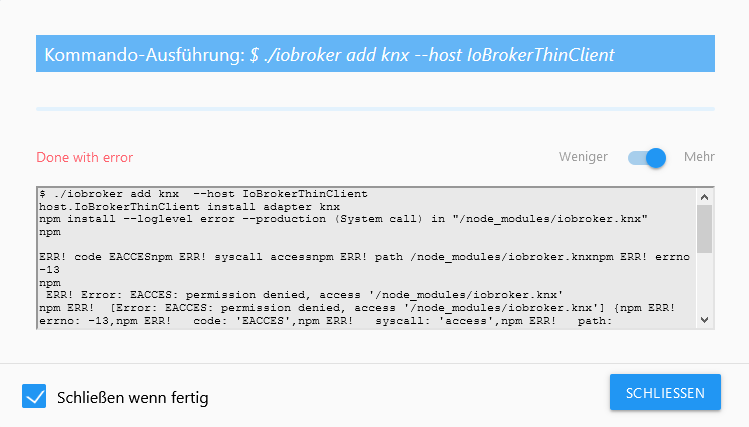
                  iobroker@IoBrokerThinClient:/$ iobroker add knx  --prefix "/opt/iobroker"
                  host.IoBrokerThinClient install adapter knx
                  npm install --loglevel error --production (System call) in "/node_modules/iobroker.knx"
                  npm ERR! code EACCES
                  npm ERR! syscall access
                  npm ERR! path /node_modules/iobroker.knx
                  npm ERR! errno -13
                  npm ERR! Error: EACCES: permission denied, access '/node_modules/iobroker.knx'
                  npm ERR!  [Error: EACCES: permission denied, access '/node_modules/iobroker.knx'] {
                  npm ERR!   errno: -13,
                  npm ERR!   code: 'EACCES',
                  npm ERR!   syscall: 'access',
                  npm ERR!   path: '/node_modules/iobroker.knx'
                  npm ERR! }
                  npm ERR!
                  npm ERR! The operation was rejected by your operating system.
                  npm ERR! It is likely you do not have the permissions to access this file as the current user
                  npm ERR!
                  npm ERR! If you believe this might be a permissions issue, please double-check the
                  npm ERR! permissions of the file and its containing directories, or try running
                  npm ERR! the command again as root/Administrator.
                  
                  npm ERR! A complete log of this run can be found in:
                  npm ERR!     /home/iobroker/.npm/_logs/2020-11-02T20_09_43_507Z-debug.log
                  Cannot install iobroker.knx: 243
                  
                  
                  GlasfaserG 1 Antwort Letzte Antwort
                  0
                  • Thomas BraunT Thomas Braun

                    @tobiii1810

                    iobroker add knx  --prefix "/opt/iobroker"
                    

                    Versuch mal so.

                    GlasfaserG Offline
                    GlasfaserG Offline
                    Glasfaser
                    schrieb am zuletzt editiert von Glasfaser
                    #27

                    @Thomas-Braun

                    ich vermute mal der Ordner ist/war schon da ... aber falsche Rechte gesetzt .

                    /node_modules/iobroker.knx
                    

                    und der Fix greift nicht ...

                    Synology 918+ 16GB - ioBroker in Docker v9 , VISO auf Trekstor Primebook C13 13,3" , Hikvision Domkameras mit Surveillance Station .. CCU RaspberryMatic in Synology VM .. Zigbee CC2538+CC2592 .. Sonoff .. KNX .. Modbus ..

                    Thomas BraunT 1 Antwort Letzte Antwort
                    0
                    • GlasfaserG Glasfaser

                      @Thomas-Braun

                      ich vermute mal der Ordner ist/war schon da ... aber falsche Rechte gesetzt .

                      /node_modules/iobroker.knx
                      

                      und der Fix greift nicht ...

                      Thomas BraunT Online
                      Thomas BraunT Online
                      Thomas Braun
                      Most Active
                      schrieb am zuletzt editiert von Thomas Braun
                      #28

                      @Glasfaser Nee, da greift der Prefix /opt/iobroker nicht und die Installation soll in / erfolgen. Und das darf der iobroker natürlich nicht. Ich weiß aber nicht wo das einzustellen ist.

                      Das Environment für einen Standarduser weicht ja auch vom Systemuser iobroker ab:

                      pi:x:1000:1000:,,,:/home/pi:/bin/bash
                      iobroker:x:1001:1001::/home/iobroker:/usr/sbin/nologin

                      

                      Ich bin aber nicht sicher, ob das damit zu tun haben könnte.

                      In einem 'sauberen' System läuft die Installation ja auch in das richtige Directory rein:

                      iobroker add knx
                      NPM version: 6.14.8
                      npm install iobroker.knx@1.0.42 --loglevel error --prefix "/opt/iobroker" (System call)
                      

                      Linux-Werkzeugkasten:
                      https://forum.iobroker.net/topic/42952/der-kleine-iobroker-linux-werkzeugkasten
                      NodeJS Fixer Skript:
                      https://forum.iobroker.net/topic/68035/iob-node-fix-skript
                      iob_diag: curl -sLf -o diag.sh https://iobroker.net/diag.sh && bash diag.sh

                      1 Antwort Letzte Antwort
                      0
                      • T tobiii1810

                        @Thomas-Braun

                        iobroker@IoBrokerThinClient:/$ iobroker add knx  --prefix "/opt/iobroker"
                        host.IoBrokerThinClient install adapter knx
                        npm install --loglevel error --production (System call) in "/node_modules/iobroker.knx"
                        npm ERR! code EACCES
                        npm ERR! syscall access
                        npm ERR! path /node_modules/iobroker.knx
                        npm ERR! errno -13
                        npm ERR! Error: EACCES: permission denied, access '/node_modules/iobroker.knx'
                        npm ERR!  [Error: EACCES: permission denied, access '/node_modules/iobroker.knx'] {
                        npm ERR!   errno: -13,
                        npm ERR!   code: 'EACCES',
                        npm ERR!   syscall: 'access',
                        npm ERR!   path: '/node_modules/iobroker.knx'
                        npm ERR! }
                        npm ERR!
                        npm ERR! The operation was rejected by your operating system.
                        npm ERR! It is likely you do not have the permissions to access this file as the current user
                        npm ERR!
                        npm ERR! If you believe this might be a permissions issue, please double-check the
                        npm ERR! permissions of the file and its containing directories, or try running
                        npm ERR! the command again as root/Administrator.
                        
                        npm ERR! A complete log of this run can be found in:
                        npm ERR!     /home/iobroker/.npm/_logs/2020-11-02T20_09_43_507Z-debug.log
                        Cannot install iobroker.knx: 243
                        
                        
                        GlasfaserG Offline
                        GlasfaserG Offline
                        Glasfaser
                        schrieb am zuletzt editiert von Glasfaser
                        #29

                        @Thomas-Braun

                        Er hat :

                        iobroker@IoBrokerThinClient:/$
                        

                        müsste das nicht so sein !?

                        iobroker@IoBrokerThinClient:~#
                        

                        am Ende

                        ~#
                        

                        Synology 918+ 16GB - ioBroker in Docker v9 , VISO auf Trekstor Primebook C13 13,3" , Hikvision Domkameras mit Surveillance Station .. CCU RaspberryMatic in Synology VM .. Zigbee CC2538+CC2592 .. Sonoff .. KNX .. Modbus ..

                        Thomas BraunT 1 Antwort Letzte Antwort
                        0
                        • GlasfaserG Glasfaser

                          @Thomas-Braun

                          Er hat :

                          iobroker@IoBrokerThinClient:/$
                          

                          müsste das nicht so sein !?

                          iobroker@IoBrokerThinClient:~#
                          

                          am Ende

                          ~#
                          
                          Thomas BraunT Online
                          Thomas BraunT Online
                          Thomas Braun
                          Most Active
                          schrieb am zuletzt editiert von Thomas Braun
                          #30

                          @Glasfaser Nee, das ist schon richtig.

                          # für root
                          $ für U$ER
                          

                          Trotzdem ist iobroker kein 'normaler' User.

                          Linux-Werkzeugkasten:
                          https://forum.iobroker.net/topic/42952/der-kleine-iobroker-linux-werkzeugkasten
                          NodeJS Fixer Skript:
                          https://forum.iobroker.net/topic/68035/iob-node-fix-skript
                          iob_diag: curl -sLf -o diag.sh https://iobroker.net/diag.sh && bash diag.sh

                          GlasfaserG T 2 Antworten Letzte Antwort
                          0
                          • Thomas BraunT Thomas Braun

                            @Glasfaser Nee, das ist schon richtig.

                            # für root
                            $ für U$ER
                            

                            Trotzdem ist iobroker kein 'normaler' User.

                            GlasfaserG Offline
                            GlasfaserG Offline
                            Glasfaser
                            schrieb am zuletzt editiert von
                            #31

                            @Thomas-Braun

                            Oh ...
                            stimmt ich muß immer umdenken , da es bei der Synology (Docker) anders ist ( root) :)

                            Synology 918+ 16GB - ioBroker in Docker v9 , VISO auf Trekstor Primebook C13 13,3" , Hikvision Domkameras mit Surveillance Station .. CCU RaspberryMatic in Synology VM .. Zigbee CC2538+CC2592 .. Sonoff .. KNX .. Modbus ..

                            1 Antwort Letzte Antwort
                            0
                            • Thomas BraunT Thomas Braun

                              @Glasfaser Nee, das ist schon richtig.

                              # für root
                              $ für U$ER
                              

                              Trotzdem ist iobroker kein 'normaler' User.

                              T Offline
                              T Offline
                              tobiii1810
                              schrieb am zuletzt editiert von
                              #32

                              @Thomas-Braun

                              Bei der Debian Installation habe ich einen User mit dem Namen "iobroker" angelegt. Vielleicht verwirrt der Name nur ein wenig...

                              Thomas BraunT 2 Antworten Letzte Antwort
                              0
                              • T tobiii1810

                                @Thomas-Braun

                                Bei der Debian Installation habe ich einen User mit dem Namen "iobroker" angelegt. Vielleicht verwirrt der Name nur ein wenig...

                                Thomas BraunT Online
                                Thomas BraunT Online
                                Thomas Braun
                                Most Active
                                schrieb am zuletzt editiert von
                                #33

                                @tobiii1810 Ääääääh...
                                GAAAAAAAAAANZ doofe Idee!
                                Der iobroker ist für andere Dinge vorgesehen.

                                Linux-Werkzeugkasten:
                                https://forum.iobroker.net/topic/42952/der-kleine-iobroker-linux-werkzeugkasten
                                NodeJS Fixer Skript:
                                https://forum.iobroker.net/topic/68035/iob-node-fix-skript
                                iob_diag: curl -sLf -o diag.sh https://iobroker.net/diag.sh && bash diag.sh

                                T 1 Antwort Letzte Antwort
                                0
                                • Thomas BraunT Thomas Braun

                                  @tobiii1810 Ääääääh...
                                  GAAAAAAAAAANZ doofe Idee!
                                  Der iobroker ist für andere Dinge vorgesehen.

                                  T Offline
                                  T Offline
                                  tobiii1810
                                  schrieb am zuletzt editiert von
                                  #34

                                  @Thomas-Braun

                                  Kann ich den Usernamen nachträglich ändern?

                                  1 Antwort Letzte Antwort
                                  0
                                  • T tobiii1810

                                    @Thomas-Braun

                                    Bei der Debian Installation habe ich einen User mit dem Namen "iobroker" angelegt. Vielleicht verwirrt der Name nur ein wenig...

                                    Thomas BraunT Online
                                    Thomas BraunT Online
                                    Thomas Braun
                                    Most Active
                                    schrieb am zuletzt editiert von
                                    #35

                                    @tobiii1810

                                    cat /etc/passwd | grep iobroker
                                    

                                    Linux-Werkzeugkasten:
                                    https://forum.iobroker.net/topic/42952/der-kleine-iobroker-linux-werkzeugkasten
                                    NodeJS Fixer Skript:
                                    https://forum.iobroker.net/topic/68035/iob-node-fix-skript
                                    iob_diag: curl -sLf -o diag.sh https://iobroker.net/diag.sh && bash diag.sh

                                    T 1 Antwort Letzte Antwort
                                    0
                                    • Thomas BraunT Thomas Braun

                                      @tobiii1810

                                      cat /etc/passwd | grep iobroker
                                      
                                      T Offline
                                      T Offline
                                      tobiii1810
                                      schrieb am zuletzt editiert von
                                      #36

                                      @Thomas-Braun

                                      iobroker@IoBrokerThinClient:/$ cat /etc/passwd | grep iobroker
                                      iobroker:x:1000:1000:Iobroker,,,:/home/iobroker:/bin/bash
                                      
                                      
                                      Thomas BraunT 2 Antworten Letzte Antwort
                                      0
                                      • T tobiii1810

                                        @Thomas-Braun

                                        iobroker@IoBrokerThinClient:/$ cat /etc/passwd | grep iobroker
                                        iobroker:x:1000:1000:Iobroker,,,:/home/iobroker:/bin/bash
                                        
                                        
                                        Thomas BraunT Online
                                        Thomas BraunT Online
                                        Thomas Braun
                                        Most Active
                                        schrieb am zuletzt editiert von
                                        #37

                                        @tobiii1810
                                        Ja, das ist für die UID 1000 das richtige Setup, aber der falsche Name...

                                        Der User iobroker läuft eigentlich so:

                                        iobroker:x:1001:1001::/home/iobroker:/usr/sbin/nologin
                                        

                                        Linux-Werkzeugkasten:
                                        https://forum.iobroker.net/topic/42952/der-kleine-iobroker-linux-werkzeugkasten
                                        NodeJS Fixer Skript:
                                        https://forum.iobroker.net/topic/68035/iob-node-fix-skript
                                        iob_diag: curl -sLf -o diag.sh https://iobroker.net/diag.sh && bash diag.sh

                                        Thomas BraunT 1 Antwort Letzte Antwort
                                        0
                                        • Thomas BraunT Thomas Braun

                                          @tobiii1810
                                          Ja, das ist für die UID 1000 das richtige Setup, aber der falsche Name...

                                          Der User iobroker läuft eigentlich so:

                                          iobroker:x:1001:1001::/home/iobroker:/usr/sbin/nologin
                                          
                                          Thomas BraunT Online
                                          Thomas BraunT Online
                                          Thomas Braun
                                          Most Active
                                          schrieb am zuletzt editiert von
                                          #38

                                          @Thomas-Braun

                                          Linux-Werkzeugkasten:
                                          https://forum.iobroker.net/topic/42952/der-kleine-iobroker-linux-werkzeugkasten
                                          NodeJS Fixer Skript:
                                          https://forum.iobroker.net/topic/68035/iob-node-fix-skript
                                          iob_diag: curl -sLf -o diag.sh https://iobroker.net/diag.sh && bash diag.sh

                                          1 Antwort Letzte Antwort
                                          0
                                          Antworten
                                          • In einem neuen Thema antworten
                                          Anmelden zum Antworten
                                          • Älteste zuerst
                                          • Neuste zuerst
                                          • Meiste Stimmen


                                          Support us

                                          ioBroker
                                          Community Adapters
                                          Donate

                                          616

                                          Online

                                          32.6k

                                          Benutzer

                                          82.3k

                                          Themen

                                          1.3m

                                          Beiträge
                                          Community
                                          Impressum | Datenschutz-Bestimmungen | Nutzungsbedingungen | Einwilligungseinstellungen
                                          ioBroker Community 2014-2025
                                          logo
                                          • Anmelden

                                          • Du hast noch kein Konto? Registrieren

                                          • Anmelden oder registrieren, um zu suchen
                                          • Erster Beitrag
                                            Letzter Beitrag
                                          0
                                          • Home
                                          • Aktuell
                                          • Tags
                                          • Ungelesen 0
                                          • Kategorien
                                          • Unreplied
                                          • Beliebt
                                          • GitHub
                                          • Docu
                                          • Hilfe