




Adapter sind plötzlich nicht mehr aktualisiert
-
Das Problem ist ja die Logs geben nichts her, weil die Updates laufen ja fehlerfrei durch. Da stand letztens bei Adaptern (1) also noch ein Adapter mit Updats, am nächsten Tag stand da wieder (12) und die Adapter die ich am Vortag aktualisiert habem waren wieder auf dem alten Stand.
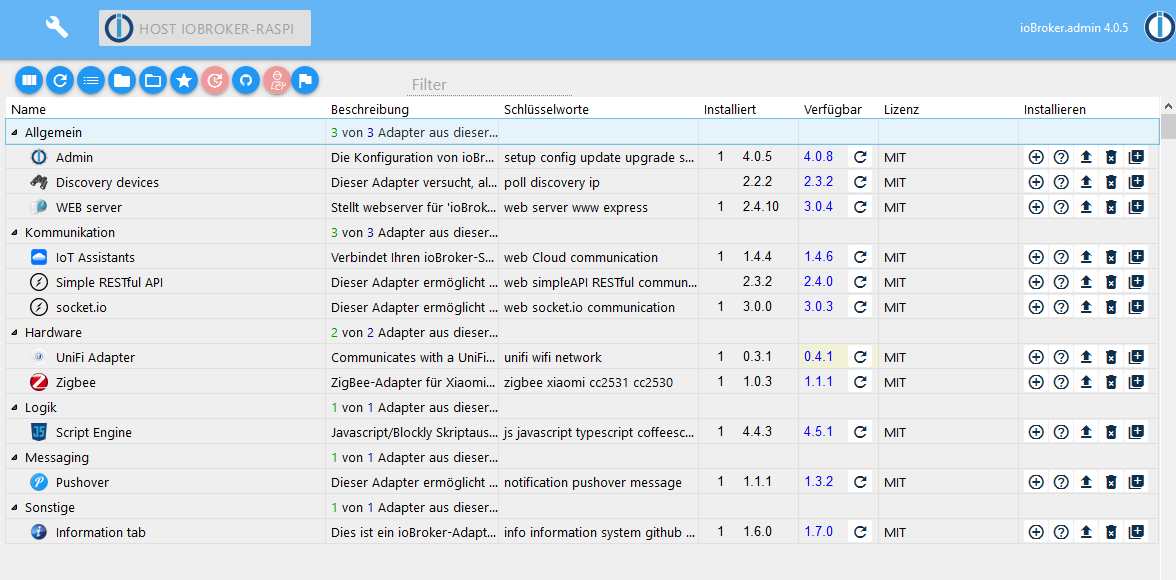
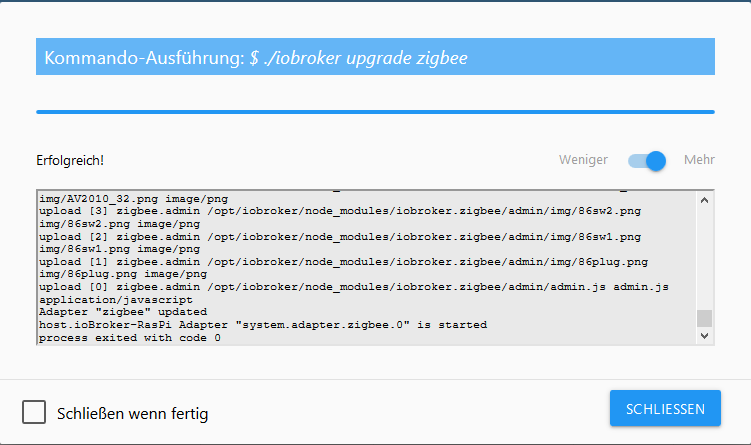
Update fehlerfrei. Dann habe ich den Ping Adapter aktualisiert und siehe da, der Zigbee Adapter ist wieder 1.0.3
Zum Mäuse melken
-
Kann es sein, das du von default auf latest gewechselt hast, in den Einstellungen, und deshalb siehst du viel mehr verfügbare Updates?
-
Das Problem ist ja die Logs geben nichts her, weil die Updates laufen ja fehlerfrei durch. Da stand letztens bei Adaptern (1) also noch ein Adapter mit Updats, am nächsten Tag stand da wieder (12) und die Adapter die ich am Vortag aktualisiert habem waren wieder auf dem alten Stand.
Update fehlerfrei. Dann habe ich den Ping Adapter aktualisiert und siehe da, der Zigbee Adapter ist wieder 1.0.3
Zum Mäuse melken
@Hagiman2000 könnte eventuell an deinem Browser cache liegen
-
Das Problem ist ja die Logs geben nichts her, weil die Updates laufen ja fehlerfrei durch. Da stand letztens bei Adaptern (1) also noch ein Adapter mit Updats, am nächsten Tag stand da wieder (12) und die Adapter die ich am Vortag aktualisiert habem waren wieder auf dem alten Stand.
Update fehlerfrei. Dann habe ich den Ping Adapter aktualisiert und siehe da, der Zigbee Adapter ist wieder 1.0.3
Zum Mäuse melken
@Hagiman2000 sagte in Adapter sind plötzlich nicht mehr aktualisiert:
Update fehlerfrei. Dann habe ich den Ping Adapter aktualisiert und siehe da, der Zigbee Adapter ist wieder 1.0.3
Man sieht nur das Ende vom Log ... !
Ist am Anfang eine Meldung mit " pixman- "
-
$ ./iobroker upgrade discovery
Update discovery from @2.2.2 to @2.3.5
NPM version: 6.13.4
npm install iobroker.discovery@2.3.5 --loglevel error --prefix "/opt/iobroker" (System call)
Package pixman-1 was not found in the pkg-config search path.Perhaps you should add the directory containing `pixman-1.pc'to the PKG_CONFIG_PATH environment variableNo package 'pixman-1' found
gyp: Call to 'pkg-config pixman-1 --libs' returned exit status 1 while in binding.gyp. while trying to load binding.gyp
gyp
 ERR! configure error
gyp ERR! stack Error: `gyp` failed with exit code: 1gyp ERR! stack     at ChildProcess.onCpExit (/usr/lib/node_modules/npm/node_modules/node-gyp/lib/configure.js:351:16)gyp ERR! stack     at ChildProcess.emit (events.js:198:13)gyp ERR! stack     at Process.ChildProcess._handle.onexit (internal/child_process.js:248:12)gyp ERR! System Linux 4.9.24-v7+
gyp ERR! command "/usr/bin/node" "/usr/lib/node_modules/npm/node_modules/node-gyp/bin/node-gyp.js" "configure" "--fallback-to-build" "--module=/opt/iobroker/node_modules/canvas/build/Release/canvas.node" "--module_name=canvas" "--module_path=/opt/iobroker/node_modules/canvas/build/Release" "--napi_version=5" "--node_abi_napi=napi" "--napi_build_version=0" "--node_napi_label=node-v64"gyp ERR! cwd /opt/iobroker/node_modules/canvasgyp ERR! node -v v10.19.0gyp ERR! node-gyp -v v5.0.5gyp ERR! not ok
node-pre-gyp ERR! build error
node-pre-gyp ERR! stack Error: Failed to execute '/usr/bin/node /usr/lib/node_modules/npm/node_modules/node-gyp/bin/node-gyp.js configure --fallback-to-build --module=/opt/iobroker/node_modules/canvas/build/Release/canvas.node --module_name=canvas --module_path=/opt/iobroker/node_modules/canvas/build/Release --napi_version=5 --node_abi_napi=napi --napi_build_version=0 --node_napi_label=node-v64' (1)node-pre-gyp ERR! stack     at ChildProcess.<anonymous> (/opt/iobroker/node_modules/node-pre-gyp/lib/util/compile.js:83:29)node-pre-gyp ERR! stack     at ChildProcess.emit (events.js:198:13)node-pre-gyp ERR! stack     at maybeClose (internal/child_process.js:982:16)node-pre-gyp ERR! stack     at Process.ChildProcess._handle.onexit (internal/child_process.js:259:5)
node-pre-gyp ERR! System Linux 4.9.24-v7+node-pre-gyp ERR! command "/usr/bin/node" "/opt/iobroker/node_modules/.bin/node-pre-gyp" "install" "--fallback-to-build"node-pre-gyp ERR! cwd /opt/iobroker/node_modules/canvasnode-pre-gyp ERR! node -v v10.19.0node-pre-gyp ERR! node-pre-gyp -v v0.11.0node-pre-gyp ERR! not ok
npm ERR! code ELIFECYCLE
npm ERR! errno 1npm ERR! canvas@2.6.1 install: `node-pre-gyp install --fallback-to-build`npm ERR! Exit status 1npm ERR! npm ERR! Failed at the canvas@2.6.1 install script.npm ERR! This is probably not a problem with npm. There is likely additional logging output above.
npm ERR! A complete log of this run can be found in:npm ERR!     /home/iobroker/.npm/_logs/2020-05-16T22_51_36_834Z-debug.log
upload [6] discovery.admin /opt/iobroker/node_modules/iobroker.discovery/admin/words.js words.js application/javascript
upload [5] discovery.admin /opt/iobroker/node_modules/iobroker.discovery/admin/translateTools.js translateTools.js application/javascript
upload [4] discovery.admin /opt/iobroker/node_modules/iobroker.discovery/admin/settings_m.html settings_m.html text/html
upload [3] discovery.admin /opt/iobroker/node_modules/iobroker.discovery/admin/settings.html settings.html text/html
upload [2] discovery.admin /opt/iobroker/node_modules/iobroker.discovery/admin/index_m.html index_m.html text/html
upload [1] discovery.admin /opt/iobroker/node_modules/iobroker.discovery/admin/index.html index.html text/html
upload [0] discovery.admin /opt/iobroker/node_modules/iobroker.discovery/admin/discovery.png discovery.png image/png
Adapter "discovery" updated
process exited with code 0
Ja das steht etwas mit gyp: Call to 'pkg-config pixman-1 --libs' returned exit status 1 while in binding.gyp. while trying to load binding.gyp
-
$ ./iobroker upgrade discovery
Update discovery from @2.2.2 to @2.3.5
NPM version: 6.13.4
npm install iobroker.discovery@2.3.5 --loglevel error --prefix "/opt/iobroker" (System call)
Package pixman-1 was not found in the pkg-config search path.Perhaps you should add the directory containing `pixman-1.pc'to the PKG_CONFIG_PATH environment variableNo package 'pixman-1' found
gyp: Call to 'pkg-config pixman-1 --libs' returned exit status 1 while in binding.gyp. while trying to load binding.gyp
gyp
 ERR! configure error
gyp ERR! stack Error: `gyp` failed with exit code: 1gyp ERR! stack     at ChildProcess.onCpExit (/usr/lib/node_modules/npm/node_modules/node-gyp/lib/configure.js:351:16)gyp ERR! stack     at ChildProcess.emit (events.js:198:13)gyp ERR! stack     at Process.ChildProcess._handle.onexit (internal/child_process.js:248:12)gyp ERR! System Linux 4.9.24-v7+
gyp ERR! command "/usr/bin/node" "/usr/lib/node_modules/npm/node_modules/node-gyp/bin/node-gyp.js" "configure" "--fallback-to-build" "--module=/opt/iobroker/node_modules/canvas/build/Release/canvas.node" "--module_name=canvas" "--module_path=/opt/iobroker/node_modules/canvas/build/Release" "--napi_version=5" "--node_abi_napi=napi" "--napi_build_version=0" "--node_napi_label=node-v64"gyp ERR! cwd /opt/iobroker/node_modules/canvasgyp ERR! node -v v10.19.0gyp ERR! node-gyp -v v5.0.5gyp ERR! not ok
node-pre-gyp ERR! build error
node-pre-gyp ERR! stack Error: Failed to execute '/usr/bin/node /usr/lib/node_modules/npm/node_modules/node-gyp/bin/node-gyp.js configure --fallback-to-build --module=/opt/iobroker/node_modules/canvas/build/Release/canvas.node --module_name=canvas --module_path=/opt/iobroker/node_modules/canvas/build/Release --napi_version=5 --node_abi_napi=napi --napi_build_version=0 --node_napi_label=node-v64' (1)node-pre-gyp ERR! stack     at ChildProcess.<anonymous> (/opt/iobroker/node_modules/node-pre-gyp/lib/util/compile.js:83:29)node-pre-gyp ERR! stack     at ChildProcess.emit (events.js:198:13)node-pre-gyp ERR! stack     at maybeClose (internal/child_process.js:982:16)node-pre-gyp ERR! stack     at Process.ChildProcess._handle.onexit (internal/child_process.js:259:5)
node-pre-gyp ERR! System Linux 4.9.24-v7+node-pre-gyp ERR! command "/usr/bin/node" "/opt/iobroker/node_modules/.bin/node-pre-gyp" "install" "--fallback-to-build"node-pre-gyp ERR! cwd /opt/iobroker/node_modules/canvasnode-pre-gyp ERR! node -v v10.19.0node-pre-gyp ERR! node-pre-gyp -v v0.11.0node-pre-gyp ERR! not ok
npm ERR! code ELIFECYCLE
npm ERR! errno 1npm ERR! canvas@2.6.1 install: `node-pre-gyp install --fallback-to-build`npm ERR! Exit status 1npm ERR! npm ERR! Failed at the canvas@2.6.1 install script.npm ERR! This is probably not a problem with npm. There is likely additional logging output above.
npm ERR! A complete log of this run can be found in:npm ERR!     /home/iobroker/.npm/_logs/2020-05-16T22_51_36_834Z-debug.log
upload [6] discovery.admin /opt/iobroker/node_modules/iobroker.discovery/admin/words.js words.js application/javascript
upload [5] discovery.admin /opt/iobroker/node_modules/iobroker.discovery/admin/translateTools.js translateTools.js application/javascript
upload [4] discovery.admin /opt/iobroker/node_modules/iobroker.discovery/admin/settings_m.html settings_m.html text/html
upload [3] discovery.admin /opt/iobroker/node_modules/iobroker.discovery/admin/settings.html settings.html text/html
upload [2] discovery.admin /opt/iobroker/node_modules/iobroker.discovery/admin/index_m.html index_m.html text/html
upload [1] discovery.admin /opt/iobroker/node_modules/iobroker.discovery/admin/index.html index.html text/html
upload [0] discovery.admin /opt/iobroker/node_modules/iobroker.discovery/admin/discovery.png discovery.png image/png
Adapter "discovery" updated
process exited with code 0
Ja das steht etwas mit gyp: Call to 'pkg-config pixman-1 --libs' returned exit status 1 while in binding.gyp. while trying to load binding.gyp
sudo apt install libpixman-1-dev libpixman-1-0 -
Ist auf den neusten Stand. Habe auch den canvas neu bauen lassen. Das lief in Fehler und jetzt sehen die Installationen noch schlimmer aus.
$ ./iobroker upgrade history Update history from @1.8.7 to @1.9.6 NPM version: 6.13.4npm install iobroker.history@1.9.6 --loglevel error --prefix "/opt/iobroker" (System call) ../src/bmp/BMPParser.cc: In member function ‘void BMPParser::Parser::parse(uint8_t*, int, uint8_t*)’:../src/bmp/BMPParser.cc:189:16: warning: comparison between signed and unsigned integer expressions [-Wsign-compare] E(ptr - data > imgdOffset, "image data overlaps with another structure"); ^../src/bmp/BMPParser.cc:10:25: note: in definition of macro ‘E’ #define E(cond, msg) if(cond) return setErr(msg) ^../src/bmp/BMPParser.cc:204:27: warning: comparison between signed and unsigned integer expressions [-Wsign-compare] E(ptr - data + imgdSize > len, "not enough image data"); ^../src/bmp/BMPParser.cc:10:25: note: in definition of macro ‘E’ #define E(cond, msg) if(cond) return setErr(msg) ^ ../src/Canvas.cc: In static member function ‘static Nan::NAN_METHOD_RETURN_TYPE Canvas::ToBuffer(Nan::NAN_METHOD_ARGS_TYPE)’:../src/Canvas.cc:415:26: warning: comparison between signed and unsigned integer expressions [-Wsign-compare] if (canvas->nBytes() > node::Buffer::kMaxLength) { ^ ../src/Canvas.cc: At global scope:../src/Canvas.cc:935:1: fatal error: opening dependency file ./Release/.deps/Release/obj.target/canvas/src/Canvas.o.d.raw: Datei oder Verzeichnis nicht gefunden } ^ compilation terminated. make: *** [Release/obj.target/canvas/src/Canvas.o] Error 1 gyp ERR! build error gyp ERR! stack Error: `make` failed with exit code: 2gyp ERR! stack at ChildProcess.onExit (/usr/lib/node_modules/npm/node_modules/node-gyp/lib/build.js:191:23)gyp ERR! stack at ChildProcess.emit (events.js:198:13)gyp ERR! stack at Process.ChildProcess._handle.onexit (internal/child_process.js:248:12) gyp ERR! System Linux 4.9.24-v7+gyp ERR! command "/usr/bin/node" "/usr/lib/node_modules/npm/node_modules/node-gyp/bin/node-gyp.js" "build" "--fallback-to-build" "--module=/opt/iobroker/node_modules/canvas/build/Release/canvas.node" "--module_name=canvas" "--module_path=/opt/iobroker/node_modules/canvas/build/Release" "--napi_version=5" "--node_abi_napi=napi" "--napi_build_version=0" "--node_napi_label=node-v64" gyp ERR! cwd /opt/iobroker/node_modules/canvasgyp ERR! node -v v10.19.0gyp ERR! node-gyp -v v5.0.5gyp ERR! not ok node-pre-gyp ERR! build error node-pre-gyp ERR! stack Error: Failed to execute '/usr/bin/node /usr/lib/node_modules/npm/node_modules/node-gyp/bin/node-gyp.js build --fallback-to-build --module=/opt/iobroker/node_modules/canvas/build/Release/canvas.node --module_name=canvas --module_path=/opt/iobroker/node_modules/canvas/build/Release --napi_version=5 --node_abi_napi=napi --napi_build_version=0 --node_napi_label=node-v64' (1)node-pre-gyp ERR! stack at ChildProcess.<anonymous> (/opt/iobroker/node_modules/node-pre-gyp/lib/util/compile.js:83:29)node-pre-gyp ERR! stack at ChildProcess.emit (events.js:198:13)node-pre-gyp ERR! stack at maybeClose (internal/child_process.js:982:16)node-pre-gyp ERR! stack at Process.ChildProcess._handle.onexit (internal/child_process.js:259:5) node-pre-gyp ERR! System Linux 4.9.24-v7+node-pre-gyp ERR! command "/usr/bin/node" "/opt/iobroker/node_modules/.bin/node-pre-gyp" "install" "--fallback-to-build" node-pre-gyp ERR! UNCAUGHT EXCEPTION node-pre-gyp ERR! stack Error: ENOENT: no such file or directory, uv_cwdnode-pre-gyp ERR! stack at errorMessage (/opt/iobroker/node_modules/node-pre-gyp/bin/node-pre-gyp:120:28)node-pre-gyp ERR! stack at /opt/iobroker/node_modules/node-pre-gyp/bin/node-pre-gyp:86:7node-pre-gyp ERR! stack at /opt/iobroker/node_modules/node-pre-gyp/lib/build.js:27:20node-pre-gyp ERR! stack at ChildProcess.<anonymous> (/opt/iobroker/node_modules/node-pre-gyp/lib/util/compile.js:83:20)node-pre-gyp ERR! stack at ChildProcess.emit (events.js:198:13)node-pre-gyp ERR! stack at maybeClose (internal/child_process.js:982:16)node-pre-gyp ERR! stack at Process.ChildProcess._handle.onexit (internal/child_process.js:259:5)node-pre-gyp ERR! System Linux 4.9.24-v7+node-pre-gyp ERR! command "/usr/bin/node" "/opt/iobroker/node_modules/.bin/node-pre-gyp" "install" "--fallback-to-build"/opt/iobroker/node_modules/node-pre-gyp/bin/node-pre-gyp:120 log.error('cwd', process.cwd()); ^Error: ENOENT: no such file or directory, uv_cwd at errorMessage (/opt/iobroker/node_modules/node-pre-gyp/bin/node-pre-gyp:120:28) at issueMessage (/opt/iobroker/node_modules/node-pre-gyp/bin/node-pre-gyp:126:3) at process.<anonymous> (/opt/iobroker/node_modules/node-pre-gyp/bin/node-pre-gyp:111:3) at process.emit (events.js:198:13) at process._fatalException (internal/bootstrap/node.js:497:27) npm ERR! code ELIFECYCLE npm ERR! errno 7npm ERR! canvas@2.6.1 install: `node-pre-gyp install --fallback-to-build`npm ERR! Exit status 7 npm ERR! npm ERR! Failed at the canvas@2.6.1 install script.npm ERR! This is probably not a problem with npm. There is likely additional logging output above. npm ERR! A complete log of this run can be found in:npm ERR! /home/iobroker/.npm/_logs/2020-05-16T23_26_17_232Z-debug.log ERROR: host.ioBroker-RasPi Cannot install iobroker.history@1.9.6: 7 ERROR: process exited with code 25 -
Ist auf den neusten Stand. Habe auch den canvas neu bauen lassen. Das lief in Fehler und jetzt sehen die Installationen noch schlimmer aus.
$ ./iobroker upgrade history Update history from @1.8.7 to @1.9.6 NPM version: 6.13.4npm install iobroker.history@1.9.6 --loglevel error --prefix "/opt/iobroker" (System call) ../src/bmp/BMPParser.cc: In member function ‘void BMPParser::Parser::parse(uint8_t*, int, uint8_t*)’:../src/bmp/BMPParser.cc:189:16: warning: comparison between signed and unsigned integer expressions [-Wsign-compare] E(ptr - data > imgdOffset, "image data overlaps with another structure"); ^../src/bmp/BMPParser.cc:10:25: note: in definition of macro ‘E’ #define E(cond, msg) if(cond) return setErr(msg) ^../src/bmp/BMPParser.cc:204:27: warning: comparison between signed and unsigned integer expressions [-Wsign-compare] E(ptr - data + imgdSize > len, "not enough image data"); ^../src/bmp/BMPParser.cc:10:25: note: in definition of macro ‘E’ #define E(cond, msg) if(cond) return setErr(msg) ^ ../src/Canvas.cc: In static member function ‘static Nan::NAN_METHOD_RETURN_TYPE Canvas::ToBuffer(Nan::NAN_METHOD_ARGS_TYPE)’:../src/Canvas.cc:415:26: warning: comparison between signed and unsigned integer expressions [-Wsign-compare] if (canvas->nBytes() > node::Buffer::kMaxLength) { ^ ../src/Canvas.cc: At global scope:../src/Canvas.cc:935:1: fatal error: opening dependency file ./Release/.deps/Release/obj.target/canvas/src/Canvas.o.d.raw: Datei oder Verzeichnis nicht gefunden } ^ compilation terminated. make: *** [Release/obj.target/canvas/src/Canvas.o] Error 1 gyp ERR! build error gyp ERR! stack Error: `make` failed with exit code: 2gyp ERR! stack at ChildProcess.onExit (/usr/lib/node_modules/npm/node_modules/node-gyp/lib/build.js:191:23)gyp ERR! stack at ChildProcess.emit (events.js:198:13)gyp ERR! stack at Process.ChildProcess._handle.onexit (internal/child_process.js:248:12) gyp ERR! System Linux 4.9.24-v7+gyp ERR! command "/usr/bin/node" "/usr/lib/node_modules/npm/node_modules/node-gyp/bin/node-gyp.js" "build" "--fallback-to-build" "--module=/opt/iobroker/node_modules/canvas/build/Release/canvas.node" "--module_name=canvas" "--module_path=/opt/iobroker/node_modules/canvas/build/Release" "--napi_version=5" "--node_abi_napi=napi" "--napi_build_version=0" "--node_napi_label=node-v64" gyp ERR! cwd /opt/iobroker/node_modules/canvasgyp ERR! node -v v10.19.0gyp ERR! node-gyp -v v5.0.5gyp ERR! not ok node-pre-gyp ERR! build error node-pre-gyp ERR! stack Error: Failed to execute '/usr/bin/node /usr/lib/node_modules/npm/node_modules/node-gyp/bin/node-gyp.js build --fallback-to-build --module=/opt/iobroker/node_modules/canvas/build/Release/canvas.node --module_name=canvas --module_path=/opt/iobroker/node_modules/canvas/build/Release --napi_version=5 --node_abi_napi=napi --napi_build_version=0 --node_napi_label=node-v64' (1)node-pre-gyp ERR! stack at ChildProcess.<anonymous> (/opt/iobroker/node_modules/node-pre-gyp/lib/util/compile.js:83:29)node-pre-gyp ERR! stack at ChildProcess.emit (events.js:198:13)node-pre-gyp ERR! stack at maybeClose (internal/child_process.js:982:16)node-pre-gyp ERR! stack at Process.ChildProcess._handle.onexit (internal/child_process.js:259:5) node-pre-gyp ERR! System Linux 4.9.24-v7+node-pre-gyp ERR! command "/usr/bin/node" "/opt/iobroker/node_modules/.bin/node-pre-gyp" "install" "--fallback-to-build" node-pre-gyp ERR! UNCAUGHT EXCEPTION node-pre-gyp ERR! stack Error: ENOENT: no such file or directory, uv_cwdnode-pre-gyp ERR! stack at errorMessage (/opt/iobroker/node_modules/node-pre-gyp/bin/node-pre-gyp:120:28)node-pre-gyp ERR! stack at /opt/iobroker/node_modules/node-pre-gyp/bin/node-pre-gyp:86:7node-pre-gyp ERR! stack at /opt/iobroker/node_modules/node-pre-gyp/lib/build.js:27:20node-pre-gyp ERR! stack at ChildProcess.<anonymous> (/opt/iobroker/node_modules/node-pre-gyp/lib/util/compile.js:83:20)node-pre-gyp ERR! stack at ChildProcess.emit (events.js:198:13)node-pre-gyp ERR! stack at maybeClose (internal/child_process.js:982:16)node-pre-gyp ERR! stack at Process.ChildProcess._handle.onexit (internal/child_process.js:259:5)node-pre-gyp ERR! System Linux 4.9.24-v7+node-pre-gyp ERR! command "/usr/bin/node" "/opt/iobroker/node_modules/.bin/node-pre-gyp" "install" "--fallback-to-build"/opt/iobroker/node_modules/node-pre-gyp/bin/node-pre-gyp:120 log.error('cwd', process.cwd()); ^Error: ENOENT: no such file or directory, uv_cwd at errorMessage (/opt/iobroker/node_modules/node-pre-gyp/bin/node-pre-gyp:120:28) at issueMessage (/opt/iobroker/node_modules/node-pre-gyp/bin/node-pre-gyp:126:3) at process.<anonymous> (/opt/iobroker/node_modules/node-pre-gyp/bin/node-pre-gyp:111:3) at process.emit (events.js:198:13) at process._fatalException (internal/bootstrap/node.js:497:27) npm ERR! code ELIFECYCLE npm ERR! errno 7npm ERR! canvas@2.6.1 install: `node-pre-gyp install --fallback-to-build`npm ERR! Exit status 7 npm ERR! npm ERR! Failed at the canvas@2.6.1 install script.npm ERR! This is probably not a problem with npm. There is likely additional logging output above. npm ERR! A complete log of this run can be found in:npm ERR! /home/iobroker/.npm/_logs/2020-05-16T23_26_17_232Z-debug.log ERROR: host.ioBroker-RasPi Cannot install iobroker.history@1.9.6: 7 ERROR: process exited with code 25cd /opt/iobroker npm rebuild canvas --build-from-source -
@Thomas-Braun said in Adapter sind plötzlich nicht mehr aktualisiert:
npm rebuild canvas --build-from-source
Sieht gut aus, bis jetzt 3 Adapter erfolgreich geupdated. Danke.
-
@Thomas-Braun said in Adapter sind plötzlich nicht mehr aktualisiert:
npm rebuild canvas --build-from-source
Sieht gut aus, bis jetzt 3 Adapter erfolgreich geupdated. Danke.
@Hagiman2000
Fein.
Du könntest aber mal überlegen dein node zu aktualisieren. Was hast du da drauf?nodejs -v && node -v && npm -v -
v10.19.0 weil auf die 12er sollte man letztens noch nicht upgraden weil die Probleme mit einigen Adaptern hat.
-
v10.19.0 weil auf die 12er sollte man letztens noch nicht upgraden weil die Probleme mit einigen Adaptern hat.
Mittlerweile wird node12 empfohlen.




Hey! Du scheinst an dieser Unterhaltung interessiert zu sein, hast aber noch kein Konto.
Hast du es satt, bei jedem Besuch durch die gleichen Beiträge zu scrollen? Wenn du dich für ein Konto anmeldest, kommst du immer genau dorthin zurück, wo du zuvor warst, und kannst dich über neue Antworten benachrichtigen lassen (entweder per E-Mail oder Push-Benachrichtigung). Du kannst auch Lesezeichen speichern und Beiträge positiv bewerten, um anderen Community-Mitgliedern deine Wertschätzung zu zeigen.
Mit deinem Input könnte dieser Beitrag noch besser werden 💗
Registrieren Anmelden422
Online33.1k
Benutzende83.7k
Themen1.3m
Beiträge