Skip to content
  • Home
  • Recent
  • Tags
  • 0 Unread 0
  • Categories
  • Unreplied
  • Popular
  • GitHub
  • Docu
  • Hilfe
Skins
  • Light
  • Brite
  • Cerulean
  • Cosmo
  • Flatly
  • Journal
  • Litera
  • Lumen
  • Lux
  • Materia
  • Minty
  • Morph
  • Pulse
  • Sandstone
  • Simplex
  • Sketchy
  • Spacelab
  • United
  • Yeti
  • Zephyr
  • Dark
  • Cyborg
  • Darkly
  • Quartz
  • Slate
  • Solar
  • Superhero
  • Vapor

  • Default (No Skin)
  • No Skin
Collapse
ioBroker Logo

Community Forum

donate donate
  1. ioBroker Community Home
  2. Deutsch
  3. Tester
  4. [web-speedy] Teste deine Internetverbindung :)

NEWS

  • Jahresrückblick 2025 – unser neuer Blogbeitrag ist online! ✨
    BluefoxB
    Bluefox
    17
    1
    2.5k

  • Neuer Blogbeitrag: Monatsrückblick - Dezember 2025 🎄
    BluefoxB
    Bluefox
    13
    1
    993

  • Weihnachtsangebot 2025! 🎄
    BluefoxB
    Bluefox
    25
    1
    2.3k

[web-speedy] Teste deine Internetverbindung :)

Scheduled Pinned Locked Moved Tester
adapterinternettester
321 Posts 66 Posters 64.3k Views 78 Watching
  • Oldest to Newest
  • Newest to Oldest
  • Most Votes
Reply
  • Reply as topic
Log in to reply
This topic has been deleted. Only users with topic management privileges can see it.
  • marcusklM Offline
    marcusklM Offline
    marcuskl
    wrote on last edited by
    #101

    Irgentwas stimmt mit dem Wert Upload (web-speedy.0.Results.speeds.upload_Mb) in Mb/s nicht, es wird mir 77Mb/s angezeigt, obwohl ich eigentlich nur 10 Mb/s habe.

    Ich glaube da würde MB/s und Mb/s vertauscht, weil bei MB/s steht 9MB/s, dieser Wert kommt den schon näher?

    Host: Intel Nuc6cayh (16GB Ram, 240GB SSD) mit Proxmox.

    Iobroker VM, InfluxDB LXC, Pihole LXC, Tasmoadmin LXC, Easy2connect VM

    Marco LaserM 1 Reply Last reply
    0
    • marcusklM marcuskl

      Irgentwas stimmt mit dem Wert Upload (web-speedy.0.Results.speeds.upload_Mb) in Mb/s nicht, es wird mir 77Mb/s angezeigt, obwohl ich eigentlich nur 10 Mb/s habe.

      Ich glaube da würde MB/s und Mb/s vertauscht, weil bei MB/s steht 9MB/s, dieser Wert kommt den schon näher?

      Marco LaserM Offline
      Marco LaserM Offline
      Marco Laser
      wrote on last edited by
      #102

      @marcuskl Ja bei mir genauso seit dem Update auf 1.7.

      Update hab ich um 14 Uhr gemacht seitdem stimmen die werte nicht mehrAnmerkung 2020-02-16 201431.png

      DutchmanD 1 Reply Last reply
      0
      • Marco LaserM Marco Laser

        @marcuskl Ja bei mir genauso seit dem Update auf 1.7.

        Update hab ich um 14 Uhr gemacht seitdem stimmen die werte nicht mehrAnmerkung 2020-02-16 201431.png

        DutchmanD Offline
        DutchmanD Offline
        Dutchman
        Developer Most Active Administrators
        wrote on last edited by Dutchman
        #103

        @marcuskl sagte in [web-speedy] Teste deine Internetverbindung :):

        Irgentwas stimmt mit dem Wert Upload (web-speedy.0.Results.speeds.upload_Mb) in Mb/s nicht, es wird mir 77Mb/s angezeigt, obwohl ich eigentlich nur 10 Mb/s habe.

        Ich glaube da würde MB/s und Mb/s vertauscht, weil bei MB/s steht 9MB/s, dieser Wert kommt den schon näher?

        @Marco-Laser sagte in [web-speedy] Teste deine Internetverbindung :):

        @marcuskl Ja bei mir genauso seit dem Update auf 1.7.

        Update hab ich um 14 Uhr gemacht seitdem stimmen die werte nicht mehrAnmerkung 2020-02-16 201431.png

        sollte jetzt in 0.1.8 behoben sein

        1 Reply Last reply
        3
        • DutchmanD Offline
          DutchmanD Offline
          Dutchman
          Developer Most Active Administrators
          wrote on last edited by
          #104

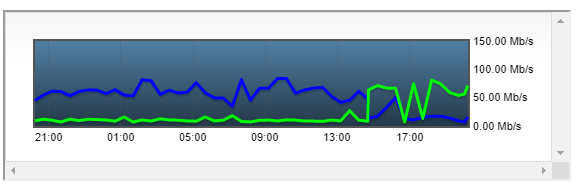
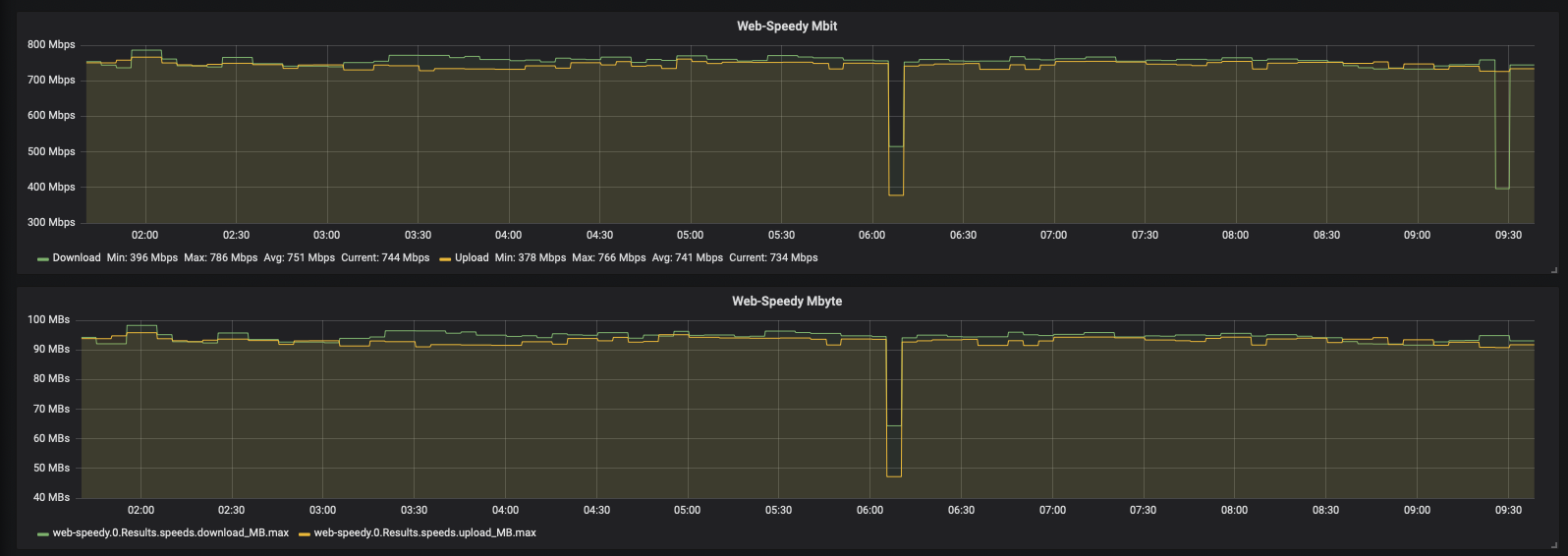
          bin mal gespannt auf eure berichte, so sieht meine 750 Mb Leitung aus die letzte nacht (fiber to home)
          Schermafbeelding 2020-02-17 om 09.38.42.png

          C 1 Reply Last reply
          0
          • DutchmanD Dutchman

            bin mal gespannt auf eure berichte, so sieht meine 750 Mb Leitung aus die letzte nacht (fiber to home)

            Schermafbeelding 2020-02-17 om 09.38.42.png

            C Offline
            C Offline
            CruziX
            wrote on last edited by CruziX
            #105

            @Dutchman Ein Träumchen :sweat_smile:
            Werde es mir jetzt, wo wohl die Kinderkrankheiten beseitigt sind, mal morgen in Grafana einrichten. :+1:

            Wie kommt es bei dir eig. zu diesen Einbrüchen?
            "Einbrüche", deine Einbrüche sind doppelt so schnell wie meine gesamte Leitung :sweat_smile:

            DutchmanD 1 Reply Last reply
            0
            • C CruziX

              @Dutchman Ein Träumchen :sweat_smile:
              Werde es mir jetzt, wo wohl die Kinderkrankheiten beseitigt sind, mal morgen in Grafana einrichten. :+1:

              Wie kommt es bei dir eig. zu diesen Einbrüchen?
              "Einbrüche", deine Einbrüche sind doppelt so schnell wie meine gesamte Leitung :sweat_smile:

              DutchmanD Offline
              DutchmanD Offline
              Dutchman
              Developer Most Active Administrators
              wrote on last edited by Dutchman
              #106

              @CruziX sagte in [web-speedy] Teste deine Internetverbindung :):

              Wie kommt es bei dir eig. zu diesen Einbrüchen?

              naja ... ja wie soll ich sagen.... leute es ist ne moment aufnahme :grin:

              es kan an so vielen Sachen liegen, z.b. der server der einkackt, die Verbindung die Latenz probleme hat und und und....

              Was man aber deutlich sieht, ist der unterschied einer Kabel / Adel Verbindung mit Glasfaser.
              Die Ergebnisse bei fiber sind besser, zu erklaehren daran das die Verbindung stabiler ist und dadurch der durchschnitt eher stimmt.

              (wert im Resultat = durchschnitt)

              interessant ist aber diese Knaller um 6 Uhr, und ich weis warum :)

              Unser Fiber provider macht morgens zwischen 6 & 7 nen master sync zum I-net hub da kan man sehen das die client Verbindungen kurzzeitig weniger zur Verfügung haben :)

              1 Reply Last reply
              0
              • NegaleinN Offline
                NegaleinN Offline
                Negalein
                Global Moderator
                wrote on last edited by
                #107

                @Dutchman

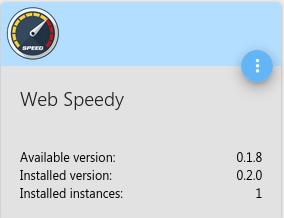
                Ich kann nicht auf 0.1.8 updaten.

                Im Admin zeigt er mir das Update auf 0.1.8 an.

                adapters - ioBroker.png

                Update schließt auf mit 0 ab.
                Aber im Admin zeigt er mir noch immer an, dass ein Update auf 0.1.8 da ist.

                $ ./iobroker upgrade web-speedy
                Update web-speedy from @0.1.7 to @0.1.8
                NPM version: 6.11.3
                npm install iobroker.web-speedy@0.1.8 --loglevel error --prefix "/opt/iobroker" (System call)
                npm
                 ERR! code E403
                npm ERR! 403 403 Forbidden - GET https://registry.npmjs.org/iobroker.web-speedynpm ERR! 403 In most cases, you or one of your dependencies are requestingnpm ERR! 403 a package version that is forbidden by your security policy.
                npm ERR! A complete log of this run can be found in:npm ERR!     /home/iobroker/.npm/_logs/2020-02-17T11_13_52_094Z-debug.log
                upload [3] web-speedy.admin /opt/iobroker/node_modules/iobroker.web-speedy/admin/words.js words.js application/javascript
                upload [2] web-speedy.admin /opt/iobroker/node_modules/iobroker.web-speedy/admin/web-speedy.png web-speedy.png image/png
                upload [1] web-speedy.admin /opt/iobroker/node_modules/iobroker.web-speedy/admin/button.png button.png image/png
                upload [0] web-speedy.admin /opt/iobroker/node_modules/iobroker.web-speedy/admin/admin.d.ts admin.d.ts video/mp2t
                Adapter "web-speedy" updated
                process exited with code 0
                

                ° Node.js & System Update ---> sudo apt update, iob stop, sudo apt full-upgrade
                ° Node.js Fixer ---> iob nodejs-update
                ° Fixer ---> iob fix

                1 Reply Last reply
                0
                • NegaleinN Offline
                  NegaleinN Offline
                  Negalein
                  Global Moderator
                  wrote on last edited by
                  #108

                  @Dutchman

                  jetzt hat das Update geklappt.

                  ° Node.js & System Update ---> sudo apt update, iob stop, sudo apt full-upgrade
                  ° Node.js Fixer ---> iob nodejs-update
                  ° Fixer ---> iob fix

                  DutchmanD 1 Reply Last reply
                  0
                  • NegaleinN Negalein

                    @Dutchman

                    jetzt hat das Update geklappt.

                    DutchmanD Offline
                    DutchmanD Offline
                    Dutchman
                    Developer Most Active Administrators
                    wrote on last edited by
                    #109

                    @Negalein sagte in [web-speedy] Teste deine Internetverbindung :):

                    @Dutchman

                    jetzt hat das Update geklappt.

                    hmm da hatte NPM wohl n hickup :/

                    1 Reply Last reply
                    0
                    • C Offline
                      C Offline
                      Coffeelover
                      wrote on last edited by
                      #110

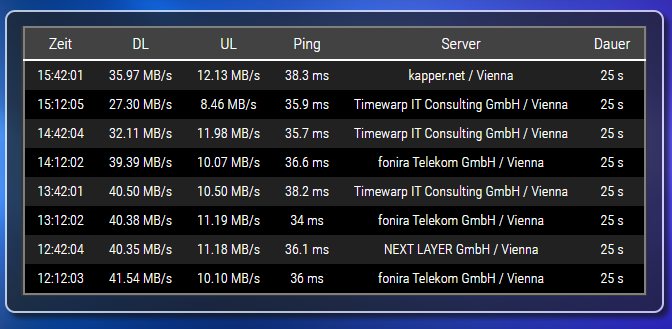
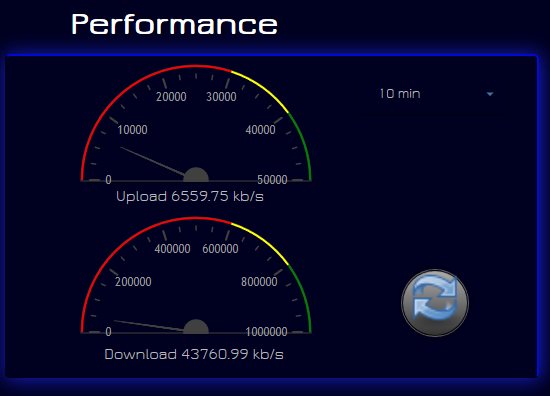
                      Vielen Dank für den coolen Adapter. Jetzt muss ich nur noch Vodafone dazu bringen, auch die bezahlte Leitung abzuliefern.
                      e0ff8353-0215-499f-b7e3-210fc4d8a05e-image.png

                      1 Reply Last reply
                      0
                      • Merlin123M Offline
                        Merlin123M Offline
                        Merlin123
                        wrote on last edited by
                        #111

                        Danke für den Adapter. Mal schauen wie gut er auf Dauer läuft... Muss bei mir mit nem 600/600er Anschluss klarkommen :D

                        Beta-Tester

                        1 Reply Last reply
                        0
                        • DutchmanD Offline
                          DutchmanD Offline
                          Dutchman
                          Developer Most Active Administrators
                          wrote on last edited by
                          #112

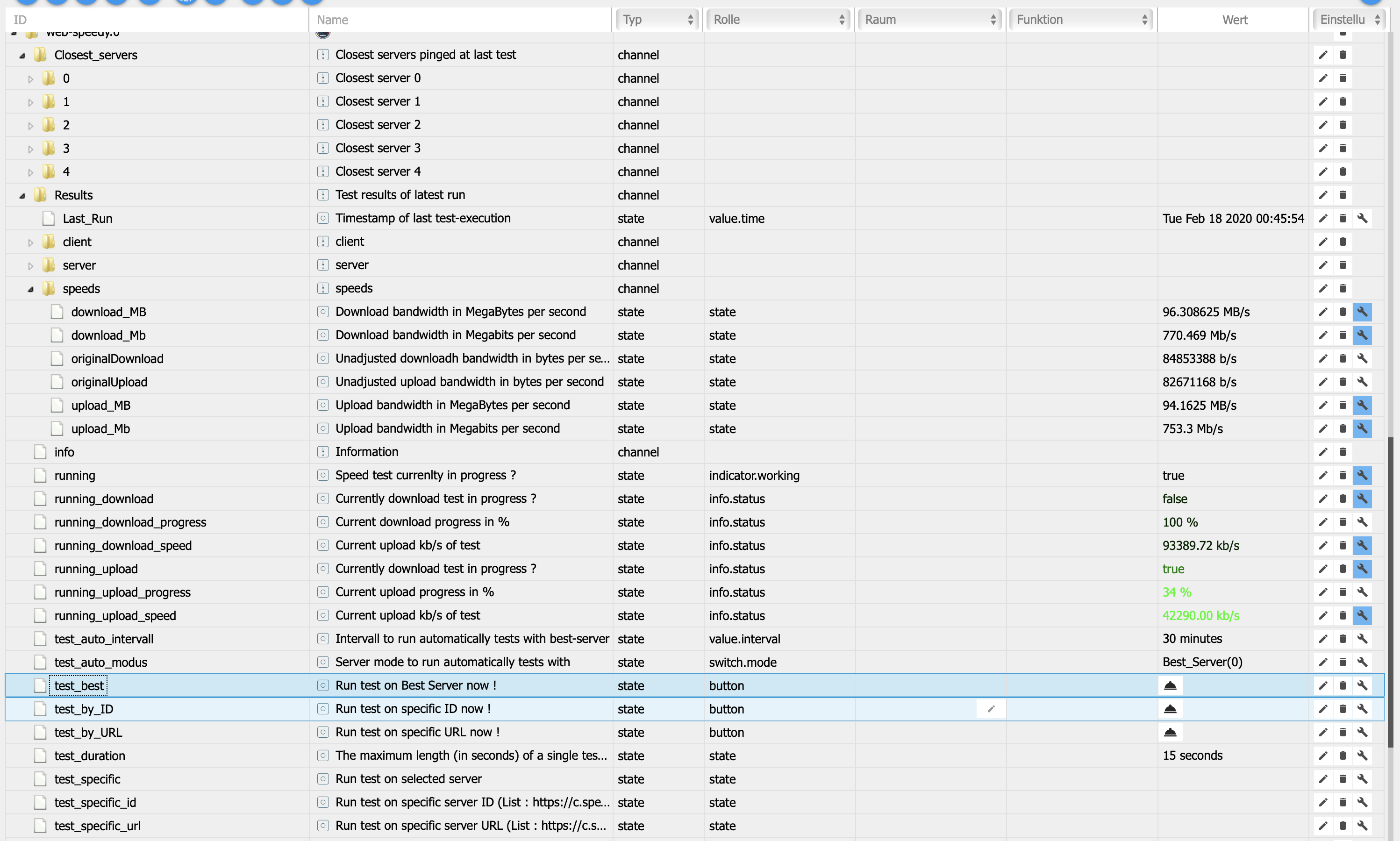
                          0.2.0 Initial release

                          • (DutchmanNL) Attention : Delete all objects beforer adapter start if previous version installed !
                          • (DutchmanNL) Implement [ test_auto_modus ] Server mode to run automatically tests with
                          • (DutchmanNL) Fix issues with running specific server tests
                          • (DutchmanNL) Upload speed calculation issue fixed

                          0.1.5 New settings possibilities & Code improvements

                          • (DutchmanNL) Implemented states for progress in %
                          • (DutchmanNL) No automated scan if test_auto_intervall set zo 0
                          • (DutchmanNL) Ensure propper running state reset at adapter start
                          • (DutchmanNL) Improve code performance and avoid multiple running instances
                          • (DutchmanNL) Implemented adjustable duration time for scan by (increase if you see strange test results, like to 20 secons)
                          • (DutchmanNL) Implemented state to run test ONCE by id or URL at specific server Please find a server id here
                          • (DutchmanNL) Implemented state to run test ALWAYS by id or URL at specific server Please find a server id here

                          web-speedy adapter for ioBroker

                          Web-Speedy enables you to test your internet connection on a regular base and store results in ioBroker !

                          How to use this adapter

                          At first startup it will retrieve best-servers nearby based on ping results and run the first test.

                          Web-Speedy is build in a way all execution is handled automatically, meaning you don't have a configuration page.
                          However, you still can influance some things (see datapoints):

                          State Description
                          test_auto_modus Server mode to run automatically tests with
                          test_auto_intervall Intervall time for automated test-execution (default = 30, if set to 0 no automated test will run !)
                          test_best Run test now on best-server based on last ping results
                          test_by_id Run test on specific server ID now !
                          test_by_url Run test on specific server URL now !
                          test_duration The maximum length (in seconds) of a single test run (upload or download)
                          test_specific Use the dropdown list to choose one of the top 5 servers found in previous scan
                          test_specific_id Enter specific server ID Please find a server ID here
                          test_specific_url Enter specific server URL Please find a server URL here

                          Mbyte
                          Mbit
                          States

                          NegaleinN 1 Reply Last reply
                          1
                          • DutchmanD Dutchman

                            0.2.0 Initial release

                            • (DutchmanNL) Attention : Delete all objects beforer adapter start if previous version installed !
                            • (DutchmanNL) Implement [ test_auto_modus ] Server mode to run automatically tests with
                            • (DutchmanNL) Fix issues with running specific server tests
                            • (DutchmanNL) Upload speed calculation issue fixed

                            0.1.5 New settings possibilities & Code improvements

                            • (DutchmanNL) Implemented states for progress in %
                            • (DutchmanNL) No automated scan if test_auto_intervall set zo 0
                            • (DutchmanNL) Ensure propper running state reset at adapter start
                            • (DutchmanNL) Improve code performance and avoid multiple running instances
                            • (DutchmanNL) Implemented adjustable duration time for scan by (increase if you see strange test results, like to 20 secons)
                            • (DutchmanNL) Implemented state to run test ONCE by id or URL at specific server Please find a server id here
                            • (DutchmanNL) Implemented state to run test ALWAYS by id or URL at specific server Please find a server id here

                            web-speedy adapter for ioBroker

                            Web-Speedy enables you to test your internet connection on a regular base and store results in ioBroker !

                            How to use this adapter

                            At first startup it will retrieve best-servers nearby based on ping results and run the first test.

                            Web-Speedy is build in a way all execution is handled automatically, meaning you don't have a configuration page.
                            However, you still can influance some things (see datapoints):

                            State Description
                            test_auto_modus Server mode to run automatically tests with
                            test_auto_intervall Intervall time for automated test-execution (default = 30, if set to 0 no automated test will run !)
                            test_best Run test now on best-server based on last ping results
                            test_by_id Run test on specific server ID now !
                            test_by_url Run test on specific server URL now !
                            test_duration The maximum length (in seconds) of a single test run (upload or download)
                            test_specific Use the dropdown list to choose one of the top 5 servers found in previous scan
                            test_specific_id Enter specific server ID Please find a server ID here
                            test_specific_url Enter specific server URL Please find a server URL here

                            Mbyte
                            Mbit
                            States

                            NegaleinN Offline
                            NegaleinN Offline
                            Negalein
                            Global Moderator
                            wrote on last edited by
                            #113

                            @Dutchman sagte in [web-speedy] Teste deine Internetverbindung :):

                            0.2.0 Initial release

                            scheint leider noch nicht als Update auf

                            ° Node.js & System Update ---> sudo apt update, iob stop, sudo apt full-upgrade
                            ° Node.js Fixer ---> iob nodejs-update
                            ° Fixer ---> iob fix

                            harrymH 1 Reply Last reply
                            0
                            • NegaleinN Negalein

                              @Dutchman sagte in [web-speedy] Teste deine Internetverbindung :):

                              0.2.0 Initial release

                              scheint leider noch nicht als Update auf

                              harrymH Offline
                              harrymH Offline
                              harrym
                              wrote on last edited by
                              #114

                              @Negalein Bildschirmfoto vom 2020-02-18 01-52-42.png

                              doch

                              ASRock FM2A88X-ITX+ mit 32GB RAM, 128GB SSD mit Proxmox, 3x1 TB SSD als RAID mit CT und VMs.

                              NegaleinN 1 Reply Last reply
                              0
                              • harrymH harrym

                                @Negalein Bildschirmfoto vom 2020-02-18 01-52-42.png

                                doch

                                NegaleinN Offline
                                NegaleinN Offline
                                Negalein
                                Global Moderator
                                wrote on last edited by
                                #115

                                @harrym sagte in [web-speedy] Teste deine Internetverbindung :):

                                doch

                                Ja, mittlerweile hab ich es auch schon installiert.

                                ° Node.js & System Update ---> sudo apt update, iob stop, sudo apt full-upgrade
                                ° Node.js Fixer ---> iob nodejs-update
                                ° Fixer ---> iob fix

                                1 Reply Last reply
                                0
                                • Dr. BakteriusD Online
                                  Dr. BakteriusD Online
                                  Dr. Bakterius
                                  Most Active
                                  wrote on last edited by
                                  #116

                                  @Dutchman :

                                  Mittlerweile kommen auch bei mir realistische Werte an. Danke für den Adapter!

                                  Ich habe einen bestimmten Testserver per ID vorgegeben und die Tests werden auch ausgeführt. Doch im LOG steht jedes Mal ein Fehler:

                                  2020-02-19 15:47:58.415 - info: web-speedy.0 (11256) Execute timer with : 3600000 Currently running : false
                                  2020-02-19 15:47:58.418 - info: web-speedy.0 (11256) Run test on configured server by id : 5351
                                  2020-02-19 15:47:58.426 - info: web-speedy.0 (11256) The speed test has been started and will take at maximum 30 seconds for a single test run
                                  2020-02-19 15:47:59.931 - error: web-speedy.0 (11256) TypeError: Cannot read property 'id' of undefined
                                  2020-02-19 15:47:59.932 - info: web-speedy.0 (11256) Closest server found, running test
                                  2020-02-19 15:48:48.856 - info: web-speedy.0 (11256) The speed test has been completed successfully.
                                  

                                  Was läuft hier falsch?

                                  Und ich nehme an, der Adapter misst per single connection? Zumindest deuten die reduzierten Downloadergebnisse (im Vergleich zu speedtest.net) darauf hin. Gibt es auch die Möglichkeit einen multi connection Test durchzuführen?

                                  DutchmanD 2 Replies Last reply
                                  0
                                  • NegaleinN Offline
                                    NegaleinN Offline
                                    Negalein
                                    Global Moderator
                                    wrote on last edited by
                                    #117

                                    @Dutchman

                                    läuft jetzt perfekt
                                    vis (23).png

                                    ° Node.js & System Update ---> sudo apt update, iob stop, sudo apt full-upgrade
                                    ° Node.js Fixer ---> iob nodejs-update
                                    ° Fixer ---> iob fix

                                    1 Reply Last reply
                                    1
                                    • KnallochseK Do not disturb
                                      KnallochseK Do not disturb
                                      Knallochse
                                      wrote on last edited by Knallochse
                                      #118

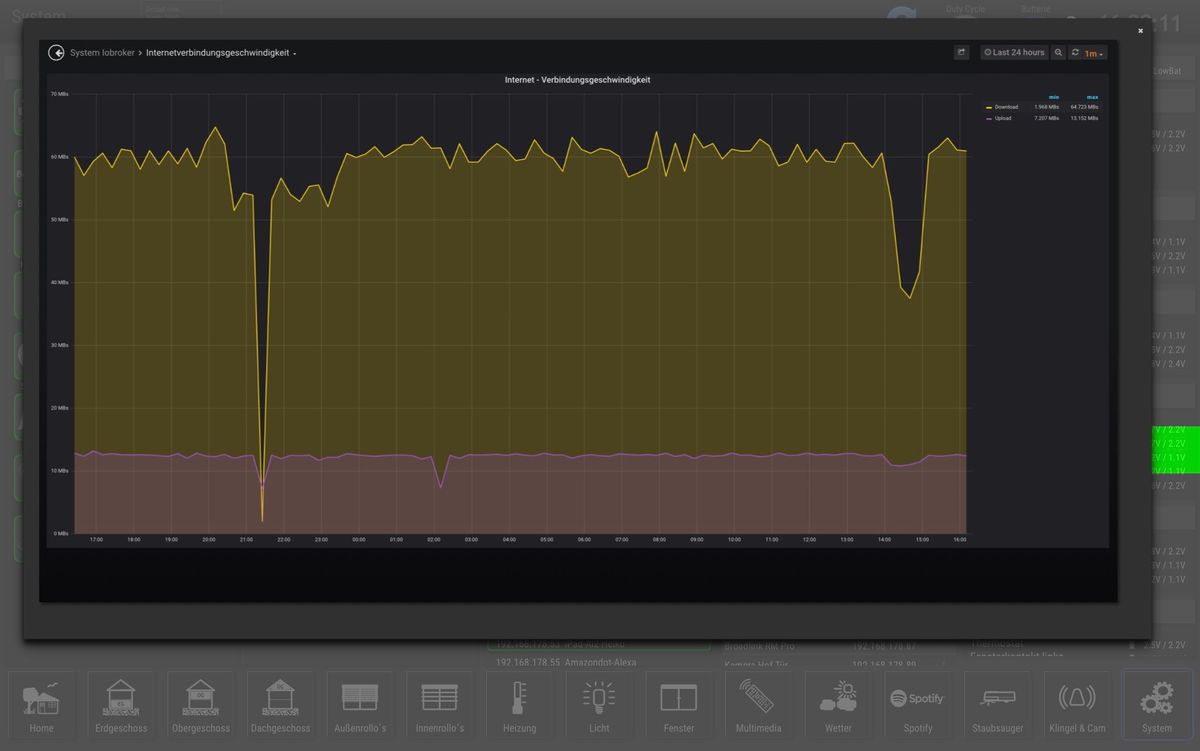
                                      @Dutchman läuft. Möchte mich vielmals bei dir bedanken 👍
                                      0BC42845-8C3F-441C-94FE-191D285BD8FE.jpeg

                                      HM&HMIP über 100 Geräte + IoBroker auf DS918+ uvm.

                                      1 Reply Last reply
                                      1
                                      • Dr. BakteriusD Online
                                        Dr. BakteriusD Online
                                        Dr. Bakterius
                                        Most Active
                                        wrote on last edited by
                                        #119

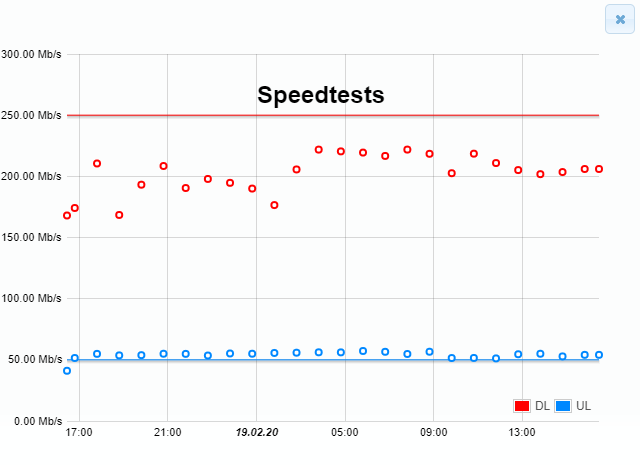
                                        Meine Ergebnisse:
                                        speedtests.png

                                        Also die Downloadraten liegen immer deutlich unter dem Nominalwert (rote Linie). Der Upload sieht hingegen sehr gut aus...

                                        DutchmanD 1 Reply Last reply
                                        0
                                        • S Do not disturb
                                          S Do not disturb
                                          stenmic
                                          wrote on last edited by
                                          #120

                                          Danke für den Adapter.
                                          Down- und Upload sind bei mir realistisch,
                                          jedoch liegt der Ping mit 60ms konstant zu hoch.
                                          Wenn ich über die Konsole einen Ping an Google sende lande ich immer bei 28-29ms

                                          1 Reply Last reply
                                          0
                                          Reply
                                          • Reply as topic
                                          Log in to reply
                                          • Oldest to Newest
                                          • Newest to Oldest
                                          • Most Votes


                                          Support us

                                          ioBroker
                                          Community Adapters
                                          Donate

                                          716

                                          Online

                                          32.6k

                                          Users

                                          82.3k

                                          Topics

                                          1.3m

                                          Posts
                                          Community
                                          Impressum | Datenschutz-Bestimmungen | Nutzungsbedingungen | Einwilligungseinstellungen
                                          ioBroker Community 2014-2025
                                          logo
                                          • Login

                                          • Don't have an account? Register

                                          • Login or register to search.
                                          • First post
                                            Last post
                                          0
                                          • Home
                                          • Recent
                                          • Tags
                                          • Unread 0
                                          • Categories
                                          • Unreplied
                                          • Popular
                                          • GitHub
                                          • Docu
                                          • Hilfe